
VEED
Browser-based VEED covers captions, avatars, dubbing, and cleanup, but rough edges and limits stay.
Our Take
- You want a browser-based MP4 workflow for removing backgrounds from talking-head or multi-person clips.
- You need a browser-based timeline editor with auto captions and line-by-line cleanup.
- You want to generate vertical AI-avatar videos from prepared scripts and can track credit use.
- You need pixel-perfect masking around hair, glasses, fur hoods, backpacks, scarves, or earphone cables.
Feature scores on this page: 8.3/10 (6 scored features)
Our take
VEED.io handles the core browser workflow across the tested use cases: it removed backgrounds from MP4 clips while keeping subjects recognizable, generated editable subtitles cleanly on talking-head videos, turned scripts into usable vertical AI-avatar ads, and dubbed spoken dialogue into another language with solid exports. The recurring tradeoffs are clear: background cutouts still show halos and rough edges, Clean Audio is a quick steady-noise pass rather than full restoration, and dubbing still leaves issues like inconsistent lip sync, untranslated on-screen text, and messy subtitle layers. Plan limits also matter — free exports are capped at 720p with watermarking, captioning can hit transcription-minute quotas, AI-avatar generation is credit-based, and some features such as Clean Audio and dubbing sit behind paid tiers.
In-Depth Review
Our detailed analysis of VEED — features, performance, and real-world testing.
Feature-by-Feature Breakdown
Automatic Subtitle Generation and EditingUseful, but it needs a manual QA pass on every run.9.5/10▾
Feature tested: Automatic Subtitle Generation and Editing
Result: Passed (9.5/10)
Verdict: Useful, but it needs a manual QA pass on every run.
Expected behavior: VEED generates synchronized captions from spoken audio and lets users edit transcript lines, adjust timing, split/add subtitle blocks, and style or animate captions. The exercised inputs were clean talking-head clips and post-render subtitle cleanup workflows.
Test case: Video file → Video file
Input type: Video file
Input used: Input artifact (Video file): INPUT — Input 1 Fitness Video (online-video-cutter.com).mp4
Observed output: Output artifact (Video file): The fitness clip’s burned-in captions overlapped: the original English caption stayed on screen while the new Hindi caption appeared, and the two drifted out of sync. — Veed.io output 1.mp4
Input artifact: Input artifact (Video file): INPUT — Input 1 Fitness Video (online-video-cutter.com).mp4
Output artifact: Output artifact (Video file): The fitness clip’s burned-in captions overlapped: the original English caption stayed on screen while the new Hindi caption appeared, and the two drifted out of sync. — Veed.io output 1.mp4
What changed: Video file transformed into Video file
Test case: Video file → Video file
Input type: Video file
Input used: Input artifact (Video file): INPUT — Input 2 Educational.mp4
Observed output: Output artifact (Video file): The educational clip’s subtitle layer was not clean: the Spanish caption line truncated mid-word and the karaoke-style word highlight was misaligned. — Veed.io output 2.mp4
Input artifact: Input artifact (Video file): INPUT — Input 2 Educational.mp4
Output artifact: Output artifact (Video file): The educational clip’s subtitle layer was not clean: the Spanish caption line truncated mid-word and the karaoke-style word highlight was misaligned. — Veed.io output 2.mp4
What changed: Video file transformed into Video file
Test case: Video file → Video file
Input type: Video file
Input used: Input artifact (Video file): INPUT — Free Copyright Stock Videos Images And Music.publer.com (online-video-cutter.com).mp4
Observed output: Output artifact (Video file): The Hindi→English output leaked Romanized Hindi into the caption layer, including a caption that looked phonetically generated instead of cleanly translated. — Veed.io output 3.mp4
Input artifact: Input artifact (Video file): INPUT — Free Copyright Stock Videos Images And Music.publer.com (online-video-cutter.com).mp4
Output artifact: Output artifact (Video file): The Hindi→English output leaked Romanized Hindi into the caption layer, including a caption that looked phonetically generated instead of cleanly translated. — Veed.io output 3.mp4
What changed: Video file transformed into Video file
Test case: Video file → Image
Input type: Video file
Input used: Input artifact (Video file): Input 1 — Ai Demos now supports markdown pages - SEQ.mp4
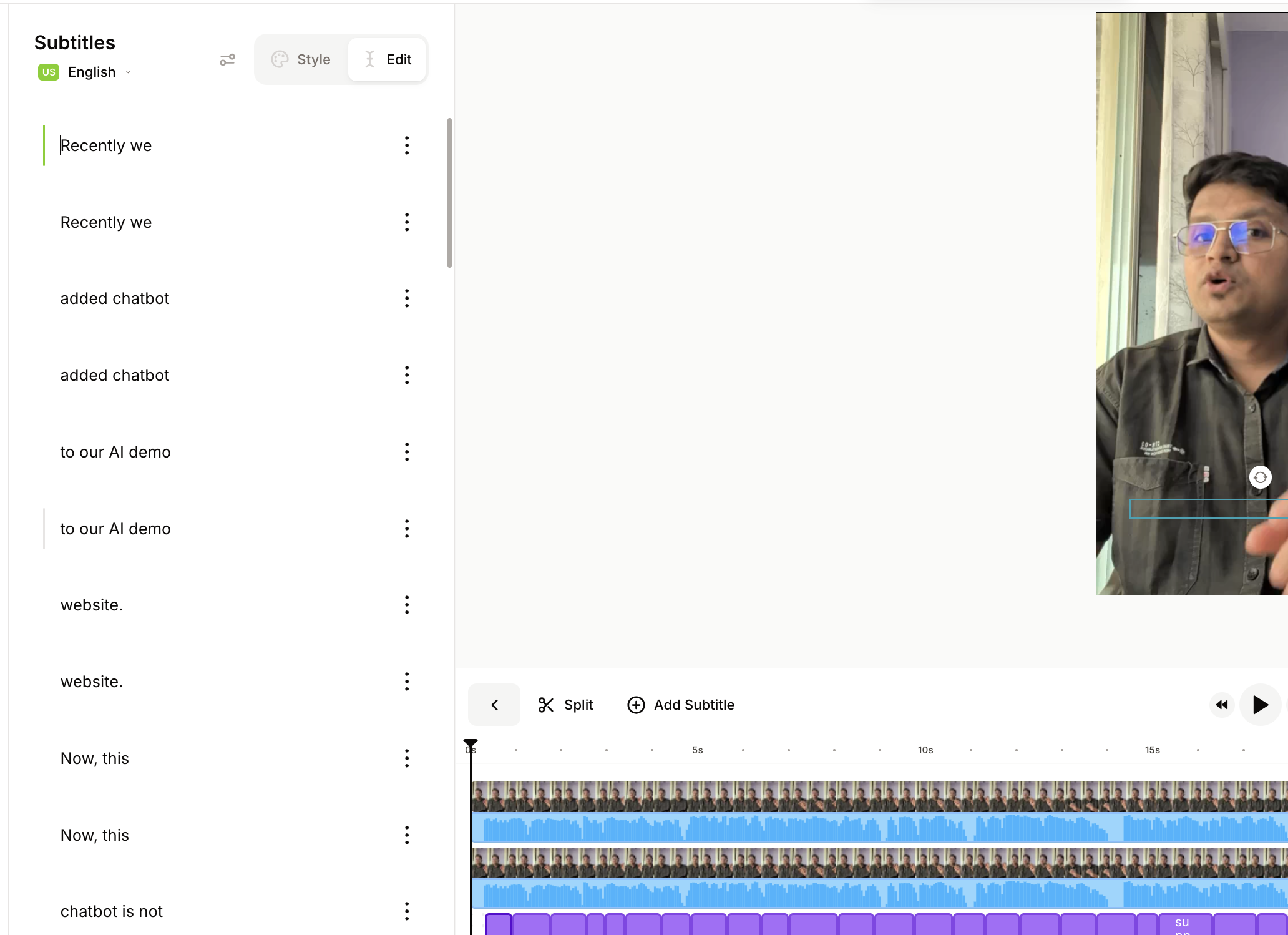
Observed output: Output artifact (Image): The subtitles editor shows individual caption entries that can be edited line by line, with Style/Edit tabs and Split/Add Subtitle controls visible for cleanup and styling. — editable_captions.png
Input artifact: Input artifact (Video file): Input 1 — Ai Demos now supports markdown pages - SEQ.mp4
Output artifact: Output artifact (Image): The subtitles editor shows individual caption entries that can be edited line by line, with Style/Edit tabs and Split/Add Subtitle controls visible for cleanup and styling. — editable_captions.png
What changed: Video file transformed into Image
Test case: Video file → Video file
Input type: Video file
Input used: Input artifact (Video file): Initial FutureSmart AI render used as the source for subtitle editing after generation. — Veed.io-futuresmart-ai-output.mp4.mp4
Observed output: Output artifact (Video file): Captions were added after the initial render using the subtitle tools, producing a separate captioned export. — veed-futuresmart-captioned-output.mp4.mp4
Input artifact: Input artifact (Video file): Initial FutureSmart AI render used as the source for subtitle editing after generation. — Veed.io-futuresmart-ai-output.mp4.mp4
Output artifact: Output artifact (Video file): Captions were added after the initial render using the subtitle tools, producing a separate captioned export. — veed-futuresmart-captioned-output.mp4.mp4
What changed: Video file transformed into Video file
Test case: Text prompt → Image
Input type: Text prompt
Input used: Input artifact (Text prompt): INPUT
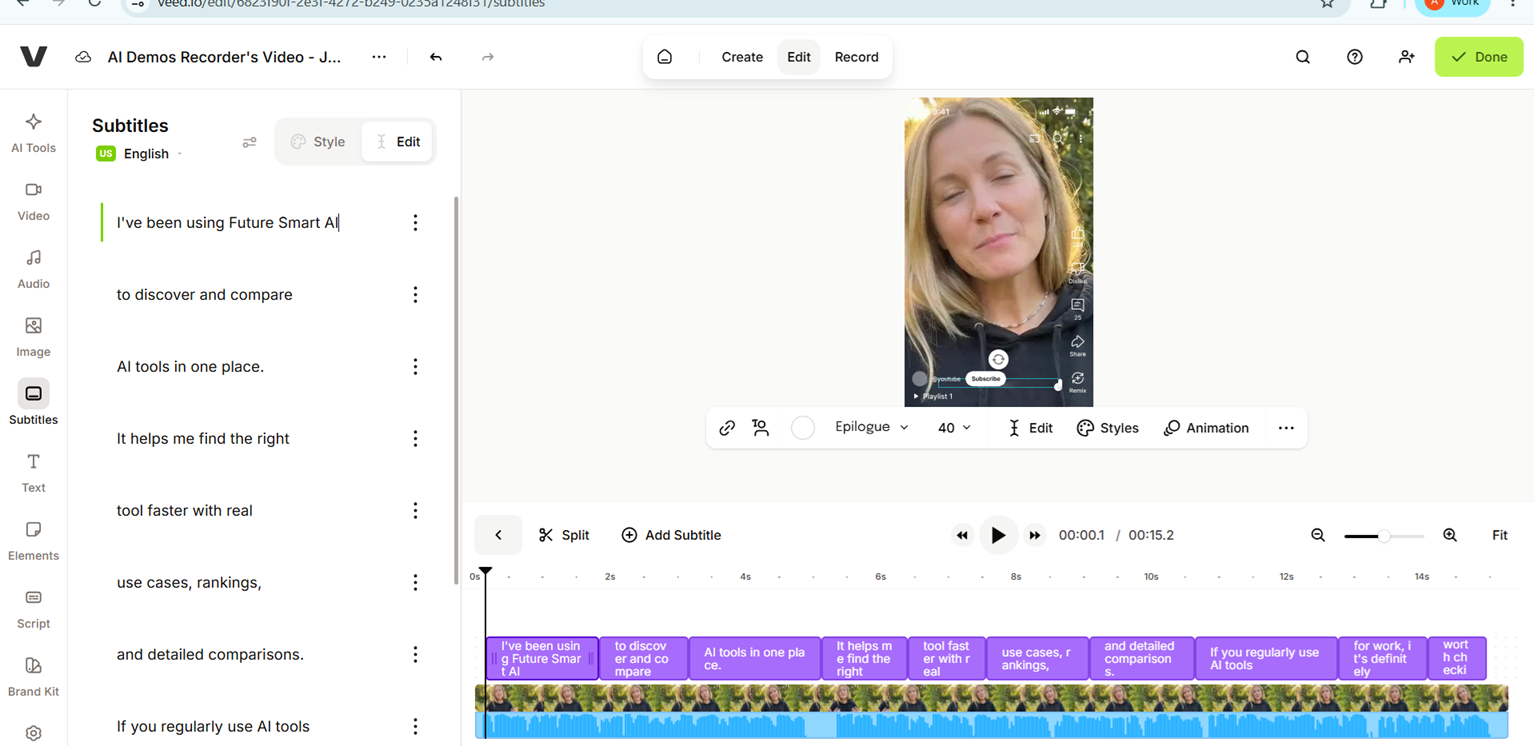
Observed output: Output artifact (Image): The subtitle editor showed transcript rows and editing controls, confirming that caption cleanup happens as a manual post-generation step. — veed-caption-editor.png
Input artifact: Input artifact (Text prompt): INPUT
Output artifact: Output artifact (Image): The subtitle editor showed transcript rows and editing controls, confirming that caption cleanup happens as a manual post-generation step. — veed-caption-editor.png
What changed: Text prompt transformed into Image
Test case: Text prompt → Image
Input type: Text prompt
Input used: Input artifact (Text prompt): INPUT
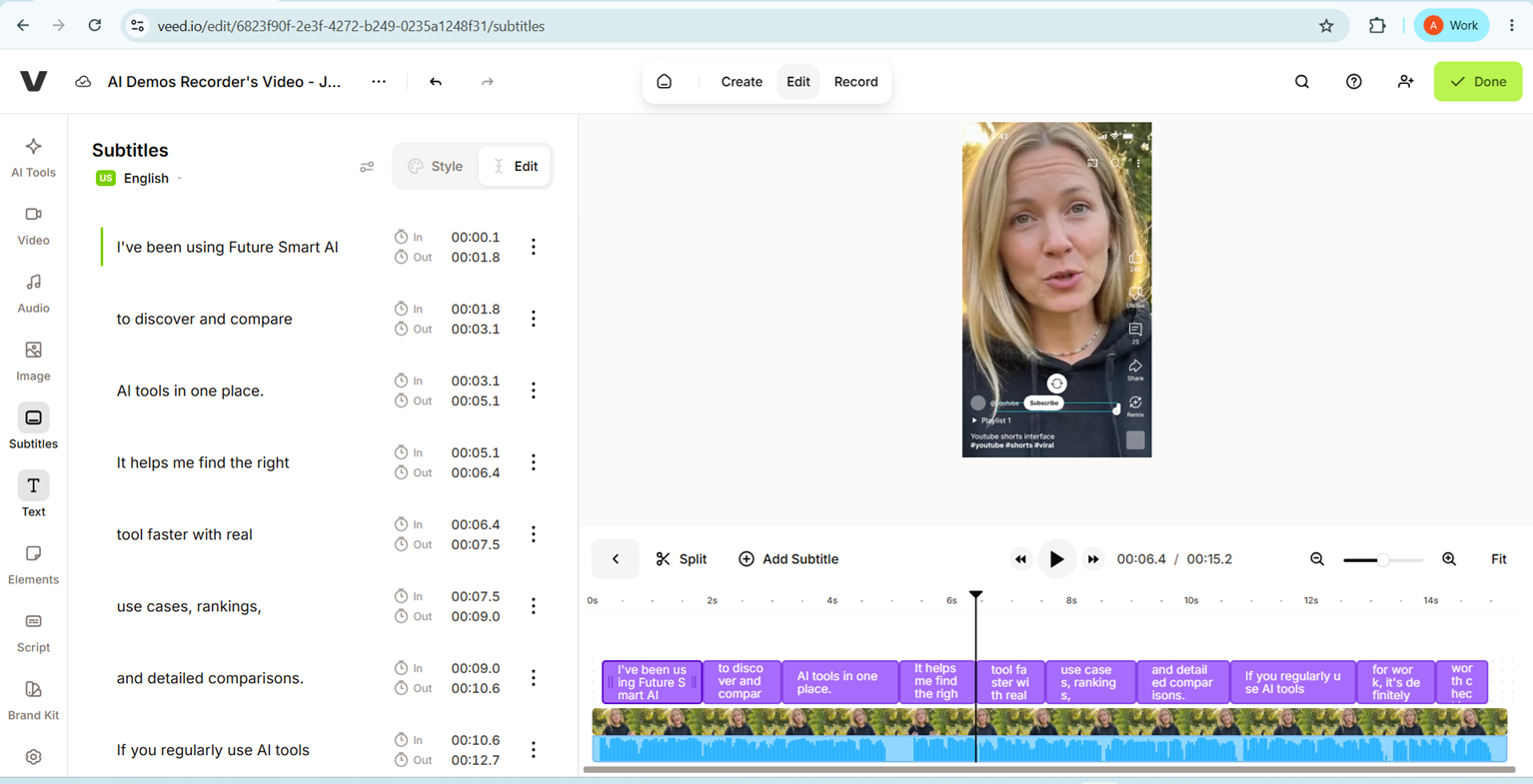
Observed output: Output artifact (Image): The timeline view showed caption blocks aligned to the waveform, with in/out timing visible for manual subtitle refinement. — veed-caption-timeline.png
Input artifact: Input artifact (Text prompt): INPUT
Output artifact: Output artifact (Image): The timeline view showed caption blocks aligned to the waveform, with in/out timing visible for manual subtitle refinement. — veed-caption-timeline.png
What changed: Text prompt transformed into Image
Test case: Text prompt → Image
Input type: Text prompt
Input used: Input artifact (Text prompt): INPUT
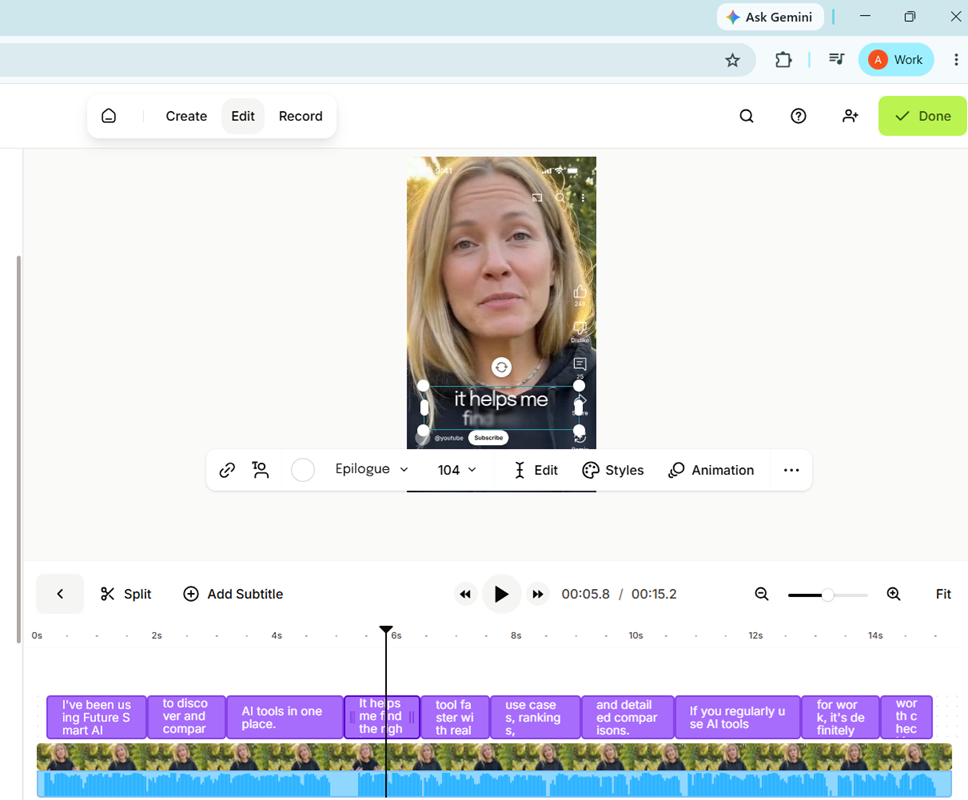
Observed output: Output artifact (Image): The active subtitle was rendered over the lower part of the vertical talking-head video, showing the caption preview state before export. — veed-futuresmart-caption-preview.png
Input artifact: Input artifact (Text prompt): INPUT
Output artifact: Output artifact (Image): The active subtitle was rendered over the lower part of the vertical talking-head video, showing the caption preview state before export. — veed-futuresmart-caption-preview.png
What changed: Text prompt transformed into Image
Test case: Video file → Text prompt
Input type: Video file
Input used: Input artifact (Video file): Input 1 — Ai Demos now supports markdown pages - SEQ.mp4
Observed output: Output artifact (Text prompt): ASR result
Input artifact: Input artifact (Video file): Input 1 — Ai Demos now supports markdown pages - SEQ.mp4
Output artifact: Output artifact (Text prompt): ASR result
What changed: Video file transformed into Text prompt
Test case: Video file → Text prompt
Input type: Video file
Input used: Input artifact (Video file): Input 2 — Client Pay us for - SEQ.mp4
Observed output: Output artifact (Text prompt): ASR result
Input artifact: Input artifact (Video file): Input 2 — Client Pay us for - SEQ.mp4
Output artifact: Output artifact (Text prompt): ASR result
What changed: Video file transformed into Text prompt
Test case: Video file → Image
Input type: Video file
Input used: Input artifact (Video file): Input 3 — Workflow vs AI Agent - SEQ Copy 01.mp4
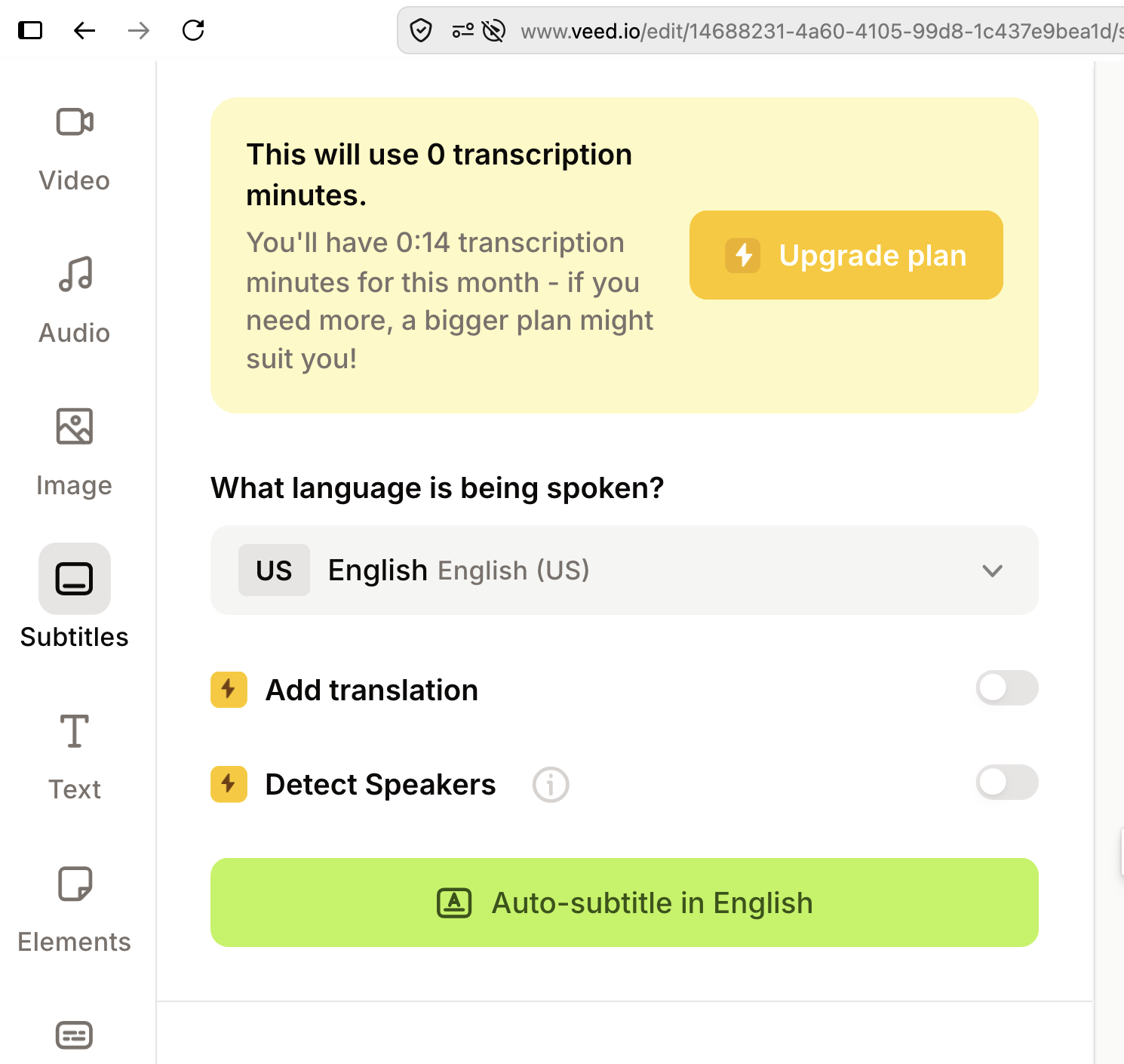
Observed output: Output artifact (Image): VEED warned that the subtitle operation would use 0 transcription minutes while only 0:14 remained for the month, then presented an Upgrade plan prompt and blocked auto-subtitle generation. — Veed_input3_paywall_after_quota.png
Input artifact: Input artifact (Video file): Input 3 — Workflow vs AI Agent - SEQ Copy 01.mp4
Output artifact: Output artifact (Image): VEED warned that the subtitle operation would use 0 transcription minutes while only 0:14 remained for the month, then presented an Upgrade plan prompt and blocked auto-subtitle generation. — Veed_input3_paywall_after_quota.png
What changed: Video file transformed into Image
Test case: Video file → Video file
Input type: Video file
Input used: Input artifact (Video file): Input — Input 1 - Talking Head with Dead Air.mp4
Observed output: Output artifact (Video file): Auto-generated subtitles tracked the narration accurately on the talking-head clip. — VEED Output 1 - Talking Head with Dead Air.mp4
Input artifact: Input artifact (Video file): Input — Input 1 - Talking Head with Dead Air.mp4
Output artifact: Output artifact (Video file): Auto-generated subtitles tracked the narration accurately on the talking-head clip. — VEED Output 1 - Talking Head with Dead Air.mp4
What changed: Video file transformed into Video file
Test case: Video file → Video file
Input type: Video file
Input used: Input artifact (Video file): Input — Input 2 - Low-Quality Audio & Lighting.mp4
Observed output: Output artifact (Video file): The subtitle editor showed that capitalization, punctuation, or timing still needed a final review before publishing. — VEED Output 2 - Low-Quality Audio & Lighting.mp4
Input artifact: Input artifact (Video file): Input — Input 2 - Low-Quality Audio & Lighting.mp4
Output artifact: Output artifact (Video file): The subtitle editor showed that capitalization, punctuation, or timing still needed a final review before publishing. — VEED Output 2 - Low-Quality Audio & Lighting.mp4
What changed: Video file transformed into Video file
Why it matters / Conclusion: The subtitles are usable only after review and cleanup; they are not set-and-forget.
VEED generates synchronized captions from spoken audio and lets users edit transcript lines, adjust timing, split/add subtitle blocks, and style or animate captions. The exercised inputs were clean talking-head clips and post-render subtitle cleanup workflows.
Video Export and DownloadReliable9/10▾
Feature tested: Video Export and Download
Result: Passed (9/10)
Verdict: Reliable
Expected behavior: VEED exported the completed projects as downloadable MP4 videos after the AI passes and manual refinements. Export was straightforward once the project had been cleaned up.
Test case: Video file → Video file
Input type: Video file
Input used: Input artifact (Video file): Input — Input 1 - Talking Head with Dead Air.mp4
Observed output: Output artifact (Video file): The edited talking-head project exported successfully after manual cleanup. — VEED Output 1 - Talking Head with Dead Air.mp4
Input artifact: Input artifact (Video file): Input — Input 1 - Talking Head with Dead Air.mp4
Output artifact: Output artifact (Video file): The edited talking-head project exported successfully after manual cleanup. — VEED Output 1 - Talking Head with Dead Air.mp4
What changed: Video file transformed into Video file
Test case: Video file → Video file
Input type: Video file
Input used: Input artifact (Video file): Input — Input 2 - Low-Quality Audio & Lighting.mp4
Observed output: Output artifact (Video file): The webcam project also exported successfully after the AI-assisted edit and review. — VEED Output 2 - Low-Quality Audio & Lighting.mp4
Input artifact: Input artifact (Video file): Input — Input 2 - Low-Quality Audio & Lighting.mp4
Output artifact: Output artifact (Video file): The webcam project also exported successfully after the AI-assisted edit and review. — VEED Output 2 - Low-Quality Audio & Lighting.mp4
What changed: Video file transformed into Video file
Test case: Video file → Video file
Input type: Video file
Input used: Input artifact (Video file): INPUT — Input 1 Fitness Video (online-video-cutter.com).mp4
Observed output: Output artifact (Video file): The fitness deliverable stayed at 1080×1920 with the original framing and duration preserved. — Veed.io output 1.mp4
Input artifact: Input artifact (Video file): INPUT — Input 1 Fitness Video (online-video-cutter.com).mp4
Output artifact: Output artifact (Video file): The fitness deliverable stayed at 1080×1920 with the original framing and duration preserved. — Veed.io output 1.mp4
What changed: Video file transformed into Video file
Test case: Video file → Video file
Input type: Video file
Input used: Input artifact (Video file): INPUT — Input 2 Educational.mp4
Observed output: Output artifact (Video file): The educational clip was upscaled cleanly from 360×640 to 1080×1920 without visible stretch or distortion. — Veed.io output 2.mp4
Input artifact: Input artifact (Video file): INPUT — Input 2 Educational.mp4
Output artifact: Output artifact (Video file): The educational clip was upscaled cleanly from 360×640 to 1080×1920 without visible stretch or distortion. — Veed.io output 2.mp4
What changed: Video file transformed into Video file
Test case: Video file → Video file
Input type: Video file
Input used: Input artifact (Video file): INPUT — Free Copyright Stock Videos Images And Music.publer.com (online-video-cutter.com).mp4
Observed output: Output artifact (Video file): The vlog output remained a clean vertical MP4 with intact framing and watchable playback. — Veed.io output 3.mp4
Input artifact: Input artifact (Video file): INPUT — Free Copyright Stock Videos Images And Music.publer.com (online-video-cutter.com).mp4
Output artifact: Output artifact (Video file): The vlog output remained a clean vertical MP4 with intact framing and watchable playback. — Veed.io output 3.mp4
What changed: Video file transformed into Video file
Test case: Text prompt → Video file
Input type: Text prompt
Input used: Input artifact (Text prompt): INPUT
Observed output: Output artifact (Video file): The exported FutureSmart AI ad is a vertical 9:16 video suitable for short-form social platforms. — Veed.io-futuresmart-ai-output.mp4.mp4
Input artifact: Input artifact (Text prompt): INPUT
Output artifact: Output artifact (Video file): The exported FutureSmart AI ad is a vertical 9:16 video suitable for short-form social platforms. — Veed.io-futuresmart-ai-output.mp4.mp4
What changed: Text prompt transformed into Video file
Test case: Text prompt → Video file
Input type: Text prompt
Input used: Input artifact (Text prompt): INPUT
Observed output: Output artifact (Video file): The exported Nike Pegasus 41 ad is a vertical 9:16 video intended for short-form social placement. — Veed.io-nike-pegasus41-output.mp4.mp4
Input artifact: Input artifact (Text prompt): INPUT
Output artifact: Output artifact (Video file): The exported Nike Pegasus 41 ad is a vertical 9:16 video intended for short-form social placement. — Veed.io-nike-pegasus41-output.mp4.mp4
What changed: Text prompt transformed into Video file
Test case: Text prompt → Video file
Input type: Text prompt
Input used: Input artifact (Text prompt): INPUT
Observed output: Output artifact (Video file): The exported Duolingo ad is a vertical 9:16 video that fits the tested short-form format. — Veed.io-duolingo-output.mp4.mp4
Input artifact: Input artifact (Text prompt): INPUT
Output artifact: Output artifact (Video file): The exported Duolingo ad is a vertical 9:16 video that fits the tested short-form format. — Veed.io-duolingo-output.mp4.mp4
What changed: Text prompt transformed into Video file
Test case: Video file → Image
Input type: Video file
Input used: Input artifact (Video file): Input 1 — Ai Demos now supports markdown pages - SEQ.mp4
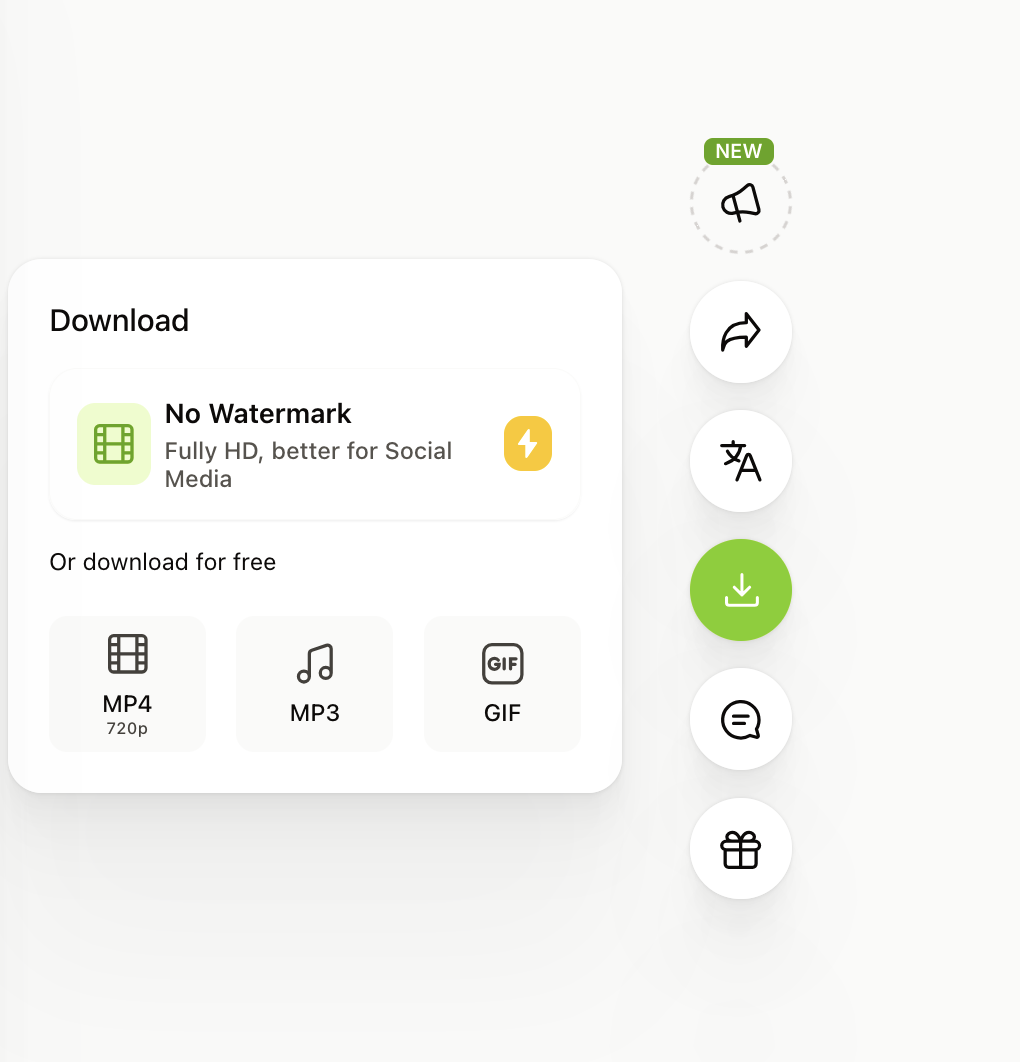
Observed output: Output artifact (Image): The download panel exposes a paid 'No Watermark' HD export and free download options for MP4 720p, MP3, and GIF. — export_quality_restriction.png
Input artifact: Input artifact (Video file): Input 1 — Ai Demos now supports markdown pages - SEQ.mp4
Output artifact: Output artifact (Image): The download panel exposes a paid 'No Watermark' HD export and free download options for MP4 720p, MP3, and GIF. — export_quality_restriction.png
What changed: Video file transformed into Image
Test case: Video file → Image
Input type: Video file
Input used: Input artifact (Video file): Input 1 — Ai Demos now supports markdown pages - SEQ.mp4
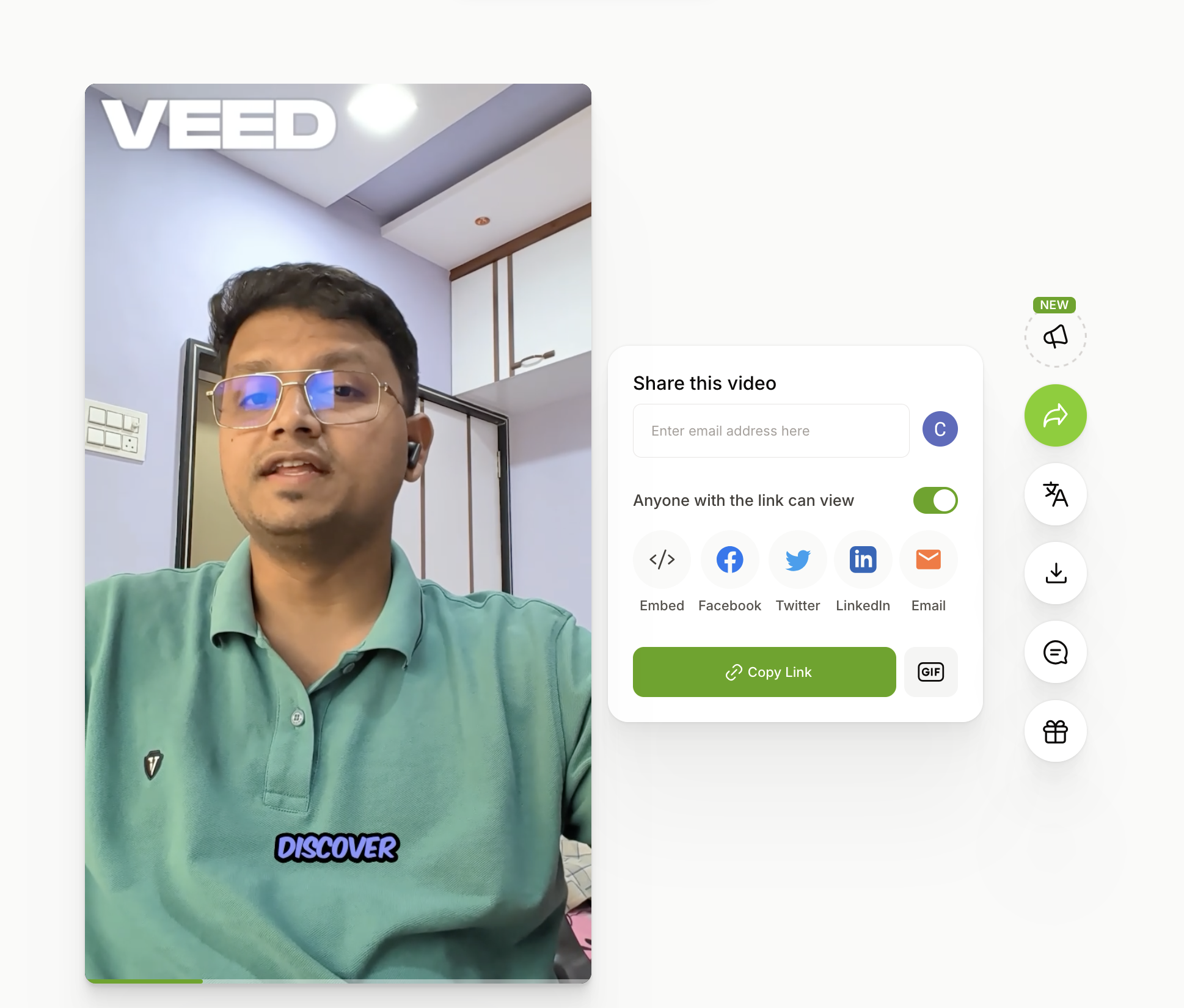
Observed output: Output artifact (Image): The exported share preview still shows a VEED watermark at the top-left and opens a link-sharing dialog with Copy Link controls. — veed_input1_watermark_720p_export.png
Input artifact: Input artifact (Video file): Input 1 — Ai Demos now supports markdown pages - SEQ.mp4
Output artifact: Output artifact (Image): The exported share preview still shows a VEED watermark at the top-left and opens a link-sharing dialog with Copy Link controls. — veed_input1_watermark_720p_export.png
What changed: Video file transformed into Image
Test case: Video file → Video file
Input type: Video file
Input used: Input artifact (Video file): Simple indoor background test clip. — Input 01 – Video.mp4
Observed output: Output artifact (Video file): The browser workflow completed an export for the simple indoor clip. — veed.io output 1.mp4
Input artifact: Input artifact (Video file): Simple indoor background test clip. — Input 01 – Video.mp4
Output artifact: Output artifact (Video file): The browser workflow completed an export for the simple indoor clip. — veed.io output 1.mp4
What changed: Video file transformed into Video file
Test case: Video file → Video file
Input type: Video file
Input used: Input artifact (Video file): Static talking-head test clip. — Input 02 – Video.mp4
Observed output: Output artifact (Video file): The browser workflow completed an export for the talking-head clip. — veed.io output 2.mp4
Input artifact: Input artifact (Video file): Static talking-head test clip. — Input 02 – Video.mp4
Output artifact: Output artifact (Video file): The browser workflow completed an export for the talking-head clip. — veed.io output 2.mp4
What changed: Video file transformed into Video file
Test case: Video file → Video file
Input type: Video file
Input used: Input artifact (Video file): Complex outdoor two-person test clip. — Input 03 – Video.mp4
Observed output: Output artifact (Video file): The browser workflow completed an export for the two-subject outdoor clip. — veed.io output 3.mp4
Input artifact: Input artifact (Video file): Complex outdoor two-person test clip. — Input 03 – Video.mp4
Output artifact: Output artifact (Video file): The browser workflow completed an export for the two-subject outdoor clip. — veed.io output 3.mp4
What changed: Video file transformed into Video file
Why it matters / Conclusion: Export was straightforward once the project had been cleaned up.
VEED exported the completed projects as downloadable MP4 videos after the AI passes and manual refinements. Export was straightforward once the project had been cleaned up.
Browser-Based Timeline Video EditingHands-on7.5/10▾
Feature tested: Browser-Based Timeline Video Editing
Result: Failed (7.5/10)
Verdict: Hands-on
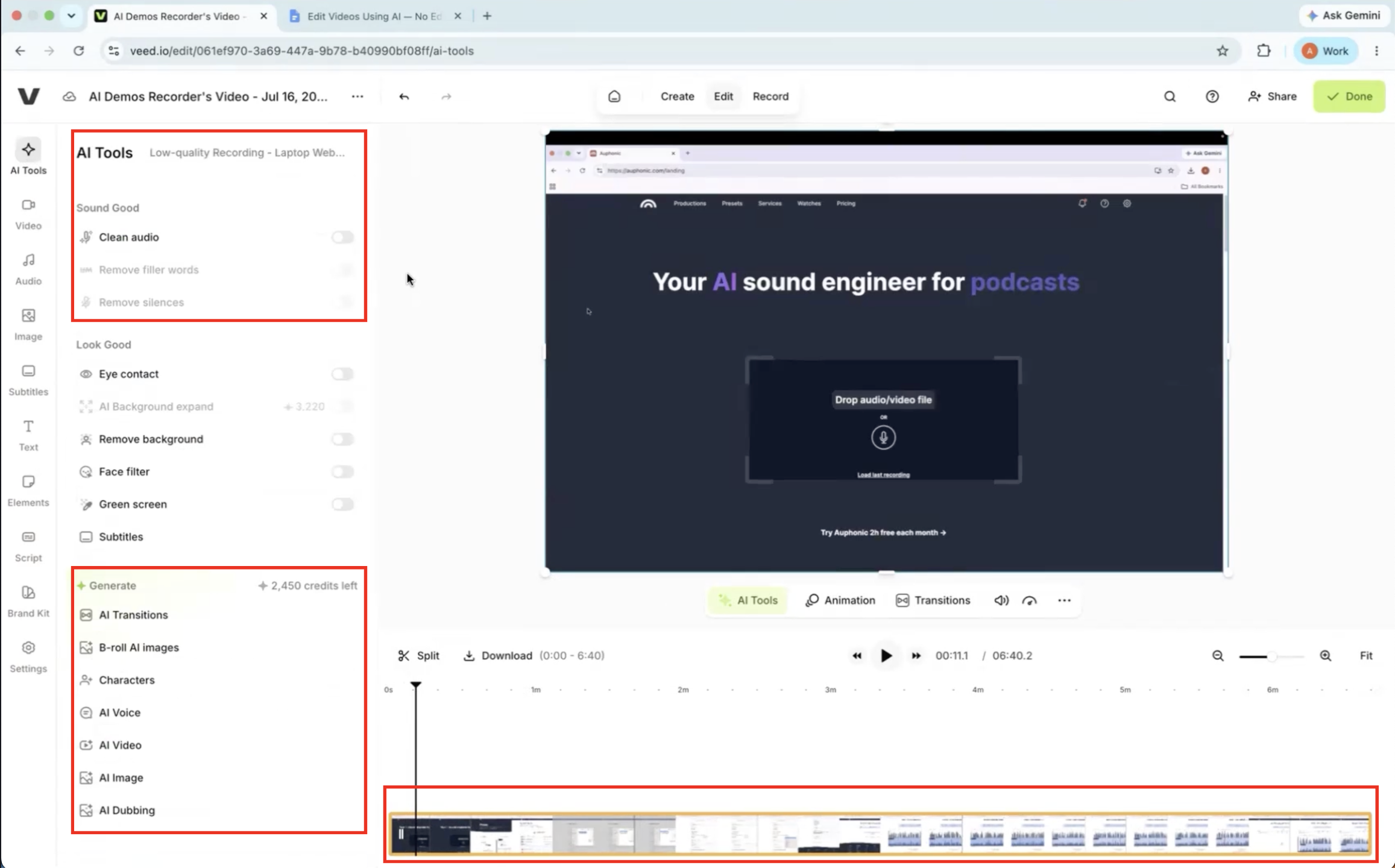
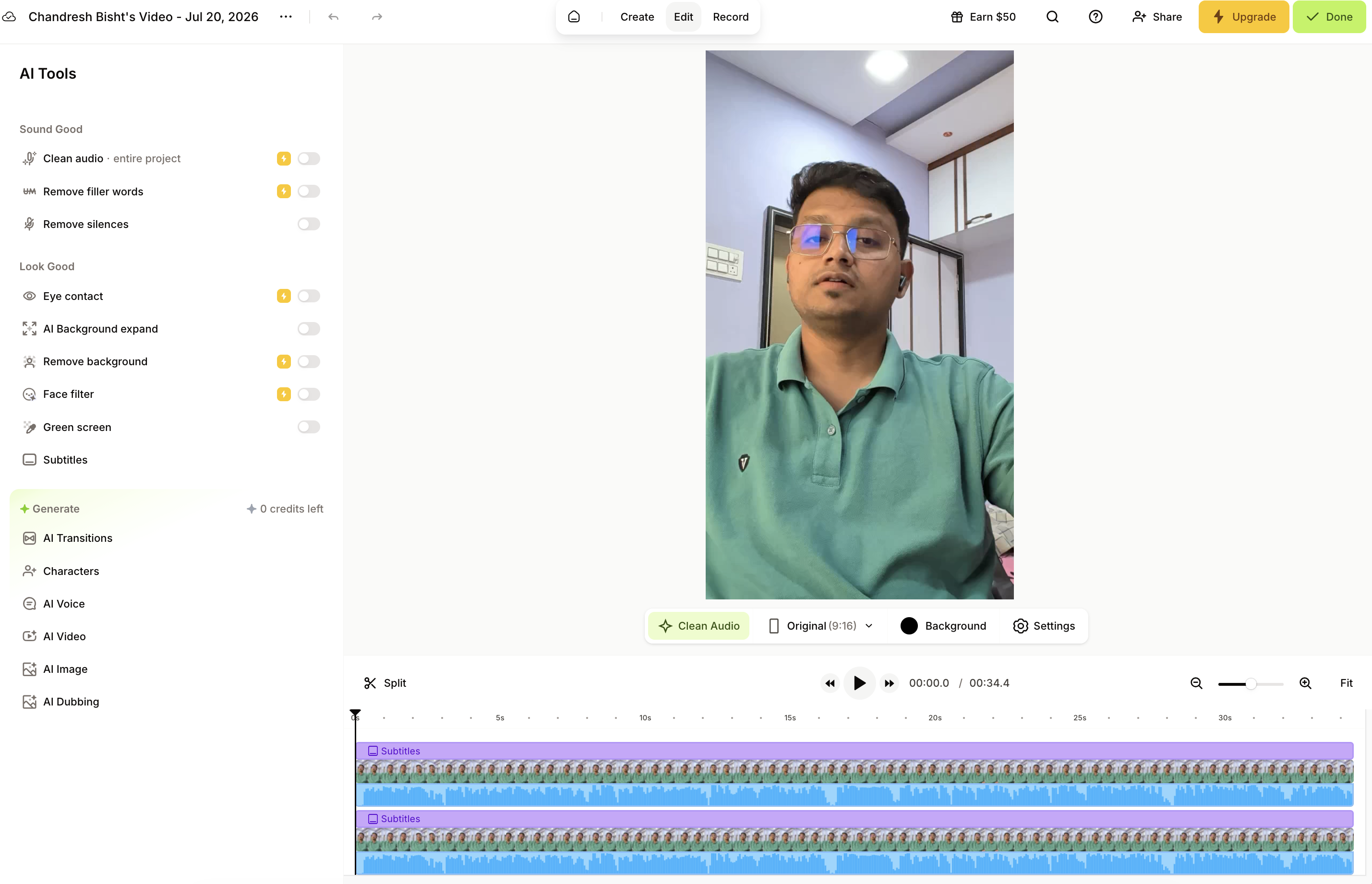
Expected behavior: VEED provides a cloud editor with preview, timeline tracks, an AI Tools sidebar, and manual crop/reposition controls for assembling a final cut. The tested MP4 and vertical-clip workflows used that same multi-step editor before export.
Test case: Video file → Image
Input type: Video file
Input used: Input artifact (Video file): Input — Input 1 - Talking Head with Dead Air.mp4
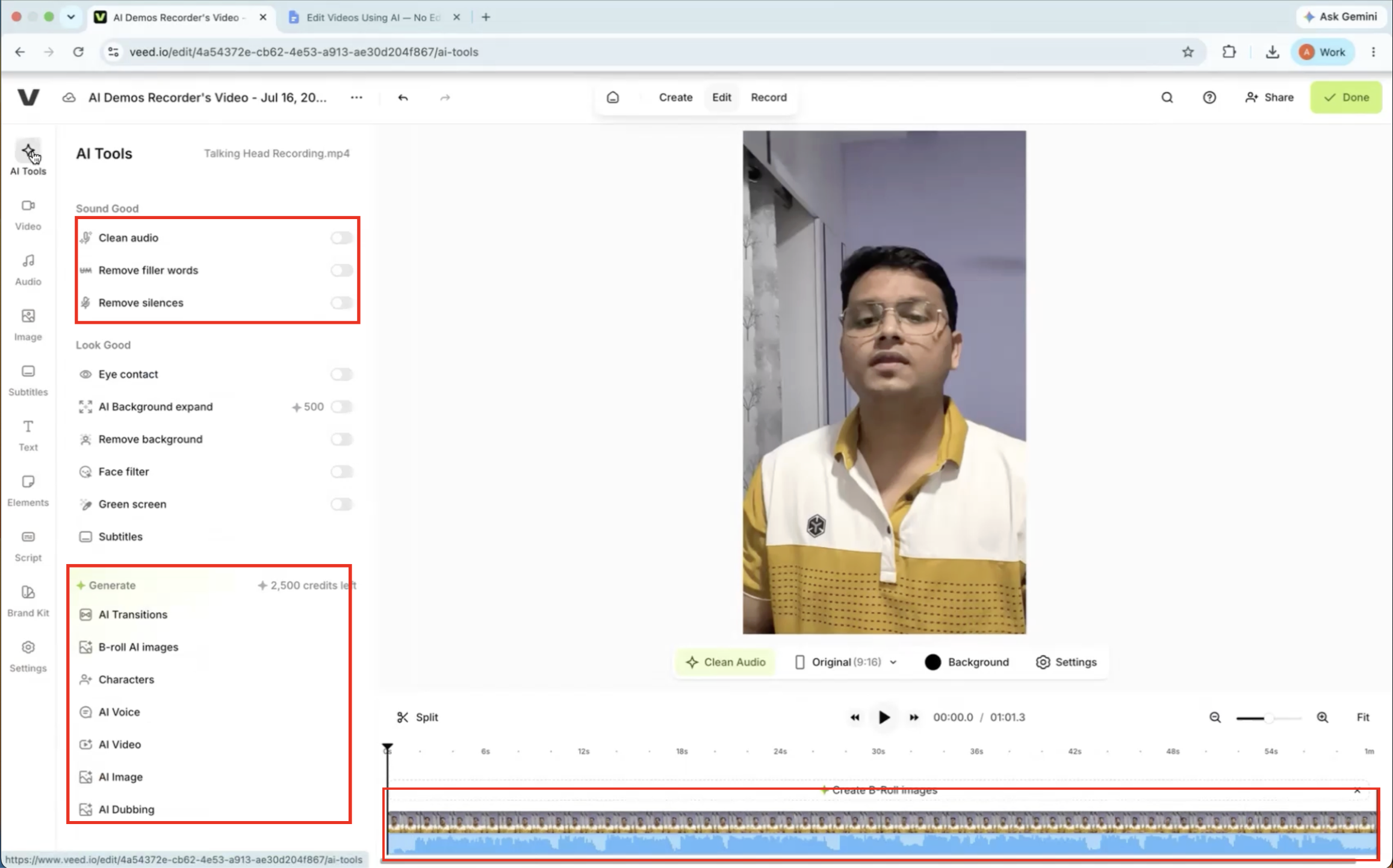
Observed output: Output artifact (Image): The AI tools panel showed separate manual actions for cleanup, generation, and timeline work rather than a single auto-edit. — VEED-input1-failure-1-no-fully-automated-editing-workflow.png
Input artifact: Input artifact (Video file): Input — Input 1 - Talking Head with Dead Air.mp4
Output artifact: Output artifact (Image): The AI tools panel showed separate manual actions for cleanup, generation, and timeline work rather than a single auto-edit. — VEED-input1-failure-1-no-fully-automated-editing-workflow.png
What changed: Video file transformed into Image
Test case: Video file → Image
Input type: Video file
Input used: Input artifact (Video file): Input — Input 2 - Low-Quality Audio & Lighting.mp4
Observed output: Output artifact (Image): The low-quality-audio test also required sequential manual steps instead of one-click automated editing. — VEED-input2-failure-1-manual-ai-workflow-required.png
Input artifact: Input artifact (Video file): Input — Input 2 - Low-Quality Audio & Lighting.mp4
Output artifact: Output artifact (Image): The low-quality-audio test also required sequential manual steps instead of one-click automated editing. — VEED-input2-failure-1-manual-ai-workflow-required.png
What changed: Video file transformed into Image
Test case: Video file → Image
Input type: Video file
Input used: Input artifact (Video file): Input 1 — Ai Demos now supports markdown pages - SEQ.mp4
Observed output: Output artifact (Image): VEED opened the vertical upload in a conventional timeline editor with AI Tools on the left, the preview center/right, and subtitle/audio tracks visible below; the clip remained in its original aspect ratio until the editor manually cropped and centered it. — editing_layout_after_upload.png
Input artifact: Input artifact (Video file): Input 1 — Ai Demos now supports markdown pages - SEQ.mp4
Output artifact: Output artifact (Image): VEED opened the vertical upload in a conventional timeline editor with AI Tools on the left, the preview center/right, and subtitle/audio tracks visible below; the clip remained in its original aspect ratio until the editor manually cropped and centered it. — editing_layout_after_upload.png
What changed: Video file transformed into Image
Test case: Text prompt → Text prompt
Input type: Text prompt
Input used: Input artifact (Text prompt): Input
Observed output: Output artifact (Text prompt): Output
Input artifact: Input artifact (Text prompt): Input
Output artifact: Output artifact (Text prompt): Output
What changed: Text prompt transformed into Text prompt
Test case: Text prompt → Text prompt
Input type: Text prompt
Input used: Input artifact (Text prompt): Input
Observed output: Output artifact (Text prompt): Output
Input artifact: Input artifact (Text prompt): Input
Output artifact: Output artifact (Text prompt): Output
What changed: Text prompt transformed into Text prompt
Test case: Text prompt → Text prompt
Input type: Text prompt
Input used: Input artifact (Text prompt): Input
Observed output: Output artifact (Text prompt): Output
Input artifact: Input artifact (Text prompt): Input
Output artifact: Output artifact (Text prompt): Output
What changed: Text prompt transformed into Text prompt
Test case: Text prompt → Text prompt
Input type: Text prompt
Input used: Input artifact (Text prompt): Input
Observed output: Output artifact (Text prompt): Output
Input artifact: Input artifact (Text prompt): Input
Output artifact: Output artifact (Text prompt): Output
What changed: Text prompt transformed into Text prompt
Test case: Text prompt → Image
Input type: Text prompt
Input used: Input artifact (Text prompt): Input
Observed output: Output artifact (Image): The VEED editor after upload shows the AI Tools sidebar, centered preview, and visible timeline/subtitle tracks; the source clip remains in the original vertical frame, so manual crop and reframing are still required. — editing_layout_after_upload.png
Input artifact: Input artifact (Text prompt): Input
Output artifact: Output artifact (Image): The VEED editor after upload shows the AI Tools sidebar, centered preview, and visible timeline/subtitle tracks; the source clip remains in the original vertical frame, so manual crop and reframing are still required. — editing_layout_after_upload.png
What changed: Text prompt transformed into Image
Test case: Text prompt → Image
Input type: Text prompt
Input used: Input artifact (Text prompt): Input
Observed output: Output artifact (Image): The subtitles panel lists individual subtitle lines as editable entries, showing that VEED generates a caption layer that can be edited line by line. — editable_captions.png
Input artifact: Input artifact (Text prompt): Input
Output artifact: Output artifact (Image): The subtitles panel lists individual subtitle lines as editable entries, showing that VEED generates a caption layer that can be edited line by line. — editable_captions.png
What changed: Text prompt transformed into Image
Test case: Text prompt → Image
Input type: Text prompt
Input used: Input artifact (Text prompt): Input
Observed output: Output artifact (Image): The download panel exposes a paid No Watermark HD option and free export options limited to MP4 720p, MP3, and GIF. — export_quality_restriction.png
Input artifact: Input artifact (Text prompt): Input
Output artifact: Output artifact (Image): The download panel exposes a paid No Watermark HD option and free export options limited to MP4 720p, MP3, and GIF. — export_quality_restriction.png
What changed: Text prompt transformed into Image
Test case: Text prompt → Image
Input type: Text prompt
Input used: Input artifact (Text prompt): Input
Observed output: Output artifact (Image): The exported preview shows a visible VEED watermark, and the share dialog on the right offers link sharing with a Copy Link button. — veed_input1_watermark_720p_export.png
Input artifact: Input artifact (Text prompt): Input
Output artifact: Output artifact (Image): The exported preview shows a visible VEED watermark, and the share dialog on the right offers link sharing with a Copy Link button. — veed_input1_watermark_720p_export.png
What changed: Text prompt transformed into Image
Test case: Text prompt → Image
Input type: Text prompt
Input used: Input artifact (Text prompt): Input
Observed output: Output artifact (Image): The subtitles screen reports that only 0:14 transcription minutes remain for the month and prompts an upgrade, blocking the caption-generation step. — Veed_input3_paywall_after_quota.png
Input artifact: Input artifact (Text prompt): Input
Output artifact: Output artifact (Image): The subtitles screen reports that only 0:14 transcription minutes remain for the month and prompts an upgrade, blocking the caption-generation step. — Veed_input3_paywall_after_quota.png
What changed: Text prompt transformed into Image
Why it matters / Conclusion: Flexible and familiar for editors, but it still expects the user to assemble the final cut.
VEED provides a cloud editor with preview, timeline tracks, an AI Tools sidebar, and manual crop/reposition controls for assembling a final cut. The tested MP4 and vertical-clip workflows used that same multi-step editor before export.
AI Avatar Video GenerationWorked▾
Feature tested: AI Avatar Video Generation
Result: Passed
Verdict: Worked
Expected behavior: VEED turns supplied scripts into vertical avatar-led videos with lip-synced voice delivery and branded ad-style presentation. The exercised inputs included prepared promotional scripts that rendered as polished social-ready avatar ads.
Test case: Text prompt → Video file
Input type: Text prompt
Input used: Input artifact (Text prompt): INPUT
Observed output: Output artifact (Video file): VEED.io generated a vertical AI-avatar ad from the FutureSmart AI script with clear voice, stable delivery, and close adherence to the supplied copy. — Veed.io-futuresmart-ai-output.mp4.mp4
Input artifact: Input artifact (Text prompt): INPUT
Output artifact: Output artifact (Video file): VEED.io generated a vertical AI-avatar ad from the FutureSmart AI script with clear voice, stable delivery, and close adherence to the supplied copy. — Veed.io-futuresmart-ai-output.mp4.mp4
What changed: Text prompt transformed into Video file
Test case: Text prompt → Video file
Input type: Text prompt
Input used: Input artifact (Text prompt): INPUT
Observed output: Output artifact (Video file): VEED.io generated a clean product-promotion video for Nike Pegasus 41 with stable voice output and good lip sync, though the result felt more studio-generated than raw UGC. — Veed.io-nike-pegasus41-output.mp4.mp4
Input artifact: Input artifact (Text prompt): INPUT
Output artifact: Output artifact (Video file): VEED.io generated a clean product-promotion video for Nike Pegasus 41 with stable voice output and good lip sync, though the result felt more studio-generated than raw UGC. — Veed.io-nike-pegasus41-output.mp4.mp4
What changed: Text prompt transformed into Video file
Test case: Text prompt → Video file
Input type: Text prompt
Input used: Input artifact (Text prompt): INPUT
Observed output: Output artifact (Video file): VEED.io generated a usable educational-style avatar ad for Duolingo with clear delivery, stable voice, and no major lip-sync issues. — Veed.io-duolingo-output.mp4.mp4
Input artifact: Input artifact (Text prompt): INPUT
Output artifact: Output artifact (Video file): VEED.io generated a usable educational-style avatar ad for Duolingo with clear delivery, stable voice, and no major lip-sync issues. — Veed.io-duolingo-output.mp4.mp4
What changed: Text prompt transformed into Video file
Test case: Text prompt → Video file
Input type: Text prompt
Input used: Input artifact (Text prompt): INPUT
Observed output: Output artifact (Video file): AI avatar appeared relatively more polished and realistic compared to basic tools; voice was smooth and understandable; script was followed closely; lip sync was generally well aligned. — Veed.io-futuresmart-ai-output.mp4.mp4
Input artifact: Input artifact (Text prompt): INPUT
Output artifact: Output artifact (Video file): AI avatar appeared relatively more polished and realistic compared to basic tools; voice was smooth and understandable; script was followed closely; lip sync was generally well aligned. — Veed.io-futuresmart-ai-output.mp4.mp4
What changed: Text prompt transformed into Video file
Test case: Text prompt → Video file
Input type: Text prompt
Input used: Input artifact (Text prompt): INPUT
Observed output: Output artifact (Video file): Script was delivered clearly with a professional tone; voice remained stable and natural; lip sync felt more precise; overall video quality felt polished, though product visuals were not strongly integrated by default. — Veed.io-nike-pegasus41-output.mp4.mp4
Input artifact: Input artifact (Text prompt): INPUT
Output artifact: Output artifact (Video file): Script was delivered clearly with a professional tone; voice remained stable and natural; lip sync felt more precise; overall video quality felt polished, though product visuals were not strongly integrated by default. — Veed.io-nike-pegasus41-output.mp4.mp4
What changed: Text prompt transformed into Video file
Test case: Text prompt → Video file
Input type: Text prompt
Input used: Input artifact (Text prompt): INPUT
Observed output: Output artifact (Video file): Delivery matched the educational app use case well; voice stayed stable and natural; avatar speech and lip movement were well synchronized; final output was clean and usable, but the Duolingo UI was not automatically included. — Veed.io-duolingo-output.mp4.mp4
Input artifact: Input artifact (Text prompt): INPUT
Output artifact: Output artifact (Video file): Delivery matched the educational app use case well; voice stayed stable and natural; avatar speech and lip movement were well synchronized; final output was clean and usable, but the Duolingo UI was not automatically included. — Veed.io-duolingo-output.mp4.mp4
What changed: Text prompt transformed into Video file
Why it matters / Conclusion: This was the strongest part of the workflow: all three scenarios produced polished, readable avatar ads with reliable voice and timing, and the outputs were good enough for branded or paid-social use.
VEED turns supplied scripts into vertical avatar-led videos with lip-synced voice delivery and branded ad-style presentation. The exercised inputs included prepared promotional scripts that rendered as polished social-ready avatar ads.
Background Removal and Subject IsolationWorked, but edge cleanup was rough▾
Feature tested: Background Removal and Subject Isolation
Result: Partial
Verdict: Worked, but edge cleanup was rough
Expected behavior: VEED removes backgrounds from MP4 clips and isolates the main subject for usable cutouts. The tested scenes included talking-head footage and multi-person outdoor clips with rough edges around hair and accessories.
Test case: Video file → Video file
Input type: Video file
Input used: Input artifact (Video file): Simple indoor background test clip. — Input 01 – Video.mp4
Observed output: Output artifact (Video file): The cutout kept the subject recognizable, but shoulders and arms showed inconsistent edges, a halo remained around the subject, hair edges were not clean, and the overall outline stayed rough. — veed.io output 1.mp4
Input artifact: Input artifact (Video file): Simple indoor background test clip. — Input 01 – Video.mp4
Output artifact: Output artifact (Video file): The cutout kept the subject recognizable, but shoulders and arms showed inconsistent edges, a halo remained around the subject, hair edges were not clean, and the overall outline stayed rough. — veed.io output 1.mp4
What changed: Video file transformed into Video file
Test case: Video file → Image
Input type: Video file
Input used: Input artifact (Video file): Static talking-head test clip. — Input 02 – Video.mp4
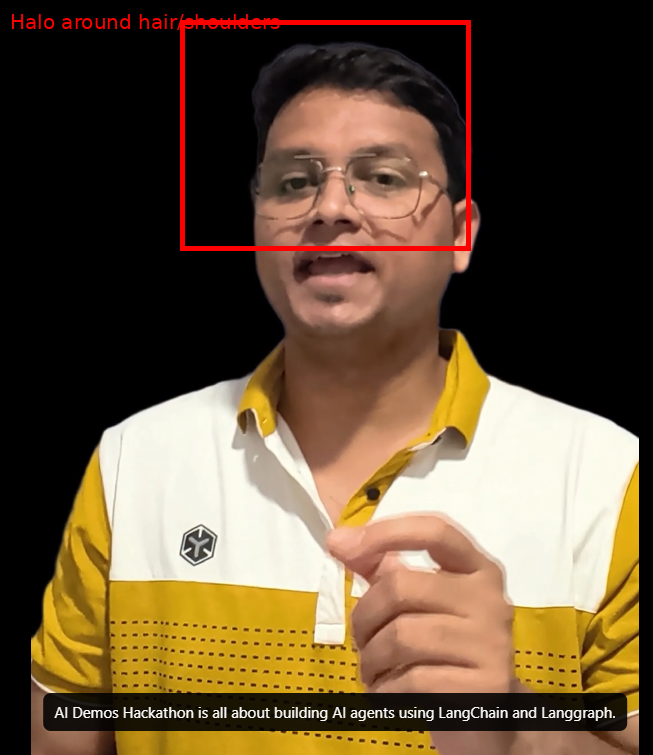
Observed output: Output artifact (Image): The speaker stayed recognizable, but there was a thin halo around the hair and shoulders, artifacts near the glasses and temples, and the outline still looked slightly artificial. — veed-io-halo-issue-091139a3c981.png
Input artifact: Input artifact (Video file): Static talking-head test clip. — Input 02 – Video.mp4
Output artifact: Output artifact (Image): The speaker stayed recognizable, but there was a thin halo around the hair and shoulders, artifacts near the glasses and temples, and the outline still looked slightly artificial. — veed-io-halo-issue-091139a3c981.png
What changed: Video file transformed into Image
Test case: Video file → Image
Input type: Video file
Input used: Input artifact (Video file): Complex outdoor two-person test clip. — Input 03 – Video.mp4
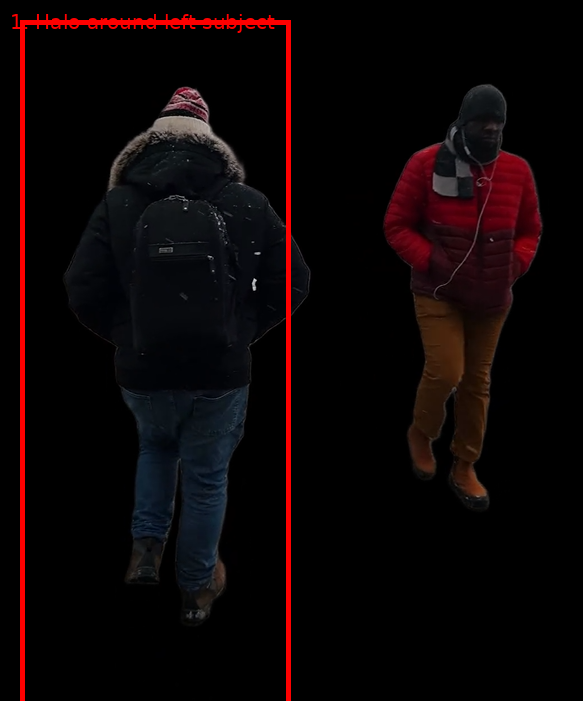
Observed output: Output artifact (Image): Both subjects were isolated from the busy outdoor scene, but halos remained around the outer edges, the fur hood and jacket edges were rough, backpack edges showed artifacts, and earphone/scarf details were not perfectly preserved. — veed-io-issue1-halo-3f4cfbb165ff.png
Input artifact: Input artifact (Video file): Complex outdoor two-person test clip. — Input 03 – Video.mp4
Output artifact: Output artifact (Image): Both subjects were isolated from the busy outdoor scene, but halos remained around the outer edges, the fur hood and jacket edges were rough, backpack edges showed artifacts, and earphone/scarf details were not perfectly preserved. — veed-io-issue1-halo-3f4cfbb165ff.png
What changed: Video file transformed into Image
Test case: Text prompt → Text prompt
Input type: Text prompt
Input used: Input artifact (Text prompt): INPUT
Observed output: Output artifact (Text prompt): OUTPUT
Input artifact: Input artifact (Text prompt): INPUT
Output artifact: Output artifact (Text prompt): OUTPUT
What changed: Text prompt transformed into Text prompt
Test case: Text prompt → Text prompt
Input type: Text prompt
Input used: Input artifact (Text prompt): INPUT
Observed output: Output artifact (Text prompt): OUTPUT
Input artifact: Input artifact (Text prompt): INPUT
Output artifact: Output artifact (Text prompt): OUTPUT
What changed: Text prompt transformed into Text prompt
Test case: Text prompt → Text prompt
Input type: Text prompt
Input used: Input artifact (Text prompt): INPUT
Observed output: Output artifact (Text prompt): OUTPUT
Input artifact: Input artifact (Text prompt): INPUT
Output artifact: Output artifact (Text prompt): OUTPUT
What changed: Text prompt transformed into Text prompt
Why it matters / Conclusion: This is workable for social or presentation cutouts, but the rough edges make it too soft for clean compositing work.
VEED removes backgrounds from MP4 clips and isolates the main subject for usable cutouts. The tested scenes included talking-head footage and multi-person outdoor clips with rough edges around hair and accessories.
Audio Noise Reduction and Speech EnhancementHelpful for steady noise, not a full restoration pass.9/10▾
Feature tested: Audio Noise Reduction and Speech Enhancement
Result: Partial (9/10)
Verdict: Helpful for steady noise, not a full restoration pass.
Expected behavior: VEED's Clean Audio pass reduces steady background noise, breathing, and air noise while making speech easier to follow on uploaded clips. The tested inputs were noisy talking-head and MP4 clips, with some limits on transient sounds and voice fidelity.
Test case: Video file → Video file
Input type: Video file
Input used: Input artifact (Video file): Input clip with background noise — VEED - Input - Background Noise Test Clip.mp4
Observed output: Output artifact (Video file): Clean Audio reduced steady background noise such as AC hum, breathing noise, and air noise, but residual noise remained around 0:03 and 0:13-0:16 where bird chirping was still audible. The speaker's voice also sounded louder/higher in level and less natural after processing. — VEED - Output - Clean Audio Result.mp4
Input artifact: Input artifact (Video file): Input clip with background noise — VEED - Input - Background Noise Test Clip.mp4
Output artifact: Output artifact (Video file): Clean Audio reduced steady background noise such as AC hum, breathing noise, and air noise, but residual noise remained around 0:03 and 0:13-0:16 where bird chirping was still audible. The speaker's voice also sounded louder/higher in level and less natural after processing. — VEED - Output - Clean Audio Result.mp4
What changed: Video file transformed into Video file
Why it matters / Conclusion: Useful as a quick cleanup step, but it does not replace manual audio review.
VEED's Clean Audio pass reduces steady background noise, breathing, and air noise while making speech easier to follow on uploaded clips. The tested inputs were noisy talking-head and MP4 clips, with some limits on transient sounds and voice fidelity.
Silence, Filler-Word, and Repetition RemovalHelpful, but incomplete7.5/10▾
Feature tested: Silence, Filler-Word, and Repetition Removal
Result: Partial (7.5/10)
Verdict: Helpful, but incomplete
Expected behavior: VEED removes pauses, filler words, and some repeated phrases to improve pacing in raw clips. The tested results still left some dead air and duplicated fragments, so manual cleanup remained useful.
Test case: Video file → Video file
Input type: Video file
Input used: Input artifact (Video file): Input — Input 1 - Talking Head with Dead Air.mp4
Observed output: Output artifact (Video file): After VEED processed the talking-head clip, noticeable pauses still remained in the timeline. — VEED Output 1 - Talking Head with Dead Air.mp4
Input artifact: Input artifact (Video file): Input — Input 1 - Talking Head with Dead Air.mp4
Output artifact: Output artifact (Video file): After VEED processed the talking-head clip, noticeable pauses still remained in the timeline. — VEED Output 1 - Talking Head with Dead Air.mp4
What changed: Video file transformed into Video file
Test case: Video file → Video file
Input type: Video file
Input used: Input artifact (Video file): Input — Input 2 - Low-Quality Audio & Lighting.mp4
Observed output: Output artifact (Video file): After cleanup on the low-quality webcam clip, repeated words and short fragments were still visible in the edited transcript. — VEED Output 2 - Low-Quality Audio & Lighting.mp4
Input artifact: Input artifact (Video file): Input — Input 2 - Low-Quality Audio & Lighting.mp4
Output artifact: Output artifact (Video file): After cleanup on the low-quality webcam clip, repeated words and short fragments were still visible in the edited transcript. — VEED Output 2 - Low-Quality Audio & Lighting.mp4
What changed: Video file transformed into Video file
Why it matters / Conclusion: It improves pacing, but a manual cleanup pass is still needed to remove every pause and repeated phrase.
VEED removes pauses, filler words, and some repeated phrases to improve pacing in raw clips. The tested results still left some dead air and duplicated fragments, so manual cleanup remained useful.
Contextual B-Roll Generation and Placement ControlUseful but manual7.5/10▾
Feature tested: Contextual B-Roll Generation and Placement Control
Result: Partial (7.5/10)
Verdict: Useful but manual
Expected behavior: VEED generates contextually relevant B-roll suggestions and lets users replace, regenerate, or reposition them in the timeline. The tested runs showed useful suggestions, but placement still needed manual adjustment.
Test case: Video file → Video file
Input type: Video file
Input used: Input artifact (Video file): Input — Input 1 - Talking Head with Dead Air.mp4
Observed output: Output artifact (Video file): The generated B-roll was relevant, but the workflow did not auto-place it correctly. — VEED Output 1 - Talking Head with Dead Air.mp4
Input artifact: Input artifact (Video file): Input — Input 1 - Talking Head with Dead Air.mp4
Output artifact: Output artifact (Video file): The generated B-roll was relevant, but the workflow did not auto-place it correctly. — VEED Output 1 - Talking Head with Dead Air.mp4
What changed: Video file transformed into Video file
Why it matters / Conclusion: Good source control, but not automatic synchronization.
VEED generates contextually relevant B-roll suggestions and lets users replace, regenerate, or reposition them in the timeline. The tested runs showed useful suggestions, but placement still needed manual adjustment.
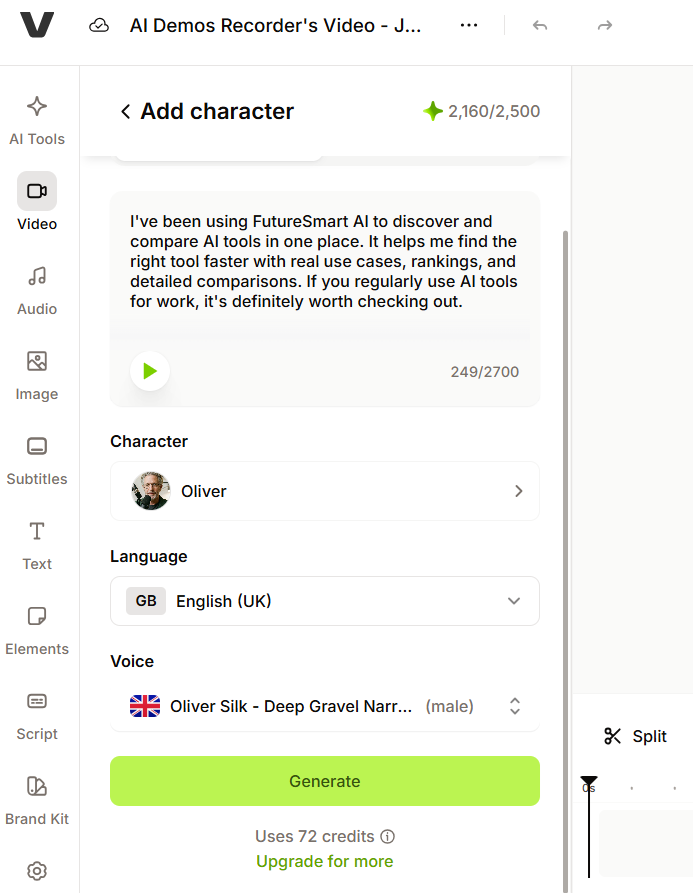
Credit Cost Preview and EstimationWorked▾
Feature tested: Credit Cost Preview and Estimation
Result: Partial
Verdict: Worked
Expected behavior: VEED shows estimated credit usage before generation and reflects how cost scales with script length. The tested flows exposed the estimate in the interface before rendering and surfaced the resulting charge after a run.
Test case: Text prompt → Image
Input type: Text prompt
Input used: Input artifact (Text prompt): INPUT
Observed output: Output artifact (Image): The generation screen showed an estimated cost of 72 credits before the video was created, indicating that credit usage is visible up front. — veed-credit-estimate-futuresmart.png
Input artifact: Input artifact (Text prompt): INPUT
Output artifact: Output artifact (Image): The generation screen showed an estimated cost of 72 credits before the video was created, indicating that credit usage is visible up front. — veed-credit-estimate-futuresmart.png
What changed: Text prompt transformed into Image
Test case: Text prompt → Image
Input type: Text prompt
Input used: Input artifact (Text prompt): INPUT
Observed output: Output artifact (Image): The generation panel showed an estimated cost of 72 credits for the FutureSmart AI script, along with the selected voice and language settings. — veed-credit-estimate-futuresmart.png
Input artifact: Input artifact (Text prompt): INPUT
Output artifact: Output artifact (Image): The generation panel showed an estimated cost of 72 credits for the FutureSmart AI script, along with the selected voice and language settings. — veed-credit-estimate-futuresmart.png
What changed: Text prompt transformed into Image
Why it matters / Conclusion: The credit meter is useful for planning, but the observed per-video cost was high enough that longer scripts can make scaling expensive.
VEED shows estimated credit usage before generation and reflects how cost scales with script length. The tested flows exposed the estimate in the interface before rendering and surfaced the resulting charge after a run.
Background Music AdditionWorking▾
Feature tested: Background Music Addition
Result: Passed
Verdict: Working
Expected behavior: VEED lets users add background music after the AI cleanup pass through manual selection. The exercised workflow treated music as an add-on rather than an automatic mix/master step.
Test case: Video file → Video file
Input type: Video file
Input used: Input artifact (Video file): Input — Input 1 - Talking Head with Dead Air.mp4
Observed output: Output artifact (Video file): Background music was added successfully after the AI cleanup pass. — VEED Output 1 - Talking Head with Dead Air.mp4
Input artifact: Input artifact (Video file): Input — Input 1 - Talking Head with Dead Air.mp4
Output artifact: Output artifact (Video file): Background music was added successfully after the AI cleanup pass. — VEED Output 1 - Talking Head with Dead Air.mp4
What changed: Video file transformed into Video file
Test case: Video file → Video file
Input type: Video file
Input used: Input artifact (Video file): Input — Input 2 - Low-Quality Audio & Lighting.mp4
Observed output: Output artifact (Video file): Background music also worked on the lower-quality clip once selected manually. — VEED Output 2 - Low-Quality Audio & Lighting.mp4
Input artifact: Input artifact (Video file): Input — Input 2 - Low-Quality Audio & Lighting.mp4
Output artifact: Output artifact (Video file): Background music also worked on the lower-quality clip once selected manually. — VEED Output 2 - Low-Quality Audio & Lighting.mp4
What changed: Video file transformed into Video file
Why it matters / Conclusion: Works as an add-on, but it is not an automatic mix/master step.
VEED lets users add background music after the AI cleanup pass through manual selection. The exercised workflow treated music as an add-on rather than an automatic mix/master step.
AI Video Dubbing and Translated CaptionsGood for dubbed dialogue, but not a full-frame localizer.▾
Feature tested: AI Video Dubbing and Translated Captions
Result: Passed
Verdict: Good for dubbed dialogue, but not a full-frame localizer.
Expected behavior: VEED can replace the source audio with translated dialogue and burn in translated captions on a source video. In the tested fitness, educational, and vlog clips, it produced Hindi, Spanish, and English dubs while keeping resolution, framing, and duration intact.
Test case: Video file → Video file
Input type: Video file
Input used: Input artifact (Video file): INPUT — Input 1 Fitness Video (online-video-cutter.com).mp4
Observed output: Output artifact (Video file): Dubbed fitness clip with translated Hindi captions; the spoken layer changed, but the on-screen quiz headlines stayed in English and the lips were not regenerated. — Veed.io output 1.mp4
Input artifact: Input artifact (Video file): INPUT — Input 1 Fitness Video (online-video-cutter.com).mp4
Output artifact: Output artifact (Video file): Dubbed fitness clip with translated Hindi captions; the spoken layer changed, but the on-screen quiz headlines stayed in English and the lips were not regenerated. — Veed.io output 1.mp4
What changed: Video file transformed into Video file
Test case: Video file → Video file
Input type: Video file
Input used: Input artifact (Video file): INPUT — Input 2 Educational.mp4
Observed output: Output artifact (Video file): Dubbed educational clip with translated Spanish captions and preserved framing; the banana-stage labels in the frame stayed in English. — Veed.io output 2.mp4
Input artifact: Input artifact (Video file): INPUT — Input 2 Educational.mp4
Output artifact: Output artifact (Video file): Dubbed educational clip with translated Spanish captions and preserved framing; the banana-stage labels in the frame stayed in English. — Veed.io output 2.mp4
What changed: Video file transformed into Video file
Test case: Video file → Video file
Input type: Video file
Input used: Input artifact (Video file): INPUT — Free Copyright Stock Videos Images And Music.publer.com (online-video-cutter.com).mp4
Observed output: Output artifact (Video file): Dubbed vlog clip with English output and preserved existing English branding, but the caption engine leaked Romanized Hindi into the translated subtitles. — Veed.io output 3.mp4
Input artifact: Input artifact (Video file): INPUT — Free Copyright Stock Videos Images And Music.publer.com (online-video-cutter.com).mp4
Output artifact: Output artifact (Video file): Dubbed vlog clip with English output and preserved existing English branding, but the caption engine leaked Romanized Hindi into the translated subtitles. — Veed.io output 3.mp4
What changed: Video file transformed into Video file
Why it matters / Conclusion: Reliable for spoken dialogue translation, but it does not fully localize the video frame.
VEED can replace the source audio with translated dialogue and burn in translated captions on a source video. In the tested fitness, educational, and vlog clips, it produced Hindi, Spanish, and English dubs while keeping resolution, framing, and duration intact.
Optional Lip Sync RegenerationInconsistent: it worked in 2 of 3 tests and failed completely in 1.▾
Feature tested: Optional Lip Sync Regeneration
Result: Passed
Verdict: Inconsistent: it worked in 2 of 3 tests and failed completely in 1.
Expected behavior: VEED offers an opt-in pass that attempts to regenerate mouth motion after dubbing. On the tested English→Hindi, English→Spanish, and Hindi→English clips, the results ranged from no visible regeneration to visibly re-rendered faces.
Test case: Video file → Video file
Input type: Video file
Input used: Input artifact (Video file): INPUT — Input 1 Fitness Video (online-video-cutter.com).mp4
Observed output: Output artifact (Video file): No lip-sync regeneration occurred on the English→Hindi fitness clip; the mouth region was pixel-identical apart from compression noise, so only the audio changed. — Veed.io output 1.mp4
Input artifact: Input artifact (Video file): INPUT — Input 1 Fitness Video (online-video-cutter.com).mp4
Output artifact: Output artifact (Video file): No lip-sync regeneration occurred on the English→Hindi fitness clip; the mouth region was pixel-identical apart from compression noise, so only the audio changed. — Veed.io output 1.mp4
What changed: Video file transformed into Video file
Test case: Video file → Video file
Input type: Video file
Input used: Input artifact (Video file): INPUT — Input 2 Educational.mp4
Observed output: Output artifact (Video file): Lip sync was regenerated on the English→Spanish educational clip; the mouth shape changed to match the new audio, but the face gained a slightly smoothed plastic texture. — Veed.io output 2.mp4
Input artifact: Input artifact (Video file): INPUT — Input 2 Educational.mp4
Output artifact: Output artifact (Video file): Lip sync was regenerated on the English→Spanish educational clip; the mouth shape changed to match the new audio, but the face gained a slightly smoothed plastic texture. — Veed.io output 2.mp4
What changed: Video file transformed into Video file
Test case: Video file → Video file
Input type: Video file
Input used: Input artifact (Video file): INPUT — Free Copyright Stock Videos Images And Music.publer.com (online-video-cutter.com).mp4
Observed output: Output artifact (Video file): Lip sync was regenerated on the Hindi→English vlog clip; the mouth shape visibly changed to match the translated audio. — Veed.io output 3.mp4
Input artifact: Input artifact (Video file): INPUT — Free Copyright Stock Videos Images And Music.publer.com (online-video-cutter.com).mp4
Output artifact: Output artifact (Video file): Lip sync was regenerated on the Hindi→English vlog clip; the mouth shape visibly changed to match the translated audio. — Veed.io output 3.mp4
What changed: Video file transformed into Video file
Why it matters / Conclusion: Use it only if you can verify each clip, because the lip-sync pass is not predictable.
VEED offers an opt-in pass that attempts to regenerate mouth motion after dubbing. On the tested English→Hindi, English→Spanish, and Hindi→English clips, the results ranged from no visible regeneration to visibly re-rendered faces.
Pricing and access
Translation/dubbing was tested on a paid plan, and the source report says the feature is gated to Pro tier or higher.
Prices were listed in INR in the source report and may vary by region.
Featured in Rankings
Independent rankings where VEED was tested and rated.
Banner Preview
How the embed badge will look on your site

Embed HTML
Copy this code to your website source
Quick Integration Guide
- 1Copy the HTML code block above.
- 2Paste it into your site's HTML or CMS editor.
- 3Banner appears instantly on your page.
- 4Links back to your tool profile here.
Similar Tools
Discover more AI tools like VEED to enhance your workflow.
Comments (0)
Need a custom AI solution for this use case?
If you are looking to build a custom video dubbing, vertical video generation, or social video editing workflow for your business or internal workflow, email us at contact@futuresmart.ai.
Found something inaccurate or missing? We try to keep our AI research accurate and useful. If you found outdated information, an issue, or have a suggestion, email us at collaborate@aidemos.com.