
Synthesia
AI avatar videos from scripts that generate cleanly, but the tested workflow stayed landscape and export-gated.
Reliable script-to-avatar generation, but not a ready-to-export UGC ad workflow in this test
- You need a straightforward script-in, avatar-out workflow for polished promo videos.
- You are comfortable reviewing output inside the web app before export.
- You can work with a workflow that may gate download or translation behind an upgrade.
- You need guaranteed vertical 9:16 short-form ads.
Our take
Synthesia consistently turned the three supplied product scripts into polished AI-avatar videos with clear voice delivery and consistent lip-sync on a paid credits plan. In the tested workflow, though, the outputs stayed landscape rather than vertical and final download was blocked behind an upgrade, so it was more usable for in-browser review and corporate-style promo work than for immediate short-form ad export.
In-Depth Review
Our detailed analysis of Synthesia — features, performance, and real-world testing.
Feature-by-Feature Breakdown
Script-to-Avatar Video GenerationWorked across all three scripts, but the tested output format was not vertical UGC-ready.▾
Feature tested: Script-to-Avatar Video Generation
Result: Partial
Verdict: Worked across all three scripts, but the tested output format was not vertical UGC-ready.
Expected behavior: Synthesia took supplied product scripts and produced finished AI-avatar videos for the tested FutureSmart AI, Nike Pegasus 41, and Duolingo inputs, including spoken narration and successful completion inside the platform.
Test case: Text prompt → Video file
Input type: Text prompt
Input used: Input artifact (Text prompt): Input
Observed output: Output artifact (Video file): Generated successfully with clear presenter delivery, natural voice, and consistent lip-sync. The test also noted about 32 credits for a 16–17 second video, with landscape output and upgrade-gated download. — Synthesia-FutureSmart AI-output mp4.mp4
Input artifact: Input artifact (Text prompt): Input
Output artifact: Output artifact (Video file): Generated successfully with clear presenter delivery, natural voice, and consistent lip-sync. The test also noted about 32 credits for a 16–17 second video, with landscape output and upgrade-gated download. — Synthesia-FutureSmart AI-output mp4.mp4
What changed: Text prompt transformed into Video file
Test case: Text prompt → Video file
Input type: Text prompt
Input used: Input artifact (Text prompt): Input
Observed output: Output artifact (Video file): Generated successfully with professional, consistent avatar delivery, strong voice clarity, and accurate lip-sync. The tested workflow still produced landscape video and required an upgrade to download. — Synthesia-Nike Pegasus 41-output mp4.mp4
Input artifact: Input artifact (Text prompt): Input
Output artifact: Output artifact (Video file): Generated successfully with professional, consistent avatar delivery, strong voice clarity, and accurate lip-sync. The tested workflow still produced landscape video and required an upgrade to download. — Synthesia-Nike Pegasus 41-output mp4.mp4
What changed: Text prompt transformed into Video file
Test case: Text prompt → Video file
Input type: Text prompt
Input used: Input artifact (Text prompt): Input
Observed output: Output artifact (Video file): Generated smoothly with clear, well-paced voice delivery and maintained lip-sync. The output remained landscape, and downloading was not available without upgrading. — Synthesia-Duolingo-output mp4.mp4
Input artifact: Input artifact (Text prompt): Input
Output artifact: Output artifact (Video file): Generated smoothly with clear, well-paced voice delivery and maintained lip-sync. The output remained landscape, and downloading was not available without upgrading. — Synthesia-Duolingo-output mp4.mp4
What changed: Text prompt transformed into Video file
Why it matters / Conclusion: Reliable generation across three normal promo scripts, but the tested outputs were landscape 16–17 second videos rather than short-form vertical ads.
Synthesia took supplied product scripts and produced finished AI-avatar videos for the tested FutureSmart AI, Nike Pegasus 41, and Duolingo inputs, including spoken narration and successful completion inside the platform.
Avatar Library and Presenter SelectionPresenter selection was available through a browsable avatar library.▾
Feature tested: Avatar Library and Presenter Selection
Result: Passed
Verdict: Presenter selection was available through a browsable avatar library.
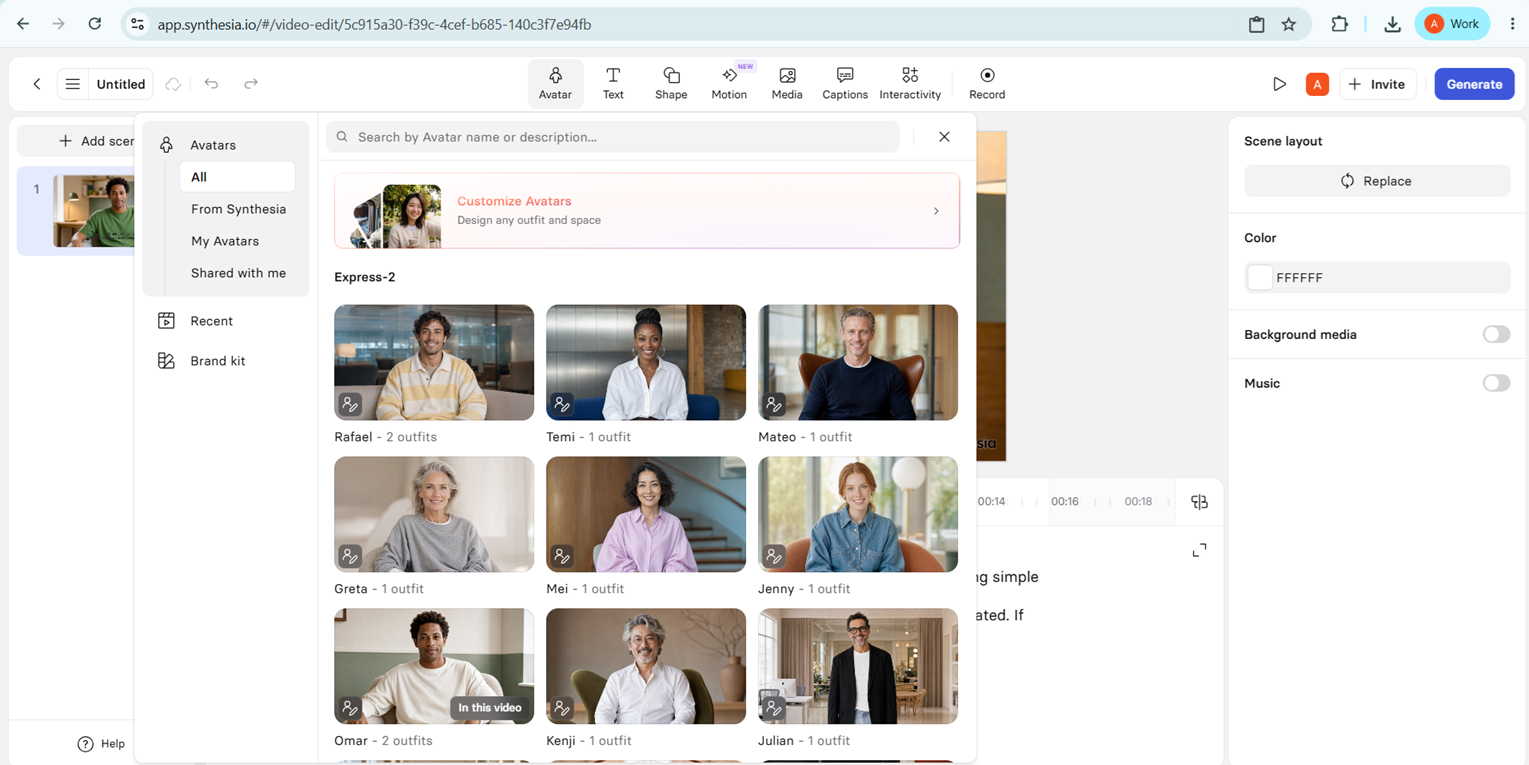
Expected behavior: The avatar picker provided a searchable presenter library with filters like All Avatars, My Avatars, Shared with me, Recent, Brand kit, and Custom Avatars, along with presenter thumbnails for choosing a presenter.
Test case: Text prompt → Image
Input type: Text prompt
Input used: Input artifact (Text prompt): Input
Observed output: Output artifact (Image): The avatar picker displayed multiple selectable presenters and categories, including All Avatars, My Avatars, Shared with me, Recent, Brand kit, and Custom Avatars. — synthesia-avatar-library.png
Input artifact: Input artifact (Text prompt): Input
Output artifact: Output artifact (Image): The avatar picker displayed multiple selectable presenters and categories, including All Avatars, My Avatars, Shared with me, Recent, Brand kit, and Custom Avatars. — synthesia-avatar-library.png
What changed: Text prompt transformed into Image
Why it matters / Conclusion: The presenter library is easy to browse, but this report did not verify separate voice-library breadth or an avatar swap inside a finished ad.
The avatar picker provided a searchable presenter library with filters like All Avatars, My Avatars, Shared with me, Recent, Brand kit, and Custom Avatars, along with presenter thumbnails for choosing a presenter.
In-Editor Preview and PlaybackPreviewing worked inside the workspace.▾
Feature tested: In-Editor Preview and Playback
Result: Passed
Verdict: Previewing worked inside the workspace.
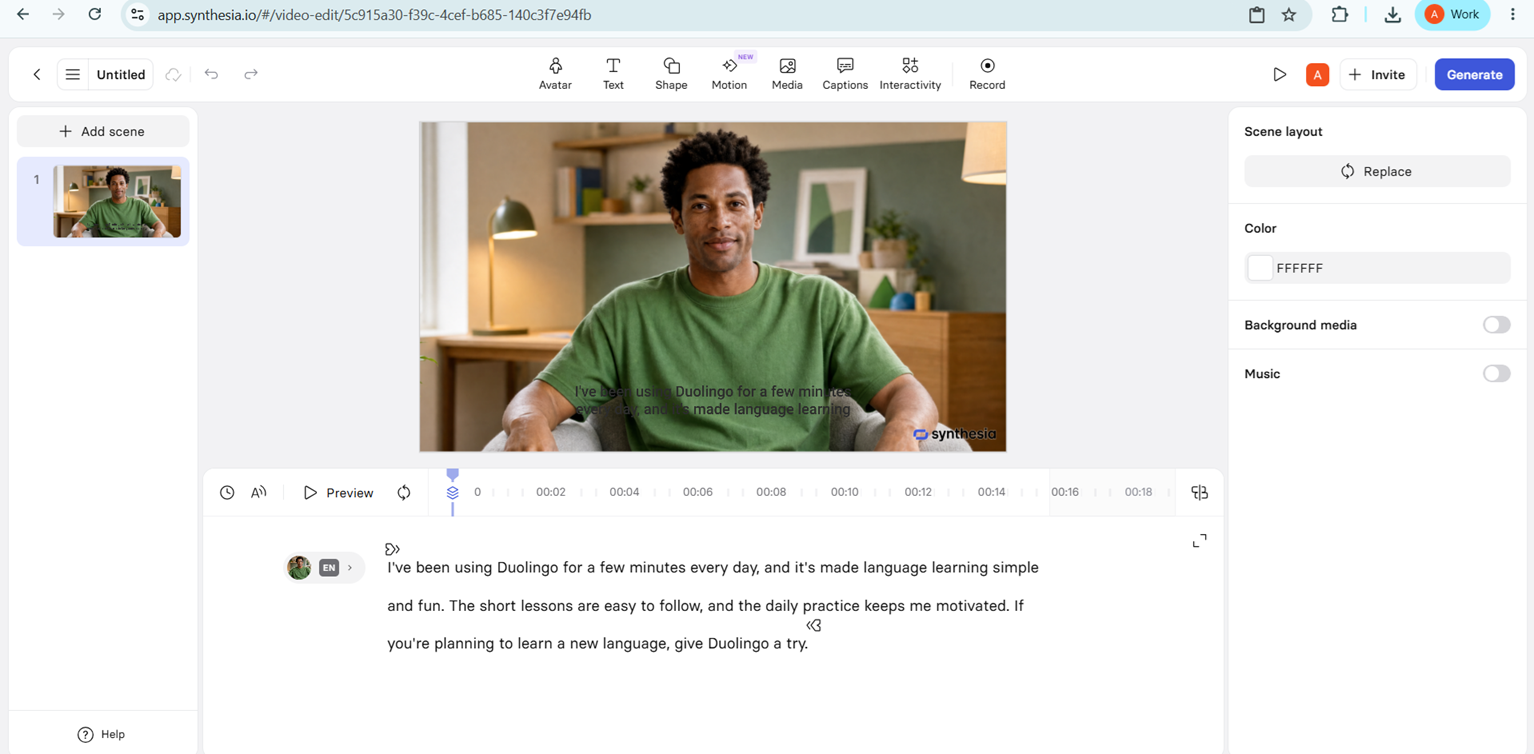
Expected behavior: Synthesia let the tester review generated videos inside the workspace before export, so the result could be inspected without leaving the editor.
Test case: Text prompt → Image
Input type: Text prompt
Input used: Input artifact (Text prompt): Input
Observed output: Output artifact (Image): Output — synthesia-script-input.png
Input artifact: Input artifact (Text prompt): Input
Output artifact: Output artifact (Image): Output — synthesia-script-input.png
What changed: Text prompt transformed into Image
Why it matters / Conclusion: Previewing is available and worked as expected, but the report did not test deeper edits or refinement beyond review.
Synthesia let the tester review generated videos inside the workspace before export, so the result could be inspected without leaving the editor.
Export and Translation ControlsExport and translation actions were visible, but gated on the tested account.▾
Feature tested: Export and Translation Controls
Result: Partial
Verdict: Export and translation actions were visible, but gated on the tested account.
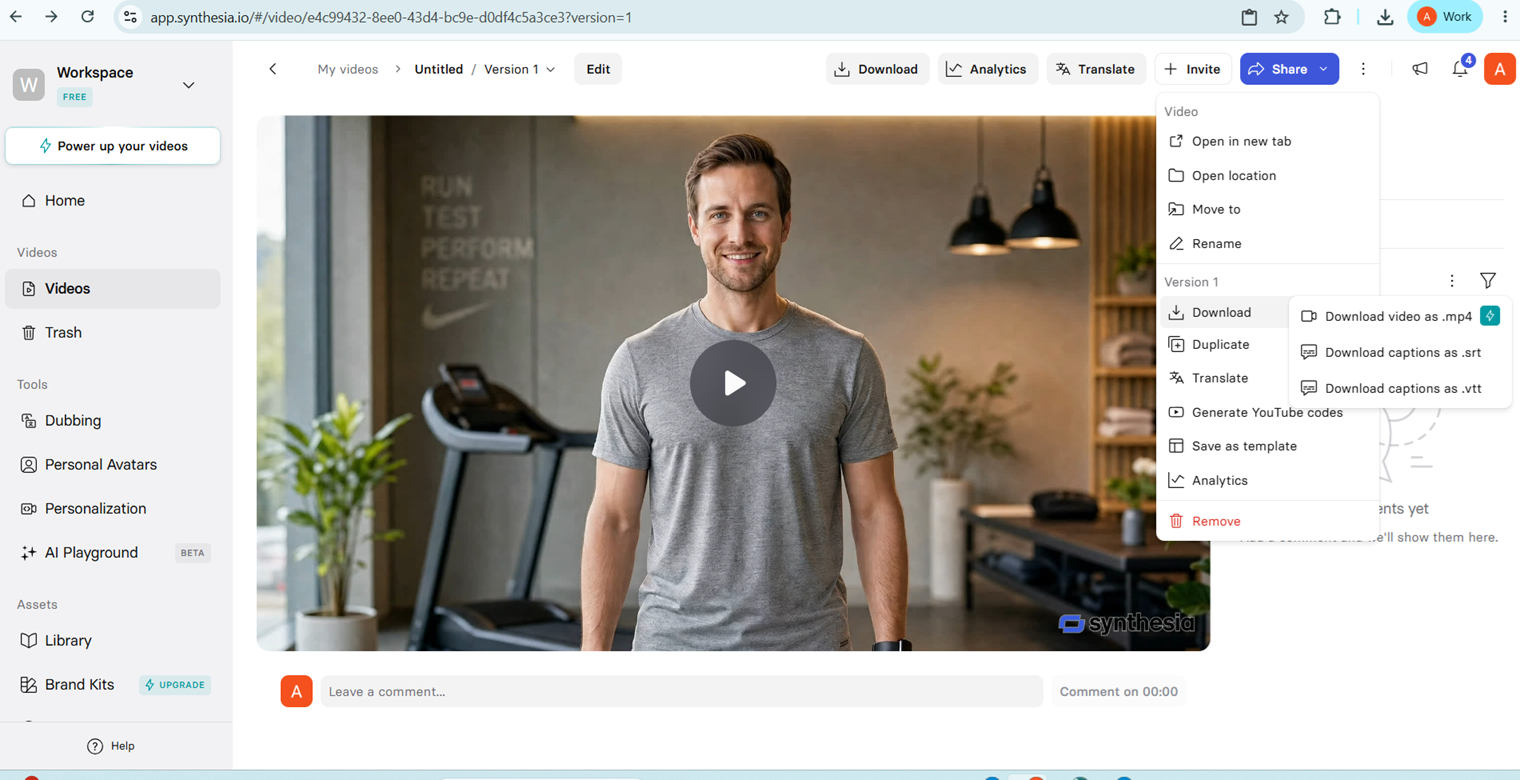
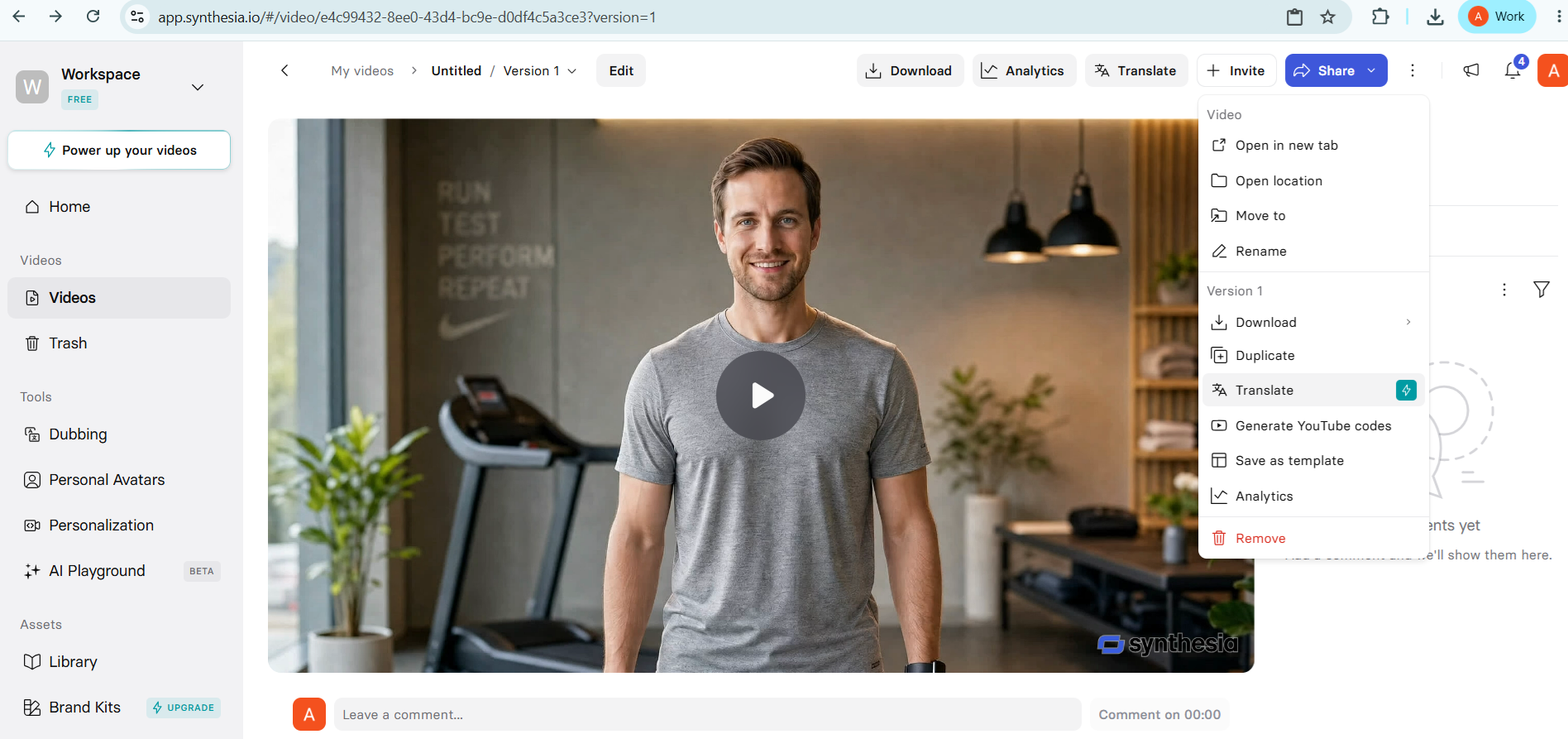
Expected behavior: The version menu exposed download options for MP4 and caption files plus a Translate action, though the tested account showed upgrade gating for download and translation.
Test case: Text prompt → Image
Input type: Text prompt
Input used: Input artifact (Text prompt): Input
Observed output: Output artifact (Image): The version menu showed export choices for video and captions files, but downloading the generated video required an upgraded plan. — synthesia-download-restriction.png
Input artifact: Input artifact (Text prompt): Input
Output artifact: Output artifact (Image): The version menu showed export choices for video and captions files, but downloading the generated video required an upgraded plan. — synthesia-download-restriction.png
What changed: Text prompt transformed into Image
Test case: Text prompt → Image
Input type: Text prompt
Input used: Input artifact (Text prompt): Input
Observed output: Output artifact (Image): The video workspace exposed Translate in the version menu, but the tested workflow indicated that the action required an upgrade. — synthesia-translate-option.png
Input artifact: Input artifact (Text prompt): Input
Output artifact: Output artifact (Image): The video workspace exposed Translate in the version menu, but the tested workflow indicated that the action required an upgrade. — synthesia-translate-option.png
What changed: Text prompt transformed into Image
Why it matters / Conclusion: The product surfaces export and language workflows, but the tested plan could not complete them.
The version menu exposed download options for MP4 and caption files plus a Translate action, though the tested account showed upgrade gating for download and translation.
Featured in Rankings
Independent rankings where Synthesia was tested and rated.
Banner Preview
How the embed badge will look on your site

Embed HTML
Copy this code to your website source
Quick Integration Guide
- 1Copy the HTML code block above.
- 2Paste it into your site's HTML or CMS editor.
- 3Banner appears instantly on your page.
- 4Links back to your tool profile here.
Similar Tools
Discover more AI tools like Synthesia to enhance your workflow.
Comments (0)
Need a custom AI solution for this use case?
If you are looking to build a custom AI avatar video generation, script-to-video, or training video workflow for your business or internal workflow, email us at contact@futuresmart.ai.
Found something inaccurate or missing? We try to keep our AI research accurate and useful. If you found outdated information, an issue, or have a suggestion, email us at collaborate@aidemos.com.