
AutoCaption.io
Precise animated captions with strong styling controls, but export is locked behind credits.
Strong captioning, blocked at export
- You need fast first-pass auto-captioning with word-level sync on talking-head or rapid conversational clips.
- You want built-in caption style controls for font family, text color, stroke, capitalization, shadows, and background boxes.
- You are fine previewing and editing captions in-browser while sorting out a paid export path later.
- You need a free export path; the observed flow failed at a 7-credits-per-minute wall.
Our take
AutoCaption.io handled the tested talking-head and fast conversational clips with strong first-pass transcription and stable word-level timing, and it exposes useful caption styling controls inside the editor. The main limitation is the export wall: the researched unpaid flow fails at download time unless enough credits are available, and the standard tier also blocks deeper brand controls such as custom font uploads, exact hex color mapping, and external subtitle downloads.
In-Depth Review
Our detailed analysis of AutoCaption.io — features, performance, and real-world testing.
Feature-by-Feature Breakdown
Auto-Caption Generation▾
Feature tested: Auto-Caption Generation
Result: Passed
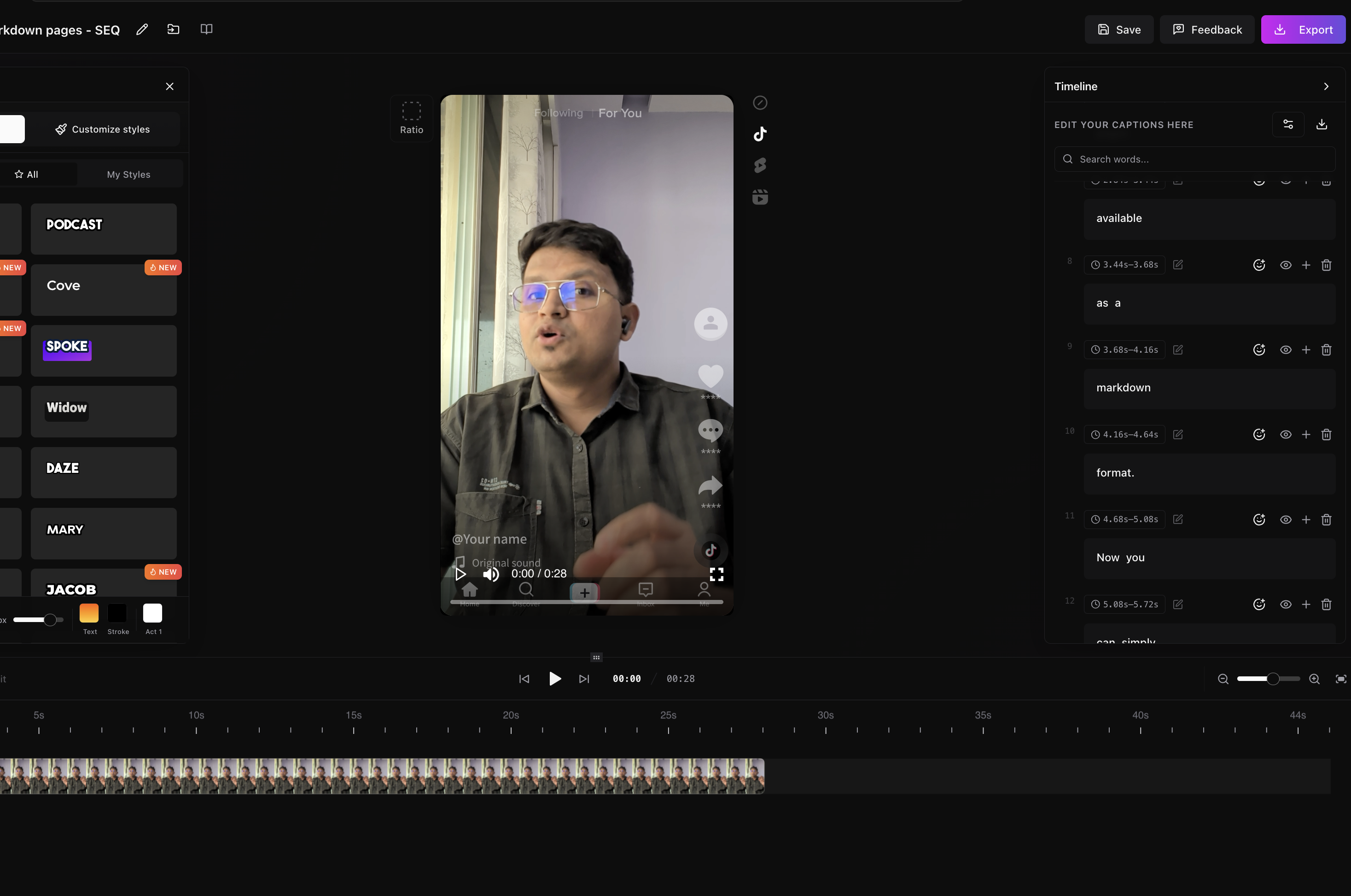
Expected behavior: AutoCaption.io generates timed caption tracks from uploaded video, with word-level synchronization and stable timing on the researched technical talking-head clip and the faster conversational clip. The tested flow handled accurate transcription even on rapid speech and the phrase "markdown pages."
Test case: Text prompt → Image
Input type: Text prompt
Input used: Input artifact (Text prompt): Input
Observed output: Output artifact (Image): The editor produced a clean, readable caption track in a vertical talking-head composition, and the timeline correctly captured the phrase "markdown pages" in the script. The preview showed stable word-level segmentation with no obvious transcription collapse. — proper_captions.png
Input artifact: Input artifact (Text prompt): Input
Output artifact: Output artifact (Image): The editor produced a clean, readable caption track in a vertical talking-head composition, and the timeline correctly captured the phrase "markdown pages" in the script. The preview showed stable word-level segmentation with no obvious transcription collapse. — proper_captions.png
What changed: Text prompt transformed into Image
Test case: Text prompt → Image
Input type: Text prompt
Input used: Input artifact (Text prompt): Input
Observed output: Output artifact (Image): Output — proper_captions.png
Input artifact: Input artifact (Text prompt): Input
Output artifact: Output artifact (Image): Output — proper_captions.png
What changed: Text prompt transformed into Image
Why it matters / Conclusion: Very strong first-pass caption generation and timing on the tested clips, including rapid speech.
AutoCaption.io generates timed caption tracks from uploaded video, with word-level synchronization and stable timing on the researched technical talking-head clip and the faster conversational clip. The tested flow handled accurate transcription even on rapid speech and the phrase "markdown pages."
Caption Styling and Text Customization▾
Feature tested: Caption Styling and Text Customization
Result: Passed
Expected behavior: The editor lets users change caption appearance in-app using controls for font, color, size, stroke, capitalization, typography, shadows, background boxes, and preset looks. The tested flows also mention reusable corporate templates and editable styling on the researched tier.
Test case: Text prompt → Image
Input type: Text prompt
Input used: Input artifact (Text prompt): Input
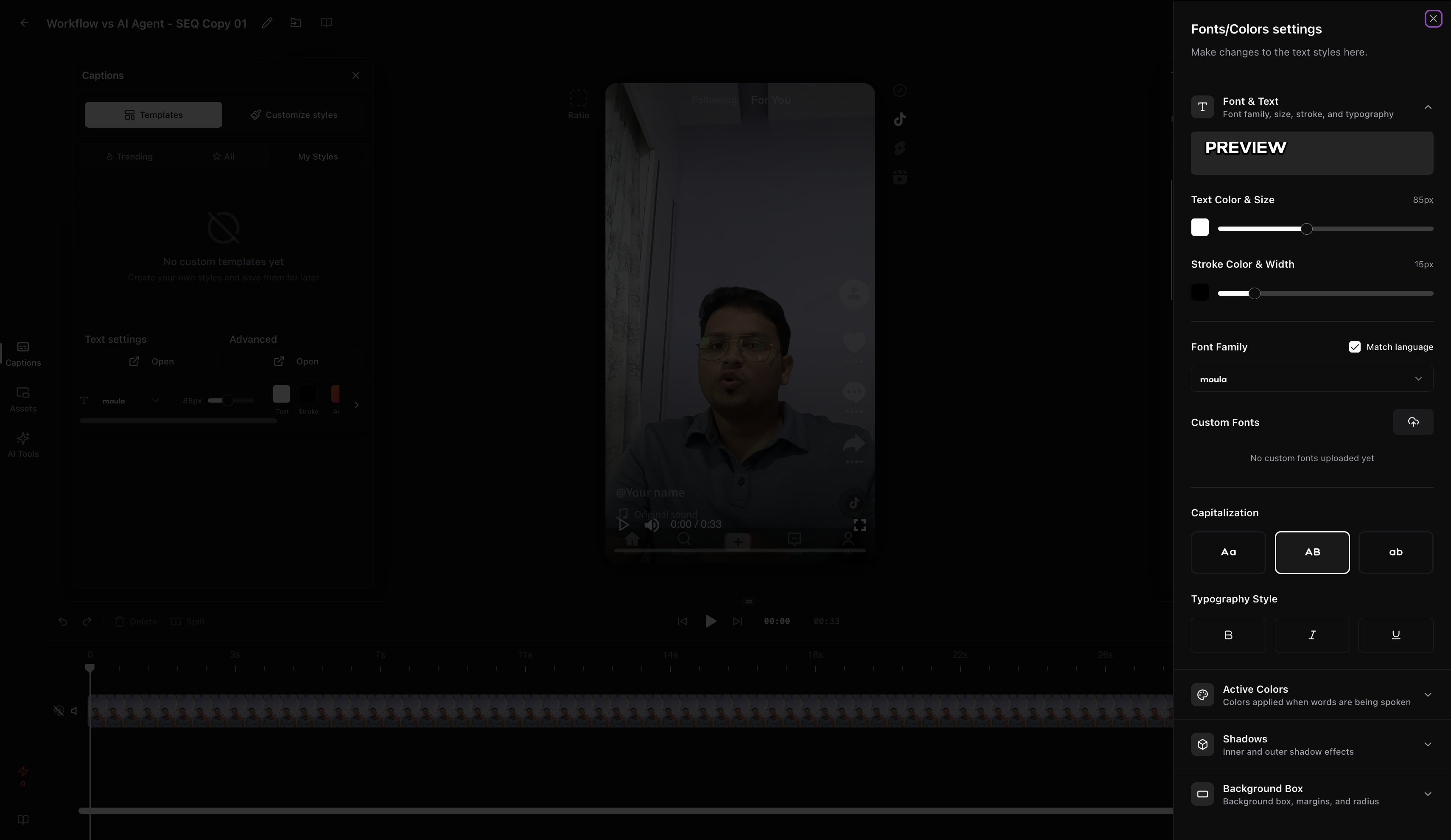
Observed output: Output artifact (Image): Fonts/Colors settings drawer showing controls for font family, text color and size, stroke color and width, capitalization, typography style, active colors, shadows, and a background box. The research also found that custom font uploads were not available yet. — text_customization.png
Input artifact: Input artifact (Text prompt): Input
Output artifact: Output artifact (Image): Fonts/Colors settings drawer showing controls for font family, text color and size, stroke color and width, capitalization, typography style, active colors, shadows, and a background box. The research also found that custom font uploads were not available yet. — text_customization.png
What changed: Text prompt transformed into Image
Why it matters / Conclusion: Useful in-editor styling controls, but the tested freemium path does not provide full brand-system control.
The editor lets users change caption appearance in-app using controls for font, color, size, stroke, capitalization, typography, shadows, background boxes, and preset looks. The tested flows also mention reusable corporate templates and editable styling on the researched tier.
Emoji Overlay Insertion▾
Feature tested: Emoji Overlay Insertion
Result: Partial
Expected behavior: AutoCaption.io can place emoji-style graphic accents above the active caption phrase while captions play, including contextual icons in the fast-paced test. The evidence also notes the overlay set is generic and can feel repetitive on technical dialogue.
Test case: Text prompt → Text prompt
Input type: Text prompt
Input used: Input artifact (Text prompt): Input
Observed output: Output artifact (Text prompt): Output
Input artifact: Input artifact (Text prompt): Input
Output artifact: Output artifact (Text prompt): Output
What changed: Text prompt transformed into Text prompt
Why it matters / Conclusion: The overlay feature works, but the icon vocabulary is narrow.
AutoCaption.io can place emoji-style graphic accents above the active caption phrase while captions play, including contextual icons in the fast-paced test. The evidence also notes the overlay set is generic and can feel repetitive on technical dialogue.
Caption Export and Download▾
Feature tested: Caption Export and Download
Result: Failed
Expected behavior: The product supports previewing and then exporting or downloading completed caption output, including subtitle-file delivery attempts. In the researched flows, the export step was blocked by credits and standard-tier access also blocked external .srt delivery.
Test case: Text prompt → Image
Input type: Text prompt
Input used: Input artifact (Text prompt): Input
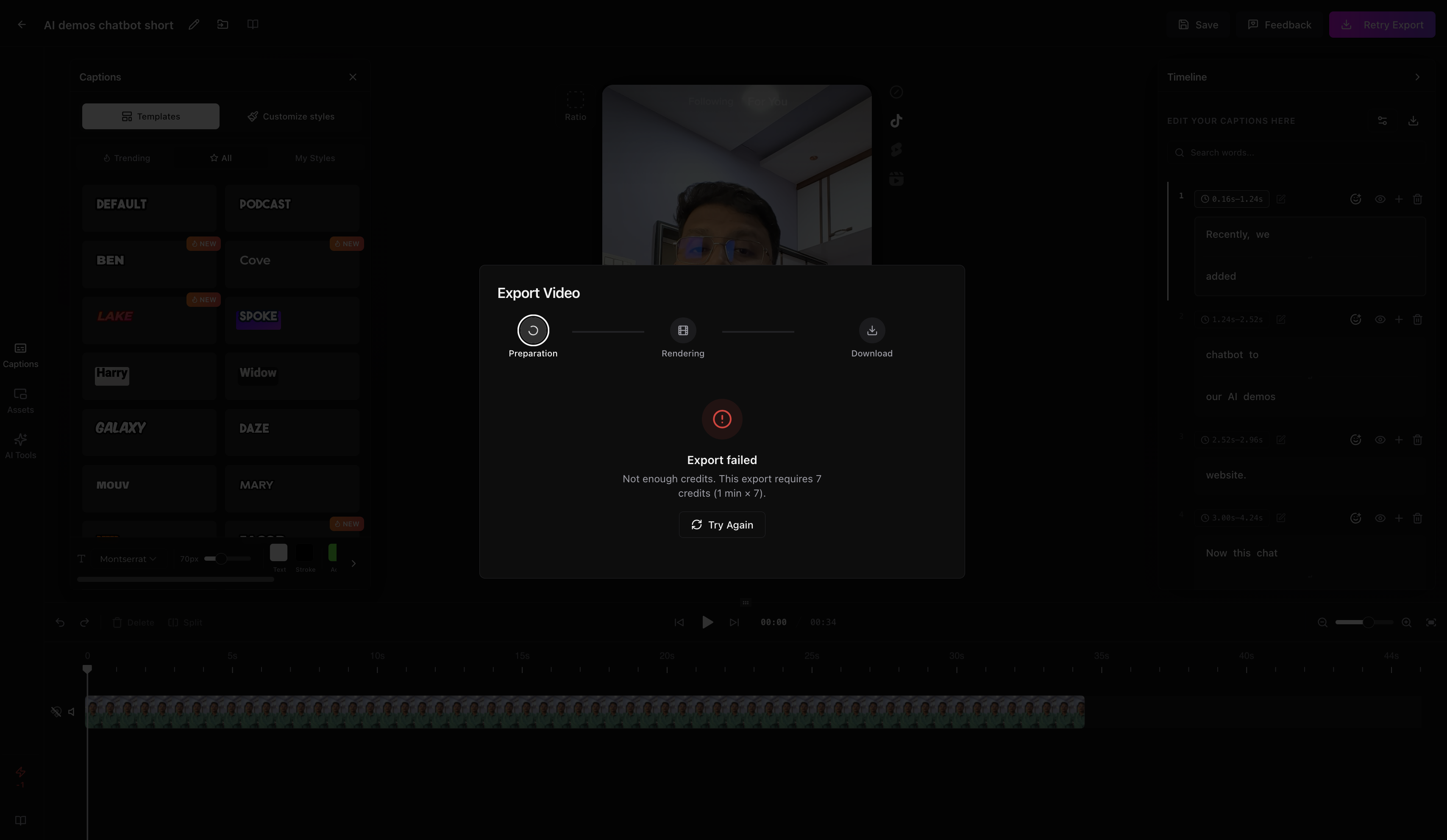
Observed output: Output artifact (Image): Export Video modal showing preparation, rendering, and download steps, but the export failed because there were not enough credits. The dialog states that the export requires 7 credits per minute and offers a "Try Again" action. — credit_limit.png
Input artifact: Input artifact (Text prompt): Input
Output artifact: Output artifact (Image): Export Video modal showing preparation, rendering, and download steps, but the export failed because there were not enough credits. The dialog states that the export requires 7 credits per minute and offers a "Try Again" action. — credit_limit.png
What changed: Text prompt transformed into Image
Test case: Text prompt → Image
Input type: Text prompt
Input used: Input artifact (Text prompt): Input
Observed output: Output artifact (Image): Output — credit_limit.png
Input artifact: Input artifact (Text prompt): Input
Output artifact: Output artifact (Image): Output — credit_limit.png
What changed: Text prompt transformed into Image
Why it matters / Conclusion: The editor preview is usable, but the researched flow cannot finish a free export and also blocks external subtitle delivery on the standard tier.
The product supports previewing and then exporting or downloading completed caption output, including subtitle-file delivery attempts. In the researched flows, the export step was blocked by credits and standard-tier access also blocked external .srt delivery.
Pricing reported in the research
Monthly billing ranges were listed; annual plans were mentioned as available with savings.
Exact annual prices were not provided in the report.
Featured in Rankings
Independent rankings where AutoCaption.io was tested and rated.
Banner Preview
How the embed badge will look on your site

Embed HTML
Copy this code to your website source
Quick Integration Guide
- 1Copy the HTML code block above.
- 2Paste it into your site's HTML or CMS editor.
- 3Banner appears instantly on your page.
- 4Links back to your tool profile here.
Similar Tools
Discover more AI tools like AutoCaption.io to enhance your workflow.
Comments (0)
Need a custom AI solution for this use case?
If you are looking to build a custom video captioning, subtitle generation, or animated captions workflow for your business or internal workflow, email us at contact@futuresmart.ai.
Found something inaccurate or missing? We try to keep our AI research accurate and useful. If you found outdated information, an issue, or have a suggestion, email us at collaborate@aidemos.com.