
Zubtitle
Browser-based caption drafting for quick video subtitles, but export limits, watermarking, and jargon errors make the free tier a poor fit for polished kinetic captions.
Solid for draft captioning, but not for a polished free-tier workflow
- You want a browser-based tool that can turn speech into editable caption drafts quickly.
- You are comfortable fixing transcript mistakes manually, especially on jargon-heavy clips.
- You only need basic caption editing controls and can work within the free-tier export limits or pay for a higher tier.
- You need reliable transcription on technical jargon without cleanup.
Our take
Zubtitle did create editable caption drafts and kept basic timing aligned on the cleaner clips, but it misread technical terms, stayed template-bound, and locked exports behind a strict free-tier quota with 720p output and a fixed watermark.
In-Depth Review
Our detailed analysis of Zubtitle — features, performance, and real-world testing.
Feature-by-Feature Breakdown
Auto-Transcription and Caption Drafting▾
Feature tested: Auto-Transcription and Caption Drafting
Result: Partial
Expected behavior: Zubtitle turns uploaded MP4 speech into editable transcript/caption drafts. The testing covered clean studio audio, a conceptual clip, a fast-paced clip, and jargon-heavy audio where technical phrases were misheard.
Test case: Text prompt → Text prompt
Input type: Text prompt
Input used: Input artifact (Text prompt): Input
Observed output: Output artifact (Text prompt): Output
Input artifact: Input artifact (Text prompt): Input
Output artifact: Output artifact (Text prompt): Output
What changed: Text prompt transformed into Text prompt
Test case: Text prompt → Text prompt
Input type: Text prompt
Input used: Input artifact (Text prompt): Input
Observed output: Output artifact (Text prompt): Output
Input artifact: Input artifact (Text prompt): Input
Output artifact: Output artifact (Text prompt): Output
What changed: Text prompt transformed into Text prompt
Test case: Text prompt → Text prompt
Input type: Text prompt
Input used: Input artifact (Text prompt): Input
Observed output: Output artifact (Text prompt): Output
Input artifact: Input artifact (Text prompt): Input
Output artifact: Output artifact (Text prompt): Output
What changed: Text prompt transformed into Text prompt
Test case: Text prompt → Text prompt
Input type: Text prompt
Input used: Input artifact (Text prompt): Input
Observed output: Output artifact (Text prompt): Output
Input artifact: Input artifact (Text prompt): Input
Output artifact: Output artifact (Text prompt): Output
What changed: Text prompt transformed into Text prompt
Why it matters / Conclusion: Good enough to create a first-pass caption draft and keep basic timing aligned, but technical vocabulary was unreliable and the tool did not produce a polished kinetic-caption output by itself.
Zubtitle turns uploaded MP4 speech into editable transcript/caption drafts. The testing covered clean studio audio, a conceptual clip, a fast-paced clip, and jargon-heavy audio where technical phrases were misheard.
Caption Editing Workspace and Layout Controls▾
Feature tested: Caption Editing Workspace and Layout Controls
Result: Partial
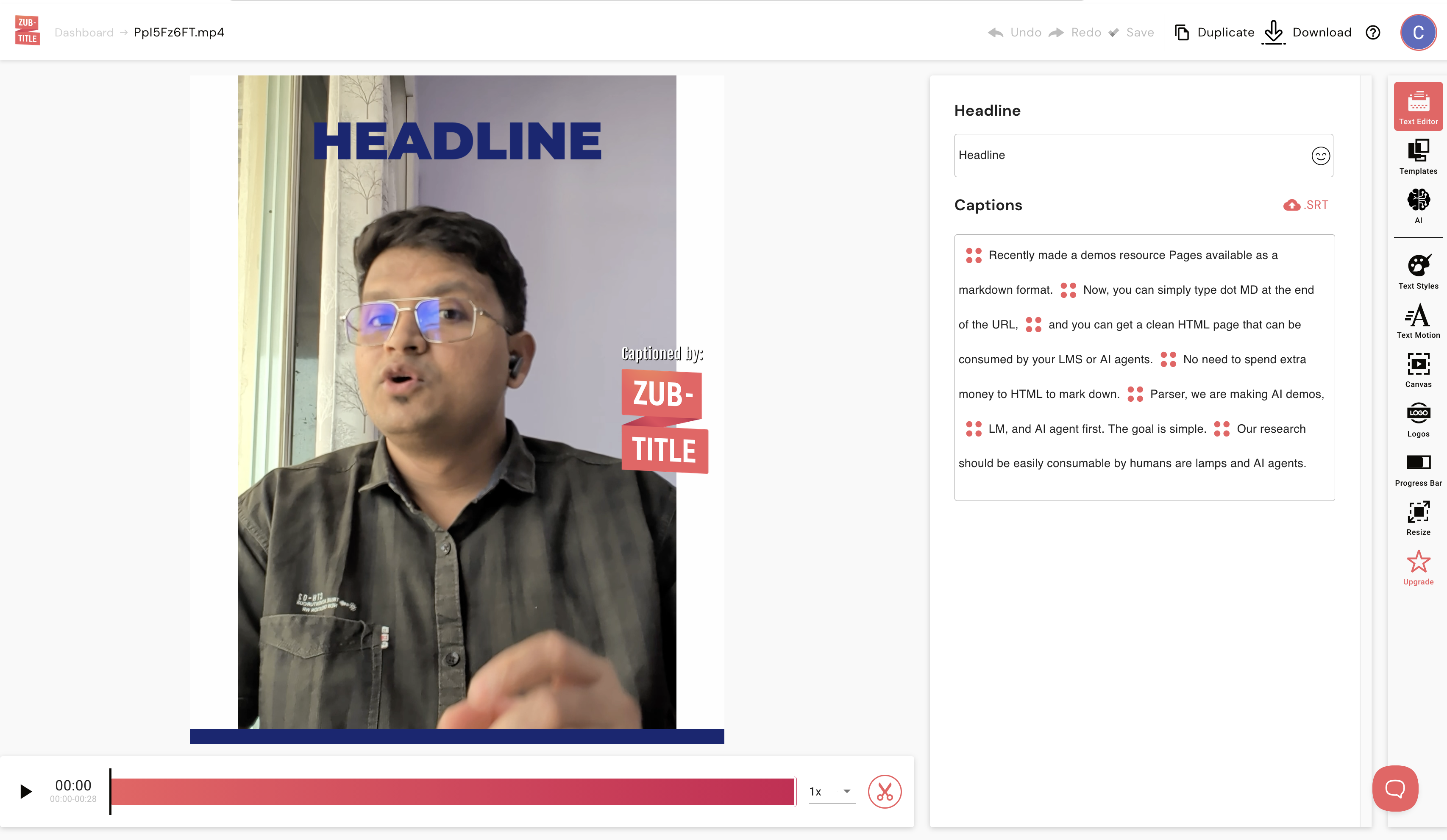
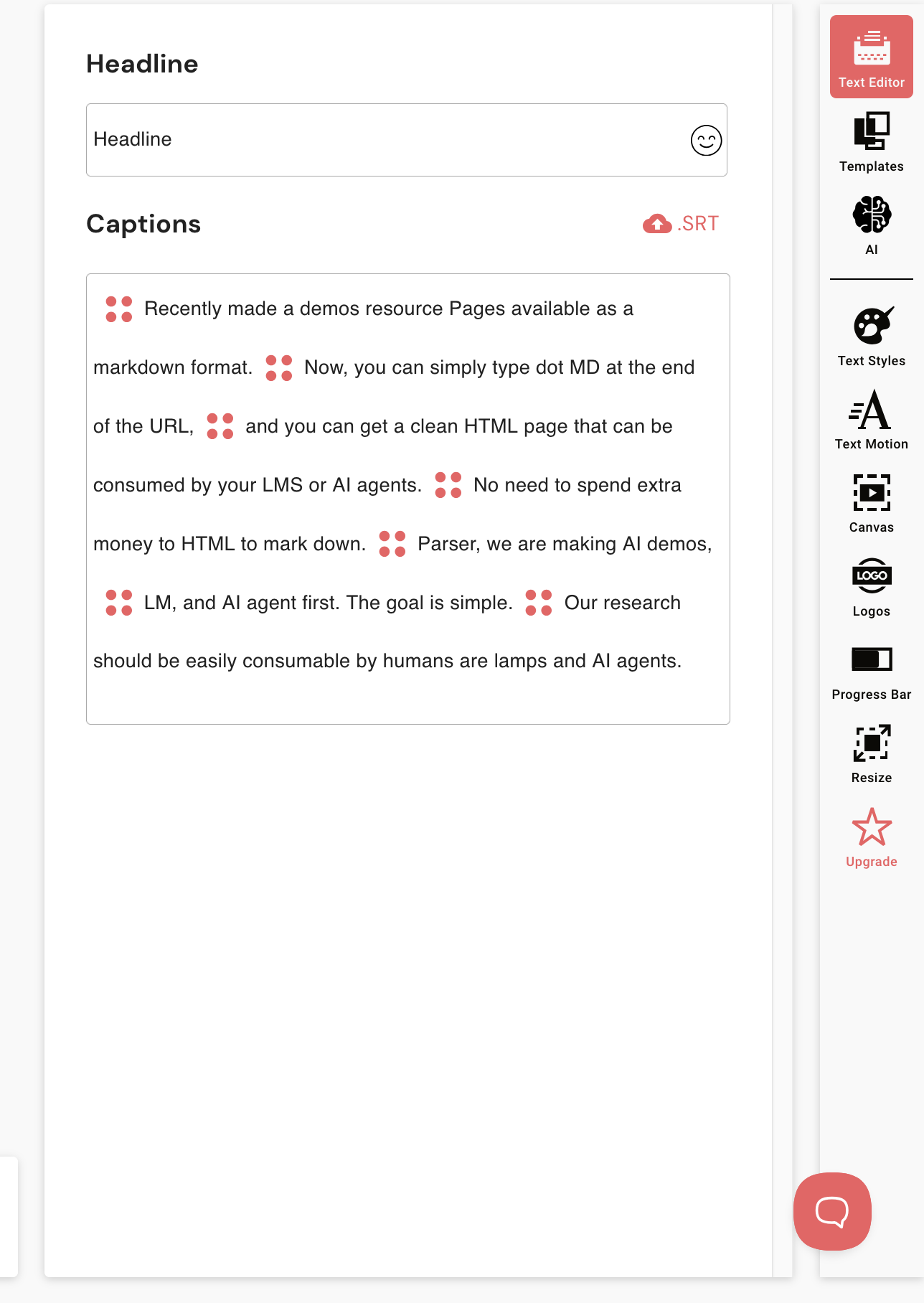
Expected behavior: Zubtitle provides a browser-based caption editor with text, templates, AI, text styles, text motion, canvas, logos, progress bar, and resize controls. In the report, it was used to inspect drafts, remove default elements, and manually correct transcript issues.
Test case: Text prompt → Image
Input type: Text prompt
Input used: Input artifact (Text prompt): Input
Observed output: Output artifact (Image): The editor opened with a fixed HEADLINE box, visible caption controls, and a ZUB-TITLE watermark over the preview, so the default overlay had to be manually removed. — ugly_watermark_and_UI.png
Input artifact: Input artifact (Text prompt): Input
Output artifact: Output artifact (Image): The editor opened with a fixed HEADLINE box, visible caption controls, and a ZUB-TITLE watermark over the preview, so the default overlay had to be manually removed. — ugly_watermark_and_UI.png
What changed: Text prompt transformed into Image
Test case: Text prompt → Image
Input type: Text prompt
Input used: Input artifact (Text prompt): Input
Observed output: Output artifact (Image): The browser editor exposed an editable text panel and a right-side tool menu, but the caption preview still relied on default placement rather than a deeply custom kinetic style. — outdated_editing_options.png
Input artifact: Input artifact (Text prompt): Input
Output artifact: Output artifact (Image): The browser editor exposed an editable text panel and a right-side tool menu, but the caption preview still relied on default placement rather than a deeply custom kinetic style. — outdated_editing_options.png
What changed: Text prompt transformed into Image
Test case: Text prompt → Image
Input type: Text prompt
Input used: Input artifact (Text prompt): Input
Observed output: Output artifact (Image): Output — outdated_editing_options.png
Input artifact: Input artifact (Text prompt): Input
Output artifact: Output artifact (Image): Output — outdated_editing_options.png
What changed: Text prompt transformed into Image
Why it matters / Conclusion: Useful for manual cleanup and basic layout adjustments, but the editor still feels template-bound rather than like a deep caption-design tool.
Zubtitle provides a browser-based caption editor with text, templates, AI, text styles, text motion, canvas, logos, progress bar, and resize controls. In the report, it was used to inspect drafts, remove default elements, and manually correct transcript issues.
Video Export and Plan-Based Output Limits▾
Feature tested: Video Export and Plan-Based Output Limits
Result: Failed
Expected behavior: Zubtitle can render captioned MP4s, with free-tier exports limited to 2 downloads per month, capped at 720p, and permanently watermarked, while paid plans remove the watermark and raise resolution up to 4K.
Test case: Text prompt → Video file
Input type: Text prompt
Input used: Input artifact (Text prompt): Input
Observed output: Output artifact (Video file): Output — zubtitle_test.mp4
Input artifact: Input artifact (Text prompt): Input
Output artifact: Output artifact (Video file): Output — zubtitle_test.mp4
What changed: Text prompt transformed into Video file
Test case: Text prompt → Image
Input type: Text prompt
Input used: Input artifact (Text prompt): Input
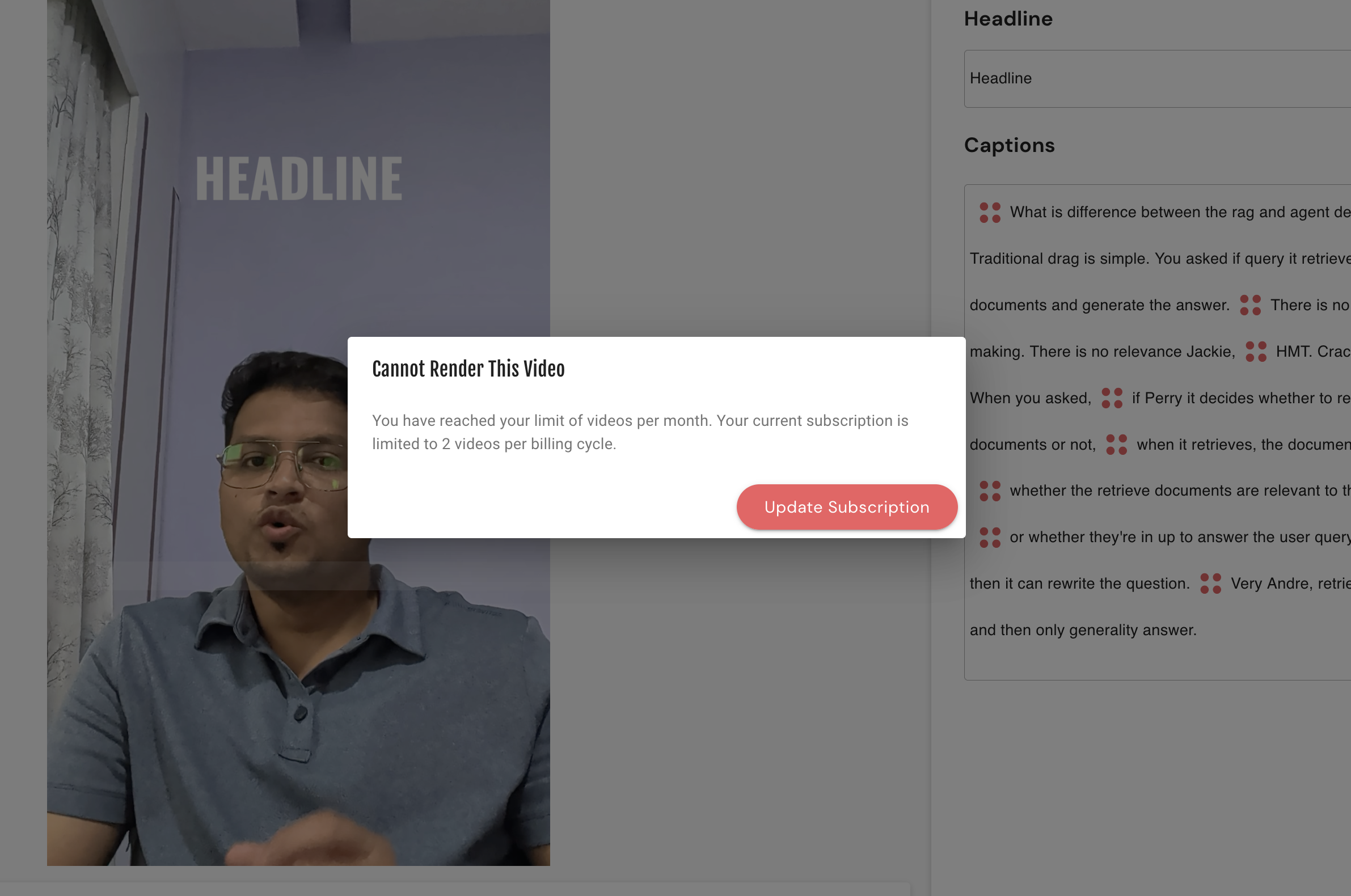
Observed output: Output artifact (Image): The render was blocked by a modal saying the user had reached the monthly download limit and prompting an upgrade. — download_paywall.png
Input artifact: Input artifact (Text prompt): Input
Output artifact: Output artifact (Image): The render was blocked by a modal saying the user had reached the monthly download limit and prompting an upgrade. — download_paywall.png
What changed: Text prompt transformed into Image
Why it matters / Conclusion: The export path works, but the free plan is too limited for serious use because every render is watermarked, capped at 720p, and blocked after two downloads per month.
Zubtitle can render captioned MP4s, with free-tier exports limited to 2 downloads per month, capped at 720p, and permanently watermarked, while paid plans remove the watermark and raise resolution up to 4K.
Pricing plans in the report
The free tier is functional for testing, but paid plans are needed for watermark-free, higher-resolution exports.
Plan details were taken from the pricing table in the research report.
Featured in Rankings
Independent rankings where Zubtitle was tested and rated.
Banner Preview
How the embed badge will look on your site

Embed HTML
Copy this code to your website source
Quick Integration Guide
- 1Copy the HTML code block above.
- 2Paste it into your site's HTML or CMS editor.
- 3Banner appears instantly on your page.
- 4Links back to your tool profile here.
Similar Tools
Discover more AI tools like Zubtitle to enhance your workflow.
Comments (0)
Need a custom AI solution for this use case?
If you are looking to build a custom video captioning, subtitle generation, or caption editing workflow for your business or internal workflow, email us at contact@futuresmart.ai.
Found something inaccurate or missing? We try to keep our AI research accurate and useful. If you found outdated information, an issue, or have a suggestion, email us at collaborate@aidemos.com.