
Descript
Descript automates editing, cleanup, and effects well enough to speed drafts, but review is still essential.
Our take
- You want transcript-first AI editing for raw talking-head or webcam footage
- You want automatic captions with quick manual correction inside the same editor
- You want AI-generated B-roll and are okay replacing weak clips by hand
- You need every meaningful word preserved without review
Feature scores on this page: 7.9/10 (1 scored feature)
Our take
Descript is strongest as an all-in-one draft builder: transcript-first editing, captioning, audio cleanup, background removal, and even prompt-driven sound-effect placement all happen inside the same editor. It can save a lot of time on straightforward talking-head, product, or promo clips, but the tests repeatedly showed cleanup work afterward: cut words, loose B-roll, halo/fringing and lighting mismatch, voice-tone shifts, and sound effects that were sometimes generic or off-timed. The overall fit is best for fast turnaround and a single-project workflow, not for first-pass precision or highly nuanced creative decisions.
In-Depth Review
Our detailed analysis of Descript — features, performance, and real-world testing.
Feature-by-Feature Breakdown
Audio Noise Reduction and Voice Enhancement▾
Feature tested: Audio Noise Reduction and Voice Enhancement
Result: Partial
Expected behavior: Descript cleans up recorded speech by reducing background noise and improving clarity, with adjustable strength and before/after preview. The cards were exercised on indoor AC/fan, indoor AC-only, and outdoor balcony recordings, including the 0–100% slider behavior at the high end.
Test case: Audio file → Audio file
Input type: Audio file
Input used: Input artifact (Audio file): Input — AI demos direction ac and fan on.wav
Observed output: Output artifact (Audio file): At 100% intensity, Studio Sound removed the continuous AC hum, fan whirr, hiss, and mic bump noise from the clip in about 10–15 seconds, but it also changed the speaker's natural vocal timbre. — AI demos direction ac and fan on - Descript Studio Sound Demo Video.mp3
Input artifact: Input artifact (Audio file): Input — AI demos direction ac and fan on.wav
Output artifact: Output artifact (Audio file): At 100% intensity, Studio Sound removed the continuous AC hum, fan whirr, hiss, and mic bump noise from the clip in about 10–15 seconds, but it also changed the speaker's natural vocal timbre. — AI demos direction ac and fan on - Descript Studio Sound Demo Video.mp3
What changed: Audio file transformed into Audio file
Test case: Audio file → Audio file
Input type: Audio file
Input used: Input artifact (Audio file): Input — Ai direction ac on fan off noise from noise.wav
Observed output: Output artifact (Audio file): At 100% intensity, Studio Sound removed the AC hum, hiss-type noise, and most breathing noise, but a small residual noise pocket remained around 7–8 seconds and the voice timbre still shifted. — Ai direction ac on fan off noise from noise - Descript Studio Sound Demo Video.mp3
Input artifact: Input artifact (Audio file): Input — Ai direction ac on fan off noise from noise.wav
Output artifact: Output artifact (Audio file): At 100% intensity, Studio Sound removed the AC hum, hiss-type noise, and most breathing noise, but a small residual noise pocket remained around 7–8 seconds and the voice timbre still shifted. — Ai direction ac on fan off noise from noise - Descript Studio Sound Demo Video.mp3
What changed: Audio file transformed into Audio file
Test case: Audio file → Audio file
Input type: Audio file
Input used: Input artifact (Audio file): Input — Outside in balcony birds vehicles and surrounding noise.wav
Observed output: Output artifact (Audio file): At 100% intensity, Studio Sound reduced wind/air noise, breathing noise, and bird chirping, but a chair-creak/transient noise at the start still remained and the vocal tone changed. — Outside in balcony birds vehicles and surrounding noise - Descript Studio Sound Demo Video.mp3
Input artifact: Input artifact (Audio file): Input — Outside in balcony birds vehicles and surrounding noise.wav
Output artifact: Output artifact (Audio file): At 100% intensity, Studio Sound reduced wind/air noise, breathing noise, and bird chirping, but a chair-creak/transient noise at the start still remained and the vocal tone changed. — Outside in balcony birds vehicles and surrounding noise - Descript Studio Sound Demo Video.mp3
What changed: Audio file transformed into Audio file
Test case: Text prompt → Text prompt
Input type: Text prompt
Input used: Input artifact (Text prompt): Input
Observed output: Output artifact (Text prompt): Output
Input artifact: Input artifact (Text prompt): Input
Output artifact: Output artifact (Text prompt): Output
What changed: Text prompt transformed into Text prompt
Why it matters / Conclusion: Useful cleanup, especially on noisy speech, but it can make the voice sound less natural.
Descript cleans up recorded speech by reducing background noise and improving clarity, with adjustable strength and before/after preview. The cards were exercised on indoor AC/fan, indoor AC-only, and outdoor balcony recordings, including the 0–100% slider behavior at the high end.
Integrated Review and Export▾
Feature tested: Integrated Review and Export
Result: Partial
Expected behavior: Descript keeps generated edits and sound effects inside the editor timeline for in-place review, then exports the finished project as a single video file. The tested outputs included MP4 export while preserving the applied edits.
Test case: Text prompt → Text prompt
Input type: Text prompt
Input used: Input artifact (Text prompt): INPUT
Observed output: Output artifact (Text prompt): OUTPUT
Input artifact: Input artifact (Text prompt): INPUT
Output artifact: Output artifact (Text prompt): OUTPUT
What changed: Text prompt transformed into Text prompt
Test case: Video file → Video file
Input type: Video file
Input used: Input artifact (Video file): Input — input-1-product-demo.mp4
Observed output: Output artifact (Video file): The generated effects were labeled on the timeline and the interface was praised for usability, but export is only available as the full video rather than as separate sound-effect layers. — descript-product-reveal-output-1.mp4
Input artifact: Input artifact (Video file): Input — input-1-product-demo.mp4
Output artifact: Output artifact (Video file): The generated effects were labeled on the timeline and the interface was praised for usability, but export is only available as the full video rather than as separate sound-effect layers. — descript-product-reveal-output-1.mp4
What changed: Video file transformed into Video file
Test case: Video file → Video file
Input type: Video file
Input used: Input artifact (Video file): INPUT — Product reveal.mp4
Observed output: Output artifact (Video file): The finished deliverable is exported as one full video, not as separate sound-effect layers. — descript-product-reveal-output-1.mp4
Input artifact: Input artifact (Video file): INPUT — Product reveal.mp4
Output artifact: Output artifact (Video file): The finished deliverable is exported as one full video, not as separate sound-effect layers. — descript-product-reveal-output-1.mp4
What changed: Video file transformed into Video file
Test case: Text prompt → Video file
Input type: Text prompt
Input used: Input artifact (Text prompt): Input
Observed output: Output artifact (Video file): The finished edit exported successfully as MP4, kept the applied replacement, and retained the original 1920×1080 resolution. — Descript output1.mp4
Input artifact: Input artifact (Text prompt): Input
Output artifact: Output artifact (Video file): The finished edit exported successfully as MP4, kept the applied replacement, and retained the original 1920×1080 resolution. — Descript output1.mp4
What changed: Text prompt transformed into Video file
Test case: Video file → Video file
Input type: Video file
Input used: Input artifact (Video file): Input — oregoncoast_input.mp4.mp4
Observed output: Output artifact (Video file): The exported MP4 preserved the applied background replacement and remained playable at the original 1920 × 1080 resolution; the quality limits came from AI cutout/compositing artifacts, not export corruption. — Descript output1.mp4
Input artifact: Input artifact (Video file): Input — oregoncoast_input.mp4.mp4
Output artifact: Output artifact (Video file): The exported MP4 preserved the applied background replacement and remained playable at the original 1920 × 1080 resolution; the quality limits came from AI cutout/compositing artifacts, not export corruption. — Descript output1.mp4
What changed: Video file transformed into Video file
Test case: Video file → Video file
Input type: Video file
Input used: Input artifact (Video file): Input — talkinghead_input.mp4.mp4
Observed output: Output artifact (Video file): The exported MP4 kept the same replacement scene and resolution, and the edge, lighting, and framing issues visible in the editor carried through unchanged rather than being introduced during export. — Descript output 2.mp4
Input artifact: Input artifact (Video file): Input — talkinghead_input.mp4.mp4
Output artifact: Output artifact (Video file): The exported MP4 kept the same replacement scene and resolution, and the edge, lighting, and framing issues visible in the editor carried through unchanged rather than being introduced during export. — Descript output 2.mp4
What changed: Video file transformed into Video file
Test case: Video file → Video file
Input type: Video file
Input used: Input artifact (Video file): Input — busystreet_input.mp4.mp4
Observed output: Output artifact (Video file): The final MP4 preserved the alley composite at the original 1920 × 1080 resolution; the remaining issues were the same AI scene and segmentation limits already visible in the project. — Descript output 3.mp4
Input artifact: Input artifact (Video file): Input — busystreet_input.mp4.mp4
Output artifact: Output artifact (Video file): The final MP4 preserved the alley composite at the original 1920 × 1080 resolution; the remaining issues were the same AI scene and segmentation limits already visible in the project. — Descript output 3.mp4
What changed: Video file transformed into Video file
Test case: Text prompt → Image
Input type: Text prompt
Input used: Input artifact (Text prompt): Input
Observed output: Output artifact (Image): The transcript, timeline, AI suggestions, and export controls stay in one workspace, but the final cut still needed manual verification before publishing. — Descript-input1-failure-3-manual-review-required-before-publishing.png
Input artifact: Input artifact (Text prompt): Input
Output artifact: Output artifact (Image): The transcript, timeline, AI suggestions, and export controls stay in one workspace, but the final cut still needed manual verification before publishing. — Descript-input1-failure-3-manual-review-required-before-publishing.png
What changed: Text prompt transformed into Image
Why it matters / Conclusion: Export succeeded cleanly in testing and preserved the edit rather than reintroducing new problems.
Descript keeps generated edits and sound effects inside the editor timeline for in-place review, then exports the finished project as a single video file. The tested outputs included MP4 export while preserving the applied edits.
AI Background Removal and Replacement▾
Feature tested: AI Background Removal and Replacement
Result: Partial
Expected behavior: Descript can remove or replace video backgrounds inside the editor with a one-click workflow and non-destructive layered compositing. The exercised cases included walking, talking-head, and busy-street clips, plus video, image, GIF, and stock-background inputs.
Test case: Text prompt → Text prompt
Input type: Text prompt
Input used: Input artifact (Text prompt): INPUT
Observed output: Output artifact (Text prompt): OUTPUT
Input artifact: Input artifact (Text prompt): INPUT
Output artifact: Output artifact (Text prompt): OUTPUT
What changed: Text prompt transformed into Text prompt
Test case: Text prompt → Text prompt
Input type: Text prompt
Input used: Input artifact (Text prompt): INPUT
Observed output: Output artifact (Text prompt): OUTPUT
Input artifact: Input artifact (Text prompt): INPUT
Output artifact: Output artifact (Text prompt): OUTPUT
What changed: Text prompt transformed into Text prompt
Test case: Video file → Video file
Input type: Video file
Input used: Input artifact (Video file): Input — oregoncoast_input.mp4.mp4
Observed output: Output artifact (Video file): The desert backdrop replaced the coast completely and preserved the walking silhouette, but the result still showed edge haloing, lighting mismatch, uniform ripples, and an extra tree that was not requested. — Descript output1.mp4
Input artifact: Input artifact (Video file): Input — oregoncoast_input.mp4.mp4
Output artifact: Output artifact (Video file): The desert backdrop replaced the coast completely and preserved the walking silhouette, but the result still showed edge haloing, lighting mismatch, uniform ripples, and an extra tree that was not requested. — Descript output1.mp4
What changed: Video file transformed into Video file
Test case: Video file → Video file
Input type: Video file
Input used: Input artifact (Video file): Input — talkinghead_input.mp4.mp4
Observed output: Output artifact (Video file): The YouTube-style room read as a coherent composited scene, but the subject lacked colored light spill, the shoulder matte was rough, the background felt undersized, and the output crop tightened compared with the input. — Descript output 2.mp4
Input artifact: Input artifact (Video file): Input — talkinghead_input.mp4.mp4
Output artifact: Output artifact (Video file): The YouTube-style room read as a coherent composited scene, but the subject lacked colored light spill, the shoulder matte was rough, the background felt undersized, and the output crop tightened compared with the input. — Descript output 2.mp4
What changed: Video file transformed into Video file
Test case: Video file → Video file
Input type: Video file
Input used: Input artifact (Video file): Input — busystreet_input.mp4.mp4
Observed output: Output artifact (Video file): The alley scene delivered the requested mood and wet reflections, but the composite also introduced a ghost figure, failed to wrap warm light around the jackets, flattened the motion cue, and left the subjects scaled awkwardly for the narrow walls. — Descript output 3.mp4
Input artifact: Input artifact (Video file): Input — busystreet_input.mp4.mp4
Output artifact: Output artifact (Video file): The alley scene delivered the requested mood and wet reflections, but the composite also introduced a ghost figure, failed to wrap warm light around the jackets, flattened the motion cue, and left the subjects scaled awkwardly for the narrow walls. — Descript output 3.mp4
What changed: Video file transformed into Video file
Why it matters / Conclusion: Useful one-click cutout and replacement, but edge fidelity and motion-heavy scenes still needed cleanup.
Descript can remove or replace video backgrounds inside the editor with a one-click workflow and non-destructive layered compositing. The exercised cases included walking, talking-head, and busy-street clips, plus video, image, GIF, and stock-background inputs.
Automatic Transcription on Upload▾
Feature tested: Automatic Transcription on Upload
Result: Passed
Expected behavior: Descript accepts uploaded media and generates a transcript alongside the waveform for in-app review. The exercised inputs included MP3, FLAC, AAC, and video files.
Test case: Text prompt → Text prompt
Input type: Text prompt
Input used: Input artifact (Text prompt): Input
Observed output: Output artifact (Text prompt): Output
Input artifact: Input artifact (Text prompt): Input
Output artifact: Output artifact (Text prompt): Output
What changed: Text prompt transformed into Text prompt
Test case: Audio file → Text prompt
Input type: Audio file
Input used: Input artifact (Audio file): INPUT — AI demos direction ac and fan on.wav
Observed output: Output artifact (Text prompt): OUTPUT
Input artifact: Input artifact (Audio file): INPUT — AI demos direction ac and fan on.wav
Output artifact: Output artifact (Text prompt): OUTPUT
What changed: Audio file transformed into Text prompt
Test case: Audio file → Text prompt
Input type: Audio file
Input used: Input artifact (Audio file): INPUT — Ai direction ac on fan off noise from noise.wav
Observed output: Output artifact (Text prompt): OUTPUT
Input artifact: Input artifact (Audio file): INPUT — Ai direction ac on fan off noise from noise.wav
Output artifact: Output artifact (Text prompt): OUTPUT
What changed: Audio file transformed into Text prompt
Test case: Audio file → Text prompt
Input type: Audio file
Input used: Input artifact (Audio file): INPUT — Outside in balcony birds vehicles and surrounding noise.wav
Observed output: Output artifact (Text prompt): OUTPUT
Input artifact: Input artifact (Audio file): INPUT — Outside in balcony birds vehicles and surrounding noise.wav
Output artifact: Output artifact (Text prompt): OUTPUT
What changed: Audio file transformed into Text prompt
Why it matters / Conclusion: Useful if you want to stay inside Descript while cleaning clips, though the source report did not provide a saved transcript artifact for comparison.
Descript accepts uploaded media and generates a transcript alongside the waveform for in-app review. The exercised inputs included MP3, FLAC, AAC, and video files.
Batch Audio Cleanup and Export▾
Feature tested: Batch Audio Cleanup and Export
Result: Partial
Expected behavior: Descript lets you apply audio cleanup to multiple files in one action and export the processed audio in common formats such as MP3 or WAV. The tested workflows covered grouped cleanup, bundled batch output, and successful MP3/WAV export.
Test case: Text prompt → Text prompt
Input type: Text prompt
Input used: Input artifact (Text prompt): Input
Observed output: Output artifact (Text prompt): Output
Input artifact: Input artifact (Text prompt): Input
Output artifact: Output artifact (Text prompt): Output
What changed: Text prompt transformed into Text prompt
Why it matters / Conclusion: Handy for bulk application, but the bundled export behavior makes per-file workflows awkward.
Descript lets you apply audio cleanup to multiple files in one action and export the processed audio in common formats such as MP3 or WAV. The tested workflows covered grouped cleanup, bundled batch output, and successful MP3/WAV export.
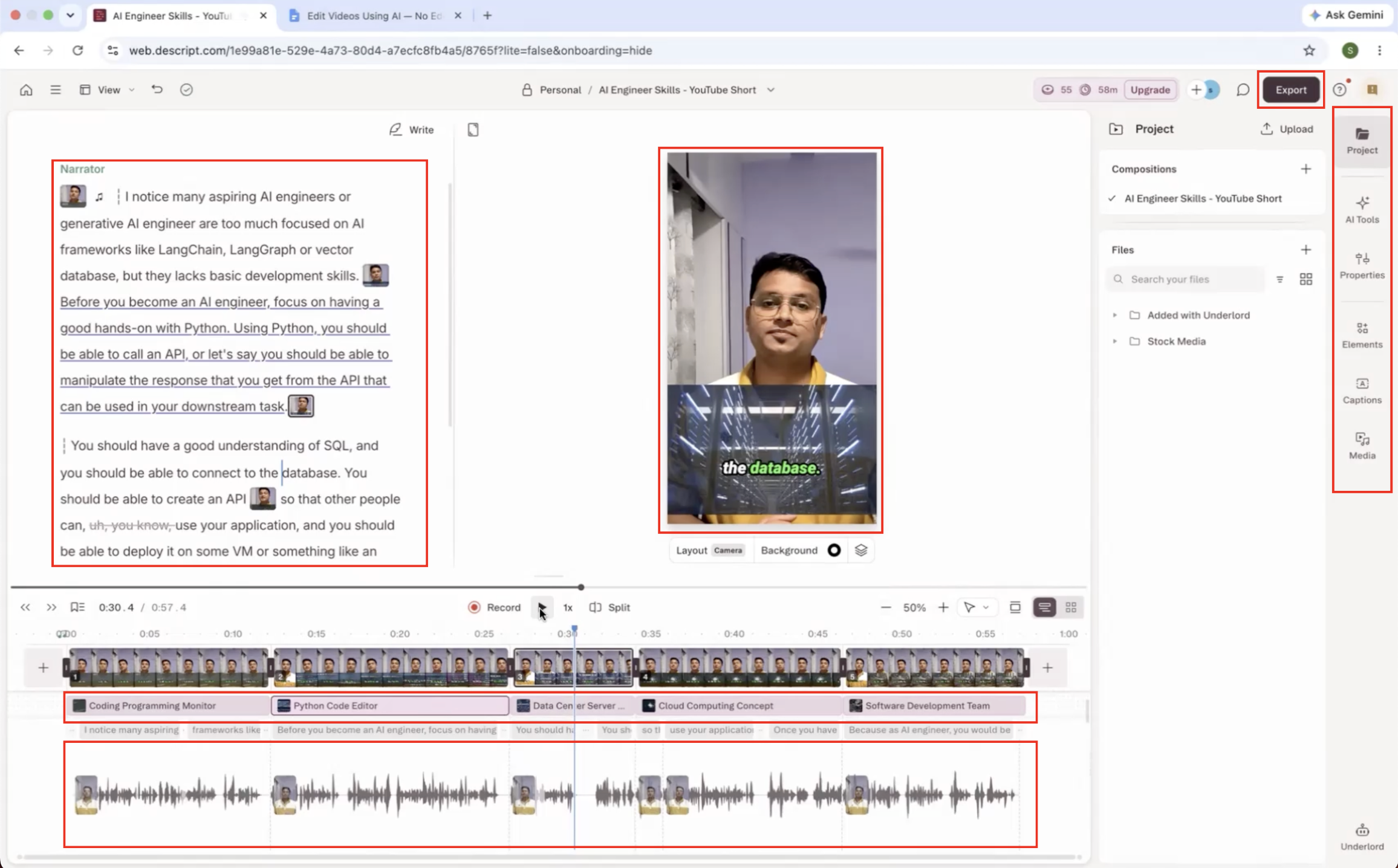
Transcript-based AI editing▾
Feature tested: Transcript-based AI editing
Result: Partial
Expected behavior: Descript lets you edit media from the transcript and prompt, automatically removing dead air, filler words, retakes, and long pauses. In the benchmark it also improved pacing and could add background music, though aggressive cleanup sometimes removed meaningful dialogue.
Test case: Video file → Video file
Input type: Video file
Input used: Input artifact (Video file): Input — Input 1 - Talking Head with Dead Air.mp4
Observed output: Output artifact (Video file): Descript removed most dead air and filler words and tightened pacing, but it also cut meaningful dialogue in places, so the edit needed review before publishing. — Descript Output 1 - Talking Head with Dead Air.mp4
Input artifact: Input artifact (Video file): Input — Input 1 - Talking Head with Dead Air.mp4
Output artifact: Output artifact (Video file): Descript removed most dead air and filler words and tightened pacing, but it also cut meaningful dialogue in places, so the edit needed review before publishing. — Descript Output 1 - Talking Head with Dead Air.mp4
What changed: Video file transformed into Video file
Test case: Video file → Video file
Input type: Video file
Input used: Input artifact (Video file): Input — Input 2 - Low-Quality Audio & Lighting.mp4
Observed output: Output artifact (Video file): The transcript edit cleaned up pauses and filler words on the noisy webcam clip, but some meaningful phrases were removed, so the cut was not fully publish-ready. — Descript Output 2 - Low-Quality Audio & Lighting.mp4
Input artifact: Input artifact (Video file): Input — Input 2 - Low-Quality Audio & Lighting.mp4
Output artifact: Output artifact (Video file): The transcript edit cleaned up pauses and filler words on the noisy webcam clip, but some meaningful phrases were removed, so the cut was not fully publish-ready. — Descript Output 2 - Low-Quality Audio & Lighting.mp4
What changed: Video file transformed into Video file
Why it matters / Conclusion: Strong for fast cleanup and pacing, but the AI can overcut and remove important speech, so manual verification is required.
Descript lets you edit media from the transcript and prompt, automatically removing dead air, filler words, retakes, and long pauses. In the benchmark it also improved pacing and could add background music, though aggressive cleanup sometimes removed meaningful dialogue.
Caption generation and correction▾
Feature tested: Caption generation and correction
Result: Passed
Expected behavior: Descript automatically generates synchronized captions and provides tools to restyle and correct them in the same editor. The benchmark showed high caption accuracy overall, with technical terms and product names still needing manual fixes.
Test case: Video file → Video file
Input type: Video file
Input used: Input artifact (Video file): Input — Input 1 - Talking Head with Dead Air.mp4
Observed output: Output artifact (Video file): Captions were synchronized and generally accurate on the talking-head clip, though some text still needed correction after aggressive transcript edits. — Descript Output 1 - Talking Head with Dead Air.mp4
Input artifact: Input artifact (Video file): Input — Input 1 - Talking Head with Dead Air.mp4
Output artifact: Output artifact (Video file): Captions were synchronized and generally accurate on the talking-head clip, though some text still needed correction after aggressive transcript edits. — Descript Output 1 - Talking Head with Dead Air.mp4
What changed: Video file transformed into Video file
Test case: Video file → Video file
Input type: Video file
Input used: Input artifact (Video file): Input — Input 2 - Low-Quality Audio & Lighting.mp4
Observed output: Output artifact (Video file): Captions stayed synchronized on the low-quality audio clip, but technical terms and product names needed manual correction before publishing. — Descript Output 2 - Low-Quality Audio & Lighting.mp4
Input artifact: Input artifact (Video file): Input — Input 2 - Low-Quality Audio & Lighting.mp4
Output artifact: Output artifact (Video file): Captions stayed synchronized on the low-quality audio clip, but technical terms and product names needed manual correction before publishing. — Descript Output 2 - Low-Quality Audio & Lighting.mp4
What changed: Video file transformed into Video file
Why it matters / Conclusion: Captions were generally accurate and editable, but technical terms still needed human correction.
Descript automatically generates synchronized captions and provides tools to restyle and correct them in the same editor. The benchmark showed high caption accuracy overall, with technical terms and product names still needing manual fixes.
AI B-roll generation and placement▾
Feature tested: AI B-roll generation and placement
Result: Partial
Expected behavior: Descript can generate B-roll from narration and place it on the timeline, then let you replace, reposition, and trim clips manually. On the talking-head input it worked, but several visuals were only loosely related to the narration.
Test case: Video file → Video file
Input type: Video file
Input used: Input artifact (Video file): Input — Input 1 - Talking Head with Dead Air.mp4
Observed output: Output artifact (Video file): B-roll was generated automatically, but several clips were only loosely tied to the narration and needed replacement or repositioning. — Descript Output 1 - Talking Head with Dead Air.mp4
Input artifact: Input artifact (Video file): Input — Input 1 - Talking Head with Dead Air.mp4
Output artifact: Output artifact (Video file): B-roll was generated automatically, but several clips were only loosely tied to the narration and needed replacement or repositioning. — Descript Output 1 - Talking Head with Dead Air.mp4
What changed: Video file transformed into Video file
Why it matters / Conclusion: Helpful on straightforward sections, but relevance varied enough that manual B-roll swaps were still needed.
Descript can generate B-roll from narration and place it on the timeline, then let you replace, reposition, and trim clips manually. On the talking-head input it worked, but several visuals were only loosely related to the narration.
AI sound-effect generation and placement▾
Feature tested: AI sound-effect generation and placement
Result: Partial
Expected behavior: Descript can generate sound effects from a prompt and place them on a video timeline. The earlier benchmark found it strongest on straightforward clips and weaker when timing or genre nuance mattered.
Test case: Video file → Video file
Input type: Video file
Input used: Input artifact (Video file): Input — input-1-product-demo.mp4
Observed output: Output artifact (Video file): The tool accepted drag-and-drop upload and automatically added three named sound effects. The crisp effect fit well, but a water-bubble effect felt unnecessary; the finished project still has to be exported as one full video. — descript-product-reveal-output-1.mp4
Input artifact: Input artifact (Video file): Input — input-1-product-demo.mp4
Output artifact: Output artifact (Video file): The tool accepted drag-and-drop upload and automatically added three named sound effects. The crisp effect fit well, but a water-bubble effect felt unnecessary; the finished project still has to be exported as one full video. — descript-product-reveal-output-1.mp4
What changed: Video file transformed into Video file
Test case: Video file → Video file
Input type: Video file
Input used: Input artifact (Video file): Input — input-2-bird-chirping.mp4
Observed output: Output artifact (Video file): Descript placed bird chirping continuously across the full 10-second clip even though the bird only chirped a few times, so the sound was not synced to the actual action. — descript-bird-chirping-output-1.mp4
Input artifact: Input artifact (Video file): Input — input-2-bird-chirping.mp4
Output artifact: Output artifact (Video file): Descript placed bird chirping continuously across the full 10-second clip even though the bird only chirped a few times, so the sound was not synced to the actual action. — descript-bird-chirping-output-1.mp4
What changed: Video file transformed into Video file
Test case: Video file → Video file
Input type: Video file
Input used: Input artifact (Video file): Input — input-3-horror-ghost.mp4
Observed output: Output artifact (Video file): The horror-adjacent sound design was contextually acceptable but generic and stock-library-like, with the reviewer rating it 6/10 and judging it weaker than Mirelo on the same scene. — descript-horror-output-1.mp4
Input artifact: Input artifact (Video file): Input — input-3-horror-ghost.mp4
Output artifact: Output artifact (Video file): The horror-adjacent sound design was contextually acceptable but generic and stock-library-like, with the reviewer rating it 6/10 and judging it weaker than Mirelo on the same scene. — descript-horror-output-1.mp4
What changed: Video file transformed into Video file
Test case: Video file → Text prompt
Input type: Video file
Input used: Input artifact (Video file): INPUT — input-2-bird-chirping.mp4
Observed output: Output artifact (Text prompt): OUTPUT
Input artifact: Input artifact (Video file): INPUT — input-2-bird-chirping.mp4
Output artifact: Output artifact (Text prompt): OUTPUT
What changed: Video file transformed into Text prompt
Test case: Video file → Video file
Input type: Video file
Input used: Input artifact (Video file): INPUT — Product reveal.mp4
Observed output: Output artifact (Video file): Three sound effects were added automatically. The crisp effect fit well, while one water-bubble effect felt unnecessary. Overall, the reviewer liked the result. — descript-product-reveal-output-1.mp4
Input artifact: Input artifact (Video file): INPUT — Product reveal.mp4
Output artifact: Output artifact (Video file): Three sound effects were added automatically. The crisp effect fit well, while one water-bubble effect felt unnecessary. Overall, the reviewer liked the result. — descript-product-reveal-output-1.mp4
What changed: Video file transformed into Video file
Test case: Video file → Video file
Input type: Video file
Input used: Input artifact (Video file): INPUT — Bird.mp4
Observed output: Output artifact (Video file): Bird chirping was added for the full 10-second clip even though the bird chirped only 2–3 times, so the sound was not synced to the actual behavior. — descript-bird-chirping-output-1.mp4
Input artifact: Input artifact (Video file): INPUT — Bird.mp4
Output artifact: Output artifact (Video file): Bird chirping was added for the full 10-second clip even though the bird chirped only 2–3 times, so the sound was not synced to the actual behavior. — descript-bird-chirping-output-1.mp4
What changed: Video file transformed into Video file
Test case: Video file → Video file
Input type: Video file
Input used: Input artifact (Video file): INPUT — Horror scene .mp4
Observed output: Output artifact (Video file): The horror pass produced contextually relevant but generic sound effects; the reviewer said it needed manual trimming and rated the result 6/10. — descript-horror-output-1.mp4
Input artifact: Input artifact (Video file): INPUT — Horror scene .mp4
Output artifact: Output artifact (Video file): The horror pass produced contextually relevant but generic sound effects; the reviewer said it needed manual trimming and rated the result 6/10. — descript-horror-output-1.mp4
What changed: Video file transformed into Video file
Test case: Video file → Text prompt
Input type: Video file
Input used: Input artifact (Video file): INPUT — Bird.mp4
Observed output: Output artifact (Text prompt): OUTPUT
Input artifact: Input artifact (Video file): INPUT — Bird.mp4
Output artifact: Output artifact (Text prompt): OUTPUT
What changed: Video file transformed into Text prompt
Test case: Video file → Text prompt
Input type: Video file
Input used: Input artifact (Video file): Input — input-2-bird-chirping.mp4
Observed output: Output artifact (Text prompt): Output
Input artifact: Input artifact (Video file): Input — input-2-bird-chirping.mp4
Output artifact: Output artifact (Text prompt): Output
What changed: Video file transformed into Text prompt
Why it matters / Conclusion: Good on straightforward clips, but timing and genre nuance were less reliable.
Descript can generate sound effects from a prompt and place them on a video timeline. The earlier benchmark found it strongest on straightforward clips and weaker when timing or genre nuance mattered.
AI Storyboard GenerationModerate — capable but dependent on agent workflow7.9/10▾
Feature tested: AI Storyboard Generation
Result: Passed (7.9/10)
Verdict: Moderate — capable but dependent on agent workflow
Expected behavior: Descript can map script content into storyboard frames automatically and organize those frames in storyboard view. The cards cover both prompt-driven frame creation and the agent-assisted workflow used to reduce manual organization after generation.
Test case: Artifact → Image
Input type: Artifact
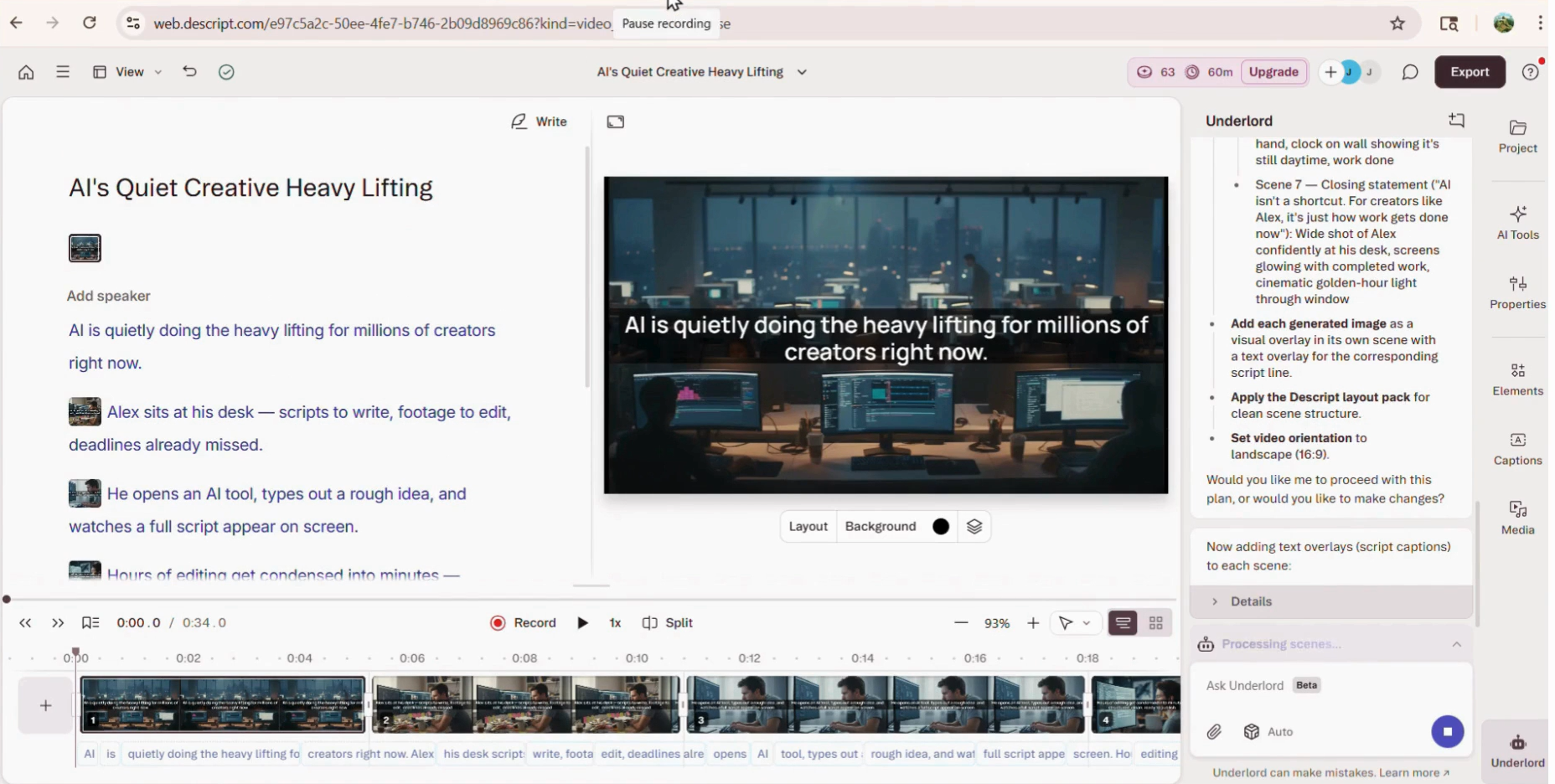
Input used: Input artifact (Artifact): Narrative script submitted to AI agent with prompt : Create a realistic storyboard in 16:9 aspect ratio, using a photorealistic, cinematic style with natural lighting. Ensure strong character consistency across all frames (the same character must remain visually identical throughout) and maintain environmental continuity unless contextually required. Map each line of the script into appropriate storyboard frames with clear visual storytelling. SCRIPT: AI is quietly doing the heavy lifting for millions of creators right now. Alex sits at his desk — scripts to write, footage to edit, deadlines already missed. He opens an AI tool, types out a rough idea, and watches a full script appear on screen. Hours of editing get condensed into minutes — structured, clean, ready to publish. What used to take a full day wraps up in a single sitting. AI isn't a shortcut. For creators like Alex, it's just how work gets done now.
Observed output: Output artifact (Image): Storyboard view generated on the left panel — each script line explicitly paired to its corresponding frame by the AI agent. — Screenshot 2026-04-09 172755.png
Input artifact: Input artifact (Artifact): Narrative script submitted to AI agent with prompt : Create a realistic storyboard in 16:9 aspect ratio, using a photorealistic, cinematic style with natural lighting. Ensure strong character consistency across all frames (the same character must remain visually identical throughout) and maintain environmental continuity unless contextually required. Map each line of the script into appropriate storyboard frames with clear visual storytelling. SCRIPT: AI is quietly doing the heavy lifting for millions of creators right now. Alex sits at his desk — scripts to write, footage to edit, deadlines already missed. He opens an AI tool, types out a rough idea, and watches a full script appear on screen. Hours of editing get condensed into minutes — structured, clean, ready to publish. What used to take a full day wraps up in a single sitting. AI isn't a shortcut. For creators like Alex, it's just how work gets done now.
Output artifact: Output artifact (Image): Storyboard view generated on the left panel — each script line explicitly paired to its corresponding frame by the AI agent. — Screenshot 2026-04-09 172755.png
What changed: Artifact transformed into Image
Test case: Artifact → Artifact
Input type: Artifact
Input used: Input artifact (Artifact): Creator narrative script with character consistency instruction : Create a realistic storyboard in 16:9 aspect ratio, using a photorealistic, cinematic style with natural lighting. Ensure strong character consistency across all frames (the same character must remain visually identical throughout) and maintain environmental continuity unless contextually required. Map each line of the script into appropriate storyboard frames with clear visual storytelling. SCRIPT: AI is quietly doing the heavy lifting for millions of creators right now. Alex sits at his desk — scripts to write, footage to edit, deadlines already missed. He opens an AI tool, types out a rough idea, and watches a full script appear on screen. Hours of editing get condensed into minutes — structured, clean, ready to publish. What used to take a full day wraps up in a single sitting. AI isn't a shortcut. For creators like Alex, it's just how work gets done now.
Observed output: Output artifact (Artifact): General character appearance maintained — same build and clothing style across frames, but facial features varied noticeably between scenes.
Input artifact: Input artifact (Artifact): Creator narrative script with character consistency instruction : Create a realistic storyboard in 16:9 aspect ratio, using a photorealistic, cinematic style with natural lighting. Ensure strong character consistency across all frames (the same character must remain visually identical throughout) and maintain environmental continuity unless contextually required. Map each line of the script into appropriate storyboard frames with clear visual storytelling. SCRIPT: AI is quietly doing the heavy lifting for millions of creators right now. Alex sits at his desk — scripts to write, footage to edit, deadlines already missed. He opens an AI tool, types out a rough idea, and watches a full script appear on screen. Hours of editing get condensed into minutes — structured, clean, ready to publish. What used to take a full day wraps up in a single sitting. AI isn't a shortcut. For creators like Alex, it's just how work gets done now.
Output artifact: Output artifact (Artifact): General character appearance maintained — same build and clothing style across frames, but facial features varied noticeably between scenes.
What changed: Artifact transformed into Artifact
Test case: Text prompt → Text prompt
Input type: Text prompt
Input used: Input artifact (Text prompt): INPUT
Observed output: Output artifact (Text prompt): OUTPUT
Input artifact: Input artifact (Text prompt): INPUT
Output artifact: Output artifact (Text prompt): OUTPUT
What changed: Text prompt transformed into Text prompt
Test case: Artifact → PDF document
Input type: Artifact
Input used: Input artifact (Artifact): Technical script vector style instruction: Create a vector-style storyboard (clean vector graphics, flat or minimal tech-illustration style) in 16:9 aspect ratio, ensuring consistent visual style, layout system, iconography, and color palette across all frames. Maintain conceptual consistency in how elements are visually represented throughout the storyboard. Interpret each line of the script and convert it into clear explanatory visuals. SCRIPT: A base LLM only knows what it learned during training — its knowledge is frozen at the cutoff. This makes it unreliable for anything recent, private, or domain-specific. Retrieval-Augmented Generation (RAG) solves this by retrieving relevant documents before generation. The query is embedded and similar chunks are fetched from a vector database. Those chunks are injected into the prompt alongside the original query. The LLM generates an answer using both its training knowledge and the retrieved context.
Observed output: Output artifact (PDF document): Clean above average quality images generated per scene — accurate in terms of script interpretation — Descript storyboard.pdf
Input artifact: Input artifact (Artifact): Technical script vector style instruction: Create a vector-style storyboard (clean vector graphics, flat or minimal tech-illustration style) in 16:9 aspect ratio, ensuring consistent visual style, layout system, iconography, and color palette across all frames. Maintain conceptual consistency in how elements are visually represented throughout the storyboard. Interpret each line of the script and convert it into clear explanatory visuals. SCRIPT: A base LLM only knows what it learned during training — its knowledge is frozen at the cutoff. This makes it unreliable for anything recent, private, or domain-specific. Retrieval-Augmented Generation (RAG) solves this by retrieving relevant documents before generation. The query is embedded and similar chunks are fetched from a vector database. Those chunks are injected into the prompt alongside the original query. The LLM generates an answer using both its training knowledge and the retrieved context.
Output artifact: Output artifact (PDF document): Clean above average quality images generated per scene — accurate in terms of script interpretation — Descript storyboard.pdf
What changed: Artifact transformed into PDF document
Why it matters / Conclusion: Explicit script-to-frame mapping is handled automatically by the AI agent, reducing the need for manual organisation after generation, though it remains dependent on the agent’s workflow.
Descript can map script content into storyboard frames automatically and organize those frames in storyboard view. The cards cover both prompt-driven frame creation and the agent-assisted workflow used to reduce manual organization after generation.
Pricing and access
The benchmark was run on the Free Trial.
Plans and limits were listed in the source report and last verified there in July 2026.
Featured in Rankings
Independent rankings where Descript was tested and rated.
Banner Preview
How the embed badge will look on your site

Embed HTML
Copy this code to your website source
Quick Integration Guide
- 1Copy the HTML code block above.
- 2Paste it into your site's HTML or CMS editor.
- 3Banner appears instantly on your page.
- 4Links back to your tool profile here.
Similar Tools
Discover more AI tools like Descript to enhance your workflow.
Comments (0)
Need a custom AI solution for this use case?
If you are looking to build a custom transcript-based video editing, caption generation, or audio cleanup workflow for your business or internal workflow, email us at contact@futuresmart.ai.
Found something inaccurate or missing? We try to keep our AI research accurate and useful. If you found outdated information, an issue, or have a suggestion, email us at collaborate@aidemos.com.