Best AI Tools for Animated Captions with Effects in Videos
We tested six video captioning tools on four real talking-head clips to compare transcription accuracy, word-level timing, style flexibility, and export limits.
Updated July 20266 tools10 decisive checks59 findings12 min read
Best overall caption quality in this set, with strong transcript cleanup, polished styling, and the most convincing kinetic-caption workflow before the export wall stops it.
Catch
It does not support easy reuse of a style across multiple clips on the tested tier, which is the main thing batch workflow needs, so the score is near the bottom.
The evidence-backed checks show the shape of the field; coverage explains the gaps.
Tool10 decisive checksCoverageScoreWhere it lands
#1AutoCaption.io$14–$18514—14—455Animation quality · Batch capability · Customization depth · Editing ease · Export flexibility · Processing speed · Speaker detection · Style range · Timing precision · Transcription accuracy8/10skipped Editing ease, Speaker detection3.6Best overall caption quality in this set, with strong transcript cleanup, polished styling, and the most convincing kinetic-caption workflow before the export wall stops it.
#2Vidyo.aiFree · $29/mo51152———43Animation quality · Batch capability · Customization depth · Editing ease · Export flexibility · Processing speed · Speaker detection · Style range · Timing precision · Transcription accuracy7/10skipped Processing speed, Speaker detection, Style range3The out-of-the-box animated caption look is strong and sync holds up well on fast speech, but the free tier still locks down branding, fonts, and raw subtitle export.
#3VEED₹520/mo—1441————5Animation quality · Batch capability · Customization depth · Editing ease · Export flexibility · Processing speed · Speaker detection · Style range · Timing precision · Transcription accuracy5/10skipped Animation quality, Processing speed, Speaker detection, Style range, Timing precision3VEED gives you the deepest timeline control and strong ASR, yet the free tier’s watermark, 720p limit, and quota stop the batch workflow from finishing cleanly.
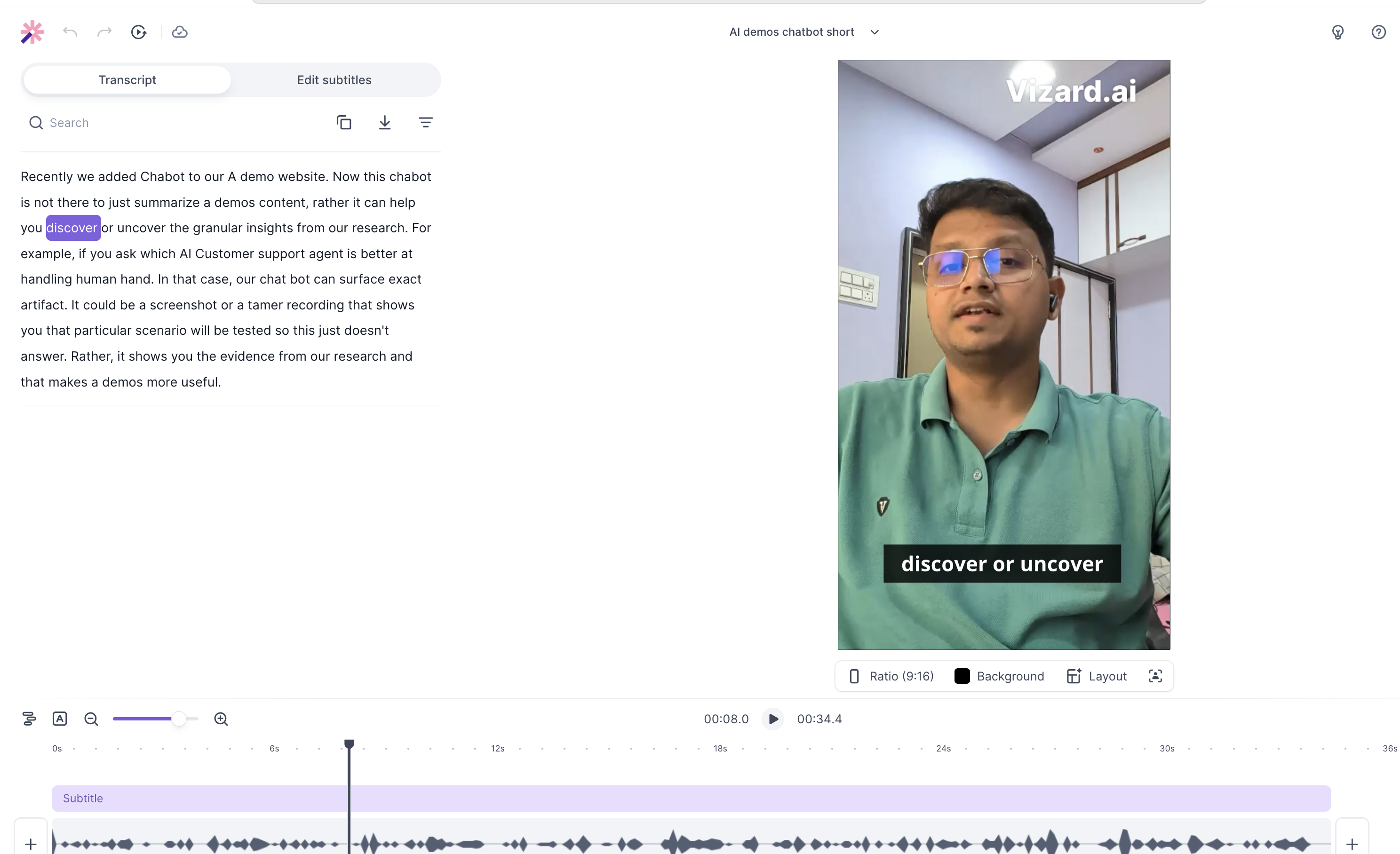
#4Vizard.aiFree · $14.5/month412323—351Animation quality · Batch capability · Customization depth · Editing ease · Export flexibility · Processing speed · Speaker detection · Style range · Timing precision · Transcription accuracy9/10skipped Speaker detection2.7Reliable word-level sync and a very usable transcript-first editor, but the free tier’s 720p cap and watermark keep it from feeling production-ready.
#5ZubtitleFree · $19/mo—1331———52Animation quality · Batch capability · Customization depth · Editing ease · Export flexibility · Processing speed · Speaker detection · Style range · Timing precision · Transcription accuracy6/10skipped Animation quality, Processing speed, Speaker detection, Style range2.5The roughest captions of the set, with garbled technical transcription, rigid layouts, and a free tier that quickly runs into download limits and watermarking.
#6Opus Clip$16 USD / $9 USD/mo24131——431Animation quality · Batch capability · Customization depth · Editing ease · Export flexibility · Processing speed · Speaker detection · Style range · Timing precision · Transcription accuracy8/10skipped Processing speed, Speaker detection2.4Good at auto-clipping, face-centered reframing, and quick output, but it misreads technical syntax and still blocks branded/exportable workflows on the free plan.
Ranking rule: tools measured on every decisive check rank above tools missing any, whatever their score. AutoCaption.io skipped Editing ease, Speaker detection (scores 3.6 on the checks it ran); Vidyo.ai skipped Processing speed, Speaker detection, Style range (scores 3 on the checks it ran); VEED skipped Animation quality, Processing speed, Speaker detection, Style range, Timing precision (scores 3 on the checks it ran); Vizard.ai skipped Speaker detection (scores 2.7 on the checks it ran); Zubtitle skipped Animation quality, Processing speed, Speaker detection, Style range (scores 2.5 on the checks it ran); Opus Clip skipped Processing speed, Speaker detection (scores 2.4 on the checks it ran).
Compare
Pick the tools you care about, then compare what they returned or how they scored.
Tools6 of 6 selected
No output file capturedThe written finding remains available in Evidence.
AutoCaption.io
It kept the fast speech tightly synced and the bounce animation looked smooth, but export was blocked and the extra emoji styling felt repetitive.
Written result only
No output file capturedThe written finding remains available in Evidence.
Vidyo.ai
It kept up with rapid speech fairly well, added emoji-style touches automatically, and stayed mostly in sync, though the fastest bursts still showed a bit of timing lag.
Written result only
Result not recorded per promptVEED was tested, but its results were written up across all 4 prompts together rather than prompt by prompt.
VEED
VEED's findings for this run cover all 4 prompts together, so there is no per-prompt result to show here. Its full write-up is in Evidence.
Covered run-wide
The output#4
Vizard.ai
It kept word highlights locked to fast speech and the text motion stayed smooth, but the preset styles were fairly generic and the export was still a watermarked 720p file.
vizard-ai-output-2-0fe895f65935.png
Result not recorded per promptZubtitle was tested, but its results were written up across all 4 prompts together rather than prompt by prompt.
Zubtitle
Zubtitle's findings for this run cover all 4 prompts together, so there is no per-prompt result to show here. Its full write-up is in Evidence.
Covered run-wide
No output file capturedThe written finding remains available in Evidence.
Opus Clip
It handled the fast clip and added semantic emoji, but the subtitles lagged and stuttered when the speech speed increased.
Written result only
The evidence
All 10 recorded checks per tool. Open a tool to inspect every finding.
Why this score
The motion looked smooth and clean during rapid speech, which is exactly what good caption animation should do; confidence is low because we only observed one animation style on one fast clip.
When we tried: AI demos chatbot short
The kinetic word-bounce preset tracked rapid delivery smoothly without visible frame delays or caption overlaps.
AutoCaption.io is the page’s overall winner, and that matches the scorecard: it pairs top-tier transcription accuracy, timing precision, and strong word-level sync with solid processing speed and decent style/customization depth. The trade-off is real, though: export flexibility is only 1/5 and batch capability is also 1/5, so it looks best when caption quality and sync matter more than reuse or high-volume workflows. Because it is marked partly tested (8 of 10 decisive checks), the coverage is incomplete, so the win should be read as policy-backed rather than a claim of full measurement.
If you need the strongest manual subtitle control and accurate transcription, VEED.io is the next best fit, but its 1/5 export flexibility and quota limits mean the workflow breaks down on free-tier use. Vidyo.ai is the pick for polished kinetic templates and easy editing, but it is much more rigid, with weak customization and only middling export options. Vizard.ai is decent for caption sync and transcript-driven editing, but its transcription score is poor and branding/export limits are a constraint. Zubtitle is mainly a timing-first option, but weak jargon handling and locked-down export reduce its usefulness. Opus Clip is better when preset clip generation matters more than deep caption customization, yet it is also held back by weak export and transcription scores.
Similar Tools
The tools we tested for this use case — each card opens its full tested review.
⚡ Built by FutureSmart AI — the team behind AI Demos
Need a custom AI solution for this use case?
If you are looking to build a custom video captioning, subtitle styling, or animated captions system for your business or internal workflow, email us at contact@futuresmart.ai.
Found something inaccurate or missing? We try to keep our AI research accurate and useful. If you found outdated information, an issue, or have a suggestion, email us at collaborate@aidemos.com.
Comments (0)