
AKOOL
A browser-based AI video studio for avatar ads and dubbing, with useful exports and clear tradeoffs
Our take
- You want to turn a written script into a vertical avatar video quickly.
- You want to dub a finished video and export a downloadable MP4 directly in the browser.
- You want a browser-based editor that lets you reopen a project and keep refining it.
- You need the final ad or dubbed video to feel fully natural and creator-shot right away.
Our take
Akool covers two useful jobs: it can turn scripts into exportable avatar videos, and it can dub finished videos with real lip sync in the browser. The workflow is practical, especially with project reopening/in-place editing and direct MP4 export, but the results still show visible AI styling, restrained motion, and some quality issues. In translation use, the free tier especially comes with compromises like resolution loss, timing drift, and untranslated on-screen text or labels.
In-Depth Review
Our detailed analysis of AKOOL — features, performance, and real-world testing.
Feature-by-Feature Breakdown
AI Video Dubbing with Voice Cloning and Lip SyncWorks end-to-end, but translation coverage and render stability are inconsistent.▾
Feature tested: AI Video Dubbing with Voice Cloning and Lip Sync
Result: Partial
Verdict: Works end-to-end, but translation coverage and render stability are inconsistent.
Expected behavior: Akool translated finished vertical videos into dubbed outputs and attempted voice cloning plus lip sync on the tested fitness, educational, and vlog clips. The evidence includes English→Hindi, English→Spanish, and Hindi→English source videos with visible mouth regeneration in some renders.
Test case: Video file → Video file
Input type: Video file
Input used: Input artifact (Video file): INPUT — Input 1 Fitness Video (online-video-cutter.com).mp4
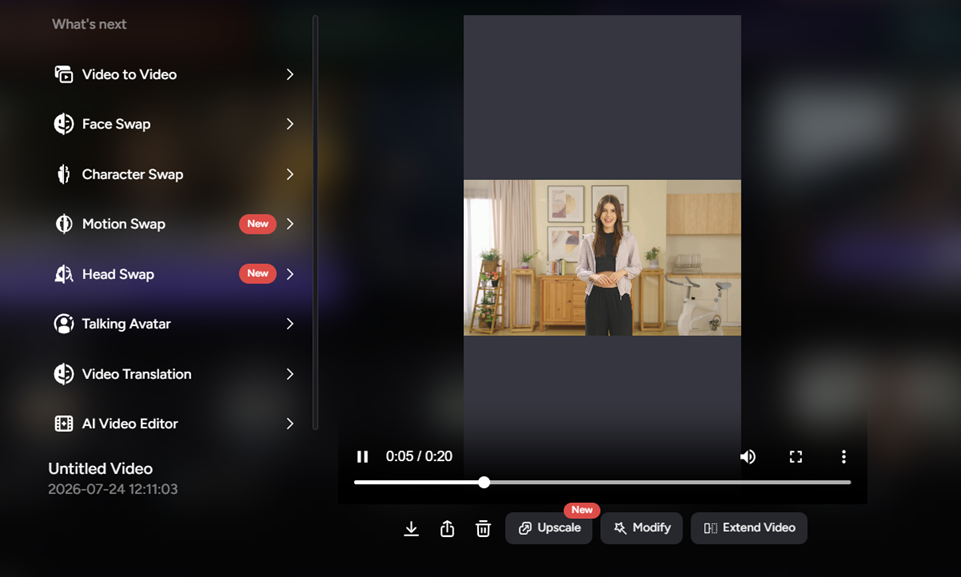
Observed output: Output artifact (Video file): Fitness input exported as a vertical dubbed MP4, but the delivered file baked in a bright-green body defect with a stray white “9,” left burned-in English captions untranslated, and drifted out of exact sync partway through. — akool output 1.mp4
Input artifact: Input artifact (Video file): INPUT — Input 1 Fitness Video (online-video-cutter.com).mp4
Output artifact: Output artifact (Video file): Fitness input exported as a vertical dubbed MP4, but the delivered file baked in a bright-green body defect with a stray white “9,” left burned-in English captions untranslated, and drifted out of exact sync partway through. — akool output 1.mp4
What changed: Video file transformed into Video file
Test case: Video file → Video file
Input type: Video file
Input used: Input artifact (Video file): INPUT — Input 2 Educational.mp4
Observed output: Output artifact (Video file): Educational input returned a vertical dubbed MP4 with genuine mouth regeneration, preserved 360×640 resolution, but left the banana-ripeness labels in English and shortened the clip from 9.08s to 7.48s with non-uniform timing compression. — akool output 2.mp4
Input artifact: Input artifact (Video file): INPUT — Input 2 Educational.mp4
Output artifact: Output artifact (Video file): Educational input returned a vertical dubbed MP4 with genuine mouth regeneration, preserved 360×640 resolution, but left the banana-ripeness labels in English and shortened the clip from 9.08s to 7.48s with non-uniform timing compression. — akool output 2.mp4
What changed: Video file transformed into Video file
Test case: Video file → Video file
Input type: Video file
Input used: Input artifact (Video file): INPUT: Hindi→English vlog-style talking-head clip with a man speaking in a neon-lit room and on-screen promotional text. — Do Fitness Influencers Actually Know Fitness_.publer.com.mp4
Observed output: Output artifact (Video file): Exports a vertical dubbed MP4 with active mouth movement and preserves pre-existing English branding text, but carries through a full Hindi sentence and another Hindi word untranslated while timing drifts from the source. — akool output 3.mp4
Input artifact: Input artifact (Video file): INPUT: Hindi→English vlog-style talking-head clip with a man speaking in a neon-lit room and on-screen promotional text. — Do Fitness Influencers Actually Know Fitness_.publer.com.mp4
Output artifact: Output artifact (Video file): Exports a vertical dubbed MP4 with active mouth movement and preserves pre-existing English branding text, but carries through a full Hindi sentence and another Hindi word untranslated while timing drifts from the source. — akool output 3.mp4
What changed: Video file transformed into Video file
Why it matters / Conclusion: This is the core strength: the pipeline ran end-to-end and real lip motion was visible in 2 of 3 tests, but translation coverage was uneven and one render had a serious visual defect.
Akool translated finished vertical videos into dubbed outputs and attempted voice cloning plus lip sync on the tested fitness, educational, and vlog clips. The evidence includes English→Hindi, English→Spanish, and Hindi→English source videos with visible mouth regeneration in some renders.
Video Export and Delivery ControlsExports successfully, but the free tier can visibly cap resolution on larger sources.▾
Feature tested: Video Export and Delivery Controls
Result: Partial
Verdict: Exports successfully, but the free tier can visibly cap resolution on larger sources.
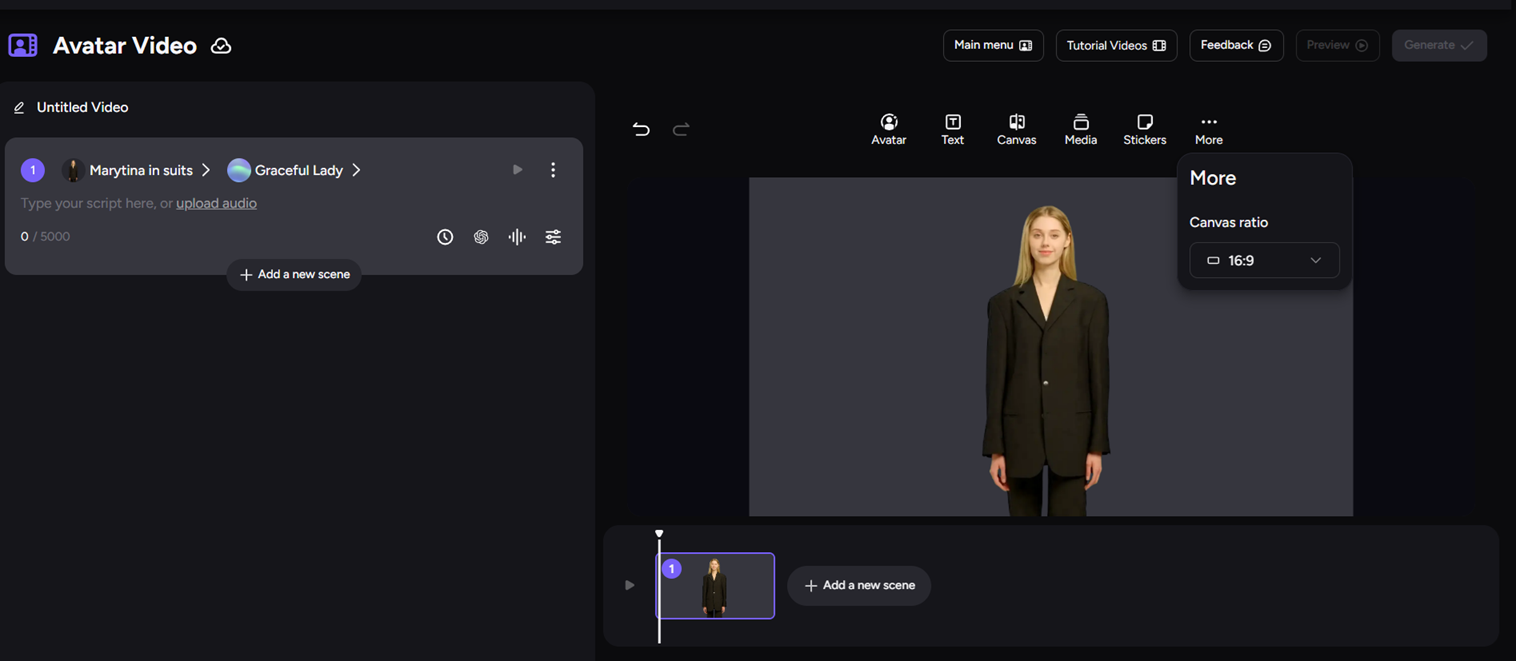
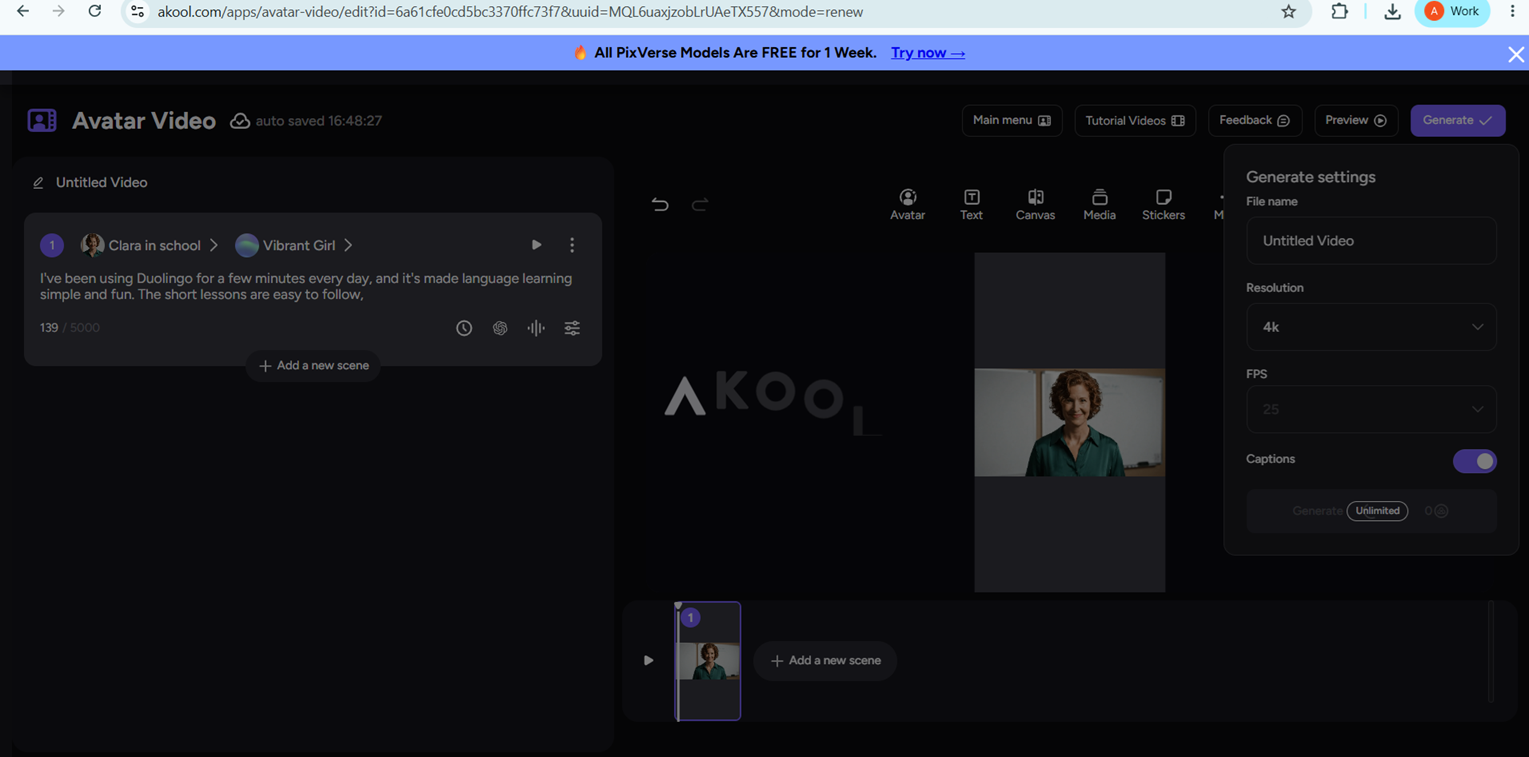
Expected behavior: Akool exported completed videos as downloadable MP4s and exposed delivery settings such as vertical 9:16 output, canvas ratio, resolution, FPS, and captions. The tested runs also showed resolution handling, including free-tier downscaling on a 1080×1920 source.
Test case: Video file → Video file
Input type: Video file
Input used: Input artifact (Video file): INPUT — Input 1 Fitness Video (online-video-cutter.com).mp4
Observed output: Output artifact (Video file): Directly downloadable vertical MP4 output from the free tier; this clip also showed a visible downgrade from 1080×1920 to 404×720. — akool output 1.mp4
Input artifact: Input artifact (Video file): INPUT — Input 1 Fitness Video (online-video-cutter.com).mp4
Output artifact: Output artifact (Video file): Directly downloadable vertical MP4 output from the free tier; this clip also showed a visible downgrade from 1080×1920 to 404×720. — akool output 1.mp4
What changed: Video file transformed into Video file
Test case: Video file → Video file
Input type: Video file
Input used: Input artifact (Video file): INPUT — Input 2 Educational.mp4
Observed output: Output artifact (Video file): Directly downloadable vertical MP4 output from the free tier; this clip preserved the source’s 360×640 resolution. — akool output 2.mp4
Input artifact: Input artifact (Video file): INPUT — Input 2 Educational.mp4
Output artifact: Output artifact (Video file): Directly downloadable vertical MP4 output from the free tier; this clip preserved the source’s 360×640 resolution. — akool output 2.mp4
What changed: Video file transformed into Video file
Test case: Text prompt → Video file
Input type: Text prompt
Input used: Input artifact (Text prompt): Input
Observed output: Output artifact (Video file): Native MP4 export succeeded from the free tier, but the 1080×1920 source was downgraded to 404×720. — akool output 1.mp4
Input artifact: Input artifact (Text prompt): Input
Output artifact: Output artifact (Video file): Native MP4 export succeeded from the free tier, but the 1080×1920 source was downgraded to 404×720. — akool output 1.mp4
What changed: Text prompt transformed into Video file
Test case: Text prompt → Video file
Input type: Text prompt
Input used: Input artifact (Text prompt): Input
Observed output: Output artifact (Video file): Exported natively and preserved 360×640 because the source was already small; no corruption or render failure showed up here. — akool output 2.mp4
Input artifact: Input artifact (Text prompt): Input
Output artifact: Output artifact (Video file): Exported natively and preserved 360×640 because the source was already small; no corruption or render failure showed up here. — akool output 2.mp4
What changed: Text prompt transformed into Video file
Test case: Text prompt → Video file
Input type: Text prompt
Input used: Input artifact (Text prompt): Input
Observed output: Output artifact (Video file): Exported natively as a playable vertical MP4 with no render failure, but the timing still drifted from the source. — akool output 3.mp4
Input artifact: Input artifact (Text prompt): Input
Output artifact: Output artifact (Video file): Exported natively as a playable vertical MP4 with no render failure, but the timing still drifted from the source. — akool output 3.mp4
What changed: Text prompt transformed into Video file
Test case: Text prompt → Image
Input type: Text prompt
Input used: Input artifact (Text prompt): Caption check
Observed output: Output artifact (Image): The first FutureSmart preview showed no captions in the rendered output. — akool-futuresmart-output-no-captions.png
Input artifact: Input artifact (Text prompt): Caption check
Output artifact: Output artifact (Image): The first FutureSmart preview showed no captions in the rendered output. — akool-futuresmart-output-no-captions.png
What changed: Text prompt transformed into Image
Test case: Text prompt → Image
Input type: Text prompt
Input used: Input artifact (Text prompt): Caption settings
Observed output: Output artifact (Image): Caption-related controls were visible in the editor, but this did not demonstrate automatic captions in the first render. — akool-caption-option.png
Input artifact: Input artifact (Text prompt): Caption settings
Output artifact: Output artifact (Image): Caption-related controls were visible in the editor, but this did not demonstrate automatic captions in the first render. — akool-caption-option.png
What changed: Text prompt transformed into Image
Test case: Text prompt → Image
Input type: Text prompt
Input used: Input artifact (Text prompt): Input
Observed output: Output artifact (Image): The editor exposes canvas ratio controls; the open menu shows a 16:9 option rather than a completed captioned export. — akool-caption-option.png
Input artifact: Input artifact (Text prompt): Input
Output artifact: Output artifact (Image): The editor exposes canvas ratio controls; the open menu shows a 16:9 option rather than a completed captioned export. — akool-caption-option.png
What changed: Text prompt transformed into Image
Test case: Text prompt → Image
Input type: Text prompt
Input used: Input artifact (Text prompt): Input
Observed output: Output artifact (Image): Generate settings include file name, resolution, FPS, and captions controls, indicating captions are configurable from the editor. — akool-duolingo-after-edit.png
Input artifact: Input artifact (Text prompt): Input
Output artifact: Output artifact (Image): Generate settings include file name, resolution, FPS, and captions controls, indicating captions are configurable from the editor. — akool-duolingo-after-edit.png
What changed: Text prompt transformed into Image
Why it matters / Conclusion: Export worked reliably, but higher-resolution sources are capped and can lose detail on the free plan.
Akool exported completed videos as downloadable MP4s and exposed delivery settings such as vertical 9:16 output, canvas ratio, resolution, FPS, and captions. The tested runs also showed resolution handling, including free-tier downscaling on a 1080×1920 source.
Project Reopening and In-Place Editing▾
Feature tested: Project Reopening and In-Place Editing
Result: Passed
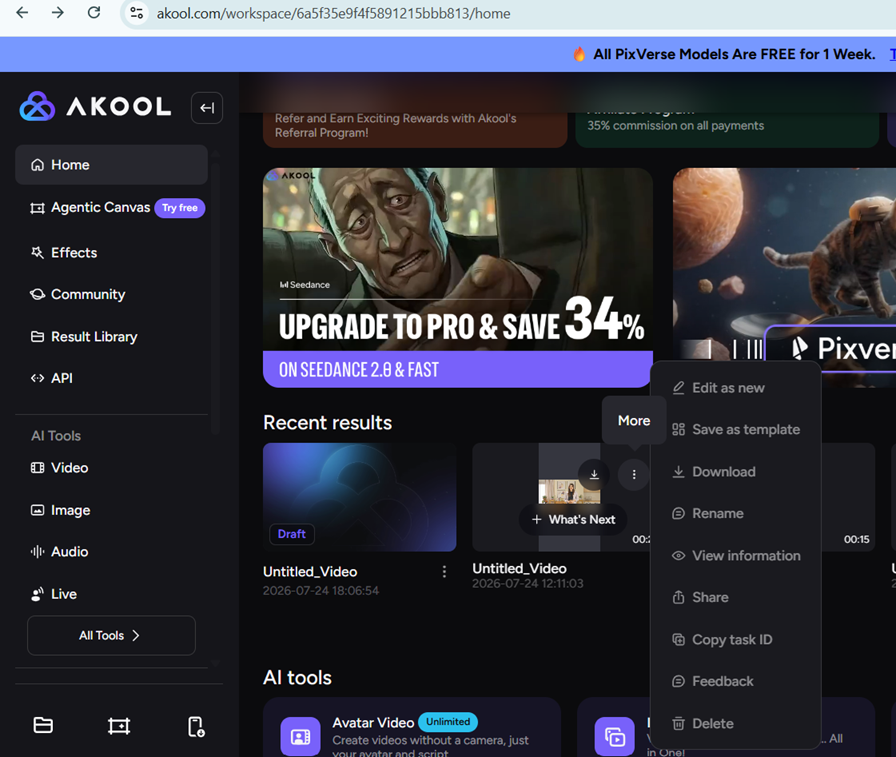
Expected behavior: Completed projects could be reopened from the home/results area and adjusted inside the editor without starting over. In the tested flow, the project could also be saved, downloaded, renamed, and shared from the results menu.
Test case: Text prompt → Image
Input type: Text prompt
Input used: Input artifact (Text prompt): Project reopen
Observed output: Output artifact (Image): The recent-results menu was open on a generated project, exposing edit, save as template, download, rename, share, copy task ID, feedback, and delete actions. — akool-duolingo-editor.png
Input artifact: Input artifact (Text prompt): Project reopen
Output artifact: Output artifact (Image): The recent-results menu was open on a generated project, exposing edit, save as template, download, rename, share, copy task ID, feedback, and delete actions. — akool-duolingo-editor.png
What changed: Text prompt transformed into Image
Test case: Text prompt → Image
Input type: Text prompt
Input used: Input artifact (Text prompt): Script edit
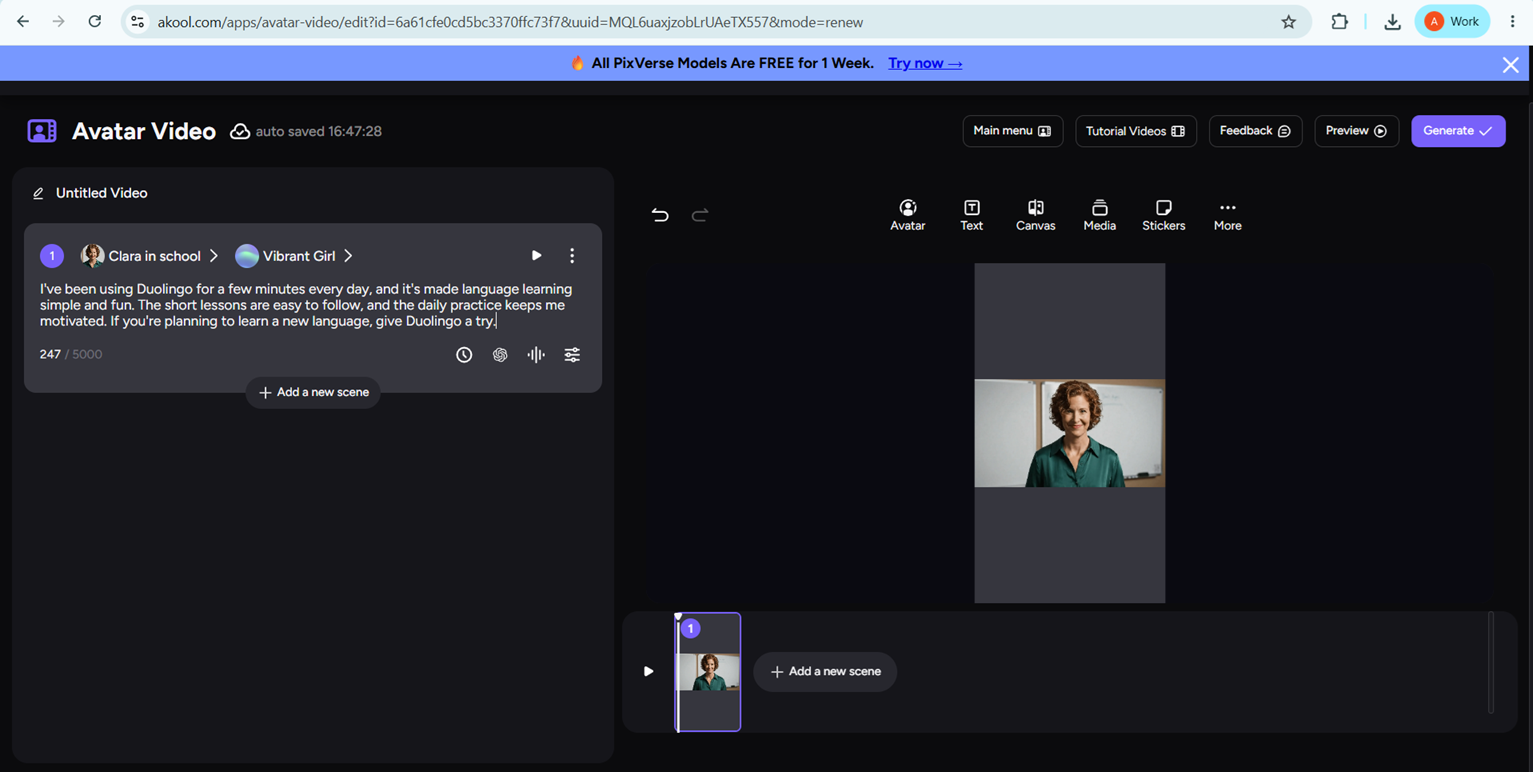
Observed output: Output artifact (Image): The script panel was editable in place, and the Duolingo narration draft was visible inside the editor. — akool-duolingo-edit-script.png
Input artifact: Input artifact (Text prompt): Script edit
Output artifact: Output artifact (Image): The script panel was editable in place, and the Duolingo narration draft was visible inside the editor. — akool-duolingo-edit-script.png
What changed: Text prompt transformed into Image
Why it matters / Conclusion: Good for refinement after first generation, but the research verified editing access rather than a full after-edit re-render.
Completed projects could be reopened from the home/results area and adjusted inside the editor without starting over. In the tested flow, the project could also be saved, downloaded, renamed, and shared from the results menu.
Script-to-avatar video generation▾
Feature tested: Script-to-avatar video generation
Result: Passed
Expected behavior: AKOOL turns a written product script into a presenter-led video with synthesized voice and exportable vertical output. In testing, it completed end-to-end generation for a SaaS product, a physical product, and a mobile app.
Test case: Text prompt → Video file
Input type: Text prompt
Input used: Input artifact (Text prompt): Input script
Observed output: Output artifact (Video file): Generated an exportable vertical avatar video from the FutureSmart script. The voice was clear and stable, but the presenter looked moderately AI-generated and the delivery felt structured rather than organic UGC. — akool-futuresmart-output.mp4.mp4
Input artifact: Input artifact (Text prompt): Input script
Output artifact: Output artifact (Video file): Generated an exportable vertical avatar video from the FutureSmart script. The voice was clear and stable, but the presenter looked moderately AI-generated and the delivery felt structured rather than organic UGC. — akool-futuresmart-output.mp4.mp4
What changed: Text prompt transformed into Video file
Test case: Text prompt → Video file
Input type: Text prompt
Input used: Input artifact (Text prompt): Input script
Observed output: Output artifact (Video file): Generated a product-review style avatar video from the Nike Pegasus 41 script. The voice stayed stable and easy to understand, but product emphasis was limited and the delivery remained fairly generic. — Akool-nike-pegasus41-output.mp4.mp4
Input artifact: Input artifact (Text prompt): Input script
Output artifact: Output artifact (Video file): Generated a product-review style avatar video from the Nike Pegasus 41 script. The voice stayed stable and easy to understand, but product emphasis was limited and the delivery remained fairly generic. — Akool-nike-pegasus41-output.mp4.mp4
What changed: Text prompt transformed into Video file
Test case: Text prompt → Video file
Input type: Text prompt
Input used: Input artifact (Text prompt): Input script
Observed output: Output artifact (Video file): Generated an exportable avatar video from the Duolingo script. The communication was clear and structured, but the tone stayed neutral and the avatar still looked moderately AI-generated. — Akool-duolingo-output.mp4.mp4
Input artifact: Input artifact (Text prompt): Input script
Output artifact: Output artifact (Video file): Generated an exportable avatar video from the Duolingo script. The communication was clear and structured, but the tone stayed neutral and the avatar still looked moderately AI-generated. — Akool-duolingo-output.mp4.mp4
What changed: Text prompt transformed into Video file
Test case: Text prompt → Video file
Input type: Text prompt
Input used: Input artifact (Text prompt): Input
Observed output: Output artifact (Video file): Generated successfully as a vertical avatar video; voice was understandable and the presenter stayed consistent, but the delivery felt somewhat AI-generated and more structured than organic UGC. — Akool FutureSmart AI.mp4
Input artifact: Input artifact (Text prompt): Input
Output artifact: Output artifact (Video file): Generated successfully as a vertical avatar video; voice was understandable and the presenter stayed consistent, but the delivery felt somewhat AI-generated and more structured than organic UGC. — Akool FutureSmart AI.mp4
What changed: Text prompt transformed into Video file
Test case: Text prompt → Video file
Input type: Text prompt
Input used: Input artifact (Text prompt): Input
Observed output: Output artifact (Video file): Generated successfully with clear script delivery and stable voice, but the shoes were not strongly emphasized visually and the presentation felt neutral rather than highly engaging. — Akool Nike Pegasus 41.mp4
Input artifact: Input artifact (Text prompt): Input
Output artifact: Output artifact (Video file): Generated successfully with clear script delivery and stable voice, but the shoes were not strongly emphasized visually and the presentation felt neutral rather than highly engaging. — Akool Nike Pegasus 41.mp4
What changed: Text prompt transformed into Video file
Test case: Text prompt → Video file
Input type: Text prompt
Input used: Input artifact (Text prompt): Input
Observed output: Output artifact (Video file): Generated successfully with simple, clear delivery and a consistent avatar, but the background stayed generic and the output did not include app UI integration. — Akool Duolingo.mp4
Input artifact: Input artifact (Text prompt): Input
Output artifact: Output artifact (Video file): Generated successfully with simple, clear delivery and a consistent avatar, but the background stayed generic and the output did not include app UI integration. — Akool Duolingo.mp4
What changed: Text prompt transformed into Video file
Why it matters / Conclusion: A dependable script-to-video workflow for short-form avatar ads, but the outputs are best treated as a starting point rather than finished creator-style UGC.
AKOOL turns a written product script into a presenter-led video with synthesized voice and exportable vertical output. In testing, it completed end-to-end generation for a SaaS product, a physical product, and a mobile app.
Video Translation access across tiers
The free tier was tested; higher tiers mainly raise resolution and upload limits.
Language support is listed at 155+ across all tiers, including Free. The Free tier is also listed with a full-screen watermark and up to 720p output.
Featured in Rankings
Independent rankings where AKOOL was tested and rated.
Banner Preview
How the embed badge will look on your site

Embed HTML
Copy this code to your website source
Quick Integration Guide
- 1Copy the HTML code block above.
- 2Paste it into your site's HTML or CMS editor.
- 3Banner appears instantly on your page.
- 4Links back to your tool profile here.
Similar Tools
Discover more AI tools like AKOOL to enhance your workflow.
Comments (0)
Need a custom AI solution for this use case?
If you are looking to build a custom video translation, lip-sync dubbing, or video localization workflow for your business or internal workflow, email us at contact@futuresmart.ai.
Found something inaccurate or missing? We try to keep our AI research accurate and useful. If you found outdated information, an issue, or have a suggestion, email us at collaborate@aidemos.com.