
Media.io
Automatic browser-based background removal and scene swapping for creator videos, with clean isolation but visible edge and shadow limits.
Strong at automated cutout, weaker at realistic compositing
- You want automatic background removal without manual masking or a green screen.
- You need a browser-based workflow that can also do simple background replacement.
- You work mostly with single-person or otherwise readable footage and can tolerate some soft edges.
- You need photorealistic compositing with matched lighting, depth, and grounding shadows.
Feature scores on this page: 8.3/10 (3 scored features)
Our take
Media.io is a solid browser-based choice for automatic video background removal, and it can also swap in a basic replacement scene without manual masking. In our tests it isolated subjects across three clips and exported successfully, but the outputs repeatedly showed soft edges, halo bleed, lost hair/fur detail, and missing grounding shadows, so the result still looks composited in harder shots.
In-Depth Review
Our detailed analysis of Media.io — features, performance, and real-world testing.
Feature-by-Feature Breakdown
Video Background Removal8.5/10▾
Feature tested: Video Background Removal
Result: Partial (8.5/10)
Expected behavior: Media.io automatically removes a person or subject from uploaded video and isolates them from the original background without manual masking. It was exercised on multiple clips, including an Oregon coast walking subject, an indoor talking-head clip, a busy street scene with two people, and a painted scene.
Test case: Video file → Video file
Input type: Video file
Input used: Input artifact (Video file): INPUT — Input 01 – Video.mp4
Observed output: Output artifact (Video file): Oregon coast walking clip: the background was removed cleanly, but the result kept a blue-white halo around the head, warm residue in the arm-to-torso gaps, and a soft feathered edge around the full silhouette. — mediaio_oregoncoast_output.mp4.mp4
Input artifact: Input artifact (Video file): INPUT — Input 01 – Video.mp4
Output artifact: Output artifact (Video file): Oregon coast walking clip: the background was removed cleanly, but the result kept a blue-white halo around the head, warm residue in the arm-to-torso gaps, and a soft feathered edge around the full silhouette. — mediaio_oregoncoast_output.mp4.mp4
What changed: Video file transformed into Video file
Test case: Video file → Video file
Input type: Video file
Input used: Input artifact (Video file): Input — Input 02 – Video.mp4
Observed output: Output artifact (Video file): The talking-head clip stayed recognizable, but the hair edge became stiff and jagged, the face lighting remained flat against the new scene, and the cutout still lacked grounding shadow realism. — mediaio_talkinghead_output.mp4.mp4
Input artifact: Input artifact (Video file): Input — Input 02 – Video.mp4
Output artifact: Output artifact (Video file): The talking-head clip stayed recognizable, but the hair edge became stiff and jagged, the face lighting remained flat against the new scene, and the cutout still lacked grounding shadow realism. — mediaio_talkinghead_output.mp4.mp4
What changed: Video file transformed into Video file
Test case: Video file → Video file
Input type: Video file
Input used: Input artifact (Video file): INPUT — Input 03 – Video.mp4
Observed output: Output artifact (Video file): Busy street clip: both people were isolated correctly, with relative scale and posture preserved, but the fur hood lost texture, the body edges stayed soft, and both subjects lost their grounding shadows. — mediaio_busystreet_output.mp4.mp4
Input artifact: Input artifact (Video file): INPUT — Input 03 – Video.mp4
Output artifact: Output artifact (Video file): Busy street clip: both people were isolated correctly, with relative scale and posture preserved, but the fur hood lost texture, the body edges stayed soft, and both subjects lost their grounding shadows. — mediaio_busystreet_output.mp4.mp4
What changed: Video file transformed into Video file
Test case: Video file → Video file
Input type: Video file
Input used: Input artifact (Video file): Video mp4 - Two women working and discussing at a office desk. Task: Remove person completely — 6781904-uhd_2160_3840_30fps-3.mp4
Observed output: Output artifact (Video file): Final output MP4 — person removed from simple background — Media.io output video.mp4
Input artifact: Input artifact (Video file): Video mp4 - Two women working and discussing at a office desk. Task: Remove person completely — 6781904-uhd_2160_3840_30fps-3.mp4
Output artifact: Output artifact (Video file): Final output MP4 — person removed from simple background — Media.io output video.mp4
What changed: Video file transformed into Video file
Why it matters / Conclusion: Strong for automatic background removal, especially when you want a one-click result without manual masking, but edge softness and fine-detail loss remain visible in harder scenes.
Media.io automatically removes a person or subject from uploaded video and isolates them from the original background without manual masking. It was exercised on multiple clips, including an Oregon coast walking subject, an indoor talking-head clip, a busy street scene with two people, and a painted scene.
Video Background ReplacementUsable for simple scene swaps, not photorealistic compositing.▾
Feature tested: Video Background Replacement
Result: Partial
Verdict: Usable for simple scene swaps, not photorealistic compositing.
Expected behavior: Media.io swaps an existing or removed video background for a new scene while keeping the subject in place. It was tested on the indoor talking-head clip, where the subject was placed into a studio-style backdrop.
Test case: Video file → Video file
Input type: Video file
Input used: Input artifact (Video file): Input — Input 02 – Video.mp4
Observed output: Output artifact (Video file): The replacement created a plausible studio-style scene, but the hair boundary stayed stiff, the lighting on the face did not match the darker background, no grounding shadow appeared, and the monitor sat directly behind the head in an awkward composition. — mediaio_talkinghead_output.mp4.mp4
Input artifact: Input artifact (Video file): Input — Input 02 – Video.mp4
Output artifact: Output artifact (Video file): The replacement created a plausible studio-style scene, but the hair boundary stayed stiff, the lighting on the face did not match the darker background, no grounding shadow appeared, and the monitor sat directly behind the head in an awkward composition. — mediaio_talkinghead_output.mp4.mp4
What changed: Video file transformed into Video file
Why it matters / Conclusion: Works for basic swaps, but the lack of relighting, shadow integration, and clean hair edges keeps it from looking fully natural.
Media.io swaps an existing or removed video background for a new scene while keeping the subject in place. It was tested on the indoor talking-head clip, where the subject was placed into a studio-style backdrop.
Video Processing and ExportExports reliably; longer-duration support is reported in the prior review but not re-benchmarked here.▾
Feature tested: Video Processing and Export
Result: Passed
Verdict: Exports reliably; longer-duration support is reported in the prior review but not re-benchmarked here.
Expected behavior: Media.io processes uploaded video and exports a playable result, here on a 15–20 second 1920×1080 MP4 in about 5–6 minutes. The review also mentions support for longer videos, but the hands-on proof centers on the processing/export workflow.
Test case: Text prompt → Text prompt
Input type: Text prompt
Input used: Input artifact (Text prompt): INPUT
Observed output: Output artifact (Text prompt): OUTPUT
Input artifact: Input artifact (Text prompt): INPUT
Output artifact: Output artifact (Text prompt): OUTPUT
What changed: Text prompt transformed into Text prompt
Why it matters / Conclusion: Reliable export on short clips; the longer 15-minute claim should be treated as published guidance rather than a fresh benchmark from this run.
Media.io processes uploaded video and exports a playable result, here on a 15–20 second 1920×1080 MP4 in about 5–6 minutes. The review also mentions support for longer videos, but the hands-on proof centers on the processing/export workflow.
Long-Form Video SupportStrong8/10▾
Feature tested: Long-Form Video Support
Result: Passed (8/10)
Verdict: Strong
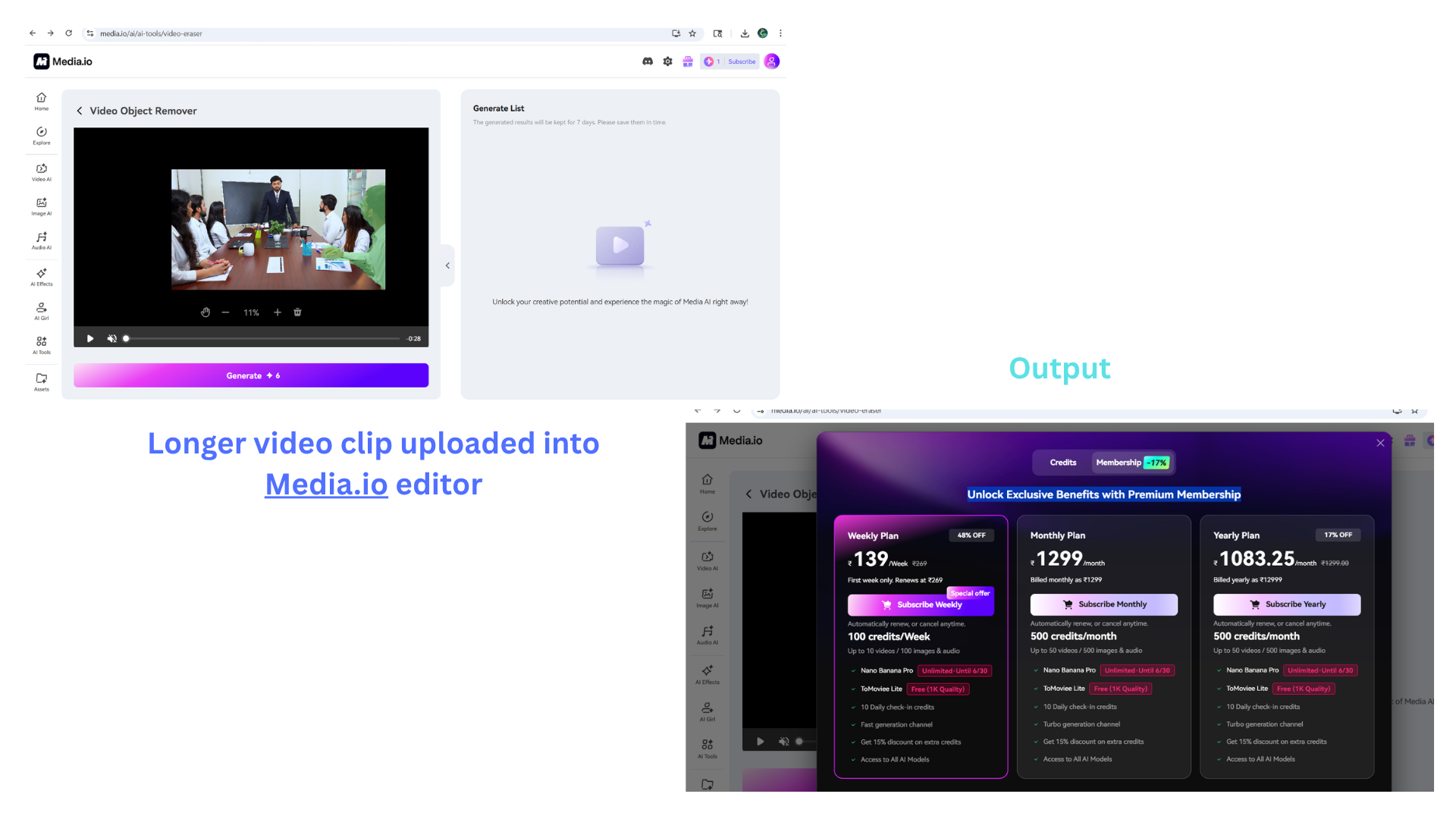
Expected behavior: Media.io handles longer uploaded clips in the browser editor workflow, not just short preview clips. It was demonstrated on a 28-second video, suggesting suitability for presentations, lectures, or event recordings.
Test case: Image → Image
Input type: Image
Input used: Input artifact (Image): Longer video clip uploaded into Media.io editor — image (19)-1.png
Observed output: Output artifact (Image): Longer video clip uploaded into Media.io editor + Output — Longer video clip uploaded into Media.io editor.png
Input artifact: Input artifact (Image): Longer video clip uploaded into Media.io editor — image (19)-1.png
Output artifact: Output artifact (Image): Longer video clip uploaded into Media.io editor + Output — Longer video clip uploaded into Media.io editor.png
What changed: Image transformed into Image
Why it matters / Conclusion: Long video support is a key advantage of Media.io over tools like MagicEraser and EzRemove AI which are limited to short clips. Suitable for longer content like presentations, lectures, or event recordings.
Media.io handles longer uploaded clips in the browser editor workflow, not just short preview clips. It was demonstrated on a 28-second video, suggesting suitability for presentations, lectures, or event recordings.
-1.png)
Brush-Based Video Erasure with AI Frame TrackingStrong8.5/10▾
Feature tested: Brush-Based Video Erasure with AI Frame Tracking
Result: Passed (8.5/10)
Verdict: Strong
Expected behavior: Media.io Video Eraser lets users paint over a person with a brush and then tracks that selection across frames to remove it automatically. It was exercised on moving subjects where the AI followed moderate motion across the clip.
Test case: Video file → Video file
Input type: Video file
Input used: Input artifact (Video file): Video mp4 - Two women working and discussing at a office desk. Task: Remove person completely — 6781904-uhd_2160_3840_30fps-3.mp4
Observed output: Output artifact (Video file): Final output MP4 — person removed from simple background — Media.io output video.mp4
Input artifact: Input artifact (Video file): Video mp4 - Two women working and discussing at a office desk. Task: Remove person completely — 6781904-uhd_2160_3840_30fps-3.mp4
Output artifact: Output artifact (Video file): Final output MP4 — person removed from simple background — Media.io output video.mp4
What changed: Video file transformed into Video file
Why it matters / Conclusion: Media.io brush tool with frame tracking produces clean results on simple backgrounds. Complex backgrounds show some edge artifacts but overall quality is good. AI tracking handles moderate movement well. Supports videos up to 15 minutes which is longer than most free tools.
Media.io Video Eraser lets users paint over a person with a brush and then tracks that selection across frames to remove it automatically. It was exercised on moving subjects where the AI followed moderate motion across the clip.
Freemium pricing with paid tiers for broader access
Publicly listed rates carried forward from the prior published review; export limits and watermark behavior should still be confirmed at checkout/export time.
Pricing reflected publicly listed rates as of June 2026.
Featured in Rankings
Independent rankings where Media.io was tested and rated.
Banner Preview
How the embed badge will look on your site

Embed HTML
Copy this code to your website source
Quick Integration Guide
- 1Copy the HTML code block above.
- 2Paste it into your site's HTML or CMS editor.
- 3Banner appears instantly on your page.
- 4Links back to your tool profile here.
Similar Tools
Discover more AI tools like Media.io to enhance your workflow.
Comments (0)
Need a custom AI solution for this use case?
If you are looking to build a custom video background removal, scene swapping, or compositing tool for your business or internal workflow, email us at contact@futuresmart.ai.
Found something inaccurate or missing? We try to keep our AI research accurate and useful. If you found outdated information, an issue, or have a suggestion, email us at collaborate@aidemos.com.