
Vidnoz AI
Turns product scripts into vertical AI-avatar ads quickly, but the output still feels template-led and only moderately realistic.
Fast and functional, but not the most natural UGC feel
- You need a fast way to turn a supplied product script into a vertical avatar video.
- You are okay adding or refining captions after generation.
- You want a straightforward paid workflow with visible credit usage and basic editor tweaks.
- You need highly natural, creator-like UGC performance with strong expression variety.
Our take
Vidnoz AI successfully generated exportable 9:16 avatar videos from three different product scripts and supported post-generation caption edits. The tradeoff is that the presenter, delivery, and product treatment remained fairly generic, so it works better as a fast draft or test creative than as a highly convincing creator-native UGC replacement.
In-Depth Review
Our detailed analysis of Vidnoz AI — features, performance, and real-world testing.
Feature-by-Feature Breakdown
AI Avatar Video Generation▾
Feature tested: AI Avatar Video Generation
Result: Passed
Expected behavior: Creates exportable vertical AI-avatar videos from predefined product scripts, with spoken narration and generally aligned lip-sync. It was exercised on a SaaS brief for FutureSmart AI, a physical product review for Nike Pegasus 41, and an app-style script for Duolingo.
Test case: Text prompt → Video file
Input type: Text prompt
Input used: Input artifact (Text prompt): INPUT
Observed output: Output artifact (Video file): The tool generated a vertical avatar video for the FutureSmart AI script with understandable voice, generally aligned lip-sync, and a somewhat template-based delivery style. — vidnoz-futuresmart-output.mp4.mp4
Input artifact: Input artifact (Text prompt): INPUT
Output artifact: Output artifact (Video file): The tool generated a vertical avatar video for the FutureSmart AI script with understandable voice, generally aligned lip-sync, and a somewhat template-based delivery style. — vidnoz-futuresmart-output.mp4.mp4
What changed: Text prompt transformed into Video file
Test case: Text prompt → Video file
Input type: Text prompt
Input used: Input artifact (Text prompt): INPUT
Observed output: Output artifact (Video file): The tool generated a product-review style avatar video for Nike Pegasus 41 with stable voice and reasonably accurate lip-sync, but the shoes were not strongly emphasized visually. — vidnoz-nike-pegasus41-output.mp4.mp4
Input artifact: Input artifact (Text prompt): INPUT
Output artifact: Output artifact (Video file): The tool generated a product-review style avatar video for Nike Pegasus 41 with stable voice and reasonably accurate lip-sync, but the shoes were not strongly emphasized visually. — vidnoz-nike-pegasus41-output.mp4.mp4
What changed: Text prompt transformed into Video file
Test case: Text prompt → Video file
Input type: Text prompt
Input used: Input artifact (Text prompt): INPUT
Observed output: Output artifact (Video file): The tool generated a clear app-style avatar video for Duolingo with consistent voice and mostly aligned lip-sync, but the background stayed generic and the presenter still looked AI-generated. — vidnoz-duolingo-output.mp4.mp4
Input artifact: Input artifact (Text prompt): INPUT
Output artifact: Output artifact (Video file): The tool generated a clear app-style avatar video for Duolingo with consistent voice and mostly aligned lip-sync, but the background stayed generic and the presenter still looked AI-generated. — vidnoz-duolingo-output.mp4.mp4
What changed: Text prompt transformed into Video file
Why it matters / Conclusion: Worked reliably across all three tested scripts, but the presentation stayed structured and only moderately realistic.
Creates exportable vertical AI-avatar videos from predefined product scripts, with spoken narration and generally aligned lip-sync. It was exercised on a SaaS brief for FutureSmart AI, a physical product review for Nike Pegasus 41, and an app-style script for Duolingo.
Post-Generation Captioning▾
Feature tested: Post-Generation Captioning
Result: Passed
Expected behavior: Adds subtitles after the main video is already created using the built-in editor. In the tested FutureSmart AI workflow, captions appeared only after the subtitle step rather than in the initial render.
Test case: Text prompt → Image
Input type: Text prompt
Input used: Input artifact (Text prompt): INPUT
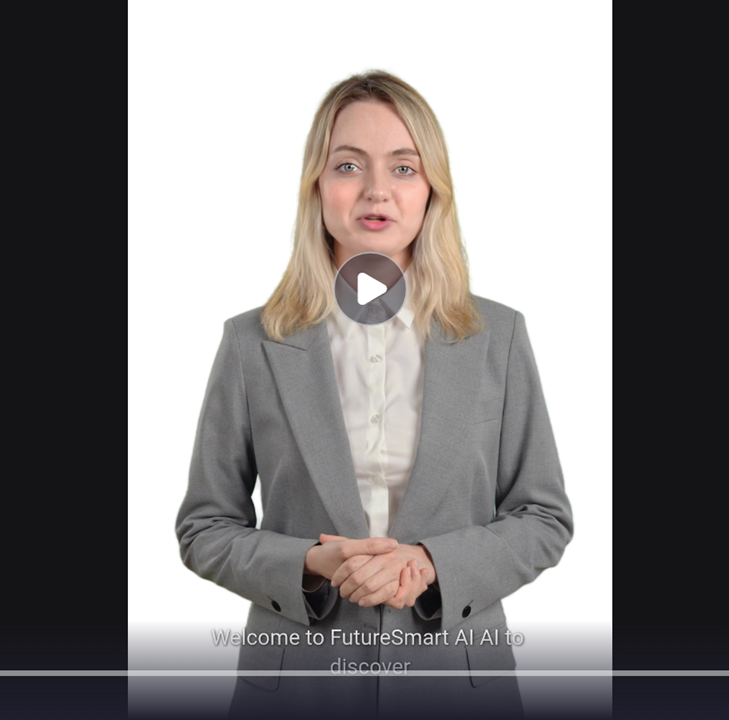
Observed output: Output artifact (Image): The preview frame shows the FutureSmart AI clip with a subtitle line rendered at the bottom, confirming captions can be added after generation. — vidnoz-futuresmart-caption-output.png
Input artifact: Input artifact (Text prompt): INPUT
Output artifact: Output artifact (Image): The preview frame shows the FutureSmart AI clip with a subtitle line rendered at the bottom, confirming captions can be added after generation. — vidnoz-futuresmart-caption-output.png
What changed: Text prompt transformed into Image
Why it matters / Conclusion: Captions are available, but they require an extra post-generation step rather than appearing automatically in the initial render.
Adds subtitles after the main video is already created using the built-in editor. In the tested FutureSmart AI workflow, captions appeared only after the subtitle step rather than in the initial render.
In-Editor Script and Subtitle Editing▾
Feature tested: In-Editor Script and Subtitle Editing
Result: Passed
Expected behavior: Reopens a generated avatar project so the speech text or subtitle copy can be edited without rebuilding the whole video. The tested FutureSmart AI clip was updated by changing the opening line in the editor.
Test case: Text prompt → Image
Input type: Text prompt
Input used: Input artifact (Text prompt): INPUT
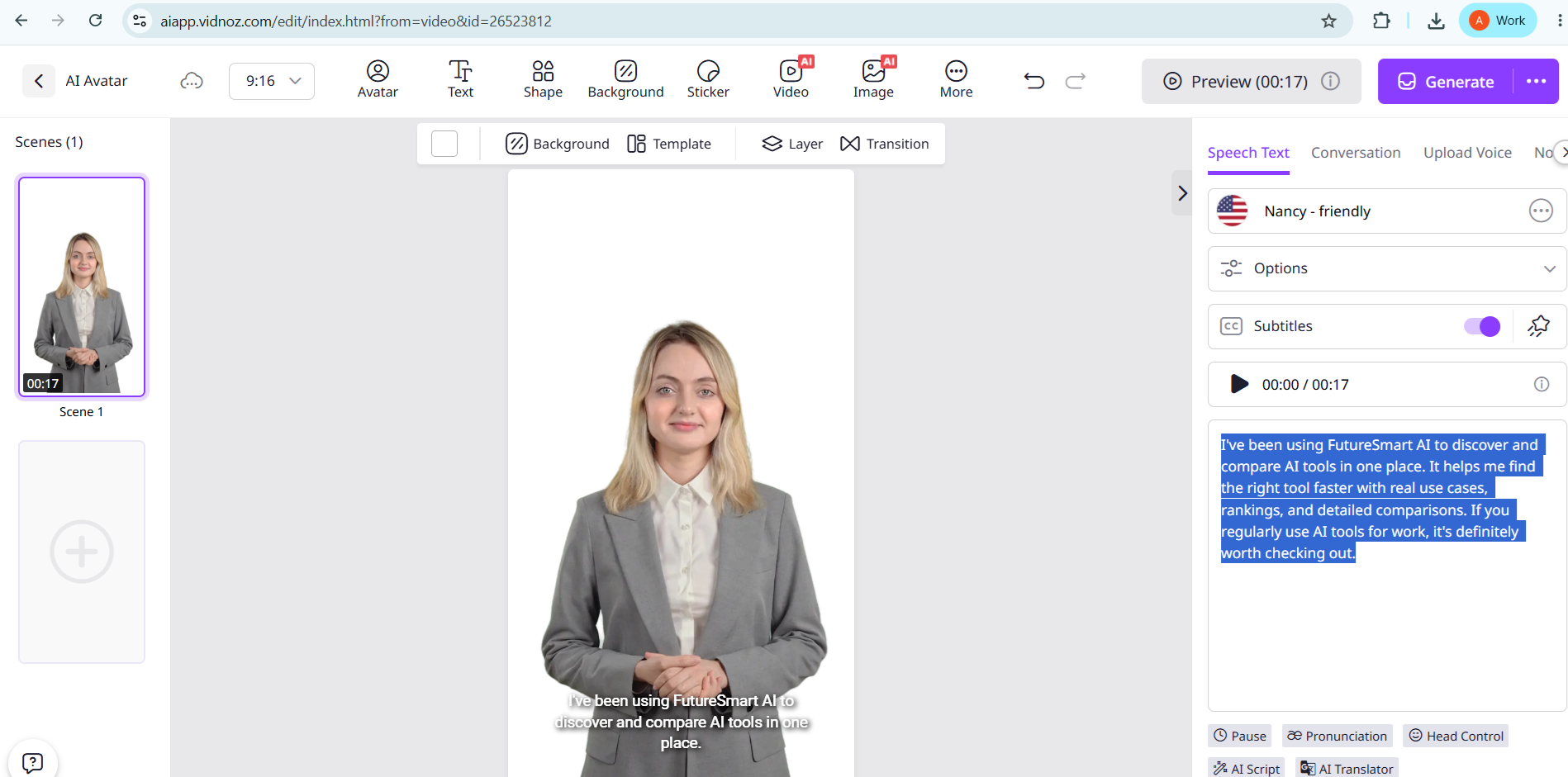
Observed output: Output artifact (Image): The editor shows the FutureSmart AI script selected for editing, with the opening text highlighted in the speech text panel. — vidnoz-caption-edit.png
Input artifact: Input artifact (Text prompt): INPUT
Output artifact: Output artifact (Image): The editor shows the FutureSmart AI script selected for editing, with the opening text highlighted in the speech text panel. — vidnoz-caption-edit.png
What changed: Text prompt transformed into Image
Test case: Text prompt → Image
Input type: Text prompt
Input used: Input artifact (Text prompt): INPUT
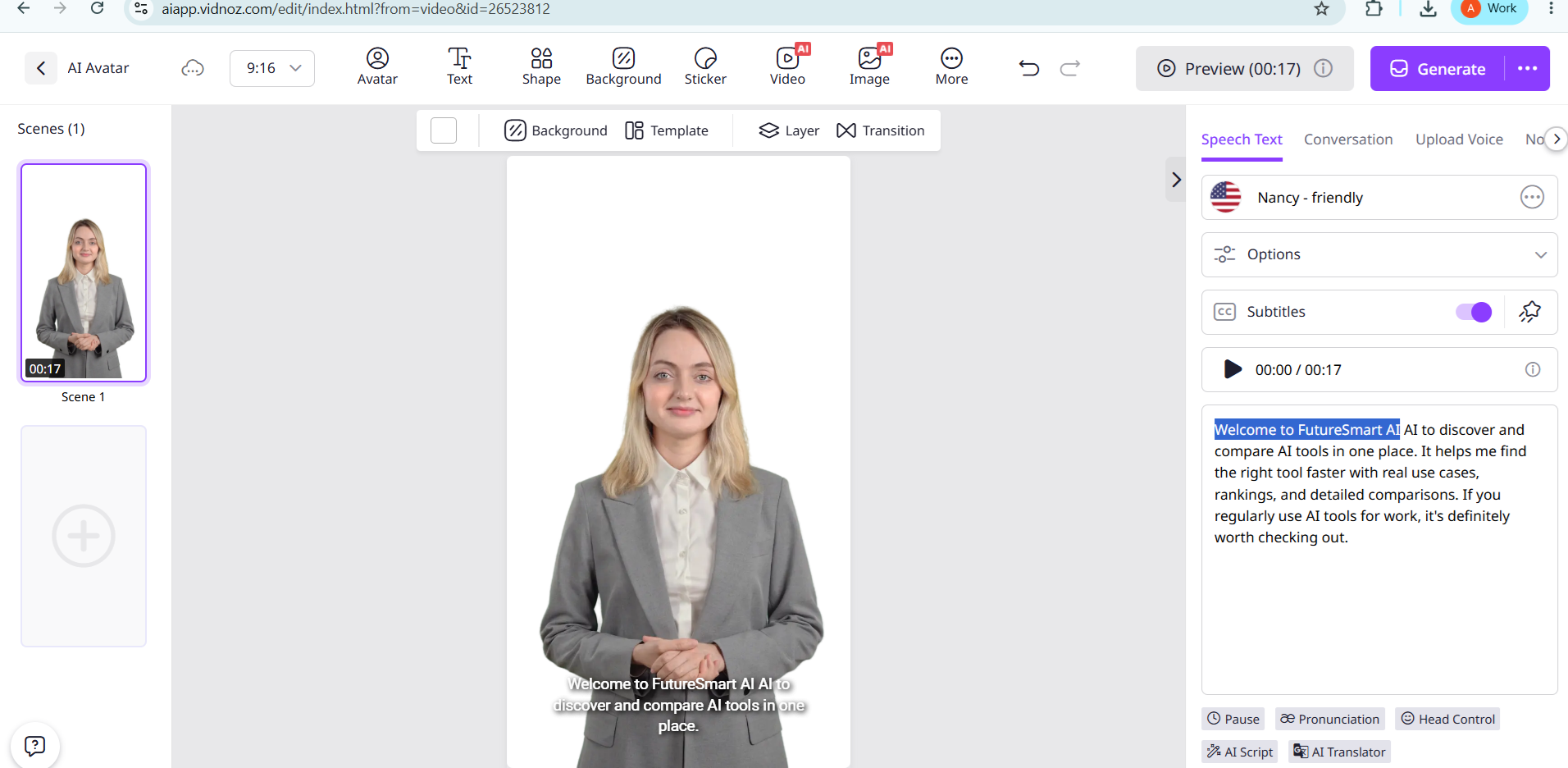
Observed output: Output artifact (Image): After the edit, the script begins with "Welcome to FutureSmart AI..." while the avatar preview and subtitle line remain visible in the editor. — vidnoz-editor-after-edit.png
Input artifact: Input artifact (Text prompt): INPUT
Output artifact: Output artifact (Image): After the edit, the script begins with "Welcome to FutureSmart AI..." while the avatar preview and subtitle line remain visible in the editor. — vidnoz-editor-after-edit.png
What changed: Text prompt transformed into Image
Why it matters / Conclusion: Basic refinement is supported, and the text change shows up in the editor, but this is a text-level adjustment rather than a deeper creative rewrite.
Reopens a generated avatar project so the speech text or subtitle copy can be edited without rebuilding the whole video. The tested FutureSmart AI clip was updated by changing the opening line in the editor.
Credit-Based Usage Tracking▾
Feature tested: Credit-Based Usage Tracking
Result: Passed
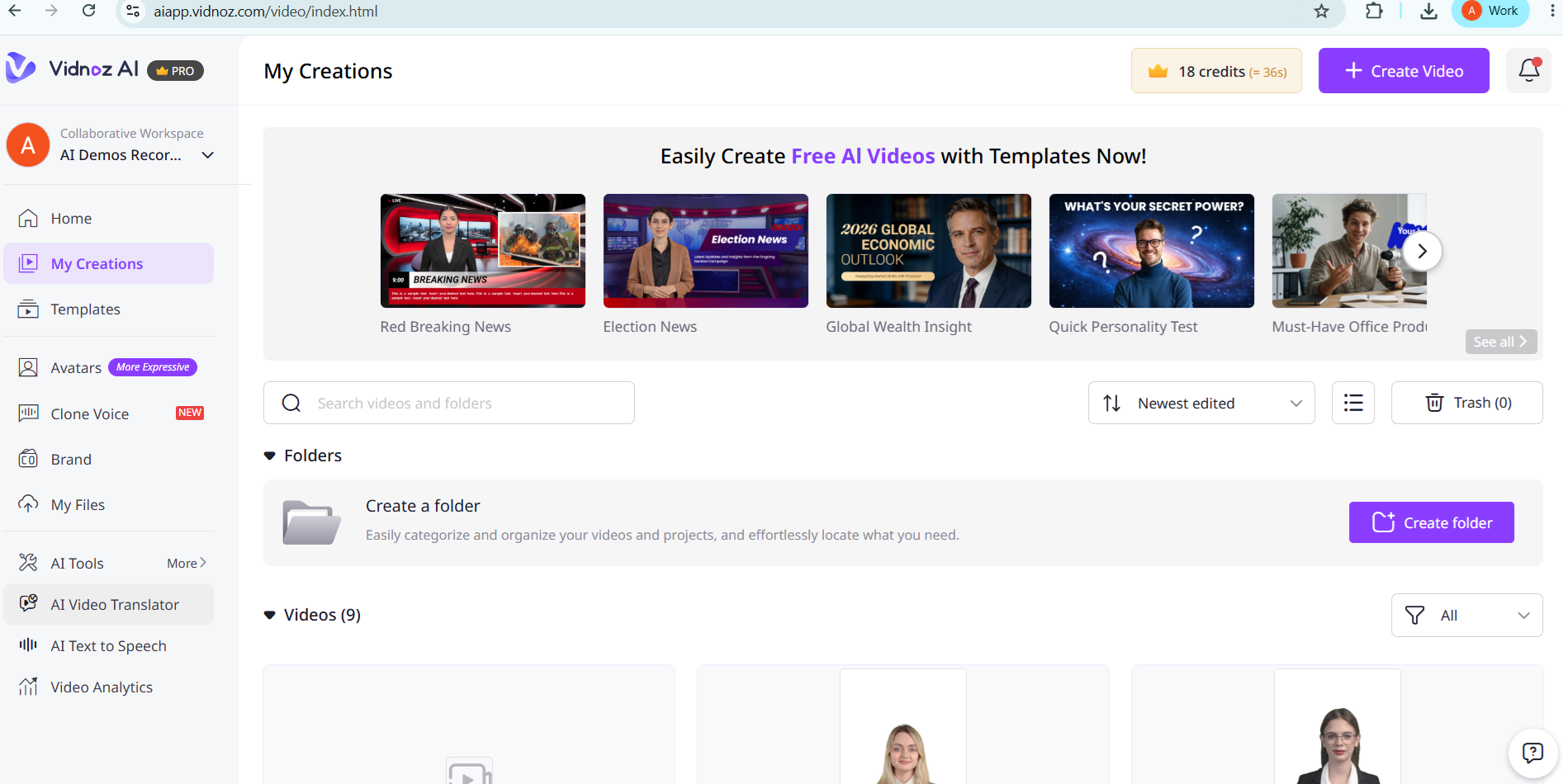
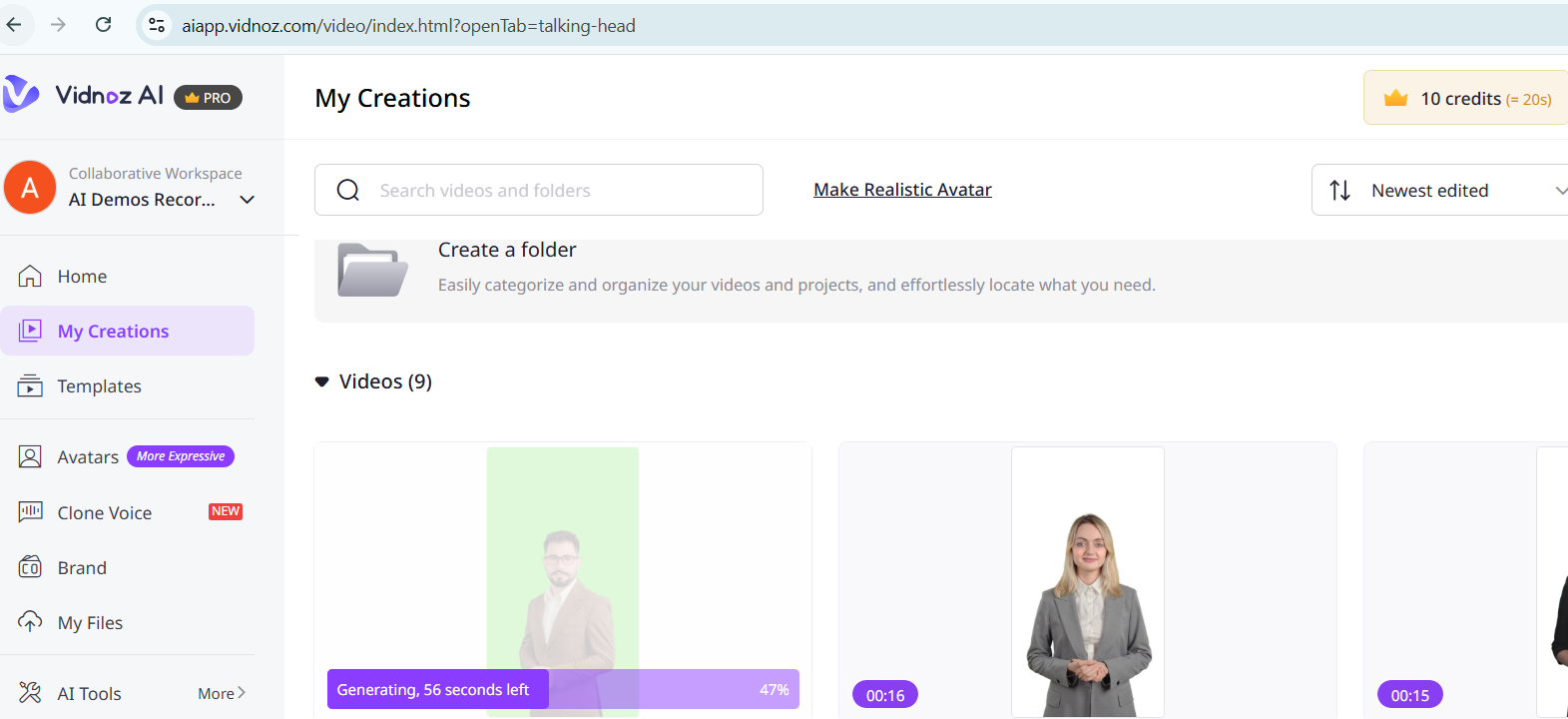
Expected behavior: Shows generation usage through a visible credit meter in the dashboard. In the tested configuration, the dashboard showed 18 credits before generation and 10 credits after generation started, indicating about 8 credits consumed for one video.
Test case: Image → Image
Input type: Image
Input used: Input artifact (Image): Input — vidnoz-credit-before-generation.png
Observed output: Output artifact (Image): The dashboard dropped from 18 credits to 10 credits while one video was actively generating, which matches the report's approximate 8-credit consumption observation. — vidnoz-credit-after-generation.png
Input artifact: Input artifact (Image): Input — vidnoz-credit-before-generation.png
Output artifact: Output artifact (Image): The dashboard dropped from 18 credits to 10 credits while one video was actively generating, which matches the report's approximate 8-credit consumption observation. — vidnoz-credit-after-generation.png
What changed: Image transformed into Image
Why it matters / Conclusion: The billing model is visible enough to verify usage, but the report does not establish a fixed per-video price or a universal cost per variation.
Shows generation usage through a visible credit meter in the dashboard. In the tested configuration, the dashboard showed 18 credits before generation and 10 credits after generation started, indicating about 8 credits consumed for one video.
Featured in Rankings
Independent rankings where Vidnoz AI was tested and rated.
Banner Preview
How the embed badge will look on your site

Embed HTML
Copy this code to your website source
Quick Integration Guide
- 1Copy the HTML code block above.
- 2Paste it into your site's HTML or CMS editor.
- 3Banner appears instantly on your page.
- 4Links back to your tool profile here.
Similar Tools
Discover more AI tools like Vidnoz AI to enhance your workflow.
Comments (0)
Need a custom AI solution for this use case?
If you are looking to build a custom AI avatar ad generation, product video creation, or vertical video workflow for your business or internal workflow, email us at contact@futuresmart.ai.
Found something inaccurate or missing? We try to keep our AI research accurate and useful. If you found outdated information, an issue, or have a suggestion, email us at collaborate@aidemos.com.