
HeyGen
Fast avatar-led video drafts with strong voice cloning, but visuals and exports still need QA
Our take
- You want a fast text-to-video workflow that turns a script or prompt into a complete vertical short with an AI avatar, voiceover, captions, music, and scene transitions.
- You are making presenter-led explainers, marketing shorts, lightweight story shorts, or draft UGC-style ads where a believable presenter matters more than tightly directed cinematic visuals.
- You can review and tweak a mostly-correct first render instead of needing frame-perfect scene fidelity or exact scene-by-scene storytelling.
- You need exact scene-by-scene visual storytelling or concept-specific imagery.
Our take
HeyGen is strongest when you want a fast text-to-video workflow that turns a prompt into a complete avatar-led short with voiceover, captions, background music, and scene transitions. Its voice cloning can get impressively close to a source voice after iteration, especially when you compare multiple renders and use the tuning controls. The tradeoff is that visuals often stay generic or presentation-style, scene regeneration is limited, long-form or multilingual narration still needs human review before publishing.
In-Depth Review
Our detailed analysis of HeyGen — features, performance, and real-world testing.
Feature-by-Feature Breakdown
Voice CloningBest-case renders are strong, but quality varies a lot.▾
Feature tested: Voice Cloning
Result: Failed
Verdict: Best-case renders are strong, but quality varies a lot.
Expected behavior: HeyGen can clone a speaker’s voice from source audio and reuse that voice in generated speech. The benchmark exercised cloning quality under different render and source-quality conditions, including long passages and Hindi.
Test case: Audio file → Audio file
Input type: Audio file
Input used: Input artifact (Audio file): Input — low quality voice sample .wav
Observed output: Output artifact (Audio file): Approximately 20% similar to the original voice; significant deviation in tone and vocal characteristics, and the result sounded noticeably robotic. — 1st output.wav
Input artifact: Input artifact (Audio file): Input — low quality voice sample .wav
Output artifact: Output artifact (Audio file): Approximately 20% similar to the original voice; significant deviation in tone and vocal characteristics, and the result sounded noticeably robotic. — 1st output.wav
What changed: Audio file transformed into Audio file
Test case: Audio file → Audio file
Input type: Audio file
Input used: Input artifact (Audio file): INPUT — low quality voice sample .wav
Observed output: Output artifact (Audio file): In the longer-script test, the voice remained human-like but occasionally broke conversational flow, mispronounced certain words, and delivered inconsistently across the passage. — 3rd output most acuurate.wav
Input artifact: Input artifact (Audio file): INPUT — low quality voice sample .wav
Output artifact: Output artifact (Audio file): In the longer-script test, the voice remained human-like but occasionally broke conversational flow, mispronounced certain words, and delivered inconsistently across the passage. — 3rd output most acuurate.wav
What changed: Audio file transformed into Audio file
Test case: Audio file → Audio file
Input type: Audio file
Input used: Input artifact (Audio file): INPUT — Voice sample ( profetional studio ).wav
Observed output: Output artifact (Audio file): Long-form testing again showed flow interruptions, word mispronunciations, inconsistent delivery, and a need for multiple regenerations before the output would be production-ready. — 3rd output most good .wav
Input artifact: Input artifact (Audio file): INPUT — Voice sample ( profetional studio ).wav
Output artifact: Output artifact (Audio file): Long-form testing again showed flow interruptions, word mispronunciations, inconsistent delivery, and a need for multiple regenerations before the output would be production-ready. — 3rd output most good .wav
What changed: Audio file transformed into Audio file
Test case: Audio file → Audio file
Input type: Audio file
Input used: Input artifact (Audio file): Input — Voice sample ( profetional studio ).wav
Observed output: Output artifact (Audio file): Lower-accuracy studio-sample render; the voice drifted noticeably and sounded closer to a female voice profile than the original speaker. — 2nd output.wav
Input artifact: Input artifact (Audio file): Input — Voice sample ( profetional studio ).wav
Output artifact: Output artifact (Audio file): Lower-accuracy studio-sample render; the voice drifted noticeably and sounded closer to a female voice profile than the original speaker. — 2nd output.wav
What changed: Audio file transformed into Audio file
Test case: Text prompt → Audio file
Input type: Text prompt
Input used: Input artifact (Text prompt): Input
Observed output: Output artifact (Audio file): The longer-script run stayed human-like, but the report observed flow breaks, word mispronunciations, and inconsistent delivery across the passage. — 3rd output most acuurate.wav
Input artifact: Input artifact (Text prompt): Input
Output artifact: Output artifact (Audio file): The longer-script run stayed human-like, but the report observed flow breaks, word mispronunciations, and inconsistent delivery across the passage. — 3rd output most acuurate.wav
What changed: Text prompt transformed into Audio file
Test case: Text prompt → Audio file
Input type: Text prompt
Input used: Input artifact (Text prompt): Input
Observed output: Output artifact (Audio file): The voice remained relatively close to the original speaker, but Hindi words were frequently mispronounced and the result was not production-ready. — Multilingual.wav
Input artifact: Input artifact (Text prompt): Input
Output artifact: Output artifact (Audio file): The voice remained relatively close to the original speaker, but Hindi words were frequently mispronounced and the result was not production-ready. — Multilingual.wav
What changed: Text prompt transformed into Audio file
Test case: Text prompt → Audio file
Input type: Text prompt
Input used: Input artifact (Text prompt): INPUT
Observed output: Output artifact (Audio file): On the longer-script check, the voice stayed human-like but occasionally broke conversational flow, mispronounced words, and delivered inconsistently across the passage. — 3rd output most acuurate.wav
Input artifact: Input artifact (Text prompt): INPUT
Output artifact: Output artifact (Audio file): On the longer-script check, the voice stayed human-like but occasionally broke conversational flow, mispronounced words, and delivered inconsistently across the passage. — 3rd output most acuurate.wav
What changed: Text prompt transformed into Audio file
Test case: Text prompt → Audio file
Input type: Text prompt
Input used: Input artifact (Text prompt): INPUT
Observed output: Output artifact (Audio file): The long-form check on the clean-sample side also needed extra review; the report says multiple regenerations may be required before the result is production-ready. — 3rd output most good .wav
Input artifact: Input artifact (Text prompt): INPUT
Output artifact: Output artifact (Audio file): The long-form check on the clean-sample side also needed extra review; the report says multiple regenerations may be required before the result is production-ready. — 3rd output most good .wav
What changed: Text prompt transformed into Audio file
Test case: Text prompt → Audio file
Input type: Text prompt
Input used: Input artifact (Text prompt): INPUT
Observed output: Output artifact (Audio file): Multilingual voice generation is available, and the cloned voice stayed relatively close to the speaker, but Hindi words were frequently mispronounced and the result was not production-ready. — Multilingual.wav
Input artifact: Input artifact (Text prompt): INPUT
Output artifact: Output artifact (Audio file): Multilingual voice generation is available, and the cloned voice stayed relatively close to the speaker, but Hindi words were frequently mispronounced and the result was not production-ready. — Multilingual.wav
What changed: Text prompt transformed into Audio file
Why it matters / Conclusion: Strong best-case cloning, but you have to audition multiple renders and source quality alone does not guarantee the best result.
HeyGen can clone a speaker’s voice from source audio and reuse that voice in generated speech. The benchmark exercised cloning quality under different render and source-quality conditions, including long passages and Hindi.
Voice Parameter Tuning▾
Feature tested: Voice Parameter Tuning
Result: Passed
Expected behavior: HeyGen exposes voice controls such as similarity, stability, speed, volume, and model settings to fine-tune generated speech. The benchmark used these controls to iterate toward better renders rather than to create a different output type.
Test case: Text prompt → Audio file
Input type: Text prompt
Input used: Input artifact (Text prompt): Input
Observed output: Output artifact (Audio file): The control set was available during the noisy-sample run, and the tuned best render reached near-perfect similarity with the most natural delivery. — 3rd output most acuurate.wav
Input artifact: Input artifact (Text prompt): Input
Output artifact: Output artifact (Audio file): The control set was available during the noisy-sample run, and the tuned best render reached near-perfect similarity with the most natural delivery. — 3rd output most acuurate.wav
What changed: Text prompt transformed into Audio file
Test case: Text prompt → Audio file
Input type: Text prompt
Input used: Input artifact (Text prompt): Input
Observed output: Output artifact (Audio file): The same customization controls were available on the studio sample, but even the best render still needed review because it was not fully consistent over longer passages. — 3rd output most good .wav
Input artifact: Input artifact (Text prompt): Input
Output artifact: Output artifact (Audio file): The same customization controls were available on the studio sample, but even the best render still needed review because it was not fully consistent over longer passages. — 3rd output most good .wav
What changed: Text prompt transformed into Audio file
Test case: Audio file → Audio file
Input type: Audio file
Input used: Input artifact (Audio file): INPUT — low quality voice sample .wav
Observed output: Output artifact (Audio file): The render exposed similarity, stability, speed, volume, and voice-model controls, which made iteration useful, but they did not fully remove output inconsistency. — 3rd output most acuurate.wav
Input artifact: Input artifact (Audio file): INPUT — low quality voice sample .wav
Output artifact: Output artifact (Audio file): The render exposed similarity, stability, speed, volume, and voice-model controls, which made iteration useful, but they did not fully remove output inconsistency. — 3rd output most acuurate.wav
What changed: Audio file transformed into Audio file
Test case: Audio file → Audio file
Input type: Audio file
Input used: Input artifact (Audio file): INPUT — Voice sample ( profetional studio ).wav
Observed output: Output artifact (Audio file): The report says the voice remained tunable, but even the best clean-sample output still needed review for long-form consistency. — 3rd output most good .wav
Input artifact: Input artifact (Audio file): INPUT — Voice sample ( profetional studio ).wav
Output artifact: Output artifact (Audio file): The report says the voice remained tunable, but even the best clean-sample output still needed review for long-form consistency. — 3rd output most good .wav
What changed: Audio file transformed into Audio file
Test case: Audio file → Audio file
Input type: Audio file
Input used: Input artifact (Audio file): Input — low quality voice sample .wav
Observed output: Output artifact (Audio file): The same noisy sample could also produce a weak render at about 20% similarity and a robotic tone, showing that output quality still varied widely. — 1st output.wav
Input artifact: Input artifact (Audio file): Input — low quality voice sample .wav
Output artifact: Output artifact (Audio file): The same noisy sample could also produce a weak render at about 20% similarity and a robotic tone, showing that output quality still varied widely. — 1st output.wav
What changed: Audio file transformed into Audio file
Test case: Audio file → Audio file
Input type: Audio file
Input used: Input artifact (Audio file): INPUT — Voice sample ( profetional studio ).wav
Observed output: Output artifact (Audio file): The same control surface was available on a clean sample, but one iteration drifted away from the source voice and became noticeably less accurate. — 2nd output.wav
Input artifact: Input artifact (Audio file): INPUT — Voice sample ( profetional studio ).wav
Output artifact: Output artifact (Audio file): The same control surface was available on a clean sample, but one iteration drifted away from the source voice and became noticeably less accurate. — 2nd output.wav
What changed: Audio file transformed into Audio file
Why it matters / Conclusion: Excellent for tuning and auditioning, but not enough to guarantee one reliable render on the first pick.
HeyGen exposes voice controls such as similarity, stability, speed, volume, and model settings to fine-tune generated speech. The benchmark used these controls to iterate toward better renders rather than to create a different output type.
Audio Noise Reduction and Cleanup▾
Feature tested: Audio Noise Reduction and Cleanup
Result: Partial
Expected behavior: HeyGen can remove background noise from rough source recordings during processing. The benchmark used this as a salvage step for noisy input audio.
Test case: Audio file → Audio file
Input type: Audio file
Input used: Input artifact (Audio file): INPUT — low quality voice sample -2.wav
Observed output: Output artifact (Audio file): Noisy-sample salvage still started from a very weak render: about 20% similarity and robotic delivery, showing that noise handling alone is not enough. — 1st output.wav
Input artifact: Input artifact (Audio file): INPUT — low quality voice sample -2.wav
Output artifact: Output artifact (Audio file): Noisy-sample salvage still started from a very weak render: about 20% similarity and robotic delivery, showing that noise handling alone is not enough. — 1st output.wav
What changed: Audio file transformed into Audio file
Test case: Audio file → Audio file
Input type: Audio file
Input used: Input artifact (Audio file): INPUT — heygen-low-quality-voice-sample-d7c2185c759a.wav
Observed output: Output artifact (Audio file): The best salvage pass improved dramatically to about 95–99% similarity and a much more human-like result, but it still needed careful output selection. — 3rd output most acuurate.wav
Input artifact: Input artifact (Audio file): INPUT — heygen-low-quality-voice-sample-d7c2185c759a.wav
Output artifact: Output artifact (Audio file): The best salvage pass improved dramatically to about 95–99% similarity and a much more human-like result, but it still needed careful output selection. — 3rd output most acuurate.wav
What changed: Audio file transformed into Audio file
Test case: Audio file → Audio file
Input type: Audio file
Input used: Input artifact (Audio file): Input — low quality voice sample .wav
Observed output: Output artifact (Audio file): The first render from the noisy sample remained the weakest result: roughly 20% similar, noticeably robotic, and far from the original voice. — 1st output.wav
Input artifact: Input artifact (Audio file): Input — low quality voice sample .wav
Output artifact: Output artifact (Audio file): The first render from the noisy sample remained the weakest result: roughly 20% similar, noticeably robotic, and far from the original voice. — 1st output.wav
What changed: Audio file transformed into Audio file
Test case: Audio file → Audio file
Input type: Audio file
Input used: Input artifact (Audio file): Input — low quality voice sample .wav
Observed output: Output artifact (Audio file): After retries and cleanup, the noisy sample produced the strongest result: roughly 95–99% similar and the most natural of the low-quality renders. — 3rd output most acuurate.wav
Input artifact: Input artifact (Audio file): Input — low quality voice sample .wav
Output artifact: Output artifact (Audio file): After retries and cleanup, the noisy sample produced the strongest result: roughly 95–99% similar and the most natural of the low-quality renders. — 3rd output most acuurate.wav
What changed: Audio file transformed into Audio file
Why it matters / Conclusion: A helpful salvage option, not a dependable rescue for badly degraded audio.
HeyGen can remove background noise from rough source recordings during processing. The benchmark used this as a salvage step for noisy input audio.
AI Avatar PresentationWorks, but can override avatar-free prompts.▾
Feature tested: AI Avatar Presentation
Result: Partial
Verdict: Works, but can override avatar-free prompts.
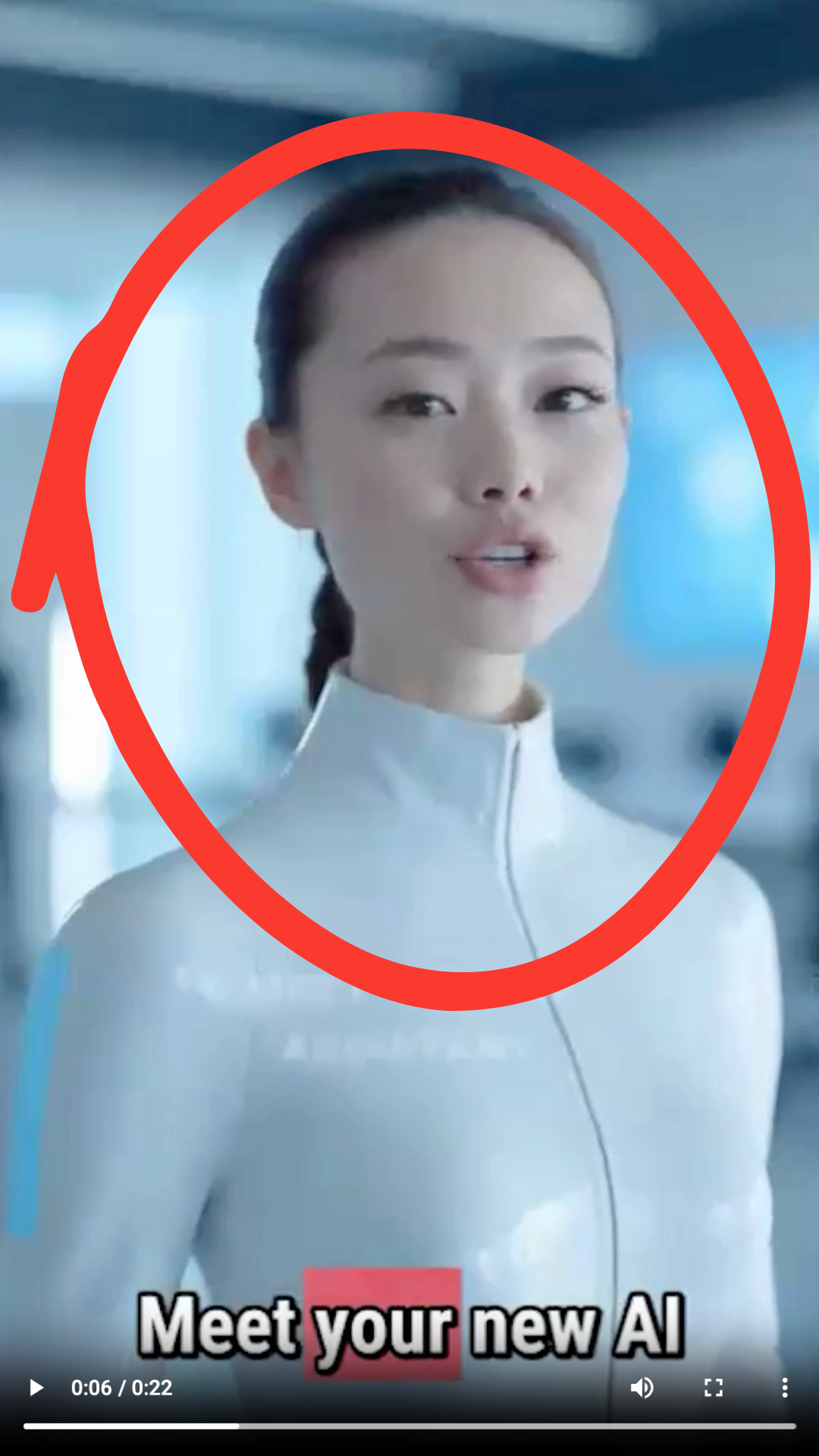
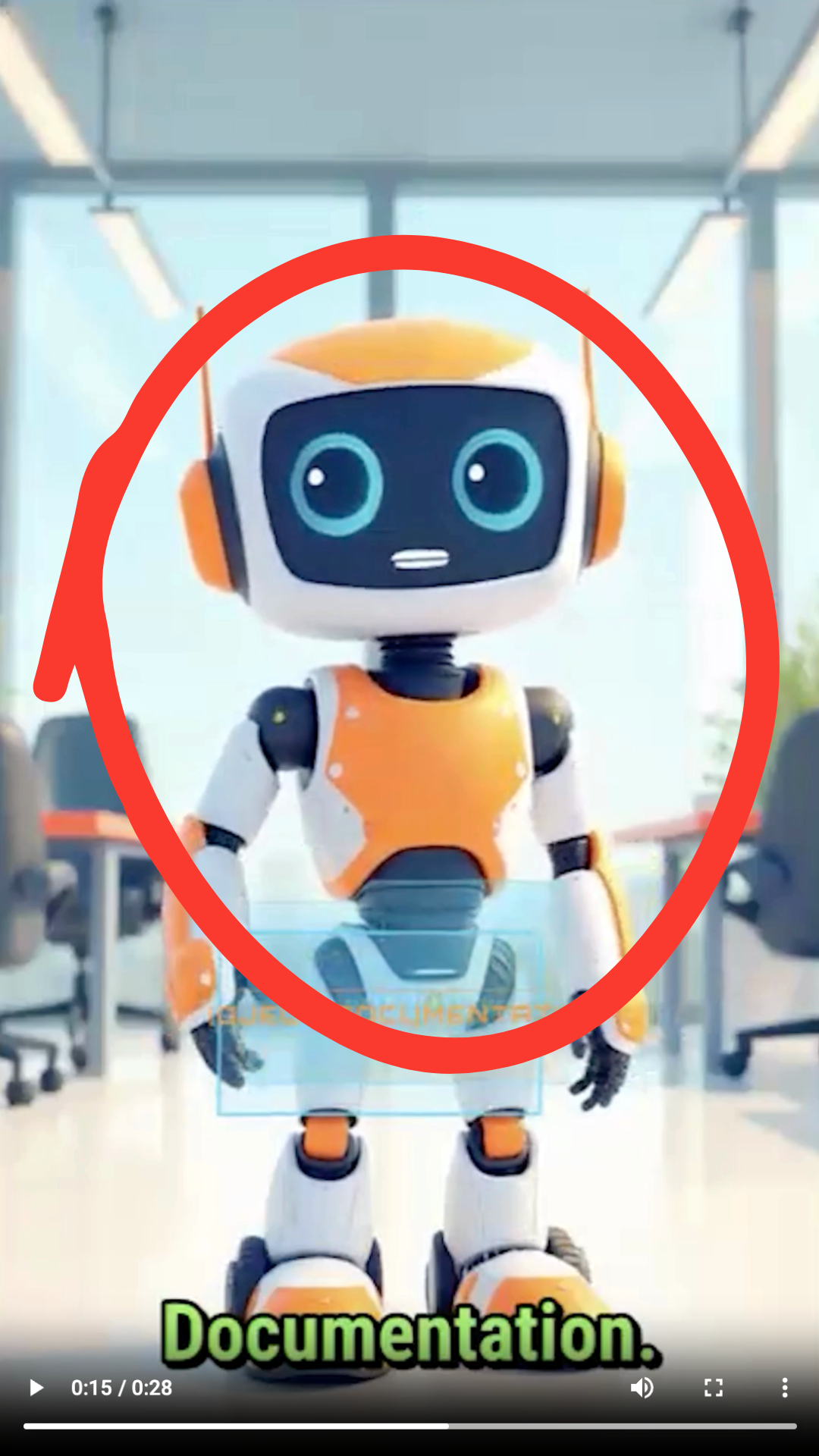
Expected behavior: HeyGen can place an AI avatar on screen as the presenter in generated videos. The benchmark exercised automatic avatar insertion, which worked for spokesperson-style concepts but could be intrusive when no presenter was desired.
Test case: Text prompt → Image
Input type: Text prompt
Input used: Input artifact (Text prompt): INPUT
Observed output: Output artifact (Image): Heygen automatically inserted a realistic female AI avatar even though the prompt was about organizing customer-support messages into a dashboard. The avatar became the dominant focus instead of staying behind the concept. — HeyGen_Anchor1_UnrequestedAIAvatar_0006.png
Input artifact: Input artifact (Text prompt): INPUT
Output artifact: Output artifact (Image): Heygen automatically inserted a realistic female AI avatar even though the prompt was about organizing customer-support messages into a dashboard. The avatar became the dominant focus instead of staying behind the concept. — HeyGen_Anchor1_UnrequestedAIAvatar_0006.png
What changed: Text prompt transformed into Image
Test case: Text prompt → Image
Input type: Text prompt
Input used: Input artifact (Text prompt): INPUT
Observed output: Output artifact (Image): The documentation beat shifted toward an avatar-led presentation rather than visually showing the robot learning from documentation. This confirmed that avatar presentation can take over the narrative when the concept needs more scene-specific storytelling. — HeyGen_Anchor2_AvatarLedStorytelling_0013.png
Input artifact: Input artifact (Text prompt): INPUT
Output artifact: Output artifact (Image): The documentation beat shifted toward an avatar-led presentation rather than visually showing the robot learning from documentation. This confirmed that avatar presentation can take over the narrative when the concept needs more scene-specific storytelling. — HeyGen_Anchor2_AvatarLedStorytelling_0013.png
What changed: Text prompt transformed into Image
Why it matters / Conclusion: Good for presenter-style videos, but risky when the concept should stay avatar-free.
HeyGen can place an AI avatar on screen as the presenter in generated videos. The benchmark exercised automatic avatar insertion, which worked for spokesperson-style concepts but could be intrusive when no presenter was desired.
Text-to-Video GenerationUseful for fast shorts, but only moderately specific visually.▾
Feature tested: Text-to-Video Generation
Result: Partial
Verdict: Useful for fast shorts, but only moderately specific visually.
Expected behavior: HeyGen turns a natural-language brief or text prompt into a complete short video, generating script, scenes, narration, captions, music, and an export-ready vertical output. The benchmark runs exercised prompt-to-short creation, including avatar-led explainer-style outputs and full vertical drafts.
Test case: Text prompt → Video file
Input type: Text prompt
Input used: Input artifact (Text prompt): INPUT
Observed output: Output artifact (Video file): Heygen produced a complete vertical short with an AI avatar, narration, captions, background music, and generated visuals for the customer-support dashboard idea. The result matched the prompt roughly 70–80%, but some scenes were blurry or generic rather than highly specific. — Heygen_AnchorTask1_Dashboard_Output.mp4
Input artifact: Input artifact (Text prompt): INPUT
Output artifact: Output artifact (Video file): Heygen produced a complete vertical short with an AI avatar, narration, captions, background music, and generated visuals for the customer-support dashboard idea. The result matched the prompt roughly 70–80%, but some scenes were blurry or generic rather than highly specific. — Heygen_AnchorTask1_Dashboard_Output.mp4
What changed: Text prompt transformed into Video file
Test case: Text prompt → Video file
Input type: Text prompt
Input used: Input artifact (Text prompt): INPUT
Observed output: Output artifact (Video file): Heygen produced a complete vertical short with narration, captions, background music, and generated visuals for the robot-intern story. The story flow was intact, but several scenes became generic or presentation-style, so the prompt landed only at a moderate level of fidelity. — Heygen_AnchorTask2_RobotIntern_Output.mp4
Input artifact: Input artifact (Text prompt): INPUT
Output artifact: Output artifact (Video file): Heygen produced a complete vertical short with narration, captions, background music, and generated visuals for the robot-intern story. The story flow was intact, but several scenes became generic or presentation-style, so the prompt landed only at a moderate level of fidelity. — Heygen_AnchorTask2_RobotIntern_Output.mp4
What changed: Text prompt transformed into Video file
Why it matters / Conclusion: Reliable for fast explainer-style shorts, but the visual rendering stays only moderately specific.
HeyGen turns a natural-language brief or text prompt into a complete short video, generating script, scenes, narration, captions, music, and an export-ready vertical output. The benchmark runs exercised prompt-to-short creation, including avatar-led explainer-style outputs and full vertical drafts.
Product Visual and CTA Scene AssemblyMixed▾
Feature tested: Product Visual and CTA Scene Assembly
Result: Partial
Verdict: Mixed
Expected behavior: Builds ad-style supporting visuals such as product close-ups, spec overlays, lifestyle cutaways, and CTA end cards. The member cards show branded packaging around the main video, along with some incorrect cutaway content.
Test case: Text prompt → Video file
Input type: Text prompt
Input used: Input artifact (Text prompt): INPUT 2
Observed output: Output artifact (Video file): This was the most ad-like result: it had a hook shot, product close-up B-roll, spec and feature overlays, lifestyle running B-roll, captions throughout, and a proper CTA end card. — heygen output 2 UGC.mp4
Input artifact: Input artifact (Text prompt): INPUT 2
Output artifact: Output artifact (Video file): This was the most ad-like result: it had a hook shot, product close-up B-roll, spec and feature overlays, lifestyle running B-roll, captions throughout, and a proper CTA end card. — heygen output 2 UGC.mp4
What changed: Text prompt transformed into Video file
Test case: Text prompt → Video file
Input type: Text prompt
Input used: Input artifact (Text prompt): INPUT 3
Observed output: Output artifact (Video file): The video ended with a branded Duolingo CTA card, but the phone screenshot cutaway showed a shopping app instead of Duolingo, so the supporting visuals were not product-accurate. — heygen output 3 UGC.mp4
Input artifact: Input artifact (Text prompt): INPUT 3
Output artifact: Output artifact (Video file): The video ended with a branded Duolingo CTA card, but the phone screenshot cutaway showed a shopping app instead of Duolingo, so the supporting visuals were not product-accurate. — heygen output 3 UGC.mp4
What changed: Text prompt transformed into Video file
Why it matters / Conclusion: This is useful for templated ad packaging, but product-specific visuals still need QA because the cutaway content can be wrong.
Builds ad-style supporting visuals such as product close-ups, spec overlays, lifestyle cutaways, and CTA end cards. The member cards show branded packaging around the main video, along with some incorrect cutaway content.
Vertical Video ExportWorking, with Free-plan limits▾
Feature tested: Vertical Video Export
Result: Partial
Verdict: Working, with Free-plan limits
Expected behavior: HeyGen exports finished videos in a vertical social format. The benchmark outputs were ready-to-upload vertical MP4s, with plan limits affecting export flexibility and quality options.
Test case: Text prompt → Video file
Input type: Text prompt
Input used: Input artifact (Text prompt): INPUT
Observed output: Output artifact (Video file): The output exported as a vertical social-ready video, suitable for publishing in short-form formats. — Heygen_AnchorTask1_Dashboard_Output.mp4
Input artifact: Input artifact (Text prompt): INPUT
Output artifact: Output artifact (Video file): The output exported as a vertical social-ready video, suitable for publishing in short-form formats. — Heygen_AnchorTask1_Dashboard_Output.mp4
What changed: Text prompt transformed into Video file
Test case: Text prompt → Video file
Input type: Text prompt
Input used: Input artifact (Text prompt): INPUT
Observed output: Output artifact (Video file): The output exported as a vertical social-ready video, but the observed Free-plan context means export volume and flexibility are still limited compared with paid tiers. — Heygen_AnchorTask2_RobotIntern_Output.mp4
Input artifact: Input artifact (Text prompt): INPUT
Output artifact: Output artifact (Video file): The output exported as a vertical social-ready video, but the observed Free-plan context means export volume and flexibility are still limited compared with paid tiers. — Heygen_AnchorTask2_RobotIntern_Output.mp4
What changed: Text prompt transformed into Video file
Why it matters / Conclusion: The format is right for shorts, but the Free plan keeps export flexibility constrained.
HeyGen exports finished videos in a vertical social format. The benchmark outputs were ready-to-upload vertical MP4s, with plan limits affecting export flexibility and quality options.
Post-Generation EditingPartial▾
Feature tested: Post-Generation Editing
Result: Partial
Verdict: Partial
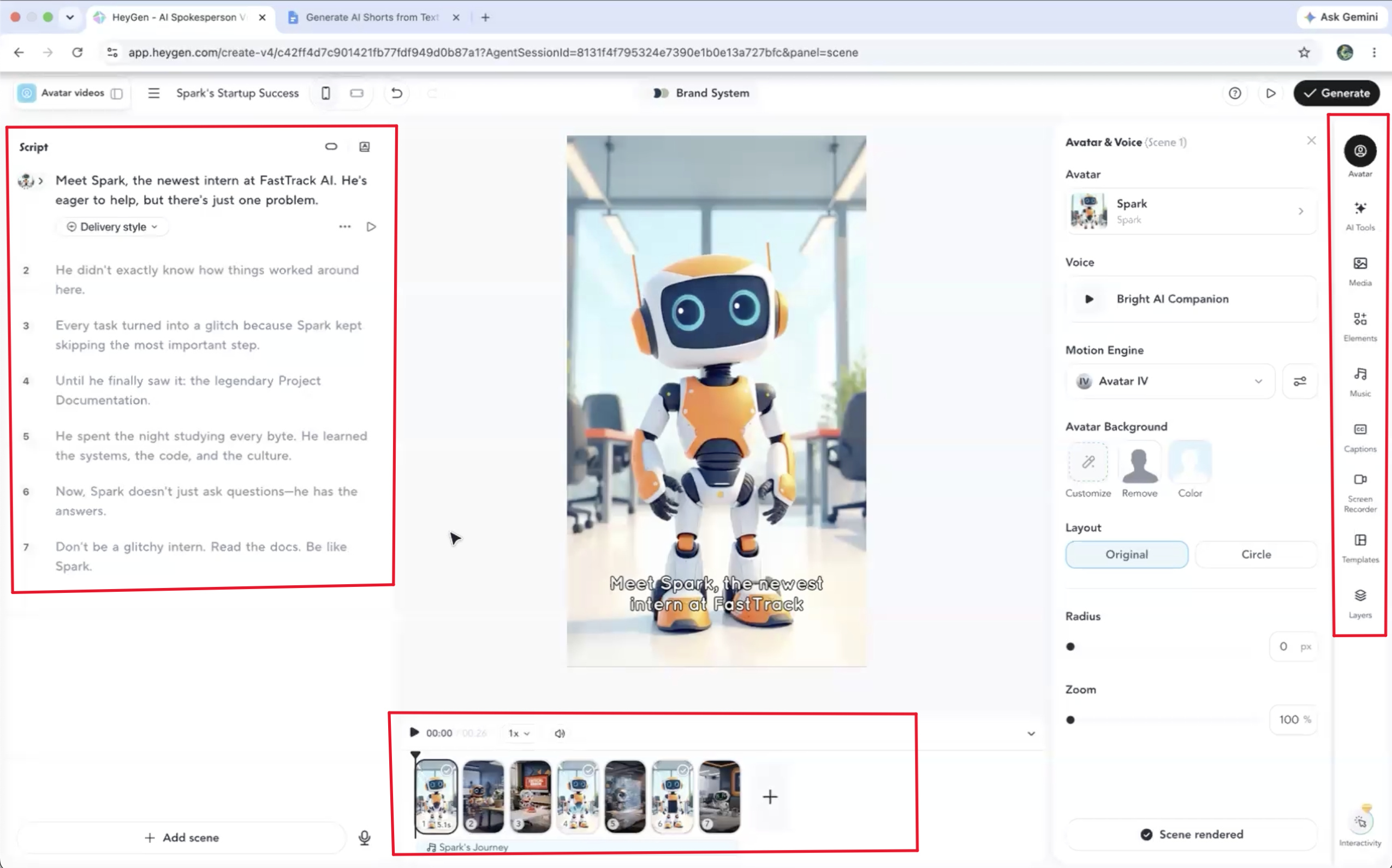
Expected behavior: HeyGen provides a post-generation editor for scripts, scenes, captions, avatar choice, voice, and music settings. The benchmark notes that replacing AI visuals for an existing scene usually requires manual edits or uploaded media rather than direct regeneration.
Test case: Text prompt → Image
Input type: Text prompt
Input used: Input artifact (Text prompt): INPUT
Observed output: Output artifact (Image): The editor exposes script, avatar, voice, music, captions, and scene tools, but it does not show direct AI regeneration for an existing scene. Replacing a scene appears to require manual media uploads or manual editing instead. — HeyGen_Anchor2_LimitedSceneRegeneration.png
Input artifact: Input artifact (Text prompt): INPUT
Output artifact: Output artifact (Image): The editor exposes script, avatar, voice, music, captions, and scene tools, but it does not show direct AI regeneration for an existing scene. Replacing a scene appears to require manual media uploads or manual editing instead. — HeyGen_Anchor2_LimitedSceneRegeneration.png
What changed: Text prompt transformed into Image
Why it matters / Conclusion: Useful for after-the-fact tweaks, but not for direct scene-level AI regeneration.
HeyGen provides a post-generation editor for scripts, scenes, captions, avatar choice, voice, and music settings. The benchmark notes that replacing AI visuals for an existing scene usually requires manual edits or uploaded media rather than direct regeneration.
Video Translation▾
Feature tested: Video Translation
Result: Partial
Expected behavior: Translates uploaded source videos into new-language rendered videos. The member cards include English, Hindi, and educational explainer sources, with playable output confirmed in the tests.
Test case: Video file → Video file
Input type: Video file
Input used: Input artifact (Video file): English gym interview video with two men in a weight room; the on-screen quiz prompt changes over time and includes a shoulder-anatomy question and BCAA-related questions. — Input 1 Fitness Video.mp4
Observed output: Output artifact (Video file): Free-tier English→Hindi fitness clip rendered cleanly, but the face stayed frame-identical at a matched caption moment, the burned-in English captions remained unchanged, and the screen recording could not verify whether an audio dub was present. — Heygen output 1-2.mp4
Input artifact: Input artifact (Video file): English gym interview video with two men in a weight room; the on-screen quiz prompt changes over time and includes a shoulder-anatomy question and BCAA-related questions. — Input 1 Fitness Video.mp4
Output artifact: Output artifact (Video file): Free-tier English→Hindi fitness clip rendered cleanly, but the face stayed frame-identical at a matched caption moment, the burned-in English captions remained unchanged, and the screen recording could not verify whether an audio dub was present. — Heygen output 1-2.mp4
What changed: Video file transformed into Video file
Test case: Video file → Video file
Input type: Video file
Input used: Input artifact (Video file): Vertical educational video about banana ripeness, with a woman speaking outdoors beside a white panel showing four banana images from green to very dark. — Input 2 Educational.mp4
Observed output: Output artifact (Video file): Free-tier English→Spanish banana explainer rendered cleanly, but the woman's face did not visibly change at the matched 'Unripe' moment and the banana-stage labels stayed in English. — heygen output 2-2.mp4
Input artifact: Input artifact (Video file): Vertical educational video about banana ripeness, with a woman speaking outdoors beside a white panel showing four banana images from green to very dark. — Input 2 Educational.mp4
Output artifact: Output artifact (Video file): Free-tier English→Spanish banana explainer rendered cleanly, but the woman's face did not visibly change at the matched 'Unripe' moment and the banana-stage labels stayed in English. — heygen output 2-2.mp4
What changed: Video file transformed into Video file
Test case: Video file → Video file
Input type: Video file
Input used: Input artifact (Video file): Vertical talking-head promo about copyright-free stock media, with a speaker in a studio and on-screen English/Hindi text about stock images and videos. — Free Copyright Stock Videos Images And Music.publer.com (online-video-cutter.com).mp4
Observed output: Output artifact (Video file): Free-tier Hindi→English vlog/promo rendered cleanly, but the face stayed identical at a matched 'AAP' moment, the words 'AAP' and 'MAIN' remained untranslated, and pre-existing English branding was preserved. — 7f527b1140434a3fbbd21dc4470f0660.mp4
Input artifact: Input artifact (Video file): Vertical talking-head promo about copyright-free stock media, with a speaker in a studio and on-screen English/Hindi text about stock images and videos. — Free Copyright Stock Videos Images And Music.publer.com (online-video-cutter.com).mp4
Output artifact: Output artifact (Video file): Free-tier Hindi→English vlog/promo rendered cleanly, but the face stayed identical at a matched 'AAP' moment, the words 'AAP' and 'MAIN' remained untranslated, and pre-existing English branding was preserved. — 7f527b1140434a3fbbd21dc4470f0660.mp4
What changed: Video file transformed into Video file
Test case: Video file → Video file
Input type: Video file
Input used: Input artifact (Video file): Source video — Input 1 Fitness Video (online-video-cutter.com).mp4
Observed output: Output artifact (Video file): At a matched caption moment in the fitness clip, the face appeared frame-for-frame identical between input and output, with no visible lip-sync or face regeneration. — 7f9190c0c36b4bdeaac82f8607fc0bea.mp4
Input artifact: Input artifact (Video file): Source video — Input 1 Fitness Video (online-video-cutter.com).mp4
Output artifact: Output artifact (Video file): At a matched caption moment in the fitness clip, the face appeared frame-for-frame identical between input and output, with no visible lip-sync or face regeneration. — 7f9190c0c36b4bdeaac82f8607fc0bea.mp4
What changed: Video file transformed into Video file
Test case: Text prompt → Text prompt
Input type: Text prompt
Input used: Input artifact (Text prompt): Input
Observed output: Output artifact (Text prompt): Output
Input artifact: Input artifact (Text prompt): Input
Output artifact: Output artifact (Text prompt): Output
What changed: Text prompt transformed into Text prompt
Why it matters / Conclusion: The render pipeline worked, but the dubbed audio itself remained unconfirmed in this round.
Translates uploaded source videos into new-language rendered videos. The member cards include English, Hindi, and educational explainer sources, with playable output confirmed in the tests.
Background Music AdditionMusic is automatically added and helps the drafts feel finished▾
Feature tested: Background Music Addition
Result: Passed
Verdict: Music is automatically added and helps the drafts feel finished
Expected behavior: Automatically adds background music to the generated video and exposes music controls in the editing workflow. Both benchmark outputs included music as part of the finished shorts.
Test case: Text prompt → Video file
Input type: Text prompt
Input used: Input artifact (Text prompt): Input
Observed output: Output artifact (Video file): The dashboard short included background music automatically, which helped it feel like a finished social video rather than a raw draft. — Heygen_AnchorTask1_Dashboard_Output.mp4
Input artifact: Input artifact (Text prompt): Input
Output artifact: Output artifact (Video file): The dashboard short included background music automatically, which helped it feel like a finished social video rather than a raw draft. — Heygen_AnchorTask1_Dashboard_Output.mp4
What changed: Text prompt transformed into Video file
Test case: Text prompt → Video file
Input type: Text prompt
Input used: Input artifact (Text prompt): Input
Observed output: Output artifact (Video file): The robot-intern short also received automatic background music, adding polish to the final output. — Heygen_AnchorTask2_RobotIntern_Output.mp4
Input artifact: Input artifact (Text prompt): Input
Output artifact: Output artifact (Video file): The robot-intern short also received automatic background music, adding polish to the final output. — Heygen_AnchorTask2_RobotIntern_Output.mp4
What changed: Text prompt transformed into Video file
Test case: Text prompt → Video file
Input type: Text prompt
Input used: Input artifact (Text prompt): INPUT
Observed output: Output artifact (Video file): The dashboard output included background music, which contributed to the feeling of a finished social short. — Heygen_AnchorTask1_Dashboard_Output.mp4
Input artifact: Input artifact (Text prompt): INPUT
Output artifact: Output artifact (Video file): The dashboard output included background music, which contributed to the feeling of a finished social short. — Heygen_AnchorTask1_Dashboard_Output.mp4
What changed: Text prompt transformed into Video file
Test case: Text prompt → Video file
Input type: Text prompt
Input used: Input artifact (Text prompt): INPUT
Observed output: Output artifact (Video file): The robot story output also included background music, reinforcing the complete short-form package. — Heygen_AnchorTask2_RobotIntern_Output.mp4
Input artifact: Input artifact (Text prompt): INPUT
Output artifact: Output artifact (Video file): The robot story output also included background music, reinforcing the complete short-form package. — Heygen_AnchorTask2_RobotIntern_Output.mp4
What changed: Text prompt transformed into Video file
Why it matters / Conclusion: Music was consistently added and helped the videos feel ready to view without outside editing.
Automatically adds background music to the generated video and exposes music controls in the editing workflow. Both benchmark outputs included music as part of the finished shorts.
Pricing & access
The report tested the Free plan; paid-plan details below come from the report's access notes.
Free-plan exports were watermarked in every test.
Featured in Rankings
Independent rankings where HeyGen was tested and rated.
Banner Preview
How the embed badge will look on your site

Embed HTML
Copy this code to your website source
Quick Integration Guide
- 1Copy the HTML code block above.
- 2Paste it into your site's HTML or CMS editor.
- 3Banner appears instantly on your page.
- 4Links back to your tool profile here.
Similar Tools
Discover more AI tools like HeyGen to enhance your workflow.
Comments (0)
Need a custom AI solution for this use case?
If you are looking to build a custom AI video generation, avatar-led video creation, or UGC video workflow for your business or internal workflow, email us at contact@futuresmart.ai.
Found something inaccurate or missing? We try to keep our AI research accurate and useful. If you found outdated information, an issue, or have a suggestion, email us at collaborate@aidemos.com.