
Skima AI
Fast PDF resume parsing with dependable core fields and experience-year calculation, but weak structured output and supplemental coverage.
Reliable on core fields, but weak on structured output fidelity
- You need fast parsing for uploaded PDF resumes and can work with a fixed schema.
- You mainly need name, contact info, work history, education, and a computed experience total.
- You can normalize skills, bullets, and supplemental sections downstream before using the data.
- You need reliable machine-readable skills lists or clean bullet points out of the box.
Our take
Skima AI was dependable for the basics: it consistently parsed identity/contact data, work history, education, and a total-experience estimate across clean, multi-column, and messy resumes. The tradeoff is output quality: skills can collapse into unreadable strings, responsibility bullets can truncate or run on, and certifications, projects, languages, references, hobbies, and GPA are often missing, so it is useful for quick screening but not for clean downstream structured export without cleanup.
In-Depth Review
Our detailed analysis of Skima AI — features, performance, and real-world testing.
Feature-by-Feature Breakdown
Automated Resume ParsingAutomatic▾
Feature tested: Automated Resume Parsing
Result: Passed
Verdict: Automatic
Expected behavior: Skima AI accepts uploaded resume files and parses them automatically without manual template setup or layout hints. The evidence exercised this on a clean resume, a multi-column/sidebar resume, a messy resume, and direct PDF uploads.
Test case: Text prompt → Image
Input type: Text prompt
Input used: Input artifact (Text prompt): INPUT
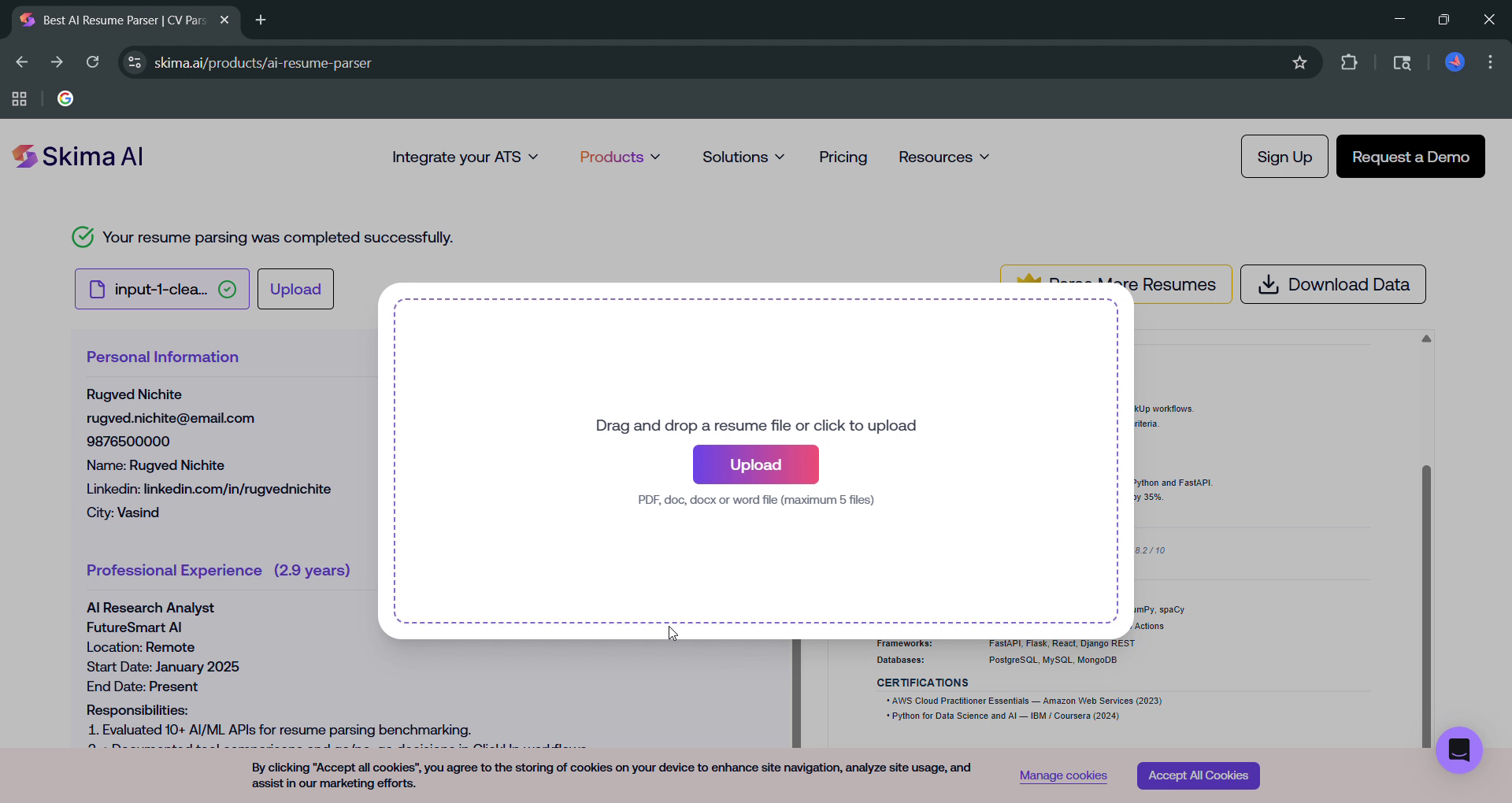
Observed output: Output artifact (Image): The upload modal accepts drag-and-drop or click-to-upload and lists PDF, doc, docx, or Word files, with parsing proceeding automatically after upload. — 01_input_handling.png
Input artifact: Input artifact (Text prompt): INPUT
Output artifact: Output artifact (Image): The upload modal accepts drag-and-drop or click-to-upload and lists PDF, doc, docx, or Word files, with parsing proceeding automatically after upload. — 01_input_handling.png
What changed: Text prompt transformed into Image
Test case: Text prompt → Image
Input type: Text prompt
Input used: Input artifact (Text prompt): INPUT
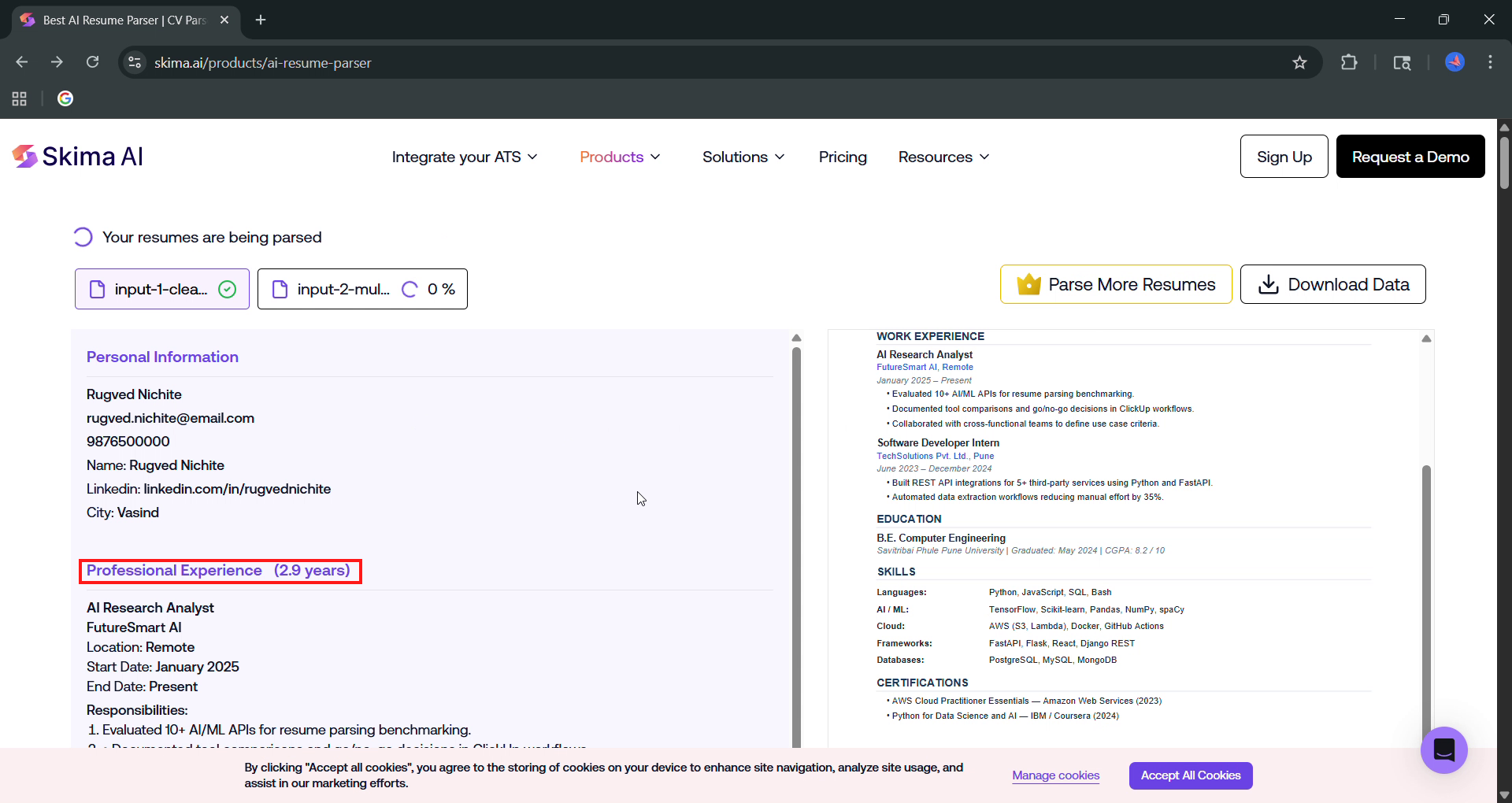
Observed output: Output artifact (Image): Parsing completed successfully on a clean resume without manual configuration; the parser returned core fields and a 2.9-year experience total. — 02_experience_calc.png
Input artifact: Input artifact (Text prompt): INPUT
Output artifact: Output artifact (Image): Parsing completed successfully on a clean resume without manual configuration; the parser returned core fields and a 2.9-year experience total. — 02_experience_calc.png
What changed: Text prompt transformed into Image
Test case: Text prompt → Image
Input type: Text prompt
Input used: Input artifact (Text prompt): INPUT
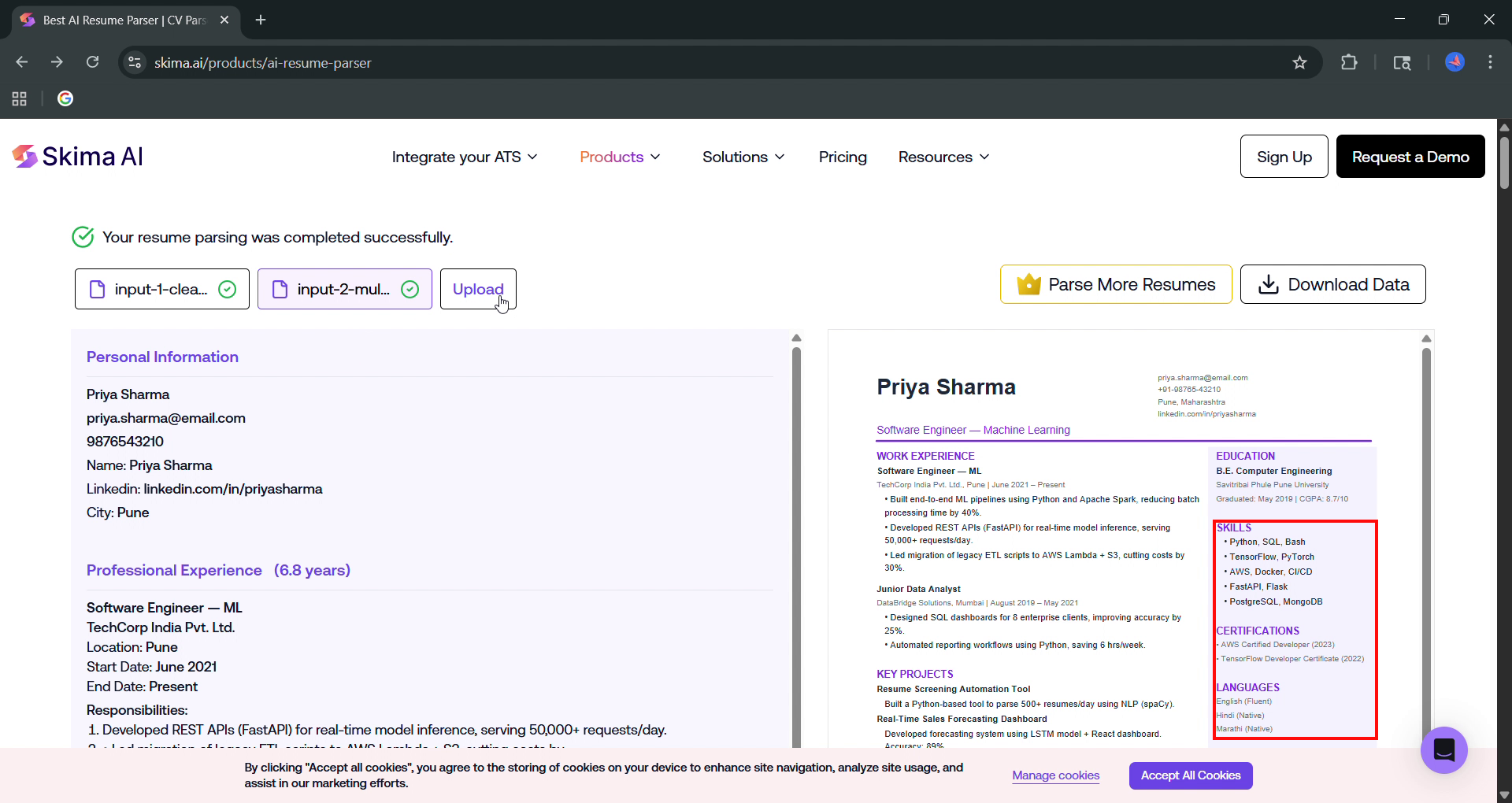
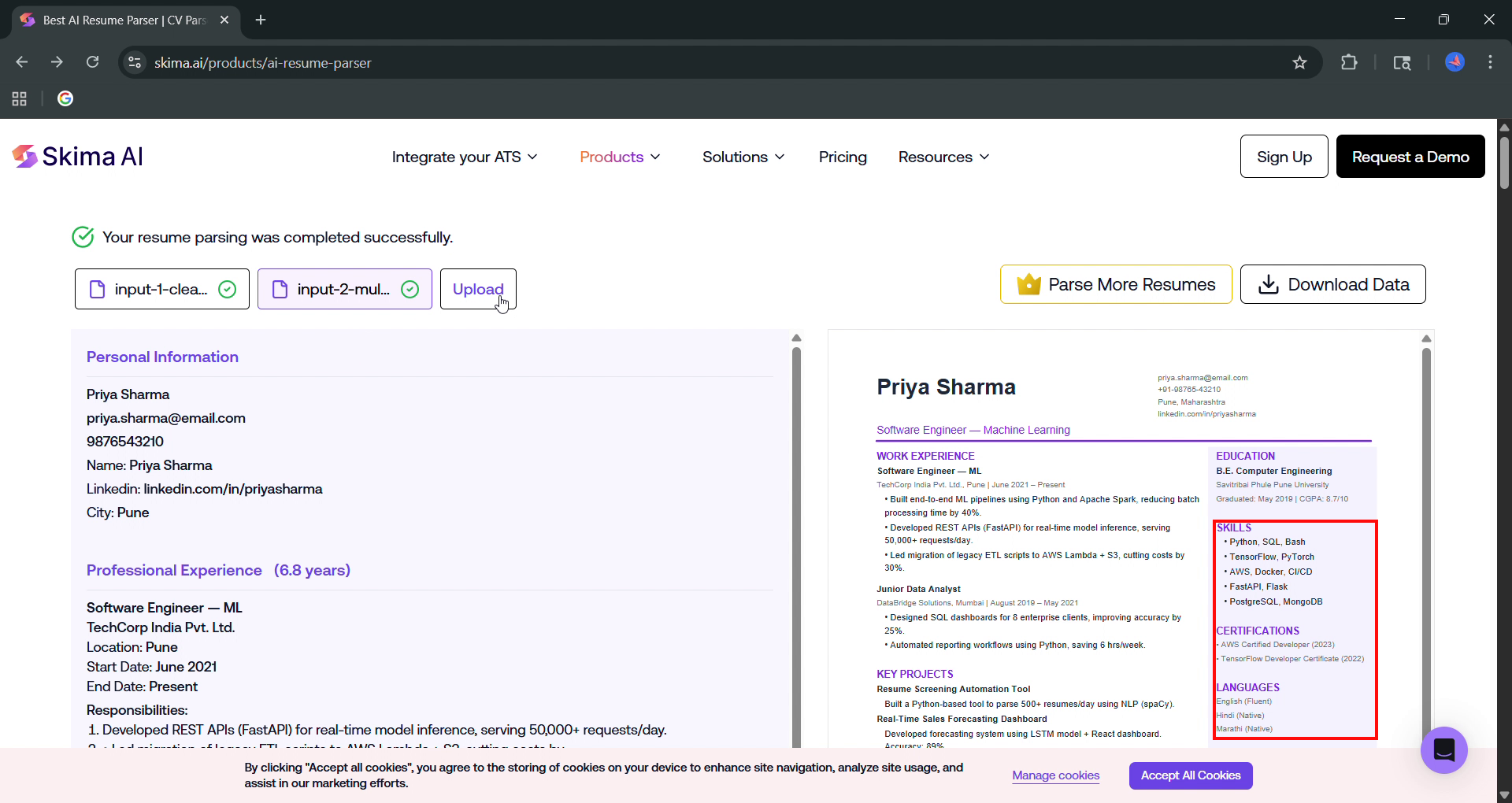
Observed output: Output artifact (Image): The multi-column resume parsed successfully, showing that the tool can ingest sidebar layouts even though supplemental extraction is incomplete. — skima_task2_sidebar-skills-certs-languages-missing.png
Input artifact: Input artifact (Text prompt): INPUT
Output artifact: Output artifact (Image): The multi-column resume parsed successfully, showing that the tool can ingest sidebar layouts even though supplemental extraction is incomplete. — skima_task2_sidebar-skills-certs-languages-missing.png
What changed: Text prompt transformed into Image
Test case: Text prompt → Image
Input type: Text prompt
Input used: Input artifact (Text prompt): INPUT
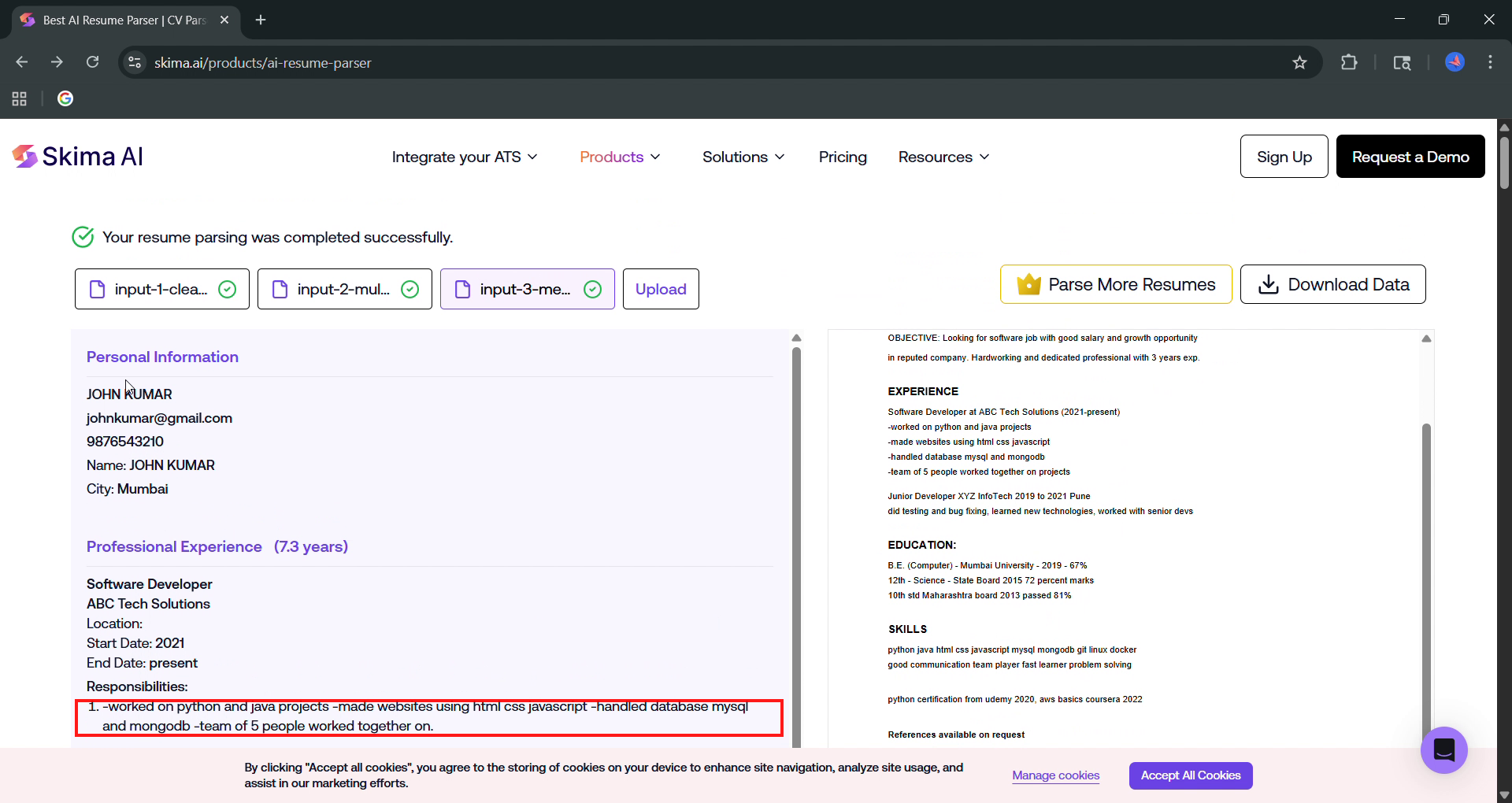
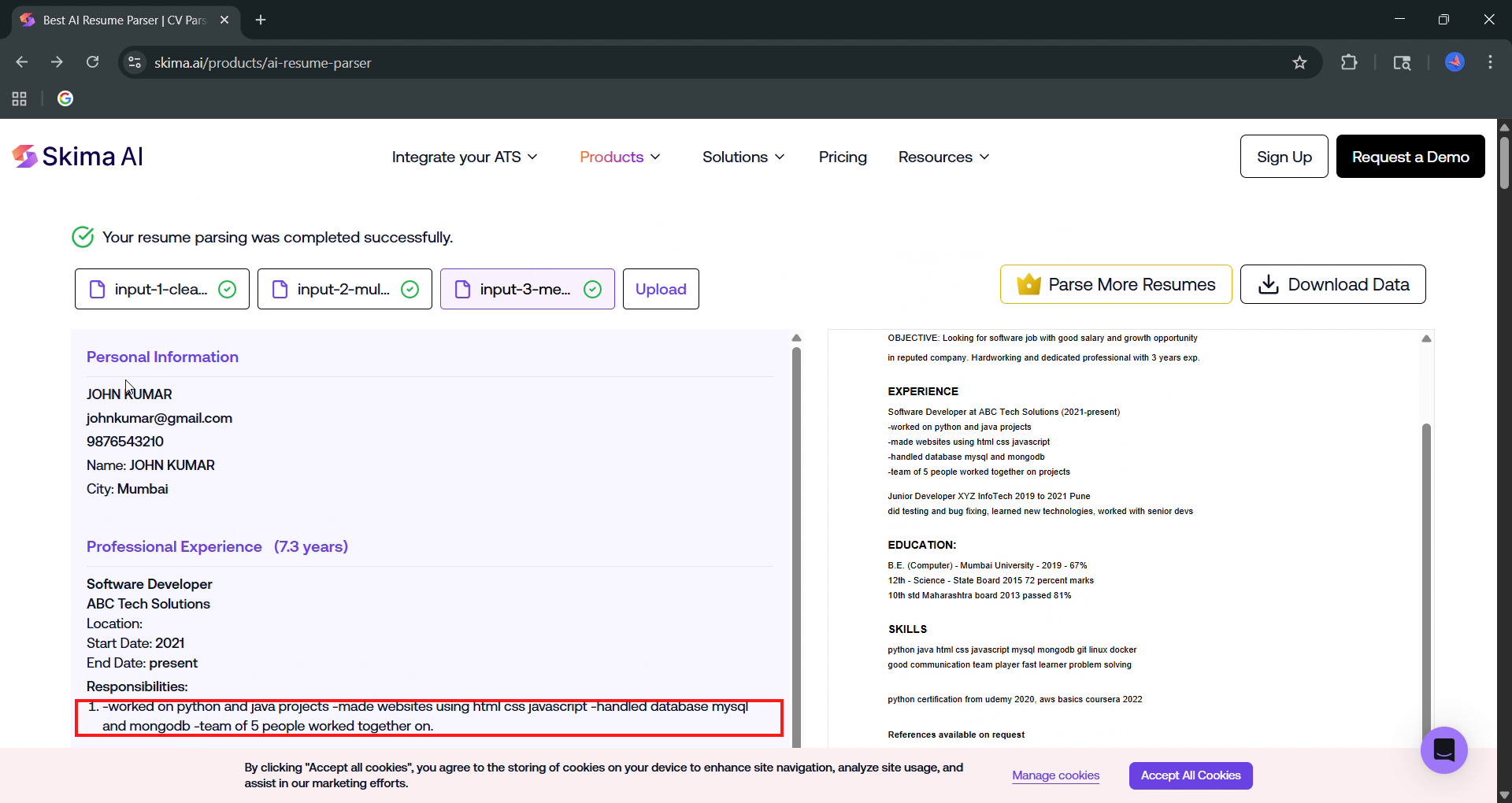
Observed output: Output artifact (Image): The parser accepted the messy resume and returned a result page rather than failing, but the extracted responsibilities were badly formatted. — skima_task3_runon-string.png
Input artifact: Input artifact (Text prompt): INPUT
Output artifact: Output artifact (Image): The parser accepted the messy resume and returned a result page rather than failing, but the extracted responsibilities were badly formatted. — skima_task3_runon-string.png
What changed: Text prompt transformed into Image
Why it matters / Conclusion: Parsing is automatic and resilient to file/layout variety, but quality falls off once the layout gets complex.
Skima AI accepts uploaded resume files and parses them automatically without manual template setup or layout hints. The evidence exercised this on a clean resume, a multi-column/sidebar resume, a messy resume, and direct PDF uploads.
Core Profile ExtractionReliable core identity capture across all three tested resumes.▾
Feature tested: Core Profile Extraction
Result: Partial
Verdict: Reliable core identity capture across all three tested resumes.
Expected behavior: Skima AI extracts core identity and contact details such as name, email, phone, city, and LinkedIn when present. The evidence covered clean, multi-column, and messy resumes, with these fields staying the most stable across outputs.
Test case: Artifact → Image
Input type: Artifact
Input used: Input artifact (Artifact): Input 1: Rugved Nichite clean PDF resume with identity/contact fields, two jobs, education, skills, and certifications.
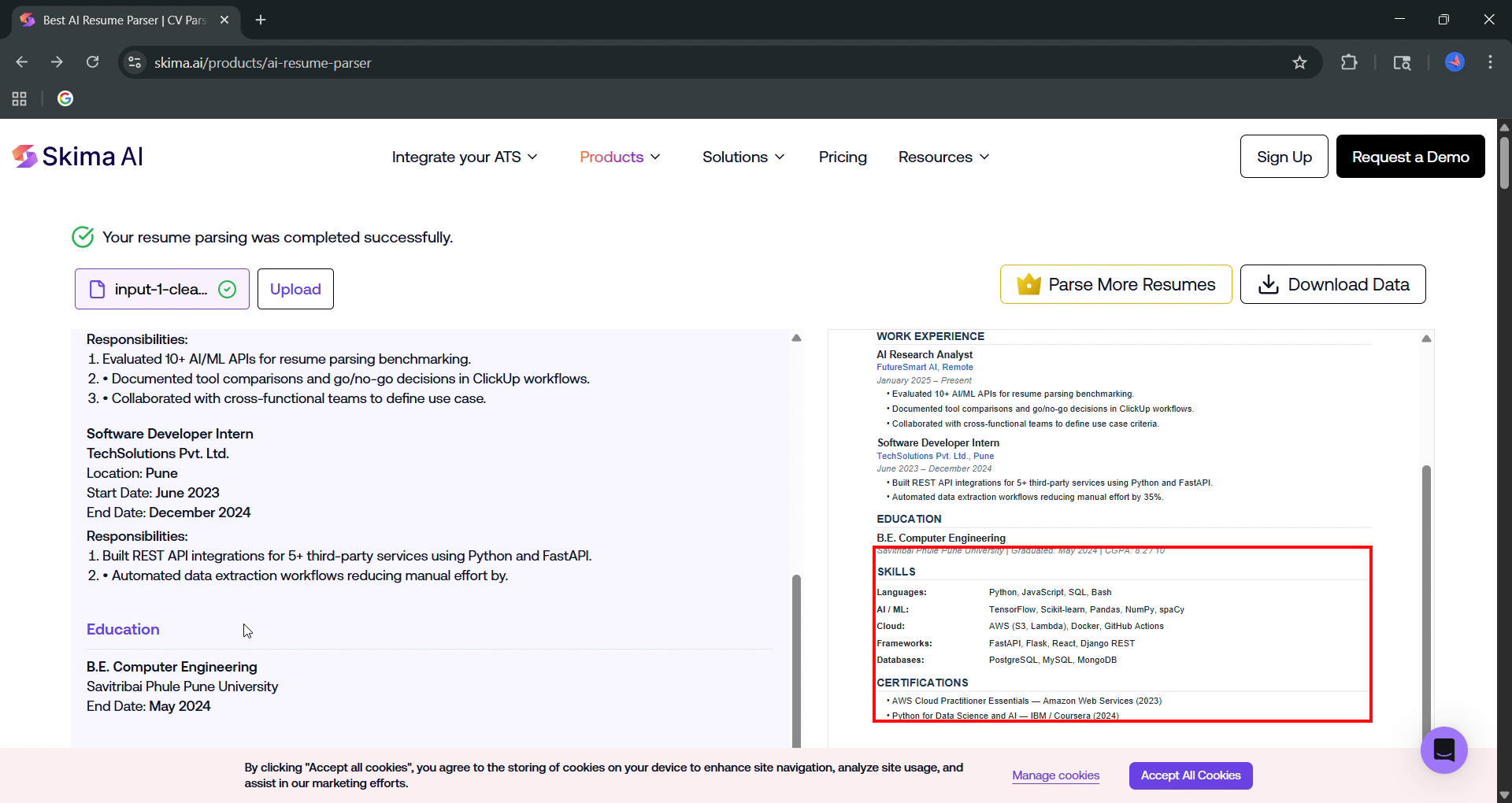
Observed output: Output artifact (Image): Rugved Nichite's parsed result includes name, email, phone, city, work history, and education; the report says GPA and certifications were not extracted as structured fields. — skima_task1_gpa-certs-missing.png
Input artifact: Input artifact (Artifact): Input 1: Rugved Nichite clean PDF resume with identity/contact fields, two jobs, education, skills, and certifications.
Output artifact: Output artifact (Image): Rugved Nichite's parsed result includes name, email, phone, city, work history, and education; the report says GPA and certifications were not extracted as structured fields. — skima_task1_gpa-certs-missing.png
What changed: Artifact transformed into Image
Test case: Artifact → Image
Input type: Artifact
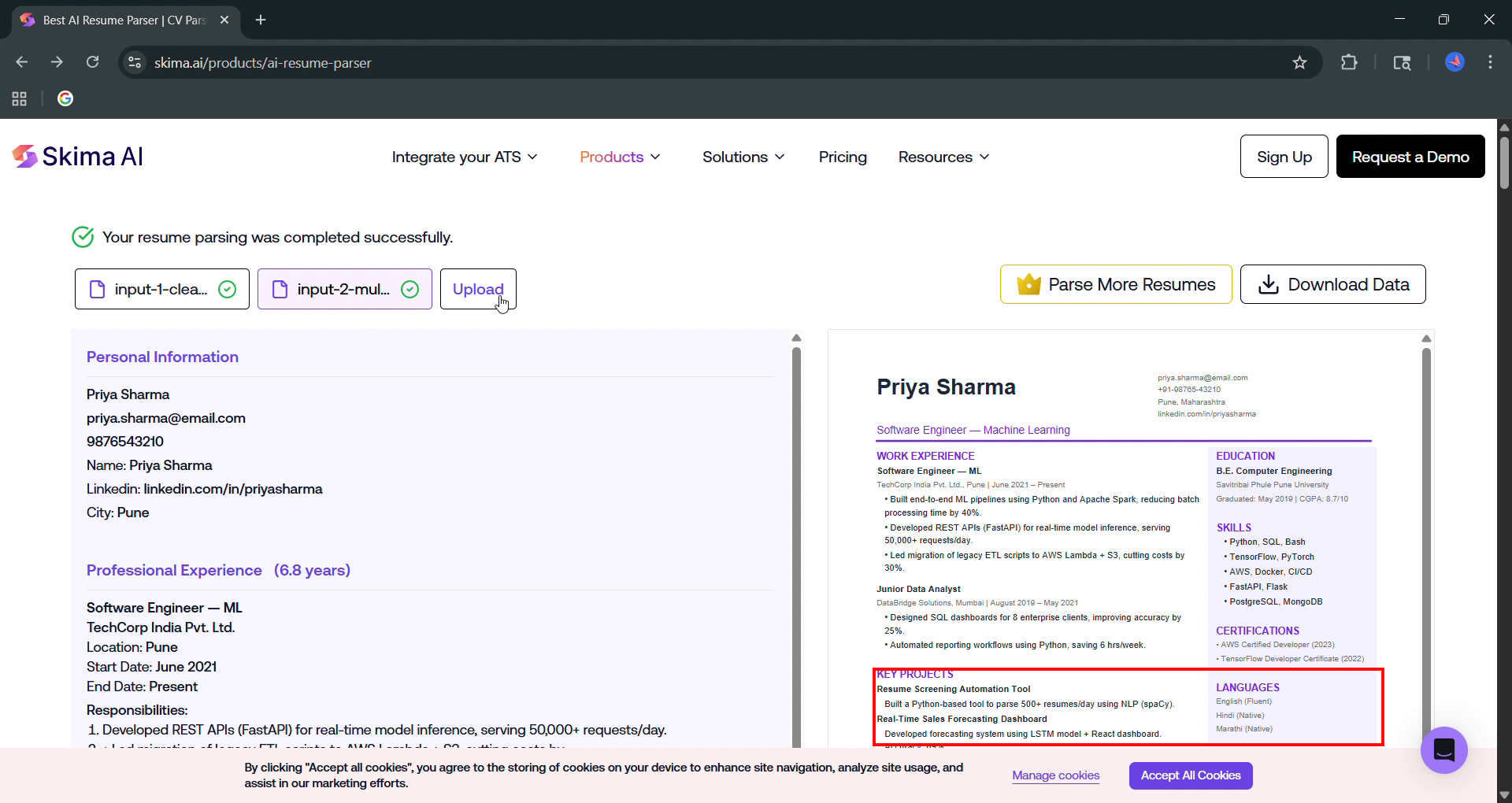
Input used: Input artifact (Artifact): Input 2: Priya Sharma multi-column PDF resume with sidebar skills, certifications, languages, and key projects.
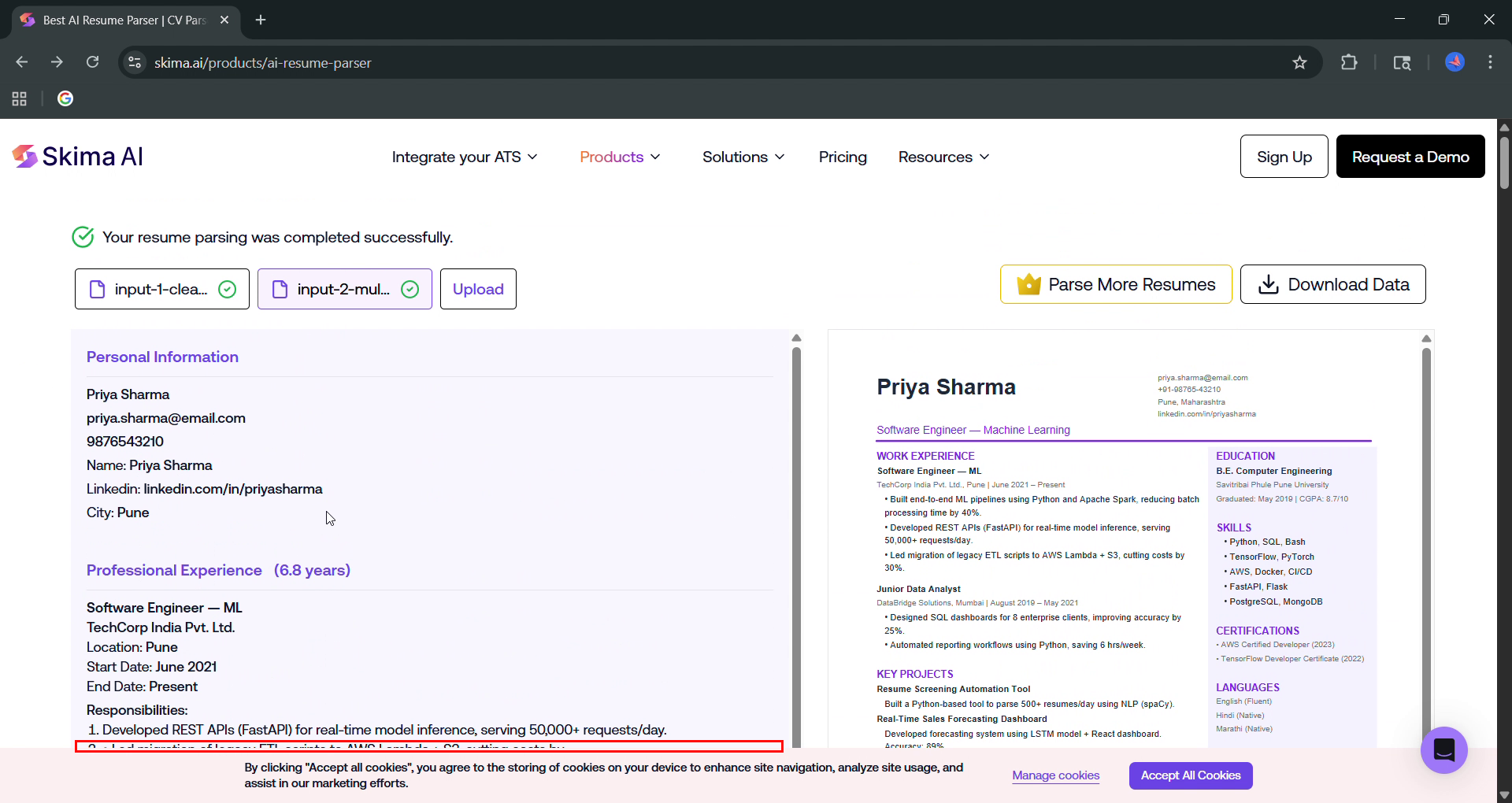
Observed output: Output artifact (Image): Priya Sharma's parsed result includes name, email, phone, LinkedIn, and city alongside the resume preview. — image-5.png
Input artifact: Input artifact (Artifact): Input 2: Priya Sharma multi-column PDF resume with sidebar skills, certifications, languages, and key projects.
Output artifact: Output artifact (Image): Priya Sharma's parsed result includes name, email, phone, LinkedIn, and city alongside the resume preview. — image-5.png
What changed: Artifact transformed into Image
Test case: Artifact → Image
Input type: Artifact
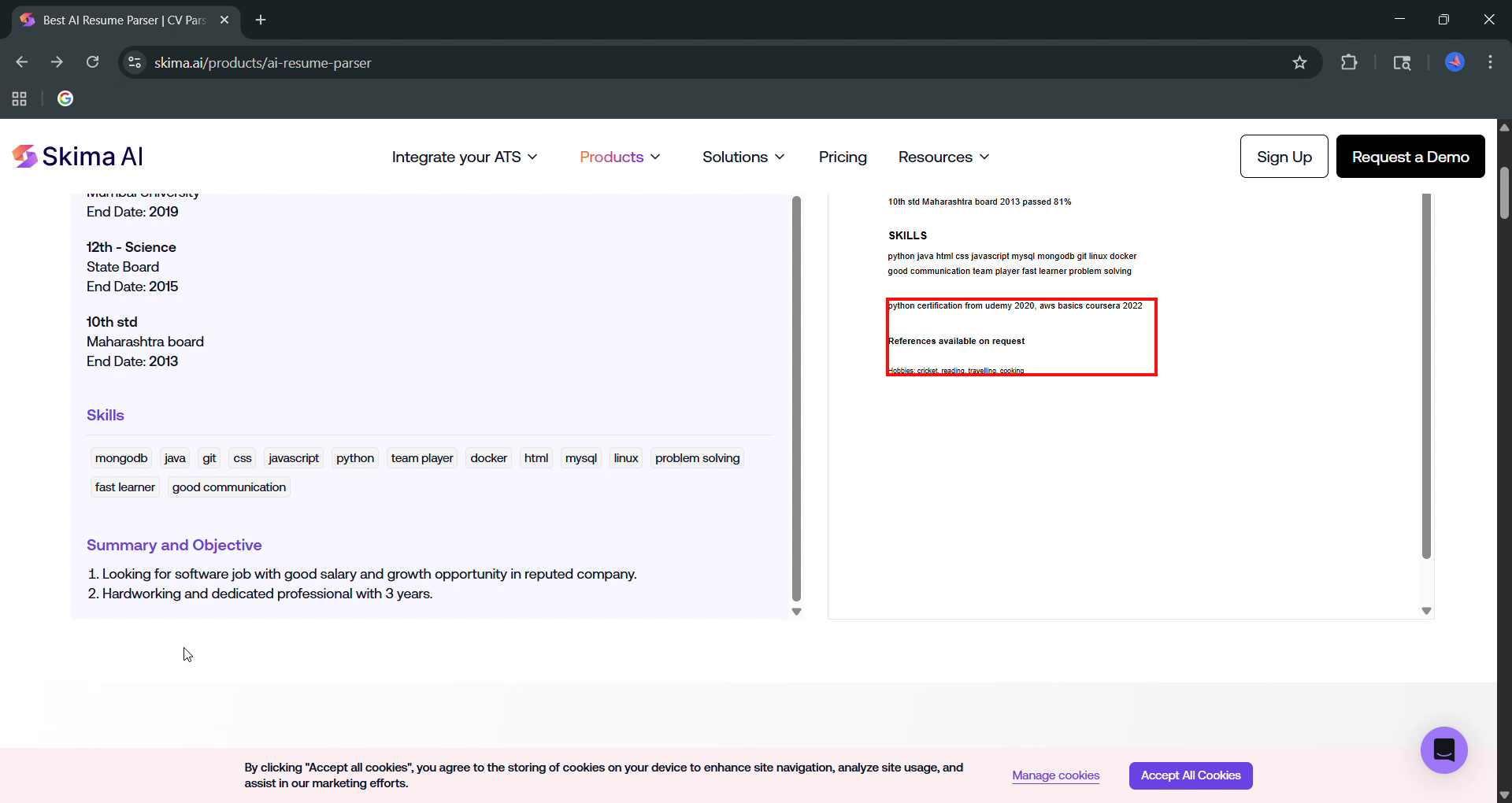
Input used: Input artifact (Artifact): Input 3: John Kumar messy PDF resume with run-on responsibilities, certifications, references, and hobbies.
Observed output: Output artifact (Image): John Kumar's parsed result still captures name, email, phone, city, and work history even though the responsibilities text is badly merged. — skima_task3_responsibilities-runon-string.png
Input artifact: Input artifact (Artifact): Input 3: John Kumar messy PDF resume with run-on responsibilities, certifications, references, and hobbies.
Output artifact: Output artifact (Image): John Kumar's parsed result still captures name, email, phone, city, and work history even though the responsibilities text is badly merged. — skima_task3_responsibilities-runon-string.png
What changed: Artifact transformed into Image
Test case: Text prompt → Image
Input type: Text prompt
Input used: Input artifact (Text prompt): INPUT
Observed output: Output artifact (Image): The clean resume output shows the candidate identity and contact block, including name, email, phone, city, and the parsed profile section. — 02_experience_calc.png
Input artifact: Input artifact (Text prompt): INPUT
Output artifact: Output artifact (Image): The clean resume output shows the candidate identity and contact block, including name, email, phone, city, and the parsed profile section. — 02_experience_calc.png
What changed: Text prompt transformed into Image
Why it matters / Conclusion: Core identity fields are dependable across layout styles and were present in all three tested resumes.
Skima AI extracts core identity and contact details such as name, email, phone, city, and LinkedIn when present. The evidence covered clean, multi-column, and messy resumes, with these fields staying the most stable across outputs.
Skills Extraction and NormalizationUnreliable▾
Feature tested: Skills Extraction and Normalization
Result: Failed
Verdict: Unreliable
Expected behavior: Skima AI extracts skills from the SKILLS section and attempts to normalize them into readable output. The evidence showed mixed results across resumes, including readable lists, collapsed strings, and missing sidebar skills.
Test case: Artifact → Image
Input type: Artifact
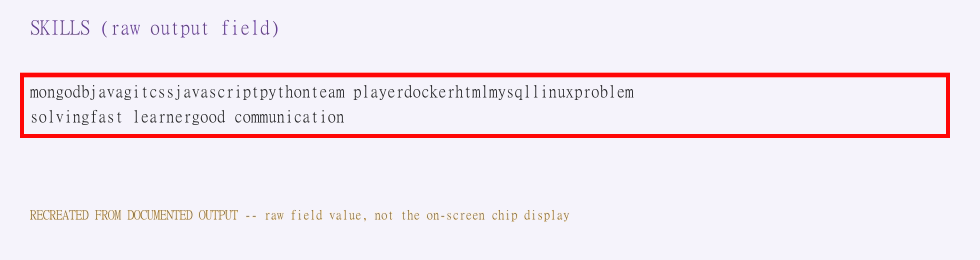
Input used: Input artifact (Artifact): The skills field collapsed
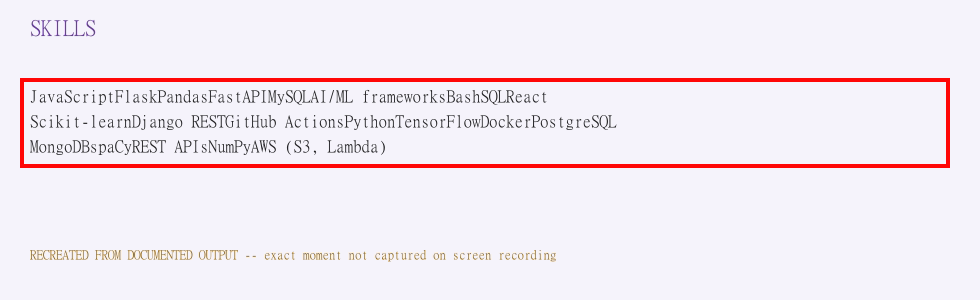
Observed output: Output artifact (Image): The skills field collapsed into a single concatenated string with no separators or chips. — 02_input1_skills_concatenated_mock-2.png
Input artifact: Input artifact (Artifact): The skills field collapsed
Output artifact: Output artifact (Image): The skills field collapsed into a single concatenated string with no separators or chips. — 02_input1_skills_concatenated_mock-2.png
What changed: Artifact transformed into Image
Test case: Artifact → Image
Input type: Artifact
Input used: Input artifact (Artifact): John Kumar messy resume
Observed output: Output artifact (Image): A second messy resume produced another long run-on skills string with no readable tokenization. — 09_input3_skills_concatenated_mock-2.png
Input artifact: Input artifact (Artifact): John Kumar messy resume
Output artifact: Output artifact (Image): A second messy resume produced another long run-on skills string with no readable tokenization. — 09_input3_skills_concatenated_mock-2.png
What changed: Artifact transformed into Image
Test case: Text prompt → Image
Input type: Text prompt
Input used: Input artifact (Text prompt): INPUT
Observed output: Output artifact (Image): The sidebar skills block is not extracted cleanly in this multi-column layout, so the skills section is effectively missing from the parsed result. — skima_task2_sidebar-skills-certs-languages-missing.png
Input artifact: Input artifact (Text prompt): INPUT
Output artifact: Output artifact (Image): The sidebar skills block is not extracted cleanly in this multi-column layout, so the skills section is effectively missing from the parsed result. — skima_task2_sidebar-skills-certs-languages-missing.png
What changed: Text prompt transformed into Image
Why it matters / Conclusion: Skills handling is inconsistent and often unusable downstream without post-processing.
Skima AI extracts skills from the SKILLS section and attempts to normalize them into readable output. The evidence showed mixed results across resumes, including readable lists, collapsed strings, and missing sidebar skills.
Responsibility Bullet ExtractionWeak▾
Feature tested: Responsibility Bullet Extraction
Result: Failed
Verdict: Weak
Expected behavior: Skima AI attempts to preserve bullet-point responsibilities from work history entries on bullet-heavy resumes. The tested outputs showed truncation, run-on merges, duplicated markers, and other formatting degradation.
Test case: Artifact → Image
Input type: Artifact
Input used: Input artifact (Artifact): Clean resume responsibilities section with multiple bullets under the Software Developer Intern role.
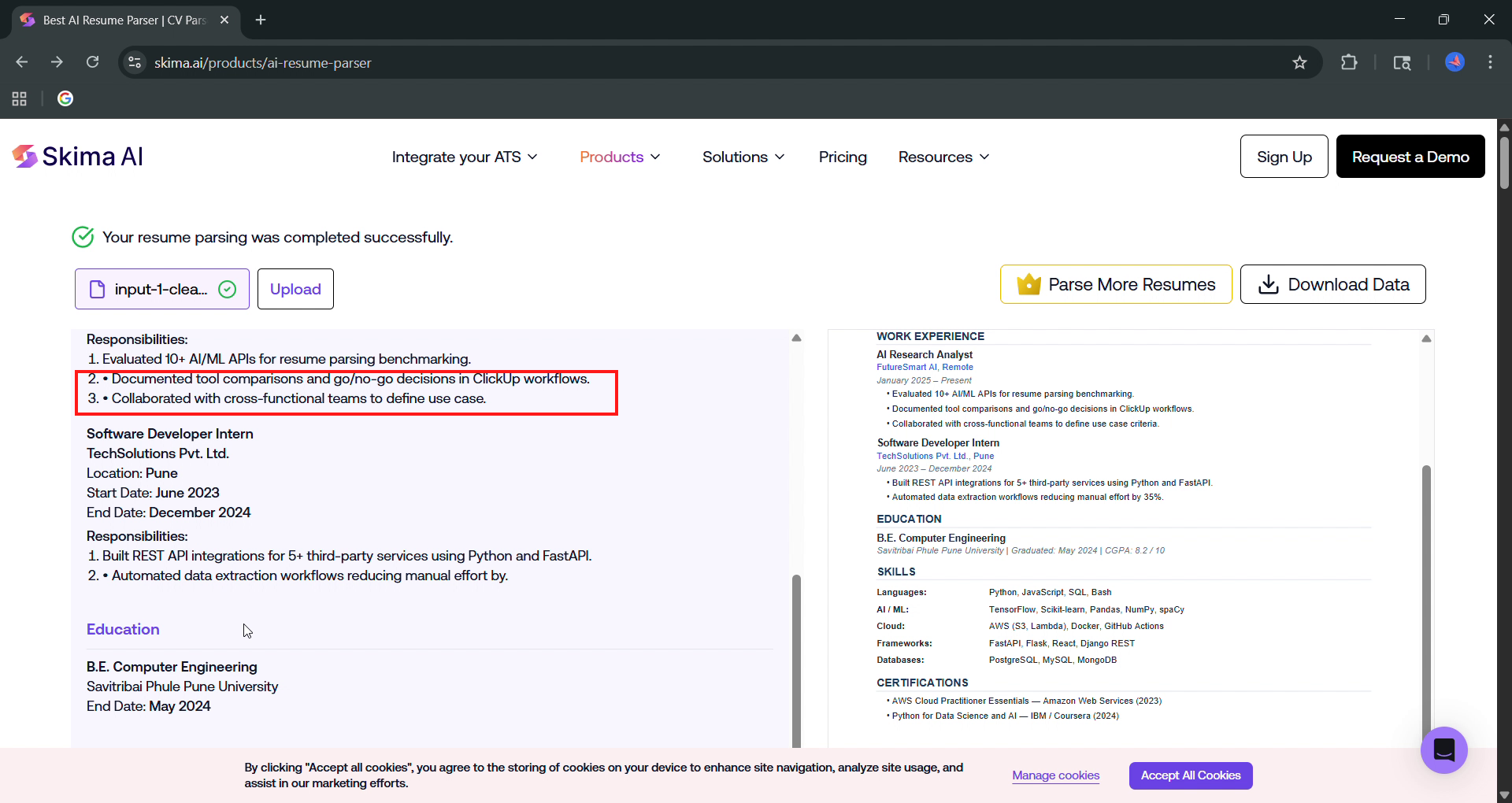
Observed output: Output artifact (Image): Two responsibility bullets showed duplicate numbering and awkward wrapping, indicating the parser preserved raw bullet artifacts. — skima_task1_duplicate-bullet-formatting.png
Input artifact: Input artifact (Artifact): Clean resume responsibilities section with multiple bullets under the Software Developer Intern role.
Output artifact: Output artifact (Image): Two responsibility bullets showed duplicate numbering and awkward wrapping, indicating the parser preserved raw bullet artifacts. — skima_task1_duplicate-bullet-formatting.png
What changed: Artifact transformed into Image
Test case: Artifact → Image
Input type: Artifact
Input used: Input artifact (Artifact): Source resume snippet where the second responsibility bullet ends mid-sentence after 'cutting costs by.'
Observed output: Output artifact (Image): The second responsibility bullet is cut off after 'cutting costs by.', losing the quantified result and leaving the line incomplete. — 04_truncated_input2-2.png
Input artifact: Input artifact (Artifact): Source resume snippet where the second responsibility bullet ends mid-sentence after 'cutting costs by.'
Output artifact: Output artifact (Image): The second responsibility bullet is cut off after 'cutting costs by.', losing the quantified result and leaving the line incomplete. — 04_truncated_input2-2.png
What changed: Artifact transformed into Image
Why it matters / Conclusion: Do not use responsibility text verbatim; important metrics can be cut off or merged away.
Skima AI attempts to preserve bullet-point responsibilities from work history entries on bullet-heavy resumes. The tested outputs showed truncation, run-on merges, duplicated markers, and other formatting degradation.
Supplemental Section ExtractionIncomplete▾
Feature tested: Supplemental Section Extraction
Result: Failed
Verdict: Incomplete
Expected behavior: Skima AI tries to capture non-core resume sections such as certifications, projects, languages, references, hobbies, and GPA. The evidence shows these supplemental fields were inconsistent, incomplete, or often missing altogether.
Test case: Text prompt → Image
Input type: Text prompt
Input used: Input artifact (Text prompt): INPUT
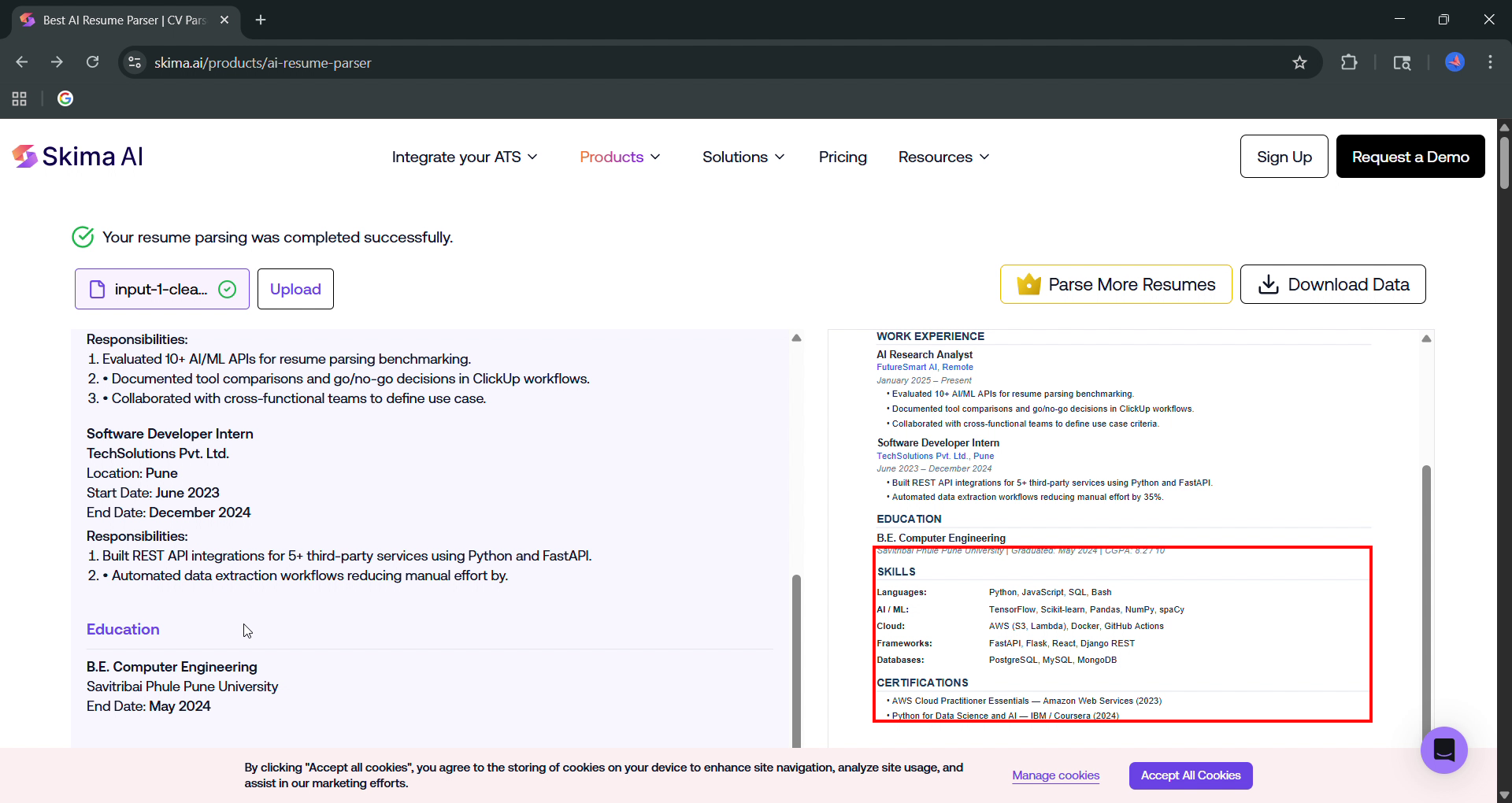
Observed output: Output artifact (Image): GPA and certifications are absent from the parsed output even though they are present in the source resume. — 01_input1_gpa_certs_missing.png
Input artifact: Input artifact (Text prompt): INPUT
Output artifact: Output artifact (Image): GPA and certifications are absent from the parsed output even though they are present in the source resume. — 01_input1_gpa_certs_missing.png
What changed: Text prompt transformed into Image
Test case: Text prompt → Image
Input type: Text prompt
Input used: Input artifact (Text prompt): INPUT
Observed output: Output artifact (Image): The projects section is not carried through cleanly, and the sidebar supplemental fields are missing or incomplete in the parsed output. — skima_task2_projects-missing.png
Input artifact: Input artifact (Text prompt): INPUT
Output artifact: Output artifact (Image): The projects section is not carried through cleanly, and the sidebar supplemental fields are missing or incomplete in the parsed output. — skima_task2_projects-missing.png
What changed: Text prompt transformed into Image
Test case: Text prompt → Image
Input type: Text prompt
Input used: Input artifact (Text prompt): INPUT
Observed output: Output artifact (Image): Certifications, references, and hobbies are absent from the parsed output. — skima_task3_certs-refs-hobbies-missing.png
Input artifact: Input artifact (Text prompt): INPUT
Output artifact: Output artifact (Image): Certifications, references, and hobbies are absent from the parsed output. — skima_task3_certs-refs-hobbies-missing.png
What changed: Text prompt transformed into Image
Why it matters / Conclusion: Supplemental fields are the weakest part of the parser and were the most likely to disappear.
Skima AI tries to capture non-core resume sections such as certifications, projects, languages, references, hobbies, and GPA. The evidence shows these supplemental fields were inconsistent, incomplete, or often missing altogether.
Pricing & access verified August 2026
Free plan tested; exact free-tier caps weren't published.
Pricing checked August 2026. The pricing page was JS-rendered, and the report notes that exact free-tier limits were not published on-site; the quoted paid-tier figures were corroborated via third-party sources.
Featured in Rankings
Independent rankings where Skima AI was tested and rated.
Banner Preview
How the embed badge will look on your site

Embed HTML
Copy this code to your website source
Quick Integration Guide
- 1Copy the HTML code block above.
- 2Paste it into your site's HTML or CMS editor.
- 3Banner appears instantly on your page.
- 4Links back to your tool profile here.
Similar Tools
Discover more AI tools like Skima AI to enhance your workflow.
Comments (0)
Need a custom AI solution for this use case?
If you are looking to build a custom resume parsing, experience extraction, or candidate data extraction system for your business or internal workflow, email us at contact@futuresmart.ai.
Found something inaccurate or missing? We try to keep our AI research accurate and useful. If you found outdated information, an issue, or have a suggestion, email us at collaborate@aidemos.com.