
HireAbility
Strong resume-to-JSON parsing on standard and messy single-column PDFs, but two-column layouts can break the result schema.
Capable on standard resumes, risky on multi-column layouts
- Your resumes are mostly single-column or otherwise standardized PDFs.
- You need Indian phone numbers, Indian addresses, and LinkedIn captured automatically.
- You want structured JSON with certifications, hobbies, and other extra fields.
- Your resumes are two-column or sidebar-heavy and schema routing must be exact.
Feature scores on this page: 7.0/10 (1 scored feature)
Our take
Hireability returns structured JSON and handles Indian contact formats, messy single-column resumes, certifications, LinkedIn, and hobbies well enough to be useful. The big caveat is layout sensitivity: the two-column Priya Sharma resume was misclassified as a Job Order, and the skills output was noisy enough that it would need cleanup before ranking or downstream automation.
In-Depth Review
Our detailed analysis of HireAbility — features, performance, and real-world testing.
Feature-by-Feature Breakdown
Resume Parsing, Classification, and Structured ExportStrong on clean resumes, but can drop visible contact blocks on multi-column layouts.7/10▾
Feature tested: Resume Parsing, Classification, and Structured Export
Result: Failed (7/10)
Verdict: Strong on clean resumes, but can drop visible contact blocks on multi-column layouts.
Expected behavior: Parses uploaded resume PDFs into structured machine-readable outputs such as JSON and HR-XML, while classifying/routing the document into the appropriate schema. The cards exercise it on clean single-column, messy no-header, and two-column resumes, including cases where a two-column input was routed to a Job Order-style response.
Test case: Image → Text prompt
Input type: Image
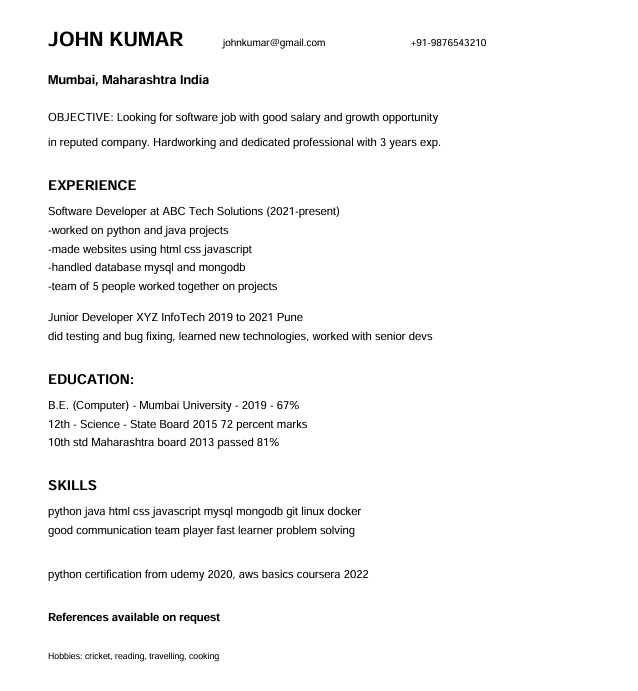
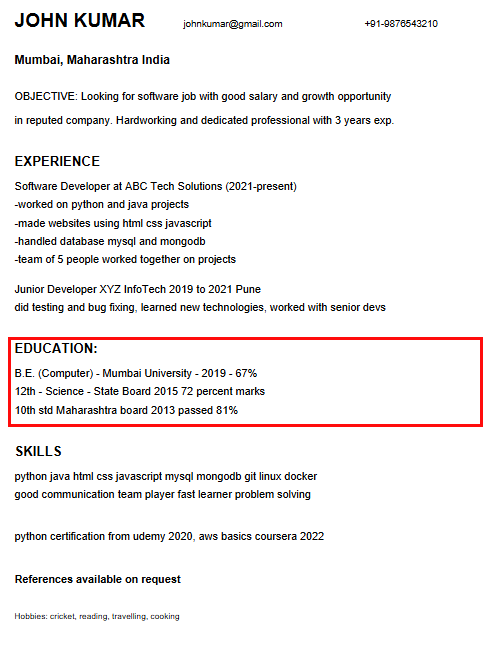
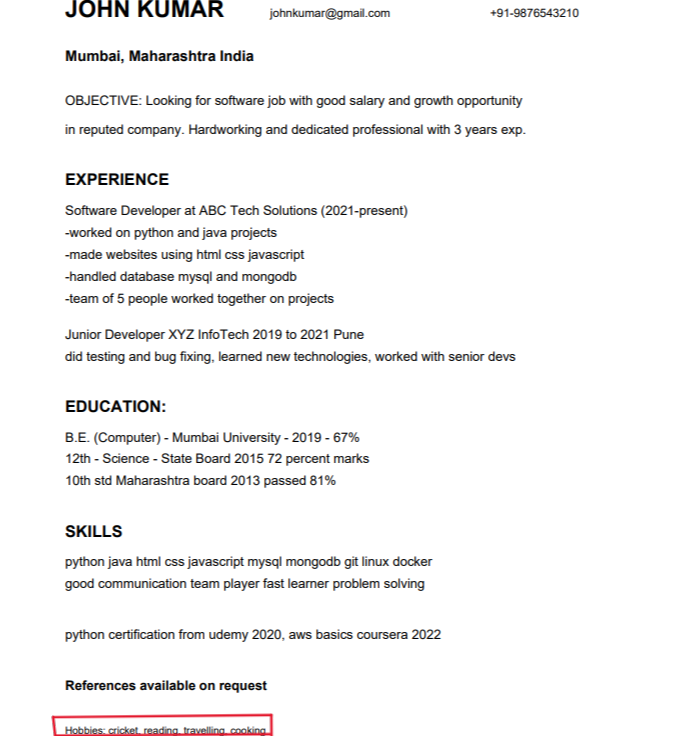
Input used: Input artifact (Image): INPUT — Input 3 Messy resume for JOHN KUMAR.png
Observed output: Output artifact (Text prompt): RESULT
Input artifact: Input artifact (Image): INPUT — Input 3 Messy resume for JOHN KUMAR.png
Output artifact: Output artifact (Text prompt): RESULT
What changed: Image transformed into Text prompt
Test case: Image → Image
Input type: Image
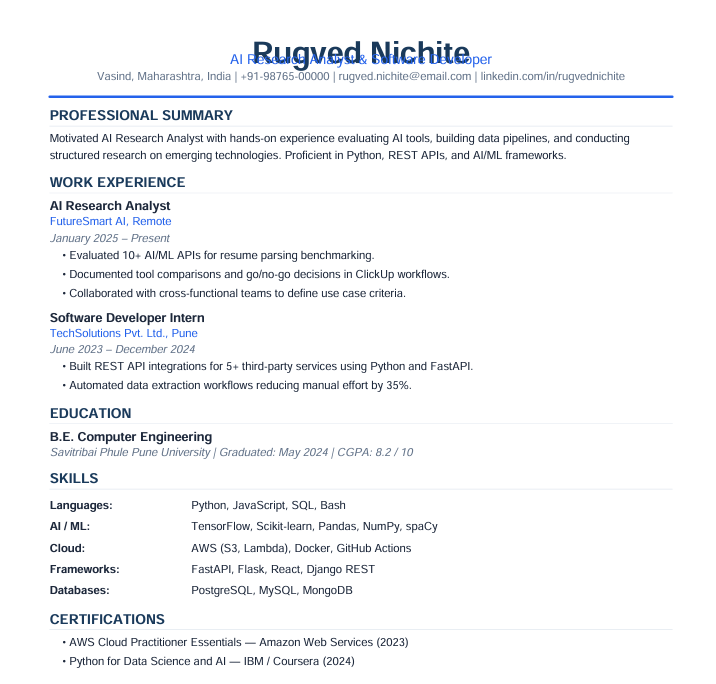
Input used: Input artifact (Image): INPUT — Input 1 Rugved Nichite clean PDF resume.png
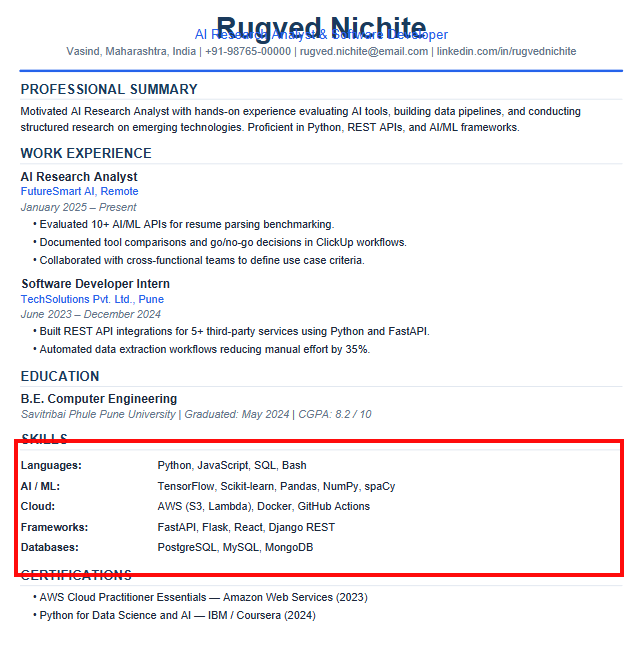
Observed output: Output artifact (Image): The source resume grouped skills into Languages, AI/ML, Cloud, Frameworks, and Databases, but the parsed output flattened that structure into a single competency list. — hireability_task1_categorized-skills-not-preserved.png
Input artifact: Input artifact (Image): INPUT — Input 1 Rugved Nichite clean PDF resume.png
Output artifact: Output artifact (Image): The source resume grouped skills into Languages, AI/ML, Cloud, Frameworks, and Databases, but the parsed output flattened that structure into a single competency list. — hireability_task1_categorized-skills-not-preserved.png
What changed: Image transformed into Image
Test case: Image → Text prompt
Input type: Image
Input used: Input artifact (Image): Rugved Nichite resume source — hireability-image-11-293923438eb5.png
Observed output: Output artifact (Text prompt): Experience extraction summary
Input artifact: Input artifact (Image): Rugved Nichite resume source — hireability-image-11-293923438eb5.png
Output artifact: Output artifact (Text prompt): Experience extraction summary
What changed: Image transformed into Text prompt
Test case: Image → Text prompt
Input type: Image
Input used: Input artifact (Image): John Kumar resume source — image-3.png
Observed output: Output artifact (Text prompt): Skills extraction summary
Input artifact: Input artifact (Image): John Kumar resume source — image-3.png
Output artifact: Output artifact (Text prompt): Skills extraction summary
What changed: Image transformed into Text prompt
Test case: Artifact → Image
Input type: Artifact
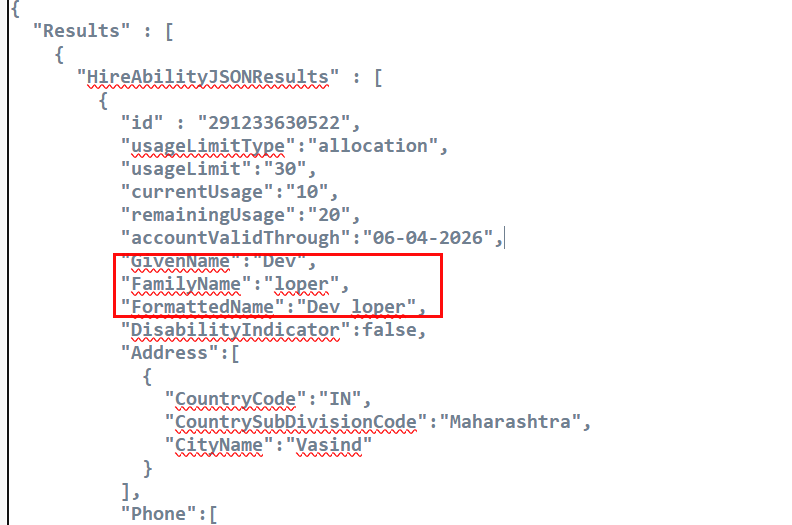
Input used: Input artifact (Artifact): The clean single-column resume parsed into structured JSON, but the name was split into GivenName 'Dev' and FamilyName 'loper' because the PDF text layer merged the name with the subtitle.
Observed output: Output artifact (Image): Output — hireability_task1_name-split-dev-loper.png
Input artifact: Input artifact (Artifact): The clean single-column resume parsed into structured JSON, but the name was split into GivenName 'Dev' and FamilyName 'loper' because the PDF text layer merged the name with the subtitle.
Output artifact: Output artifact (Image): Output — hireability_task1_name-split-dev-loper.png
What changed: Artifact transformed into Image
Test case: Image → Text prompt
Input type: Image
Input used: Input artifact (Image): Input — Input 3 Messy resume for JOHN KUMAR.png
Observed output: Output artifact (Text prompt): Output
Input artifact: Input artifact (Image): Input — Input 3 Messy resume for JOHN KUMAR.png
Output artifact: Output artifact (Text prompt): Output
What changed: Image transformed into Text prompt
Test case: Artifact → Image
Input type: Artifact
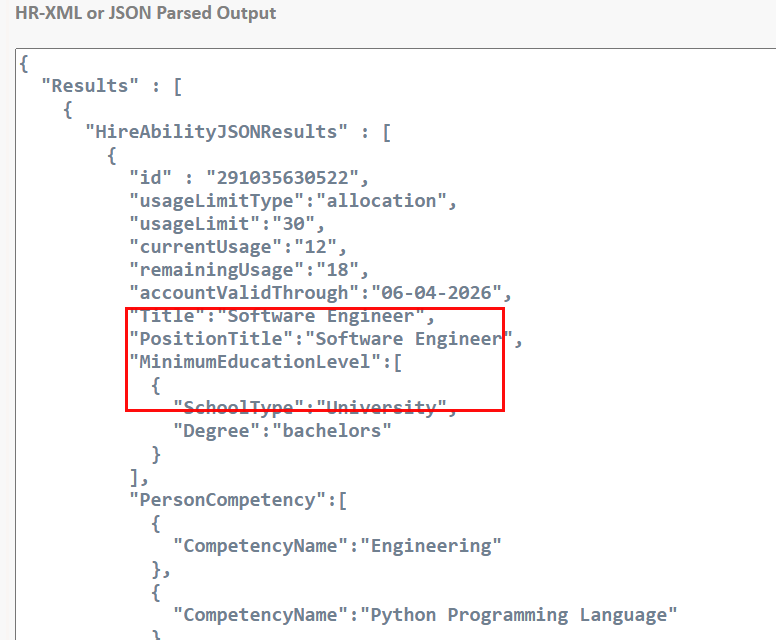
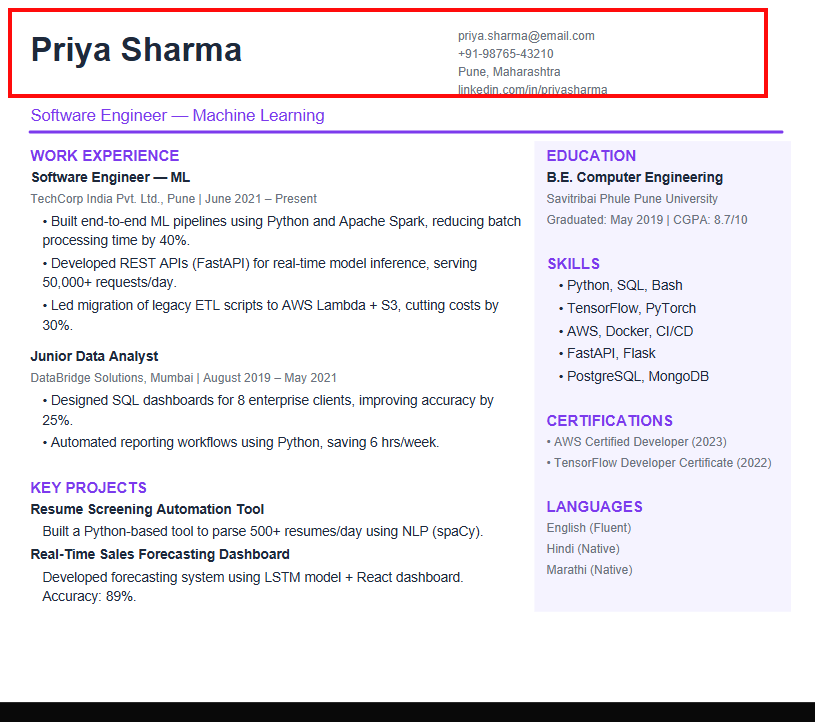
Input used: Input artifact (Artifact): The two-column Priya Sharma resume was misclassified as a Job Order, so the parser returned job-style fields instead of a resume profile.
Observed output: Output artifact (Image): Output — hireability_task2_job-order-misclassification.png
Input artifact: Input artifact (Artifact): The two-column Priya Sharma resume was misclassified as a Job Order, so the parser returned job-style fields instead of a resume profile.
Output artifact: Output artifact (Image): Output — hireability_task2_job-order-misclassification.png
What changed: Artifact transformed into Image
Why it matters / Conclusion: Identity extraction is reliable on straightforward resumes, but it is not safe to trust on the two-column input.
Parses uploaded resume PDFs into structured machine-readable outputs such as JSON and HR-XML, while classifying/routing the document into the appropriate schema. The cards exercise it on clean single-column, messy no-header, and two-column resumes, including cases where a two-column input was routed to a Job Order-style response.
Identity and Contact ExtractionGood header parsing when layout is simple.▾
Feature tested: Identity and Contact Extraction
Result: Partial
Verdict: Good header parsing when layout is simple.
Expected behavior: Pulls header identity/contact fields from resumes, including GivenName/FamilyName, email, phone, address, and LinkedIn. It was exercised on clean, messy, and two-column resume inputs, with mixed success when the name or contact block was split or missing.
Test case: Artifact → Image
Input type: Artifact
Input used: Input artifact (Artifact): The contact block was visibly present in the source, but the parsed output left GivenName, FamilyName, Email, Phone, LinkedIn, and Address empty.
Observed output: Output artifact (Image): Output — hireability_task2_contact-fields-missing.png
Input artifact: Input artifact (Artifact): The contact block was visibly present in the source, but the parsed output left GivenName, FamilyName, Email, Phone, LinkedIn, and Address empty.
Output artifact: Output artifact (Image): Output — hireability_task2_contact-fields-missing.png
What changed: Artifact transformed into Image
Test case: Image → Text prompt
Input type: Image
Input used: Input artifact (Image): Input — Input 3 Messy resume for JOHN KUMAR.png
Observed output: Output artifact (Text prompt): Output
Input artifact: Input artifact (Image): Input — Input 3 Messy resume for JOHN KUMAR.png
Output artifact: Output artifact (Text prompt): Output
What changed: Image transformed into Text prompt
Why it matters / Conclusion: Straightforward headers are handled well, but merged text and multi-column layouts can wipe out the contact block.
Pulls header identity/contact fields from resumes, including GivenName/FamilyName, email, phone, address, and LinkedIn. It was exercised on clean, messy, and two-column resume inputs, with mixed success when the name or contact block was split or missing.
Work Experience and Education ExtractionMostly reliable, with a merge bug in later job rows.▾
Feature tested: Work Experience and Education Extraction
Result: Partial
Verdict: Mostly reliable, with a merge bug in later job rows.
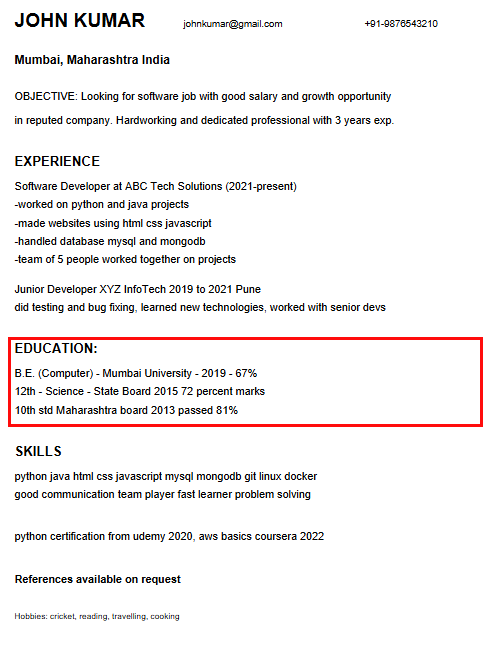
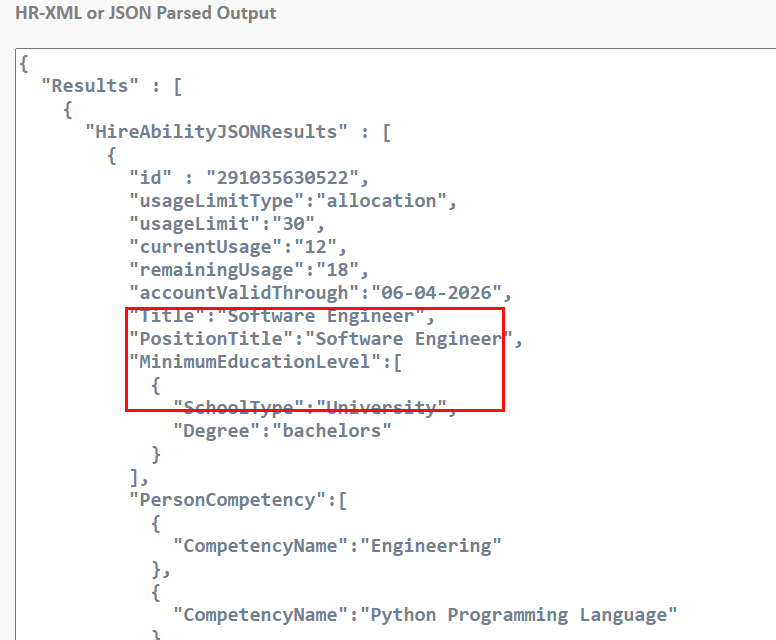
Expected behavior: Extracts work history rows and education entries from resume text, including roles, employers, dates, institutions, and grades/scores. The member card shows it recovering the main blocks but sometimes merging later rows or omitting extra schooling entries.
Test case: Image → Text prompt
Input type: Image
Input used: Input artifact (Image): Input — i3_p3_education_missing.png
Observed output: Output artifact (Text prompt): Output
Input artifact: Input artifact (Image): Input — i3_p3_education_missing.png
Output artifact: Output artifact (Text prompt): Output
What changed: Image transformed into Text prompt
Test case: Image → Text prompt
Input type: Image
Input used: Input artifact (Image): Input — image-11.png
Observed output: Output artifact (Text prompt): Output
Input artifact: Input artifact (Image): Input — image-11.png
Output artifact: Output artifact (Text prompt): Output
What changed: Image transformed into Text prompt
Why it matters / Conclusion: Core experience and education data are recoverable, but later rows and extra schooling entries can be lost or merged.
Extracts work history rows and education entries from resume text, including roles, employers, dates, institutions, and grades/scores. The member card shows it recovering the main blocks but sometimes merging later rows or omitting extra schooling entries.
Skills Extraction and NormalizationHigh recall, but too noisy for downstream ranking.▾
Feature tested: Skills Extraction and Normalization
Result: Failed
Verdict: High recall, but too noisy for downstream ranking.
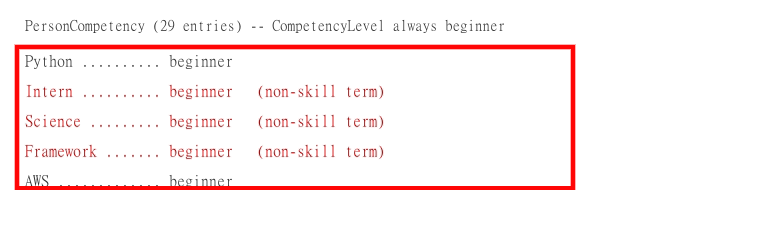
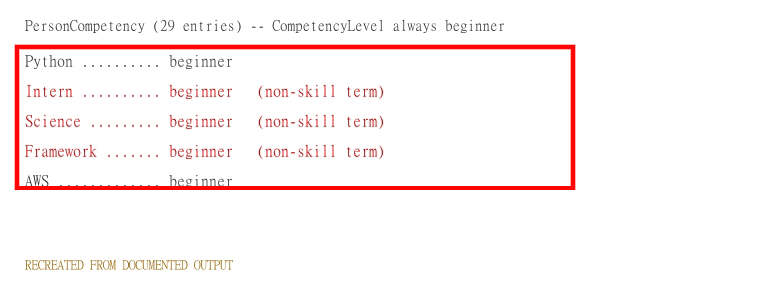
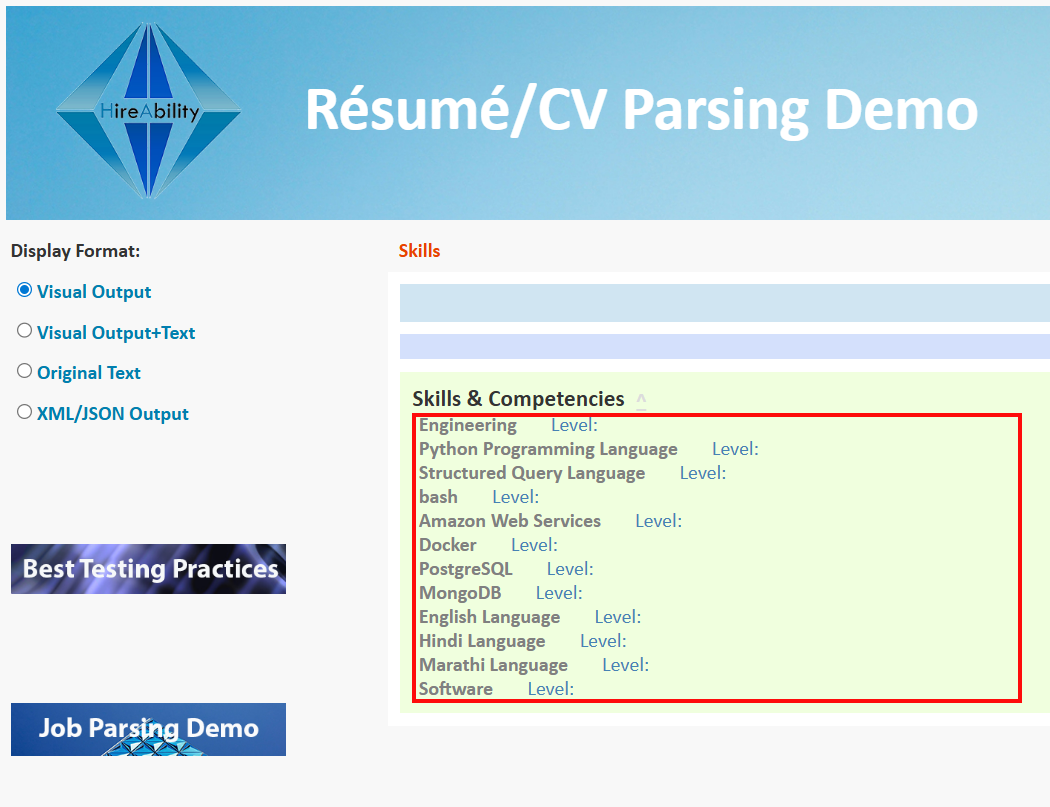
Expected behavior: Extracts skills into PersonCompetency records from resume text. The tested output flattened categorized skills into one list, assigned uniform beginner levels, and sometimes introduced non-skill noise or blank level fields.
Test case: Artifact → Image
Input type: Artifact
Input used: Input artifact (Artifact): The original Languages / AI-ML / Cloud / Frameworks / Databases grouping was flattened into a single skills list.
Observed output: Output artifact (Image): Output — hireability_task1_categorized-skills-not-preserved.png
Input artifact: Input artifact (Artifact): The original Languages / AI-ML / Cloud / Frameworks / Databases grouping was flattened into a single skills list.
Output artifact: Output artifact (Image): Output — hireability_task1_categorized-skills-not-preserved.png
What changed: Artifact transformed into Image
Test case: Image → Image
Input type: Image
Input used: Input artifact (Image): Input — image-8.png
Observed output: Output artifact (Image): The skills panel listed competencies but left the Level fields blank. — hireability_task2_competency-levels-blank.png
Input artifact: Input artifact (Image): Input — image-8.png
Output artifact: Output artifact (Image): The skills panel listed competencies but left the Level fields blank. — hireability_task2_competency-levels-blank.png
What changed: Image transformed into Image
Why it matters / Conclusion: The parser finds many skills, but the output is too noisy and too normalized for ranking without cleanup.
Extracts skills into PersonCompetency records from resume text. The tested output flattened categorized skills into one list, assigned uniform beginner levels, and sometimes introduced non-skill noise or blank level fields.
Additional Profile Field ExtractionUseful extras, but certification normalization is weak.▾
Feature tested: Additional Profile Field Extraction
Result: Partial
Verdict: Useful extras, but certification normalization is weak.
Expected behavior: Extracts extra resume profile fields such as certifications, hobbies, and LinkedIn. The card shows certifications coming through on a clean resume but getting merged with other text in a messy resume, while hobbies were still separated.
Test case: Image → Text prompt
Input type: Image
Input used: Input artifact (Image): Input — image-11.png
Observed output: Output artifact (Text prompt): Output
Input artifact: Input artifact (Image): Input — image-11.png
Output artifact: Output artifact (Text prompt): Output
What changed: Image transformed into Text prompt
Test case: Artifact → Image
Input type: Artifact
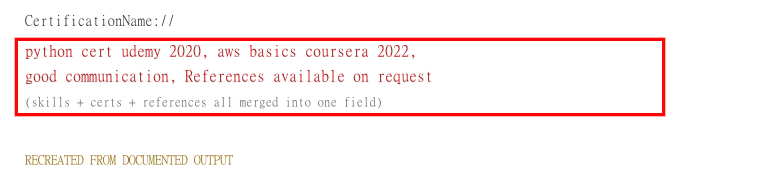
Input used: Input artifact (Artifact): John Kumar's messy resume, CertificationName merged the certification text with 'good communication' and 'References available on request' instead of keeping certifications separate.
Observed output: Output artifact (Image): CertificationName merged the certification text with 'good communication' and 'References available on request' instead of keeping certifications separate. — hireability_task3_certs-merged.png
Input artifact: Input artifact (Artifact): John Kumar's messy resume, CertificationName merged the certification text with 'good communication' and 'References available on request' instead of keeping certifications separate.
Output artifact: Output artifact (Image): CertificationName merged the certification text with 'good communication' and 'References available on request' instead of keeping certifications separate. — hireability_task3_certs-merged.png
What changed: Artifact transformed into Image
Test case: File → Text prompt
Input type: File
Input used: Input artifact (File): Input — Input 3: Messy resume for JOHN KUMAR
Observed output: Output artifact (Text prompt): Output
Input artifact: Input artifact (File): Input — Input 3: Messy resume for JOHN KUMAR
Output artifact: Output artifact (Text prompt): Output
What changed: File transformed into Text prompt
Why it matters / Conclusion: Useful extra fields are available, but certification extraction is unreliable when the source mixes free text with credential lines.
Extracts extra resume profile fields such as certifications, hobbies, and LinkedIn. The card shows certifications coming through on a clean resume but getting merged with other text in a messy resume, while hobbies were still separated.
Pricing & Access
Partially tested free trial; no public dollar figures were listed.
Pricing was checked in August 2026 and described as usage/volume-based.
Featured in Rankings
Independent rankings where HireAbility was tested and rated.
Banner Preview
How the embed badge will look on your site

Embed HTML
Copy this code to your website source
Quick Integration Guide
- 1Copy the HTML code block above.
- 2Paste it into your site's HTML or CMS editor.
- 3Banner appears instantly on your page.
- 4Links back to your tool profile here.
Similar Tools
Discover more AI tools like HireAbility to enhance your workflow.
Comments (0)
Need a custom AI solution for this use case?
If you are looking to build a custom resume parsing, PDF extraction, or candidate data structuring system for your business or internal workflow, email us at contact@futuresmart.ai.
Found something inaccurate or missing? We try to keep our AI research accurate and useful. If you found outdated information, an issue, or have a suggestion, email us at collaborate@aidemos.com.