Airparser
Parses clean, multi-column, and messy resumes into structured JSON, but email, title, and skill formatting still need validation.
Strong layout coverage, but field quality varies
- You need an API that turns PDF resumes into structured JSON.
- You want one parser to handle clean, multi-column, and messy layouts without per-file setup.
- You can add validation for occasional hallucinations, truncation, or skill-format drift.
- You need perfectly reliable contact data with no typos.
Our take
Airparser parsed all three tested resume layouts and returned readable JSON without per-file setup, which makes it useful for resume-ingestion workflows. It was strongest on the multi-column and messy resumes, but the clean resume exposed a hallucinated email address and a truncated job title, and skill output drifted from grouped categories to flat lists or a single string. Add validation if contact accuracy and taxonomy preservation matter.
In-Depth Review
Our detailed analysis of Airparser — features, performance, and real-world testing.
Feature-by-Feature Breakdown
Schema-Driven Resume JSON ExtractionWorked across all three PDF layouts with no per-file setup after the schema was defined.▾
Feature tested: Schema-Driven Resume JSON Extraction
Result: Partial
Verdict: Worked across all three PDF layouts with no per-file setup after the schema was defined.
Expected behavior: Accepts uploaded resume PDFs after a one-time schema setup and returns structured JSON. It was exercised on clean single-column, two-column, and messy resumes, with the same extraction pipeline handling contact details, career history/education/projects, and skills/certifications/languages/extras.
Test case: PDF document → Text/code file
Input type: PDF document
Input used: Input artifact (PDF document): Clean single-column resume uploaded directly to Airparser. — Airparser input.1.pdf
Observed output: Output artifact (Text/code file): Clean resume parsed into structured JSON with no manual setup. — airparser 1 output.txt
Input artifact: Input artifact (PDF document): Clean single-column resume uploaded directly to Airparser. — Airparser input.1.pdf
Output artifact: Output artifact (Text/code file): Clean resume parsed into structured JSON with no manual setup. — airparser 1 output.txt
What changed: PDF document transformed into Text/code file
Test case: PDF document → Text/code file
Input type: PDF document
Input used: Input artifact (PDF document): Two-column resume uploaded directly to Airparser. — Airparser input.2.pdf
Observed output: Output artifact (Text/code file): Two-column resume parsed successfully without layout hints. — airparser output 1.txt
Input artifact: Input artifact (PDF document): Two-column resume uploaded directly to Airparser. — Airparser input.2.pdf
Output artifact: Output artifact (Text/code file): Two-column resume parsed successfully without layout hints. — airparser output 1.txt
What changed: PDF document transformed into Text/code file
Test case: PDF document → Text/code file
Input type: PDF document
Input used: Input artifact (PDF document): Messy single-column resume uploaded directly to Airparser. — Airparser input.3.pdf
Observed output: Output artifact (Text/code file): Messy resume parsed successfully despite inconsistent formatting and mixed date styles. — airparser output 3.txt
Input artifact: Input artifact (PDF document): Messy single-column resume uploaded directly to Airparser. — Airparser input.3.pdf
Output artifact: Output artifact (Text/code file): Messy resume parsed successfully despite inconsistent formatting and mixed date styles. — airparser output 3.txt
What changed: PDF document transformed into Text/code file
Why it matters / Conclusion: This is the core strength of Airparser in the report: broad PDF intake works reliably enough for automated resume ingestion.
Accepts uploaded resume PDFs after a one-time schema setup and returns structured JSON. It was exercised on clean single-column, two-column, and messy resumes, with the same extraction pipeline handling contact details, career history/education/projects, and skills/certifications/languages/extras.
Contact Information ExtractionUseful, but not fully reliable▾
Feature tested: Contact Information Extraction
Result: Partial
Verdict: Useful, but not fully reliable
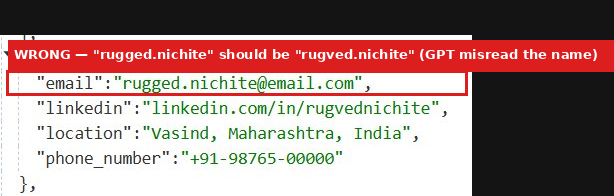
Expected behavior: Extracts contact blocks from resumes, including name, email, phone, LinkedIn, and location. It was exercised on a messy resume where the contact data came through correctly and on a clean resume where the email was hallucinated.
Test case: PDF document → Image
Input type: PDF document
Input used: Input artifact (PDF document): Clean resume contact block with name, email, phone, LinkedIn, and location. — Airparser input.1.pdf
Observed output: Output artifact (Image): Clean resume: the parser returned a structured contact block, but the email was misread as rugged.nichite@email.com. — wrong email extracted.png
Input artifact: Input artifact (PDF document): Clean resume contact block with name, email, phone, LinkedIn, and location. — Airparser input.1.pdf
Output artifact: Output artifact (Image): Clean resume: the parser returned a structured contact block, but the email was misread as rugged.nichite@email.com. — wrong email extracted.png
What changed: PDF document transformed into Image
Test case: Artifact → Image
Input type: Artifact
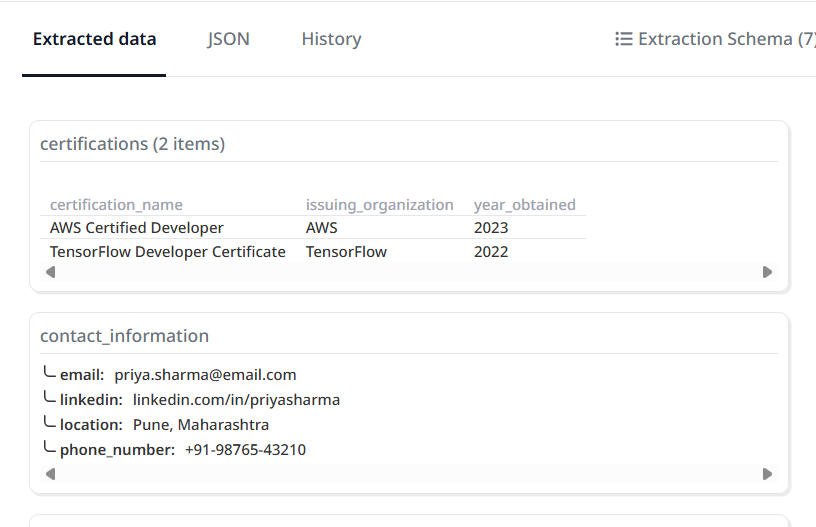
Input used: Input artifact (Artifact): Contact fields were extracted correctly from the split header on the multi-column resume.
Observed output: Output artifact (Image): Output — Contact fields were extracted.png
Input artifact: Input artifact (Artifact): Contact fields were extracted correctly from the split header on the multi-column resume.
Output artifact: Output artifact (Image): Output — Contact fields were extracted.png
What changed: Artifact transformed into Image
Test case: Artifact → Image
Input type: Artifact
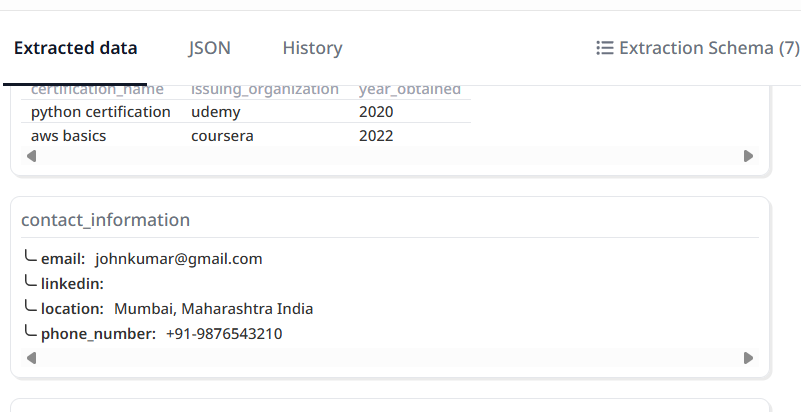
Input used: Input artifact (Artifact): Messy resume: contact fields came through correctly, including email, phone, and Mumbai location.
Observed output: Output artifact (Image): Parsed JSON — Contact fields were extracted.png
Input artifact: Input artifact (Artifact): Messy resume: contact fields came through correctly, including email, phone, and Mumbai location.
Output artifact: Output artifact (Image): Parsed JSON — Contact fields were extracted.png
What changed: Artifact transformed into Image
Why it matters / Conclusion: Useful for contact extraction, but the clean-resume email typo is a production-level warning.
Extracts contact blocks from resumes, including name, email, phone, LinkedIn, and location. It was exercised on a messy resume where the contact data came through correctly and on a clean resume where the email was hallucinated.
Resume Section ExtractionMostly strong, with some silent drift▾
Feature tested: Resume Section Extraction
Result: Partial
Verdict: Mostly strong, with some silent drift
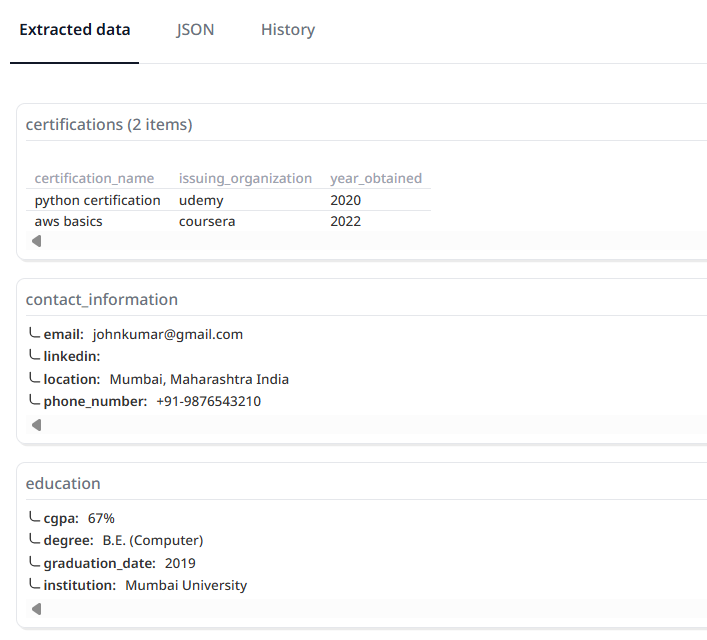
Expected behavior: Extracts work history, education, certifications, and adjacent sections such as projects, languages, objective, references, and hobbies. It was exercised across clean, multi-column, and messy resumes, including cases involving employment structure and education details.
Test case: Artifact → Image
Input type: Artifact
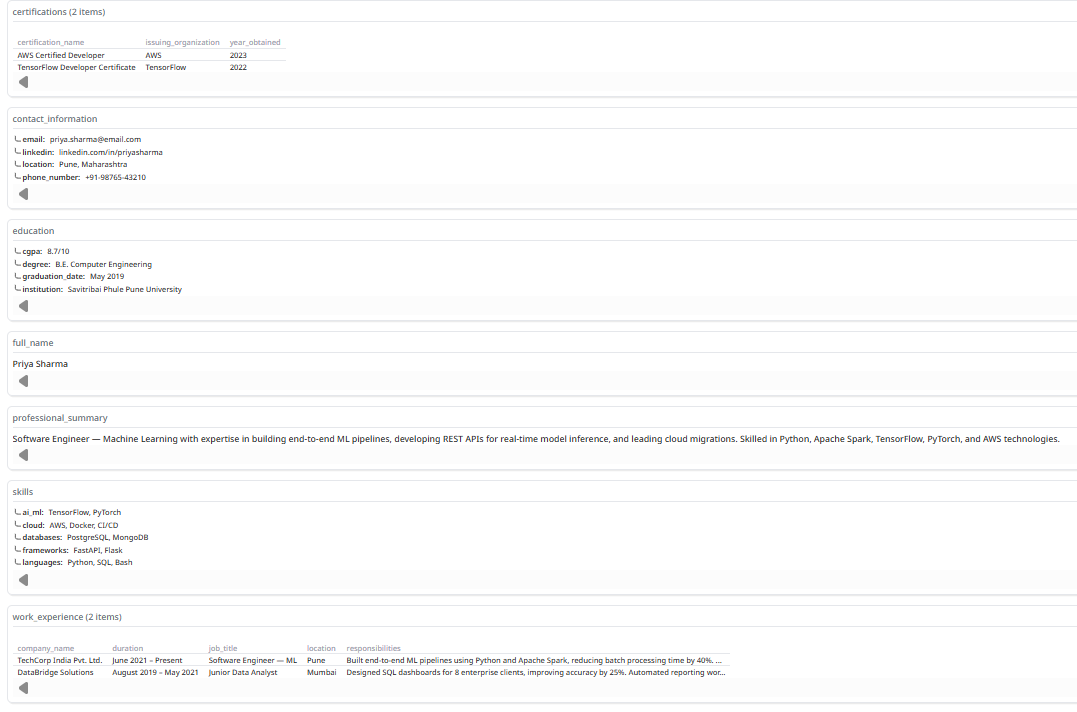
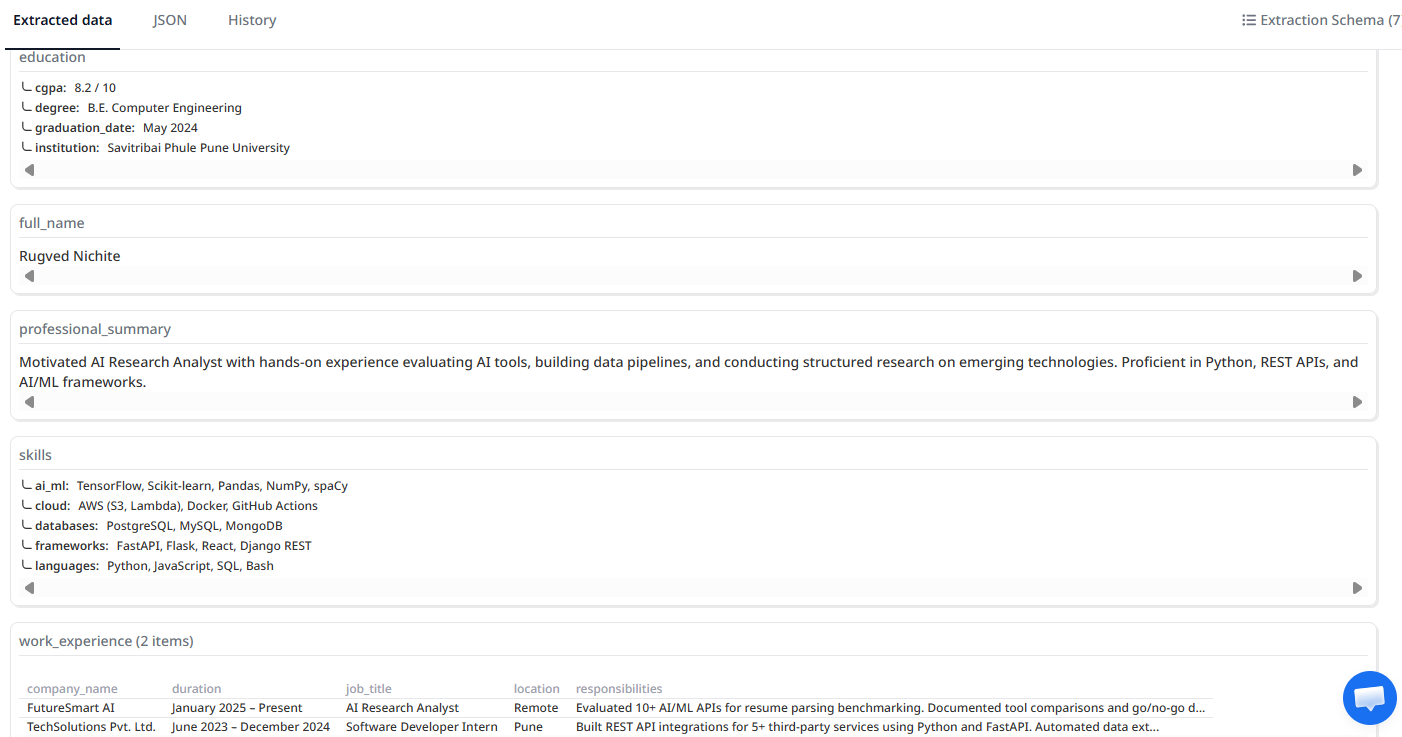
Input used: Input artifact (Artifact): Captured both experience entries, education, certifications, key projects, and languages from the two-column resume.
Observed output: Output artifact (Image): Output — Extracted experience entries, education, certifications, key projects, and lang.png
Input artifact: Input artifact (Artifact): Captured both experience entries, education, certifications, key projects, and languages from the two-column resume.
Output artifact: Output artifact (Image): Output — Extracted experience entries, education, certifications, key projects, and lang.png
What changed: Artifact transformed into Image
Test case: PDF document → Image
Input type: PDF document
Input used: Input artifact (PDF document): Input — Airparser input.3.pdf
Observed output: Output artifact (Image): Captured both jobs, all three education entries, and both certifications from the messy resume. — education entries, and both certifications extracted.png
Input artifact: Input artifact (PDF document): Input — Airparser input.3.pdf
Output artifact: Output artifact (Image): Captured both jobs, all three education entries, and both certifications from the messy resume. — education entries, and both certifications extracted.png
What changed: PDF document transformed into Image
Test case: Artifact → Image
Input type: Artifact
Input used: Input artifact (Artifact): Captured both work experiences, education, CGPA, and certifications, though the top job title lost part of the original wording.
Observed output: Output artifact (Image): Captured both work experiences, education, CGPA, and certifications, though the top job title lost part of the original wording. — captured work experiences, education, CGPA, and certifications.png
Input artifact: Input artifact (Artifact): Captured both work experiences, education, CGPA, and certifications, though the top job title lost part of the original wording.
Output artifact: Output artifact (Image): Captured both work experiences, education, CGPA, and certifications, though the top job title lost part of the original wording. — captured work experiences, education, CGPA, and certifications.png
What changed: Artifact transformed into Image
Why it matters / Conclusion: This is one of Airparser's strongest extraction areas, but it can silently truncate titles and leaves normalization to downstream systems.
Extracts work history, education, certifications, and adjacent sections such as projects, languages, objective, references, and hobbies. It was exercised across clean, multi-column, and messy resumes, including cases involving employment structure and education details.
Skills and Resume Extras ExtractionInconsistent▾
Feature tested: Skills and Resume Extras Extraction
Result: Partial
Verdict: Inconsistent
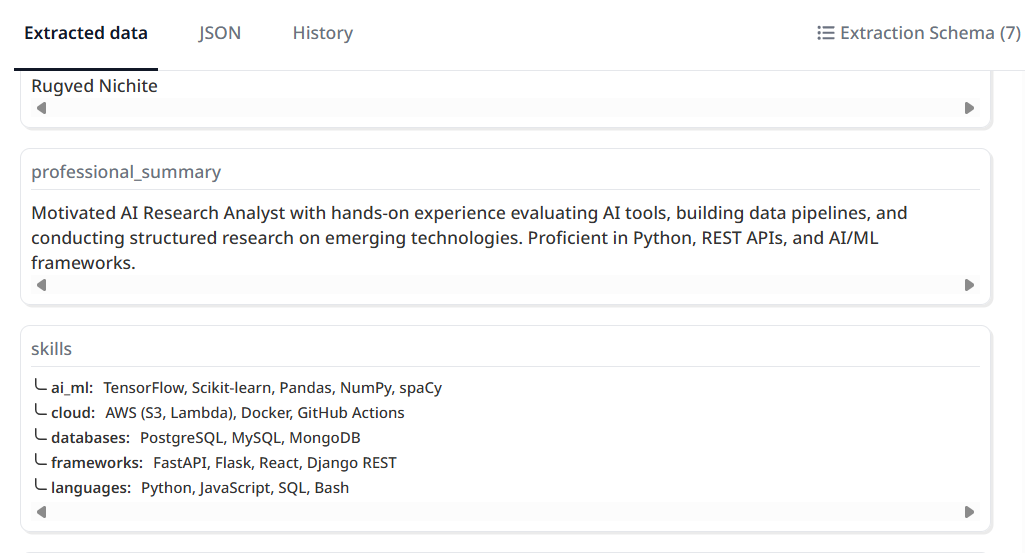
Expected behavior: Extracts skills plus profile extras such as professional summary, objective, projects, languages, hobbies, and references. It was exercised across clean, two-column, and messy resumes, with output shapes varying by layout.
Test case: Artifact → Image
Input type: Artifact
Input used: Input artifact (Artifact): Returned categorized skill groups for languages, AI/ML, cloud, frameworks, and databases, and also captured the professional summary.
Observed output: Output artifact (Image): Output — skill groups , AIML, cloud, frameworks, and databases, professional summary captured.png
Input artifact: Input artifact (Artifact): Returned categorized skill groups for languages, AI/ML, cloud, frameworks, and databases, and also captured the professional summary.
Output artifact: Output artifact (Image): Output — skill groups , AIML, cloud, frameworks, and databases, professional summary captured.png
What changed: Artifact transformed into Image
Test case: PDF document → Image
Input type: PDF document
Input used: Input artifact (PDF document): Input — Airparser input.2.pdf
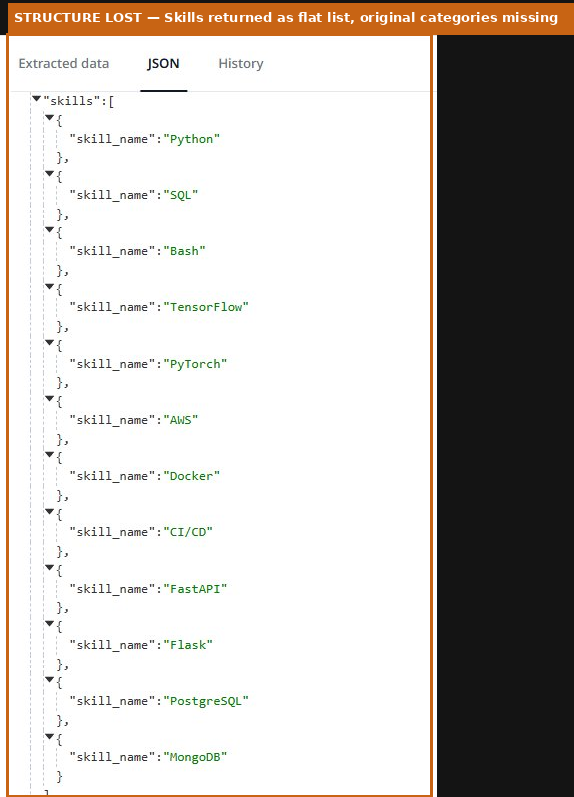
Observed output: Output artifact (Image): Returned skills as individual objects but lost the original skill categories from the resume. — Skills returned as one concatenated string.png
Input artifact: Input artifact (PDF document): Input — Airparser input.2.pdf
Output artifact: Output artifact (Image): Returned skills as individual objects but lost the original skill categories from the resume. — Skills returned as one concatenated string.png
What changed: PDF document transformed into Image
Test case: PDF document → Image
Input type: PDF document
Input used: Input artifact (PDF document): Input — Airparser input.3.pdf
Observed output: Output artifact (Image): Returned all skills as one concatenated string and also extracted the objective, hobbies, and references note. — all skills are dumped in one line.png
Input artifact: Input artifact (PDF document): Input — Airparser input.3.pdf
Output artifact: Output artifact (Image): Returned all skills as one concatenated string and also extracted the objective, hobbies, and references note. — all skills are dumped in one line.png
What changed: PDF document transformed into Image
Why it matters / Conclusion: The tool can extract skills, but the format is not stable enough for strict taxonomy-preserving pipelines.
Extracts skills plus profile extras such as professional summary, objective, projects, languages, hobbies, and references. It was exercised across clean, two-column, and messy resumes, with output shapes varying by layout.

Featured in Rankings
Independent rankings where Airparser was tested and rated.
Banner Preview
How the embed badge will look on your site

Embed HTML
Copy this code to your website source
Quick Integration Guide
- 1Copy the HTML code block above.
- 2Paste it into your site's HTML or CMS editor.
- 3Banner appears instantly on your page.
- 4Links back to your tool profile here.
Similar Tools
Discover more AI tools like Airparser to enhance your workflow.
Comments (0)
Need a custom AI solution for this use case?
If you are looking to build a custom resume parsing, candidate data extraction, or structured profile extraction system for your business or internal workflow, email us at contact@futuresmart.ai.
Found something inaccurate or missing? We try to keep our AI research accurate and useful. If you found outdated information, an issue, or have a suggestion, email us at collaborate@aidemos.com.