
Docparser
Template-based resume parsing that works on one fixed layout, but breaks on varied resumes.
Works on the exact template it was built for, but not on varied resumes.
- Your resumes follow one standardized layout that you can template once.
- You want an in-app parsed-data review screen and Excel Download for that same fixed format.
- You can tolerate manual zone mapping before parsing.
- You need layout-adaptive parsing across varied resume formats.
Our take
Docparser extracted a useful amount of data from the one resume that matched its manually zoned template, and the app exposed a parsed-data review view with Excel Download. But the same setup broke on different layouts, producing empty fields, field bleed, truncation, and wrong mappings, and this run did not verify a JSON API response.
In-Depth Review
Our detailed analysis of Docparser — features, performance, and real-world testing.
Feature-by-Feature Breakdown
Template-Based Resume Field Extraction▾
Feature tested: Template-Based Resume Field Extraction
Result: Failed
Expected behavior: Docparser extracts structured resume fields from uploaded PDF resumes after a hand-built template or manual zone map is created for a specific layout. The tested resumes showed the same template working on the intended layout and layout variants, though extraction quality degraded on fields like names and CGPA.
Test case: Text prompt → Image
Input type: Text prompt
Input used: Input artifact (Text prompt): INPUT
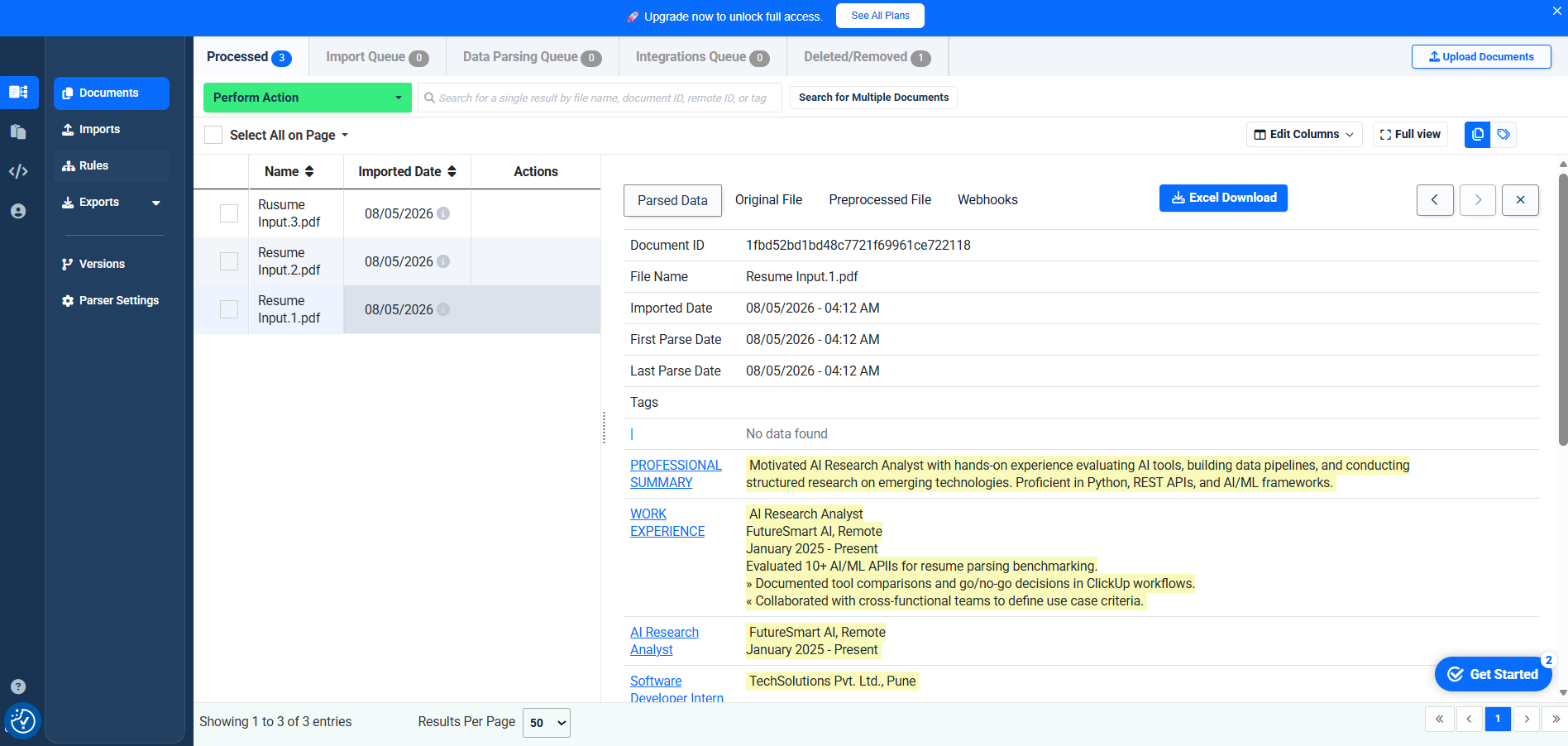
Observed output: Output artifact (Image): Docparser processed the clean template-matching resume and surfaced a usable parsed-data table with professional summary, work experience, skills, and certifications, but the dashboard still showed missing basic fields like Name and CGPA. — image-2.png
Input artifact: Input artifact (Text prompt): INPUT
Output artifact: Output artifact (Image): Docparser processed the clean template-matching resume and surfaced a usable parsed-data table with professional summary, work experience, skills, and certifications, but the dashboard still showed missing basic fields like Name and CGPA. — image-2.png
What changed: Text prompt transformed into Image
Test case: Text prompt → Image
Input type: Text prompt
Input used: Input artifact (Text prompt): INPUT
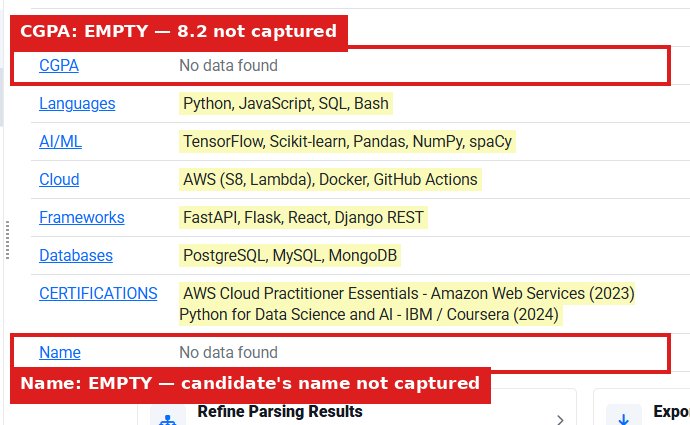
Observed output: Output artifact (Image): Even on the clean layout, CGPA and Name returned No data found, showing that the template missed two basic fields that were present in the source resume. — image-3.png
Input artifact: Input artifact (Text prompt): INPUT
Output artifact: Output artifact (Image): Even on the clean layout, CGPA and Name returned No data found, showing that the template missed two basic fields that were present in the source resume. — image-3.png
What changed: Text prompt transformed into Image
Test case: Text prompt → Image
Input type: Text prompt
Input used: Input artifact (Text prompt): INPUT
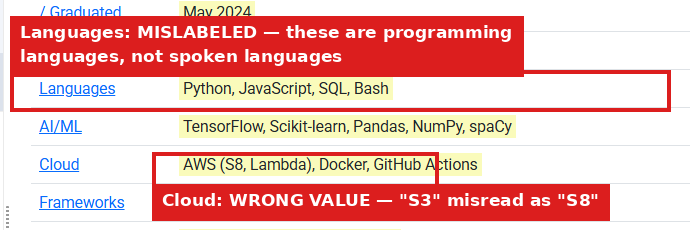
Observed output: Output artifact (Image): The clean-layout run mislabeled programming languages as spoken Languages and misread S3 as S8 in Cloud, so the output was not only incomplete but also semantically wrong. — image-4.png
Input artifact: Input artifact (Text prompt): INPUT
Output artifact: Output artifact (Image): The clean-layout run mislabeled programming languages as spoken Languages and misread S3 as S8 in Cloud, so the output was not only incomplete but also semantically wrong. — image-4.png
What changed: Text prompt transformed into Image
Test case: Text prompt → Image
Input type: Text prompt
Input used: Input artifact (Text prompt): INPUT
Observed output: Output artifact (Image): The same template accepted a differently structured resume, but the parsed-data panel was only partially populated and much of the content did not align cleanly with the intended fields. — image-5.png
Input artifact: Input artifact (Text prompt): INPUT
Output artifact: Output artifact (Image): The same template accepted a differently structured resume, but the parsed-data panel was only partially populated and much of the content did not align cleanly with the intended fields. — image-5.png
What changed: Text prompt transformed into Image
Test case: Text prompt → Image
Input type: Text prompt
Input used: Input artifact (Text prompt): INPUT
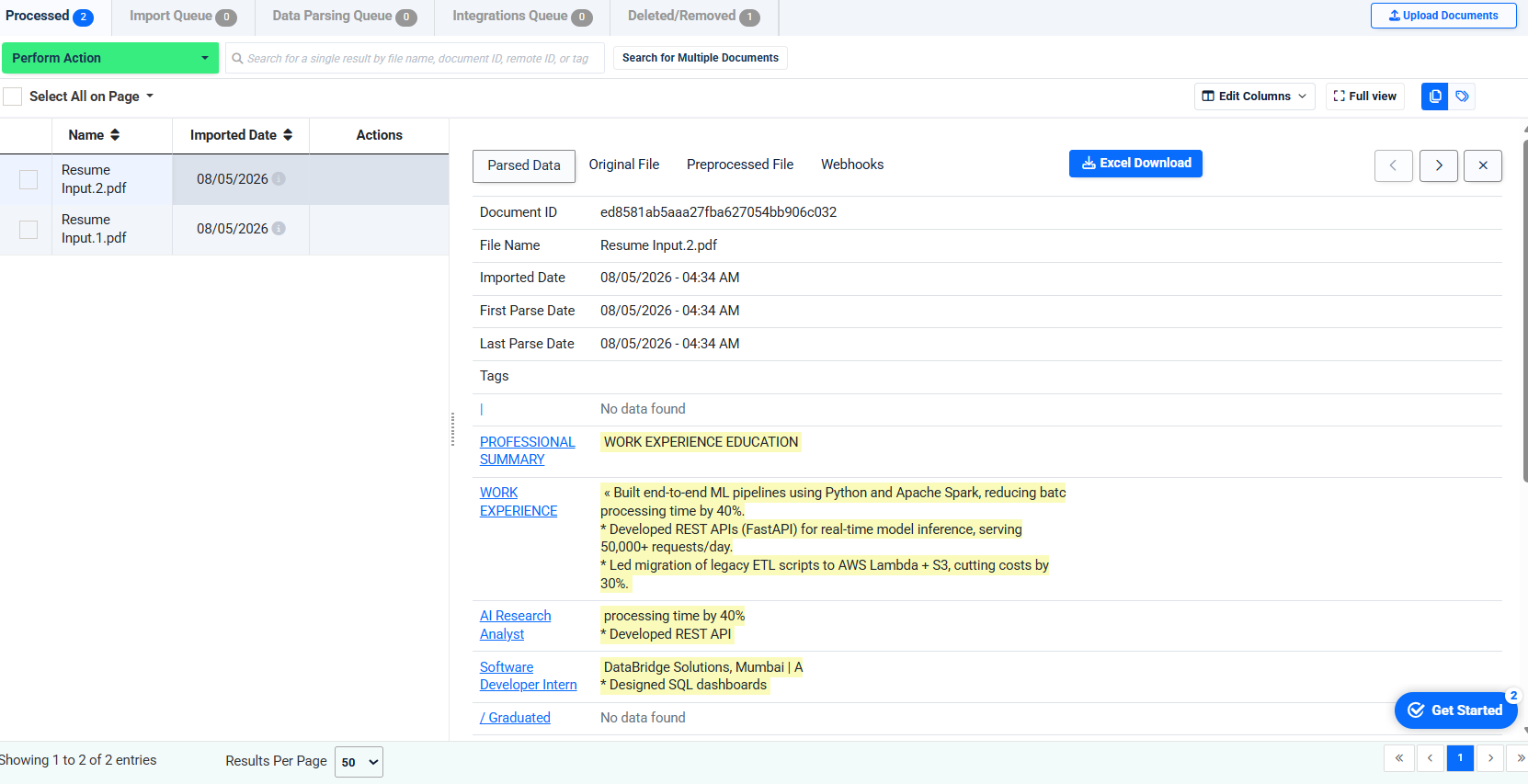
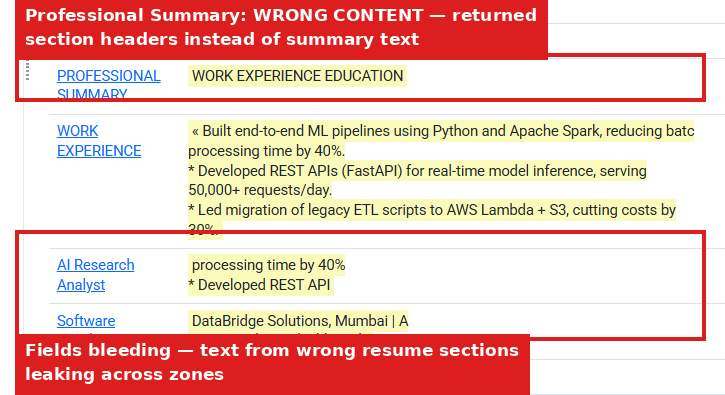
Observed output: Output artifact (Image): On the second resume, Professional Summary returned section headers instead of summary text, and text bled across the wrong fields with visible truncation in the overlaid fragments. — image-6.png
Input artifact: Input artifact (Text prompt): INPUT
Output artifact: Output artifact (Image): On the second resume, Professional Summary returned section headers instead of summary text, and text bled across the wrong fields with visible truncation in the overlaid fragments. — image-6.png
What changed: Text prompt transformed into Image
Test case: Text prompt → Image
Input type: Text prompt
Input used: Input artifact (Text prompt): INPUT
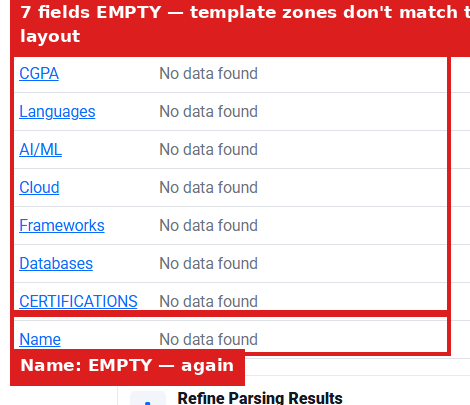
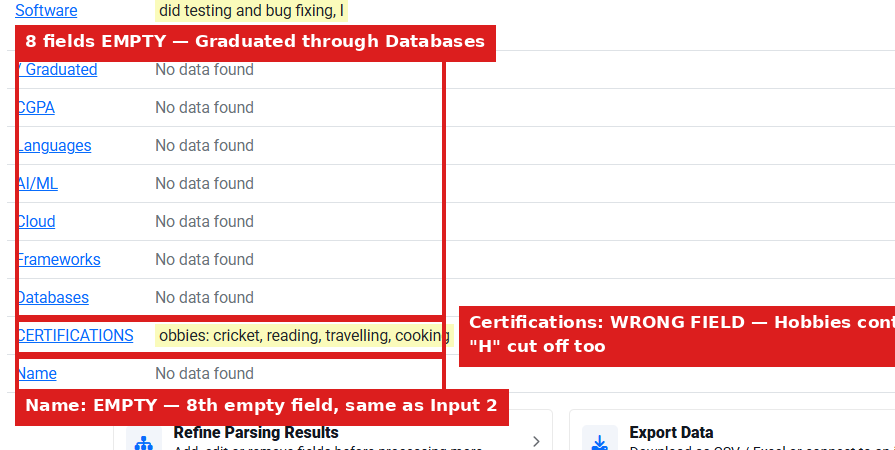
Observed output: Output artifact (Image): The same template left CGPA, Languages, AI/ML, Cloud, Frameworks, Databases, Certifications, and Name empty on the second layout. — image-7.png
Input artifact: Input artifact (Text prompt): INPUT
Output artifact: Output artifact (Image): The same template left CGPA, Languages, AI/ML, Cloud, Frameworks, Databases, Certifications, and Name empty on the second layout. — image-7.png
What changed: Text prompt transformed into Image
Test case: Text prompt → Image
Input type: Text prompt
Input used: Input artifact (Text prompt): INPUT
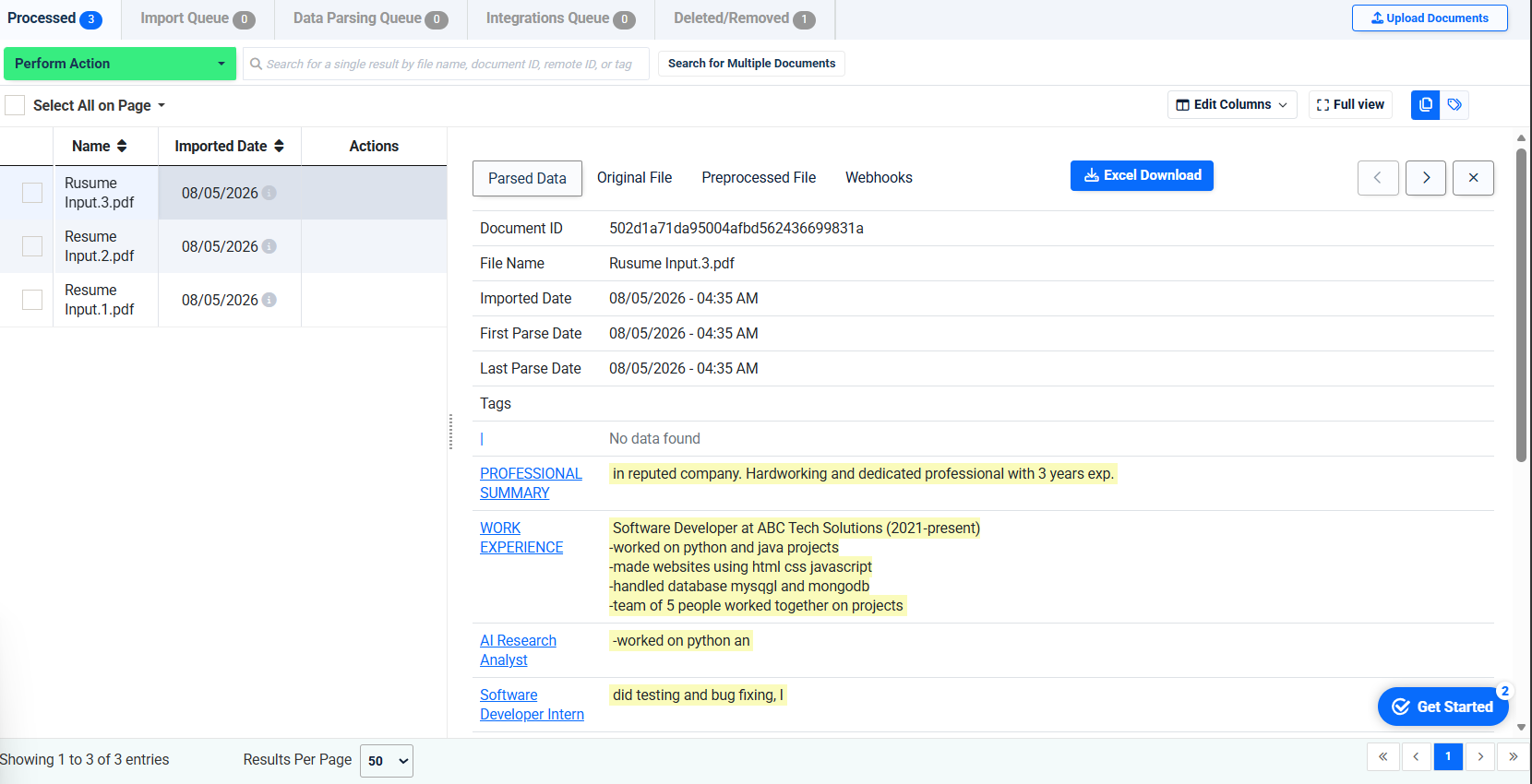
Observed output: Output artifact (Image): Docparser still extracted work experience and a short professional summary from the messy resume, but some text was clipped and partial. — image-8.png
Input artifact: Input artifact (Text prompt): INPUT
Output artifact: Output artifact (Image): Docparser still extracted work experience and a short professional summary from the messy resume, but some text was clipped and partial. — image-8.png
What changed: Text prompt transformed into Image
Test case: Text prompt → Image
Input type: Text prompt
Input used: Input artifact (Text prompt): INPUT
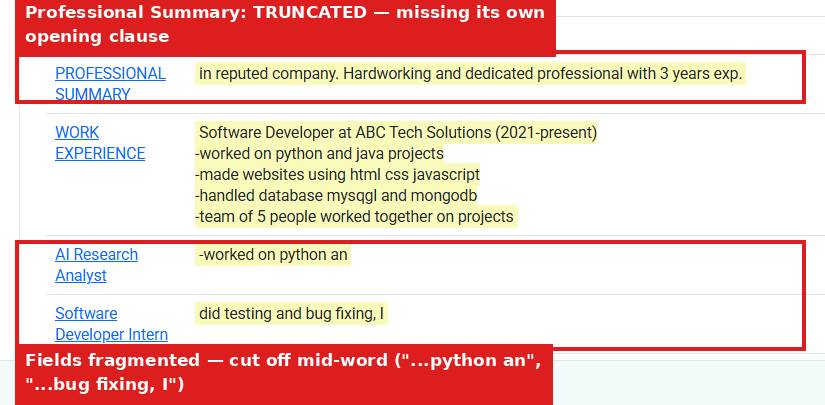
Observed output: Output artifact (Image): The messy resume produced a truncated Professional Summary and fragmented field values, including mid-word cutoffs in the job-title fields. — image-9.png
Input artifact: Input artifact (Text prompt): INPUT
Output artifact: Output artifact (Image): The messy resume produced a truncated Professional Summary and fragmented field values, including mid-word cutoffs in the job-title fields. — image-9.png
What changed: Text prompt transformed into Image
Test case: Text prompt → Image
Input type: Text prompt
Input used: Input artifact (Text prompt): INPUT
Observed output: Output artifact (Image): On the messy resume, multiple fields remained empty and Certifications captured Hobbies text instead of actual certifications. — image-10.png
Input artifact: Input artifact (Text prompt): INPUT
Output artifact: Output artifact (Image): On the messy resume, multiple fields remained empty and Certifications captured Hobbies text instead of actual certifications. — image-10.png
What changed: Text prompt transformed into Image
Why it matters / Conclusion: Usable on a fixed template, but not clean enough for high-trust extraction because even the best-matching layout still missed Name and misread some fields.
Docparser extracts structured resume fields from uploaded PDF resumes after a hand-built template or manual zone map is created for a specific layout. The tested resumes showed the same template working on the intended layout and layout variants, though extraction quality degraded on fields like names and CGPA.
Parsed-Data Review and Export WorkspaceThe in-app review and Excel export controls are visible, but export was not verified.▾
Feature tested: Parsed-Data Review and Export Workspace
Result: Passed
Verdict: The in-app review and Excel export controls are visible, but export was not verified.
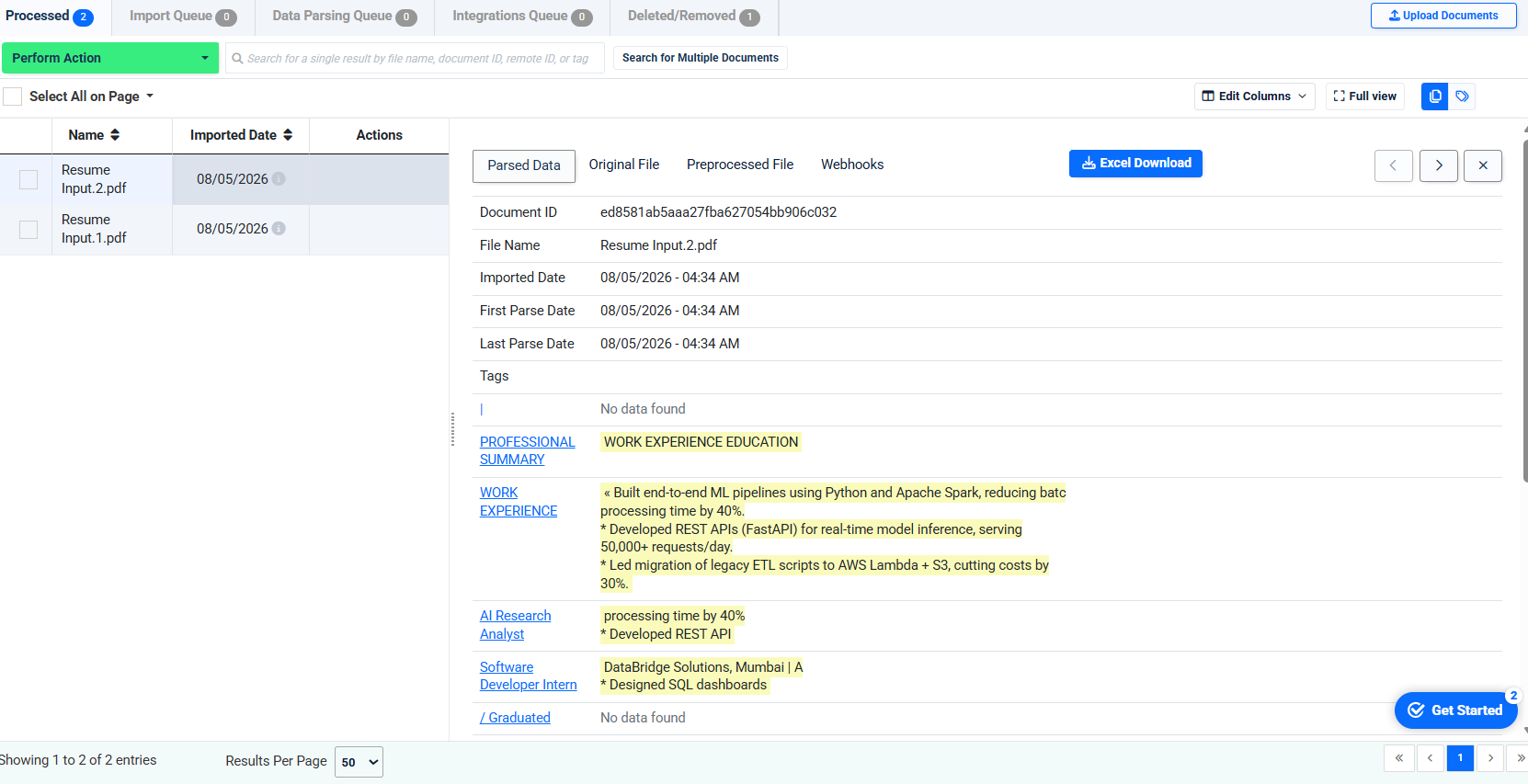
Expected behavior: The web app provides a workspace for reviewing parsed fields alongside the original and preprocessed files, with export actions such as Webhooks and Excel Download. The evidence shows the review surface and export controls are present in-app.
Test case: Text prompt → Image
Input type: Text prompt
Input used: Input artifact (Text prompt): INPUT
Observed output: Output artifact (Image): The Docparser dashboard exposed Import Queue, Data Parsing Queue, Integrations Queue, Original File, Preprocessed File, Webhooks, and Excel Download in the parsed-data workspace, but the test did not verify an actual downloaded file or any JSON API payload. — image-12.png
Input artifact: Input artifact (Text prompt): INPUT
Output artifact: Output artifact (Image): The Docparser dashboard exposed Import Queue, Data Parsing Queue, Integrations Queue, Original File, Preprocessed File, Webhooks, and Excel Download in the parsed-data workspace, but the test did not verify an actual downloaded file or any JSON API payload. — image-12.png
What changed: Text prompt transformed into Image
Why it matters / Conclusion: The review workspace is real and visible in-app, and Excel Download is offered, but this research did not confirm that export actually ran or that the product returned a machine-readable JSON response.
The web app provides a workspace for reviewing parsed fields alongside the original and preprocessed files, with export actions such as Webhooks and Excel Download. The evidence shows the review surface and export controls are present in-app.
Plans listed in the August 2026 research
Pricing and limits were captured from the task markdown; current rates may have changed since then.
Pricing checked August 2026. Visit docparser.com/pricing for current rates.
Banner Preview
How the embed badge will look on your site

Embed HTML
Copy this code to your website source
Quick Integration Guide
- 1Copy the HTML code block above.
- 2Paste it into your site's HTML or CMS editor.
- 3Banner appears instantly on your page.
- 4Links back to your tool profile here.
Similar Tools
Discover more AI tools like Docparser to enhance your workflow.
Comments (0)
Need a custom AI solution for this use case?
If you are looking to build a custom resume parsing, resume extraction, or candidate data extraction system for your business or internal workflow, email us at contact@futuresmart.ai.
Found something inaccurate or missing? We try to keep our AI research accurate and useful. If you found outdated information, an issue, or have a suggestion, email us at collaborate@aidemos.com.