
Extracta.ai
Schema-first resume parsing that stays lean and predictable across clean, multi-column, and messy PDFs.
Best when you know the schema up front
- You already know exactly which fields you need and can define the schema up front.
- You want lean JSON with no extra metadata, taxonomy IDs, or unrelated fields.
- You need resume PDFs parsed reliably across clean, two-column, and messy layouts.
- You need LinkedIn, summary, objective, hobbies, or projects inferred automatically without defining them first.
Feature scores on this page: 9.0/10 (2 scored features)
Our take
Extracta.ai is the strongest fit for schema-first resume parsing: it turns clean, two-column, and messy PDF resumes into lean JSON with no metadata noise or extra taxonomy fields. The tradeoff is that it only returns what you define, so undefined fields are silently skipped and some values like CGPA, marks, languages, and certifications may still need downstream cleanup or normalization.
In-Depth Review
Our detailed analysis of Extracta.ai — features, performance, and real-world testing.
Feature-by-Feature Breakdown
Schema-Driven Resume Extraction9/10▾
Feature tested: Schema-Driven Resume Extraction
Result: Passed (9/10)
Expected behavior: Extracta.ai lets users define target fields up front and returns only those fields as lean JSON. The member cards show this on schema-bound runs over a clean single-column resume and on examples where unspecified fields are omitted.
Test case: Image → Text/code file
Input type: Image
Input used: Input artifact (Image): Input — extracta-ai-screenshot-2026-05-05-124028-cbdba62c2569.png
Observed output: Output artifact (Text/code file): Clean single-column resume parsed after the schema was defined; the output stayed lean and only included the modeled fields, with LinkedIn omitted because it was not in schema. — extracta.ai output 1.txt
Input artifact: Input artifact (Image): Input — extracta-ai-screenshot-2026-05-05-124028-cbdba62c2569.png
Output artifact: Output artifact (Text/code file): Clean single-column resume parsed after the schema was defined; the output stayed lean and only included the modeled fields, with LinkedIn omitted because it was not in schema. — extracta.ai output 1.txt
What changed: Image transformed into Text/code file
Test case: Image → Text/code file
Input type: Image
Input used: Input artifact (Image): Input — extracta-ai-image-5-aa9cc0c96107.png
Observed output: Output artifact (Text/code file): Two-column resume parsed without manual layout setup; the output stayed minimal and schema-bound. — extracta.ai output2.txt
Input artifact: Input artifact (Image): Input — extracta-ai-image-5-aa9cc0c96107.png
Output artifact: Output artifact (Text/code file): Two-column resume parsed without manual layout setup; the output stayed minimal and schema-bound. — extracta.ai output2.txt
What changed: Image transformed into Text/code file
Test case: Image → Text/code file
Input type: Image
Input used: Input artifact (Image): Input — extracta-ai-screenshot-2026-05-05-124544-174ecd83f60c.png
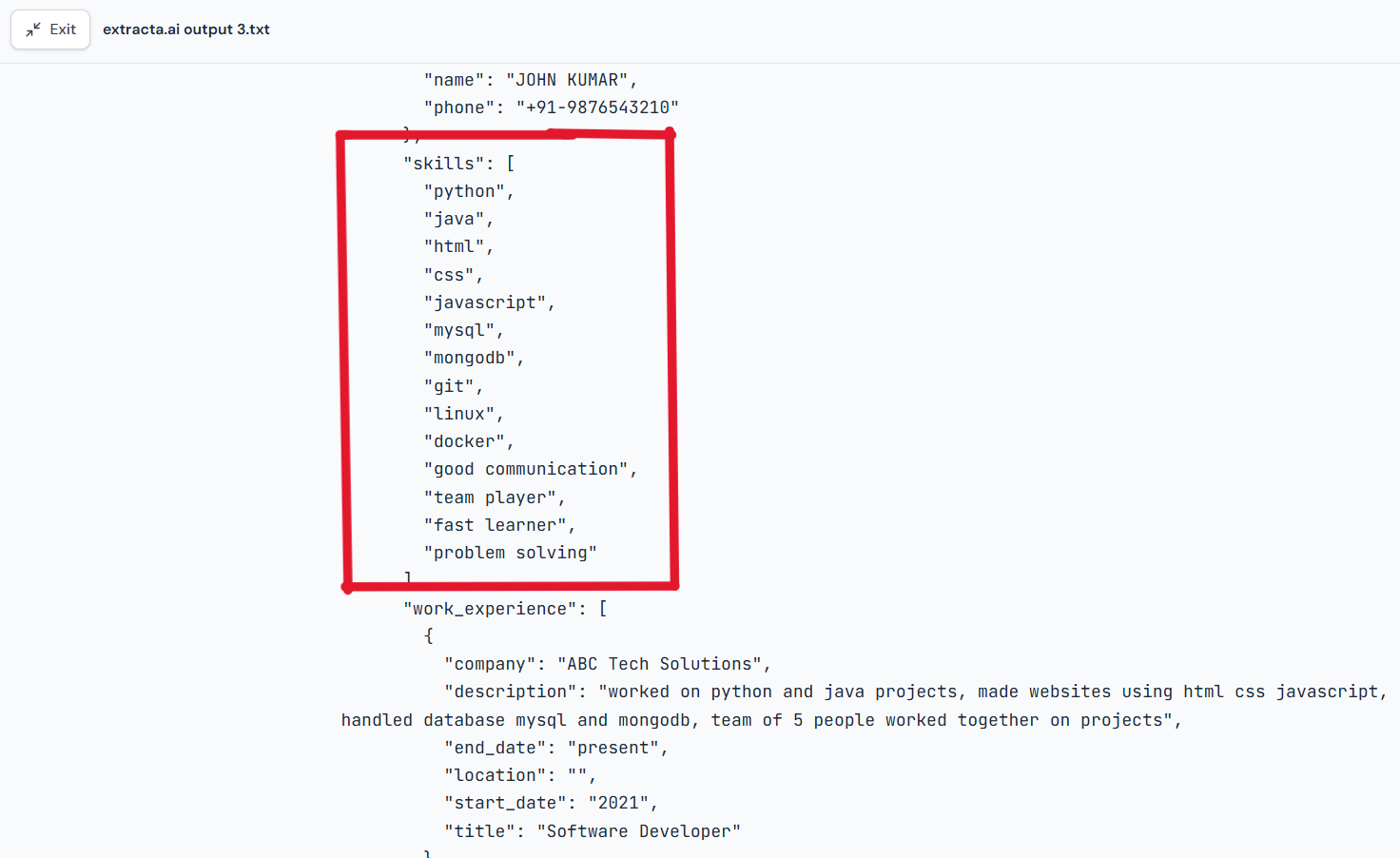
Observed output: Output artifact (Text/code file): Messy resume parsed successfully; the same schema-controlled field set was returned in structured JSON. — extracta.ai output 3.txt
Input artifact: Input artifact (Image): Input — extracta-ai-screenshot-2026-05-05-124544-174ecd83f60c.png
Output artifact: Output artifact (Text/code file): Messy resume parsed successfully; the same schema-controlled field set was returned in structured JSON. — extracta.ai output 3.txt
What changed: Image transformed into Text/code file
Why it matters / Conclusion: Strong and predictable for teams that can define the schema upfront; weak if you expect the parser to infer fields that were never declared.
Extracta.ai lets users define target fields up front and returns only those fields as lean JSON. The member cards show this on schema-bound runs over a clean single-column resume and on examples where unspecified fields are omitted.
Layout-Agnostic Resume ParsingVery Good — lean clean JSON with only defined fields, no metadata noise9/10▾
Feature tested: Layout-Agnostic Resume Parsing
Result: Passed (9/10)
Verdict: Very Good — lean clean JSON with only defined fields, no metadata noise
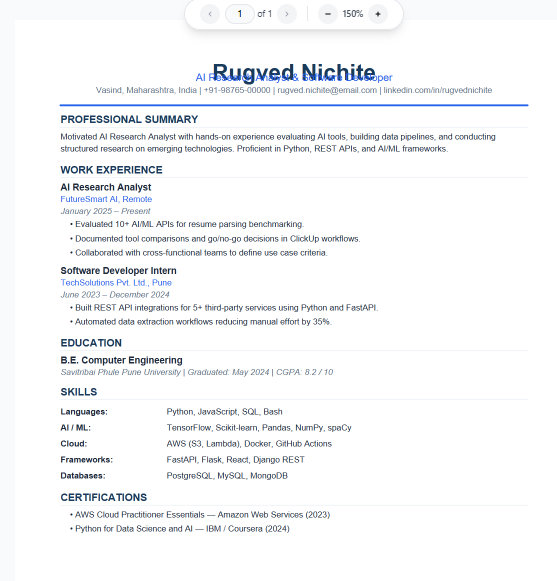
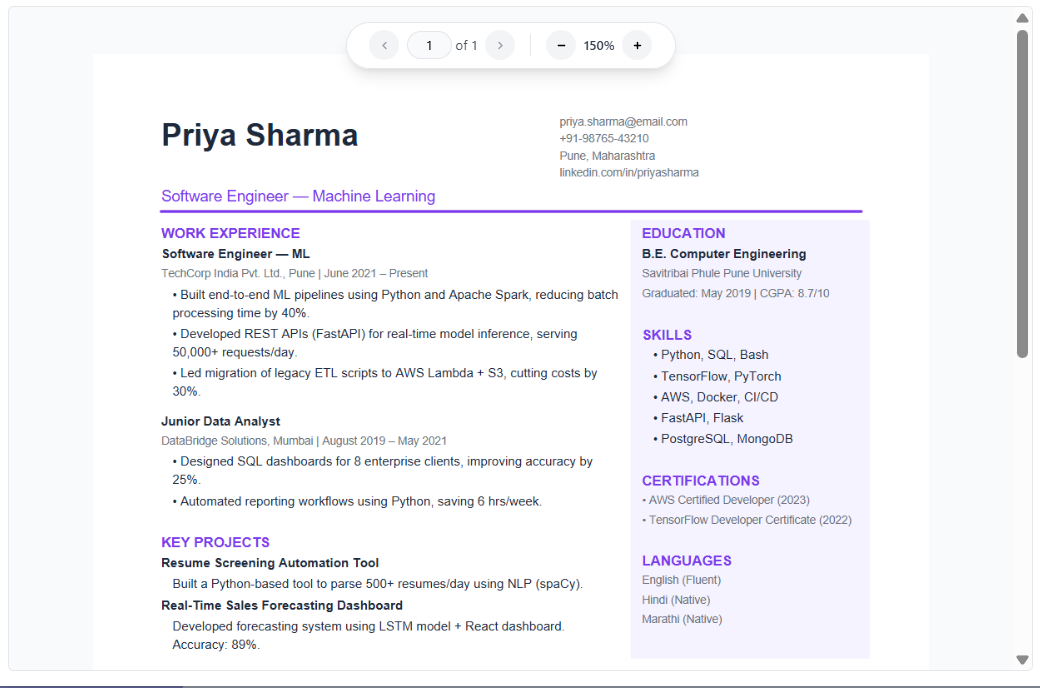
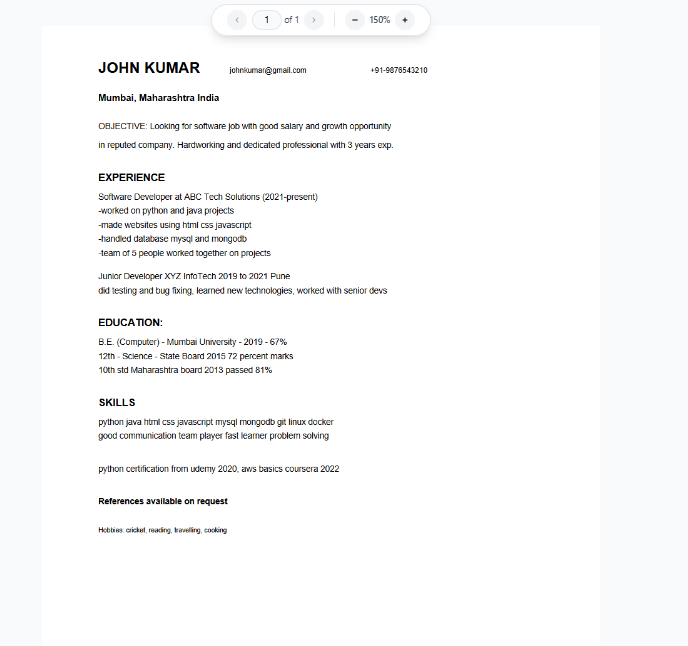
Expected behavior: Extracta.ai parses resumes without manual layout mapping, including clean single-column PDFs, two-column/sidebar resumes, and messy formatting. The evidence covers automatically reading both columns and handling non-standard resume structure without layout hints.
Test case: PDF document → Image
Input type: PDF document
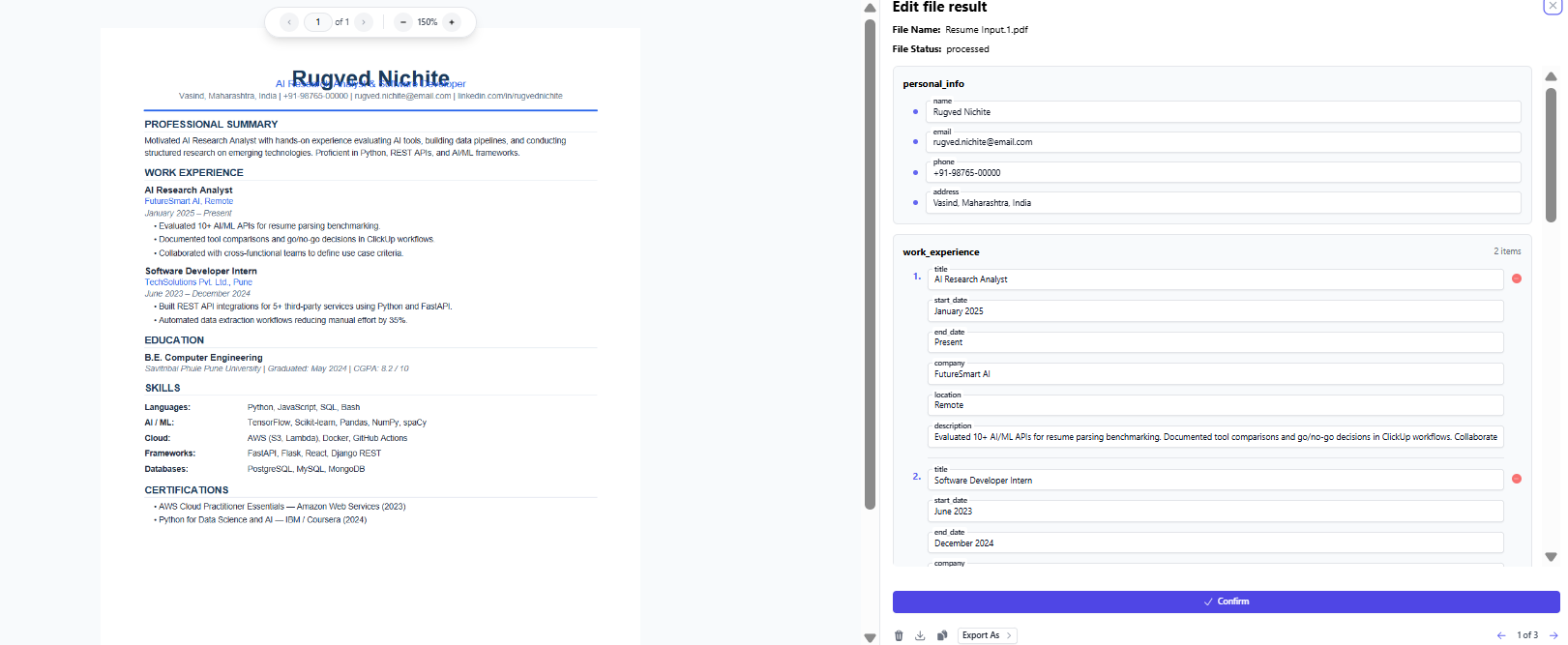
Input used: Input artifact (PDF document): Clean single-column resume input. — Extracta.ai input.1.pdf
Observed output: Output artifact (Image): Parsed successfully on first upload with the clean resume layout. — Clean resume parsed succesfully.png
Input artifact: Input artifact (PDF document): Clean single-column resume input. — Extracta.ai input.1.pdf
Output artifact: Output artifact (Image): Parsed successfully on first upload with the clean resume layout. — Clean resume parsed succesfully.png
What changed: PDF document transformed into Image
Test case: PDF document → Image
Input type: PDF document
Input used: Input artifact (PDF document): Extracta.ai Input.2.pdf — Extracta.ai Input.2.pdf
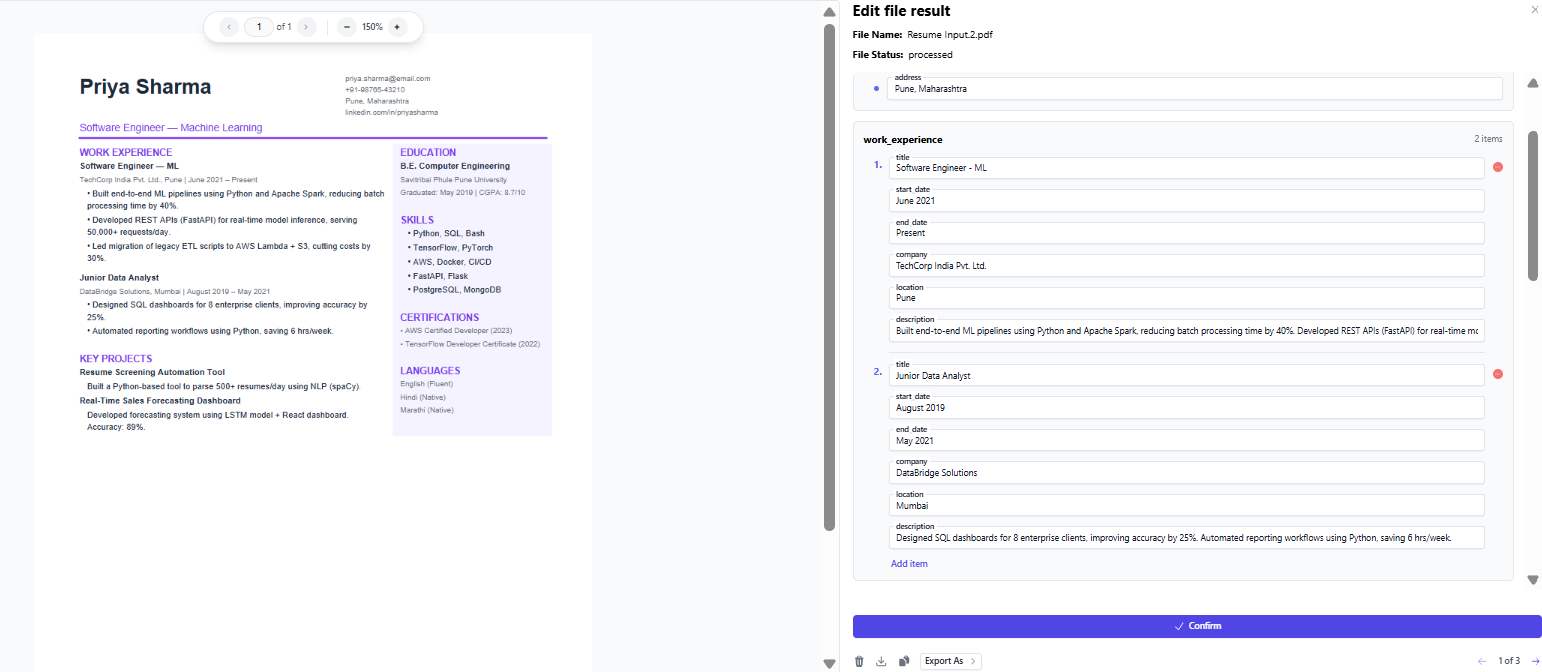
Observed output: Output artifact (Image): The two-column resume parsed without layout setup, and the extracted JSON preserved both the work history and the right-side sections correctly. — Multi colum resume parsed succesfully.png
Input artifact: Input artifact (PDF document): Extracta.ai Input.2.pdf — Extracta.ai Input.2.pdf
Output artifact: Output artifact (Image): The two-column resume parsed without layout setup, and the extracted JSON preserved both the work history and the right-side sections correctly. — Multi colum resume parsed succesfully.png
What changed: PDF document transformed into Image
Test case: PDF document → Image
Input type: PDF document
Input used: Input artifact (PDF document): Messy resume input. — Extracta.ai input.3.pdf
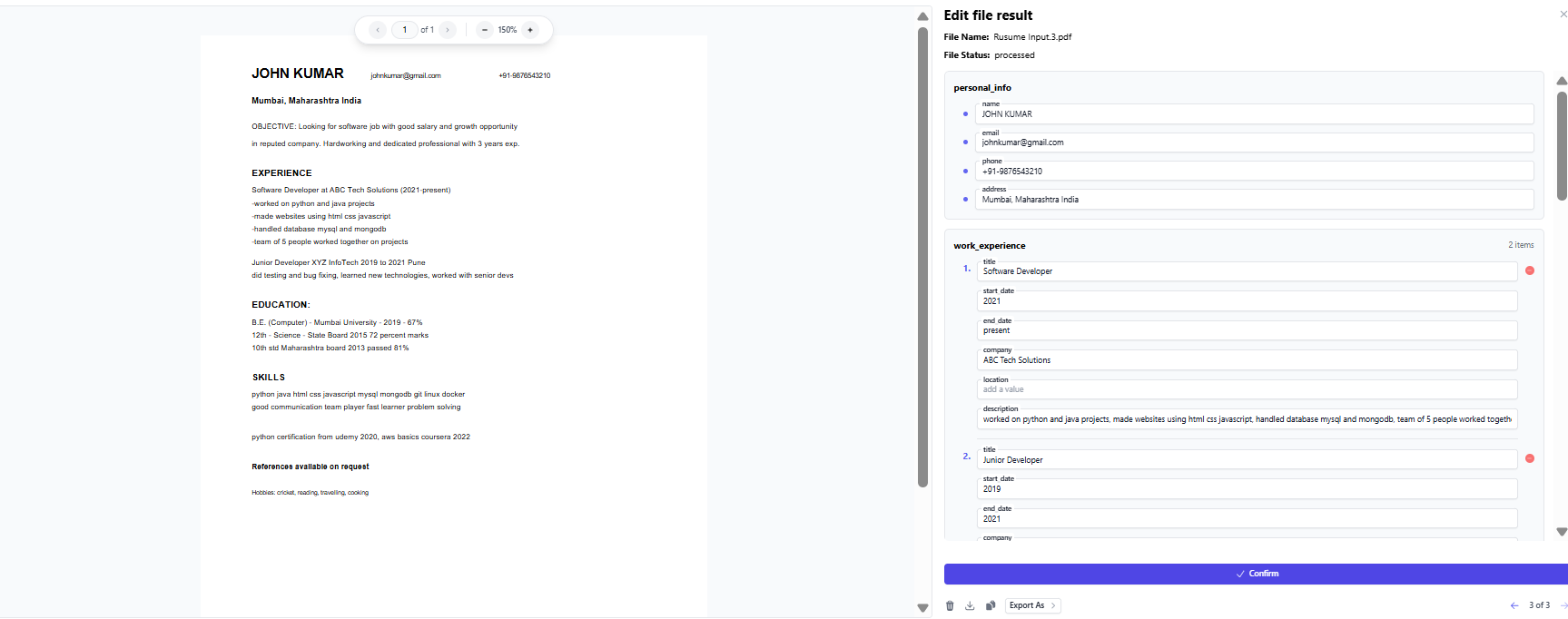
Observed output: Output artifact (Image): Parsed successfully despite inconsistent formatting and missing structural markers. — Messy resume parsed succesfully.png
Input artifact: Input artifact (PDF document): Messy resume input. — Extracta.ai input.3.pdf
Output artifact: Output artifact (Image): Parsed successfully despite inconsistent formatting and missing structural markers. — Messy resume parsed succesfully.png
What changed: PDF document transformed into Image
Why it matters / Conclusion: Multi-column parsing works excellently. All fields from both columns extracted correctly including the spoken languages (English, Hindi, Marathi) from the right sidebar — correctly identified from the dedicated LANGUAGES section. All 12 skills from the sidebar returned as individual array items. Main weaknesses are LinkedIn URL not extracted (not in schema), key projects not returned (not in schema), and the job title headline not captured. Fields not defined in the schema are never returned regardless of how prominent they are in the resume.
Extracta.ai parses resumes without manual layout mapping, including clean single-column PDFs, two-column/sidebar resumes, and messy formatting. The evidence covers automatically reading both columns and handling non-standard resume structure without layout hints.
Education Extraction and Normalization▾
Feature tested: Education Extraction and Normalization
Result: Partial
Expected behavior: Extracta.ai extracts education entries with degree, institution, dates, and related text, including cases where subfields are missing or embedded in free text. The cards show education rows being captured and partially normalized rather than inferred.
Test case: PDF document → Image
Input type: PDF document
Input used: Input artifact (PDF document): Input — Extracta.ai input.1.pdf
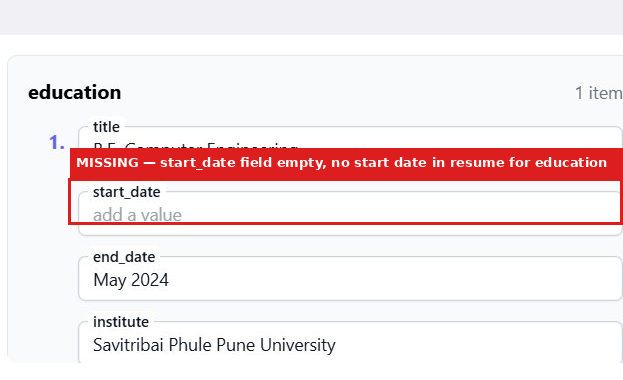
Observed output: Output artifact (Image): The education item was missing start_date because the resume did not provide one. — image-2.png
Input artifact: Input artifact (PDF document): Input — Extracta.ai input.1.pdf
Output artifact: Output artifact (Image): The education item was missing start_date because the resume did not provide one. — image-2.png
What changed: PDF document transformed into Image
Test case: PDF document → Image
Input type: PDF document
Input used: Input artifact (PDF document): Extracta.ai input.1.pdf — Extracta.ai input.1.pdf
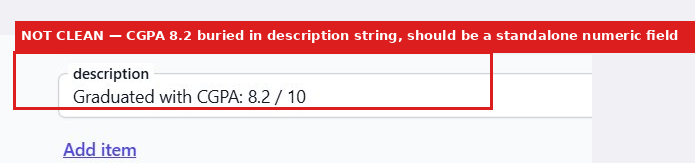
Observed output: Output artifact (Image): CGPA 8.2 was embedded in the description field instead of being extracted into a standalone numeric field. — image-4.png
Input artifact: Input artifact (PDF document): Extracta.ai input.1.pdf — Extracta.ai input.1.pdf
Output artifact: Output artifact (Image): CGPA 8.2 was embedded in the description field instead of being extracted into a standalone numeric field. — image-4.png
What changed: PDF document transformed into Image
Test case: PDF document → Image
Input type: PDF document
Input used: Input artifact (PDF document): Input — Extracta.ai Input.2.pdf
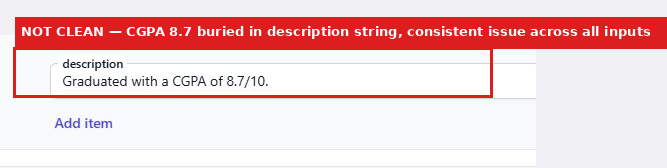
Observed output: Output artifact (Image): CGPA 8.7 also stayed buried in the description string. — image-7.png
Input artifact: Input artifact (PDF document): Input — Extracta.ai Input.2.pdf
Output artifact: Output artifact (Image): CGPA 8.7 also stayed buried in the description string. — image-7.png
What changed: PDF document transformed into Image
Test case: PDF document → Image
Input type: PDF document
Input used: Input artifact (PDF document): Extracta.ai Input.2.pdf — Extracta.ai Input.2.pdf
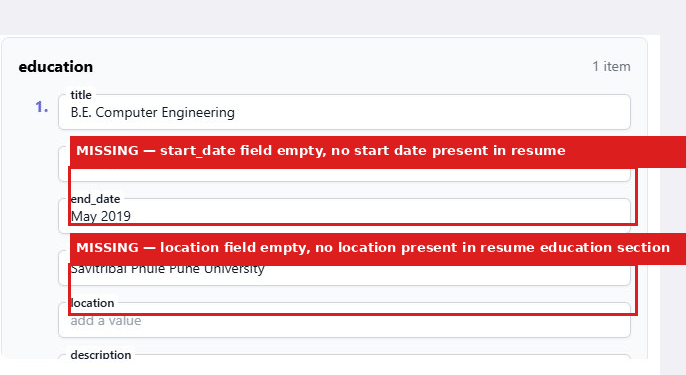
Observed output: Output artifact (Image): The education entry left both start_date and location empty placeholders because neither value was present in the resume section. — image-8.png
Input artifact: Input artifact (PDF document): Extracta.ai Input.2.pdf — Extracta.ai Input.2.pdf
Output artifact: Output artifact (Image): The education entry left both start_date and location empty placeholders because neither value was present in the resume section. — image-8.png
What changed: PDF document transformed into Image
Test case: Image → Image
Input type: Image
Input used: Input artifact (Image): Input — extracta-ai-screenshot-2026-05-05-124544-174ecd83f60c.png
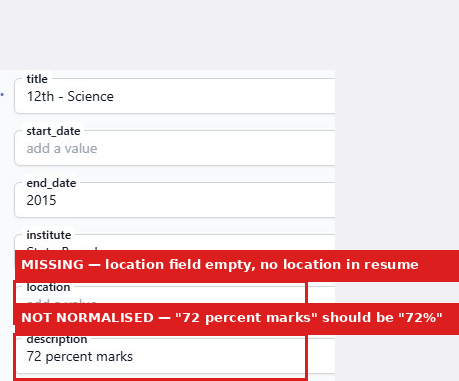
Observed output: Output artifact (Image): 72 percent marks stayed as raw text and location was missing in the education entry. — image-10.png
Input artifact: Input artifact (Image): Input — extracta-ai-screenshot-2026-05-05-124544-174ecd83f60c.png
Output artifact: Output artifact (Image): 72 percent marks stayed as raw text and location was missing in the education entry. — image-10.png
What changed: Image transformed into Image
Why it matters / Conclusion: Good at finding education entries, but normalization is inconsistent and empty placeholders need downstream handling.
Extracta.ai extracts education entries with degree, institution, dates, and related text, including cases where subfields are missing or embedded in free text. The cards show education rows being captured and partially normalized rather than inferred.
Skills, Languages, and Certifications Extraction▾
Feature tested: Skills, Languages, and Certifications Extraction
Result: Partial
Expected behavior: Extracta.ai itemizes skills into arrays, preserves certification text, and extracts language values when the resume has a clear languages section. The member cards show this across clean, two-column/sidebar, and messy resumes.
Test case: PDF document → Image
Input type: PDF document
Input used: Input artifact (PDF document): Input — Extracta.ai Input.2.pdf
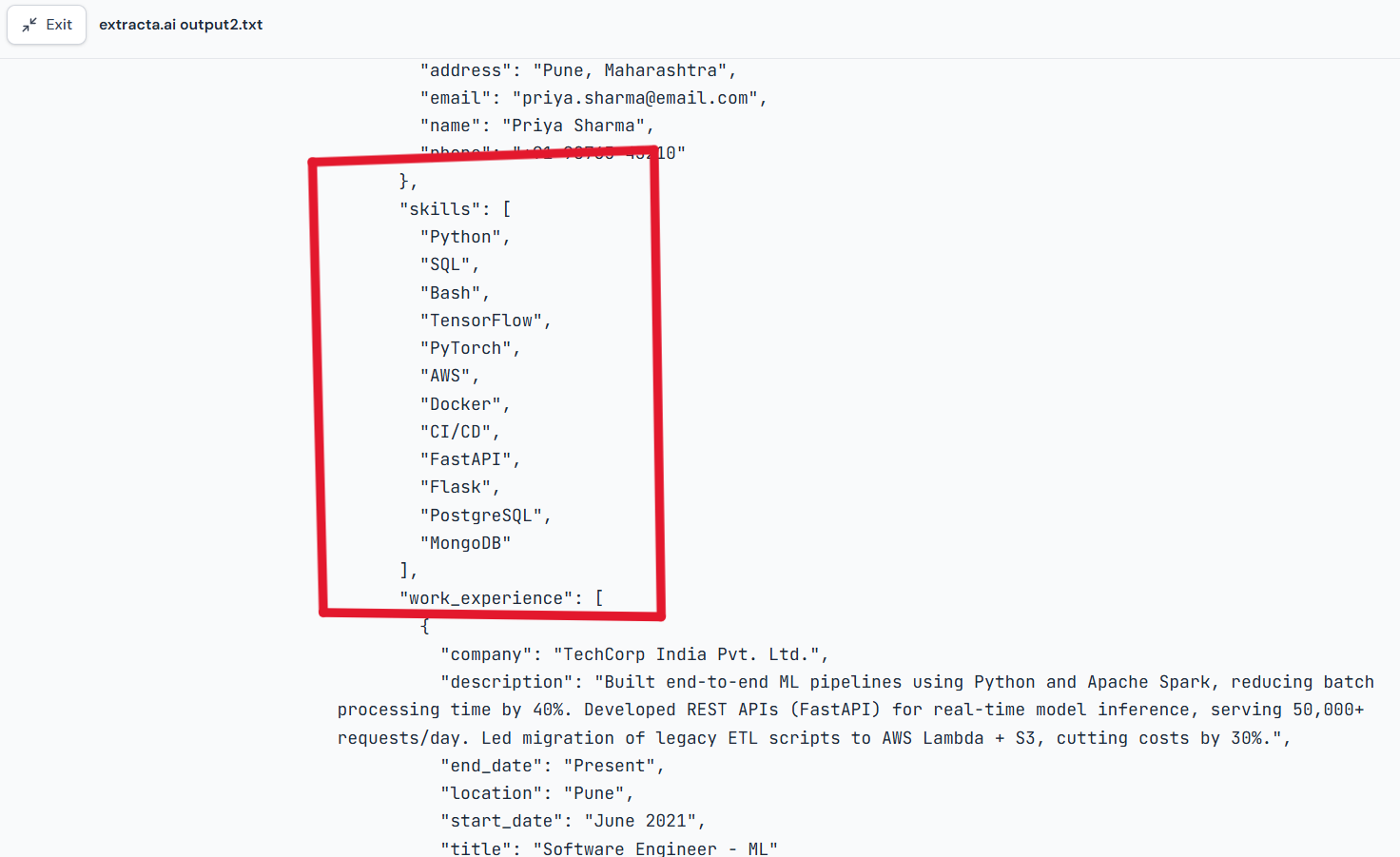
Observed output: Output artifact (Image): Skills were returned as individual array items from the multi-column resume. — Input 2 Skills were returned as individual array .png .png
Input artifact: Input artifact (PDF document): Input — Extracta.ai Input.2.pdf
Output artifact: Output artifact (Image): Skills were returned as individual array items from the multi-column resume. — Input 2 Skills were returned as individual array .png .png
What changed: PDF document transformed into Image
Test case: PDF document → Image
Input type: PDF document
Input used: Input artifact (PDF document): Extracta.ai input.1.pdf — Extracta.ai input.1.pdf
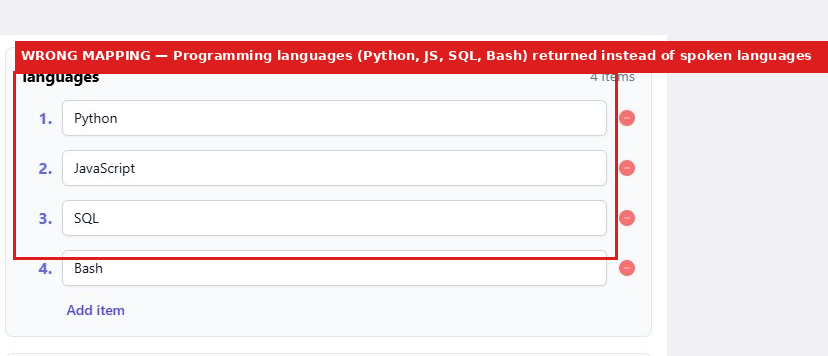
Observed output: Output artifact (Image): Programming languages from the Skills section were returned under the Languages field, showing a wrong section mapping because the resume did not have a dedicated spoken-languages section. — image-3.png
Input artifact: Input artifact (PDF document): Extracta.ai input.1.pdf — Extracta.ai input.1.pdf
Output artifact: Output artifact (Image): Programming languages from the Skills section were returned under the Languages field, showing a wrong section mapping because the resume did not have a dedicated spoken-languages section. — image-3.png
What changed: PDF document transformed into Image
Test case: Image → Image
Input type: Image
Input used: Input artifact (Image): Extracta.ai input.3.pdf — extracta-ai-screenshot-2026-05-05-124544-174ecd83f60c.png
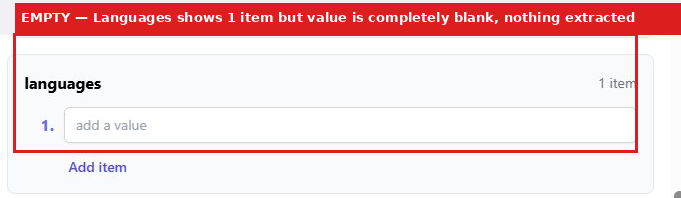
Observed output: Output artifact (Image): The messy resume produced a blank Languages item, confirming the field can come back empty when no languages section exists. — image-9.png
Input artifact: Input artifact (Image): Extracta.ai input.3.pdf — extracta-ai-screenshot-2026-05-05-124544-174ecd83f60c.png
Output artifact: Output artifact (Image): The messy resume produced a blank Languages item, confirming the field can come back empty when no languages section exists. — image-9.png
What changed: Image transformed into Image
Test case: Image → Image
Input type: Image
Input used: Input artifact (Image): Extracta.ai input.3.pdf — extracta-ai-screenshot-2026-05-05-124544-174ecd83f60c.png
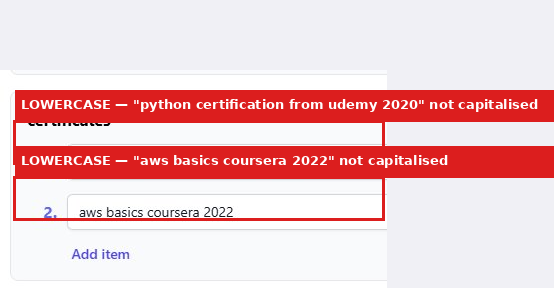
Observed output: Output artifact (Image): The messy resume's certifications were captured but kept lowercase exactly as written, with no capitalization normalization. — image-11.png
Input artifact: Input artifact (Image): Extracta.ai input.3.pdf — extracta-ai-screenshot-2026-05-05-124544-174ecd83f60c.png
Output artifact: Output artifact (Image): The messy resume's certifications were captured but kept lowercase exactly as written, with no capitalization normalization. — image-11.png
What changed: Image transformed into Image
Test case: PDF document → Image
Input type: PDF document
Input used: Input artifact (PDF document): Input — Extracta.ai input.1.pdf
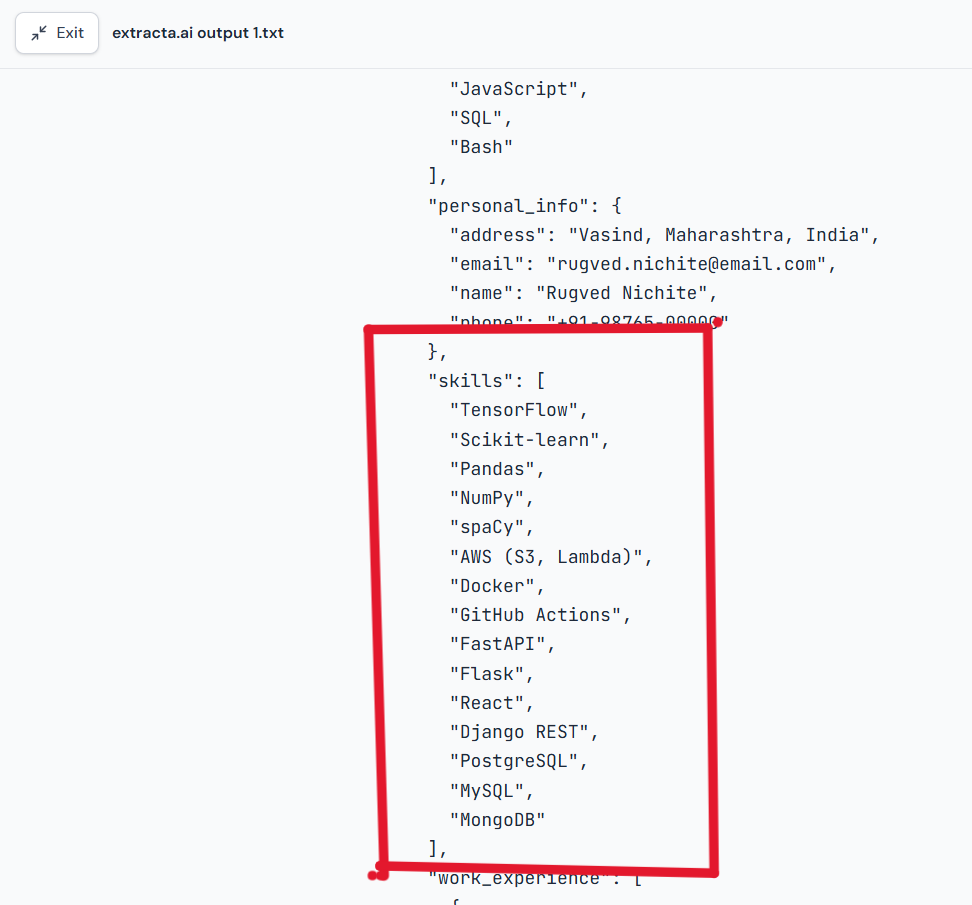
Observed output: Output artifact (Image): Skills were returned as individual array items from the clean resume. — Input 1 Skills returned as individual array .png
Input artifact: Input artifact (PDF document): Input — Extracta.ai input.1.pdf
Output artifact: Output artifact (Image): Skills were returned as individual array items from the clean resume. — Input 1 Skills returned as individual array .png
What changed: PDF document transformed into Image
Test case: PDF document → Image
Input type: PDF document
Input used: Input artifact (PDF document): Input — Extracta.ai input.3.pdf
Observed output: Output artifact (Image): The messy resume returned 14 individual skill strings, including soft skills. — Input 3 messy resume returned 14 individual skill strings including soft skills.png
Input artifact: Input artifact (PDF document): Input — Extracta.ai input.3.pdf
Output artifact: Output artifact (Image): The messy resume returned 14 individual skill strings, including soft skills. — Input 3 messy resume returned 14 individual skill strings including soft skills.png
What changed: PDF document transformed into Image
Why it matters / Conclusion: Works well when a dedicated languages section exists, but it can misfire or go blank without one, and certification text may need capitalization cleanup.
Extracta.ai itemizes skills into arrays, preserves certification text, and extracts language values when the resume has a clear languages section. The member cards show this across clean, two-column/sidebar, and messy resumes.
Contact and Work History Extraction▾
Feature tested: Contact and Work History Extraction
Result: Passed
Expected behavior: Extracta.ai extracts identity and employment-history fields such as name, email, phone, address, employers, titles, dates, locations, and role descriptions. The examples also preserve quantified achievements and nonstandard date ranges.
Test case: PDF document → Image
Input type: PDF document
Input used: Input artifact (PDF document): Input — Extracta.ai input.1.pdf
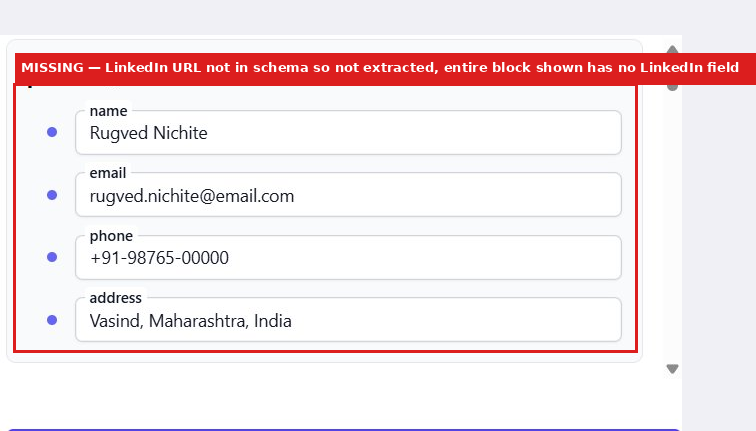
Observed output: Output artifact (Image): On the clean resume, the extracted contact block contained name, email, phone, and address, but LinkedIn was missing because it was not defined in the schema. — image.png
Input artifact: Input artifact (PDF document): Input — Extracta.ai input.1.pdf
Output artifact: Output artifact (Image): On the clean resume, the extracted contact block contained name, email, phone, and address, but LinkedIn was missing because it was not defined in the schema. — image.png
What changed: PDF document transformed into Image
Test case: PDF document → Image
Input type: PDF document
Input used: Input artifact (PDF document): Input — Extracta.ai Input.2.pdf
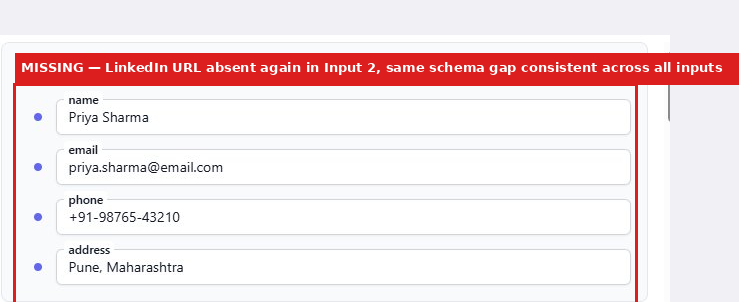
Observed output: Output artifact (Image): The same contact behavior repeated on the multi-column resume: name, email, phone, and address were extracted, and LinkedIn stayed absent for the same schema reason. — image-6.png
Input artifact: Input artifact (PDF document): Input — Extracta.ai Input.2.pdf
Output artifact: Output artifact (Image): The same contact behavior repeated on the multi-column resume: name, email, phone, and address were extracted, and LinkedIn stayed absent for the same schema reason. — image-6.png
What changed: PDF document transformed into Image
Test case: PDF document → Image
Input type: PDF document
Input used: Input artifact (PDF document): Input — Extracta.ai input.3.pdf
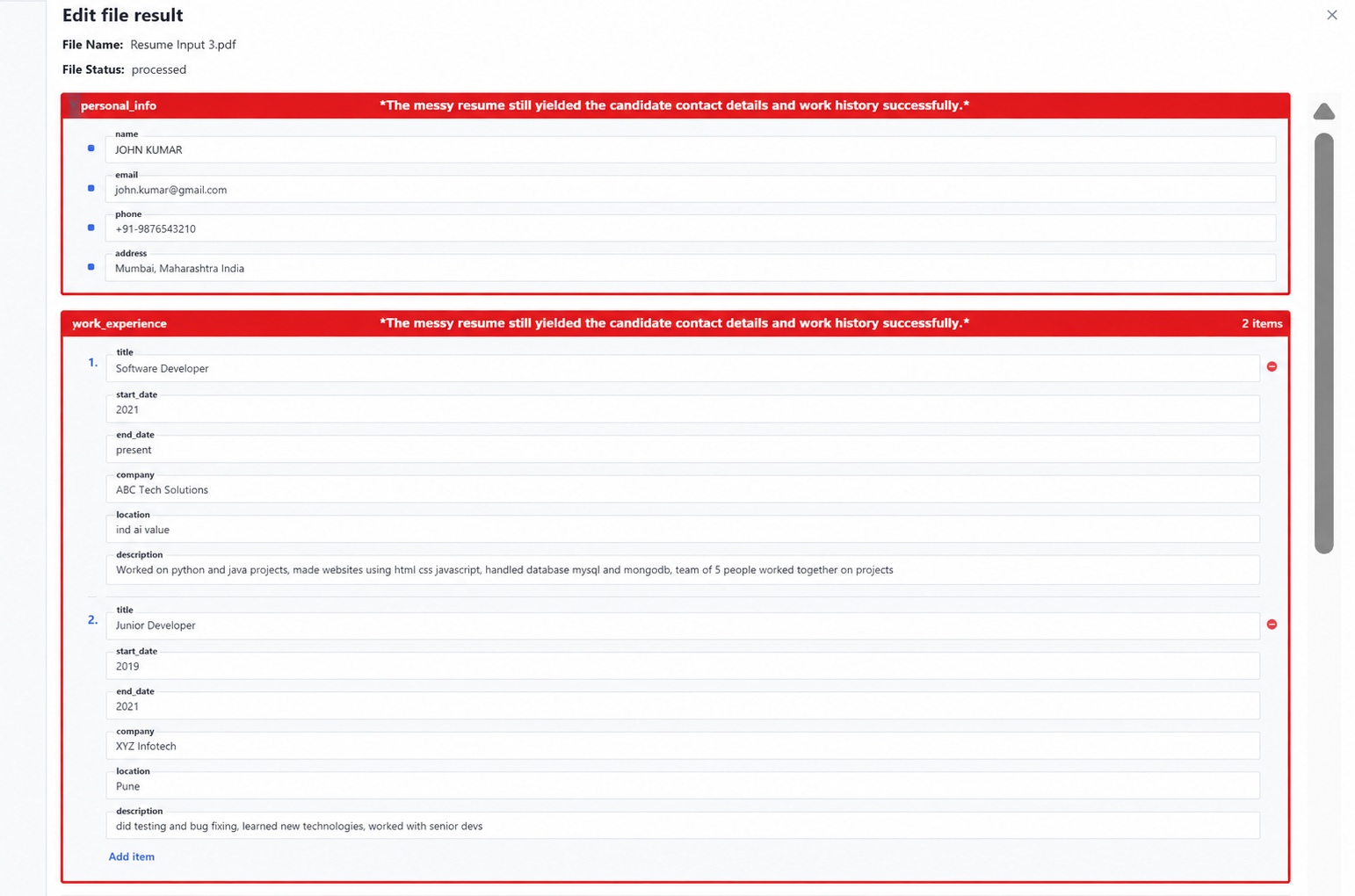
Observed output: Output artifact (Image): The messy resume still yielded the candidate contact details and work history successfully. — contact_work_history.png
Input artifact: Input artifact (PDF document): Input — Extracta.ai input.3.pdf
Output artifact: Output artifact (Image): The messy resume still yielded the candidate contact details and work history successfully. — contact_work_history.png
What changed: PDF document transformed into Image
Why it matters / Conclusion: Reliable for core candidate data, with empty work-location fields when the source leaves them out.
Extracta.ai extracts identity and employment-history fields such as name, email, phone, address, employers, titles, dates, locations, and role descriptions. The examples also preserve quantified achievements and nonstandard date ranges.
Pricing & Access
Pricing checked May 2026. We re-check quarterly. Visit extracta.ai for current plans and annual pricing options.
Featured in Rankings
Independent rankings where Extracta.ai was tested and rated.
Banner Preview
How the embed badge will look on your site

Embed HTML
Copy this code to your website source
Quick Integration Guide
- 1Copy the HTML code block above.
- 2Paste it into your site's HTML or CMS editor.
- 3Banner appears instantly on your page.
- 4Links back to your tool profile here.
Similar Tools
Discover more AI tools like Extracta.ai to enhance your workflow.
Comments (0)
Need a custom AI solution for this use case?
If you are looking to build a custom resume parsing, candidate data extraction, or structured hiring workflow for your business or internal workflow, email us at contact@futuresmart.ai.
Found something inaccurate or missing? We try to keep our AI research accurate and useful. If you found outdated information, an issue, or have a suggestion, email us at collaborate@aidemos.com.