
Hrflow Review: 3 Resume Parsing Tests (2026)
HrFlow is an API-first resume parser that covers core fields well, but needs cleanup for phones, casing, and certifications.
Solid core parser, but not production-ready without downstream cleanup
- You are integrating resume parsing into a recruitment or HR product via API
- You mainly need contact info, work history, education, and languages
- You can normalize casing and phone formats downstream
- You need phone numbers without truncation
Feature scores on this page: 6.0/10 (1 scored feature)
Our take
HrFlow handled all three tested resumes through an API and did well on core resume structure: names, emails, work history, education, and even sidebar languages on the multi-column sample. The consistent blockers were phone truncation on 2 of 3 resumes, lowercase normalization across outputs, and unreliable certification/task extraction, so teams will need post-processing before using the data downstream.
In-Depth Review
Our detailed analysis of HrFlow — features, performance, and real-world testing.
Feature-by-Feature Breakdown
API-Based Resume ParsingWorks reliably as an API transport and JSON parser.6/10▾
Feature tested: API-Based Resume Parsing
Result: Partial (6/10)
Verdict: Works reliably as an API transport and JSON parser.
Expected behavior: HrFlow accepts resume PDFs through an API and returns structured JSON candidate data without template setup. The grouped cards cover a clean single-column resume, a multi-column/sidebar resume, and a messy resume, all of which were parsed without crashing.
Test case: Image → Text/code file
Input type: Image
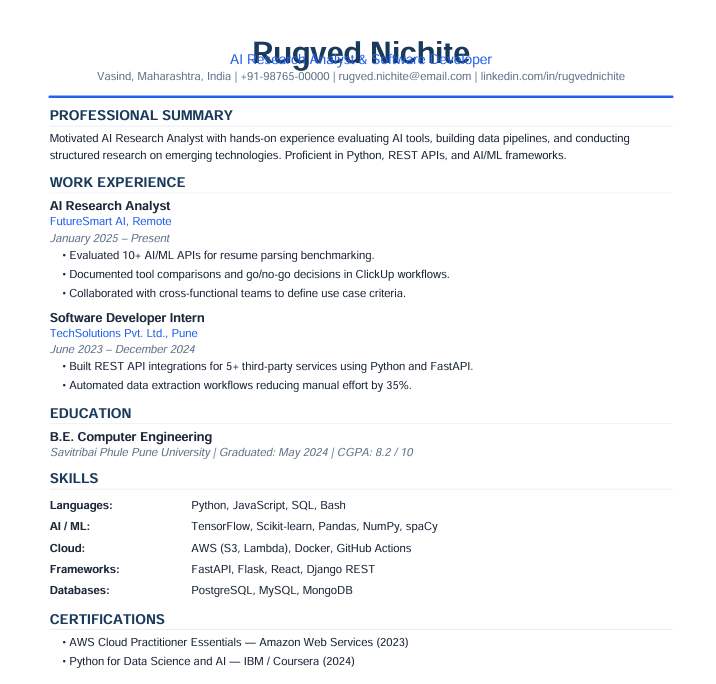
Input used: Input artifact (Image): Input — image.png
Observed output: Output artifact (Text/code file): The clean resume parsed successfully, with name, email, phone, location, LinkedIn, job titles, companies, and education extracted; the JSON response also showed lowercased text fields and no CGPA. — hrflow output 1.txt
Input artifact: Input artifact (Image): Input — image.png
Output artifact: Output artifact (Text/code file): The clean resume parsed successfully, with name, email, phone, location, LinkedIn, job titles, companies, and education extracted; the JSON response also showed lowercased text fields and no CGPA. — hrflow output 1.txt
What changed: Image transformed into Text/code file
Test case: Image → Text prompt
Input type: Image
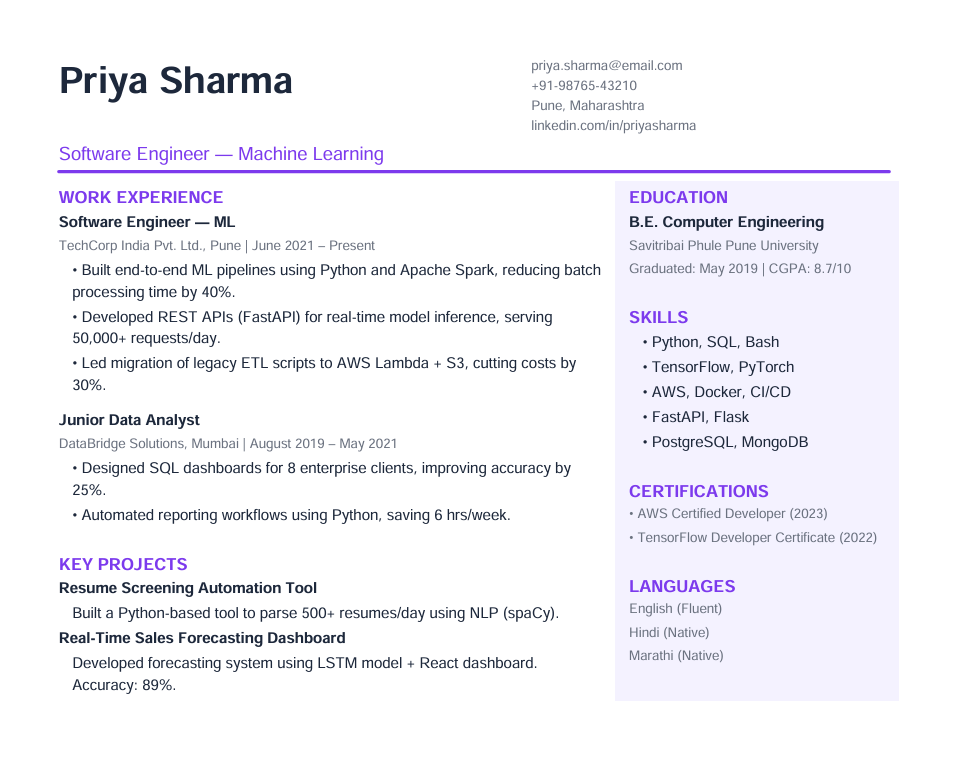
Input used: Input artifact (Image): Input resume — image-9.png
Observed output: Output artifact (Text prompt): Observation
Input artifact: Input artifact (Image): Input resume — image-9.png
Output artifact: Output artifact (Text prompt): Observation
What changed: Image transformed into Text prompt
Test case: Image → Text prompt
Input type: Image
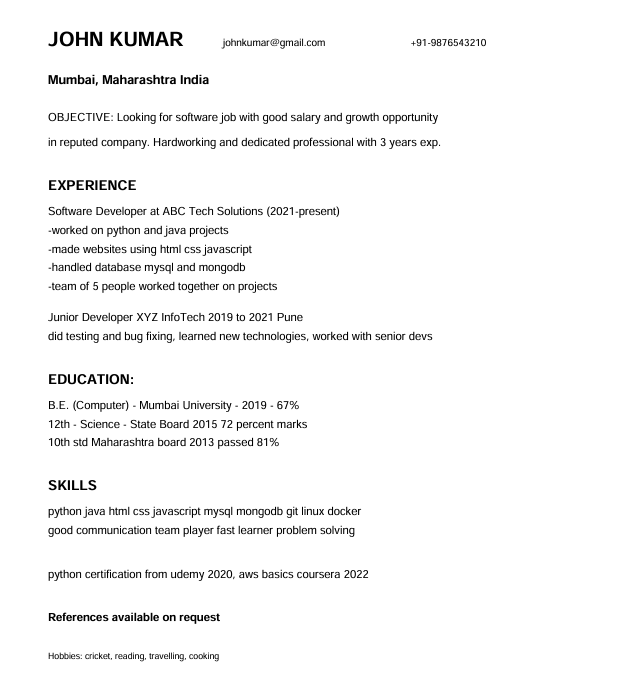
Input used: Input artifact (Image): Input resume — image-8.png
Observed output: Output artifact (Text prompt): Observation
Input artifact: Input artifact (Image): Input resume — image-8.png
Output artifact: Output artifact (Text prompt): Observation
What changed: Image transformed into Text prompt
Why it matters / Conclusion: Reliable transport layer for API-driven parsing, but it is not a UI upload tool and the output still needs downstream cleanup for field quality.
HrFlow accepts resume PDFs through an API and returns structured JSON candidate data without template setup. The grouped cards cover a clean single-column resume, a multi-column/sidebar resume, and a messy resume, all of which were parsed without crashing.
Identity and Contact ExtractionGood on basic identity fields, but phone accuracy is inconsistent.▾
Feature tested: Identity and Contact Extraction
Result: Partial
Verdict: Good on basic identity fields, but phone accuracy is inconsistent.
Expected behavior: HrFlow extracts personal identity and contact details such as name, email, location, LinkedIn, and phone numbers from the tested resumes. The evidence shows the same contact-info capability across clean, multi-column, and messy inputs, with phone fidelity varying by resume.
Test case: Image → Image
Input type: Image
Input used: Input artifact (Image): Clean resume input with a formatted phone number. — image.png
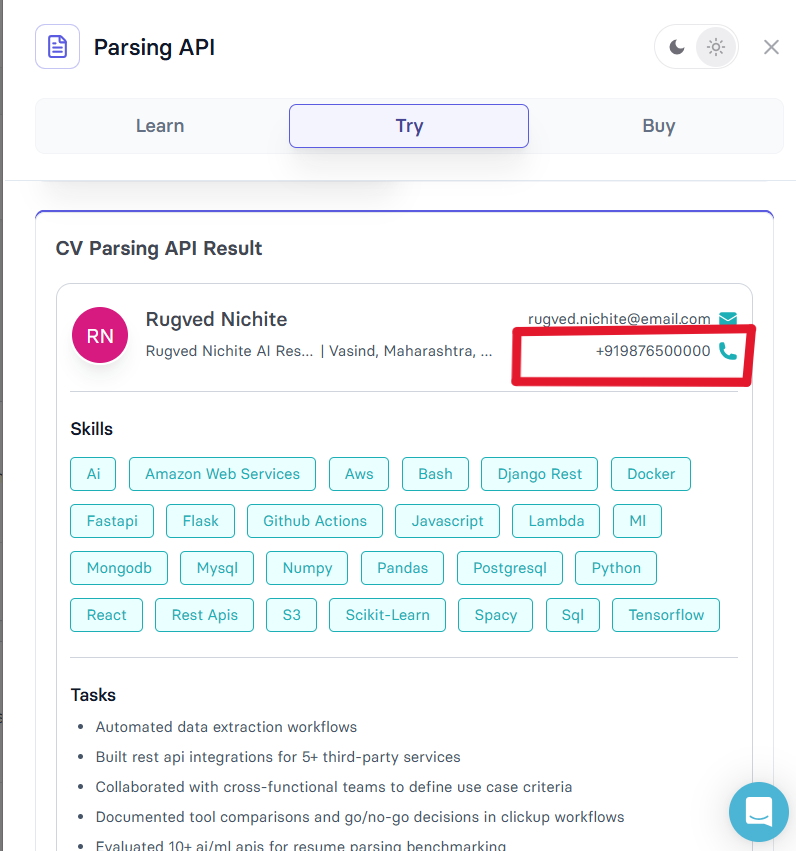
Observed output: Output artifact (Image): Rugved Nichite's phone number was returned complete. — Rugved Nichite's phone no extracted.png
Input artifact: Input artifact (Image): Clean resume input with a formatted phone number. — image.png
Output artifact: Output artifact (Image): Rugved Nichite's phone number was returned complete. — Rugved Nichite's phone no extracted.png
What changed: Image transformed into Image
Test case: Image → Image
Input type: Image
Input used: Input artifact (Image): Input resume — image-9.png
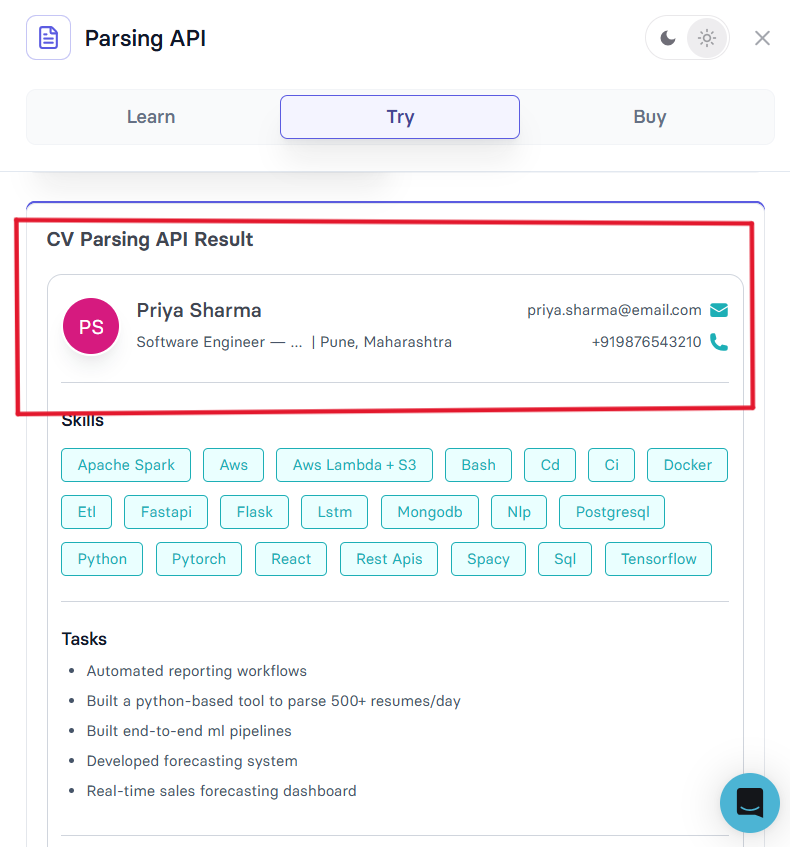
Observed output: Output artifact (Image): Observation — Priya Sharma’s contact fields extracted, phone number was truncated headline lost the ML suffix..png
Input artifact: Input artifact (Image): Input resume — image-9.png
Output artifact: Output artifact (Image): Observation — Priya Sharma’s contact fields extracted, phone number was truncated headline lost the ML suffix..png
What changed: Image transformed into Image
Test case: Image → Image
Input type: Image
Input used: Input artifact (Image): Input resume — image-8.png
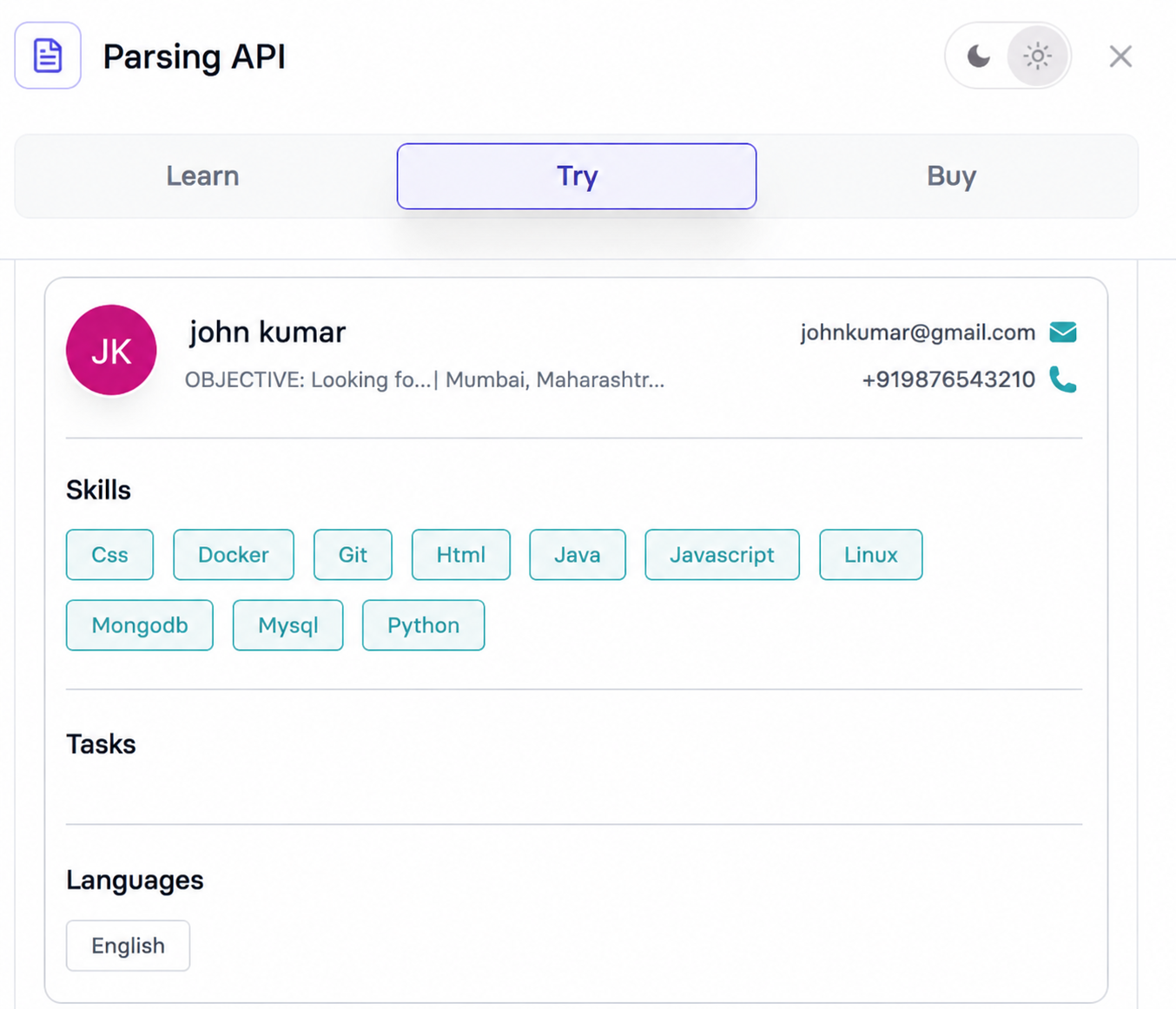
Observed output: Output artifact (Image): Observation — contact fields were extracted, phone retained lost the hyphen separator, and the name was lowercased..png
Input artifact: Input artifact (Image): Input resume — image-8.png
Output artifact: Output artifact (Image): Observation — contact fields were extracted, phone retained lost the hyphen separator, and the name was lowercased..png
What changed: Image transformed into Image
Why it matters / Conclusion: Solid identity extraction overall, but phone numbers are not production-safe because they failed on two of the three resumes.
HrFlow extracts personal identity and contact details such as name, email, location, LinkedIn, and phone numbers from the tested resumes. The evidence shows the same contact-info capability across clean, multi-column, and messy inputs, with phone fidelity varying by resume.
Core Resume Section ExtractionGood core coverage for employment and education structure, with a few fidelity gaps.▾
Feature tested: Core Resume Section Extraction
Result: Partial
Verdict: Good core coverage for employment and education structure, with a few fidelity gaps.
Expected behavior: HrFlow extracts core resume structure including work history, job titles, employers, date ranges, education, institutions, degrees, and languages. The member cards show it also capturing responsibility/task bullets, with some truncation or pollution on harder layouts.
Test case: Image → Image
Input type: Image
Input used: Input artifact (Image): Clean resume input with work experience bullets. — image.png
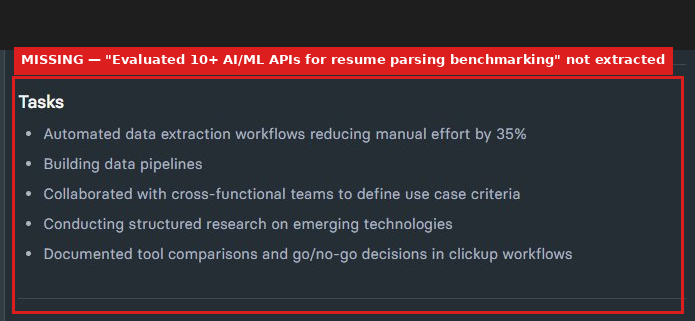
Observed output: Output artifact (Image): The task panel omitted the bullet about evaluating 10+ AI/ML APIs for resume parsing benchmarking and only showed the remaining tasks. — Evaluated 10+ AI ML APIs for resume parsing benchmarking.png
Input artifact: Input artifact (Image): Clean resume input with work experience bullets. — image.png
Output artifact: Output artifact (Image): The task panel omitted the bullet about evaluating 10+ AI/ML APIs for resume parsing benchmarking and only showed the remaining tasks. — Evaluated 10+ AI ML APIs for resume parsing benchmarking.png
What changed: Image transformed into Image
Test case: Image → Image
Input type: Image
Input used: Input artifact (Image): Priya Sharma resume with two certifications listed in the sidebar. — image-9.png
Observed output: Output artifact (Image): Output — certification_education_mismatch.png
Input artifact: Input artifact (Image): Priya Sharma resume with two certifications listed in the sidebar. — image-9.png
Output artifact: Output artifact (Image): Output — certification_education_mismatch.png
What changed: Image transformed into Image
Test case: Image → Image
Input type: Image
Input used: Input artifact (Image): Input — image-9.png
Observed output: Output artifact (Image): Output — languages and certifications fields are extracted correctly.png
Input artifact: Input artifact (Image): Input — image-9.png
Output artifact: Output artifact (Image): Output — languages and certifications fields are extracted correctly.png
What changed: Image transformed into Image
Test case: Image → Image
Input type: Image
Input used: Input artifact (Image): Input resume — image-9.png
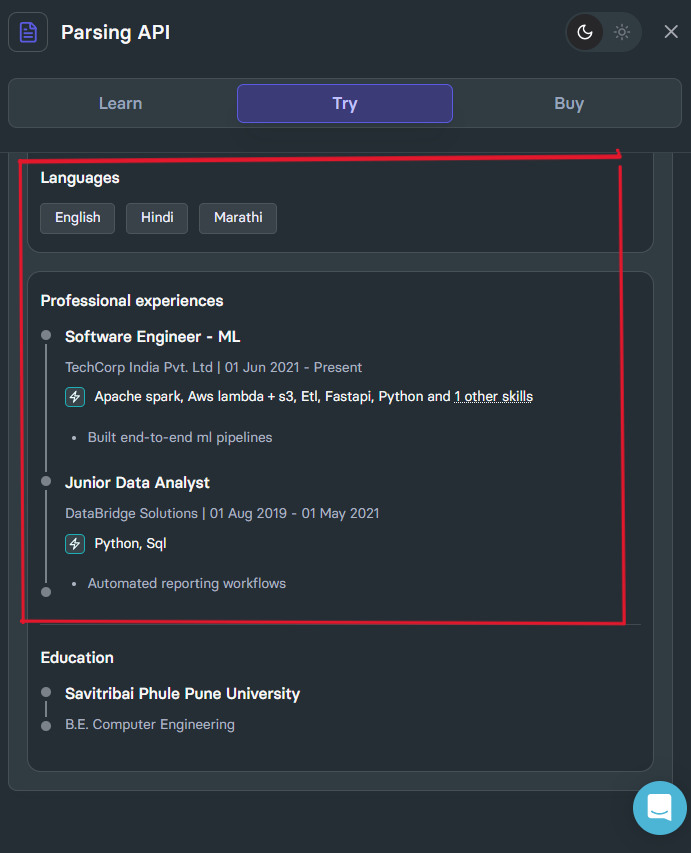
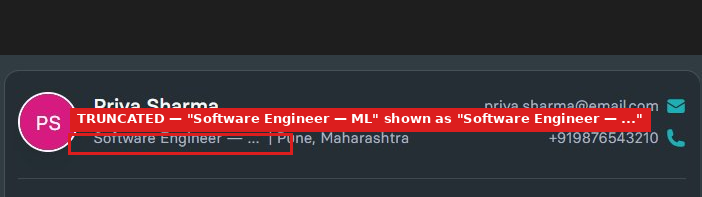
Observed output: Output artifact (Image): The multi-column resume’s headline was truncated to 'Software Engineer — ...' even though the underlying role was 'Software Engineer — ML'; work history, education, and sidebar languages were also parsed. — image-5.png
Input artifact: Input artifact (Image): Input resume — image-9.png
Output artifact: Output artifact (Image): The multi-column resume’s headline was truncated to 'Software Engineer — ...' even though the underlying role was 'Software Engineer — ML'; work history, education, and sidebar languages were also parsed. — image-5.png
What changed: Image transformed into Image
Test case: Image → Text prompt
Input type: Image
Input used: Input artifact (Image): Input resume — image-8.png
Observed output: Output artifact (Text prompt): Observation
Input artifact: Input artifact (Image): Input resume — image-8.png
Output artifact: Output artifact (Text prompt): Observation
What changed: Image transformed into Text prompt
Why it matters / Conclusion: Strong core coverage for work and education structure, with clear weaknesses around grade fields and title fidelity.
HrFlow extracts core resume structure including work history, job titles, employers, date ranges, education, institutions, degrees, and languages. The member cards show it also capturing responsibility/task bullets, with some truncation or pollution on harder layouts.

Skills and Certification ExtractionWeakest area: normalization, classification, and certification handling are not reliable.▾
Feature tested: Skills and Certification Extraction
Result: Failed
Verdict: Weakest area: normalization, classification, and certification handling are not reliable.
Expected behavior: HrFlow builds a skills-oriented list from resume content, surfacing technical keywords across the tested resumes. The cards also show weaker handling around certifications and noisy outputs like lowercasing, dropped soft skills, and fragments from projects or section labels.
Test case: Image → Image
Input type: Image
Input used: Input artifact (Image): Input resume — image.png
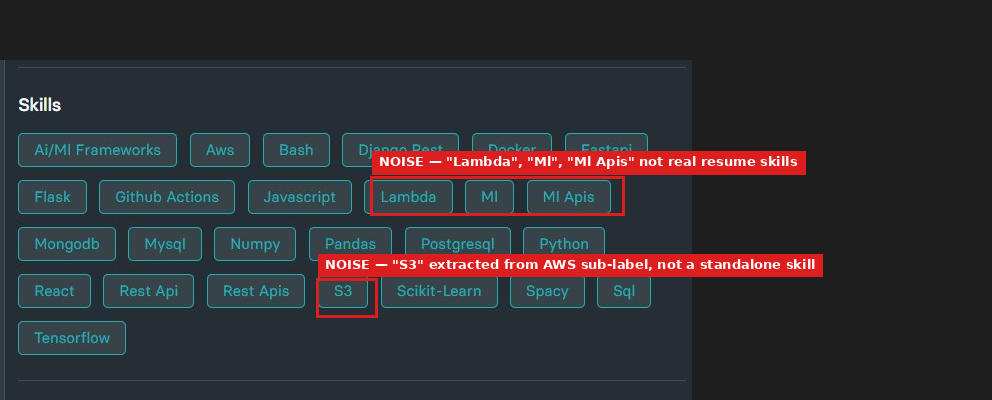
Observed output: Output artifact (Image): The clean resume produced 26 skills, but the list included noise fragments such as 'lambda', 'mi', 'mi apis', and 's3', and all terms were lowercased. — image-3.png
Input artifact: Input artifact (Image): Input resume — image.png
Output artifact: Output artifact (Image): The clean resume produced 26 skills, but the list included noise fragments such as 'lambda', 'mi', 'mi apis', and 's3', and all terms were lowercased. — image-3.png
What changed: Image transformed into Image
Test case: Image → Image
Input type: Image
Input used: Input artifact (Image): Input resume — image.png
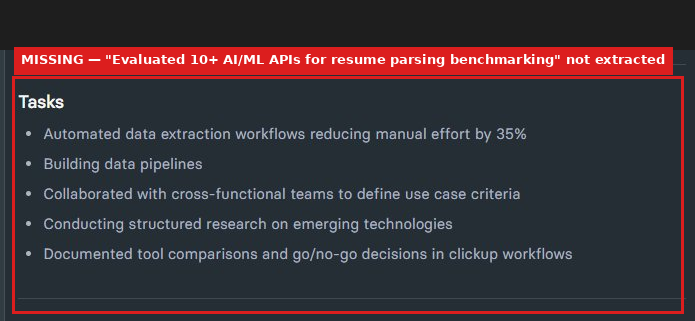
Observed output: Output artifact (Image): The clean resume missed the task 'Evaluated 10+ AI/ML APIs for resume parsing benchmarking' from the extracted tasks list. — image-2.png
Input artifact: Input artifact (Image): Input resume — image.png
Output artifact: Output artifact (Image): The clean resume missed the task 'Evaluated 10+ AI/ML APIs for resume parsing benchmarking' from the extracted tasks list. — image-2.png
What changed: Image transformed into Image
Test case: Image → Image
Input type: Image
Input used: Input artifact (Image): Input resume — image-9.png
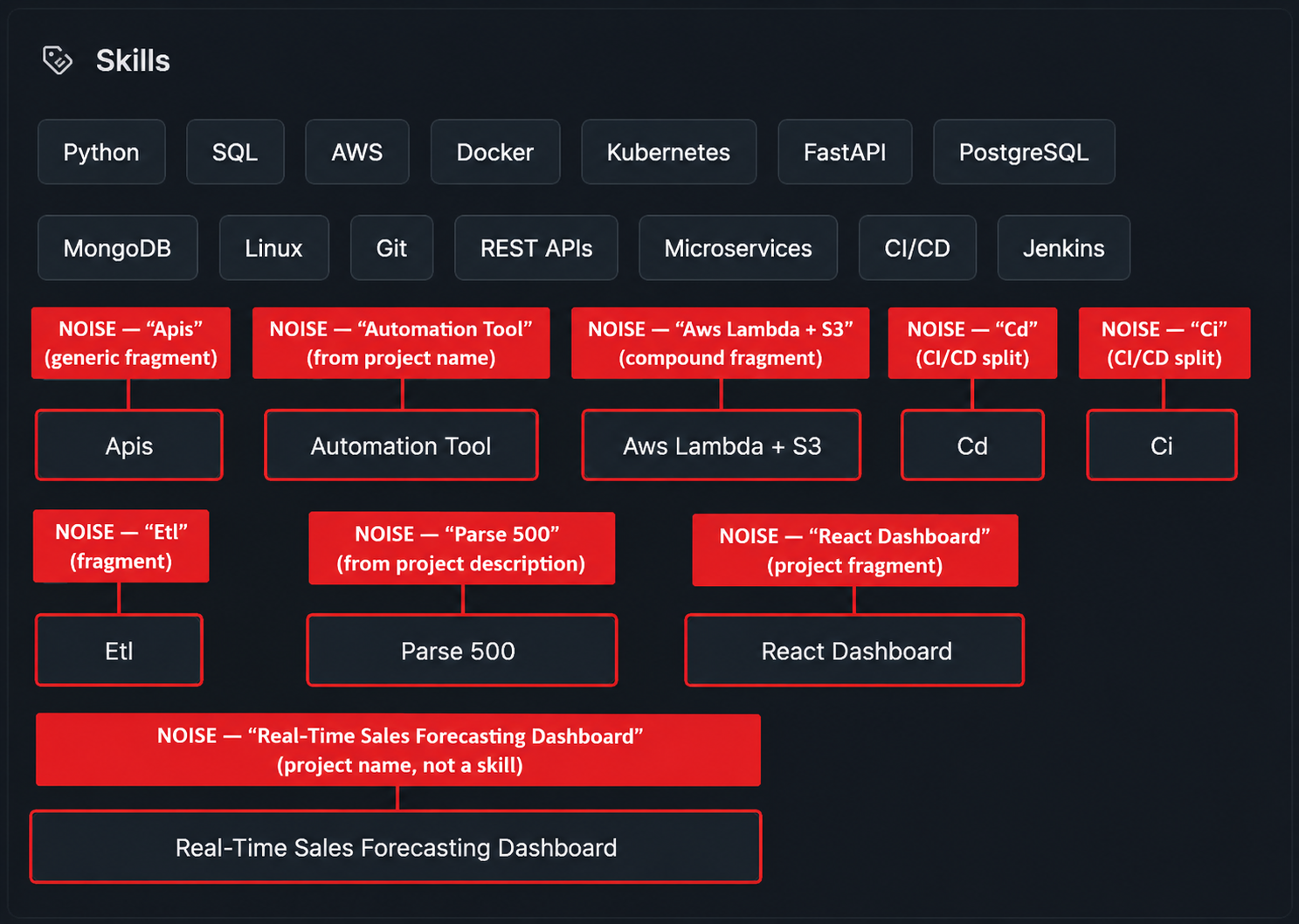
Observed output: Output artifact (Image): The multi-column resume’s skills list included project fragments such as 'parse 500', 'automation tool', 'react dashboard', and split CI/CD fragments. — image-6.png
Input artifact: Input artifact (Image): Input resume — image-9.png
Output artifact: Output artifact (Image): The multi-column resume’s skills list included project fragments such as 'parse 500', 'automation tool', 'react dashboard', and split CI/CD fragments. — image-6.png
What changed: Image transformed into Image
Test case: Image → Image
Input type: Image
Input used: Input artifact (Image): Input resume — image-9.png
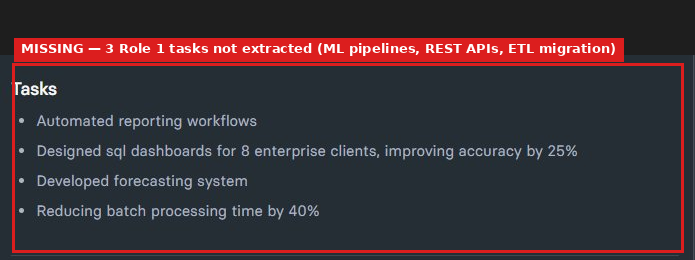
Observed output: Output artifact (Image): Only one Role 1 task was captured; the ML pipelines, REST APIs, and ETL migration tasks were missing. — image-7.png
Input artifact: Input artifact (Image): Input resume — image-9.png
Output artifact: Output artifact (Image): Only one Role 1 task was captured; the ML pipelines, REST APIs, and ETL migration tasks were missing. — image-7.png
What changed: Image transformed into Image
Why it matters / Conclusion: This is the weakest area: technical skills are partially captured, but normalization, classification, and certification handling are not reliable enough without manual cleanup.
HrFlow builds a skills-oriented list from resume content, surfacing technical keywords across the tested resumes. The cards also show weaker handling around certifications and noisy outputs like lowercasing, dropped soft skills, and fragments from projects or section labels.
Pricing & Access
Pricing checked May 2026. We re-check quarterly. HrFlow pricing is in Euros. Visit hrflow.ai for current plans and volume pricing.
Featured in Rankings
Independent rankings where HrFlow was tested and rated.
Banner Preview
How the embed badge will look on your site

Embed HTML
Copy this code to your website source
Quick Integration Guide
- 1Copy the HTML code block above.
- 2Paste it into your site's HTML or CMS editor.
- 3Banner appears instantly on your page.
- 4Links back to your tool profile here.
Similar Tools
Discover more AI tools like HrFlow to enhance your workflow.
Comments (0)
Need a custom AI solution for this use case?
If you are looking to build a custom resume parsing, candidate data extraction, or ATS enrichment system for your business or internal workflow, email us at contact@futuresmart.ai.
Found something inaccurate or missing? We try to keep our AI research accurate and useful. If you found outdated information, an issue, or have a suggestion, email us at collaborate@aidemos.com.