Feature scores on this page: 10.0/10 (4 scored features)
Our take
Across the research, LlamaParse was strong at turning complex PDFs into usable downstream formats: it preserved reading order in Markdown, recovered scanned content, and produced rich nested JSON for invoices, bank statements, and resumes. The trade-off was consistency and exact structure: grouped table headers and TOC nesting could flatten, some extracted rows were incomplete or off by count, and resume field names or missing sections could drift across parses. It looks best when you want a hosted, schema-aware parsing workflow and can validate outputs before production use.
Screen recording of the LlamaParse web app showing the upload-and-parse workflow on resume PDFs.
In-Depth Review
Our detailed analysis of LlamaParse — features, performance, and real-world testing.
AD
AI Demos Team
Expert Reviewer
Verified Review
Feature-by-Feature Breakdown
Hosted Parsing Workspace and Reviewable JSON Export
Useful hosted workflow for API-backed parsing.
▾
Test Summary
Feature tested: Hosted Parsing Workspace and Reviewable JSON Export
Result: Passed — Useful hosted workflow for API-backed parsing.
Feature tested: Hosted Parsing Workspace and Reviewable JSON Export
Result: Passed
Verdict: Useful hosted workflow for API-backed parsing.
Expected behavior: LlamaParse provides a hosted web workspace for parsing and extraction, with reviewable structured JSON and confidence scores before download. The evidence mentions the Parse, Extract, Split, Classify, Sheets, and Agents UI surfaces plus downloadable outputs.
Test case: Text prompt → Image
Input type: Text prompt
Input used: Input artifact (Text prompt): Input
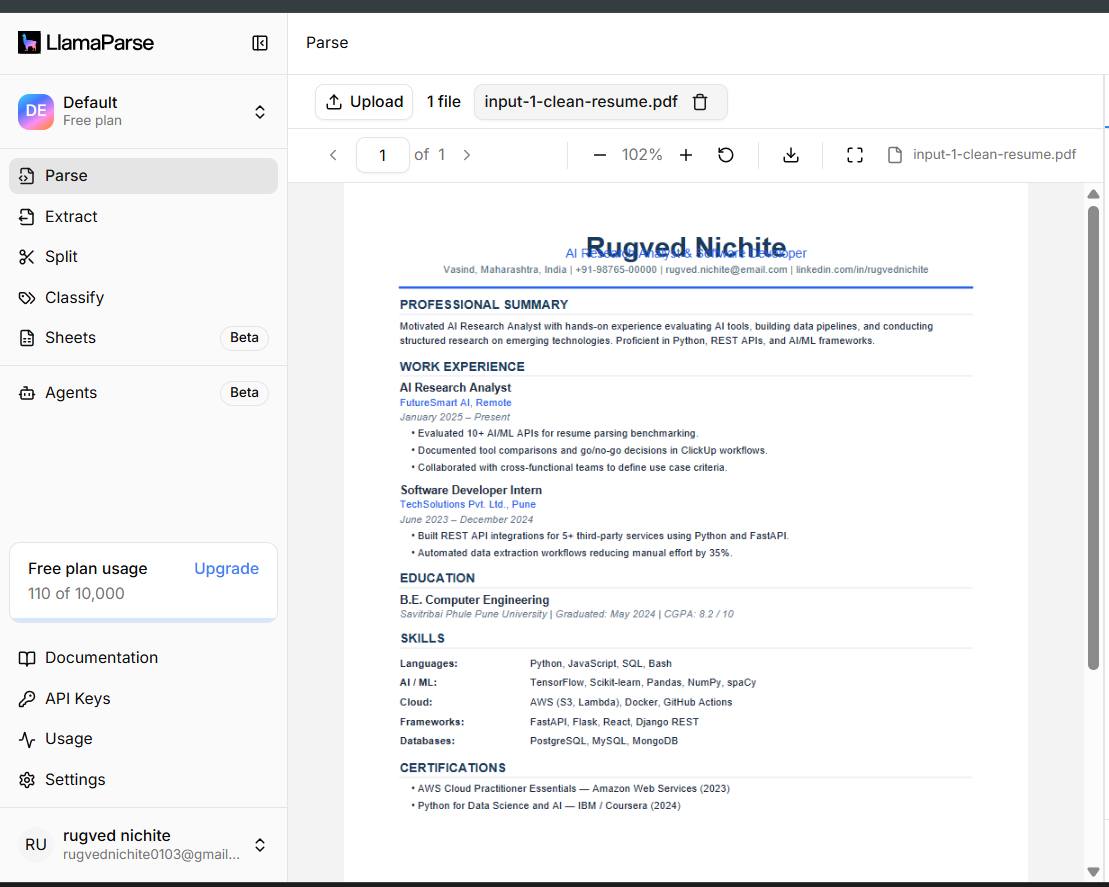
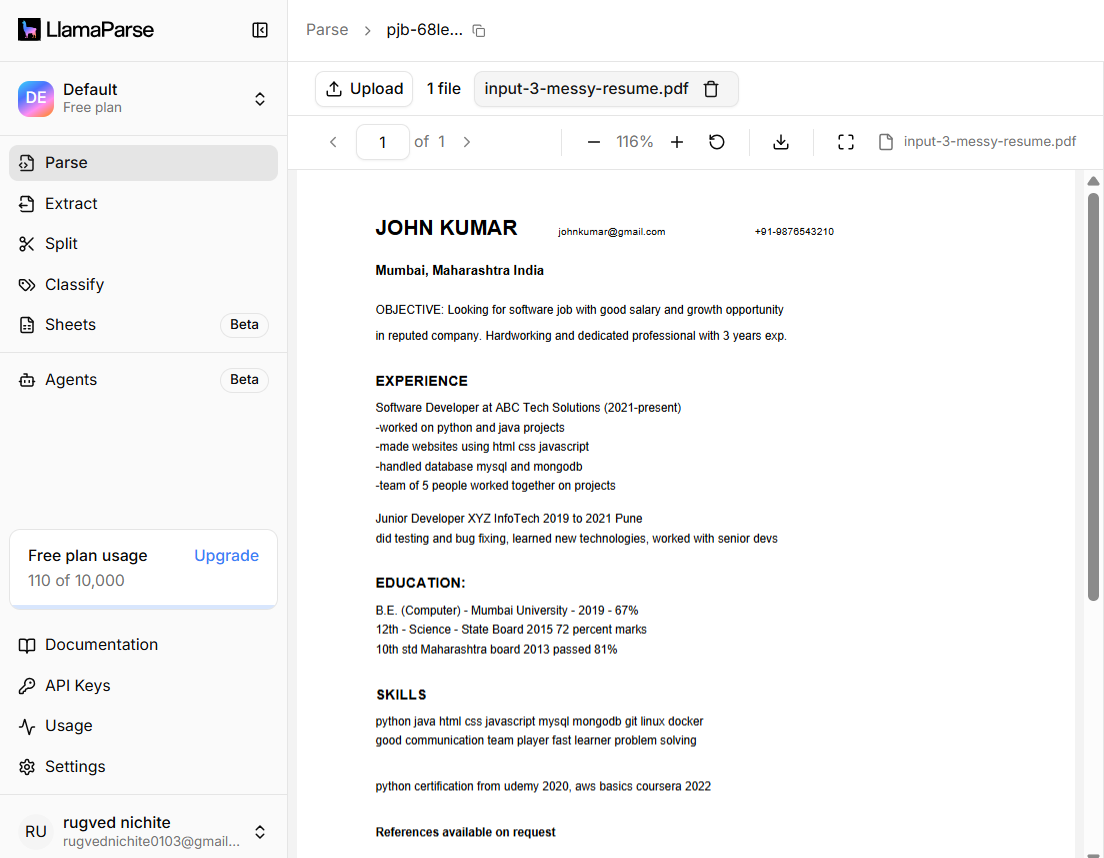
Observed output: Output artifact (Image): The hosted UI shows the uploaded PDF, page controls, and the Parse/Extract workflow in the cloud app. — image-14.png
Output artifact: Output artifact (Image): The hosted UI shows the uploaded PDF, page controls, and the Parse/Extract workflow in the cloud app. — image-14.png
What changed: Text prompt transformed into Image
Test case: Text prompt → Image
Input type: Text prompt
Input used: Input artifact (Text prompt): Input
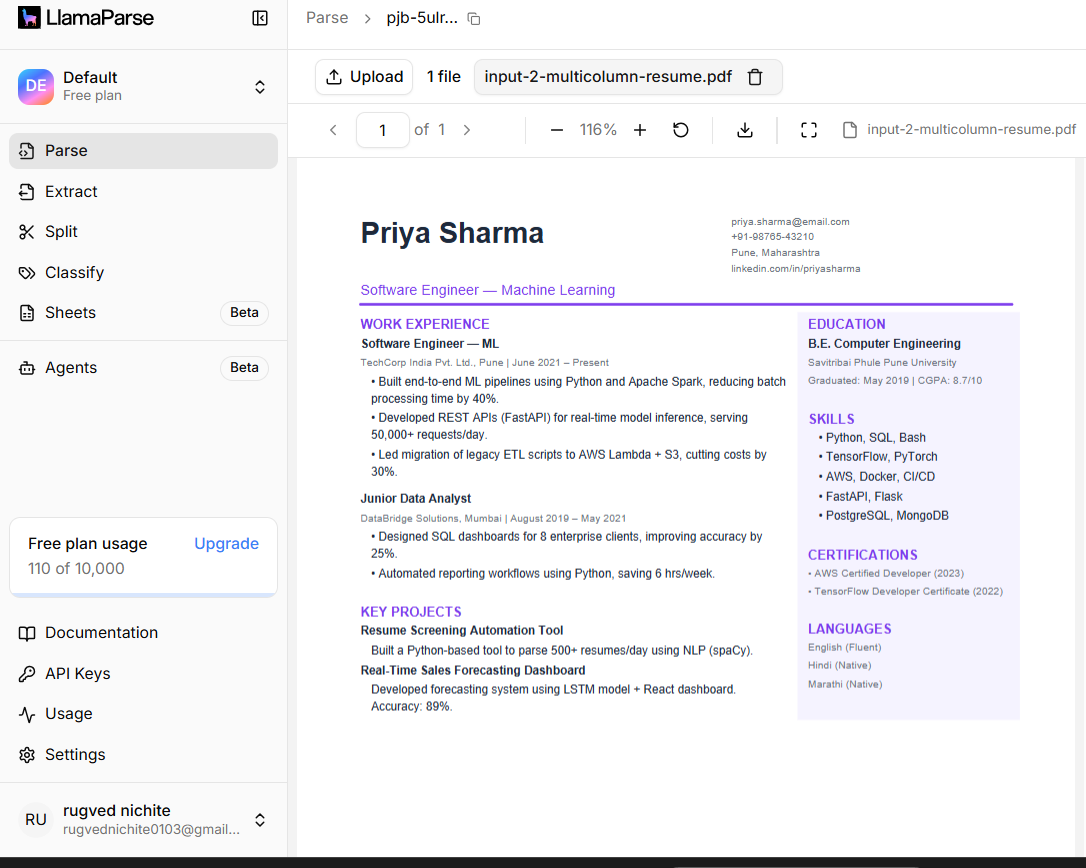
Observed output: Output artifact (Image): The same cloud interface also handled the multi-column resume upload and preview. — image-15.png
What changed: Text prompt transformed into Text prompt
Test case: PDF document → Text/code file
Input type: PDF document
Input used: Input artifact (PDF document): Source bank-statement PDF used to produce downloadable JSON output. — Bank Statement PDF.pdf
Observed output: Output artifact (Text/code file): The bank statement was exported as structured JSON aligned to the supplied schema. — llamaparse-bank-statement-output.json
Input artifact: Input artifact (PDF document): Source bank-statement PDF used to produce downloadable JSON output. — Bank Statement PDF.pdf
Output artifact: Output artifact (Text/code file): The bank statement was exported as structured JSON aligned to the supplied schema. — llamaparse-bank-statement-output.json
What changed: PDF document transformed into Text/code file
Test case: PDF document → Text/code file
Input type: PDF document
Input used: Input artifact (PDF document): Source invoice PDF used to produce downloadable JSON output. — Invoice PDF.pdf
Observed output: Output artifact (Text/code file): The invoice was exported as structured JSON aligned to the supplied schema. — llamaparse-invoice-output.json
Input artifact: Input artifact (PDF document): Source invoice PDF used to produce downloadable JSON output. — Invoice PDF.pdf
Output artifact: Output artifact (Text/code file): The invoice was exported as structured JSON aligned to the supplied schema. — llamaparse-invoice-output.json
What changed: PDF document transformed into Text/code file
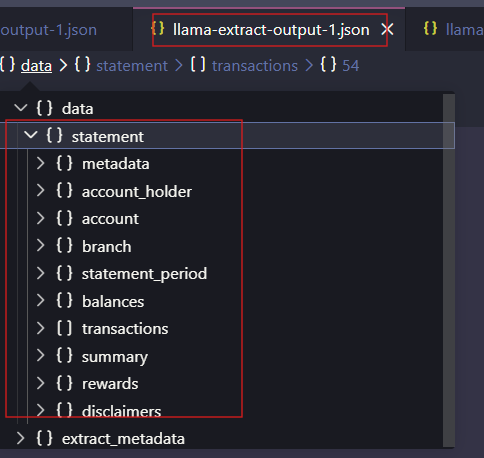
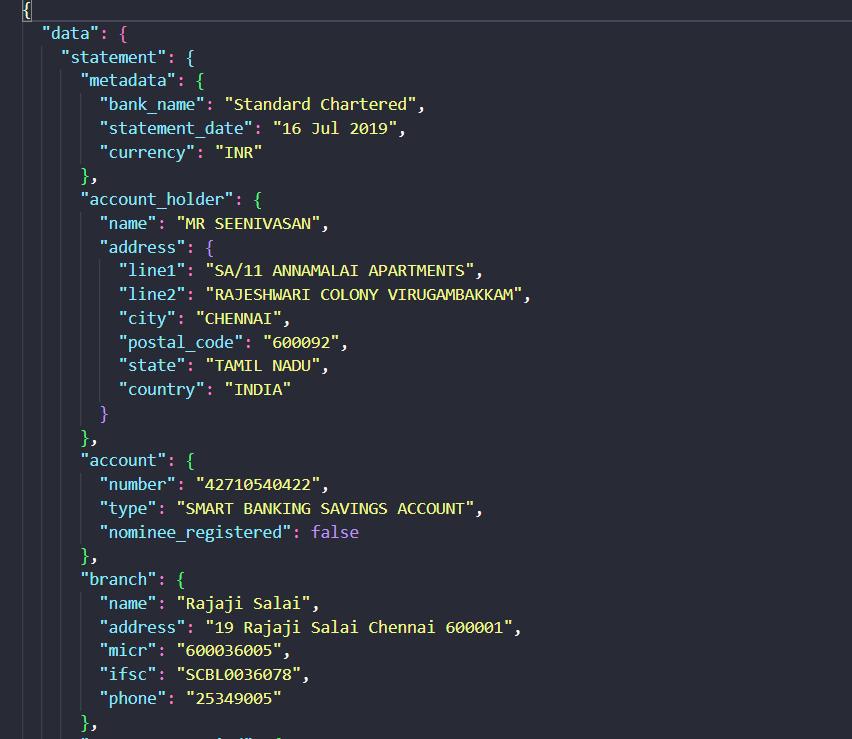
Observed output: Output artifact (Image): The bank-statement output is visible as a structured JSON tree in the UI, with document nodes ordered under data > statement. — llamaparse-bank-statement-doc-order.png
Output artifact: Output artifact (Image): The bank-statement output is visible as a structured JSON tree in the UI, with document nodes ordered under data > statement. — llamaparse-bank-statement-doc-order.png
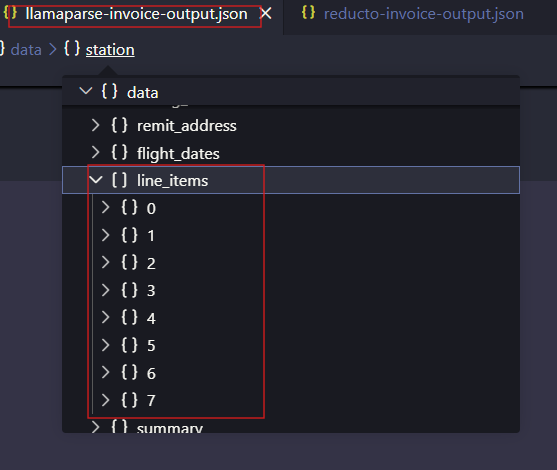
Observed output: Output artifact (Image): The invoice output is visible in the editor/tree UI with the line_items array expanded, showing reviewable structured extraction before download. — llamaparse-invoice-extracted-line-items.png
Output artifact: Output artifact (Image): The invoice output is visible in the editor/tree UI with the line_items array expanded, showing reviewable structured extraction before download. — llamaparse-invoice-extracted-line-items.png
What changed: Text prompt transformed into Image
Why it matters / Conclusion: Good fit for teams that want a hosted parsing workflow and export options; the bigger buyer risk is output consistency, not upload handling.
LlamaParse provides a hosted web workspace for parsing and extraction, with reviewable structured JSON and confidence scores before download. The evidence mentions the Parse, Extract, Split, Classify, Sheets, and Agents UI surfaces plus downloadable outputs.
INPUT
Open the LlamaParse hosted app and upload a resume PDF on the Parse page.
↓→
OUTPUT
The hosted UI shows the uploaded PDF, page controls, and the Parse/Extract workflow in the cloud app.
INPUT
Open the LlamaParse hosted app and upload another resume PDF.
↓→
OUTPUT
The same cloud interface also handled the multi-column resume upload and preview.
INPUT
Check the export options reported by the research for a parsed resume.
↓→
OUTPUT
JSON, Markdown, and Excel export are reported as available.
INPUT
Bank Statement PDF.pdf
Source bank-statement PDF used to produce downloadable JSON output.
↓→
OUTPUT
llamaparse-bank-statement-output.json
Loading file...
The bank statement was exported as structured JSON aligned to the supplied schema.
INPUT
Invoice PDF.pdf
Source invoice PDF used to produce downloadable JSON output.
↓→
OUTPUT
llamaparse-invoice-output.json
Loading file...
The invoice was exported as structured JSON aligned to the supplied schema.
text
Inspect the extracted structured data in the web UI before export.
↓→
image
The bank-statement output is visible as a structured JSON tree in the UI, with document nodes ordered under data > statement.
text
Inspect the extracted structured data in the web UI before export.
↓→
image
The invoice output is visible in the editor/tree UI with the line_items array expanded, showing reviewable structured extraction before download.
Bottom Line
Good fit for teams that want a hosted parsing workflow and export options; the bigger buyer risk is output consistency, not upload handling.
From our researchParse resumes into structured data using an APIExtract and query structured data from documents using natural language
API Access and Automated Parsing
The product is set up as a hosted service with API key management and a cloud results workflow.
▾
Test Summary
Feature tested: API Access and Automated Parsing
Result: Passed — The product is set up as a hosted service with API key management and a cloud results workflow.
Feature tested: API Access and Automated Parsing
Result: Passed
Verdict: The product is set up as a hosted service with API key management and a cloud results workflow.
Expected behavior: LlamaParse exposes project API keys and supports automated parsing through API calls, backed by a cloud results dashboard. The evidence points to API-driven workflows rather than only the web UI.
Test case: Text prompt → Image
Input type: Text prompt
Input used: Input artifact (Text prompt): INPUT
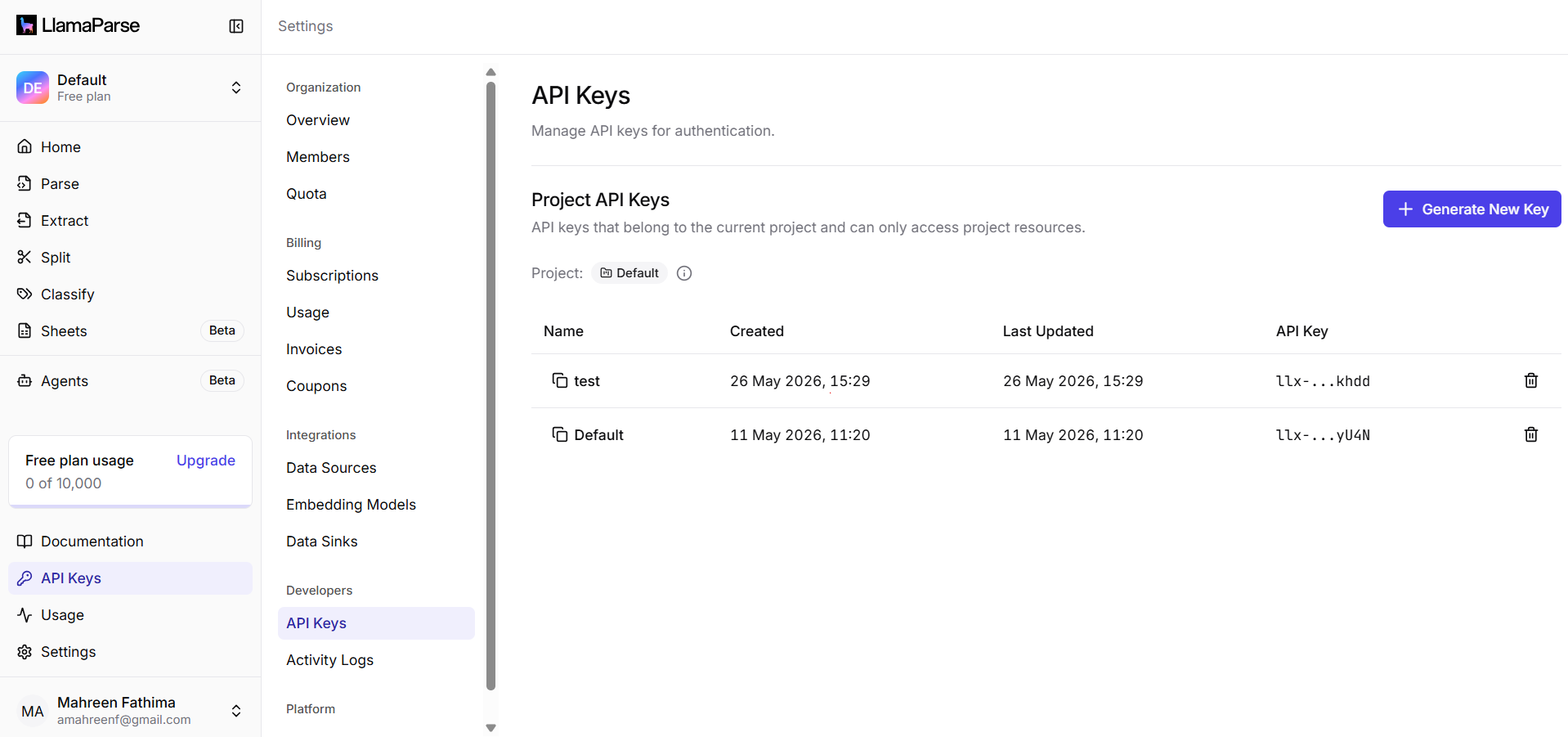
Observed output: Output artifact (Image): The settings page shows Project API Keys, existing keys, and a Generate New Key control for the hosted service. — llamaparse_apikey.png
Output artifact: Output artifact (Image): The settings page shows Project API Keys, existing keys, and a Generate New Key control for the hosted service. — llamaparse_apikey.png
What changed: Text prompt transformed into Image
Test case: Text prompt → Image
Input type: Text prompt
Input used: Input artifact (Text prompt): INPUT
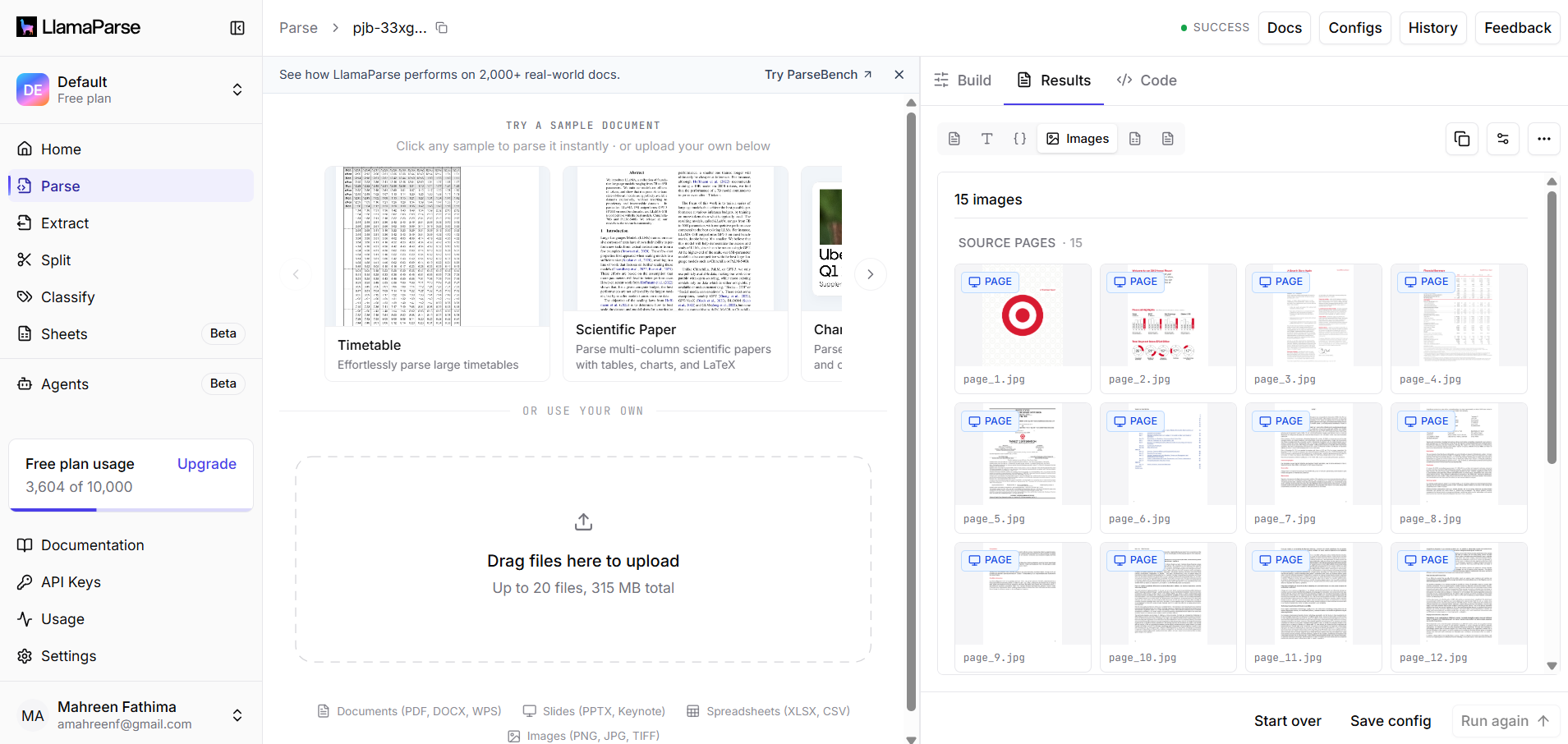
Observed output: Output artifact (Image): The web app shows Docs, Configs, History, Parse/Extract/Split/Classify navigation plus source-page thumbnails and result controls, confirming a hosted workflow. — llamaparse_downloadable_visual_assets.png
Output artifact: Output artifact (Image): The web app shows Docs, Configs, History, Parse/Extract/Split/Classify navigation plus source-page thumbnails and result controls, confirming a hosted workflow. — llamaparse_downloadable_visual_assets.png
What changed: Text prompt transformed into Image
Why it matters / Conclusion: Well suited to API-backed pipelines, with visible credential management and a cloud results interface.
LlamaParse exposes project API keys and supports automated parsing through API calls, backed by a cloud results dashboard. The evidence points to API-driven workflows rather than only the web UI.
INPUT
Hosted parse workflow with API keys and downloadable results
↓→
OUTPUT
The settings page shows Project API Keys, existing keys, and a Generate New Key control for the hosted service.
INPUT
Post-run cloud results interface for parsed documents
↓→
OUTPUT
The web app shows Docs, Configs, History, Parse/Extract/Split/Classify navigation plus source-page thumbnails and result controls, confirming a hosted workflow.
Bottom Line
Well suited to API-backed pipelines, with visible credential management and a cloud results interface.
From our researchConvert a Complex PDF into Clean Markdown with an API
Table Extraction and Row Reconstruction
▾
Test Summary
Feature tested: Table Extraction and Row Reconstruction
Result: Partial
Feature tested: Table Extraction and Row Reconstruction
Result: Partial
Expected behavior: LlamaParse reconstructs tables and row records from PDFs into markdown-style tables or separate records. The examples include bank-statement transactions, invoice line items, financial tables, multi-level segment tables, and nested stand-data tables.
Test case: PDF document → Image
Input type: PDF document
Input used: Input artifact (PDF document): Input PDF — Bank Statement PDF.pdf
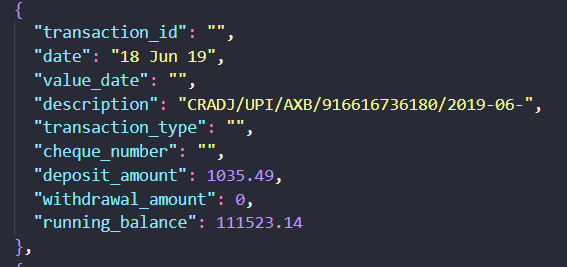
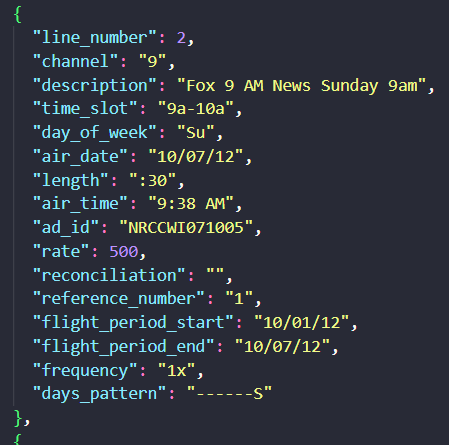
Observed output: Output artifact (Image): A single bank-statement transaction was extracted as a structured row with date, description, deposit amount, withdrawal amount, and running balance. — llamaparse-bank-statement-transaction-item.png
Input artifact: Input artifact (PDF document): Input PDF — Bank Statement PDF.pdf
Output artifact: Output artifact (Image): A single bank-statement transaction was extracted as a structured row with date, description, deposit amount, withdrawal amount, and running balance. — llamaparse-bank-statement-transaction-item.png
What changed: PDF document transformed into Image
Test case: PDF document → Image
Input type: PDF document
Input used: Input artifact (PDF document): Input PDF — Bank Statement PDF.pdf
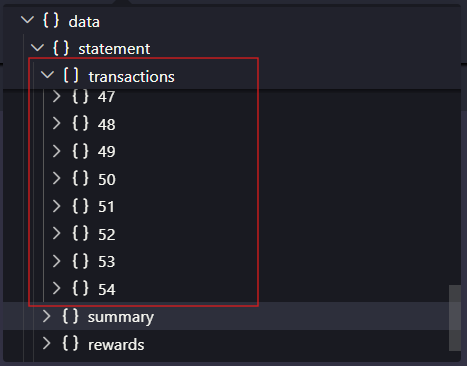
Observed output: Output artifact (Image): The transactions tree reached item 54, which matches the report’s note that the extracted array was longer than the source statement’s 51 records. — llamaparse-bank-statement-transaction-count.png
Input artifact: Input artifact (PDF document): Input PDF — Bank Statement PDF.pdf
Output artifact: Output artifact (Image): The transactions tree reached item 54, which matches the report’s note that the extracted array was longer than the source statement’s 51 records. — llamaparse-bank-statement-transaction-count.png
Observed output: Output artifact (Image): An invoice line item was extracted with line_number, channel, description, time slot, air date, rate, air time, and flight-period fields. — llamaparse-invoice-extracted-line-item-2.png
Output artifact: Output artifact (Image): An invoice line item was extracted with line_number, channel, description, time slot, air date, rate, air time, and flight-period fields. — llamaparse-invoice-extracted-line-item-2.png
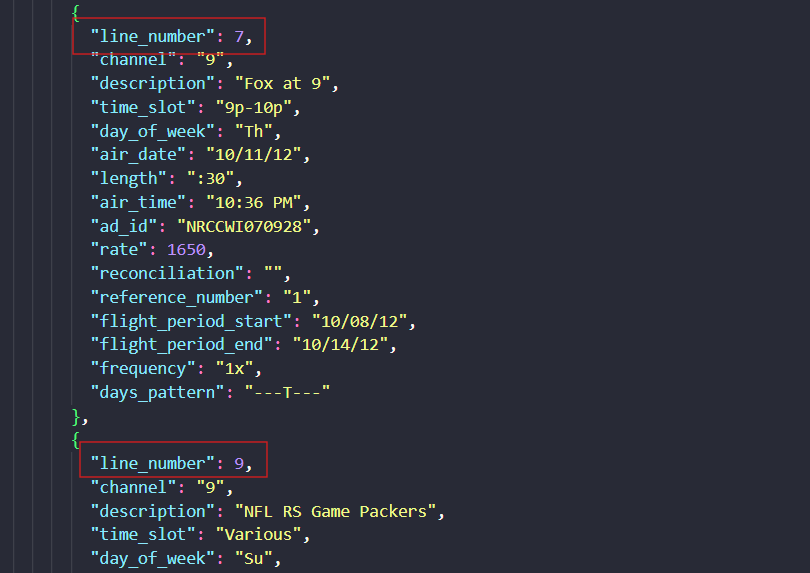
Observed output: Output artifact (Image): The final visible invoice row begins with line_number 9 even though the source invoice contained eight advertising records, showing a numbering mismatch. — llamaparse-invoice-extracted-line-item-8.png
Output artifact: Output artifact (Image): The final visible invoice row begins with line_number 9 even though the source invoice contained eight advertising records, showing a numbering mismatch. — llamaparse-invoice-extracted-line-item-8.png
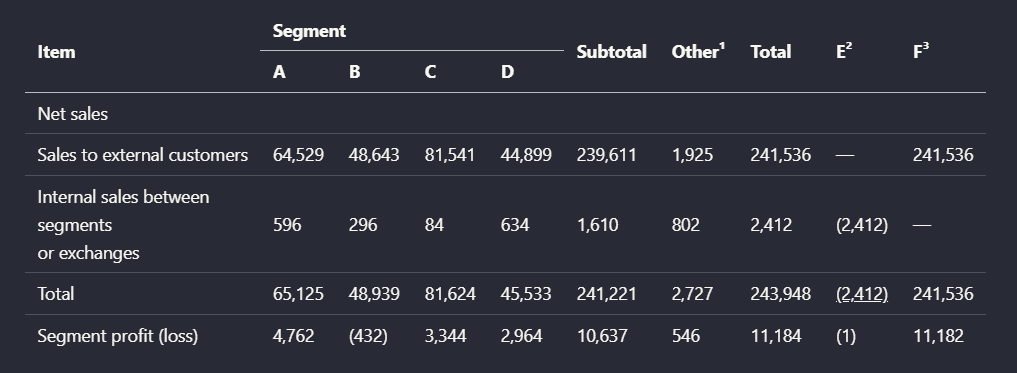
Observed output: Output artifact (Image): Preserved the segment sales table values, but the grouped column semantics became less explicit in the rebuilt version. — llamaparse_financialInput_parsed_table.png
Output artifact: Output artifact (Image): Preserved the segment sales table values, but the grouped column semantics became less explicit in the rebuilt version. — llamaparse_financialInput_parsed_table.png
What changed: Image transformed into Image
Why it matters / Conclusion: The tool is good at separating rows, but it is not fully reliable on record boundaries or row counts: the bank statement array was over-segmented and the invoice produced an extra line-item index.
LlamaParse reconstructs tables and row records from PDFs into markdown-style tables or separate records. The examples include bank-statement transactions, invoice line items, financial tables, multi-level segment tables, and nested stand-data tables.
file
Bank Statement PDF.pdf
↓→
image
A single bank-statement transaction was extracted as a structured row with date, description, deposit amount, withdrawal amount, and running balance.
file
Bank Statement PDF.pdf
↓→
image
The transactions tree reached item 54, which matches the report’s note that the extracted array was longer than the source statement’s 51 records.
file
Invoice PDF.pdf
↓→
image
An invoice line item was extracted with line_number, channel, description, time slot, air date, rate, air time, and flight-period fields.
file
Invoice PDF.pdf
↓→
image
The final visible invoice row begins with line_number 9 even though the source invoice contained eight advertising records, showing a numbering mismatch.
INPUT
↓→
OUTPUT
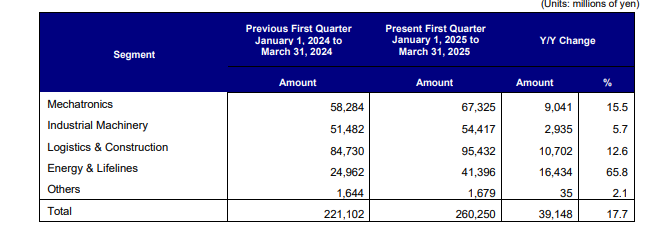
Preserved the financial summary table's rows, columns, and yearly values in a readable table.
INPUT
↓→
OUTPUT
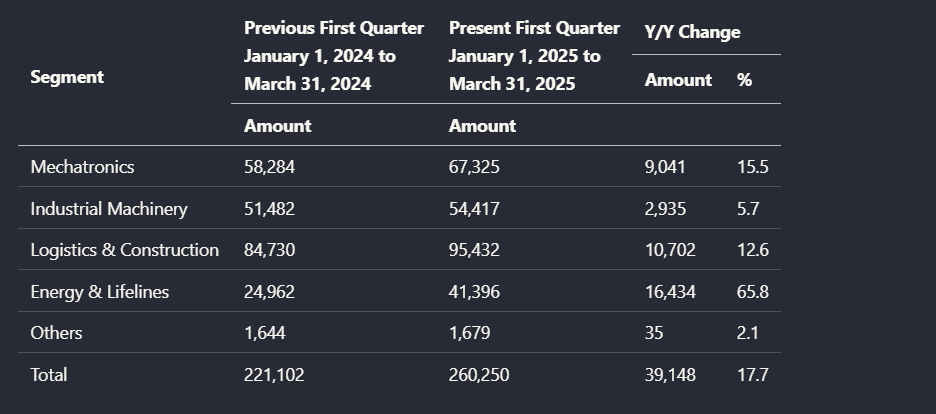
Preserved the grouped segment-results table and its year-over-year columns.
INPUT
↓→
OUTPUT
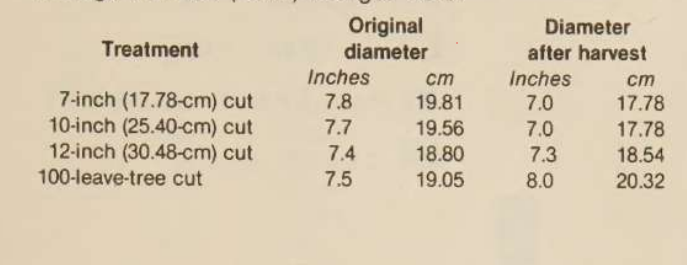
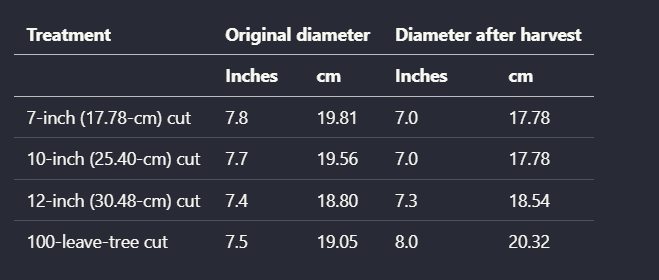
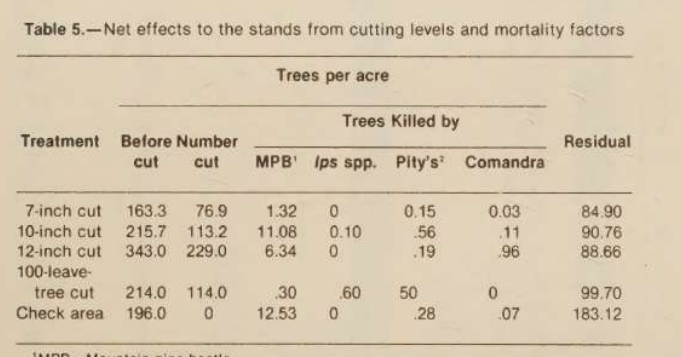
Cleaned up the scanned harvest-diameter table while keeping treatment rows and before/after values aligned.
INPUT
↓→
OUTPUT
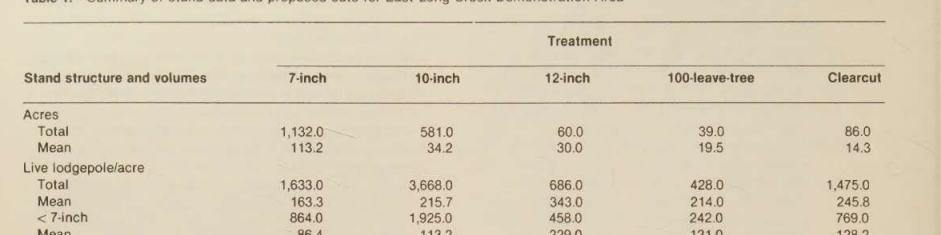
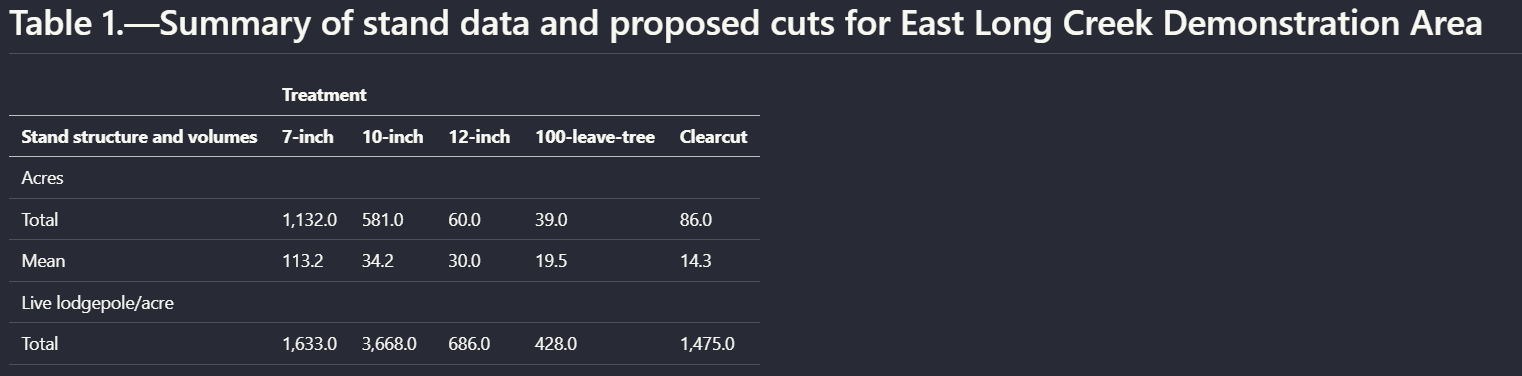
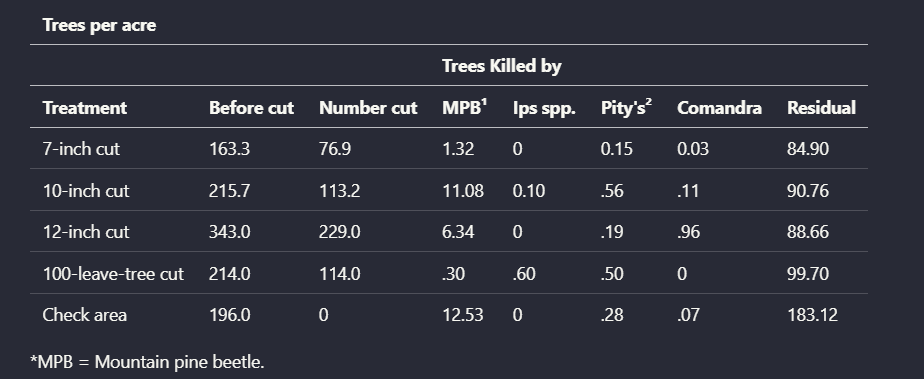
Reconstructed the nested stand-data table with grouped treatment columns for 7-inch through clearcut cuts.
INPUT
↓→
OUTPUT
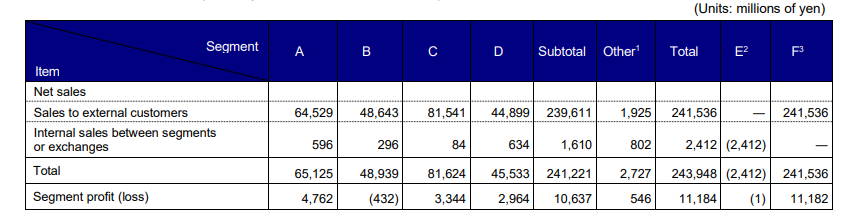
Preserved the segment sales table values, but the grouped column semantics became less explicit in the rebuilt version.
Bottom Line
The tool is good at separating rows, but it is not fully reliable on record boundaries or row counts: the bank statement array was over-segmented and the invoice produced an extra line-item index.
From our researchExtract and query structured data from documents using natural languageConvert a Complex PDF into Clean Markdown with an API
PDF-to-Markdown Conversion
Accepted all three complex PDFs and returned markdown exports without manual cleanup.
▾
Test Summary
Feature tested: PDF-to-Markdown Conversion
Result: Partial — Accepted all three complex PDFs and returned markdown exports without manual cleanup.
Feature tested: PDF-to-Markdown Conversion
Result: Partial
Verdict: Accepted all three complex PDFs and returned markdown exports without manual cleanup.
Expected behavior: LlamaParse converts mixed digital and scanned PDFs into downloadable Markdown while preserving readable order and headings. It was exercised on a hybrid earnings report, a table-heavy financial report, and a scanned research paper.
Observed output: Output artifact (Text/code file): Accepted the 84-page hybrid annual report with native text, tables, charts, and a scanned signature page, and returned a markdown export. — llamaparse_target_earnings_output.md
Output artifact: Output artifact (Text/code file): Accepted the 84-page hybrid annual report with native text, tables, charts, and a scanned signature page, and returned a markdown export. — llamaparse_target_earnings_output.md
What changed: PDF document transformed into Text/code file
Observed output: Output artifact (Text/code file): Accepted the table-heavy Sumitomo financial report and returned a markdown export. — llamaparse_financial_pdf_output.md
Output artifact: Output artifact (Text/code file): Accepted the table-heavy Sumitomo financial report and returned a markdown export. — llamaparse_financial_pdf_output.md
What changed: PDF document transformed into Text/code file
Observed output: Output artifact (Text/code file): Accepted the scanned research paper with multi-column text, tables, and charts and returned a markdown export. — llamaparse_scanned_pdf_output.md
Output artifact: Output artifact (Text/code file): Accepted the scanned research paper with multi-column text, tables, and charts and returned a markdown export. — llamaparse_scanned_pdf_output.md
What changed: PDF document transformed into Text/code file
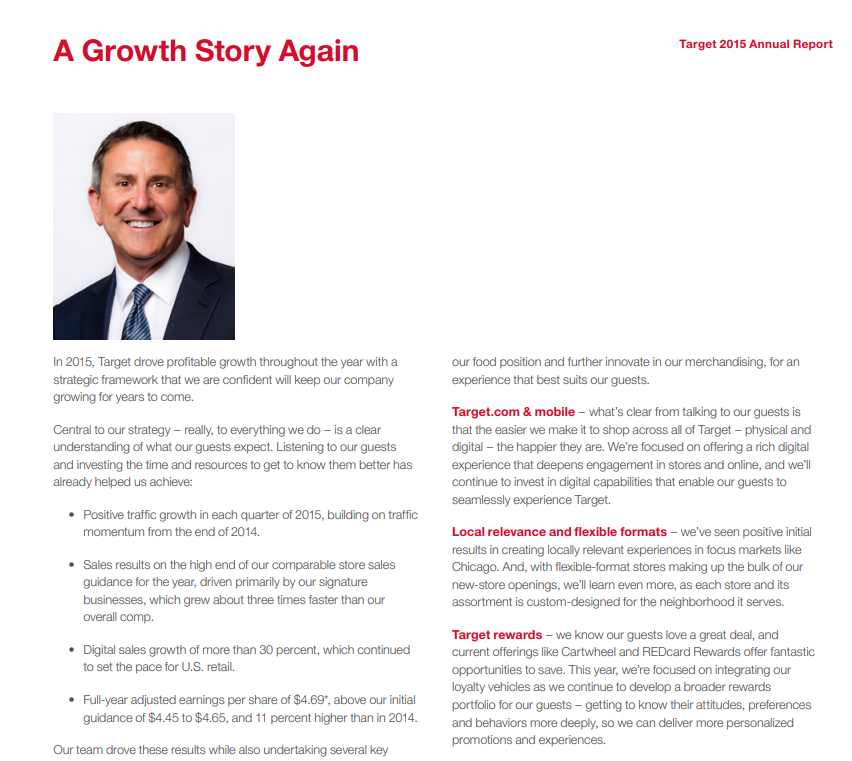
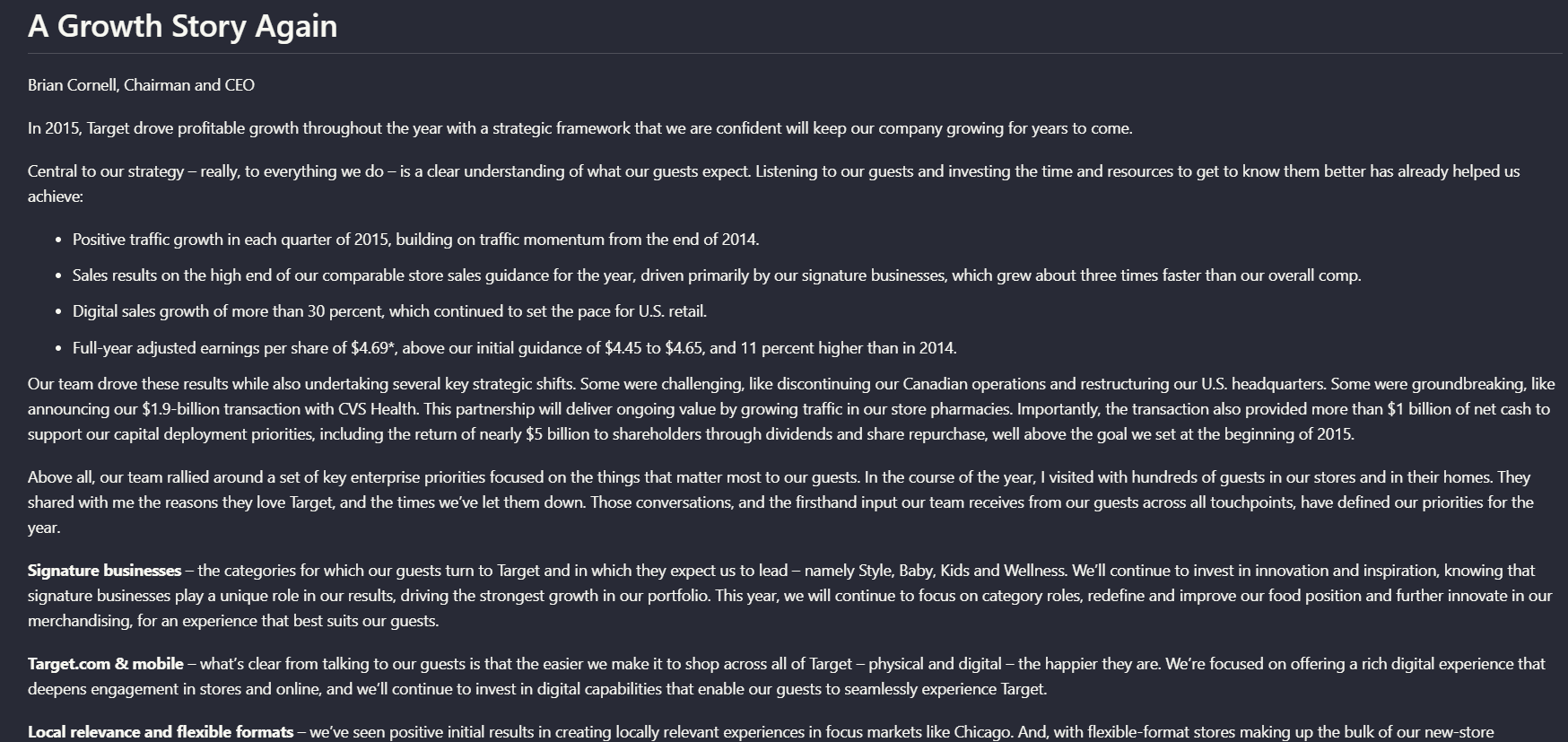
Observed output: Output artifact (Image): Retained the Target annual report page's heading, paragraph, and bullet order as a readable text hierarchy instead of flattening it. — llamaparse_hybridInput_hierarchy.png
Output artifact: Output artifact (Image): Retained the Target annual report page's heading, paragraph, and bullet order as a readable text hierarchy instead of flattening it. — llamaparse_hybridInput_hierarchy.png
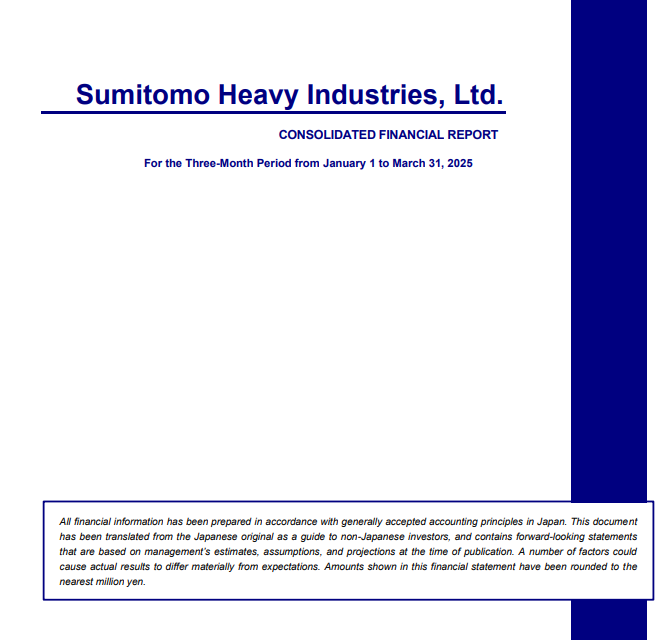
Observed output: Output artifact (Image): Preserved the Sumitomo report's title, disclaimer, and section ordering in a single reading flow. — llamaparse_financialInput_hierarchy.png
Output artifact: Output artifact (Image): Preserved the Sumitomo report's title, disclaimer, and section ordering in a single reading flow. — llamaparse_financialInput_hierarchy.png
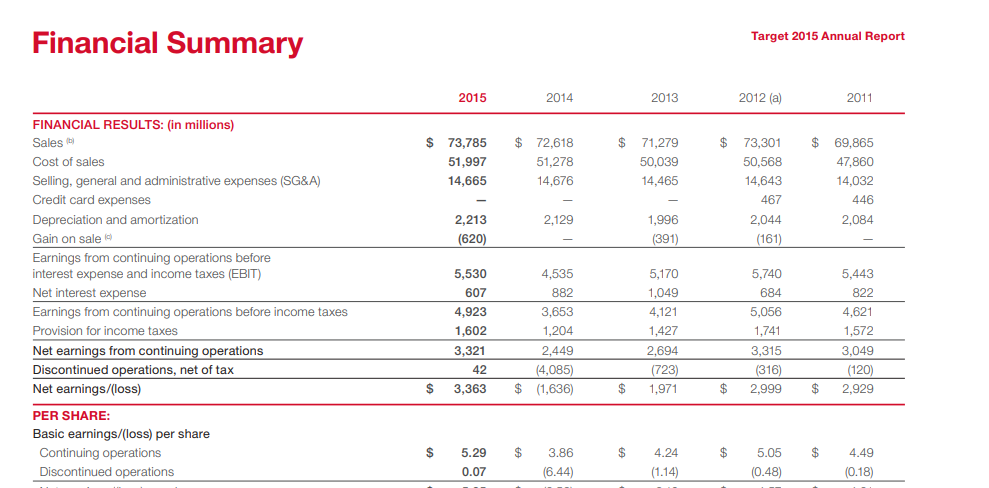
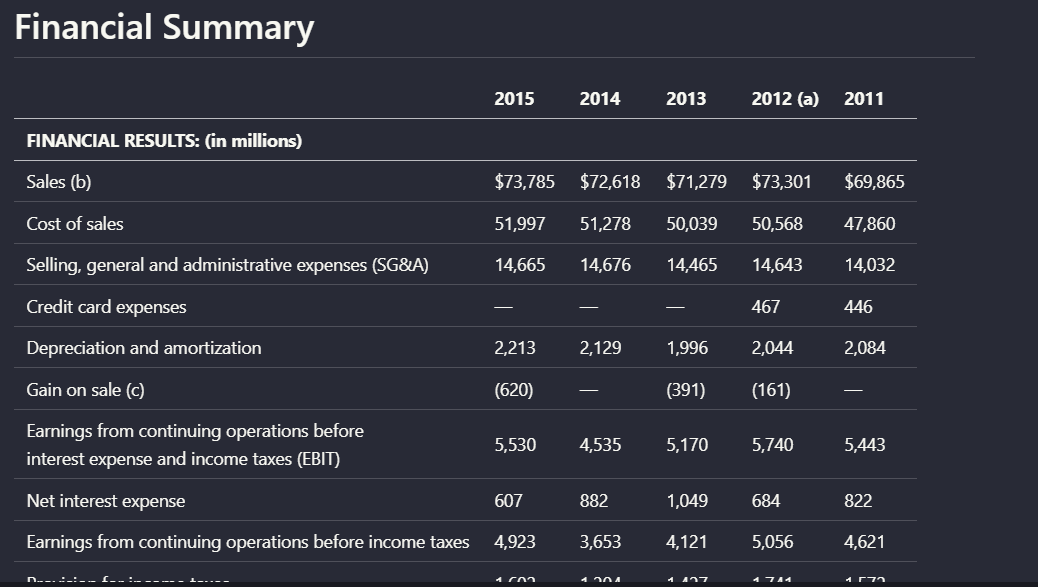
Observed output: Output artifact (Image): LlamaParse preserves the structure of the standard financial table, maintaining row alignment, column organization, and value associations in the generated Markdown. — Llamaparse_hybridInput_table_retention.png
Output artifact: Output artifact (Image): LlamaParse preserves the structure of the standard financial table, maintaining row alignment, column organization, and value associations in the generated Markdown. — Llamaparse_hybridInput_table_retention.png
Observed output: Output artifact (Image): The parser retains the multi-level column organization of this table, preserving the relationships between grouped headers and their associated data. — financialpdf_parsed_multilevel_table.png
Output artifact: Output artifact (Image): The parser retains the multi-level column organization of this table, preserving the relationships between grouped headers and their associated data. — financialpdf_parsed_multilevel_table.png
Observed output: Output artifact (Image): The extracted table preserves the visible values but only partially retains the semantic relationships between grouped headers and their associated columns, so parent-child column roles are less explicit. — llamaparse_financialInput_parsed_table.png
Output artifact: Output artifact (Image): The extracted table preserves the visible values but only partially retains the semantic relationships between grouped headers and their associated columns, so parent-child column roles are less explicit. — llamaparse_financialInput_parsed_table.png
Observed output: Output artifact (Image): The grouped header structure is not faithfully reconstructed; the table contents remain largely recoverable, but the original organization is only partially preserved. — llamaparse_scannedInput_multilevel_table_parsed_output.png
Output artifact: Output artifact (Image): The grouped header structure is not faithfully reconstructed; the table contents remain largely recoverable, but the original organization is only partially preserved. — llamaparse_scannedInput_multilevel_table_parsed_output.png
What changed: Image transformed into Image
Why it matters / Conclusion: Strong at ingesting mixed PDF types end-to-end; the tool consistently produced a usable markdown result.
LlamaParse converts mixed digital and scanned PDFs into downloadable Markdown while preserving readable order and headings. It was exercised on a hybrid earnings report, a table-heavy financial report, and a scanned research paper.
INPUT
Hybrid-Earnings-PDF.pdf
↓→
OUTPUT
llamaparse_target_earnings_output.md
Loading file...
Accepted the 84-page hybrid annual report with native text, tables, charts, and a scanned signature page, and returned a markdown export.
INPUT
Sumitomo Financial PDF.pdf
↓→
OUTPUT
llamaparse_financial_pdf_output.md
Loading file...
Accepted the table-heavy Sumitomo financial report and returned a markdown export.
INPUT
Scanned Research PDF.pdf
↓→
OUTPUT
llamaparse_scanned_pdf_output.md
Loading file...
Accepted the scanned research paper with multi-column text, tables, and charts and returned a markdown export.
INPUT
↓→
OUTPUT
Retained the Target annual report page's heading, paragraph, and bullet order as a readable text hierarchy instead of flattening it.
INPUT
↓→
OUTPUT
Preserved the Sumitomo report's title, disclaimer, and section ordering in a single reading flow.
INPUT
↓→
OUTPUT
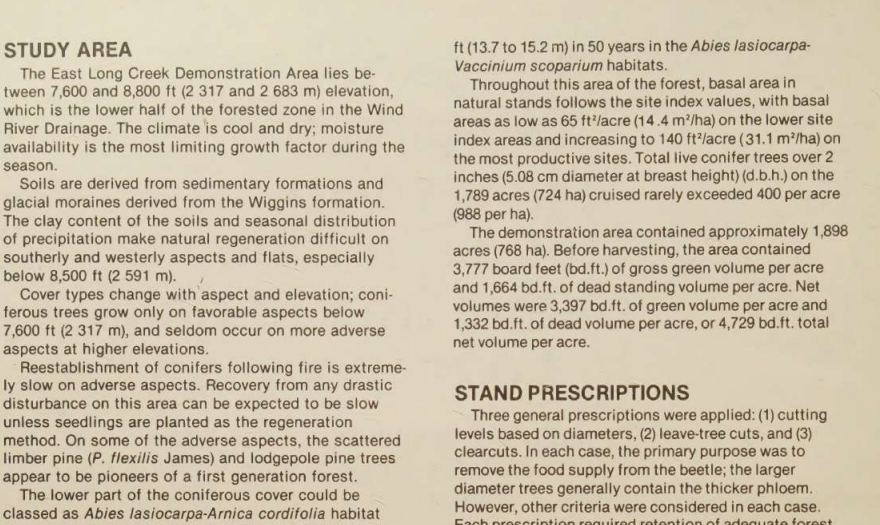
Turned a scanned two-column page into coherent single-column prose with the section flow intact.
INPUT
↓→
OUTPUT
LlamaParse preserves the structure of the standard financial table, maintaining row alignment, column organization, and value associations in the generated Markdown.
INPUT
↓→
OUTPUT
The parser retains the multi-level column organization of this table, preserving the relationships between grouped headers and their associated data.
INPUT
↓→
OUTPUT
The extracted table preserves the visible values but only partially retains the semantic relationships between grouped headers and their associated columns, so parent-child column roles are less explicit.
INPUT
↓→
OUTPUT
The grouped header structure is not faithfully reconstructed; the table contents remain largely recoverable, but the original organization is only partially preserved.
Bottom Line
Strong at ingesting mixed PDF types end-to-end; the tool consistently produced a usable markdown result.
From our researchConvert a Complex PDF into Clean Markdown with an API
OCR, Reading Order, and Visual Element Transcription
Recovers text from scans and transcribes charts/signatures, but does not keep visuals as visuals.
▾
Test Summary
Feature tested: OCR, Reading Order, and Visual Element Transcription
Result: Partial — Recovers text from scans and transcribes charts/signatures, but does not keep visuals as visuals.
Feature tested: OCR, Reading Order, and Visual Element Transcription
Result: Partial
Verdict: Recovers text from scans and transcribes charts/signatures, but does not keep visuals as visuals.
Expected behavior: LlamaParse transcribes scanned prose and visual page elements into readable text or structured representations. The evidence covers scanned research-paper pages, multi-column reading-order recovery, charts, blurry signatures, stamps, and logos.
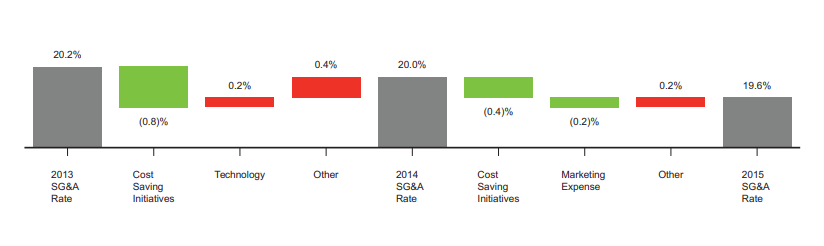
Observed output: Output artifact (Image): The chart was translated into a text table listing the SG&A rate values and contributing changes in sequence. — llamaparse_hybrid_earningspdf_parsed_waterfall_chart.png
Output artifact: Output artifact (Image): The chart was translated into a text table listing the SG&A rate values and contributing changes in sequence. — llamaparse_hybrid_earningspdf_parsed_waterfall_chart.png
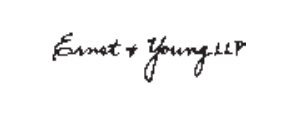
Observed output: Output artifact (Image): The blurry Ernst & Young signature mark remained recognizable in the parsed output as a detected signature line and page number. — llamaparse_hybrid_earningspdf_parsed_blurry_stamp.png
Output artifact: Output artifact (Image): The blurry Ernst & Young signature mark remained recognizable in the parsed output as a detected signature line and page number. — llamaparse_hybrid_earningspdf_parsed_blurry_stamp.png
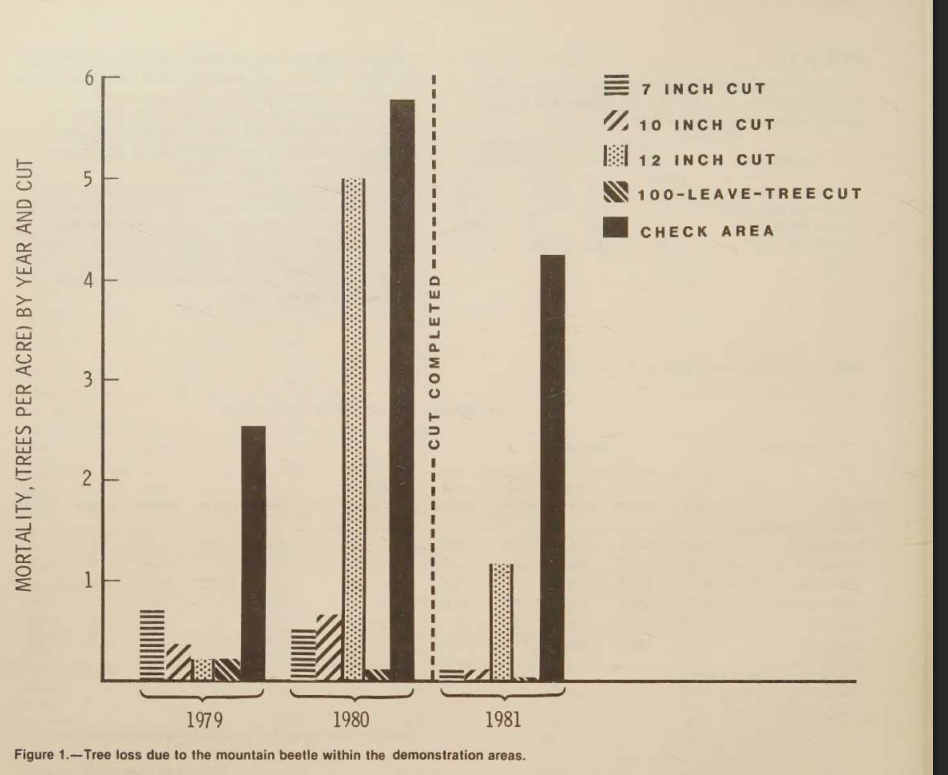
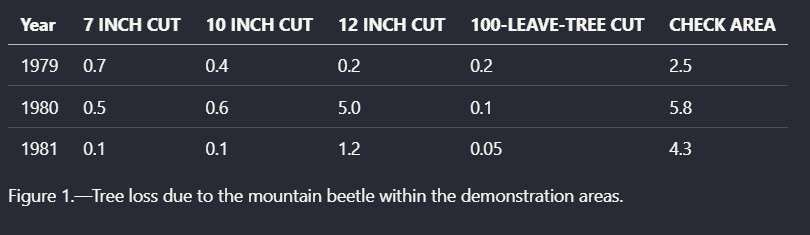
Observed output: Output artifact (Image): The chart was converted into a structured table while maintaining the mapping between legend entries and their associated values. — llamaparse_scannedInput_parsed_chart.png
Output artifact: Output artifact (Image): The chart was converted into a structured table while maintaining the mapping between legend entries and their associated values. — llamaparse_scannedInput_parsed_chart.png
What changed: Image transformed into Image
Test case: Text prompt → Image
Input type: Text prompt
Input used: Input artifact (Text prompt): Input
Observed output: Output artifact (Image): The parser successfully reconstructs the scanned multi-column layout into a coherent reading flow, preserving the relationship between section headings and the paragraphs that follow. — llamaparse_scannedInput_hierarchy.png
Output artifact: Output artifact (Image): The parser successfully reconstructs the scanned multi-column layout into a coherent reading flow, preserving the relationship between section headings and the paragraphs that follow. — llamaparse_scannedInput_hierarchy.png
What changed: Text prompt transformed into Image
Test case: Text prompt → Image
Input type: Text prompt
Input used: Input artifact (Text prompt): Input
Observed output: Output artifact (Image): The parser retains the organizational structure of the multi-column earnings report, preserving section hierarchy and content flow rather than flattening the document into disconnected text blocks. — llamaparse_hybridInput_hierarchy.png
Output artifact: Output artifact (Image): The parser retains the organizational structure of the multi-column earnings report, preserving section hierarchy and content flow rather than flattening the document into disconnected text blocks. — llamaparse_hybridInput_hierarchy.png
What changed: Text prompt transformed into Text prompt
Why it matters / Conclusion: OCR and transcription coverage is good, but the output is text-centric rather than image-preserving.
LlamaParse transcribes scanned prose and visual page elements into readable text or structured representations. The evidence covers scanned research-paper pages, multi-column reading-order recovery, charts, blurry signatures, stamps, and logos.
INPUT
↓→
OUTPUT
The chart was translated into a text table listing the SG&A rate values and contributing changes in sequence.
INPUT
↓→
OUTPUT
The blurry Ernst & Young signature mark remained recognizable in the parsed output as a detected signature line and page number.
INPUT
↓→
OUTPUT
The chart was converted into a structured table while maintaining the mapping between legend entries and their associated values.
INPUT
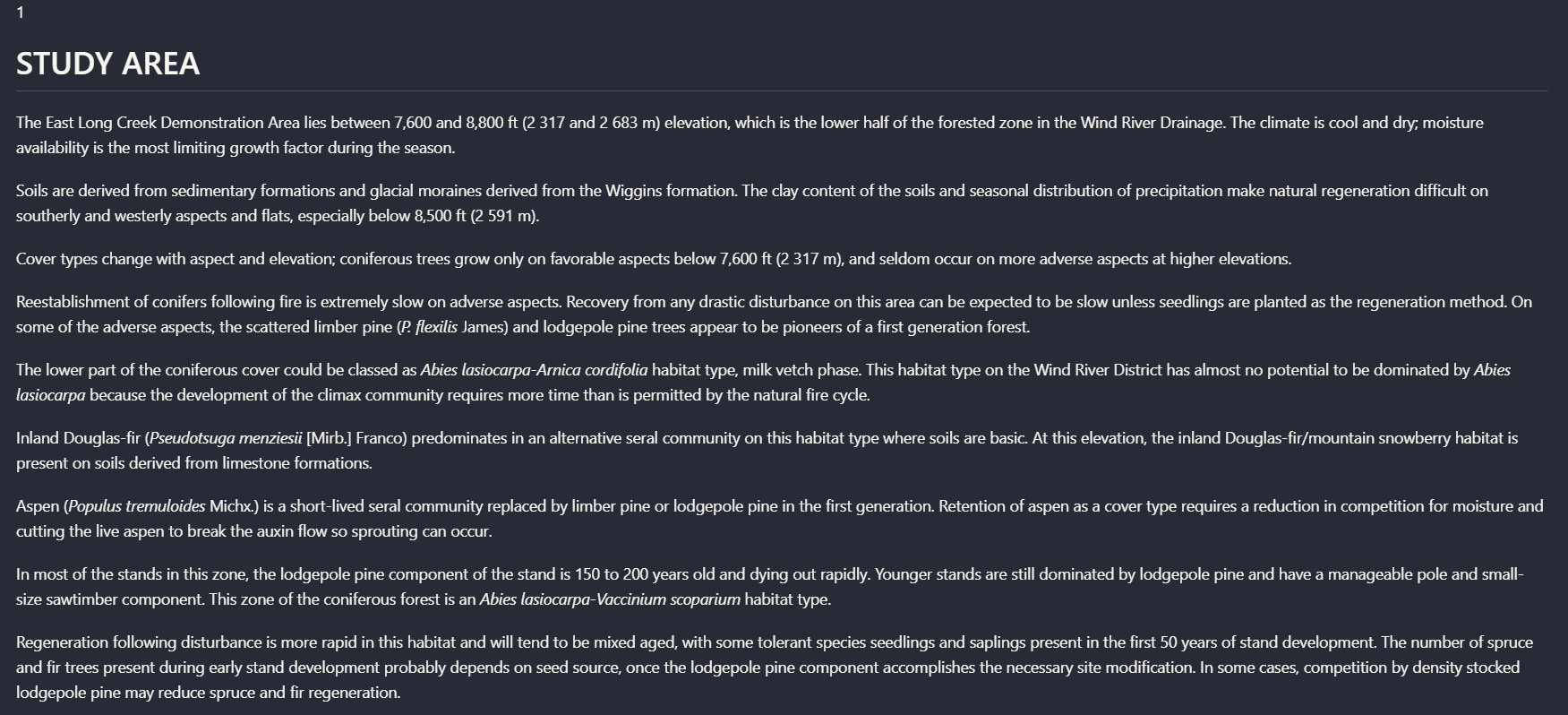
INPUT: A scanned research paper page headed "STUDY AREA" with dense two-column prose and a following section heading "STAND PRESCRIPTIONS."
↓→
OUTPUT
The parser successfully reconstructs the scanned multi-column layout into a coherent reading flow, preserving the relationship between section headings and the paragraphs that follow.
INPUT
INPUT: Hybrid Target annual report page 3 with the heading "A Growth Story Again," two-column narrative text, and bullet points.
↓→
OUTPUT
The parser retains the organizational structure of the multi-column earnings report, preserving section hierarchy and content flow rather than flattening the document into disconnected text blocks.
INPUT
INPUT: Target logo placeholder and Brian Cornell signature block from the annual report.
↓→
OUTPUT
Rather than omitting non-text assets, the extracted content describes logos and signatures within the output text.
Bottom Line
OCR and transcription coverage is good, but the output is text-centric rather than image-preserving.
From our researchConvert a Complex PDF into Clean Markdown with an API
Schema-driven resume extraction
Strong
▾
Test Summary
Feature tested: Schema-driven resume extraction
Result: Partial — Strong
Feature tested: Schema-driven resume extraction
Result: Partial
Verdict: Strong
Expected behavior: LlamaParse can ingest uploaded resume PDFs and return structured JSON from a defined extraction schema, as exercised on clean single-column, two-column, and dense messy resumes. It also captured a broad set of resume sections and normalized them into exportable structured output, though the exact key structure varied across documents.
Test case: Image → Text prompt
Input type: Image
Input used: Input artifact (Image): Clean single-column resume PDF for Rugved Nichite uploaded in the Parse view with a custom extraction schema. — image-14.png
Observed output: Output artifact (Text prompt): Parsed result
Input artifact: Input artifact (Image): Clean single-column resume PDF for Rugved Nichite uploaded in the Parse view with a custom extraction schema. — image-14.png
Output artifact: Output artifact (Text prompt): Parsed result
What changed: Image transformed into Text prompt
Test case: Image → Image
Input type: Image
Input used: Input artifact (Image): Multi-column resume PDF for Priya Sharma. — image-15.png
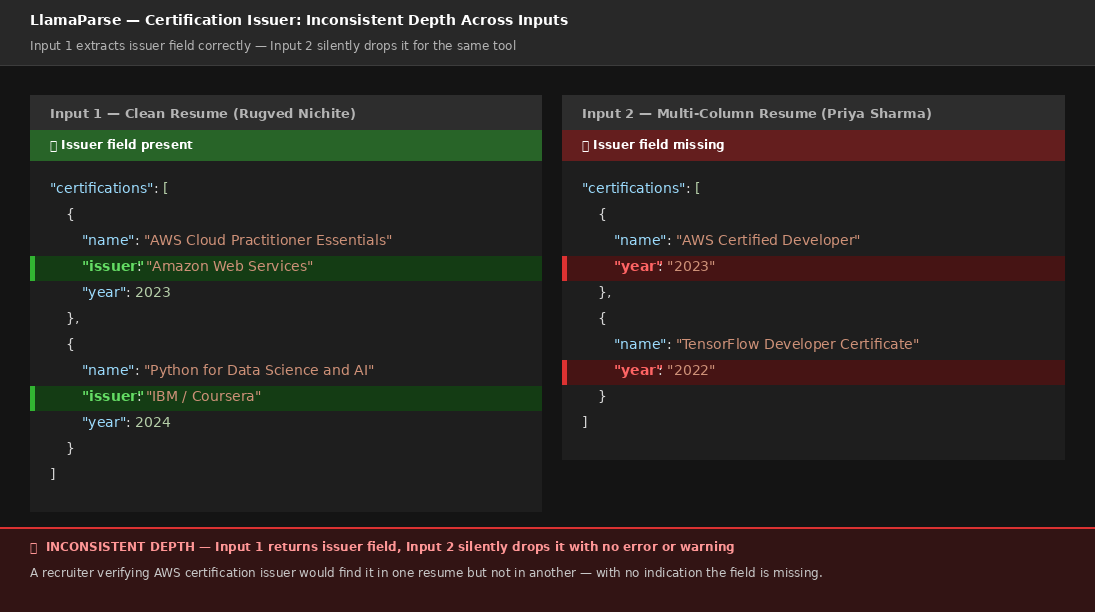
Observed output: Output artifact (Image): Certification issuer data was present on the clean resume but missing here, showing inconsistent field depth across parses. — certifecation Section missing.png
Input artifact: Input artifact (Image): Multi-column resume PDF for Priya Sharma. — image-15.png
Output artifact: Output artifact (Image): Certification issuer data was present on the clean resume but missing here, showing inconsistent field depth across parses. — certifecation Section missing.png
What changed: Image transformed into Image
Test case: Image → Image
Input type: Image
Input used: Input artifact (Image): Messy resume PDF for John Kumar. — image-7.png
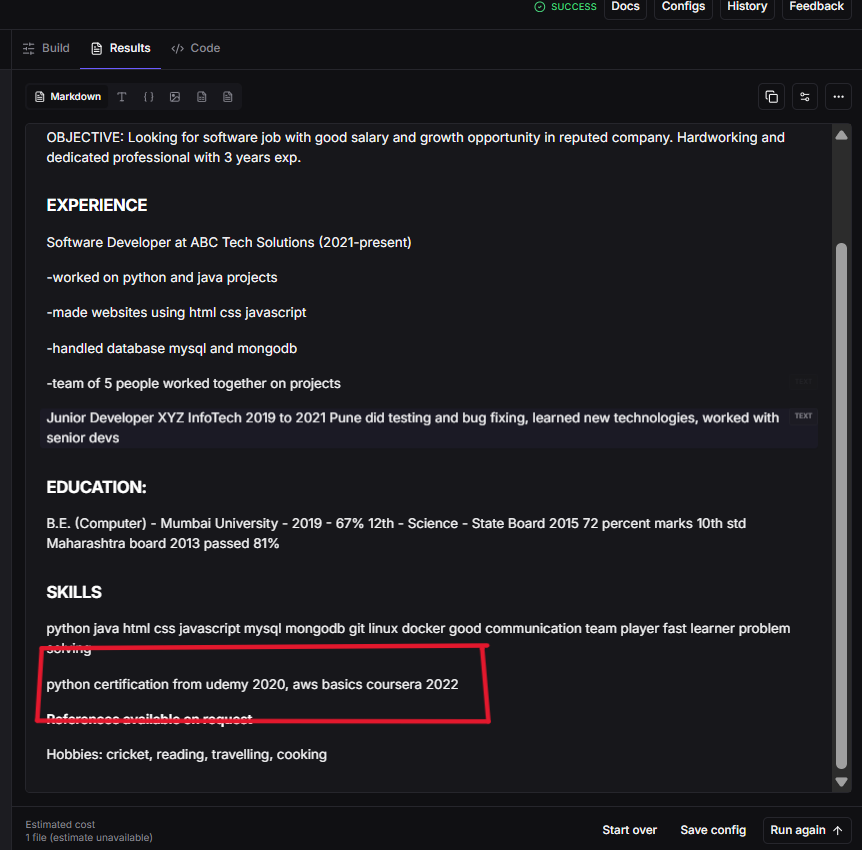
Observed output: Output artifact (Image): The languages key was omitted entirely, '72 percent marks' was not normalized to 72%, and skills were kept in lowercase. — LlamaParse extracted the certification issuer.png
Input artifact: Input artifact (Image): Messy resume PDF for John Kumar. — image-7.png
Output artifact: Output artifact (Image): The languages key was omitted entirely, '72 percent marks' was not normalized to 72%, and skills were kept in lowercase. — LlamaParse extracted the certification issuer.png
What changed: Image transformed into Image
Test case: Image → Text prompt
Input type: Image
Input used: Input artifact (Image): Clean single-column resume PDF for Rugved Nichite. — image-14.png
Why it matters / Conclusion: Excellent at turning resumes into structured JSON, but the output schema is not fully deterministic across documents.
LlamaParse can ingest uploaded resume PDFs and return structured JSON from a defined extraction schema, as exercised on clean single-column, two-column, and dense messy resumes. It also captured a broad set of resume sections and normalized them into exportable structured output, though the exact key structure varied across documents.
image
Clean single-column resume PDF for Rugved Nichite uploaded in the Parse view with a custom extraction schema.
↓→
RESULT
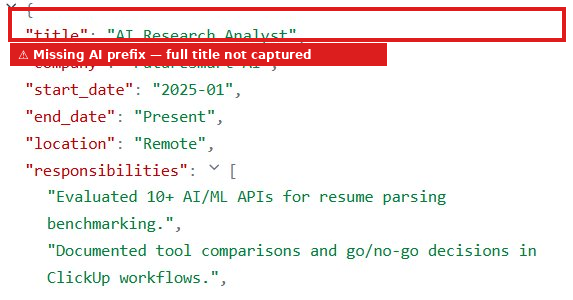
Parsed successfully into structured JSON. Contact details, work history, education, skills, and certifications were extracted; skills came back as categorized arrays, certifications as structured objects, and responsibilities as separate array items. The job title dropped the leading 'AI', and the education CGPA appeared as 'CGPA: 8.2 / 10'.
image
Multi-column resume PDF for Priya Sharma.
↓→
text
Certification issuer data was present on the clean resume but missing here, showing inconsistent field depth across parses.
image
Messy resume PDF for John Kumar.
↓→
text
The languages key was omitted entirely, '72 percent marks' was not normalized to 72%, and skills were kept in lowercase.
image
Clean single-column resume PDF for Rugved Nichite.
↓→
RESULT
Parsed successfully in the web app with the resume rendered in the viewer and a structured result produced from the clean layout.
image
Clean resume PDF containing summary, work history, education, skills, and certifications.
↓→
RESULT
Returned contact details, a professional summary, two work entries with responsibilities, education, categorized skills, and structured certifications. The output was the most structurally rich of the clean-resume tests.
image
Clean resume PDF for Rugved Nichite.
↓→
RESULT
Bottom Line
Excellent at turning resumes into structured JSON, but the output schema is not fully deterministic across documents.
From our researchParse resumes into structured data using an API
Structured Resume Parsing
Excellent — most structurally rich output of all tools tested, CGPA and certifications fully structured
10/10
▾
Test Summary
Feature tested: Structured Resume Parsing
Result: Passed (10/10) — Excellent — most structurally rich output of all tools tested, CGPA and certifications fully structured
Feature tested: Structured Resume Parsing
Result: Passed (10/10)
Verdict: Excellent — most structurally rich output of all tools tested, CGPA and certifications fully structured
Expected behavior: Extracts resume fields into structured JSON across clean, multi-column, and messy layouts. In the tests it handled a standard single-column resume, a multi-column resume without layout hints, and a highly inconsistent resume with missing headers and comma-separated lists.
What changed: PDF document transformed into Text/code file
Why it matters / Conclusion: Excellent output on clean resumes — most structurally rich of all tools tested. CGPA captured as dedicated standalone field. All 5 skill categories correctly structured. Both certifications as fully structured objects. Main weakness is job title missing the AI prefix and languages field absent since no spoken languages section was in the resume.
Extracts resume fields into structured JSON across clean, multi-column, and messy layouts. In the tests it handled a standard single-column resume, a multi-column resume without layout hints, and a highly inconsistent resume with missing headers and comma-separated lists.
PDF
Llamaparse input.1.pdf
↓→
PDF
llama output.1.txt
Loading file...
PDF
Llamaparse input.2.pdf
↓→
PDF
llama output.2.txt
Loading file...
PDF
Llamaparse input.3.pdf
↓→
PDF
llama output.3.txt
Loading file...
Bottom Line
Excellent output on clean resumes — most structurally rich of all tools tested. CGPA captured as dedicated standalone field. All 5 skill categories correctly structured. Both certifications as fully structured objects. Main weakness is job title missing the AI prefix and languages field absent since no spoken languages section was in the resume.
From our researchearlier research
Structured Resume Parsing
Strong output richness, but schema stability is uneven.
10/10
▾
Test Summary
Feature tested: Structured Resume Parsing
Result: Partial (10/10) — Strong output richness, but schema stability is uneven.
Feature tested: Structured Resume Parsing
Result: Partial (10/10)
Verdict: Strong output richness, but schema stability is uneven.
Expected behavior: LlamaParse extracts machine-readable JSON from resume PDFs across clean single-column, multi-column, and messy layouts. The runs surfaced work history, education, skills, certifications, languages, projects, and other nested sections.
Test case: Text prompt → Text/code file
Input type: Text prompt
Input used: Input artifact (Text prompt): Input
Observed output: Output artifact (Text/code file): Languages were returned with proficiency levels and projects were captured as dedicated records. — llama output 2.txt
Output artifact: Output artifact (Text/code file): Languages were returned with proficiency levels and projects were captured as dedicated records. — llama output 2.txt
What changed: Text prompt transformed into Text/code file
Why it matters / Conclusion: Very strong extraction breadth, but the output schema is not stable enough for downstream systems that rely on fixed keys.
LlamaParse extracts machine-readable JSON from resume PDFs across clean single-column, multi-column, and messy layouts. The runs surfaced work history, education, skills, certifications, languages, projects, and other nested sections.
INPUT
Multi-column resume PDF for Priya Sharma with a right-side languages section and dedicated projects section.
↓→
OUTPUT
llama output 2.txt
Loading file...
Languages were returned with proficiency levels and projects were captured as dedicated records.
Bottom Line
Very strong extraction breadth, but the output schema is not stable enough for downstream systems that rely on fixed keys.
From our researchearlier research
Schema-Guided Structured Data Extraction
▾
Test Summary
Feature tested: Schema-Guided Structured Data Extraction
Result: Passed
Feature tested: Schema-Guided Structured Data Extraction
Result: Passed
Expected behavior: LlamaParse can take a PDF plus a user-defined JSON schema, or seed a schema from the document, and populate nested structured JSON rather than flat OCR text. In the bank statement and invoice runs it filled fields like metadata, account details, balances, and invoice line items.
Test case: PDF document → Image
Input type: PDF document
Input used: Input artifact (PDF document): Input PDF — Bank Statement PDF.pdf
Observed output: Output artifact (Image): The bank statement extraction followed the requested hierarchy, including metadata, account holder, account, branch, statement-period, balances, transactions, rewards, and disclaimers sections. — llamaparse-bank-statement-extracted-details.png
Input artifact: Input artifact (PDF document): Input PDF — Bank Statement PDF.pdf
Output artifact: Output artifact (Image): The bank statement extraction followed the requested hierarchy, including metadata, account holder, account, branch, statement-period, balances, transactions, rewards, and disclaimers sections. — llamaparse-bank-statement-extracted-details.png
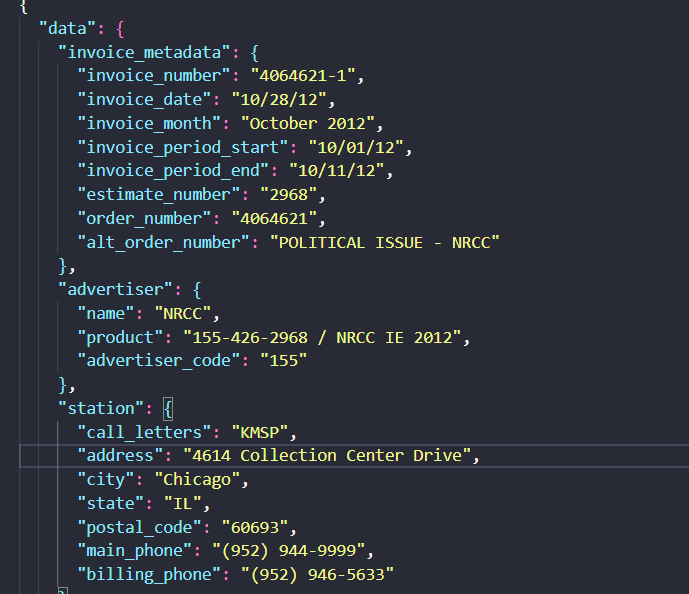
Observed output: Output artifact (Image): The invoice extraction followed the supplied schema and reconstructed invoice metadata, advertiser, and station objects as structured JSON. — llamaparse-invoice-metadata.png
Output artifact: Output artifact (Image): The invoice extraction followed the supplied schema and reconstructed invoice metadata, advertiser, and station objects as structured JSON. — llamaparse-invoice-metadata.png
What changed: PDF document transformed into Image
Why it matters / Conclusion: Strong when the schema is explicit and the document has a clear financial structure, but downstream validation is still needed because some extracted fields remained blank or inconsistent in later row-level tests.
LlamaParse can take a PDF plus a user-defined JSON schema, or seed a schema from the document, and populate nested structured JSON rather than flat OCR text. In the bank statement and invoice runs it filled fields like metadata, account details, balances, and invoice line items.
file
Bank Statement PDF.pdf
↓→
image
The bank statement extraction followed the requested hierarchy, including metadata, account holder, account, branch, statement-period, balances, transactions, rewards, and disclaimers sections.
file
Invoice PDF.pdf
↓→
image
The invoice extraction followed the supplied schema and reconstructed invoice metadata, advertiser, and station objects as structured JSON.
Bottom Line
Strong when the schema is explicit and the document has a clear financial structure, but downstream validation is still needed because some extracted fields remained blank or inconsistent in later row-level tests.
From our researchExtract and query structured data from documents using natural languageParse resumes into structured data using an API
Totals and Summary Field Extraction
▾
Test Summary
Feature tested: Totals and Summary Field Extraction
Result: Passed
Feature tested: Totals and Summary Field Extraction
Result: Passed
Expected behavior: LlamaParse can extract document-level totals and rollups alongside detailed rows. In the bank statement and invoice tests it surfaced figures such as total deposits, total withdrawals, gross total, net amount due, and payment terms.
Test case: PDF document → Image
Input type: PDF document
Input used: Input artifact (PDF document): Source bank-statement PDF used to test summary extraction. — Bank Statement PDF.pdf
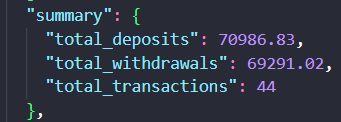
Observed output: Output artifact (Image): The bank statement summary object reported total deposits, total withdrawals, and total transactions. — llamaparse-bank-statement-summary.png
Input artifact: Input artifact (PDF document): Source bank-statement PDF used to test summary extraction. — Bank Statement PDF.pdf
Output artifact: Output artifact (Image): The bank statement summary object reported total deposits, total withdrawals, and total transactions. — llamaparse-bank-statement-summary.png
What changed: PDF document transformed into Image
Test case: PDF document → Image
Input type: PDF document
Input used: Input artifact (PDF document): Source invoice PDF used to test summary extraction. — Invoice PDF.pdf
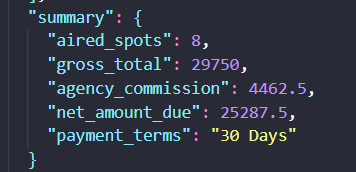
Observed output: Output artifact (Image): The invoice summary object reported aired spots, gross total, agency commission, net amount due, and payment terms. — llamaparse-invoice-summary.png
Input artifact: Input artifact (PDF document): Source invoice PDF used to test summary extraction. — Invoice PDF.pdf
Output artifact: Output artifact (Image): The invoice summary object reported aired spots, gross total, agency commission, net amount due, and payment terms. — llamaparse-invoice-summary.png
What changed: PDF document transformed into Image
Why it matters / Conclusion: Financial rollups are a useful companion to row extraction, and the invoice totals matched the source cleanly; however, the bank statement transaction count in summary did not reconcile with the extracted rows or source statement.
LlamaParse can extract document-level totals and rollups alongside detailed rows. In the bank statement and invoice tests it surfaced figures such as total deposits, total withdrawals, gross total, net amount due, and payment terms.
INPUT
Bank Statement PDF.pdf
Source bank-statement PDF used to test summary extraction.
↓→
OUTPUT
The bank statement summary object reported total deposits, total withdrawals, and total transactions.
INPUT
Invoice PDF.pdf
Source invoice PDF used to test summary extraction.
↓→
OUTPUT
The invoice summary object reported aired spots, gross total, agency commission, net amount due, and payment terms.
Bottom Line
Financial rollups are a useful companion to row extraction, and the invoice totals matched the source cleanly; however, the bank statement transaction count in summary did not reconcile with the extracted rows or source statement.
From our researchExtract and query structured data from documents using natural language
Table of Contents Extraction
▾
Test Summary
Feature tested: Table of Contents Extraction
Result: Passed
Feature tested: Table of Contents Extraction
Result: Passed
Expected behavior: Extracts TOC entries and page numbers from report front matter. The tested output recovered TOC content even when the full hierarchy was not always rebuilt.
Test case: Text prompt → Image
Input type: Text prompt
Input used: Input artifact (Text prompt): Input
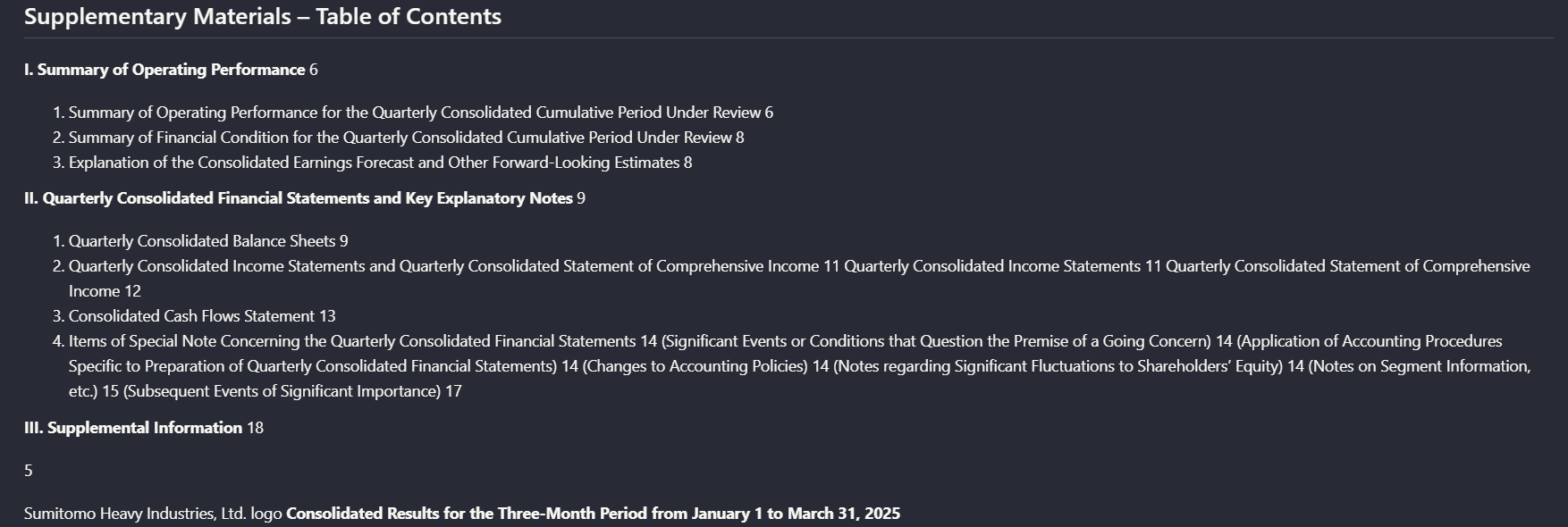
Observed output: Output artifact (Image): The TOC entries and page numbers were recovered, but the organizational relationships that define the TOC were not preserved; the page came out as sequential text rather than a structured table. — llamaparse_financialInput_TOC_output.png
Output artifact: Output artifact (Image): The TOC entries and page numbers were recovered, but the organizational relationships that define the TOC were not preserved; the page came out as sequential text rather than a structured table. — llamaparse_financialInput_TOC_output.png
What changed: Text prompt transformed into Image
Why it matters / Conclusion: Useful for recovering TOC content, but not for preserving full TOC structure.
Extracts TOC entries and page numbers from report front matter. The tested output recovered TOC content even when the full hierarchy was not always rebuilt.
INPUT
INPUT: Financial report table-of-contents page with major sections, subsections, and page numbers.
↓→
OUTPUT
The TOC entries and page numbers were recovered, but the organizational relationships that define the TOC were not preserved; the page came out as sequential text rather than a structured table.
Bottom Line
Useful for recovering TOC content, but not for preserving full TOC structure.
From our researchConvert a Complex PDF into Clean Markdown with an API
Resume Information Extraction
Excellent — most structurally rich output of all tools tested, CGPA and certifications fully structured
10/10
▾
Test Summary
Feature tested: Resume Information Extraction
Result: Passed (10/10) — Excellent — most structurally rich output of all tools tested, CGPA and certifications fully structured
Feature tested: Resume Information Extraction
Result: Passed (10/10)
Verdict: Excellent — most structurally rich output of all tools tested, CGPA and certifications fully structured
Expected behavior: LlamaParse extracts structured fields from resumes across clean single-column, multi-column, and messy formats, returning rich JSON with skills, certifications, languages, projects, education, and related fields.
What changed: PDF document transformed into Text/code file
Why it matters / Conclusion: Excellent output on clean resumes — most structurally rich of all tools tested. CGPA captured as dedicated standalone field. All 5 skill categories correctly structured. Both certifications as fully structured objects. Main weakness is job title missing the AI prefix and languages field absent since no spoken languages section was in the resume.
LlamaParse extracts structured fields from resumes across clean single-column, multi-column, and messy formats, returning rich JSON with skills, certifications, languages, projects, education, and related fields.
PDF
Llamaparse input.1.pdf
↓→
PDF
llama output.1.txt
Loading file...
PDF
Llamaparse input.2.pdf
↓→
PDF
llama output.2.txt
Loading file...
PDF
Llamaparse input.3.pdf
↓→
PDF
llama output.3.txt
Loading file...
Bottom Line
Excellent output on clean resumes — most structurally rich of all tools tested. CGPA captured as dedicated standalone field. All 5 skill categories correctly structured. Both certifications as fully structured objects. Main weakness is job title missing the AI prefix and languages field absent since no spoken languages section was in the resume.
From our researchearlier research
Resume Parsing
Excellent — most structurally rich output of all tools tested, CGPA and certifications fully structured
10/10
▾
Test Summary
Feature tested: Resume Parsing
Result: Passed (10/10) — Excellent — most structurally rich output of all tools tested, CGPA and certifications fully structured
Feature tested: Resume Parsing
Result: Passed (10/10)
Verdict: Excellent — most structurally rich output of all tools tested, CGPA and certifications fully structured
Expected behavior: LlamaParse extracts structured fields from resumes across clean single-column, multi-column, and messy formats, returning rich JSON with skills, certifications, languages, projects, education, and related fields.
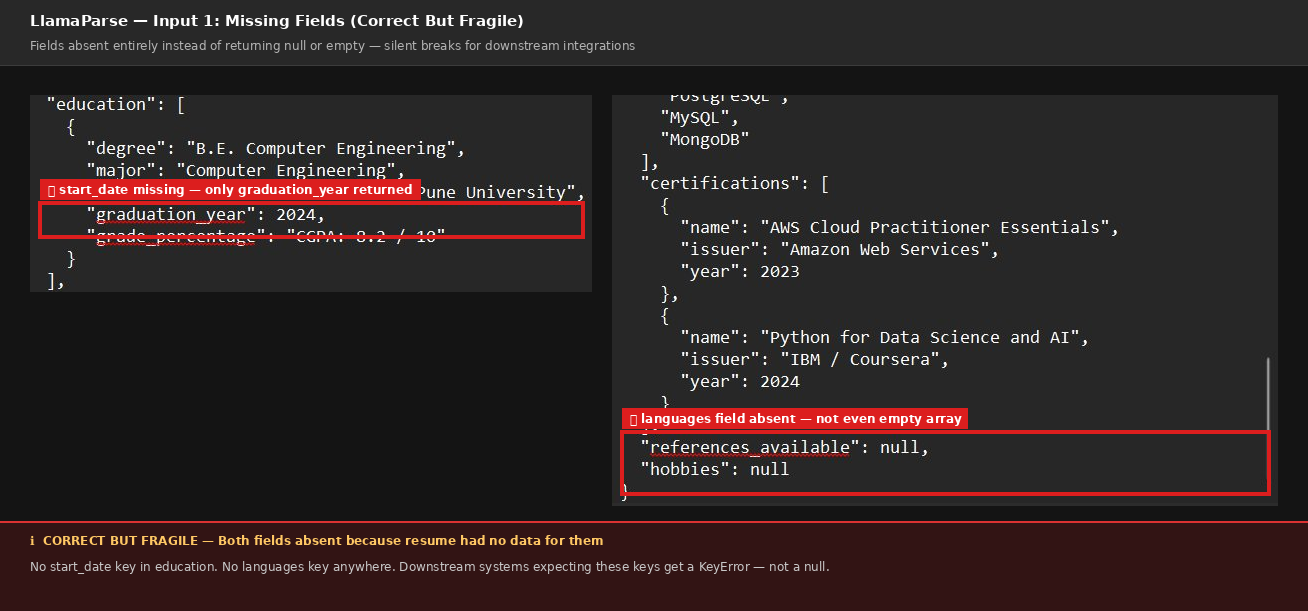
Observed output: Output artifact (Image): Both fields are absent because the resume had no data for them — no start date in education, no languages section. However LlamaParse drops the keys entirely instead of returning null or an empty array. A downstream system expecting these keys will get a KeyError with no warning. — no start date in education, no languages section..png
Output artifact: Output artifact (Image): Both fields are absent because the resume had no data for them — no start date in education, no languages section. However LlamaParse drops the keys entirely instead of returning null or an empty array. A downstream system expecting these keys will get a KeyError with no warning. — no start date in education, no languages section..png
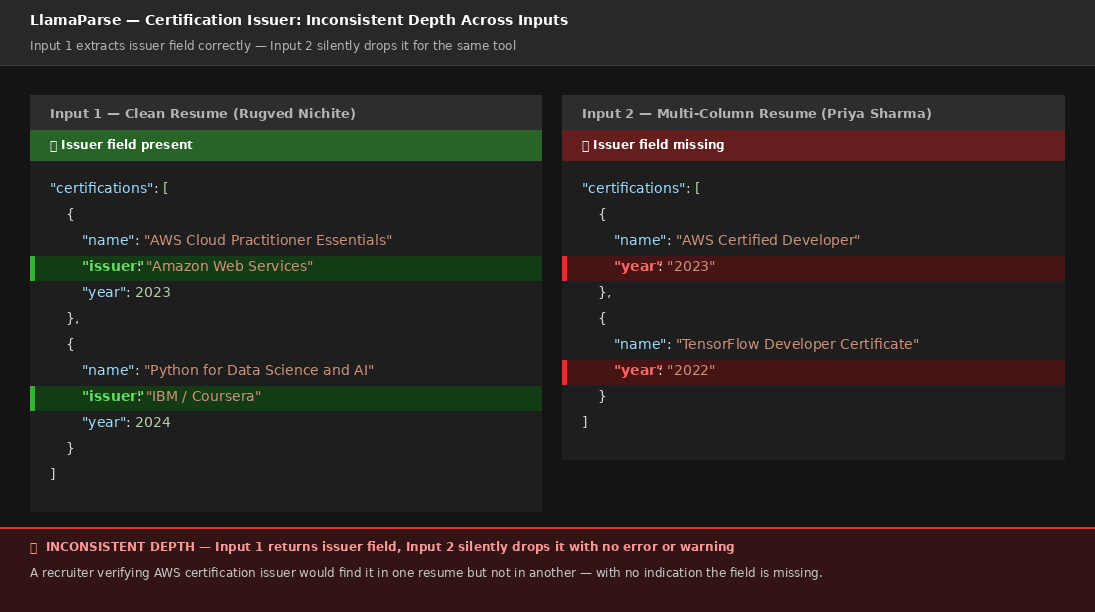
Observed output: Output artifact (Image): LlamaParse extracted the certification issuer correctly for Input 1 but silently dropped it for Input 2. As you can see in the comparison — Input 1 returns "issuer": "Amazon Web Services" and "issuer": "IBM / Coursera" as dedicated fields, while Input 2 returns only name and year with no issuer field at all. Both resumes had certification issuer information clearly written. A recruiter verifying whether an AWS certification came from Amazon or a third-party provider would find the answer for one candidate but not another — with no error, no null field, just a completely absent key. — INCONSISTENT DEPTH for certifications.png
Output artifact: Output artifact (Image): LlamaParse extracted the certification issuer correctly for Input 1 but silently dropped it for Input 2. As you can see in the comparison — Input 1 returns "issuer": "Amazon Web Services" and "issuer": "IBM / Coursera" as dedicated fields, while Input 2 returns only name and year with no issuer field at all. Both resumes had certification issuer information clearly written. A recruiter verifying whether an AWS certification came from Amazon or a third-party provider would find the answer for one candidate but not another — with no error, no null field, just a completely absent key. — INCONSISTENT DEPTH for certifications.png
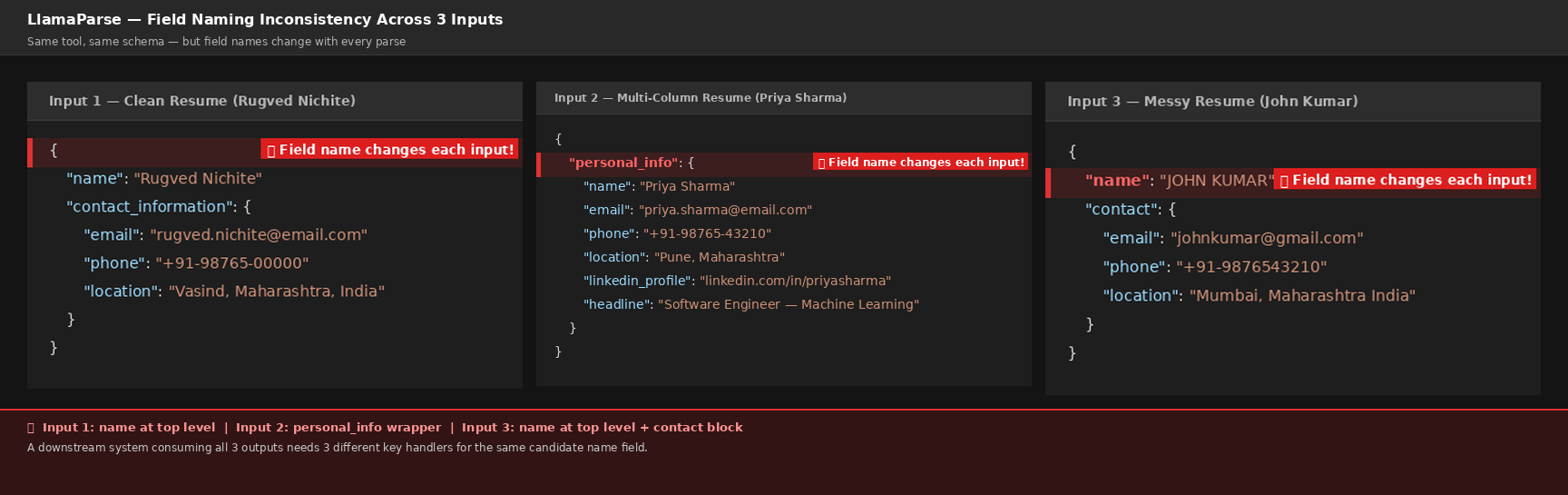
Observed output: Output artifact (Image): LlamaParse uses GPT-based extraction which interprets the schema instructions differently for each document. As you can see in the comparison above — Input 1 returns candidate name as a top-level field, Input 2 wraps everything inside a "personal_info" block, and Input 3 returns name at top level but with a separate "contact" block. All three parse the same data but use three completely different key structures. A production system consuming resumes at scale would silently break on Input 2 while working fine on Inputs 1 and 3 — with no error thrown, just a missing name field in the output. — INCONSISTENT FIELD NAMING for all the inputs.png
Output artifact: Output artifact (Image): LlamaParse uses GPT-based extraction which interprets the schema instructions differently for each document. As you can see in the comparison above — Input 1 returns candidate name as a top-level field, Input 2 wraps everything inside a "personal_info" block, and Input 3 returns name at top level but with a separate "contact" block. All three parse the same data but use three completely different key structures. A production system consuming resumes at scale would silently break on Input 2 while working fine on Inputs 1 and 3 — with no error thrown, just a missing name field in the output. — INCONSISTENT FIELD NAMING for all the inputs.png
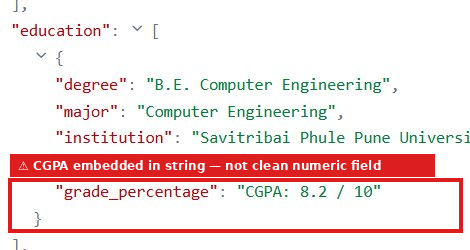
Observed output: Output artifact (Image): CGPA returned as "CGPA: 8.2 / 10" — the full label and value packed into a single string in the grade_percentage field instead of a clean numeric value like 8.2. — CGPA embedded in string — not a clean numeric field.png
Output artifact: Output artifact (Image): CGPA returned as "CGPA: 8.2 / 10" — the full label and value packed into a single string in the grade_percentage field instead of a clean numeric value like 8.2. — CGPA embedded in string — not a clean numeric field.png
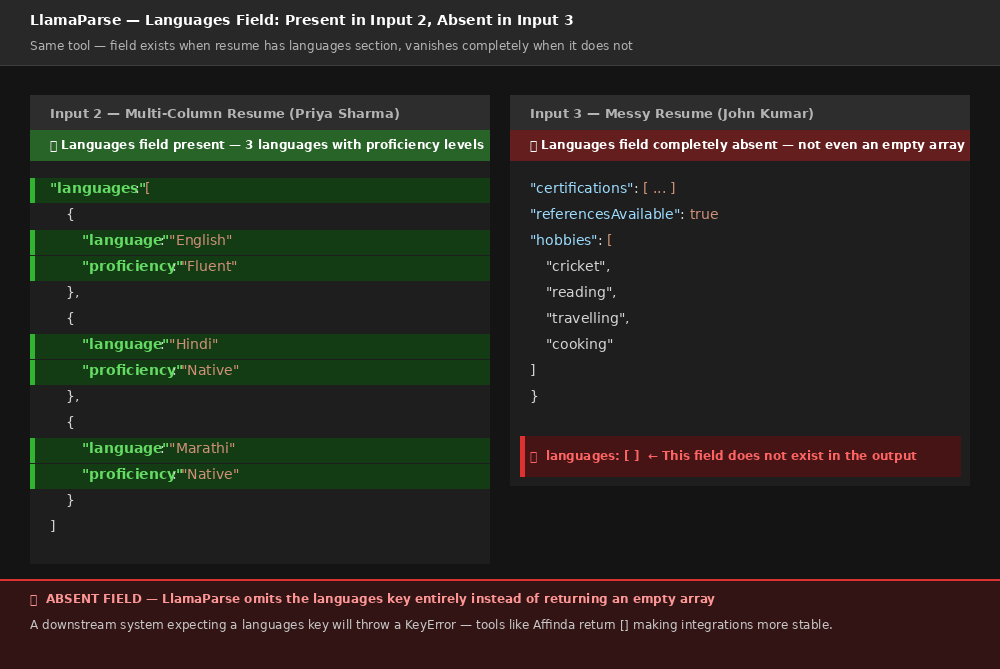
Observed output: Output artifact (Image): LlamaParse omits the languages key entirely when the resume has no languages section — instead of returning an empty array. As you can see — Input 2 returns a fully structured languages array with proficiency levels, while Input 3 has no languages key anywhere in the output. A downstream system expecting a languages key will throw a KeyError or null reference error, while tools like Affinda and ResumeParser handle this gracefully by returning an empty array. — ABSENT FIELD language on inputs 3.png
Output artifact: Output artifact (Image): LlamaParse omits the languages key entirely when the resume has no languages section — instead of returning an empty array. As you can see — Input 2 returns a fully structured languages array with proficiency levels, while Input 3 has no languages key anywhere in the output. A downstream system expecting a languages key will throw a KeyError or null reference error, while tools like Affinda and ResumeParser handle this gracefully by returning an empty array. — ABSENT FIELD language on inputs 3.png
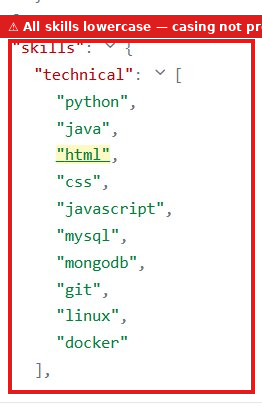
Observed output: Output artifact (Image): Skills returned as "python", "java", "html", "css" — all lowercase as written in the source resume. No capitalisation normalisation was applied despite the skills being well-known proper nouns. — All skills returned in lowercase — original casing not preserved.png
Output artifact: Output artifact (Image): Skills returned as "python", "java", "html", "css" — all lowercase as written in the source resume. No capitalisation normalisation was applied despite the skills being well-known proper nouns. — All skills returned in lowercase — original casing not preserved.png
What changed: Artifact transformed into Image
Why it matters / Conclusion: Excellent output on clean resumes — most structurally rich of all tools tested. CGPA captured as dedicated standalone field. All 5 skill categories correctly structured. Both certifications as fully structured objects. Main weakness is job title missing the AI prefix and languages field absent since no spoken languages section was in the resume.
LlamaParse extracts structured fields from resumes across clean single-column, multi-column, and messy formats, returning rich JSON with skills, certifications, languages, projects, education, and related fields.
PDF
Llamaparse input.1.pdf
↓→
PDF
PDF
Llamaparse input.2.pdf
↓→
PDF
PDF
Llamaparse input.3.pdf
↓→
PDF
INPUT
Input 1 Rugved Nichite Clean resume
↓→
OUTPUT
INPUT
John Kumar messy resume input 3
↓→
OUTPUT
INPUT
John Kumar messy resume input 3
↓→
OUTPUT
Bottom Line
Excellent output on clean resumes — most structurally rich of all tools tested. CGPA captured as dedicated standalone field. All 5 skill categories correctly structured. Both certifications as fully structured objects. Main weakness is job title missing the AI prefix and languages field absent since no spoken languages section was in the resume.
From our researchearlier research
Plans reported in the evaluation
Free
$0/month
Includes 10,000 credits per month, 1 user, and basic support.
Starter
$50/month
Includes 40,000 credits per month, pay-as-you-go usage up to 400,000 credits, and supports up to 5 users.
Pro
$500/month
Includes 400,000 credits per month, pay-as-you-go usage up to 4 million credits, supports up to 10 users, and includes Slack support.
Enterprise
Custom pricing
Includes volume discounts, higher rate limits, SSO, SaaS or hybrid deployment options, and dedicated account management.
✓ Use This If
●You need a hosted API that converts complex PDFs into usable Markdown without manual cleanup
●You work with hybrid documents that mix native text, scanned pages, tables, charts, and other visual elements
●You need heading hierarchy and reading order to stay recognizable in the extracted output
●You need schema-driven extraction into nested JSON for documents like invoices, bank statements, or resumes
●You want downloadable JSON or Markdown returned programmatically, with confidence scores available for review
✕ Skip This If
●You need perfect visual fidelity for charts, logos, signatures, or stamps instead of textual or table-based reconstructions
●You need grouped multi-level table headers to remain fully explicit in every case
●You need the table of contents reconstructed as a fully nested hierarchy rather than sequential text
●You need every extracted row to have complete IDs, transaction types, and value dates without manual validation
●You need the same field names, wrappers, and null/empty placeholders on every resume parse
Featured in Rankings
Independent rankings where LlamaParse was tested and rated.
Yes. In this research it accepted an 84-page hybrid earnings report and a scanned research paper, and the output preserved readable content and document flow instead of skipping the scanned material.
It preserved reading order and kept document structure recognizable in the Markdown output. The trade-off was that the table of contents was flattened into sequential text rather than kept as a fully nested hierarchy.
Standard tables were preserved well, and many multi-level tables stayed readable, including financial summary and segment tables. The main limitation was that grouped header semantics became less explicit in some complex tables.
Charts were not kept as visual charts in the output. Instead, they were converted into structured text or table representations, while logos, signatures, and even a blurry stamp were still represented in extracted text or detected as recognizable elements.
Yes. In this research it extracted both a bank statement and an invoice into nested JSON that followed the supplied schemas, with detailed hierarchy such as metadata, account or advertiser details, line items, summaries, and disclaimers.
Structural fidelity was not perfect at the edges. The bank statement repeatedly left transaction_id and transaction_type empty, some rows had blank value_date fields, and record counts drifted from the source; the invoice also showed a line-number mismatch against its summary.
Yes. The report says you can define a schema manually field-by-field, paste a full JSON schema, or use the AI Schema Generator, and the extracted data can be downloaded in JSON format with confidence scores shown in the interface.
It parsed clean, multi-column, and messy resume PDFs successfully in the cloud UI, and it was strongest on skills, certifications, languages, work history, education, and other detailed nested fields. The weakness was stability: field names could drift, missing sections could disappear instead of coming back as nulls or empty arrays, and some values were not normalized consistently.
Banner Preview
How the embed badge will look on your site
Embed HTML
Copy this code to your website source
<a target="_blank" href="https://aidemos.com/tools/llamaparse?utm_source=llamaparse_embed" style="width: 250px; height: 80px; border-radius:4px;" width="250" height="80">
<img src="https://aidemos-website-images.s3.amazonaws.com/featured.png" alt="LlamaParse | Featured on AI Demos" style="width: 250px; height: 80px; border-radius:4px;" width="250" height="80">
</a>
Quick Integration Guide
1Copy the HTML code block above.
2Paste it into your site's HTML or CMS editor.
3Banner appears instantly on your page.
4Links back to your tool profile here.
Similar Tools
Similar Tools
Discover more AI tools like LlamaParse to enhance your workflow.
⚡ Built by FutureSmart AI — the team behind AI Demos
Need a custom AI solution for this use case?
If you are looking to build a custom document extraction, PDF parsing, or structured data extraction system for your business or internal workflow, email us at contact@futuresmart.ai.
Found something inaccurate or missing? We try to keep our AI research accurate and useful. If you found outdated information, an issue, or have a suggestion, email us at collaborate@aidemos.com.