
Parseur
Template-driven resume parsing that returns predictable JSON after one-time setup.
Good fit once the template is defined
- You can configure a mailbox and template before parsing resumes at scale.
- You want predictable field names and control over the returned schema.
- You need JSON, CSV, or Excel export after parsing.
- You need automatic field discovery with no template design.
Our take
Parseur handled clean, multi-column, and messy PDF resumes well after a one-time mailbox/template setup, and it exported data in JSON, CSV, and Excel. The recurring tradeoff was schema-gated output: CGPA, languages, work location, and list-like fields such as skills and certifications were either omitted, flattened, or embedded rather than normalized.
In-Depth Review
Our detailed analysis of Parseur — features, performance, and real-world testing.
Feature-by-Feature Breakdown
Mailbox-Based Resume ParsingWorks after setup.▾
Feature tested: Mailbox-Based Resume Parsing
Result: Passed
Verdict: Works after setup.
Expected behavior: Parseur accepts PDF resumes through a mailbox/template workflow, and after setup it can automatically process incoming PDFs while extracting core profile, role, contact, work-history, and education fields from clean, multi-column, and messy resumes.
Test case: Text prompt → Image
Input type: Text prompt
Input used: Input artifact (Text prompt): INPUT
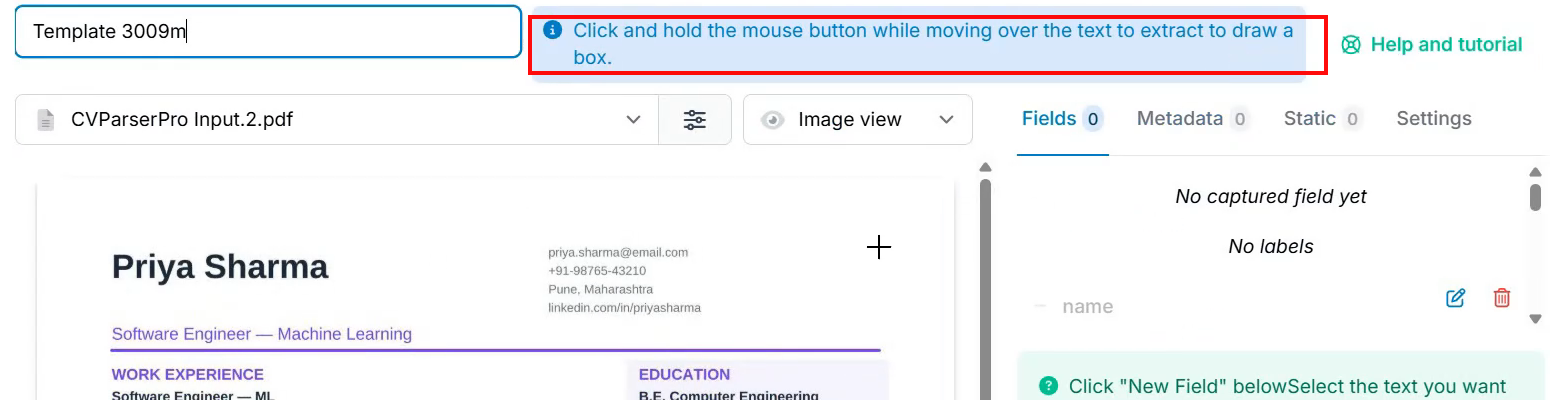
Observed output: Output artifact (Image): Template setup screen shows the manual click-and-drag capture step and an empty Fields panel before the first parse. — parseur_task1_template-setup.png
Input artifact: Input artifact (Text prompt): INPUT
Output artifact: Output artifact (Image): Template setup screen shows the manual click-and-drag capture step and an empty Fields panel before the first parse. — parseur_task1_template-setup.png
What changed: Text prompt transformed into Image
Test case: PDF document → Image
Input type: PDF document
Input used: Input artifact (PDF document): Input — Input2_Priya_Sharma_MultiColumnResume.pdf
Observed output: Output artifact (Image): The multi-column PDF was accepted and marked Processed (AI) after the template was already configured. — image-3.png
Input artifact: Input artifact (PDF document): Input — Input2_Priya_Sharma_MultiColumnResume.pdf
Output artifact: Output artifact (Image): The multi-column PDF was accepted and marked Processed (AI) after the template was already configured. — image-3.png
What changed: PDF document transformed into Image
Test case: PDF document → Image
Input type: PDF document
Input used: Input artifact (PDF document): Input — Input3_John_Kumar_MessyResume.pdf
Observed output: Output artifact (Image): The messy PDF was also accepted and processed AI, showing that inconsistent formatting did not block ingestion. — image-4.png
Input artifact: Input artifact (PDF document): Input — Input3_John_Kumar_MessyResume.pdf
Output artifact: Output artifact (Image): The messy PDF was also accepted and processed AI, showing that inconsistent formatting did not block ingestion. — image-4.png
What changed: PDF document transformed into Image
Test case: PDF document → Image
Input type: PDF document
Input used: Input artifact (PDF document): Input — Input1_Rugved_Nichite_CleanResume.pdf
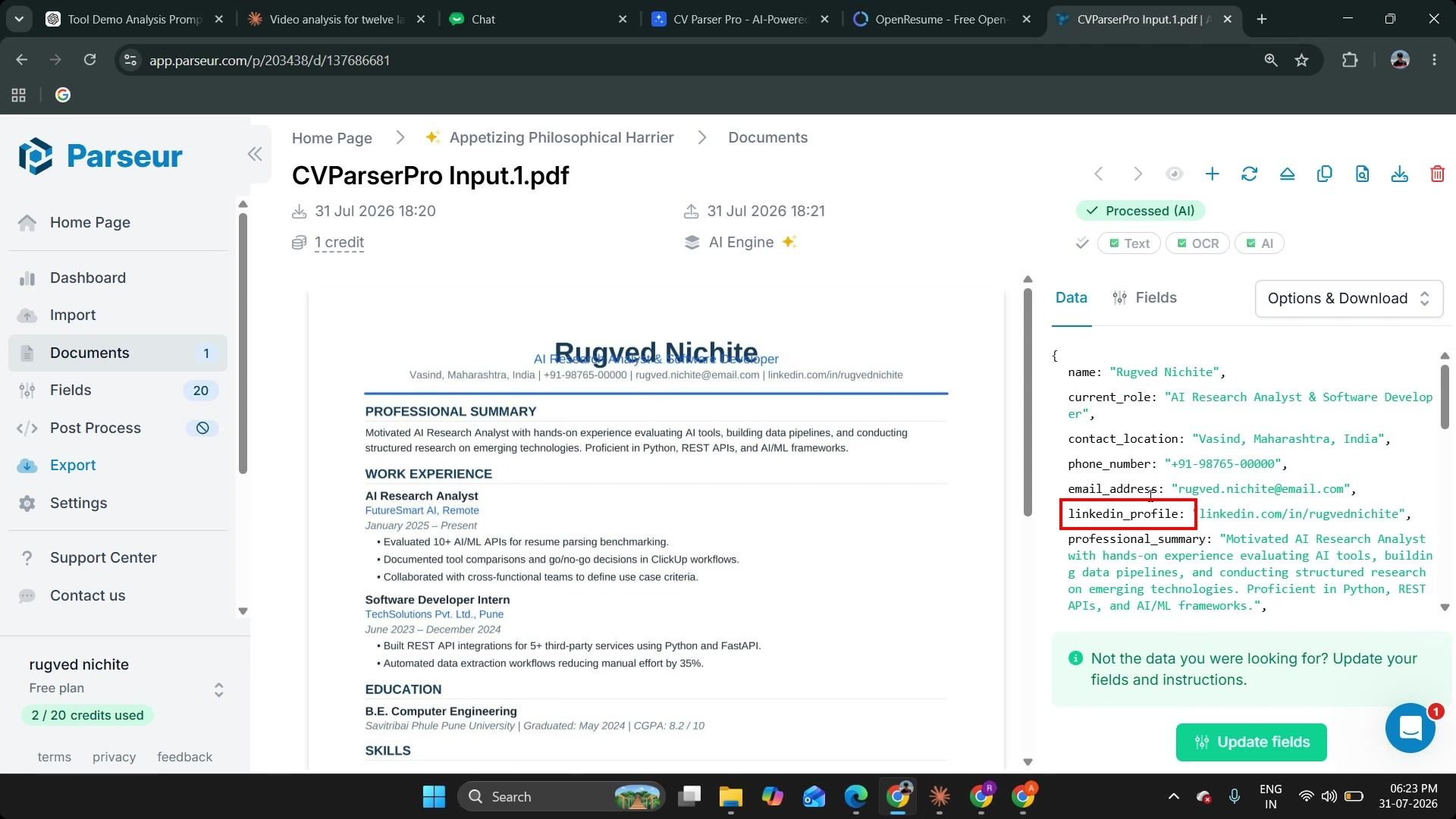
Observed output: Output artifact (Image): The clean resume output includes current_role, contact_location, phone_number, email_address, and linkedin_profile. — image-7.png
Input artifact: Input artifact (PDF document): Input — Input1_Rugved_Nichite_CleanResume.pdf
Output artifact: Output artifact (Image): The clean resume output includes current_role, contact_location, phone_number, email_address, and linkedin_profile. — image-7.png
What changed: PDF document transformed into Image
Why it matters / Conclusion: Parseur is not zero-setup, but once the mailbox/template exists it reliably ingests varied PDF resumes.
Parseur accepts PDF resumes through a mailbox/template workflow, and after setup it can automatically process incoming PDFs while extracting core profile, role, contact, work-history, and education fields from clean, multi-column, and messy resumes.
Schema-Guided Resume ParsingStrong control, but only mapped fields return.▾
Feature tested: Schema-Guided Resume Parsing
Result: Partial
Verdict: Strong control, but only mapped fields return.
Expected behavior: Parseur parses PDF resumes against a predefined template/schema, letting you define field names and instructions and shape multi-value sections while extracting structured candidate data from varied resume layouts.
Test case: PDF document → Image
Input type: PDF document
Input used: Input artifact (PDF document): Input — Input1_Rugved_Nichite_CleanResume.pdf
Observed output: Output artifact (Image): The LinkedIn URL is stored under the underscore-separated key linkedin_profile, showing the template's field-naming convention. — parseur-image-7-c5a350a2e9fe.png
Input artifact: Input artifact (PDF document): Input — Input1_Rugved_Nichite_CleanResume.pdf
Output artifact: Output artifact (Image): The LinkedIn URL is stored under the underscore-separated key linkedin_profile, showing the template's field-naming convention. — parseur-image-7-c5a350a2e9fe.png
What changed: PDF document transformed into Image
Test case: PDF document → Image
Input type: PDF document
Input used: Input artifact (PDF document): INPUT — Input2_Priya_Sharma_MultiColumnResume.pdf
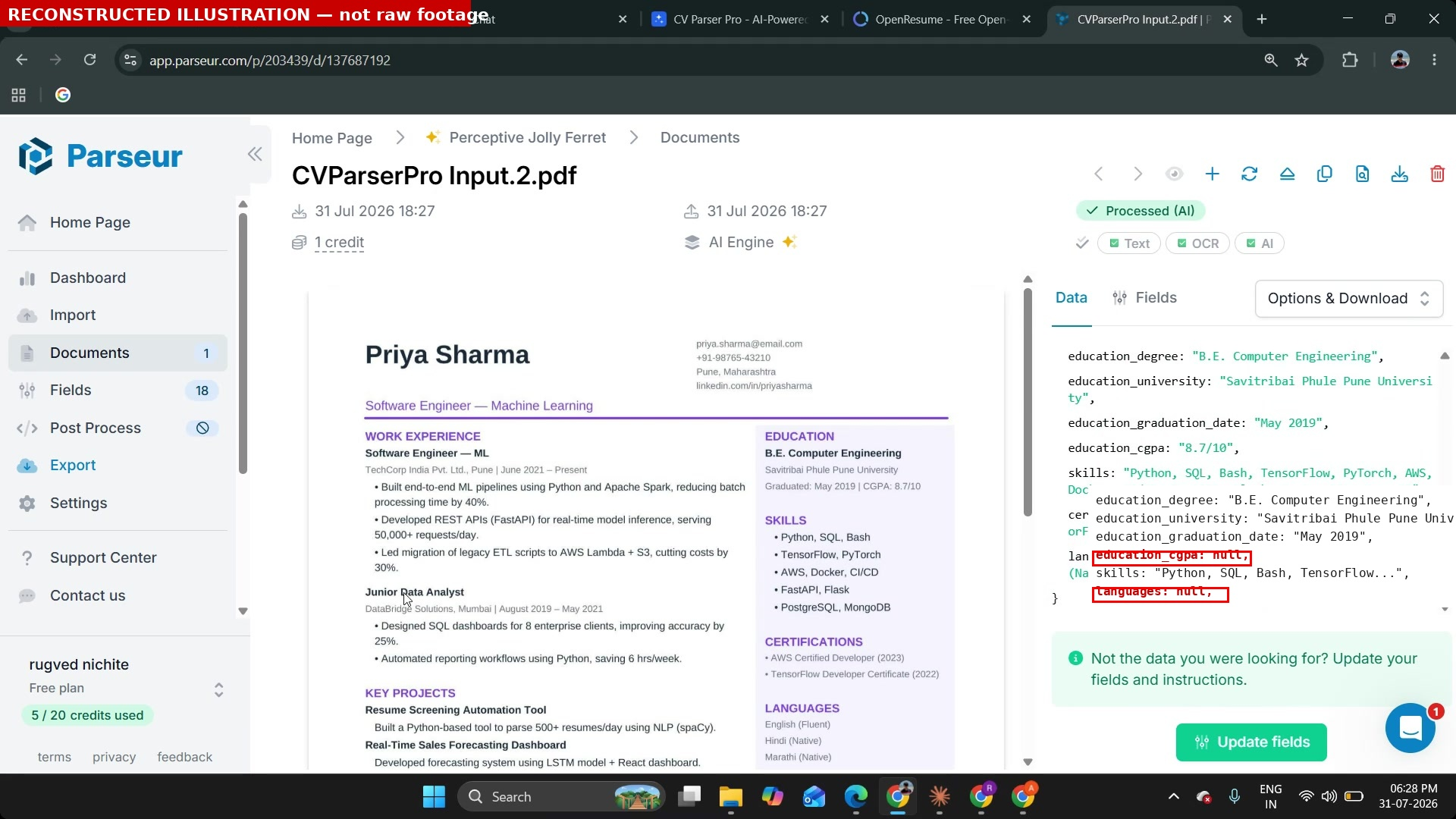
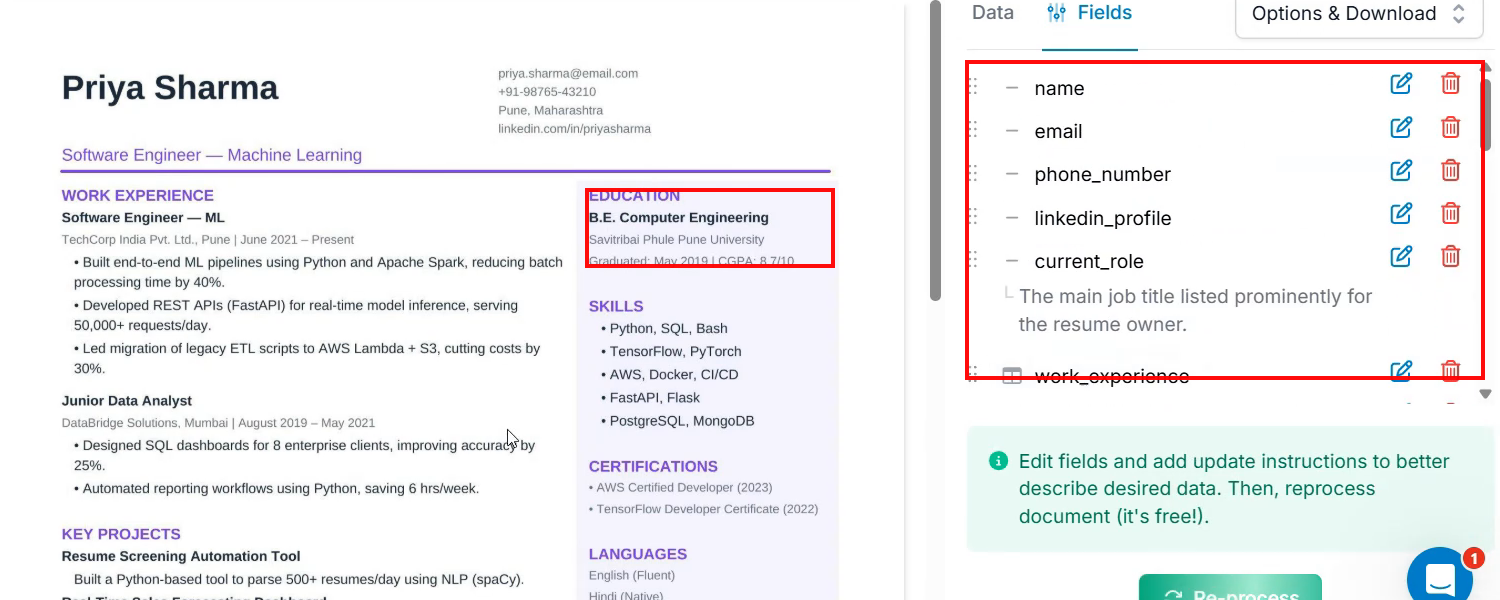
Observed output: Output artifact (Image): CGPA is visible in the source resume, but the template field list does not include a CGPA field. — parseur_task2_cgpa-not-in-template.png
Input artifact: Input artifact (PDF document): INPUT — Input2_Priya_Sharma_MultiColumnResume.pdf
Output artifact: Output artifact (Image): CGPA is visible in the source resume, but the template field list does not include a CGPA field. — parseur_task2_cgpa-not-in-template.png
What changed: PDF document transformed into Image
Test case: PDF document → Image
Input type: PDF document
Input used: Input artifact (PDF document): INPUT — Input2_Priya_Sharma_MultiColumnResume.pdf
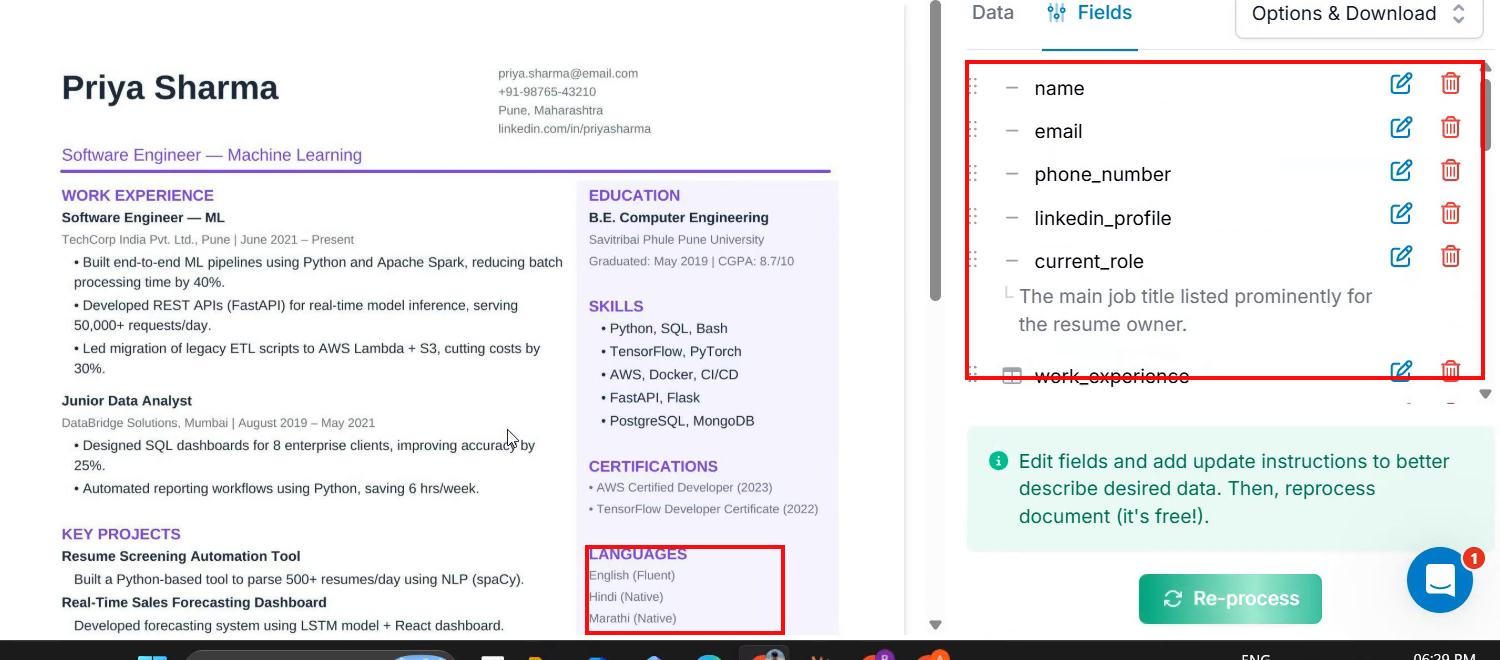
Observed output: Output artifact (Image): Languages are visible in the source resume, but the template field list does not include a languages field. — parseur_task2_languages-not-in-template.png
Input artifact: Input artifact (PDF document): INPUT — Input2_Priya_Sharma_MultiColumnResume.pdf
Output artifact: Output artifact (Image): Languages are visible in the source resume, but the template field list does not include a languages field. — parseur_task2_languages-not-in-template.png
What changed: PDF document transformed into Image
Test case: PDF document → Image
Input type: PDF document
Input used: Input artifact (PDF document): INPUT — Input2_Priya_Sharma_MultiColumnResume.pdf
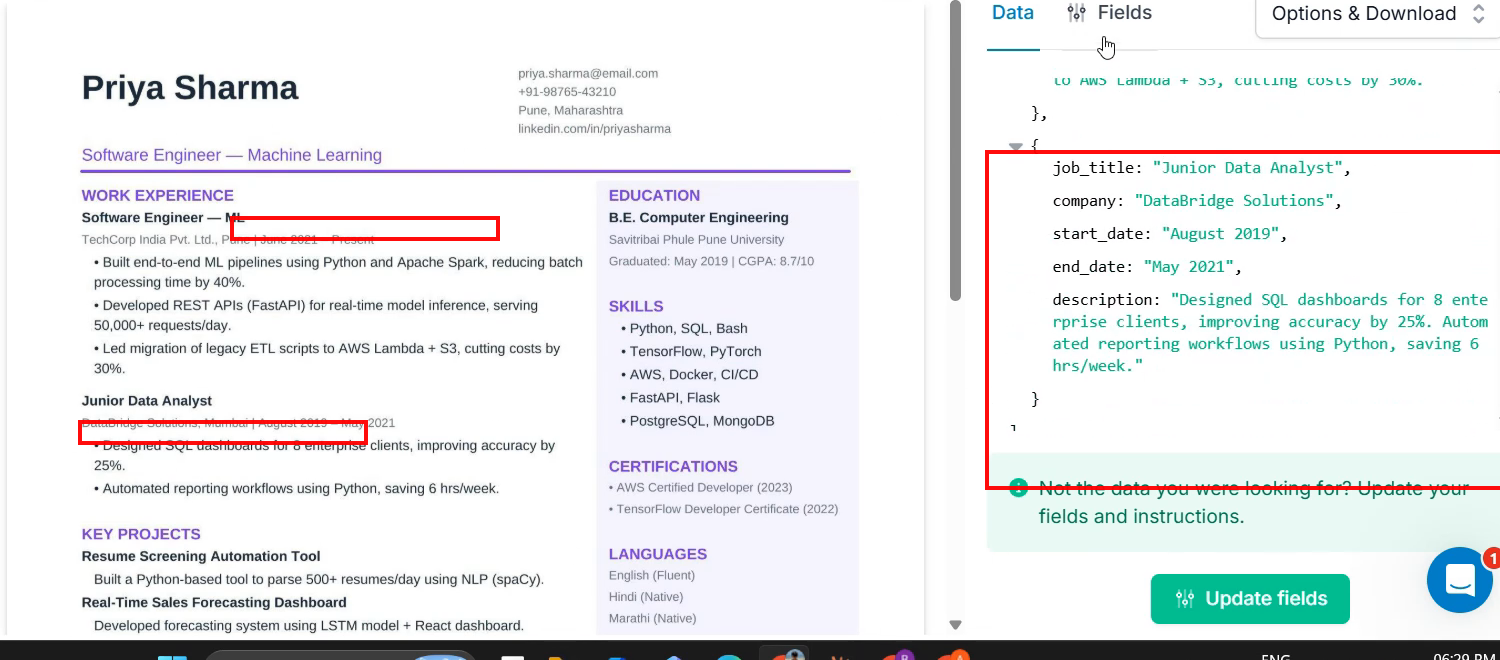
Observed output: Output artifact (Image): Work-experience locations are visible in the source, but the extracted structure only includes job title, company, dates, and description. — parseur_task2_work-location-missing.png
Input artifact: Input artifact (PDF document): INPUT — Input2_Priya_Sharma_MultiColumnResume.pdf
Output artifact: Output artifact (Image): Work-experience locations are visible in the source, but the extracted structure only includes job title, company, dates, and description. — parseur_task2_work-location-missing.png
What changed: PDF document transformed into Image
Test case: PDF document → Image
Input type: PDF document
Input used: Input artifact (PDF document): Input — Input1_Rugved_Nichite_CleanResume.pdf
Observed output: Output artifact (Image): Certifications are returned as one flattened comma-separated string instead of separate structured entries. — parseur-image-7-c5a350a2e9fe.png
Input artifact: Input artifact (PDF document): Input — Input1_Rugved_Nichite_CleanResume.pdf
Output artifact: Output artifact (Image): Certifications are returned as one flattened comma-separated string instead of separate structured entries. — parseur-image-7-c5a350a2e9fe.png
What changed: PDF document transformed into Image
Test case: PDF document → Image
Input type: PDF document
Input used: Input artifact (PDF document): Input — Input1_Rugved_Nichite_CleanResume.pdf
Observed output: Output artifact (Image): CGPA is embedded inside the education string instead of appearing as its own field. — parseur-image-7-c5a350a2e9fe.png
Input artifact: Input artifact (PDF document): Input — Input1_Rugved_Nichite_CleanResume.pdf
Output artifact: Output artifact (Image): CGPA is embedded inside the education string instead of appearing as its own field. — parseur-image-7-c5a350a2e9fe.png
What changed: PDF document transformed into Image
Test case: PDF document → Image
Input type: PDF document
Input used: Input artifact (PDF document): Input — Input3_John_Kumar_MessyResume.pdf
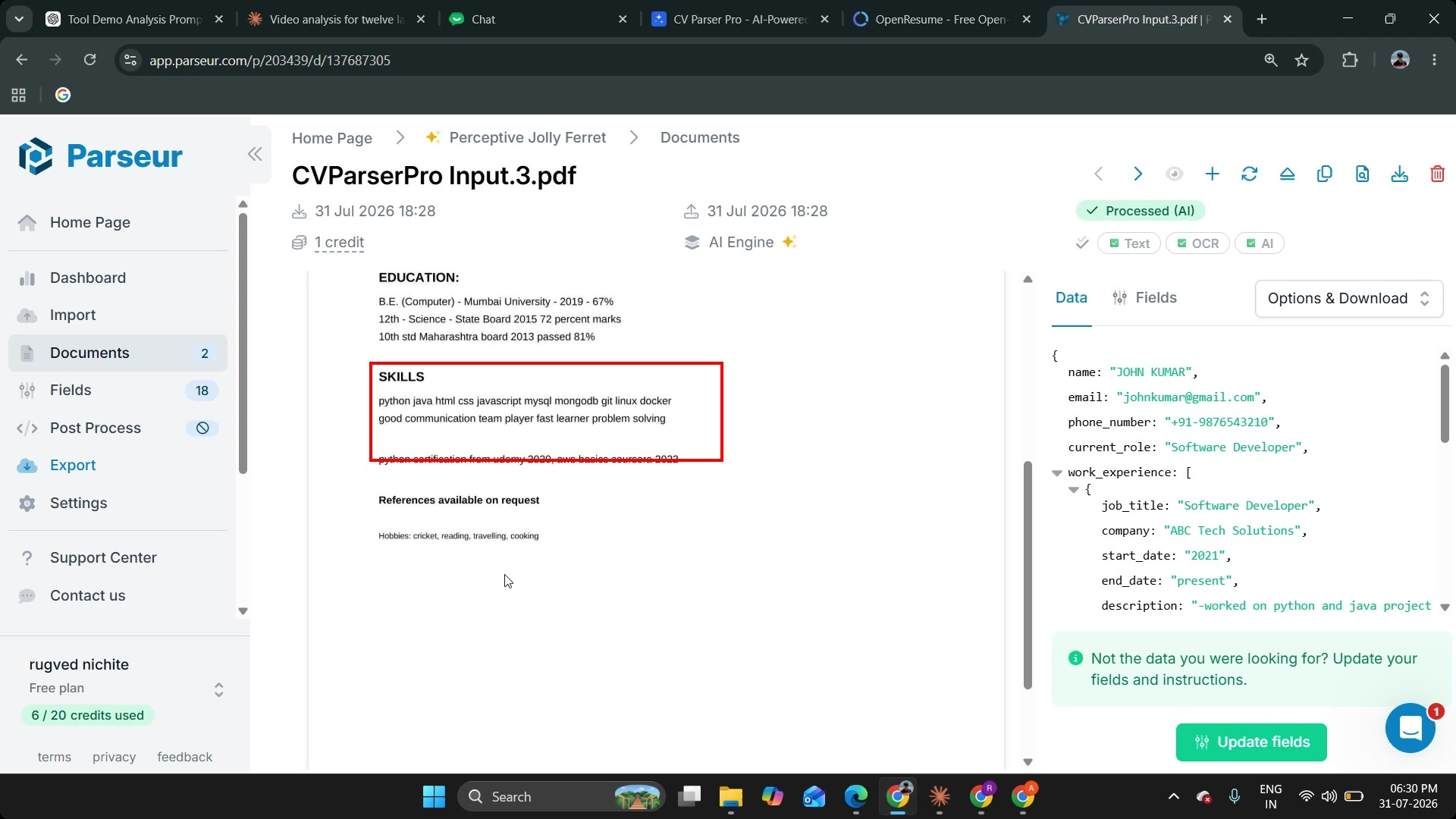
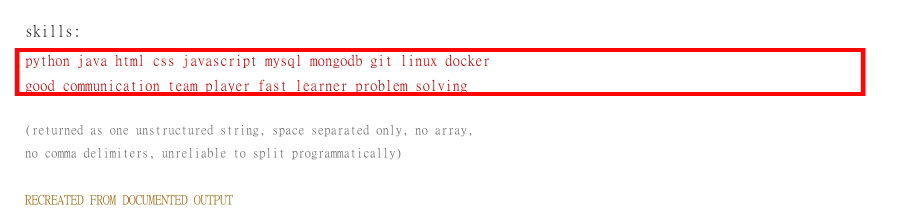
Observed output: Output artifact (Image): Skills are returned as one unstructured space-separated string, mixing technical and soft skills without delimiters suitable for arrays. — parseur_task3_skills-flat-mock.png
Input artifact: Input artifact (PDF document): Input — Input3_John_Kumar_MessyResume.pdf
Output artifact: Output artifact (Image): Skills are returned as one unstructured space-separated string, mixing technical and soft skills without delimiters suitable for arrays. — parseur_task3_skills-flat-mock.png
What changed: PDF document transformed into Image
Test case: PDF document → Image
Input type: PDF document
Input used: Input artifact (PDF document): INPUT — Input3_John_Kumar_MessyResume.pdf
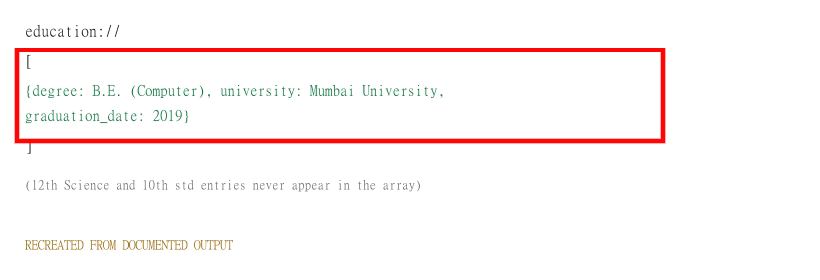
Observed output: Output artifact (Image): Only one education record is captured, and earlier school entries are omitted. — parseur_task3_only-one-education-entry-mock.png
Input artifact: Input artifact (PDF document): INPUT — Input3_John_Kumar_MessyResume.pdf
Output artifact: Output artifact (Image): Only one education record is captured, and earlier school entries are omitted. — parseur_task3_only-one-education-entry-mock.png
What changed: PDF document transformed into Image
Test case: PDF document → Image
Input type: PDF document
Input used: Input artifact (PDF document): Input — Input3_John_Kumar_MessyResume.pdf
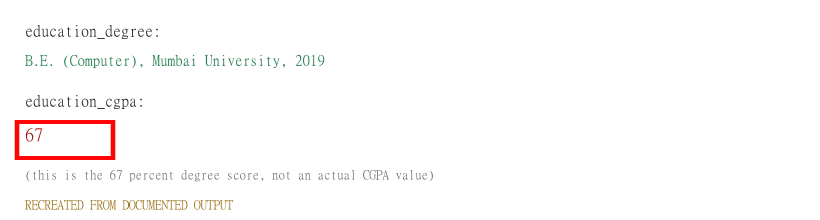
Observed output: Output artifact (Image): The CGPA-related field shows 67, which the note identifies as a percentage degree score rather than a real CGPA. — parseur_task3_cgpa-67-mock.png
Input artifact: Input artifact (PDF document): Input — Input3_John_Kumar_MessyResume.pdf
Output artifact: Output artifact (Image): The CGPA-related field shows 67, which the note identifies as a percentage degree score rather than a real CGPA. — parseur_task3_cgpa-67-mock.png
What changed: PDF document transformed into Image
Test case: PDF document → Image
Input type: PDF document
Input used: Input artifact (PDF document): Input — Input2_Priya_Sharma_MultiColumnResume.pdf
Observed output: Output artifact (Image): Multi-column resume output showing parsed core fields and work experience in a processed AI view. — image-3.png
Input artifact: Input artifact (PDF document): Input — Input2_Priya_Sharma_MultiColumnResume.pdf
Output artifact: Output artifact (Image): Multi-column resume output showing parsed core fields and work experience in a processed AI view. — image-3.png
What changed: PDF document transformed into Image
Test case: PDF document → Image
Input type: PDF document
Input used: Input artifact (PDF document): Input — Input3_John_Kumar_MessyResume.pdf
Observed output: Output artifact (Image): Messy resume output showing the parsed name, contact details, current role, and work experience despite inconsistent formatting. — image-4.png
Input artifact: Input artifact (PDF document): Input — Input3_John_Kumar_MessyResume.pdf
Output artifact: Output artifact (Image): Messy resume output showing the parsed name, contact details, current role, and work experience despite inconsistent formatting. — image-4.png
What changed: PDF document transformed into Image
Test case: PDF document → Image
Input type: PDF document
Input used: Input artifact (PDF document): Input — Input1_Rugved_Nichite_CleanResume.pdf
Observed output: Output artifact (Image): Clean resume output showing correctly extracted identity and profile fields, including current role, location, phone, email, and LinkedIn URL. — image-7.png
Input artifact: Input artifact (PDF document): Input — Input1_Rugved_Nichite_CleanResume.pdf
Output artifact: Output artifact (Image): Clean resume output showing correctly extracted identity and profile fields, including current role, location, phone, email, and LinkedIn URL. — image-7.png
What changed: PDF document transformed into Image
Test case: PDF document → Text prompt
Input type: PDF document
Input used: Input artifact (PDF document): Input — Input1_Rugved_Nichite_CleanResume.pdf
Observed output: Output artifact (Text prompt): Output
Input artifact: Input artifact (PDF document): Input — Input1_Rugved_Nichite_CleanResume.pdf
Output artifact: Output artifact (Text prompt): Output
What changed: PDF document transformed into Text prompt
Test case: PDF document → Text prompt
Input type: PDF document
Input used: Input artifact (PDF document): Input — Input1_Rugved_Nichite_CleanResume.pdf
Observed output: Output artifact (Text prompt): Output
Input artifact: Input artifact (PDF document): Input — Input1_Rugved_Nichite_CleanResume.pdf
Output artifact: Output artifact (Text prompt): Output
What changed: PDF document transformed into Text prompt
Why it matters / Conclusion: Parseur gives precise control over schema and naming, but anything not mapped in the template stays out of the output.
Parseur parses PDF resumes against a predefined template/schema, letting you define field names and instructions and shape multi-value sections while extracting structured candidate data from varied resume layouts.
Multi-Format ExportCovers the common export formats.▾
Feature tested: Multi-Format Export
Result: Passed
Verdict: Covers the common export formats.
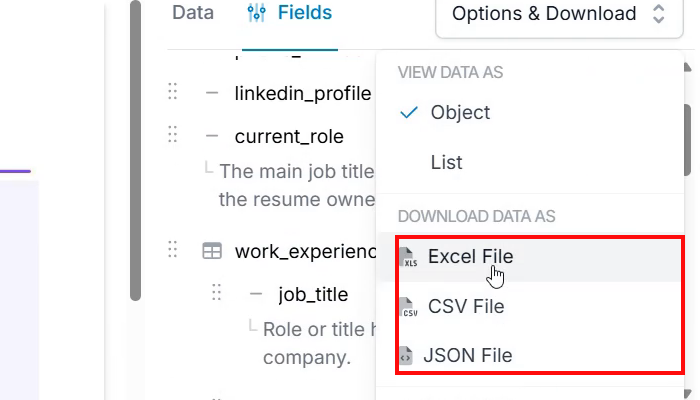
Expected behavior: Parseur lets you download parsed resume data from the Fields view as Excel, CSV, or JSON.
Test case: Text prompt → Image
Input type: Text prompt
Input used: Input artifact (Text prompt): INPUT
Observed output: Output artifact (Image): The Options & Download menu shows Excel File, CSV File, and JSON File under 'Download data as.' — parseur_task1_export-formats.png
Input artifact: Input artifact (Text prompt): INPUT
Output artifact: Output artifact (Image): The Options & Download menu shows Excel File, CSV File, and JSON File under 'Download data as.' — parseur_task1_export-formats.png
What changed: Text prompt transformed into Image
Why it matters / Conclusion: Export coverage is straightforward and covers the common spreadsheet and API-friendly formats.
Parseur lets you download parsed resume data from the Fields view as Excel, CSV, or JSON.
Plans as of August 2026
Tested on the free plan.
1 credit = 1 page processed. A '3 months free' promotion was mentioned on the pricing page at the time of check.
Featured in Rankings
Independent rankings where Parseur was tested and rated.
Banner Preview
How the embed badge will look on your site

Embed HTML
Copy this code to your website source
Quick Integration Guide
- 1Copy the HTML code block above.
- 2Paste it into your site's HTML or CMS editor.
- 3Banner appears instantly on your page.
- 4Links back to your tool profile here.
Similar Tools
Discover more AI tools like Parseur to enhance your workflow.
Comments (0)
Need a custom AI solution for this use case?
If you are looking to build a custom resume parsing, document extraction, or structured data extraction system for your business or internal workflow, email us at contact@futuresmart.ai.
Found something inaccurate or missing? We try to keep our AI research accurate and useful. If you found outdated information, an issue, or have a suggestion, email us at collaborate@aidemos.com.