
Affinda
Best overall resume parsing API here for clean, multi-column, and messy PDFs with rich structured JSON.
Best overall parser in this test, set with cleanup still needed.
- You need a resume parser API that handles clean single-column, multi-column, and messy PDF resumes without manual setup
- You need machine-readable JSON with contact info, work history, education, skills, certifications, languages, projects, and hobbies
- You want skill records enriched with taxonomy metadata and can post-process duplicates or noise afterward
- You need CGPA numeric scores to be captured reliably without review
Feature scores on this page: 9.0/10 (1 scored feature)
Our take
Affinda is the clear overall winner in this test set: it parsed all three resumes end-to-end, returned structured JSON, and stayed strong on clean, multi-column, and messy layouts. The tradeoff is that CGPA scores, some certifications, URL handling, and skill hygiene still need downstream validation.
In-Depth Review
Our detailed analysis of Affinda — features, performance, and real-world testing.
Feature-by-Feature Breakdown
Resume PDF Field ExtractionReliable9/10▾
Feature tested: Resume PDF Field Extraction
Result: Failed (9/10)
Verdict: Reliable
Expected behavior: Accepts resume PDFs and returns structured JSON with core candidate fields such as contact details, work history, education, certifications, and related profile data. The same parser was exercised on clean single-column, two-column, and messy free-form resumes.
Test case: PDF document → Text/code file
Input type: PDF document
Input used: Input artifact (PDF document): Clean resume input — Affinda Input.1.pdf
Observed output: Output artifact (Text/code file): Structured JSON was produced for the clean resume, with the main candidate fields, work history, education, certifications, and skills exported in named fields. — json output 1.txt
Input artifact: Input artifact (PDF document): Clean resume input — Affinda Input.1.pdf
Output artifact: Output artifact (Text/code file): Structured JSON was produced for the clean resume, with the main candidate fields, work history, education, certifications, and skills exported in named fields. — json output 1.txt
What changed: PDF document transformed into Text/code file
Test case: PDF document → Text/code file
Input type: PDF document
Input used: Input artifact (PDF document): Multi-column resume input — Affinda Input.2.pdf
Observed output: Output artifact (Text/code file): Structured JSON was produced for the multi-column resume, with both columns parsed into named fields. — json output 2.txt
Input artifact: Input artifact (PDF document): Multi-column resume input — Affinda Input.2.pdf
Output artifact: Output artifact (Text/code file): Structured JSON was produced for the multi-column resume, with both columns parsed into named fields. — json output 2.txt
What changed: PDF document transformed into Text/code file
Test case: PDF document → Text/code file
Input type: PDF document
Input used: Input artifact (PDF document): Messy resume input — Affinda Input.3.pdf
Observed output: Output artifact (Text/code file): Structured JSON was produced for the messy resume, with candidate data exported despite the non-standard formatting. — Json output 3.txt
Input artifact: Input artifact (PDF document): Messy resume input — Affinda Input.3.pdf
Output artifact: Output artifact (Text/code file): Structured JSON was produced for the messy resume, with candidate data exported despite the non-standard formatting. — Json output 3.txt
What changed: PDF document transformed into Text/code file
Test case: PDF document → Image
Input type: PDF document
Input used: Input artifact (PDF document): Input — Affinda Input.1.pdf
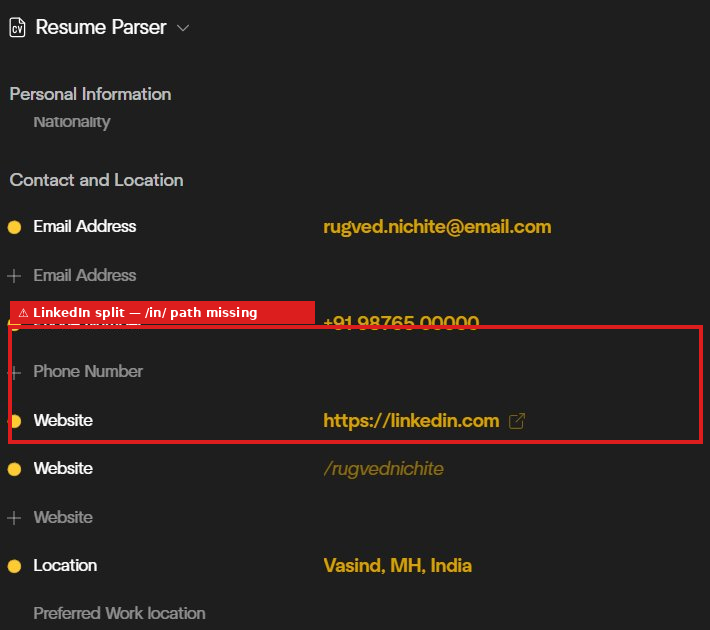
Observed output: Output artifact (Image): Email, phone, and location were extracted, but the LinkedIn value was split across two website fields and the /in/ path was missing. — image-2.png
Input artifact: Input artifact (PDF document): Input — Affinda Input.1.pdf
Output artifact: Output artifact (Image): Email, phone, and location were extracted, but the LinkedIn value was split across two website fields and the /in/ path was missing. — image-2.png
What changed: PDF document transformed into Image
Test case: PDF document → Image
Input type: PDF document
Input used: Input artifact (PDF document): Input — Affinda Input.2.pdf
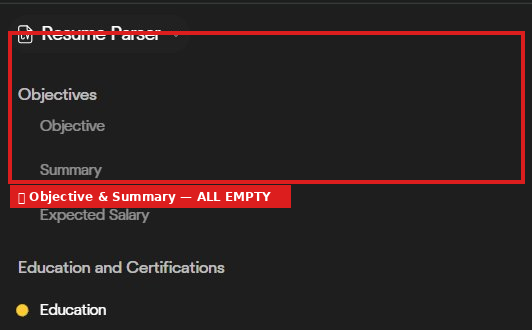
Observed output: Output artifact (Image): Objective, summary, and expected salary were all empty on the Priya Sharma resume even though the source had content. — image-7.png
Input artifact: Input artifact (PDF document): Input — Affinda Input.2.pdf
Output artifact: Output artifact (Image): Objective, summary, and expected salary were all empty on the Priya Sharma resume even though the source had content. — image-7.png
What changed: PDF document transformed into Image
Test case: PDF document → Image
Input type: PDF document
Input used: Input artifact (PDF document): Source resume — Affinda Input.2.pdf
Observed output: Output artifact (Image): The project description was truncated before the Accuracy: 89% metric, so one performance detail was lost. — image-9.png
Input artifact: Input artifact (PDF document): Source resume — Affinda Input.2.pdf
Output artifact: Output artifact (Image): The project description was truncated before the Accuracy: 89% metric, so one performance detail was lost. — image-9.png
What changed: PDF document transformed into Image
Test case: PDF document → Image
Input type: PDF document
Input used: Input artifact (PDF document): Input — Affinda Input.3.pdf
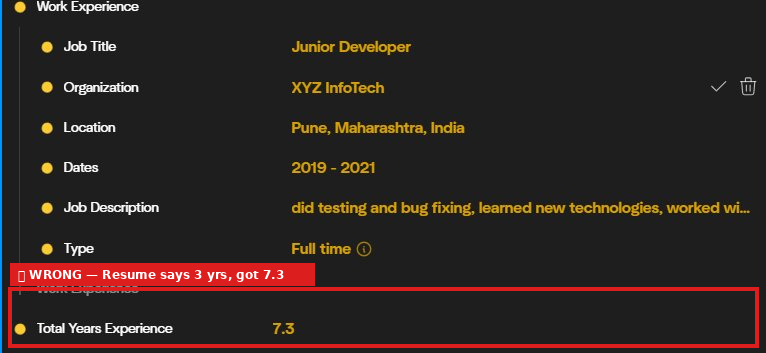
Observed output: Output artifact (Image): Junior Developer was extracted, but total years of experience was inflated to 7.3 even though the resume states 3 years. — image-11.png
Input artifact: Input artifact (PDF document): Input — Affinda Input.3.pdf
Output artifact: Output artifact (Image): Junior Developer was extracted, but total years of experience was inflated to 7.3 even though the resume states 3 years. — image-11.png
What changed: PDF document transformed into Image
Test case: PDF document → Image
Input type: PDF document
Input used: Input artifact (PDF document): Source resume — Affinda Input.1.pdf
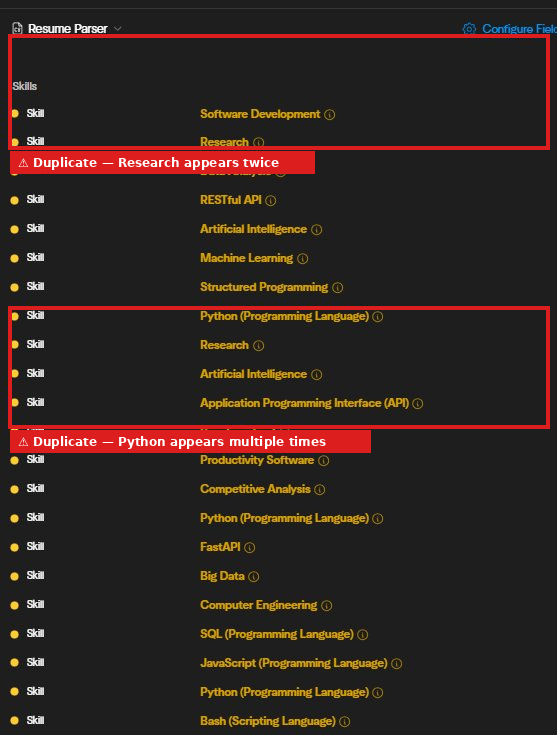
Observed output: Output artifact (Image): The skills list contained repeated entries such as Research, Python, and Artificial Intelligence, so deduplication is needed. — image-3.png
Input artifact: Input artifact (PDF document): Source resume — Affinda Input.1.pdf
Output artifact: Output artifact (Image): The skills list contained repeated entries such as Research, Python, and Artificial Intelligence, so deduplication is needed. — image-3.png
What changed: PDF document transformed into Image
Test case: PDF document → Image
Input type: PDF document
Input used: Input artifact (PDF document): Source resume — Affinda Input.1.pdf
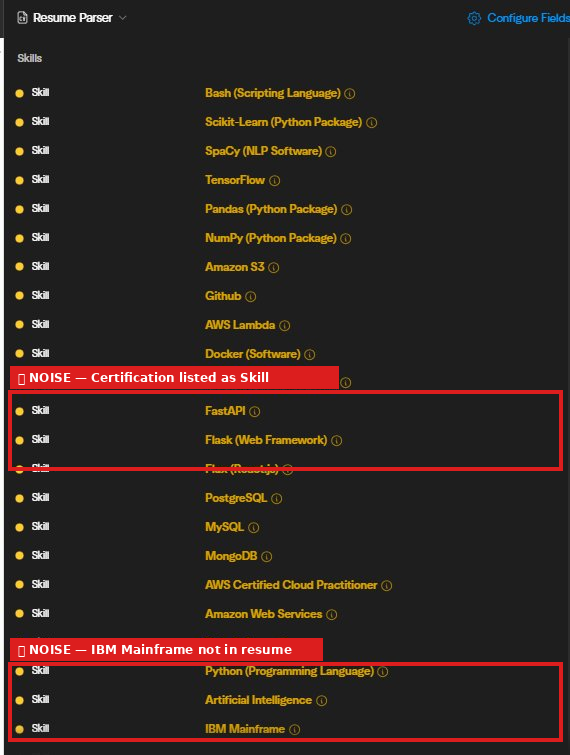
Observed output: Output artifact (Image): Certification names were treated as skills, and IBM Mainframe appeared even though it was not in the resume. — image-4.png
Input artifact: Input artifact (PDF document): Source resume — Affinda Input.1.pdf
Output artifact: Output artifact (Image): Certification names were treated as skills, and IBM Mainframe appeared even though it was not in the resume. — image-4.png
What changed: PDF document transformed into Image
Test case: PDF document → Image
Input type: PDF document
Input used: Input artifact (PDF document): Source resume — Affinda Input.2.pdf
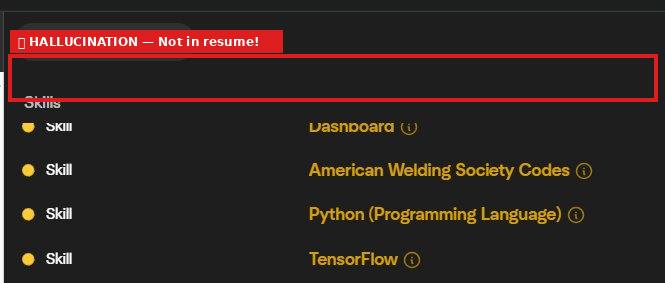
Observed output: Output artifact (Image): American Welding Society Codes was injected as a skill despite not appearing in the source resume. — image-8.png
Input artifact: Input artifact (PDF document): Source resume — Affinda Input.2.pdf
Output artifact: Output artifact (Image): American Welding Society Codes was injected as a skill despite not appearing in the source resume. — image-8.png
What changed: PDF document transformed into Image
Test case: PDF document → Image
Input type: PDF document
Input used: Input artifact (PDF document): Source resume — Affinda Input.3.pdf
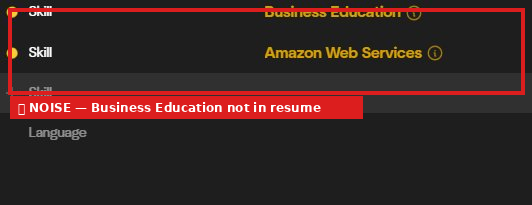
Observed output: Output artifact (Image): Business Education was injected as a skill even though it was not in the resume. — image-13.png
Input artifact: Input artifact (PDF document): Source resume — Affinda Input.3.pdf
Output artifact: Output artifact (Image): Business Education was injected as a skill even though it was not in the resume. — image-13.png
What changed: PDF document transformed into Image
Why it matters / Conclusion: A strong core parser pipeline: it accepted every PDF tested and returned structured JSON consistently.
Accepts resume PDFs and returns structured JSON with core candidate fields such as contact details, work history, education, certifications, and related profile data. The same parser was exercised on clean single-column, two-column, and messy free-form resumes.

Education and Certification Extraction▾
Feature tested: Education and Certification Extraction
Result: Partial
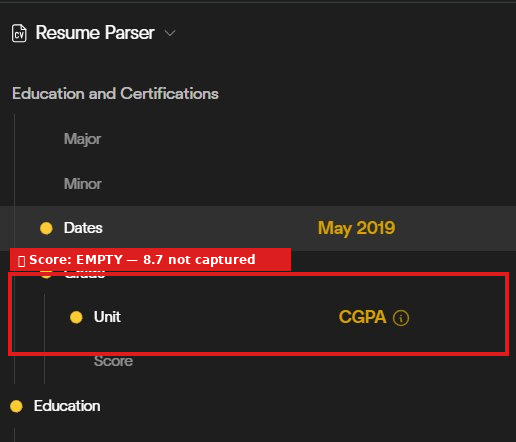
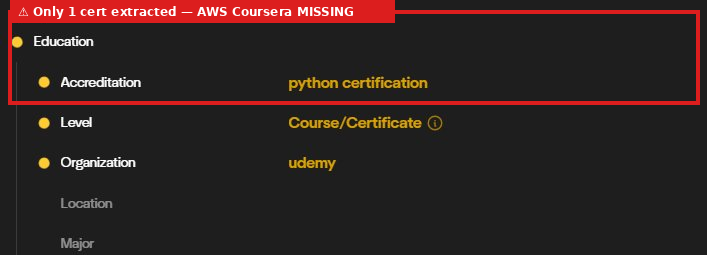
Expected behavior: Extracts degree records, institutions, dates, and certification entries from resumes. The tested set also showed a repeated CGPA miss and one missed certification on a messy resume.
Test case: PDF document → Image
Input type: PDF document
Input used: Input artifact (PDF document): Input — Affinda Input.1.pdf
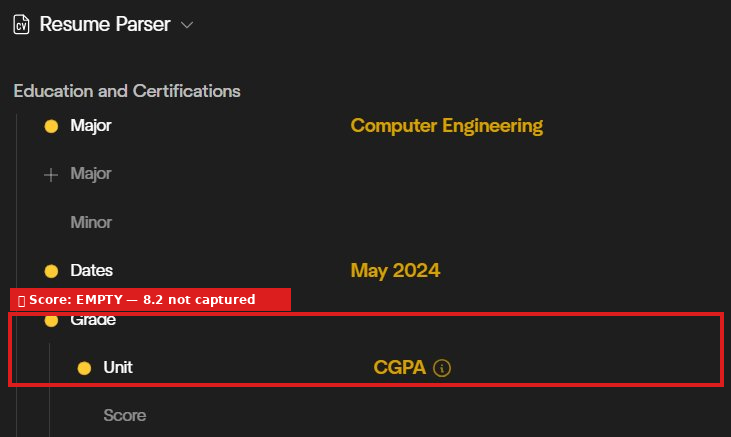
Observed output: Output artifact (Image): The clean resume's education panel captured the degree and CGPA unit, but the numeric score remained empty at 8.2. — image.png
Input artifact: Input artifact (PDF document): Input — Affinda Input.1.pdf
Output artifact: Output artifact (Image): The clean resume's education panel captured the degree and CGPA unit, but the numeric score remained empty at 8.2. — image.png
What changed: PDF document transformed into Image
Test case: PDF document → Image
Input type: PDF document
Input used: Input artifact (PDF document): Input — Affinda Input.2.pdf
Observed output: Output artifact (Image): The multi-column resume repeated the same CGPA miss: unit captured as CGPA, score 8.7 not captured. — CGPA Score missing Input 2.png
Input artifact: Input artifact (PDF document): Input — Affinda Input.2.pdf
Output artifact: Output artifact (Image): The multi-column resume repeated the same CGPA miss: unit captured as CGPA, score 8.7 not captured. — CGPA Score missing Input 2.png
What changed: PDF document transformed into Image
Test case: PDF document → Image
Input type: PDF document
Input used: Input artifact (PDF document): Input — Affinda Input.3.pdf
Observed output: Output artifact (Image): Only one certificate was extracted from the messy resume; the AWS Coursera certification was missing. — image-12.png
Input artifact: Input artifact (PDF document): Input — Affinda Input.3.pdf
Output artifact: Output artifact (Image): Only one certificate was extracted from the messy resume; the AWS Coursera certification was missing. — image-12.png
What changed: PDF document transformed into Image
Why it matters / Conclusion: Useful for education and certification parsing, but the repeated CGPA miss and a dropped certification make manual validation necessary.
Extracts degree records, institutions, dates, and certification entries from resumes. The tested set also showed a repeated CGPA miss and one missed certification on a messy resume.
Skill Extraction with Taxonomy Metadata▾
Feature tested: Skill Extraction with Taxonomy Metadata
Result: Failed
Expected behavior: Returns skill lists from resumes along with taxonomy-style metadata. The evidence also showed duplicates, certification names treated as skills, and some hallucinated taxonomy entries.
Test case: PDF document → Image
Input type: PDF document
Input used: Input artifact (PDF document): Input — Affinda Input.1.pdf
Observed output: Output artifact (Image): Research appears twice, Python appears multiple times, and the skills list mixes inferred duplicates with the source skill section. — image-3.png
Input artifact: Input artifact (PDF document): Input — Affinda Input.1.pdf
Output artifact: Output artifact (Image): Research appears twice, Python appears multiple times, and the skills list mixes inferred duplicates with the source skill section. — image-3.png
What changed: PDF document transformed into Image
Test case: PDF document → Image
Input type: PDF document
Input used: Input artifact (PDF document): Input — Affinda Input.1.pdf
Observed output: Output artifact (Image): Certification names such as AWS Certified Cloud Practitioner and IBM Mainframe were treated as skills, adding noise. — image-4.png
Input artifact: Input artifact (PDF document): Input — Affinda Input.1.pdf
Output artifact: Output artifact (Image): Certification names such as AWS Certified Cloud Practitioner and IBM Mainframe were treated as skills, adding noise. — image-4.png
What changed: PDF document transformed into Image
Test case: PDF document → Image
Input type: PDF document
Input used: Input artifact (PDF document): Input — Affinda Input.2.pdf
Observed output: Output artifact (Image): American Welding Society Codes was hallucinated as a skill even though it was not in the resume. — image-8.png
Input artifact: Input artifact (PDF document): Input — Affinda Input.2.pdf
Output artifact: Output artifact (Image): American Welding Society Codes was hallucinated as a skill even though it was not in the resume. — image-8.png
What changed: PDF document transformed into Image
Test case: PDF document → Image
Input type: PDF document
Input used: Input artifact (PDF document): Input — Affinda Input.3.pdf
Observed output: Output artifact (Image): Business Education was injected as a skill despite not appearing anywhere in the John Kumar resume. — image-13.png
Input artifact: Input artifact (PDF document): Input — Affinda Input.3.pdf
Output artifact: Output artifact (Image): Business Education was injected as a skill despite not appearing anywhere in the John Kumar resume. — image-13.png
What changed: PDF document transformed into Image
Why it matters / Conclusion: The skill output is rich, but the duplicate and hallucinated entries are too noisy to trust without cleanup.
Returns skill lists from resumes along with taxonomy-style metadata. The evidence also showed duplicates, certification names treated as skills, and some hallucinated taxonomy entries.
Custom Field Configuration and Review WorkflowThe interface exposes a configurable field schema and a document review step, but the report did not test authoring a new schema end to end.▾
Feature tested: Custom Field Configuration and Review Workflow
Result: Partial
Verdict: The interface exposes a configurable field schema and a document review step, but the report did not test authoring a new schema end to end.
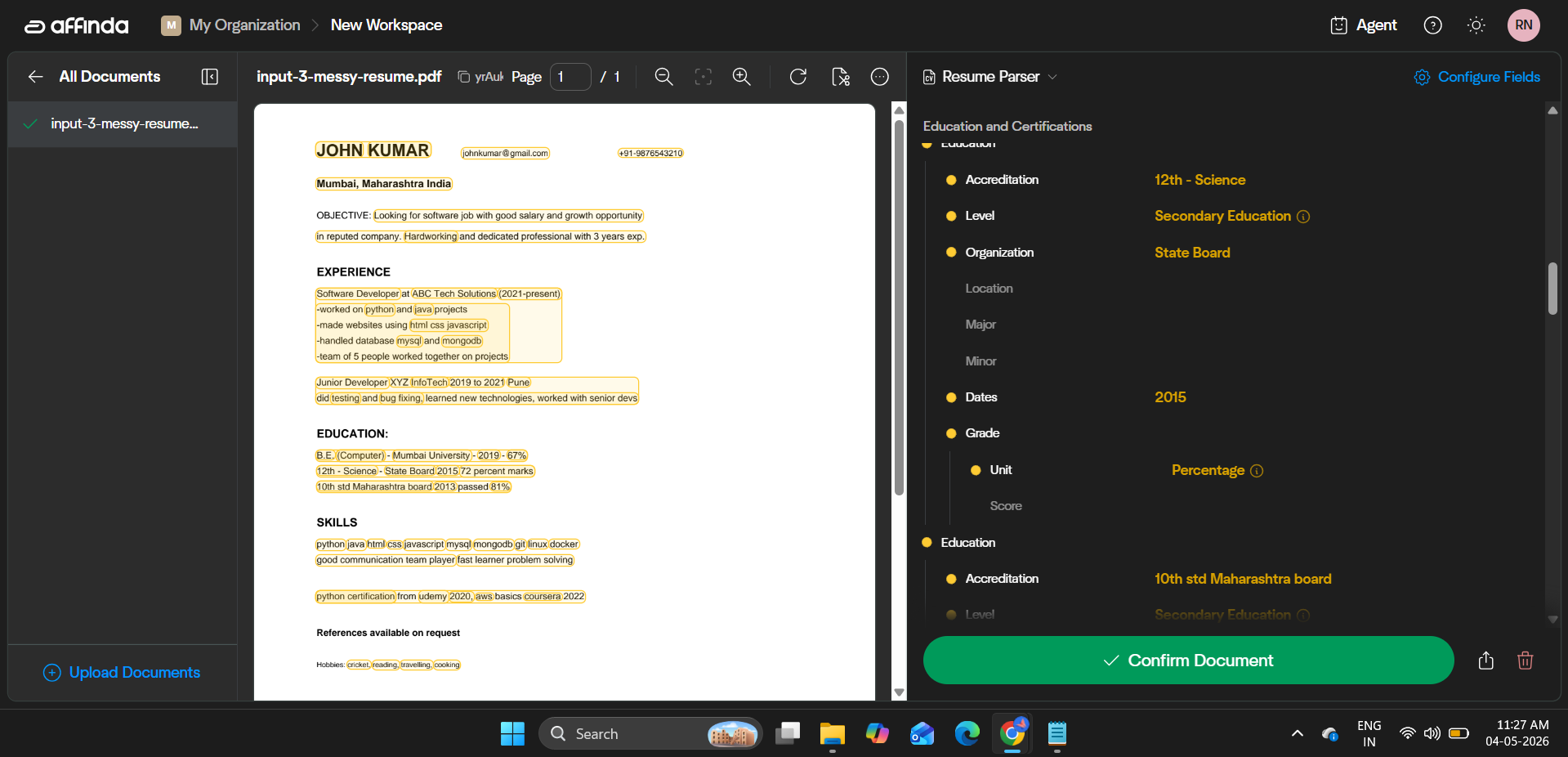
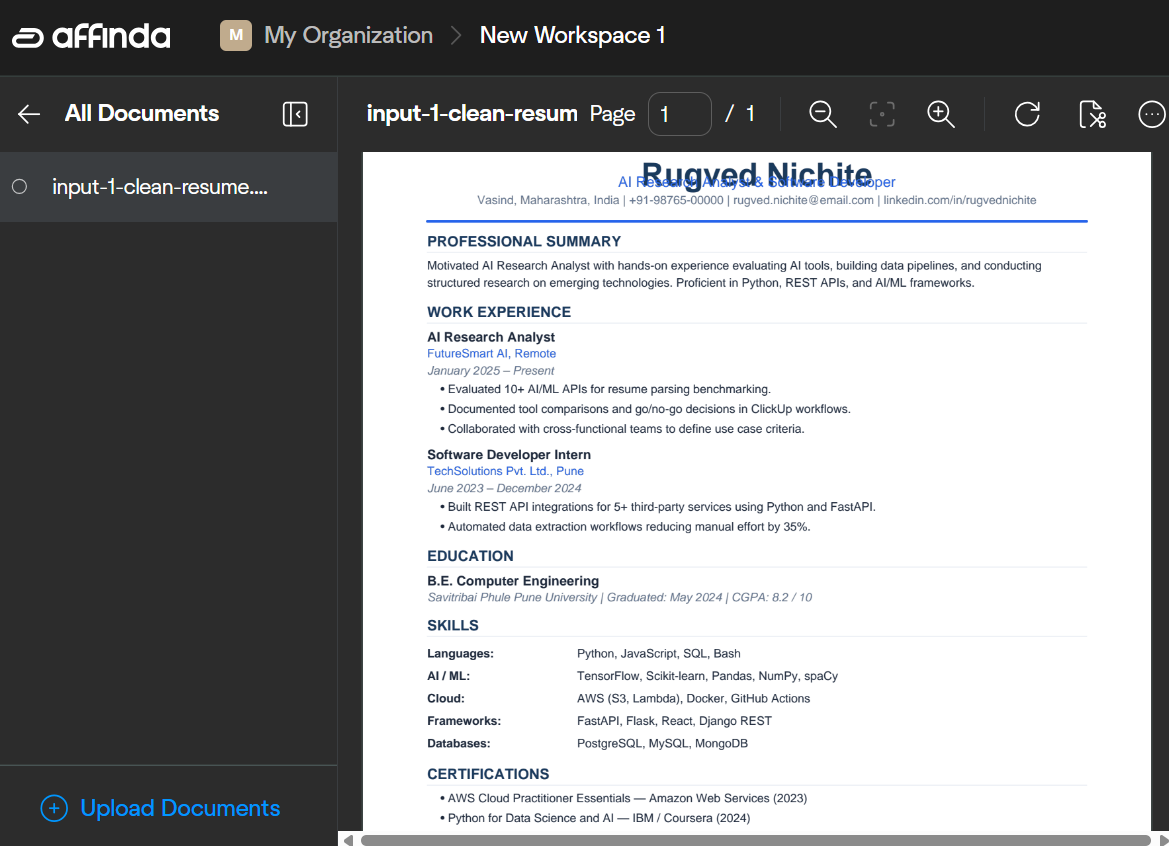
Expected behavior: Provides configurable extraction fields and a confirmation-oriented review interface around parsed resumes. The evidence showed a Configure Fields UI and review workflow, but did not verify that custom mappings changed extraction behavior.
Test case: PDF document → Image
Input type: PDF document
Input used: Input artifact (PDF document): Source resume — Affinda Input.3.pdf
Observed output: Output artifact (Image): The workspace exposed a Configure Fields panel and a Confirm Document review step around parsed education fields. — image-21.png
Input artifact: Input artifact (PDF document): Source resume — Affinda Input.3.pdf
Output artifact: Output artifact (Image): The workspace exposed a Configure Fields panel and a Confirm Document review step around parsed education fields. — image-21.png
What changed: PDF document transformed into Image
Test case: PDF document → Image
Input type: PDF document
Input used: Input artifact (PDF document): Clean resume source PDF used in the review workflow test. — Affinda Input.1.pdf
Observed output: Output artifact (Image): The clean-resume view shows the parsed document in the review interface with an Upload Documents action and a sidebar of extracted fields. — Screenshot 2026-05-05 120443.png
Input artifact: Input artifact (PDF document): Clean resume source PDF used in the review workflow test. — Affinda Input.1.pdf
Output artifact: Output artifact (Image): The clean-resume view shows the parsed document in the review interface with an Upload Documents action and a sidebar of extracted fields. — Screenshot 2026-05-05 120443.png
What changed: PDF document transformed into Image
Why it matters / Conclusion: Useful when you need to inspect or tune extraction in a review workflow, but the report did not verify custom schema creation beyond the exposed Configure Fields UI.
Provides configurable extraction fields and a confirmation-oriented review interface around parsed resumes. The evidence showed a Configure Fields UI and review workflow, but did not verify that custom mappings changed extraction behavior.
Structured List Section ExtractionUseful▾
Feature tested: Structured List Section Extraction
Result: Passed
Verdict: Useful
Expected behavior: Extracts list-like resume sections such as languages, projects, and hobbies, returning them as arrays when present. The tested resumes showed language proficiency levels, multiple projects, and hobbies in structured list form.
Test case: PDF document → Text/code file
Input type: PDF document
Input used: Input artifact (PDF document): Multi-column resume input — Affinda Input.2.pdf
Observed output: Output artifact (Text/code file): The multi-column resume included extracted language entries with proficiency levels and both project entries in the JSON output. — json output 2.txt
Input artifact: Input artifact (PDF document): Multi-column resume input — Affinda Input.2.pdf
Output artifact: Output artifact (Text/code file): The multi-column resume included extracted language entries with proficiency levels and both project entries in the JSON output. — json output 2.txt
What changed: PDF document transformed into Text/code file
Test case: PDF document → Text/code file
Input type: PDF document
Input used: Input artifact (PDF document): Messy resume input — Affinda Input.3.pdf
Observed output: Output artifact (Text/code file): The messy resume exported hobbies as a structured array, while the language field stayed null because no languages were present. — Json output 3.txt
Input artifact: Input artifact (PDF document): Messy resume input — Affinda Input.3.pdf
Output artifact: Output artifact (Text/code file): The messy resume exported hobbies as a structured array, while the language field stayed null because no languages were present. — Json output 3.txt
What changed: PDF document transformed into Text/code file
Why it matters / Conclusion: Good at structured list sections, but some project text can be truncated and absent fields are not inferred.
Extracts list-like resume sections such as languages, projects, and hobbies, returning them as arrays when present. The tested resumes showed language proficiency levels, multiple projects, and hobbies in structured list form.
Pricing & Access
Plans as of May 2026. Tested on the free plan
Pricing checked May 2026. We re-check quarterly. Visit affinda.com for current enterprise pricing.
Featured in Rankings
Independent rankings where Affinda was tested and rated.
Banner Preview
How the embed badge will look on your site

Embed HTML
Copy this code to your website source
Quick Integration Guide
- 1Copy the HTML code block above.
- 2Paste it into your site's HTML or CMS editor.
- 3Banner appears instantly on your page.
- 4Links back to your tool profile here.
Similar Tools
Discover more AI tools like Affinda to enhance your workflow.
Comments (0)
Need a custom AI solution for this use case?
If you are looking to build a custom resume parsing, candidate data extraction, or hiring workflow for your business or internal workflow, email us at contact@futuresmart.ai.
Found something inaccurate or missing? We try to keep our AI research accurate and useful. If you found outdated information, an issue, or have a suggestion, email us at collaborate@aidemos.com.