
OpenResume
Free browser resume parser that is handy for quick manual review on clean PDFs, but brittle field mapping and no JSON export make it unsuitable for API pipelines.
Useful as a free browser checker, but not a parsing API
- You want a free, zero-signup browser checker for clean single-column resumes.
- You need a quick manual review of parsed fields rather than a machine-readable API response.
- You can live with fixed schema fields and occasional misses on name, phone, or CGPA.
- You need JSON export or an HTTP API.
Our take
OpenResume is a free, open-source, zero-signup browser parser that is convenient for quick manual review of tidy single-column resumes. The tests confirm that it parses instantly and does not crash, but they also show brittle name, phone, GPA, and layout handling on multi-column and messy PDFs. Because it only exposes a browser view and no JSON export, it is not a fit for automated resume-parsing pipelines.
In-Depth Review
Our detailed analysis of OpenResume — features, performance, and real-world testing.
Feature-by-Feature Breakdown
Resume Parsing and Structured Field ExtractionFast and convenient for human review, but not machine-readable.▾
Feature tested: Resume Parsing and Structured Field Extraction
Result: Failed
Verdict: Fast and convenient for human review, but not machine-readable.
Expected behavior: OpenResume ingests resume PDFs in the browser and fills a structured resume form from clean single-column, multi-column, and messy layouts, covering contact details, summaries, work history, education/GPA, skills, certifications, and languages.
Test case: PDF document → Text prompt
Input type: PDF document
Input used: Input artifact (PDF document): Input — Input1_Rugved_Nichite_CleanResume.pdf
Observed output: Output artifact (Text prompt): Output
Input artifact: Input artifact (PDF document): Input — Input1_Rugved_Nichite_CleanResume.pdf
Output artifact: Output artifact (Text prompt): Output
What changed: PDF document transformed into Text prompt
Test case: PDF document → Text prompt
Input type: PDF document
Input used: Input artifact (PDF document): Source resume — Input2_Priya_Sharma_MultiColumnResume.pdf
Observed output: Output artifact (Text prompt): Observed result
Input artifact: Input artifact (PDF document): Source resume — Input2_Priya_Sharma_MultiColumnResume.pdf
Output artifact: Output artifact (Text prompt): Observed result
What changed: PDF document transformed into Text prompt
Test case: PDF document → Text prompt
Input type: PDF document
Input used: Input artifact (PDF document): Source resume — Input3_John_Kumar_MessyResume.pdf
Observed output: Output artifact (Text prompt): Observed result
Input artifact: Input artifact (PDF document): Source resume — Input3_John_Kumar_MessyResume.pdf
Output artifact: Output artifact (Text prompt): Observed result
What changed: PDF document transformed into Text prompt
Test case: PDF document → Image
Input type: PDF document
Input used: Input artifact (PDF document): Source resume — Input1_Rugved_Nichite_CleanResume.pdf
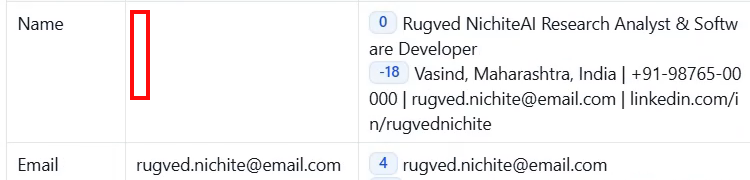
Observed output: Output artifact (Image): The Name field is blank even though the resume text on the right contains Rugved Nichite and the contact line, so the parser missed the name. — openresume_task1_name-empty.png
Input artifact: Input artifact (PDF document): Source resume — Input1_Rugved_Nichite_CleanResume.pdf
Output artifact: Output artifact (Image): The Name field is blank even though the resume text on the right contains Rugved Nichite and the contact line, so the parser missed the name. — openresume_task1_name-empty.png
What changed: PDF document transformed into Image
Test case: PDF document → Image
Input type: PDF document
Input used: Input artifact (PDF document): Source resume — Input1_Rugved_Nichite_CleanResume.pdf
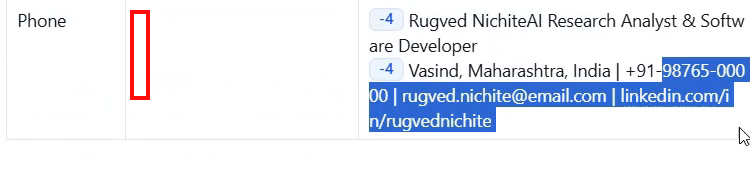
Observed output: Output artifact (Image): The Phone field is blank while the resume text still shows +91-98765-00000 in the contact line, so the dedicated phone field was not populated. — openresume_task1_phone-empty.png
Input artifact: Input artifact (PDF document): Source resume — Input1_Rugved_Nichite_CleanResume.pdf
Output artifact: Output artifact (Image): The Phone field is blank while the resume text still shows +91-98765-00000 in the contact line, so the dedicated phone field was not populated. — openresume_task1_phone-empty.png
What changed: PDF document transformed into Image
Test case: PDF document → Text prompt
Input type: PDF document
Input used: Input artifact (PDF document): Source resume — Input3_John_Kumar_MessyResume.pdf
Observed output: Output artifact (Text prompt): Observed result
Input artifact: Input artifact (PDF document): Source resume — Input3_John_Kumar_MessyResume.pdf
Output artifact: Output artifact (Text prompt): Observed result
What changed: PDF document transformed into Text prompt
Test case: PDF document → Image
Input type: PDF document
Input used: Input artifact (PDF document): Input — Input2_Priya_Sharma_MultiColumnResume.pdf
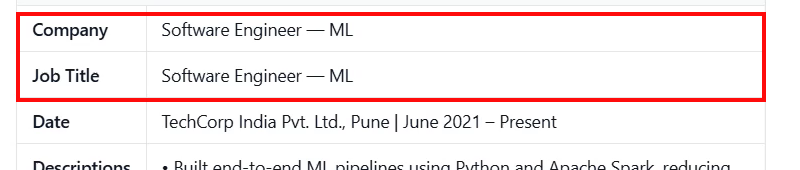
Observed output: Output artifact (Image): Company and Job Title both resolve to the same value, 'Software Engineer — ML', showing a field-mapping failure. — openresume_task2_company-jobtitle-mismatch.png
Input artifact: Input artifact (PDF document): Input — Input2_Priya_Sharma_MultiColumnResume.pdf
Output artifact: Output artifact (Image): Company and Job Title both resolve to the same value, 'Software Engineer — ML', showing a field-mapping failure. — openresume_task2_company-jobtitle-mismatch.png
What changed: PDF document transformed into Image
Test case: PDF document → Image
Input type: PDF document
Input used: Input artifact (PDF document): INPUT — Input3_John_Kumar_MessyResume.pdf
Observed output: Output artifact (Image): The Company field contains '-worked on python and java projects' instead of a company name, showing a field-mapping failure on the messy resume. — openresume_task3_company-wrong.png
Input artifact: Input artifact (PDF document): INPUT — Input3_John_Kumar_MessyResume.pdf
Output artifact: Output artifact (Image): The Company field contains '-worked on python and java projects' instead of a company name, showing a field-mapping failure on the messy resume. — openresume_task3_company-wrong.png
What changed: PDF document transformed into Image
Test case: PDF document → Image
Input type: PDF document
Input used: Input artifact (PDF document): Source resume — Input3_John_Kumar_MessyResume.pdf
Observed output: Output artifact (Image): Job Title is empty and the role information was pushed into Date, which reads 'Software Developer at ABC Tech Solutions (2021-present)'. — openresume_task3_jobtitle-empty-2.png
Input artifact: Input artifact (PDF document): Source resume — Input3_John_Kumar_MessyResume.pdf
Output artifact: Output artifact (Image): Job Title is empty and the role information was pushed into Date, which reads 'Software Developer at ABC Tech Solutions (2021-present)'. — openresume_task3_jobtitle-empty-2.png
What changed: PDF document transformed into Image
Test case: PDF document → Image
Input type: PDF document
Input used: Input artifact (PDF document): INPUT — Input2_Priya_Sharma_MultiColumnResume.pdf
Observed output: Output artifact (Image): The Summary field is populated with 'Software Engineer — Machine Learning', which is the resume's job-title headline rather than a profile summary. — openresume-o4-summary-wrong-1197c353ecbe.png
Input artifact: Input artifact (PDF document): INPUT — Input2_Priya_Sharma_MultiColumnResume.pdf
Output artifact: Output artifact (Image): The Summary field is populated with 'Software Engineer — Machine Learning', which is the resume's job-title headline rather than a profile summary. — openresume-o4-summary-wrong-1197c353ecbe.png
What changed: PDF document transformed into Image
Test case: PDF document → Text prompt
Input type: PDF document
Input used: Input artifact (PDF document): Input — Input3_John_Kumar_MessyResume.pdf
Observed output: Output artifact (Text prompt): Output
Input artifact: Input artifact (PDF document): Input — Input3_John_Kumar_MessyResume.pdf
Output artifact: Output artifact (Text prompt): Output
What changed: PDF document transformed into Text prompt
Test case: PDF document → Image
Input type: PDF document
Input used: Input artifact (PDF document): Input — Input1_Rugved_Nichite_CleanResume.pdf
Observed output: Output artifact (Image): The GPA field is blank while CGPA text has been placed into Date instead. — openresume_task1_gpa-in-date-field.png
Input artifact: Input artifact (PDF document): Input — Input1_Rugved_Nichite_CleanResume.pdf
Output artifact: Output artifact (Image): The GPA field is blank while CGPA text has been placed into Date instead. — openresume_task1_gpa-in-date-field.png
What changed: PDF document transformed into Image
Test case: PDF document → Image
Input type: PDF document
Input used: Input artifact (PDF document): Input — Input2_Priya_Sharma_MultiColumnResume.pdf
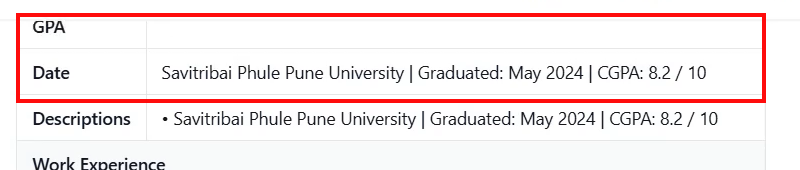
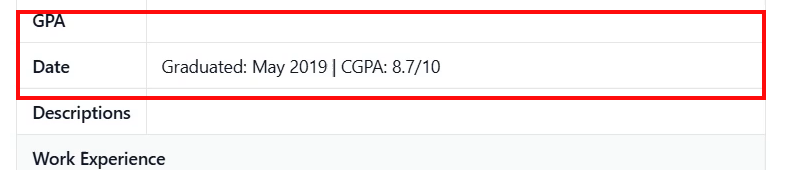
Observed output: Output artifact (Image): The GPA field is blank while the Date field contains graduation and CGPA text. — openresume_task2_gpa-in-date-field.png
Input artifact: Input artifact (PDF document): Input — Input2_Priya_Sharma_MultiColumnResume.pdf
Output artifact: Output artifact (Image): The GPA field is blank while the Date field contains graduation and CGPA text. — openresume_task2_gpa-in-date-field.png
What changed: PDF document transformed into Image
Test case: PDF document → Image
Input type: PDF document
Input used: Input artifact (PDF document): Input — Input3_John_Kumar_MessyResume.pdf
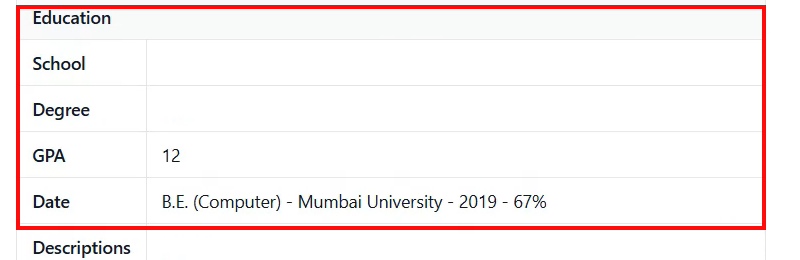
Observed output: Output artifact (Image): School and Degree are blank, GPA is misread as '12', and the Date field contains the raw education line. — openresume_task3_education-fields-failed.png
Input artifact: Input artifact (PDF document): Input — Input3_John_Kumar_MessyResume.pdf
Output artifact: Output artifact (Image): School and Degree are blank, GPA is misread as '12', and the Date field contains the raw education line. — openresume_task3_education-fields-failed.png
What changed: PDF document transformed into Image
Test case: Text prompt → Text prompt
Input type: Text prompt
Input used: Input artifact (Text prompt): INPUT
Observed output: Output artifact (Text prompt): OUTPUT
Input artifact: Input artifact (Text prompt): INPUT
Output artifact: Output artifact (Text prompt): OUTPUT
What changed: Text prompt transformed into Text prompt
Test case: PDF document → Text prompt
Input type: PDF document
Input used: Input artifact (PDF document): Input — Input2_Priya_Sharma_MultiColumnResume.pdf
Observed output: Output artifact (Text prompt): Output
Input artifact: Input artifact (PDF document): Input — Input2_Priya_Sharma_MultiColumnResume.pdf
Output artifact: Output artifact (Text prompt): Output
What changed: PDF document transformed into Text prompt
Test case: PDF document → Text prompt
Input type: PDF document
Input used: Input artifact (PDF document): Input — Input1_Rugved_Nichite_CleanResume.pdf
Observed output: Output artifact (Text prompt): Output
Input artifact: Input artifact (PDF document): Input — Input1_Rugved_Nichite_CleanResume.pdf
Output artifact: Output artifact (Text prompt): Output
What changed: PDF document transformed into Text prompt
Test case: PDF document → Text prompt
Input type: PDF document
Input used: Input artifact (PDF document): Input — Input1_Rugved_Nichite_CleanResume.pdf
Observed output: Output artifact (Text prompt): Output
Input artifact: Input artifact (PDF document): Input — Input1_Rugved_Nichite_CleanResume.pdf
Output artifact: Output artifact (Text prompt): Output
What changed: PDF document transformed into Text prompt
Test case: PDF document → Text prompt
Input type: PDF document
Input used: Input artifact (PDF document): Input — Input3_John_Kumar_MessyResume.pdf
Observed output: Output artifact (Text prompt): Output
Input artifact: Input artifact (PDF document): Input — Input3_John_Kumar_MessyResume.pdf
Output artifact: Output artifact (Text prompt): Output
What changed: PDF document transformed into Text prompt
Test case: PDF document → Text prompt
Input type: PDF document
Input used: Input artifact (PDF document): Baseline clean resume used for contact extraction. — Input1_Rugved_Nichite_CleanResume.pdf
Observed output: Output artifact (Text prompt): The report says the email and LinkedIn were the reliable contact outputs on this resume.
Input artifact: Input artifact (PDF document): Baseline clean resume used for contact extraction. — Input1_Rugved_Nichite_CleanResume.pdf
Output artifact: Output artifact (Text prompt): The report says the email and LinkedIn were the reliable contact outputs on this resume.
What changed: PDF document transformed into Text prompt
Test case: PDF document → Text prompt
Input type: PDF document
Input used: Input artifact (PDF document): Clean single-column resume with two work experiences. — Input1_Rugved_Nichite_CleanResume.pdf
Observed output: Output artifact (Text prompt): The baseline resume showed the best work-experience extraction in the report.
Input artifact: Input artifact (PDF document): Clean single-column resume with two work experiences. — Input1_Rugved_Nichite_CleanResume.pdf
Output artifact: Output artifact (Text prompt): The baseline resume showed the best work-experience extraction in the report.
What changed: PDF document transformed into Text prompt
Test case: PDF document → Text prompt
Input type: PDF document
Input used: Input artifact (PDF document): Clean single-column resume with a polished summary section. — Input1_Rugved_Nichite_CleanResume.pdf
Observed output: Output artifact (Text prompt): The clean resume summary was the strongest summary result in the report.
Input artifact: Input artifact (PDF document): Clean single-column resume with a polished summary section. — Input1_Rugved_Nichite_CleanResume.pdf
Output artifact: Output artifact (Text prompt): The clean resume summary was the strongest summary result in the report.
What changed: PDF document transformed into Text prompt
Test case: PDF document → Text prompt
Input type: PDF document
Input used: Input artifact (PDF document): Multi-column resume used for section extraction. — Input2_Priya_Sharma_MultiColumnResume.pdf
Observed output: Output artifact (Text prompt): The report says the sidebar sections were extracted correctly on this layout.
Input artifact: Input artifact (PDF document): Multi-column resume used for section extraction. — Input2_Priya_Sharma_MultiColumnResume.pdf
Output artifact: Output artifact (Text prompt): The report says the sidebar sections were extracted correctly on this layout.
What changed: PDF document transformed into Text prompt
Test case: PDF document → Text prompt
Input type: PDF document
Input used: Input artifact (PDF document): Messy-format resume used to test weak section headers. — Input3_John_Kumar_MessyResume.pdf
Observed output: Output artifact (Text prompt): The messy resume still produced a summary, but section grouping was weak.
Input artifact: Input artifact (PDF document): Messy-format resume used to test weak section headers. — Input3_John_Kumar_MessyResume.pdf
Output artifact: Output artifact (Text prompt): The messy resume still produced a summary, but section grouping was weak.
What changed: PDF document transformed into Text prompt
Why it matters / Conclusion: Great for a free browser-side sanity check, but unusable for an automated parsing pipeline because there is no JSON or API output.
OpenResume ingests resume PDFs in the browser and fills a structured resume form from clean single-column, multi-column, and messy layouts, covering contact details, summaries, work history, education/GPA, skills, certifications, and languages.



Pricing & access
Fully free open-source project; no paid tiers were reported.
Runs client-side in the browser with no signup or account required.
Featured in Rankings
Independent rankings where OpenResume was tested and rated.
Banner Preview
How the embed badge will look on your site

Embed HTML
Copy this code to your website source
Quick Integration Guide
- 1Copy the HTML code block above.
- 2Paste it into your site's HTML or CMS editor.
- 3Banner appears instantly on your page.
- 4Links back to your tool profile here.
Similar Tools
Discover more AI tools like OpenResume to enhance your workflow.
Comments (0)
Need a custom AI solution for this use case?
If you are looking to build a custom resume parsing, field extraction, or candidate screening system for your business or internal workflow, email us at contact@futuresmart.ai.
Found something inaccurate or missing? We try to keep our AI research accurate and useful. If you found outdated information, an issue, or have a suggestion, email us at collaborate@aidemos.com.