
X-Pilot
Animated workflow diagrams with narration and captions, but layout cleanup is still needed.
Accurate workflows, but not yet presentation-clean
- You need the workflow diagram logic to come through correctly, including branches and feedback loops.
- You want a narrated MP4 with matching captions instead of a silent animation.
- You can tolerate some cleanup work for overlaps, wrapping issues, and brief timing glitches.
- You need presentation-ready output with no overlaps, broken wrapping, dead air, or branding collisions.
Our take
X-Pilot reliably turned plain-text prompts into the right workflow structures, including parallel destinations in a RAG pipeline and a full approve/reject loop for a human-in-the-loop flow. It also added real narration with matching captions, which makes the output more useful than a silent animation. The recurring tradeoff is polish: icon and caption overlaps, mid-word wrapping, inconsistent labels, a title glitch, dead air before the diagram starts, and a ghost shape all showed up in testing.
In-Depth Review
Our detailed analysis of X-Pilot — features, performance, and real-world testing.
Feature-by-Feature Breakdown
Workflow Diagram AnimationStrong on concept-to-diagram accuracy, but the layout needs cleanup.▾
Feature tested: Workflow Diagram Animation
Result: Partial
Verdict: Strong on concept-to-diagram accuracy, but the layout needs cleanup.
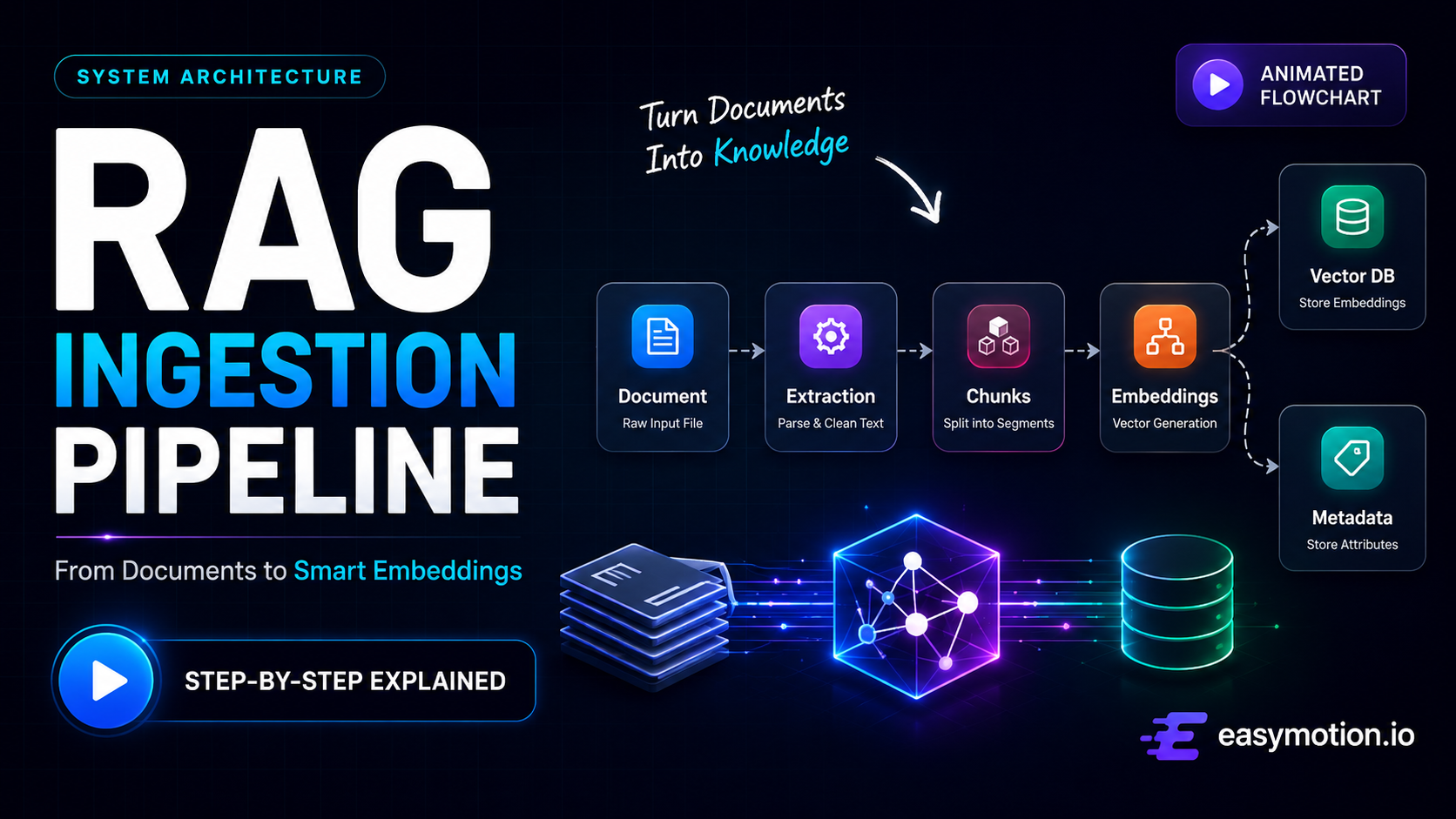
Expected behavior: Converts plain-text process descriptions into animated workflow diagrams with branching and loop-back logic. It was exercised on a RAG ingestion pipeline with parallel destinations and a human-in-the-loop approval flow with a retry loop.
Test case: Text prompt → Video file
Input type: Text prompt
Input used: Input artifact (Text prompt): Input
Observed output: Output artifact (Video file): X-Pilot correctly built the full branching structure: Document → Extracted Text → Text Chunks → Embeddings → branches into both Metadata Store and Vector Database, matching the prompt's parallel-destination logic exactly. The main limitation was polish: decorative icon overlap, mid-word wrapping on the final summary slide, inconsistent destination naming, and a breadcrumb that did not match the visible labels. — X-Pilot output 1.mp4
Input artifact: Input artifact (Text prompt): Input
Output artifact: Output artifact (Video file): X-Pilot correctly built the full branching structure: Document → Extracted Text → Text Chunks → Embeddings → branches into both Metadata Store and Vector Database, matching the prompt's parallel-destination logic exactly. The main limitation was polish: decorative icon overlap, mid-word wrapping on the final summary slide, inconsistent destination naming, and a breadcrumb that did not match the visible labels. — X-Pilot output 1.mp4
What changed: Text prompt transformed into Video file
Test case: Text prompt → Video file
Input type: Text prompt
Input used: Input artifact (Text prompt): Input
Observed output: Output artifact (Video file): X-Pilot correctly represented the full approve/reject loop: User Input → AI Generation → Human Review → Approved → Final Output / Rejected + Feedback → loops back to AI Generation. The diagram logic was right, but presentation issues remained, including a title glitch, a blank stretch before the diagram appeared, overflowing decision-shape text, an unexplained ghost diamond, and caption overlap with the logo. — X-Pilot output 2.mp4
Input artifact: Input artifact (Text prompt): Input
Output artifact: Output artifact (Video file): X-Pilot correctly represented the full approve/reject loop: User Input → AI Generation → Human Review → Approved → Final Output / Rejected + Feedback → loops back to AI Generation. The diagram logic was right, but presentation issues remained, including a title glitch, a blank stretch before the diagram appeared, overflowing decision-shape text, an unexplained ghost diamond, and caption overlap with the logo. — X-Pilot output 2.mp4
What changed: Text prompt transformed into Video file
Why it matters / Conclusion: The core diagram logic was correct in both tests, including branching and feedback loops, but recurring layout issues kept the output from feeling production-ready.
Converts plain-text process descriptions into animated workflow diagrams with branching and loop-back logic. It was exercised on a RAG ingestion pipeline with parallel destinations and a human-in-the-loop approval flow with a retry loop.
Narrated Explainer Video GenerationUseful value-add, but the surrounding motion still needs cleanup.▾
Feature tested: Narrated Explainer Video Generation
Result: Partial
Verdict: Useful value-add, but the surrounding motion still needs cleanup.
Expected behavior: Generates explainer-style videos with spoken narration and matching captions on the exported MP4. It was exercised on runs that produced continuous voiceover, captions, and in one case short side-panel explanations for each stage.
Test case: Text prompt → Video file
Input type: Text prompt
Input used: Input artifact (Text prompt): Input
Observed output: Output artifact (Video file): The video included a real narrated voiceover with matching captions and explanatory side-panels per stage, such as a "Why Chunk?" note explaining retrieval efficiency. The caption and narration layer worked as intended, even though the visual layout had recurring overlap and wrapping problems. — X-Pilot output 1.mp4
Input artifact: Input artifact (Text prompt): Input
Output artifact: Output artifact (Video file): The video included a real narrated voiceover with matching captions and explanatory side-panels per stage, such as a "Why Chunk?" note explaining retrieval efficiency. The caption and narration layer worked as intended, even though the visual layout had recurring overlap and wrapping problems. — X-Pilot output 1.mp4
What changed: Text prompt transformed into Video file
Test case: Text prompt → Video file
Input type: Text prompt
Input used: Input artifact (Text prompt): Input
Observed output: Output artifact (Video file): The video included full narrated voiceover with matching captions throughout. The caption layer worked, but long caption lines could collide with the X-Pilot logo in the lower-right corner. — X-Pilot output 2.mp4
Input artifact: Input artifact (Text prompt): Input
Output artifact: Output artifact (Video file): The video included full narrated voiceover with matching captions throughout. The caption layer worked, but long caption lines could collide with the X-Pilot logo in the lower-right corner. — X-Pilot output 2.mp4
What changed: Text prompt transformed into Video file
Why it matters / Conclusion: The narration/caption layer is a real benefit, but it does not fully offset the tool's recurring timing and branding collisions.
Generates explainer-style videos with spoken narration and matching captions on the exported MP4. It was exercised on runs that produced continuous voiceover, captions, and in one case short side-panel explanations for each stage.
Plans and free-tier limits
Testing found a credit-based free tier, while the marketing page also describes free rendering by time.
The marketing page describes free access as 3 minutes of video rendering per month, while the tested account showed a 280-credit free allotment; direct MP4 download and no watermark require Creator or above.
Featured in Rankings
Independent rankings where X-Pilot was tested and rated.
Banner Preview
How the embed badge will look on your site

Embed HTML
Copy this code to your website source
Quick Integration Guide
- 1Copy the HTML code block above.
- 2Paste it into your site's HTML or CMS editor.
- 3Banner appears instantly on your page.
- 4Links back to your tool profile here.
Similar Tools
Discover more AI tools like X-Pilot to enhance your workflow.
Comments (0)
Need a custom AI solution for this use case?
If you are looking to build a custom workflow diagram generation, narrated process visualization, or explainer video tool for your business or internal workflow, email us at contact@futuresmart.ai.
Found something inaccurate or missing? We try to keep our AI research accurate and useful. If you found outdated information, an issue, or have a suggestion, email us at collaborate@aidemos.com.