
Kodisc
Browser-based Manim-style diagram videos from text, with correct workflow logic and free MP4 export, but visible render glitches.
Strong logic, uneven polish
- You want browser-based Manim-style diagram videos without installing Python or running Manim locally.
- You need a tool that can turn a technical workflow prompt into a structured animated diagram.
- You are okay reviewing the render for glitches before sharing.
- You need consistently polished text rendering and final-frame reliability.
Feature scores on this page: 7.0/10 (1 scored feature)
Our take
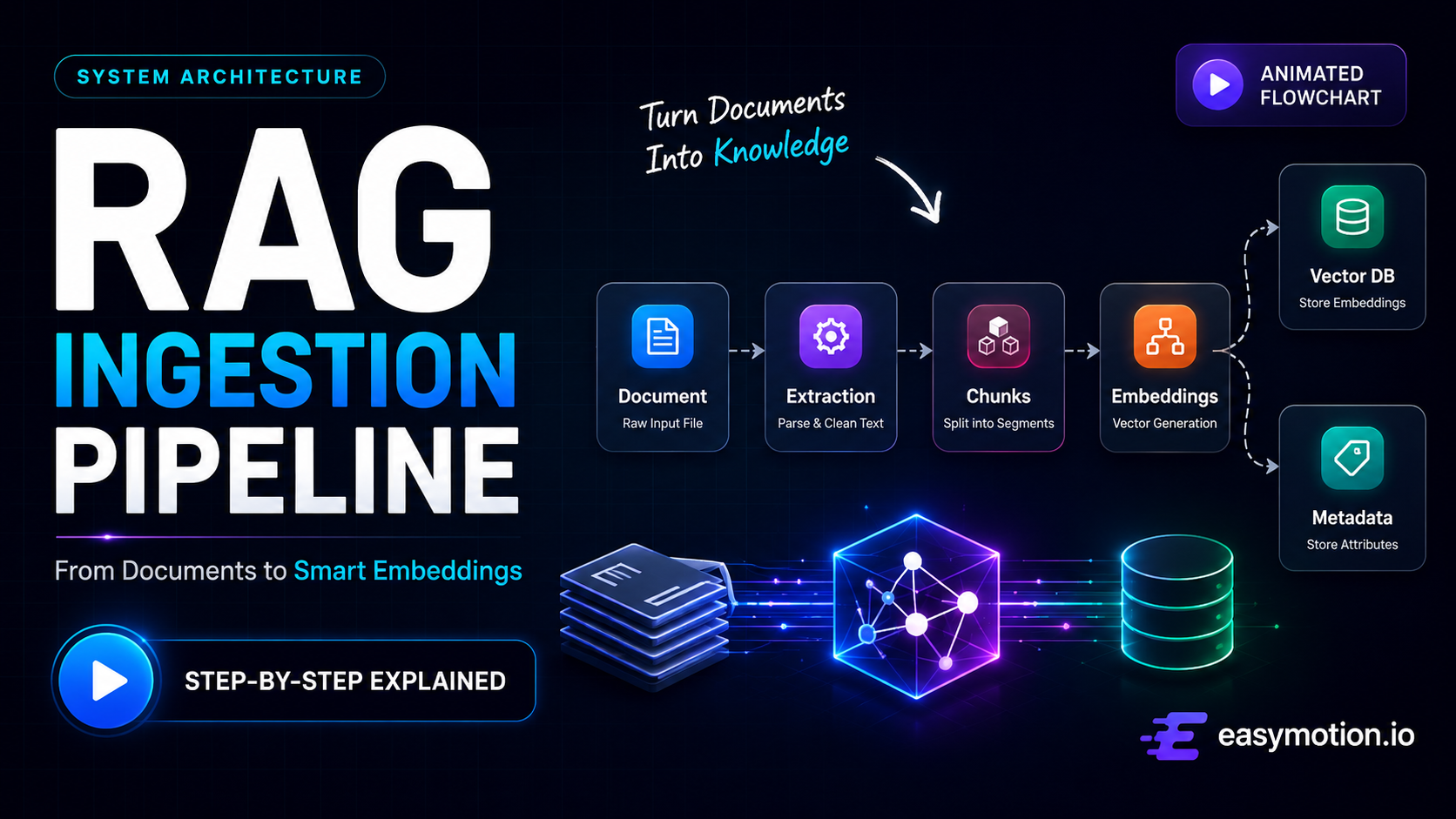
Kodisc got the tested workflows right: the RAG pipeline followed the correct order, and the human-in-the-loop clip modeled approval and rejection with a loop-back path. The problem is execution quality. The RAG render showed garbled Chunking text, stacked icons over Embedding Generation, and a freeze that ran from about 15 seconds to the end of the file, while the branching clip still had a stray letter, a clipped label, and a missing arrowhead. It looks promising for structured diagram videos, but it is not yet clean enough to trust without review.
In-Depth Review
Our detailed analysis of Kodisc — features, performance, and real-world testing.
Feature-by-Feature Breakdown
Text-to-Animated Workflow Video GenerationWorks on structured prompts, but the render quality is inconsistent.7/10▾
Feature tested: Text-to-Animated Workflow Video Generation
Result: Partial (7/10)
Verdict: Works on structured prompts, but the render quality is inconsistent.
Expected behavior: Turns plain-text process descriptions into structured animated diagrams/videos in the browser. The tested inputs included a RAG-style pipeline and a human-in-the-loop approval flow with a decision and return path, plus a detailed ingestion pipeline prompt, all producing technical workflow animations rather than generic visuals.
Test case: Text prompt → Video file
Input type: Text prompt
Input used: Input artifact (Text prompt): Input
Observed output: Output artifact (Video file): Kodisc sequenced the pipeline correctly and produced a dual fan-out animated flow, but the render later developed garbled Chunking text, stacked icons over Embedding Generation, and froze from about 15 seconds to the end. — kodisc output 1.mp4
Input artifact: Input artifact (Text prompt): Input
Output artifact: Output artifact (Video file): Kodisc sequenced the pipeline correctly and produced a dual fan-out animated flow, but the render later developed garbled Chunking text, stacked icons over Embedding Generation, and froze from about 15 seconds to the end. — kodisc output 1.mp4
What changed: Text prompt transformed into Video file
Test case: Text prompt → Video file
Input type: Text prompt
Input used: Input artifact (Text prompt): Input
Observed output: Output artifact (Video file): The branching logic was modeled correctly, including the approval decision and the rejection loop back to AI Processes, but the feedback line had no arrowhead and the Human Review label was clipped. — Kodisc output 2.mp4
Input artifact: Input artifact (Text prompt): Input
Output artifact: Output artifact (Video file): The branching logic was modeled correctly, including the approval decision and the rejection loop back to AI Processes, but the feedback line had no arrowhead and the Human Review label was clipped. — Kodisc output 2.mp4
What changed: Text prompt transformed into Video file
Why it matters / Conclusion: The core prompt-to-workflow capability is real, but the renders are not consistently clean enough for presentation use.
Turns plain-text process descriptions into structured animated diagrams/videos in the browser. The tested inputs included a RAG-style pipeline and a human-in-the-loop approval flow with a decision and return path, plus a detailed ingestion pipeline prompt, all producing technical workflow animations rather than generic visuals.
MP4 Video ExportAvailable, but free-tier downloads are limited▾
Feature tested: MP4 Video Export
Result: Partial
Verdict: Available, but free-tier downloads are limited
Expected behavior: Exports the finished animation as a downloadable MP4 file. The tested runs reported MP4 delivery on the free tier, including a 720p/24fps export and limited-download constraints.
Test case: Text prompt → Video file
Input type: Text prompt
Input used: Input artifact (Text prompt): INPUT
Observed output: Output artifact (Video file): The finished result was delivered as a final MP4 animated flowchart. The report notes that free-tier downloads are limited. — Kodisc.mp4
Input artifact: Input artifact (Text prompt): INPUT
Output artifact: Output artifact (Video file): The finished result was delivered as a final MP4 animated flowchart. The report notes that free-tier downloads are limited. — Kodisc.mp4
What changed: Text prompt transformed into Video file
Test case: Text prompt → Video file
Input type: Text prompt
Input used: Input artifact (Text prompt): Input
Observed output: Output artifact (Video file): The RAG run was exported as an MP4, but the file ended with a frozen, unresolved frame and visible text collisions. — kodisc output 1.mp4
Input artifact: Input artifact (Text prompt): Input
Output artifact: Output artifact (Video file): The RAG run was exported as an MP4, but the file ended with a frozen, unresolved frame and visible text collisions. — kodisc output 1.mp4
What changed: Text prompt transformed into Video file
Test case: Text prompt → Video file
Input type: Text prompt
Input used: Input artifact (Text prompt): Input
Observed output: Output artifact (Video file): The human-in-the-loop run was exported as an MP4 and completed without freezing, but the render still contained label and connector defects. — Kodisc output 2.mp4
Input artifact: Input artifact (Text prompt): Input
Output artifact: Output artifact (Video file): The human-in-the-loop run was exported as an MP4 and completed without freezing, but the render still contained label and connector defects. — Kodisc output 2.mp4
What changed: Text prompt transformed into Video file
Why it matters / Conclusion: MP4 export is present and usable for the tested flow, but the free tier is constrained by limited downloads.
Exports the finished animation as a downloadable MP4 file. The tested runs reported MP4 delivery on the free tier, including a 720p/24fps export and limited-download constraints.
Pricing & Access
Free tier available; paid plans add more projects, renders, and export quality.
Pricing checked March 2026. Free tier was tested.
Featured in Rankings
Independent rankings where Kodisc was tested and rated.
Banner Preview
How the embed badge will look on your site

Embed HTML
Copy this code to your website source
Quick Integration Guide
- 1Copy the HTML code block above.
- 2Paste it into your site's HTML or CMS editor.
- 3Banner appears instantly on your page.
- 4Links back to your tool profile here.
Similar Tools
Discover more AI tools like Kodisc to enhance your workflow.
Comments (0)
Need a custom AI solution for this use case?
If you are looking to build a custom diagram video generation, workflow explainer videos, or animated technical presentation tool for your business or internal workflow, email us at contact@futuresmart.ai.
Found something inaccurate or missing? We try to keep our AI research accurate and useful. If you found outdated information, an issue, or have a suggestion, email us at collaborate@aidemos.com.