
Claude AI
Turns plain-text process prompts into accurate animated flowcharts with branching and loop-back logic, but export is still a follow-up step.
Accurate animated diagrams, with export friction.
- You need accurate process diagrams with branches or loop-backs from plain-text prompts.
- You are comfortable working with a live interactive artifact and exporting it afterward.
- You want genuine motion cues like a moving dot and optional synced captions.
- You need a directly downloadable MP4 from the generation step itself.
Feature scores on this page: 8.0/10 (1 scored feature)
Our take
Claude was the strongest LLM-based option in this research for turning plain-text workflow prompts into animated diagrams. It matched both anchor tasks structurally, handled branching and loop-backs cleanly, and added genuine motion plus captions; the main drawback is that the result stayed as a live in-chat artifact in this test, so publishing/export still needs an extra step.
In-Depth Review
Our detailed analysis of Claude AI — features, performance, and real-world testing.
Feature-by-Feature Breakdown
Text-to-Animated Diagram GenerationClaude turned a single plain-text process description into a highly accurate animated flowchart, but it did not provide direct video export in this test.8/10▾
Feature tested: Text-to-Animated Diagram Generation
Result: Passed (8/10)
Verdict: Claude turned a single plain-text process description into a highly accurate animated flowchart, but it did not provide direct video export in this test.
Expected behavior: Claude turns plain-text workflow descriptions into animated HTML/SVG flowcharts and diagrams. It was exercised on RAG pipeline prompts, a conversational RAG pipeline, and a feedback-loop workflow, with outputs that included labeled stages, arrows, color-coded nodes, and browser-based animation.
Test case: Text prompt → Video file
Input type: Text prompt
Input used: Input artifact (Text prompt): INPUT
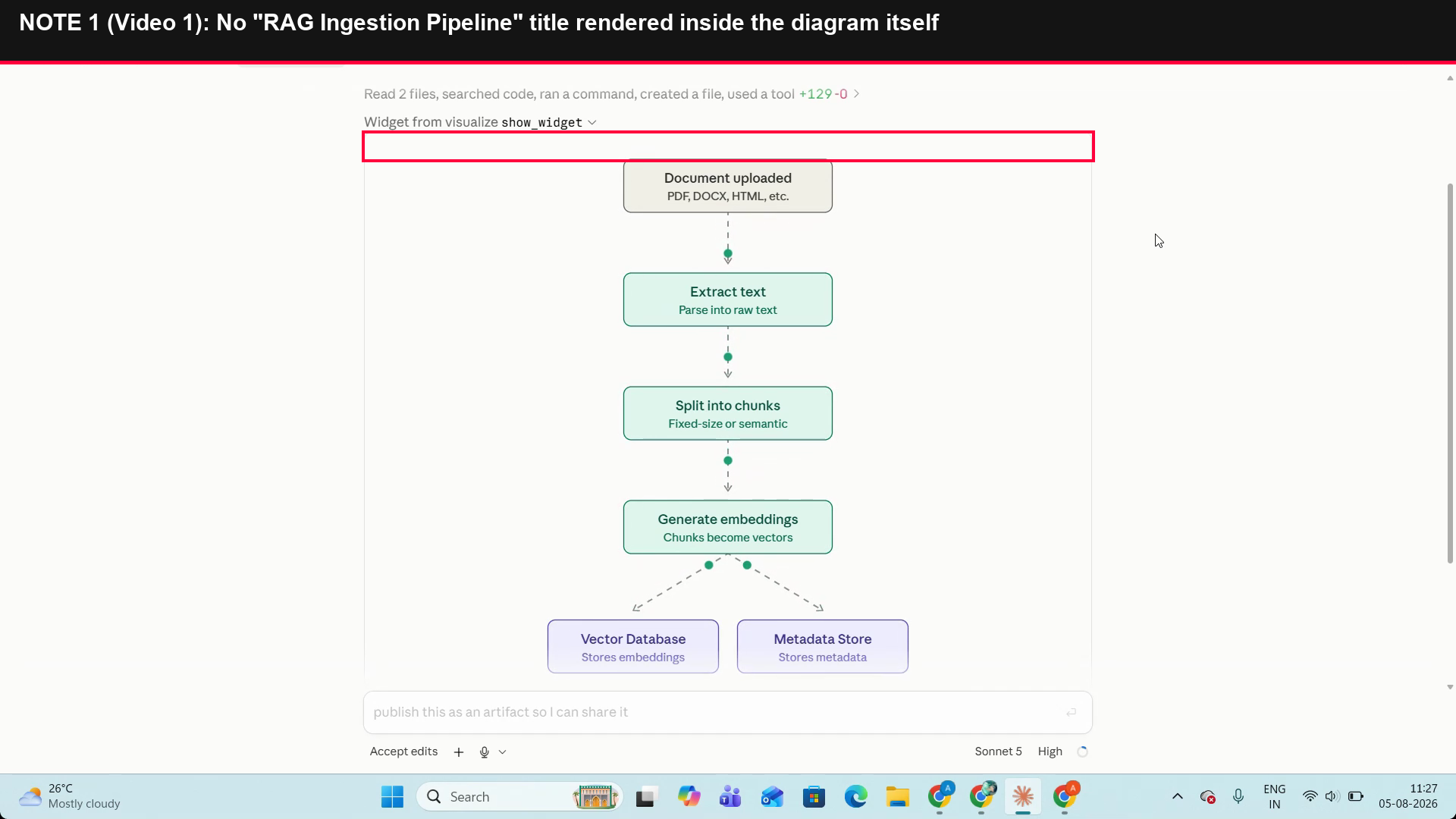
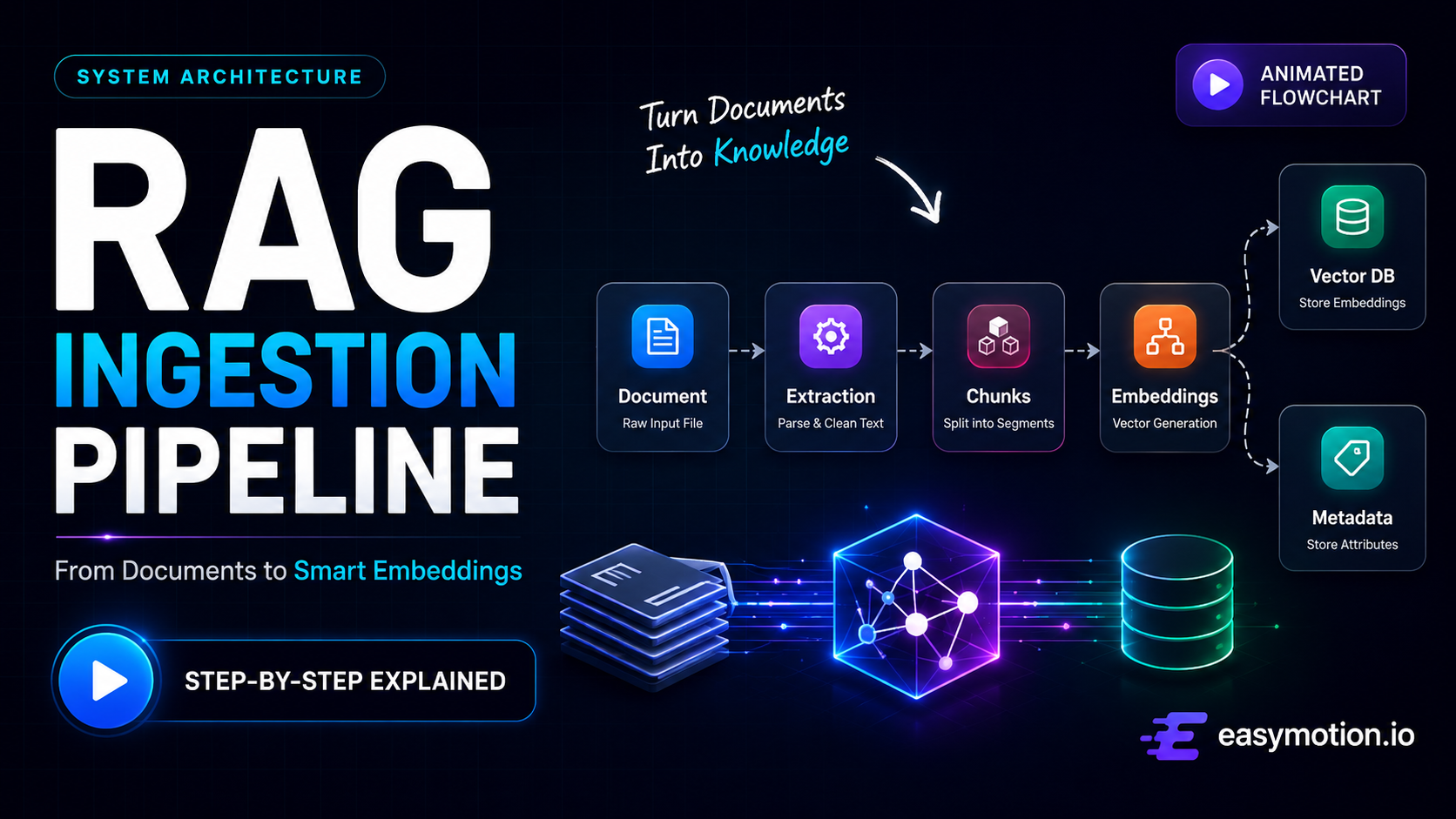
Observed output: Output artifact (Video file): The RAG ingestion pipeline was rendered in the correct order, including the branch into Vector Database and Metadata Store, with a moving dot showing flow. The canvas title did not appear inside the diagram, and the result stayed as a live in-chat artifact rather than a published file. — claude output 1.mp4
Input artifact: Input artifact (Text prompt): INPUT
Output artifact: Output artifact (Video file): The RAG ingestion pipeline was rendered in the correct order, including the branch into Vector Database and Metadata Store, with a moving dot showing flow. The canvas title did not appear inside the diagram, and the result stayed as a live in-chat artifact rather than a published file. — claude output 1.mp4
What changed: Text prompt transformed into Video file
Test case: Text prompt → Video file
Input type: Text prompt
Input used: Input artifact (Text prompt): INPUT
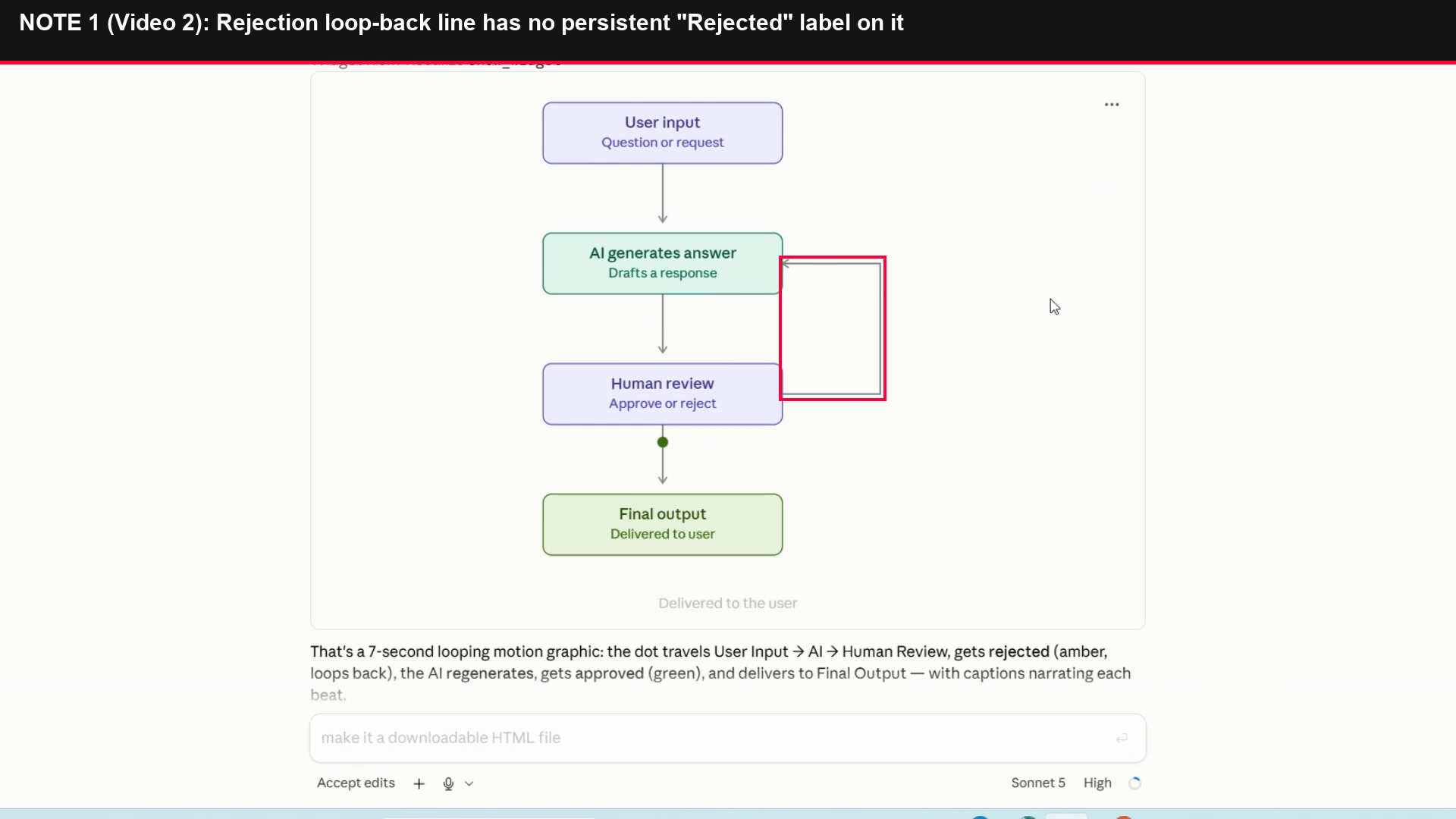
Observed output: Output artifact (Video file): The approve/reject workflow was rendered correctly end to end, including the reject loop-back and the final approval path. The animation also included synced captions, but the output was still not exported to a downloadable HTML file. — Claude output 2.mp4
Input artifact: Input artifact (Text prompt): INPUT
Output artifact: Output artifact (Video file): The approve/reject workflow was rendered correctly end to end, including the reject loop-back and the final approval path. The animation also included synced captions, but the output was still not exported to a downloadable HTML file. — Claude output 2.mp4
What changed: Text prompt transformed into Video file
Test case: Text prompt → Text prompt
Input type: Text prompt
Input used: Input artifact (Text prompt): Playback and export workflow test
Observed output: Output artifact (Text prompt): Playback and export result
Input artifact: Input artifact (Text prompt): Playback and export workflow test
Output artifact: Output artifact (Text prompt): Playback and export result
What changed: Text prompt transformed into Text prompt
Why it matters / Conclusion: Claude was the best LLM-based option tested for this use case: accurate structure, correct branching, and strong visual clarity, but weaker export usability than specialized animation tools.
Claude turns plain-text workflow descriptions into animated HTML/SVG flowcharts and diagrams. It was exercised on RAG pipeline prompts, a conversational RAG pipeline, and a feedback-loop workflow, with outputs that included labeled stages, arrows, color-coded nodes, and browser-based animation.
Branching and Loop-Back Flowchart Rendering▾
Feature tested: Branching and Loop-Back Flowchart Rendering
Result: Partial
Expected behavior: Claude can render decision logic inside animated diagrams, including diamond-style validation points, YES/NO branches, split paths, and loop-back/retry lines. The evidence comes from the feedback-loop workflow, the human-in-the-loop approval flow, and the RAG diagram.
Test case: Text prompt → Image
Input type: Text prompt
Input used: Input artifact (Text prompt): INPUT
Observed output: Output artifact (Image): Screenshot of the RAG canvas showing the parallel branch to Vector Database and Metadata Store. It also confirms the requested diagram title is missing from inside the canvas. — image.png
Input artifact: Input artifact (Text prompt): INPUT
Output artifact: Output artifact (Image): Screenshot of the RAG canvas showing the parallel branch to Vector Database and Metadata Store. It also confirms the requested diagram title is missing from inside the canvas. — image.png
What changed: Text prompt transformed into Image
Test case: Text prompt → Image
Input type: Text prompt
Input used: Input artifact (Text prompt): INPUT
Observed output: Output artifact (Image): Screenshot of the workflow canvas showing the reject-and-loop-back path. The connector itself does not keep a permanent 'Rejected' label, so the meaning relies on the temporary caption and the amber motion cue. — image-3.png
Input artifact: Input artifact (Text prompt): INPUT
Output artifact: Output artifact (Image): Screenshot of the workflow canvas showing the reject-and-loop-back path. The connector itself does not keep a permanent 'Rejected' label, so the meaning relies on the temporary caption and the amber motion cue. — image-3.png
What changed: Text prompt transformed into Image
Why it matters / Conclusion: If your diagram needs retry logic, decision diamonds, or branch accuracy, this was Claude's standout capability in the research.
Claude can render decision logic inside animated diagrams, including diamond-style validation points, YES/NO branches, split paths, and loop-back/retry lines. The evidence comes from the feedback-loop workflow, the human-in-the-loop approval flow, and the RAG diagram.
Artifact Publishing and Export HandoffFollow-up step exists, but was not completed in this test▾
Feature tested: Artifact Publishing and Export Handoff
Result: Partial
Verdict: Follow-up step exists, but was not completed in this test
Expected behavior: Claude exposes a follow-up publish/export step for the live artifact, with tests covering both a share-publish prompt and an HTML export prompt. In the observed runs, the handoff remained unfinished.
Test case: Text prompt → Image
Input type: Text prompt
Input used: Input artifact (Text prompt): INPUT
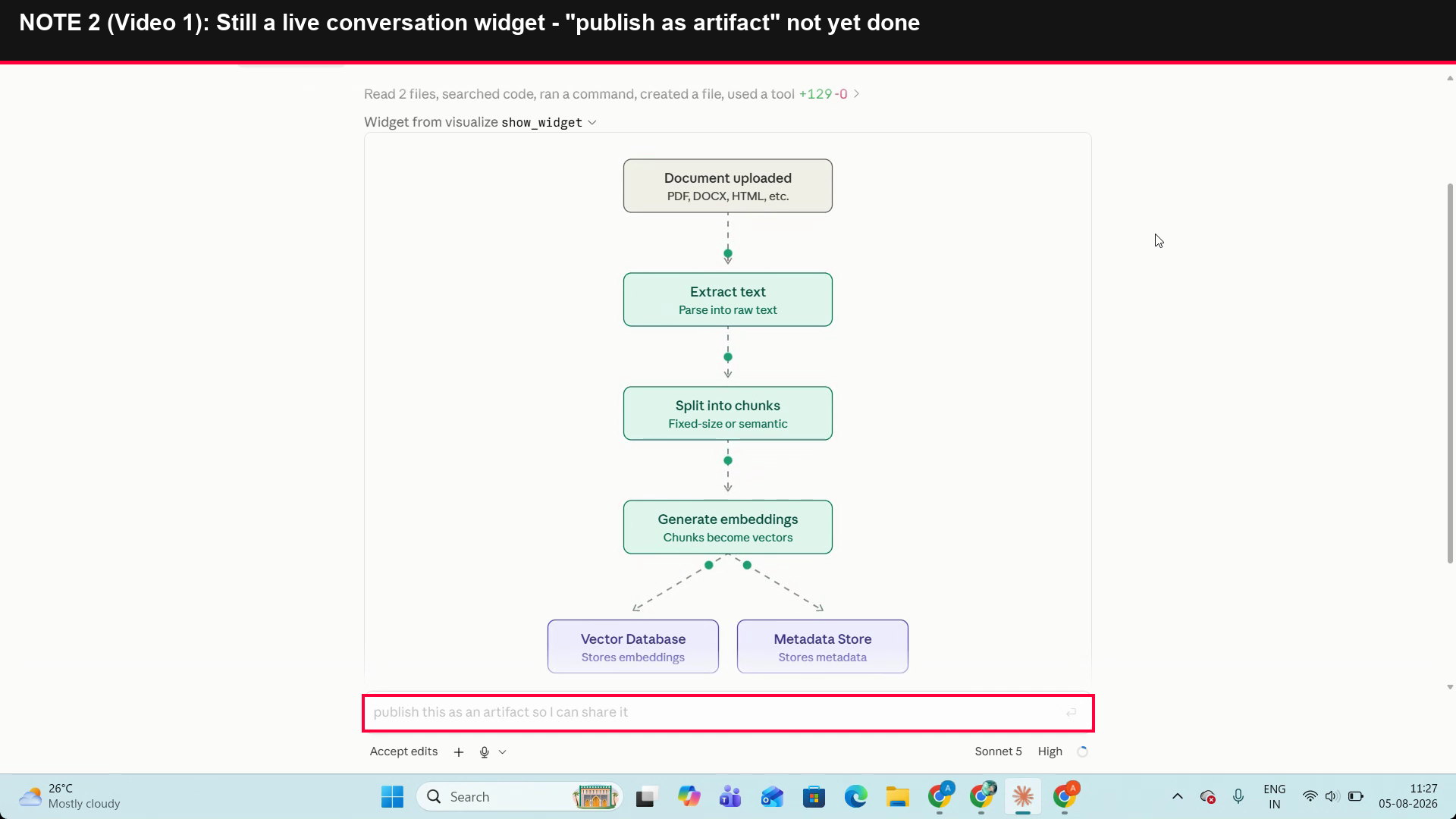
Observed output: Output artifact (Image): The publish/share request is still visible, showing the output remained a live conversation widget rather than a published shareable artifact. — image-2.png
Input artifact: Input artifact (Text prompt): INPUT
Output artifact: Output artifact (Image): The publish/share request is still visible, showing the output remained a live conversation widget rather than a published shareable artifact. — image-2.png
What changed: Text prompt transformed into Image
Test case: Text prompt → Image
Input type: Text prompt
Input used: Input artifact (Text prompt): INPUT
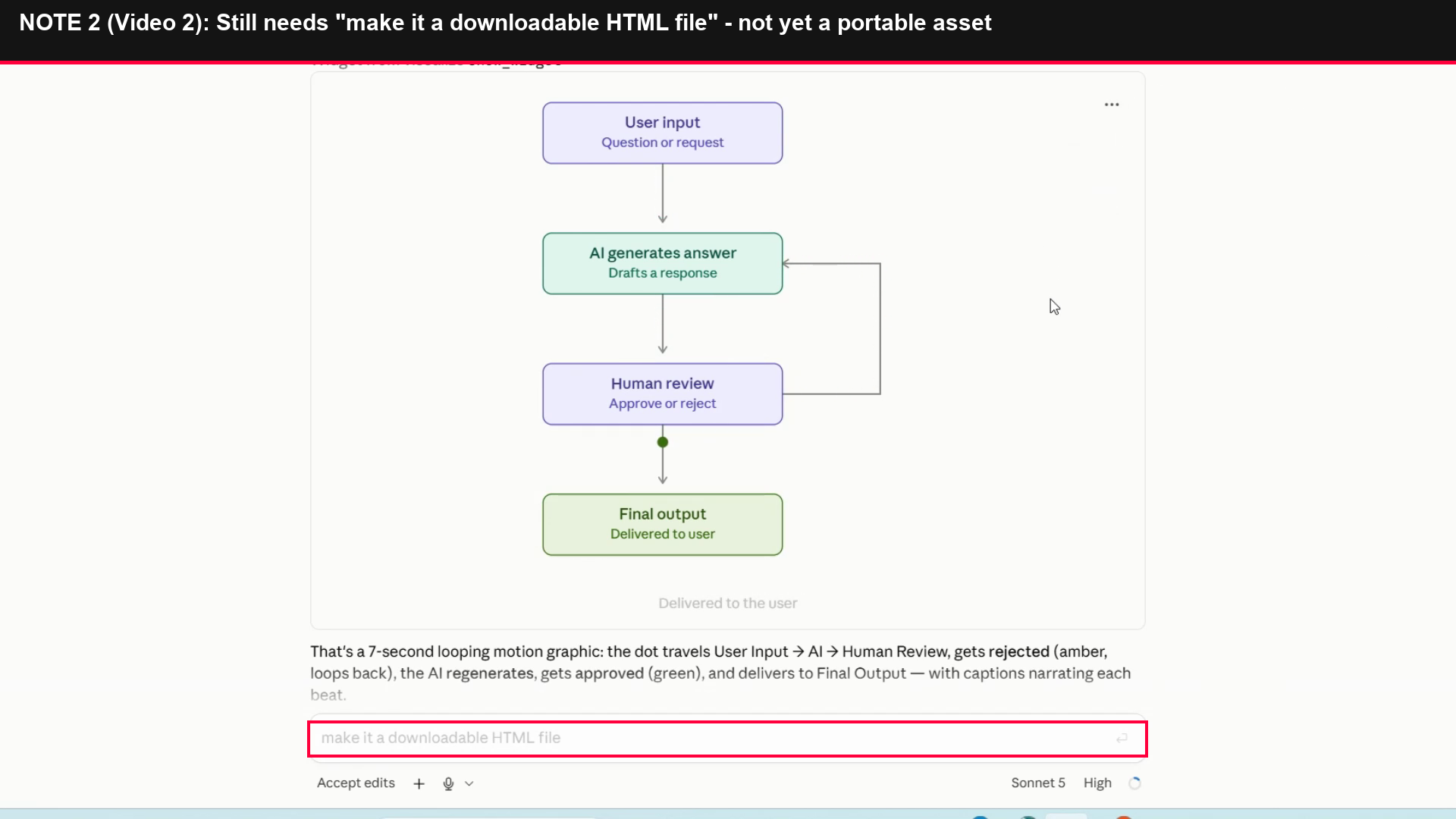
Observed output: Output artifact (Image): The HTML export request is still visible, showing the artifact had not yet been converted into a downloadable HTML file. — image-4.png
Input artifact: Input artifact (Text prompt): INPUT
Output artifact: Output artifact (Image): The HTML export request is still visible, showing the artifact had not yet been converted into a downloadable HTML file. — image-4.png
What changed: Text prompt transformed into Image
Why it matters / Conclusion: Useful as a reminder that Claude's artifact workflow is interactive first, but the test did not complete the export handoff.
Claude exposes a follow-up publish/export step for the live artifact, with tests covering both a share-publish prompt and an HTML export prompt. In the observed runs, the handoff remained unfinished.
Reported plans
The review tested a paid plan, but the exact tier was not specified.
Pricing and limits are taken from the source review and may change.
Featured in Rankings
Independent rankings where Claude AI was tested and rated.
Banner Preview
How the embed badge will look on your site

Embed HTML
Copy this code to your website source
Quick Integration Guide
- 1Copy the HTML code block above.
- 2Paste it into your site's HTML or CMS editor.
- 3Banner appears instantly on your page.
- 4Links back to your tool profile here.
Similar Tools
Discover more AI tools like Claude AI to enhance your workflow.
Comments (0)
Need a custom AI solution for this use case?
If you are looking to build a custom animated flowchart generator, workflow visualization, or process diagramming system for your business or internal workflow, email us at contact@futuresmart.ai.
Found something inaccurate or missing? We try to keep our AI research accurate and useful. If you found outdated information, an issue, or have a suggestion, email us at collaborate@aidemos.com.