Academa Ai icon
Video Generation

Academa Ai

Prompt-to-Manim videos that turn technical workflows into clean educational diagram animations.

Visit Academa Ai
Manim-style animationsFree plan testedMP4 outputTested on 2 workflows

Good educational output, but not the strongest overall pick

Academa AI makes Manim-style animation more approachable by wrapping it in a guided, education-focused workflow. In this research, it produced clean animated diagrams for both a RAG ingestion pipeline and a human-in-the-loop AI workflow, so it clearly handles structured explainer content. The trade-off is that the report positions it as a middle-ground option rather than best tool for fastest generation, highest-end Manim polish, or the most advanced loop-heavy diagram logic.

Product demo for Academa AI's study-studio workflow and positioning as an AI tool for students and researchers.

In-Depth Review

Our detailed analysis of Academa Ai — features, performance, and real-world testing.

AD
AI Demos Team
Expert Reviewer
Verified Review

Feature-by-Feature Breakdown

Text-to-Manim Animated Video
Strong
8/10
Test Summary
Feature tested: Text-to-Manim Animated Video
Result: Passed (8/10) — Strong

Feature tested: Text-to-Manim Animated Video

Result: Passed (8/10)

Verdict: Strong

Expected behavior: Transforms plain text into Manim-based animated videos designed for learning and explanation. The output is clean and structured—but its real strength shows when used for educational content.

Test case: Text prompt → Video file

Input type: Text prompt

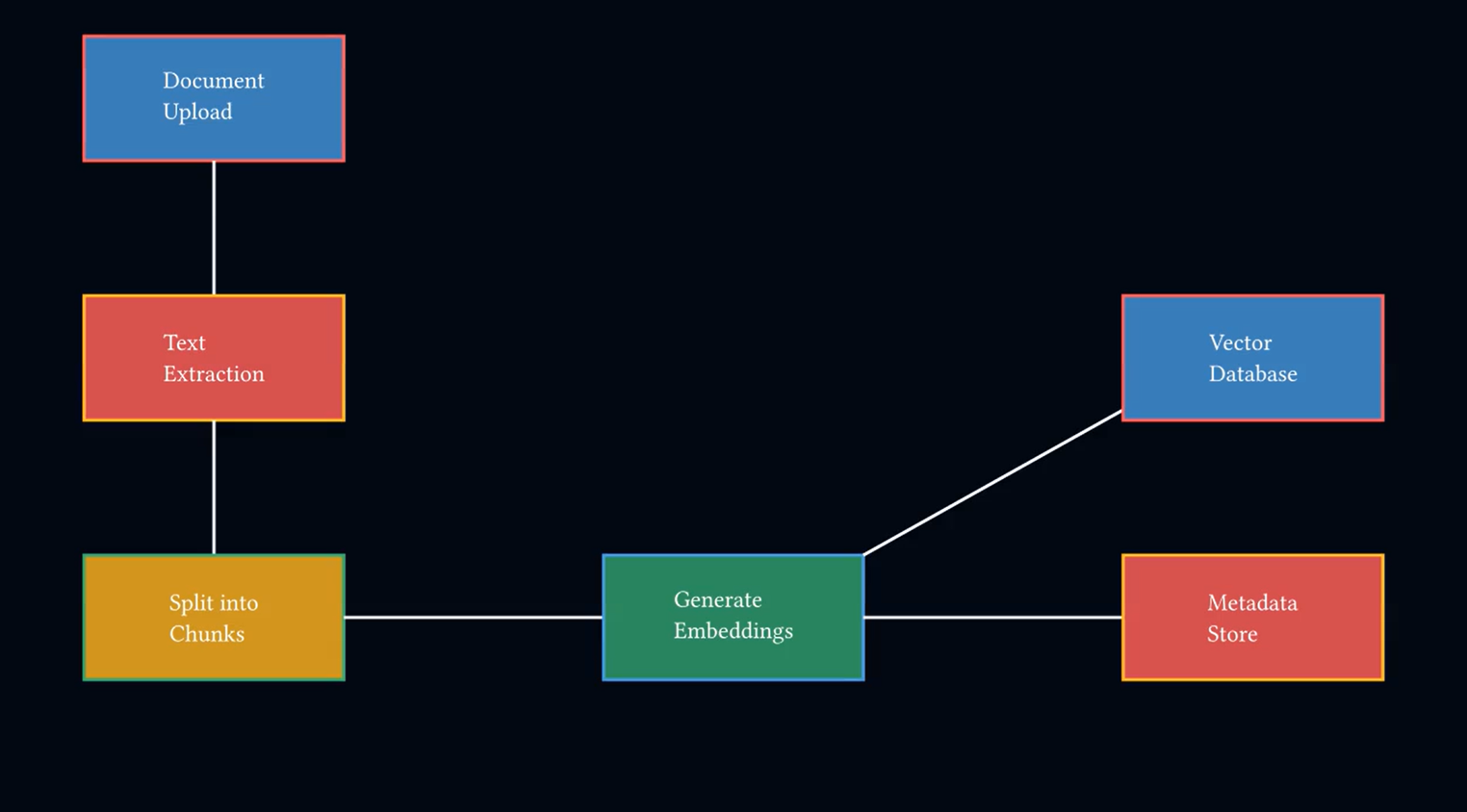
Input used: Input artifact (Text prompt): RAG Ingestion Pipeline: Create an animated flowchart titled "RAG Ingestion Pipeline". A Document is uploaded and its text is extracted. The extracted text is split into smaller chunks. Each chunk is converted into embeddings. The generated embeddings are stored in a Vector Database, and the metadata is stored in a Metadata Store.

Observed output: Output artifact (Video file): Academa AI — clean Manim-style animated flowchart video — Academa AI.mp4

Input artifact: Input artifact (Text prompt): RAG Ingestion Pipeline: Create an animated flowchart titled "RAG Ingestion Pipeline". A Document is uploaded and its text is extracted. The extracted text is split into smaller chunks. Each chunk is converted into embeddings. The generated embeddings are stored in a Vector Database, and the metadata is stored in a Metadata Store.

Output artifact: Output artifact (Video file): Academa AI — clean Manim-style animated flowchart video — Academa AI.mp4

What changed: Text prompt transformed into Video file

Test case: Text prompt → Video file

Input type: Text prompt

Input used: Input artifact (Text prompt): AI Workflow: Human-in-the-loop: Create a flowchart for AI Workflow with Human-in-the-loop. A user’s input is processed and AI generates an answer. That answer is sent for Human Review. If response is approved, it moves to Final Output. If response is rejected, it loops back to AI with new feedback from Human Review and regenerates the answer.

Observed output: Output artifact (Video file): animated flowchart — AI Workflow: Human-in-the-loop — animated flowchart — AI Workflow Human-in-the-loop.mp4

Input artifact: Input artifact (Text prompt): AI Workflow: Human-in-the-loop: Create a flowchart for AI Workflow with Human-in-the-loop. A user’s input is processed and AI generates an answer. That answer is sent for Human Review. If response is approved, it moves to Final Output. If response is rejected, it loops back to AI with new feedback from Human Review and regenerates the answer.

Output artifact: Output artifact (Video file): animated flowchart — AI Workflow: Human-in-the-loop — animated flowchart — AI Workflow Human-in-the-loop.mp4

What changed: Text prompt transformed into Video file

Why it matters / Conclusion: A balanced option between ease of use and animation quality. It may not go as deep as some tools—but for teaching-focused visuals, it delivers where it matters.

Transforms plain text into Manim-based animated videos designed for learning and explanation. The output is clean and structured—but its real strength shows when used for educational content.

TEXT
Create an animated flowchart titled "RAG Ingestion Pipeline". A Document is uploaded and its text is extracted. The extracted text is split into smaller chunks. Each chunk is converted into embeddings. The generated embeddings are stored in a Vector Database, and the metadata is stored in a Metadata Store.
TEXT
Create a flowchart for AI Workflow with Human-in-the-loop. A user’s input is processed and AI generates an answer. That answer is sent for Human Review. If response is approved, it moves to Final Output. If response is rejected, it loops back to AI with new feedback from Human Review and regenerates the answer.
Bottom Line
A balanced option between ease of use and animation quality. It may not go as deep as some tools—but for teaching-focused visuals, it delivers where it matters.
Text-to-Manim workflow video generation
Good for clean, teaching-oriented process visuals.
Test Summary
Feature tested: Text-to-Manim workflow video generation
Result: Passed — Good for clean, teaching-oriented process visuals.

Feature tested: Text-to-Manim workflow video generation

Result: Passed

Verdict: Good for clean, teaching-oriented process visuals.

Expected behavior: Converts plain-English process descriptions into Manim-style animated flowchart videos. The research exercised this on two different workflow types: a technical RAG ingestion pipeline with branching storage destinations, and an AI workflow with human review, approval, and rejection feedback.
Test case: Text prompt → Image

Input type: Text prompt

Input used: Input artifact (Text prompt): RAG ingestion pipeline prompt

Observed output: Output artifact (Image): Academa AI turned the RAG prompt into a structured technical diagram with numbered stages for document upload, text extraction, chunking, embedding generation, — RAG Ingestion Pipeline Academa AI.png

Input artifact: Input artifact (Text prompt): RAG ingestion pipeline prompt

Output artifact: Output artifact (Image): Academa AI turned the RAG prompt into a structured technical diagram with numbered stages for document upload, text extraction, chunking, embedding generation, — RAG Ingestion Pipeline Academa AI.png

What changed: Text prompt transformed into Image

Test case: Text prompt → Image

Input type: Text prompt

Input used: Input artifact (Text prompt): Human-in-the-loop workflow prompt

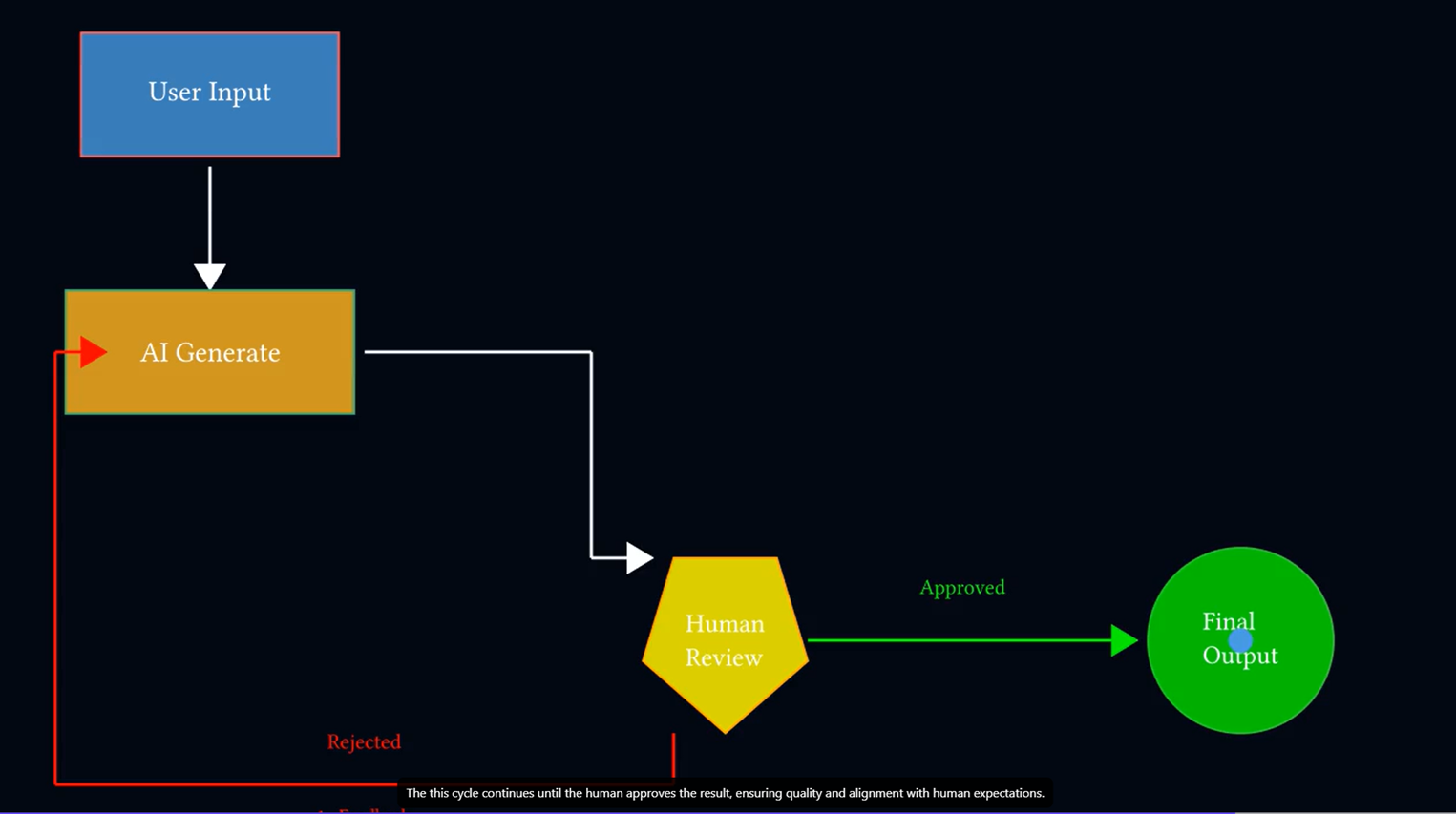
Observed output: Output artifact (Image): From the human-in-the-loop prompt, Academa AI produced a readable workflow showing User Input → AI Generate → Human Review, then two outcomes: Approved leading — AI Workflow with Human-in-the-loop Academa AI.png

Input artifact: Input artifact (Text prompt): Human-in-the-loop workflow prompt

Output artifact: Output artifact (Image): From the human-in-the-loop prompt, Academa AI produced a readable workflow showing User Input → AI Generate → Human Review, then two outcomes: Approved leading — AI Workflow with Human-in-the-loop Academa AI.png

What changed: Text prompt transformed into Image

Why it matters / Conclusion: Academa AI handled both a linear technical pipeline and a review-loop workflow in a clean, presentation-ready style, making it a solid fit for educational explainers.

Converts plain-English process descriptions into Manim-style animated flowchart videos. The research exercised this on two different workflow types: a technical RAG ingestion pipeline with branching storage destinations, and an AI workflow with human review, approval, and rejection feedback.

INPUT
Create an animated flowchart titled "RAG Ingestion Pipeline". A Document is uploaded and its text is extracted. The extracted text is split into smaller chunks. Each chunk is converted into embeddings. The generated embeddings are stored in a Vector Database, and the metadata is stored in a Metadata Store.
image/png
Output artifact for "Text-to-Manim workflow video generation" test: Academa AI turned the RAG prompt into a structured technical diagram with numbered stages for document upload, text extraction, chunking, embedding generation,, RAG Ingestion Pipeline Academa AI.png

Academa AI turned the RAG prompt into a structured technical diagram with numbered stages for document upload, text extraction, chunking, embedding generation, vector database storage, and metadata storage. The visible layout adds side panels for source types, extraction methods, embedding models, database options, and pipeline benefits, which reinforces its strength as an educational explainer rather than a generic motion graphic.
INPUT
Create a flowchart for AI Workflow with Human-in-the-loop. A user’s input is processed and AI generates an answer. That answer is sent for Human Review. If response is approved, it moves to Final Output. If response is rejected, it loops back to AI with new feedback from Human Review and regenerates the answer.
image/png
Output artifact for "Text-to-Manim workflow video generation" test: From the human-in-the-loop prompt, Academa AI produced a readable workflow showing User Input → AI Generate → Human Review, then two outcomes: Approved leading, AI Workflow with Human-in-the-loop Academa AI.png

From the human-in-the-loop prompt, Academa AI produced a readable workflow showing User Input → AI Generate → Human Review, then two outcomes: Approved leading to Final Output and Rejected looping back to AI. That means it did not reduce the scenario to a simple linear chatbot flow; it preserved the approval gate and feedback loop in the generated diagram.

Bottom Line
Academa AI handled both a linear technical pipeline and a review-loop workflow in a clean, presentation-ready style, making it a solid fit for educational explainers.
MP4 animated output
Usable video output is present, but free-plan access is limited.
Test Summary
Feature tested: MP4 animated output
Result: Passed — Usable video output is present, but free-plan access is limited.

Feature tested: MP4 animated output

Result: Passed

Verdict: Usable video output is present, but free-plan access is limited.

Expected behavior: Produces generated diagrams as MP4 videos instead of only static visuals. In the report, both tested workflows were delivered as final animated flowchart videos, and pricing notes limited downloads on free with HD export details on paid.

Test case: Text prompt → Video file

Input type: Text prompt

Input used: Input artifact (Text prompt): RAG ingestion pipeline generation

Observed output: Output artifact (Video file): The RAG workflow was delivered as a final MP4 animated flowchart, confirming that Academa AI can return a video artifact suitable for reuse beyond the editor ra — best-ai-tools-to-generate-diagram-animations-from--academa-ai.mp4

Input artifact: Input artifact (Text prompt): RAG ingestion pipeline generation

Output artifact: Output artifact (Video file): The RAG workflow was delivered as a final MP4 animated flowchart, confirming that Academa AI can return a video artifact suitable for reuse beyond the editor ra — best-ai-tools-to-generate-diagram-animations-from--academa-ai.mp4

What changed: Text prompt transformed into Video file

Test case: Text prompt → Video file

Input type: Text prompt

Input used: Input artifact (Text prompt): Human-in-the-loop generation

Observed output: Output artifact (Video file): The human-review workflow was also delivered as a final MP4 animated flowchart, showing that video output was not a one-off result tied only to the RAG example. — best-ai-tools-to-generate-diagram-animations-from--b8d23604-610d-411c-843f-9e7944d83890.mp4

Input artifact: Input artifact (Text prompt): Human-in-the-loop generation

Output artifact: Output artifact (Video file): The human-review workflow was also delivered as a final MP4 animated flowchart, showing that video output was not a one-off result tied only to the RAG example. — best-ai-tools-to-generate-diagram-animations-from--b8d23604-610d-411c-843f-9e7944d83890.mp4

What changed: Text prompt transformed into Video file

Why it matters / Conclusion: Academa AI does generate reusable MP4 outputs, but the report notes limited video generations and downloads on the free plan.

Produces generated diagrams as MP4 videos instead of only static visuals. In the report, both tested workflows were delivered as final animated flowchart videos, and pricing notes limited downloads on free with HD export details on paid.

INPUT
RAG Ingestion Pipeline prompt submitted as a plain-text flowchart request.
video/mp4

The RAG workflow was delivered as a final MP4 animated flowchart, confirming that Academa AI can return a video artifact suitable for reuse beyond the editor rather than only a static diagram preview.

INPUT
AI Workflow with Human-in-the-loop prompt submitted as a plain-text flowchart request.
video/mp4

The human-review workflow was also delivered as a final MP4 animated flowchart, showing that video output was not a one-off result tied only to the RAG example.

Bottom Line
Academa AI does generate reusable MP4 outputs, but the report notes limited video generations and downloads on the free plan.

Feature-by-Feature Breakdown

Text-to-Manim Animated Video
Strong
8/10
Test Summary
Feature tested: Text-to-Manim Animated Video
Result: Passed (8/10) — Strong

Feature tested: Text-to-Manim Animated Video

Result: Passed (8/10)

Verdict: Strong

Expected behavior: Transforms plain text into Manim-based animated videos designed for learning and explanation. The output is clean and structured—but its real strength shows when used for educational content.

Test case: Text prompt → Video file

Input type: Text prompt

Input used: Input artifact (Text prompt): RAG Ingestion Pipeline: Create an animated flowchart titled "RAG Ingestion Pipeline". A Document is uploaded and its text is extracted. The extracted text is split into smaller chunks. Each chunk is converted into embeddings. The generated embeddings are stored in a Vector Database, and the metadata is stored in a Metadata Store.

Observed output: Output artifact (Video file): Academa AI — clean Manim-style animated flowchart video — Academa AI.mp4

Input artifact: Input artifact (Text prompt): RAG Ingestion Pipeline: Create an animated flowchart titled "RAG Ingestion Pipeline". A Document is uploaded and its text is extracted. The extracted text is split into smaller chunks. Each chunk is converted into embeddings. The generated embeddings are stored in a Vector Database, and the metadata is stored in a Metadata Store.

Output artifact: Output artifact (Video file): Academa AI — clean Manim-style animated flowchart video — Academa AI.mp4

What changed: Text prompt transformed into Video file

Test case: Text prompt → Video file

Input type: Text prompt

Input used: Input artifact (Text prompt): AI Workflow: Human-in-the-loop: Create a flowchart for AI Workflow with Human-in-the-loop. A user’s input is processed and AI generates an answer. That answer is sent for Human Review. If response is approved, it moves to Final Output. If response is rejected, it loops back to AI with new feedback from Human Review and regenerates the answer.

Observed output: Output artifact (Video file): animated flowchart — AI Workflow: Human-in-the-loop — animated flowchart — AI Workflow Human-in-the-loop.mp4

Input artifact: Input artifact (Text prompt): AI Workflow: Human-in-the-loop: Create a flowchart for AI Workflow with Human-in-the-loop. A user’s input is processed and AI generates an answer. That answer is sent for Human Review. If response is approved, it moves to Final Output. If response is rejected, it loops back to AI with new feedback from Human Review and regenerates the answer.

Output artifact: Output artifact (Video file): animated flowchart — AI Workflow: Human-in-the-loop — animated flowchart — AI Workflow Human-in-the-loop.mp4

What changed: Text prompt transformed into Video file

Why it matters / Conclusion: A balanced option between ease of use and animation quality. It may not go as deep as some tools—but for teaching-focused visuals, it delivers where it matters.

Transforms plain text into Manim-based animated videos designed for learning and explanation. The output is clean and structured—but its real strength shows when used for educational content.

TEXT
Create an animated flowchart titled "RAG Ingestion Pipeline". A Document is uploaded and its text is extracted. The extracted text is split into smaller chunks. Each chunk is converted into embeddings. The generated embeddings are stored in a Vector Database, and the metadata is stored in a Metadata Store.
TEXT
Create a flowchart for AI Workflow with Human-in-the-loop. A user’s input is processed and AI generates an answer. That answer is sent for Human Review. If response is approved, it moves to Final Output. If response is rejected, it loops back to AI with new feedback from Human Review and regenerates the answer.
Bottom Line
A balanced option between ease of use and animation quality. It may not go as deep as some tools—but for teaching-focused visuals, it delivers where it matters.
Text-to-Manim workflow video generation
Good for clean, teaching-oriented process visuals.
Test Summary
Feature tested: Text-to-Manim workflow video generation
Result: Passed — Good for clean, teaching-oriented process visuals.

Feature tested: Text-to-Manim workflow video generation

Result: Passed

Verdict: Good for clean, teaching-oriented process visuals.

Expected behavior: Converts plain-English process descriptions into Manim-style animated flowchart videos. The research exercised this on two different workflow types: a technical RAG ingestion pipeline with branching storage destinations, and an AI workflow with human review, approval, and rejection feedback.

Test case: Text prompt → Image

Input type: Text prompt

Input used: Input artifact (Text prompt): RAG ingestion pipeline prompt

Observed output: Output artifact (Image): Academa AI turned the RAG prompt into a structured technical diagram with numbered stages for document upload, text extraction, chunking, embedding generation, — RAG Ingestion Pipeline Academa AI.png

Input artifact: Input artifact (Text prompt): RAG ingestion pipeline prompt

Output artifact: Output artifact (Image): Academa AI turned the RAG prompt into a structured technical diagram with numbered stages for document upload, text extraction, chunking, embedding generation, — RAG Ingestion Pipeline Academa AI.png

What changed: Text prompt transformed into Image

Test case: Text prompt → Image

Input type: Text prompt

Input used: Input artifact (Text prompt): Human-in-the-loop workflow prompt

Observed output: Output artifact (Image): From the human-in-the-loop prompt, Academa AI produced a readable workflow showing User Input → AI Generate → Human Review, then two outcomes: Approved leading — AI Workflow with Human-in-the-loop Academa AI.png

Input artifact: Input artifact (Text prompt): Human-in-the-loop workflow prompt

Output artifact: Output artifact (Image): From the human-in-the-loop prompt, Academa AI produced a readable workflow showing User Input → AI Generate → Human Review, then two outcomes: Approved leading — AI Workflow with Human-in-the-loop Academa AI.png

What changed: Text prompt transformed into Image

Why it matters / Conclusion: Academa AI handled both a linear technical pipeline and a review-loop workflow in a clean, presentation-ready style, making it a solid fit for educational explainers.

Converts plain-English process descriptions into Manim-style animated flowchart videos. The research exercised this on two different workflow types: a technical RAG ingestion pipeline with branching storage destinations, and an AI workflow with human review, approval, and rejection feedback.

INPUT
Create an animated flowchart titled "RAG Ingestion Pipeline". A Document is uploaded and its text is extracted. The extracted text is split into smaller chunks. Each chunk is converted into embeddings. The generated embeddings are stored in a Vector Database, and the metadata is stored in a Metadata Store.
image/png
Output artifact for "Text-to-Manim workflow video generation" test: Academa AI turned the RAG prompt into a structured technical diagram with numbered stages for document upload, text extraction, chunking, embedding generation,, RAG Ingestion Pipeline Academa AI.png

Academa AI turned the RAG prompt into a structured technical diagram with numbered stages for document upload, text extraction, chunking, embedding generation, vector database storage, and metadata storage. The visible layout adds side panels for source types, extraction methods, embedding models, database options, and pipeline benefits, which reinforces its strength as an educational explainer rather than a generic motion graphic.

INPUT
Create a flowchart for AI Workflow with Human-in-the-loop. A user’s input is processed and AI generates an answer. That answer is sent for Human Review. If response is approved, it moves to Final Output. If response is rejected, it loops back to AI with new feedback from Human Review and regenerates the answer.
image/png
Output artifact for "Text-to-Manim workflow video generation" test: From the human-in-the-loop prompt, Academa AI produced a readable workflow showing User Input → AI Generate → Human Review, then two outcomes: Approved leading, AI Workflow with Human-in-the-loop Academa AI.png

From the human-in-the-loop prompt, Academa AI produced a readable workflow showing User Input → AI Generate → Human Review, then two outcomes: Approved leading to Final Output and Rejected looping back to AI. That means it did not reduce the scenario to a simple linear chatbot flow; it preserved the approval gate and feedback loop in the generated diagram.

Bottom Line
Academa AI handled both a linear technical pipeline and a review-loop workflow in a clean, presentation-ready style, making it a solid fit for educational explainers.
MP4 animated output
Usable video output is present, but free-plan access is limited.
Test Summary
Feature tested: MP4 animated output
Result: Passed — Usable video output is present, but free-plan access is limited.

Feature tested: MP4 animated output

Result: Passed

Verdict: Usable video output is present, but free-plan access is limited.

Expected behavior: Produces generated diagrams as MP4 videos instead of only static visuals. In the report, both tested workflows were delivered as final animated flowchart videos, and pricing notes limited downloads on free with HD export details on paid.

Test case: Text prompt → Video file

Input type: Text prompt

Input used: Input artifact (Text prompt): RAG ingestion pipeline generation

Observed output: Output artifact (Video file): The RAG workflow was delivered as a final MP4 animated flowchart, confirming that Academa AI can return a video artifact suitable for reuse beyond the editor ra — best-ai-tools-to-generate-diagram-animations-from--academa-ai.mp4

Input artifact: Input artifact (Text prompt): RAG ingestion pipeline generation

Output artifact: Output artifact (Video file): The RAG workflow was delivered as a final MP4 animated flowchart, confirming that Academa AI can return a video artifact suitable for reuse beyond the editor ra — best-ai-tools-to-generate-diagram-animations-from--academa-ai.mp4

What changed: Text prompt transformed into Video file

Test case: Text prompt → Video file

Input type: Text prompt

Input used: Input artifact (Text prompt): Human-in-the-loop generation

Observed output: Output artifact (Video file): The human-review workflow was also delivered as a final MP4 animated flowchart, showing that video output was not a one-off result tied only to the RAG example. — best-ai-tools-to-generate-diagram-animations-from--b8d23604-610d-411c-843f-9e7944d83890.mp4

Input artifact: Input artifact (Text prompt): Human-in-the-loop generation

Output artifact: Output artifact (Video file): The human-review workflow was also delivered as a final MP4 animated flowchart, showing that video output was not a one-off result tied only to the RAG example. — best-ai-tools-to-generate-diagram-animations-from--b8d23604-610d-411c-843f-9e7944d83890.mp4

What changed: Text prompt transformed into Video file

Why it matters / Conclusion: Academa AI does generate reusable MP4 outputs, but the report notes limited video generations and downloads on the free plan.

Produces generated diagrams as MP4 videos instead of only static visuals. In the report, both tested workflows were delivered as final animated flowchart videos, and pricing notes limited downloads on free with HD export details on paid.

INPUT
RAG Ingestion Pipeline prompt submitted as a plain-text flowchart request.
video/mp4

The RAG workflow was delivered as a final MP4 animated flowchart, confirming that Academa AI can return a video artifact suitable for reuse beyond the editor rather than only a static diagram preview.

INPUT
AI Workflow with Human-in-the-loop prompt submitted as a plain-text flowchart request.
video/mp4

The human-review workflow was also delivered as a final MP4 animated flowchart, showing that video output was not a one-off result tied only to the RAG example.

Bottom Line
Academa AI does generate reusable MP4 outputs, but the report notes limited video generations and downloads on the free plan.

Pricing & Access

Free plan tested in March 2026.

TESTED
Free
$0
Limited video generations and downloads
Paid
$10/month
~40 videos per month; 60-second max per video; HD export quality (1080p)

Pricing checked March 2026. We re-check quarterly.

Is This Right For You?

A side-by-side guide based on our hands-on testing.

✓ Use This If
You want Manim-style animated diagrams without writing Python code.
You are creating educational, classroom, training, or course-style explainers where clarity matters more than flashy visuals.
You need clean workflow videos for technical concepts like RAG or human-review processes.
✕ Skip This If
You need a direct free download workflow; the report points to HuggingFace Manim App for that case.
You need the fastest generation time; the report recommends EasyMotion instead.
You specifically need the strongest handling of decision-diamond nodes or loop-back-heavy agent diagrams; the report points to Claude AI there.
You want the highest-end Manim quality output; the report recommends Vismo Studio instead.
Video GenerationAnimationvideo
Yes. In this research, Academa AI was tested with plain-text prompts for a RAG ingestion pipeline and a human-in-the-loop AI workflow, and both were returned as final animated flowchart videos.
The report tested two structured prompts: a RAG ingestion pipeline covering upload, extraction, chunking, embeddings, vector database storage, and metadata storage; and an AI workflow with human review, approval, rejection, and a feedback loop back to AI generation.
It handled a looped workflow in the tested human-in-the-loop example. The generated diagram showed Human Review splitting into Approved → Final Output and Rejected looping back to AI generation.
The report positions Academa AI as a way to get Manim-style animations without writing Python code, which is one of its main advantages over using Manim directly.
The free plan was the one tested. According to the report, it costs $0 and includes limited video generations and downloads.
The report lists a $10/month paid plan with about 40 videos per month, a 60-second maximum per video, and HD export quality at 1080p.
Not according to this research. The report positions EasyMotion as the faster option, Claude AI as better for decision-diamond and loop-back-heavy diagrams, and Vismo Studio as the stronger pick for highest Manim quality.

Banner Preview

How the embed badge will look on your site

Academa Ai featured on AI Demos

Embed HTML

Copy this code to your website source

<a target="_blank" href="https://aidemos.com/tools/academa-studio?utm_source=academa-studio_embed" style="width: 250px; height: 80px; border-radius:4px;" width="250" height="80"> <img src="https://aidemos-website-images.s3.amazonaws.com/featured.png" alt="Academa Ai | Featured on AI Demos" style="width: 250px; height: 80px; border-radius:4px;" width="250" height="80"> </a>

Quick Integration Guide

  • 1Copy the HTML code block above.
  • 2Paste it into your site's HTML or CMS editor.
  • 3Banner appears instantly on your page.
  • 4Links back to your tool profile here.
Similar Tools

Similar Tools

Discover more AI tools like Academa Ai to enhance your workflow.

Comments (0)

Please Log in to join the discussion.

Back to Top