
Vismo Studio Review: Manim-Style Animation Generator Tested (2026)
Polished Manim-style diagram videos from text, especially for technical workflows, with MP4 export gated by credits.
Excellent output quality, with practical trade-offs
- You want the most polished, Manim-style animated diagram output in this test set.
- You are explaining technical workflows like RAG or AI systems and want labeled, color-coded structure.
- You can work with a credits-based download model and roughly 2–3 minute generation times.
- You need a fully free workflow with no credits required.
Feature scores on this page: 6.0/10 (1 scored feature)
Our take
Vismo Studio was one of the strongest tools in this test for visual quality: the report describes its outputs as more detailed, more structured, and more polished than most alternatives, especially on technical workflows. The trade-off is usability rather than output quality: downloads run on a credits system, generations took about 2–3 minutes, the tested output style stayed on a black background, and the report specifically says to skip it if you need decision-diamond nodes or very explicit loop-back arrows.
In-Depth Review
Our detailed analysis of Vismo Studio — features, performance, and real-world testing.
Feature-by-Feature Breakdown
Technical process diagram generationStrong▾
Feature tested: Technical process diagram generation
Result: Passed
Verdict: Strong
Expected behavior: Converts a plain-English technical workflow into a polished animated diagram with labeled stages and connectors. The report exercised this on a RAG ingestion pipeline covering document upload, text extraction, chunking, embedding generation, vector database storage, and metadata storage.
Test case: Text prompt → Video file
Input type: Text prompt
Input used: Input artifact (Text prompt): RAG Ingestion Pipeline prompt
Observed output: Output artifact (Video file): Vismo returned a final MP4 animated flowchart for the RAG ingestion pipeline. The report's verdict on this output was that it looked more detailed, more structu — best-ai-tools-to-generate-diagram-animations-from--vismo-animation-2.mp4
Input artifact: Input artifact (Text prompt): RAG Ingestion Pipeline prompt
Output artifact: Output artifact (Video file): Vismo returned a final MP4 animated flowchart for the RAG ingestion pipeline. The report's verdict on this output was that it looked more detailed, more structu — best-ai-tools-to-generate-diagram-animations-from--vismo-animation-2.mp4
What changed: Text prompt transformed into Video file
Test case: Text prompt → Image
Input type: Text prompt
Input used: Input artifact (Text prompt): RAG Ingestion Pipeline prompt
Observed output: Output artifact (Image): This Vismo-generated diagram visualizes the RAG ingestion pipeline, showing how documents are uploaded, processed through text extraction and chunking, converte — RAG Ingestion Pipeline vismo.png
Input artifact: Input artifact (Text prompt): RAG Ingestion Pipeline prompt
Output artifact: Output artifact (Image): This Vismo-generated diagram visualizes the RAG ingestion pipeline, showing how documents are uploaded, processed through text extraction and chunking, converte — RAG Ingestion Pipeline vismo.png
What changed: Text prompt transformed into Image
Why it matters / Conclusion: This is where Vismo Studio looks strongest: technical workflows come out as presentation-ready animated diagrams with more polish than the typical lightweight text-to-animation tool.
Converts a plain-English technical workflow into a polished animated diagram with labeled stages and connectors. The report exercised this on a RAG ingestion pipeline covering document upload, text extraction, chunking, embedding generation, vector database storage, and metadata storage.
Vismo returned a final MP4 animated flowchart for the RAG ingestion pipeline. The report's verdict on this output was that it looked more detailed, more structured, and more polished than most competing tools tested in the same research.
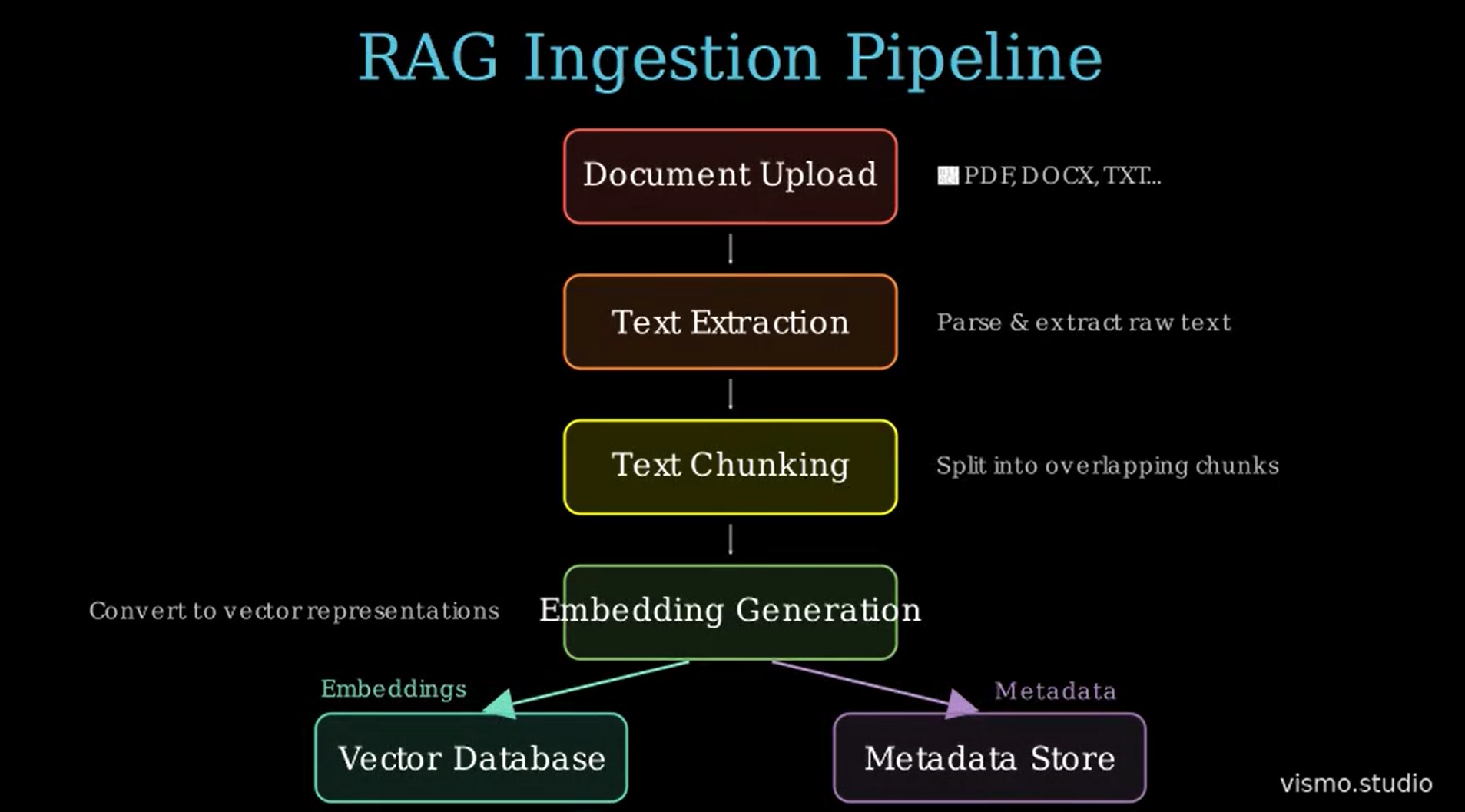
This Vismo-generated diagram visualizes the RAG ingestion pipeline, showing how documents are uploaded, processed through text extraction and chunking, converted into embeddings, and stored in vector and metadata databases for retrieval.
Branching and feedback-loop workflow visualizationMixed▾
Feature tested: Branching and feedback-loop workflow visualization
Result: Passed
Verdict: Mixed
Expected behavior: Builds multi-step workflows that include review stages, approval or rejection outcomes, and a feedback path. The report tested this on an AI workflow where an AI-generated answer goes to human review, then either moves to final output or loops back with feedback for regeneration.
Test case: Text prompt → Image
Input type: Text prompt
Input used: Input artifact (Text prompt): AI Workflow: Human-in-the-loop prompt
Observed output: Output artifact (Image): This Vismo-generated workflow illustrates a human-in-the-loop AI process where AI-generated outputs are reviewed by a human before approval, ensuring quality an — vismo-1.png
Input artifact: Input artifact (Text prompt): AI Workflow: Human-in-the-loop prompt
Output artifact: Output artifact (Image): This Vismo-generated workflow illustrates a human-in-the-loop AI process where AI-generated outputs are reviewed by a human before approval, ensuring quality an — vismo-1.png
What changed: Text prompt transformed into Image
Why it matters / Conclusion: Vismo can show approval and rejection logic, but the report still treats complex loop styling as a limitation rather than a standout strength.
Builds multi-step workflows that include review stages, approval or rejection outcomes, and a feedback path. The report tested this on an AI workflow where an AI-generated answer goes to human review, then either moves to final output or loops back with feedback for regeneration.
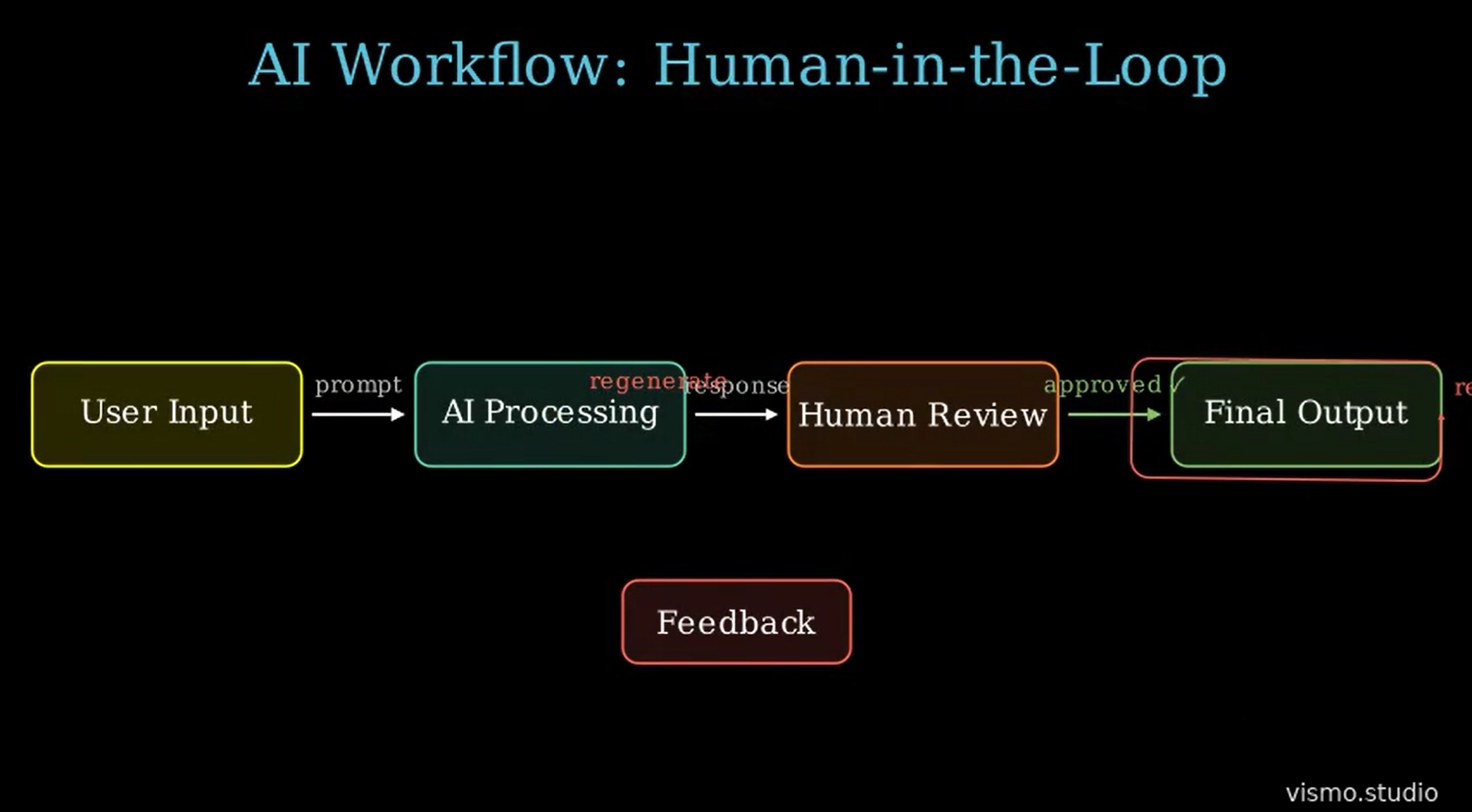
This Vismo-generated workflow illustrates a human-in-the-loop AI process where AI-generated outputs are reviewed by a human before approval, ensuring quality and accuracy in the final result.
MP4 export with credits-based accessUseful but restrictive▾
Feature tested: MP4 export with credits-based access
Result: Passed
Verdict: Useful but restrictive
Expected behavior: Exports generated diagram animations as MP4 files, but download access is tied to a credits system. This was checked on the free-credits tier rather than an unrestricted paid plan.
Test case: Text prompt → Text prompt
Input type: Text prompt
Input used: Input artifact (Text prompt): Export and access check
Observed output: Output artifact (Text prompt): Export observation
Input artifact: Input artifact (Text prompt): Export and access check
Output artifact: Output artifact (Text prompt): Export observation
What changed: Text prompt transformed into Text prompt
Why it matters / Conclusion: Export is real and practical, but the credits model is the main usability catch.
Exports generated diagram animations as MP4 files, but download access is tied to a credits system. This was checked on the free-credits tier rather than an unrestricted paid plan.
Text-to-Manim Animated VideoNormal6/10▾
Feature tested: Text-to-Manim Animated Video
Result: Passed (6/10)
Verdict: Normal
Expected behavior: Turns plain text into Manim-style animated videos with rich visual detail. The output goes beyond basic flow diagrams—but you’ll notice the depth only when you explore it.
Test case: Text prompt → Video file
Input type: Text prompt
Input used: Input artifact (Text prompt): RAG Ingestion Pipeline: Create an animated flowchart titled "RAG Ingestion Pipeline". A Document is uploaded and its text is extracted. The extracted text is split into smaller chunks. Each chunk is converted into embeddings. The generated embeddings are stored in a Vector Database, and the metadata is stored in a Metadata Store.
Observed output: Output artifact (Video file): RAG Ingestion Pipeline: Create an animated flowchart titled "RAG Ingestion Pipeline". A Document is uploaded and its text is extracted. The extracted text is split into smaller chunks. Each chunk is converted into embeddings. The generated embeddings are stored in a Vector Database, and the metadata is stored in a Metadata Store. — RAG Ingestion Pipeline vismo studio.mp4
Input artifact: Input artifact (Text prompt): RAG Ingestion Pipeline: Create an animated flowchart titled "RAG Ingestion Pipeline". A Document is uploaded and its text is extracted. The extracted text is split into smaller chunks. Each chunk is converted into embeddings. The generated embeddings are stored in a Vector Database, and the metadata is stored in a Metadata Store.
Output artifact: Output artifact (Video file): RAG Ingestion Pipeline: Create an animated flowchart titled "RAG Ingestion Pipeline". A Document is uploaded and its text is extracted. The extracted text is split into smaller chunks. Each chunk is converted into embeddings. The generated embeddings are stored in a Vector Database, and the metadata is stored in a Metadata Store. — RAG Ingestion Pipeline vismo studio.mp4
What changed: Text prompt transformed into Video file
Test case: Text prompt → Video file
Input type: Text prompt
Input used: Input artifact (Text prompt): AI Workflow: Human-in-the-loop: Create a flowchart for AI Workflow with Human-in-the-loop. A user’s input is processed and AI generates an answer. That answer is sent for Human Review. If response is approved, it moves to Final Output. If response is rejected, it loops back to AI with new feedback from Human Review and regenerates the answer.
Observed output: Output artifact (Video file): AI Workflow Human-in-the-loop vismo studio — AI Workflow Human-in-the-loop vismo studio.mp4
Input artifact: Input artifact (Text prompt): AI Workflow: Human-in-the-loop: Create a flowchart for AI Workflow with Human-in-the-loop. A user’s input is processed and AI generates an answer. That answer is sent for Human Review. If response is approved, it moves to Final Output. If response is rejected, it loops back to AI with new feedback from Human Review and regenerates the answer.
Output artifact: Output artifact (Video file): AI Workflow Human-in-the-loop vismo studio — AI Workflow Human-in-the-loop vismo studio.mp4
What changed: Text prompt transformed into Video file
Why it matters / Conclusion: The output quality is a step above most tools—more detailed, more structured, more polished. But there’s a trade-off you’ll encounter when it comes to downloading.
Turns plain text into Manim-style animated videos with rich visual detail. The output goes beyond basic flow diagrams—but you’ll notice the depth only when you explore it.
Pricing & Access
Plans as of March 2026. Tested on the free plan
Tested on the free credits tier. Pricing checked March 2026.
Is This Right For You?
A side-by-side guide based on our hands-on testing.
Featured in Rankings
Independent rankings where Vismo Studio was tested and rated.
Banner Preview
How the embed badge will look on your site

Embed HTML
Copy this code to your website source
Quick Integration Guide
- 1Copy the HTML code block above.
- 2Paste it into your site's HTML or CMS editor.
- 3Banner appears instantly on your page.
- 4Links back to your tool profile here.
Similar Tools
Discover more AI tools like Vismo Studio to enhance your workflow.
Comments (0)
Need a custom AI solution for this use case?
If you are looking to build a custom text-to-diagram video, technical animation, or explainer video system for your business or internal workflow, email us at contact@futuresmart.ai.
Found something inaccurate or missing? We try to keep our AI research accurate and useful. If you found outdated information, an issue, or have a suggestion, email us at collaborate@aidemos.com.