
EasyMotion
Turns plain-text process descriptions into animated flowchart MP4s, with the strongest end-to-end result in this diagram-animation test.
Best for fast, usable flowchart videos
- You want to turn plain-text process descriptions into animated flowchart videos quickly.
- You need a direct MP4 output instead of screen recording or rebuilding the animation elsewhere.
- Your diagrams are mostly linear or only require simple branching, like a review-and-approval loop.
- You need advanced decision-diamond nodes or highly precise loop-back-arrow behavior.
Feature scores on this page: 9.5/10 (1 scored feature)
Our take
EasyMotion ranked #1 in this research because it reliably turned plain-text workflows into finished animated flowchart videos with less friction than the alternatives. It worked especially well on sequential technical flows and acceptable simple branching, but the report still flags advanced decision-diamond logic, richer output formats, and deep layout customization as limits.
In-Depth Review
Our detailed analysis of EasyMotion — features, performance, and real-world testing.
Feature-by-Feature Breakdown
Linear process flow generationStrong on sequential, technical workflows.▾
Feature tested: Linear process flow generation
Result: Passed
Verdict: Strong on sequential, technical workflows.
Expected behavior: EasyMotion converts a written multi-step process into a labeled animated flowchart without requiring manual node placement. This was exercised on a RAG ingestion pipeline prompt covering document upload, text extraction, chunking, embeddings, vector storage, and metadata storage.
Test case: Text prompt → Image
Input type: Text prompt
Input used: Input artifact (Text prompt): RAG ingestion pipeline prompt
Observed output: Output artifact (Image): EasyMotion produced a readable left-to-right architecture-style flow with all of the core stages visible and labeled: Document, Extraction, Chunks, Embeddings, — RAG Ingestion Pipeline eas.png
Input artifact: Input artifact (Text prompt): RAG ingestion pipeline prompt
Output artifact: Output artifact (Image): EasyMotion produced a readable left-to-right architecture-style flow with all of the core stages visible and labeled: Document, Extraction, Chunks, Embeddings, — RAG Ingestion Pipeline eas.png
What changed: Text prompt transformed into Image
Why it matters / Conclusion: When the workflow is mostly linear and the steps are clearly named in the prompt, EasyMotion produces strong first-pass diagram animations.
EasyMotion converts a written multi-step process into a labeled animated flowchart without requiring manual node placement. This was exercised on a RAG ingestion pipeline prompt covering document upload, text extraction, chunking, embeddings, vector storage, and metadata storage.
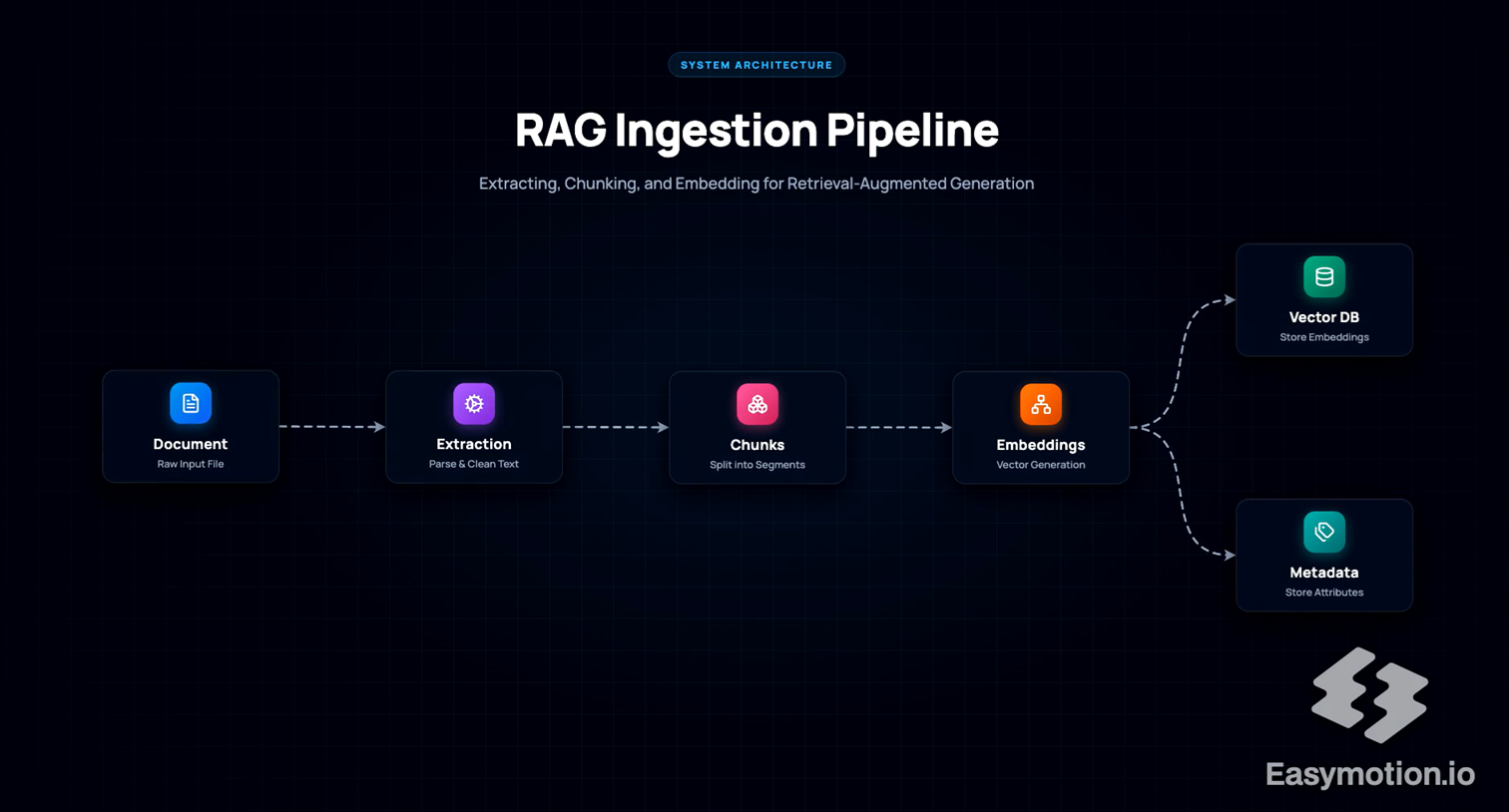
EasyMotion produced a readable left-to-right architecture-style flow with all of the core stages visible and labeled: Document, Extraction, Chunks, Embeddings, Vector DB, and Metadata. For this clean linear workflow, the text-to-diagram conversion preserved the sequence and the technical labels well enough to function as a presentation-ready explainer.
Simple branching and feedback-loop flowsCan represent a basic review loop, but not the best fit for advanced decision logic.▾
Feature tested: Simple branching and feedback-loop flows
Result: Partial
Verdict: Can represent a basic review loop, but not the best fit for advanced decision logic.
Expected behavior: EasyMotion can visualize a simple approve/reject workflow with a return path. This was tested on a human-in-the-loop AI workflow where AI output goes to human review, then either advances to final output or loops back for refinement after rejection.
Test case: Text prompt → Image
Input type: Text prompt
Input used: Input artifact (Text prompt): Human-in-the-loop workflow prompt
Observed output: Output artifact (Image): The generated workflow shows User Input, AI Generation, Human Review, and Final Output, plus visible Approved and Rejected paths and a labeled Feedback Loop for — AI Workflow with Human-in-the-loop.png
Input artifact: Input artifact (Text prompt): Human-in-the-loop workflow prompt
Output artifact: Output artifact (Image): The generated workflow shows User Input, AI Generation, Human Review, and Final Output, plus visible Approved and Rejected paths and a labeled Feedback Loop for — AI Workflow with Human-in-the-loop.png
What changed: Text prompt transformed into Image
Why it matters / Conclusion: Good enough for simple branching and one clear feedback loop; look elsewhere if your diagram depends on more complex conditional structure.
EasyMotion can visualize a simple approve/reject workflow with a return path. This was tested on a human-in-the-loop AI workflow where AI output goes to human review, then either advances to final output or loops back for refinement after rejection.
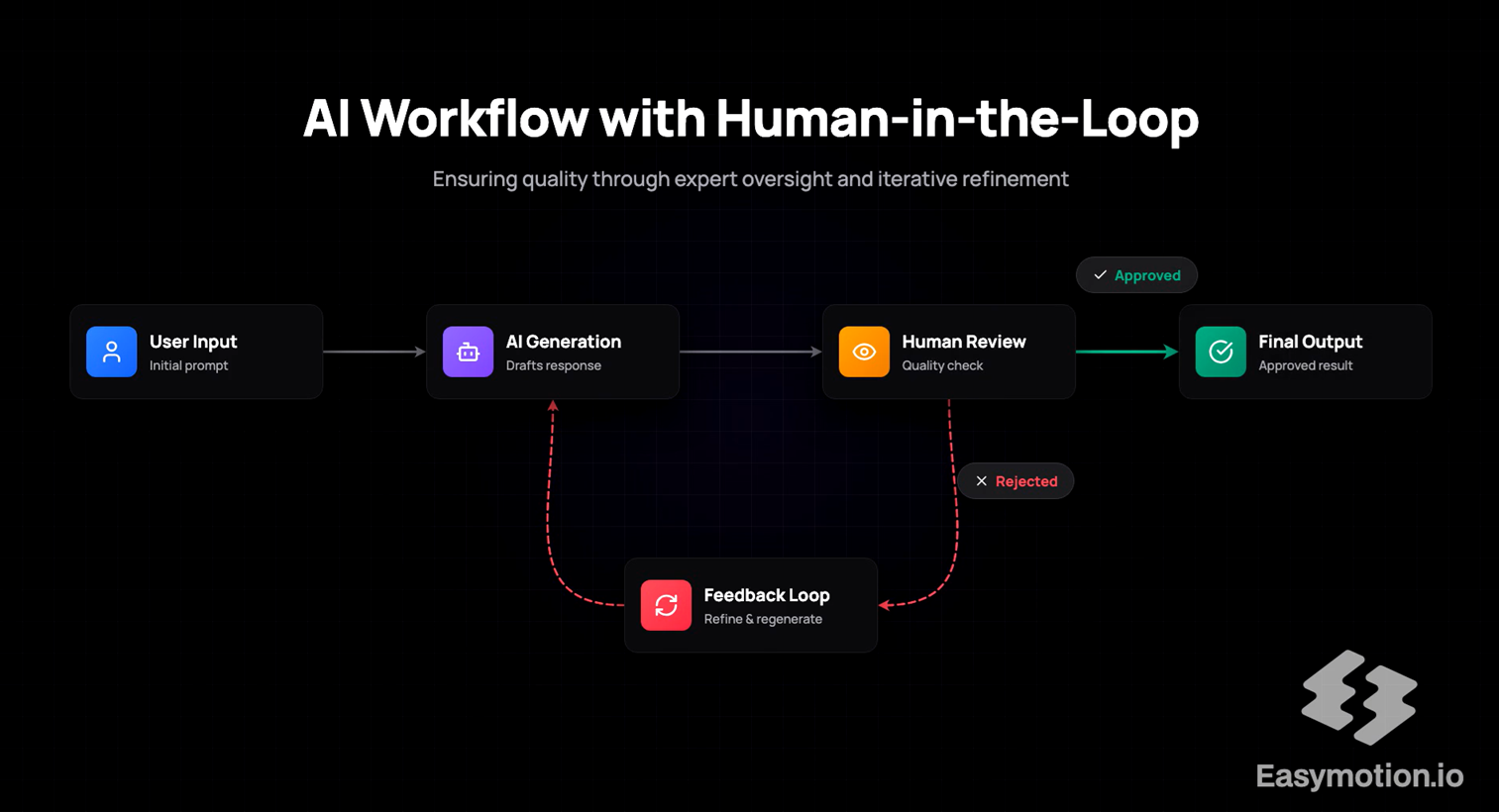
The generated workflow shows User Input, AI Generation, Human Review, and Final Output, plus visible Approved and Rejected paths and a labeled Feedback Loop for refinement and regeneration. That confirms EasyMotion can express a basic review cycle, but the report still advises skipping it when you specifically need robust decision-diamond nodes or more exact loop-back-arrow control.
Direct MP4 exportA practical differentiator in this test set.▾
Feature tested: Direct MP4 export
Result: Passed
Verdict: A practical differentiator in this test set.
Expected behavior: EasyMotion outputs finished animated flowchart videos as MP4s instead of leaving the result as a static diagram or requiring a screen-recording workaround. This mattered in the research because direct video export made the output immediately usable for presentations, articles, and educational content.
Test case: Text prompt → Text prompt
Input type: Text prompt
Input used: Input artifact (Text prompt): Export test context
Observed output: Output artifact (Text prompt): Export result
Input artifact: Input artifact (Text prompt): Export test context
Output artifact: Output artifact (Text prompt): Export result
What changed: Text prompt transformed into Text prompt
Why it matters / Conclusion: If your priority is getting from prompt to a usable video file quickly, MP4 export is one of EasyMotion's clearest strengths.
EasyMotion outputs finished animated flowchart videos as MP4s instead of leaving the result as a static diagram or requiring a screen-recording workaround. This mattered in the research because direct video export made the output immediately usable for presentations, articles, and educational content.
Text-to-Animated Flowchart VideoStrong9.5/10▾
Feature tested: Text-to-Animated Flowchart Video
Result: Passed (9.5/10)
Verdict: Strong
Expected behavior: Paste a process description, and EasyMotion transforms it into an animated flowchart video. The structure, flow, and visual output come together automatically—but the way it handles real inputs is worth exploring.
Test case: Text prompt → Video file
Input type: Text prompt
Input used: Input artifact (Text prompt): RAG Ingestion Pipeline : Create an animated flowchart titled "RAG Ingestion Pipeline". A Document is uploaded and its text is extracted. The extracted text is split into smaller chunks. Each chunk is converted into embeddings. The generated embeddings are stored in a Vector Database, and the metadata is stored in a Metadata Store.
Observed output: Output artifact (Video file): RAG Ingestion Pipeline EasyMotion — Easymotion RAG Ingestion Pipeline Flowchart v2 (16_9) (1)-2.mp4
Input artifact: Input artifact (Text prompt): RAG Ingestion Pipeline : Create an animated flowchart titled "RAG Ingestion Pipeline". A Document is uploaded and its text is extracted. The extracted text is split into smaller chunks. Each chunk is converted into embeddings. The generated embeddings are stored in a Vector Database, and the metadata is stored in a Metadata Store.
Output artifact: Output artifact (Video file): RAG Ingestion Pipeline EasyMotion — Easymotion RAG Ingestion Pipeline Flowchart v2 (16_9) (1)-2.mp4
What changed: Text prompt transformed into Video file
Test case: Text prompt → Video file
Input type: Text prompt
Input used: Input artifact (Text prompt): AI Workflow with Human-in-the-loop: Create a flowchart for AI Workflow with Human-in-the-loop. A user’s input is processed and AI generates an answer. That answer is sent for Human Review. If response is approved, it moves to Final Output. If response is rejected, it loops back to AI with new feedback from Human Review and regenerates the answer.
Observed output: Output artifact (Video file): AI Workflow with Human-in-the-loop — Easymotion AI Human-in-the-Loop Flowchart v2 (16_9) (2).mp4
Input artifact: Input artifact (Text prompt): AI Workflow with Human-in-the-loop: Create a flowchart for AI Workflow with Human-in-the-loop. A user’s input is processed and AI generates an answer. That answer is sent for Human Review. If response is approved, it moves to Final Output. If response is rejected, it loops back to AI with new feedback from Human Review and regenerates the answer.
Output artifact: Output artifact (Video file): AI Workflow with Human-in-the-loop — Easymotion AI Human-in-the-Loop Flowchart v2 (16_9) (2).mp4
What changed: Text prompt transformed into Video file
Why it matters / Conclusion: From plain text to animated MP4 in minutes sounds straightforward—but how well it handles different types of flows is where things get interesting.
Paste a process description, and EasyMotion transforms it into an animated flowchart video. The structure, flow, and visual output come together automatically—but the way it handles real inputs is worth exploring.
Pricing & Access
Pricing captured in the March 2026 research run.
We tested the free tier and the Starter paid tier. Pricing checked March 2026 and noted in the report for quarterly re-checking.
Is This Right For You?
A side-by-side guide based on our hands-on testing.
Featured in Rankings
Independent rankings where EasyMotion was tested and rated.
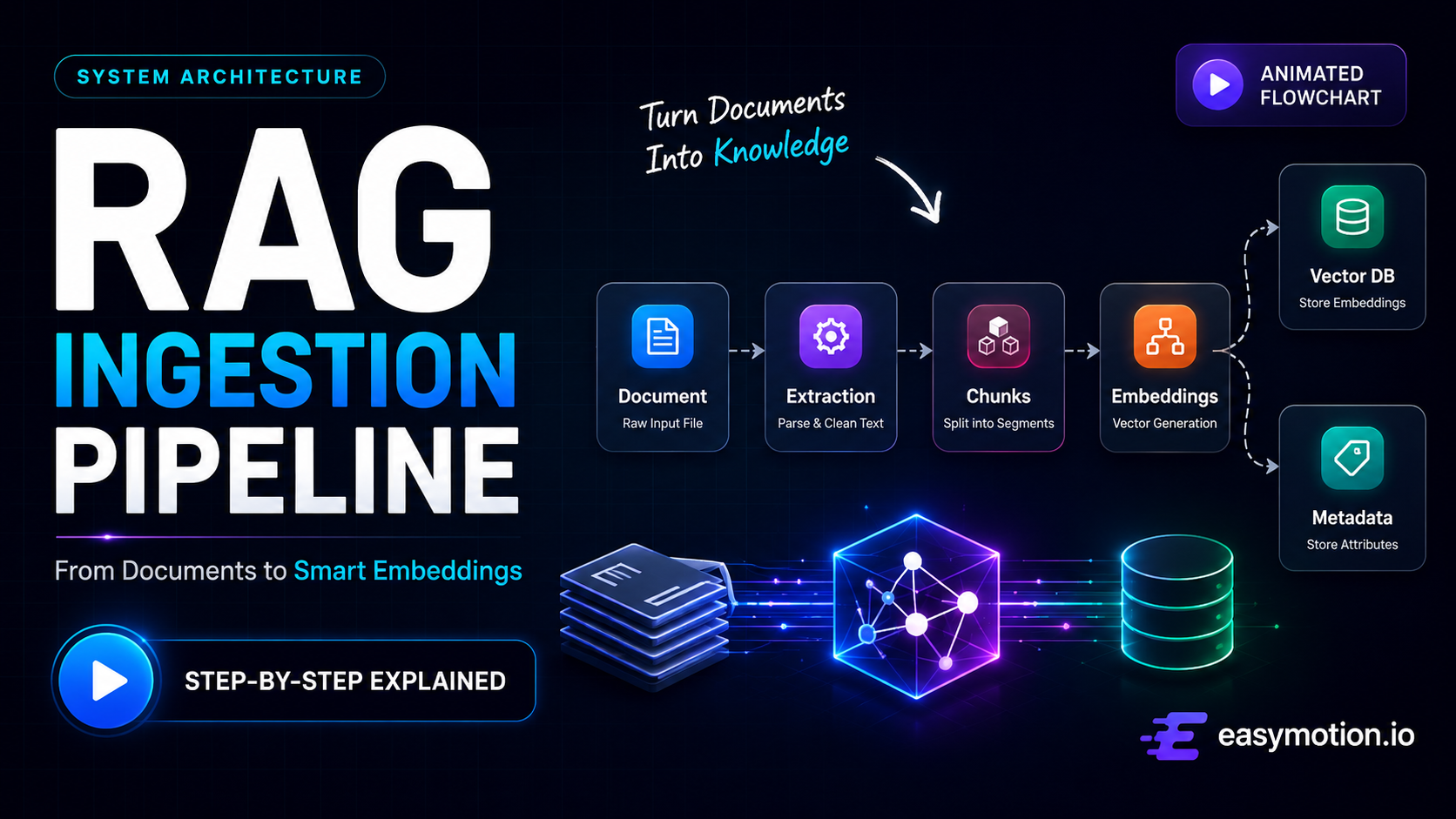
Banner Preview
How the embed badge will look on your site

Embed HTML
Copy this code to your website source
Quick Integration Guide
- 1Copy the HTML code block above.
- 2Paste it into your site's HTML or CMS editor.
- 3Banner appears instantly on your page.
- 4Links back to your tool profile here.
Similar Tools
Discover more AI tools like EasyMotion to enhance your workflow.
Comments (0)
Need a custom AI solution for this use case?
If you are looking to build a custom flowchart animation, process diagram video, or animated workflow video tool for your business or internal workflow, email us at contact@futuresmart.ai.
Found something inaccurate or missing? We try to keep our AI research accurate and useful. If you found outdated information, an issue, or have a suggestion, email us at collaborate@aidemos.com.