
AnimG
Animated workflow diagrams with correct labels, but recurring layout collisions keep it from being presentation-ready.
Accurate words, fragile layouts
- You need quick animated workflow diagrams and can tolerate manual cleanup for overlaps or dangling connectors.
- You want a browser-based tool that outputs downloadable MP4s.
- You care more about correct labels and top-level logic than perfect node spacing.
- You need clean, overlap-free flowchart layouts without rework.
Our take
AnimG gets the labels and top-level logic right in both tested workflows, and the free tier did allow downloadable MP4 output, but repeated layout collisions, dangling arrows, and an unlabeled decision diamond make the diagrams hard to trust without cleanup. It feels closer to a Manim/math-animation tool than a polished flowchart generator, which likely explains why flowchart-style prompts expose its weakest spots.
In-Depth Review
Our detailed analysis of AnimG — features, performance, and real-world testing.
Feature-by-Feature Breakdown
Animated Workflow Diagram GenerationCorrect on the workflow logic, but the layout degrades as the diagram becomes more complex.▾
Feature tested: Animated Workflow Diagram Generation
Result: Partial
Verdict: Correct on the workflow logic, but the layout degrades as the diagram becomes more complex.
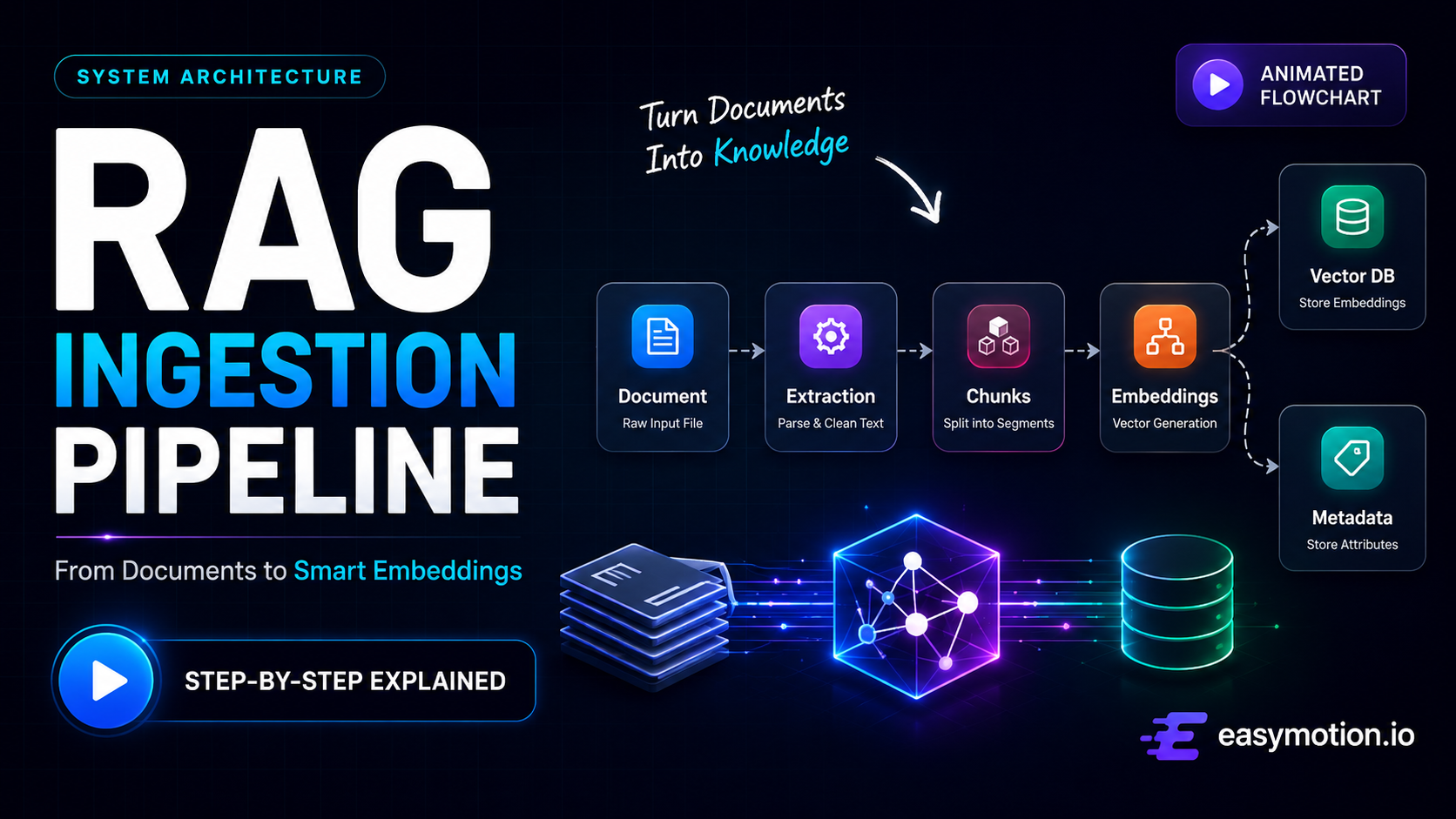
Expected behavior: Turns plain-English process prompts into animated MP4 workflow diagrams with nodes, arrows, labels, and sequential logic. It was exercised on a RAG ingestion prompt and a human-in-the-loop workflow with a yes/no feedback loop.
Test case: Text prompt → Video file
Input type: Text prompt
Input used: Input artifact (Text prompt): Input
Observed output: Output artifact (Video file): Title rendered correctly and every label was spelled correctly, with a clean early progression from Upload to Text Extractor to chunks, embeddings, and storage. But the connector line cuts through Upload, the chunk boxes disappear while arrows keep pointing at empty space, the embedding-model icons fade out leaving an orphaned label, Vector DB and Metadata Store stack on top of each other in the final frame, the Retrieval arrow points into empty space, and Metadata Store never gets its own distinct incoming connector. — AnimG output 1.mp4
Input artifact: Input artifact (Text prompt): Input
Output artifact: Output artifact (Video file): Title rendered correctly and every label was spelled correctly, with a clean early progression from Upload to Text Extractor to chunks, embeddings, and storage. But the connector line cuts through Upload, the chunk boxes disappear while arrows keep pointing at empty space, the embedding-model icons fade out leaving an orphaned label, Vector DB and Metadata Store stack on top of each other in the final frame, the Retrieval arrow points into empty space, and Metadata Store never gets its own distinct incoming connector. — AnimG output 1.mp4
What changed: Text prompt transformed into Video file
Test case: Text prompt → Video file
Input type: Text prompt
Input used: Input artifact (Text prompt): Input
Observed output: Output artifact (Video file): The title and top-level user→AI→review→decision→final-output logic were correct, but Approved? sat on the Human Review border instead of inside the diamond, the diamond stayed blank for the whole video, the rejection path faded to near-invisibility, the feedback arrow covered part of Human Review, New Feedback was low-contrast on the black background, and a horizontal line artifact cut through the bottom title caption. — AnimG output 2.mp4
Input artifact: Input artifact (Text prompt): Input
Output artifact: Output artifact (Video file): The title and top-level user→AI→review→decision→final-output logic were correct, but Approved? sat on the Human Review border instead of inside the diamond, the diamond stayed blank for the whole video, the rejection path faded to near-invisibility, the feedback arrow covered part of Human Review, New Feedback was low-contrast on the black background, and a horizontal line artifact cut through the bottom title caption. — AnimG output 2.mp4
What changed: Text prompt transformed into Video file
Why it matters / Conclusion: Useful for getting the right workflow on screen, but not for polished flowchart presentation without cleanup.
Turns plain-English process prompts into animated MP4 workflow diagrams with nodes, arrows, labels, and sequential logic. It was exercised on a RAG ingestion prompt and a human-in-the-loop workflow with a yes/no feedback loop.
Plans
Free export was available in testing, and the report also states a paid upgrade.
The review observed a free MP4 download with no paywall during testing. The report also lists a free tier with a watermark, 480p, up to 2 animations, and 3 playground renders/day.
Featured in Rankings
Independent rankings where AnimG was tested and rated.
Banner Preview
How the embed badge will look on your site

Embed HTML
Copy this code to your website source
Quick Integration Guide
- 1Copy the HTML code block above.
- 2Paste it into your site's HTML or CMS editor.
- 3Banner appears instantly on your page.
- 4Links back to your tool profile here.
Similar Tools
Discover more AI tools like AnimG to enhance your workflow.
Comments (0)
Need a custom AI solution for this use case?
If you are looking to build a custom workflow diagram animation, process visualization, or presentation video tool for your business or internal workflow, email us at contact@futuresmart.ai.
Found something inaccurate or missing? We try to keep our AI research accurate and useful. If you found outdated information, an issue, or have a suggestion, email us at collaborate@aidemos.com.