AI Database Agents
Version 128 published Results

Plain-English database answers with visible SQL and unusually strong query analytics, best for well-formed questions.
Strong on self-contained questions, weaker on relative-time comparisons
Database Agent is a strong fit when the question is self-contained: it returns readable tables and summaries, shows the executed SQL, keeps context across successful follow-ups, and uniquely logs latency, cost, and token usage per query. The main weakness is relative-date logic, where empty windows can collapse into no-answer responses or misdiagnosed failures instead of a usable comparison. Charting is also inconsistent on later turns, and some direct answers omit details the underlying data require.
Explore Database Agent by FutureSmart AI in our public benchmarks.
28 published Results
Our detailed analysis of Database Agent by FutureSmart AI — features, performance, and real-world testing.
Feature tested: Natural-Language Database Querying
Result: Passed
Expected behavior: Converts plain-English business questions into live database queries and returns readable answers, tables, prose, and executed SQL. The exercised inputs included customer rankings, orders-by-stage summaries, grouped questions, zero-result acquisition queries, and relative-date comparison prompts.
Test case: Text prompt → Image
Input type: Text prompt
Input used: Input artifact (Text prompt): Input
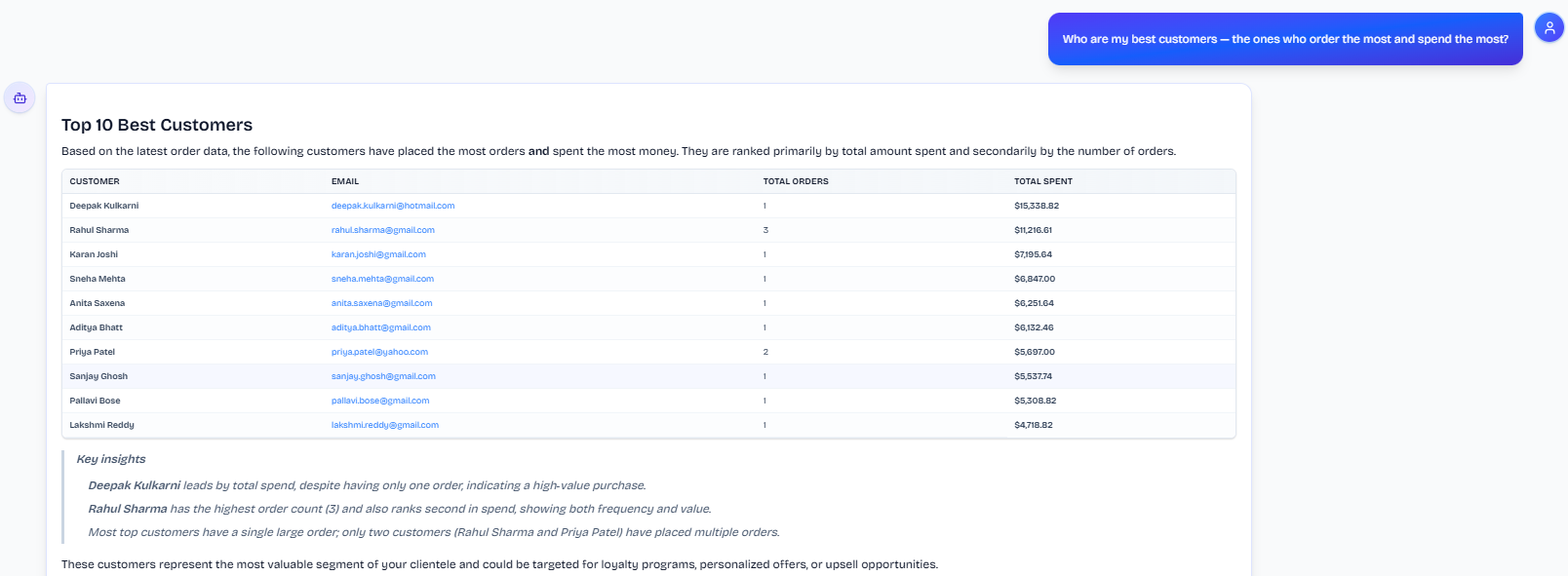
Observed output: Output artifact (Image): The tool returns a ranked top-10 customer table with order counts and total spend, plus a short key-insights block that explains who leads on spend and who leads on order count among the top customers. — input2-main-top10-table-and-key-insights.png
Input artifact: Input artifact (Text prompt): Input
Output artifact: Output artifact (Image): The tool returns a ranked top-10 customer table with order counts and total spend, plus a short key-insights block that explains who leads on spend and who leads on order count among the top customers. — input2-main-top10-table-and-key-insights.png
What changed: Text prompt transformed into Image
Test case: Text prompt → Image
Input type: Text prompt
Input used: Input artifact (Text prompt): Input
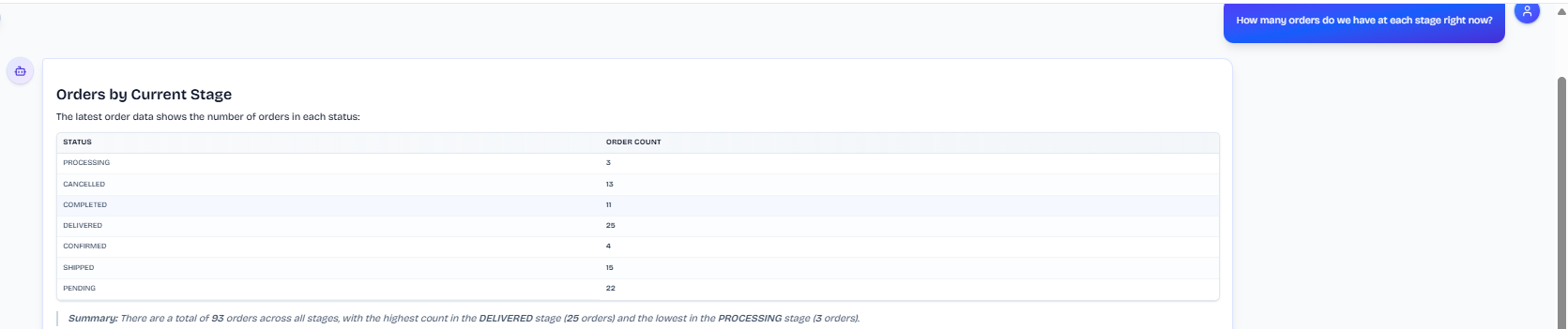
Observed output: Output artifact (Image): The output is a clean stage-by-stage summary table with a plain-language recap, showing the total order count and which status has the most and least orders. — input3-main-orders-by-stage-table-and-summary.png
Input artifact: Input artifact (Text prompt): Input
Output artifact: Output artifact (Image): The output is a clean stage-by-stage summary table with a plain-language recap, showing the total order count and which status has the most and least orders. — input3-main-orders-by-stage-table-and-summary.png
What changed: Text prompt transformed into Image
Test case: Text prompt → Image
Input type: Text prompt
Input used: Input artifact (Text prompt): Input
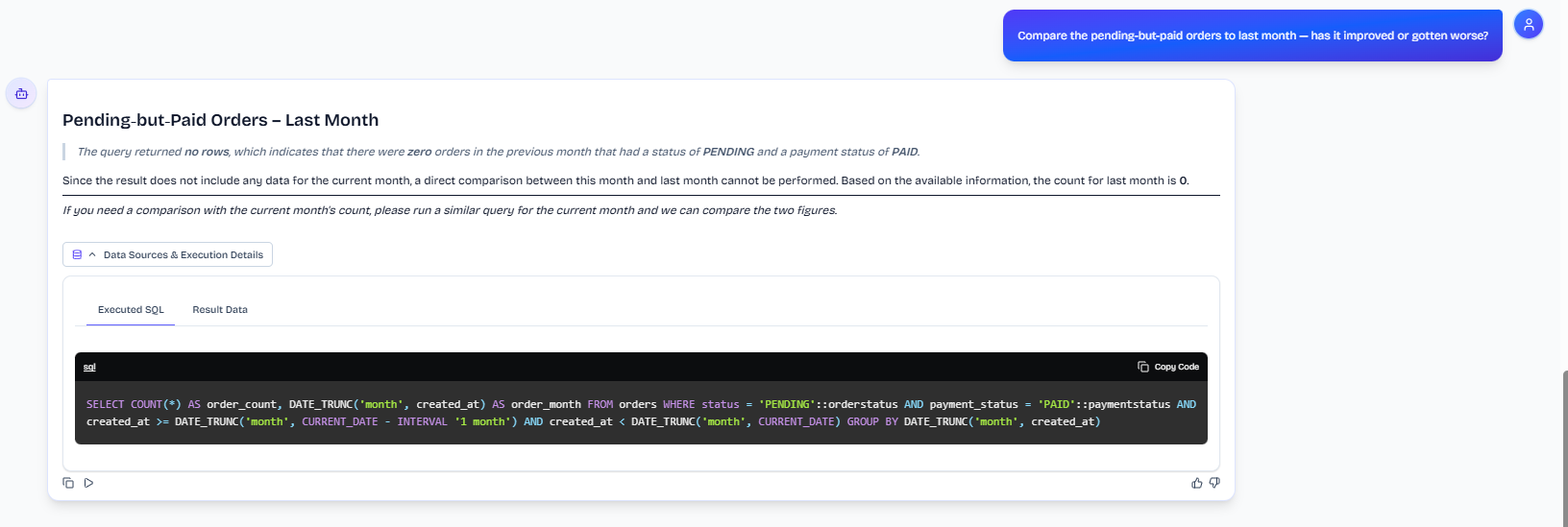
Observed output: Output artifact (Image): When the comparison is re-asked with the referent clarified, the tool still reports zero rows for the previous month and tells the user to run a similar query for the current month instead of producing a real comparison. — input3-followup3-disambiguated-reask-still-gives-up.png
Input artifact: Input artifact (Text prompt): Input
Output artifact: Output artifact (Image): When the comparison is re-asked with the referent clarified, the tool still reports zero rows for the previous month and tells the user to run a similar query for the current month instead of producing a real comparison. — input3-followup3-disambiguated-reask-still-gives-up.png
What changed: Text prompt transformed into Image
Why it matters / Conclusion: Strong on well-formed business questions that map cleanly to one live query.
Converts plain-English business questions into live database queries and returns readable answers, tables, prose, and executed SQL. The exercised inputs included customer rankings, orders-by-stage summaries, grouped questions, zero-result acquisition queries, and relative-date comparison prompts.
Feature tested: Contextual Follow-Up Querying
Result: Partial
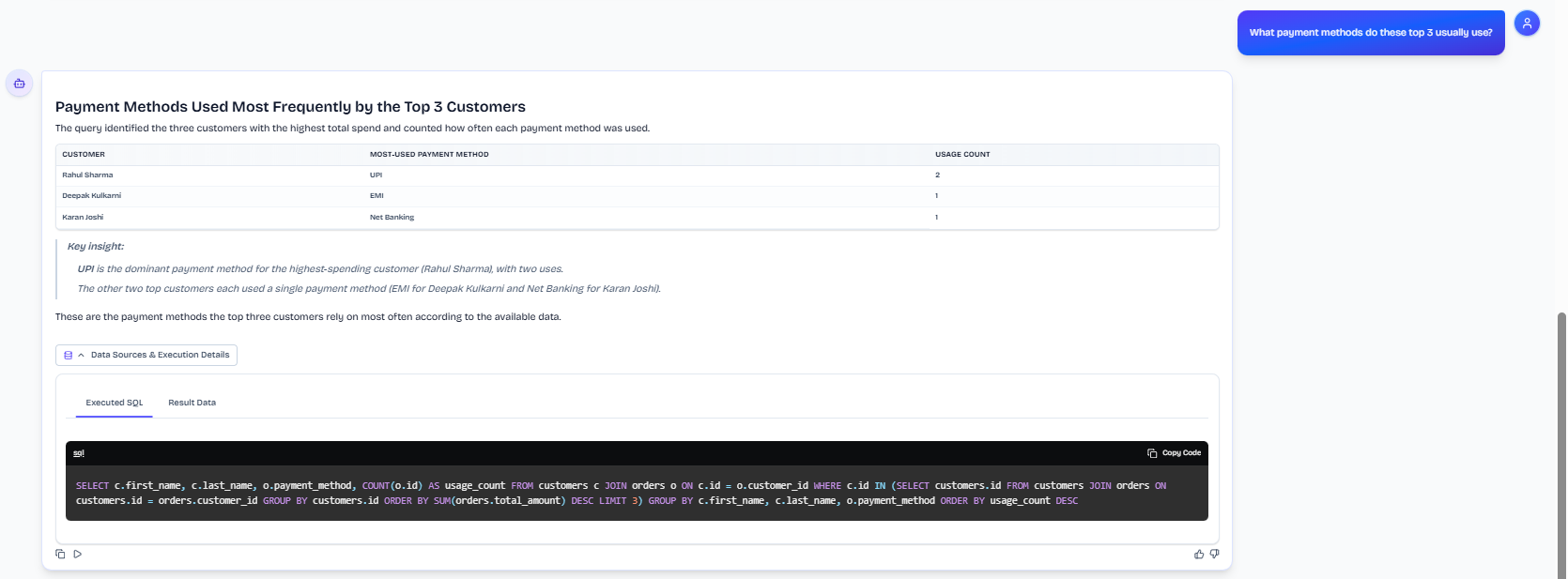
Expected behavior: Carries prior conversational context into later business questions so users can drill into the same customer set, pipeline breakdown, or scoped order/payment questions without restating everything. The exercised follow-ups included best-customers chains, order-pipeline turns, unpaid-order questions, and payment-method and delivery breakdowns.
Test case: Text prompt → Image
Input type: Text prompt
Input used: Input artifact (Text prompt): INPUT
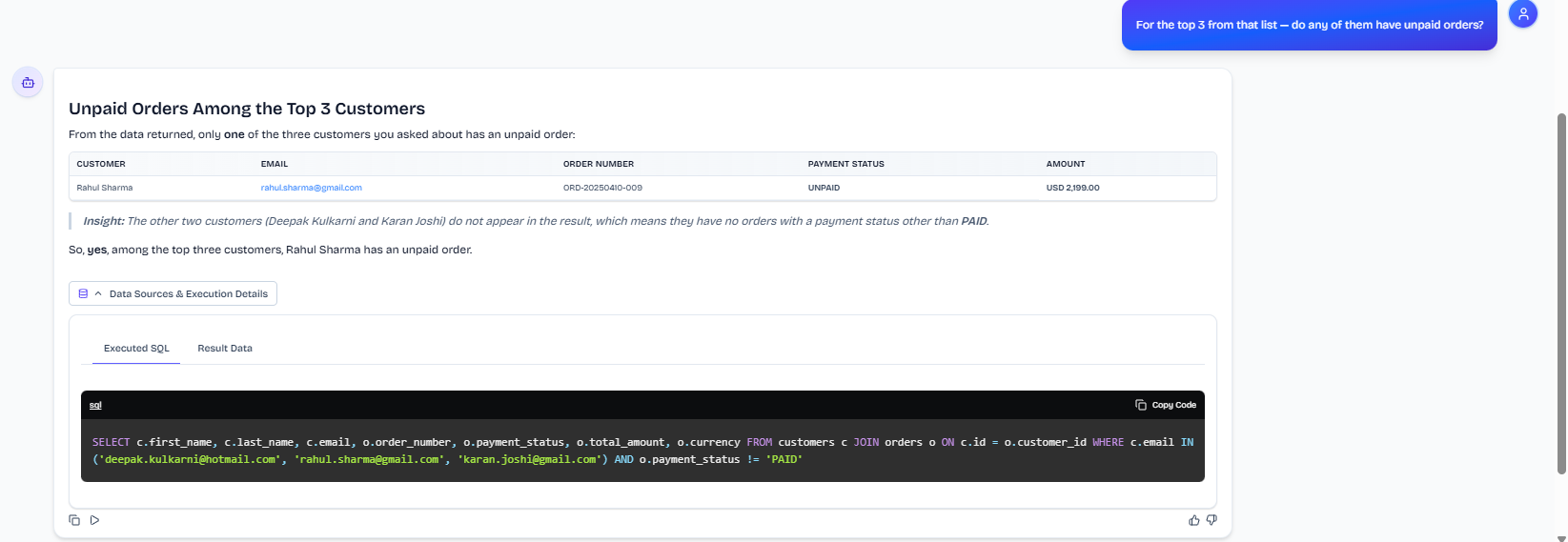
Observed output: Output artifact (Image): Answered the follow-up by carrying forward the top-3 customer set and reporting that only Rahul Sharma had an unpaid order; the other two customers did not appear in the result. — input2-followup1-unpaid-orders-answer-and-sql.png
Input artifact: Input artifact (Text prompt): INPUT
Output artifact: Output artifact (Image): Answered the follow-up by carrying forward the top-3 customer set and reporting that only Rahul Sharma had an unpaid order; the other two customers did not appear in the result. — input2-followup1-unpaid-orders-answer-and-sql.png
What changed: Text prompt transformed into Image
Test case: Text prompt → Image
Input type: Text prompt
Input used: Input artifact (Text prompt): INPUT
Observed output: Output artifact (Image): Kept the same top-3 scope and returned a payment-method breakdown for those customers. The result was conversational and context-aware, although the broader research also found an omission in one of the payment-method outputs. — input2-followup2-payment-methods-answer-and-sql.png
Input artifact: Input artifact (Text prompt): INPUT
Output artifact: Output artifact (Image): Kept the same top-3 scope and returned a payment-method breakdown for those customers. The result was conversational and context-aware, although the broader research also found an omission in one of the payment-method outputs. — input2-followup2-payment-methods-answer-and-sql.png
What changed: Text prompt transformed into Image
Test case: Text prompt → Image
Input type: Text prompt
Input used: Input artifact (Text prompt): INPUT
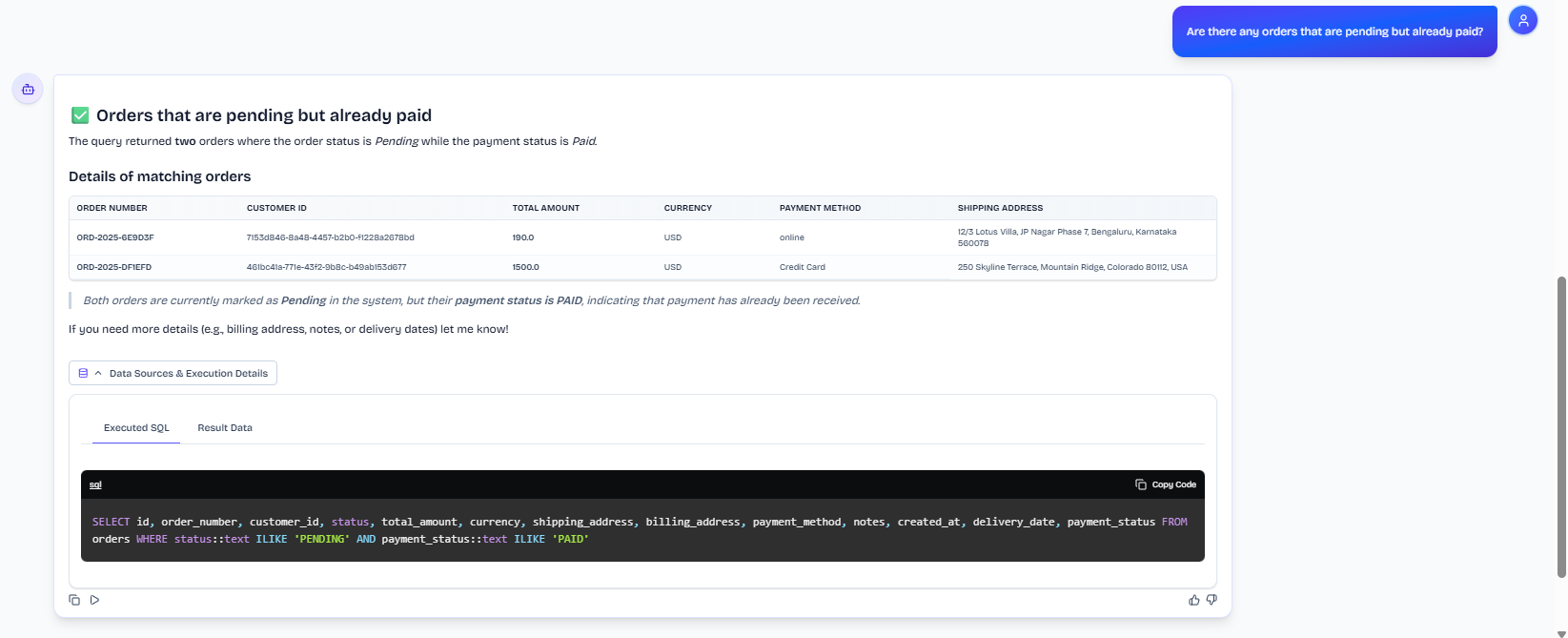
Observed output: Output artifact (Image): The follow-up stays on the order-pipeline context and returns the pending-but-paid matches. — input3-followup2-pending-but-paid-table-and-sql.png
Input artifact: Input artifact (Text prompt): INPUT
Output artifact: Output artifact (Image): The follow-up stays on the order-pipeline context and returns the pending-but-paid matches. — input3-followup2-pending-but-paid-table-and-sql.png
What changed: Text prompt transformed into Image
Test case: Text prompt → Image
Input type: Text prompt
Input used: Input artifact (Text prompt): INPUT
Observed output: Output artifact (Image): Failed to turn the follow-up into a usable month-over-month comparison and instead gave up because the queried window returned no data. — input3-followup3-give-up-answer-and-literal-last-month-sql.png
Input artifact: Input artifact (Text prompt): INPUT
Output artifact: Output artifact (Image): Failed to turn the follow-up into a usable month-over-month comparison and instead gave up because the queried window returned no data. — input3-followup3-give-up-answer-and-literal-last-month-sql.png
What changed: Text prompt transformed into Image
Why it matters / Conclusion: Context retention is strong across the successful follow-ups, but ambiguous references are guessed rather than clarified, and empty relative-time follow-ups can collapse into a no-answer response.
Carries prior conversational context into later business questions so users can drill into the same customer set, pipeline breakdown, or scoped order/payment questions without restating everything. The exercised follow-ups included best-customers chains, order-pipeline turns, unpaid-order questions, and payment-method and delivery breakdowns.

Feature tested: Automatic Chart Generation
Result: Partial
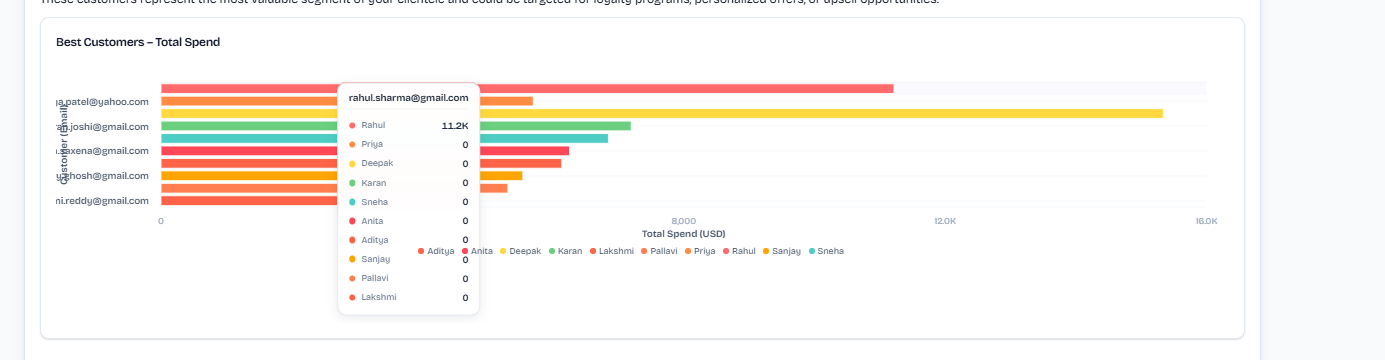
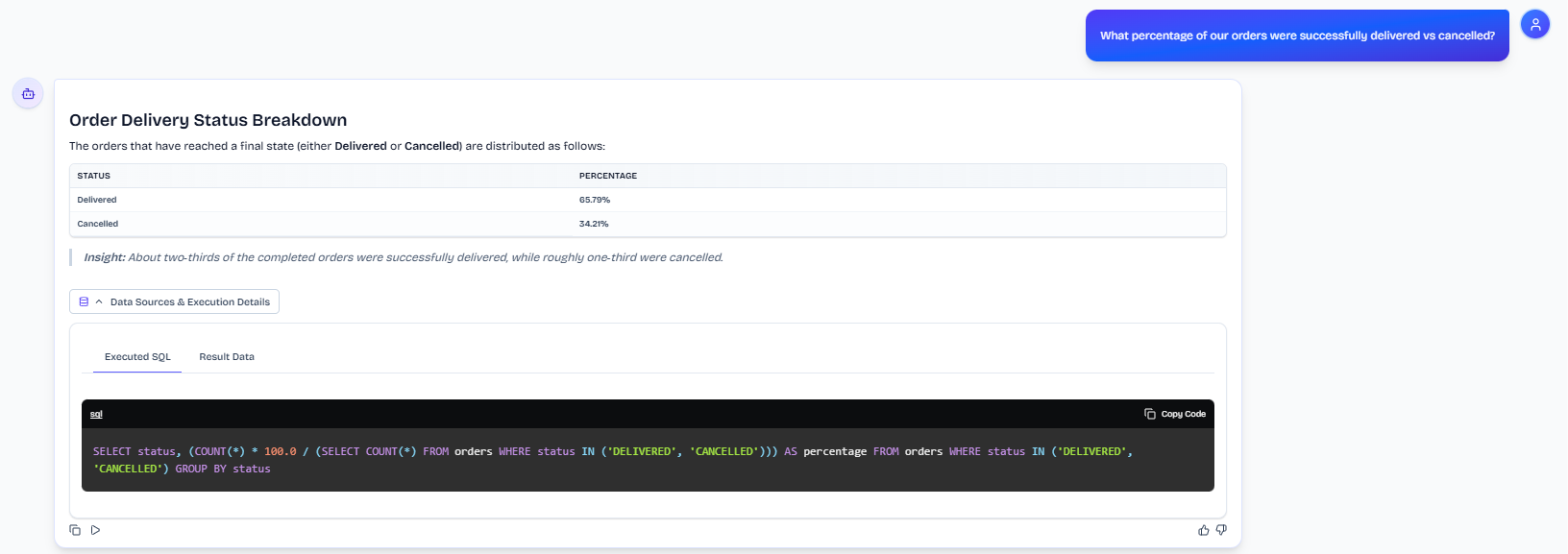
Expected behavior: Automatically renders charts for some summary query shapes, especially ranked customer views and order/status breakdowns. The same behavior was exercised on later chart-shaped follow-ups, which were inconsistently visualized and sometimes left as tables or text.
Test case: Text prompt → Image
Input type: Text prompt
Input used: Input artifact (Text prompt): INPUT
Observed output: Output artifact (Image): Generated a horizontal bar chart for the best-customers query, showing total spend by customer and giving a visual ranking of the top names. — input2-main-best-customers-bar-chart.png
Input artifact: Input artifact (Text prompt): INPUT
Output artifact: Output artifact (Image): Generated a horizontal bar chart for the best-customers query, showing total spend by customer and giving a visual ranking of the top names. — input2-main-best-customers-bar-chart.png
What changed: Text prompt transformed into Image
Test case: Text prompt → Image
Input type: Text prompt
Input used: Input artifact (Text prompt): INPUT
Observed output: Output artifact (Image): Generated a bar chart for the order-count-by-status summary, with one bar per status and a clear visual comparison across stages. — input3-main-order-count-by-status-bar-chart.png
Input artifact: Input artifact (Text prompt): INPUT
Output artifact: Output artifact (Image): Generated a bar chart for the order-count-by-status summary, with one bar per status and a clear visual comparison across stages. — input3-main-order-count-by-status-bar-chart.png
What changed: Text prompt transformed into Image
Test case: Text prompt → Image
Input type: Text prompt
Input used: Input artifact (Text prompt): INPUT
Observed output: Output artifact (Image): Returned a two-row percentage table but no chart, even though the result shape was chart-friendly. — input3-followup1-no-chart-percentage-split.png
Input artifact: Input artifact (Text prompt): INPUT
Output artifact: Output artifact (Image): Returned a two-row percentage table but no chart, even though the result shape was chart-friendly. — input3-followup1-no-chart-percentage-split.png
What changed: Text prompt transformed into Image
Test case: Text prompt → Image
Input type: Text prompt
Input used: Input artifact (Text prompt): INPUT
Observed output: Output artifact (Image): Returned the payment-method counts as a table with no chart, despite the data being a small categorical breakdown that could have been visualized. — input2-followup2-no-chart-payment-counts].png
Input artifact: Input artifact (Text prompt): INPUT
Output artifact: Output artifact (Image): Returned the payment-method counts as a table with no chart, despite the data being a small categorical breakdown that could have been visualized. — input2-followup2-no-chart-payment-counts].png
What changed: Text prompt transformed into Image
Why it matters / Conclusion: Useful charting appears on the main queries, but follow-up chart-shaped results are inconsistent.
Automatically renders charts for some summary query shapes, especially ranked customer views and order/status breakdowns. The same behavior was exercised on later chart-shaped follow-ups, which were inconsistently visualized and sometimes left as tables or text.

![Output artifact for "Automatic Chart Generation" test: Returned the payment-method counts as a table with no chart, despite the data being a small categorical breakdown that could have been visualized., input2-followup2-no-chart-payment-counts].png](https://cdn.futuresmart.ai/public/aidemos/6a51826143fd4b30b65e8cd06a4d3a53.png?v=1)
Feature tested: SQL Inspection and Result Metadata Viewing
Result: Passed
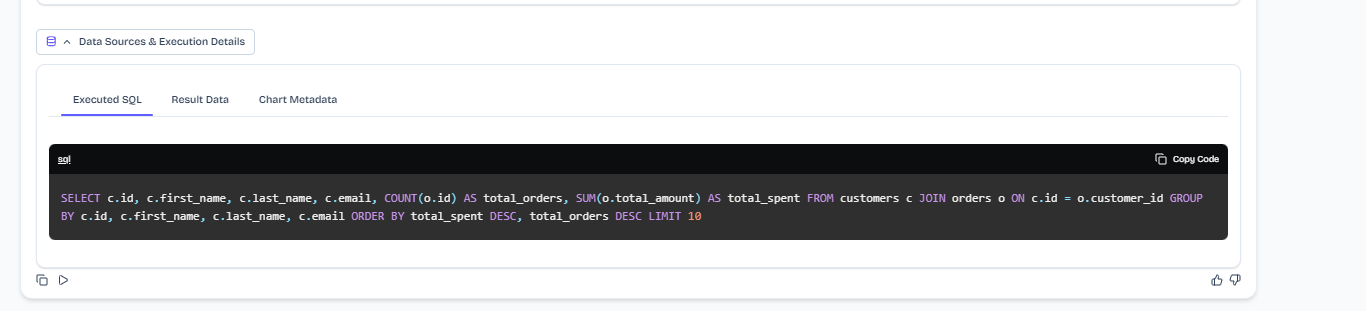
Expected behavior: Shows the generated SQL in a dedicated execution panel and exposes result data plus chart metadata tabs so users can inspect what the tool ran and what rows came back. The cards emphasize that the SQL is shown raw rather than explained in plain language.
Test case: Text prompt → Image
Input type: Text prompt
Input used: Input artifact (Text prompt): INPUT
Observed output: Output artifact (Image): Displayed the executed SQL for the top-customers query in a dedicated panel, showing the join, grouping, ordering, and limit used to produce the answer. — input2-main-executed-sql.png
Input artifact: Input artifact (Text prompt): INPUT
Output artifact: Output artifact (Image): Displayed the executed SQL for the top-customers query in a dedicated panel, showing the join, grouping, ordering, and limit used to produce the answer. — input2-main-executed-sql.png
What changed: Text prompt transformed into Image
Test case: Text prompt → Image
Input type: Text prompt
Input used: Input artifact (Text prompt): INPUT
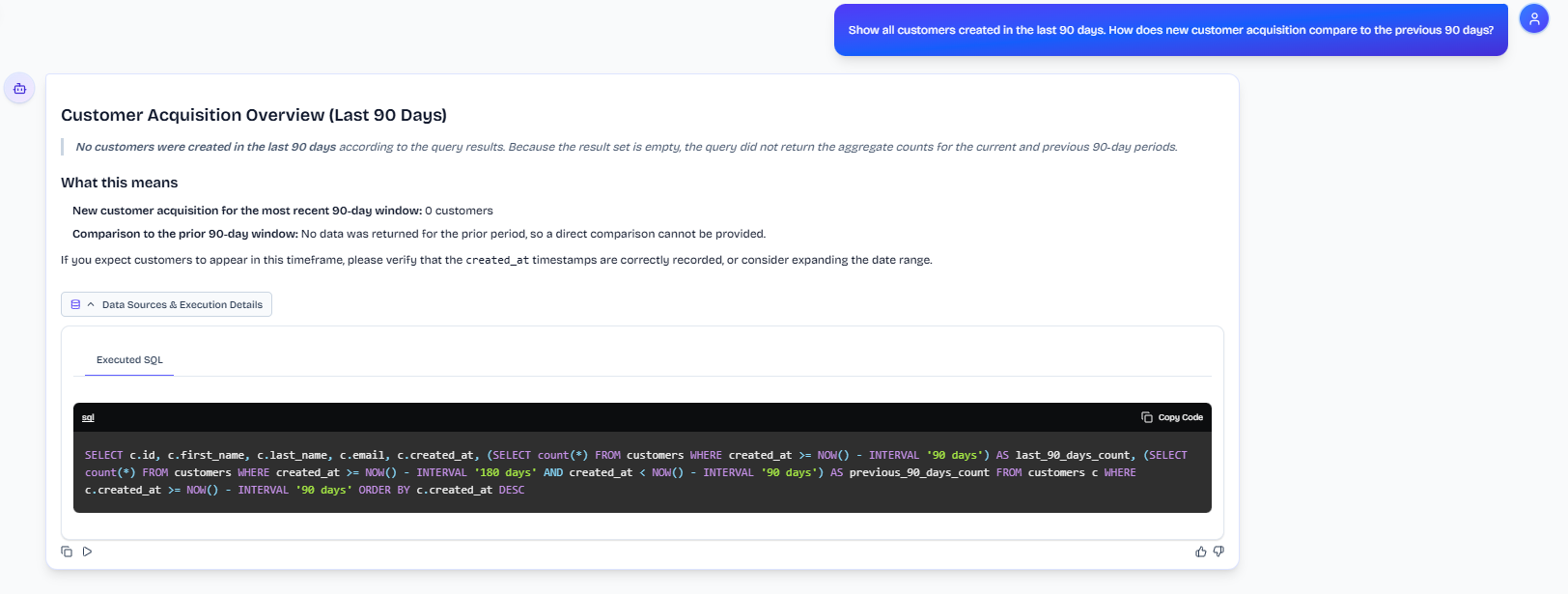
Observed output: Output artifact (Image): Displayed the executed SQL for the customer-acquisition query in a dedicated panel, making the query logic visible even though the resulting comparison was flawed. — input1-executed-sql-previous-period-column.png
Input artifact: Input artifact (Text prompt): INPUT
Output artifact: Output artifact (Image): Displayed the executed SQL for the customer-acquisition query in a dedicated panel, making the query logic visible even though the resulting comparison was flawed. — input1-executed-sql-previous-period-column.png
What changed: Text prompt transformed into Image
Test case: Text prompt → Image
Input type: Text prompt
Input used: Input artifact (Text prompt): INPUT
Observed output: Output artifact (Image): Displayed the executed SQL for the order-count-by-status query, showing a simple GROUP BY count in the inspection panel. — input3-main-executed-sql.png
Input artifact: Input artifact (Text prompt): INPUT
Output artifact: Output artifact (Image): Displayed the executed SQL for the order-count-by-status query, showing a simple GROUP BY count in the inspection panel. — input3-main-executed-sql.png
What changed: Text prompt transformed into Image
Why it matters / Conclusion: A real transparency surface is built into the product, but the SQL is shown raw rather than explained in plain language.
Shows the generated SQL in a dedicated execution panel and exposes result data plus chart metadata tabs so users can inspect what the tool ran and what rows came back. The cards emphasize that the SQL is shown raw rather than explained in plain language.


Feature tested: Query Analytics and Usage Observability
Result: Passed
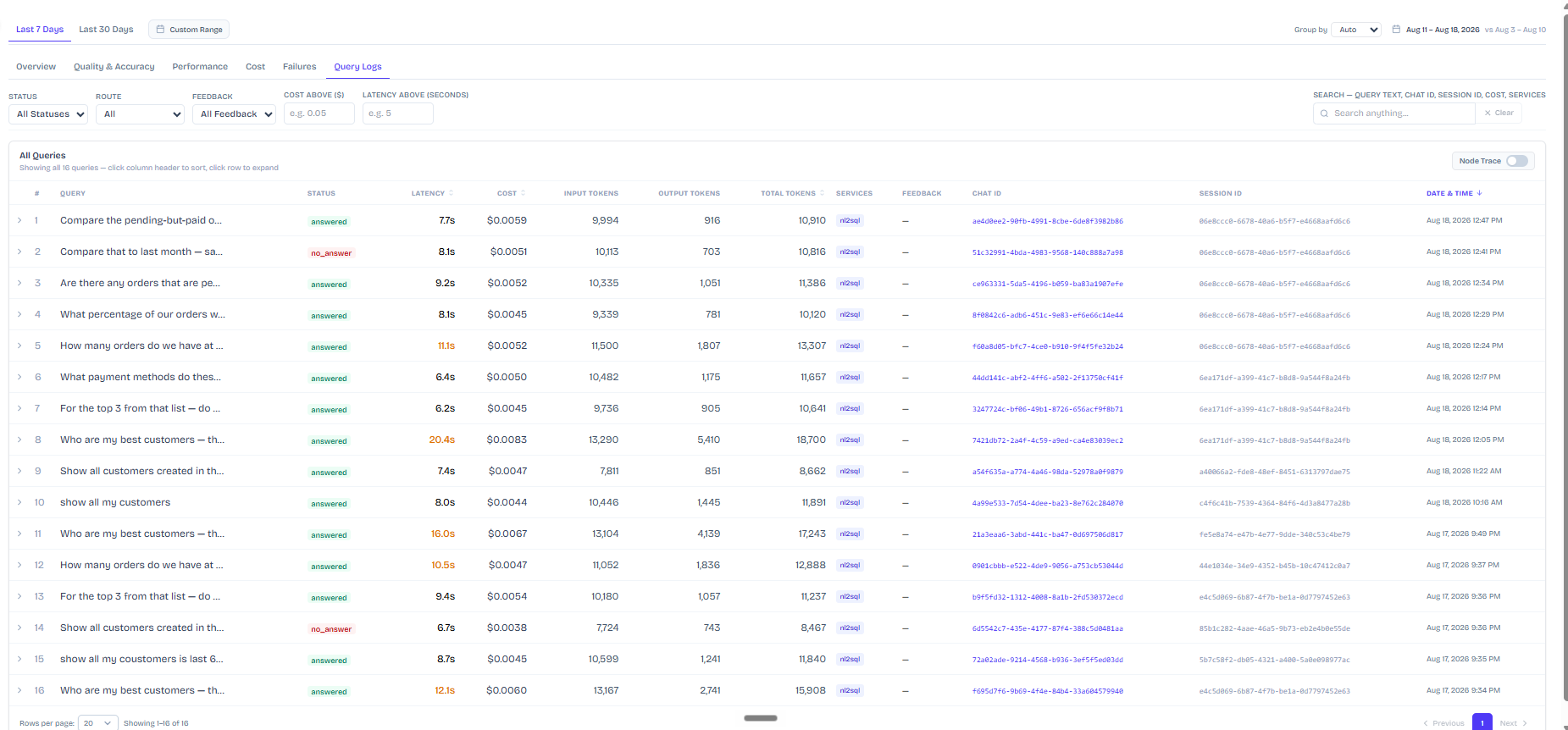
Expected behavior: Provides a dedicated analytics surface for reviewing past query runs, including latency, cost, token counts, query status, query text, chat/session IDs, filters, and log-level history. It supports historical inspection of per-query operational metrics and usage across recent runs.
Test case: Text prompt → Image
Input type: Text prompt
Input used: Input artifact (Text prompt): INPUT
Observed output: Output artifact (Image): Showed an Analytics page with filters, query history, cost per query, average latency, token counts, and links into SQL and results, giving strong per-query observability. — fsnl2sql-analytics-page-all-queries-cost-latency-tokens.png
Input artifact: Input artifact (Text prompt): INPUT
Output artifact: Output artifact (Image): Showed an Analytics page with filters, query history, cost per query, average latency, token counts, and links into SQL and results, giving strong per-query observability. — fsnl2sql-analytics-page-all-queries-cost-latency-tokens.png
What changed: Text prompt transformed into Image
Why it matters / Conclusion: This is the tool's most distinctive strength: it makes per-query cost, latency, and token usage visible in one place.
Provides a dedicated analytics surface for reviewing past query runs, including latency, cost, token counts, query status, query text, chat/session IDs, filters, and log-level history. It supports historical inspection of per-query operational metrics and usage across recent runs.
Feature tested: Relative-Date Comparison Handling
Result: Failed
Expected behavior: Answers relative-time comparison questions such as last-90-days and last-month prompts, but can be brittle when the relevant time window is empty. In those cases it may suppress an independently-computable comparison or give up instead of adapting to the dataset boundary.
Test case: Text prompt → Image
Input type: Text prompt
Input used: Input artifact (Text prompt): INPUT
Observed output: Output artifact (Image): Returned a last-90-days acquisition answer that reported zero customers in the current window but failed to surface the previous-90-days count, instead describing the comparison as unavailable. — input1-answer-empty-result-what-this-means.png
Input artifact: Input artifact (Text prompt): INPUT
Output artifact: Output artifact (Image): Returned a last-90-days acquisition answer that reported zero customers in the current window but failed to surface the previous-90-days count, instead describing the comparison as unavailable. — input1-answer-empty-result-what-this-means.png
What changed: Text prompt transformed into Image
Test case: Text prompt → Image
Input type: Text prompt
Input used: Input artifact (Text prompt): INPUT
Observed output: Output artifact (Image): On a rephrased month-over-month follow-up, the tool still gave up because the queried month returned no rows, rather than diagnosing the available date range and computing a valid comparison. — input3-followup3-disambiguated-reask-still-gives-up.png
Input artifact: Input artifact (Text prompt): INPUT
Output artifact: Output artifact (Image): On a rephrased month-over-month follow-up, the tool still gave up because the queried month returned no rows, rather than diagnosing the available date range and computing a valid comparison. — input3-followup3-disambiguated-reask-still-gives-up.png
What changed: Text prompt transformed into Image
Why it matters / Conclusion: Relative-time questions are the clearest reliability gap: when the chosen window is empty, the tool often stops instead of adapting.
Answers relative-time comparison questions such as last-90-days and last-month prompts, but can be brittle when the relevant time window is empty. In those cases it may suppress an independently-computable comparison or give up instead of adapting to the dataset boundary.
The report says the tool was tested on the Free ($0) tier and that a Custom tier is also offered.
Pricing details were taken from the report's testing setup note.
How the embed badge will look on your site

Copy this code to your website source
Discover more AI tools like Database Agent by FutureSmart AI to enhance your workflow.
If you are looking to build a custom database query assistant, SQL generation, or query analytics tool for your business or internal workflow, email us at contact@futuresmart.ai.
Found something inaccurate or missing? We try to keep our AI research accurate and useful. If you found outdated information, an issue, or have a suggestion, email us at collaborate@aidemos.com.