AI Database Agents
Version 119 published Results

Plain-English database analytics with SQL transparency, auto-charts, and self-correcting follow-ups.
Strong analyst-like behavior, with caveats
BlazeSQL is a strong fit for non-technical users who want live database answers in plain English: it returns tables and charts, shows SQL on demand, keeps context across follow-ups, and often corrects its own first pass. The main cautions are inconsistent auto-charting, no visible cost or latency, and a Training workflow needed to lock down business-rule definitions.
Explore BlazeSQL in our public benchmarks.
19 published Results
Our detailed analysis of BlazeSQL — features, performance, and real-world testing.
Feature tested: Natural-Language Live Database Querying
Result: Passed
Verdict: Strong
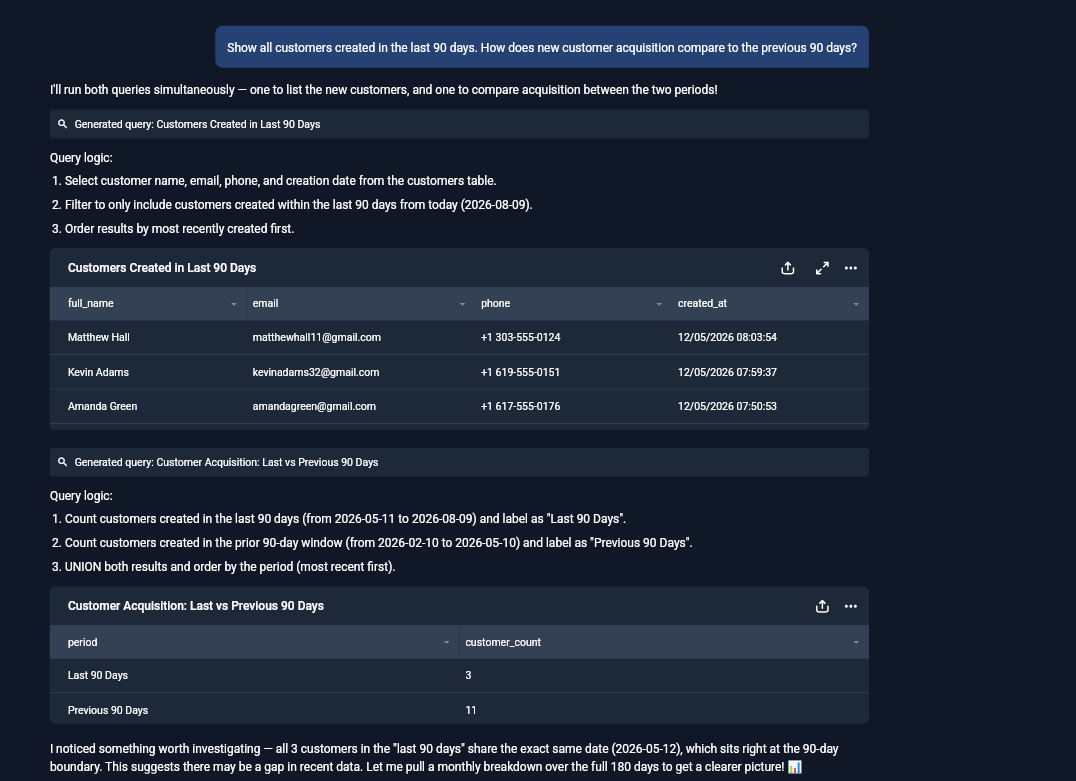
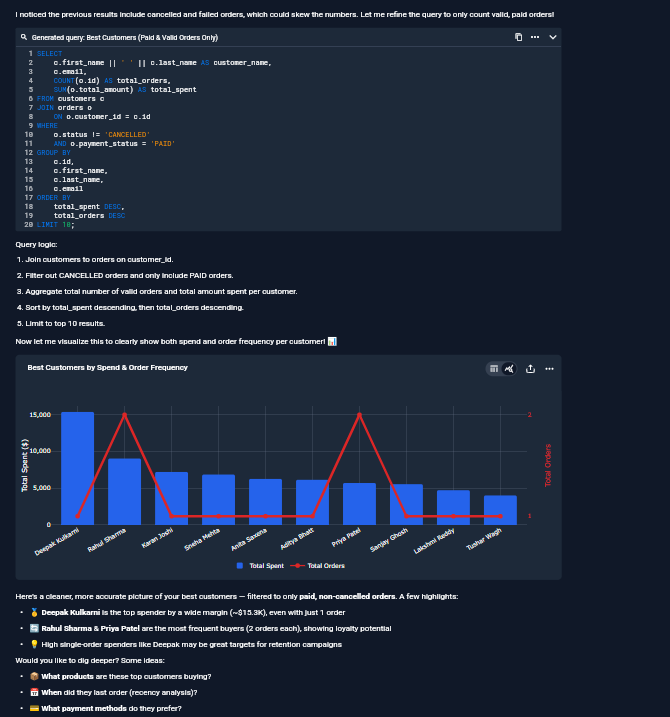
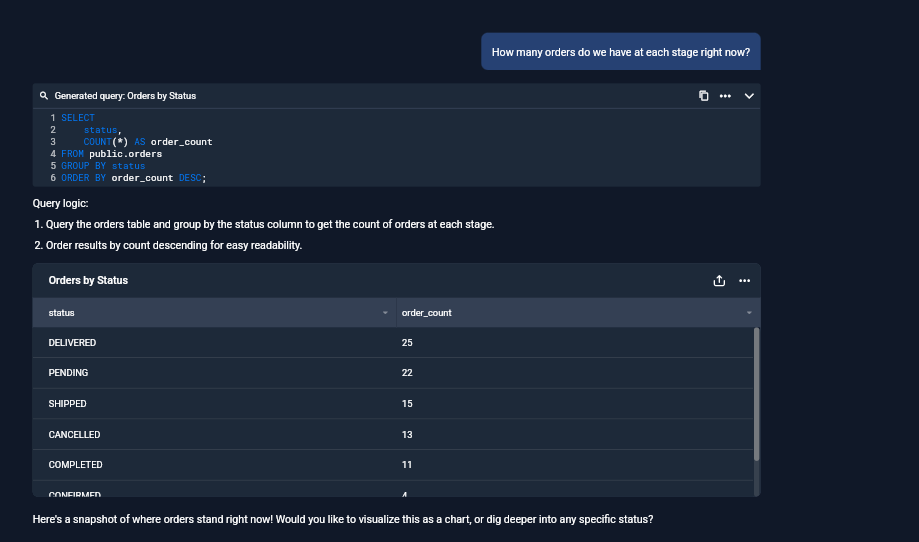
Expected behavior: Converts business questions into live database queries and returns readable answers with tables and narrative. In testing, it handled customer acquisition, best-customer ranking, and order-status breakdowns without requiring SQL from the user.
Test case: Text prompt → Image
Input type: Text prompt
Input used: Input artifact (Text prompt): Input
Observed output: Output artifact (Image): Returned a readable customer list from the connected database for the last-90-days query, showing that BlazeSQL can answer a plain-English request with a live result table. — input1-customer-list-table.png
Input artifact: Input artifact (Text prompt): Input
Output artifact: Output artifact (Image): Returned a readable customer list from the connected database for the last-90-days query, showing that BlazeSQL can answer a plain-English request with a live result table. — input1-customer-list-table.png
What changed: Text prompt transformed into Image
Test case: Text prompt → Image
Input type: Text prompt
Input used: Input artifact (Text prompt): Input
Observed output: Output artifact (Image): Returned the best-customer answer as a ranked analytical result with narrative summary after correcting the ranking to use valid paid orders only. — input2-main-self-corrected-paid-only-chart.png
Input artifact: Input artifact (Text prompt): Input
Output artifact: Output artifact (Image): Returned the best-customer answer as a ranked analytical result with narrative summary after correcting the ranking to use valid paid orders only. — input2-main-self-corrected-paid-only-chart.png
What changed: Text prompt transformed into Image
Test case: Text prompt → Image
Input type: Text prompt
Input used: Input artifact (Text prompt): Input
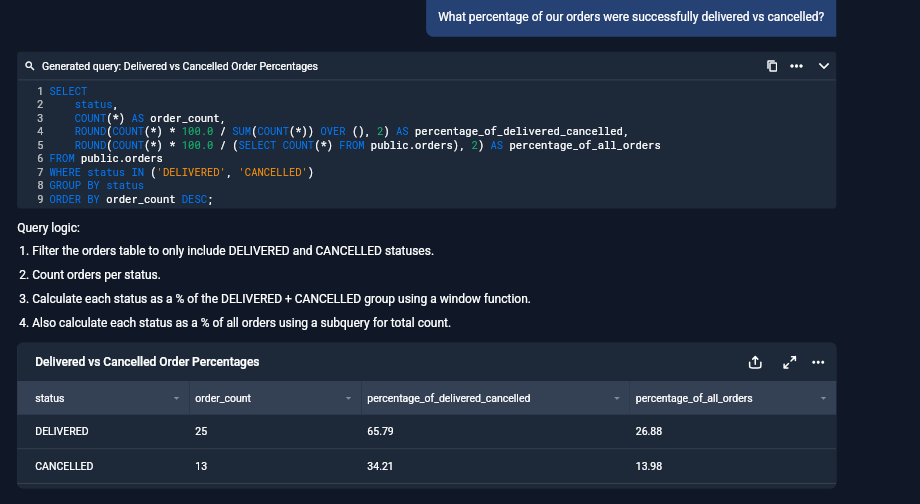
Observed output: Output artifact (Image): Returned an order-stage breakdown table with counts per status, showing that BlazeSQL can handle a straightforward operational question against the live database. — input3-main-stage-breakdown-table.png
Input artifact: Input artifact (Text prompt): Input
Output artifact: Output artifact (Image): Returned an order-stage breakdown table with counts per status, showing that BlazeSQL can handle a straightforward operational question against the live database. — input3-main-stage-breakdown-table.png
What changed: Text prompt transformed into Image
Why it matters / Conclusion: Strong for normal business questions; it answers from live data in a form a non-technical user can read.
Converts business questions into live database queries and returns readable answers with tables and narrative. In testing, it handled customer acquisition, best-customer ranking, and order-status breakdowns without requiring SQL from the user.
Feature tested: SQL Transparency and Plain-English Query Explanation
Result: Passed
Verdict: Strong when Technical Mode is on
Expected behavior: Shows the exact SQL it ran alongside a numbered plain-English explanation of the query logic. The report also notes that Technical Mode off hides the SQL while preserving the explanation for non-technical users.
Test case: Text prompt → Image
Input type: Text prompt
Input used: Input artifact (Text prompt): Input
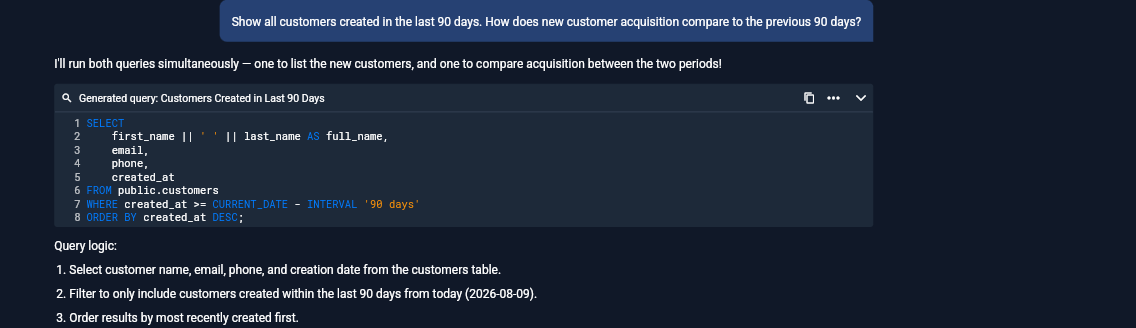
Observed output: Output artifact (Image): Technical Mode exposes the exact SQL for the 90-day customer-list query and shows a numbered plain-English query-logic summary above it. — input1-technical-mode-sql-list-query.png
Input artifact: Input artifact (Text prompt): Input
Output artifact: Output artifact (Image): Technical Mode exposes the exact SQL for the 90-day customer-list query and shows a numbered plain-English query-logic summary above it. — input1-technical-mode-sql-list-query.png
What changed: Text prompt transformed into Image
Test case: Text prompt → Image
Input type: Text prompt
Input used: Input artifact (Text prompt): Input
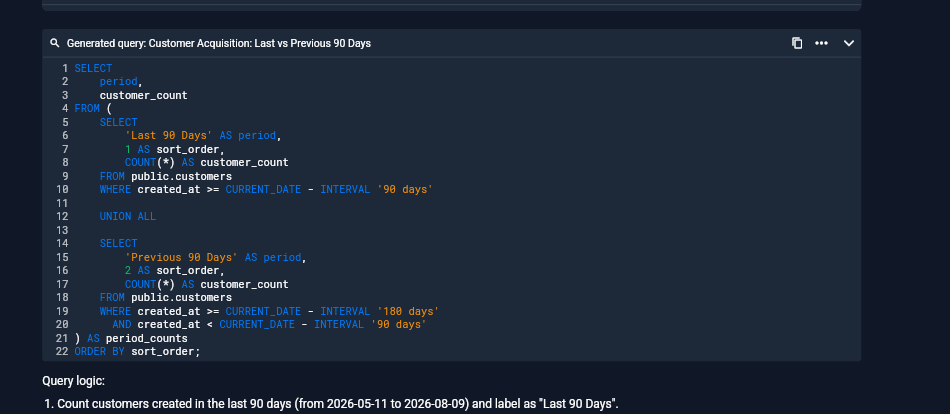
Observed output: Output artifact (Image): Technical Mode exposes the exact SQL for the last-90-days vs previous-90-days comparison query and explains the logic in plain English. — input1-technical-mode-sql-comparison-query.png
Input artifact: Input artifact (Text prompt): Input
Output artifact: Output artifact (Image): Technical Mode exposes the exact SQL for the last-90-days vs previous-90-days comparison query and explains the logic in plain English. — input1-technical-mode-sql-comparison-query.png
What changed: Text prompt transformed into Image
Test case: Text prompt → Image
Input type: Text prompt
Input used: Input artifact (Text prompt): Input
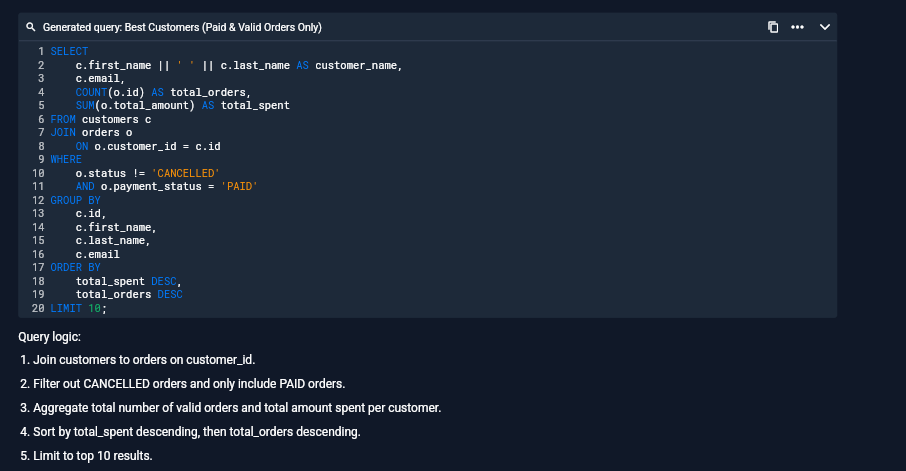
Observed output: Output artifact (Image): The refined best-customers analysis shows the generated SQL and a numbered logic breakdown, making the paid-only ranking auditable from the screen. — input2-main-technical-mode-sql-refined.png
Input artifact: Input artifact (Text prompt): Input
Output artifact: Output artifact (Image): The refined best-customers analysis shows the generated SQL and a numbered logic breakdown, making the paid-only ranking auditable from the screen. — input2-main-technical-mode-sql-refined.png
What changed: Text prompt transformed into Image
Why it matters / Conclusion: Technical Mode makes the SQL transparent and understandable; the off state keeps the same reasoning but hides the code for non-technical users.
Shows the exact SQL it ran alongside a numbered plain-English explanation of the query logic. The report also notes that Technical Mode off hides the SQL while preserving the explanation for non-technical users.
Feature tested: Automatic Chart and Table Rendering
Result: Partial
Verdict: Useful but not fully consistent
Expected behavior: Automatically renders charts for some answers, including bar, dual-axis, and pie charts, while other turns remain table-only or prompt the user about charting. The tested behavior was helpful but not uniform across every query.
Test case: Text prompt → Image
Input type: Text prompt
Input used: Input artifact (Text prompt): Input
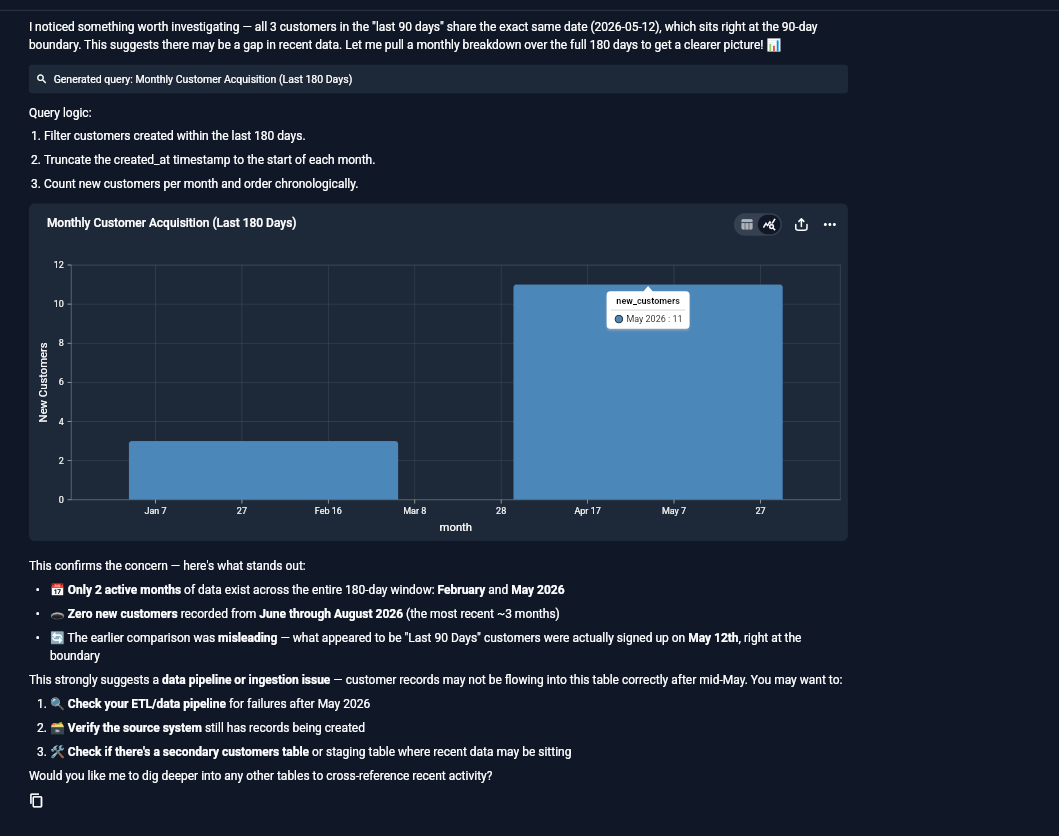
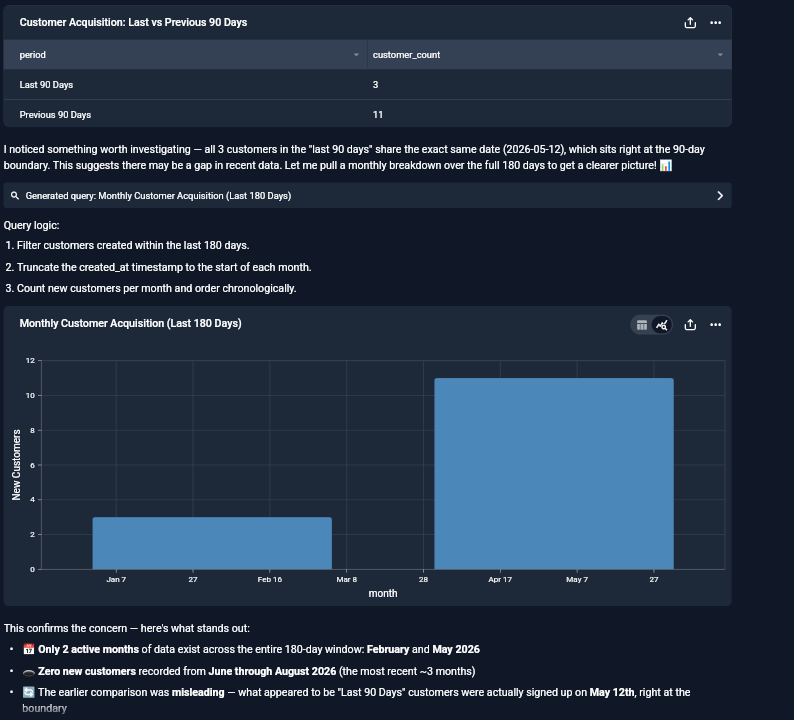
Observed output: Output artifact (Image): BlazeSQL auto-generated a monthly customer-acquisition bar chart after the initial table answers, using the live database result without requiring chart setup. — input1-monthly-breakdown-chart.png
Input artifact: Input artifact (Text prompt): Input
Output artifact: Output artifact (Image): BlazeSQL auto-generated a monthly customer-acquisition bar chart after the initial table answers, using the live database result without requiring chart setup. — input1-monthly-breakdown-chart.png
What changed: Text prompt transformed into Image
Test case: Text prompt → Image
Input type: Text prompt
Input used: Input artifact (Text prompt): Input
Observed output: Output artifact (Image): The best-customers answer rendered as a chart plus summary, combining total spend and order frequency into a single visual. — input2-main-self-corrected-paid-only-chart.png
Input artifact: Input artifact (Text prompt): Input
Output artifact: Output artifact (Image): The best-customers answer rendered as a chart plus summary, combining total spend and order frequency into a single visual. — input2-main-self-corrected-paid-only-chart.png
What changed: Text prompt transformed into Image
Test case: Text prompt → Image
Input type: Text prompt
Input used: Input artifact (Text prompt): Input
Observed output: Output artifact (Image): The successful-vs-cancelled follow-up produced a pie chart after BlazeSQL corrected the success definition to include completed orders. — input3-followup1-successful-vs-cancelled-pie.png
Input artifact: Input artifact (Text prompt): Input
Output artifact: Output artifact (Image): The successful-vs-cancelled follow-up produced a pie chart after BlazeSQL corrected the success definition to include completed orders. — input3-followup1-successful-vs-cancelled-pie.png
What changed: Text prompt transformed into Image
Test case: Text prompt → Image
Input type: Text prompt
Input used: Input artifact (Text prompt): Input
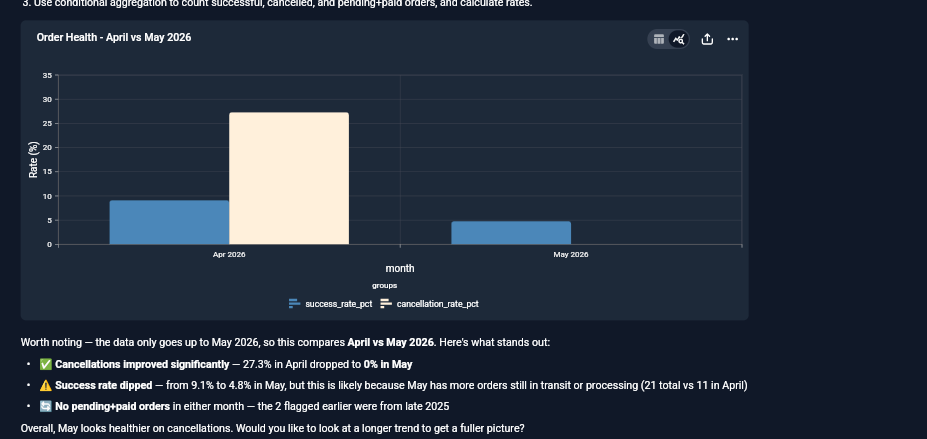
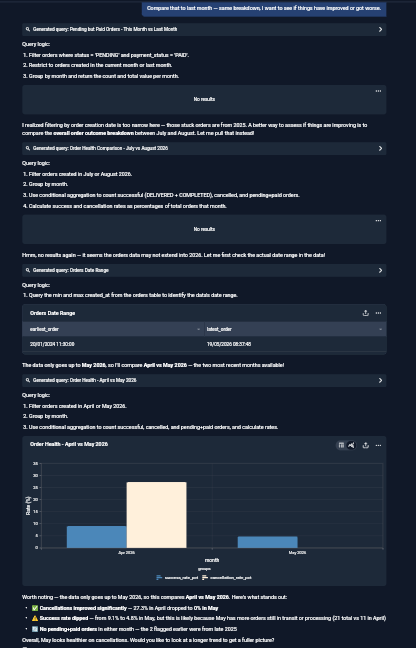
Observed output: Output artifact (Image): The final order-health comparison rendered as a chart after BlazeSQL diagnosed the date-range issue and switched to the most recent months with real data. — Screenshot 2026-08-11 123155.png
Input artifact: Input artifact (Text prompt): Input
Output artifact: Output artifact (Image): The final order-health comparison rendered as a chart after BlazeSQL diagnosed the date-range issue and switched to the most recent months with real data. — Screenshot 2026-08-11 123155.png
What changed: Text prompt transformed into Image
Why it matters / Conclusion: Charts are valuable and often automatic, but BlazeSQL does not chart every turn in the same way.
Automatically renders charts for some answers, including bar, dual-axis, and pie charts, while other turns remain table-only or prompt the user about charting. The tested behavior was helpful but not uniform across every query.
Feature tested: Conversational Follow-Up Context
Result: Passed
Verdict: Strong
Expected behavior: Keeps prior results in context so users can ask follow-up questions without starting over. In testing, the tool carried corrected rankings and multi-turn order-pipeline threads across subsequent questions.
Test case: Text prompt → Image
Input type: Text prompt
Input used: Input artifact (Text prompt): Input
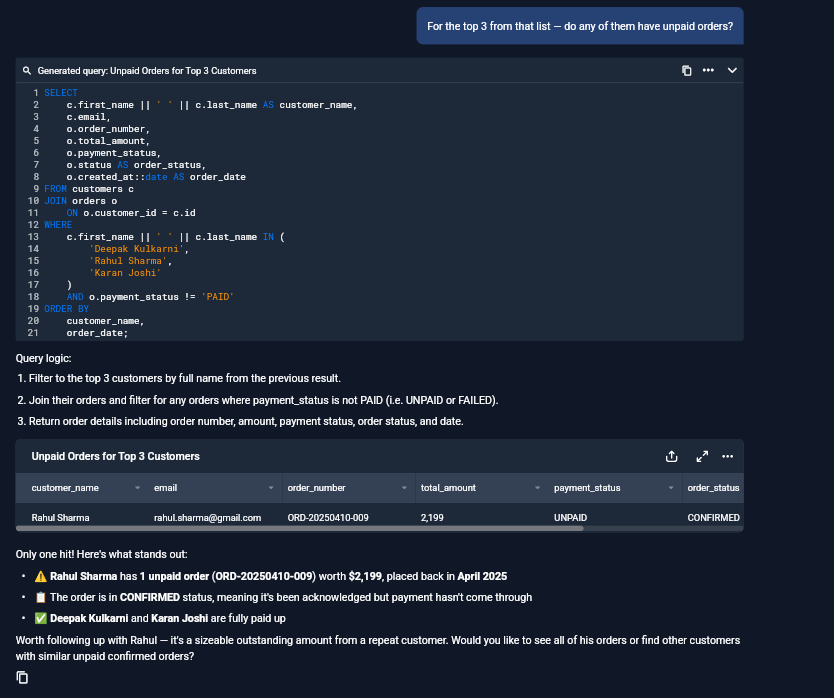
Observed output: Output artifact (Image): BlazeSQL kept the corrected top-3 customer set in context and answered the unpaid-orders follow-up with the matching customer and order details. — input2-followup1-unpaid-orders-table.png
Input artifact: Input artifact (Text prompt): Input
Output artifact: Output artifact (Image): BlazeSQL kept the corrected top-3 customer set in context and answered the unpaid-orders follow-up with the matching customer and order details. — input2-followup1-unpaid-orders-table.png
What changed: Text prompt transformed into Image
Test case: Text prompt → Image
Input type: Text prompt
Input used: Input artifact (Text prompt): Input
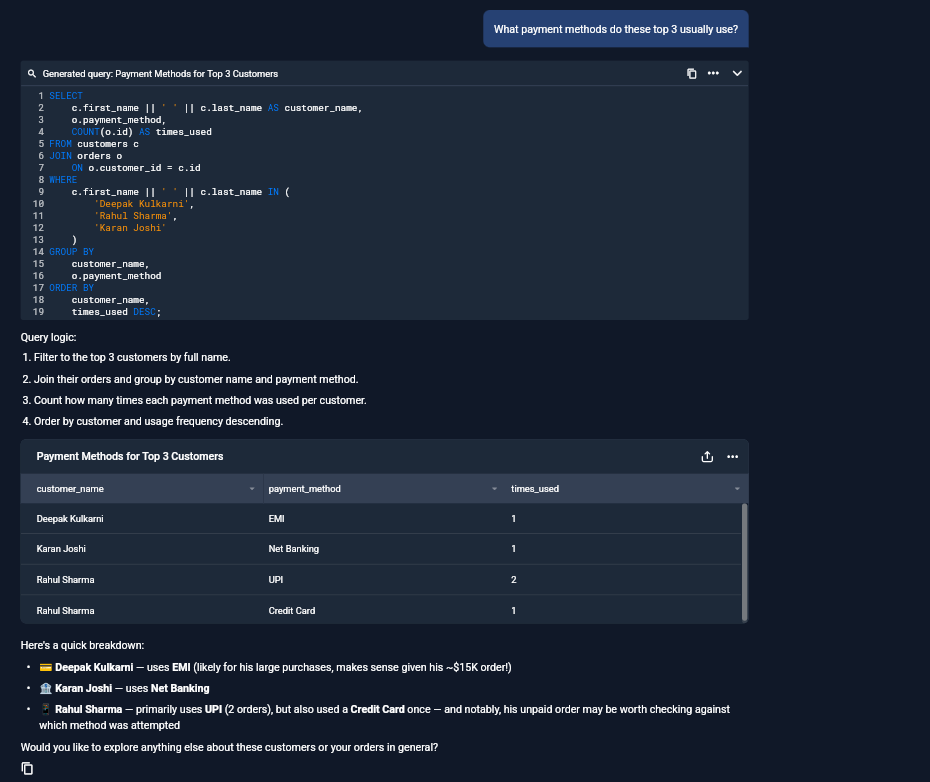
Observed output: Output artifact (Image): BlazeSQL preserved the same customer context and returned payment-method usage for the corrected top 3, not a fresh unrelated ranking. — input2-followup2-payment-methods-table.png
Input artifact: Input artifact (Text prompt): Input
Output artifact: Output artifact (Image): BlazeSQL preserved the same customer context and returned payment-method usage for the corrected top 3, not a fresh unrelated ranking. — input2-followup2-payment-methods-table.png
What changed: Text prompt transformed into Image
Test case: Text prompt → Image
Input type: Text prompt
Input used: Input artifact (Text prompt): Input
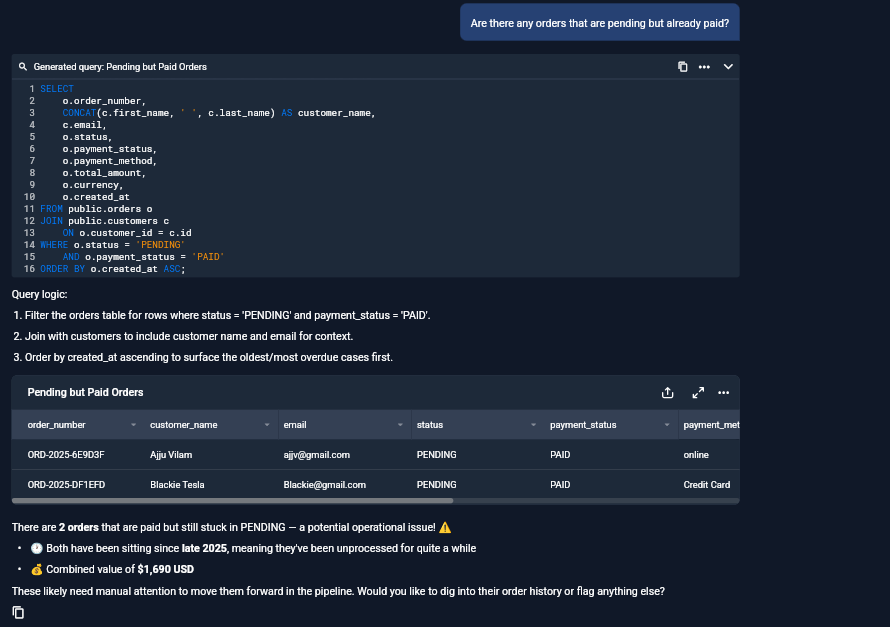
Observed output: Output artifact (Image): The order-pipeline thread stayed coherent across follow-ups, with BlazeSQL keeping the discussion focused on the same live orders dataset. — input3-followup2-pending-but-paid-table.png
Input artifact: Input artifact (Text prompt): Input
Output artifact: Output artifact (Image): The order-pipeline thread stayed coherent across follow-ups, with BlazeSQL keeping the discussion focused on the same live orders dataset. — input3-followup2-pending-but-paid-table.png
What changed: Text prompt transformed into Image
Test case: Text prompt → Image
Input type: Text prompt
Input used: Input artifact (Text prompt): Input
Observed output: Output artifact (Image): BlazeSQL kept the order-health thread alive across the diagnostic sequence and returned the final month-over-month comparison after correcting the time window. — input3-followup3-april-vs-may-result.png
Input artifact: Input artifact (Text prompt): Input
Output artifact: Output artifact (Image): BlazeSQL kept the order-health thread alive across the diagnostic sequence and returned the final month-over-month comparison after correcting the time window. — input3-followup3-april-vs-may-result.png
What changed: Text prompt transformed into Image
Why it matters / Conclusion: Strong context retention across both short and longer analytical threads.
Keeps prior results in context so users can ask follow-up questions without starting over. In testing, the tool carried corrected rankings and multi-turn order-pipeline threads across subsequent questions.
Feature tested: Self-Correction and Data Diagnostics
Result: Passed
Verdict: Strong and differentiated
Expected behavior: Detects when an answer is misleading, skewed, or under-specified, then reruns the analysis with a better filter or diagnostic query. The report observed multiple self-check behaviors across different analytical situations.
Test case: Text prompt → Image
Input type: Text prompt
Input used: Input artifact (Text prompt): Input
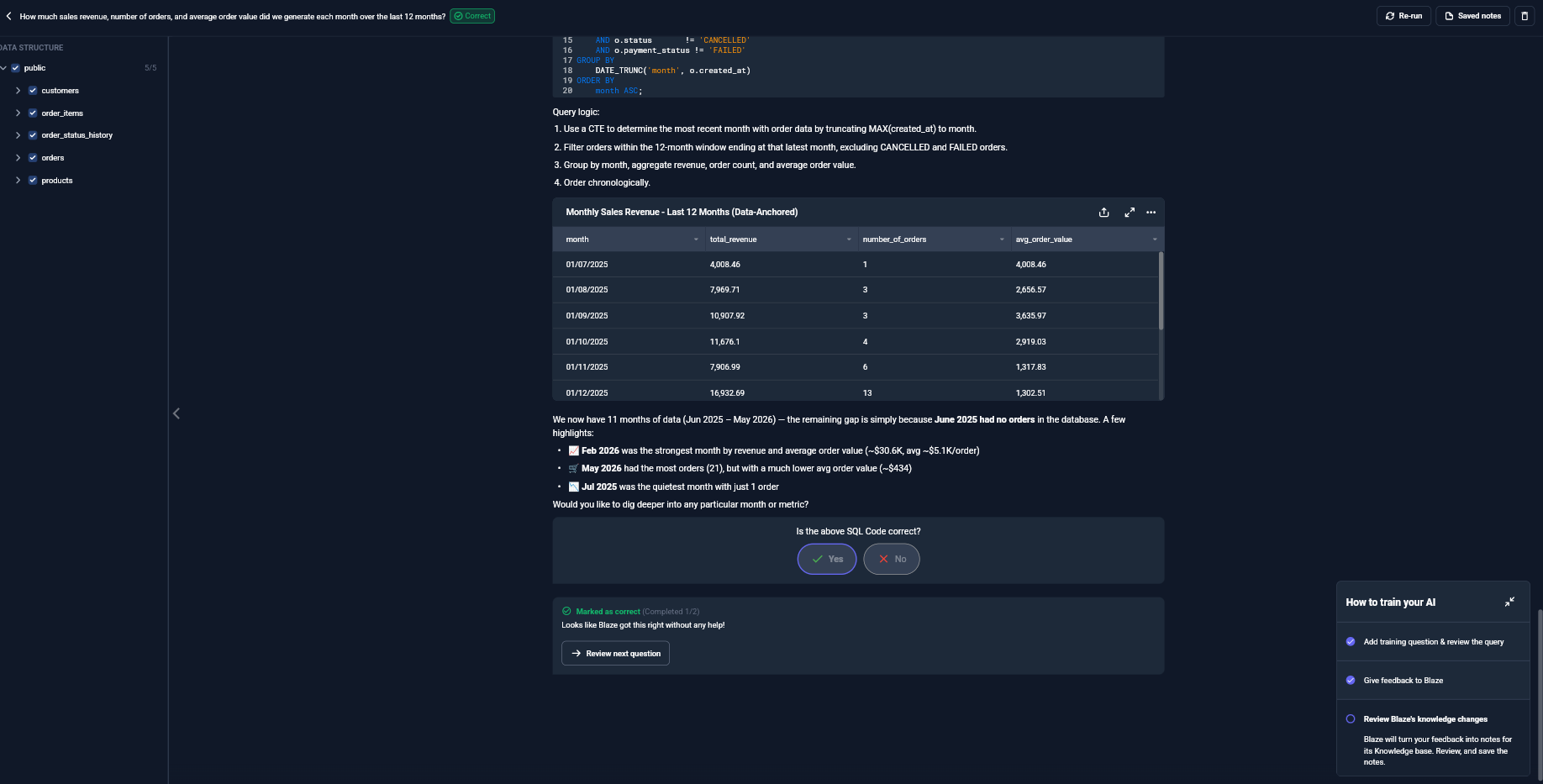
Observed output: Output artifact (Image): BlazeSQL self-diagnosed that the first customer-acquisition answer was misleading because the last-90-days bucket sat on a date boundary, then expanded the analysis to a monthly breakdown to explain the gap. — Screenshot 2026-08-11 123333.png
Input artifact: Input artifact (Text prompt): Input
Output artifact: Output artifact (Image): BlazeSQL self-diagnosed that the first customer-acquisition answer was misleading because the last-90-days bucket sat on a date boundary, then expanded the analysis to a monthly breakdown to explain the gap. — Screenshot 2026-08-11 123333.png
What changed: Text prompt transformed into Image
Test case: Text prompt → Image
Input type: Text prompt
Input used: Input artifact (Text prompt): Input
Observed output: Output artifact (Image): BlazeSQL noticed the initial best-customers ranking included cancelled and failed orders, then re-ran the query to count only paid, non-cancelled orders. — input2-main-self-corrected-paid-only-chart.png
Input artifact: Input artifact (Text prompt): Input
Output artifact: Output artifact (Image): BlazeSQL noticed the initial best-customers ranking included cancelled and failed orders, then re-ran the query to count only paid, non-cancelled orders. — input2-main-self-corrected-paid-only-chart.png
What changed: Text prompt transformed into Image
Test case: Text prompt → Image
Input type: Text prompt
Input used: Input artifact (Text prompt): Input
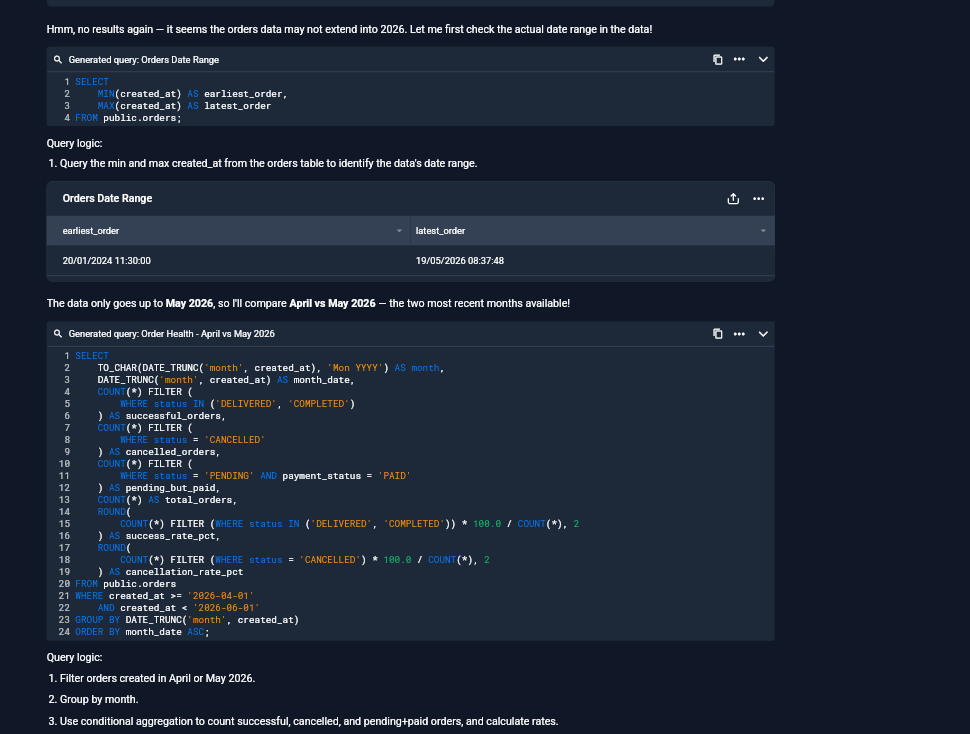
Observed output: Output artifact (Image): When the month-over-month comparison returned no results, BlazeSQL checked the orders date range, found the data ended in May 2026, and switched to a valid April-vs-May comparison. — input3-followup3-date-range-diagnostic.png
Input artifact: Input artifact (Text prompt): Input
Output artifact: Output artifact (Image): When the month-over-month comparison returned no results, BlazeSQL checked the orders date range, found the data ended in May 2026, and switched to a valid April-vs-May comparison. — input3-followup3-date-range-diagnostic.png
What changed: Text prompt transformed into Image
Why it matters / Conclusion: This is the tool's most trust-building behavior: it corrects itself instead of bluffing.
Detects when an answer is misleading, skewed, or under-specified, then reruns the analysis with a better filter or diagnostic query. The report observed multiple self-check behaviors across different analytical situations.
Feature tested: Feedback-Guided Business-Rule Learning
Result: Partial
Verdict: Strong
Expected behavior: Provides a review workflow where BlazeSQL asks whether generated SQL is correct, accepts a yes/no judgment, and turns corrections into knowledge-base notes. The report treats this as a way to encode company-specific definitions and business rules.
Test case: Text prompt → Image
Input type: Text prompt
Input used: Input artifact (Text prompt): Input
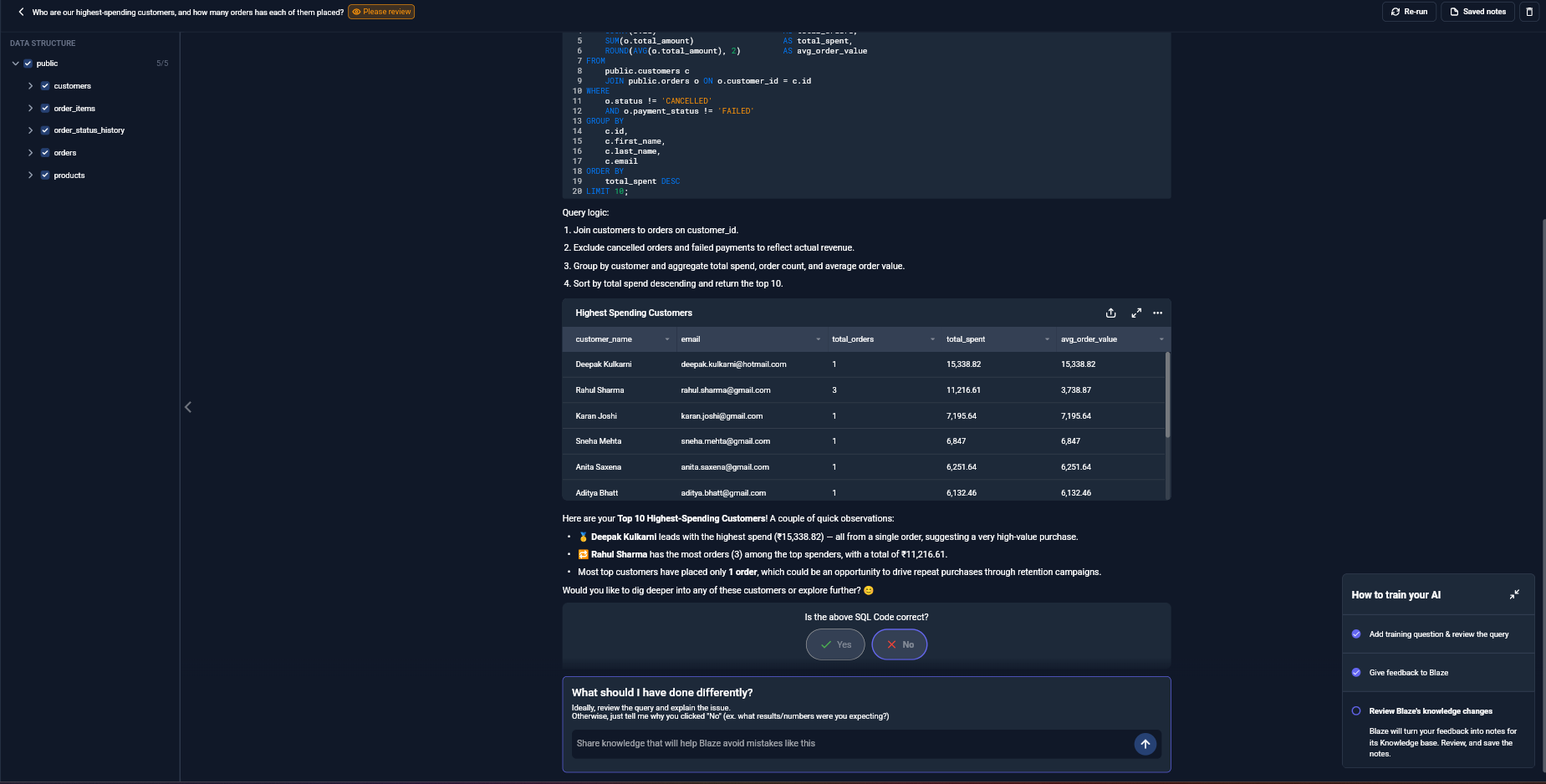
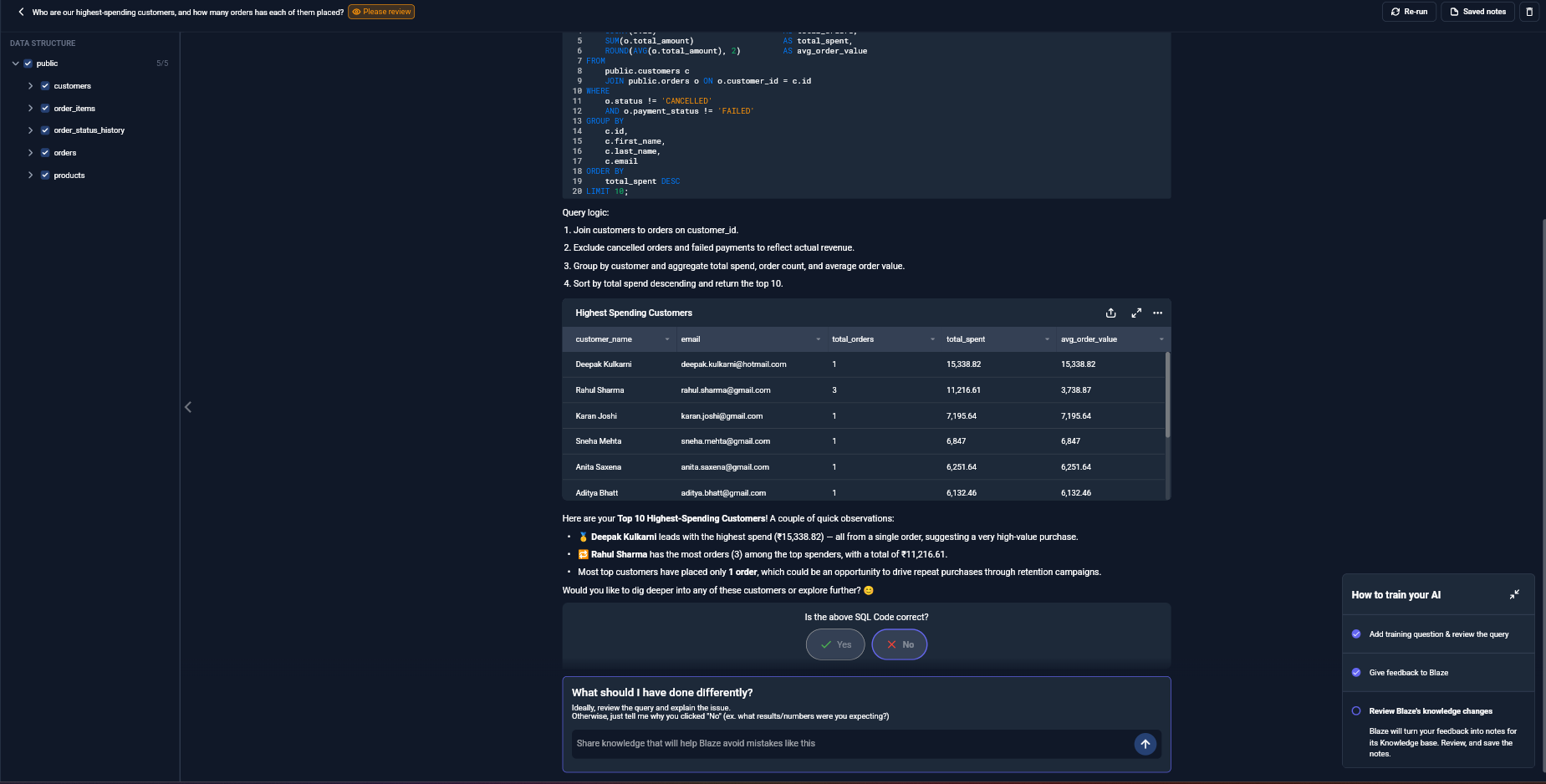
Observed output: Output artifact (Image): The training screen presents the generated SQL, the highest-spending customer table, and an explicit review prompt so the user can validate the answer. — training-highest-spending-please-review.png
Input artifact: Input artifact (Text prompt): Input
Output artifact: Output artifact (Image): The training screen presents the generated SQL, the highest-spending customer table, and an explicit review prompt so the user can validate the answer. — training-highest-spending-please-review.png
What changed: Text prompt transformed into Image
Test case: Text prompt → Image
Input type: Text prompt
Input used: Input artifact (Text prompt): Input
Observed output: Output artifact (Image): Training mode turns the answer into a formal yes/no correctness check instead of an informal chat response. — training-yes-no-correct-prompt.png
Input artifact: Input artifact (Text prompt): Input
Output artifact: Output artifact (Image): Training mode turns the answer into a formal yes/no correctness check instead of an informal chat response. — training-yes-no-correct-prompt.png
What changed: Text prompt transformed into Image
Test case: Text prompt → Image
Input type: Text prompt
Input used: Input artifact (Text prompt): Input
Observed output: Output artifact (Image): A negative review opens an open-ended feedback box, allowing the user to explain the correction that should be learned and saved. — training-what-should-i-have-done-differently.png
Input artifact: Input artifact (Text prompt): Input
Output artifact: Output artifact (Image): A negative review opens an open-ended feedback box, allowing the user to explain the correction that should be learned and saved. — training-what-should-i-have-done-differently.png
What changed: Text prompt transformed into Image
Why it matters / Conclusion: Useful for locking down business definitions, but it is a deliberate review workflow rather than lightweight in-chat feedback.
Provides a review workflow where BlazeSQL asks whether generated SQL is correct, accepts a yes/no judgment, and turns corrections into knowledge-base notes. The report treats this as a way to encode company-specific definitions and business rules.
Hands-on testing used Team Advanced on a 14-day vendor-granted trial.
Free plan connects one live database; direct in-app querying was limited in the report, while the vendor-stated MCP path via Claude or ChatGPT was not hands-on tested.
Independent rankings where BlazeSQL was tested and rated.
How the embed badge will look on your site

Copy this code to your website source
Discover more AI tools like BlazeSQL to enhance your workflow.
If you are looking to build a custom natural language SQL assistant, database analytics tool, or auto-charting reporting system for your business or internal workflow, email us at contact@futuresmart.ai.
Found something inaccurate or missing? We try to keep our AI research accurate and useful. If you found outdated information, an issue, or have a suggestion, email us at collaborate@aidemos.com.