AI Database Agents
Version 1No published result

AI-Native BI · NL2SQL · Data Analyst Chat · June 2026
Our take
Feature scores on this page: 8.6/10 (5 scored features)
It gives clean answers, readable tables, useful summaries, and visible agentic steps without making the final response feel technical or overloaded. Its biggest strength is the user experience. Compared to Draxlr, Basedash feels lighter, cleaner, and easier to understand. The main weakness is ambiguous follow-up handling. In some cases, it silently narrowed the scope instead of asking the user what they meant.
Explore Basedash in our public benchmarks.
No published result
Our detailed analysis of Basedash — features, performance, and real-world testing.
Feature tested: Natural Language Query Handling
Result: Passed (8.8/10)
Verdict: Strong — accepts plain English questions and returns simple business-readable answers.
Expected behavior: Converts natural language business questions into SQL-backed results with clean summaries, tables, and charts that non-technical users can understand quickly.
Test case: Text prompt → Image
Input type: Text prompt
Input used: Input artifact (Text prompt): Input
Observed output: Output artifact (Image): Basedash understood both parts of the question: * listing customers created in the last 90 days * comparing acquisition with the previous 90 days It returned: * — Natural Language Query Handling.png
Input artifact: Input artifact (Text prompt): Input
Output artifact: Output artifact (Image): Basedash understood both parts of the question: * listing customers created in the last 90 days * comparing acquisition with the previous 90 days It returned: * — Natural Language Query Handling.png
What changed: Text prompt transformed into Image
Why it matters / Conclusion: Basedash gave the business answer first instead of forcing the user to inspect the table manually. The artifact is worth checking because it shows a clean answer, chart, and customer table in one response without SQL-heavy noise.
Converts natural language business questions into SQL-backed results with clean summaries, tables, and charts that non-technical users can understand quickly.
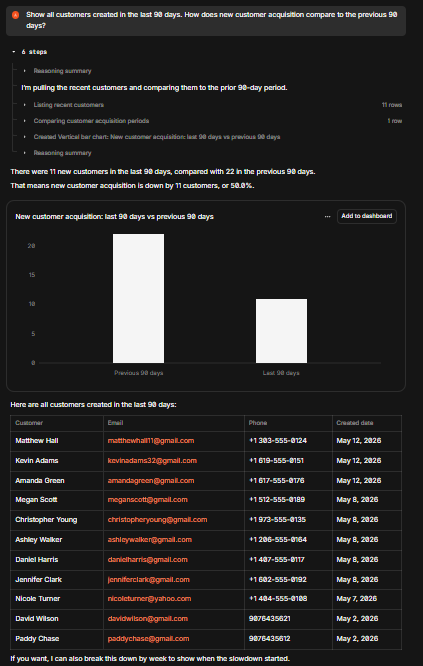
Basedash understood both parts of the question: * listing customers created in the last 90 days * comparing acquisition with the previous 90 days It returned: * Last 90 days: 13 new customers * Previous 90 days: 22 new customers * Change: 9 fewer customers * Percent change: 40.9% decrease It also generated a simple bar chart and a readable customer table with names, emails, phone numbers, and created dates.
Feature tested: Agentic Step-by-Step Execution
Result: Passed (9/10)
Verdict: Excellent — shows what the agent is doing without making the final answer complicated.
Expected behavior: Shows visible execution steps before the final result, including what the agent is checking, querying, and summarizing.
Test case: Text prompt → Image
Input type: Text prompt
Input used: Input artifact (Text prompt): Input
Observed output: Output artifact (Image): Basedash showed agent-style steps before the final answer. The steps explained that it was: * pulling recent customers * comparing them against the previous 90- — basedash-agentic-step-by-step-execution-1.png
Input artifact: Input artifact (Text prompt): Input
Output artifact: Output artifact (Image): Basedash showed agent-style steps before the final answer. The steps explained that it was: * pulling recent customers * comparing them against the previous 90- — basedash-agentic-step-by-step-execution-1.png
What changed: Text prompt transformed into Image
Test case: Text prompt → Image
Input type: Text prompt
Input used: Input artifact (Text prompt): Input
Observed output: Output artifact (Image): Basedash showed reasoning-style steps before returning the delivered vs cancelled result. In the expanded flow, it showed how the calculation was being approach — basedash-agentic-step-by-step-execution-2.png
Input artifact: Input artifact (Text prompt): Input
Output artifact: Output artifact (Image): Basedash showed reasoning-style steps before returning the delivered vs cancelled result. In the expanded flow, it showed how the calculation was being approach — basedash-agentic-step-by-step-execution-2.png
What changed: Text prompt transformed into Image
Why it matters / Conclusion: Basedash does not behave like a black-box SQL chatbot. The artifact is worth checking because the user can see the execution flow, while the final answer still stays simple enough for a non-technical user.
Shows visible execution steps before the final result, including what the agent is checking, querying, and summarizing.
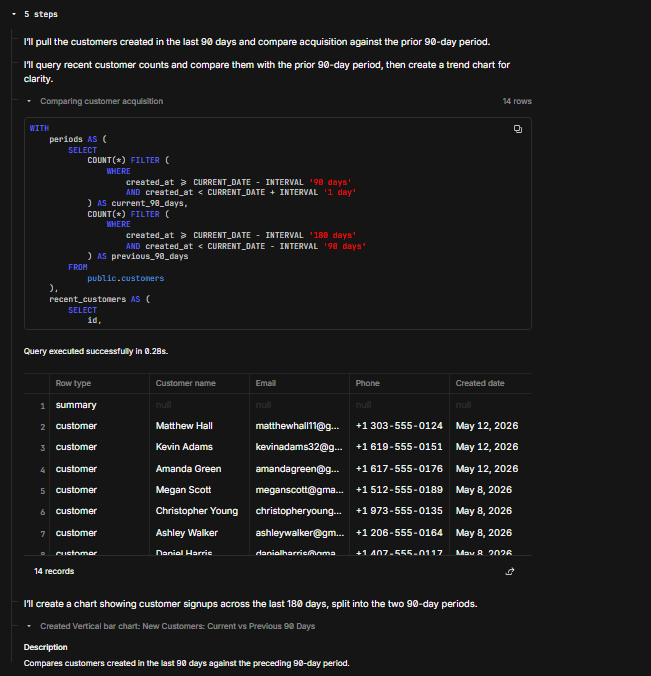
Basedash showed agent-style steps before the final answer. The steps explained that it was: * pulling recent customers * comparing them against the previous 90-day period * generating the acquisition comparison * creating the chart and table output The final response stayed clean and readable.
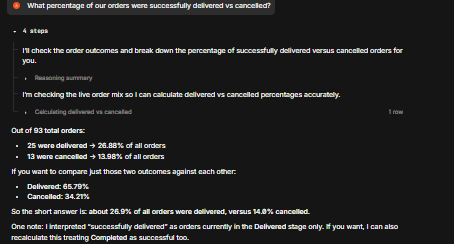
Basedash showed reasoning-style steps before returning the delivered vs cancelled result. In the expanded flow, it showed how the calculation was being approached before producing the final answer.
Feature tested: Self-Healing Query Execution
Result: Passed (9/10)
Verdict: Excellent — when a query fails, the agent can correct and rerun it instead of exposing the error to the user.
Expected behavior: Detects failed query attempts, adjusts the query internally, and reruns it so the user receives the final result instead of a raw SQL error.
Test case: Text prompt → Image
Input type: Text prompt
Input used: Input artifact (Text prompt): Input
Observed output: Output artifact (Image): During testing, Basedash hit a SQL issue related to a missing calculated column. Instead of stopping the workflow or showing the error as the final output, it c — basedash-self-healing-query-execution.png
Input artifact: Input artifact (Text prompt): Input
Output artifact: Output artifact (Image): During testing, Basedash hit a SQL issue related to a missing calculated column. Instead of stopping the workflow or showing the error as the final output, it c — basedash-self-healing-query-execution.png
What changed: Text prompt transformed into Image
Why it matters / Conclusion: This is one of Basedash’s strongest production-readiness signals. The artifact is worth checking because it shows the agent recovering from a query issue and still delivering a clean final answer.
Detects failed query attempts, adjusts the query internally, and reruns it so the user receives the final result instead of a raw SQL error.
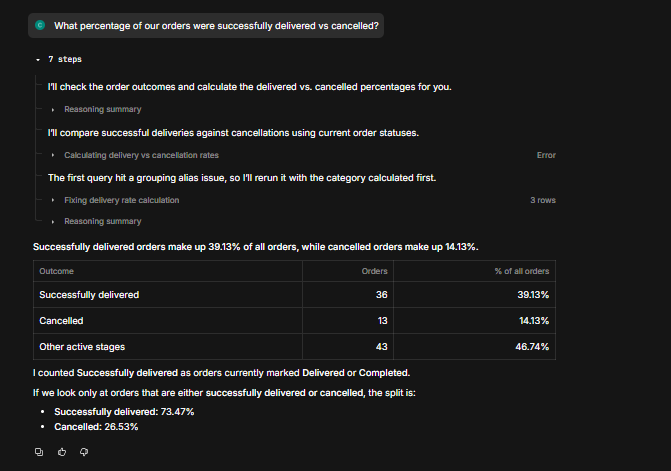
During testing, Basedash hit a SQL issue related to a missing calculated column. Instead of stopping the workflow or showing the error as the final output, it corrected the query and reran it. The user received the final result: * Successfully delivered: 36 orders / 39.13% * Cancelled: 13 orders / 14.13% * Other active stages: 43 orders / 46.74% It also returned a resolved-only split: * Successfully delivered: 73.47% * Cancelled: 26.53%
Feature tested: Multi-Turn Query Context
Result: Partial (8/10)
Verdict: Strong but needs clarification behavior — Basedash can continue analysis across follow-up questions, but ambiguous follow-ups are not always clarified.
Expected behavior: Maintains context across multi-turn database questions and lets users ask follow-up queries without restating the full previous context.
Test case: Text prompt → Image
Input type: Text prompt
Input used: Input artifact (Text prompt): Input
Observed output: Output artifact (Image): Basedash interpreted “best customers” in two useful ways: * customers who spend the most * customers who order the most It returned two ranked views and added s — basedash-customer-value-analysis-1.png
Input artifact: Input artifact (Text prompt): Input
Output artifact: Output artifact (Image): Basedash interpreted “best customers” in two useful ways: * customers who spend the most * customers who order the most It returned two ranked views and added s — basedash-customer-value-analysis-1.png
What changed: Text prompt transformed into Image
Test case: Text prompt → Image
Input type: Text prompt
Input used: Input artifact (Text prompt): Input
Observed output: Output artifact (Image): Basedash checked unpaid orders for the selected customers and returned a clean table with: * customer name * total orders * total spent * unpaid order count * u — basedash-customer-value-analysis-2.png
Input artifact: Input artifact (Text prompt): Input
Output artifact: Output artifact (Image): Basedash checked unpaid orders for the selected customers and returned a clean table with: * customer name * total orders * total spent * unpaid order count * u — basedash-customer-value-analysis-2.png
What changed: Text prompt transformed into Image
Test case: Text prompt → Image
Input type: Text prompt
Input used: Input artifact (Text prompt): Input
Observed output: Output artifact (Image): Basedash returned the usual payment method behavior for the selected customers. It showed: * Deepak Kulkarni — EMI * Karan Joshi — Net Banking * Rahul Sharma — — basedash-customer-value-analysis-3.png
Input artifact: Input artifact (Text prompt): Input
Output artifact: Output artifact (Image): Basedash returned the usual payment method behavior for the selected customers. It showed: * Deepak Kulkarni — EMI * Karan Joshi — Net Banking * Rahul Sharma — — basedash-customer-value-analysis-3.png
What changed: Text prompt transformed into Image
Why it matters / Conclusion: Basedash made the customer analysis easy to read, but the artifact is worth checking because it also shows the main weakness: when the previous answer contains multiple lists, Basedash may choose one silently instead of asking for clarification.
Maintains context across multi-turn database questions and lets users ask follow-up queries without restating the full previous context.
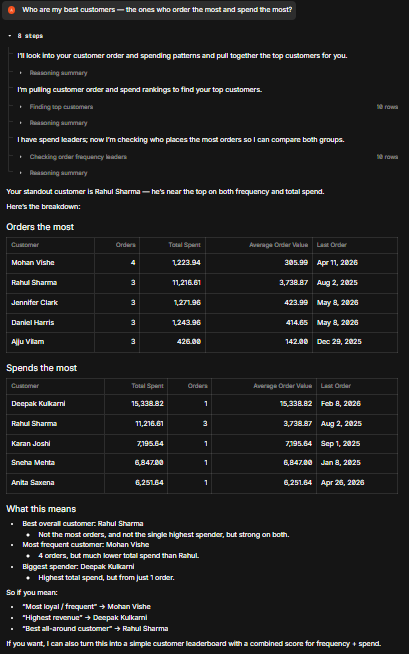
Basedash interpreted “best customers” in two useful ways: * customers who spend the most * customers who order the most It returned two ranked views and added simple business conclusions: * Rahul Sharma as the strongest overall pick * Vikram Singh as the biggest spender * Mohan Vishe as the most frequent buyer
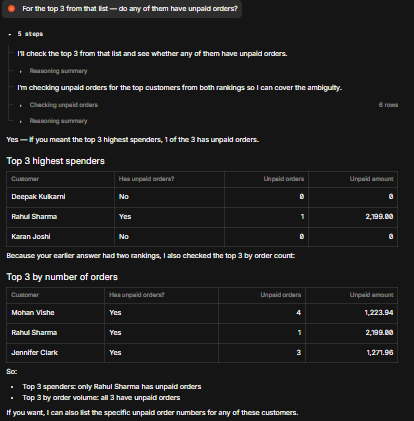
Basedash checked unpaid orders for the selected customers and returned a clean table with: * customer name * total orders * total spent * unpaid order count * unpaid amount * unpaid order ID It identified Rahul Sharma as the only one among the selected top 3 with an unpaid order.
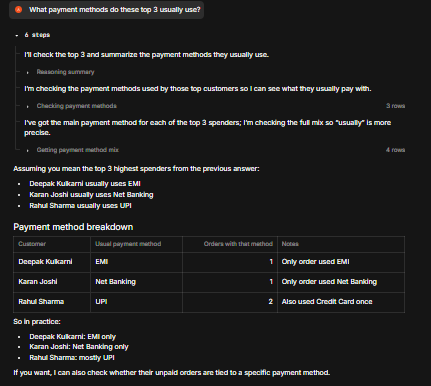
Basedash returned the usual payment method behavior for the selected customers. It showed: * Deepak Kulkarni — EMI * Karan Joshi — Net Banking * Rahul Sharma — UPI It also clarified that Rahul Sharma used Credit Card once, but his most frequent method was UPI.
Feature tested: Visualization, Drill-Down, and Export
Result: Passed (8/10)
Verdict: Strong — charts are useful, dashboard actions are available, and chart/table outputs can be reused.
Expected behavior: Provides automatic charts for some results, dashboard actions, clickable chart drill-down, and export/copy options for tables and charts.
Test case: Text prompt → Image
Input type: Text prompt
Input used: Input artifact (Text prompt): Input
Observed output: Output artifact (Image): Basedash generated a bar chart comparing previous 90 days vs current 90 days and provided an Add to dashboard option. — basedash-visualization-basedash.png
Input artifact: Input artifact (Text prompt): Input
Output artifact: Output artifact (Image): Basedash generated a bar chart comparing previous 90 days vs current 90 days and provided an Add to dashboard option. — basedash-visualization-basedash.png
What changed: Text prompt transformed into Image
Why it matters / Conclusion: Basedash has a useful workflow layer beyond plain text answers. The artifact is worth checking because the chart is not just decoration — it can connect back to records and dashboard/reporting actions.
Provides automatic charts for some results, dashboard actions, clickable chart drill-down, and export/copy options for tables and charts.
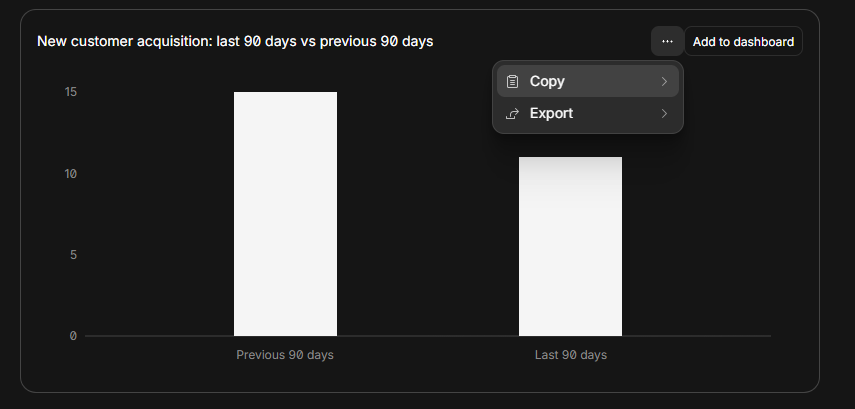
Basedash generated a bar chart comparing previous 90 days vs current 90 days and provided an Add to dashboard option.
Plans as of June 2026
Testing was completed on Basedash’s 14-day free trial. Paid plan limits, AI credit usage, and enterprise deployment details should be verified again before publishing.
A side-by-side guide based on our hands-on testing.
How the embed badge will look on your site

Copy this code to your website source
Discover more AI tools like Basedash to enhance your workflow.
If you are looking to build a custom natural language analytics, SQL generation, or data analyst assistant for your business or internal workflow, email us at contact@futuresmart.ai.
Found something inaccurate or missing? We try to keep our AI research accurate and useful. If you found outdated information, an issue, or have a suggestion, email us at collaborate@aidemos.com.