AI Database Agents
Version 1No published result

AI Data Analyst · NL2SQL · Data Visualization · June 2026
Our Take
Feature scores on this page: 8.6/10 (7 scored features)
Querio is strongest when the user wants a full analyst-style answer from one plain-English question. It does not only return a table; it can run multiple SQL queries, show the SQL, generate charts, and add business-style insights in the same workflow.
The biggest strength is the amount of work Querio does automatically. In the customer acquisition test, it created multiple tables, generated visual comparisons, and added a Key Insights section without needing a separate follow-up prompt.
The main limitation is readability in some follow-up outputs. In the best-customer workflow, Querio kept context correctly, but some follow-up results relied heavily on customer IDs instead of readable customer names. That makes the output accurate, but slightly less friendly for non-technical business users.
Explore Querio in our public benchmarks.
No published result
Our detailed analysis of Querio — features, performance, and real-world testing.
Feature tested: NL2SQL Generation
Result: Passed (8.5/10)
Verdict: Strong — Querio converts plain-English business questions into SQL-backed outputs without requiring the user to write SQL.
Expected behavior: Querio accepts natural language database questions and generates SQL-backed result tables with readable titles, tables, and supporting analysis.
Test case: Text prompt → Image
Input type: Text prompt
Input used: Input artifact (Text prompt): Input
Observed output: Output artifact (Image): Querio accepted the plain-English question and generated a customer acquisition analysis. It returned: * a list of customers created in the last 90 days * a — querio-querio-customer-acquisition-query-output.png
Input artifact: Input artifact (Text prompt): Input
Output artifact: Output artifact (Image): Querio accepted the plain-English question and generated a customer acquisition analysis. It returned: * a list of customers created in the last 90 days * a — querio-querio-customer-acquisition-query-output.png
What changed: Text prompt transformed into Image
Why it matters / Conclusion: The screenshot is the key proof here. Check whether the natural-language question, SQL-backed customer list, period comparison, and generated acquisition analysis appear together in the same workflow.
Querio accepts natural language database questions and generates SQL-backed result tables with readable titles, tables, and supporting analysis.
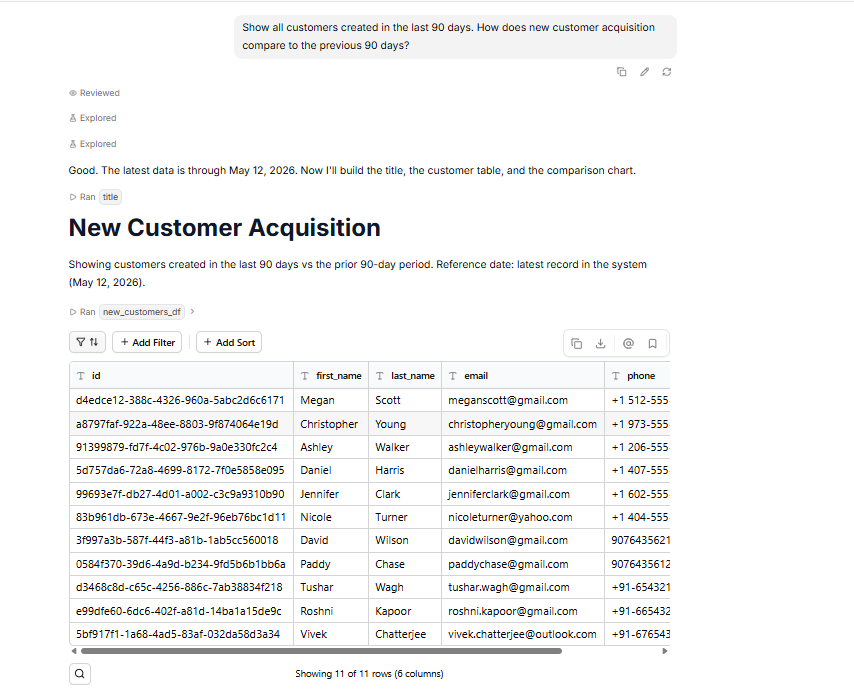
Querio accepted the plain-English question and generated a customer acquisition analysis. It returned: * a list of customers created in the last 90 days * a period comparison table * a weekly trend table * visual charts for acquisition comparison * a Key Insights section explaining the business meaning
Feature tested: SQL Visibility
Result: Passed (9/10)
Verdict: Excellent — Querio shows the SQL it runs, making the output easier to verify.
Expected behavior: Querio displays generated SQL blocks in the chat/result workflow, with copy controls available around the SQL output.
Test case: Text prompt → Image
Input type: Text prompt
Input used: Input artifact (Text prompt): Input
Observed output: Output artifact (Image): Querio ran multiple SQL queries for the customer acquisition workflow. The SQL was visible for the user to inspect, including separate logic for the customer li — querio-querio-customer-acquisition-sql-visibility.png
Input artifact: Input artifact (Text prompt): Input
Output artifact: Output artifact (Image): Querio ran multiple SQL queries for the customer acquisition workflow. The SQL was visible for the user to inspect, including separate logic for the customer li — querio-querio-customer-acquisition-sql-visibility.png
What changed: Text prompt transformed into Image
Why it matters / Conclusion: The screenshot is needed to verify the exact SQL visibility. Check whether Querio exposes the generated SQL blocks directly inside the workflow instead of only showing the final answer.
Querio displays generated SQL blocks in the chat/result workflow, with copy controls available around the SQL output.
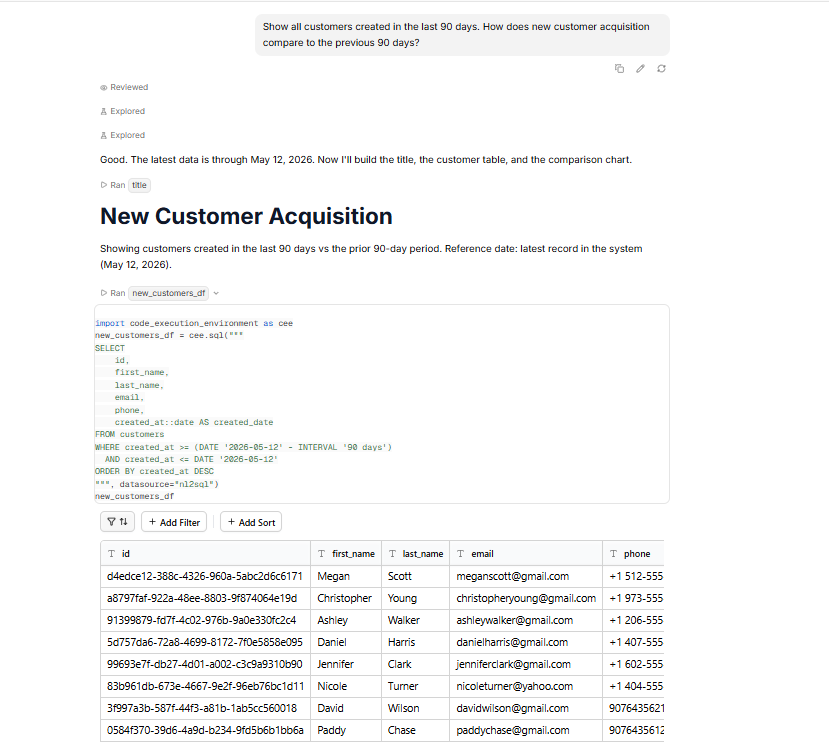
Querio ran multiple SQL queries for the customer acquisition workflow. The SQL was visible for the user to inspect, including separate logic for the customer list, current-period count, previous-period count, and supporting chart/table data.
Feature tested: Parallel Query Execution
Result: Passed (9/10)
Verdict: Strong — Querio can break one compound question into multiple SQL-backed outputs.
Expected behavior: Querio can run multiple SQL queries from a single compound business question and combine the outputs into one analysis flow.
Test case: Text prompt → Image
Input type: Text prompt
Input used: Input artifact (Text prompt): Input
Observed output: Output artifact (Image): Querio split the request into multiple outputs: * customer list for the last 90 days * count for the last 90 days * count for the previous 90 days * per — querio-querio-customer-acquisition-multiple-sql-outputs.png
Input artifact: Input artifact (Text prompt): Input
Output artifact: Output artifact (Image): Querio split the request into multiple outputs: * customer list for the last 90 days * count for the last 90 days * count for the previous 90 days * per — querio-querio-customer-acquisition-multiple-sql-outputs.png
What changed: Text prompt transformed into Image
Why it matters / Conclusion: The screenshot is needed because the capability is only clear when the workflow is inspected. Check whether the single prompt produces multiple SQL-backed tables and charts instead of one flat answer.
Querio can run multiple SQL queries from a single compound business question and combine the outputs into one analysis flow.
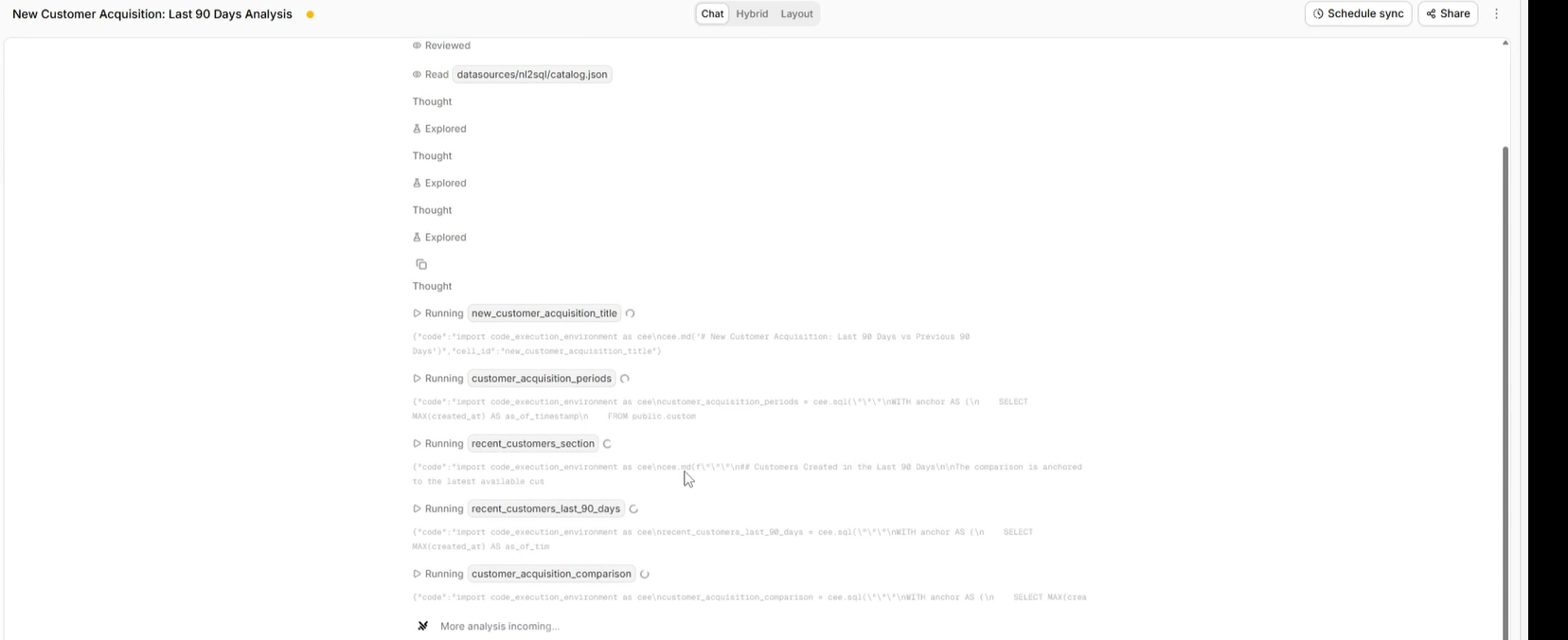
Querio split the request into multiple outputs: * customer list for the last 90 days * count for the last 90 days * count for the previous 90 days * period comparison table * weekly trend output * acquisition charts
Feature tested: Auto-Generated Charts
Result: Passed (8.5/10)
Verdict: Strong — Querio generated charts automatically for analytical queries.
Expected behavior: Querio can generate visual outputs from query results without requiring the user to ask separately for visualization.
Test case: Text prompt → Image
Input type: Text prompt
Input used: Input artifact (Text prompt): Input
Observed output: Output artifact (Image): Querio generated visual outputs for the customer acquisition workflow. The chart set included: * a period comparison chart for Last 90 Days vs Prior 90 Days — querio-image.png
Input artifact: Input artifact (Text prompt): Input
Output artifact: Output artifact (Image): Querio generated visual outputs for the customer acquisition workflow. The chart set included: * a period comparison chart for Last 90 Days vs Prior 90 Days — querio-image.png
What changed: Text prompt transformed into Image
Test case: Text prompt → Image
Input type: Text prompt
Input used: Input artifact (Text prompt): Input
Observed output: Output artifact (Image): Querio generated visual outputs for the customer acquisition workflow. The chart set included: * a weekly trend chart showing acquisition activity over time — querio-querio-customer-acquisition-weekly-trend-chart.png
Input artifact: Input artifact (Text prompt): Input
Output artifact: Output artifact (Image): Querio generated visual outputs for the customer acquisition workflow. The chart set included: * a weekly trend chart showing acquisition activity over time — querio-querio-customer-acquisition-weekly-trend-chart.png
What changed: Text prompt transformed into Image
Why it matters / Conclusion: The screenshot is the only place to verify the chart behavior. Check whether the comparison chart and weekly trend chart appear automatically as part of the same analysis flow.
Querio can generate visual outputs from query results without requiring the user to ask separately for visualization.
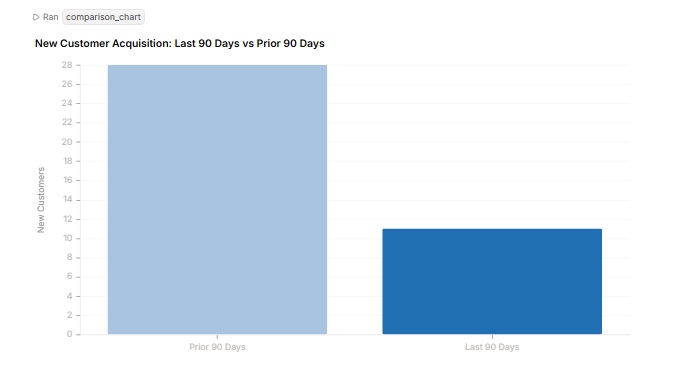
Querio generated visual outputs for the customer acquisition workflow. The chart set included: * a period comparison chart for Last 90 Days vs Prior 90 Days
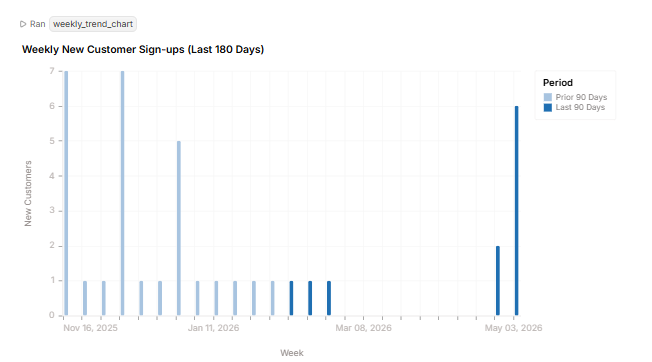
Querio generated visual outputs for the customer acquisition workflow. The chart set included: * a weekly trend chart showing acquisition activity over time
Feature tested: Automatic Insight Generation
Result: Passed (9/10)
Verdict: Excellent — Querio adds business-style interpretation instead of only returning raw tables.
Expected behavior: Querio can generate a Key Insights section that explains what the result means in plain English.
Test case: Text prompt → Image
Input type: Text prompt
Input used: Input artifact (Text prompt): Input
Observed output: Output artifact (Image): Querio generated a Key Insights section for the customer acquisition result. The insights explained that: * recent acquisition was lower than the previous 90- — querio-querio-customer-acquisition-key-insights.png
Input artifact: Input artifact (Text prompt): Input
Output artifact: Output artifact (Image): Querio generated a Key Insights section for the customer acquisition result. The insights explained that: * recent acquisition was lower than the previous 90- — querio-querio-customer-acquisition-key-insights.png
What changed: Text prompt transformed into Image
Why it matters / Conclusion: The screenshot is needed to verify the insight layer. Check whether Querio explains the business meaning of the acquisition drop instead of only showing tables and charts.
Querio can generate a Key Insights section that explains what the result means in plain English.
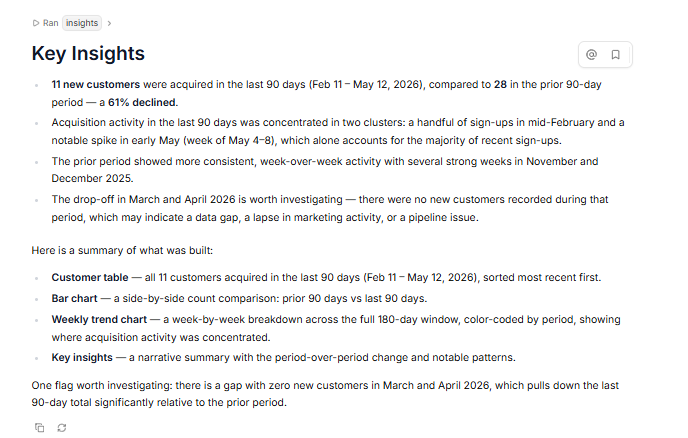
Querio generated a Key Insights section for the customer acquisition result. The insights explained that: * recent acquisition was lower than the previous 90-day period * most recent sign-ups were concentrated in a smaller number of weeks * there was a gap in acquisition activity worth investigating * the previous period had more consistent weekly acquisition activity
Feature tested: Multi-Turn Query Context
Result: Partial (8/10)
Verdict: Good — Querio maintained context across the tested best-customer follow-ups.
Expected behavior: Querio can continue analysis across follow-up questions by using the previous result context.
Test case: Text prompt → Image
Input type: Text prompt
Input used: Input artifact (Text prompt): Input
Observed output: Output artifact (Image): Querio used the top-customer context from the previous result and checked unpaid orders for the selected customers. The output identified unpaid-order status fo — querio-querio-top3-unpaid-order-context.png
Input artifact: Input artifact (Text prompt): Input
Output artifact: Output artifact (Image): Querio used the top-customer context from the previous result and checked unpaid orders for the selected customers. The output identified unpaid-order status fo — querio-querio-top3-unpaid-order-context.png
What changed: Text prompt transformed into Image
Test case: Text prompt → Image
Input type: Text prompt
Input used: Input artifact (Text prompt): Input
Observed output: Output artifact (Image): Querio continued from the same top-customer context and returned payment method usage for the selected customers. — querio-querio-top3-payment-method-context.png
Input artifact: Input artifact (Text prompt): Input
Output artifact: Output artifact (Image): Querio continued from the same top-customer context and returned payment method usage for the selected customers. — querio-querio-top3-payment-method-context.png
What changed: Text prompt transformed into Image
Why it matters / Conclusion: The proof depends on comparing the follow-up screenshots. Check whether Querio keeps the “top 3” customer context across the unpaid-order and payment-method follow-ups.
Querio can continue analysis across follow-up questions by using the previous result context.
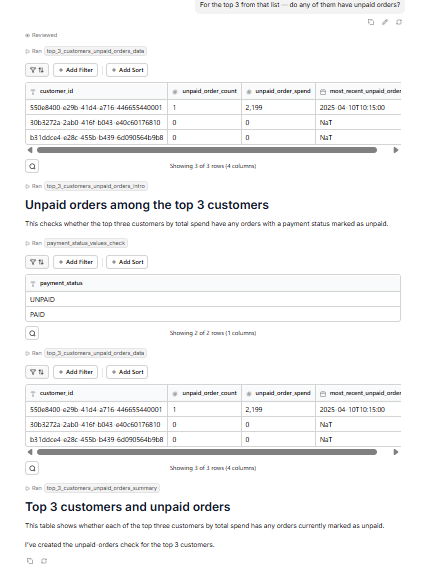
Querio used the top-customer context from the previous result and checked unpaid orders for the selected customers. The output identified unpaid-order status for the top customers and continued the workflow without requiring the user to restate the full customer list.
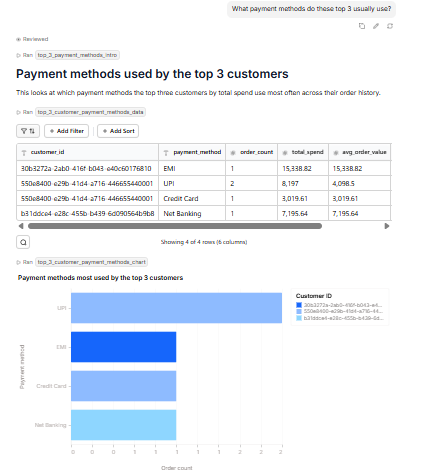
Querio continued from the same top-customer context and returned payment method usage for the selected customers.
Feature tested: Data Export
Result: Passed (8/10)
Verdict: Strong — Querio supports reusable output through downloadable data and chart exports.
Expected behavior: Querio allows generated data and charts to be reused outside the chat/report workflow through export options.
Test case: Text prompt → Image
Input type: Text prompt
Input used: Input artifact (Text prompt): Input
Observed output: Output artifact (Image): Querio provided downloadable data and chart export options. Observed export behavior included: * CSV download for data * chart export as image * SQL copy — querio-querio-export-csv.png
Input artifact: Input artifact (Text prompt): Input
Output artifact: Output artifact (Image): Querio provided downloadable data and chart export options. Observed export behavior included: * CSV download for data * chart export as image * SQL copy — querio-querio-export-csv.png
What changed: Text prompt transformed into Image
Test case: Text prompt → Image
Input type: Text prompt
Input used: Input artifact (Text prompt): Input
Observed output: Output artifact (Image): Querio provided downloadable data and chart export options. Observed export behavior included: * CSV download for data * chart export as image * SQL copy — querio-querio-export-chart-image.png
Input artifact: Input artifact (Text prompt): Input
Output artifact: Output artifact (Image): Querio provided downloadable data and chart export options. Observed export behavior included: * CSV download for data * chart export as image * SQL copy — querio-querio-export-chart-image.png
What changed: Text prompt transformed into Image
Why it matters / Conclusion: The screenshot is needed to verify where export appears. Check whether the data and chart outputs expose reusable export actions rather than staying only inside the generated analysis page.
Querio allows generated data and charts to be reused outside the chat/report workflow through export options.
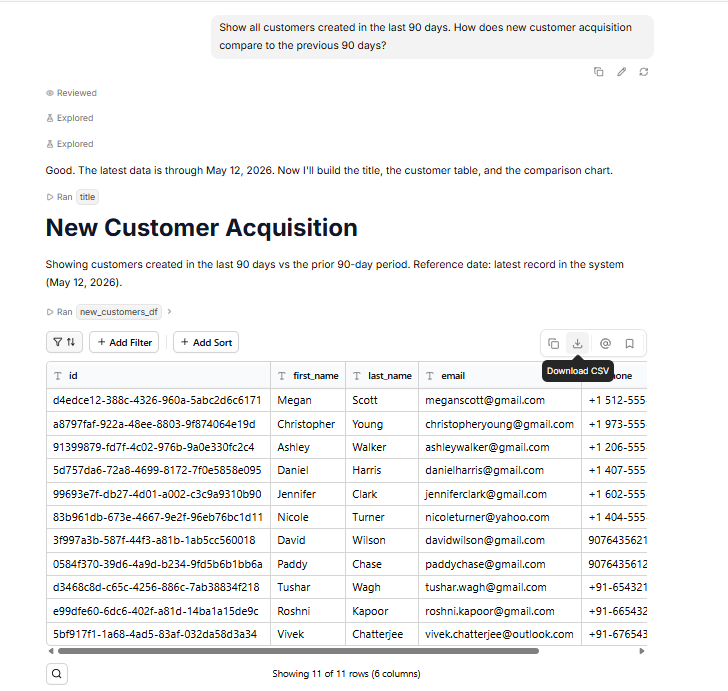
Querio provided downloadable data and chart export options. Observed export behavior included: * CSV download for data * chart export as image * SQL copy controls * print option
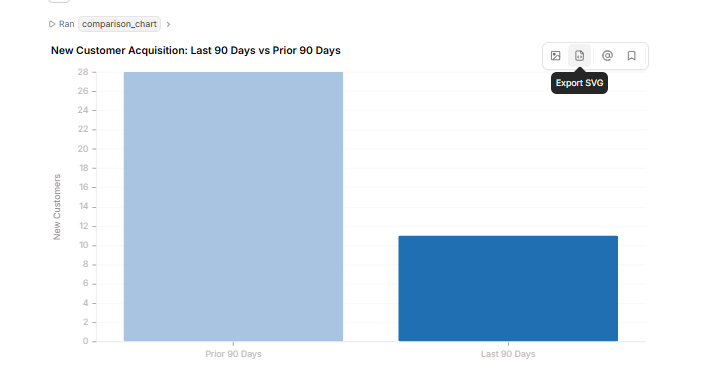
Querio provided downloadable data and chart export options. Observed export behavior included: * CSV download for data * chart export as image * SQL copy controls * print option
Feature tested: Follow-up Context Selection
Result: Failed
Verdict: Querio answered the follow-up, but it compared the delivered-vs-cancelled breakdown instead of continuing the pending-but-paid breakdown from the immediately previous question.
Expected behavior: This is a real failure case because the phrase “same breakdown” should refer to the immediately previous pending-but-paid question. Instead, Querio reused the earlier delivered-vs-cancelled context, which can mislead the user in a multi-turn analysis flow.
Test case: Text prompt → Image
Input type: Text prompt
Input used: Input artifact (Text prompt): Input
Observed output: Output artifact (Image): In Screenshot 1, highlight the previous question: “Are there any orders that are pending but already paid?” — querio-querio-pending-paid-followup-context.png
Input artifact: Input artifact (Text prompt): Input
Output artifact: Output artifact (Image): In Screenshot 1, highlight the previous question: “Are there any orders that are pending but already paid?” — querio-querio-pending-paid-followup-context.png
What changed: Text prompt transformed into Image
Test case: Text prompt → Image
Input type: Text prompt
Input used: Input artifact (Text prompt): Input
Observed output: Output artifact (Image): Querio answered the follow-up, but it compared the delivered-vs-cancelled breakdown instead of continuing the pending-but-paid breakdown from the immediately pr — querio-querio-same-breakdown-wrong-context.png
Input artifact: Input artifact (Text prompt): Input
Output artifact: Output artifact (Image): Querio answered the follow-up, but it compared the delivered-vs-cancelled breakdown instead of continuing the pending-but-paid breakdown from the immediately pr — querio-querio-same-breakdown-wrong-context.png
What changed: Text prompt transformed into Image
Why it matters / Conclusion: The screenshots are required because the failure is only visible when both turns are compared together. Screenshot 1 shows the pending-but-paid context, while Screenshot 2 shows that the follow-up comparison moved to a different breakdown.
This is a real failure case because the phrase “same breakdown” should refer to the immediately previous pending-but-paid question. Instead, Querio reused the earlier delivered-vs-cancelled context, which can mislead the user in a multi-turn analysis flow.
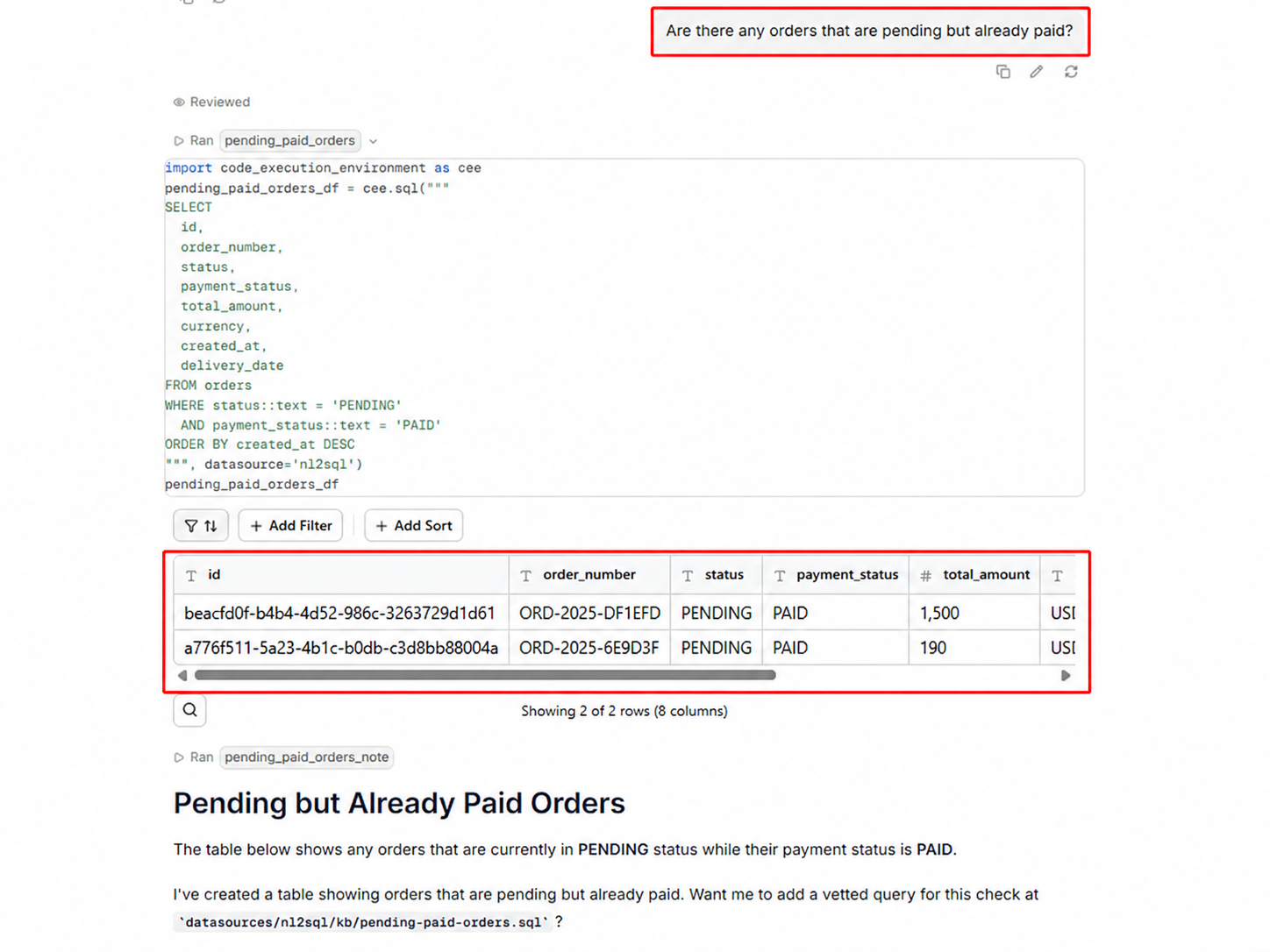
In Screenshot 1, highlight the previous question: “Are there any orders that are pending but already paid?”
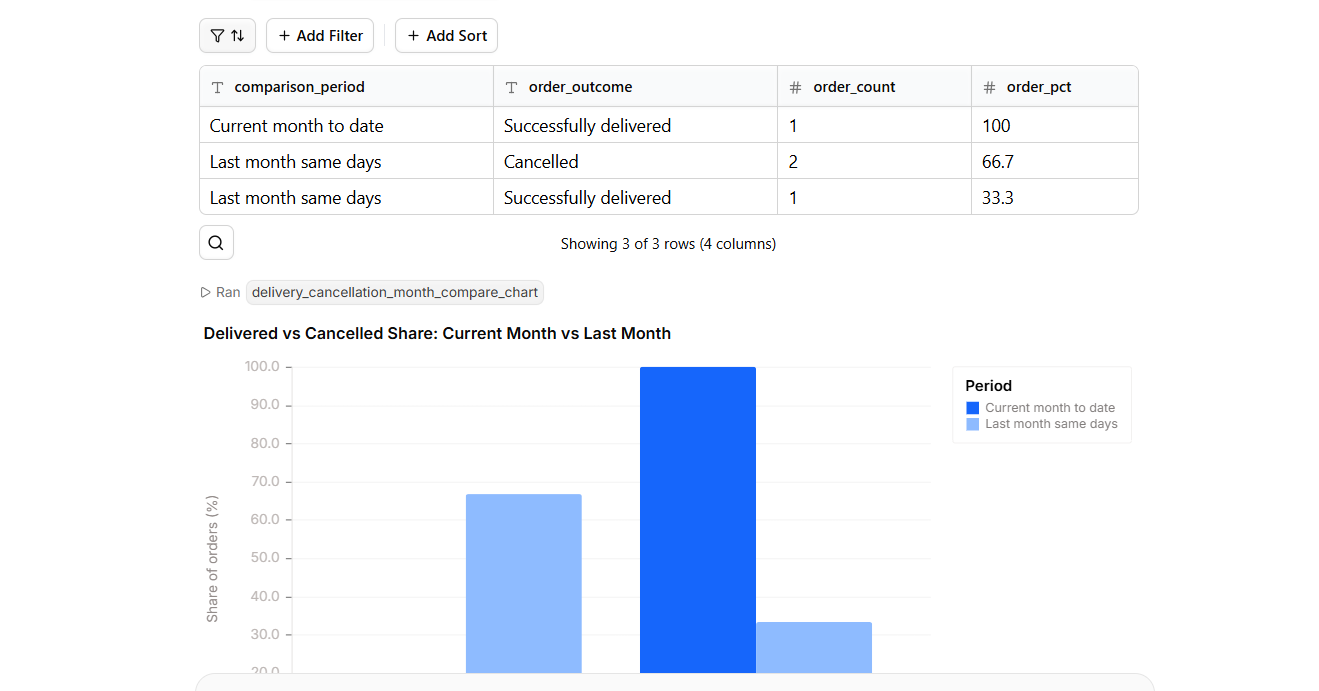
Querio answered the follow-up, but it compared the delivered-vs-cancelled breakdown instead of continuing the pending-but-paid breakdown from the immediately previous question. The tool generated a month comparison, but the context selection shifted from Follow-up 2 back to the earlier delivered-vs-cancelled analysis.
In Screenshot 2, highlight the follow-up question: “Compare that to last month — same breakdown…”
Plans as of June 2026
Pricing checked: June 2026. Recheck quarterly before publishing. Querio’s pricing should be verified again before publishing because plan names, billing amounts, and included limits can change. Querio is positioned more like a serious team/enterprise analytics platform than a lightweight personal SQL assistant. The tested value is strongest when teams need visible SQL, charts, insights, Slack support, and embedded analytics options in one workflow.
A side-by-side guide based on our hands-on testing.
Independent rankings where Querio was tested and rated.
How the embed badge will look on your site

Copy this code to your website source
Discover more AI tools like Querio to enhance your workflow.
If you are looking to build a custom AI data analysis, NL2SQL, or data visualization system for your business or internal workflow, email us at contact@futuresmart.ai.
Found something inaccurate or missing? We try to keep our AI research accurate and useful. If you found outdated information, an issue, or have a suggestion, email us at collaborate@aidemos.com.