AG
Ayush Ghosh
Verified Review
5 Tools TestedLive DatabasePlain-English QueryingFollow-Up ContextJune 2026

Best AI Tools to Query Live Databases Using Plain English

0
Tested: AskYourDatabase vs Basedash vs Querio vs Draxlr vs Definite · 2026-06

We tested five AI database tools on the same live ecommerce database to see which ones let non-technical teams ask plain-English questions, inspect the SQL, follow up naturally, and get readable tables, charts, and business conclusions.

How We Tested

All tools were tested against the same ecommerce-style live database and the same three prompt groups, increasing from a simple customer-acquisition comparison to multi-table best-customer analysis and then a deeper order-pipeline follow-up chain. We evaluated whether each tool could understand plain English, generate and show SQL, execute against the live database, return readable business-facing answers, keep follow-up context, generate useful visuals, and support reuse through export or dashboards.

What We Evaluated
Label
Description
Plain English Query Handling
Can the tool understand business questions without SQL?
SQL Generation
Does it generate database-backed SQL correctly?
SQL Visibility
Can users inspect or copy the generated SQL?
Result Readability
Is the answer easy for a non-technical user to understand?
Follow-Up Context
Does the tool remember previous answers correctly?
Business Insight
Does it explain what the result means?
Chart / Visualization Support
Does it generate charts automatically or allow useful visual views?
Export / Reuse
Can users export, save, share, or reuse the result?
Dashboard Workflow
Can the answer become a dashboard or reusable view?
Ambiguity Handling
Does the tool clarify unclear business terms instead of guessing silently?

The Ranking

5 toolstested head-to-head on the same input. Each card shows the verdict and per-criterion scores. Click "Full breakdown" for the artifact-level evidence.

1
Direct NL2SQL chatbot with the best business-readable follow-ups
Full breakdown ↓

Best practical direct NL2SQL tool.

2
BasedashUsable
Best UX and agentic execution flow for non-technical users
Full breakdown ↓

Best UX and agentic execution reference.

3
QuerioNeeds work
Analyst-style workspace that auto-builds multiple outputs
Full breakdown ↓

Best analyst workspace reference.

4
DraxlrNeeds work
SQL-first explorer with strong chart controls and export
Full breakdown ↓

Best SQL-first exploration reference.

5
DefiniteNeeds work
Dashboard-oriented workflow with strong reusable views
Full breakdown ↓

Best dashboard generation reference.

Ranking visual
Full breakdown · Tool 1 of 5

AskYourDatabaseBest

AskYourDatabase was the strongest direct plain-English-to-database tool in the test. It consistently exposed the SQL, answered in business language instead of raw rows, and preserved context across follow-ups better than the rest of the field.

Input 1 — Simple, Common, Single Table, Surface Level

Show all customers created in the last 90 days. How does new customer acquisition compare to the previous 90 days?

Input 2 — Medium, Common, Multi-table, Follow-up Chain

Who are my best customers — the ones who order the most and spend the most?
Follow-up 1: For the top 3 from that list — do any of them have unpaid orders?
Follow-up 2: What payment methods do these top 3 usually use?

Input 3 — Complex, Analytical, Multi-step, Follow-up Chain

How many orders do we have at each stage right now?

Follow-up 1: What percentage of our orders were successfully delivered vs cancelled?

Follow-up 2: Are there any orders that are pending but already paid?

Follow-up 3: Compare that to last month — same breakdown, I want to see if things have improved or got worse.

What worked
  • AskYourDatabase was the most complete match for the use case. It answered all three input groups with readable customer names instead of IDs, showed the SQL it generated, produced short business takeaways automatically, and held context across multi-turn follow-ups. Its best moments were the best-customer chain, where it separated frequency from spend instead of collapsing them into one list, and the order-pipeline chain, where it identified two pending-but-paid orders and then correctly compared that exact metric to last month, concluding that the stuck-order backlog had fallen from 13 to 2.
Where it struggled
  • Its biggest weakness was chart automation. Across the tested workflows, charts were possible but usually not automatic; the user often had to explicitly ask for a visualization after already receiving the answer. That makes the tool slightly less polished for non-technical users who expect a comparison or trend question to produce a chart by default.
What came out
Customer acquisition comparison

For the customer-acquisition prompt, AskYourDatabase returned a business summary instead of just raw rows: it compared the last 90 days with the previous 90 days, showed 12 new customers versus 23 before, stated that acquisition was down about 48%, and listed the 12 recent customers with names, emails, phone numbers, and created dates. It also called out that 11 of the 12 recent sign-ups happened in May 2026, leaving a long lull between late February and early May.

Best customers SQL visibility

On the best-customers query, the tool visibly ran two separate SQL queries in parallel: one ranking customers by order count and one by total spend. That made its interpretation of 'order the most and spend the most' transparent instead of silently choosing one ranking method.

Top customers unpaid-order follow-up

On the first follow-up, AskYourDatabase kept the top-customer context and produced a customer-by-customer payment-risk breakdown. Vikram Singh was fully paid, Rahul Sharma had one unpaid order worth $2,199.00 stuck in CONFIRMED status since April 2025, and Mohan Vishe had four unpaid orders totaling $1,223.94, including two already shipped orders, which the tool explicitly flagged as a risk.

Top customers payment methods

On the payment-method follow-up, the tool stayed on the same top-three customers and summarized each customer's usual payment behavior: Vikram Singh used EMI for his single high-value order, Rahul Sharma mostly used UPI with one credit-card order, and Mohan Vishe split between Cash on Delivery and Credit Card. It also connected Mohan's payment-method mix to the unpaid-order risk, noting that both shipped credit-card orders were still unpaid.

Order stages breakdown

For the order-pipeline prompt, AskYourDatabase returned a clean SQL-backed stage breakdown with 93 total orders: DELIVERED 25, PENDING 22, SHIPPED 15, CANCELLED 13, COMPLETED 11, CONFIRMED 4, and PROCESSING 3. It then summarized the distribution in plain language, highlighting delivered as the largest group and confirmed plus processing as the smallest.

Pending but paid orders

For the operational edge case, the tool correctly found two orders that were still PENDING even though payment had already been received: one for Blackie Tesla worth $1,500.00 and one for Aju Vlam worth $190.00. It did not stop at listing them; it explicitly said both were worth flagging, especially the older order that had been stuck since November 2025.

Month-over-month pending-paid comparison

On the final follow-up, AskYourDatabase kept the pending-paid context and compared the same metric against last month. It showed the stuck-order count dropping from 13 to 2, listed 11 resolved orders and their new statuses, and concluded that the backlog had improved significantly with an 85% reduction.

Visualization required extra prompt

AskYourDatabase could generate a useful acquisition chart, but only after the user asked for visualization separately. The chart itself clearly showed the 23-versus-12 comparison and that the last 90 days made up only 34.7% of all new customers across the last 180 days, but the need for an extra prompt was a recurring weakness.

8 full renders · same input
Full breakdown · Tool 2 of 5

Basedash

Basedash had the cleanest user experience in the test. It kept answers short, readable, and business-friendly, showed visible agentic steps, and demonstrated the best self-healing behavior when a SQL issue occurred mid-run.

Input 1 — Simple, Common, Single Table, Surface Level

Show all customers created in the last 90 days. How does new customer acquisition compare to the previous 90 days?

Input 2 — Medium, Common, Multi-table, Follow-up Chain

Who are my best customers — the ones who order the most and spend the most?
Follow-up 1: For the top 3 from that list — do any of them have unpaid orders?
Follow-up 2: What payment methods do these top 3 usually use?

Input 3 — Complex, Analytical, Multi-step, Follow-up Chain

How many orders do we have at each stage right now?

Follow-up 1: What percentage of our orders were successfully delivered vs cancelled?

Follow-up 2: Are there any orders that are pending but already paid?

Follow-up 3: Compare that to last month — same breakdown, I want to see if things have improved or got worse.


What worked
  • Basedash felt the easiest to consume for a non-technical business user. It auto-generated charts for the customer-acquisition prompt, exposed agentic execution steps clearly, kept answers compact, and handled SQL errors better than any other tested tool by repairing a failed query and continuing. It also did a strong job turning the best-customers prompt into an immediately useful business answer instead of a technical dump.
Where it struggled
  • Its main limitation was ambiguity handling. In both the best-customer follow-up chain and the order-pipeline follow-up chain, Basedash silently narrowed scope instead of asking a clarification question. That meant 'top 3 from that list' and 'same breakdown' were interpreted in plausible but not guaranteed-correct ways, which could mislead a business user who assumes the tool checked the broader intended scope.
What came out
Customer acquisition table and chart

For the customer-acquisition prompt, Basedash returned the business answer first, then a simple chart and customer table. It reported 11 new customers in the last 90 days versus 22 in the previous 90 days, framed the drop as a 50.0% decline, and listed the recent customers in an easy-to-scan table with names, emails, phone numbers, and created dates.

Visible agentic steps

Basedash exposed its step-by-step execution flow instead of acting like a black box. The output showed that it was querying recent customers, comparing the two 90-day periods, returning records, and then creating a vertical bar chart, which made the process legible without overwhelming the final answer.

Best customers multi-metric output

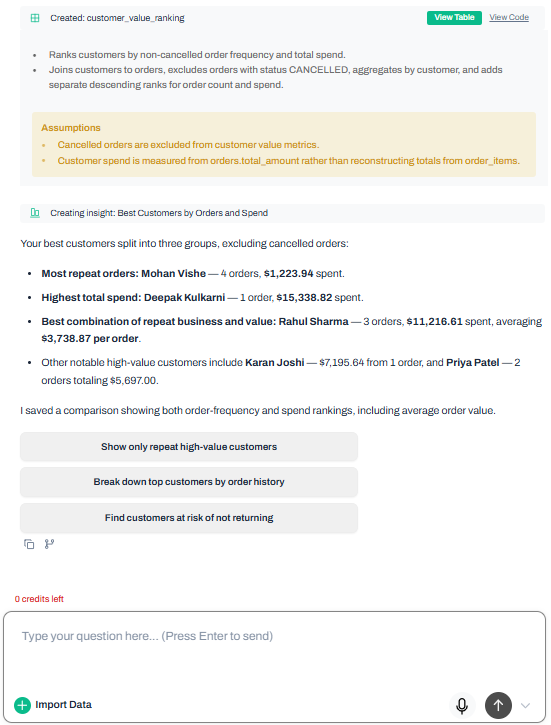
On the best-customers prompt, Basedash handled the ambiguity better than most tools by separating the answer into two views: customers who order the most and customers who spend the most. It then synthesized those lists into a business conclusion, calling Rahul Sharma the best all-around customer, Mohan Vishe the most frequent buyer, and Deepak Kulkarni the biggest spender.

Top-3 follow-up scope caution

The first follow-up exposed Basedash's main weakness: scope clarification. Because the prior answer produced two rankings, the phrase 'top 3 from that list' was ambiguous, and Basedash chose a spend-based interpretation first, then separately checked the top three by order count. That made the output usable, but it did not ask the user which list they actually meant.

Payment-method follow-up

For the payment-method follow-up, Basedash summarized the usual payment method for each previously selected customer in a compact table. It concluded that Deepak Kulkarni used EMI, Karan Joshi used Net Banking, and Rahul Sharma mostly used UPI while also using Credit Card once.

SQL self-healing retry

Basedash showed one of the most practical product behaviors in the entire benchmark when a delivered-versus-cancelled query hit a grouping alias issue. Instead of failing visibly, it noted that the first query had a problem, rewrote the logic, reran it, and still produced a final answer that grouped delivered and completed orders as successfully delivered.

Delivered vs cancelled percentages

Basedash's delivered-versus-cancelled answer was direct and readable. It reported 25 delivered orders and 13 cancelled orders out of 93 total, then also gave the two-outcome comparison alone, showing delivered at 65.79% versus cancelled at 34.21%, while explicitly noting that this interpretation counted only DELIVERED unless the user wanted COMPLETED included too.

7 full renders · same input
Full breakdown · Tool 3 of 5

Querio

Querio was the strongest analyst-style workspace tested. One prompt could expand into multiple SQL-backed outputs, charts, and narrative insights, but the experience sometimes leaned too technical for the non-technical user this use case targets.

Input 1 — Simple, Common, Single Table, Surface Level

Show all customers created in the last 90 days. How does new customer acquisition compare to the previous 90 days?

Input 2 — Medium, Common, Multi-table, Follow-up Chain

Who are my best customers — the ones who order the most and spend the most?
Follow-up 1: For the top 3 from that list — do any of them have unpaid orders?
Follow-up 2: What payment methods do these top 3 usually use?

Input 3 — Complex, Analytical, Multi-step, Follow-up Chain

How many orders do we have at each stage right now?

Follow-up 1: What percentage of our orders were successfully delivered vs cancelled?

Follow-up 2: Are there any orders that are pending but already paid?

Follow-up 3: Compare that to last month — same breakdown, I want to see if things have improved or got worse.

What worked
  • Querio was impressive when the task rewarded analyst-style automation. It turned the acquisition prompt into multiple outputs, auto-generated charts, and wrote stronger narrative insights than most tools. It also retained context reasonably well across the best-customer chain and felt more like a modular analysis workspace than a single chat answer.
Where it struggled
  • For this specific use case, its biggest problem was follow-up safety deeper in the conversation. On the hardest prompt chain, it selected the wrong prior context for 'same breakdown' and answered a different analytical question than the user meant. It also hurt readability by surfacing customer IDs instead of names in some follow-up results, which is a real usability issue for non-technical business users.
What came out
Multiple SQL-backed outputs from one prompt

For the customer-acquisition prompt, Querio did not stop at a single answer block. It created a workspace with multiple running analyses for metrics, periods, recent customers, and comparisons, showing that one plain-English prompt could trigger several SQL-backed outputs in parallel.

Automatic acquisition chart

Querio automatically generated a comparison chart for prior 90 days versus last 90 days without requiring the user to ask for visualization separately. That was a meaningful advantage over tools that answered correctly but needed an extra chart prompt.

Key insights panel
Key insights panel

Querio added a narrative insights layer to the acquisition analysis. It stated that 11 new customers were acquired in the last 90 days versus 28 in the prior 90-day period, called that a 61% decline, identified clusters in mid-February and early May, and explicitly flagged the March-April gap with zero new customers as something worth investigating.

Best-customer follow-up context

Querio largely maintained follow-up context in the best-customer workflow. Its follow-up workspace explicitly described the unpaid-order check as applying to the top three customers by total spend and returned a three-row result for that selected group.

Customer-ID-heavy payment-method output

Querio's readability weakened on the payment-method follow-up because the results table and chart used customer IDs instead of customer names. The output still exposed payment methods such as EMI, UPI, Credit Card, and Net Banking, but a non-technical user would have to translate IDs back into actual customers.

Previous-question context before failure

Immediately before the final follow-up, Querio had the correct pending-versus-paid context in memory: it had just answered the question about orders that were still pending even though payment had already been collected. That makes the next context shift important, because the tool had the right reference point available.

Wrong context selected for 'same breakdown'

Querio's real failure came on the final follow-up. When asked to 'Compare that to last month — same breakdown,' it compared delivered-versus-cancelled month-to-date outcomes instead of continuing the pending-but-paid breakdown from the immediately preceding turn. The result was a clean chart and table, but for the wrong metric.

7 full renders · same input
Full breakdown · Tool 4 of 5

Draxlr

Draxlr was a capable SQL-first explorer with excellent transparency, chart controls, and export options. It handled the database work well, but the experience felt closer to a data tool for analysts than a guided AI analyst for non-technical operators.

Input 1 — Simple, Common, Single Table, Surface Level

Show all customers created in the last 90 days. How does new customer acquisition compare to the previous 90 days?

Input 2 — Medium, Common, Multi-table, Follow-up Chain

Who are my best customers — the ones who order the most and spend the most?
Follow-up 1: For the top 3 from that list — do any of them have unpaid orders?
Follow-up 2: What payment methods do these top 3 usually use?

Input 3 — Complex, Analytical, Multi-step, Follow-up Chain

How many orders do we have at each stage right now?

Follow-up 1: What percentage of our orders were successfully delivered vs cancelled?

Follow-up 2: Are there any orders that are pending but already paid?

Follow-up 3: Compare that to last month — same breakdown, I want to see if things have improved or got worse.

What worked
  • Draxlr was strong wherever the job was accurate SQL generation, visible queries, and reusable exploration. It maintained the top-three customer context across follow-ups, handled the pending-but-paid edge case correctly, generated good SQL for month comparisons, and offered the best post-query control set in the test through chart switching, CSV export, Save Query, and Add to Dashboard.
Where it struggled
  • Its weak spot was the non-technical-user experience. Default visual choices were not always good, some outputs were table-heavy or ID-heavy, natural-language summaries appeared inconsistently, and ambiguous follow-ups were sometimes resolved silently instead of clarified. The result was capable but more technical and less guided than the leading chat-first tools.
What came out
Customer acquisition SQL output

For the acquisition prompt, Draxlr produced a SQL-backed results table with recent customers plus comparison fields for current-period customers, previous-period customers, and percent change. The result showed strong query construction and clear exposure of the underlying logic, even though the presentation leaned technical.

Best customers SQL visible

On the best-customers prompt, Draxlr exposed the SQL editor and query structure directly. The query ranked customers by order count and total spend, and the result table included order count, total spend, average order value, and most recent order date, which made the ranking logic transparent.

Top customers unpaid-order query result

Draxlr kept follow-up context correctly when asked whether the top three customers had unpaid orders. It returned a three-record result with unpaid-order indicators alongside total orders, total spend, average order value, and most recent order date, showing that the check stayed tied to the selected customer group.

Top customers payment methods

For the payment-method follow-up, Draxlr continued with the same customer scope and broke each top customer's orders down by payment method. The output showed, for example, Mohan Vishe split between Cash on Delivery and Credit Card, while Rahul Sharma mostly used UPI with Credit Card as a secondary method.

Order pipeline summary

For the order-pipeline prompt, Draxlr returned counts by current stage and added an AI summary. It reported 92 total orders, with DELIVERED at 25, PENDING at 21, and SHIPPED at 15, then summarized that most orders were either delivered or still pending while PROCESSING and CONFIRMED were the smallest groups.

Chart switching options

Draxlr's strongest product advantage was visualization flexibility. After returning a result, it let the user switch the same query into different visual formats rather than forcing one default chart type, which is useful when the first visualization choice is not the best one.

CSV export action
CSV export action

Draxlr also stood out on export and reuse. The results screen exposed direct export options for Excel and CSV alongside Save Query and Add to Dashboard actions, making it easier to turn an answer into a reusable artifact instead of a one-off chat result.

Predictive-assumption caution

A separate churn-style test showed that Draxlr would answer predictive business questions by making an assumption rather than grounding them in explicit labels. The interface explicitly stated that churn was being proxied from order recency and expected next order date, which is better than hiding the assumption but still something business users need to treat cautiously.

8 full renders · same input
Full breakdown · Tool 5 of 5

Definite

Definite was the most dashboard-oriented tool in the set. It could turn chat analysis into reusable dashboard views and handled some operational assumptions well, but it felt heavier and less direct for quick plain-English database Q&A.

Input 1 — Simple, Common, Single Table, Surface Level

Show all customers created in the last 90 days. How does new customer acquisition compare to the previous 90 days?

Input 2 — Medium, Common, Multi-table, Follow-up Chain

Who are my best customers — the ones who order the most and spend the most?
Follow-up 1: For the top 3 from that list — do any of them have unpaid orders?
Follow-up 2: What payment methods do these top 3 usually use?

Input 3 — Complex, Analytical, Multi-step, Follow-up Chain

How many orders do we have at each stage right now?

Follow-up 1: What percentage of our orders were successfully delivered vs cancelled?

Follow-up 2: Are there any orders that are pending but already paid?

Follow-up 3: Compare that to last month — same breakdown, I want to see if things have improved or got worse.

What worked
  • Definite's best moments came when the answer needed to become a reusable dashboard or when a metric involved a business assumption that should be stated explicitly. Its order-pipeline workflow was strong, it handled delivered-versus-cancelled logic carefully, and it built reusable dashboard views that could matter for ongoing operations tracking.
Where it struggled
  • For this benchmark's core use case, Definite felt slower and heavier than the top tools. Visualizations usually required an extra prompt and then opened as separate dashboard artifacts instead of appearing inline, which is not ideal for fast conversational analysis. It also missed the main intent of the best-customers prompt by leaning primarily on spend and underweighting order frequency.
What came out
Customer acquisition result

For the acquisition prompt, Definite returned a clear comparison table and customer list. The result showed 12 new customers in the last 90 days versus 22 in the previous 90 days and added commentary about customers arriving in two bursts with a large gap between them, though the written interpretation also showed inconsistency between the displayed counts and the narrative line beneath.

Customer acquisition dashboard

When visualization was requested, Definite turned the acquisition answer into a dashboard-style artifact rather than an inline chat chart. The dashboard combined a trend view, KPI-style counts, and a comparison table, which is powerful for reuse but heavier than a quick in-chat visualization.

Spend-focused best-customers caution

Definite narrowed the best-customers prompt too far toward spend. Its ranking table sorted top customers by total spend, and the commentary explicitly called Deepak Kulkarni the highest-value customer while noting Rahul Sharma's repeat buying, but it did not treat 'order the most' as an equal ranking dimension the way the prompt requested.

Unpaid-order business commentary

Definite's unpaid-order follow-up was business-readable. It identified Rahul Sharma's unpaid order worth $2,199, noted that it had been sitting confirmed but unpaid since April 2025, and framed it as worth following up because he was still one of the highest-value customers in the set.

Order stages breakdown

On the order-pipeline prompt, Definite returned a straightforward breakdown of 93 total orders: DELIVERED 25, PENDING 22, SHIPPED 15, CANCELLED 13, COMPLETED 11, CONFIRMED 4, and PROCESSING 3. It then summarized active orders, resolved orders, and the approximate cancellation rate, which made the output easier to interpret than a bare table.

Delivered-vs-cancelled assumption handling

Definite handled the delivered-versus-cancelled metric with more assumption transparency than most tools. It showed both shares of all orders and shares of resolved-only orders, then explicitly noted that COMPLETED could also count as a successful outcome depending on the workflow, which would raise the success rate among resolved orders.

Order pipeline dashboard

Definite's dashboard workflow was strongest on the order pipeline. It converted the chat analysis into a reusable dashboard with KPI cards and a stage breakdown view, which fits teams that want the answer to live beyond the initial conversation.

7 full renders · same input

Final Take

AskYourDatabase is the best overall pick if you want a business user to ask a live database questions in plain English, see the SQL, and keep drilling down through follow-ups without getting lost. Basedash is the best runner-up for teams that care most about clean UX, automatic charts on simple comparisons, and resilient agent behavior. Querio is compelling for analyst-style multi-output work but needs safer deep follow-up context. Draxlr is best when SQL visibility, export, and chart switching matter more than simplicity. Definite is the specialist choice when the goal is to turn a chat answer into a reusable dashboard rather than get the fastest direct answer.

Tested as of 2026-06-01T00:00:00.000Z · Will be re-verified monthly

Comments (0)

Please Log in to join the discussion.