AI Database Agents
Version 1No published result

Plain-English database querying with strong SQL transparency and follow-up context, but uneven insight and data-recency handling.
Good self-serve analytics, best for users who will verify and interpret
Dot is strong at answering live-database questions in plain English, showing the SQL, and preserving context across follow-ups. It is less reliable when the answer depends on proactive interpretation or on refusing comparisons that span data gaps, so it works best for users who are comfortable checking the result themselves.
Explore Dot in our public benchmarks.
No published result
Our detailed analysis of Dot — features, performance, and real-world testing.
Feature tested: Natural-Language Database Querying
Result: Passed
Verdict: Strong
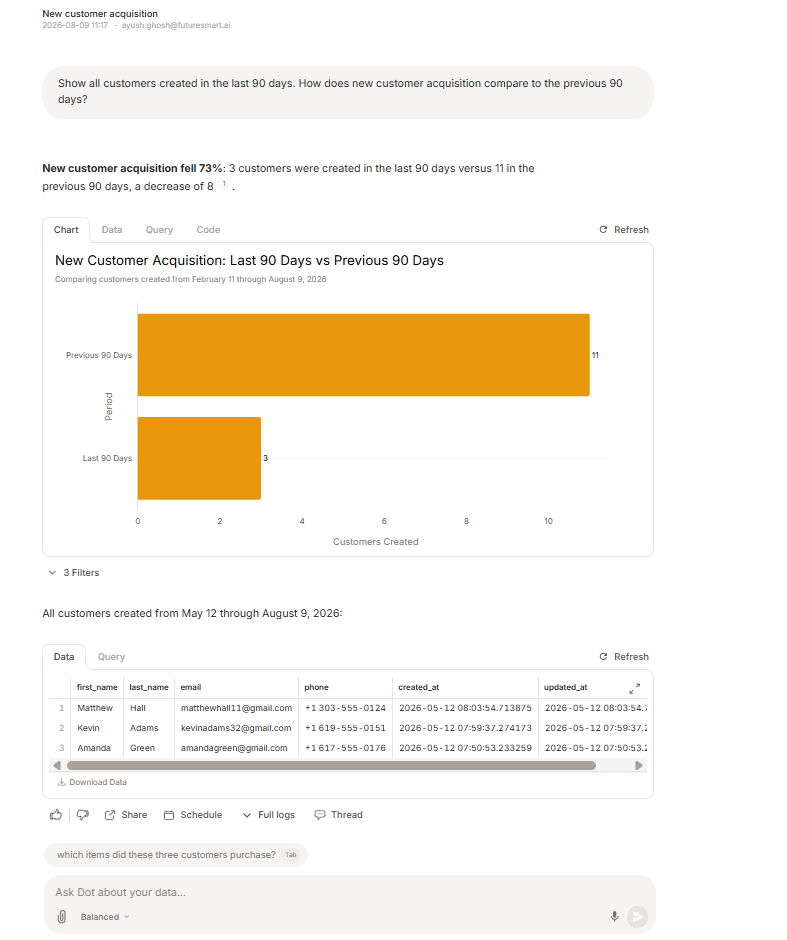
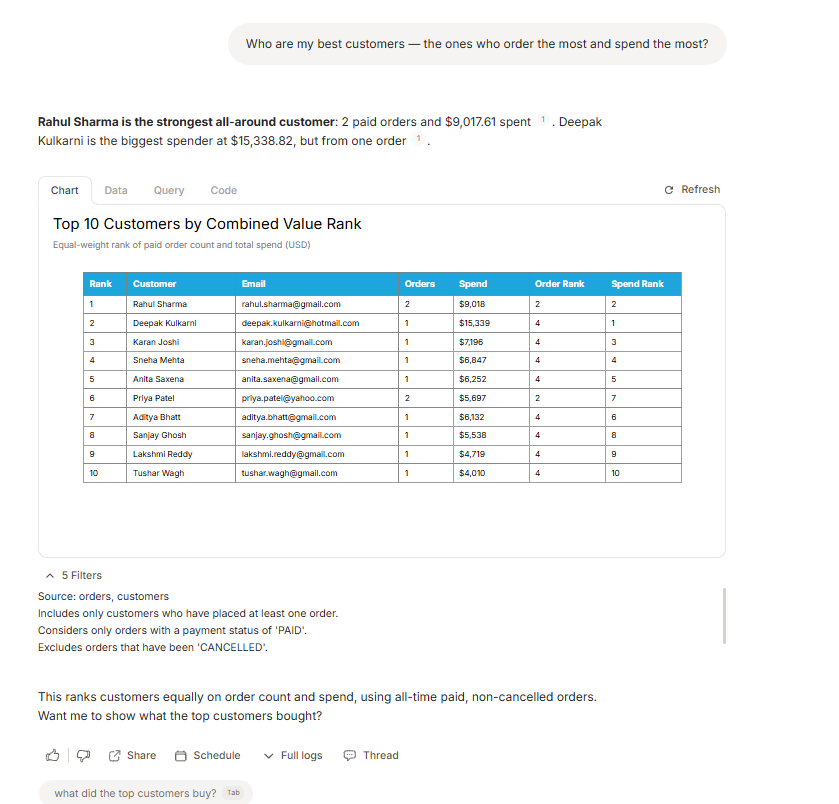
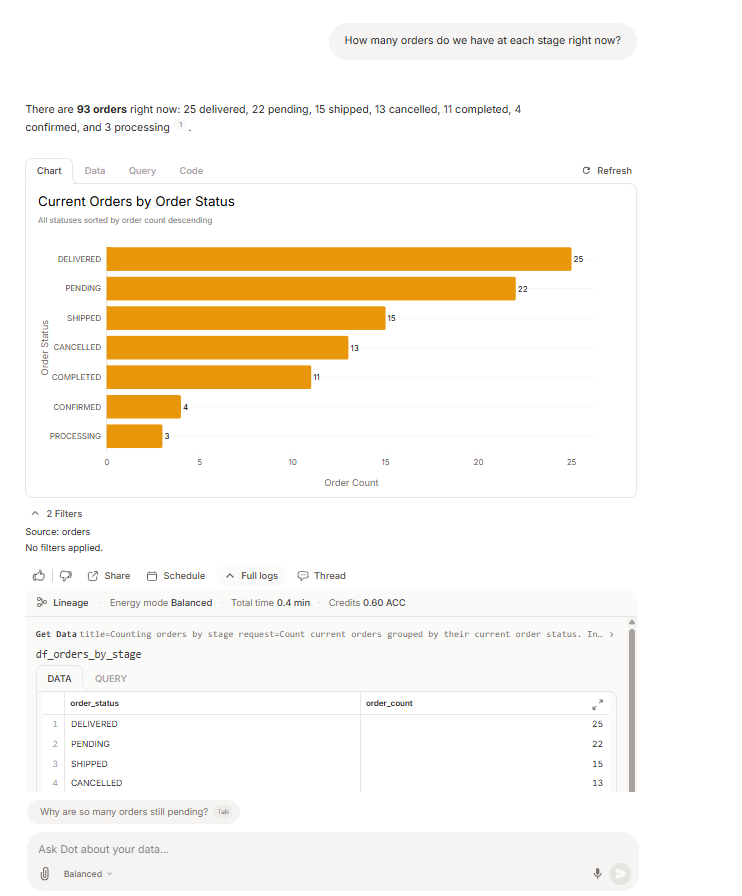
Expected behavior: Dot answers business questions against a live PostgreSQL database without requiring the user to write SQL, and returns a natural-language summary with an auto-generated chart or table. The tested inputs included a 90-day customer-acquisition comparison, a customer-value ranking, and an order-status query.
Test case: Text prompt → Image
Input type: Text prompt
Input used: Input artifact (Text prompt): INPUT
Observed output: Output artifact (Image): New customer acquisition fell 73%: 3 customers were created in the last 90 days versus 11 in the previous 90 days, and Dot showed a comparison chart plus the matching customer list. — input1-answer-and-comparison-chart.png
Input artifact: Input artifact (Text prompt): INPUT
Output artifact: Output artifact (Image): New customer acquisition fell 73%: 3 customers were created in the last 90 days versus 11 in the previous 90 days, and Dot showed a comparison chart plus the matching customer list. — input1-answer-and-comparison-chart.png
What changed: Text prompt transformed into Image
Test case: Text prompt → Image
Input type: Text prompt
Input used: Input artifact (Text prompt): INPUT
Observed output: Output artifact (Image): Dot returned a ranked customer table with order count, spend, and separate order/spend ranks, and summarized Rahul Sharma as the strongest all-around customer while Deepak Kulkarni was the biggest spender. — input2-main-combined-rank-table.png
Input artifact: Input artifact (Text prompt): INPUT
Output artifact: Output artifact (Image): Dot returned a ranked customer table with order count, spend, and separate order/spend ranks, and summarized Rahul Sharma as the strongest all-around customer while Deepak Kulkarni was the biggest spender. — input2-main-combined-rank-table.png
What changed: Text prompt transformed into Image
Test case: Text prompt → Image
Input type: Text prompt
Input used: Input artifact (Text prompt): INPUT
Observed output: Output artifact (Image): Dot reported 93 total orders across seven statuses and rendered a horizontal bar chart sorted by order count. — input3-main-stage-breakdown-chart.png
Input artifact: Input artifact (Text prompt): INPUT
Output artifact: Output artifact (Image): Dot reported 93 total orders across seven statuses and rendered a horizontal bar chart sorted by order count. — input3-main-stage-breakdown-chart.png
What changed: Text prompt transformed into Image
Why it matters / Conclusion: Strong for direct self-serve queries: the answers were readable, accurate, and formatted with charts or tables, but the tool generally reports the number before adding business interpretation.
Dot answers business questions against a live PostgreSQL database without requiring the user to write SQL, and returns a natural-language summary with an auto-generated chart or table. The tested inputs included a 90-day customer-acquisition comparison, a customer-value ranking, and an order-status query.
Feature tested: SQL Transparency and Query Assumptions
Result: Passed
Verdict: Strong
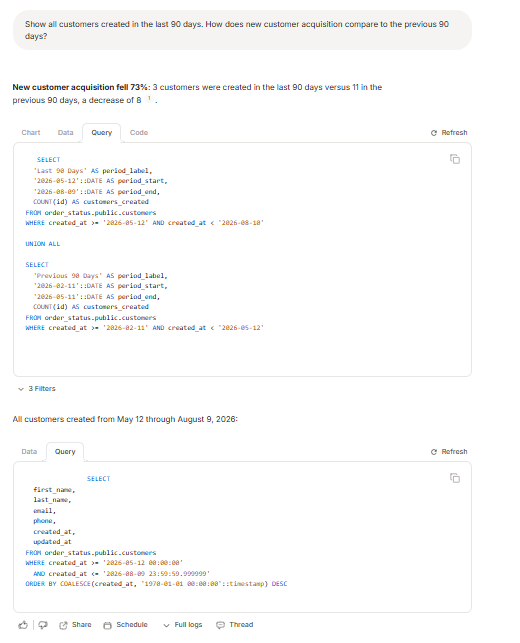
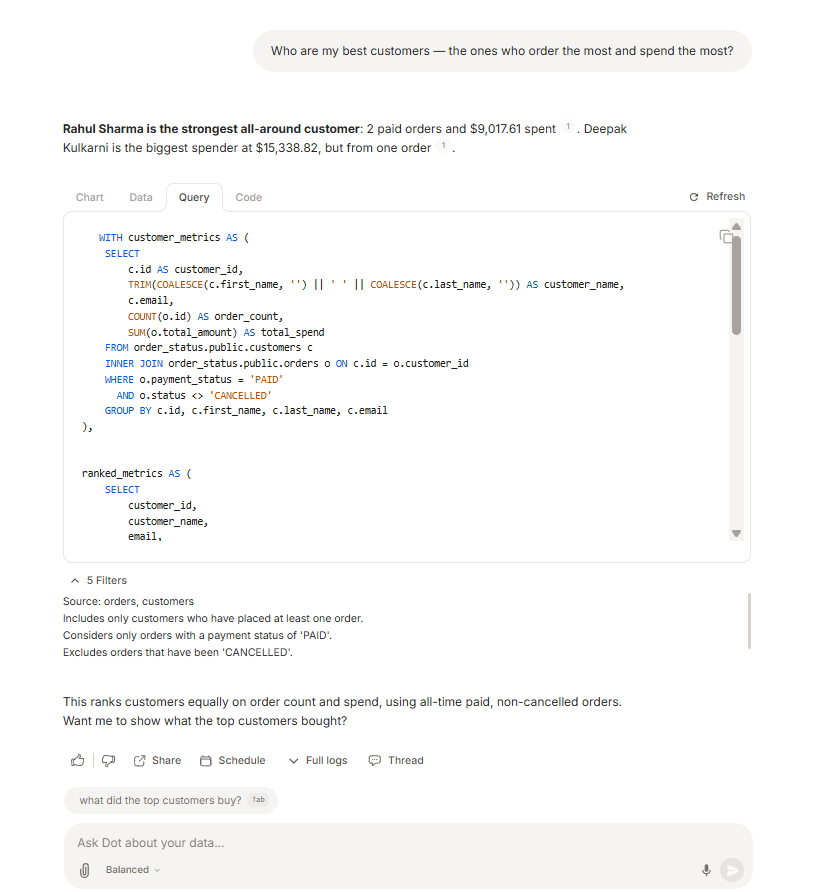
Expected behavior: Dot shows the generated SQL behind a result in a separate Query tab and includes filter notes that explain date windows and ranking assumptions. In testing, this covered the 90-day acquisition comparison and the best-customers ranking queries.
Test case: Text prompt → Image
Input type: Text prompt
Input used: Input artifact (Text prompt): INPUT
Observed output: Output artifact (Image): The Query tab displayed the generated SQL for both the 90-day comparison and the customer list query. — input1-query-tab-sql.png
Input artifact: Input artifact (Text prompt): INPUT
Output artifact: Output artifact (Image): The Query tab displayed the generated SQL for both the 90-day comparison and the customer list query. — input1-query-tab-sql.png
What changed: Text prompt transformed into Image
Test case: Text prompt → Image
Input type: Text prompt
Input used: Input artifact (Text prompt): INPUT
Observed output: Output artifact (Image): The Query tab exposed the CTE-based SQL used to calculate customer metrics and combined rankings, along with the plain-English assumptions panel. — input2-main-query-tab-sql.png
Input artifact: Input artifact (Text prompt): INPUT
Output artifact: Output artifact (Image): The Query tab exposed the CTE-based SQL used to calculate customer metrics and combined rankings, along with the plain-English assumptions panel. — input2-main-query-tab-sql.png
What changed: Text prompt transformed into Image
Why it matters / Conclusion: Very good transparency: the generated SQL and assumptions are inspectable, but they are one click away rather than embedded inline in the chat answer.
Dot shows the generated SQL behind a result in a separate Query tab and includes filter notes that explain date windows and ranking assumptions. In testing, this covered the 90-day acquisition comparison and the best-customers ranking queries.
Feature tested: Conversational Follow-Up Handling
Result: Passed
Verdict: Strong
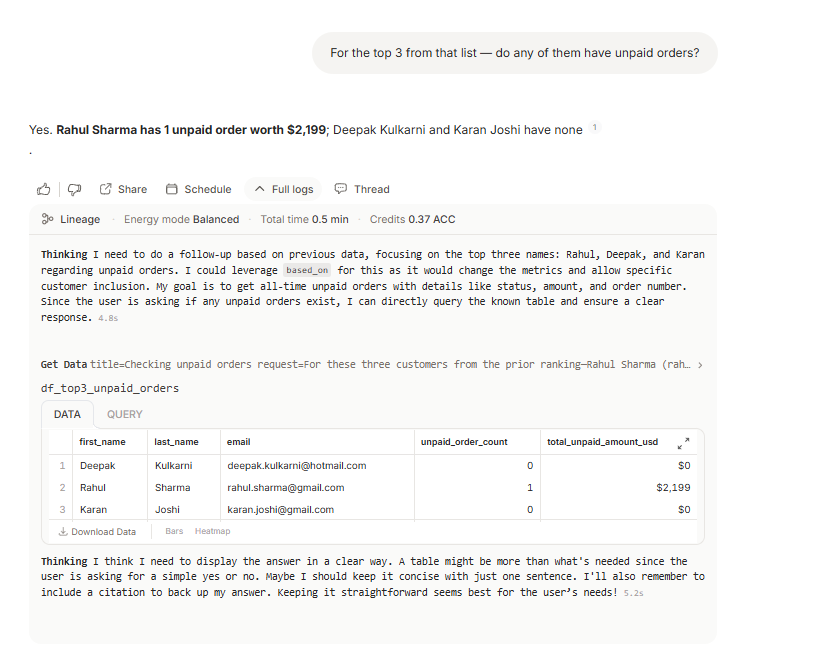
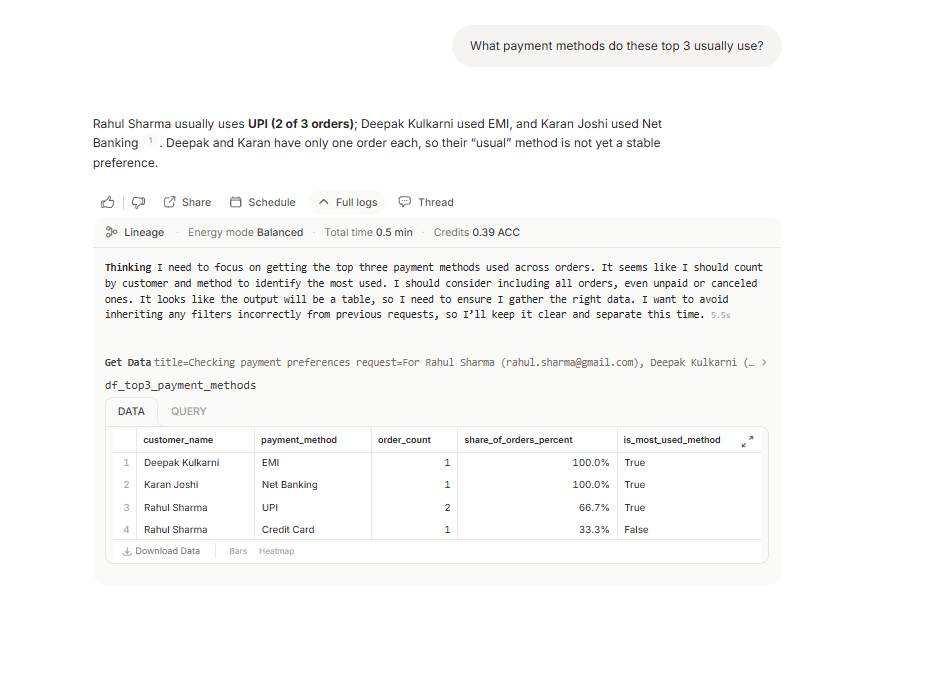
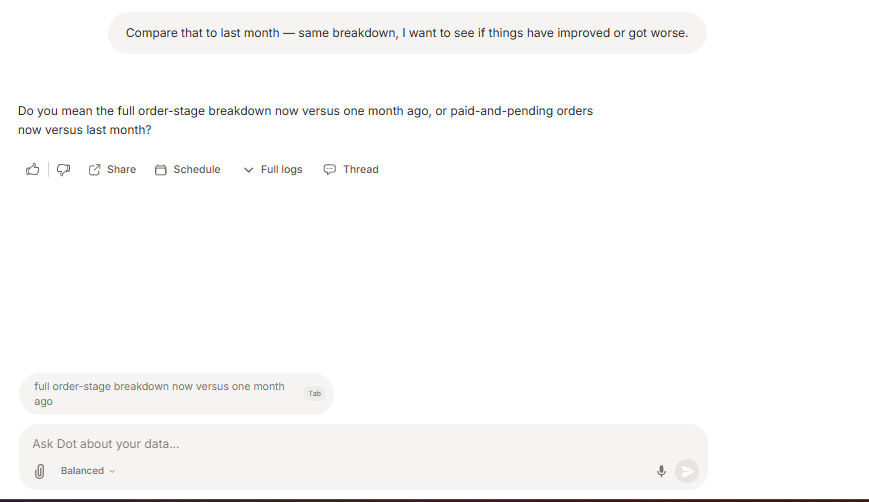
Expected behavior: Dot keeps context across turns so follow-up questions can build on the previous result instead of starting over, and it asks clarifying questions when a reference is ambiguous. The tested follow-ups carried forward a top-three customer list into unpaid-order and payment-method questions.
Test case: Text prompt → Image
Input type: Text prompt
Input used: Input artifact (Text prompt): INPUT
Observed output: Output artifact (Image): Dot answered the follow-up using the prior top-three customer context and reported that Rahul Sharma had 1 unpaid order worth $2,199 while Deepak Kulkarni and Karan Joshi had none. — input2-followup1-unpaid-orders.png
Input artifact: Input artifact (Text prompt): INPUT
Output artifact: Output artifact (Image): Dot answered the follow-up using the prior top-three customer context and reported that Rahul Sharma had 1 unpaid order worth $2,199 while Deepak Kulkarni and Karan Joshi had none. — input2-followup1-unpaid-orders.png
What changed: Text prompt transformed into Image
Test case: Text prompt → Image
Input type: Text prompt
Input used: Input artifact (Text prompt): INPUT
Observed output: Output artifact (Image): Dot kept the same top-three customer context and summarized their usual payment methods, while noting that Deepak and Karan each had only one order so their preference was not yet stable. — input2-followup2-payment-methods.png
Input artifact: Input artifact (Text prompt): INPUT
Output artifact: Output artifact (Image): Dot kept the same top-three customer context and summarized their usual payment methods, while noting that Deepak and Karan each had only one order so their preference was not yet stable. — input2-followup2-payment-methods.png
What changed: Text prompt transformed into Image
Test case: Text prompt → Image
Input type: Text prompt
Input used: Input artifact (Text prompt): INPUT
Observed output: Output artifact (Image): Dot paused to ask which comparison was meant instead of guessing, offering the full order-stage breakdown versus the paid-and-pending comparison as alternatives. — input3-followup3-clarification-question.png
Input artifact: Input artifact (Text prompt): INPUT
Output artifact: Output artifact (Image): Dot paused to ask which comparison was meant instead of guessing, offering the full order-stage breakdown versus the paid-and-pending comparison as alternatives. — input3-followup3-clarification-question.png
What changed: Text prompt transformed into Image
Why it matters / Conclusion: Standout capability: it preserves context well and will ask before guessing when a reference is ambiguous. The weakness is that some follow-up answers become very terse, with supporting detail buried in logs.
Dot keeps context across turns so follow-up questions can build on the previous result instead of starting over, and it asks clarifying questions when a reference is ambiguous. The tested follow-ups carried forward a top-three customer list into unpaid-order and payment-method questions.
Feature tested: Time-Based Comparison and Historical Snapshot Analysis
Result: Partial
Verdict: Mixed
Expected behavior: Dot can compare time windows and reconstruct prior snapshots from order history. The tested cases included last-90-days versus previous-90-days comparisons, delivered versus cancelled share, and a current-versus-prior-month view of paid-but-pending orders.
Test case: Text prompt → Image
Input type: Text prompt
Input used: Input artifact (Text prompt): INPUT
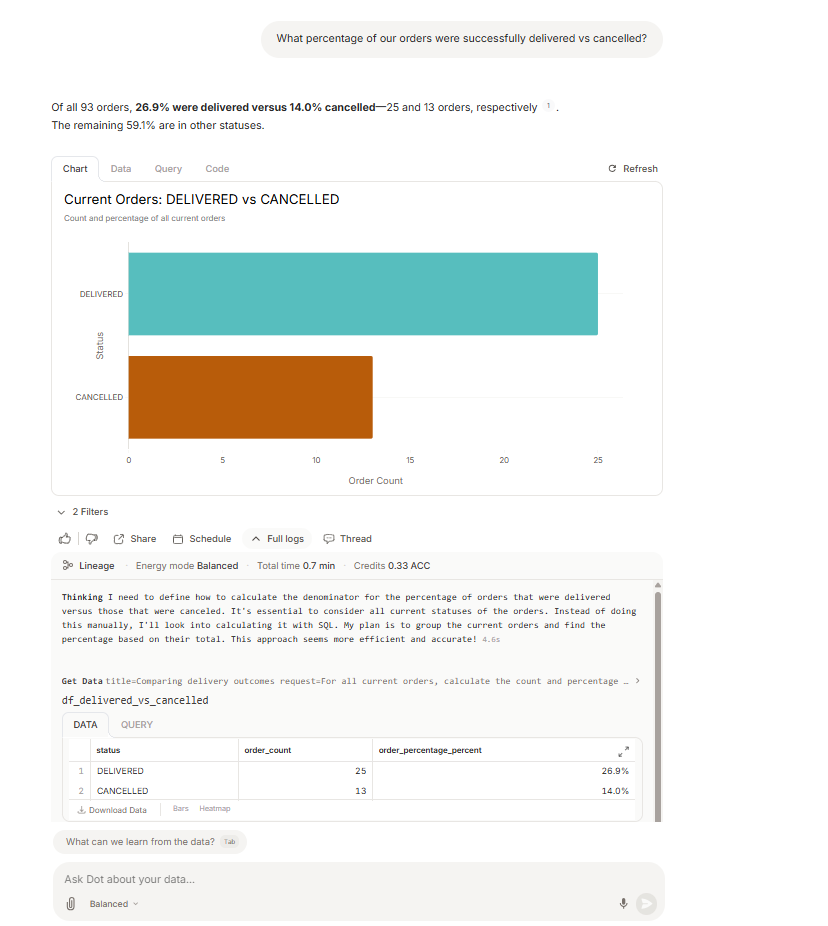
Observed output: Output artifact (Image): Dot compared delivered versus cancelled orders as a share of all current orders and reported 26.9% delivered and 14.0% cancelled. — input3-followup1-delivered-vs-cancelled.png
Input artifact: Input artifact (Text prompt): INPUT
Output artifact: Output artifact (Image): Dot compared delivered versus cancelled orders as a share of all current orders and reported 26.9% delivered and 14.0% cancelled. — input3-followup1-delivered-vs-cancelled.png
What changed: Text prompt transformed into Image
Test case: Text prompt → Image
Input type: Text prompt
Input used: Input artifact (Text prompt): INPUT
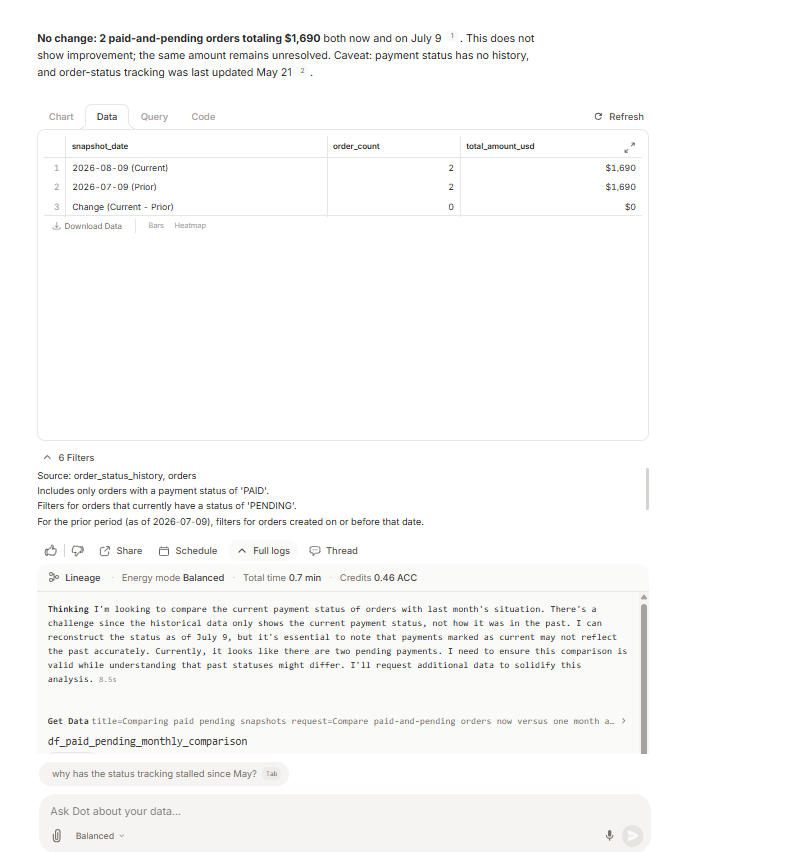
Observed output: Output artifact (Image): Dot reconstructed a month-over-month snapshot for paid-and-pending orders and reported no change: 2 orders totaling $1,690 both now and on July 9. — 3a2e58afe8db45b1b14143dea3bb0117.png
Input artifact: Input artifact (Text prompt): INPUT
Output artifact: Output artifact (Image): Dot reconstructed a month-over-month snapshot for paid-and-pending orders and reported no change: 2 orders totaling $1,690 both now and on July 9. — 3a2e58afe8db45b1b14143dea3bb0117.png
What changed: Text prompt transformed into Image
Test case: Text prompt → Image
Input type: Text prompt
Input used: Input artifact (Text prompt): INPUT
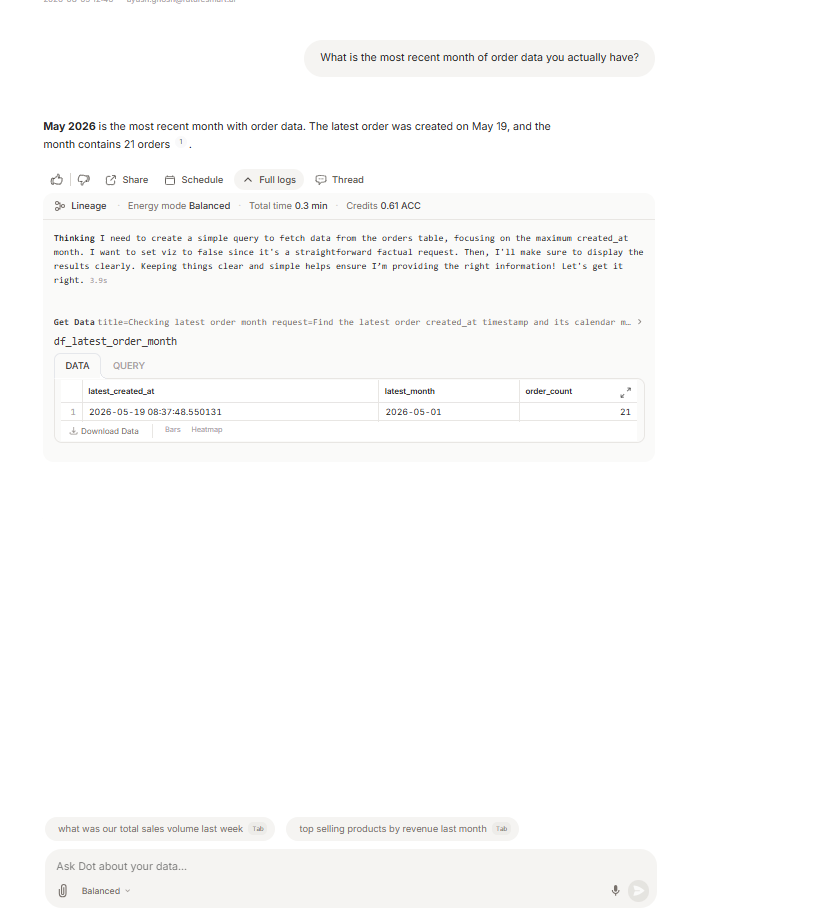
Observed output: Output artifact (Image): Dot correctly identified May 2026 as the most recent month of order data and showed that the latest order was created on May 19. — diagnostic-latest-order-may19.png
Input artifact: Input artifact (Text prompt): INPUT
Output artifact: Output artifact (Image): Dot correctly identified May 2026 as the most recent month of order data and showed that the latest order was created on May 19. — diagnostic-latest-order-may19.png
What changed: Text prompt transformed into Image
Test case: Text prompt → Image
Input type: Text prompt
Input used: Input artifact (Text prompt): INPUT
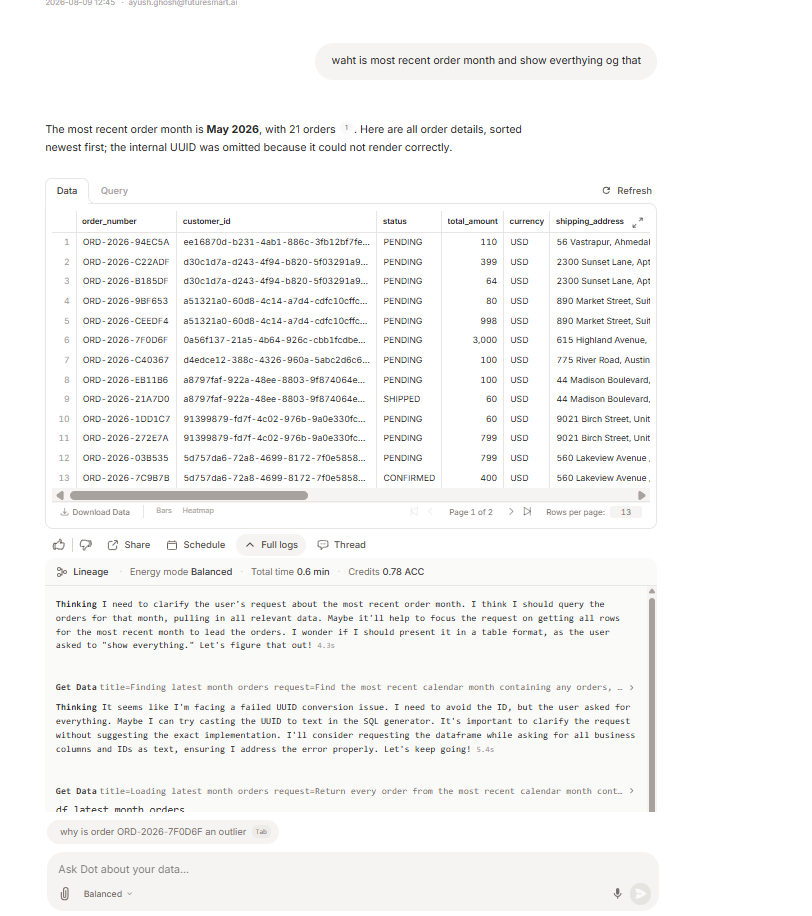
Observed output: Output artifact (Image): Dot reported that the most recent order month is May 2026, with 21 orders, and listed the order details sorted newest first. — diagnostic-most-recent-month-may2026.png
Input artifact: Input artifact (Text prompt): INPUT
Output artifact: Output artifact (Image): Dot reported that the most recent order month is May 2026, with 21 orders, and listed the order details sorted newest first. — diagnostic-most-recent-month-may2026.png
What changed: Text prompt transformed into Image
Why it matters / Conclusion: It can reconstruct useful time-based views and even answer recency checks correctly, but the final month-over-month comparison was misleading because it compared July/August dates even though the tool’s own data cutoff was in May. That makes this capability useful but risky when the date window may be empty.
Dot can compare time windows and reconstruct prior snapshots from order history. The tested cases included last-90-days versus previous-90-days comparisons, delivered versus cancelled share, and a current-versus-prior-month view of paid-but-pending orders.
Testing used the free 300-credit tier; paid plans are metered by credits.
A 10% annual discount was mentioned in the report.
How the embed badge will look on your site

Copy this code to your website source
Discover more AI tools like Dot to enhance your workflow.
If you are looking to build a custom natural language SQL querying, database analytics assistant, data exploration tool for your business or internal workflow, email us at contact@futuresmart.ai.
Found something inaccurate or missing? We try to keep our AI research accurate and useful. If you found outdated information, an issue, or have a suggestion, email us at collaborate@aidemos.com.