AI Database Agents
Version 1No published result

Plain-English live database querying with inline SQL, charts, follow-ups, and cost visibility.
Strong analytics surface, but the prose layer needs verification.
AI for Database is a strong fit when you want self-serve live-database answers with visible SQL, charts, follow-ups, and unusually strong cost transparency. The tradeoff is that the natural-language summaries and some chart choices need checking, because the report found verified arithmetic, attribution, and labeling issues even when the SQL and tables were correct.
Explore AI for Database in our public benchmarks.
No published result
Our detailed analysis of AI for Database — features, performance, and real-world testing.
Feature tested: Natural-Language Database Querying
Result: Passed
Expected behavior: Accepts natural-language questions against the live PostgreSQL dataset and returns readable answers grounded in the database rather than requiring SQL editing. It handled a simple acquisition question, a ranked best-customers analysis, and an order-status breakdown.
Test case: Text prompt → Image
Input type: Text prompt
Input used: Input artifact (Text prompt): INPUT
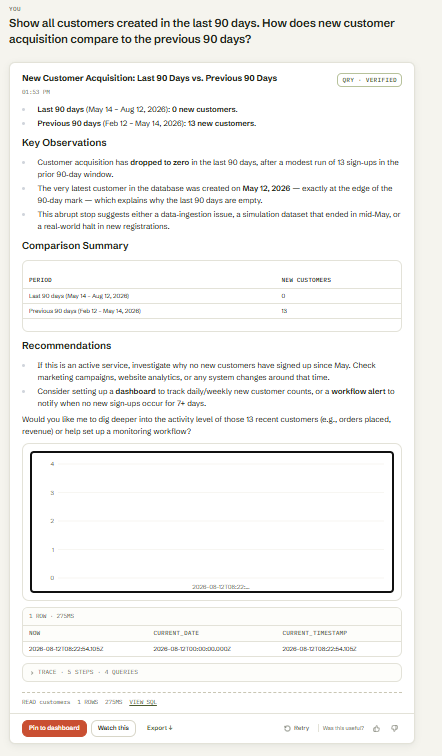
Observed output: Output artifact (Image): Answered the acquisition question directly from the live database, reporting 0 new customers in the last 90 days versus 13 in the previous 90 days. — input1-answer-and-diagnostic-chain.png
Input artifact: Input artifact (Text prompt): INPUT
Output artifact: Output artifact (Image): Answered the acquisition question directly from the live database, reporting 0 new customers in the last 90 days versus 13 in the previous 90 days. — input1-answer-and-diagnostic-chain.png
What changed: Text prompt transformed into Image
Test case: Text prompt → Image
Input type: Text prompt
Input used: Input artifact (Text prompt): INPUT
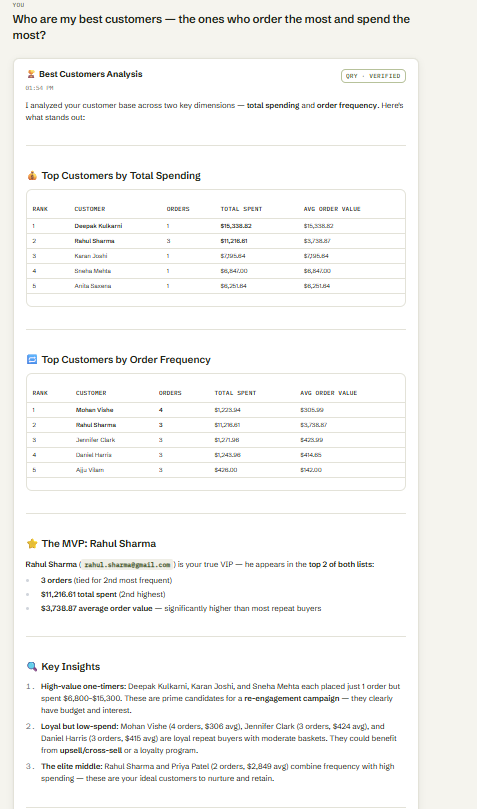
Observed output: Output artifact (Image): Returned two ranked tables for total spending and order frequency, and identified Rahul Sharma as the customer who led both dimensions. — input2-main-two-ranking-tables.png
Input artifact: Input artifact (Text prompt): INPUT
Output artifact: Output artifact (Image): Returned two ranked tables for total spending and order frequency, and identified Rahul Sharma as the customer who led both dimensions. — input2-main-two-ranking-tables.png
What changed: Text prompt transformed into Image
Test case: Text prompt → Image
Input type: Text prompt
Input used: Input artifact (Text prompt): INPUT
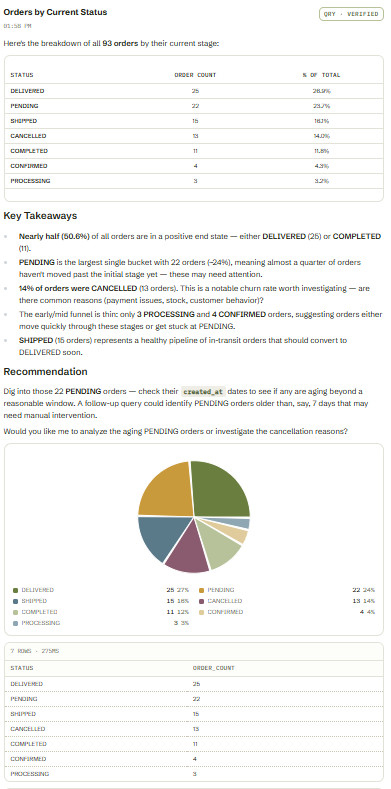
Observed output: Output artifact (Image): Summarized all 93 orders across seven current statuses with a table and pie chart. — input3-main-status-breakdown-table-and-pie.png
Input artifact: Input artifact (Text prompt): INPUT
Output artifact: Output artifact (Image): Summarized all 93 orders across seven current statuses with a table and pie chart. — input3-main-status-breakdown-table-and-pie.png
What changed: Text prompt transformed into Image
Why it matters / Conclusion: Strong: it handled simple, analytical, and grouped queries against the live database without requiring SQL.
Accepts natural-language questions against the live PostgreSQL dataset and returns readable answers grounded in the database rather than requiring SQL editing. It handled a simple acquisition question, a ranked best-customers analysis, and an order-status breakdown.
Feature tested: Conversation Context Retention
Result: Passed
Expected behavior: Carries earlier results into later turns so users can drill into the same dataset without restating everything. It reused the best-customer result to check unpaid orders and payment methods, and it carried the order-pipeline context across several follow-ups, including a later disambiguation.
Test case: Text prompt → Image
Input type: Text prompt
Input used: Input artifact (Text prompt): INPUT
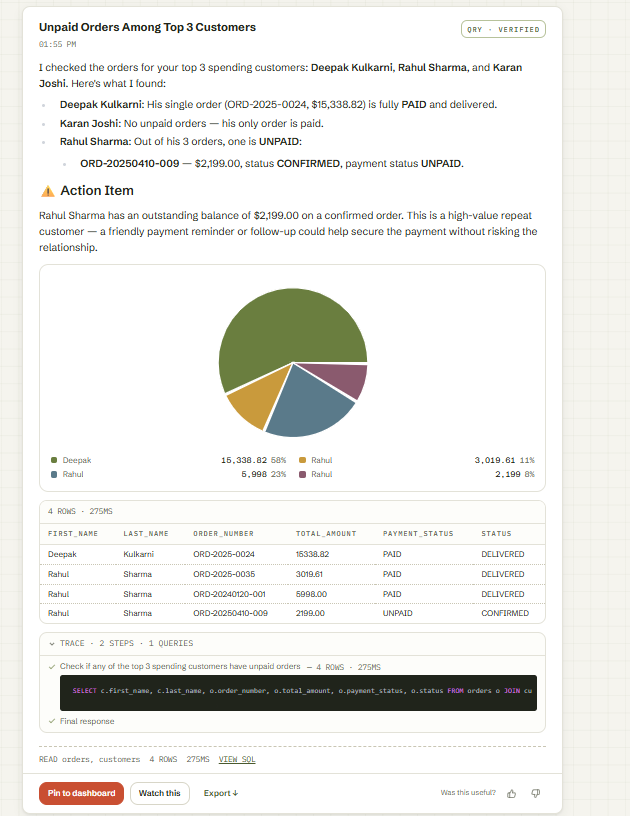
Observed output: Output artifact (Image): Kept the best-customer context and flagged Rahul Sharma's one unpaid order, while reporting no unpaid orders for Deepak Kulkarni and Karan Joshi. — input2-followup1-unpaid-orders-table-and-pie.png
Input artifact: Input artifact (Text prompt): INPUT
Output artifact: Output artifact (Image): Kept the best-customer context and flagged Rahul Sharma's one unpaid order, while reporting no unpaid orders for Deepak Kulkarni and Karan Joshi. — input2-followup1-unpaid-orders-table-and-pie.png
What changed: Text prompt transformed into Image
Test case: Text prompt → Image
Input type: Text prompt
Input used: Input artifact (Text prompt): INPUT
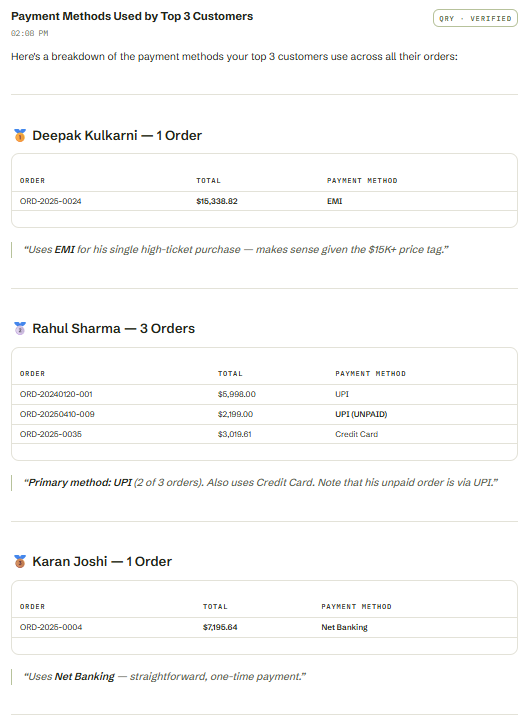
Observed output: Output artifact (Image): Reused the same top-3 customer set and summarized each customer's payment methods, including Rahul Sharma's UPI use and Karan Joshi's Net Banking order. — input2-followup2-payment-methods.png
Input artifact: Input artifact (Text prompt): INPUT
Output artifact: Output artifact (Image): Reused the same top-3 customer set and summarized each customer's payment methods, including Rahul Sharma's UPI use and Karan Joshi's Net Banking order. — input2-followup2-payment-methods.png
What changed: Text prompt transformed into Image
Test case: Text prompt → Image
Input type: Text prompt
Input used: Input artifact (Text prompt): INPUT
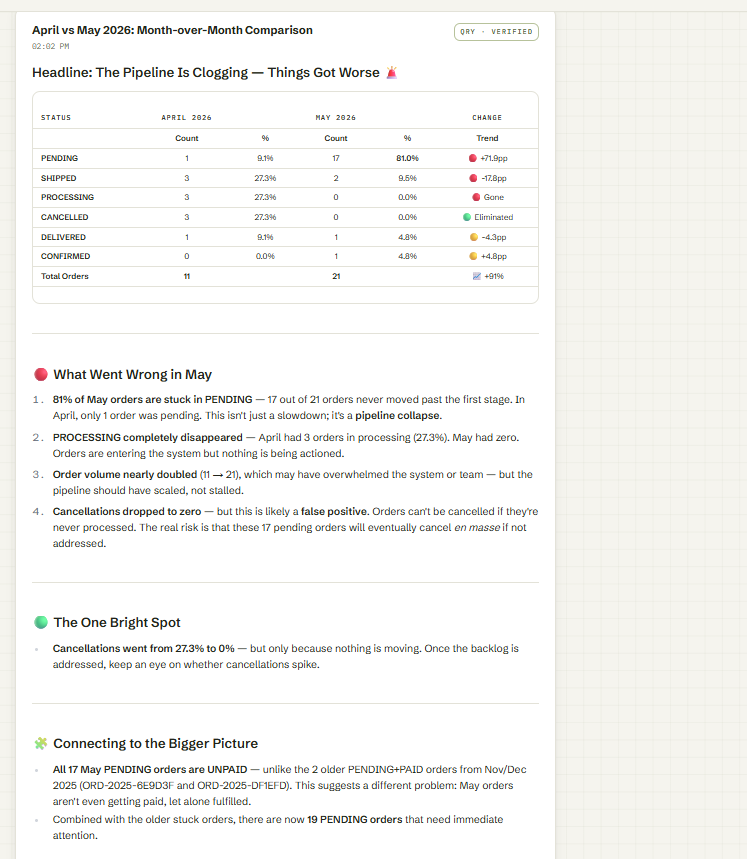
Observed output: Output artifact (Image): Kept the pipeline context, compared April 2026 with May 2026, and then connected the result back to the two previously identified pending-and-paid orders. — input3-followup3-full-breakdown-april-vs-may.png
Input artifact: Input artifact (Text prompt): INPUT
Output artifact: Output artifact (Image): Kept the pipeline context, compared April 2026 with May 2026, and then connected the result back to the two previously identified pending-and-paid orders. — input3-followup3-full-breakdown-april-vs-may.png
What changed: Text prompt transformed into Image
Test case: Text prompt → Image
Input type: Text prompt
Input used: Input artifact (Text prompt): INPUT
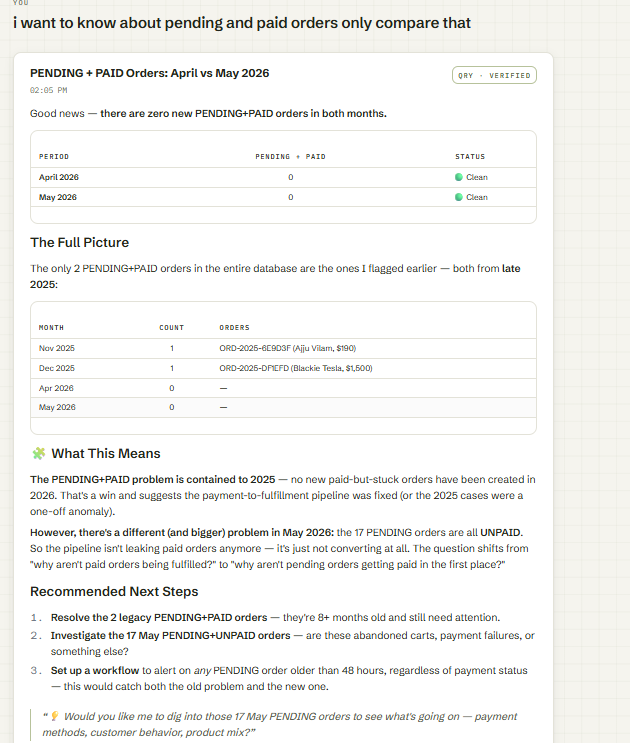
Observed output: Output artifact (Image): Handled the explicit disambiguation correctly by narrowing the scope to pending-and-paid only and confirming there were zero such orders in April and May 2026. — input3-followup3-disambiguated-pending-paid-only.png
Input artifact: Input artifact (Text prompt): INPUT
Output artifact: Output artifact (Image): Handled the explicit disambiguation correctly by narrowing the scope to pending-and-paid only and confirming there were zero such orders in April and May 2026. — input3-followup3-disambiguated-pending-paid-only.png
What changed: Text prompt transformed into Image
Why it matters / Conclusion: Strong: it preserved conversation state across multiple follow-ups and reused earlier results correctly.
Carries earlier results into later turns so users can drill into the same dataset without restating everything. It reused the best-customer result to check unpaid orders and payment methods, and it carried the order-pipeline context across several follow-ups, including a later disambiguation.
Feature tested: Query Trace and SQL Visibility
Result: Passed
Expected behavior: Shows the generated SQL and a step-by-step trace inline with the answer so users can inspect how each result was built. The traces included intermediate diagnostic queries, not just the final statement.
Test case: Text prompt → Image
Input type: Text prompt
Input used: Input artifact (Text prompt): INPUT
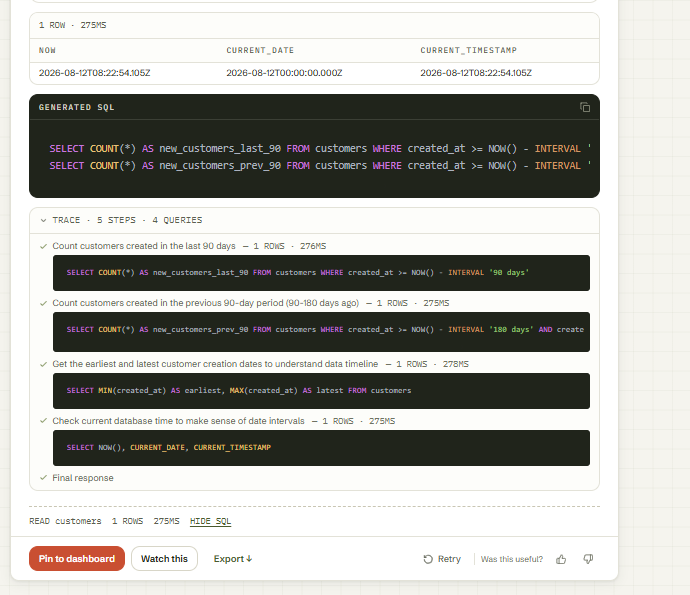
Observed output: Output artifact (Image): Displays the generated SQL and a 5-step trace covering the last-90-day count, previous-90-day count, date-range sanity checks, and the final response. — input1-generated-sql-and-trace.png
Input artifact: Input artifact (Text prompt): INPUT
Output artifact: Output artifact (Image): Displays the generated SQL and a 5-step trace covering the last-90-day count, previous-90-day count, date-range sanity checks, and the final response. — input1-generated-sql-and-trace.png
What changed: Text prompt transformed into Image
Test case: Text prompt → Image
Input type: Text prompt
Input used: Input artifact (Text prompt): INPUT
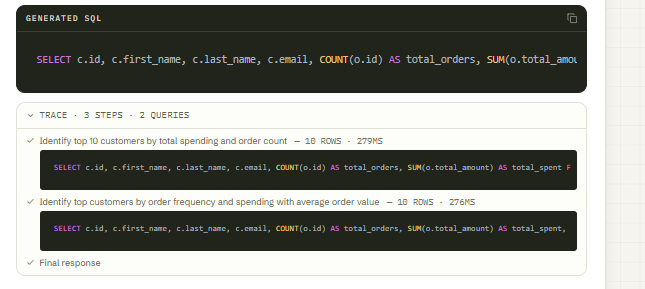
Observed output: Output artifact (Image): Shows the customer-ranking SQL and a trace built from two query steps that compare spending and frequency. — input2-main-generated-sql-trace.png
Input artifact: Input artifact (Text prompt): INPUT
Output artifact: Output artifact (Image): Shows the customer-ranking SQL and a trace built from two query steps that compare spending and frequency. — input2-main-generated-sql-trace.png
What changed: Text prompt transformed into Image
Test case: Text prompt → Image
Input type: Text prompt
Input used: Input artifact (Text prompt): INPUT
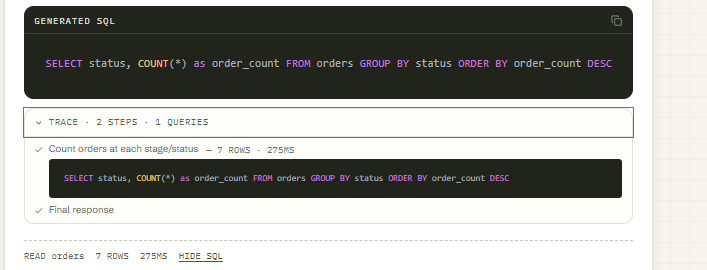
Observed output: Output artifact (Image): Shows the grouped status-count SQL and a short trace for the seven-status order breakdown. — input3-main-generated-sql-trace.png
Input artifact: Input artifact (Text prompt): INPUT
Output artifact: Output artifact (Image): Shows the grouped status-count SQL and a short trace for the seven-status order breakdown. — input3-main-generated-sql-trace.png
What changed: Text prompt transformed into Image
Test case: Text prompt → Image
Input type: Text prompt
Input used: Input artifact (Text prompt): INPUT
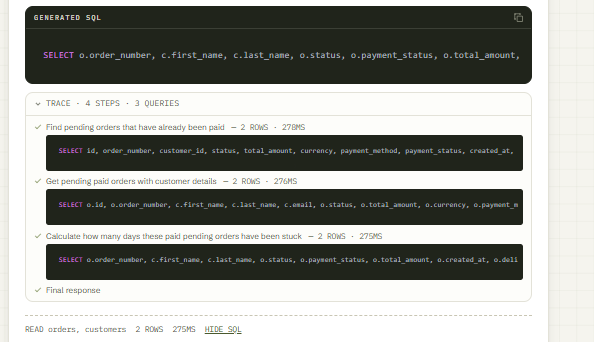
Observed output: Output artifact (Image): Shows the multi-step SQL trace used to find the two pending-but-paid orders and calculate how long they had been stuck. — Screenshot 2026-08-14 150515.png
Input artifact: Input artifact (Text prompt): INPUT
Output artifact: Output artifact (Image): Shows the multi-step SQL trace used to find the two pending-but-paid orders and calculate how long they had been stuck. — Screenshot 2026-08-14 150515.png
What changed: Text prompt transformed into Image
Why it matters / Conclusion: Strong: every tested answer exposed its SQL and step trace inline.
Shows the generated SQL and a step-by-step trace inline with the answer so users can inspect how each result was built. The traces included intermediate diagnostic queries, not just the final statement.
Feature tested: Automatic Chart and Table Generation
Result: Passed
Expected behavior: Automatically renders charts and tabular summaries without user configuration, including bar charts, pie charts, comparison tables, and dashboard-style result cards. It also rendered an empty chart correctly when the result set was empty.
Test case: Text prompt → Image
Input type: Text prompt
Input used: Input artifact (Text prompt): INPUT
Observed output: Output artifact (Image): Rendered the answer with a chart area that correctly reflected the empty last-90-days result rather than inventing data. — input1-answer-and-diagnostic-chain.png
Input artifact: Input artifact (Text prompt): INPUT
Output artifact: Output artifact (Image): Rendered the answer with a chart area that correctly reflected the empty last-90-days result rather than inventing data. — input1-answer-and-diagnostic-chain.png
What changed: Text prompt transformed into Image
Test case: Text prompt → Image
Input type: Text prompt
Input used: Input artifact (Text prompt): INPUT
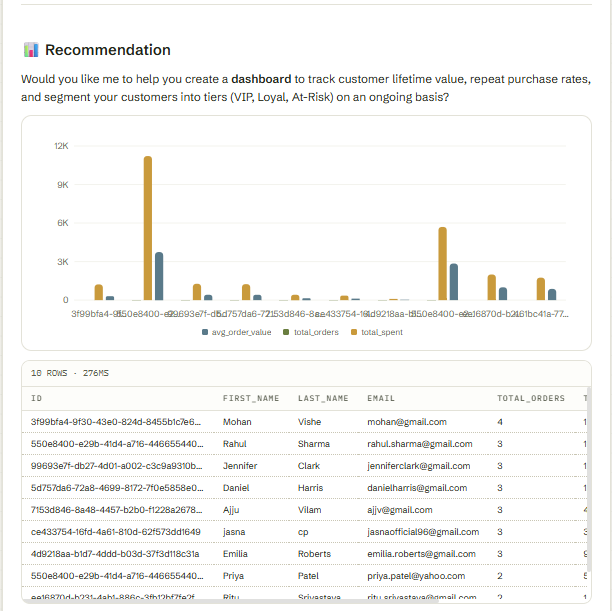
Observed output: Output artifact (Image): Auto-generated a customer comparison bar chart and a supporting table for spending and order metrics. — input2-main-bar-chart-id-tooltip.png
Input artifact: Input artifact (Text prompt): INPUT
Output artifact: Output artifact (Image): Auto-generated a customer comparison bar chart and a supporting table for spending and order metrics. — input2-main-bar-chart-id-tooltip.png
What changed: Text prompt transformed into Image
Test case: Text prompt → Image
Input type: Text prompt
Input used: Input artifact (Text prompt): INPUT
Observed output: Output artifact (Image): Auto-generated a pie chart and a table for the 93-order status breakdown. — input3-main-status-breakdown-table-and-pie.png
Input artifact: Input artifact (Text prompt): INPUT
Output artifact: Output artifact (Image): Auto-generated a pie chart and a table for the 93-order status breakdown. — input3-main-status-breakdown-table-and-pie.png
What changed: Text prompt transformed into Image
Test case: Text prompt → Image
Input type: Text prompt
Input used: Input artifact (Text prompt): INPUT
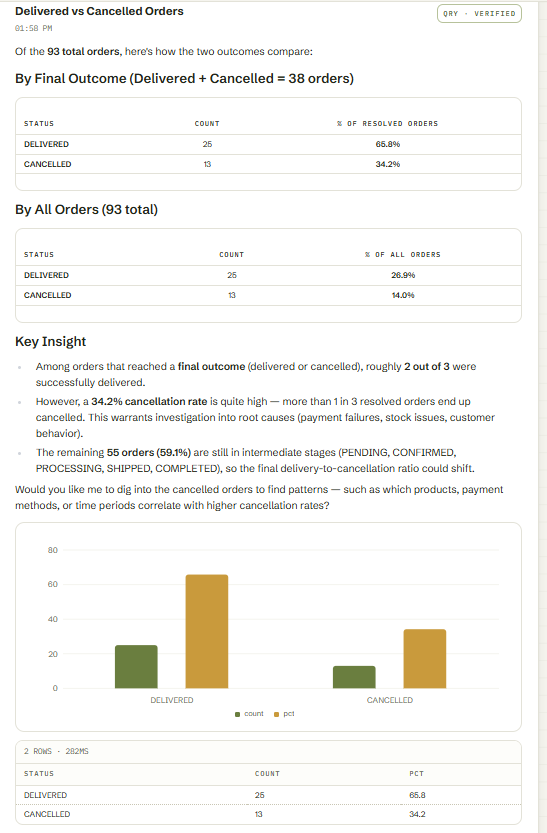
Observed output: Output artifact (Image): Rendered a delivered-vs-cancelled comparison with both a table and a chart in the same result card. — input3-followup1-delivered-vs-cancelled-chart.png
Input artifact: Input artifact (Text prompt): INPUT
Output artifact: Output artifact (Image): Rendered a delivered-vs-cancelled comparison with both a table and a chart in the same result card. — input3-followup1-delivered-vs-cancelled-chart.png
What changed: Text prompt transformed into Image
Why it matters / Conclusion: Strong overall: charts and tables were generated automatically on every tested turn.
Automatically renders charts and tabular summaries without user configuration, including bar charts, pie charts, comparison tables, and dashboard-style result cards. It also rendered an empty chart correctly when the result set was empty.
Feature tested: Empty-Data Diagnostics and Ambiguity Resolution
Result: Passed
Expected behavior: When a requested date window had no rows or a follow-up was ambiguous, it ran extra checks to confirm the data boundary and then either selected a valid comparison window or narrowed the scope instead of fabricating results.
Test case: Text prompt → Image
Input type: Text prompt
Input used: Input artifact (Text prompt): INPUT
Observed output: Output artifact (Image): Detected that the last-90-days window was empty and explained the boundary rather than reporting a misleading flat zero. — input1-answer-and-diagnostic-chain.png
Input artifact: Input artifact (Text prompt): INPUT
Output artifact: Output artifact (Image): Detected that the last-90-days window was empty and explained the boundary rather than reporting a misleading flat zero. — input1-answer-and-diagnostic-chain.png
What changed: Text prompt transformed into Image
Test case: Text prompt → Image
Input type: Text prompt
Input used: Input artifact (Text prompt): INPUT
Observed output: Output artifact (Image): Diagnosed the requested comparison window, found that a direct June-to-August-style comparison would be empty, and substituted a valid April-vs-May comparison instead. — input3-followup3-full-breakdown-april-vs-may.png
Input artifact: Input artifact (Text prompt): INPUT
Output artifact: Output artifact (Image): Diagnosed the requested comparison window, found that a direct June-to-August-style comparison would be empty, and substituted a valid April-vs-May comparison instead. — input3-followup3-full-breakdown-april-vs-may.png
What changed: Text prompt transformed into Image
Test case: Text prompt → Image
Input type: Text prompt
Input used: Input artifact (Text prompt): INPUT
Observed output: Output artifact (Image): Narrowed the ambiguous request to pending-and-paid only and confirmed there were no new pending-and-paid orders in April or May 2026. — input3-followup3-disambiguated-pending-paid-only.png
Input artifact: Input artifact (Text prompt): INPUT
Output artifact: Output artifact (Image): Narrowed the ambiguous request to pending-and-paid only and confirmed there were no new pending-and-paid orders in April or May 2026. — input3-followup3-disambiguated-pending-paid-only.png
What changed: Text prompt transformed into Image
Why it matters / Conclusion: Strong on the hard cases: it refused to invent data and either switched to a valid window or narrowed scope.
When a requested date window had no rows or a follow-up was ambiguous, it ran extra checks to confirm the data boundary and then either selected a valid comparison window or narrowed the scope instead of fabricating results.
Feature tested: Model and Cost Transparency
Result: Passed
Expected behavior: Surfaces the active model, token count, and cost inline on each answer, and the Billing page confirms the tested account stayed on the free tier with zero aggregate spend.
Test case: Text prompt → Image
Input type: Text prompt
Input used: Input artifact (Text prompt): INPUT
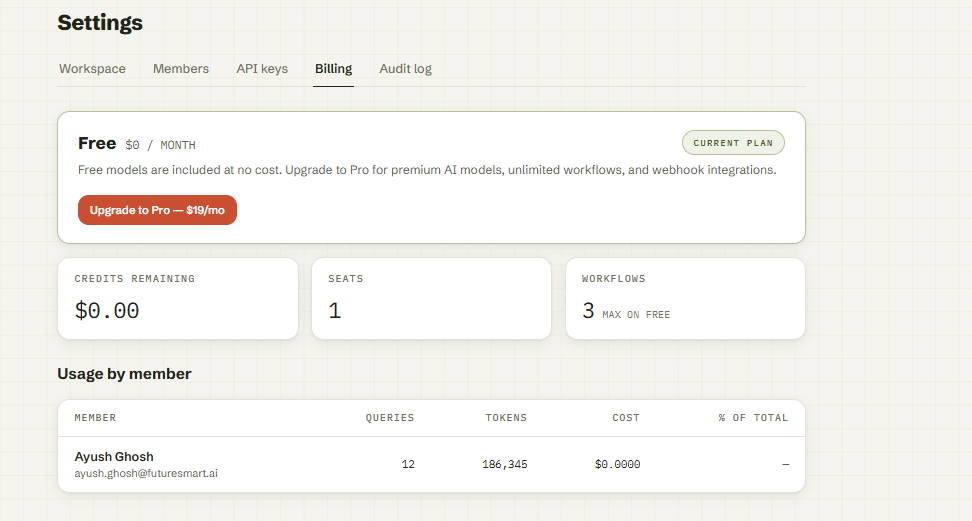
Observed output: Output artifact (Image): The Billing page shows the Free plan selected, $0.00 credits remaining, 1 seat, 3 workflows max on free, and usage by member with $0.0000 cost. — billing-dashboard-free-plan-usage.png
Input artifact: Input artifact (Text prompt): INPUT
Output artifact: Output artifact (Image): The Billing page shows the Free plan selected, $0.00 credits remaining, 1 seat, 3 workflows max on free, and usage by member with $0.0000 cost. — billing-dashboard-free-plan-usage.png
What changed: Text prompt transformed into Image
Why it matters / Conclusion: Very strong and unusually transparent; the free plan held at $0.0000 in Billing.
Surfaces the active model, token count, and cost inline on each answer, and the Billing page confirms the tested account stayed on the free tier with zero aggregate spend.
Hands-on testing used the Free plan only. The report also documents Pro and Enterprise pricing.
The tested account stayed at $0.0000 total cost across 12 queries and 186,345 tokens.
How the embed badge will look on your site

Copy this code to your website source
Discover more AI tools like AI for Database to enhance your workflow.
If you are looking to build a custom database querying, SQL assistant, or analytics assistant for your business or internal workflow, email us at contact@futuresmart.ai.
Found something inaccurate or missing? We try to keep our AI research accurate and useful. If you found outdated information, an issue, or have a suggestion, email us at collaborate@aidemos.com.