PDF Vector accepted both the 84-page hybrid earnings report and the scanned research PDF, so the ingestion path is working. The limitation is output quality: the hybrid report came back as markdown content inside JSON with a mostly flattened structure, and the scan test only proves a successful parsed preview rather than a clearly faithful markdown export. It looks useful as a raw document parser, but this research does not show a structure-preserving converter yet.
Walkthrough showing a search for PDF Vector, then a playground upload of Target-2015-Annual-Report.pdf and a successful parse of the document.
In-Depth Review
Our detailed analysis of PDF Vector — features, performance, and real-world testing.
AD
AI Demos Team
Expert Reviewer
Verified Review
Feature-by-Feature Breakdown
PDF Parsing
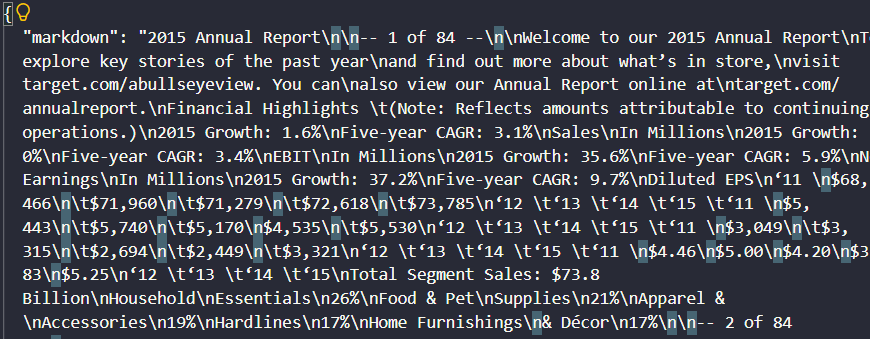
Accepted the file, but the output was flattened and JSON-wrapped rather than clean markdown.
▾
Test Summary
Feature tested: PDF Parsing
Result: Partial — Accepted the file, but the output was flattened and JSON-wrapped rather than clean markdown.
Feature tested: PDF Parsing
Result: Partial
Verdict: Accepted the file, but the output was flattened and JSON-wrapped rather than clean markdown.
Expected behavior: PDF Vector can ingest and extract content from PDF documents, including a complex 84-page hybrid earnings report and a scanned research PDF. The evidence shows it accepts both file types and returns parsed content, though the output quality and structure vary.
Observed output: Output artifact (Text/code file): The screen recording shows the upload completing successfully, with the run finishing in 20.6 seconds for a 12-page document and the parsed preview appearing in the results pane. — md_extracted_from_json.md
Output artifact: Output artifact (Text/code file): The screen recording shows the upload completing successfully, with the run finishing in 20.6 seconds for a 12-page document and the parsed preview appearing in the results pane. — md_extracted_from_json.md
What changed: PDF document transformed into Text/code file
Why it matters / Conclusion: Good enough to ingest a complex PDF, but not yet good enough to trust as clean markdown without extra processing.
PDF Vector can ingest and extract content from PDF documents, including a complex 84-page hybrid earnings report and a scanned research PDF. The evidence shows it accepts both file types and returns parsed content, though the output quality and structure vary.
file
Target-2015-Annual-Report.pdf
↓→
image/png
The response screenshot shows the Target 2015 annual report title, financial highlights, diluted EPS figures, total segment sales, and category percentages embedded in escaped JSON-like markdown, which confirms the flattened output.
application/pdf
Scanned Research PDF.pdf
↓→
text/markdown
md_extracted_from_json.md
Loading file...
The screen recording shows the upload completing successfully, with the run finishing in 20.6 seconds for a 12-page document and the parsed preview appearing in the results pane.
Bottom Line
Good enough to ingest a complex PDF, but not yet good enough to trust as clean markdown without extra processing.
✓ Use This If
●You need an API that can ingest a mixed digital/scanned PDF without failing on upload.
●You can post-process flattened text if the parser returns markdown inside JSON.
●You want a tool that at least completes on scanned PDFs and returns parsed text.
✕ Skip This If
●You need clean, directly usable markdown with preserved section and table structure out of the box.
●You need a standalone markdown export rather than text embedded in JSON.
●You need proof of high-fidelity OCR quality from the scan test alone.
Featured in Rankings
Independent rankings where PDF Vector was tested and rated.
Yes. The 84-page hybrid earnings report uploaded successfully and was parsed, but the returned content was mostly flattened text embedded in JSON rather than clean markdown.
Yes. The scanned research PDF completed successfully, and the results pane showed a parsed document preview after the run.
Not in the hybrid-report test. The report says the markdown content was embedded in a JSON payload, and no standalone markdown export was provided there.
Both files were parsed successfully, but the hybrid report exposed the bigger limitation: its output was flattened and JSON-wrapped. The scan test proved ingestion and OCR-backed parsing, but the report does not show that its markdown structure was clean.
Banner Preview
How the embed badge will look on your site
Embed HTML
Copy this code to your website source
<a target="_blank" href="https://aidemos.com/tools/pdf-vector?utm_source=pdf-vector_embed" style="width: 250px; height: 80px; border-radius:4px;" width="250" height="80">
<img src="https://aidemos-website-images.s3.amazonaws.com/featured.png" alt="PDF Vector | Featured on AI Demos" style="width: 250px; height: 80px; border-radius:4px;" width="250" height="80">
</a>
Quick Integration Guide
1Copy the HTML code block above.
2Paste it into your site's HTML or CMS editor.
3Banner appears instantly on your page.
4Links back to your tool profile here.
Similar Tools
Similar Tools
Discover more AI tools like PDF Vector to enhance your workflow.
⚡ Built by FutureSmart AI — the team behind AI Demos
Need a custom AI solution for this use case?
If you are looking to build a custom PDF parsing, document extraction, or markdown cleanup workflow for your business or internal workflow, email us at contact@futuresmart.ai.
Found something inaccurate or missing? We try to keep our AI research accurate and useful. If you found outdated information, an issue, or have a suggestion, email us at collaborate@aidemos.com.