Extend AI did a good job turning the tested bank statement and invoice PDFs into reviewable structured JSON, including nested objects, row arrays, totals, and confidence metadata. The practical caveats are clear: some top-level sections were reordered, bank-row `transaction_id` values stayed null, the bank summary reported 49 transactions instead of the reviewer’s expected 40, and the invoice `payment_terms` field leaked label text (`Payment Terms 30 Days`).
General walkthrough of the extraction flow and output review.
In-Depth Review
Our detailed analysis of Extend AI — features, performance, and real-world testing.
AD
AI Demos Team
Expert Reviewer
Verified Review
Feature-by-Feature Breakdown
Schema-Filled Document Extraction
▾
Test Summary
Feature tested: Schema-Filled Document Extraction
Result: Partial
Feature tested: Schema-Filled Document Extraction
Result: Partial
Expected behavior: Populates nested document objects from user-defined JSON schemas applied to finance PDFs. In the bank statement and invoice runs, it reconstructed statement metadata, account and branch data, rewards, balances, invoice metadata, advertiser and station fields, and line-item structures.
Test case: PDF document → Image
Input type: PDF document
Input used: Input artifact (PDF document): Bank statement PDF — Bank Statement PDF.pdf
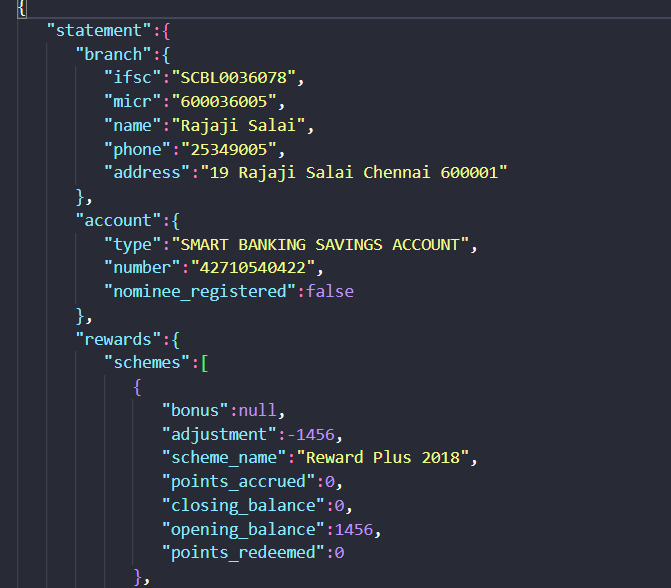
Observed output: Output artifact (Image): The bank-statement output reconstructed branch, account, and rewards sections in JSON. — extend-ai-bank-statement-extracted-details.png
Input artifact: Input artifact (PDF document): Bank statement PDF — Bank Statement PDF.pdf
Output artifact: Output artifact (Image): The bank-statement output reconstructed branch, account, and rewards sections in JSON. — extend-ai-bank-statement-extracted-details.png
What changed: PDF document transformed into Image
Test case: PDF document → Image
Input type: PDF document
Input used: Input artifact (PDF document): Bank statement PDF — Bank Statement PDF.pdf
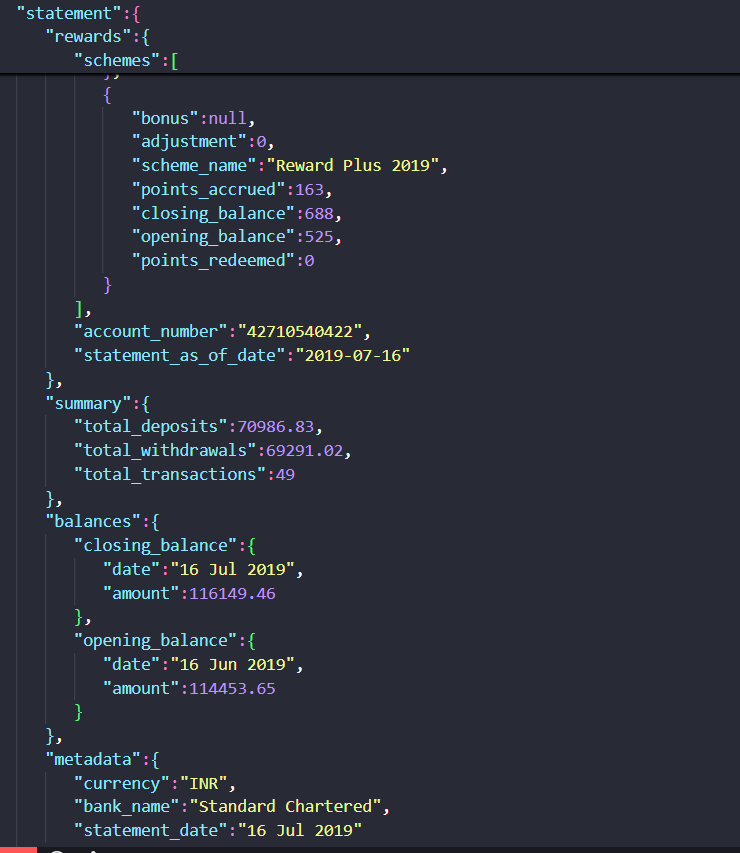
Observed output: Output artifact (Image): The bank-statement output also reconstructed document-level summary, balances, and metadata fields. — extend-ai-document-level-bank-statement.png
Input artifact: Input artifact (PDF document): Bank statement PDF — Bank Statement PDF.pdf
Output artifact: Output artifact (Image): The bank-statement output also reconstructed document-level summary, balances, and metadata fields. — extend-ai-document-level-bank-statement.png
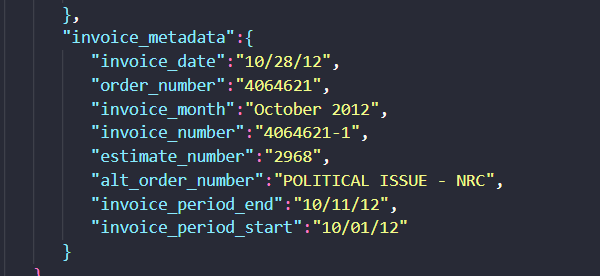
Observed output: Output artifact (Image): The invoice output populated invoice_metadata with dates and order identifiers. — extend-invoice-metadata.png
Output artifact: Output artifact (Image): The invoice output populated invoice_metadata with dates and order identifiers. — extend-invoice-metadata.png
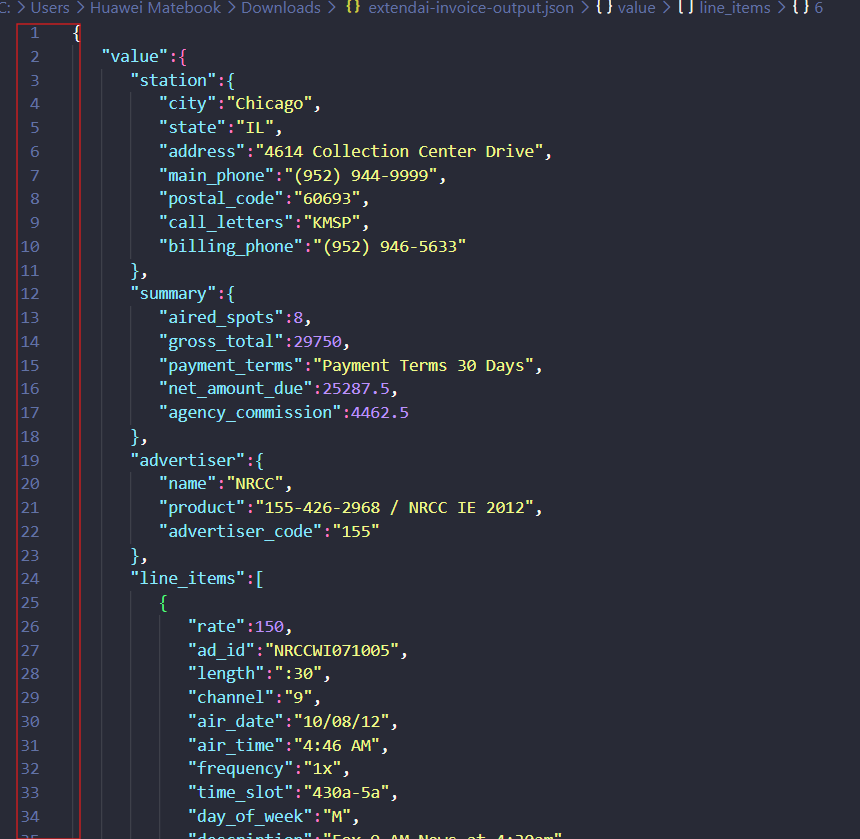
Observed output: Output artifact (Image): The invoice output reconstructed station, summary, advertiser, and the start of the line_items array under the requested schema. — extend-ai-schema-order-invoice.png
Output artifact: Output artifact (Image): The invoice output reconstructed station, summary, advertiser, and the start of the line_items array under the requested schema. — extend-ai-schema-order-invoice.png
What changed: PDF document transformed into Image
Why it matters / Conclusion: Very strong at filling nested document schemas, but the extracted output did not always preserve the input schema order exactly.
Populates nested document objects from user-defined JSON schemas applied to finance PDFs. In the bank statement and invoice runs, it reconstructed statement metadata, account and branch data, rewards, balances, invoice metadata, advertiser and station fields, and line-item structures.
file
Bank Statement PDF.pdf
↓→
image
The bank-statement output reconstructed branch, account, and rewards sections in JSON.
file
Bank Statement PDF.pdf
↓→
image
The bank-statement output also reconstructed document-level summary, balances, and metadata fields.
file
Invoice PDF.pdf
↓→
image
The invoice output populated invoice_metadata with dates and order identifiers.
file
Invoice PDF.pdf
↓→
image
The invoice output reconstructed station, summary, advertiser, and the start of the line_items array under the requested schema.
Bottom Line
Very strong at filling nested document schemas, but the extracted output did not always preserve the input schema order exactly.
From our researchExtract and query structured data from documents using natural language
Table Extraction
▾
Test Summary
Feature tested: Table Extraction
Result: Partial
Feature tested: Table Extraction
Result: Partial
Expected behavior: Extracts repeating table records as discrete rows from PDFs, including financial and research tables. It kept bank-statement transactions separate, returned invoice line items with line numbers, airtimes, rates, and flight-period data, and was also tested on harder tables with grouped headers, multirow structure, and vertical annotations.
Test case: PDF document → Image
Input type: PDF document
Input used: Input artifact (PDF document): Bank statement PDF — Bank Statement PDF.pdf
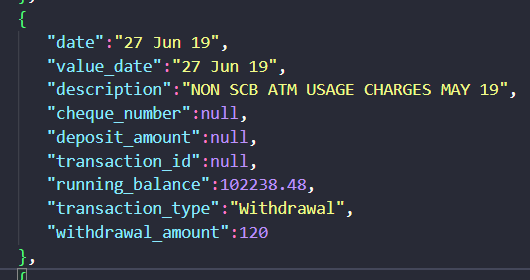
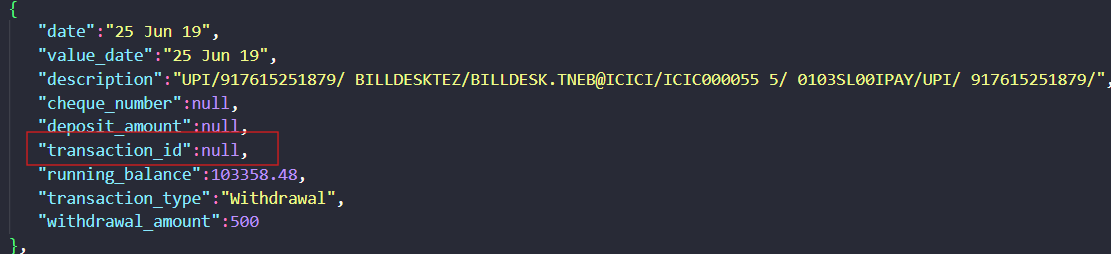
Observed output: Output artifact (Image): A single bank transaction was extracted as a discrete row with date, description, running balance, transaction_type, and amount fields. — extend-ai-extracted-transaction-item.png
Input artifact: Input artifact (PDF document): Bank statement PDF — Bank Statement PDF.pdf
Output artifact: Output artifact (Image): A single bank transaction was extracted as a discrete row with date, description, running balance, transaction_type, and amount fields. — extend-ai-extracted-transaction-item.png
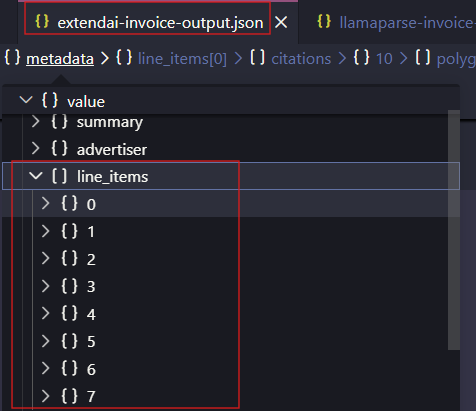
Observed output: Output artifact (Image): The invoice output exposed a line_items array expanded with items 0 through 7, confirming eight discrete line items. — extendai-extracted-invoice-line-items.png
Output artifact: Output artifact (Image): The invoice output exposed a line_items array expanded with items 0 through 7, confirming eight discrete line items. — extendai-extracted-invoice-line-items.png
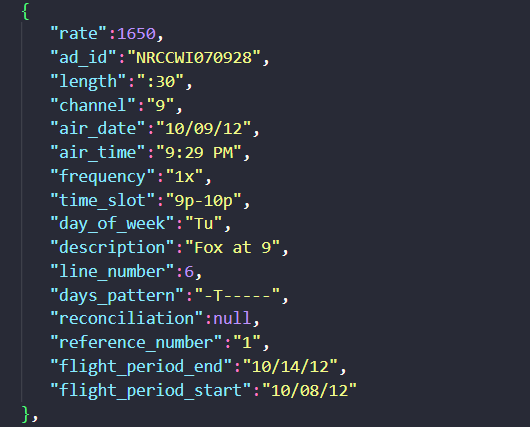
Output artifact: Output artifact (Image): Line item 6 preserved rate, ad_id, air_time, time_slot, day_of_week, and flight-period fields. — extend-ai-invoice-line-item-6.png
What changed: PDF document transformed into Image
Test case: Image → Image
Input type: Image
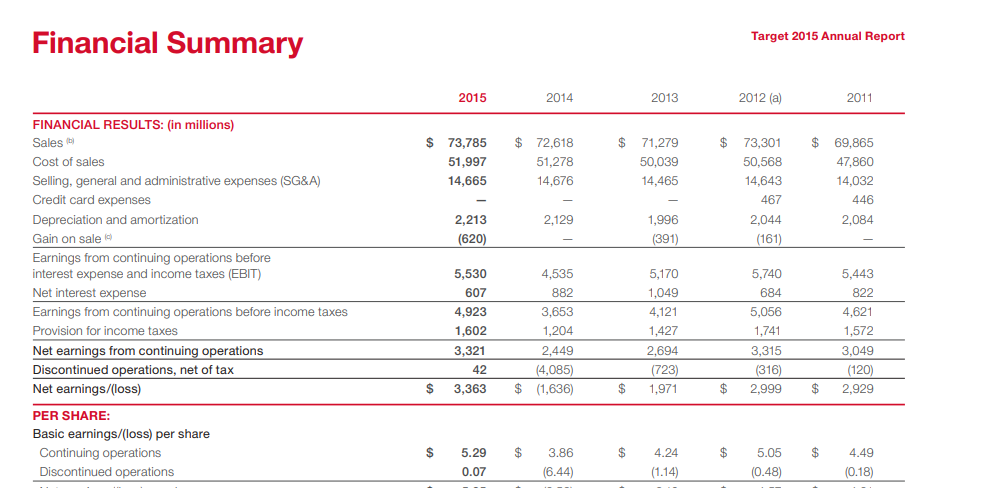
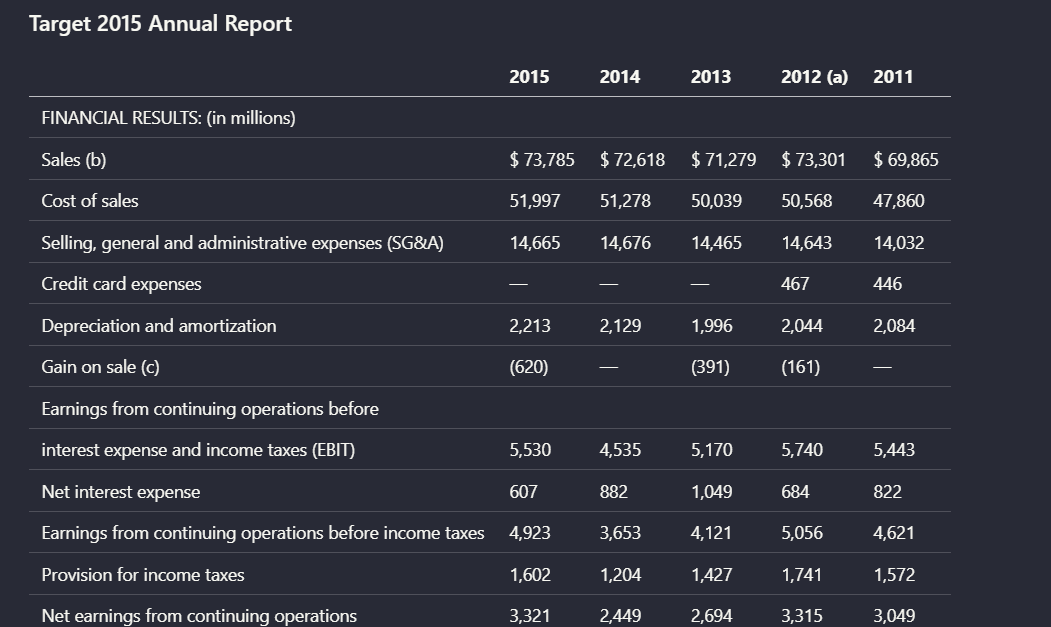
Input used: Input artifact (Image): Target 2015 Annual Report financial summary table with year columns from 2015 to 2011. — landing-ai-target-annual-report-financial-summary-table-2.png
Observed output: Output artifact (Image): For the Target financial summary, Extend AI preserved the year columns, row labels, and most numeric values in a clean tabular layout. This is a strong example — extend-ai-target-annual-report-parsed-financial-table.png
Input artifact: Input artifact (Image): Target 2015 Annual Report financial summary table with year columns from 2015 to 2011. — landing-ai-target-annual-report-financial-summary-table-2.png
Output artifact: Output artifact (Image): For the Target financial summary, Extend AI preserved the year columns, row labels, and most numeric values in a clean tabular layout. This is a strong example — extend-ai-target-annual-report-parsed-financial-table.png
What changed: Image transformed into Image
Test case: Image → Image
Input type: Image
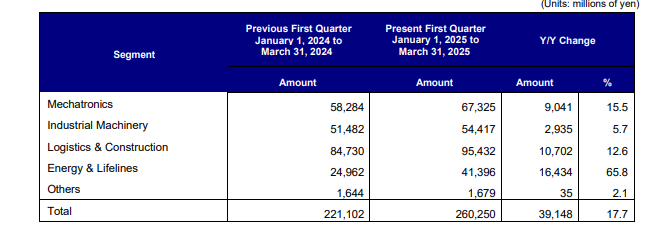
Input used: Input artifact (Image): Orders Received table with grouped time-period headers and year-over-year change columns. — landing-ai-segment-results-table-2025-first-quarter.png
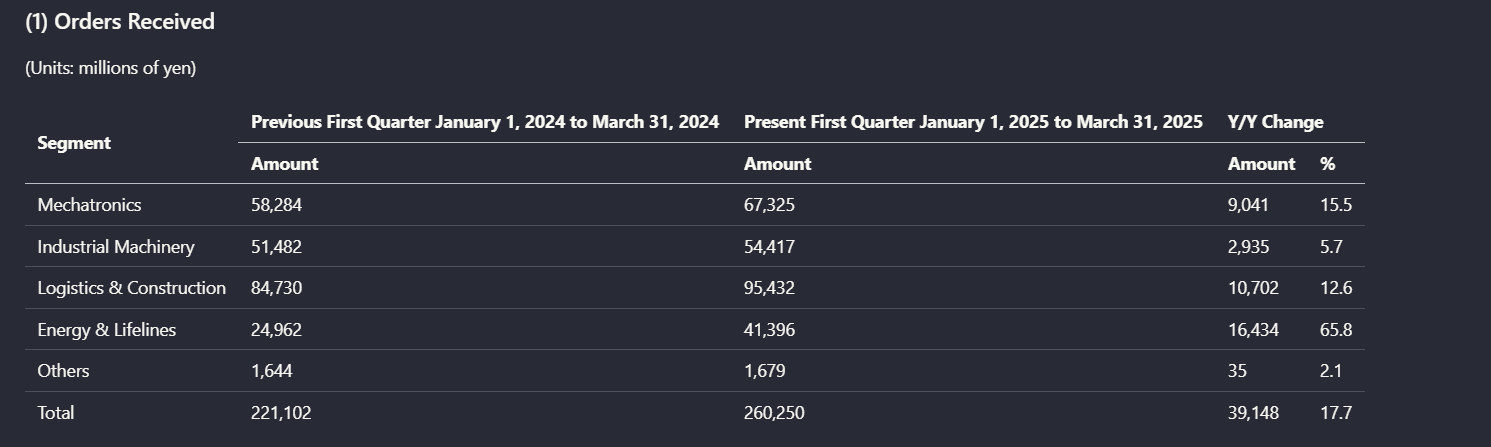
Observed output: Output artifact (Image): In the 'Orders Received' table, Extend AI retained the segment rows, the previous-versus-present quarter grouping, and the Y/Y change columns. The parsed result — extend-ai-parsed-orders-received-table.png
Input artifact: Input artifact (Image): Orders Received table with grouped time-period headers and year-over-year change columns. — landing-ai-segment-results-table-2025-first-quarter.png
Output artifact: Output artifact (Image): In the 'Orders Received' table, Extend AI retained the segment rows, the previous-versus-present quarter grouping, and the Y/Y change columns. The parsed result — extend-ai-parsed-orders-received-table.png
What changed: Image transformed into Image
Test case: Image → Image
Input type: Image
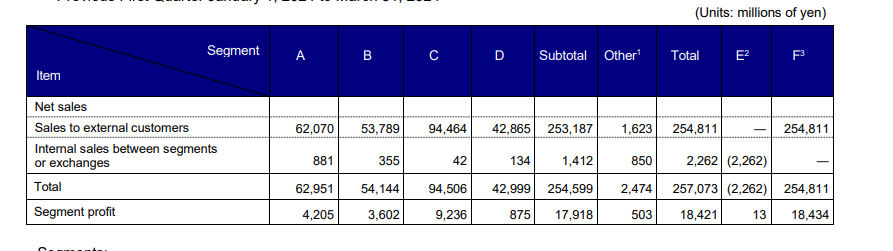
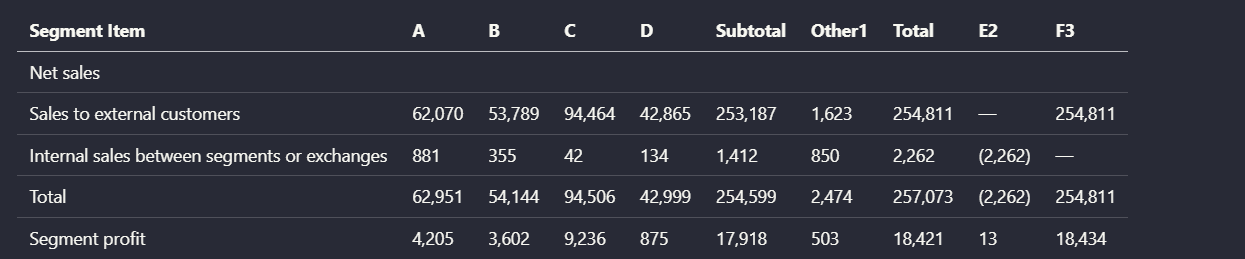
Input used: Input artifact (Image): Segment results table with compound header cells across A, B, C, D, Subtotal, Other1, Total, E2, and F3. — extend-ai-financial-segment-reporting-table.png
Observed output: Output artifact (Image): This harder segment table stayed broadly tabular, but Extend AI did not cleanly split compound header roles. The output preserved the numbers and row labels, ye — extend-ai-parsed-segment-reporting-table.png
Input artifact: Input artifact (Image): Segment results table with compound header cells across A, B, C, D, Subtotal, Other1, Total, E2, and F3. — extend-ai-financial-segment-reporting-table.png
Output artifact: Output artifact (Image): This harder segment table stayed broadly tabular, but Extend AI did not cleanly split compound header roles. The output preserved the numbers and row labels, ye — extend-ai-parsed-segment-reporting-table.png
What changed: Image transformed into Image
Test case: Image → Image
Input type: Image
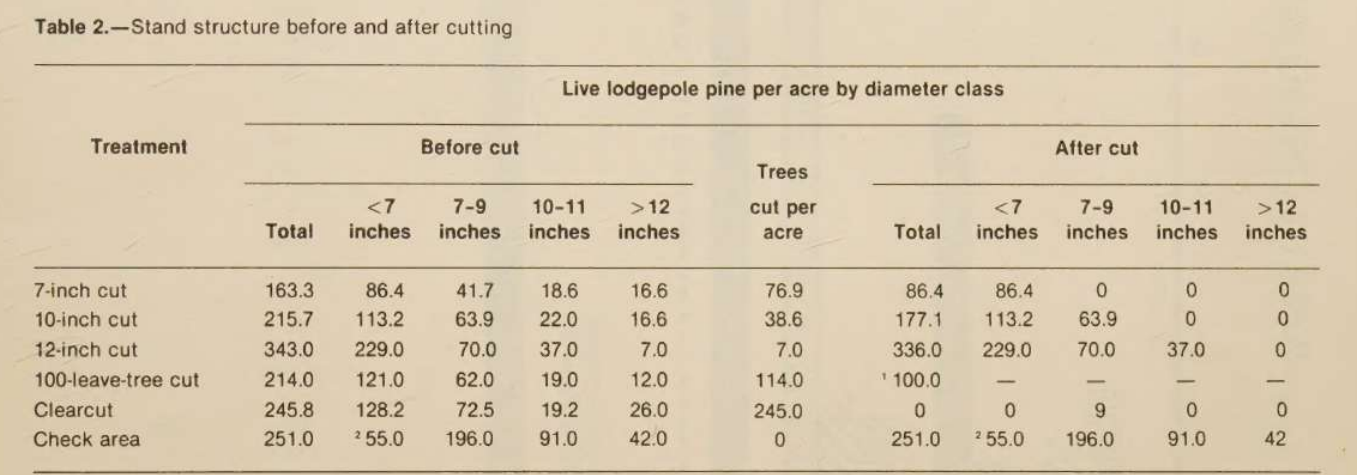
Input used: Input artifact (Image): Scanned 'Stand structure before and after cutting' table with before-cut and after-cut column groups. — extend-ai-scanned-stand-structure-table.png
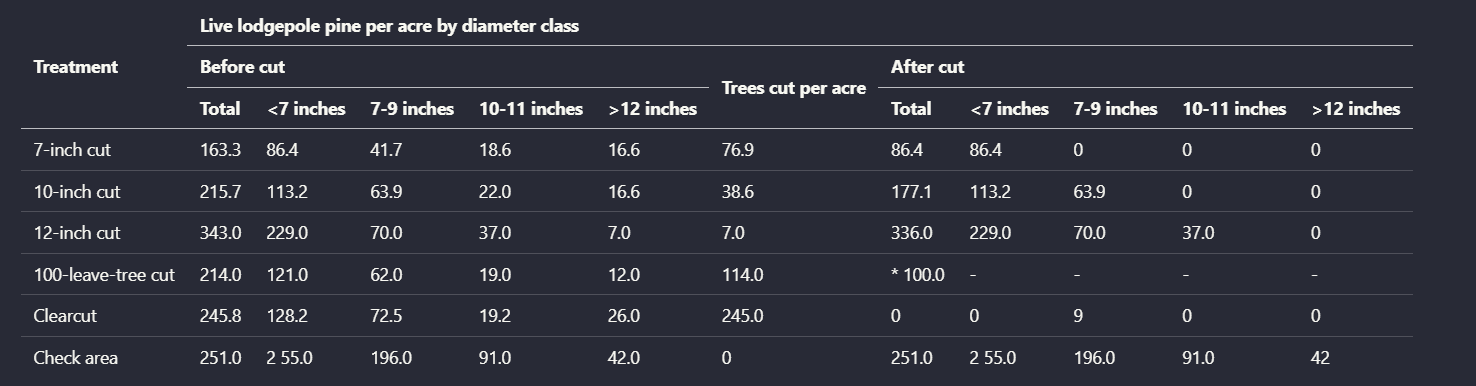
Observed output: Output artifact (Image): On the scanned stand-structure table, Extend AI preserved treatment rows, diameter-class columns, and before/after groupings well enough for the table to remain — extend-ai-parsed-stand-structure-table.png
Input artifact: Input artifact (Image): Scanned 'Stand structure before and after cutting' table with before-cut and after-cut column groups. — extend-ai-scanned-stand-structure-table.png
Output artifact: Output artifact (Image): On the scanned stand-structure table, Extend AI preserved treatment rows, diameter-class columns, and before/after groupings well enough for the table to remain — extend-ai-parsed-stand-structure-table.png
What changed: Image transformed into Image
Test case: Image → Image
Input type: Image
Input used: Input artifact (Image): Scanned table with multirow year groupings and treatment rows for tree mortality. — extend-ai-scanned-table-tree-mortality-multirow.png
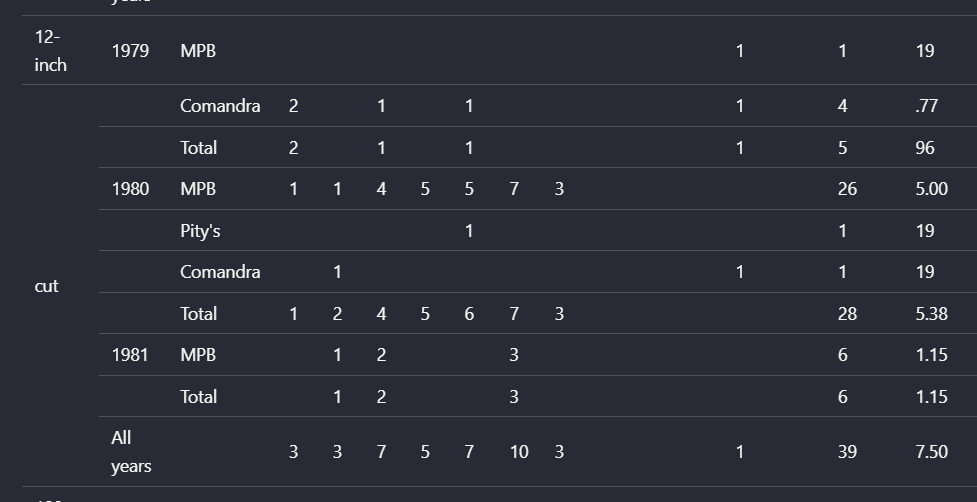
Observed output: Output artifact (Image): For the multirow scanned mortality table, header-level relationships were not fully preserved. The output split or displaced structural cues such as the '12-inc — extend-ai-parsed-tree-mortality-multirow-table.png
Input artifact: Input artifact (Image): Scanned table with multirow year groupings and treatment rows for tree mortality. — extend-ai-scanned-table-tree-mortality-multirow.png
Output artifact: Output artifact (Image): For the multirow scanned mortality table, header-level relationships were not fully preserved. The output split or displaced structural cues such as the '12-inc — extend-ai-parsed-tree-mortality-multirow-table.png
What changed: Image transformed into Image
Test case: Image → Image
Input type: Image
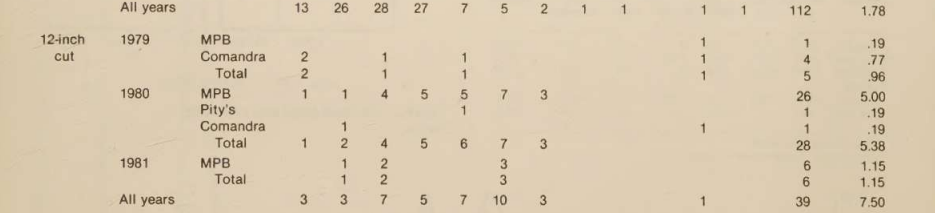
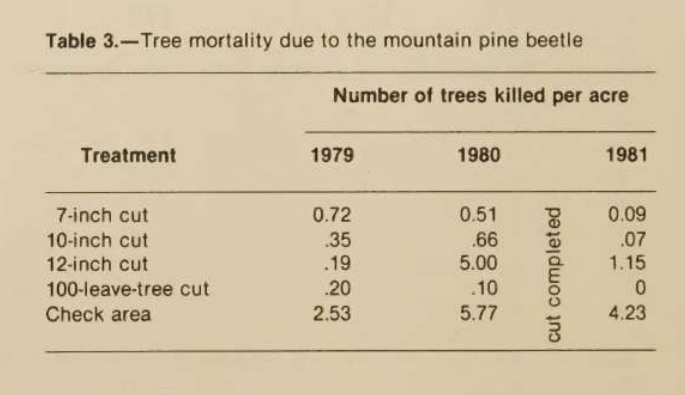
Input used: Input artifact (Image): Scanned table with yearly columns and a vertically printed 'cut completed' note between the 1980 and 1981 columns. — extend-ai-scanned-table-mountain-pine-beetle-mortality.png
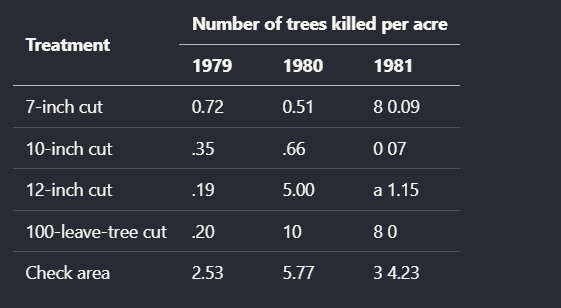
Observed output: Output artifact (Image): Extend AI rebuilt the main rows and year columns of this scanned table, but it failed on the vertical 'cut completed' annotation placed between columns. That no — extend-ai-parsed-table-text-between-columns.png
Input artifact: Input artifact (Image): Scanned table with yearly columns and a vertically printed 'cut completed' note between the 1980 and 1981 columns. — extend-ai-scanned-table-mountain-pine-beetle-mortality.png
Output artifact: Output artifact (Image): Extend AI rebuilt the main rows and year columns of this scanned table, but it failed on the vertical 'cut completed' annotation placed between columns. That no — extend-ai-parsed-table-text-between-columns.png
What changed: Image transformed into Image
Why it matters / Conclusion: It keeps rows separate well, but the bank rows still missed `transaction_id` values, so identifiers may need downstream reconciliation.
Extracts repeating table records as discrete rows from PDFs, including financial and research tables. It kept bank-statement transactions separate, returned invoice line items with line numbers, airtimes, rates, and flight-period data, and was also tested on harder tables with grouped headers, multirow structure, and vertical annotations.
file
Bank Statement PDF.pdf
↓→
image
A single bank transaction was extracted as a discrete row with date, description, running balance, transaction_type, and amount fields.
file
Invoice PDF.pdf
↓→
image
The invoice output exposed a line_items array expanded with items 0 through 7, confirming eight discrete line items.
file
Invoice PDF.pdf
↓→
image
Line item 6 preserved rate, ad_id, air_time, time_slot, day_of_week, and flight-period fields.
image
Target 2015 Annual Report financial summary table with year columns from 2015 to 2011.
↓→
image
For the Target financial summary, Extend AI preserved the year columns, row labels, and most numeric values in a clean tabular layout. This is a strong example of the tool keeping a conventional financial table readable in markdown-oriented output.
image
Orders Received table with grouped time-period headers and year-over-year change columns.
↓→
image
In the 'Orders Received' table, Extend AI retained the segment rows, the previous-versus-present quarter grouping, and the Y/Y change columns. The parsed result kept the relationship between major column groups and their values understandable.
image
Segment results table with compound header cells across A, B, C, D, Subtotal, Other1, Total, E2, and F3.
↓→
image
This harder segment table stayed broadly tabular, but Extend AI did not cleanly split compound header roles. The output preserved the numbers and row labels, yet the semantic meaning of some grouped headers was reduced because the header layers were flattened together.
image
Scanned 'Stand structure before and after cutting' table with before-cut and after-cut column groups.
↓→
image
On the scanned stand-structure table, Extend AI preserved treatment rows, diameter-class columns, and before/after groupings well enough for the table to remain interpretable. This shows the parser could recover a substantial amount of table structure from a scanned source, not just a digital one.
image
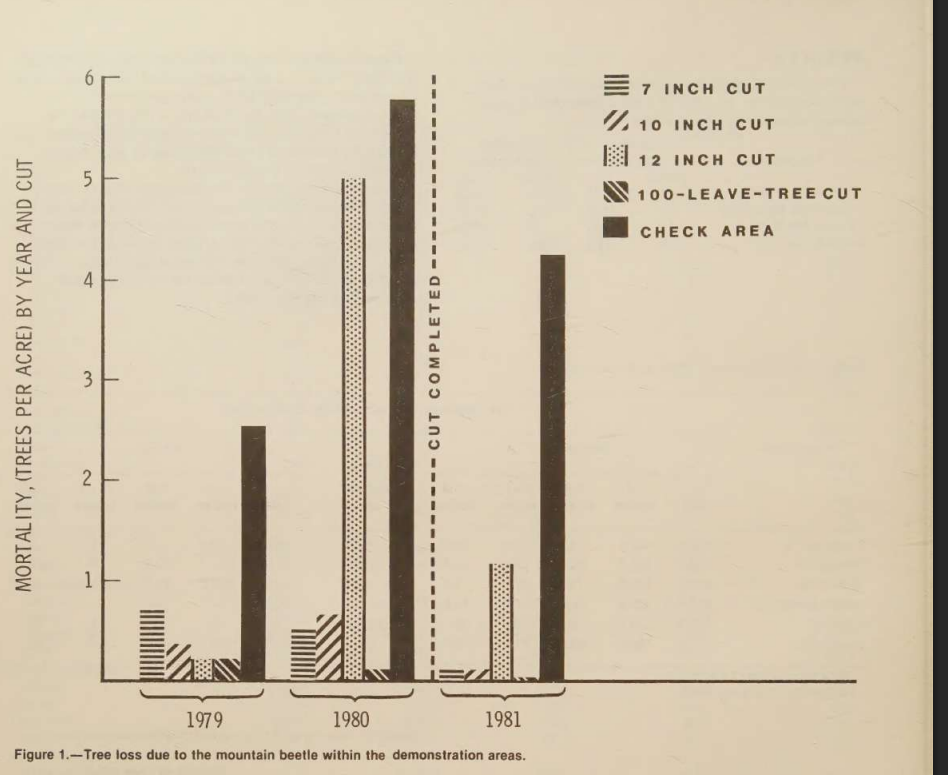
Scanned table with multirow year groupings and treatment rows for tree mortality.
↓→
image
For the multirow scanned mortality table, header-level relationships were not fully preserved. The output split or displaced structural cues such as the '12-inch cut' grouping and introduced OCR artifacts like stray '19' values, which made the reconstructed layout less faithful than the simpler table cases.
image
Scanned table with yearly columns and a vertically printed 'cut completed' note between the 1980 and 1981 columns.
↓→
image
Extend AI rebuilt the main rows and year columns of this scanned table, but it failed on the vertical 'cut completed' annotation placed between columns. That note was absorbed into nearby values as stray characters such as '8', 'a', and '3', so the contextual annotation was lost and some cells became noisier.
Bottom Line
It keeps rows separate well, but the bank rows still missed `transaction_id` values, so identifiers may need downstream reconciliation.
From our researchExtract and query structured data from documents using natural language
Transaction Type Classification
▾
Test Summary
Feature tested: Transaction Type Classification
Result: Passed
Feature tested: Transaction Type Classification
Result: Passed
Expected behavior: Infers transaction labels from description text in bank-statement rows. In the sampled withdrawal-like entries, items such as ATM usage charges, self-switch ATM withdrawal, and UPI/BILLDESK activity were labeled as Withdrawal.
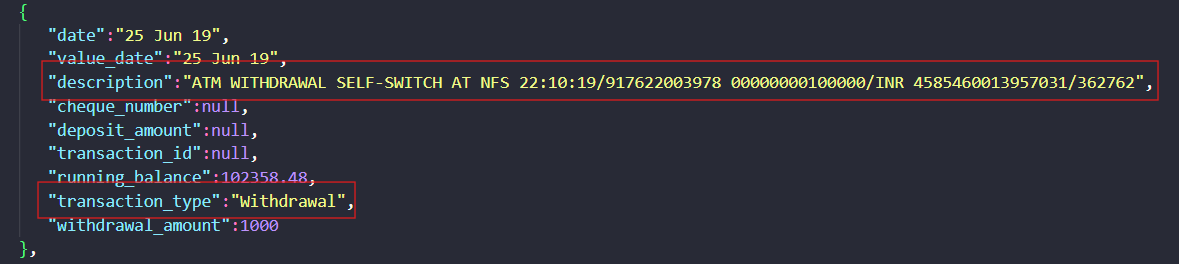
Observed output: Output artifact (Image): This row was labeled `transaction_type = Withdrawal` from its description text. — extend-ai-transaction-type.png
Output artifact: Output artifact (Image): This row was labeled `transaction_type = Withdrawal` from its description text. — extend-ai-transaction-type.png
Observed output: Output artifact (Image): The row was also labeled `Withdrawal`, but `transaction_id` remained null in the extracted JSON. — extend-ai-extracted-transaction-id.png
Output artifact: Output artifact (Image): The row was also labeled `Withdrawal`, but `transaction_id` remained null in the extracted JSON. — extend-ai-extracted-transaction-id.png
What changed: Text prompt transformed into Image
Why it matters / Conclusion: The classifier worked on the sampled withdrawal rows, but the report does not show a deposit example and the row IDs were still missing.
Infers transaction labels from description text in bank-statement rows. In the sampled withdrawal-like entries, items such as ATM usage charges, self-switch ATM withdrawal, and UPI/BILLDESK activity were labeled as Withdrawal.
text
25 Jun 19 — ATM WITHDRAWAL SELF-SWITCH AT NFS 22:10:19/917622003978 00000000100000/INR 4585460013957031/362762; withdrawal amount 1000
↓→
image
This row was labeled `transaction_type = Withdrawal` from its description text.
The row was also labeled `Withdrawal`, but `transaction_id` remained null in the extracted JSON.
Bottom Line
The classifier worked on the sampled withdrawal rows, but the report does not show a deposit example and the row IDs were still missing.
From our researchExtract and query structured data from documents using natural language
Financial Summary Extraction
▾
Test Summary
Feature tested: Financial Summary Extraction
Result: Partial
Feature tested: Financial Summary Extraction
Result: Partial
Expected behavior: Produces document-level totals and balances from financial documents. The bank-statement output included total deposits, total withdrawals, transaction count, and opening/closing balances, while the invoice output included aired spots, gross total, agency commission, payment terms, and net amount due.
Test case: PDF document → Image
Input type: PDF document
Input used: Input artifact (PDF document): Bank statement PDF — Bank Statement PDF.pdf
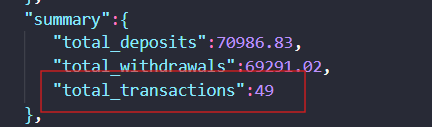
Observed output: Output artifact (Image): The bank statement summary reported `total_deposits: 70986.83`, `total_withdrawals: 69291.02`, and `total_transactions: 49`; the report says the expected count was 40 after excluding balance-forward, tax, and charge entries. — extend-ai-bank-statement-summary.png
Input artifact: Input artifact (PDF document): Bank statement PDF — Bank Statement PDF.pdf
Output artifact: Output artifact (Image): The bank statement summary reported `total_deposits: 70986.83`, `total_withdrawals: 69291.02`, and `total_transactions: 49`; the report says the expected count was 40 after excluding balance-forward, tax, and charge entries. — extend-ai-bank-statement-summary.png
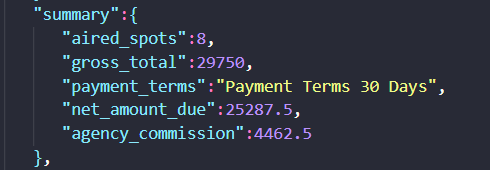
Observed output: Output artifact (Image): The invoice summary reported `aired_spots: 8`, `gross_total: 29750`, `agency_commission: 4462.5`, `net_amount_due: 25287.5`, and `payment_terms: "Payment Terms 30 Days"` rather than the bare value `30 Days`. — extend-ai-invoice-summary-2.png
Output artifact: Output artifact (Image): The invoice summary reported `aired_spots: 8`, `gross_total: 29750`, `agency_commission: 4462.5`, `net_amount_due: 25287.5`, and `payment_terms: "Payment Terms 30 Days"` rather than the bare value `30 Days`. — extend-ai-invoice-summary-2.png
What changed: PDF document transformed into Image
Why it matters / Conclusion: The invoice totals looked consistent, but the bank summary count and the invoice payment_terms value both show why a review pass is still needed.
Produces document-level totals and balances from financial documents. The bank-statement output included total deposits, total withdrawals, transaction count, and opening/closing balances, while the invoice output included aired spots, gross total, agency commission, payment terms, and net amount due.
file
Bank Statement PDF.pdf
↓→
image
The bank statement summary reported `total_deposits: 70986.83`, `total_withdrawals: 69291.02`, and `total_transactions: 49`; the report says the expected count was 40 after excluding balance-forward, tax, and charge entries.
file
Invoice PDF.pdf
↓→
image
The invoice summary reported `aired_spots: 8`, `gross_total: 29750`, `agency_commission: 4462.5`, `net_amount_due: 25287.5`, and `payment_terms: "Payment Terms 30 Days"` rather than the bare value `30 Days`.
Bottom Line
The invoice totals looked consistent, but the bank summary count and the invoice payment_terms value both show why a review pass is still needed.
From our researchExtract and query structured data from documents using natural language
Expected behavior: Displays extracted values in a reviewable interface with confidence metadata so users can validate fields before export. The report showed OCR confidence values for grouped invoice sections rather than only raw extracted JSON.
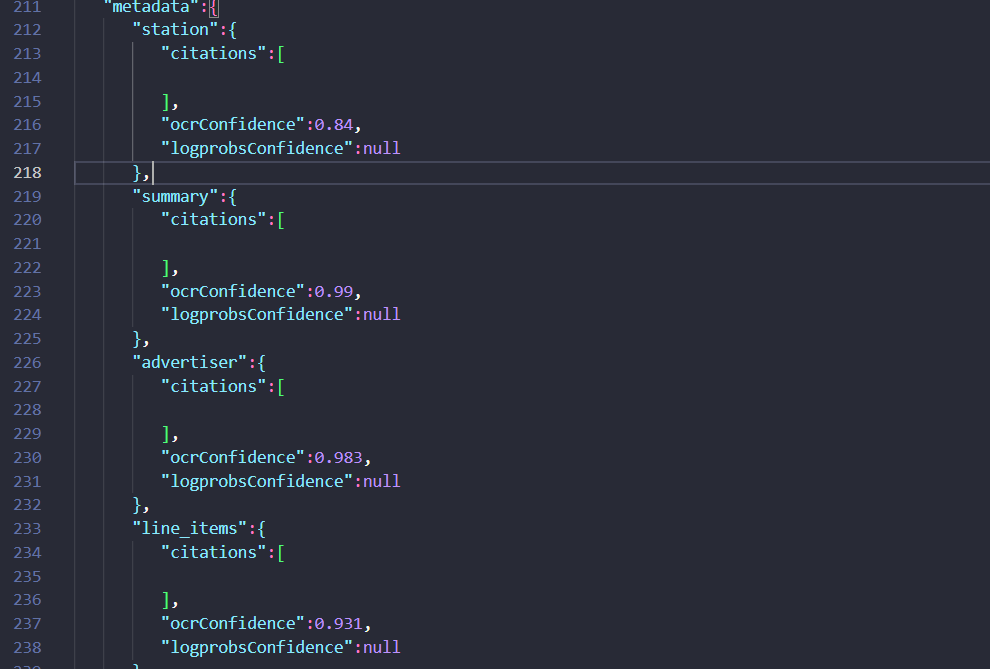
Observed output: Output artifact (Image): The review view surfaced OCR confidence for station, summary, advertiser, and line_items, making the extraction easier to validate before export. — extend-ai-invoice-extracted-metadata.png
Output artifact: Output artifact (Image): The review view surfaced OCR confidence for station, summary, advertiser, and line_items, making the extraction easier to validate before export. — extend-ai-invoice-extracted-metadata.png
What changed: PDF document transformed into Image
Why it matters / Conclusion: A useful validation aid, though the report only demonstrated confidence metadata on the invoice run.
Displays extracted values in a reviewable interface with confidence metadata so users can validate fields before export. The report showed OCR confidence values for grouped invoice sections rather than only raw extracted JSON.
file
Invoice PDF.pdf
↓→
image
The review view surfaced OCR confidence for station, summary, advertiser, and line_items, making the extraction easier to validate before export.
Bottom Line
A useful validation aid, though the report only demonstrated confidence metadata on the invoice run.
From our researchExtract and query structured data from documents using natural language
Document Structure Reconstruction
Strong across hybrid, table-heavy, and scanned PDFs.
▾
Test Summary
Feature tested: Document Structure Reconstruction
Result: Passed — Strong across hybrid, table-heavy, and scanned PDFs.
Feature tested: Document Structure Reconstruction
Result: Passed
Verdict: Strong across hybrid, table-heavy, and scanned PDFs.
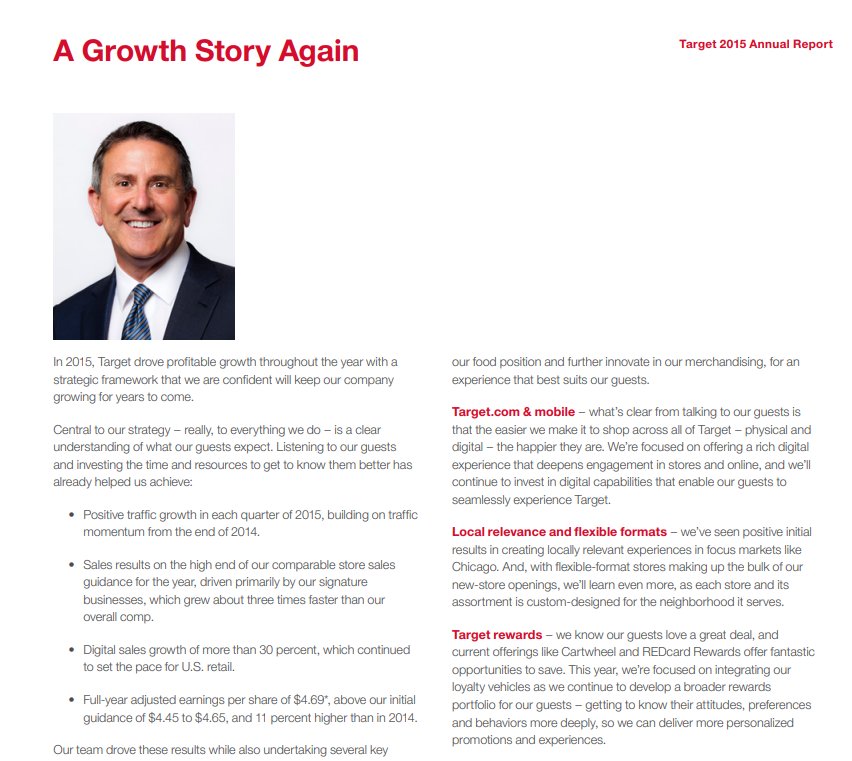
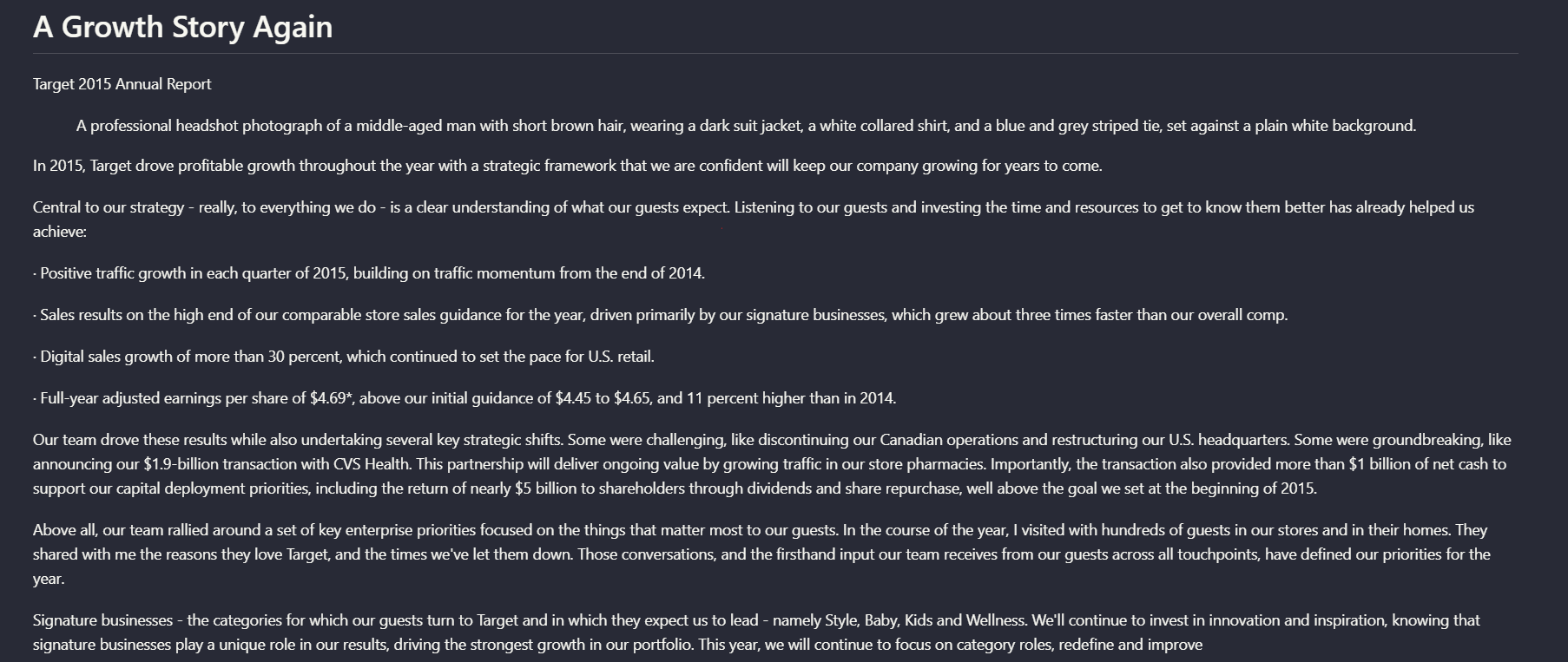
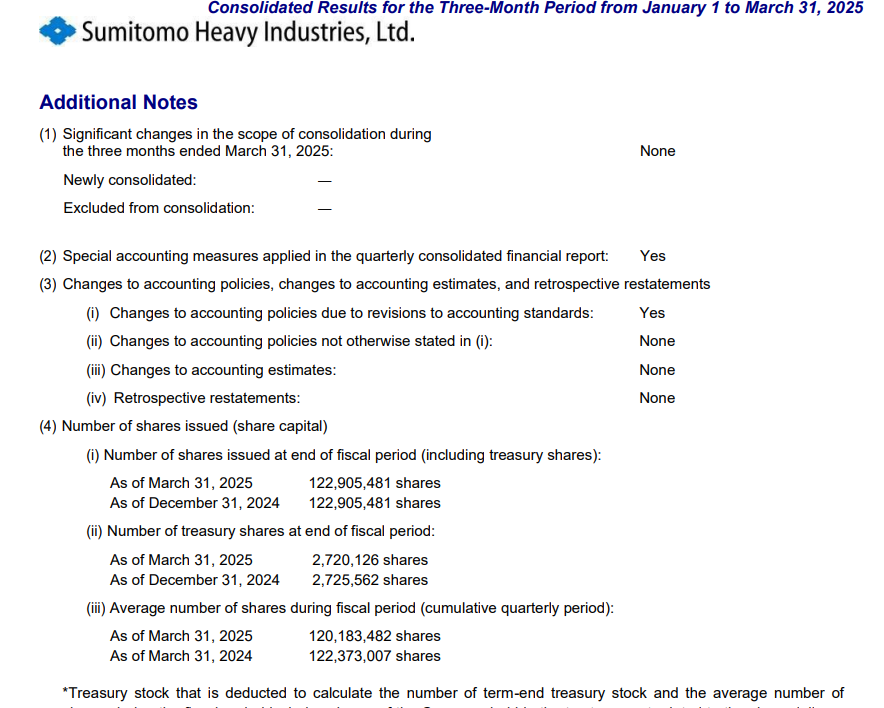
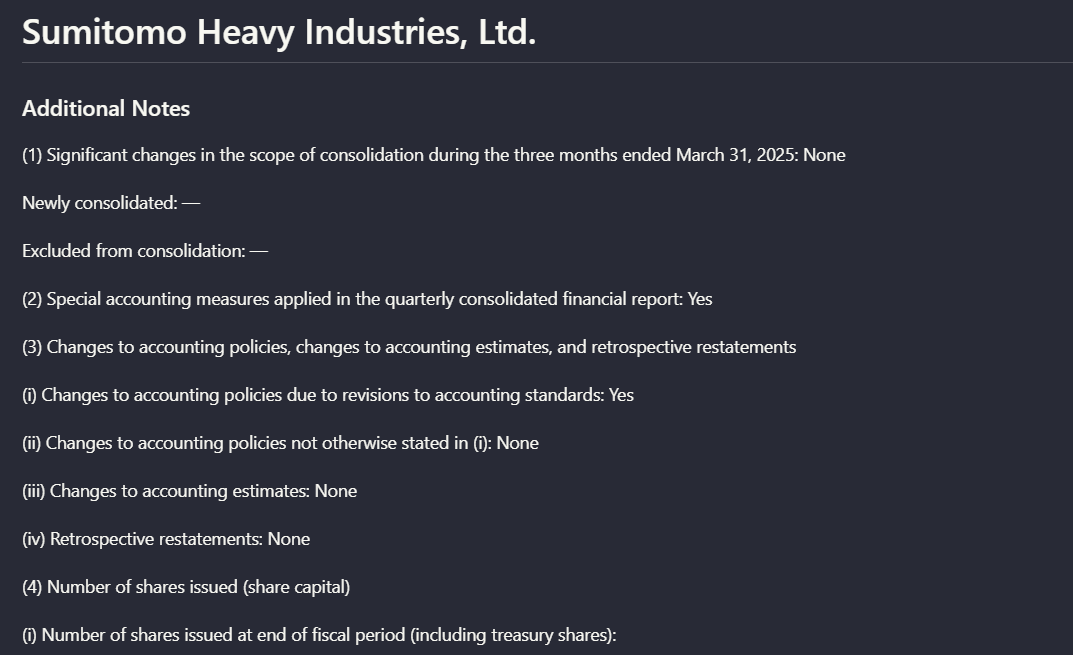
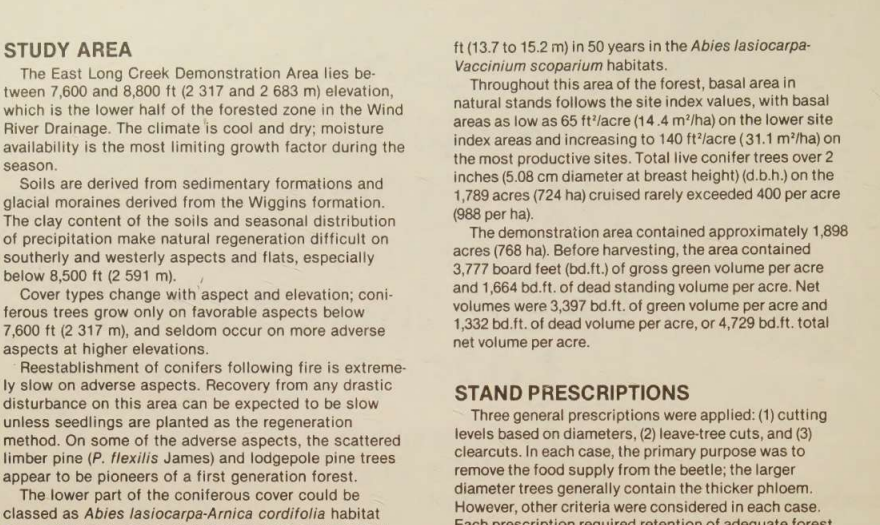
Expected behavior: Reflows mixed PDF pages into readable markdown-style text while preserving headings, section flow, bullets, and nearby body content. It was exercised on a Target annual report page, a Sumitomo financial notes page, and a scanned two-column research page.
Test case: Image → Image
Input type: Image
Input used: Input artifact (Image): Target annual report narrative page titled 'A Growth Story Again'. — landing-ai-target-annual-report-growth-story-page.png
Observed output: Output artifact (Image): On the Target 'A Growth Story Again' page, Extend AI kept the title, narrative paragraphs, and bullet-style highlights in readable order, and it even inserted a — extend-ai-target-annual-report-extracted-text-page.png
Input artifact: Input artifact (Image): Target annual report narrative page titled 'A Growth Story Again'. — landing-ai-target-annual-report-growth-story-page.png
Output artifact: Output artifact (Image): On the Target 'A Growth Story Again' page, Extend AI kept the title, narrative paragraphs, and bullet-style highlights in readable order, and it even inserted a — extend-ai-target-annual-report-extracted-text-page.png
Observed output: Output artifact (Image): On the Sumitomo notes page, it preserved the main heading and numbered note structure with clean line breaks. The visible extracted output shown in the proof re — extend-ai-hierarchy-extracted-notes-page.png
Output artifact: Output artifact (Image): On the Sumitomo notes page, it preserved the main heading and numbered note structure with clean line breaks. The visible extracted output shown in the proof re — extend-ai-hierarchy-extracted-notes-page.png
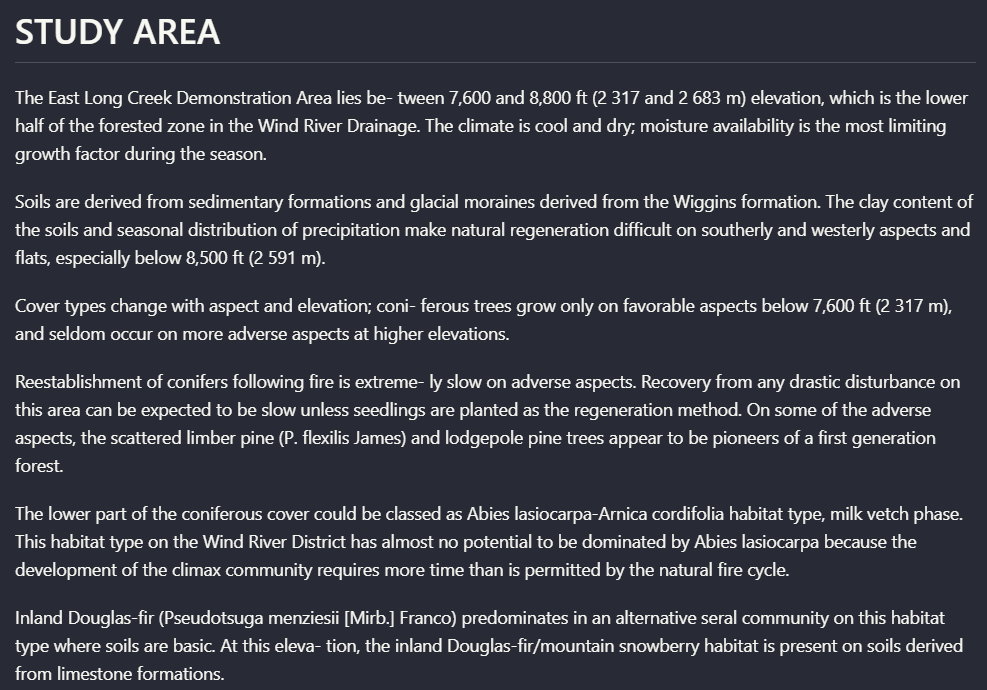
Observed output: Output artifact (Image): On the scanned two-column page, Extend AI rebuilt the 'STUDY AREA' section into clean linear text, correcting scan-era hyphenation breaks such as 'between' and — extend-ai-parsed-study-area-section.png
Output artifact: Output artifact (Image): On the scanned two-column page, Extend AI rebuilt the 'STUDY AREA' section into clean linear text, correcting scan-era hyphenation breaks such as 'between' and — extend-ai-parsed-study-area-section.png
What changed: Image transformed into Image
Why it matters / Conclusion: If your top priority is getting readable markdown with section hierarchy preserved across mixed PDFs, this was one of Extend AI's strongest behaviors in the test.
Reflows mixed PDF pages into readable markdown-style text while preserving headings, section flow, bullets, and nearby body content. It was exercised on a Target annual report page, a Sumitomo financial notes page, and a scanned two-column research page.
image
Target annual report narrative page titled 'A Growth Story Again'.
↓→
image
On the Target 'A Growth Story Again' page, Extend AI kept the title, narrative paragraphs, and bullet-style highlights in readable order, and it even inserted a description of the headshot image. The result reads like a reconstructed report page rather than a flat OCR dump.
image
Sumitomo Heavy Industries 'Additional Notes' page.
↓→
image
On the Sumitomo notes page, it preserved the main heading and numbered note structure with clean line breaks. The visible extracted output shown in the proof reaches the start of item (4) 'Number of shares issued (share capital),' so this proof supports structural retention more clearly than full-page completeness.
On the scanned two-column page, Extend AI rebuilt the 'STUDY AREA' section into clean linear text, correcting scan-era hyphenation breaks such as 'between' and 'extremely' and preserving the heading-to-paragraph relationship despite paper texture and skew.
Bottom Line
If your top priority is getting readable markdown with section hierarchy preserved across mixed PDFs, this was one of Extend AI's strongest behaviors in the test.
From our researchearlier research
Visual Element Retention and Captioning
Extend AI preserved charts and logos as structured figure blocks with descriptions, but usually translated visuals into text instead of keeping the original visual form inline.
▾
Test Summary
Feature tested: Visual Element Retention and Captioning
Result: Partial — Extend AI preserved charts and logos as structured figure blocks with descriptions, but usually translated visuals into text instead of keeping the original visual form inline.
Feature tested: Visual Element Retention and Captioning
Result: Partial
Verdict: Extend AI preserved charts and logos as structured figure blocks with descriptions, but usually translated visuals into text instead of keeping the original visual form inline.
Expected behavior: Retains charts and other non-text visuals by converting them into figure-style elements with extracted labels, values, and generated captions. This was tested on a waterfall chart, a scanned bar chart, annual-report charts, a research chart, and a logo element.
Test case: Image → Image
Input type: Image
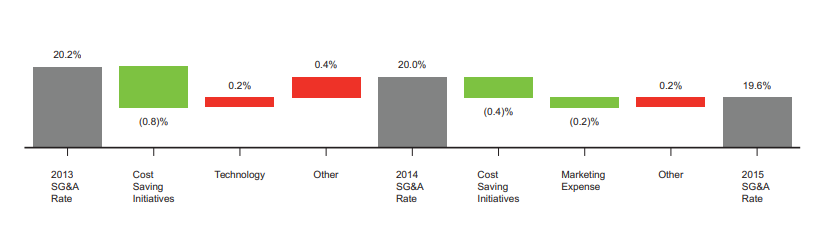
Input used: Input artifact (Image): Waterfall chart showing SG&A rate changes from 2013 to 2015. — extend-ai-sg-and-a-rate-waterfall-chart.png
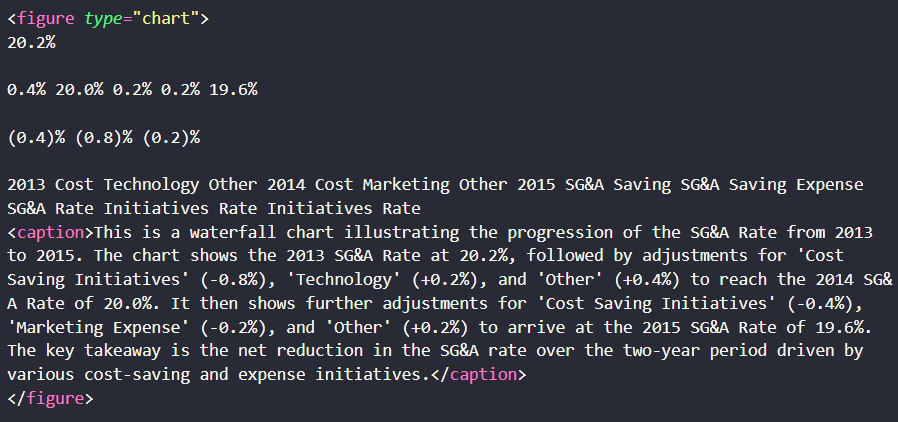
Observed output: Output artifact (Image): For the SG&A waterfall chart, Extend AI emitted a figure block that preserved the chart labels, percentage values, and a generated caption explaining the moveme — extend-ai-sg-and-a-waterfall-extracted-text.png
Input artifact: Input artifact (Image): Waterfall chart showing SG&A rate changes from 2013 to 2015. — extend-ai-sg-and-a-rate-waterfall-chart.png
Output artifact: Output artifact (Image): For the SG&A waterfall chart, Extend AI emitted a figure block that preserved the chart labels, percentage values, and a generated caption explaining the moveme — extend-ai-sg-and-a-waterfall-extracted-text.png
What changed: Image transformed into Image
Test case: Image → Image
Input type: Image
Input used: Input artifact (Image): Scanned grouped bar chart of tree mortality by year and cut treatment. — landing-ai-tree-mortality-by-year-and-cut-bar-chart-1.png
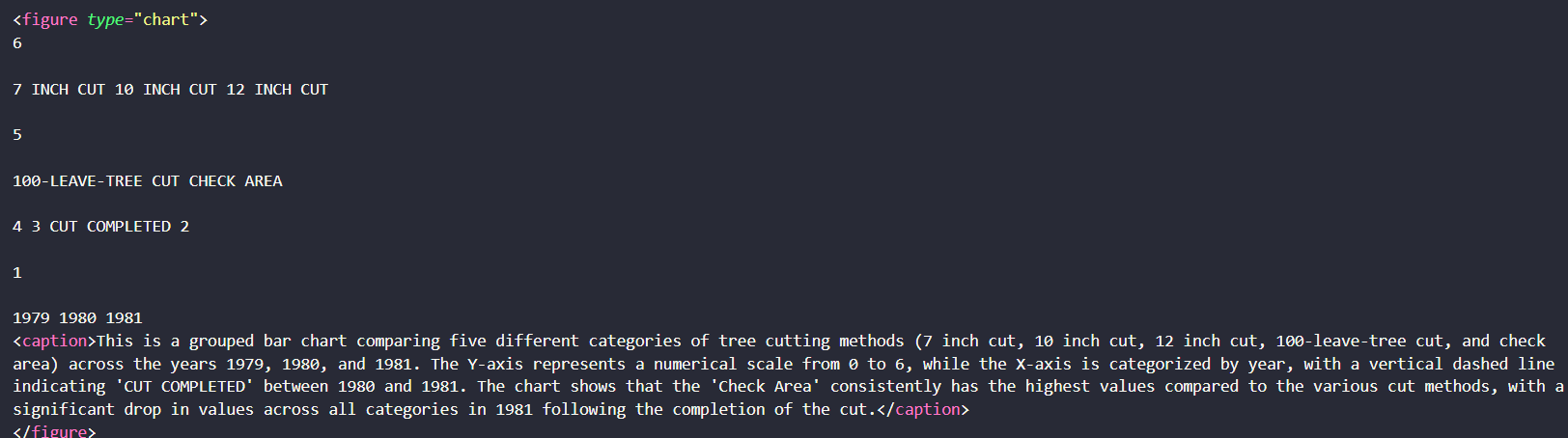
Observed output: Output artifact (Image): On the scanned mortality chart, Extend AI captured the chart title, cut-method labels, years, and a generated caption summarizing the trend. However, it did not — extend-ai-parsed-chart-tree-cutting-methods.png
Input artifact: Input artifact (Image): Scanned grouped bar chart of tree mortality by year and cut treatment. — landing-ai-tree-mortality-by-year-and-cut-bar-chart-1.png
Output artifact: Output artifact (Image): On the scanned mortality chart, Extend AI captured the chart title, cut-method labels, years, and a generated caption summarizing the trend. However, it did not — extend-ai-parsed-chart-tree-cutting-methods.png
What changed: Image transformed into Image
Test case: Image → Image
Input type: Image
Input used: Input artifact (Image): A logo element embedded in the hybrid earnings report. — hybrid_earningspdf_target_logo.png
Observed output: Output artifact (Image): Instead of keeping the logo visually in document context, Extend AI emitted a logo figure block whose caption identifies it as the Target bullseye symbol. The e — hybrid_earningspdf_parsed_logo.png
Input artifact: Input artifact (Image): A logo element embedded in the hybrid earnings report. — hybrid_earningspdf_target_logo.png
Output artifact: Output artifact (Image): Instead of keeping the logo visually in document context, Extend AI emitted a logo figure block whose caption identifies it as the Target bullseye symbol. The e — hybrid_earningspdf_parsed_logo.png
What changed: Image transformed into Image
Why it matters / Conclusion: Good if you want charts and logos retained in markdown as descriptive elements; weaker if you need the original visual presentation preserved inline.
Retains charts and other non-text visuals by converting them into figure-style elements with extracted labels, values, and generated captions. This was tested on a waterfall chart, a scanned bar chart, annual-report charts, a research chart, and a logo element.
image
Waterfall chart showing SG&A rate changes from 2013 to 2015.
↓→
image
For the SG&A waterfall chart, Extend AI emitted a figure block that preserved the chart labels, percentage values, and a generated caption explaining the movement from 20.2% in 2013 to 19.6% in 2015. The semantic content survived, but the output became a text description of the chart rather than the original chart graphic.
image
Scanned grouped bar chart of tree mortality by year and cut treatment.
↓→
image
On the scanned mortality chart, Extend AI captured the chart title, cut-method labels, years, and a generated caption summarizing the trend. However, it did not preserve the bar shapes or full visual encoding, so the output was useful for meaning retention but weaker for chart fidelity.
INPUT
A logo element embedded in the hybrid earnings report.
↓→
image
Instead of keeping the logo visually in document context, Extend AI emitted a logo figure block whose caption identifies it as the Target bullseye symbol. The element is preserved semantically, but not as an in-place image.
Bottom Line
Good if you want charts and logos retained in markdown as descriptive elements; weaker if you need the original visual presentation preserved inline.
From our researchearlier research
OCR for Signatures, Stamps, and Faint Markings
Extend AI successfully captured low-visibility non-body-text elements that many parsers skip.
▾
Test Summary
Feature tested: OCR for Signatures, Stamps, and Faint Markings
Result: Passed — Extend AI successfully captured low-visibility non-body-text elements that many parsers skip.
Feature tested: OCR for Signatures, Stamps, and Faint Markings
Result: Passed
Verdict: Extend AI successfully captured low-visibility non-body-text elements that many parsers skip.
Expected behavior: Extracts non-body scanned markings beyond standard text, including signature blocks, a blurry audit-firm stamp, and faint handwritten marks from a research paper title page.
Test case: Image → Image
Input type: Image
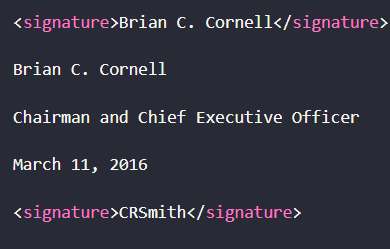
Input used: Input artifact (Image): Printed signature block from the Target annual report. — extend-ai-target-annual-report-signature-block.png
Observed output: Output artifact (Image): From the Target sign-off block, Extend AI captured 'Brian C. Cornell,' the title 'Chairman and Chief Executive Officer,' and the date 'March 11, 2016.' It also — extend-ai-parsed-signature-block-brian-c-cornell.png
Input artifact: Input artifact (Image): Printed signature block from the Target annual report. — extend-ai-target-annual-report-signature-block.png
Output artifact: Output artifact (Image): From the Target sign-off block, Extend AI captured 'Brian C. Cornell,' the title 'Chairman and Chief Executive Officer,' and the date 'March 11, 2016.' It also — extend-ai-parsed-signature-block-brian-c-cornell.png
What changed: Image transformed into Image
Test case: Image → Image
Input type: Image
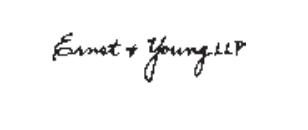
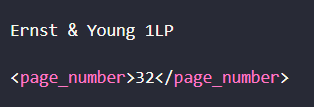
Input used: Input artifact (Image): Blurred Ernst & Young LLP stamp. — extend-ai-blurred-ernst-young-stamp.png
Observed output: Output artifact (Image): From a blurred Ernst & Young LLP stamp, the output still recovered the firm name and added a page-number tag. That shows Extend AI can pull useful text from low — extend-ai-parsed-ernst-young-stamp-page-number.png
Input artifact: Input artifact (Image): Blurred Ernst & Young LLP stamp. — extend-ai-blurred-ernst-young-stamp.png
Output artifact: Output artifact (Image): From a blurred Ernst & Young LLP stamp, the output still recovered the firm name and added a page-number tag. That shows Extend AI can pull useful text from low — extend-ai-parsed-ernst-young-stamp-page-number.png
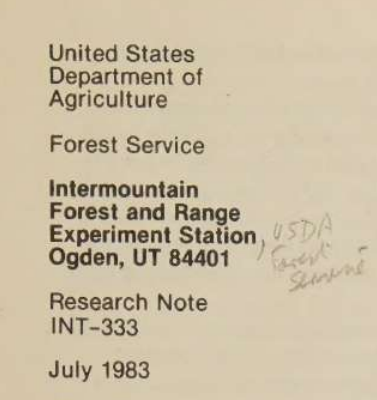
Observed output: Output artifact (Image): On faint handwritten markings, Extend AI did not truly transcribe the cursive. It output 'USDA Semaine' and a caption stating that the remaining handwriting app — extend-ai-parsed-handwriting-ocr-output.png
Output artifact: Output artifact (Image): On faint handwritten markings, Extend AI did not truly transcribe the cursive. It output 'USDA Semaine' and a caption stating that the remaining handwriting app — extend-ai-parsed-handwriting-ocr-output.png
What changed: Image transformed into Image
Why it matters / Conclusion: A notable strength: Extend AI kept signatures, stamps, and faint markings in the extracted output instead of silently omitting them.
Extracts non-body scanned markings beyond standard text, including signature blocks, a blurry audit-firm stamp, and faint handwritten marks from a research paper title page.
image
Printed signature block from the Target annual report.
↓→
image
From the Target sign-off block, Extend AI captured 'Brian C. Cornell,' the title 'Chairman and Chief Executive Officer,' and the date 'March 11, 2016.' It also added signature tags, including an extra parsed signature tag beyond the printed block, which suggests some over-reading around signature content.
image
Blurred Ernst & Young LLP stamp.
↓→
image
From a blurred Ernst & Young LLP stamp, the output still recovered the firm name and added a page-number tag. That shows Extend AI can pull useful text from low-clarity printed markings.
image
USDA cover page with faint handwritten marginal notes.
↓→
image
On faint handwritten markings, Extend AI did not truly transcribe the cursive. It output 'USDA Semaine' and a caption stating that the remaining handwriting appears to be illegible cursive, which preserves the presence of the note but not its exact content.
Bottom Line
A notable strength: Extend AI kept signatures, stamps, and faint markings in the extracted output instead of silently omitting them.
From our researchearlier research
API-Based Markdown Export
The tested workflow was fully automated and ended in downloadable markdown output.
▾
Test Summary
Feature tested: API-Based Markdown Export
Result: Passed — The tested workflow was fully automated and ended in downloadable markdown output.
Feature tested: API-Based Markdown Export
Result: Passed
Verdict: The tested workflow was fully automated and ended in downloadable markdown output.
Expected behavior: Accepts PDF uploads, processes them automatically, and returns markdown files through a hosted API workflow. The report also shows a Developers area with API key creation, supporting programmatic use.
Test case: PDF document → Text/code file
Input type: PDF document
Input used: Input artifact (PDF document): 84-page hybrid earnings report used as the main mixed-content stress test. — llamaparse-hybrid-earnings-pdf-1.pdf
Observed output: Output artifact (Text/code file): For the hybrid report, Extend AI returned a markdown file as a downloadable artifact after a fully automated API flow. The researcher did not report any manual — extend-ai-extendai-hybrid-earnings-pdf-output-6.md
Input artifact: Input artifact (PDF document): 84-page hybrid earnings report used as the main mixed-content stress test. — llamaparse-hybrid-earnings-pdf-1.pdf
Output artifact: Output artifact (Text/code file): For the hybrid report, Extend AI returned a markdown file as a downloadable artifact after a fully automated API flow. The researcher did not report any manual — extend-ai-extendai-hybrid-earnings-pdf-output-6.md
What changed: PDF document transformed into Text/code file
Test case: PDF document → Text/code file
Input type: PDF document
Input used: Input artifact (PDF document): 18-page table-heavy financial report used to test complex tables. — llamaparse-sumitomo-financial-pdf-1.pdf
Observed output: Output artifact (Text/code file): The table-heavy financial report was also returned as markdown, showing the same export pattern on a different document type. This supports the claim that markd — extend-ai-extendai-financialpdf-output-5.md
Input artifact: Input artifact (PDF document): 18-page table-heavy financial report used to test complex tables. — llamaparse-sumitomo-financial-pdf-1.pdf
Output artifact: Output artifact (Text/code file): The table-heavy financial report was also returned as markdown, showing the same export pattern on a different document type. This supports the claim that markd — extend-ai-extendai-financialpdf-output-5.md
What changed: PDF document transformed into Text/code file
Test case: Text prompt → Image
Input type: Text prompt
Input used: Input artifact (Text prompt): INPUT
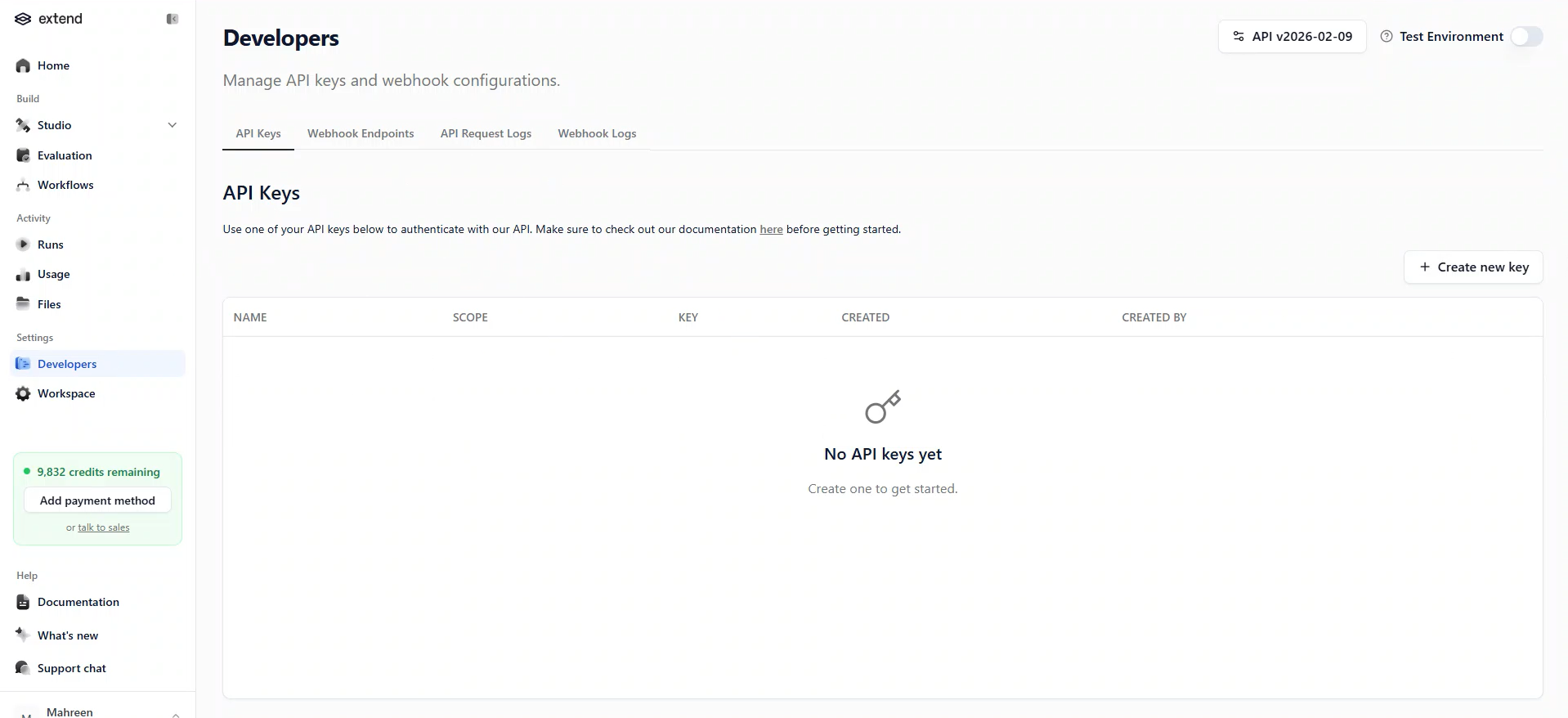
Observed output: Output artifact (Image): The Developers section shows an API Keys page with a 'Create new key' button, API documentation references, and request-log sections. That confirms the product — extend-ai-extendai-developers-api-keys-empty-state.png
Output artifact: Output artifact (Image): The Developers section shows an API Keys page with a 'Create new key' button, API documentation references, and request-log sections. That confirms the product — extend-ai-extendai-developers-api-keys-empty-state.png
What changed: Text prompt transformed into Image
Why it matters / Conclusion: The report supports Extend AI as a real hosted API workflow: upload PDF, process automatically, and retrieve markdown output.
Accepts PDF uploads, processes them automatically, and returns markdown files through a hosted API workflow. The report also shows a Developers area with API key creation, supporting programmatic use.
file
llamaparse-hybrid-earnings-pdf-1.pdf
84-page hybrid earnings report used as the main mixed-content stress test.
For the hybrid report, Extend AI returned a markdown file as a downloadable artifact after a fully automated API flow. The researcher did not report any manual repair step between upload and markdown export.
file
llamaparse-sumitomo-financial-pdf-1.pdf
18-page table-heavy financial report used to test complex tables.
↓→
file
extend-ai-extendai-financialpdf-output-5.md
Loading file...
The table-heavy financial report was also returned as markdown, showing the same export pattern on a different document type. This supports the claim that markdown export is a standard output mode, not a one-off success case.
INPUT
Need to create credentials for programmatic API use.
↓→
image
The Developers section shows an API Keys page with a 'Create new key' button, API documentation references, and request-log sections. That confirms the product exposes an API-oriented workflow rather than being only a manual UI tool.
Bottom Line
The report supports Extend AI as a real hosted API workflow: upload PDF, process automatically, and retrieve markdown output.
From our researchearlier research
Pricing
Pay As You Go
Free to start
Includes 10,000 free credits, then usage-based pricing. Access to all APIs, Studio, OCR, workflows, and evaluation tools.
Scale
$500/month
Includes 50,000 credits per month, higher rate limits, volume discounts, Slack support, and compliance options.
Enterprise
Custom pricing
Includes self-hosted deployment, SSO/SAML, RBAC, custom models, dedicated support, and enterprise agreements.
✓ Use This If
●You need to extract nested metadata, summaries, and row arrays from invoices or bank statements into JSON.
●You want a reviewable extraction flow with confidence metadata before export.
●You can tolerate a cleanup pass for reordered sections, null transaction IDs, or label-text leakage.
✕ Skip This If
●You need guaranteed `transaction_id` extraction on bank-statement rows.
●You need the output schema order to match your input exactly.
●You need broad document-type coverage beyond finance PDFs; this report only tested one bank statement and one invoice.
Featured in Rankings
Independent rankings where Extend AI was tested and rated.
A bank statement PDF and an invoice PDF were tested. Both were extracted into structured JSON outputs.
Not always. The report says the extracted JSON reordered some top-level sections instead of matching the input schema sequence exactly.
No. The tested bank-statement rows showed `transaction_id: null`.
The invoice totals matched the source, but the bank statement summary reported `total_transactions: 49` while the reviewer expected 40 after excluding balance-forward, tax, and charge entries.
Yes. The invoice `payment_terms` field came back as `Payment Terms 30 Days` instead of just `30 Days`.
Yes. The invoice extraction view surfaced OCR confidence values for station, summary, advertiser, and line_items.
Pay As You Go is free to start with 10,000 credits, Scale is $500/month with 50,000 credits, and Enterprise is custom pricing.
Banner Preview
How the embed badge will look on your site
Embed HTML
Copy this code to your website source
<a target="_blank" href="https://aidemos.com/tools/extend-ai?utm_source=extend-ai_embed" style="width: 250px; height: 80px; border-radius:4px;" width="250" height="80">
<img src="https://aidemos-website-images.s3.amazonaws.com/featured.png" alt="Extend AI | Featured on AI Demos" style="width: 250px; height: 80px; border-radius:4px;" width="250" height="80">
</a>
Quick Integration Guide
1Copy the HTML code block above.
2Paste it into your site's HTML or CMS editor.
3Banner appears instantly on your page.
4Links back to your tool profile here.
Similar Tools
Similar Tools
Discover more AI tools like Extend AI to enhance your workflow.
⚡ Built by FutureSmart AI — the team behind AI Demos
Need a custom AI solution for this use case?
If you are looking to build a custom PDF extraction, schema-driven data extraction, or financial document parsing system for your business or internal workflow, email us at contact@futuresmart.ai.
Found something inaccurate or missing? We try to keep our AI research accurate and useful. If you found outdated information, an issue, or have a suggestion, email us at collaborate@aidemos.com.