Mistral AI handled all three tested PDFs through a fully automated API workflow and returned useful markdown in both consolidated and page-level formats. It did especially well on readable text, many financial tables, scanned OCR, and keeping charts or signature assets attached to page output. The main weakness is fidelity to original structure: heading hierarchy, TOC nesting, and the semantics of the hardest multi-level tables were not preserved consistently enough to treat the markdown as a perfect reconstruction.
Our detailed analysis of Mistral AI — features, performance, and real-world testing.
AD
AI Demos Team
Expert Reviewer
Verified Review
Feature-by-Feature Breakdown
Structured markdown export
Reliable export packaging across all tested PDFs.
▾
Test Summary
Feature tested: Structured markdown export
Result: Passed — Reliable export packaging across all tested PDFs.
Feature tested: Structured markdown export
Result: Passed
Verdict: Reliable export packaging across all tested PDFs.
Expected behavior: Mistral AI returned markdown as downloadable output rather than a UI-only preview. In the hybrid earnings report, table-heavy financial report, and scanned research paper tests, the export pattern included a full-document markdown file plus page-level outputs, which makes it easier to inspect one page at a time or ingest the whole document at once.
Test case: PDF document → File
Input type: PDF document
Input used: Input artifact (PDF document): 84-page hybrid earnings report with native text, financial tables, charts, and a scanned signature page. — llamaparse-hybrid-earnings-pdf-1.pdf
Observed output: Output artifact (File): Mistral AI returned the hybrid report as a downloadable ZIP containing markdown outputs rather than a single flat text dump. — mistral-ai-mistral-ai-hybrid-earnings-pdf-output-zip-3.zip
Input artifact: Input artifact (PDF document): 84-page hybrid earnings report with native text, financial tables, charts, and a scanned signature page. — llamaparse-hybrid-earnings-pdf-1.pdf
Output artifact: Output artifact (File): Mistral AI returned the hybrid report as a downloadable ZIP containing markdown outputs rather than a single flat text dump. — mistral-ai-mistral-ai-hybrid-earnings-pdf-output-zip-3.zip
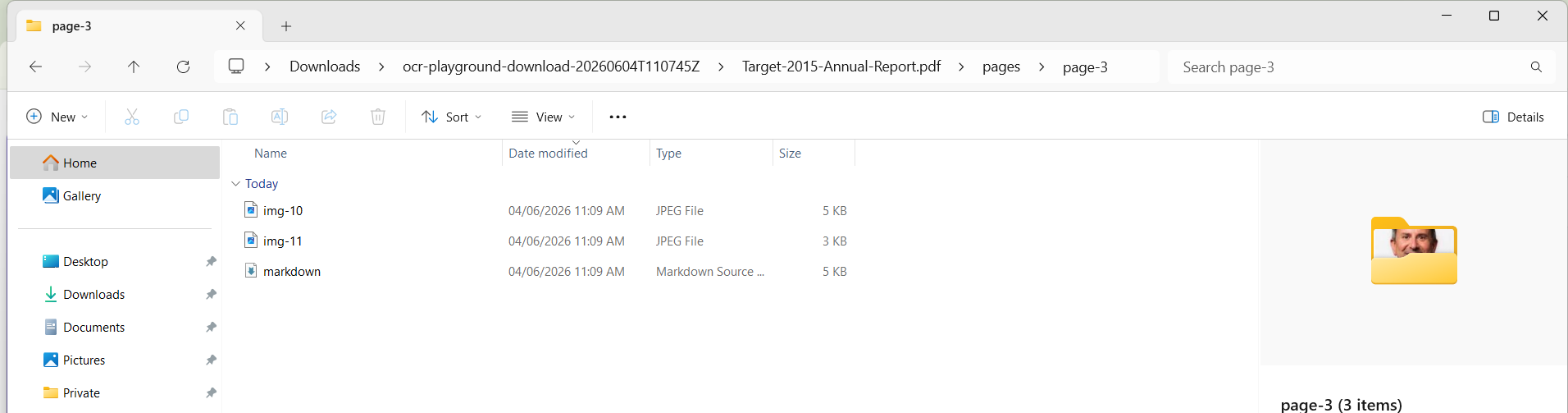
Observed output: Output artifact (Image): Inside a page-level folder, the export included a markdown file plus separate image assets, showing that Mistral packages parsed content page by page instead of — mistral-ai-windows-explorer-page-folder.png
Output artifact: Output artifact (Image): Inside a page-level folder, the export included a markdown file plus separate image assets, showing that Mistral packages parsed content page by page instead of — mistral-ai-windows-explorer-page-folder.png
Observed output: Output artifact (Image): The financial-report export contained a top-level markdown file and a pages folder, matching the same full-document plus page-level output pattern seen in the h — mistral-ai-financial-pdf-folder-structure-2.png
Output artifact: Output artifact (Image): The financial-report export contained a top-level markdown file and a pages folder, matching the same full-document plus page-level output pattern seen in the h — mistral-ai-financial-pdf-folder-structure-2.png
What changed: PDF document transformed into Image
Why it matters / Conclusion: If you need a hosted API that reliably gives you downloadable markdown with page-level inspection artifacts, Mistral AI delivered that consistently in this research.
Mistral AI returned markdown as downloadable output rather than a UI-only preview. In the hybrid earnings report, table-heavy financial report, and scanned research paper tests, the export pattern included a full-document markdown file plus page-level outputs, which makes it easier to inspect one page at a time or ingest the whole document at once.
pdf
llamaparse-hybrid-earnings-pdf-1.pdf
84-page hybrid earnings report with native text, financial tables, charts, and a scanned signature page.
Mistral AI returned the hybrid report as a downloadable ZIP containing markdown outputs rather than a single flat text dump.
pdf
llamaparse-hybrid-earnings-pdf-1.pdf
Hybrid earnings report page export structure.
↓→
image
Inside a page-level folder, the export included a markdown file plus separate image assets, showing that Mistral packages parsed content page by page instead of collapsing everything into one file.
pdf
llamaparse-sumitomo-financial-pdf-1.pdf
18-page table-heavy financial report.
↓→
image
The financial-report export contained a top-level markdown file and a pages folder, matching the same full-document plus page-level output pattern seen in the hybrid test.
Bottom Line
If you need a hosted API that reliably gives you downloadable markdown with page-level inspection artifacts, Mistral AI delivered that consistently in this research.
Document hierarchy and reading order preservation
Usually readable, but not consistently faithful to semantic structure.
▾
Test Summary
Feature tested: Document hierarchy and reading order preservation
Result: Partial — Usually readable, but not consistently faithful to semantic structure.
Feature tested: Document hierarchy and reading order preservation
Result: Partial
Verdict: Usually readable, but not consistently faithful to semantic structure.
Expected behavior: Mistral AI generally kept headings attached to their paragraphs and preserved reading flow across native and scanned pages. The capability was exercised on a hybrid annual report section, a long narrative page from the financial report, a scanned multi-column research-paper section, a visually rich annual-report page, and the financial report's table of contents.
Test case: Image → Image
Input type: Image
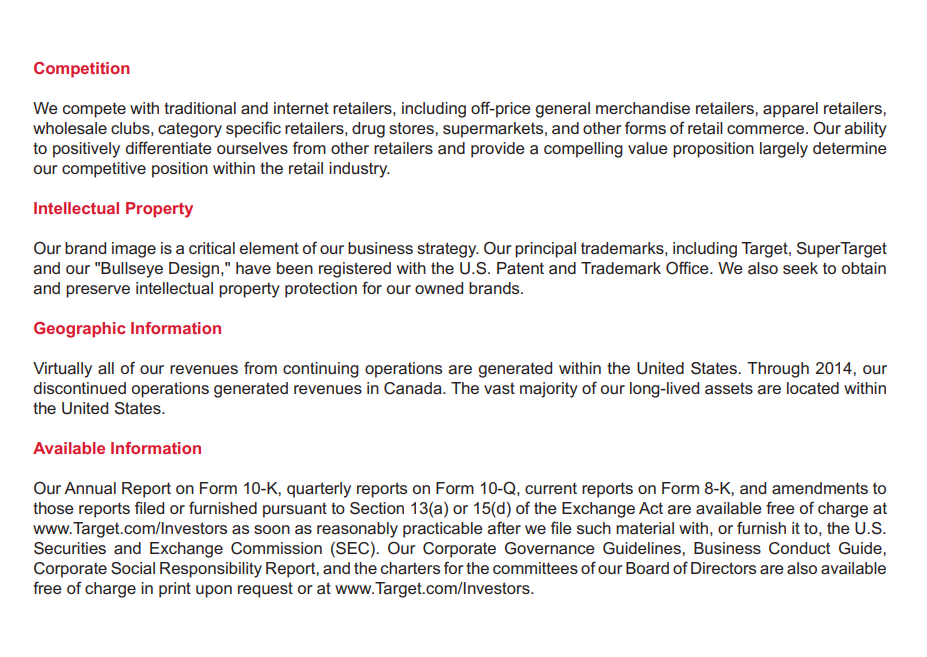
Input used: Input artifact (Image): Target annual-report page with four section headings: Competition, Intellectual Property, Geographic Information, and Available Information, each followed by a — hybrid_earningspdf_sections_and_text.png
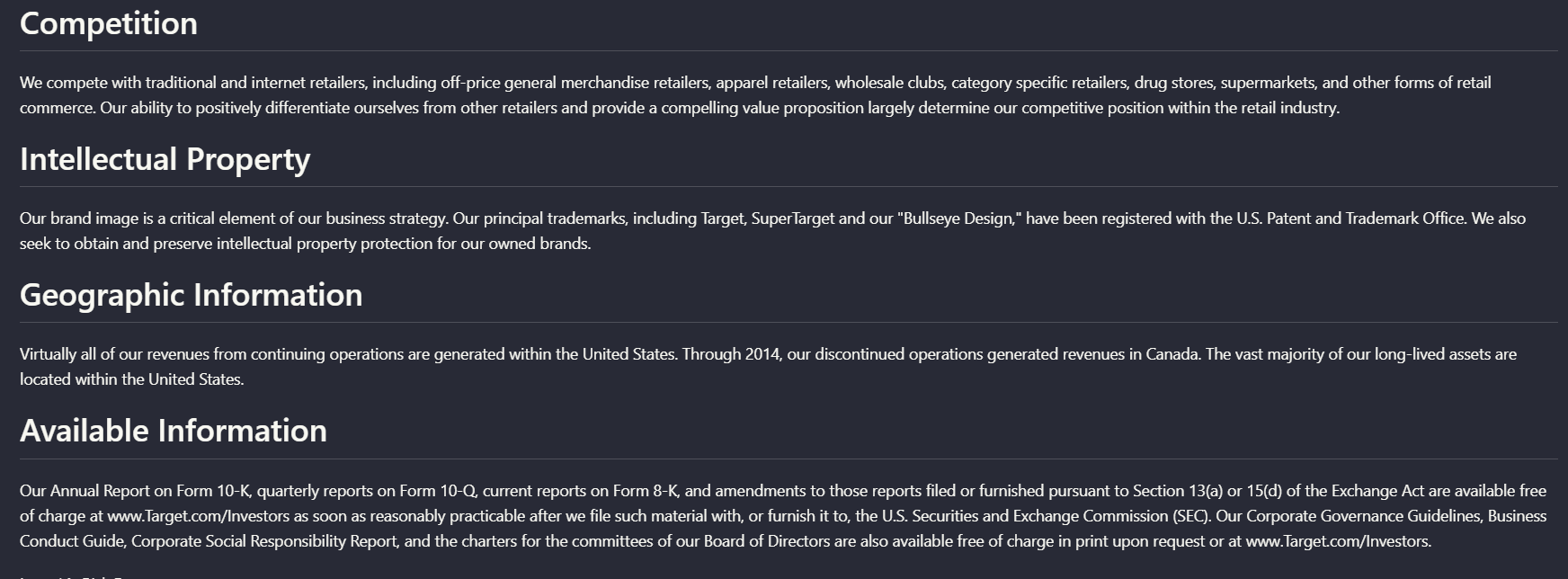
Observed output: Output artifact (Image): Mistral preserved the four section headings as distinct blocks with their associated paragraphs underneath, keeping the main reading order intact on this hybrid — mistral-ai-parsed-document-hierarchy.png
Input artifact: Input artifact (Image): Target annual-report page with four section headings: Competition, Intellectual Property, Geographic Information, and Available Information, each followed by a — hybrid_earningspdf_sections_and_text.png
Output artifact: Output artifact (Image): Mistral preserved the four section headings as distinct blocks with their associated paragraphs underneath, keeping the main reading order intact on this hybrid — mistral-ai-parsed-document-hierarchy.png
What changed: Image transformed into Image
Test case: Image → Image
Input type: Image
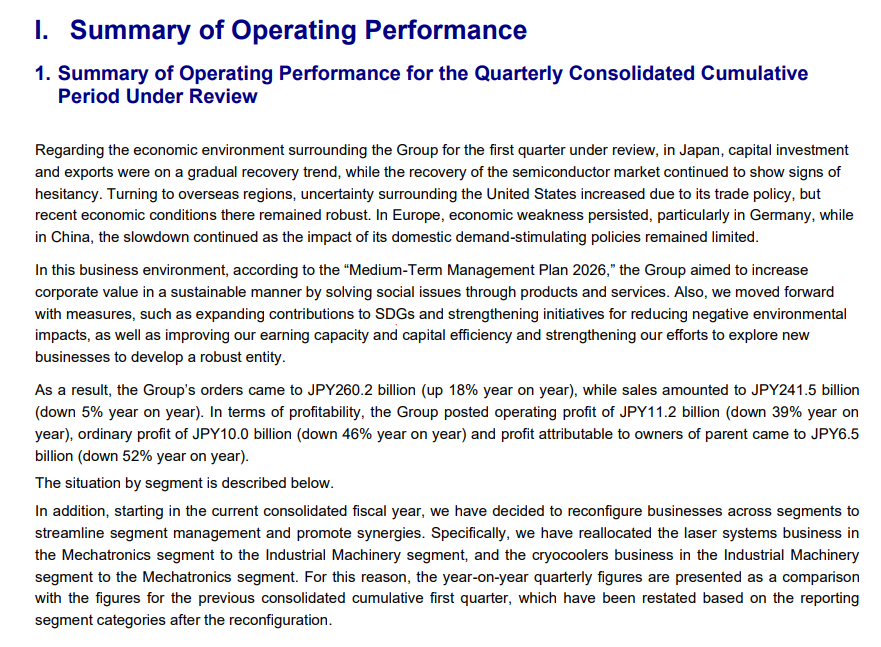
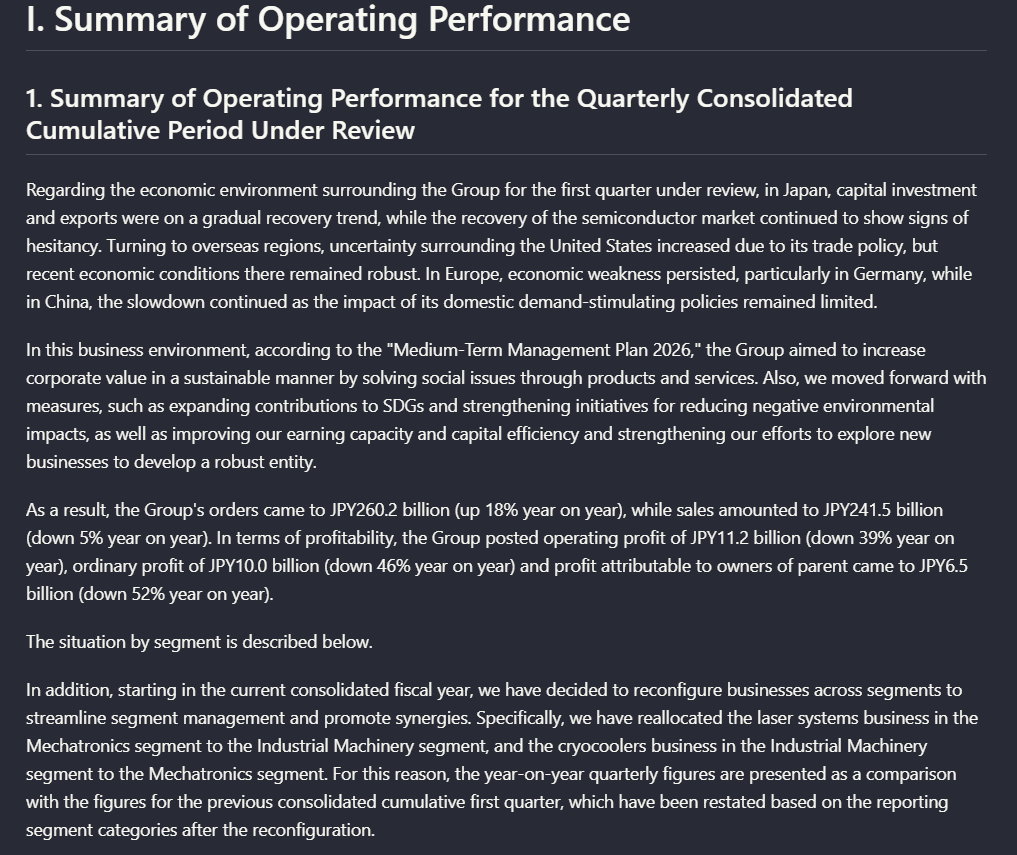
Input used: Input artifact (Image): Source page titled 'I. Summary of Operating Performance' with dense narrative paragraphs. — mistral-ai-financial-pdf-page-6-summary-operating-performance.png
Observed output: Output artifact (Image): The parsed output kept the section title, subsection title, and paragraph order readable, so this narrative page remained usable as structured markdown text. — mistral-ai-financial-pdf-parsed-operating-performance.png
Input artifact: Input artifact (Image): Source page titled 'I. Summary of Operating Performance' with dense narrative paragraphs. — mistral-ai-financial-pdf-page-6-summary-operating-performance.png
Output artifact: Output artifact (Image): The parsed output kept the section title, subsection title, and paragraph order readable, so this narrative page remained usable as structured markdown text. — mistral-ai-financial-pdf-parsed-operating-performance.png
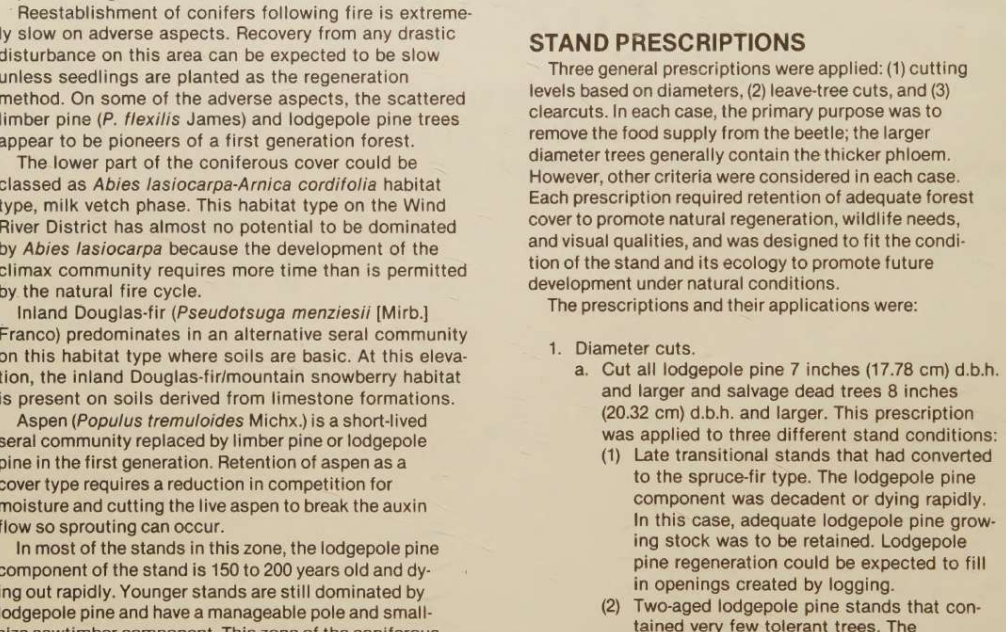
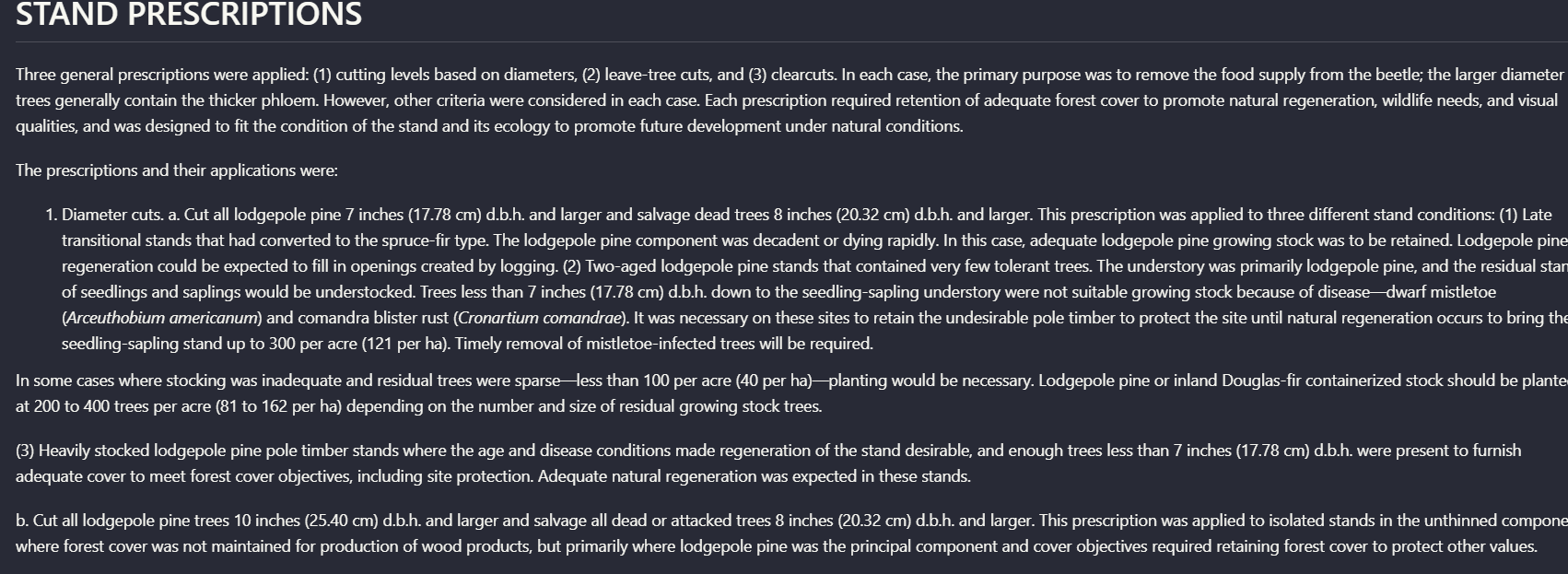
Observed output: Output artifact (Image): Despite the scanned multi-column source, Mistral kept the section heading attached to the explanatory paragraphs and preserved the numbered prescription flow in — mistral-ai-parsed-stand-prescriptions-hierarchy.png
Output artifact: Output artifact (Image): Despite the scanned multi-column source, Mistral kept the section heading attached to the explanatory paragraphs and preserved the numbered prescription flow in — mistral-ai-parsed-stand-prescriptions-hierarchy.png
What changed: Image transformed into Image
Test case: Image → Image
Input type: Image
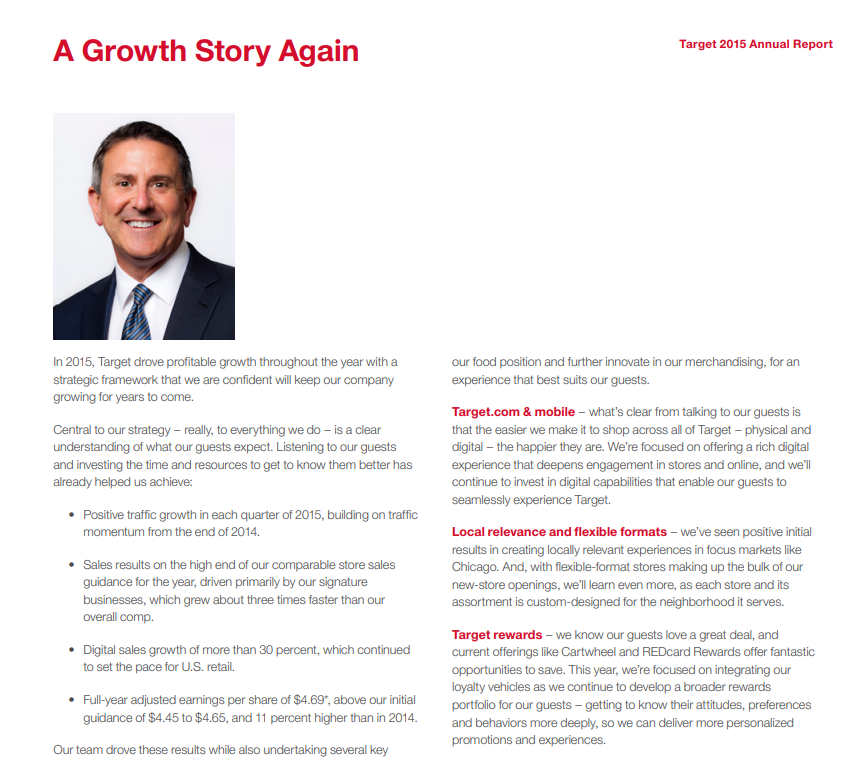
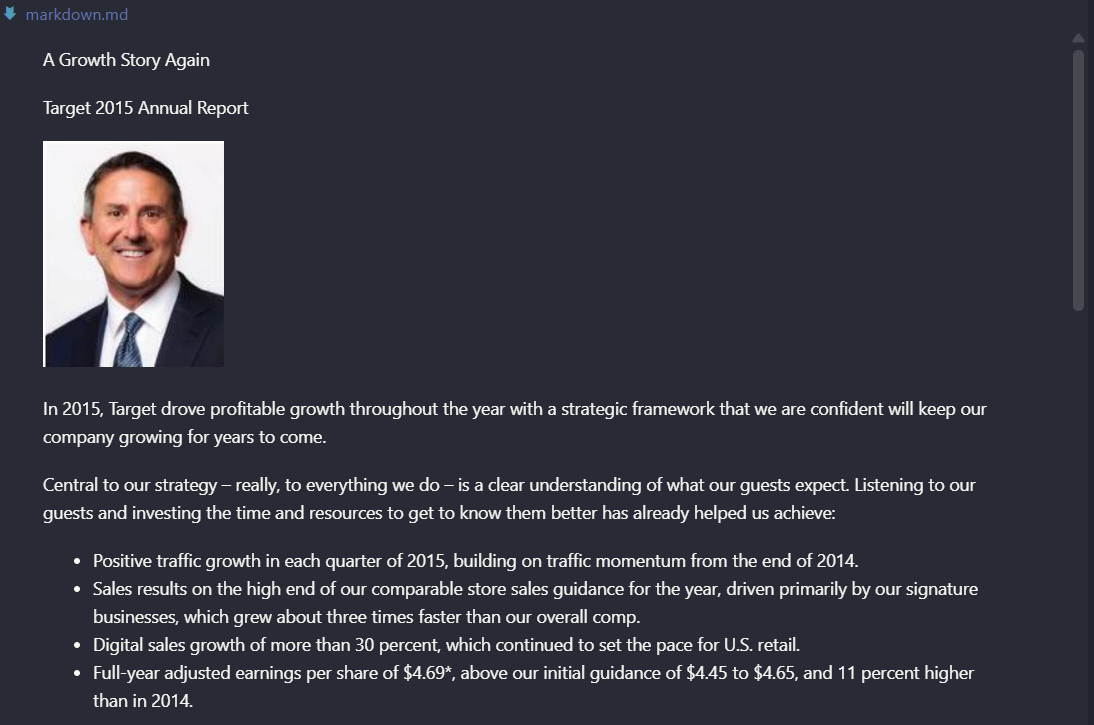
Input used: Input artifact (Image): Hybrid-report page titled 'A Growth Story Again' with title text, body copy, and a bullet-like list of growth outcomes. — hybrid_earningspdf_page.png
Observed output: Output artifact (Image): The content was recovered, but the hierarchy was only partially reconstructed: the page title and paragraphs survived, while deeper structure was flattened comp — mistral-ai-target-annual-report-markdown-viewer.png
Input artifact: Input artifact (Image): Hybrid-report page titled 'A Growth Story Again' with title text, body copy, and a bullet-like list of growth outcomes. — hybrid_earningspdf_page.png
Output artifact: Output artifact (Image): The content was recovered, but the hierarchy was only partially reconstructed: the page title and paragraphs survived, while deeper structure was flattened comp — mistral-ai-target-annual-report-markdown-viewer.png
What changed: Image transformed into Image
Test case: Image → Image
Input type: Image
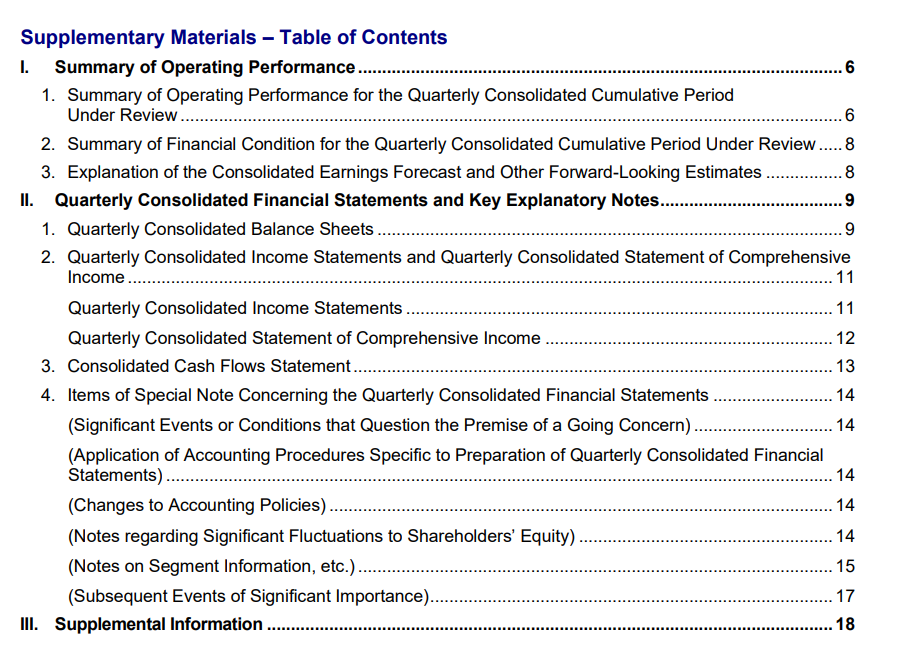
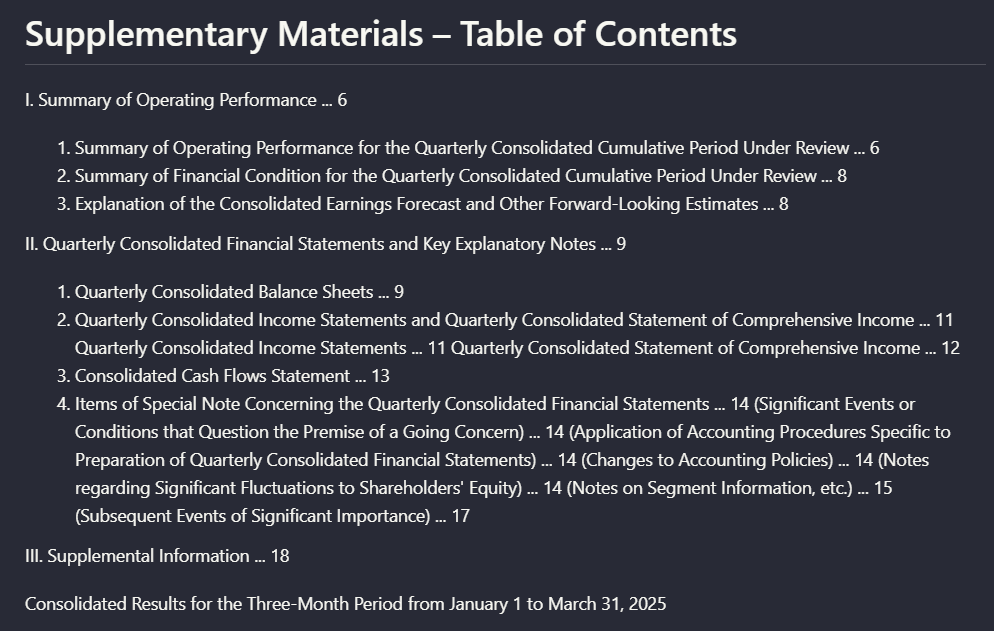
Input used: Input artifact (Image): Financial report table of contents with Roman-numeral sections, nested subsections, and page numbers. — financialpdf_toc.png
Observed output: Output artifact (Image): The TOC entries were extracted as text, but the original navigational nesting was flattened, so the output no longer preserved a clear table-of-contents hierarc — mistral-ai-supplementary-materials-table-of-contents-2.png
Input artifact: Input artifact (Image): Financial report table of contents with Roman-numeral sections, nested subsections, and page numbers. — financialpdf_toc.png
Output artifact: Output artifact (Image): The TOC entries were extracted as text, but the original navigational nesting was flattened, so the output no longer preserved a clear table-of-contents hierarc — mistral-ai-supplementary-materials-table-of-contents-2.png
What changed: Image transformed into Image
Why it matters / Conclusion: Mistral AI is good at keeping pages readable and in order, but it is not the best choice when exact heading hierarchy and navigation structure need to survive conversion.
Mistral AI generally kept headings attached to their paragraphs and preserved reading flow across native and scanned pages. The capability was exercised on a hybrid annual report section, a long narrative page from the financial report, a scanned multi-column research-paper section, a visually rich annual-report page, and the financial report's table of contents.
INPUT
Target annual-report page with four section headings: Competition, Intellectual Property, Geographic Information, and Available Information, each followed by a paragraph.
↓→
image
Mistral preserved the four section headings as distinct blocks with their associated paragraphs underneath, keeping the main reading order intact on this hybrid report page.
image
Source page titled 'I. Summary of Operating Performance' with dense narrative paragraphs.
↓→
image
The parsed output kept the section title, subsection title, and paragraph order readable, so this narrative page remained usable as structured markdown text.
INPUT
Scanned two-column research-paper section headed 'STAND PRESCRIPTIONS' with explanatory prose, numbered items, and subpoints.
↓→
image
Despite the scanned multi-column source, Mistral kept the section heading attached to the explanatory paragraphs and preserved the numbered prescription flow into readable text.
INPUT
Hybrid-report page titled 'A Growth Story Again' with title text, body copy, and a bullet-like list of growth outcomes.
↓→
image
The content was recovered, but the hierarchy was only partially reconstructed: the page title and paragraphs survived, while deeper structure was flattened compared with the source layout.
INPUT
Financial report table of contents with Roman-numeral sections, nested subsections, and page numbers.
↓→
image
The TOC entries were extracted as text, but the original navigational nesting was flattened, so the output no longer preserved a clear table-of-contents hierarchy.
Bottom Line
Mistral AI is good at keeping pages readable and in order, but it is not the best choice when exact heading hierarchy and navigation structure need to survive conversion.
Table reconstruction
Good on regular tables; weaker on nested header semantics.
▾
Test Summary
Feature tested: Table reconstruction
Result: Partial — Good on regular tables; weaker on nested header semantics.
Feature tested: Table reconstruction
Result: Partial
Verdict: Good on regular tables; weaker on nested header semantics.
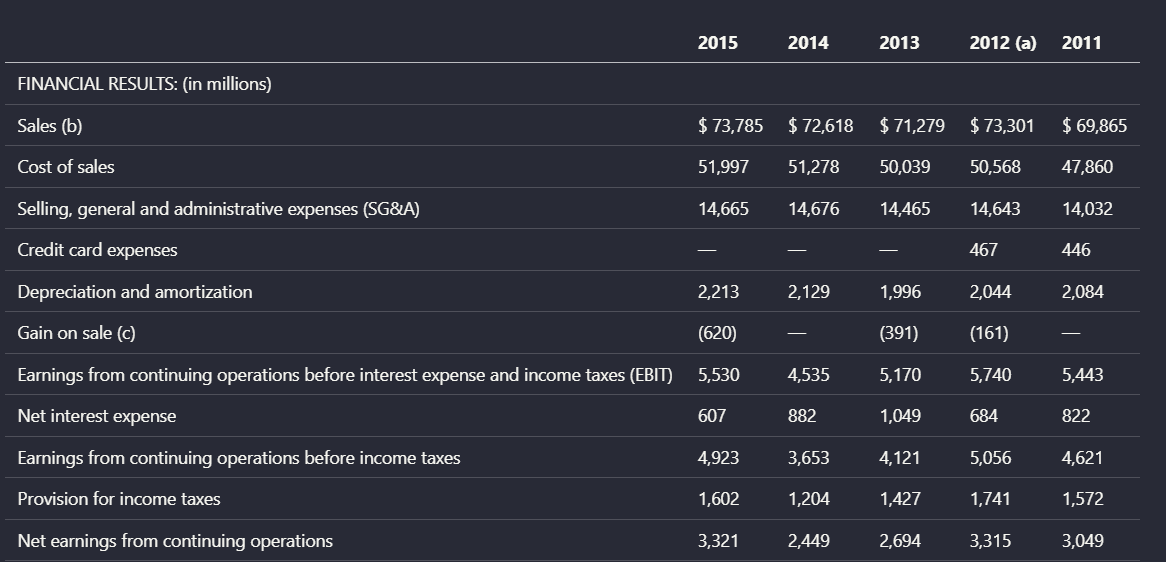
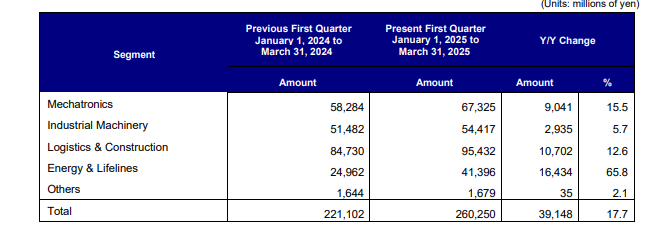
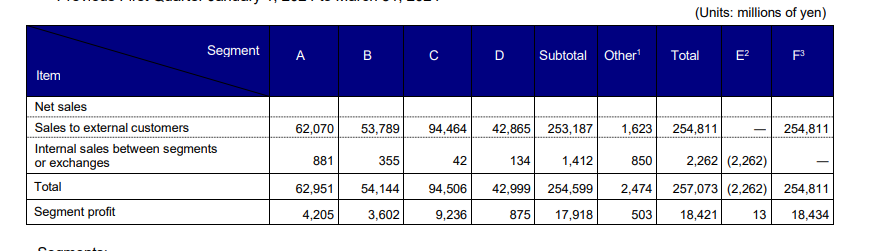
Expected behavior: Mistral AI reconstructed several tables into usable markdown-like layouts, especially when the row and column logic was straightforward. It was tested on a Target financial summary table, a segment comparison table from the financial report, a more complex multi-level segment table, and a scanned results table with before/after measurement columns.
Test case: Image → Image
Input type: Image
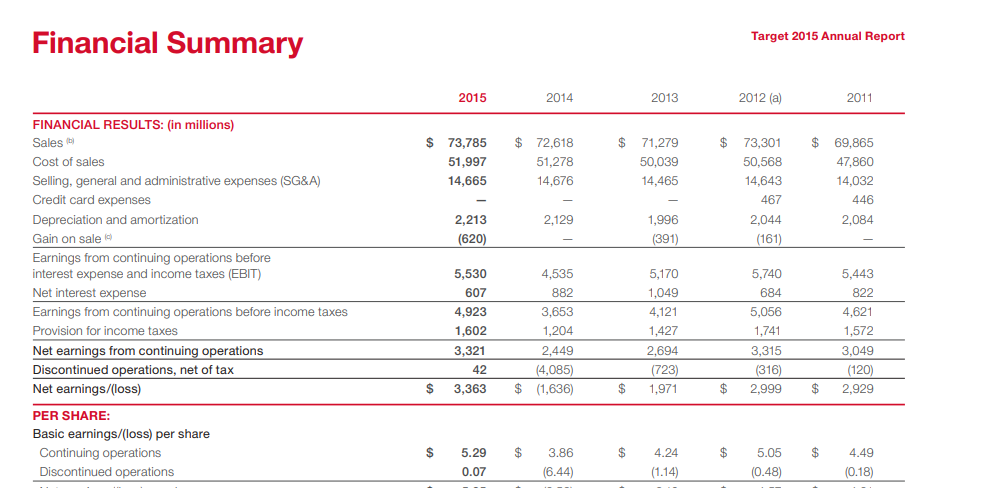
Input used: Input artifact (Image): Target 2015 Annual Report 'Financial Summary' table with year columns 2015 through 2011 and multiple financial-result rows. — landing-ai-target-annual-report-financial-summary-table-2.png
Observed output: Output artifact (Image): Mistral reconstructed the financial summary into a readable table with the year columns and row labels aligned, preserving the relationship between metrics like — mistralai_hybrid_earnings_pdf_parsed_table.png
Input artifact: Input artifact (Image): Target 2015 Annual Report 'Financial Summary' table with year columns 2015 through 2011 and multiple financial-result rows. — landing-ai-target-annual-report-financial-summary-table-2.png
Output artifact: Output artifact (Image): Mistral reconstructed the financial summary into a readable table with the year columns and row labels aligned, preserving the relationship between metrics like — mistralai_hybrid_earnings_pdf_parsed_table.png
What changed: Image transformed into Image
Test case: Image → Image
Input type: Image
Input used: Input artifact (Image): Segment 'Orders Received' table with prior and present quarter values plus year-over-year change columns. — landing-ai-segment-results-table-2025-first-quarter.png
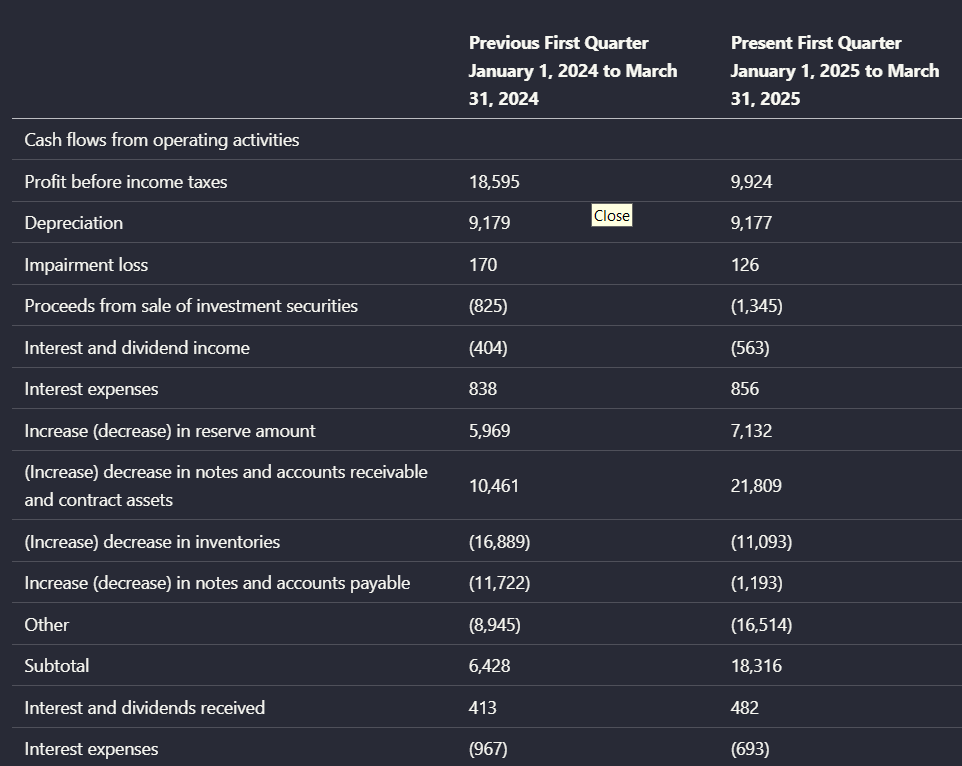
Observed output: Output artifact (Image): The extracted table retained the row labels, period labels, and change columns, making the segment comparison readable without manual re-keying. — mistral-ai-operating-cash-flow-comparison-quarterly-table.png
Input artifact: Input artifact (Image): Segment 'Orders Received' table with prior and present quarter values plus year-over-year change columns. — landing-ai-segment-results-table-2025-first-quarter.png
Output artifact: Output artifact (Image): The extracted table retained the row labels, period labels, and change columns, making the segment comparison readable without manual re-keying. — mistral-ai-operating-cash-flow-comparison-quarterly-table.png
What changed: Image transformed into Image
Test case: Image → Image
Input type: Image
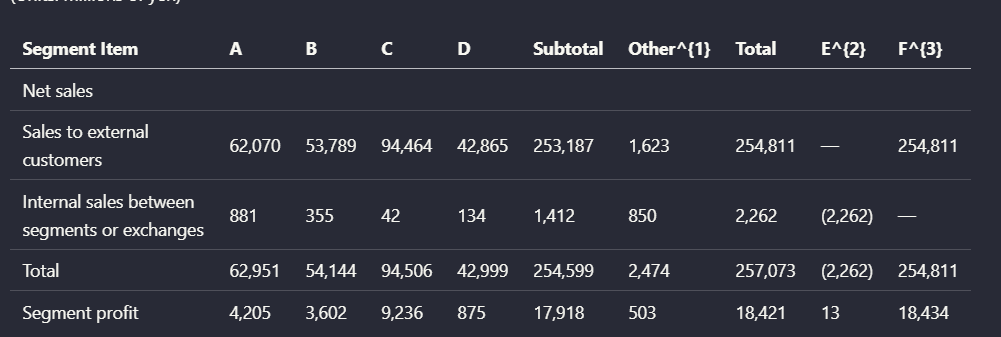
Input used: Input artifact (Image): Financial segment table with nested header levels, subtotal and total columns, and footnote-marked columns E and F. — mistral-ai-financial-segment-table-millions-yen.png
Observed output: Output artifact (Image): Mistral preserved the numbers, but it merged distinct header levels into a flatter structure, weakening the parent-child relationships needed to interpret the c — mistral-ai-parsed-financial-segment-table-dark.png
Input artifact: Input artifact (Image): Financial segment table with nested header levels, subtotal and total columns, and footnote-marked columns E and F. — mistral-ai-financial-segment-table-millions-yen.png
Output artifact: Output artifact (Image): Mistral preserved the numbers, but it merged distinct header levels into a flatter structure, weakening the parent-child relationships needed to interpret the c — mistral-ai-parsed-financial-segment-table-dark.png
What changed: Image transformed into Image
Test case: Image → Image
Input type: Image
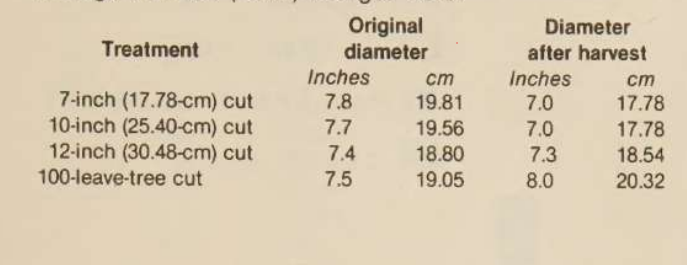
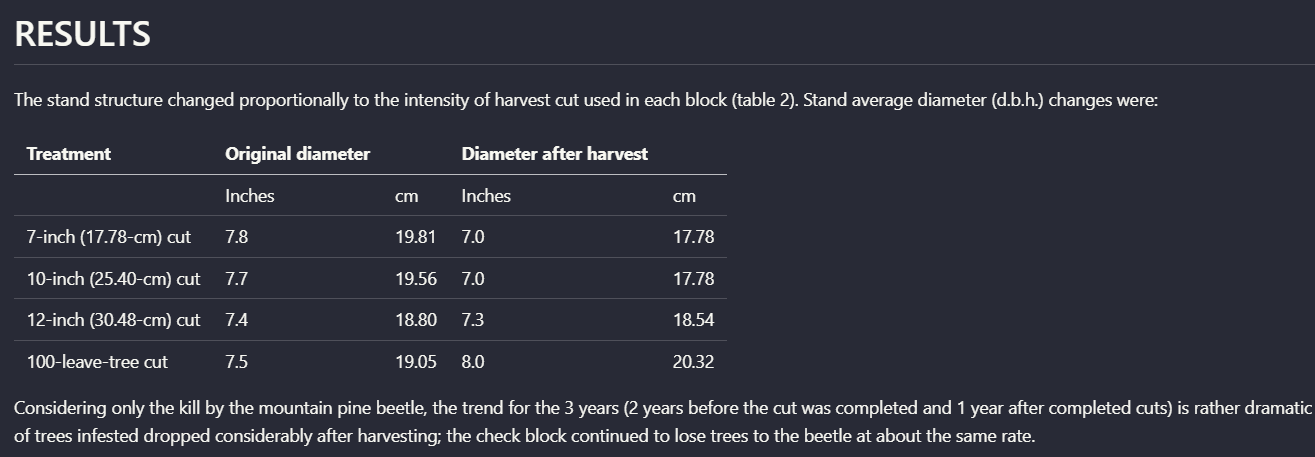
Input used: Input artifact (Image): Scanned results table comparing original diameter and diameter after harvest across four treatments, with inches and centimeters subcolumns. — mistral-ai-scanned-treatment-diameter-table.png
Observed output: Output artifact (Image): On this simpler scanned grid, Mistral kept the treatment rows and the inches/centimeters before-and-after measurements in a usable tabular layout, with only sur — mistral-ai-parsed-results-diameter-table.png
Input artifact: Input artifact (Image): Scanned results table comparing original diameter and diameter after harvest across four treatments, with inches and centimeters subcolumns. — mistral-ai-scanned-treatment-diameter-table.png
Output artifact: Output artifact (Image): On this simpler scanned grid, Mistral kept the treatment rows and the inches/centimeters before-and-after measurements in a usable tabular layout, with only sur — mistral-ai-parsed-results-diameter-table.png
What changed: Image transformed into Image
Why it matters / Conclusion: For regular financial tables and simpler scanned grids, Mistral AI was usable. For tables where nested headers carry important meaning, fidelity dropped.
Mistral AI reconstructed several tables into usable markdown-like layouts, especially when the row and column logic was straightforward. It was tested on a Target financial summary table, a segment comparison table from the financial report, a more complex multi-level segment table, and a scanned results table with before/after measurement columns.
image
Target 2015 Annual Report 'Financial Summary' table with year columns 2015 through 2011 and multiple financial-result rows.
↓→
image
Mistral reconstructed the financial summary into a readable table with the year columns and row labels aligned, preserving the relationship between metrics like Sales, EBIT, and Net earnings and their values.
image
Segment 'Orders Received' table with prior and present quarter values plus year-over-year change columns.
↓→
image
The extracted table retained the row labels, period labels, and change columns, making the segment comparison readable without manual re-keying.
image
Financial segment table with nested header levels, subtotal and total columns, and footnote-marked columns E and F.
↓→
image
Mistral preserved the numbers, but it merged distinct header levels into a flatter structure, weakening the parent-child relationships needed to interpret the column semantics precisely.
image
Scanned results table comparing original diameter and diameter after harvest across four treatments, with inches and centimeters subcolumns.
↓→
image
On this simpler scanned grid, Mistral kept the treatment rows and the inches/centimeters before-and-after measurements in a usable tabular layout, with only surrounding narrative added above and below the table.
Bottom Line
For regular financial tables and simpler scanned grids, Mistral AI was usable. For tables where nested headers carry important meaning, fidelity dropped.
Visual asset retention
Visuals were retained as page-linked assets instead of being dropped.
▾
Test Summary
Feature tested: Visual asset retention
Result: Passed — Visuals were retained as page-linked assets instead of being dropped.
Feature tested: Visual asset retention
Result: Passed
Verdict: Visuals were retained as page-linked assets instead of being dropped.
Expected behavior: Mistral AI extracted non-text document elements into page-specific assets and kept them associated with the markdown workflow. This was tested on the hybrid earnings report, which included charts and a scanned signature/stamp region, and on the scanned research paper, which included chart content referenced from the surrounding text.
Test case: PDF document → Image
Input type: PDF document
Input used: Input artifact (PDF document): Hybrid earnings report containing charts and a scanned signature or stamp region. — llamaparse-hybrid-earnings-pdf-1.pdf
Observed output: Output artifact (Image): The page-level export for the hybrid report included separate image assets alongside markdown, showing that visuals were not dropped during conversion. — mistral-ai-windows-explorer-page-folder.png
Input artifact: Input artifact (PDF document): Hybrid earnings report containing charts and a scanned signature or stamp region. — llamaparse-hybrid-earnings-pdf-1.pdf
Output artifact: Output artifact (Image): The page-level export for the hybrid report included separate image assets alongside markdown, showing that visuals were not dropped during conversion. — mistral-ai-windows-explorer-page-folder.png
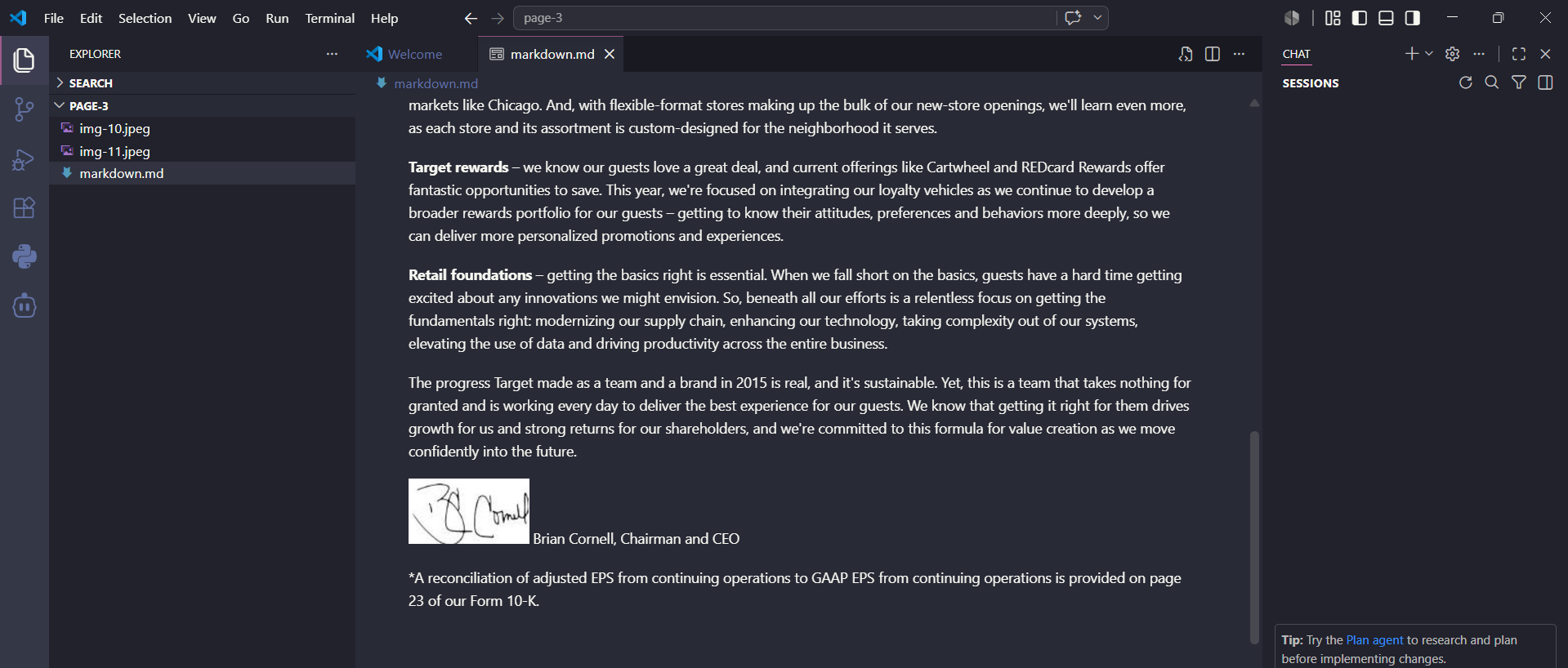
Observed output: Output artifact (Image): The markdown workflow surfaced page content together with extracted page assets, letting report visuals remain associated with the original page rather than dis — mistral-ai-vscode-markdown-embedded-assets.png
Output artifact: Output artifact (Image): The markdown workflow surfaced page content together with extracted page assets, letting report visuals remain associated with the original page rather than dis — mistral-ai-vscode-markdown-embedded-assets.png
What changed: PDF document transformed into Image
Test case: Image → Image
Input type: Image
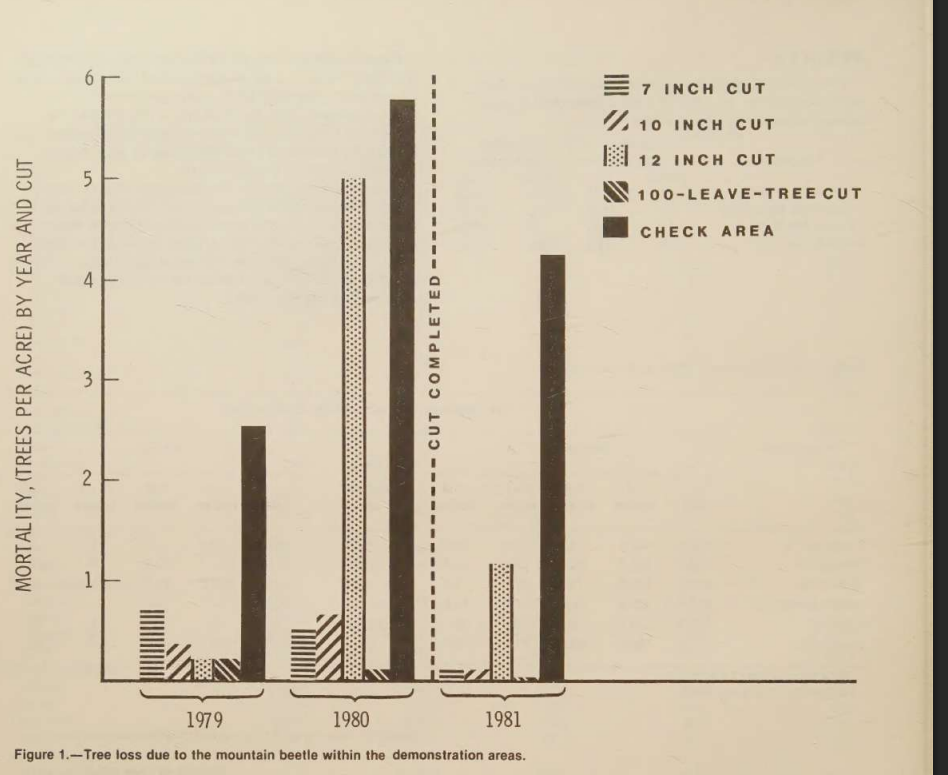
Input used: Input artifact (Image): Scanned research-paper page containing a chart referenced from the DISCUSSION section. — scanned-pdf-grouped-chart.png
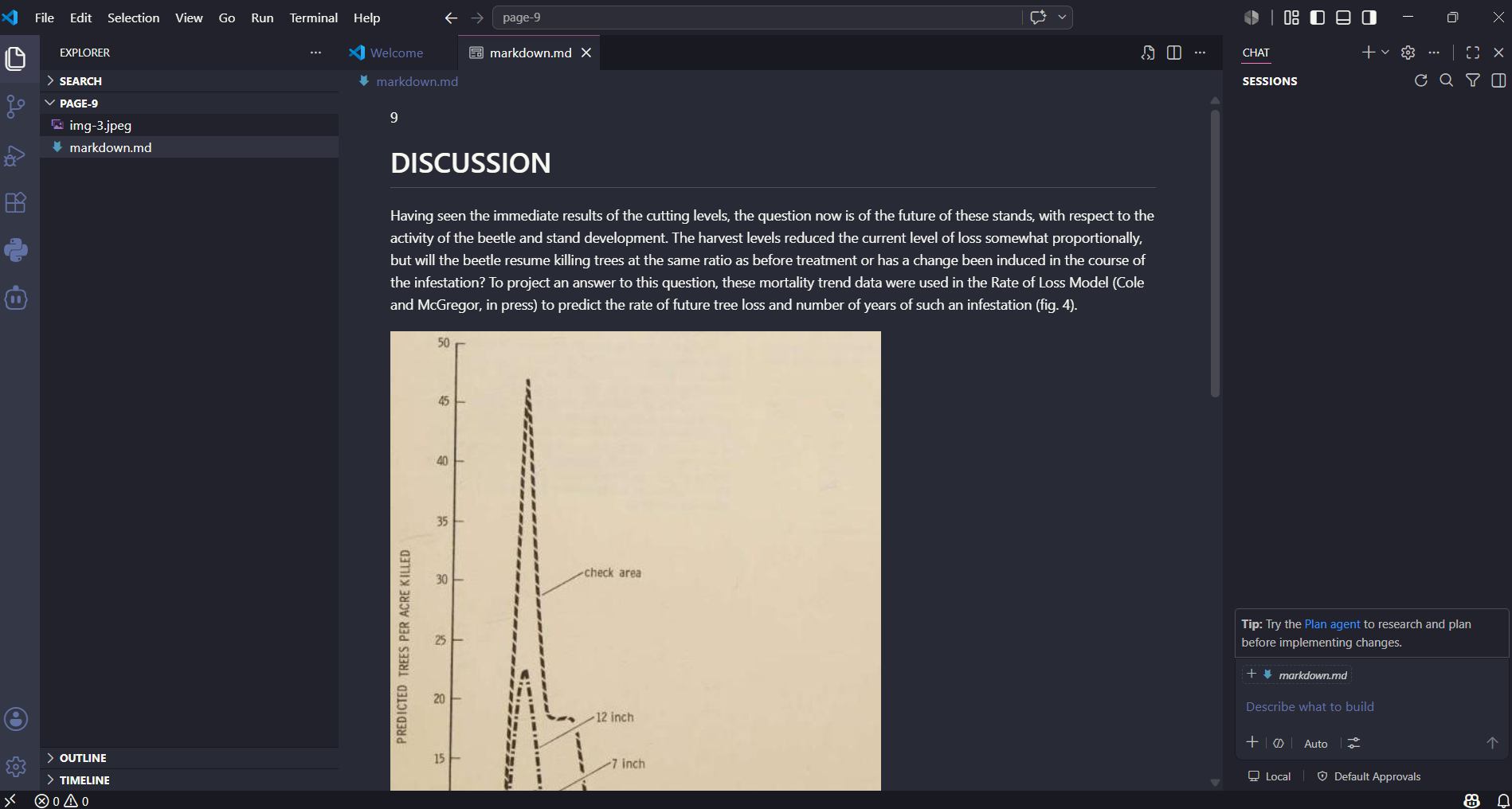
Observed output: Output artifact (Image): The parsed output included an extracted image file and a markdown file in the same workspace, indicating that chart images were retained and linked to their sou — mistral-ai-editor-discussion-with-embedded-chart.png
Input artifact: Input artifact (Image): Scanned research-paper page containing a chart referenced from the DISCUSSION section. — scanned-pdf-grouped-chart.png
Output artifact: Output artifact (Image): The parsed output included an extracted image file and a markdown file in the same workspace, indicating that chart images were retained and linked to their sou — mistral-ai-editor-discussion-with-embedded-chart.png
What changed: Image transformed into Image
Test case: Image → Image
Input type: Image
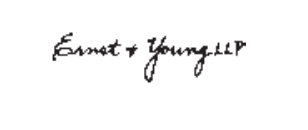
Input used: Input artifact (Image): Blurry footer stamp or signature region from the hybrid earnings report. — blurry_marker.png
Observed output: Output artifact (Image): Mistral recovered the footer stamp text, including 'Minneapolis, Minnesota,' the date, the firm name, and the page number, showing usable OCR even on a blurry f — mistral-ai-document-footer-stamp.png
Input artifact: Input artifact (Image): Blurry footer stamp or signature region from the hybrid earnings report. — blurry_marker.png
Output artifact: Output artifact (Image): Mistral recovered the footer stamp text, including 'Minneapolis, Minnesota,' the date, the firm name, and the page number, showing usable OCR even on a blurry f — mistral-ai-document-footer-stamp.png
What changed: Image transformed into Image
Why it matters / Conclusion: The research supports Mistral AI as a good choice when charts, images, and scanned visual regions need to stay attached to the markdown output instead of being silently omitted.
Mistral AI extracted non-text document elements into page-specific assets and kept them associated with the markdown workflow. This was tested on the hybrid earnings report, which included charts and a scanned signature/stamp region, and on the scanned research paper, which included chart content referenced from the surrounding text.
pdf
llamaparse-hybrid-earnings-pdf-1.pdf
Hybrid earnings report containing charts and a scanned signature or stamp region.
↓→
image
The page-level export for the hybrid report included separate image assets alongside markdown, showing that visuals were not dropped during conversion.
pdf
llamaparse-hybrid-earnings-pdf-1.pdf
Hybrid earnings report markdown view with embedded page assets.
↓→
image
The markdown workflow surfaced page content together with extracted page assets, letting report visuals remain associated with the original page rather than disappearing into plain text.
INPUT
Scanned research-paper page containing a chart referenced from the DISCUSSION section.
↓→
image
The parsed output included an extracted image file and a markdown file in the same workspace, indicating that chart images were retained and linked to their source page.
INPUT
Blurry footer stamp or signature region from the hybrid earnings report.
↓→
image
Mistral recovered the footer stamp text, including 'Minneapolis, Minnesota,' the date, the firm name, and the page number, showing usable OCR even on a blurry footer region.
Bottom Line
The research supports Mistral AI as a good choice when charts, images, and scanned visual regions need to stay attached to the markdown output instead of being silently omitted.
Pricing & Access
TESTED
Mistral API Platform
$0
Limited API credits to test API platform
OCR 3
$2 / 1,000 pages
Is This Right For You?
A side-by-side guide based on our hands-on testing.
✓ Use This If
●You need a hosted API that turns mixed PDFs into usable markdown without manual post-processing.
●You want both consolidated markdown and page-wise output for validation or downstream pipelines.
●Your documents include scanned pages, financial tables, charts, or signature images that basic parsers often drop.
●Readable text recovery and asset retention matter more to you than perfect preservation of every heading or table-header relationship.
✕ Skip This If
●You need consistently faithful heading hierarchy and nested TOC reconstruction across long documents.
●Your downstream workflow depends on exact multi-level table-header semantics, not just readable table content.
●You need multilingual or degraded-scan performance validated before adoption, because this research did not test those scenarios.
Featured in Rankings
Independent rankings where Mistral AI was tested and rated.
Yes. In this research, Mistral successfully processed an 84-page hybrid earnings report containing native text, financial tables, charts, and scanned signature content, and returned downloadable markdown output.
It did both in this research. The output packages included a consolidated markdown file and page-level folders/files, which makes it easier to inspect specific pages or feed the whole document into a pipeline.
Usually well enough to keep sections readable. It preserved section headings and paragraph flow on many pages, including a scanned multi-column section and a financial-report section page. But it was inconsistent: some headings became flatter than the source, and the financial report's table of contents was reduced to flat text instead of preserved as nested navigation.
It performed well on several tables, including a financial summary table from the hybrid annual report, an orders-received segment table from the financial report, and a scanned diameter table from the research paper. Its main weakness was on harder multi-level tables, where it kept the numbers but collapsed distinct header layers and weakened the original column semantics.
Yes. The research found that Mistral extracted page visuals into page-specific folders, preserved a signature image in page markdown, and kept a chart linked from the scanned research paper's DISCUSSION section.
Good enough to recover meaningful text from fully scanned pages and blurry regions. It extracted the title, authors, abstract, and keywords from a scanned USDA research note and also recovered location/date/signer text from a blurry signature/footer region. The trade-off is that some OCR noise remained on the scanned title page.
No. This report covered a hybrid earnings report, a table-heavy financial report, and a scanned research paper, but it did not include multilingual or degraded-scan stress tests.
Banner Preview
How the embed badge will look on your site
Embed HTML
Copy this code to your website source
<a target="_blank" href="https://aidemos.com/tools/mistral-ai?utm_source=mistral-ai_embed" style="width: 250px; height: 80px; border-radius:4px;" width="250" height="80">
<img src="https://aidemos-website-images.s3.amazonaws.com/featured.png" alt="Mistral AI | Featured on AI Demos" style="width: 250px; height: 80px; border-radius:4px;" width="250" height="80">
</a>
Quick Integration Guide
1Copy the HTML code block above.
2Paste it into your site's HTML or CMS editor.
3Banner appears instantly on your page.
4Links back to your tool profile here.
Similar Tools
Similar Tools
Discover more AI tools like Mistral AI to enhance your workflow.
⚡ Built by FutureSmart AI — the team behind AI Demos
Need a custom AI solution for this use case?
If you are looking to build a custom PDF-to-markdown conversion, OCR parsing, or document extraction system for your business or internal workflow, email us at contact@futuresmart.ai.
Found something inaccurate or missing? We try to keep our AI research accurate and useful. If you found outdated information, an issue, or have a suggestion, email us at collaborate@aidemos.com.