Tensorlake handled the mixed-document conversion job well enough for a real ingestion pipeline: it preserved reading order, retained chart data, and extracted readable text from scanned pages. The main weakness in this research was table hierarchy, where multi-level and scanned tables lost header structure or labels. The tested web flow also surfaced markdown as a copyable file rather than a downloadable export.
Walkthrough of Tensorlake's project setup and document-ingestion flow on the hybrid PDF.
In-Depth Review
Our detailed analysis of Tensorlake — features, performance, and real-world testing.
AD
AI Demos Team
Expert Reviewer
Verified Review
Feature-by-Feature Breakdown
Markdown Export
Reliable structure preservation across mixed PDFs.
▾
Test Summary
Feature tested: Markdown Export
Result: Passed — Reliable structure preservation across mixed PDFs.
Feature tested: Markdown Export
Result: Passed
Verdict: Reliable structure preservation across mixed PDFs.
Expected behavior: Converts complex PDFs into copyable markdown while keeping the source’s section order and narrative flow intact. It was exercised on a hybrid earnings report, a table-heavy financial report, and a scanned research paper, where the extracted markdown stayed organized instead of collapsing into a flat blob.
Observed output: Output artifact (Text/code file): The exported markdown preserved the earnings report's heading order and narrative flow. — tensorlake_hybrid_earningspdf_output.md
Output artifact: Output artifact (Text/code file): The exported markdown preserved the earnings report's heading order and narrative flow. — tensorlake_hybrid_earningspdf_output.md
What changed: PDF document transformed into Text/code file
Output artifact: Output artifact (Text/code file): The exported markdown retained the scanned paper's section-level structure across a multicolumn layout. — tensorlake_scannedpdf_output.md
What changed: PDF document transformed into Text/code file
Why it matters / Conclusion: This is the strongest part of Tensorlake: it keeps mixed-document output organized enough to use downstream without immediate cleanup.
Converts complex PDFs into copyable markdown while keeping the source’s section order and narrative flow intact. It was exercised on a hybrid earnings report, a table-heavy financial report, and a scanned research paper, where the extracted markdown stayed organized instead of collapsing into a flat blob.
application/pdf
Hybrid-Earnings-PDF.pdf
↓→
text/markdown
tensorlake_hybrid_earningspdf_output.md
Loading file...
The exported markdown preserved the earnings report's heading order and narrative flow.
application/pdf
Sumitomo Financial PDF.pdf
↓→
text/markdown
tensorlake_financialpdf_output.md
Loading file...
The exported markdown kept the financial report's section transitions and page-level flow.
application/pdf
Scanned Research PDF.pdf
↓→
text/markdown
tensorlake_scannedpdf_output.md
Loading file...
The exported markdown retained the scanned paper's section-level structure across a multicolumn layout.
Bottom Line
This is the strongest part of Tensorlake: it keeps mixed-document output organized enough to use downstream without immediate cleanup.
Table Reconstruction
Good on cleaner tables, unreliable on hierarchical headers.
▾
Test Summary
Feature tested: Table Reconstruction
Result: Partial — Good on cleaner tables, unreliable on hierarchical headers.
Feature tested: Table Reconstruction
Result: Partial
Verdict: Good on cleaner tables, unreliable on hierarchical headers.
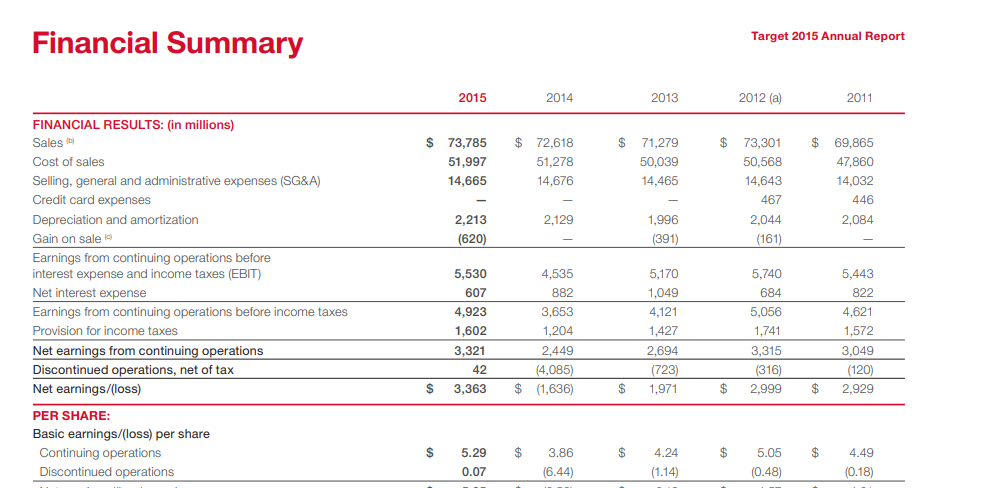
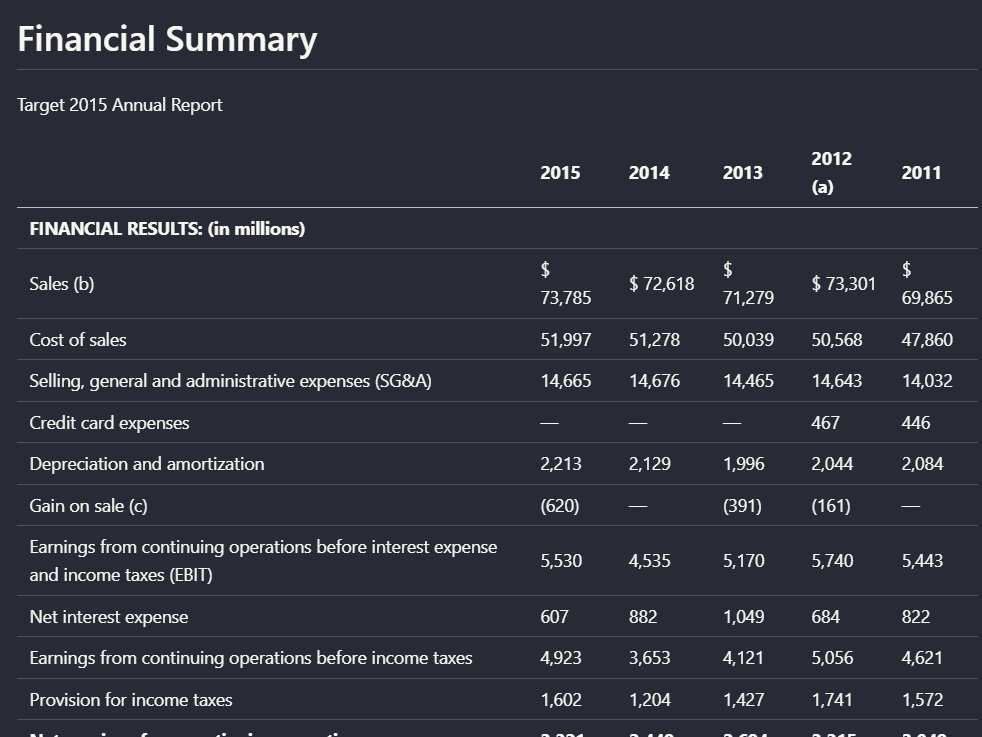
Expected behavior: Reconstructs tables into readable extracted output while preserving row and column relationships. The tested outputs worked on simpler financial tables, but multi-row or hierarchical headers in scanned documents were more error-prone.
Observed output: Output artifact (Image): The financial summary table kept its rows, columns, and values in a readable structure. — tensorlake_hybrid_earningspdf_parsed_table.png
Output artifact: Output artifact (Image): The financial summary table kept its rows, columns, and values in a readable structure. — tensorlake_hybrid_earningspdf_parsed_table.png
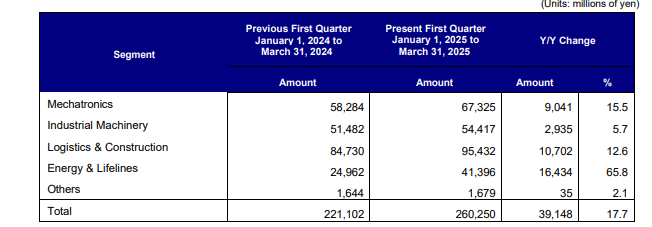
Observed output: Output artifact (Image): The multi-level financial table kept the numbers, but the header hierarchy was not identified cleanly and at least one header label was omitted. — tensorlake_financialpdf_parsed_multilevel_table.png
Output artifact: Output artifact (Image): The multi-level financial table kept the numbers, but the header hierarchy was not identified cleanly and at least one header label was omitted. — tensorlake_financialpdf_parsed_multilevel_table.png
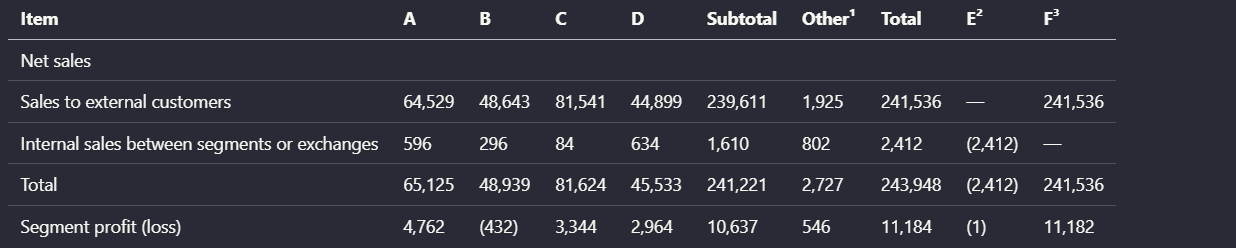
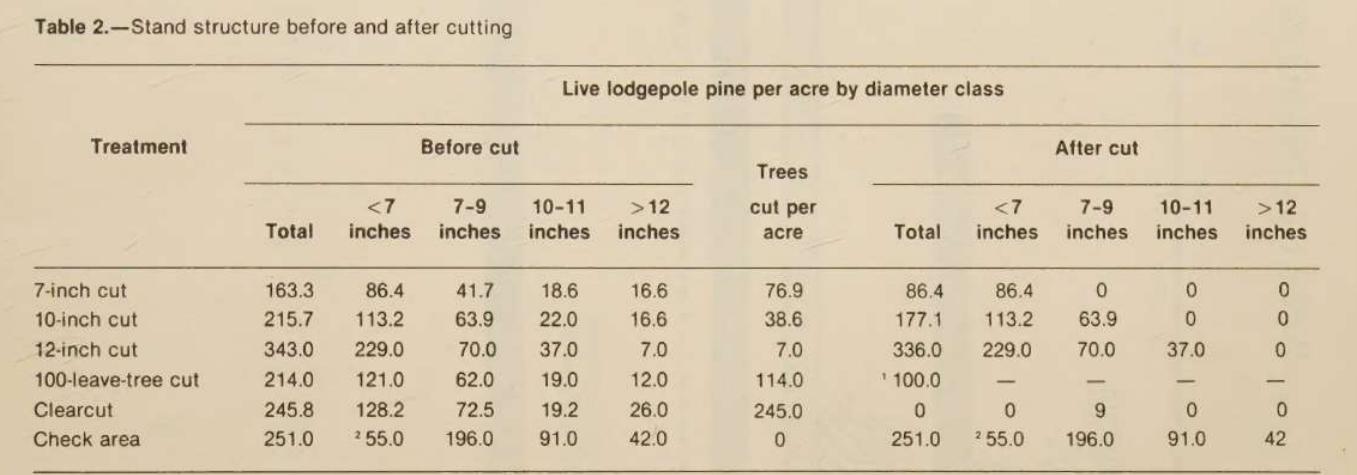
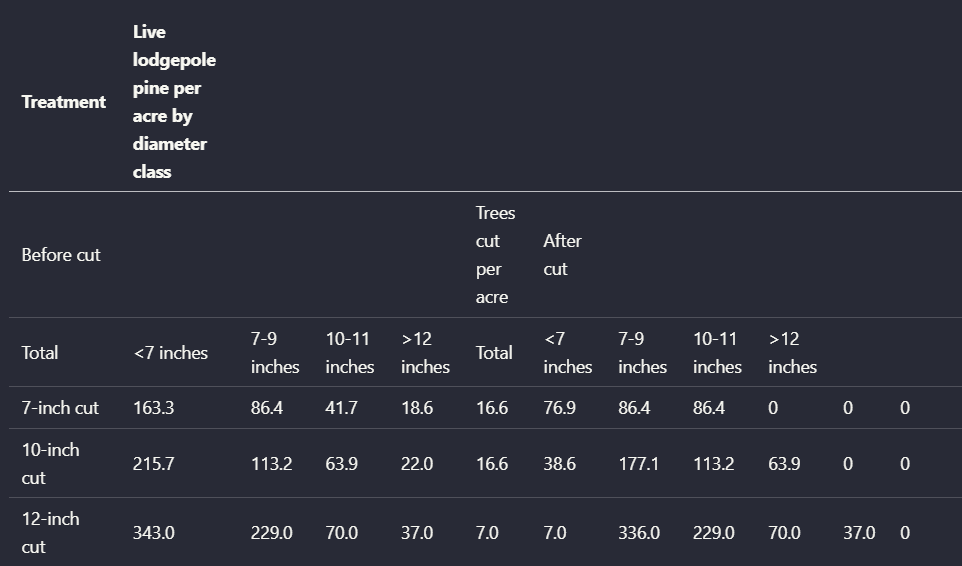
Output artifact: Output artifact (Image): The denser scanned table repeated the same header-misplacement problem. — tensorlake_scannedpdf_parsed_heavy_complexity_table.png
What changed: Image transformed into Image
Why it matters / Conclusion: Solid on simpler financial tables, but not dependable for multi-header or scanned hierarchical tables.
Reconstructs tables into readable extracted output while preserving row and column relationships. The tested outputs worked on simpler financial tables, but multi-row or hierarchical headers in scanned documents were more error-prone.
image/png
↓→
image/png
The financial summary table kept its rows, columns, and values in a readable structure.
image/png
↓→
image/png
The multi-level financial table kept the numbers, but the header hierarchy was not identified cleanly and at least one header label was omitted.
image/png
↓→
image/png
The scanned table showed misplaced column headers and unreliable reconstruction.
image/png
↓→
image/png
The denser scanned table repeated the same header-misplacement problem.
Bottom Line
Solid on simpler financial tables, but not dependable for multi-header or scanned hierarchical tables.
Chart Extraction
Charts are retained as structured output.
▾
Test Summary
Feature tested: Chart Extraction
Result: Passed — Charts are retained as structured output.
Feature tested: Chart Extraction
Result: Passed
Verdict: Charts are retained as structured output.
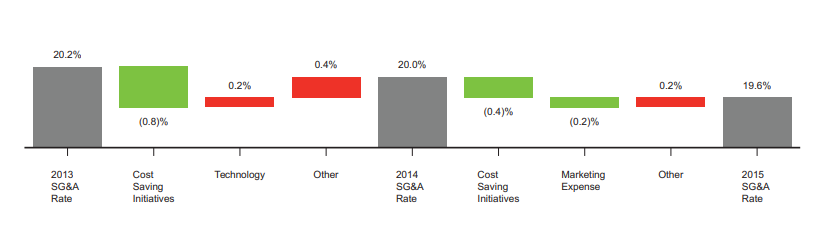
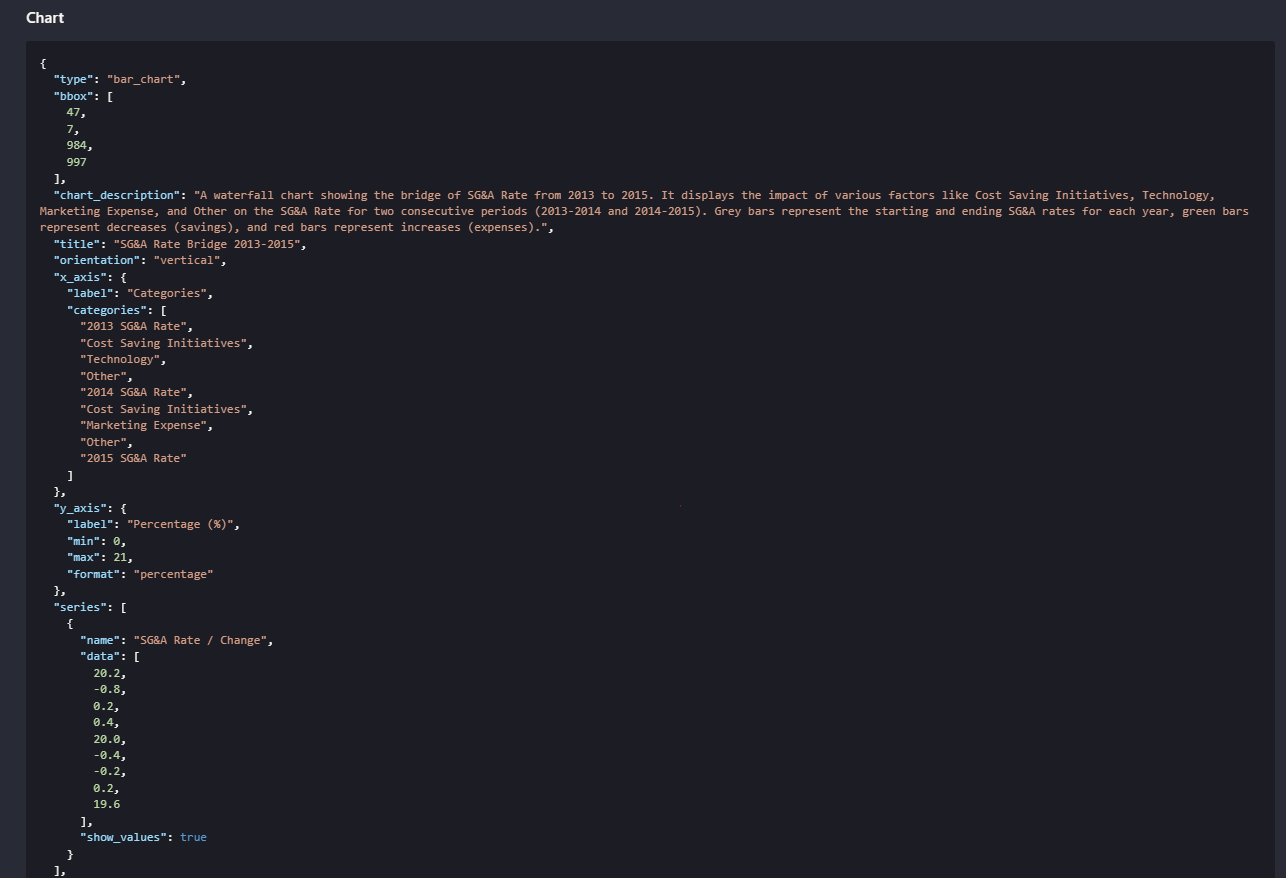
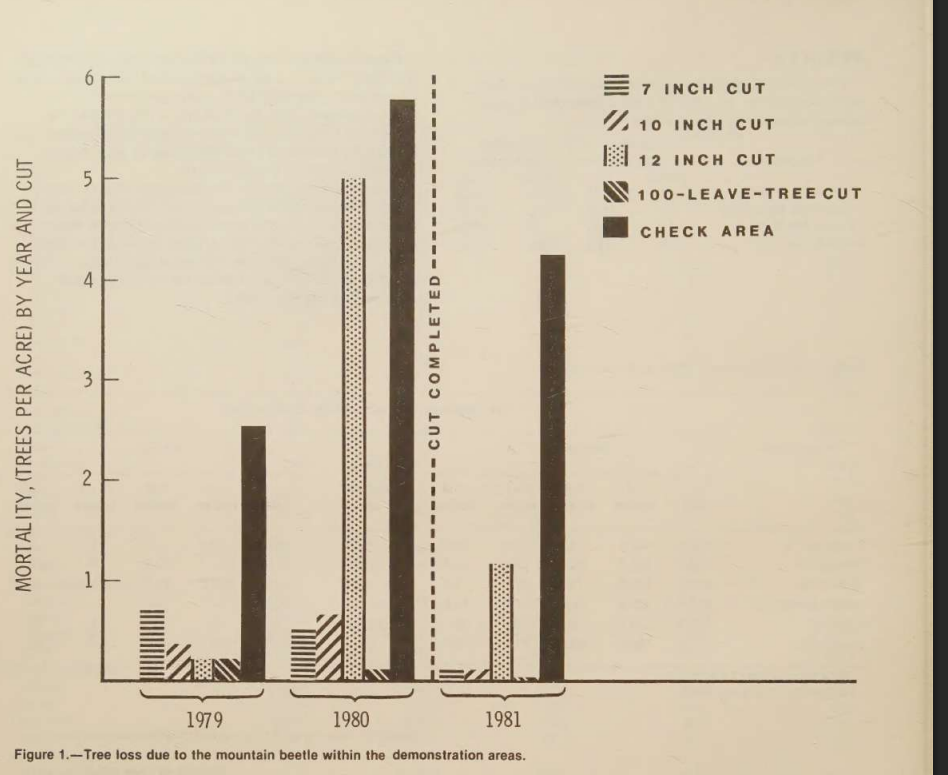
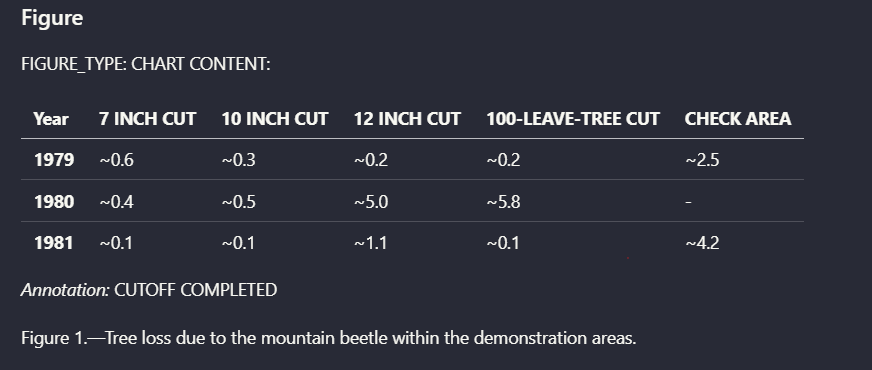
Expected behavior: Turns chart content into structured extracted data instead of dropping the figure. It was exercised on an earnings waterfall chart and a scanned mortality chart, both of which came back as chart-specific representations preserving underlying values.
Observed output: Output artifact (Image): The SG&A bridge was extracted into structured chart metadata with categories and values. — tensorlake_hybrid_earningspdf_parsed_waterfall_chart.png
Output artifact: Output artifact (Image): The SG&A bridge was extracted into structured chart metadata with categories and values. — tensorlake_hybrid_earningspdf_parsed_waterfall_chart.png
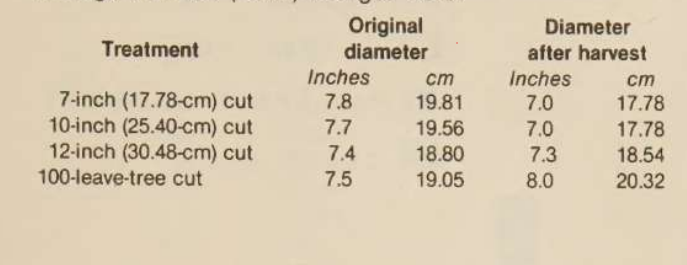
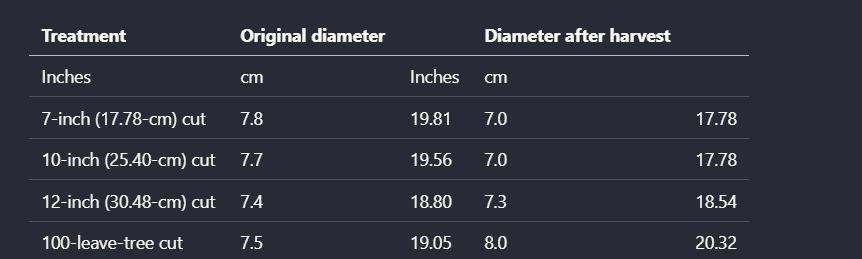
Observed output: Output artifact (Image): The tree-mortality chart was converted into a structured table-like extraction with year-by-treatment values. — tensorlake_scannedpdf_parsed_chart.png
Output artifact: Output artifact (Image): The tree-mortality chart was converted into a structured table-like extraction with year-by-treatment values. — tensorlake_scannedpdf_parsed_chart.png
What changed: Image transformed into Image
Why it matters / Conclusion: Chart content was retained and surfaced as structured data in both chart tests, which is better than dropping the figures outright.
Turns chart content into structured extracted data instead of dropping the figure. It was exercised on an earnings waterfall chart and a scanned mortality chart, both of which came back as chart-specific representations preserving underlying values.
image/png
↓→
image/png
The SG&A bridge was extracted into structured chart metadata with categories and values.
image/png
↓→
image/png
The tree-mortality chart was converted into a structured table-like extraction with year-by-treatment values.
Bottom Line
Chart content was retained and surfaced as structured data in both chart tests, which is better than dropping the figures outright.
Scanned Text OCR and Degraded Text Recovery
Readable on scans, but noisy marks can wobble.
▾
Test Summary
Feature tested: Scanned Text OCR and Degraded Text Recovery
Result: Partial — Readable on scans, but noisy marks can wobble.
Feature tested: Scanned Text OCR and Degraded Text Recovery
Result: Partial
Verdict: Readable on scans, but noisy marks can wobble.
Expected behavior: Extracts readable text from scanned pages and degraded crops, including multicolumn scan pages, signature pages, and blurry stamps. The recovered text was usable, though low-quality marks still introduced character-level errors that may need review.
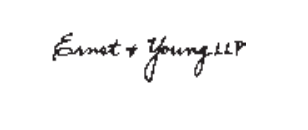
Observed output: Output artifact (Image): The blurry stamp crop recovered the location/date line and firm reference, but introduced visible character errors in the firm name. — tensorlake_hybrid_earningspdf_parsed_blurry_text.png
Output artifact: Output artifact (Image): The blurry stamp crop recovered the location/date line and firm reference, but introduced visible character errors in the firm name. — tensorlake_hybrid_earningspdf_parsed_blurry_text.png
What changed: Image transformed into Image
Why it matters / Conclusion: Useful OCR on scans and degraded crops, but low-quality marks are noisy enough that you should expect manual review.
Extracts readable text from scanned pages and degraded crops, including multicolumn scan pages, signature pages, and blurry stamps. The recovered text was usable, though low-quality marks still introduced character-level errors that may need review.
image/png
↓→
text/markdown
tensorlake_scannedpdf_output.md
Loading file...
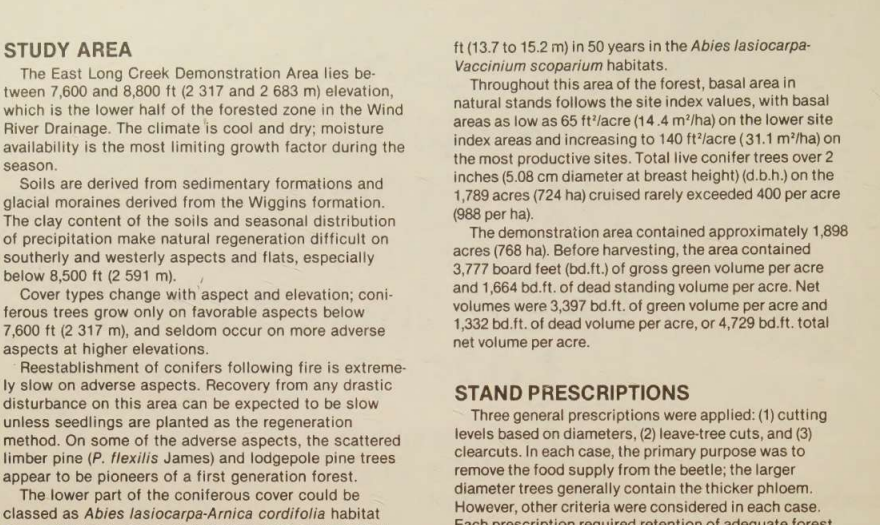
A scanned two-column page was converted into readable markdown text.
image/png
↓→
image/png
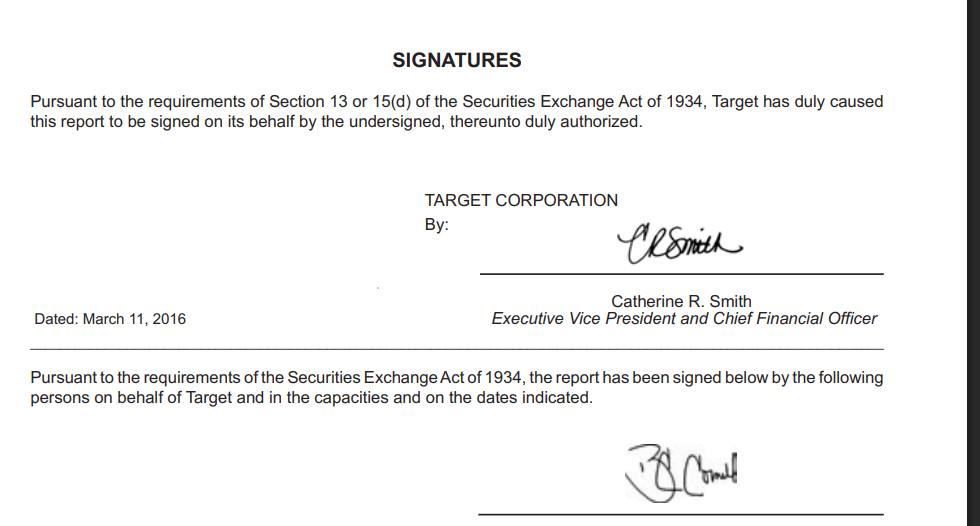
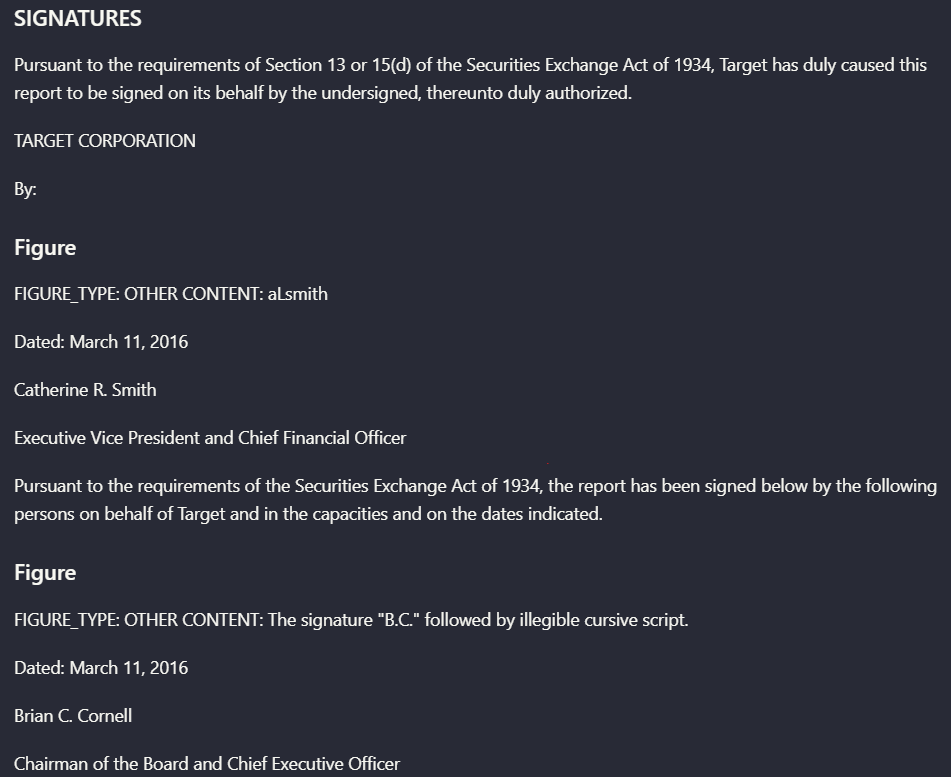
The signatures page surfaced signer names, titles, dates, and figure placeholders for the handwritten marks.
image/png
↓→
image/png
The blurry stamp crop recovered the location/date line and firm reference, but introduced visible character errors in the firm name.
Bottom Line
Useful OCR on scans and degraded crops, but low-quality marks are noisy enough that you should expect manual review.
✓ Use This If
●You need a hosted PDF-to-markdown workflow for mixed digital and scanned documents.
●You want section flow, tables, and charts preserved well enough for downstream review.
●You can work with a copyable markdown output from the tested web/API flow.
✕ Skip This If
●You need dependable reconstruction of multi-level or multi-header tables.
●You need guaranteed downloadable exports from the tested web interface.
●You need robust handwriting-specific recognition rather than general scan OCR.
Featured in Rankings
Independent rankings where Tensorlake was tested and rated.
Yes. The hybrid earnings report mixed narrative pages, financial tables, charts, and a scanned signatures page, and Tensorlake accepted it and returned copyable markdown.
Well in the tested cases. The hybrid earnings report, the table-heavy financial report, and the scanned research paper all kept their section flow and hierarchy in the extracted markdown.
Not reliably. The report says a multi-level financial table lost header hierarchy and at least one header label, and the scanned table tests showed misplaced headers.
Yes. The earnings waterfall chart and the scanned tree-mortality chart were both extracted into structured chart representations rather than being dropped.
It recovered the signer blocks and some low-quality text, but the blurry stamp crop introduced character-level errors. The research did not validate it as a handwriting-specific tool.
The tested web interface showed the markdown as copyable content rather than a downloadable file.
No pricing or plan information was stated in the research.
Banner Preview
How the embed badge will look on your site
Embed HTML
Copy this code to your website source
<a target="_blank" href="https://aidemos.com/tools/tensorlake?utm_source=tensorlake_embed" style="width: 250px; height: 80px; border-radius:4px;" width="250" height="80">
<img src="https://aidemos-website-images.s3.amazonaws.com/featured.png" alt="Tensorlake | Featured on AI Demos" style="width: 250px; height: 80px; border-radius:4px;" width="250" height="80">
</a>
Quick Integration Guide
1Copy the HTML code block above.
2Paste it into your site's HTML or CMS editor.
3Banner appears instantly on your page.
4Links back to your tool profile here.
Similar Tools
Similar Tools
Discover more AI tools like Tensorlake to enhance your workflow.
⚡ Built by FutureSmart AI — the team behind AI Demos
Need a custom AI solution for this use case?
If you are looking to build a custom PDF to markdown conversion, document parsing, or table extraction pipeline for your business or internal workflow, email us at contact@futuresmart.ai.
Found something inaccurate or missing? We try to keep our AI research accurate and useful. If you found outdated information, an issue, or have a suggestion, email us at collaborate@aidemos.com.