Upstage AI handled the API workflow cleanly and did its best work on native financial tables, where row/value placement stayed mostly intact. It also converted charts into text summaries with extracted values instead of dropping them outright. But across the broader use case, it was inconsistent: multi-column pages lost hierarchy, scanned signature pages flattened badly, and chart/table structure became less trustworthy once layouts got harder.
Verdict: Reliable ingestion and export across the three tested PDFs.
Expected behavior: Upstage accepted all three tested documents through an automated API workflow and returned downloadable markdown outputs: an 84-page hybrid earnings report, an 18-page table-heavy financial report, and a scanned research report. The researcher did not need manual correction, UI interaction, or post-processing to obtain the markdown files.
Test case: PDF document → Text/code file
Input type: PDF document
Input used: Input artifact (PDF document): Hybrid earnings report (84 pages) with native text, financial tables, charts, and a scanned signature page. — llamaparse-hybrid-earnings-pdf-1.pdf
Observed output: Output artifact (Text/code file): Upstage accepted the hybrid earnings report and returned a downloadable markdown file through a fully automated API flow. The researcher did not report any manu — upstage-ai-upstage-hybrid-earningspdf-output-1.md
Input artifact: Input artifact (PDF document): Hybrid earnings report (84 pages) with native text, financial tables, charts, and a scanned signature page. — llamaparse-hybrid-earnings-pdf-1.pdf
Output artifact: Output artifact (Text/code file): Upstage accepted the hybrid earnings report and returned a downloadable markdown file through a fully automated API flow. The researcher did not report any manu — upstage-ai-upstage-hybrid-earningspdf-output-1.md
What changed: PDF document transformed into Text/code file
Observed output: Output artifact (Text/code file): Upstage accepted the table-heavy financial PDF and exported a markdown file directly, matching the report's requirement for programmatic markdown output. — upstage-ai-upstage-financialpdf-parsed.md
Output artifact: Output artifact (Text/code file): Upstage accepted the table-heavy financial PDF and exported a markdown file directly, matching the report's requirement for programmatic markdown output. — upstage-ai-upstage-financialpdf-parsed.md
What changed: PDF document transformed into Text/code file
Test case: PDF document → Text/code file
Input type: PDF document
Input used: Input artifact (PDF document): Scanned research report used to test OCR and layout handling. — llamaparse-scanned-research-pdf-1.pdf
Observed output: Output artifact (Text/code file): Upstage also processed the scanned research PDF and returned markdown without any manual repair step in the documented workflow. — upstage-ai-upstage-scannedpdf-output.md
Input artifact: Input artifact (PDF document): Scanned research report used to test OCR and layout handling. — llamaparse-scanned-research-pdf-1.pdf
Output artifact: Output artifact (Text/code file): Upstage also processed the scanned research PDF and returned markdown without any manual repair step in the documented workflow. — upstage-ai-upstage-scannedpdf-output.md
What changed: PDF document transformed into Text/code file
Why it matters / Conclusion: If your first question is simply whether the service will accept varied PDFs and give you markdown back through an API, Upstage passed that baseline cleanly in all three tests.
Upstage accepted all three tested documents through an automated API workflow and returned downloadable markdown outputs: an 84-page hybrid earnings report, an 18-page table-heavy financial report, and a scanned research report. The researcher did not need manual correction, UI interaction, or post-processing to obtain the markdown files.
pdf
llamaparse-hybrid-earnings-pdf-1.pdf
Hybrid earnings report (84 pages) with native text, financial tables, charts, and a scanned signature page.
↓→
markdown
upstage-ai-upstage-hybrid-earningspdf-output-1.md
Loading file...
Upstage accepted the hybrid earnings report and returned a downloadable markdown file through a fully automated API flow. The researcher did not report any manual cleanup step to obtain the output.
pdf
llamaparse-sumitomo-financial-pdf-1.pdf
Table-heavy financial report (18 pages).
↓→
markdown
upstage-ai-upstage-financialpdf-parsed.md
Loading file...
Upstage accepted the table-heavy financial PDF and exported a markdown file directly, matching the report's requirement for programmatic markdown output.
pdf
llamaparse-scanned-research-pdf-1.pdf
Scanned research report used to test OCR and layout handling.
↓→
markdown
upstage-ai-upstage-scannedpdf-output.md
Loading file...
Upstage also processed the scanned research PDF and returned markdown without any manual repair step in the documented workflow.
Bottom Line
If your first question is simply whether the service will accept varied PDFs and give you markdown back through an API, Upstage passed that baseline cleanly in all three tests.
Table reconstruction
Strong on cleaner native tables; weaker on harder headers and scanned layouts.
▾
Test Summary
Feature tested: Table reconstruction
Result: Partial — Strong on cleaner native tables; weaker on harder headers and scanned layouts.
Feature tested: Table reconstruction
Result: Partial
Verdict: Strong on cleaner native tables; weaker on harder headers and scanned layouts.
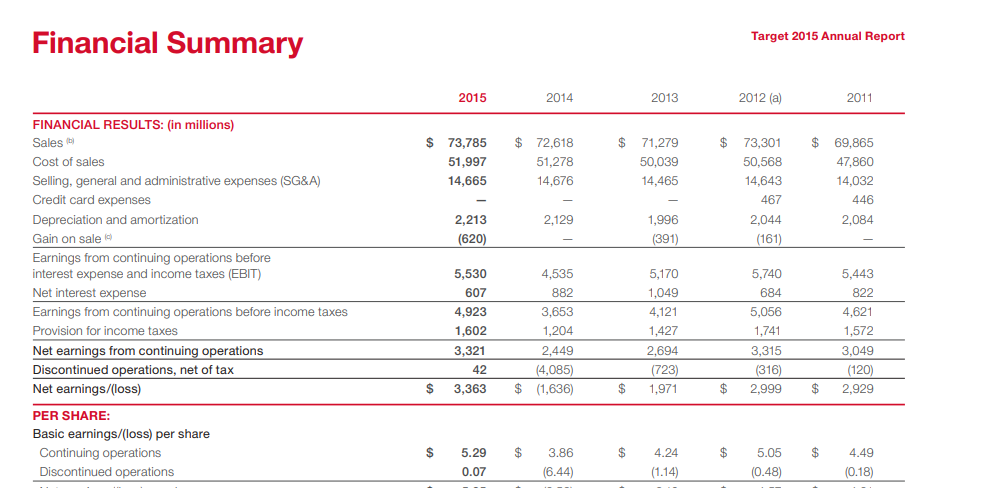
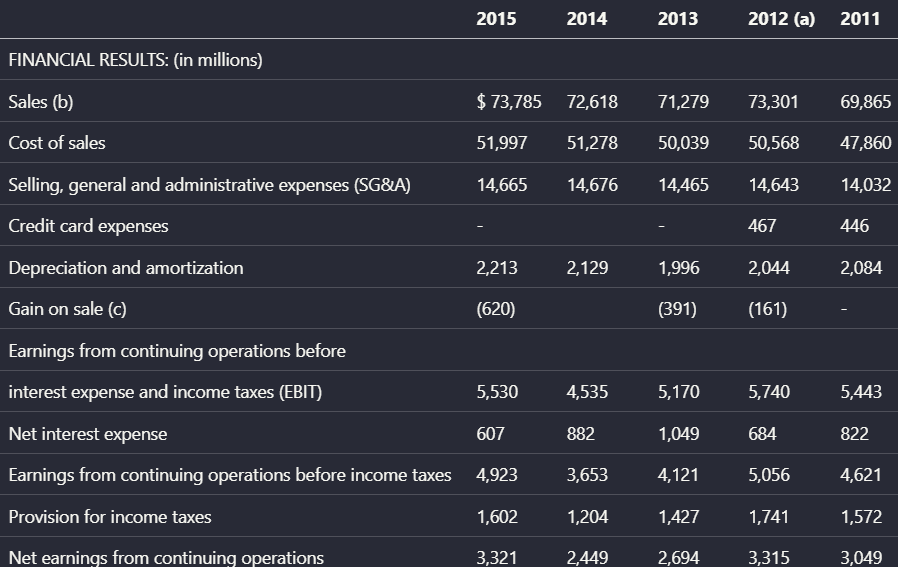
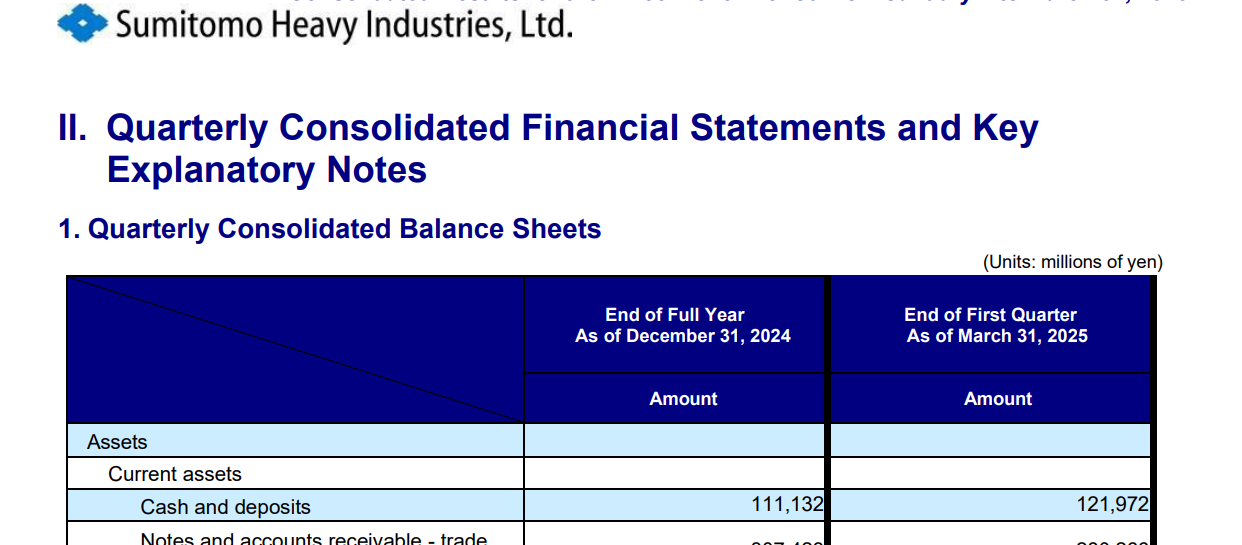
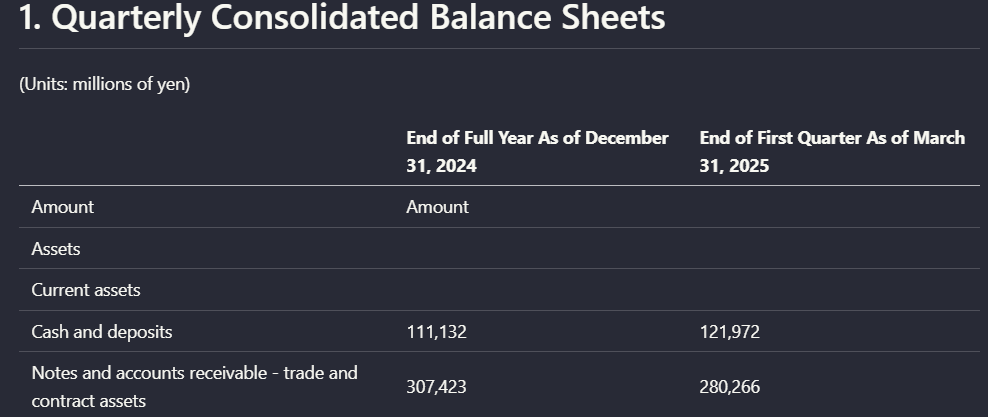
Expected behavior: Upstage reconstructs tables into readable markdown-like structure, but quality depends heavily on source complexity. It preserved the Target financial summary table from the hybrid earnings report with strong row/column fidelity and only minor symbol loss. On the Sumitomo quarterly balance sheet and the scanned forestry table, body values survived better than header structure, and grouped headers became misaligned or duplicated.
Observed output: Output artifact (Image): From the Target financial summary table, Upstage preserved the year columns from 2015 to 2011 and kept line items such as Sales, SG&A, EBIT, taxes, and net earn — upstage-ai-target-2015-financial-results-parsed-table.png
Output artifact: Output artifact (Image): From the Target financial summary table, Upstage preserved the year columns from 2015 to 2011 and kept line items such as Sales, SG&A, EBIT, taxes, and net earn — upstage-ai-target-2015-financial-results-parsed-table.png
Observed output: Output artifact (Image): On the quarterly balance sheet page, the asset rows and numeric values remained visible, but the column headers became misaligned with their corresponding data — upstage-ai-parsed-balance-sheet.png
Output artifact: Output artifact (Image): On the quarterly balance sheet page, the asset rows and numeric values remained visible, but the column headers became misaligned with their corresponding data — upstage-ai-parsed-balance-sheet.png
What changed: Image transformed into Image
Test case: Image → Image
Input type: Image
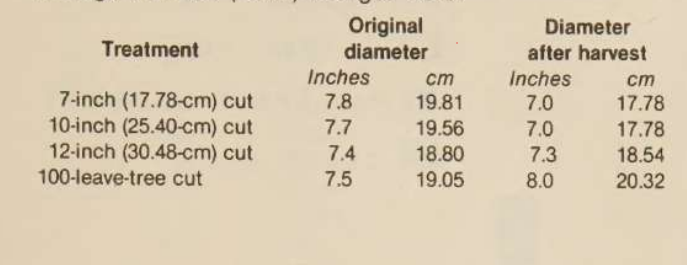
Input used: Input artifact (Image): Scanned treatment table with original diameter and diameter after harvest. — mistral-ai-scanned-treatment-diameter-table.png
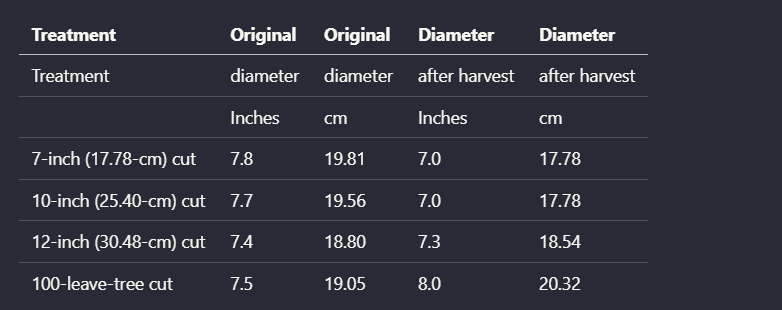
Observed output: Output artifact (Image): On the scanned treatment table, Upstage retained the four treatment rows and their numeric values, but header reconstruction broke down. 'Original diameter' and — upstage-ai-parsed-diameter-treatment-table.png
Input artifact: Input artifact (Image): Scanned treatment table with original diameter and diameter after harvest. — mistral-ai-scanned-treatment-diameter-table.png
Output artifact: Output artifact (Image): On the scanned treatment table, Upstage retained the four treatment rows and their numeric values, but header reconstruction broke down. 'Original diameter' and — upstage-ai-parsed-diameter-treatment-table.png
What changed: Image transformed into Image
Why it matters / Conclusion: Upstage is credible for readable extraction of simpler native financial tables, but once headers get more complex or the source is scanned, the markdown table structure becomes much less dependable.
Upstage reconstructs tables into readable markdown-like structure, but quality depends heavily on source complexity. It preserved the Target financial summary table from the hybrid earnings report with strong row/column fidelity and only minor symbol loss. On the Sumitomo quarterly balance sheet and the scanned forestry table, body values survived better than header structure, and grouped headers became misaligned or duplicated.
From the Target financial summary table, Upstage preserved the year columns from 2015 to 2011 and kept line items such as Sales, SG&A, EBIT, taxes, and net earnings in the correct rows. The researcher noted only minor loss of currency symbols, so the table stayed readable but was not perfectly faithful.
On the quarterly balance sheet page, the asset rows and numeric values remained visible, but the column headers became misaligned with their corresponding data regions. That made the extracted table structurally inconsistent with the source even though much of the content was still present.
image
Scanned treatment table with original diameter and diameter after harvest.
↓→
image
On the scanned treatment table, Upstage retained the four treatment rows and their numeric values, but header reconstruction broke down. 'Original diameter' and 'Diameter after harvest' were duplicated and split awkwardly, so the grouped header structure was not faithfully rebuilt.
Bottom Line
Upstage is credible for readable extraction of simpler native financial tables, but once headers get more complex or the source is scanned, the markdown table structure becomes much less dependable.
Chart and figure extraction to text
Better than dropping charts, but not clean enough to count as faithful chart preservation.
▾
Test Summary
Feature tested: Chart and figure extraction to text
Result: Partial — Better than dropping charts, but not clean enough to count as faithful chart preservation.
Feature tested: Chart and figure extraction to text
Result: Partial
Verdict: Better than dropping charts, but not clean enough to count as faithful chart preservation.
Expected behavior: Upstage converts charts and figures into prose summaries plus extracted values instead of discarding them. In the hybrid earnings report, it turned an SG&A waterfall chart into a narrative explanation and category/value list. In the scanned research report, it summarized a multi-series line chart and produced year-by-year values. The tradeoff is organization: the recovered data was described as raw or poorly structured rather than preserved in a clean, chart-like form.
Test case: Image → Image
Input type: Image
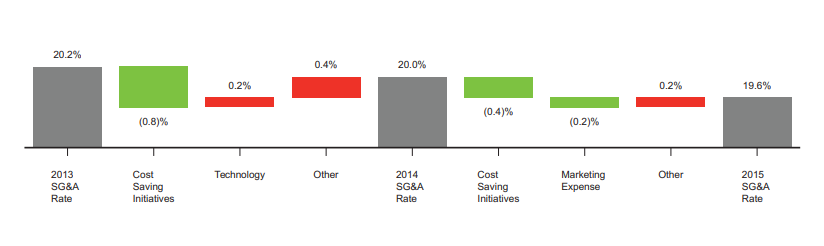
Input used: Input artifact (Image): SG&A rate waterfall chart from the hybrid earnings report. — llamaparse-sga-rate-waterfall-chart-1.png
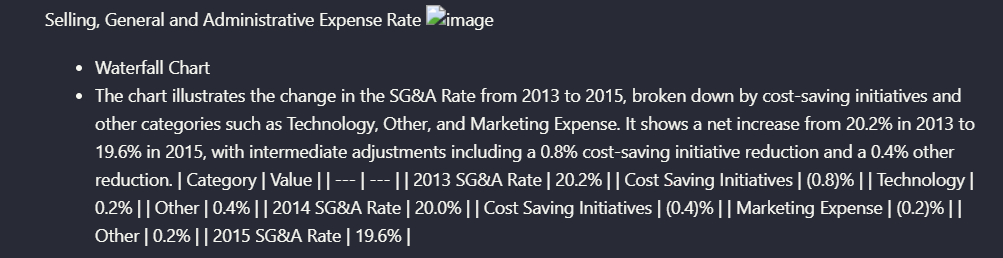
Observed output: Output artifact (Image): For the SG&A waterfall chart, Upstage generated a prose description and listed category/value pairs from 2013 to 2015 instead of omitting the figure. The resear — upstage-ai-sgaa-rate-waterfall-text-description.png
Input artifact: Input artifact (Image): SG&A rate waterfall chart from the hybrid earnings report. — llamaparse-sga-rate-waterfall-chart-1.png
Output artifact: Output artifact (Image): For the SG&A waterfall chart, Upstage generated a prose description and listed category/value pairs from 2013 to 2015 instead of omitting the figure. The resear — upstage-ai-sgaa-rate-waterfall-text-description.png
What changed: Image transformed into Image
Test case: Image → Image
Input type: Image
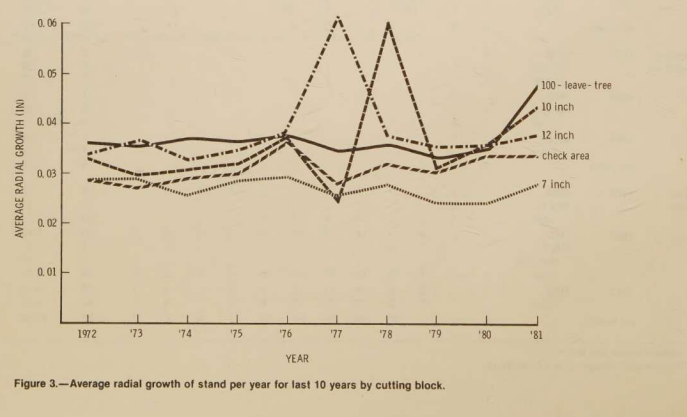
Input used: Input artifact (Image): Scanned Figure 3 line chart showing average radial growth by year. — upstage-ai-figure-3-average-radial-growth-line-chart.png
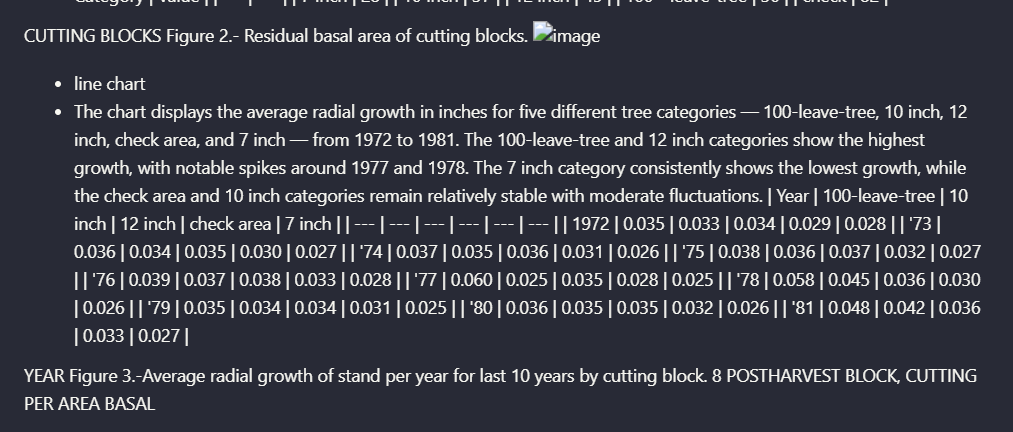
Observed output: Output artifact (Image): For the scanned line chart, Upstage produced a chart summary and a year-by-year value table for five series from 1972 to 1981. The figure content was therefore — upstage-ai-parsed-figure-3-radial-growth-summary.png
Input artifact: Input artifact (Image): Scanned Figure 3 line chart showing average radial growth by year. — upstage-ai-figure-3-average-radial-growth-line-chart.png
Output artifact: Output artifact (Image): For the scanned line chart, Upstage produced a chart summary and a year-by-year value table for five series from 1972 to 1981. The figure content was therefore — upstage-ai-parsed-figure-3-radial-growth-summary.png
What changed: Image transformed into Image
Why it matters / Conclusion: Upstage does retain chart information in text form, which is better than a silent drop, but the output is still too loosely structured for users who need faithful markdown representations of figures.
Upstage converts charts and figures into prose summaries plus extracted values instead of discarding them. In the hybrid earnings report, it turned an SG&A waterfall chart into a narrative explanation and category/value list. In the scanned research report, it summarized a multi-series line chart and produced year-by-year values. The tradeoff is organization: the recovered data was described as raw or poorly structured rather than preserved in a clean, chart-like form.
image
SG&A rate waterfall chart from the hybrid earnings report.
↓→
image
For the SG&A waterfall chart, Upstage generated a prose description and listed category/value pairs from 2013 to 2015 instead of omitting the figure. The researcher still judged the result incomplete because the values were not returned in a clean structured form that preserved the chart's original organization.
image
Scanned Figure 3 line chart showing average radial growth by year.
↓→
image
For the scanned line chart, Upstage produced a chart summary and a year-by-year value table for five series from 1972 to 1981. The figure content was therefore recoverable, but it came back as raw delimiter-separated data and even included stray text from another figure title, which hurt interpretability.
Bottom Line
Upstage does retain chart information in text form, which is better than a silent drop, but the output is still too loosely structured for users who need faithful markdown representations of figures.
Reading order and document hierarchy preservation
Inconsistent on digital sections and weak on multi-column pages.
▾
Test Summary
Feature tested: Reading order and document hierarchy preservation
Result: Failed — Inconsistent on digital sections and weak on multi-column pages.
Feature tested: Reading order and document hierarchy preservation
Result: Failed
Verdict: Inconsistent on digital sections and weak on multi-column pages.
Expected behavior: Upstage preserved basic narrative flow on at least one straightforward digital section, but it struggled to keep hierarchy and navigation intact on harder layouts. The Mechatronics/Industrial Machinery section from the Sumitomo report remained readable with subsection ordering preserved. By contrast, the hybrid earnings report's two-column strategy page blurred headings into surrounding prose, the operating-performance page lost clear heading distinction, and the researcher reported paragraph segmentation and reading-order breakdown on the scanned multi-column research paper.
Test case: Image → Image
Input type: Image
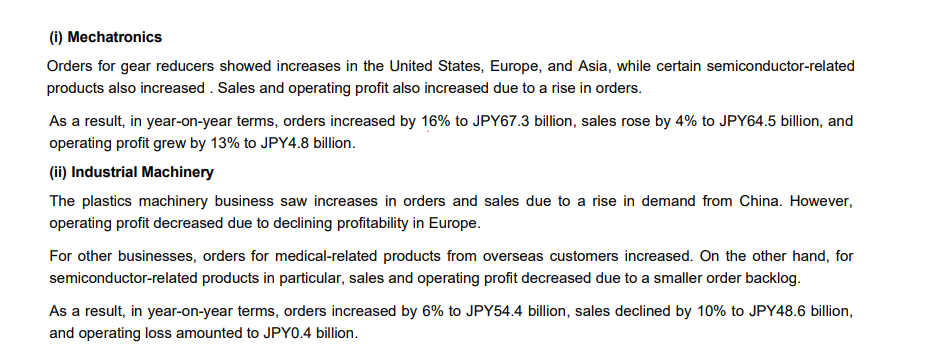
Input used: Input artifact (Image): Numbered Mechatronics / Industrial Machinery section from the financial report. — upstage-ai-financial-section-bulletins-mechatronics-industrial-machinery.png
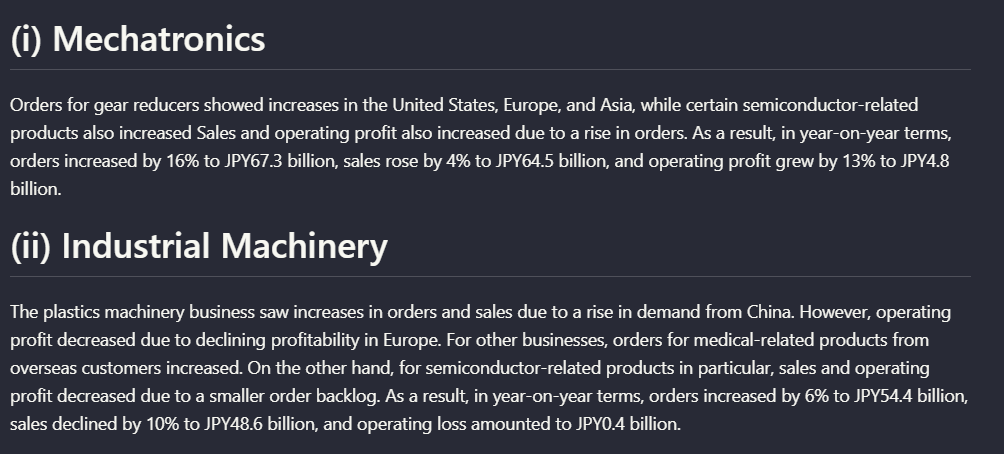
Observed output: Output artifact (Image): On the Mechatronics / Industrial Machinery section, Upstage kept the numbered subsection headings and paragraph flow in the same general order as the source, so — upstage-ai-parsed-financial-mechatronics-industrial-machinery-dark.png
Input artifact: Input artifact (Image): Numbered Mechatronics / Industrial Machinery section from the financial report. — upstage-ai-financial-section-bulletins-mechatronics-industrial-machinery.png
Output artifact: Output artifact (Image): On the Mechatronics / Industrial Machinery section, Upstage kept the numbered subsection headings and paragraph flow in the same general order as the source, so — upstage-ai-parsed-financial-mechatronics-industrial-machinery-dark.png
What changed: Image transformed into Image
Test case: Image → Image
Input type: Image
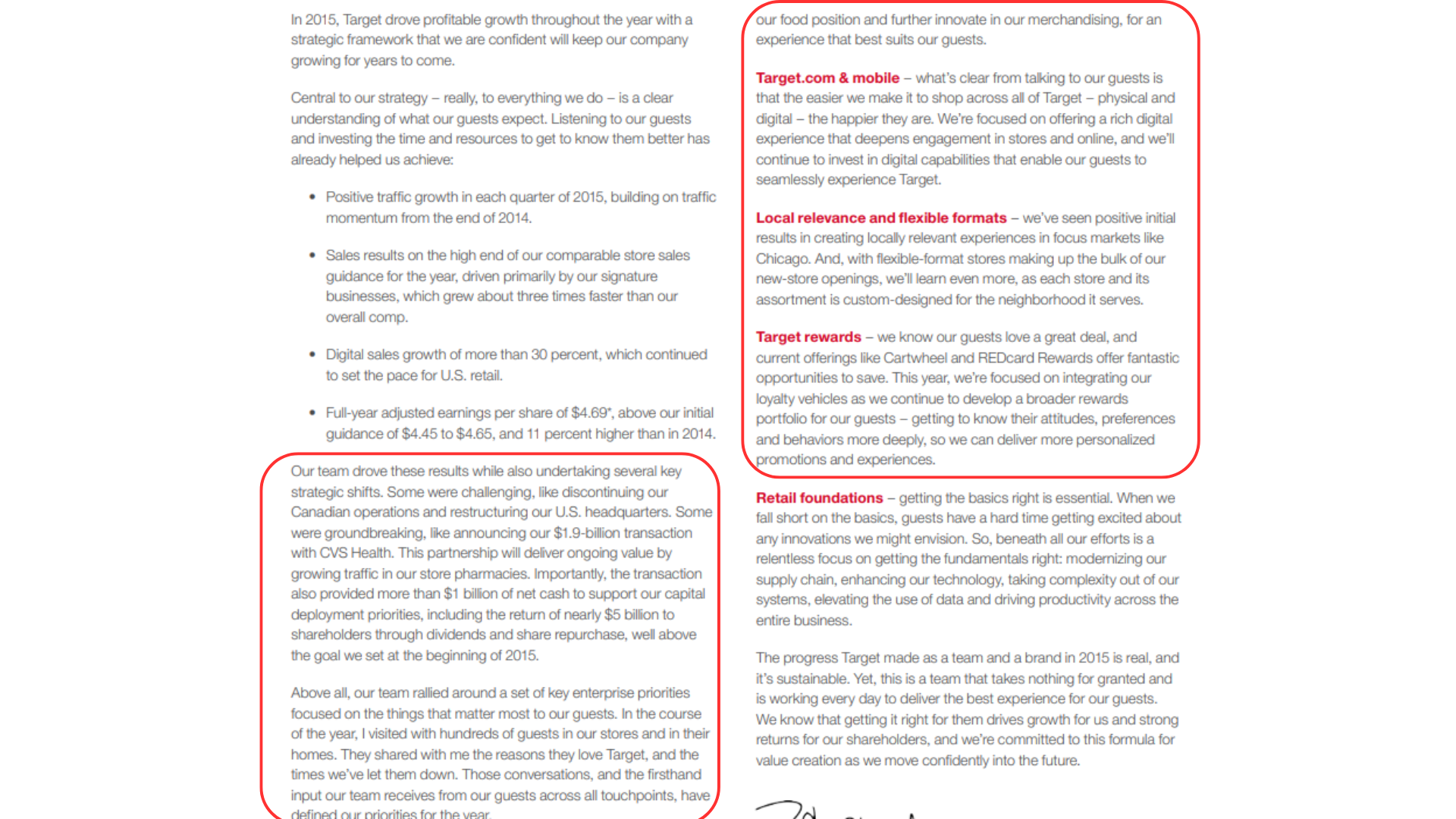
Input used: Input artifact (Image): Two-column Target narrative page with several distinct subheads. — upstage-ai-target-two-column-narrative-with-highlighted-section.png
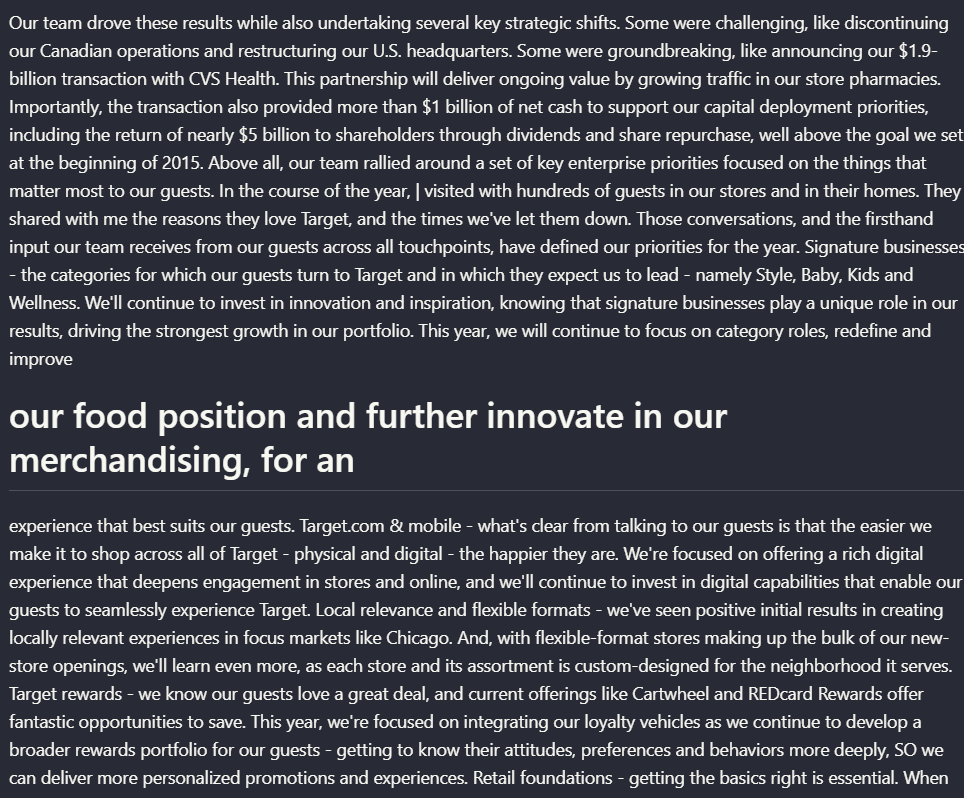
Observed output: Output artifact (Image): On the two-column Target narrative page, Upstage preserved much of the text content but blurred the original navigation structure. Headings such as 'Target.com — upstage-ai-target-earnings-parsed-strategy-and-merchandising.png
Input artifact: Input artifact (Image): Two-column Target narrative page with several distinct subheads. — upstage-ai-target-two-column-narrative-with-highlighted-section.png
Output artifact: Output artifact (Image): On the two-column Target narrative page, Upstage preserved much of the text content but blurred the original navigation structure. Headings such as 'Target.com — upstage-ai-target-earnings-parsed-strategy-and-merchandising.png
What changed: Image transformed into Image
Test case: Image → Image
Input type: Image
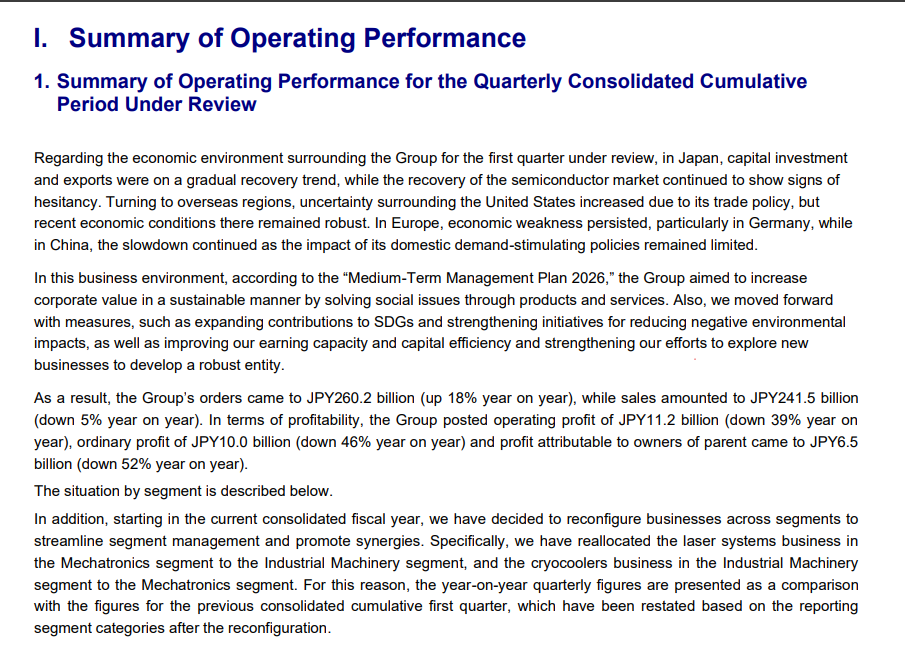
Input used: Input artifact (Image): Summary of Operating Performance page from the Sumitomo report. — upstage-ai-summary-operating-performance-quarterly-results.png
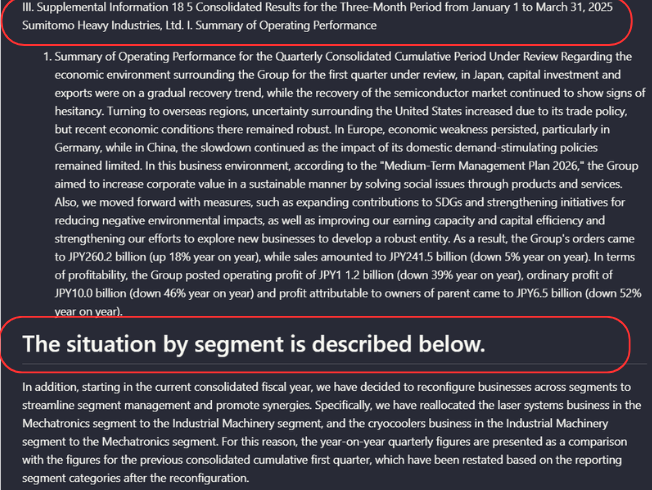
Observed output: Output artifact (Image): On the 'Summary of Operating Performance' page, Upstage retained the substantive text but reduced section-level distinction. The researcher reported that headin — upstage-ai-operating-performance-summary-annotated-callouts.png
Input artifact: Input artifact (Image): Summary of Operating Performance page from the Sumitomo report. — upstage-ai-summary-operating-performance-quarterly-results.png
Output artifact: Output artifact (Image): On the 'Summary of Operating Performance' page, Upstage retained the substantive text but reduced section-level distinction. The researcher reported that headin — upstage-ai-operating-performance-summary-annotated-callouts.png
What changed: Image transformed into Image
Test case: Image → Image
Input type: Image
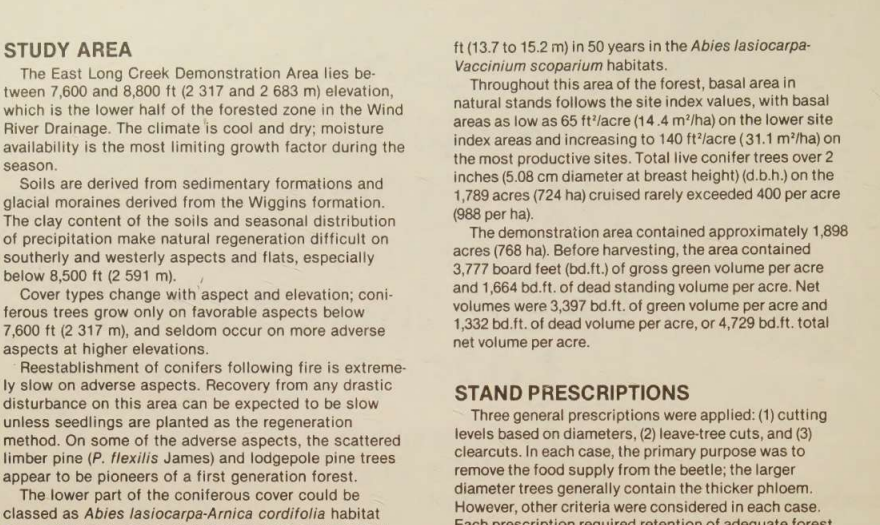
Input used: Input artifact (Image): Scanned multi-column forestry page headed 'STUDY AREA' with 'STAND PRESCRIPTIONS' lower on the page. — landing-ai-scanned-two-column-text-study-area.png
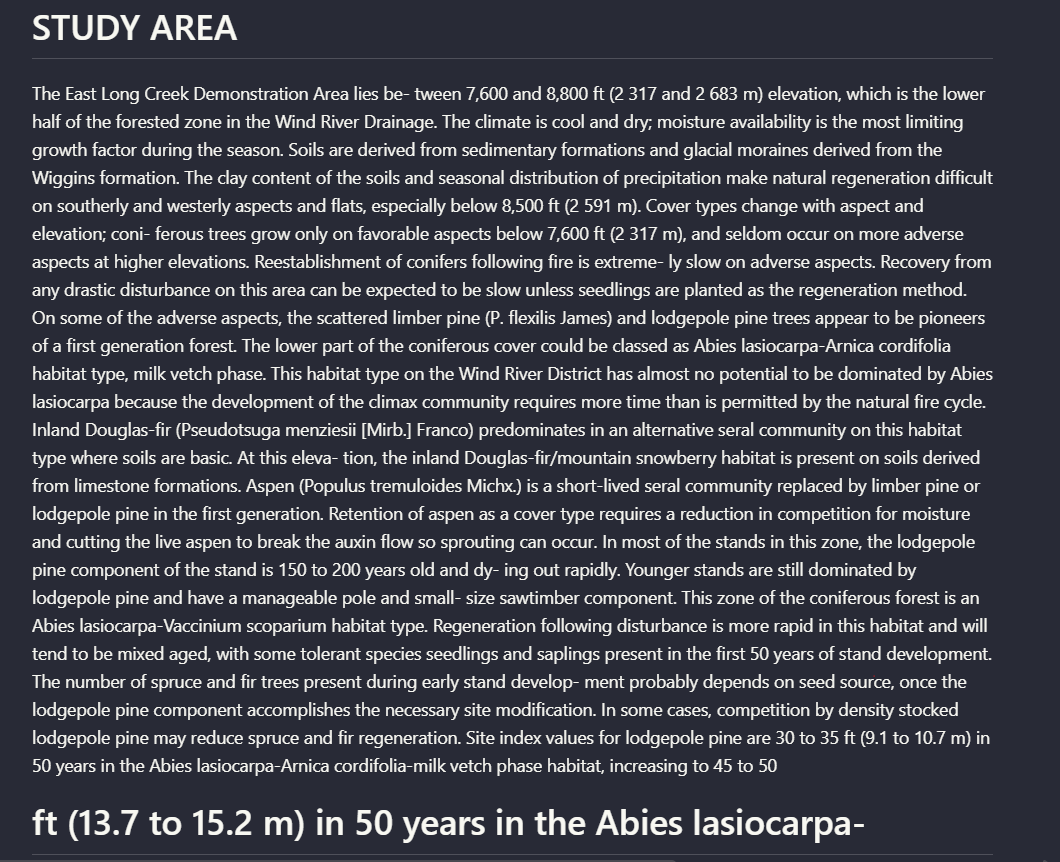
Observed output: Output artifact (Image): The paragraph-level segmentation and reading order broke down on this scanned multi-column page, with structural formatting not maintained during extraction. — upstage_scannedpdf_parsed_hierarchy.png
Input artifact: Input artifact (Image): Scanned multi-column forestry page headed 'STUDY AREA' with 'STAND PRESCRIPTIONS' lower on the page. — landing-ai-scanned-two-column-text-study-area.png
Output artifact: Output artifact (Image): The paragraph-level segmentation and reading order broke down on this scanned multi-column page, with structural formatting not maintained during extraction. — upstage_scannedpdf_parsed_hierarchy.png
What changed: Image transformed into Image
Why it matters / Conclusion: Upstage can preserve straightforward section flow, but it was not reliable enough on multi-column or hierarchy-sensitive pages to trust for full-document markdown fidelity.
Upstage preserved basic narrative flow on at least one straightforward digital section, but it struggled to keep hierarchy and navigation intact on harder layouts. The Mechatronics/Industrial Machinery section from the Sumitomo report remained readable with subsection ordering preserved. By contrast, the hybrid earnings report's two-column strategy page blurred headings into surrounding prose, the operating-performance page lost clear heading distinction, and the researcher reported paragraph segmentation and reading-order breakdown on the scanned multi-column research paper.
image
Numbered Mechatronics / Industrial Machinery section from the financial report.
↓→
image
On the Mechatronics / Industrial Machinery section, Upstage kept the numbered subsection headings and paragraph flow in the same general order as the source, so the extracted text remained readable as a structured section rather than a flat dump.
image
Two-column Target narrative page with several distinct subheads.
↓→
image
On the two-column Target narrative page, Upstage preserved much of the text content but blurred the original navigation structure. Headings such as 'Target.com & mobile,' 'Local relevance and flexible formats,' and 'Target rewards' ran into surrounding prose, so the page no longer read like clearly separated sections.
image
Summary of Operating Performance page from the Sumitomo report.
↓→
image
On the 'Summary of Operating Performance' page, Upstage retained the substantive text but reduced section-level distinction. The researcher reported that headings were no longer visually or structurally separated from the content they introduced.
image
Scanned multi-column forestry page headed 'STUDY AREA' with 'STAND PRESCRIPTIONS' lower on the page.
↓→
OUTPUT
The paragraph-level segmentation and reading order broke down on this scanned multi-column page, with structural formatting not maintained during extraction.
Bottom Line
Upstage can preserve straightforward section flow, but it was not reliable enough on multi-column or hierarchy-sensitive pages to trust for full-document markdown fidelity.
Scanned-page OCR for printed text
Printed text was partly recovered, but signature blocks and page structure were not faithfully preserved.
▾
Test Summary
Feature tested: Scanned-page OCR for printed text
Result: Partial — Printed text was partly recovered, but signature blocks and page structure were not faithfully preserved.
Feature tested: Scanned-page OCR for printed text
Result: Partial
Verdict: Printed text was partly recovered, but signature blocks and page structure were not faithfully preserved.
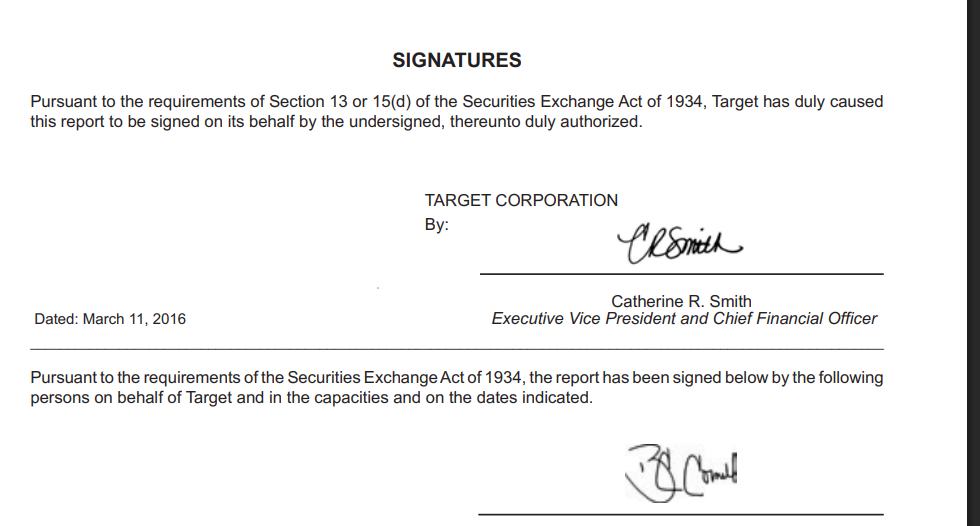
Expected behavior: Upstage can OCR printed text on scanned pages inside a mixed PDF, but the result is much less faithful once signatures and local structure matter. The tested example was the Target signatures page from the hybrid earnings report: surrounding printed text, date, and names were retained, but the handwritten signature itself was not meaningfully preserved and the section collapsed into a flat block.
Test case: Image → Image
Input type: Image
Input used: Input artifact (Image): Scanned signatures page from the Target annual report. — landing-ai-target-annual-report-signatures-page-2.png
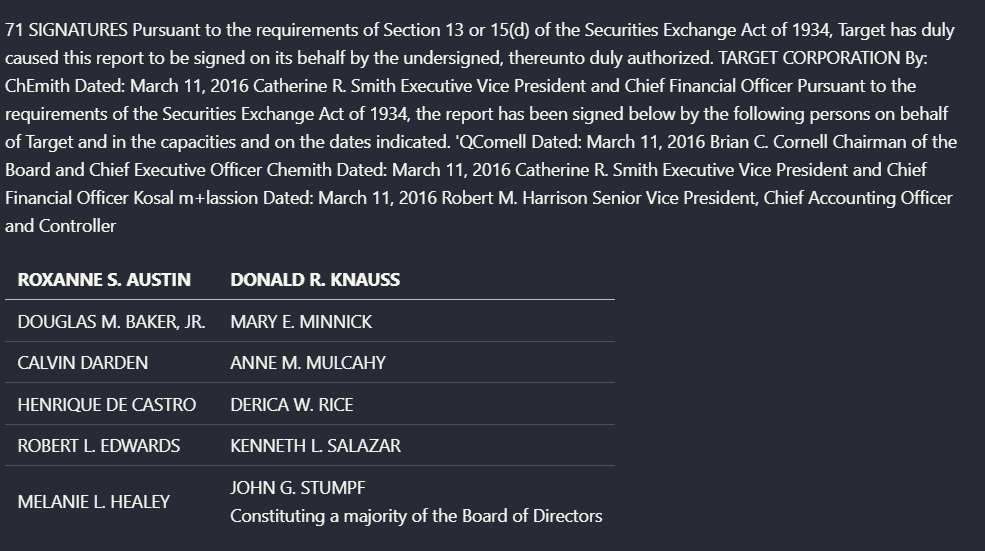
Observed output: Output artifact (Image): On the scanned signatures page, Upstage recovered most of the surrounding printed text, the date, and the printed name 'Catherine R. Smith,' but handwritten sig — upstage-ai-target-signatures-ocr-extraction-1.png
Input artifact: Input artifact (Image): Scanned signatures page from the Target annual report. — landing-ai-target-annual-report-signatures-page-2.png
Output artifact: Output artifact (Image): On the scanned signatures page, Upstage recovered most of the surrounding printed text, the date, and the printed name 'Catherine R. Smith,' but handwritten sig — upstage-ai-target-signatures-ocr-extraction-1.png
What changed: Image transformed into Image
Why it matters / Conclusion: For scanned pages with ordinary printed text, Upstage can recover usable content, but it is not a good fit when the exact structure of signature sections or handwriting-adjacent content matters.
Upstage can OCR printed text on scanned pages inside a mixed PDF, but the result is much less faithful once signatures and local structure matter. The tested example was the Target signatures page from the hybrid earnings report: surrounding printed text, date, and names were retained, but the handwritten signature itself was not meaningfully preserved and the section collapsed into a flat block.
image
Scanned signatures page from the Target annual report.
↓→
image
On the scanned signatures page, Upstage recovered most of the surrounding printed text, the date, and the printed name 'Catherine R. Smith,' but handwritten signatures were not clearly captured and the section hierarchy collapsed into a flat text block. Signature-like strings such as 'CHeSmith' appeared instead of a meaningful preserved signature element.
Bottom Line
For scanned pages with ordinary printed text, Upstage can recover usable content, but it is not a good fit when the exact structure of signature sections or handwriting-adjacent content matters.
Pricing & Access
TESTED
Free
$0
Upstage Studio offers free testing based on 10 runs per agent
Standard
$0.01 / Pages
Enhanced
$0.03 / Pages
Is This Right For You?
A side-by-side guide based on our hands-on testing.
✓ Use This If
●You mainly need an API that will accept varied PDFs and return markdown files automatically.
●Your documents are table-heavy financial PDFs where readable row/value reconstruction matters more than perfect layout fidelity.
●You can live with charts being converted into text summaries and extracted values instead of preserved visual structure.
✕ Skip This If
●You need reliable reading order and hierarchy preservation on multi-column pages.
●You need scanned pages to stay structurally faithful, especially around signature blocks.
●You need complex table headers or chart outputs to come back in clean, confidently structured markdown without manual review.
Featured in Rankings
Independent rankings where Upstage AI was tested and rated.
Yes. In this research it accepted three different PDFs through an automated workflow: an 84-page hybrid earnings report, an 18-page table-heavy financial report, and a scanned research report. Each test produced a downloadable markdown file without a manual correction step.
It performed best on the native Target financial summary table, where rows, columns, and values stayed mostly aligned and only some currency symbols were missed. It was weaker on harder tables: the Sumitomo balance sheet had header/data misalignment, and the scanned forestry table duplicated and split grouped headers awkwardly.
Partially. It did not simply drop the tested charts. Instead, it converted them into prose descriptions plus extracted values, including a waterfall chart and a scanned line chart. The downside is that the recovered chart data was not cleanly structured enough to preserve the original visual organization.
It recovered much of the printed text on the tested Target signatures page, including dates and printed names, but it did not preserve the signature structure well. Handwritten signatures were not clearly identifiable, and the whole section flattened into a block of text.
Not reliably. In the hybrid earnings report, multi-column strategy sections lost clear heading separation, and the researcher also reported paragraph segmentation and reading-order problems on a scanned multi-column research page.
Only inconsistently. It preserved hierarchy reasonably well on the Mechatronics / Industrial Machinery section of the Sumitomo report, but on other pages headings were reduced to body-text-like output and no longer clearly separated from the content they introduced.
Banner Preview
How the embed badge will look on your site
Embed HTML
Copy this code to your website source
<a target="_blank" href="https://aidemos.com/tools/upstage-ai?utm_source=upstage-ai_embed" style="width: 250px; height: 80px; border-radius:4px;" width="250" height="80">
<img src="https://aidemos-website-images.s3.amazonaws.com/featured.png" alt="Upstage AI | Featured on AI Demos" style="width: 250px; height: 80px; border-radius:4px;" width="250" height="80">
</a>
Quick Integration Guide
1Copy the HTML code block above.
2Paste it into your site's HTML or CMS editor.
3Banner appears instantly on your page.
4Links back to your tool profile here.
Similar Tools
Similar Tools
Discover more AI tools like Upstage AI to enhance your workflow.
⚡ Built by FutureSmart AI — the team behind AI Demos
Need a custom AI solution for this use case?
If you are looking to build a custom PDF parsing, markdown conversion, or document structure extraction system for your business or internal workflow, email us at contact@futuresmart.ai.
Found something inaccurate or missing? We try to keep our AI research accurate and useful. If you found outdated information, an issue, or have a suggestion, email us at collaborate@aidemos.com.