Nutrient.io Review: PDF-to-Markdown API Tested (2026)
A developer-first PDF-to-markdown API that preserves readable hierarchy on straightforward pages, but degrades on complex tables, charts, and signatures.
Nutrient.io is solid when the job is to turn a mixed PDF into markdown and keep the text readable, especially on straightforward hierarchy and OCR. The hard cases are where it slips: multi-level tables lose structure, chart semantics collapse into text-like output, handwritten signatures disappear, and the task notes point to an API-key/code path as the dependable route rather than a proven browser-only workflow.
Verdict: Works as a hosted API for turning PDFs into markdown files.
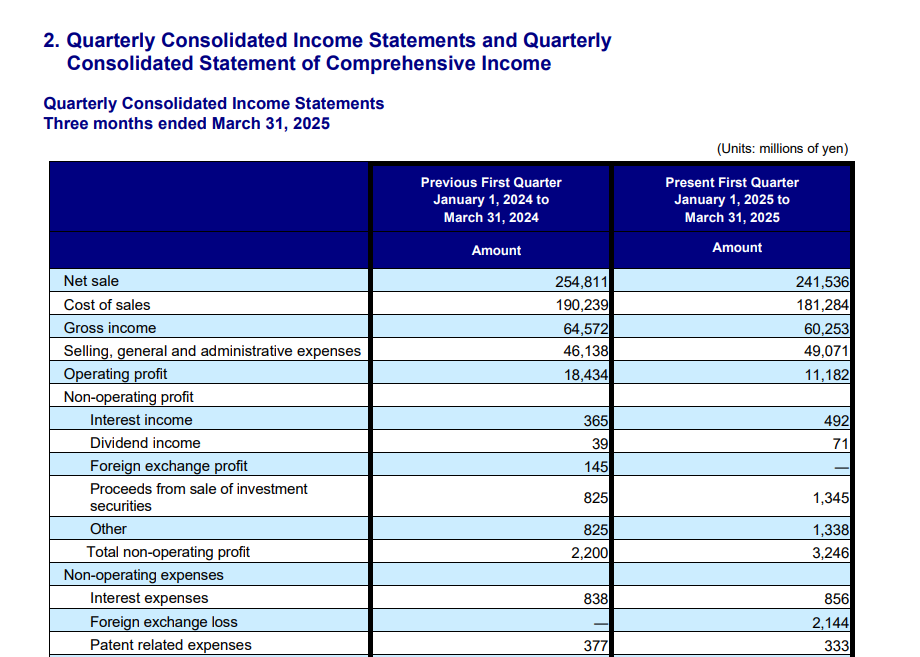
Expected behavior: Nutrient can process multi-page PDFs through its extraction API and return downloadable markdown for downstream code to save or ingest. In the evaluation, this worked on the hybrid earnings report, the table-heavy financial report, and the scanned research paper; the code-first API path was the successful route when the web UI timed out.
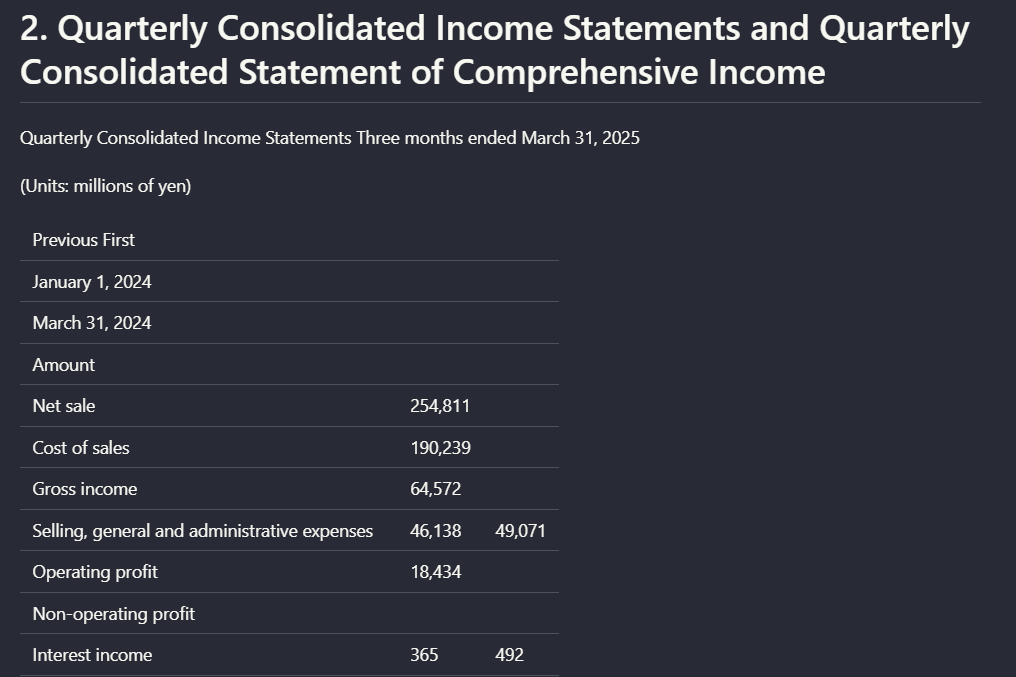
Observed output: Output artifact (Text/code file): The hybrid earnings PDF was accepted and returned as markdown output. — nutrient_hybrid_earningspdf_output.md
Output artifact: Output artifact (Text/code file): The hybrid earnings PDF was accepted and returned as markdown output. — nutrient_hybrid_earningspdf_output.md
What changed: PDF document transformed into Text/code file
Output artifact: Output artifact (Text/code file): The table-heavy financial PDF was also exported to markdown. — nutrient_financialpdf_output.md
What changed: PDF document transformed into Text/code file
Test case: PDF document → Text/code file
Input type: PDF document
Input used: Input artifact (PDF document): Scanned research PDF — Scanned Research PDF.pdf
Observed output: Output artifact (Text/code file): The scanned research PDF was accepted and returned as markdown output. — nutrient_scannedpdf_output.md
Input artifact: Input artifact (PDF document): Scanned research PDF — Scanned Research PDF.pdf
Output artifact: Output artifact (Text/code file): The scanned research PDF was accepted and returned as markdown output. — nutrient_scannedpdf_output.md
What changed: PDF document transformed into Text/code file
Why it matters / Conclusion: This is the strongest part of the product in the research: the code-first API path produced markdown across all three document types.
Nutrient can process multi-page PDFs through its extraction API and return downloadable markdown for downstream code to save or ingest. In the evaluation, this worked on the hybrid earnings report, the table-heavy financial report, and the scanned research paper; the code-first API path was the successful route when the web UI timed out.
file
Hybrid-Earnings-PDF.pdf
↓→
file
nutrient_hybrid_earningspdf_output.md
Loading file...
The hybrid earnings PDF was accepted and returned as markdown output.
file
Sumitomo Financial PDF.pdf
↓→
file
nutrient_financialpdf_output.md
Loading file...
The table-heavy financial PDF was also exported to markdown.
file
Scanned Research PDF.pdf
↓→
file
nutrient_scannedpdf_output.md
Loading file...
The scanned research PDF was accepted and returned as markdown output.
Bottom Line
This is the strongest part of the product in the research: the code-first API path produced markdown across all three document types.
From our researchConvert a Complex PDF into Clean Markdown with an APIearlier research
Layout-Aware OCR and Reading-Order Recovery
Good on straightforward pages, but not fully reliable on complex scanned layouts.
▾
Test Summary
Feature tested: Layout-Aware OCR and Reading-Order Recovery
Result: Partial — Good on straightforward pages, but not fully reliable on complex scanned layouts.
Feature tested: Layout-Aware OCR and Reading-Order Recovery
Result: Partial
Verdict: Good on straightforward pages, but not fully reliable on complex scanned layouts.
Expected behavior: Nutrient can recover readable text while preserving section hierarchy on straightforward digital and scanned pages. The cards cover heading-to-body relationships on a native-digital annual-report page, dense prose and numeric details in a financial report, and a scanned two-column research section.
Test case: Image → Image
Input type: Image
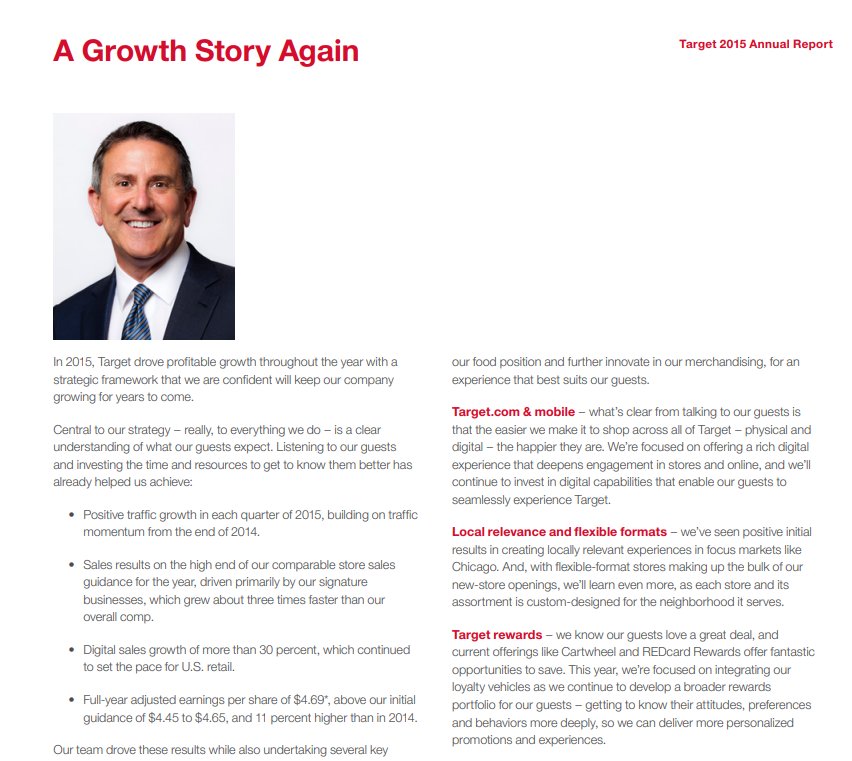
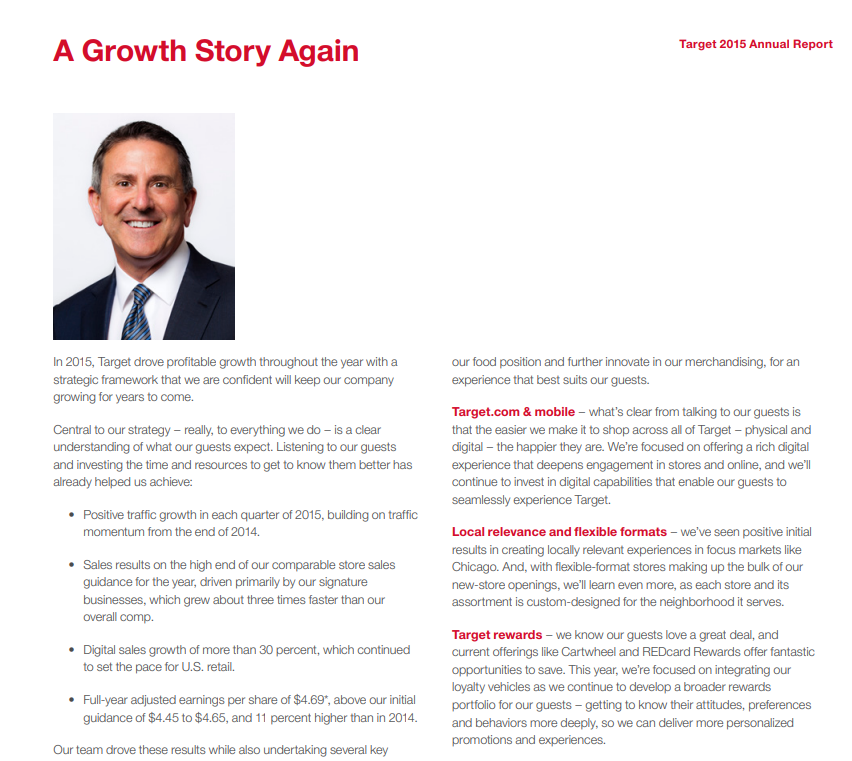
Input used: Input artifact (Image): Target 2015 Annual Report page titled 'A Growth Story Again' with heading, paragraph text, and bullets. — landing-ai-target-annual-report-growth-story-page.png
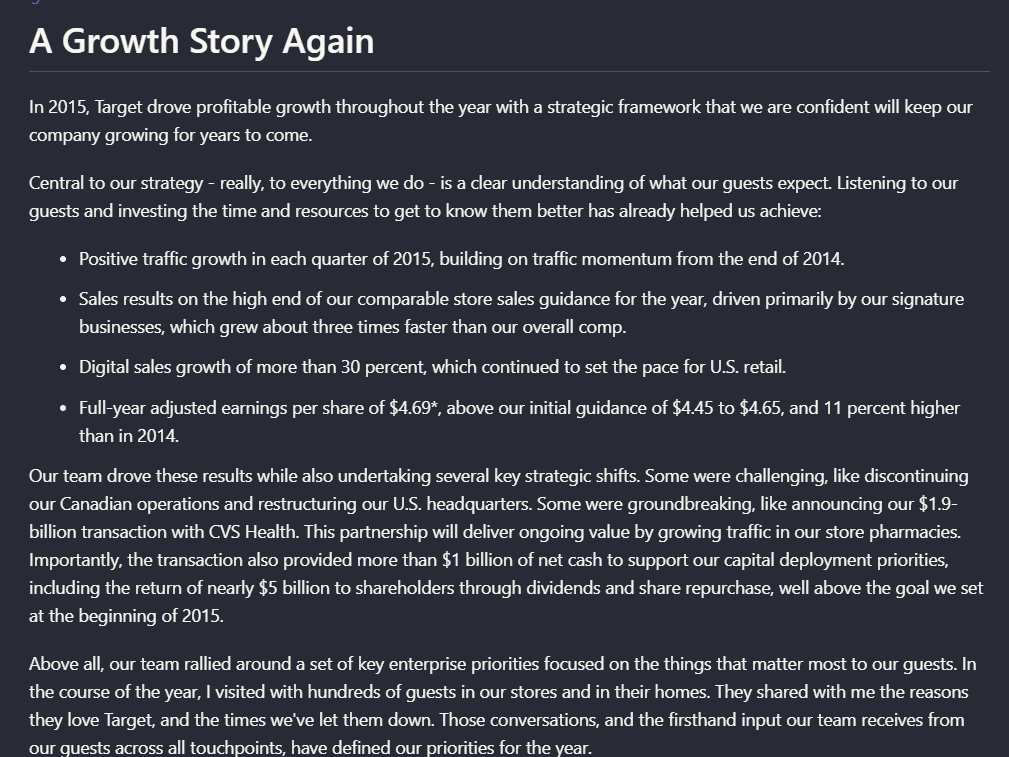
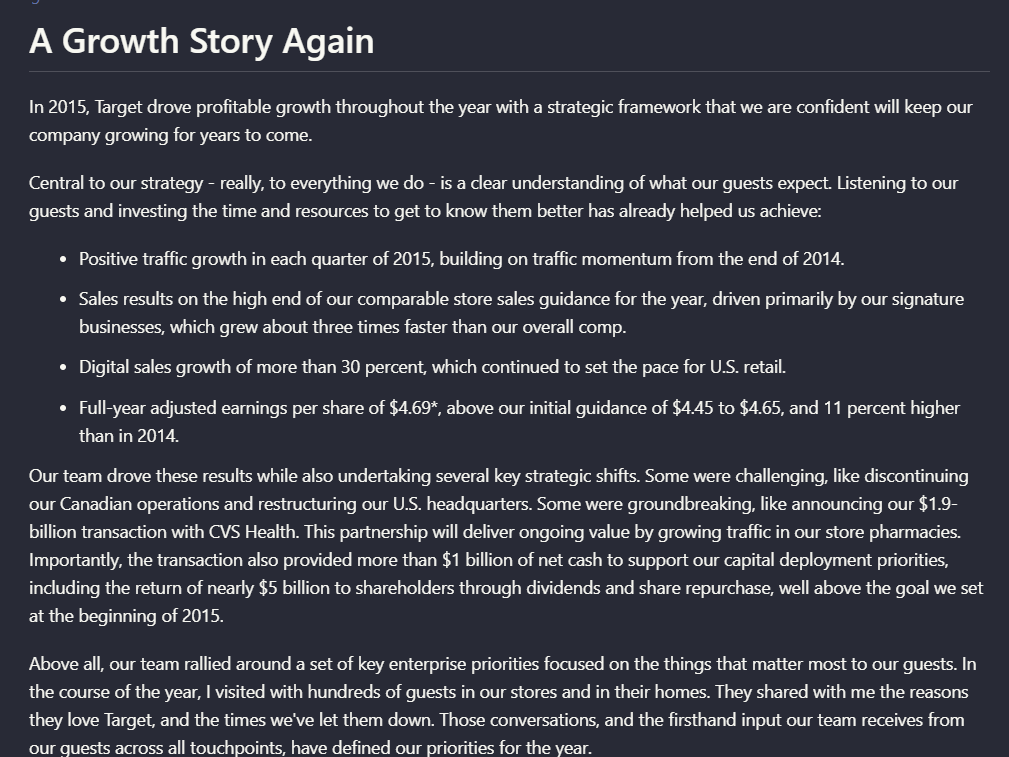
Observed output: Output artifact (Image): On the annual-report page titled 'A Growth Story Again,' Nutrient preserved the page heading, introductory paragraph, and bullet hierarchy in readable order, so — nutrient-io-target-annual-report-parsed-document-hierarchy.png
Input artifact: Input artifact (Image): Target 2015 Annual Report page titled 'A Growth Story Again' with heading, paragraph text, and bullets. — landing-ai-target-annual-report-growth-story-page.png
Output artifact: Output artifact (Image): On the annual-report page titled 'A Growth Story Again,' Nutrient preserved the page heading, introductory paragraph, and bullet hierarchy in readable order, so — nutrient-io-target-annual-report-parsed-document-hierarchy.png
What changed: Image transformed into Image
Test case: Image → Image
Input type: Image
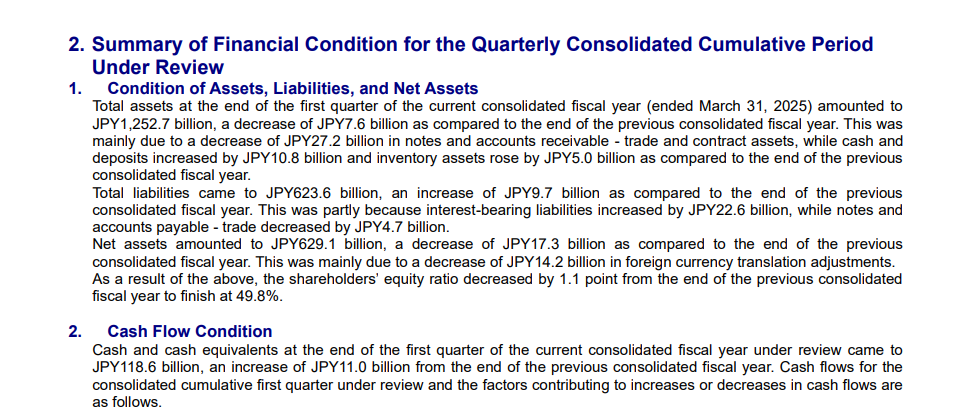
Input used: Input artifact (Image): Financial-report prose page covering assets, liabilities, net assets, and cash flow. — nutrient-io-financial-summary-condition-page-9.png
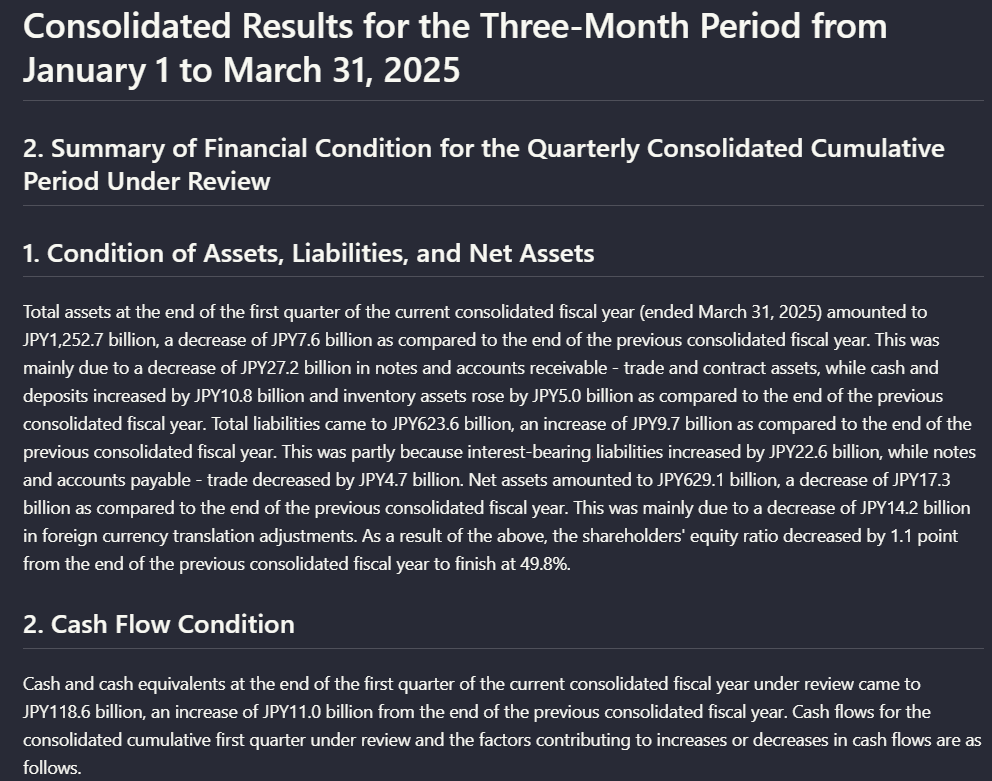
Observed output: Output artifact (Image): On the financial-report page about assets, liabilities, net assets, and cash flow, Nutrient recovered the numbered sections and key JPY amounts as readable text — nutrient-io-financial-summary-ocr-hierarchy-page-8.png
Input artifact: Input artifact (Image): Financial-report prose page covering assets, liabilities, net assets, and cash flow. — nutrient-io-financial-summary-condition-page-9.png
Output artifact: Output artifact (Image): On the financial-report page about assets, liabilities, net assets, and cash flow, Nutrient recovered the numbered sections and key JPY amounts as readable text — nutrient-io-financial-summary-ocr-hierarchy-page-8.png
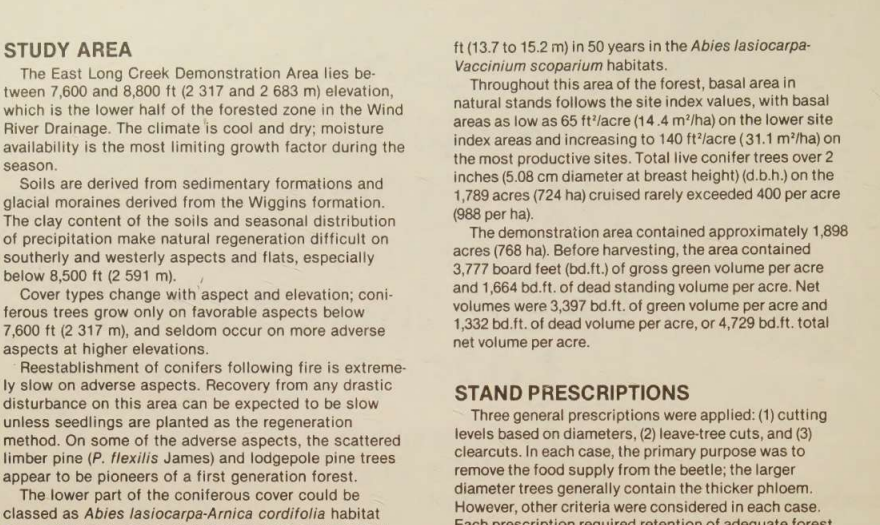
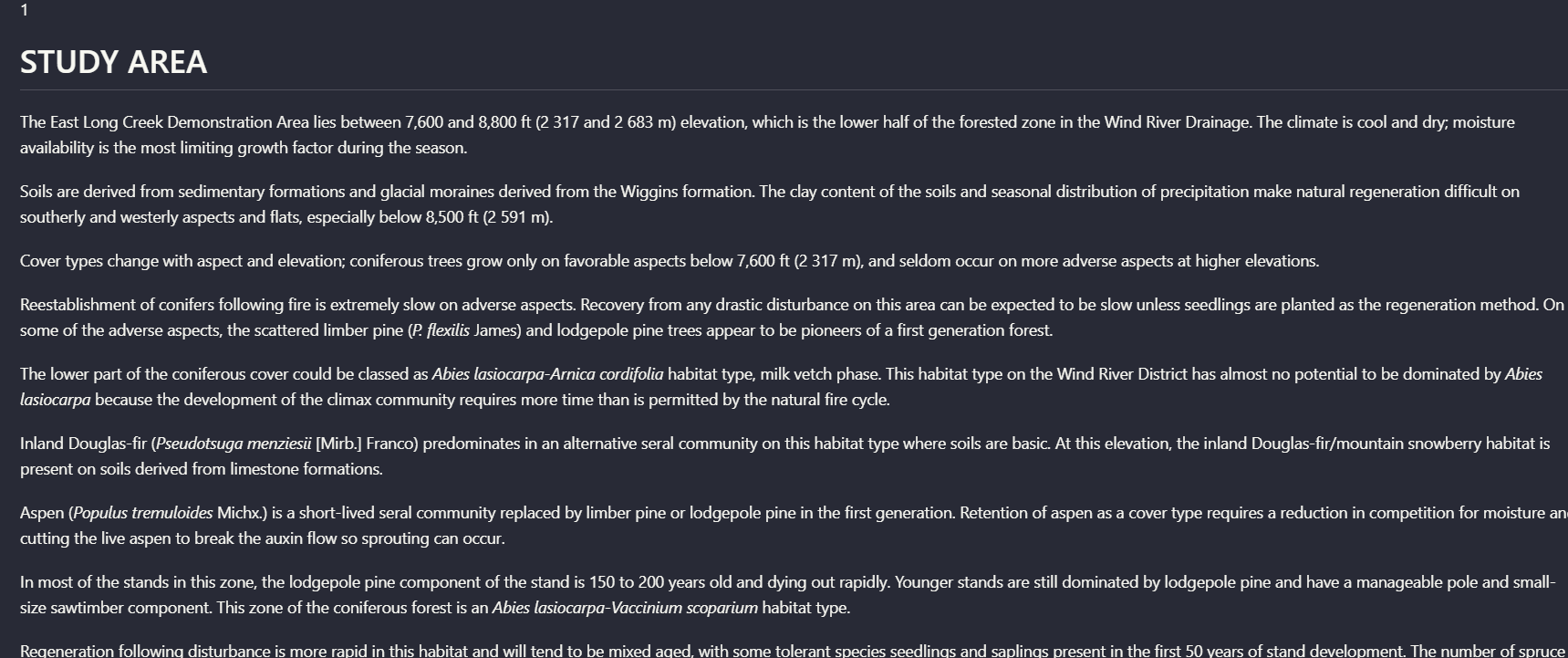
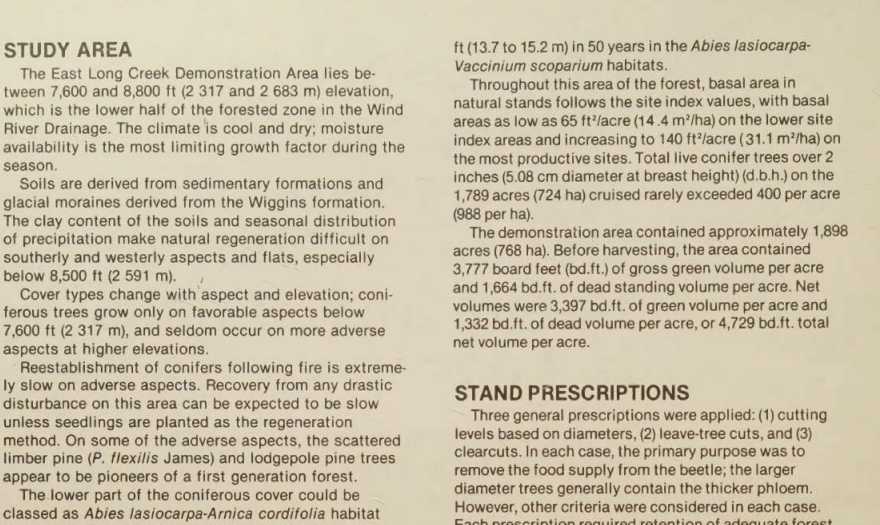
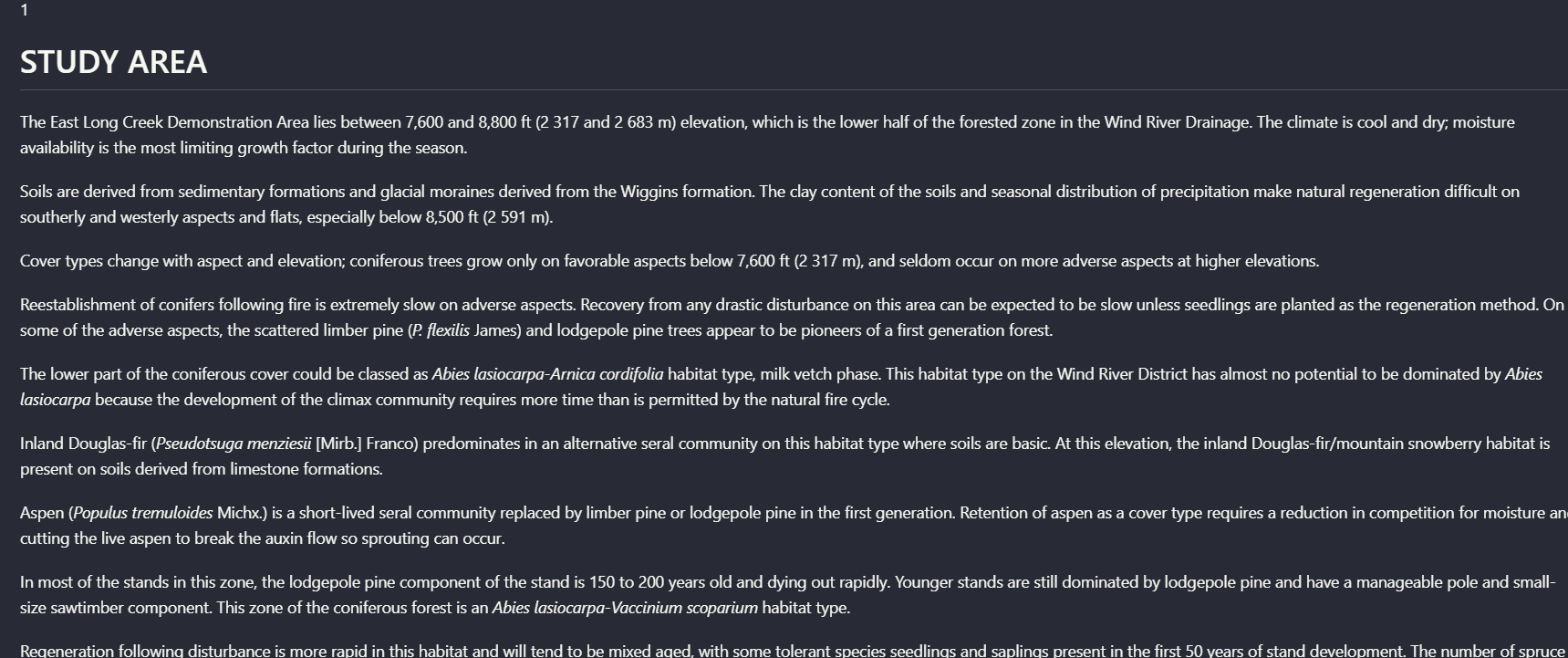
Observed output: Output artifact (Image): On the scanned two-column 'STUDY AREA' page, Nutrient kept the section heading attached to its content and converted the visible column text into coherent parag — nutrient-io-study-area-parsed-section-hierarchy.png
Output artifact: Output artifact (Image): On the scanned two-column 'STUDY AREA' page, Nutrient kept the section heading attached to its content and converted the visible column text into coherent parag — nutrient-io-study-area-parsed-section-hierarchy.png
What changed: Image transformed into Image
Test case: Image → Image
Input type: Image
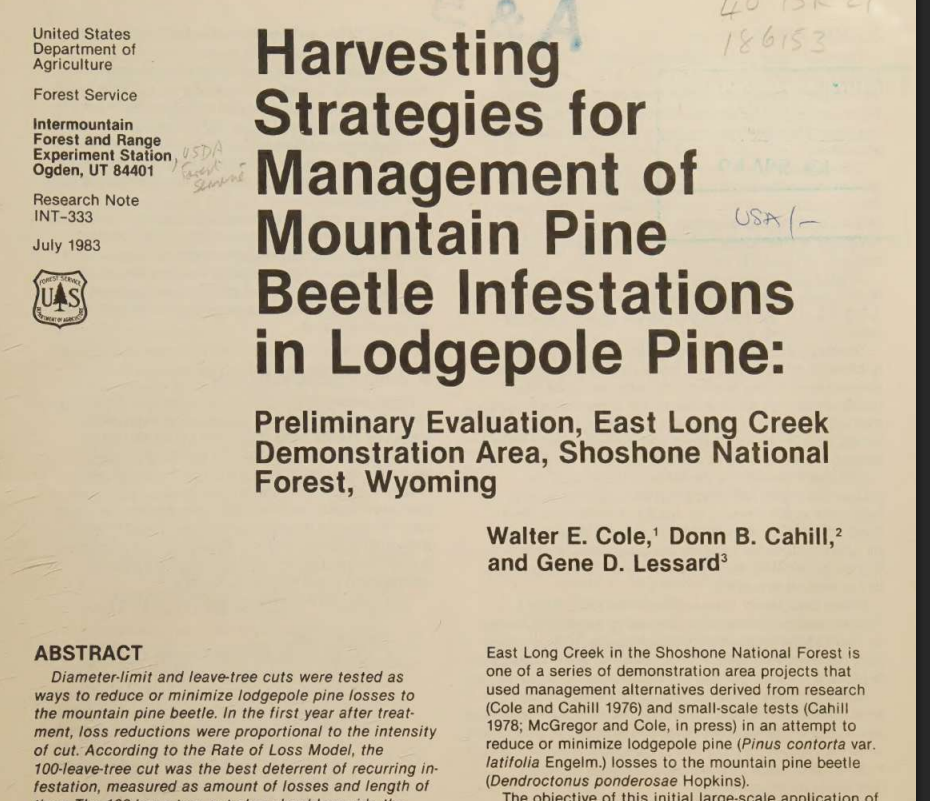
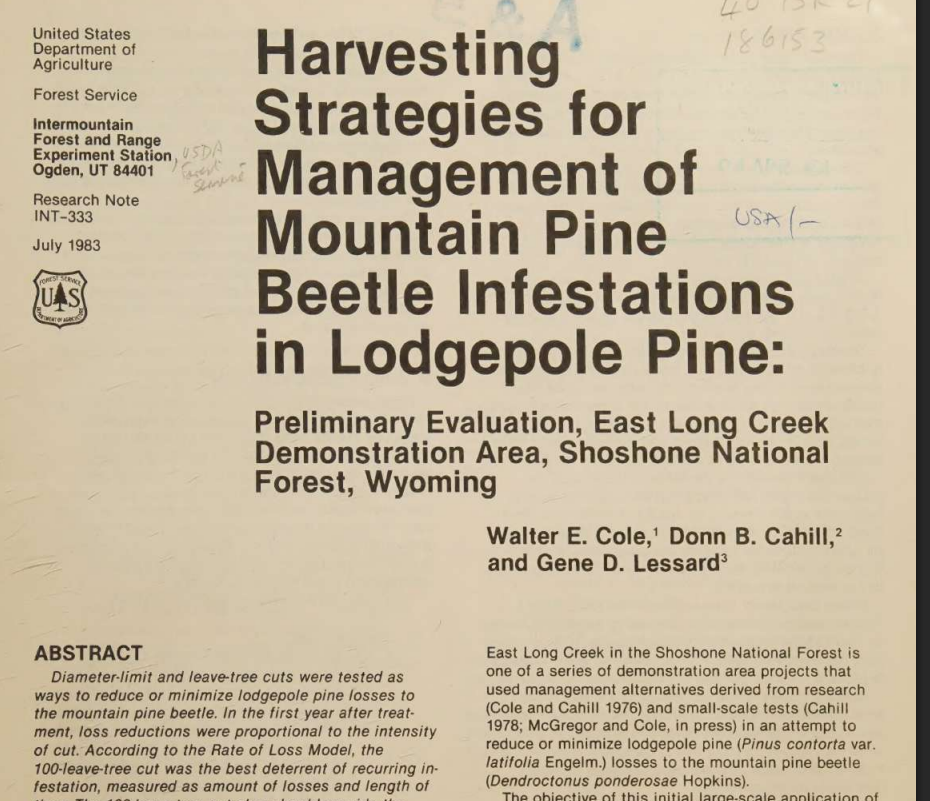
Input used: Input artifact (Image): Scanned research-note first page with title, authors, abstract start, and margin notes. — nutrient-io-usda-research-note-title-page.png
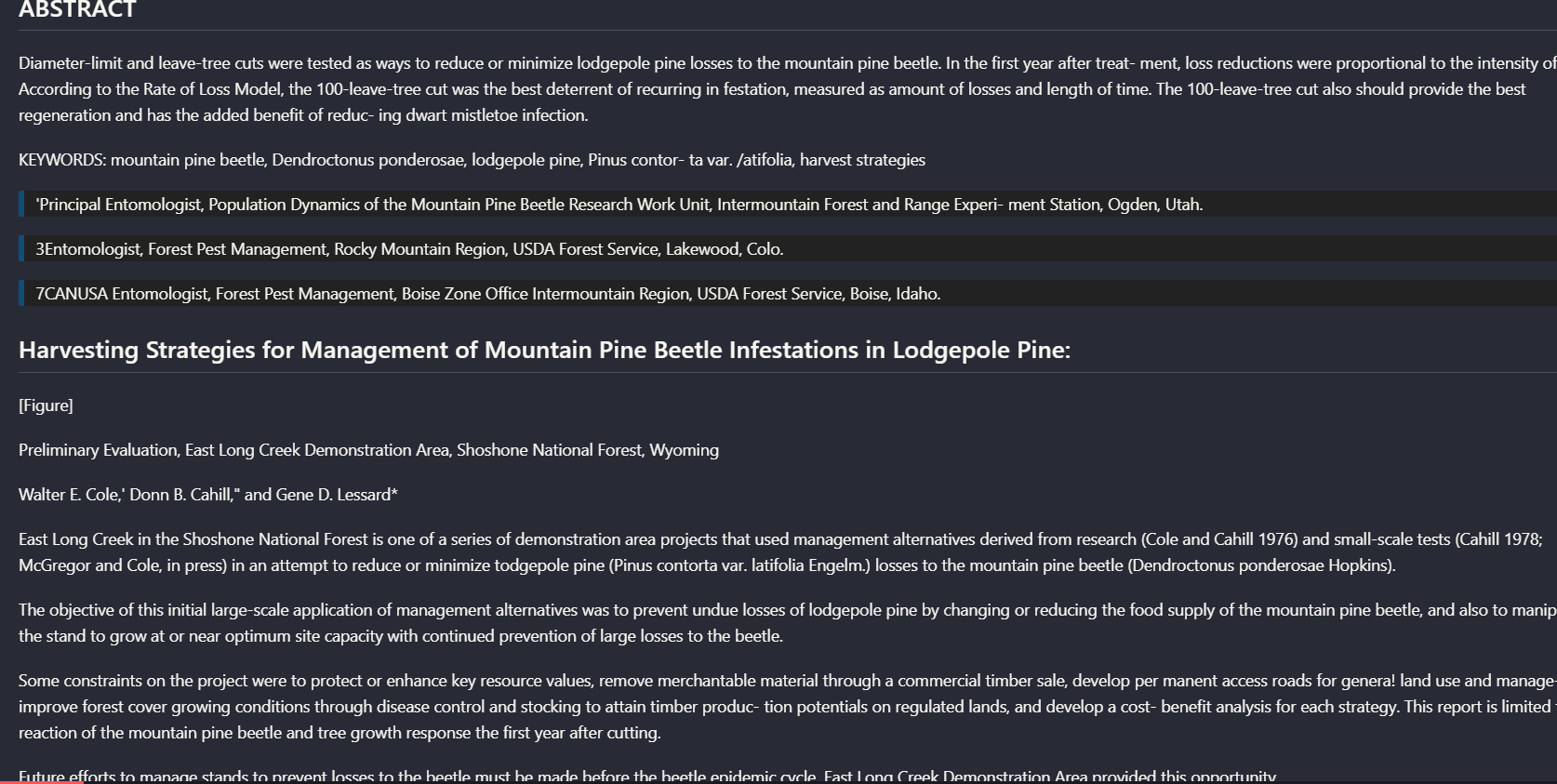
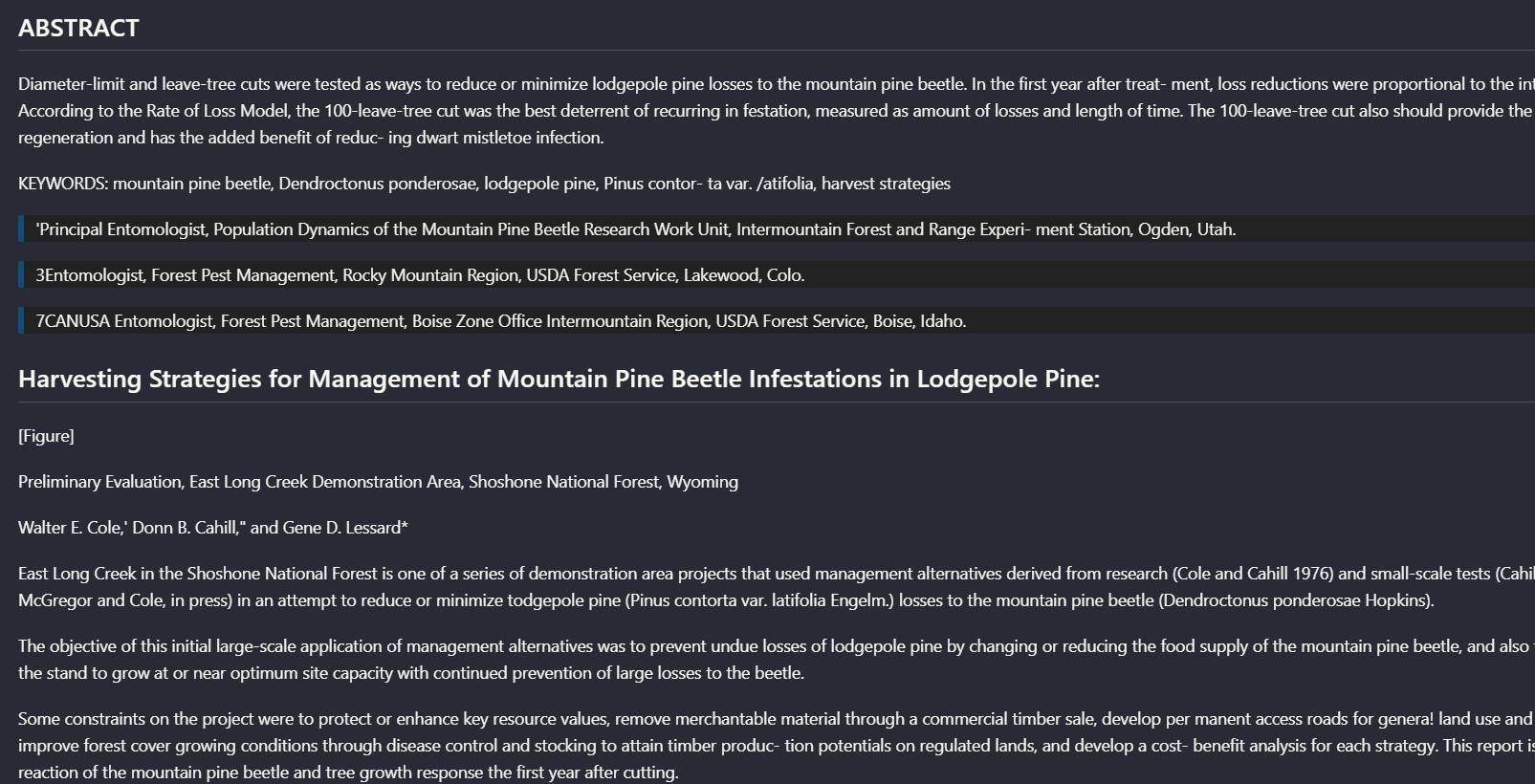
Observed output: Output artifact (Image): On the scanned research-note first page, Nutrient placed the ABSTRACT and keywords before the title and author block. That makes the text readable, but it is a — nutrient-io-ocr-first-page-abstract-text.png
Input artifact: Input artifact (Image): Scanned research-note first page with title, authors, abstract start, and margin notes. — nutrient-io-usda-research-note-title-page.png
Output artifact: Output artifact (Image): On the scanned research-note first page, Nutrient placed the ABSTRACT and keywords before the title and author block. That makes the text readable, but it is a — nutrient-io-ocr-first-page-abstract-text.png
Observed output: Output artifact (Image): The section heading, paragraphs, and bullets are preserved in reading order for this page. — nutrient_hybrid_earningspdf_parsed_doc_hierarchy.png
Output artifact: Output artifact (Image): The section heading, paragraphs, and bullets are preserved in reading order for this page. — nutrient_hybrid_earningspdf_parsed_doc_hierarchy.png
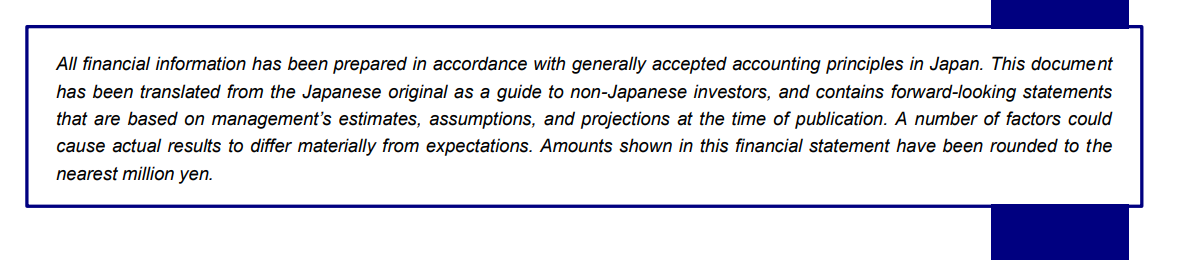
Observed output: Output artifact (Image): The disclaimer text was extracted, but the line wrapping shows that clean reading order is still imperfect on scanned title-page content. — nutrient_financialpdf_parsed_title_page_abstract.png
Output artifact: Output artifact (Image): The disclaimer text was extracted, but the line wrapping shows that clean reading order is still imperfect on scanned title-page content. — nutrient_financialpdf_parsed_title_page_abstract.png
What changed: Image transformed into Image
Test case: Image → Image
Input type: Image
Input used: Input artifact (Image): Scanned research paper first page — scannedpdf_first_page.png
Observed output: Output artifact (Image): The page text is recovered, but the report notes that the abstract/title order is not always faithful on this scanned layout. — nutrient_scannedpdf_parsed_page_hierarchy.png
Input artifact: Input artifact (Image): Scanned research paper first page — scannedpdf_first_page.png
Output artifact: Output artifact (Image): The page text is recovered, but the report notes that the abstract/title order is not always faithful on this scanned layout. — nutrient_scannedpdf_parsed_page_hierarchy.png
What changed: Image transformed into Image
Test case: Image → Image
Input type: Image
Input used: Input artifact (Image): Scanned research paper multicolumn section — scanned_pdf_multicolumn_section.png
Observed output: Output artifact (Image): The multi-column section is recovered with headings and body text aligned into a readable hierarchy. — nutrient_scannedpdf_parsed_section_hierarchy.png
Input artifact: Input artifact (Image): Scanned research paper multicolumn section — scanned_pdf_multicolumn_section.png
Output artifact: Output artifact (Image): The multi-column section is recovered with headings and body text aligned into a readable hierarchy. — nutrient_scannedpdf_parsed_section_hierarchy.png
What changed: Image transformed into Image
Why it matters / Conclusion: Nutrient can produce clean, usable text from both digital and scanned pages when the layout is straightforward. But the title-page ordering miss means you should still spot-check complex scanned layouts before trusting downstream ingestion.
Nutrient can recover readable text while preserving section hierarchy on straightforward digital and scanned pages. The cards cover heading-to-body relationships on a native-digital annual-report page, dense prose and numeric details in a financial report, and a scanned two-column research section.
image
Target 2015 Annual Report page titled 'A Growth Story Again' with heading, paragraph text, and bullets.
↓→
image
On the annual-report page titled 'A Growth Story Again,' Nutrient preserved the page heading, introductory paragraph, and bullet hierarchy in readable order, so the section stayed structurally coherent in the extracted output.
image
Financial-report prose page covering assets, liabilities, net assets, and cash flow.
↓→
image
On the financial-report page about assets, liabilities, net assets, and cash flow, Nutrient recovered the numbered sections and key JPY amounts as readable text blocks, showing that it can preserve dense report prose and section boundaries.
image
Scanned two-column page headed 'STUDY AREA'.
↓→
image
On the scanned two-column 'STUDY AREA' page, Nutrient kept the section heading attached to its content and converted the visible column text into coherent paragraphs instead of interleaving both columns.
image
Scanned research-note first page with title, authors, abstract start, and margin notes.
↓→
image
On the scanned research-note first page, Nutrient placed the ABSTRACT and keywords before the title and author block. That makes the text readable, but it is a real reading-order error for a page that mixes title matter, abstract, and body content.
file
↓→
file
The section heading, paragraphs, and bullets are preserved in reading order for this page.
file
↓→
file
The disclaimer text was extracted, but the line wrapping shows that clean reading order is still imperfect on scanned title-page content.
file
↓→
file
The page text is recovered, but the report notes that the abstract/title order is not always faithful on this scanned layout.
file
↓→
file
The multi-column section is recovered with headings and body text aligned into a readable hierarchy.
Bottom Line
Nutrient can produce clean, usable text from both digital and scanned pages when the layout is straightforward. But the title-page ordering miss means you should still spot-check complex scanned layouts before trusting downstream ingestion.
From our researchearlier researchConvert a Complex PDF into Clean Markdown with an API
Table Extraction to Markdown
Mixed to weak: simpler tables survive, but complex financial and scanned tables lose important structure.
▾
Test Summary
Feature tested: Table Extraction to Markdown
Result: Partial — Mixed to weak: simpler tables survive, but complex financial and scanned tables lose important structure.
Feature tested: Table Extraction to Markdown
Result: Partial
Verdict: Mixed to weak: simpler tables survive, but complex financial and scanned tables lose important structure.
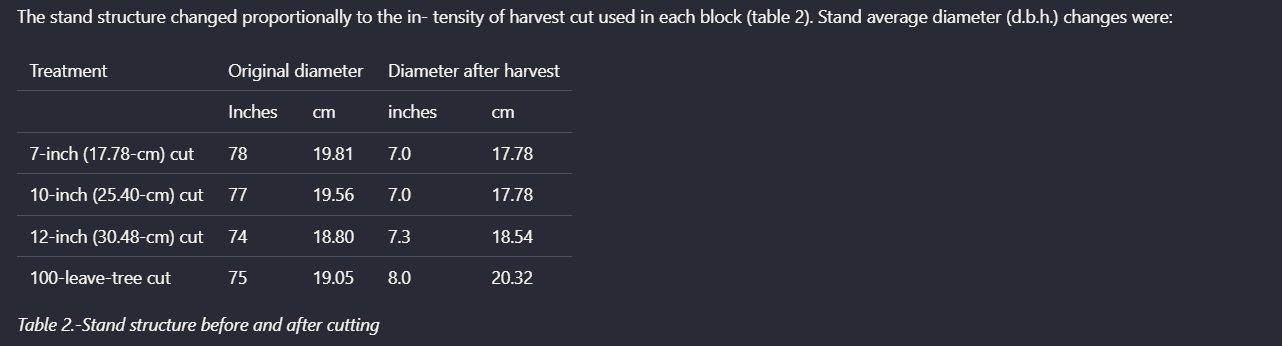
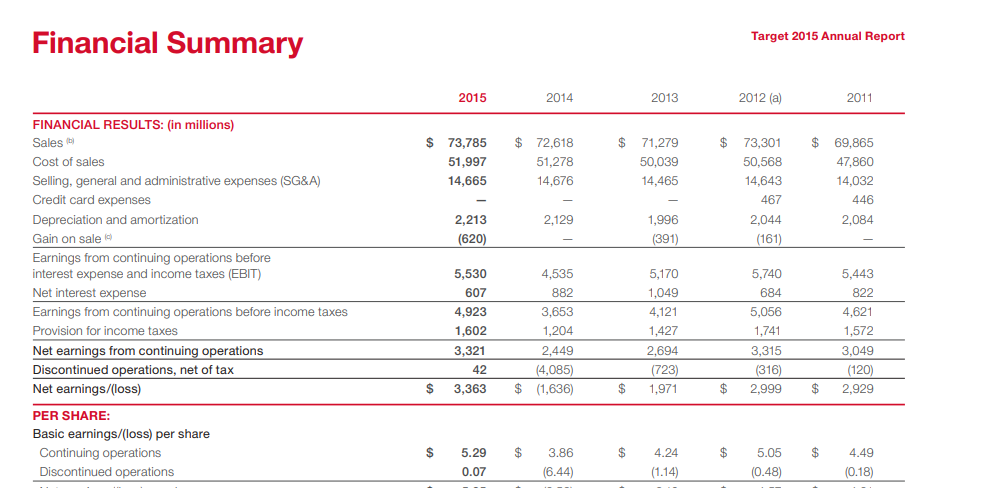
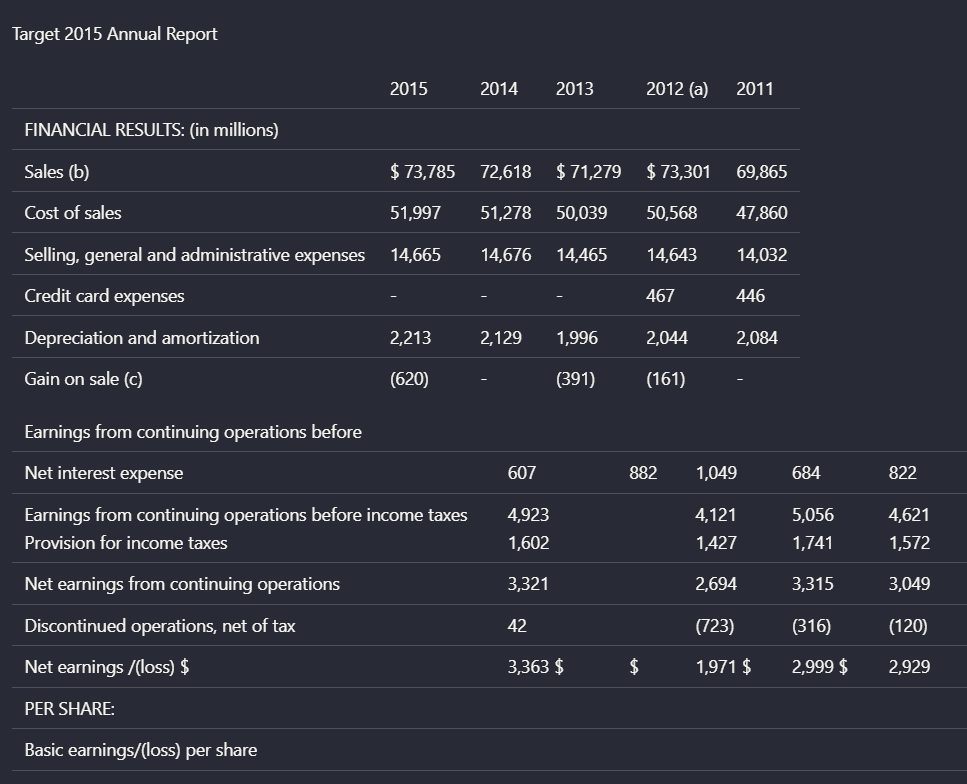
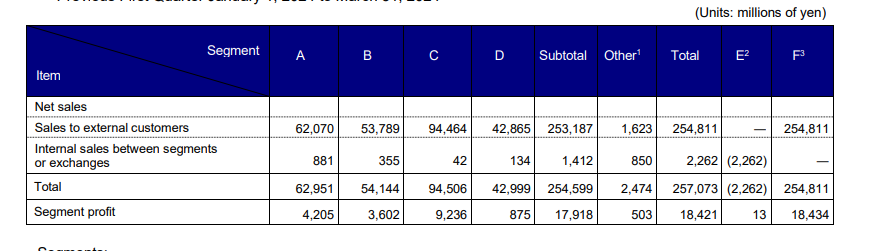
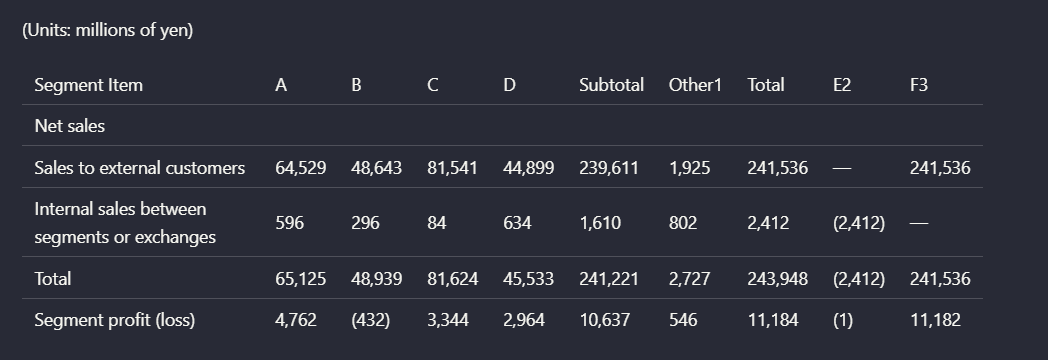
Expected behavior: Nutrient can extract table content into markdown and preserve the rough table shape on simpler cases, including grouped columns and report-style financial tables. The examples also show that structure degrades on multi-level headers, dense financial tables, and scanned complex tables.
Test case: Image → Image
Input type: Image
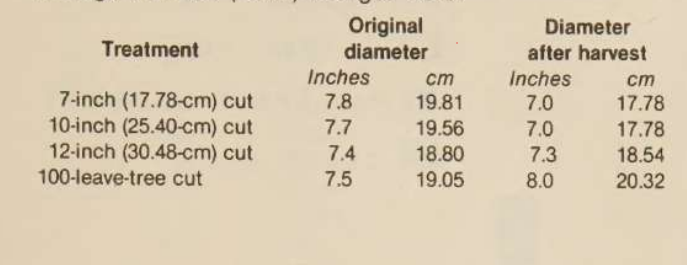
Input used: Input artifact (Image): Scanned table showing original and post-harvest diameters across four treatments. — mistral-ai-scanned-treatment-diameter-table.png
Observed output: Output artifact (Image): For the scanned treatment table, Nutrient preserved the basic grouped columns and row labels well enough for the table to remain mostly readable. It still intro — nutrient-io-parsed-table-stand-structure-before-after-cutting.png
Input artifact: Input artifact (Image): Scanned table showing original and post-harvest diameters across four treatments. — mistral-ai-scanned-treatment-diameter-table.png
Output artifact: Output artifact (Image): For the scanned treatment table, Nutrient preserved the basic grouped columns and row labels well enough for the table to remain mostly readable. It still intro — nutrient-io-parsed-table-stand-structure-before-after-cutting.png
What changed: Image transformed into Image
Test case: Image → Image
Input type: Image
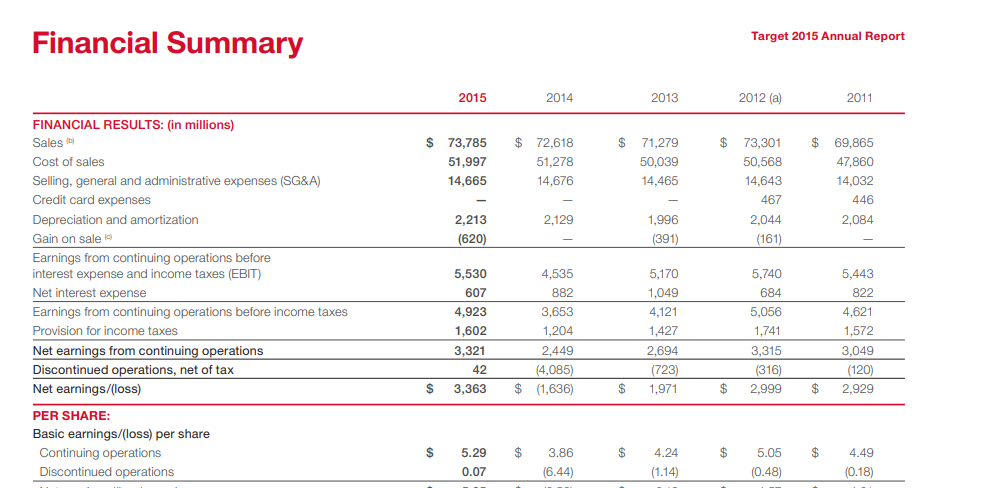
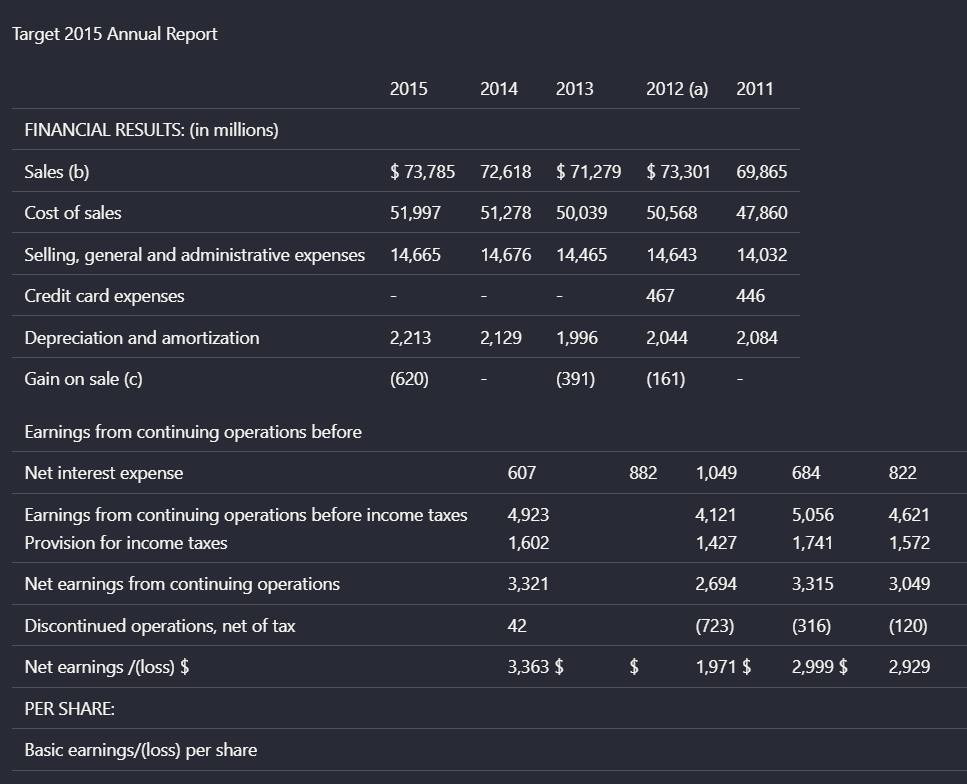
Input used: Input artifact (Image): Target annual-report financial summary table with year columns and multiple financial line items. — landing-ai-target-annual-report-financial-summary-table-2.png
Observed output: Output artifact (Image): On the Target financial summary, Nutrient recovered many row labels and values, but the table was not faithfully reconstructed. Currency markers and columns bec — nutrient-io-target-annual-report-parsed-complex-table.png
Input artifact: Input artifact (Image): Target annual-report financial summary table with year columns and multiple financial line items. — landing-ai-target-annual-report-financial-summary-table-2.png
Output artifact: Output artifact (Image): On the Target financial summary, Nutrient recovered many row labels and values, but the table was not faithfully reconstructed. Currency markers and columns bec — nutrient-io-target-annual-report-parsed-complex-table.png
What changed: Image transformed into Image
Test case: Image → Image
Input type: Image
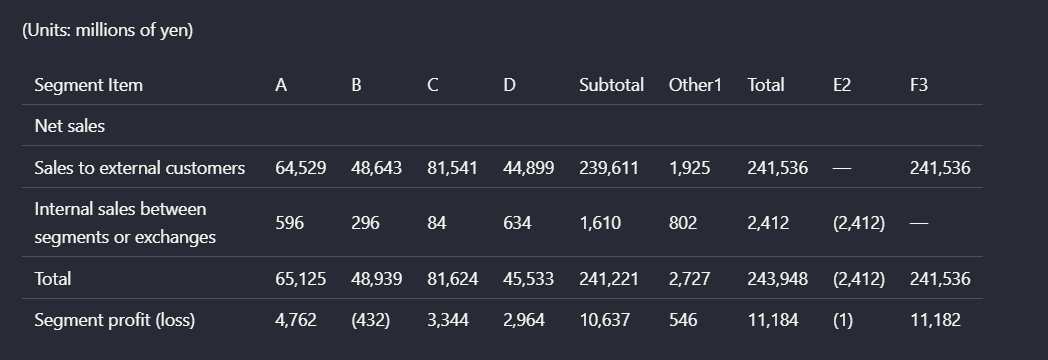
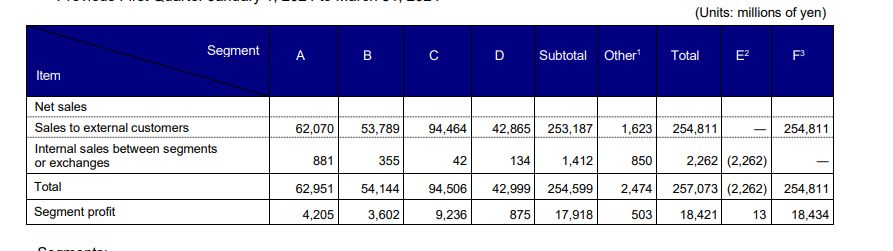
Input used: Input artifact (Image): Segment-performance table with multi-level headers and adjustment columns. — nutrient-io-financial-segment-table-cropped.png
Observed output: Output artifact (Image): On the segment table, Nutrient preserved some cell values but lost the source table's multi-level header organization. Parent-child column relationships were no — nutrient-io-segment-financial-table-by-business-unit.png
Input artifact: Input artifact (Image): Segment-performance table with multi-level headers and adjustment columns. — nutrient-io-financial-segment-table-cropped.png
Output artifact: Output artifact (Image): On the segment table, Nutrient preserved some cell values but lost the source table's multi-level header organization. Parent-child column relationships were no — nutrient-io-segment-financial-table-by-business-unit.png
What changed: Image transformed into Image
Test case: Image → Image
Input type: Image
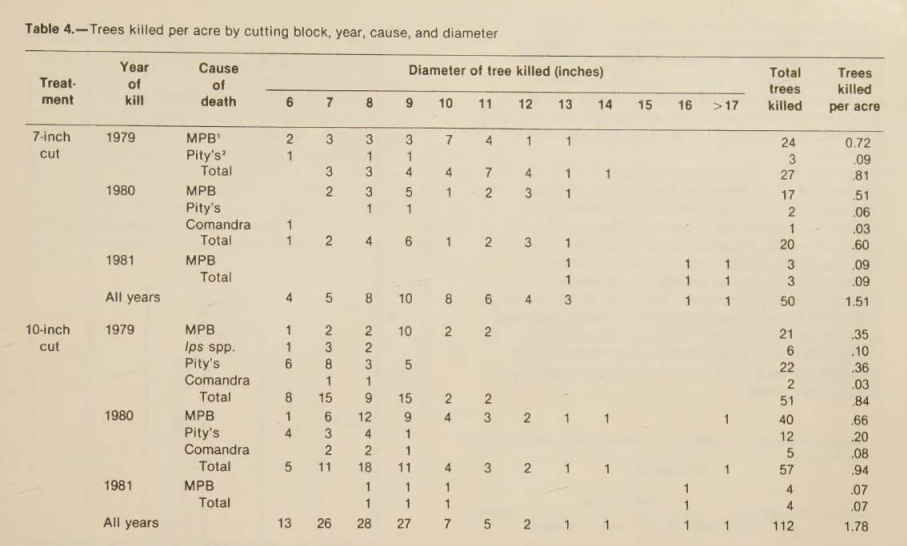
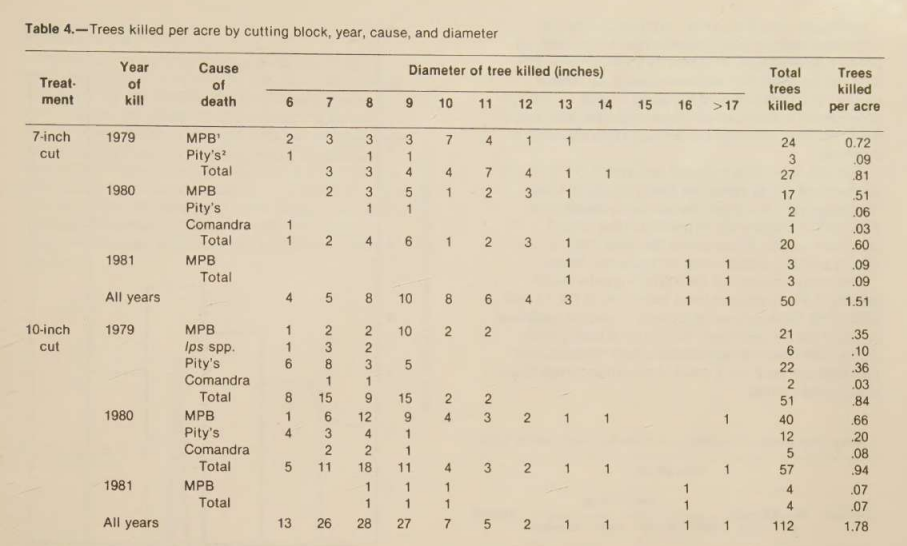
Input used: Input artifact (Image): Scanned table titled 'Trees killed per acre by cutting block, year, cause, and diameter.' — nutrient-io-table-trees-killed-per-acre.png
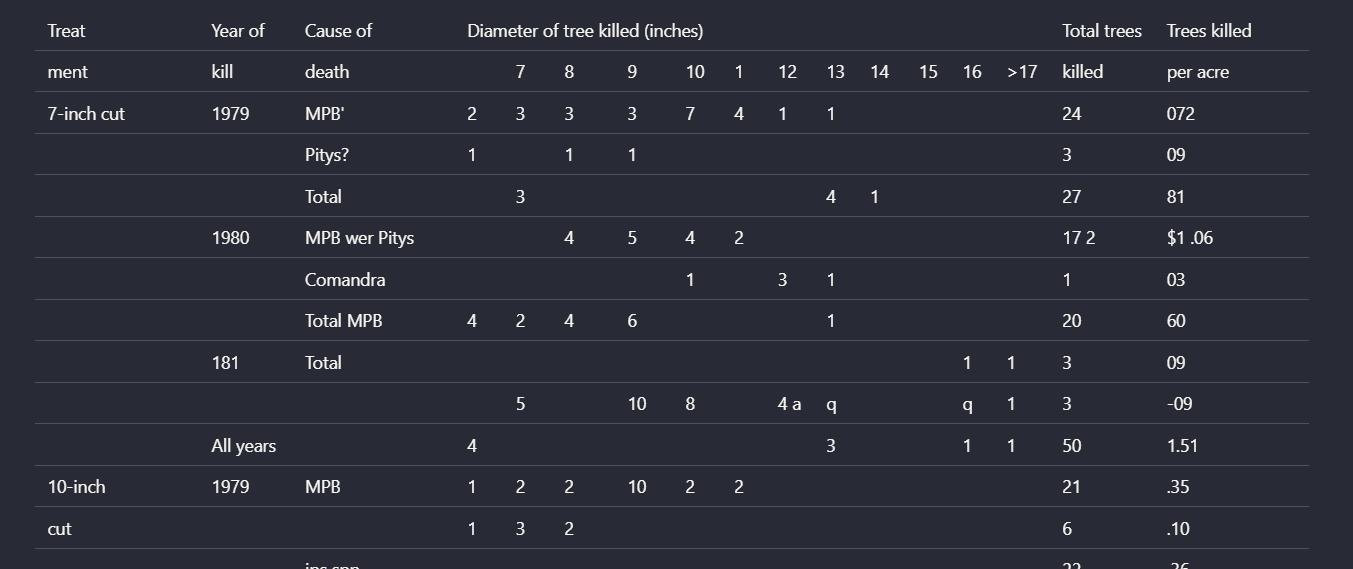
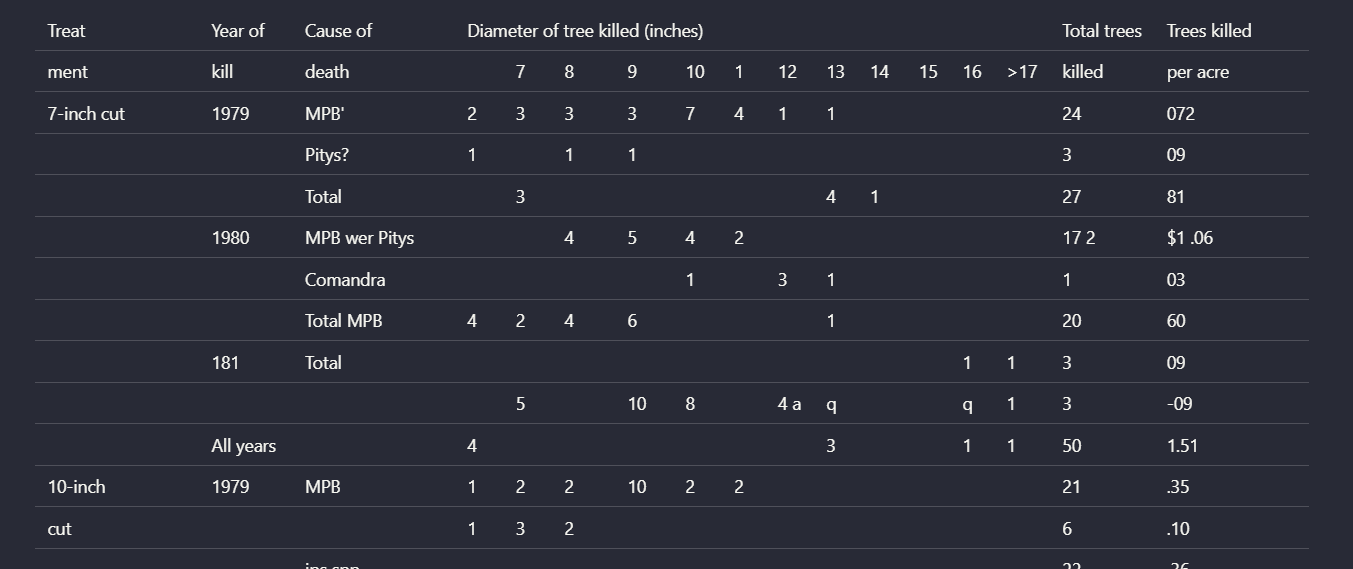
Observed output: Output artifact (Image): On the complex scanned table, Nutrient lost structural boundaries as table complexity increased. Rows were clipped, some labels were misread, and the relationsh — nutrient-io-parsed-table-trees-killed-per-acre-1.png
Input artifact: Input artifact (Image): Scanned table titled 'Trees killed per acre by cutting block, year, cause, and diameter.' — nutrient-io-table-trees-killed-per-acre.png
Output artifact: Output artifact (Image): On the complex scanned table, Nutrient lost structural boundaries as table complexity increased. Rows were clipped, some labels were misread, and the relationsh — nutrient-io-parsed-table-trees-killed-per-acre-1.png
Observed output: Output artifact (Image): The table values are recovered, but the row/column relationships are visibly misaligned. — nutrient_hybrid_earningspdf_parsed_complex_table.png
Output artifact: Output artifact (Image): The table values are recovered, but the row/column relationships are visibly misaligned. — nutrient_hybrid_earningspdf_parsed_complex_table.png
Observed output: Output artifact (Image): The table is partially flattened, so the structure is less readable than the source table. — nutrient_financialpdf_parsed_table.png
Output artifact: Output artifact (Image): The table is partially flattened, so the structure is less readable than the source table. — nutrient_financialpdf_parsed_table.png
Observed output: Output artifact (Image): Grouped columns are recovered to a degree, but the parent-child header structure is not fully preserved. — nutrient_financialpdf_parsed_multilevel_table.png
Output artifact: Output artifact (Image): Grouped columns are recovered to a degree, but the parent-child header structure is not fully preserved. — nutrient_financialpdf_parsed_multilevel_table.png
Observed output: Output artifact (Image): The dense scanned table contains truncation and recognition errors, so the result is not trustworthy for precise row-to-value reconstruction. — nutrient_scannedpdf_parsed_complex_table.png
Output artifact: Output artifact (Image): The dense scanned table contains truncation and recognition errors, so the result is not trustworthy for precise row-to-value reconstruction. — nutrient_scannedpdf_parsed_complex_table.png
What changed: Image transformed into Image
Why it matters / Conclusion: Nutrient is acceptable for simpler tables, but it was not dependable on the exact table-heavy cases this use case cares about most: financial summaries, multi-level headers, and dense scanned matrices.
Nutrient can extract table content into markdown and preserve the rough table shape on simpler cases, including grouped columns and report-style financial tables. The examples also show that structure degrades on multi-level headers, dense financial tables, and scanned complex tables.
image
Scanned table showing original and post-harvest diameters across four treatments.
↓→
image
For the scanned treatment table, Nutrient preserved the basic grouped columns and row labels well enough for the table to remain mostly readable. It still introduced OCR mistakes in the first numeric column, turning 7.8, 7.7, 7.4, and 7.5 into 78, 77, 74, and 75.
image
Target annual-report financial summary table with year columns and multiple financial line items.
↓→
image
On the Target financial summary, Nutrient recovered many row labels and values, but the table was not faithfully reconstructed. Currency markers and columns became uneven, and the relationship between rows and values weakened enough that the output read more like a flattened grid than a clean financial table.
image
Segment-performance table with multi-level headers and adjustment columns.
↓→
image
On the segment table, Nutrient preserved some cell values but lost the source table's multi-level header organization. Parent-child column relationships were no longer explicit, which makes the extracted structure harder to trust for analysis.
image
Scanned table titled 'Trees killed per acre by cutting block, year, cause, and diameter.'
↓→
image
On the complex scanned table, Nutrient lost structural boundaries as table complexity increased. Rows were clipped, some labels were misread, and the relationships between treatment, year, cause, diameter classes, and totals no longer held together.
file
↓→
file
The table values are recovered, but the row/column relationships are visibly misaligned.
file
↓→
file
The table is partially flattened, so the structure is less readable than the source table.
file
↓→
file
Grouped columns are recovered to a degree, but the parent-child header structure is not fully preserved.
file
↓→
file
The dense scanned table contains truncation and recognition errors, so the result is not trustworthy for precise row-to-value reconstruction.
Bottom Line
Nutrient is acceptable for simpler tables, but it was not dependable on the exact table-heavy cases this use case cares about most: financial summaries, multi-level headers, and dense scanned matrices.
From our researchearlier researchConvert a Complex PDF into Clean Markdown with an API
Chart and Signature Visual Content Handling
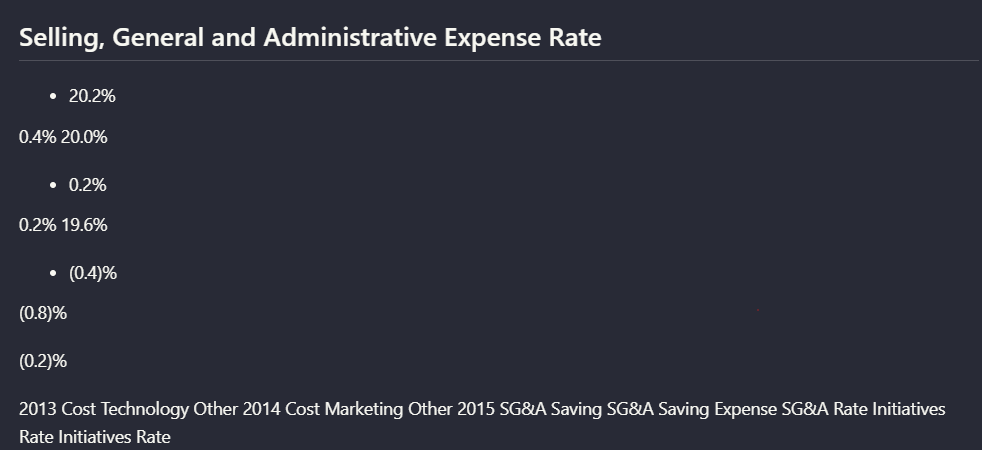
Captures surrounding text and some labels, but not the visual meaning of charts or handwritten signatures.
▾
Test Summary
Feature tested: Chart and Signature Visual Content Handling
Result: Failed — Captures surrounding text and some labels, but not the visual meaning of charts or handwritten signatures.
Feature tested: Chart and Signature Visual Content Handling
Result: Failed
Verdict: Captures surrounding text and some labels, but not the visual meaning of charts or handwritten signatures.
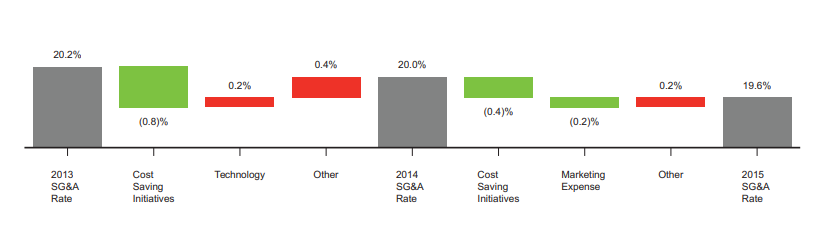
Expected behavior: Nutrient can extract some surrounding text or labels from charts and other visuals, but it does not preserve the full visual semantics. In the evaluation, a waterfall chart became text-like output, chart OCR was garbled on a scanned paper, and handwritten signatures were omitted.
Observed output: Output artifact (Image): The values and labels are present, but the chart is no longer preserved as a meaningful visual chart. — nutirent_hybrid_earningspdf_parsed_waterfall_chart.png
Output artifact: Output artifact (Image): The values and labels are present, but the chart is no longer preserved as a meaningful visual chart. — nutirent_hybrid_earningspdf_parsed_waterfall_chart.png
What changed: Image transformed into Image
Test case: Image → Image
Input type: Image
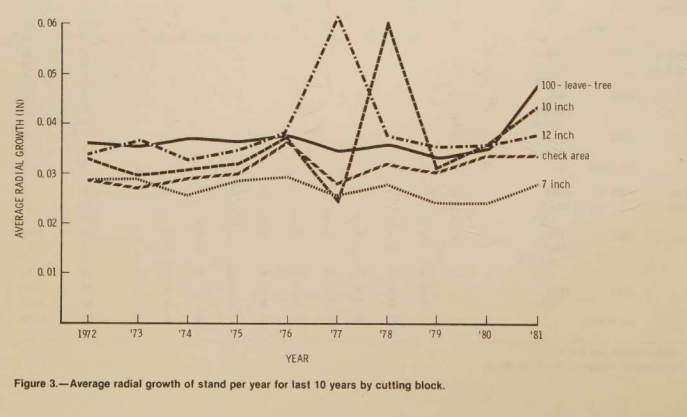
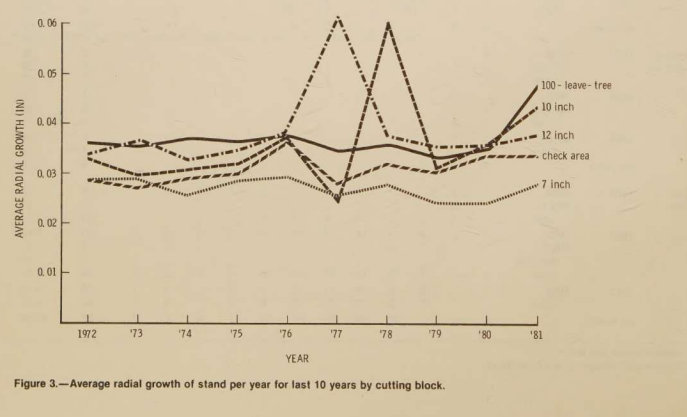
Input used: Input artifact (Image): Scanned research paper figure 3 — scannedpdf_figure_3.png
Observed output: Output artifact (Image): The chart values are extracted in a garbled, flattened form rather than as a faithful chart representation. — nutrient_scannedpdf_parsed_chart.png
Input artifact: Input artifact (Image): Scanned research paper figure 3 — scannedpdf_figure_3.png
Output artifact: Output artifact (Image): The chart values are extracted in a garbled, flattened form rather than as a faithful chart representation. — nutrient_scannedpdf_parsed_chart.png
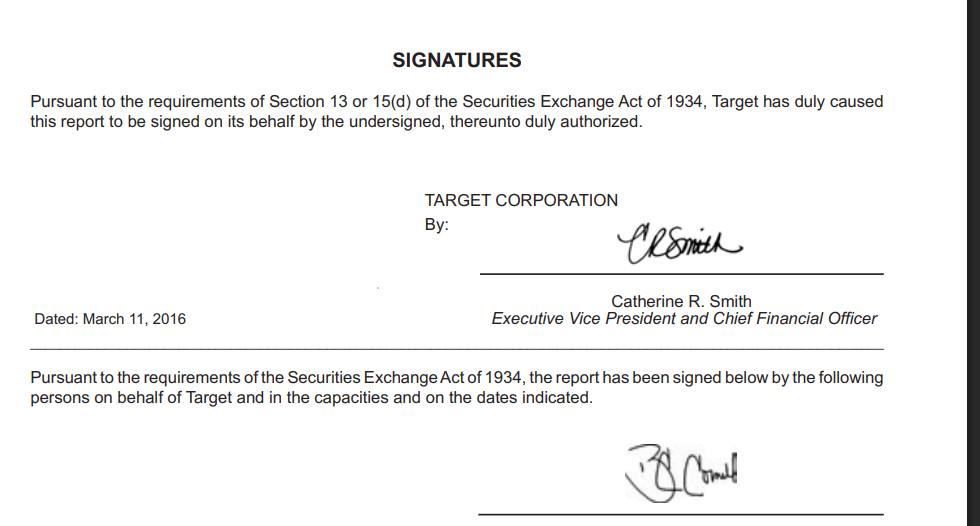
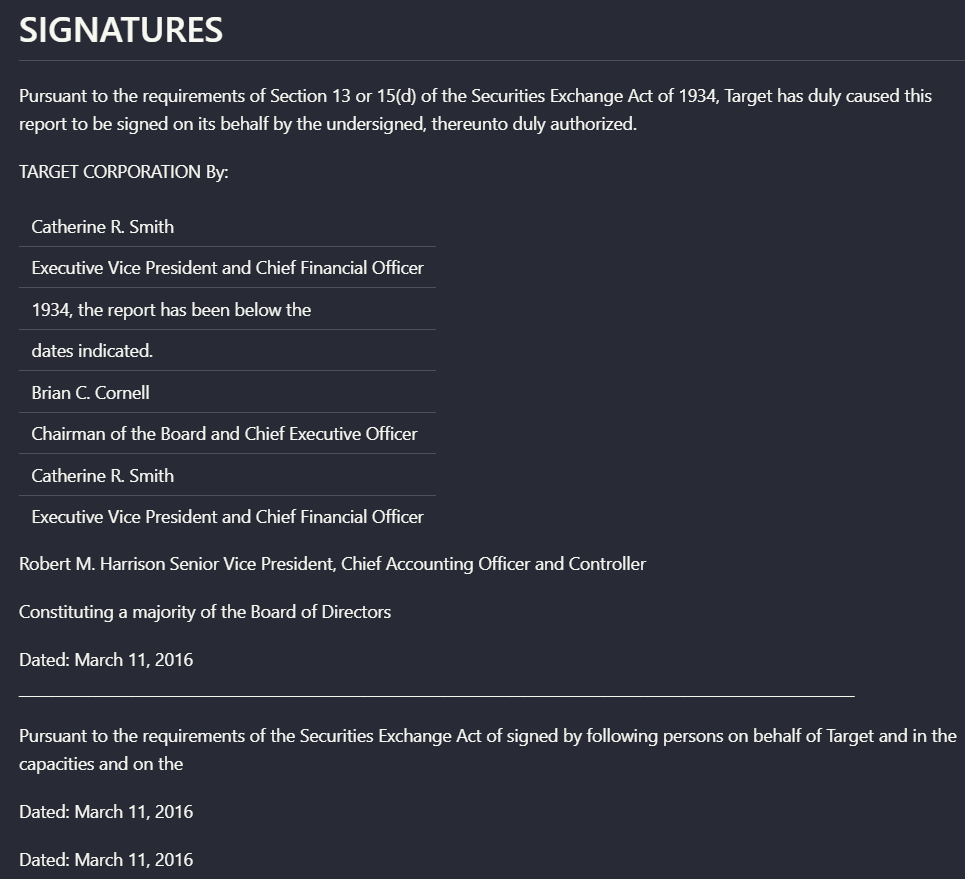
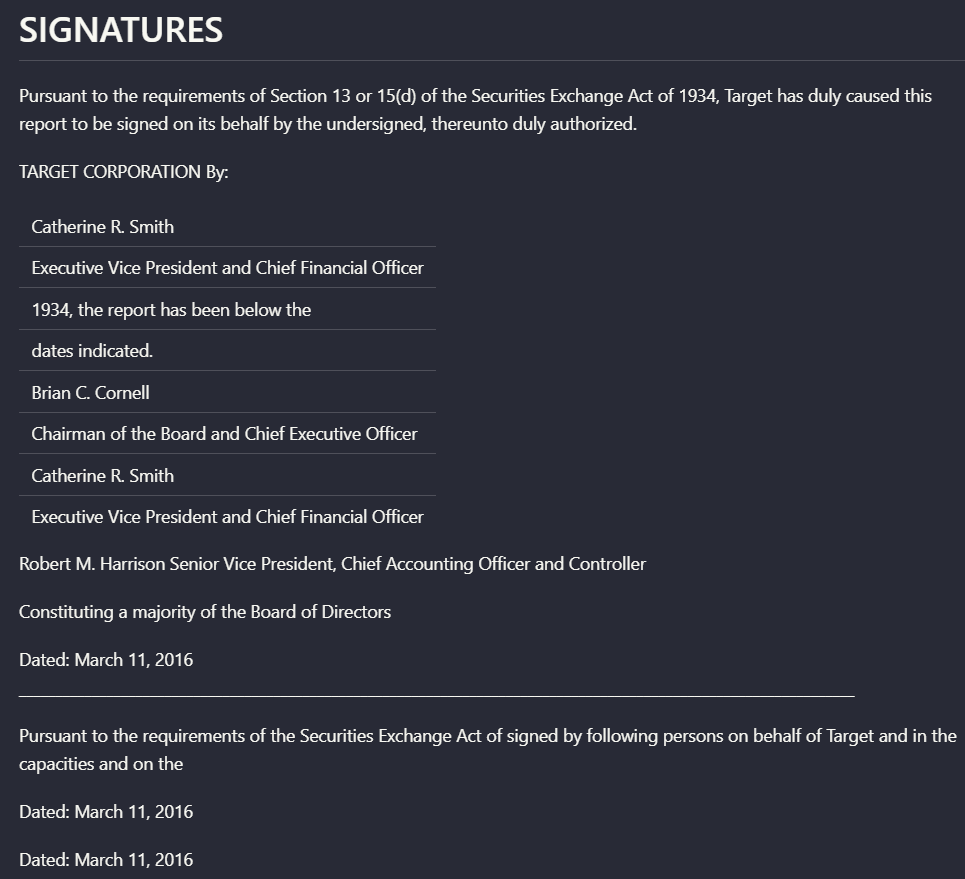
Observed output: Output artifact (Image): The signer names and surrounding legal text remain, but the handwritten signature itself is not preserved. — nutrient_hybrid_earningspdf_parsed_signs.png
Output artifact: Output artifact (Image): The signer names and surrounding legal text remain, but the handwritten signature itself is not preserved. — nutrient_hybrid_earningspdf_parsed_signs.png
What changed: Image transformed into Image
Test case: Image → Image
Input type: Image
Input used: Input artifact (Image): Scanned line graph of average radial growth by cutting-block treatment from 1972 to 1981. — nutrient-io-figure-3-average-radial-growth-by-treatment.png
Observed output: Output artifact (Image): For the scanned line graph, Nutrient produced mostly garbled OCR text. The figure caption remained partly recognizable, but the plotted relationships and chart — nutrient-io-parsed-chart-forest-growth-cutting-blocks.png
Input artifact: Input artifact (Image): Scanned line graph of average radial growth by cutting-block treatment from 1972 to 1981. — nutrient-io-figure-3-average-radial-growth-by-treatment.png
Output artifact: Output artifact (Image): For the scanned line graph, Nutrient produced mostly garbled OCR text. The figure caption remained partly recognizable, but the plotted relationships and chart — nutrient-io-parsed-chart-forest-growth-cutting-blocks.png
What changed: Image transformed into Image
Test case: Image → Image
Input type: Image
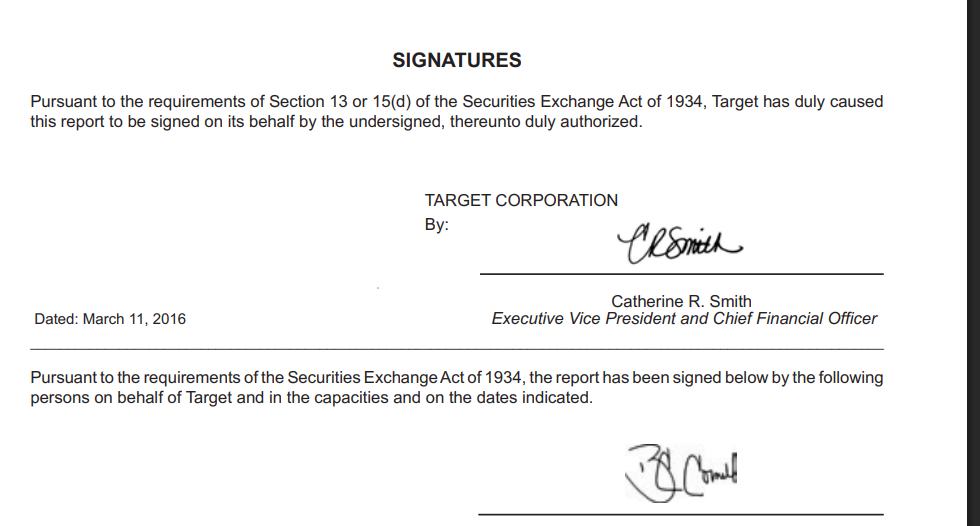
Input used: Input artifact (Image): Scanned signatures page with handwritten signatures plus printed names and titles. — landing-ai-target-annual-report-signatures-page-2.png
Observed output: Output artifact (Image): On the scanned signatures page, Nutrient captured the heading, signer names, titles, and dates, but not the handwritten signature marks themselves. The output a — nutrient-io-target-signatures-ocr-extraction.png
Input artifact: Input artifact (Image): Scanned signatures page with handwritten signatures plus printed names and titles. — landing-ai-target-annual-report-signatures-page-2.png
Output artifact: Output artifact (Image): On the scanned signatures page, Nutrient captured the heading, signer names, titles, and dates, but not the handwritten signature marks themselves. The output a — nutrient-io-target-signatures-ocr-extraction.png
What changed: Image transformed into Image
Why it matters / Conclusion: This is not a fidelity-preserving visual extractor; it is mostly text recovery around the visuals.
Nutrient can extract some surrounding text or labels from charts and other visuals, but it does not preserve the full visual semantics. In the evaluation, a waterfall chart became text-like output, chart OCR was garbled on a scanned paper, and handwritten signatures were omitted.
file
↓→
file
The values and labels are present, but the chart is no longer preserved as a meaningful visual chart.
file
↓→
file
The chart values are extracted in a garbled, flattened form rather than as a faithful chart representation.
file
↓→
file
The signer names and surrounding legal text remain, but the handwritten signature itself is not preserved.
image
Scanned line graph of average radial growth by cutting-block treatment from 1972 to 1981.
↓→
image
For the scanned line graph, Nutrient produced mostly garbled OCR text. The figure caption remained partly recognizable, but the plotted relationships and chart layout were not preserved in usable form.
image
Scanned signatures page with handwritten signatures plus printed names and titles.
↓→
image
On the scanned signatures page, Nutrient captured the heading, signer names, titles, and dates, but not the handwritten signature marks themselves. The output also repeated some structured lines, reducing completeness and cleanliness.
Bottom Line
This is not a fidelity-preserving visual extractor; it is mostly text recovery around the visuals.
From our researchConvert a Complex PDF into Clean Markdown with an APIearlier research
Pricing & Access
TESTED
Free
$0
5,000
credits/month
Starter
$59/month
25,000 credits/month
Pro
$500
500,000 credits/month
Custom
Custom
Custom credit volume
Volume discounts
Dedicated support
✓ Use This If
●You want a hosted API that turns mixed PDFs into markdown and you are comfortable automating it with an API key or code.
●Your documents are mostly report-style pages where readable OCR and section hierarchy matter more than perfect chart or table reconstruction.
●You can manually review complex tables, charts, and signature pages before sending the markdown downstream.
✕ Skip This If
●You need reliable multi-level table headers and exact row-to-value alignment.
●You need charts preserved as meaningful visuals rather than flattened labels or garbled OCR text.
●You need handwritten signatures or other visual marks preserved in the extracted output.
●You need a browser-only workflow that is proven end-to-end in this evaluation.
Featured in Rankings
Independent rankings where Nutrient was tested and rated.
Yes. In this research it produced markdown outputs for a hybrid earnings report, a table-heavy financial report, and a scanned research paper.
It does well on straightforward sections and multi-column text, but the scanned paper's first page showed that abstract/title ordering can still slip.
Not reliably. Simple tables were partly readable, but multi-level headers, grouped columns, and dense scanned tables lost structure or became misaligned.
Not as visuals. Chart output was flattened or garbled, and handwritten signatures were omitted while the surrounding signature-page text remained.
The task notes report a browser UI timeout and show the documented API-key/code path posting to the extraction endpoint and writing the markdown to a file.
The dashboard screenshot says direct uploads are limited to 150 MB and files fetched from remote URLs are limited to 50 MB.
Banner Preview
How the embed badge will look on your site
Embed HTML
Copy this code to your website source
<a target="_blank" href="https://aidemos.com/tools/nutrient-io?utm_source=nutrient-io_embed" style="width: 250px; height: 80px; border-radius:4px;" width="250" height="80">
<img src="https://aidemos-website-images.s3.amazonaws.com/featured.png" alt="Nutrient | Featured on AI Demos" style="width: 250px; height: 80px; border-radius:4px;" width="250" height="80">
</a>
Quick Integration Guide
1Copy the HTML code block above.
2Paste it into your site's HTML or CMS editor.
3Banner appears instantly on your page.
4Links back to your tool profile here.
Similar Tools
Similar Tools
Discover more AI tools like Nutrient to enhance your workflow.
⚡ Built by FutureSmart AI — the team behind AI Demos
Need a custom AI solution for this use case?
If you are looking to build a custom PDF to markdown, document parsing, or structured text extraction system for your business or internal workflow, email us at contact@futuresmart.ai.
Found something inaccurate or missing? We try to keep our AI research accurate and useful. If you found outdated information, an issue, or have a suggestion, email us at collaborate@aidemos.com.