Landing AI handled the core document-extraction workflow well on both the bank statement and invoice tests: it accepted the PDFs, followed the supplied schema, and returned nested JSON with complete transaction and line-item reconstruction. The main tradeoffs were identifier fidelity and field mapping consistency, since the bank-statement transaction IDs were regenerated sequentially, one invoice station block came back null, and some ad IDs drifted from the source text.
Expected behavior: Takes a document plus a supplied schema and returns nested structured output such as account blocks, repeated rows, line items, and identifier fields instead of flat OCR text. The member cards exercised it on bank-statement and invoice-style documents that included statement metadata, account/branch details, balances, transactions, rewards, and line items.
Test case: PDF document → Text/code file
Input type: PDF document
Input used: Input artifact (PDF document): Invoice source document used to test line-item and totals extraction. — Invoice PDF.pdf
Observed output: Output artifact (Text/code file): The invoice output captured all eight line items and the financial summary in nested JSON. — landingai-invoice-output.json
Input artifact: Input artifact (PDF document): Invoice source document used to test line-item and totals extraction. — Invoice PDF.pdf
Output artifact: Output artifact (Text/code file): The invoice output captured all eight line items and the financial summary in nested JSON. — landingai-invoice-output.json
What changed: PDF document transformed into Text/code file
Test case: PDF document → Text/code file
Input type: PDF document
Input used: Input artifact (PDF document): Bank-statement source document used for schema-guided extraction. — Bank Statement PDF.pdf
Observed output: Output artifact (Text/code file): Structured JSON matched the supplied bank-statement schema and populated statement metadata, account-holder fields, account and branch details, balances, transactions, rewards, and disclaimers. — landingai-bank-statement-output.json
Input artifact: Input artifact (PDF document): Bank-statement source document used for schema-guided extraction. — Bank Statement PDF.pdf
Output artifact: Output artifact (Text/code file): Structured JSON matched the supplied bank-statement schema and populated statement metadata, account-holder fields, account and branch details, balances, transactions, rewards, and disclaimers. — landingai-bank-statement-output.json
What changed: PDF document transformed into Text/code file
Test case: Image → Image
Input type: Image
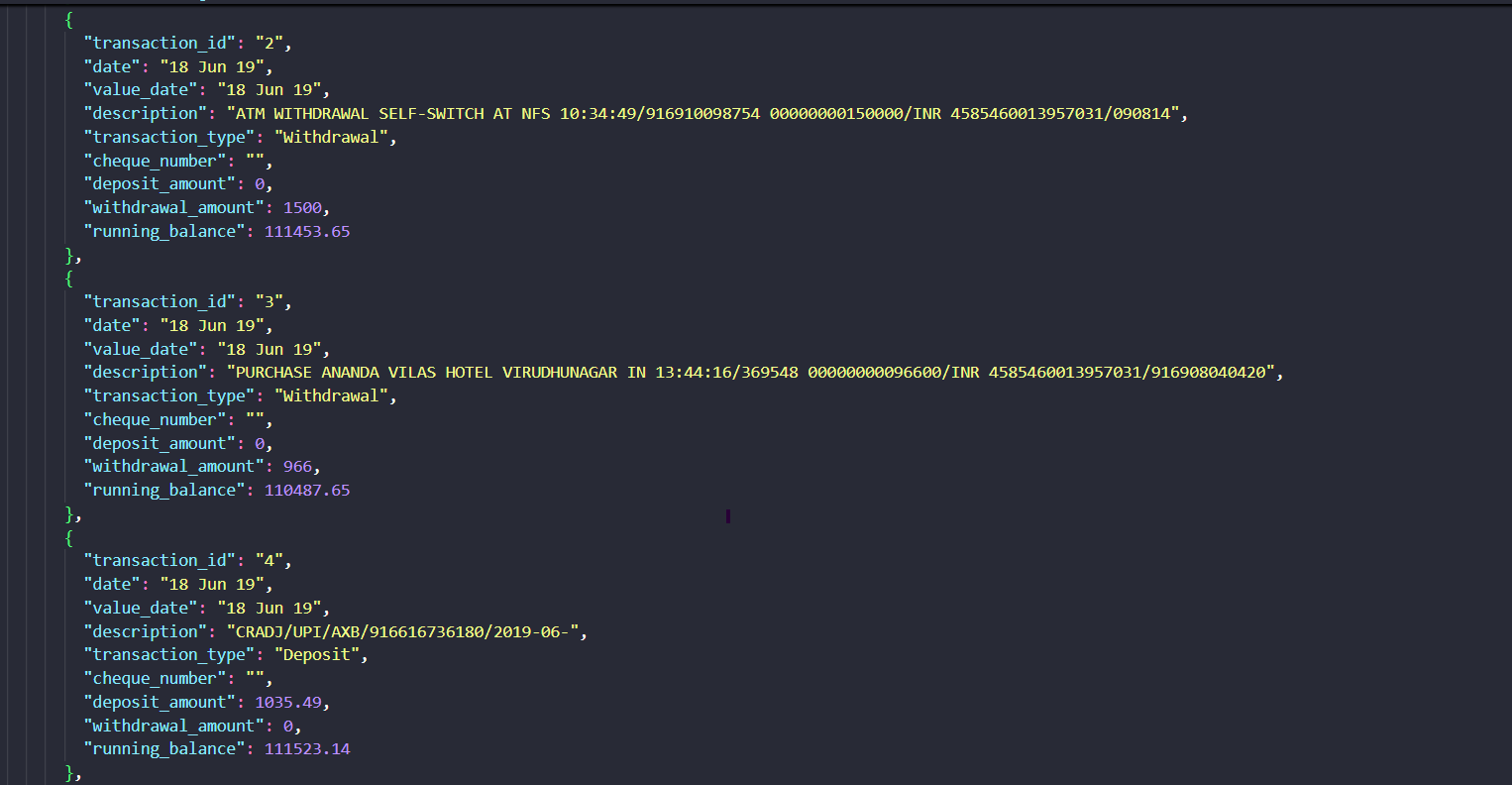
Input used: Input artifact (Image): 18 Jun bank-statement transaction table crop used to verify row-level extraction. — bank-statement-18-jun-transactions.png
Observed output: Output artifact (Image): The 18 Jun rows were extracted as structured records with transaction_type, amounts, and running_balance fields preserved. — landing-ai-bank-statement-18-jun-extractions.png
Input artifact: Input artifact (Image): 18 Jun bank-statement transaction table crop used to verify row-level extraction. — bank-statement-18-jun-transactions.png
Output artifact: Output artifact (Image): The 18 Jun rows were extracted as structured records with transaction_type, amounts, and running_balance fields preserved. — landing-ai-bank-statement-18-jun-extractions.png
What changed: Image transformed into Image
Test case: Image → Image
Input type: Image
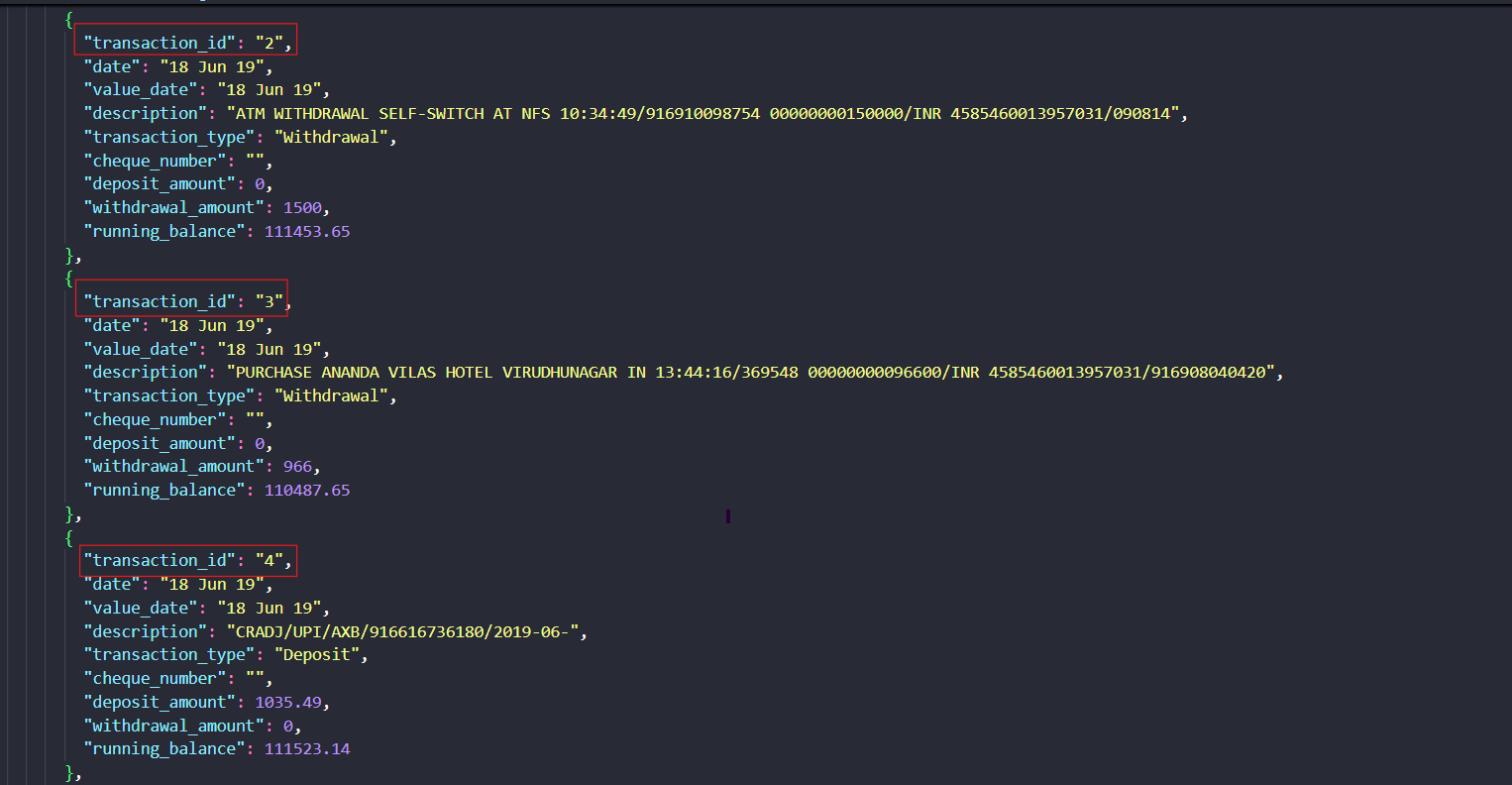
Input used: Input artifact (Image): Transaction identifiers visible in the source rows for fidelity checking. — bank-statement-18-jun-transaction-id.png
Observed output: Output artifact (Image): The extracted records expose sequential transaction_id values instead of the source identifiers, confirming that identifier fidelity is weaker than row reconstruction. — landing-ai-landing-ai-bank-statement-18-jun-extract-1b244e286ca1.png
Input artifact: Input artifact (Image): Transaction identifiers visible in the source rows for fidelity checking. — bank-statement-18-jun-transaction-id.png
Output artifact: Output artifact (Image): The extracted records expose sequential transaction_id values instead of the source identifiers, confirming that identifier fidelity is weaker than row reconstruction. — landing-ai-landing-ai-bank-statement-18-jun-extract-1b244e286ca1.png
What changed: Image transformed into Image
Test case: Image → Image
Input type: Image
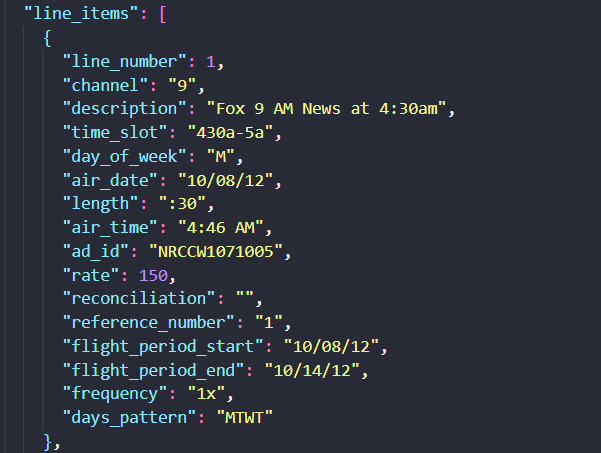
Input used: Input artifact (Image): Invoice row crop used to check row-level field fidelity, especially the Ad-ID cell. — invoice-ad-id-line-item-1.png
Observed output: Output artifact (Image): The extracted first line-item record populated ad_id and the broader row fields, but the report flags ad-ID OCR/parsing drift on some rows. — landing-ai-extracted-line-item-1.png
Input artifact: Input artifact (Image): Invoice row crop used to check row-level field fidelity, especially the Ad-ID cell. — invoice-ad-id-line-item-1.png
Output artifact: Output artifact (Image): The extracted first line-item record populated ad_id and the broader row fields, but the report flags ad-ID OCR/parsing drift on some rows. — landing-ai-extracted-line-item-1.png
What changed: Image transformed into Image
Why it matters / Conclusion: Strong for schema-shaped extraction when you need nested objects and structured document sections rather than raw OCR text.
Takes a document plus a supplied schema and returns nested structured output such as account blocks, repeated rows, line items, and identifier fields instead of flat OCR text. The member cards exercised it on bank-statement and invoice-style documents that included statement metadata, account/branch details, balances, transactions, rewards, and line items.
pdf
Invoice PDF.pdf
Invoice source document used to test line-item and totals extraction.
↓→
json
landingai-invoice-output.json
Loading file...
The invoice output captured all eight line items and the financial summary in nested JSON.
pdf
Bank Statement PDF.pdf
Bank-statement source document used for schema-guided extraction.
↓→
file
landingai-bank-statement-output.json
Loading file...
Structured JSON matched the supplied bank-statement schema and populated statement metadata, account-holder fields, account and branch details, balances, transactions, rewards, and disclaimers.
image
18 Jun bank-statement transaction table crop used to verify row-level extraction.
↓→
image
The 18 Jun rows were extracted as structured records with transaction_type, amounts, and running_balance fields preserved.
image
Transaction identifiers visible in the source rows for fidelity checking.
↓→
image
The extracted records expose sequential transaction_id values instead of the source identifiers, confirming that identifier fidelity is weaker than row reconstruction.
image
Invoice row crop used to check row-level field fidelity, especially the Ad-ID cell.
↓→
image
The extracted first line-item record populated ad_id and the broader row fields, but the report flags ad-ID OCR/parsing drift on some rows.
Bottom Line
Strong for schema-shaped extraction when you need nested objects and structured document sections rather than raw OCR text.
From our researchExtract and query structured data from documents using natural language
Document Hierarchy and Reading-Order Reconstruction
Usually preserves section flow and OCR reading order, but heading semantics are inconsistent.
▾
Test Summary
Feature tested: Document Hierarchy and Reading-Order Reconstruction
Result: Partial — Usually preserves section flow and OCR reading order, but heading semantics are inconsistent.
Feature tested: Document Hierarchy and Reading-Order Reconstruction
Result: Partial
Verdict: Usually preserves section flow and OCR reading order, but heading semantics are inconsistent.
Expected behavior: Rebuilds page-level structure into readable markdown-like text while preserving headings, subsections, and reading order across native and scanned PDFs. It was exercised on the Target annual report section, a Sumitomo financial report page with section/subsection headings, and a scanned two-column research page.
Test case: Image → Image
Input type: Image
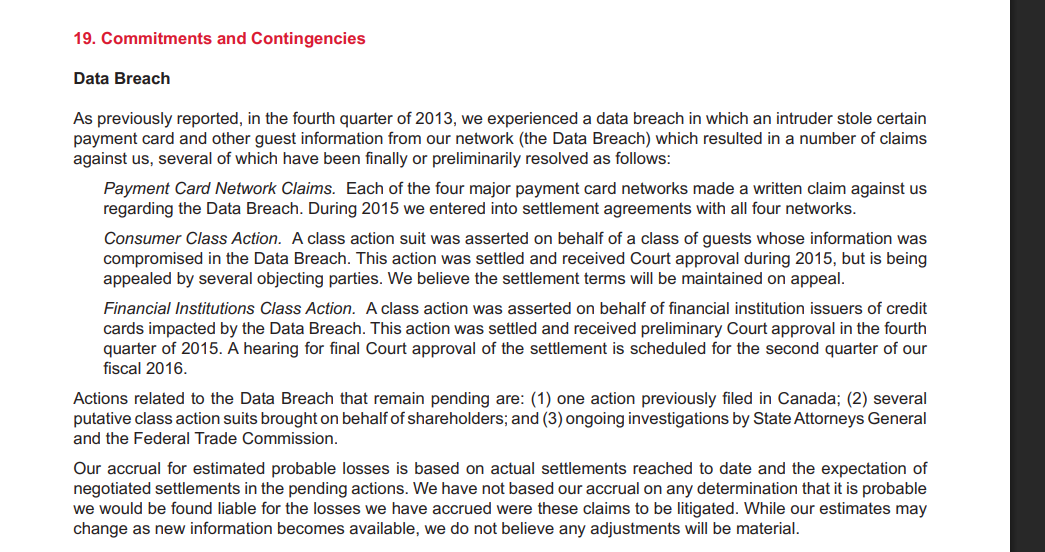
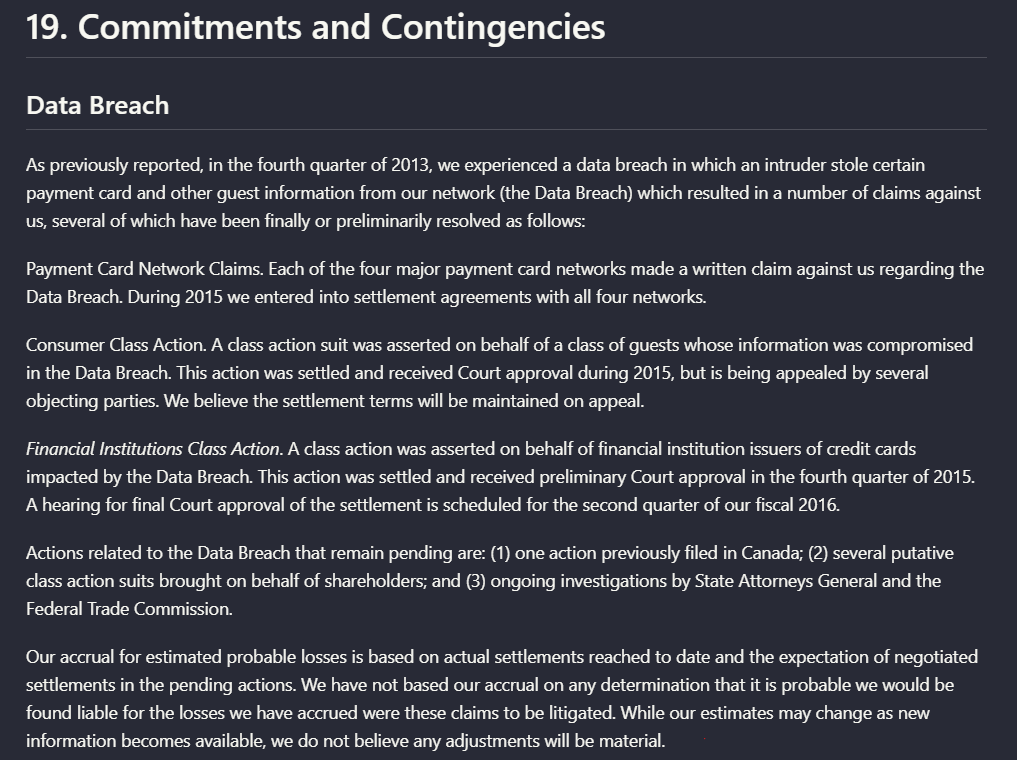
Input used: Input artifact (Image): Target annual report section titled '19. Commitments and Contingencies' with the 'Data Breach' subsection. — landing-ai-target-annual-report-commitments-contingencies-data-breach.png
Observed output: Output artifact (Image): Landing AI preserved the section heading, subsection title, and the full body paragraphs from the Target annual report section. In this example, the reading flo — landing-ai-parsed-commitments-contingencies-data-breach.png
Input artifact: Input artifact (Image): Target annual report section titled '19. Commitments and Contingencies' with the 'Data Breach' subsection. — landing-ai-target-annual-report-commitments-contingencies-data-breach.png
Output artifact: Output artifact (Image): Landing AI preserved the section heading, subsection title, and the full body paragraphs from the Target annual report section. In this example, the reading flo — landing-ai-parsed-commitments-contingencies-data-breach.png
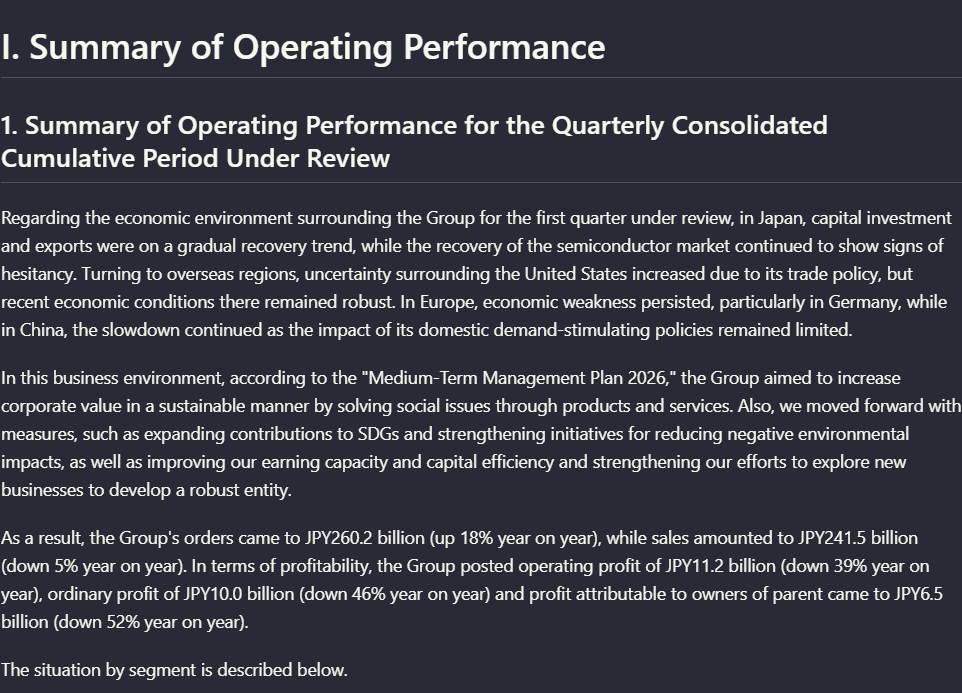
Observed output: Output artifact (Image): On the table-heavy financial report, Landing AI kept the main section title, the subsection title, and the body paragraphs in readable order. The extracted outp — landing-ai-financial-report-operating-performance-parsed-hierarchy.png
Output artifact: Output artifact (Image): On the table-heavy financial report, Landing AI kept the main section title, the subsection title, and the body paragraphs in readable order. The extracted outp — landing-ai-financial-report-operating-performance-parsed-hierarchy.png
What changed: Image transformed into Image
Test case: Image → Image
Input type: Image
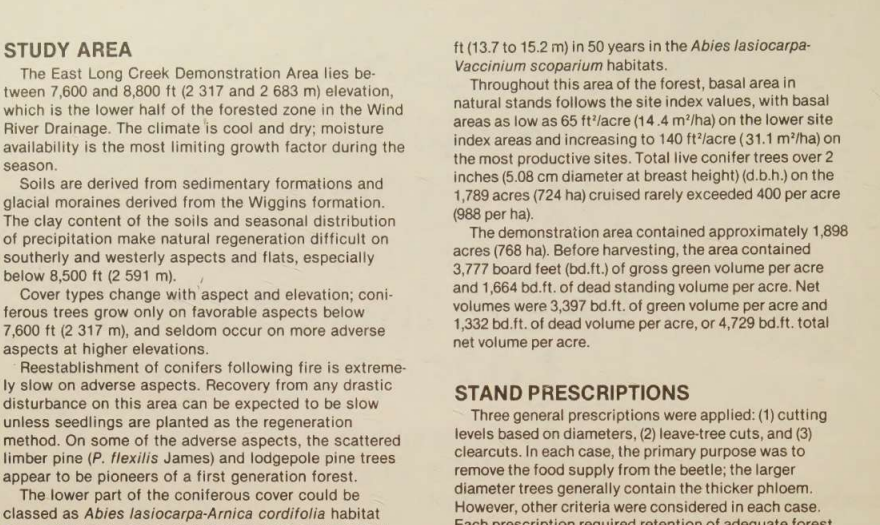
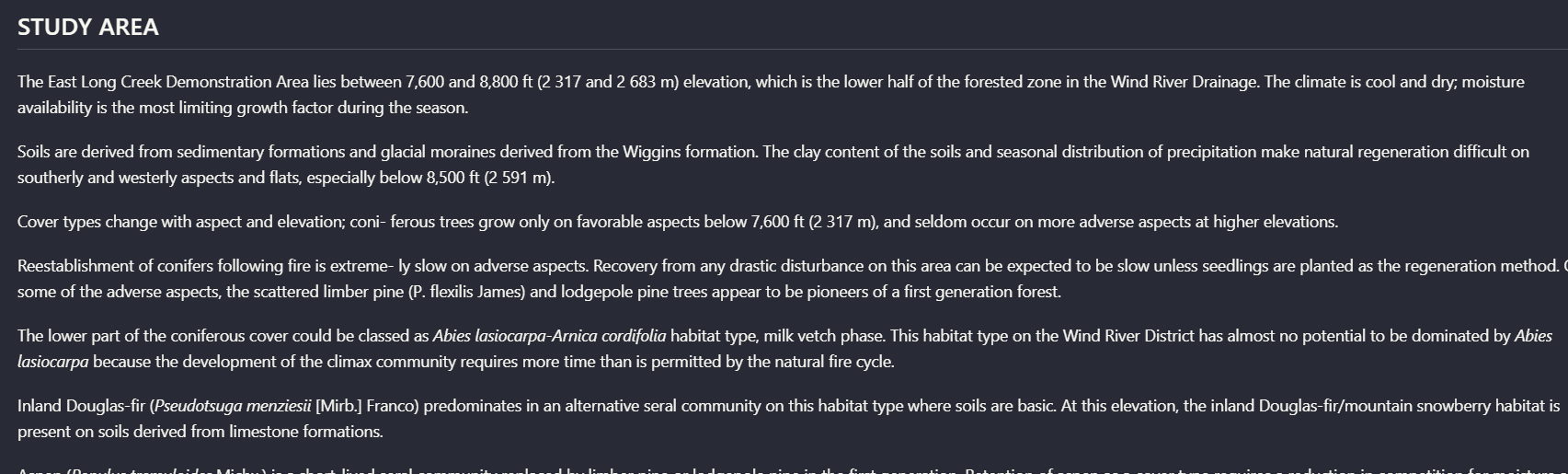
Input used: Input artifact (Image): Scanned two-column research page with 'STUDY AREA' and 'STAND PRESCRIPTIONS' sections. — landing-ai-scanned-two-column-text-study-area.png
Observed output: Output artifact (Image): On the scanned multi-column page, Landing AI OCR'd the 'STUDY AREA' section into a coherent block of text and kept related paragraphs grouped under that heading — landing-ai-hierarchy-preserved-forest-study-area-text.png
Input artifact: Input artifact (Image): Scanned two-column research page with 'STUDY AREA' and 'STAND PRESCRIPTIONS' sections. — landing-ai-scanned-two-column-text-study-area.png
Output artifact: Output artifact (Image): On the scanned multi-column page, Landing AI OCR'd the 'STUDY AREA' section into a coherent block of text and kept related paragraphs grouped under that heading — landing-ai-hierarchy-preserved-forest-study-area-text.png
What changed: Image transformed into Image
Test case: Image → Image
Input type: Image
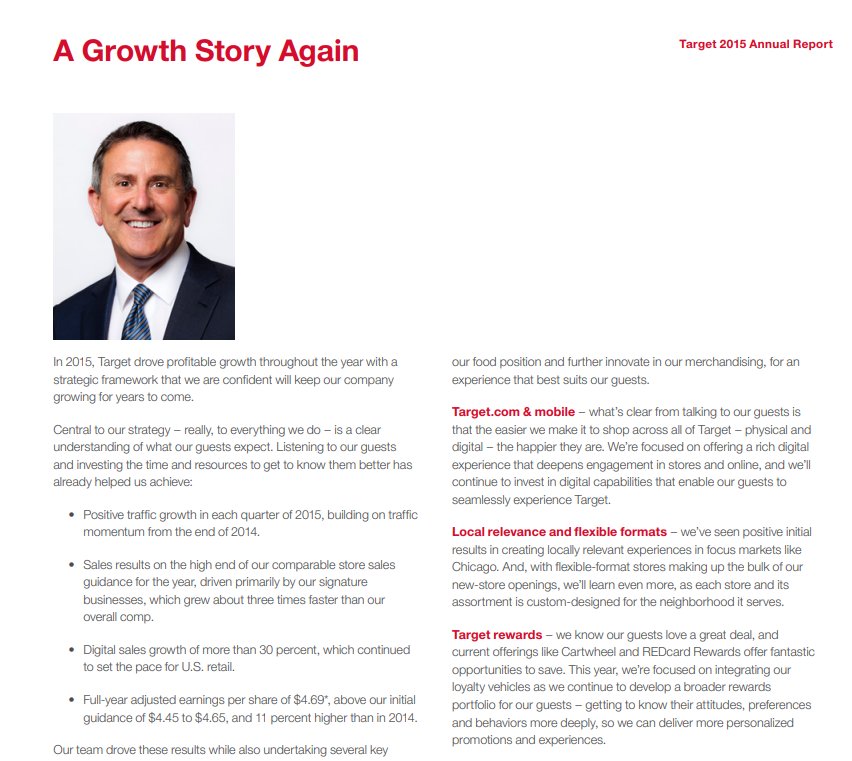
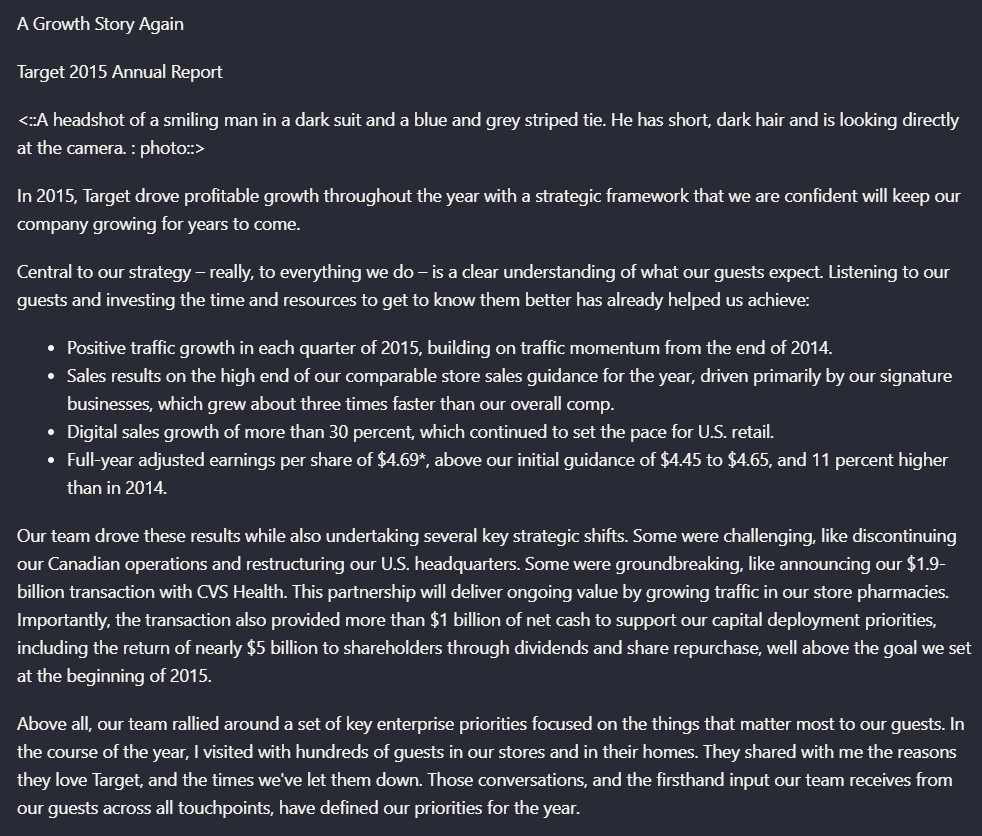
Input used: Input artifact (Image): Target annual report page titled 'A Growth Story Again' with a portrait and bullet points. — landing-ai-target-annual-report-growth-story-page.png
Observed output: Output artifact (Image): Landing AI preserved the page title, the main paragraph, the bullet list, and even added a description of the portrait image. The failure is semantic rather tha — landing-ai-target-annual-report-growth-story-parsed-hierarchy.png
Input artifact: Input artifact (Image): Target annual report page titled 'A Growth Story Again' with a portrait and bullet points. — landing-ai-target-annual-report-growth-story-page.png
Output artifact: Output artifact (Image): Landing AI preserved the page title, the main paragraph, the bullet list, and even added a description of the portrait image. The failure is semantic rather tha — landing-ai-target-annual-report-growth-story-parsed-hierarchy.png
What changed: Image transformed into Image
Why it matters / Conclusion: Good at keeping pages readable and in order across mixed PDFs, but not dependable if your downstream pipeline relies on exact heading levels.
Rebuilds page-level structure into readable markdown-like text while preserving headings, subsections, and reading order across native and scanned PDFs. It was exercised on the Target annual report section, a Sumitomo financial report page with section/subsection headings, and a scanned two-column research page.
image
Target annual report section titled '19. Commitments and Contingencies' with the 'Data Breach' subsection.
↓→
image
Landing AI preserved the section heading, subsection title, and the full body paragraphs from the Target annual report section. In this example, the reading flow stayed intact: the 'Data Breach' heading remained attached to the surrounding narrative, including the payment-card, consumer class action, and financial institutions class action paragraphs.
image
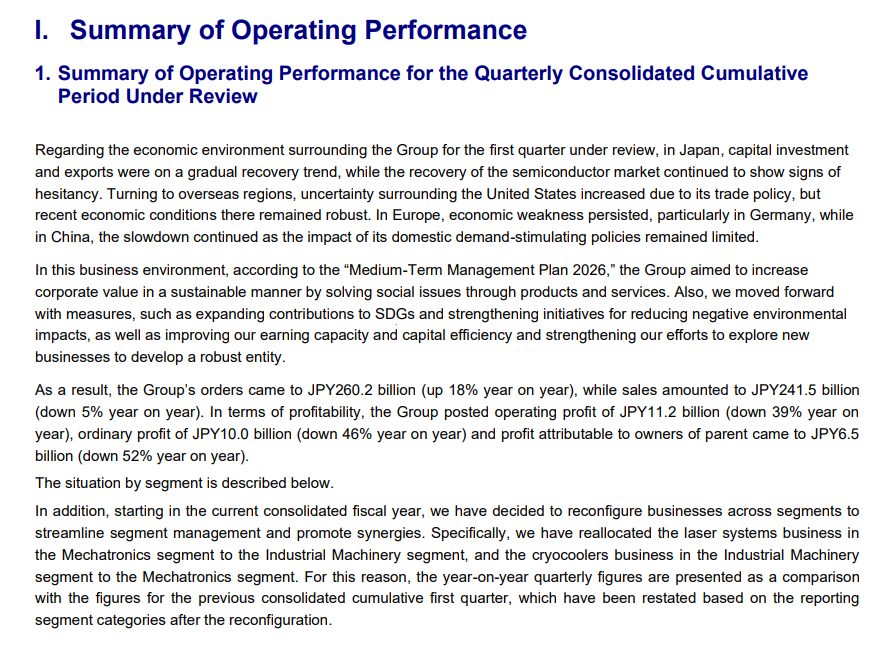
Sumitomo financial report page titled 'I. Summary of Operating Performance'.
↓→
image
On the table-heavy financial report, Landing AI kept the main section title, the subsection title, and the body paragraphs in readable order. The extracted output separates the summary heading from the paragraph text clearly enough to follow the original section organization.
image
Scanned two-column research page with 'STUDY AREA' and 'STAND PRESCRIPTIONS' sections.
↓→
image
On the scanned multi-column page, Landing AI OCR'd the 'STUDY AREA' section into a coherent block of text and kept related paragraphs grouped under that heading rather than interleaving the columns. The extraction is readable, though not letter-perfect: for example, one sentence shifts from 'growth factor during the season' to 'growth factor for the season,' and some punctuation/hyphenation is normalized.
image
Target annual report page titled 'A Growth Story Again' with a portrait and bullet points.
↓→
image
Landing AI preserved the page title, the main paragraph, the bullet list, and even added a description of the portrait image. The failure is semantic rather than textual: the top-level heading is rendered as plain text instead of a true H1-style markdown heading, so the content survives but the hierarchy is weaker than the source.
Bottom Line
Good at keeping pages readable and in order across mixed PDFs, but not dependable if your downstream pipeline relies on exact heading levels.
From our researchearlier research
Table Reconstruction
Strong on clean financial tables, weaker on nested header semantics and noisier scanned tables.
▾
Test Summary
Feature tested: Table Reconstruction
Result: Partial — Strong on clean financial tables, weaker on nested header semantics and noisier scanned tables.
Feature tested: Table Reconstruction
Result: Partial
Verdict: Strong on clean financial tables, weaker on nested header semantics and noisier scanned tables.
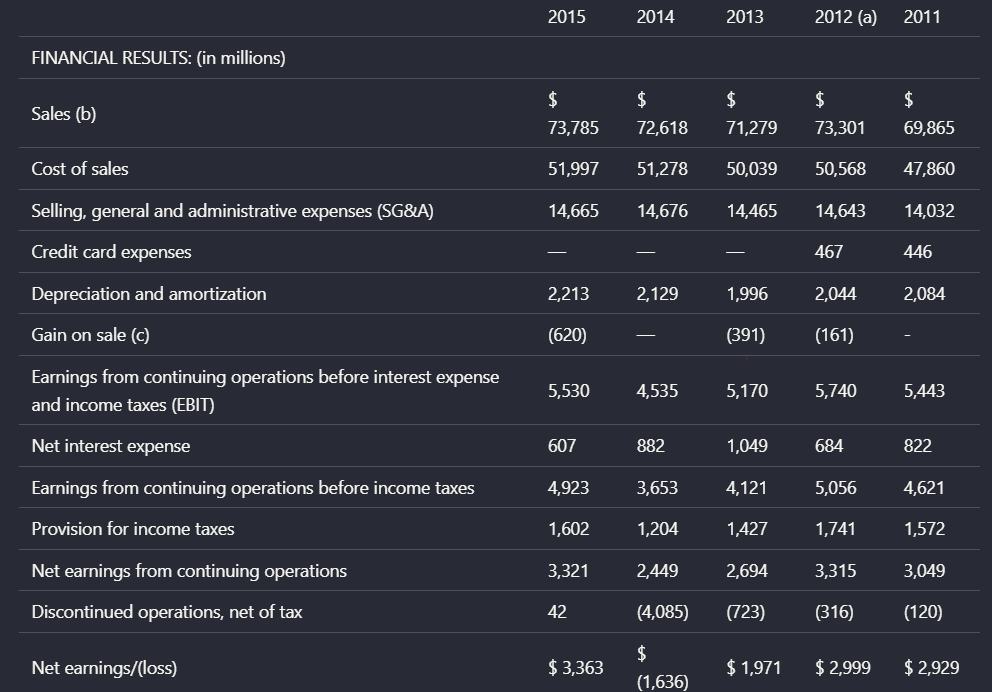
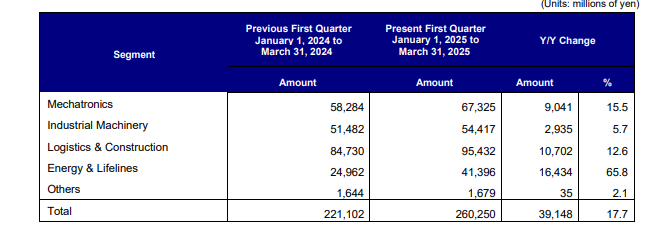
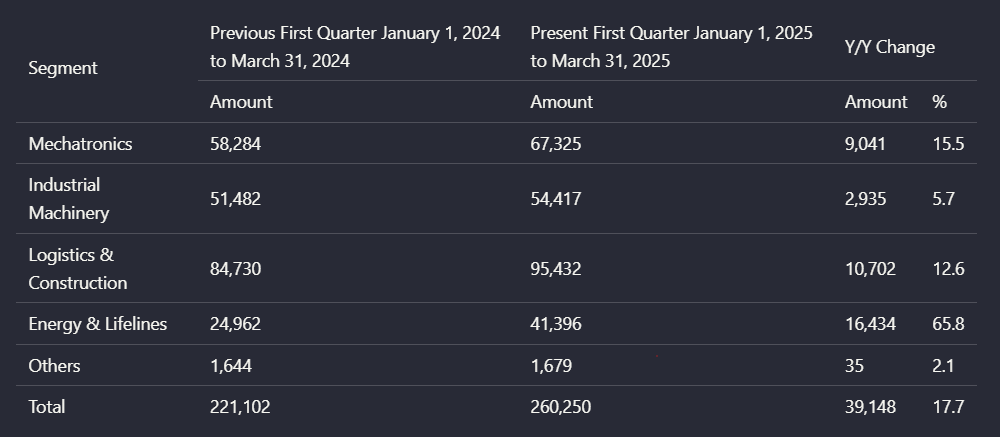
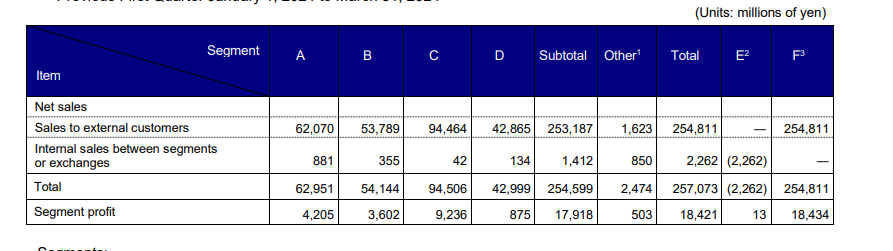
Expected behavior: Extracts tables into structured markdown-like layouts that preserve rows, columns, and cell values. It was tested on the Target financial summary table, Sumitomo segment comparison tables, a multi-level segment table, and a photographed stand-structure table from a scanned report.
Test case: Image → Image
Input type: Image
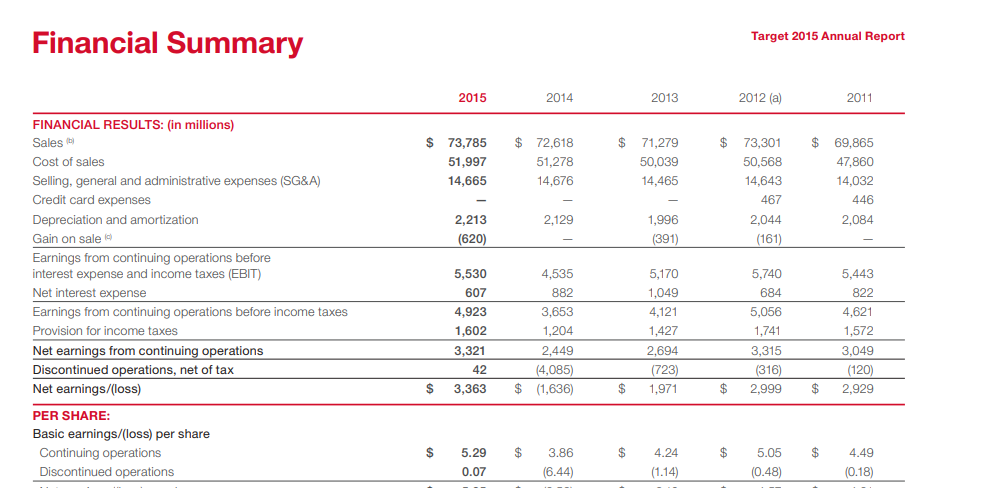
Input used: Input artifact (Image): Target annual report 'Financial Summary' table for 2015 through 2011. — landing-ai-target-annual-report-financial-summary-table-2.png
Observed output: Output artifact (Image): Landing AI reconstructed the Target financial summary with the year columns, row labels, and corresponding values still aligned. In this clean digital table, th — landing-ai-landingai-hybrid-earnings-pdf-parsed-table.png
Input artifact: Input artifact (Image): Target annual report 'Financial Summary' table for 2015 through 2011. — landing-ai-target-annual-report-financial-summary-table-2.png
Output artifact: Output artifact (Image): Landing AI reconstructed the Target financial summary with the year columns, row labels, and corresponding values still aligned. In this clean digital table, th — landing-ai-landingai-hybrid-earnings-pdf-parsed-table.png
What changed: Image transformed into Image
Test case: Image → Image
Input type: Image
Input used: Input artifact (Image): Segment results table comparing previous first quarter, present first quarter, and Y/Y change. — landing-ai-segment-results-table-2025-first-quarter.png
Observed output: Output artifact (Image): Landing AI preserved the segment table's core structure and values: business-segment rows such as Mechatronics, Industrial Machinery, Logistics & Construction, — landing-ai-segment-quarter-yoy-change-table.png
Input artifact: Input artifact (Image): Segment results table comparing previous first quarter, present first quarter, and Y/Y change. — landing-ai-segment-results-table-2025-first-quarter.png
Output artifact: Output artifact (Image): Landing AI preserved the segment table's core structure and values: business-segment rows such as Mechatronics, Industrial Machinery, Logistics & Construction, — landing-ai-segment-quarter-yoy-change-table.png
What changed: Image transformed into Image
Test case: Image → Image
Input type: Image
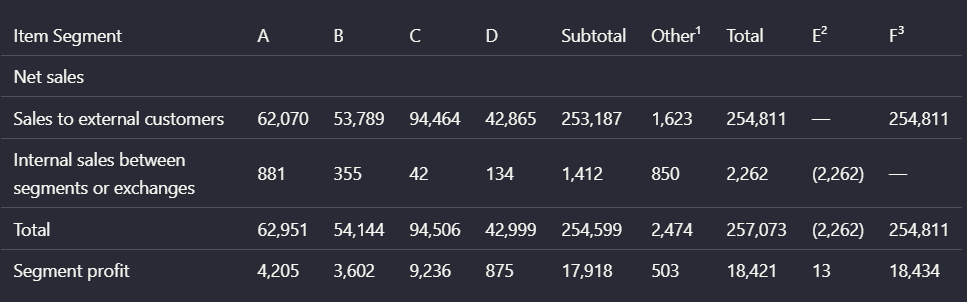
Input used: Input artifact (Image): Multi-level financial table with segment columns A through F3 and nested headers. — landing-ai-complex-financial-segment-table.png
Observed output: Output artifact (Image): Landing AI kept the values and the broad tabular shape of the complex segment table, but it flattened nested header relationships. The source distinguishes mult — landing-ai-parsed-multilevel-segment-table.png
Input artifact: Input artifact (Image): Multi-level financial table with segment columns A through F3 and nested headers. — landing-ai-complex-financial-segment-table.png
Output artifact: Output artifact (Image): Landing AI kept the values and the broad tabular shape of the complex segment table, but it flattened nested header relationships. The source distinguishes mult — landing-ai-parsed-multilevel-segment-table.png
What changed: Image transformed into Image
Test case: Image → Image
Input type: Image
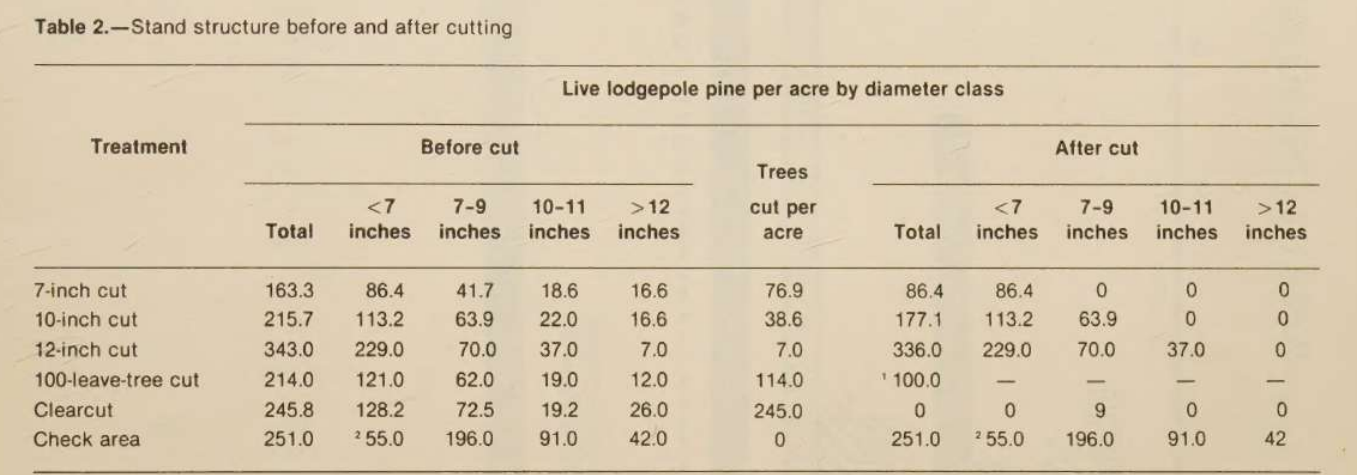
Input used: Input artifact (Image): Photographed table titled 'Table 2.—Stand structure before and after cutting'. — landing-ai-stand-structure-before-after-cutting-table-2.png
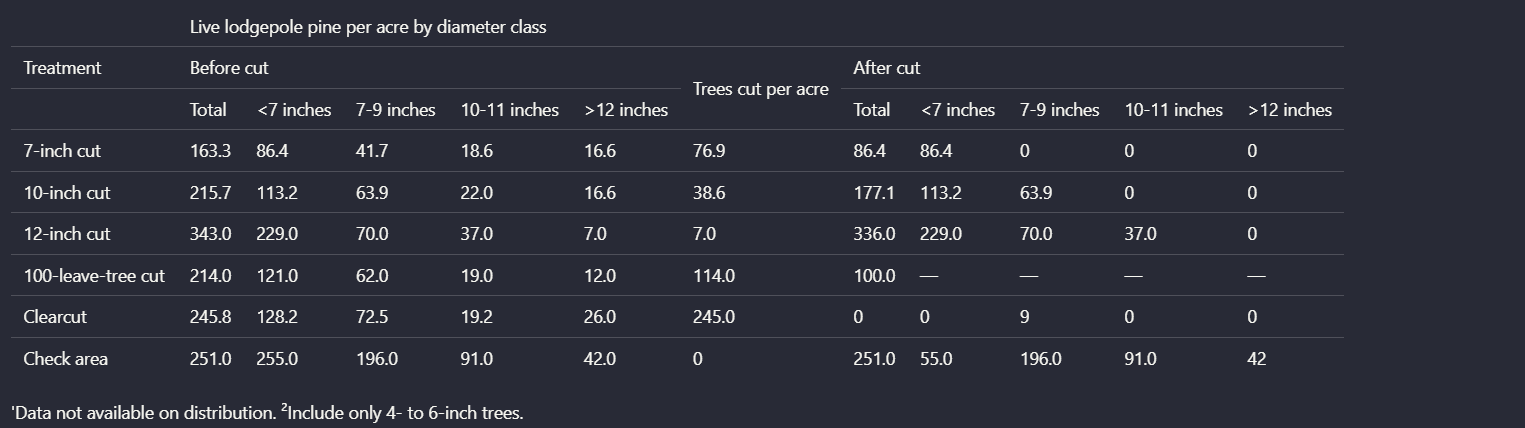
Observed output: Output artifact (Image): On the scanned photographed table, Landing AI preserved the wide table layout and most row/column labels, but OCR introduced real numeric mistakes. Compared wit — landing-ai-lodgepole-pine-diameter-class-table.png
Input artifact: Input artifact (Image): Photographed table titled 'Table 2.—Stand structure before and after cutting'. — landing-ai-stand-structure-before-after-cutting-table-2.png
Output artifact: Output artifact (Image): On the scanned photographed table, Landing AI preserved the wide table layout and most row/column labels, but OCR introduced real numeric mistakes. Compared wit — landing-ai-lodgepole-pine-diameter-class-table.png
What changed: Image transformed into Image
Why it matters / Conclusion: A strong choice for born-digital financial tables, but scanned or photographed tables still need QA, especially when numeric accuracy matters.
Extracts tables into structured markdown-like layouts that preserve rows, columns, and cell values. It was tested on the Target financial summary table, Sumitomo segment comparison tables, a multi-level segment table, and a photographed stand-structure table from a scanned report.
image
Target annual report 'Financial Summary' table for 2015 through 2011.
↓→
image
Landing AI reconstructed the Target financial summary with the year columns, row labels, and corresponding values still aligned. In this clean digital table, the extracted layout remained easy to read, including rows like Sales, Cost of sales, SG&A, EBIT, and Net earnings/(loss).
image
Segment results table comparing previous first quarter, present first quarter, and Y/Y change.
↓→
image
Landing AI preserved the segment table's core structure and values: business-segment rows such as Mechatronics, Industrial Machinery, Logistics & Construction, Energy & Lifelines, Others, and Total stayed aligned with prior-quarter, present-quarter, and Y/Y change columns. For this table, the output closely mirrors the original layout.
image
Multi-level financial table with segment columns A through F3 and nested headers.
↓→
image
Landing AI kept the values and the broad tabular shape of the complex segment table, but it flattened nested header relationships. The source distinguishes multiple header levels such as Item, Segment, A-D, Subtotal, Other, Total, and adjustment columns; the parsed version compresses these into a simpler linear header row, which makes the data readable but weakens the semantic relationships between header levels.
image
Photographed table titled 'Table 2.—Stand structure before and after cutting'.
↓→
image
On the scanned photographed table, Landing AI preserved the wide table layout and most row/column labels, but OCR introduced real numeric mistakes. Compared with the source, the '12-inch cut' row shows 'Trees cut per acre' as 7.0 instead of 114.0, the 'Clearcut' after-cut row shows a stray 9 where the source shows 0, and the 'Check area' before-cut values are distorted, with 255.0 appearing where the source shows 55.0 in that position. This makes the table inspectable, but not trustworthy without verification.
Bottom Line
A strong choice for born-digital financial tables, but scanned or photographed tables still need QA, especially when numeric accuracy matters.
From our researchearlier research
Chart-to-Text Conversion
Consistently converts charts into detailed textual representations instead of dropping them.
▾
Test Summary
Feature tested: Chart-to-Text Conversion
Result: Passed — Consistently converts charts into detailed textual representations instead of dropping them.
Feature tested: Chart-to-Text Conversion
Result: Passed
Verdict: Consistently converts charts into detailed textual representations instead of dropping them.
Expected behavior: Transforms charts into descriptive text blocks that retain titles, labels, approximate values, and trend direction. This was exercised on an SG&A waterfall chart and a scanned bar chart showing tree mortality by year and cut treatment.
Test case: Image → Image
Input type: Image
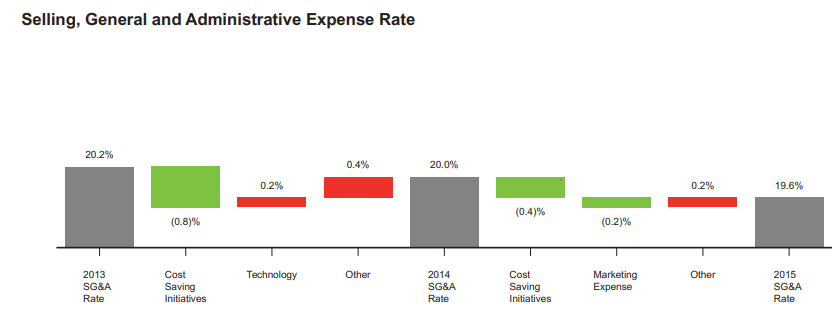
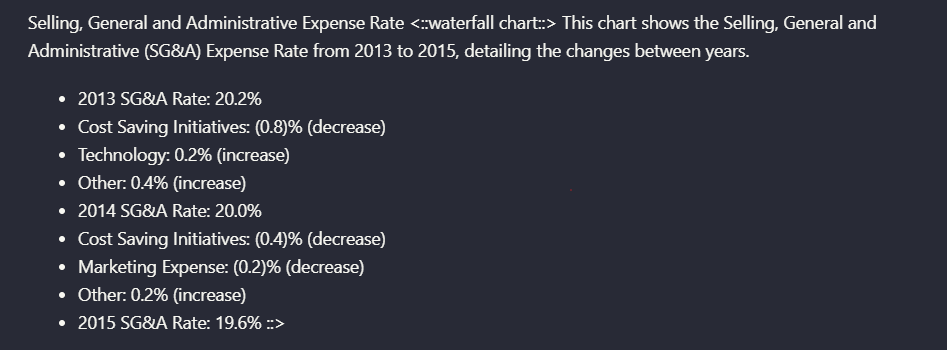
Input used: Input artifact (Image): Waterfall chart titled 'Selling, General and Administrative Expense Rate'. — landing-ai-sg-and-a-expense-rate-waterfall-chart-1.png
Observed output: Output artifact (Image): Instead of keeping the original waterfall image, Landing AI translated it into a text summary that retained the chart title, year anchors, category labels, and — landing-ai-parsed-sg-and-a-expense-rate-summary.png
Input artifact: Input artifact (Image): Waterfall chart titled 'Selling, General and Administrative Expense Rate'. — landing-ai-sg-and-a-expense-rate-waterfall-chart-1.png
Output artifact: Output artifact (Image): Instead of keeping the original waterfall image, Landing AI translated it into a text summary that retained the chart title, year anchors, category labels, and — landing-ai-parsed-sg-and-a-expense-rate-summary.png
What changed: Image transformed into Image
Test case: Image → Image
Input type: Image
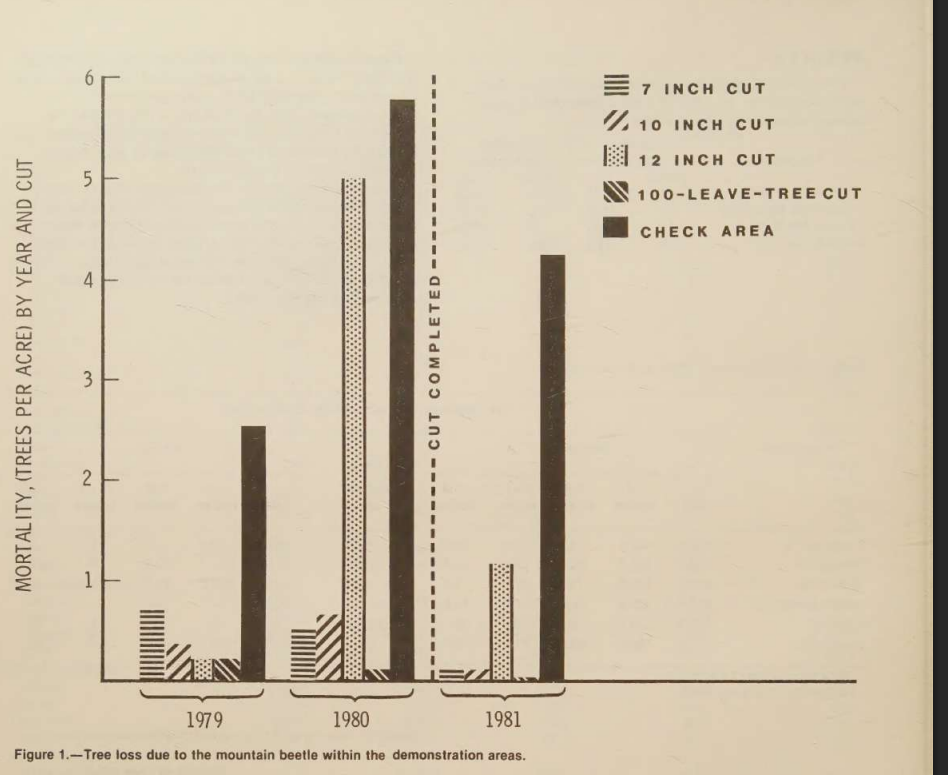
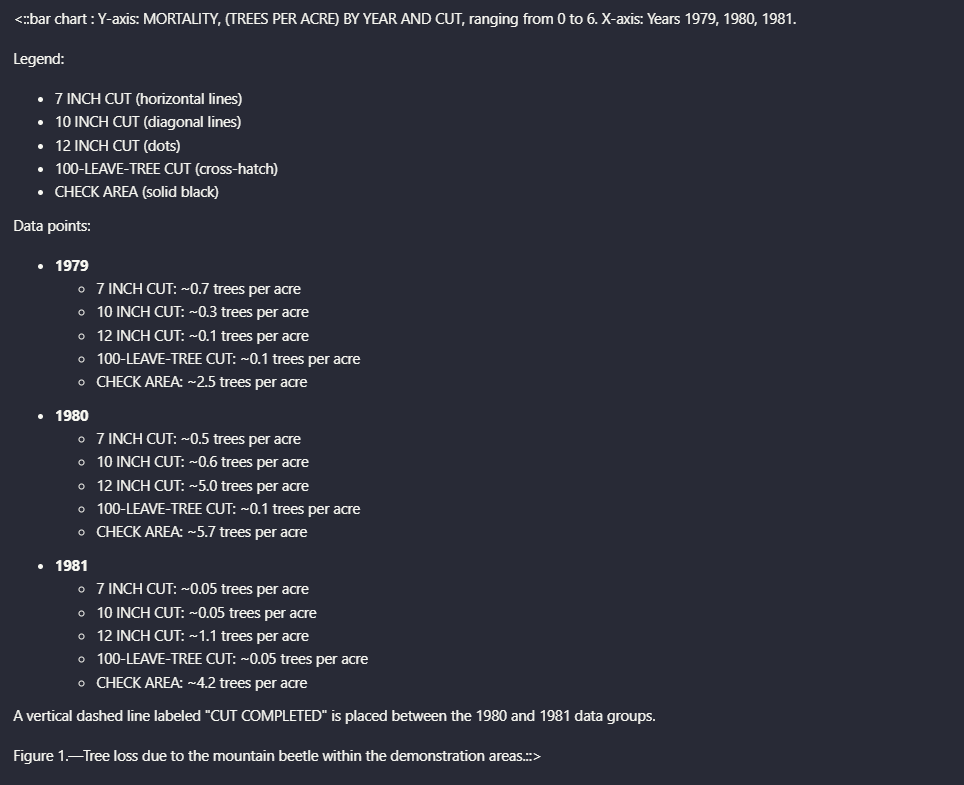
Input used: Input artifact (Image): Scanned bar chart of tree mortality by year and cut treatment. — landing-ai-tree-mortality-by-year-and-cut-bar-chart-1.png
Observed output: Output artifact (Image): Landing AI converted the scanned bar chart into a structured text description with the legend, year groupings, approximate per-series values, and the vertical d — landing-ai-parsed-tree-mortality-by-year-and-cut-chart.png
Input artifact: Input artifact (Image): Scanned bar chart of tree mortality by year and cut treatment. — landing-ai-tree-mortality-by-year-and-cut-bar-chart-1.png
Output artifact: Output artifact (Image): Landing AI converted the scanned bar chart into a structured text description with the legend, year groupings, approximate per-series values, and the vertical d — landing-ai-parsed-tree-mortality-by-year-and-cut-chart.png
What changed: Image transformed into Image
Why it matters / Conclusion: If your priority is keeping chart information in the markdown rather than preserving the original visual, this is one of Landing AI's clearest strengths in the report.
Transforms charts into descriptive text blocks that retain titles, labels, approximate values, and trend direction. This was exercised on an SG&A waterfall chart and a scanned bar chart showing tree mortality by year and cut treatment.
image
Waterfall chart titled 'Selling, General and Administrative Expense Rate'.
↓→
image
Instead of keeping the original waterfall image, Landing AI translated it into a text summary that retained the chart title, year anchors, category labels, and the increase/decrease direction for each step. The output captures specific values such as 2013 SG&A Rate 20.2%, Cost Saving Initiatives (0.8)%, Technology 0.2%, Other 0.4%, 2014 SG&A Rate 20.0%, and 2015 SG&A Rate 19.6%.
image
Scanned bar chart of tree mortality by year and cut treatment.
↓→
image
Landing AI converted the scanned bar chart into a structured text description with the legend, year groupings, approximate per-series values, and the vertical dashed 'CUT COMPLETED' marker. The output preserves the key analytical content, such as the high 1980 value for the check area and the treatment-by-treatment comparisons across 1979, 1980, and 1981.
Bottom Line
If your priority is keeping chart information in the markdown rather than preserving the original visual, this is one of Landing AI's clearest strengths in the report.
From our researchearlier research
Signature and Attestation Region Extraction
Captures signature regions as semantic attestations rather than dropping them.
▾
Test Summary
Feature tested: Signature and Attestation Region Extraction
Result: Passed — Captures signature regions as semantic attestations rather than dropping them.
Feature tested: Signature and Attestation Region Extraction
Result: Passed
Verdict: Captures signature regions as semantic attestations rather than dropping them.
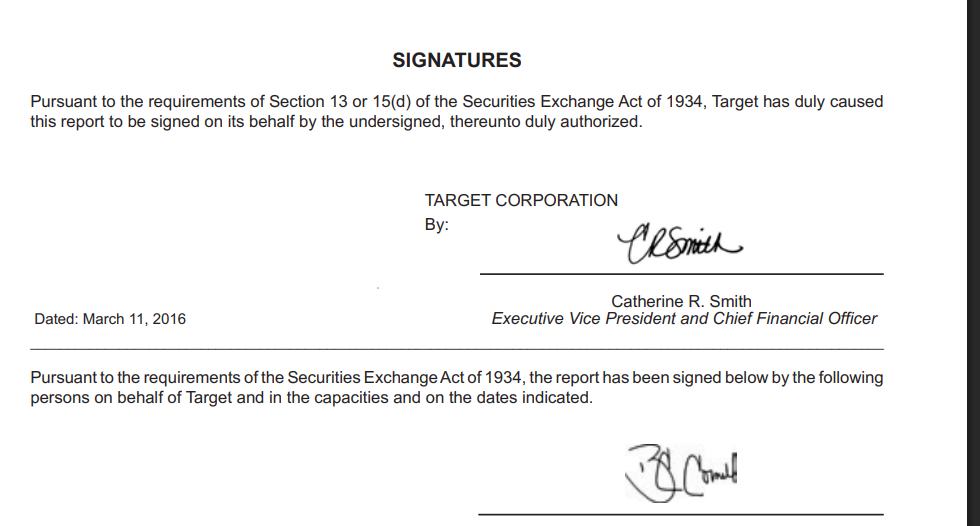
Expected behavior: Represents signature-heavy document regions as attestation-style elements that preserve the presence, role, and apparent legibility of signatures. It was exercised on the signatures page from the Target annual report.
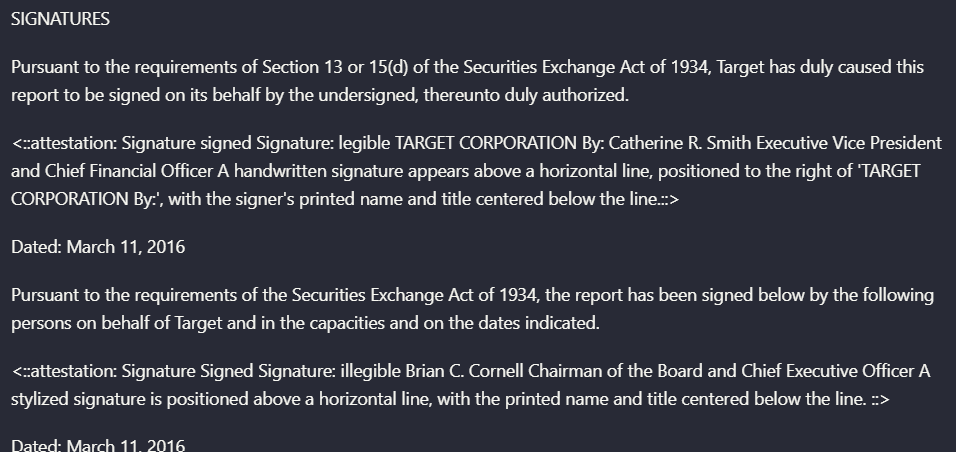
Observed output: Output artifact (Image): Landing AI did more than extract nearby text from the signature page: it emitted attestation blocks describing the signature regions themselves. In this example — landing-ai-target-earnings-signatures-parsed-text.png
Output artifact: Output artifact (Image): Landing AI did more than extract nearby text from the signature page: it emitted attestation blocks describing the signature regions themselves. In this example — landing-ai-target-earnings-signatures-parsed-text.png
What changed: Image transformed into Image
Why it matters / Conclusion: Useful for compliance-style documents where the existence of a signature block matters, even if you do not need handwriting recognition.
Represents signature-heavy document regions as attestation-style elements that preserve the presence, role, and apparent legibility of signatures. It was exercised on the signatures page from the Target annual report.
image
Target annual report signatures page.
↓→
image
Landing AI did more than extract nearby text from the signature page: it emitted attestation blocks describing the signature regions themselves. In this example, it preserved the Target Corporation attestation for Catherine R. Smith and a second attestation for Brian C. Cornell, including whether the signature appeared legible or illegible and where it sat relative to the signature line and printed title.
Bottom Line
Useful for compliance-style documents where the existence of a signature block matters, even if you do not need handwriting recognition.
From our researchearlier research
Credit-based plans
Pricing captured in the report
Explore
Pay-as-you-go
1,000 free credits, then $1 = 100 credits. Includes parsing, field extraction, document classification, and multilingual document support.
Team
$250/month
27,500 credits/month (10% bonus credits). Includes team management, shared usage, email support, zero data retention, and HIPAA-compliant processing options.
Enterprise
Custom Pricing
Includes SaaS, VPC, and on-prem deployments, custom processing pipelines, SLAs, priority rate limits, and Snowflake integration support.
✓ Use This If
●You need bank statements or invoices turned into nested JSON with minimal setup.
●You need row-level reconstruction for transactions or invoice line items.
●You can QA a few identifiers or null fields after extraction.
✕ Skip This If
●You need source-faithful transaction or ad IDs on every row.
●You need every schema field populated even when the source text is ambiguous.
●You need repeat-run consistency or harsh-layout stress validation, because this report did not test those conditions.
Featured in Rankings
Independent rankings where Landing AI was tested and rated.
The report tested one bank statement PDF and one invoice PDF, plus cropped table-level checks for a bank-statement transaction subset and an invoice line-item row.
Yes. For both documents, the output JSON followed the supplied nested schema rather than collapsing everything into plain OCR text.
The report says all 51 transactions were extracted, along with statement metadata, account details, branch information, balances, rewards, and disclaimers.
The report says all eight advertising line items were extracted and the invoice summary totals were populated.
The extracted transaction_id values were regenerated sequentially instead of preserving the source identifiers embedded in the statement.
Some station-level fields came back null even though related information existed elsewhere in the invoice, and some ad IDs drifted from the source text.
The report lists three plans: Explore at pay-as-you-go pricing with 1,000 free credits and then $1 = 100 credits; Team at $250/month with 27,500 credits/month; and Enterprise with custom pricing.
JSON was directly accessible from the interface and described as downloadable. The report does not describe CSV export.
Banner Preview
How the embed badge will look on your site
Embed HTML
Copy this code to your website source
<a target="_blank" href="https://aidemos.com/tools/landing-ai?utm_source=landing-ai_embed" style="width: 250px; height: 80px; border-radius:4px;" width="250" height="80">
<img src="https://aidemos-website-images.s3.amazonaws.com/featured.png" alt="Landing AI | Featured on AI Demos" style="width: 250px; height: 80px; border-radius:4px;" width="250" height="80">
</a>
Quick Integration Guide
1Copy the HTML code block above.
2Paste it into your site's HTML or CMS editor.
3Banner appears instantly on your page.
4Links back to your tool profile here.
Similar Tools
Similar Tools
Discover more AI tools like Landing AI to enhance your workflow.
⚡ Built by FutureSmart AI — the team behind AI Demos
Need a custom AI solution for this use case?
If you are looking to build a custom document extraction, invoice parsing, or bank statement extraction system for your business or internal workflow, email us at contact@futuresmart.ai.
Found something inaccurate or missing? We try to keep our AI research accurate and useful. If you found outdated information, an issue, or have a suggestion, email us at collaborate@aidemos.com.