
Kapwing
Good for editable AI shorts and clean vertical cutouts, but first-pass quality can be uneven
Our take
- You want to turn a text prompt into an editable vertical short with original AI visuals.
- You plan to polish the draft inside the editor with scene regeneration, timeline changes, subtitles, and audio tweaks.
- You can tolerate a first pass that may run short, look blurry, or only partially match the script.
- You need crisp, publication-ready visuals on the first render.
Our take
Kapwing is strongest when you want an editable AI short or a clean vertical subject cutout that you can refine after the first pass. In the shorts workflow, it produced original AI visuals and narration with useful regeneration controls, but the outputs were blurry, only moderately aligned to the prompt, and shorter than requested. In background removal, it handled simple talking-head footage well and exported watermark-free MP4s, but it never generated a true replacement background and became less reliable on busier scenes.
In-Depth Review
Our detailed analysis of Kapwing — features, performance, and real-world testing.
Feature-by-Feature Breakdown
Video ExportMixed▾
Feature tested: Video Export
Result: Partial
Verdict: Mixed
Expected behavior: Kapwing exports finished clips as downloadable MP4s, including native vertical outputs and watermark-free paid exports. The evidence spans continuous renders and a stitched Oregon coast/beach export that needed spot-checking.
Test case: Video file → Video file
Input type: Video file
Input used: Input artifact (Video file): Input — oregoncoast_input.mp4.mp4
Observed output: Output artifact (Video file): Native vertical MP4 export with full-bleed framing and no watermark or player UI chrome visible. — kapwing output 1.mp4
Input artifact: Input artifact (Video file): Input — oregoncoast_input.mp4.mp4
Output artifact: Output artifact (Video file): Native vertical MP4 export with full-bleed framing and no watermark or player UI chrome visible. — kapwing output 1.mp4
What changed: Video file transformed into Video file
Test case: Video file → Video file
Input type: Video file
Input used: Input artifact (Video file): Input — talkinghead_input.mp4.mp4
Observed output: Output artifact (Video file): Native vertical MP4 export with full-bleed framing and no watermark or player UI chrome visible. — kapwing output 2.mp4
Input artifact: Input artifact (Video file): Input — talkinghead_input.mp4.mp4
Output artifact: Output artifact (Video file): Native vertical MP4 export with full-bleed framing and no watermark or player UI chrome visible. — kapwing output 2.mp4
What changed: Video file transformed into Video file
Test case: Video file → Video file
Input type: Video file
Input used: Input artifact (Video file): Input — busystreet_input.mp4.mp4
Observed output: Output artifact (Video file): Native vertical MP4 export with full-bleed framing and no watermark or player UI chrome visible. — kapwing output 3.mp4
Input artifact: Input artifact (Video file): Input — busystreet_input.mp4.mp4
Output artifact: Output artifact (Video file): Native vertical MP4 export with full-bleed framing and no watermark or player UI chrome visible. — kapwing output 3.mp4
What changed: Video file transformed into Video file
Test case: Text prompt → Video file
Input type: Text prompt
Input used: Input artifact (Text prompt): INPUT
Observed output: Output artifact (Video file): Kapwing exported the short successfully as a vertical MP4, but the render still showed blur and ran much shorter than the requested 30 seconds. — Kapwing_Anchor1_OutputVideo.mp4
Input artifact: Input artifact (Text prompt): INPUT
Output artifact: Output artifact (Video file): Kapwing exported the short successfully as a vertical MP4, but the render still showed blur and ran much shorter than the requested 30 seconds. — Kapwing_Anchor1_OutputVideo.mp4
What changed: Text prompt transformed into Video file
Test case: Text prompt → Video file
Input type: Text prompt
Input used: Input artifact (Text prompt): INPUT
Observed output: Output artifact (Video file): Kapwing exported the story as a vertical MP4, and the report notes that paid users can export without a watermark. — Kapwing_Anchor2_OutputVideo.mp4
Input artifact: Input artifact (Text prompt): INPUT
Output artifact: Output artifact (Video file): Kapwing exported the story as a vertical MP4, and the report notes that paid users can export without a watermark. — Kapwing_Anchor2_OutputVideo.mp4
What changed: Text prompt transformed into Video file
Test case: Video file → Video file
Input type: Video file
Input used: Input artifact (Video file): Input 1 — Input 1 - Talking Head with Dead Air.mp4
Observed output: Output artifact (Video file): The edited talking-head project exported successfully as a finished MP4 file. — Kapwing Output 1 - Talking Head with Dead Air.mp4
Input artifact: Input artifact (Video file): Input 1 — Input 1 - Talking Head with Dead Air.mp4
Output artifact: Output artifact (Video file): The edited talking-head project exported successfully as a finished MP4 file. — Kapwing Output 1 - Talking Head with Dead Air.mp4
What changed: Video file transformed into Video file
Test case: Video file → Video file
Input type: Video file
Input used: Input artifact (Video file): Input 2 — Input 2 - Low-Quality Audio & Lighting.mp4
Observed output: Output artifact (Video file): The low-quality webcam-style project also exported successfully as MP4 after AI editing. — Kapwing Output 2 - Low-Quality Audio & Lighting.mp4
Input artifact: Input artifact (Video file): Input 2 — Input 2 - Low-Quality Audio & Lighting.mp4
Output artifact: Output artifact (Video file): The low-quality webcam-style project also exported successfully as MP4 after AI editing. — Kapwing Output 2 - Low-Quality Audio & Lighting.mp4
What changed: Video file transformed into Video file
Test case: Text prompt → Video file
Input type: Text prompt
Input used: Input artifact (Text prompt): Input
Observed output: Output artifact (Video file): The export produced a vertical MP4, but the final render was still visibly blurry and shorter than requested. — Kapwing_AnchorTask1_Dashboard_Output.mp4
Input artifact: Input artifact (Text prompt): Input
Output artifact: Output artifact (Video file): The export produced a vertical MP4, but the final render was still visibly blurry and shorter than requested. — Kapwing_AnchorTask1_Dashboard_Output.mp4
What changed: Text prompt transformed into Video file
Test case: Text prompt → Video file
Input type: Text prompt
Input used: Input artifact (Text prompt): Input
Observed output: Output artifact (Video file): The export produced a ready-to-upload vertical MP4, but the clip still came out shorter than requested and needed cleanup. — Kapwing_AnchorTask2_RobotIntern_Output - tiny robot.mp4
Input artifact: Input artifact (Text prompt): Input
Output artifact: Output artifact (Video file): The export produced a ready-to-upload vertical MP4, but the clip still came out shorter than requested and needed cleanup. — Kapwing_AnchorTask2_RobotIntern_Output - tiny robot.mp4
What changed: Text prompt transformed into Video file
Why it matters / Conclusion: Export hygiene is strong overall — the canvas stays native vertical and watermark-free — but the beach test shows you still need to spot-check continuity before publishing.
Kapwing exports finished clips as downloadable MP4s, including native vertical outputs and watermark-free paid exports. The evidence spans continuous renders and a stitched Oregon coast/beach export that needed spot-checking.
Audio Editing and Cleanup▾
Feature tested: Audio Editing and Cleanup
Result: Passed
Expected behavior: Kapwing provides in-editor audio controls such as waveform editing, trim, speed, volume, auto-level, clean audio, smart cut, enhance voice, split vocals, fades, and noise reduction. The cards show these tools used on generated projects and rough creator footage.
Test case: Text prompt → Image
Input type: Text prompt
Input used: Input artifact (Text prompt): Input
Observed output: Output artifact (Image): The editor screenshot shows extensive audio controls alongside the subtitle tools, including waveform, trim, speed, volume, auto-level volume, and clean-audio options. — kapwing_Anchor2_Manual-Subtitle-Generation.png
Input artifact: Input artifact (Text prompt): Input
Output artifact: Output artifact (Image): The editor screenshot shows extensive audio controls alongside the subtitle tools, including waveform, trim, speed, volume, auto-level volume, and clean-audio options. — kapwing_Anchor2_Manual-Subtitle-Generation.png
What changed: Text prompt transformed into Image
Test case: Text prompt → Text prompt
Input type: Text prompt
Input used: Input artifact (Text prompt): Input
Observed output: Output artifact (Text prompt): Output
Input artifact: Input artifact (Text prompt): Input
Output artifact: Output artifact (Text prompt): Output
What changed: Text prompt transformed into Text prompt
Test case: Text prompt → Image
Input type: Text prompt
Input used: Input artifact (Text prompt): Input
Observed output: Output artifact (Image): The editor exposes audio and voice controls alongside subtitle tools, including waveform, trim, speed, volume, auto level volume, clean audio, smart cut, enhance voice, split vocals, and fade controls. — kapwing_Anchor2_Manual-Subtitle-Generation.png
Input artifact: Input artifact (Text prompt): Input
Output artifact: Output artifact (Image): The editor exposes audio and voice controls alongside subtitle tools, including waveform, trim, speed, volume, auto level volume, clean audio, smart cut, enhance voice, split vocals, and fade controls. — kapwing_Anchor2_Manual-Subtitle-Generation.png
What changed: Text prompt transformed into Image
Test case: Video file → Video file
Input type: Video file
Input used: Input artifact (Video file): Input 1 — Input 1 - Talking Head with Dead Air.mp4
Observed output: Output artifact (Video file): The edited talking-head video sounded cleaner and more consistent than the source, with noticeably improved clarity after the AI pass. — Kapwing Output 1 - Talking Head with Dead Air.mp4
Input artifact: Input artifact (Video file): Input 1 — Input 1 - Talking Head with Dead Air.mp4
Output artifact: Output artifact (Video file): The edited talking-head video sounded cleaner and more consistent than the source, with noticeably improved clarity after the AI pass. — Kapwing Output 1 - Talking Head with Dead Air.mp4
What changed: Video file transformed into Video file
Test case: Video file → Video file
Input type: Video file
Input used: Input artifact (Video file): Input 2 — Input 2 - Low-Quality Audio & Lighting.mp4
Observed output: Output artifact (Video file): The low-quality recording was cleaned up with reduced room noise and better volume balance, making the narration easier to follow than the raw input. — Kapwing Output 2 - Low-Quality Audio & Lighting.mp4
Input artifact: Input artifact (Video file): Input 2 — Input 2 - Low-Quality Audio & Lighting.mp4
Output artifact: Output artifact (Video file): The low-quality recording was cleaned up with reduced room noise and better volume balance, making the narration easier to follow than the raw input. — Kapwing Output 2 - Low-Quality Audio & Lighting.mp4
What changed: Video file transformed into Video file
Why it matters / Conclusion: The editor has real audio tools, but the benchmark runs still needed manual attention on music and timing.
Kapwing provides in-editor audio controls such as waveform editing, trim, speed, volume, auto-level, clean audio, smart cut, enhance voice, split vocals, fades, and noise reduction. The cards show these tools used on generated projects and rough creator footage.
Video Background RemovalMixed▾
Feature tested: Video Background Removal
Result: Partial
Verdict: Mixed
Expected behavior: Kapwing can isolate a subject from uploaded video and remove the background to a plain white cutout. It was exercised on an indoor talking-head clip, an outdoor walking clip, and a busy street scene with another person entering.
Test case: Video file → Video file
Input type: Video file
Input used: Input artifact (Video file): INPUT — oregoncoast_input.mp4.mp4
Observed output: Output artifact (Video file): Background removal is applied to the walking subject, but only for the first half of the file. Around the midpoint, the export hard-cuts back to the untouched beach footage, so this run never produces a replacement scene. — kapwing output 1.mp4
Input artifact: Input artifact (Video file): INPUT — oregoncoast_input.mp4.mp4
Output artifact: Output artifact (Video file): Background removal is applied to the walking subject, but only for the first half of the file. Around the midpoint, the export hard-cuts back to the untouched beach footage, so this run never produces a replacement scene. — kapwing output 1.mp4
What changed: Video file transformed into Video file
Test case: Video file → Video file
Input type: Video file
Input used: Input artifact (Video file): INPUT — talkinghead_input.mp4.mp4
Observed output: Output artifact (Video file): Clean white cutout throughout with crisp edges and preserved fine detail; this is removal only, not replacement. — kapwing output 2.mp4
Input artifact: Input artifact (Video file): INPUT — talkinghead_input.mp4.mp4
Output artifact: Output artifact (Video file): Clean white cutout throughout with crisp edges and preserved fine detail; this is removal only, not replacement. — kapwing output 2.mp4
What changed: Video file transformed into Video file
Test case: Video file → Video file
Input type: Video file
Input used: Input artifact (Video file): INPUT — busystreet_input.mp4.mp4
Observed output: Output artifact (Video file): The subject is removed to white, but the cutout breaks down when a second pedestrian enters frame, leaving bleed-through and ghost smudges. — kapwing output 3.mp4
Input artifact: Input artifact (Video file): INPUT — busystreet_input.mp4.mp4
Output artifact: Output artifact (Video file): The subject is removed to white, but the cutout breaks down when a second pedestrian enters frame, leaving bleed-through and ghost smudges. — kapwing output 3.mp4
What changed: Video file transformed into Video file
Why it matters / Conclusion: Strong on the simple indoor talking-head shot, acceptable on the outdoor walk for the processed segment, and much weaker in the busy multi-person scene. Across all three runs, it only removed to white; no replacement scene ever appeared.
Kapwing can isolate a subject from uploaded video and remove the background to a plain white cutout. It was exercised on an indoor talking-head clip, an outdoor walking clip, and a busy street scene with another person entering.
Prompt-to-Editable Video Project CreationPreviously observed, not re-tested in this pass.▾
Feature tested: Prompt-to-Editable Video Project Creation
Result: Partial
Verdict: Previously observed, not re-tested in this pass.
Expected behavior: Kapwing turns natural-language prompts into complete editable vertical video projects with generated scenes, narration, and export-ready structure. The evidence includes the customer-support dashboard concept, the robot-intern story, and an earlier broader AI editing workspace example.
Test case: Text prompt → Video file
Input type: Text prompt
Input used: Input artifact (Text prompt): Input
Observed output: Output artifact (Video file): Kapwing converted the customer-support-dashboard prompt into a complete vertical short, but the first render was only about 15 seconds long instead of 30 seconds. — Kapwing_AnchorTask1_Dashboard_Output.mp4
Input artifact: Input artifact (Text prompt): Input
Output artifact: Output artifact (Video file): Kapwing converted the customer-support-dashboard prompt into a complete vertical short, but the first render was only about 15 seconds long instead of 30 seconds. — Kapwing_AnchorTask1_Dashboard_Output.mp4
What changed: Text prompt transformed into Video file
Test case: Text prompt → Video file
Input type: Text prompt
Input used: Input artifact (Text prompt): Input
Observed output: Output artifact (Video file): Kapwing converted the robot-intern prompt into a complete vertical short, but the first render was only about 14 seconds long instead of 30 seconds. — Kapwing_AnchorTask2_RobotIntern_Output - tiny robot.mp4
Input artifact: Input artifact (Text prompt): Input
Output artifact: Output artifact (Video file): Kapwing converted the robot-intern prompt into a complete vertical short, but the first render was only about 14 seconds long instead of 30 seconds. — Kapwing_AnchorTask2_RobotIntern_Output - tiny robot.mp4
What changed: Text prompt transformed into Video file
Why it matters / Conclusion: Useful to keep in mind as prior context, but not re-validated in this background-removal task.
Kapwing turns natural-language prompts into complete editable vertical video projects with generated scenes, narration, and export-ready structure. The evidence includes the customer-support dashboard concept, the robot-intern story, and an earlier broader AI editing workspace example.
Narration Script Generation▾
Feature tested: Narration Script Generation
Result: Passed
Expected behavior: Kapwing generates a narration script from prompt inputs so the video has a story structure. In the benchmark runs, the script captured the gist of the idea, with moderate scene-level precision and visual sync.
Test case: Text prompt → Video file
Input type: Text prompt
Input used: Input artifact (Text prompt): Input
Observed output: Output artifact (Video file): The generated script conveyed the messy-messages-to-clean-dashboard idea, but the visuals only matched the intended concept moderately well. — Kapwing_AnchorTask1_Dashboard_Output.mp4
Input artifact: Input artifact (Text prompt): Input
Output artifact: Output artifact (Video file): The generated script conveyed the messy-messages-to-clean-dashboard idea, but the visuals only matched the intended concept moderately well. — Kapwing_AnchorTask1_Dashboard_Output.mp4
What changed: Text prompt transformed into Video file
Test case: Text prompt → Video file
Input type: Text prompt
Input used: Input artifact (Text prompt): Input
Observed output: Output artifact (Video file): The generated script followed the robot-intern storyline, but several scenes still drifted from the narration. — Kapwing_AnchorTask2_RobotIntern_Output - tiny robot.mp4
Input artifact: Input artifact (Text prompt): Input
Output artifact: Output artifact (Video file): The generated script followed the robot-intern storyline, but several scenes still drifted from the narration. — Kapwing_AnchorTask2_RobotIntern_Output - tiny robot.mp4
What changed: Text prompt transformed into Video file
Why it matters / Conclusion: Useful for getting a narrative draft quickly, but not accurate enough to trust without review.
Kapwing generates a narration script from prompt inputs so the video has a story structure. In the benchmark runs, the script captured the gist of the idea, with moderate scene-level precision and visual sync.
AI Visual Generation▾
Feature tested: AI Visual Generation
Result: Partial
Expected behavior: Kapwing creates original AI-generated scenes and characters from short-video prompts instead of relying on stock footage. The tested inputs included dashboard-style business scenes and a 3D robot intern.
Test case: Text prompt → Video file
Input type: Text prompt
Input used: Input artifact (Text prompt): INPUT
Observed output: Output artifact (Video file): Kapwing generated original AI visuals for the dashboard concept, but the dashboard interface was blurry and one laptop angle looked visually inconsistent. — Kapwing_Anchor1_OutputVideo.mp4
Input artifact: Input artifact (Text prompt): INPUT
Output artifact: Output artifact (Video file): Kapwing generated original AI visuals for the dashboard concept, but the dashboard interface was blurry and one laptop angle looked visually inconsistent. — Kapwing_Anchor1_OutputVideo.mp4
What changed: Text prompt transformed into Video file
Test case: Text prompt → Video file
Input type: Text prompt
Input used: Input artifact (Text prompt): INPUT
Observed output: Output artifact (Video file): Kapwing generated original 3D-style robot scenes rather than stock footage, but several frames were blurry and one scene did not clearly communicate the intended action. — Kapwing_Anchor2_OutputVideo.mp4
Input artifact: Input artifact (Text prompt): INPUT
Output artifact: Output artifact (Video file): Kapwing generated original 3D-style robot scenes rather than stock footage, but several frames were blurry and one scene did not clearly communicate the intended action. — Kapwing_Anchor2_OutputVideo.mp4
What changed: Text prompt transformed into Video file
Test case: Text prompt → Image
Input type: Text prompt
Input used: Input artifact (Text prompt): Input
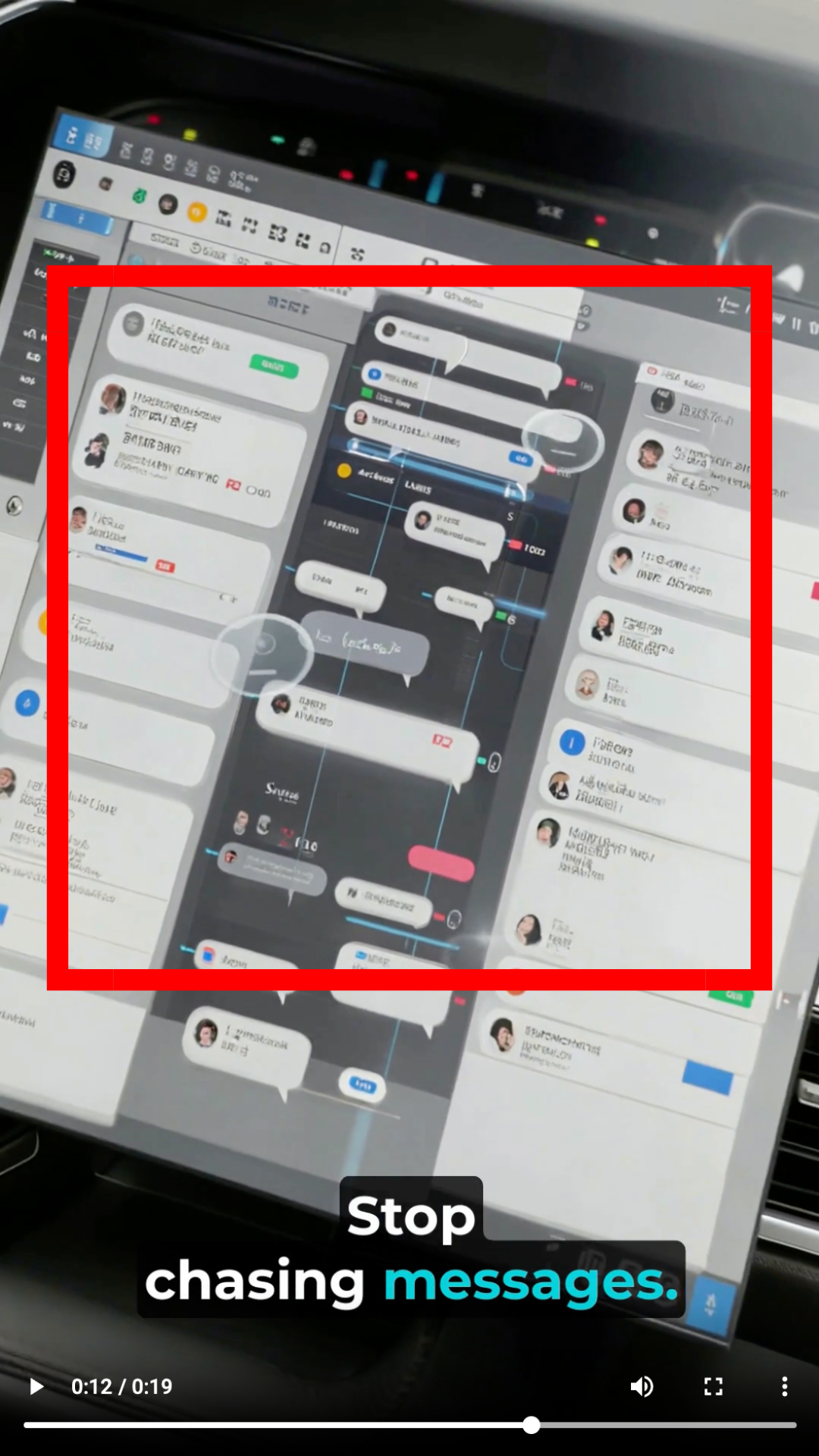
Observed output: Output artifact (Image): The dashboard interface is clearly AI-generated, but it is blurry enough that the customer support messages and UI elements are hard to read. — kapwing_Anchor1_Blurry-Dashboard-Interface.png
Input artifact: Input artifact (Text prompt): Input
Output artifact: Output artifact (Image): The dashboard interface is clearly AI-generated, but it is blurry enough that the customer support messages and UI elements are hard to read. — kapwing_Anchor1_Blurry-Dashboard-Interface.png
What changed: Text prompt transformed into Image
Test case: Text prompt → Image
Input type: Text prompt
Input used: Input artifact (Text prompt): Input
Observed output: Output artifact (Image): The laptop scene is original AI output, but the screen perspective looks awkward and visually inconsistent with the camera angle. — kapwing_Anchor1_Incorrect-Laptop-Screen-Perspective.png
Input artifact: Input artifact (Text prompt): Input
Output artifact: Output artifact (Image): The laptop scene is original AI output, but the screen perspective looks awkward and visually inconsistent with the camera angle. — kapwing_Anchor1_Incorrect-Laptop-Screen-Perspective.png
What changed: Text prompt transformed into Image
Test case: Text prompt → Image
Input type: Text prompt
Input used: Input artifact (Text prompt): Input
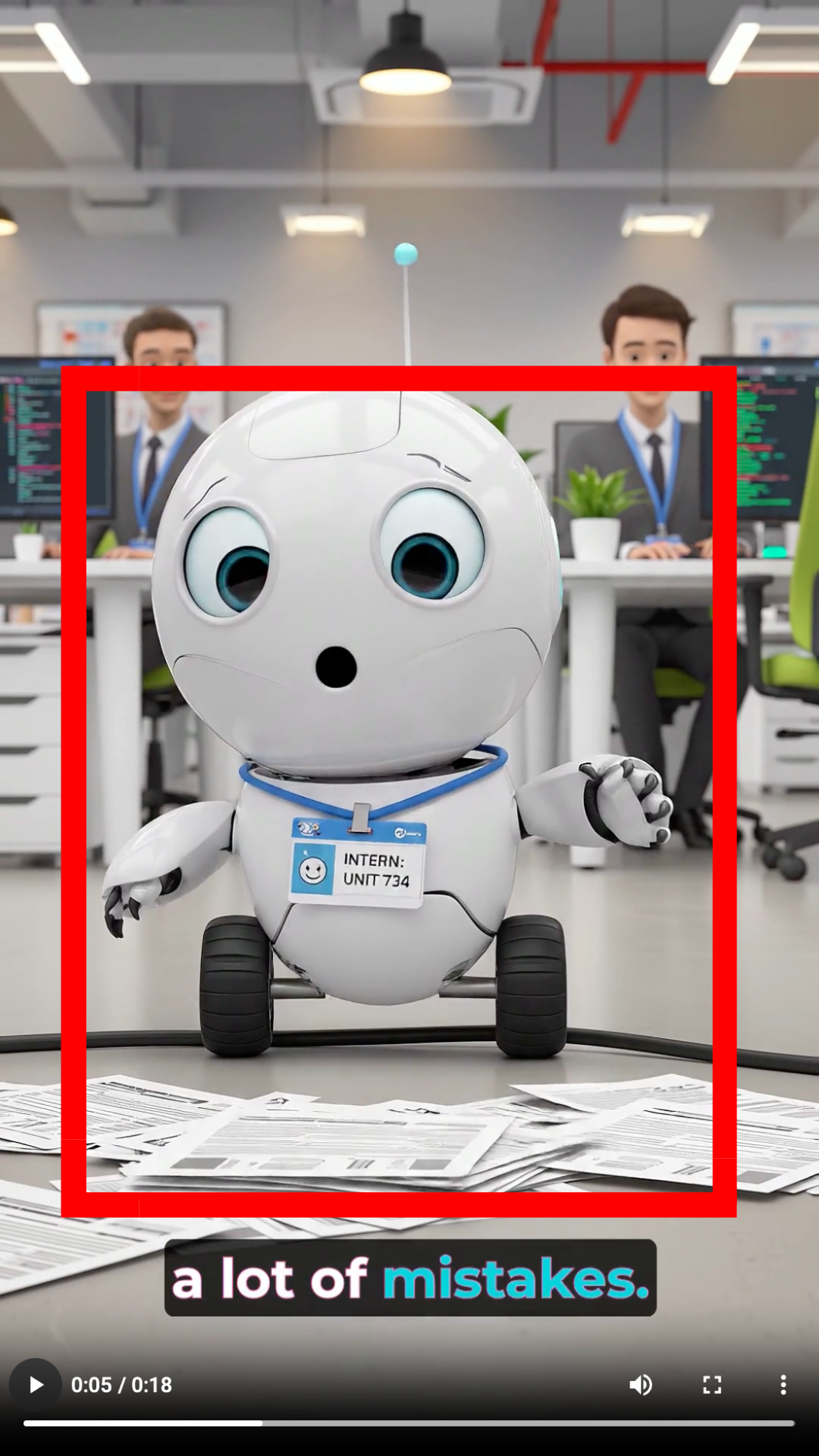
Observed output: Output artifact (Image): The robot scene is original AI output, but the visual does not cleanly match the narration about workplace mistakes. — kapwing_Anchor2_Scene-Does-Not-Match-Narration.png
Input artifact: Input artifact (Text prompt): Input
Output artifact: Output artifact (Image): The robot scene is original AI output, but the visual does not cleanly match the narration about workplace mistakes. — kapwing_Anchor2_Scene-Does-Not-Match-Narration.png
What changed: Text prompt transformed into Image
Test case: Text prompt → Image
Input type: Text prompt
Input used: Input artifact (Text prompt): Input
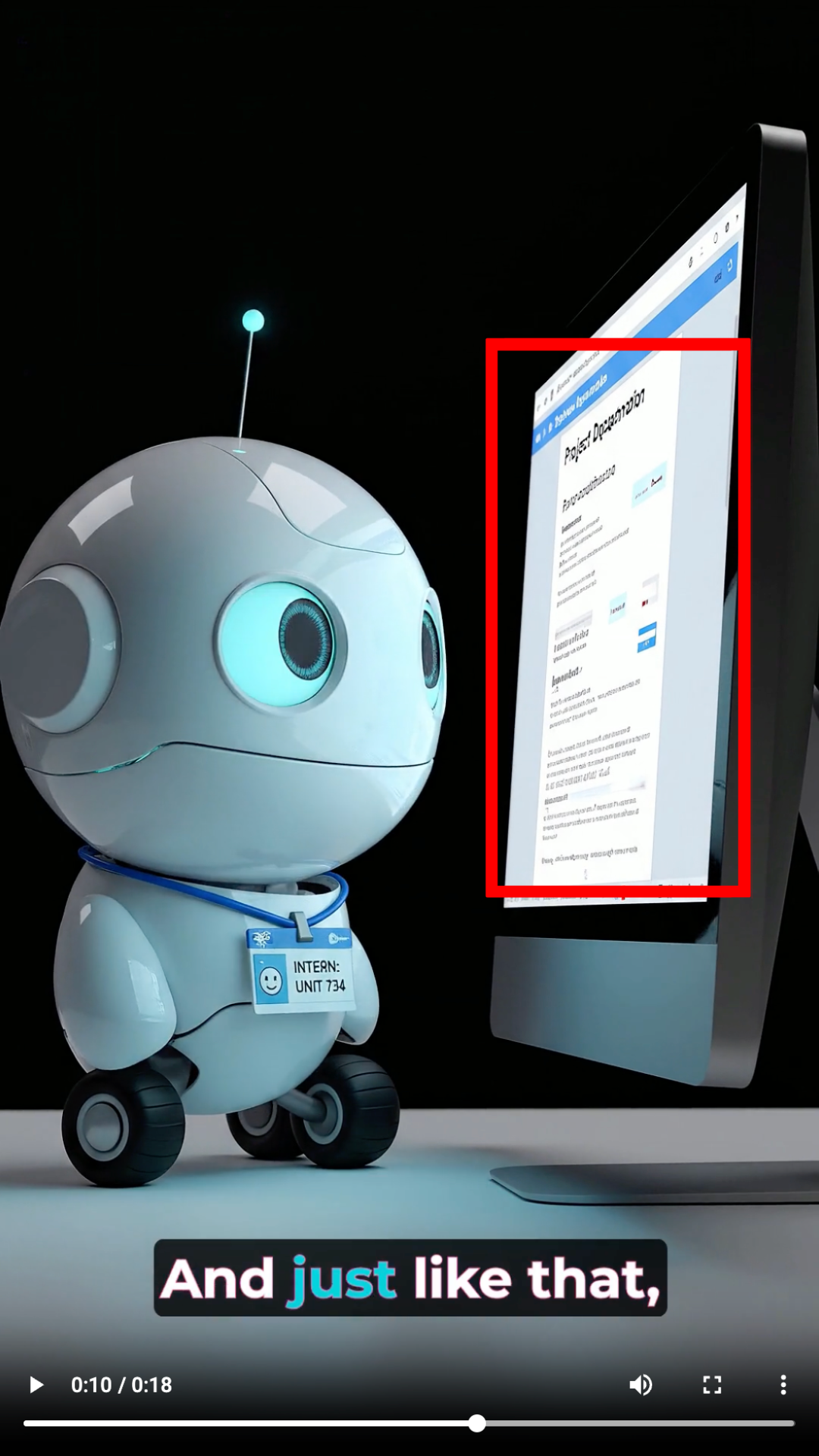
Observed output: Output artifact (Image): The monitor content is blurred, so the project-documentation scene loses readability and weakens the story. — kapwing_Anchor2_Blurry-Dashboard-Content.png
Input artifact: Input artifact (Text prompt): Input
Output artifact: Output artifact (Image): The monitor content is blurred, so the project-documentation scene loses readability and weakens the story. — kapwing_Anchor2_Blurry-Dashboard-Content.png
What changed: Text prompt transformed into Image
Why it matters / Conclusion: Kapwing does generate original visuals, but blur and occasional scene mismatch kept the outputs from feeling polished.
Kapwing creates original AI-generated scenes and characters from short-video prompts instead of relying on stock footage. The tested inputs included dashboard-style business scenes and a 3D robot intern.

Automatic Background Music Addition▾
Feature tested: Automatic Background Music Addition
Result: Passed
Expected behavior: Kapwing adds background music automatically as part of the AI editing workflow, removing the need for manual music selection in the first pass. The member cards show it working consistently across benchmark inputs as a built-in enhancement.
Test case: Video file → Video file
Input type: Video file
Input used: Input artifact (Video file): Input 1 — Input 1 - Talking Head with Dead Air.mp4
Observed output: Output artifact (Video file): Background music was added automatically during the AI edit, alongside captions and cleanup. — Kapwing Output 1 - Talking Head with Dead Air.mp4
Input artifact: Input artifact (Video file): Input 1 — Input 1 - Talking Head with Dead Air.mp4
Output artifact: Output artifact (Video file): Background music was added automatically during the AI edit, alongside captions and cleanup. — Kapwing Output 1 - Talking Head with Dead Air.mp4
What changed: Video file transformed into Video file
Test case: Video file → Video file
Input type: Video file
Input used: Input artifact (Video file): Input 2 — Input 2 - Low-Quality Audio & Lighting.mp4
Observed output: Output artifact (Video file): Background music was also applied automatically to the second benchmark edit. — Kapwing Output 2 - Low-Quality Audio & Lighting.mp4
Input artifact: Input artifact (Video file): Input 2 — Input 2 - Low-Quality Audio & Lighting.mp4
Output artifact: Output artifact (Video file): Background music was also applied automatically to the second benchmark edit. — Kapwing Output 2 - Low-Quality Audio & Lighting.mp4
What changed: Video file transformed into Video file
Test case: Text prompt → Video file
Input type: Text prompt
Input used: Input artifact (Text prompt): Input
Observed output: Output artifact (Video file): The dashboard short included AI narration and background audio, but the voiceover did not fully solve the scene timing issues. — Kapwing_AnchorTask1_Dashboard_Output.mp4
Input artifact: Input artifact (Text prompt): Input
Output artifact: Output artifact (Video file): The dashboard short included AI narration and background audio, but the voiceover did not fully solve the scene timing issues. — Kapwing_AnchorTask1_Dashboard_Output.mp4
What changed: Text prompt transformed into Video file
Test case: Text prompt → Video file
Input type: Text prompt
Input used: Input artifact (Text prompt): Input
Observed output: Output artifact (Video file): The robot-intern short also included narration, but the voiceover did not fix the scene-to-script mismatch. — Kapwing_AnchorTask2_RobotIntern_Output - tiny robot.mp4
Input artifact: Input artifact (Text prompt): Input
Output artifact: Output artifact (Video file): The robot-intern short also included narration, but the voiceover did not fix the scene-to-script mismatch. — Kapwing_AnchorTask2_RobotIntern_Output - tiny robot.mp4
What changed: Text prompt transformed into Video file
Test case: Text prompt → Video file
Input type: Text prompt
Input used: Input artifact (Text prompt): INPUT
Observed output: Output artifact (Video file): The export included generated narration and background music, producing a complete short even though the visual quality and runtime were below the requested target. — Kapwing_Anchor1_OutputVideo.mp4
Input artifact: Input artifact (Text prompt): INPUT
Output artifact: Output artifact (Video file): The export included generated narration and background music, producing a complete short even though the visual quality and runtime were below the requested target. — Kapwing_Anchor1_OutputVideo.mp4
What changed: Text prompt transformed into Video file
Test case: Text prompt → Video file
Input type: Text prompt
Input used: Input artifact (Text prompt): INPUT
Observed output: Output artifact (Video file): The export included AI narration and completed the short-form structure, but the final video still needed manual cleanup because subtitles and music were not fully automated in the generation flow. — Kapwing_Anchor2_OutputVideo.mp4
Input artifact: Input artifact (Text prompt): INPUT
Output artifact: Output artifact (Video file): The export included AI narration and completed the short-form structure, but the final video still needed manual cleanup because subtitles and music were not fully automated in the generation flow. — Kapwing_Anchor2_OutputVideo.mp4
What changed: Text prompt transformed into Video file
Why it matters / Conclusion: This worked consistently across both tests and was part of the baseline AI edit rather than a manual add-on.
Kapwing adds background music automatically as part of the AI editing workflow, removing the need for manual music selection in the first pass. The member cards show it working consistently across benchmark inputs as a built-in enhancement.
Subtitle Creation▾
Feature tested: Subtitle Creation
Result: Partial
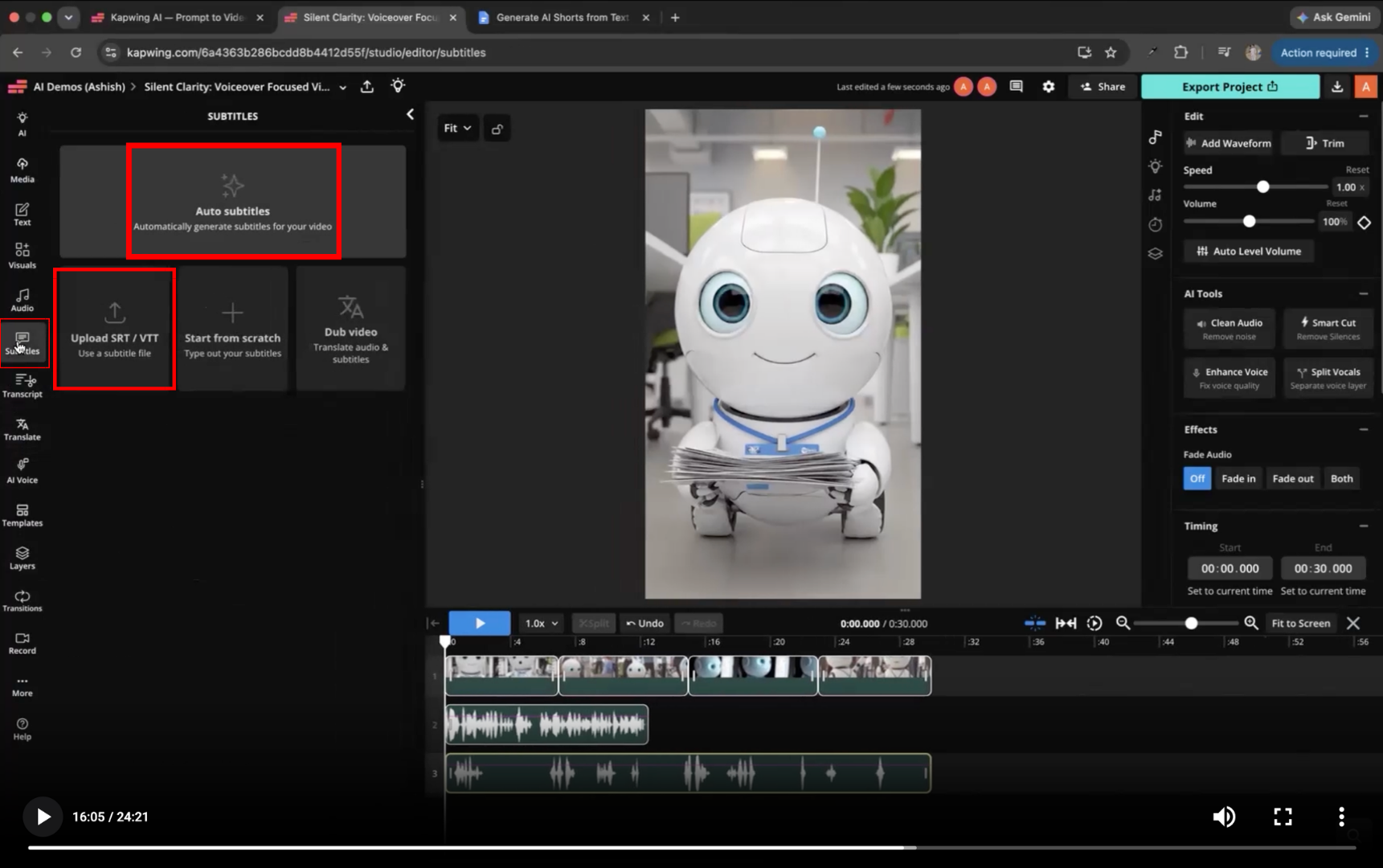
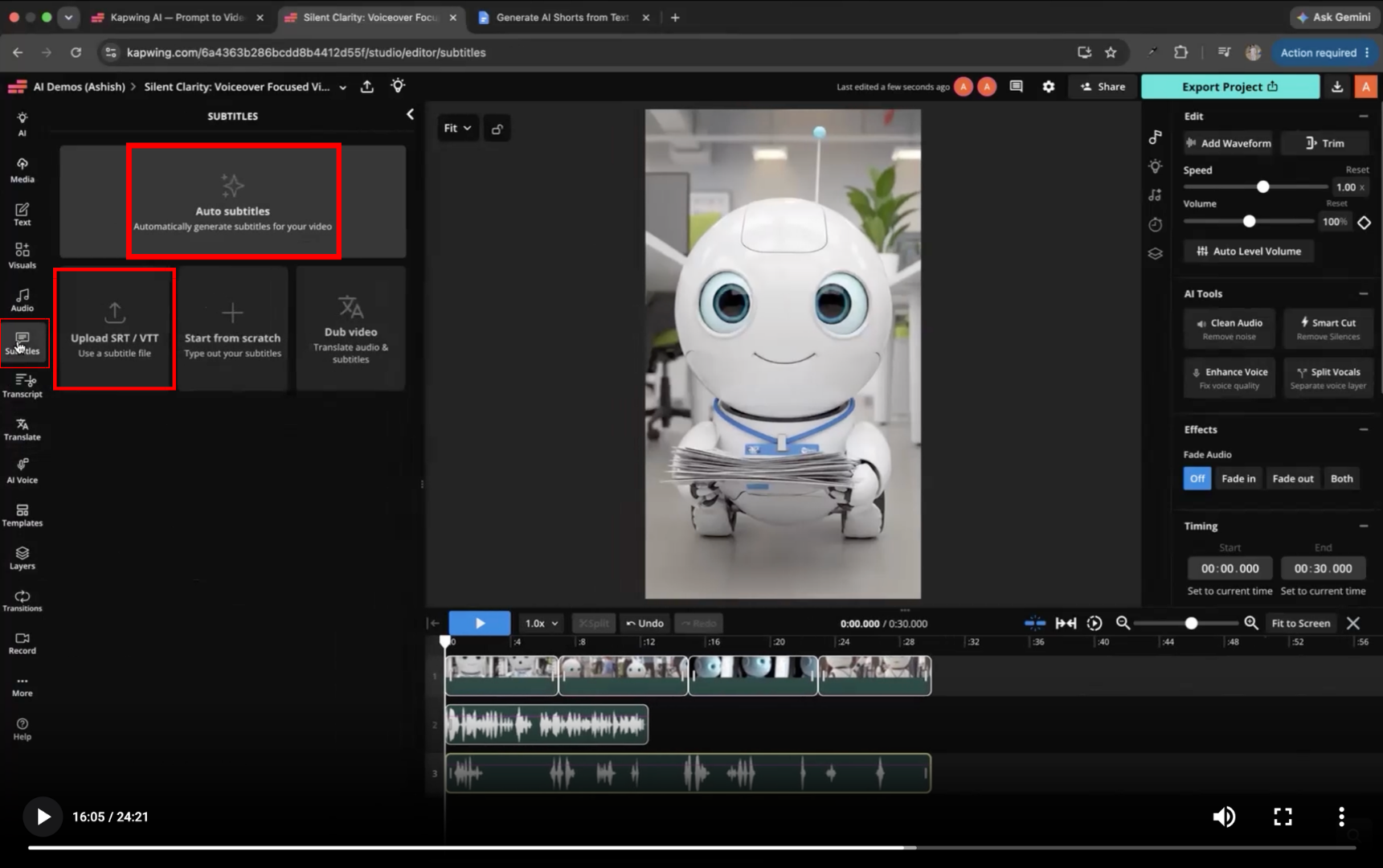
Expected behavior: Kapwing supports subtitle workflows in the editor, including Auto subtitles, Upload SRT/VTT, and starting from scratch. In testing, subtitles were usually a follow-up step rather than a fully automatic part of generation.
Test case: Text prompt → Image
Input type: Text prompt
Input used: Input artifact (Text prompt): INPUT
Observed output: Output artifact (Image): The Subtitles panel exposes Auto subtitles, Upload SRT / VTT, and Start from scratch, confirming that captioning requires a manual editor step after generation. — Kapwing_Anchor2_ManualSubtitleGeneration.png
Input artifact: Input artifact (Text prompt): INPUT
Output artifact: Output artifact (Image): The Subtitles panel exposes Auto subtitles, Upload SRT / VTT, and Start from scratch, confirming that captioning requires a manual editor step after generation. — Kapwing_Anchor2_ManualSubtitleGeneration.png
What changed: Text prompt transformed into Image
Test case: Text prompt → Image
Input type: Text prompt
Input used: Input artifact (Text prompt): Input
Observed output: Output artifact (Image): The subtitle editor exposes Auto subtitles, Upload SRT / VTT, and Start from scratch, confirming that subtitles are handled as an editor step. — kapwing_Anchor2_Manual-Subtitle-Generation.png
Input artifact: Input artifact (Text prompt): Input
Output artifact: Output artifact (Image): The subtitle editor exposes Auto subtitles, Upload SRT / VTT, and Start from scratch, confirming that subtitles are handled as an editor step. — kapwing_Anchor2_Manual-Subtitle-Generation.png
What changed: Text prompt transformed into Image
Test case: Text prompt → Text prompt
Input type: Text prompt
Input used: Input artifact (Text prompt): Input
Observed output: Output artifact (Text prompt): Output
Input artifact: Input artifact (Text prompt): Input
Output artifact: Output artifact (Text prompt): Output
What changed: Text prompt transformed into Text prompt
Why it matters / Conclusion: Subtitle support exists, but it behaves like a manual finish-pass rather than a fully automatic final step.
Kapwing supports subtitle workflows in the editor, including Auto subtitles, Upload SRT/VTT, and starting from scratch. In testing, subtitles were usually a follow-up step rather than a fully automatic part of generation.
Draft Editing and Regeneration▾
Feature tested: Draft Editing and Regeneration
Result: Partial
Expected behavior: Kapwing keeps generated projects editable so users can inspect cuts, edit scripts, adjust timing, rearrange scenes, regenerate individual scenes, and replace visuals or media assets. The benchmark exercised these repair controls on generated projects.
Test case: Video file → Image
Input type: Video file
Input used: Input artifact (Video file): Input 1 — Input 1 - Talking Head with Dead Air.mp4
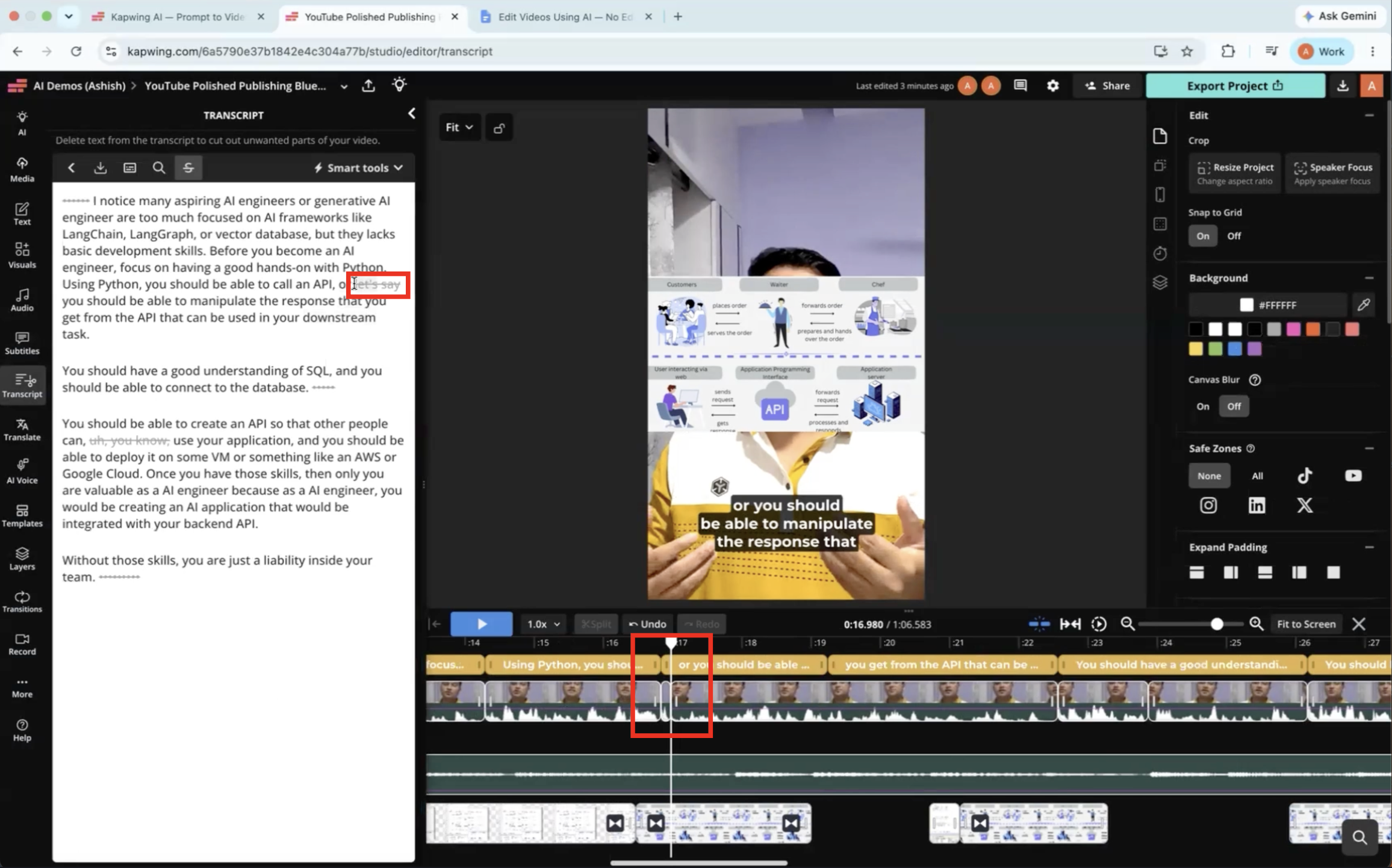
Observed output: Output artifact (Image): The transcript review view exposed AI-selected cuts, but the user still had to inspect the edit to make sure pacing and flow stayed natural. — kapwing-input1-failure-2-transcript-review-required-1.png
Input artifact: Input artifact (Video file): Input 1 — Input 1 - Talking Head with Dead Air.mp4
Output artifact: Output artifact (Image): The transcript review view exposed AI-selected cuts, but the user still had to inspect the edit to make sure pacing and flow stayed natural. — kapwing-input1-failure-2-transcript-review-required-1.png
What changed: Video file transformed into Image
Test case: Video file → Image
Input type: Video file
Input used: Input artifact (Video file): Input 2 — Input 2 - Low-Quality Audio & Lighting.mp4
Observed output: Output artifact (Image): Even after the AI pass, the timeline still needed manual refinement to remove remaining imperfections before publication. — kapwing-input2-failure-3-manual-timeline-refinement-required.png
Input artifact: Input artifact (Video file): Input 2 — Input 2 - Low-Quality Audio & Lighting.mp4
Output artifact: Output artifact (Image): Even after the AI pass, the timeline still needed manual refinement to remove remaining imperfections before publication. — kapwing-input2-failure-3-manual-timeline-refinement-required.png
What changed: Video file transformed into Image
Test case: Text prompt → Text prompt
Input type: Text prompt
Input used: Input artifact (Text prompt): INPUT
Observed output: Output artifact (Text prompt): Observation
Input artifact: Input artifact (Text prompt): INPUT
Output artifact: Output artifact (Text prompt): Observation
What changed: Text prompt transformed into Text prompt
Test case: Text prompt → Text prompt
Input type: Text prompt
Input used: Input artifact (Text prompt): Input
Observed output: Output artifact (Text prompt): Output
Input artifact: Input artifact (Text prompt): Input
Output artifact: Output artifact (Text prompt): Output
What changed: Text prompt transformed into Text prompt
Test case: Text prompt → Text prompt
Input type: Text prompt
Input used: Input artifact (Text prompt): Input
Observed output: Output artifact (Text prompt): Output
Input artifact: Input artifact (Text prompt): Input
Output artifact: Output artifact (Text prompt): Output
What changed: Text prompt transformed into Text prompt
Test case: Text prompt → Text prompt
Input type: Text prompt
Input used: Input artifact (Text prompt): Input
Observed output: Output artifact (Text prompt): Output
Input artifact: Input artifact (Text prompt): Input
Output artifact: Output artifact (Text prompt): Output
What changed: Text prompt transformed into Text prompt
Test case: Text prompt → Text prompt
Input type: Text prompt
Input used: Input artifact (Text prompt): Input
Observed output: Output artifact (Text prompt): Output
Input artifact: Input artifact (Text prompt): Input
Output artifact: Output artifact (Text prompt): Output
What changed: Text prompt transformed into Text prompt
Test case: Text prompt → Text prompt
Input type: Text prompt
Input used: Input artifact (Text prompt): Input
Observed output: Output artifact (Text prompt): Output
Input artifact: Input artifact (Text prompt): Input
Output artifact: Output artifact (Text prompt): Output
What changed: Text prompt transformed into Text prompt
Test case: Text prompt → Text prompt
Input type: Text prompt
Input used: Input artifact (Text prompt): Input
Observed output: Output artifact (Text prompt): Output
Input artifact: Input artifact (Text prompt): Input
Output artifact: Output artifact (Text prompt): Output
What changed: Text prompt transformed into Text prompt
Why it matters / Conclusion: Useful as a fix-up tool, but the report does not show it magically repairing a bad first pass.
Kapwing keeps generated projects editable so users can inspect cuts, edit scripts, adjust timing, rearrange scenes, regenerate individual scenes, and replace visuals or media assets. The benchmark exercised these repair controls on generated projects.
AI-Assisted Automatic Editing▾
Feature tested: AI-Assisted Automatic Editing
Result: Partial
Expected behavior: Kapwing automatically edits raw talking-head and webcam-style recordings by trimming silences, filler words, short pauses, and other unnecessary segments into a cleaner draft. The tested footage produced a better-paced first pass, though not a fully autonomous final edit.
Test case: Video file → Video file
Input type: Video file
Input used: Input artifact (Video file): Input 1 — Input 1 - Talking Head with Dead Air.mp4
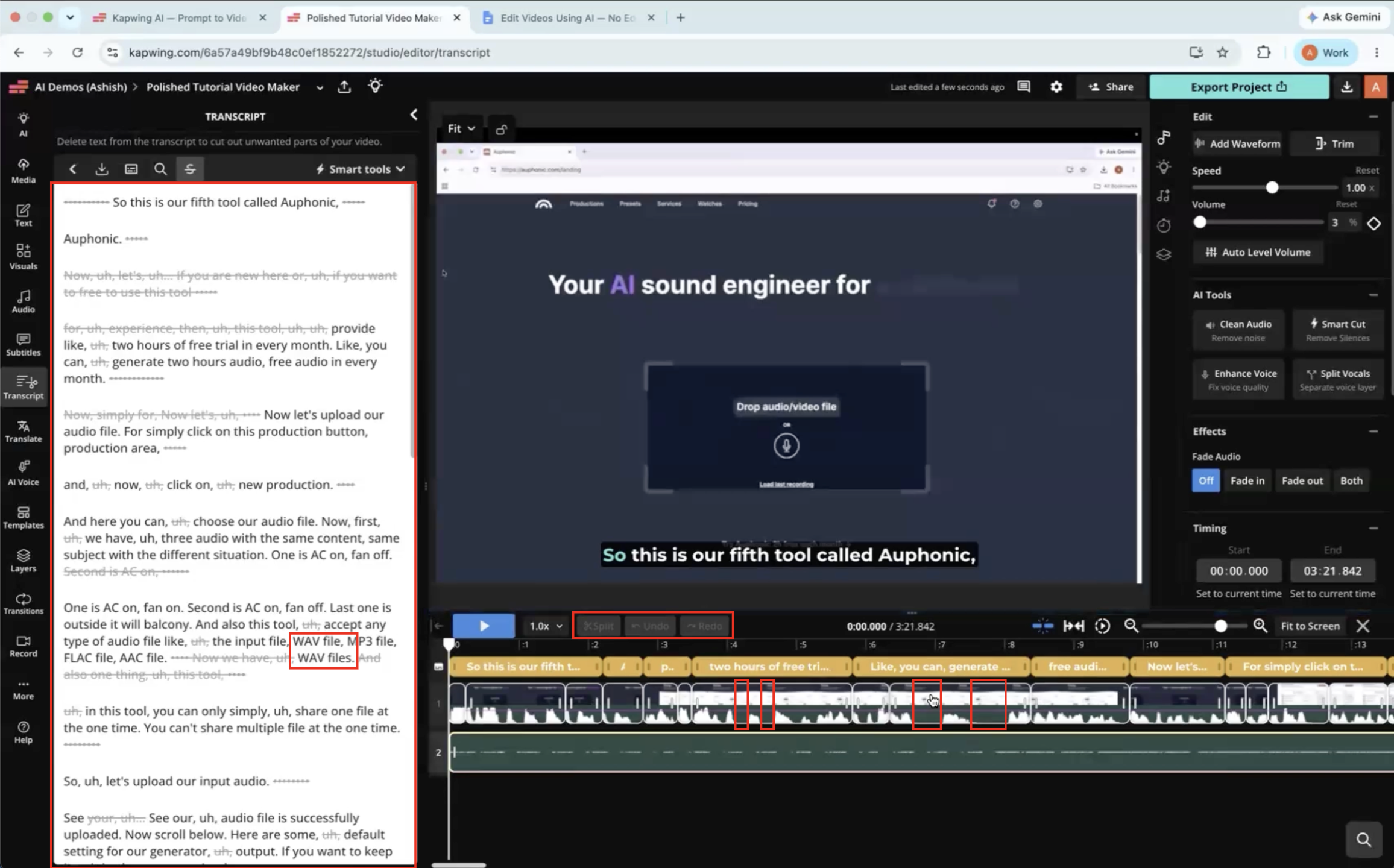
Observed output: Output artifact (Video file): Kapwing removed many pauses and filler words from the talking-head clip and made the pacing noticeably cleaner, but a few unnecessary pauses still remained and the result still benefited from manual review. — Kapwing Output 1 - Talking Head with Dead Air.mp4
Input artifact: Input artifact (Video file): Input 1 — Input 1 - Talking Head with Dead Air.mp4
Output artifact: Output artifact (Video file): Kapwing removed many pauses and filler words from the talking-head clip and made the pacing noticeably cleaner, but a few unnecessary pauses still remained and the result still benefited from manual review. — Kapwing Output 1 - Talking Head with Dead Air.mp4
What changed: Video file transformed into Video file
Test case: Video file → Video file
Input type: Video file
Input used: Input artifact (Video file): Input 2 — Input 2 - Low-Quality Audio & Lighting.mp4
Observed output: Output artifact (Video file): Kapwing cleaned up the low-quality webcam-style recording by removing many pauses and filler words, but some repeated words and brief pauses were still preserved in the first pass. — Kapwing Output 2 - Low-Quality Audio & Lighting.mp4
Input artifact: Input artifact (Video file): Input 2 — Input 2 - Low-Quality Audio & Lighting.mp4
Output artifact: Output artifact (Video file): Kapwing cleaned up the low-quality webcam-style recording by removing many pauses and filler words, but some repeated words and brief pauses were still preserved in the first pass. — Kapwing Output 2 - Low-Quality Audio & Lighting.mp4
What changed: Video file transformed into Video file
Why it matters / Conclusion: Good at producing a cleaner first draft, but it is not fully autonomous and still leaves some pauses or repeated phrases behind.
Kapwing automatically edits raw talking-head and webcam-style recordings by trimming silences, filler words, short pauses, and other unnecessary segments into a cleaner draft. The tested footage produced a better-paced first pass, though not a fully autonomous final edit.
Smart B-Roll Suggestions▾
Feature tested: Smart B-Roll Suggestions
Result: Partial
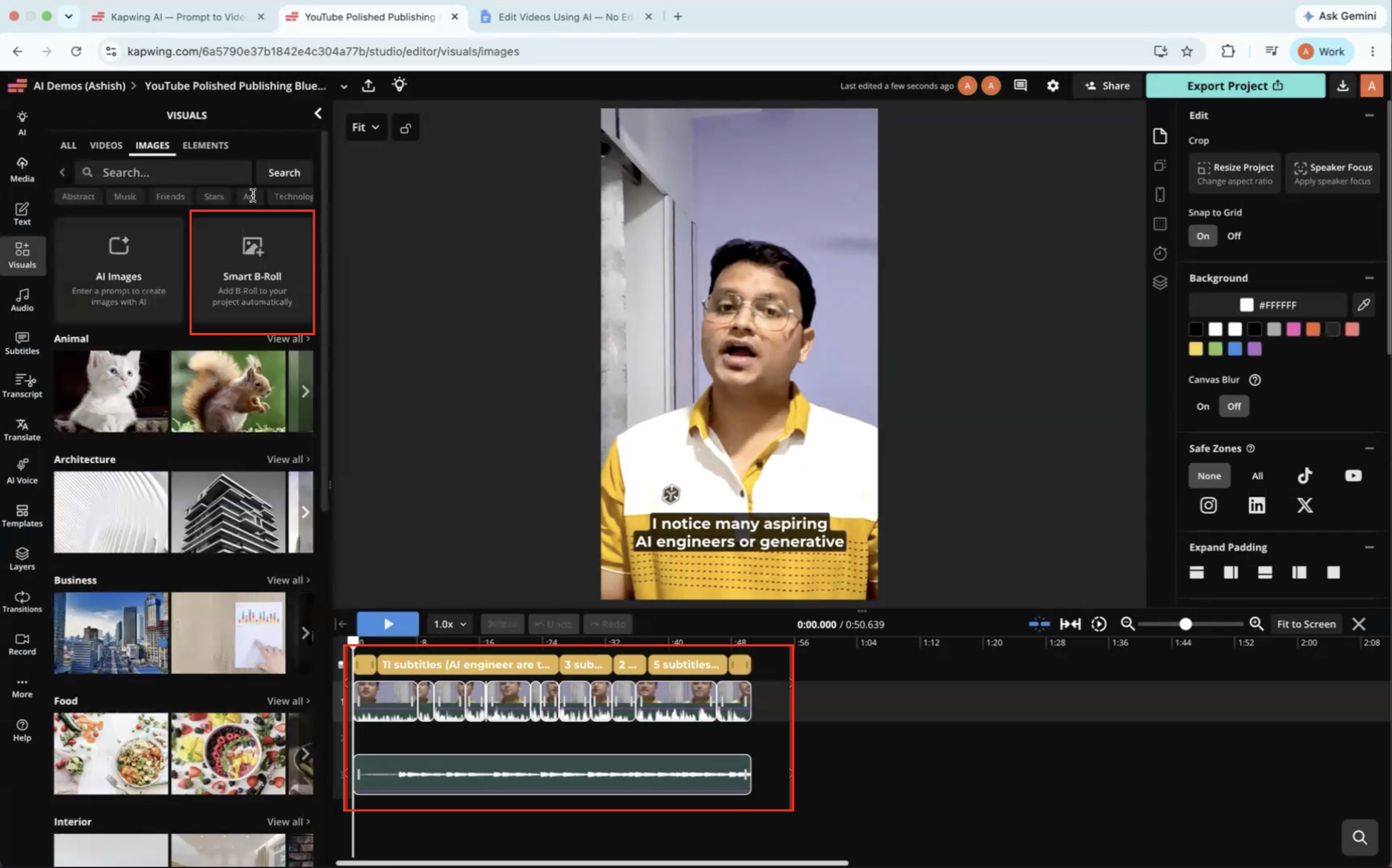
Expected behavior: Kapwing can generate contextually relevant Smart B-roll suggestions from the transcript for a project. The user still has to insert, reposition, and adjust the suggested visuals manually.
Test case: Video file → Image
Input type: Video file
Input used: Input artifact (Video file): Input 1 — Input 1 - Talking Head with Dead Air.mp4
Observed output: Output artifact (Image): After the AI edit finished, Smart B-roll still had not been inserted into the project, so it remained a separate manual step. — kapwing-input1-failure-1-smart-broll-not-applied.png
Input artifact: Input artifact (Video file): Input 1 — Input 1 - Talking Head with Dead Air.mp4
Output artifact: Output artifact (Image): After the AI edit finished, Smart B-roll still had not been inserted into the project, so it remained a separate manual step. — kapwing-input1-failure-1-smart-broll-not-applied.png
What changed: Video file transformed into Image
Test case: Video file → Image
Input type: Video file
Input used: Input artifact (Video file): Input 1 — Input 1 - Talking Head with Dead Air.mp4
Observed output: Output artifact (Image): The generated B-roll was relevant to the narration, but it had to be manually positioned and timed to match the spoken content. — kapwing-input1-failure-3-manual-broll-positioning.png
Input artifact: Input artifact (Video file): Input 1 — Input 1 - Talking Head with Dead Air.mp4
Output artifact: Output artifact (Image): The generated B-roll was relevant to the narration, but it had to be manually positioned and timed to match the spoken content. — kapwing-input1-failure-3-manual-broll-positioning.png
What changed: Video file transformed into Image
Why it matters / Conclusion: The suggestions are useful, but the timing and placement burden stays on the user.
Kapwing can generate contextually relevant Smart B-roll suggestions from the transcript for a project. The user still has to insert, reposition, and adjust the suggested visuals manually.
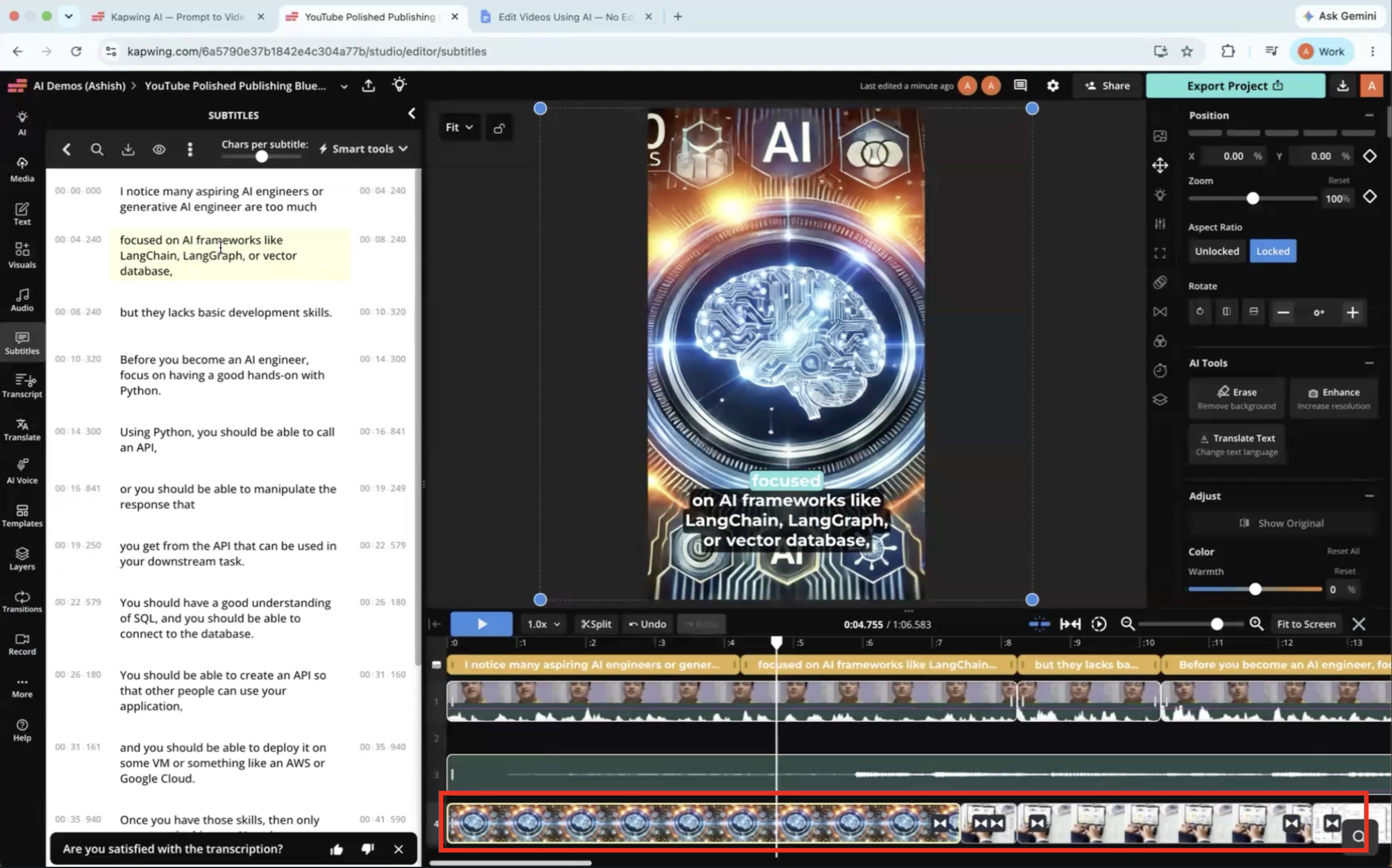
Caption Generation and Styling▾
Feature tested: Caption Generation and Styling
Result: Passed
Expected behavior: Kapwing generates synchronized captions from spoken narration and lets users style them after generation with changes to fonts, colors, sizing, positioning, and animations. The evidence comes from captioned talking-head style videos where the captions stayed aligned while being customizable.
Test case: Video file → Video file
Input type: Video file
Input used: Input artifact (Video file): Input 1 — Input 1 - Talking Head with Dead Air.mp4
Observed output: Output artifact (Video file): Captions were accurately synchronized to the talking-head narration and required little or no correction in the edited output. — Kapwing Output 1 - Talking Head with Dead Air.mp4
Input artifact: Input artifact (Video file): Input 1 — Input 1 - Talking Head with Dead Air.mp4
Output artifact: Output artifact (Video file): Captions were accurately synchronized to the talking-head narration and required little or no correction in the edited output. — Kapwing Output 1 - Talking Head with Dead Air.mp4
What changed: Video file transformed into Video file
Test case: Video file → Video file
Input type: Video file
Input used: Input artifact (Video file): Input 2 — Input 2 - Low-Quality Audio & Lighting.mp4
Observed output: Output artifact (Video file): Captions stayed well synchronized on the low-quality webcam clip and remained accurate enough that no major correction was needed. — Kapwing Output 2 - Low-Quality Audio & Lighting.mp4
Input artifact: Input artifact (Video file): Input 2 — Input 2 - Low-Quality Audio & Lighting.mp4
Output artifact: Output artifact (Video file): Captions stayed well synchronized on the low-quality webcam clip and remained accurate enough that no major correction was needed. — Kapwing Output 2 - Low-Quality Audio & Lighting.mp4
What changed: Video file transformed into Video file
Why it matters / Conclusion: One of Kapwing's strongest capabilities in this benchmark: accurate, synchronized captions with flexible styling control.
Kapwing generates synchronized captions from spoken narration and lets users style them after generation with changes to fonts, colors, sizing, positioning, and animations. The evidence comes from captioned talking-head style videos where the captions stayed aligned while being customizable.
Pricing & access
Live plans were listed on Kapwing's pricing page.
The test notes only say a paid version was used; the exact paid tier was not explicitly logged.
Featured in Rankings
Independent rankings where Kapwing was tested and rated.
Banner Preview
How the embed badge will look on your site

Embed HTML
Copy this code to your website source
Quick Integration Guide
- 1Copy the HTML code block above.
- 2Paste it into your site's HTML or CMS editor.
- 3Banner appears instantly on your page.
- 4Links back to your tool profile here.
Similar Tools
Discover more AI tools like Kapwing to enhance your workflow.
Comments (0)
Need a custom AI solution for this use case?
If you are looking to build a custom video background removal, subject segmentation, or editing tool for your business or internal workflow, email us at contact@futuresmart.ai.
Found something inaccurate or missing? We try to keep our AI research accurate and useful. If you found outdated information, an issue, or have a suggestion, email us at collaborate@aidemos.com.