
Steve AI
Fast prompt-to-short generation with strong editing controls, but free-plan visuals are image-based and watermarked.
Strong prompt-to-short workflow, with clear free-tier limits
- You want a fast text-to-short workflow that produces a complete vertical video with voiceover, captions, and music.
- You want scene-level editing and regeneration after generation.
- You can accept AI-image-style visuals on the free plan or are willing to upgrade for watermark-free exports.
- You need highly precise character continuity or emotion matching across scenes.
Our take
Steve AI turned both anchor prompts into complete vertical shorts with captions, voiceover, and background music, and its scene editing/regeneration workflow is a real strength. The customer-support dashboard prompt landed better than the robot-intern story, but the free plan leaned on animated AI-image scenes, showed blur and generic interface rendering, and exported with a visible watermark.
In-Depth Review
Our detailed analysis of Steve AI — features, performance, and real-world testing.
Feature-by-Feature Breakdown
Natural-Language Prompt IngestionWorking▾
Feature tested: Natural-Language Prompt Ingestion
Result: Passed
Verdict: Working
Expected behavior: Steve AI accepts plain-language briefs as the starting point for short-form video generation. The tested inputs were a customer-support dashboard concept and a tiny robot intern story.
Test case: Text prompt → Video file
Input type: Text prompt
Input used: Input artifact (Text prompt): Anchor Task 1 prompt
Observed output: Output artifact (Video file): The prompt was accepted and turned into a finished vertical short, showing that plain-language input is enough to start the workflow. — SteveAI_AnchorTask1_Dashboard_Output.mp4.mp4
Input artifact: Input artifact (Text prompt): Anchor Task 1 prompt
Output artifact: Output artifact (Video file): The prompt was accepted and turned into a finished vertical short, showing that plain-language input is enough to start the workflow. — SteveAI_AnchorTask1_Dashboard_Output.mp4.mp4
What changed: Text prompt transformed into Video file
Test case: Text prompt → Video file
Input type: Text prompt
Input used: Input artifact (Text prompt): Anchor Task 2 prompt
Observed output: Output artifact (Video file): The prompt was accepted and turned into a finished vertical short, confirming that Steve AI can ingest story-style briefs as well as concept prompts. — SteveAI_AnchorTask2_RobotIntern_Output.mp4
Input artifact: Input artifact (Text prompt): Anchor Task 2 prompt
Output artifact: Output artifact (Video file): The prompt was accepted and turned into a finished vertical short, confirming that Steve AI can ingest story-style briefs as well as concept prompts. — SteveAI_AnchorTask2_RobotIntern_Output.mp4
What changed: Text prompt transformed into Video file
Why it matters / Conclusion: Reliable starting point for text-to-short generation on both anchor prompts.
Steve AI accepts plain-language briefs as the starting point for short-form video generation. The tested inputs were a customer-support dashboard concept and a tiny robot intern story.
Script GenerationWorking, with caveats▾
Feature tested: Script Generation
Result: Passed
Verdict: Working, with caveats
Expected behavior: Steve AI automatically writes narration scripts from the supplied prompt before video creation. In testing, it produced scripts for both the dashboard concept and the robot-intern story.
Test case: Text prompt → Text prompt
Input type: Text prompt
Input used: Input artifact (Text prompt): Prompt brief
Observed output: Output artifact (Text prompt): Output
Input artifact: Input artifact (Text prompt): Prompt brief
Output artifact: Output artifact (Text prompt): Output
What changed: Text prompt transformed into Text prompt
Test case: Text prompt → Text prompt
Input type: Text prompt
Input used: Input artifact (Text prompt): Prompt brief
Observed output: Output artifact (Text prompt): Output
Input artifact: Input artifact (Text prompt): Prompt brief
Output artifact: Output artifact (Text prompt): Output
What changed: Text prompt transformed into Text prompt
Why it matters / Conclusion: Useful for structuring the short, but script quality did not prevent visual mismatches in the robot-intern test.
Steve AI automatically writes narration scripts from the supplied prompt before video creation. In testing, it produced scripts for both the dashboard concept and the robot-intern story.
Visual Generation Mode SelectionWorking▾
Feature tested: Visual Generation Mode Selection
Result: Passed
Verdict: Working
Expected behavior: Steve AI lets users choose the visual source mode before generation, including AI-generated images, stock images/footage, and paid AI video clips. The tested free-plan path used the AI-visual option.
Test case: Text prompt → Text prompt
Input type: Text prompt
Input used: Input artifact (Text prompt): Pre-generation choice
Observed output: Output artifact (Text prompt): Output
Input artifact: Input artifact (Text prompt): Pre-generation choice
Output artifact: Output artifact (Text prompt): Output
What changed: Text prompt transformed into Text prompt
Why it matters / Conclusion: Flexible mode chooser, but the tested free path still behaved like animated images rather than full video clips.
Steve AI lets users choose the visual source mode before generation, including AI-generated images, stock images/footage, and paid AI video clips. The tested free-plan path used the AI-visual option.
Video Style SelectionAvailable▾
Feature tested: Video Style Selection
Result: Passed
Verdict: Available
Expected behavior: Steve AI exposes pre-generation style controls such as Realistic and Hyper Realistic. The benchmark confirmed the control exists on the tested workflow.
Test case: Text prompt → Text prompt
Input type: Text prompt
Input used: Input artifact (Text prompt): Pre-generation choice
Observed output: Output artifact (Text prompt): Output
Input artifact: Input artifact (Text prompt): Pre-generation choice
Output artifact: Output artifact (Text prompt): Output
What changed: Text prompt transformed into Text prompt
Why it matters / Conclusion: A real control surface, but no evidence that it eliminates blur or continuity problems on its own.
Steve AI exposes pre-generation style controls such as Realistic and Hyper Realistic. The benchmark confirmed the control exists on the tested workflow.
AI Video GenerationWorking, with quality limits▾
Feature tested: AI Video Generation
Result: Passed
Verdict: Working, with quality limits
Expected behavior: Steve AI generates complete vertical shorts from the supplied prompts. The dashboard concept and robot-intern story both produced finished videos, though with softness, generic scenes, and some character drift.
Test case: Text prompt → Video file
Input type: Text prompt
Input used: Input artifact (Text prompt): Anchor Task 1 prompt
Observed output: Output artifact (Video file): Steve AI produced a complete short for the dashboard idea, but the free-plan visuals relied on animated image scenes rather than crisp video-native footage. — SteveAI_AnchorTask1_Dashboard_Output.mp4.mp4
Input artifact: Input artifact (Text prompt): Anchor Task 1 prompt
Output artifact: Output artifact (Video file): Steve AI produced a complete short for the dashboard idea, but the free-plan visuals relied on animated image scenes rather than crisp video-native footage. — SteveAI_AnchorTask1_Dashboard_Output.mp4.mp4
What changed: Text prompt transformed into Video file
Test case: Text prompt → Image
Input type: Text prompt
Input used: Input artifact (Text prompt): Anchor Task 1 prompt frame check
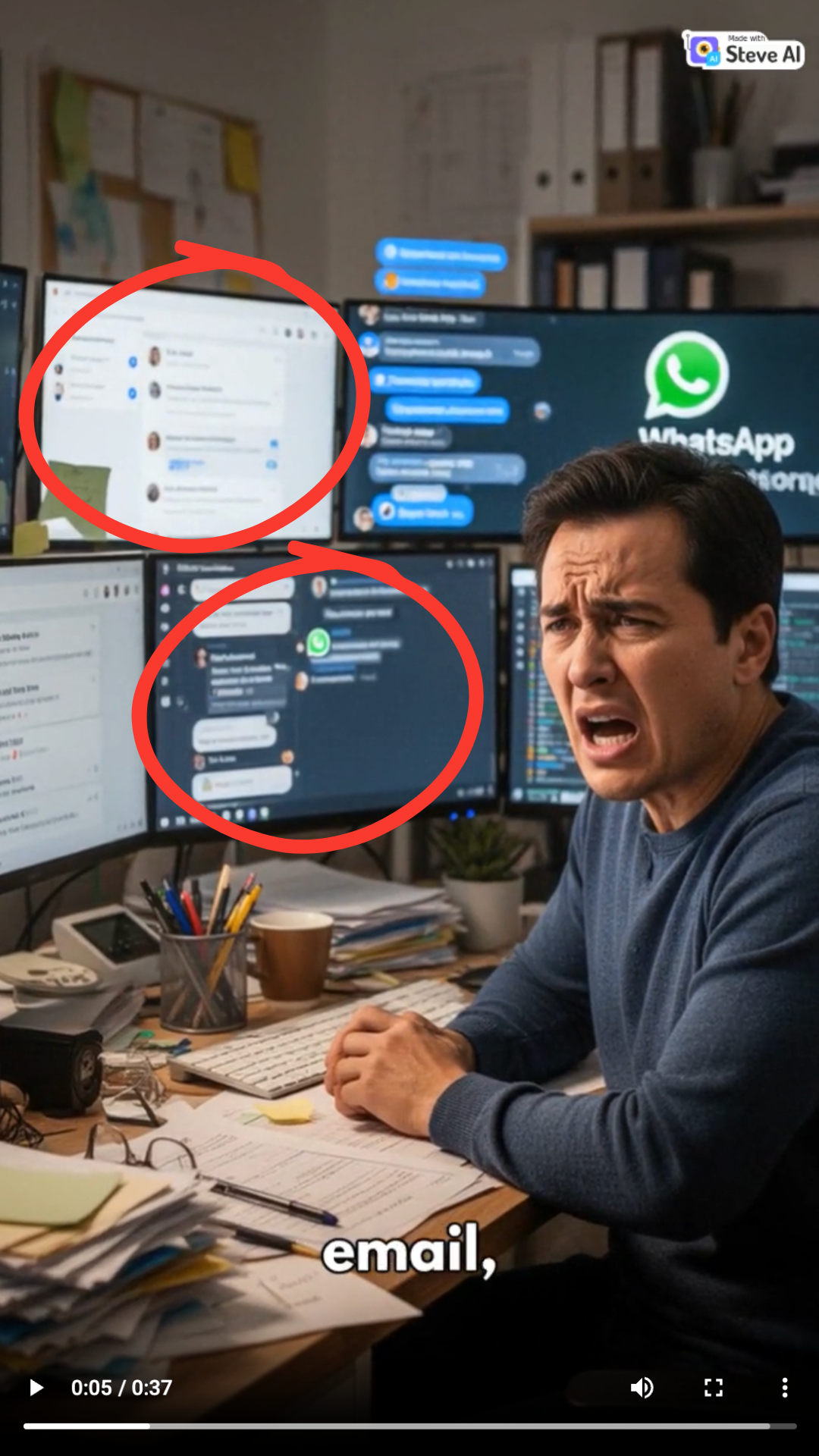
Observed output: Output artifact (Image): The dashboard frame is visibly soft and blurry, which makes the interface harder to read and weakens the clarity of the concept. — SteveAI_Anchor1_BlurryDashboard.png
Input artifact: Input artifact (Text prompt): Anchor Task 1 prompt frame check
Output artifact: Output artifact (Image): The dashboard frame is visibly soft and blurry, which makes the interface harder to read and weakens the clarity of the concept. — SteveAI_Anchor1_BlurryDashboard.png
What changed: Text prompt transformed into Image
Test case: Text prompt → Image
Input type: Text prompt
Input used: Input artifact (Text prompt): Anchor Task 1 prompt frame check
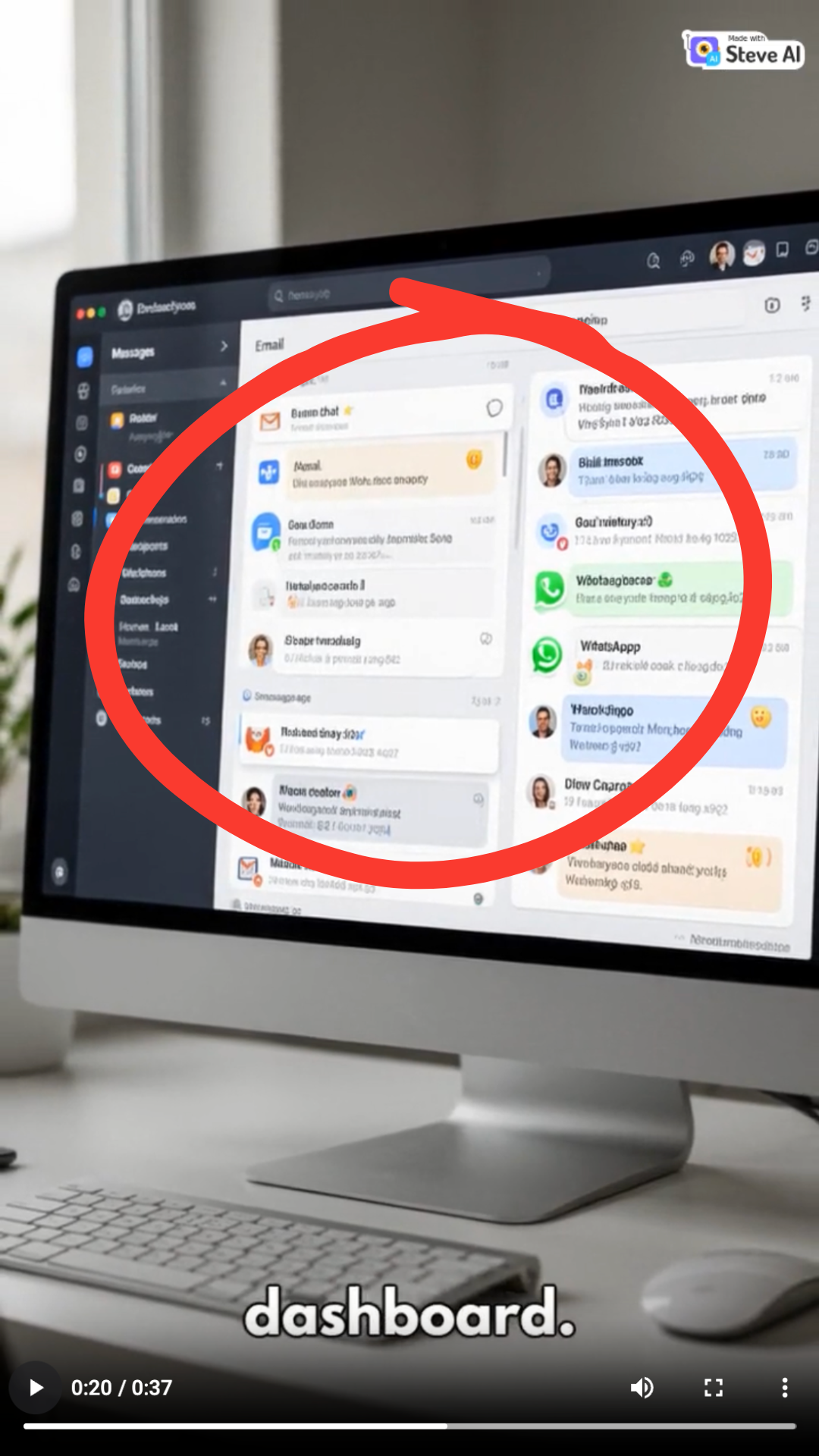
Observed output: Output artifact (Image): The unified dashboard is rendered as a generic inbox/message board rather than a precise email-plus-chat-plus-WhatsApp workflow. — SteveAI_Anchor1_GenericDashboardRepresentation.png
Input artifact: Input artifact (Text prompt): Anchor Task 1 prompt frame check
Output artifact: Output artifact (Image): The unified dashboard is rendered as a generic inbox/message board rather than a precise email-plus-chat-plus-WhatsApp workflow. — SteveAI_Anchor1_GenericDashboardRepresentation.png
What changed: Text prompt transformed into Image
Test case: Text prompt → Video file
Input type: Text prompt
Input used: Input artifact (Text prompt): Anchor Task 2 prompt
Observed output: Output artifact (Video file): Steve AI produced a complete short for the robot-intern story, but the free-plan output still leaned on image-like animation instead of fully video-native scenes. — SteveAI_AnchorTask2_RobotIntern_Output.mp4
Input artifact: Input artifact (Text prompt): Anchor Task 2 prompt
Output artifact: Output artifact (Video file): Steve AI produced a complete short for the robot-intern story, but the free-plan output still leaned on image-like animation instead of fully video-native scenes. — SteveAI_AnchorTask2_RobotIntern_Output.mp4
What changed: Text prompt transformed into Video file
Test case: Text prompt → Image
Input type: Text prompt
Input used: Input artifact (Text prompt): Anchor Task 2 prompt frame check
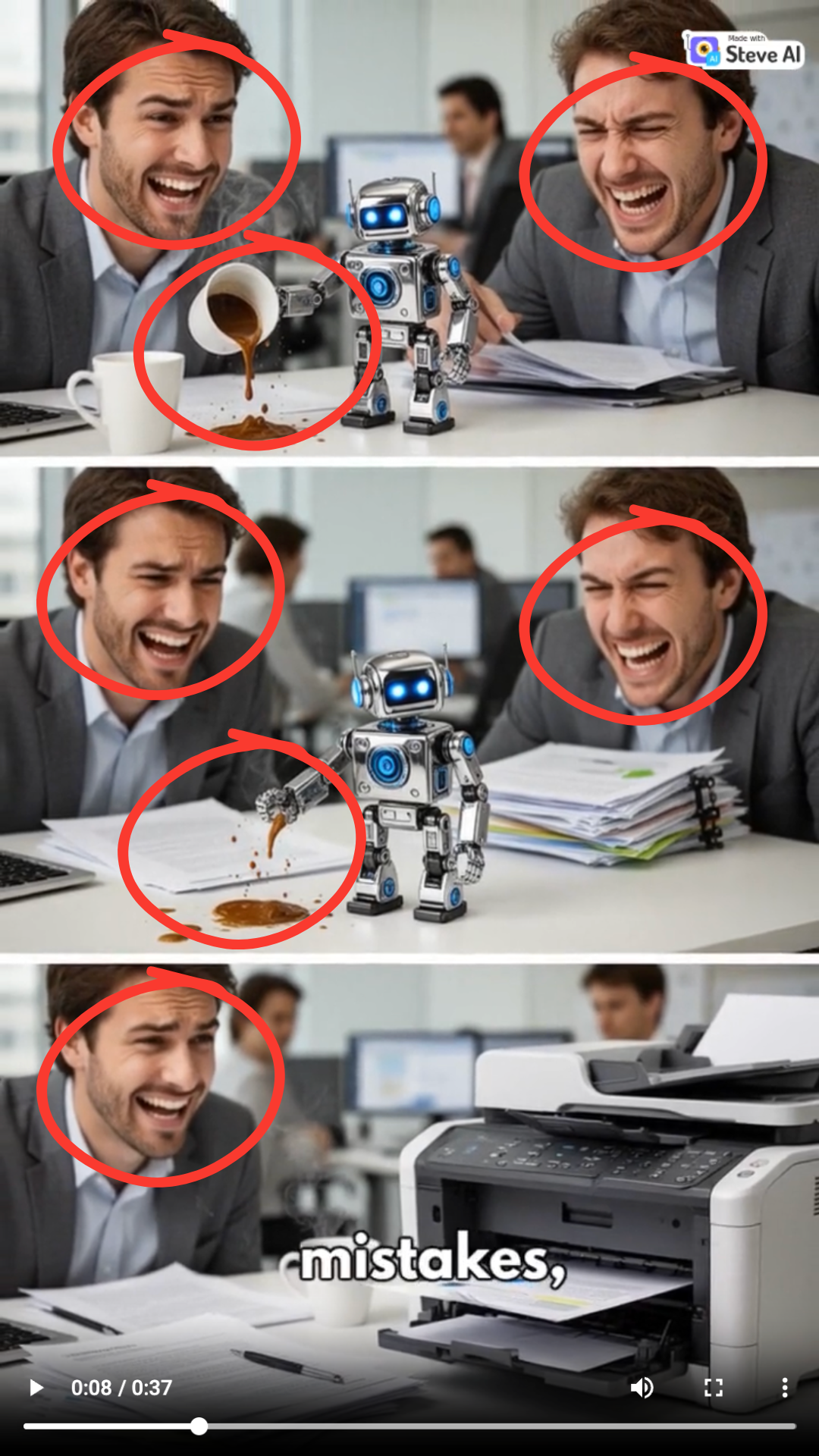
Observed output: Output artifact (Image): The scene shows a mismatch between narration and emotion: the story says the robot is making mistakes, but the surrounding team appears happy instead of frustrated. — SteveAI_Anchor2_IncorrectEmotionalScene.png
Input artifact: Input artifact (Text prompt): Anchor Task 2 prompt frame check
Output artifact: Output artifact (Image): The scene shows a mismatch between narration and emotion: the story says the robot is making mistakes, but the surrounding team appears happy instead of frustrated. — SteveAI_Anchor2_IncorrectEmotionalScene.png
What changed: Text prompt transformed into Image
Test case: Text prompt → Image
Input type: Text prompt
Input used: Input artifact (Text prompt): Anchor Task 2 prompt frame check
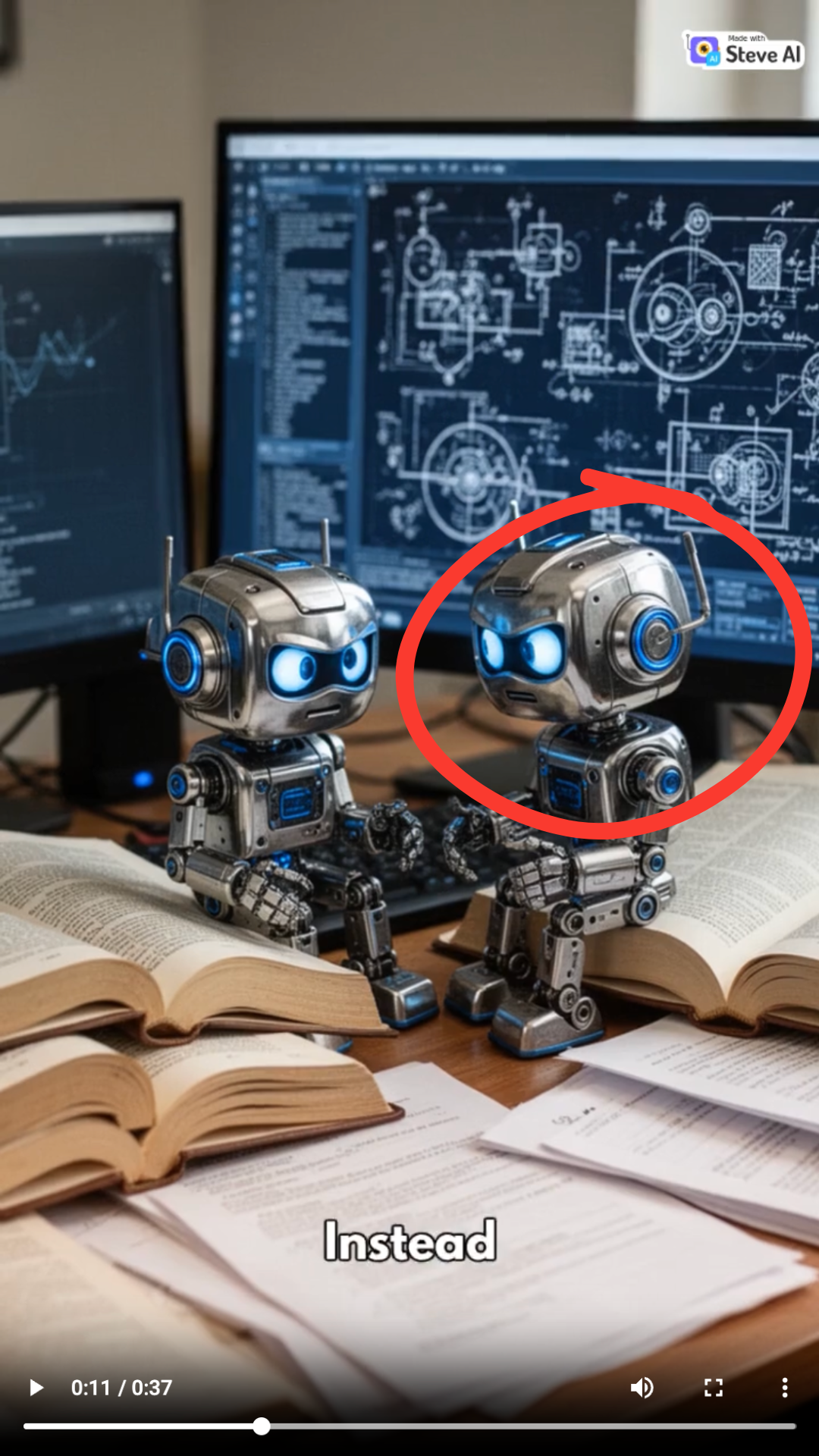
Observed output: Output artifact (Image): The prompt centers on one robot intern, but this frame introduces multiple robot characters, weakening character continuity. — SteveAI_Anchor2_MultipleRobotCharacters.png
Input artifact: Input artifact (Text prompt): Anchor Task 2 prompt frame check
Output artifact: Output artifact (Image): The prompt centers on one robot intern, but this frame introduces multiple robot characters, weakening character continuity. — SteveAI_Anchor2_MultipleRobotCharacters.png
What changed: Text prompt transformed into Image
Why it matters / Conclusion: It delivers finished vertical shorts, but the free-plan visual path is image-based and can blur interfaces, simplify detail, and drift on character continuity.
Steve AI generates complete vertical shorts from the supplied prompts. The dashboard concept and robot-intern story both produced finished videos, though with softness, generic scenes, and some character drift.
Editing and RegenerationStrong▾
Feature tested: Editing and Regeneration
Result: Passed
Verdict: Strong
Expected behavior: Steve AI supports post-generation edits for scenes, scripts, subtitle position, and music volume, and it can regenerate scenes after the first render. The described workflow shows a correction loop after output creation.
Test case: Text prompt → Text prompt
Input type: Text prompt
Input used: Input artifact (Text prompt): Post-generation edit workflow
Observed output: Output artifact (Text prompt): Output
Input artifact: Input artifact (Text prompt): Post-generation edit workflow
Output artifact: Output artifact (Text prompt): Output
What changed: Text prompt transformed into Text prompt
Why it matters / Conclusion: One of Steve AI's clearest strengths for creators who want control after the first render.
Steve AI supports post-generation edits for scenes, scripts, subtitle position, and music volume, and it can regenerate scenes after the first render. The described workflow shows a correction loop after output creation.
Automatic Captions and Audio AssemblyWorking▾
Feature tested: Automatic Captions and Audio Assembly
Result: Passed
Verdict: Working
Expected behavior: Steve AI includes captions, narration, and background music in the finished short. Both tested outputs showed this assembly working even when the visuals were weaker.
Test case: Text prompt → Video file
Input type: Text prompt
Input used: Input artifact (Text prompt): Anchor Task 1 prompt
Observed output: Output artifact (Video file): The finished short includes captions, voiceover, and background music, and the narration stays aligned with the dashboard concept. — SteveAI_AnchorTask1_Dashboard_Output.mp4.mp4
Input artifact: Input artifact (Text prompt): Anchor Task 1 prompt
Output artifact: Output artifact (Video file): The finished short includes captions, voiceover, and background music, and the narration stays aligned with the dashboard concept. — SteveAI_AnchorTask1_Dashboard_Output.mp4.mp4
What changed: Text prompt transformed into Video file
Test case: Text prompt → Video file
Input type: Text prompt
Input used: Input artifact (Text prompt): Anchor Task 2 prompt
Observed output: Output artifact (Video file): The finished short includes captions, voiceover, and background music, and the audio layer holds together even when the visuals drift. — SteveAI_AnchorTask2_RobotIntern_Output.mp4
Input artifact: Input artifact (Text prompt): Anchor Task 2 prompt
Output artifact: Output artifact (Video file): The finished short includes captions, voiceover, and background music, and the audio layer holds together even when the visuals drift. — SteveAI_AnchorTask2_RobotIntern_Output.mp4
What changed: Text prompt transformed into Video file
Why it matters / Conclusion: The audio/text assembly was dependable on both tests.
Steve AI includes captions, narration, and background music in the finished short. Both tested outputs showed this assembly working even when the visuals were weaker.
Video ExportWorking, with limits▾
Feature tested: Video Export
Result: Passed
Verdict: Working, with limits
Expected behavior: Steve AI exports completed vertical videos in a social-ready format. The tests also showed a visible watermark on the free plan, with watermark-free export reserved for paid plans.
Test case: Text prompt → Image
Input type: Text prompt
Input used: Input artifact (Text prompt): Free-plan export
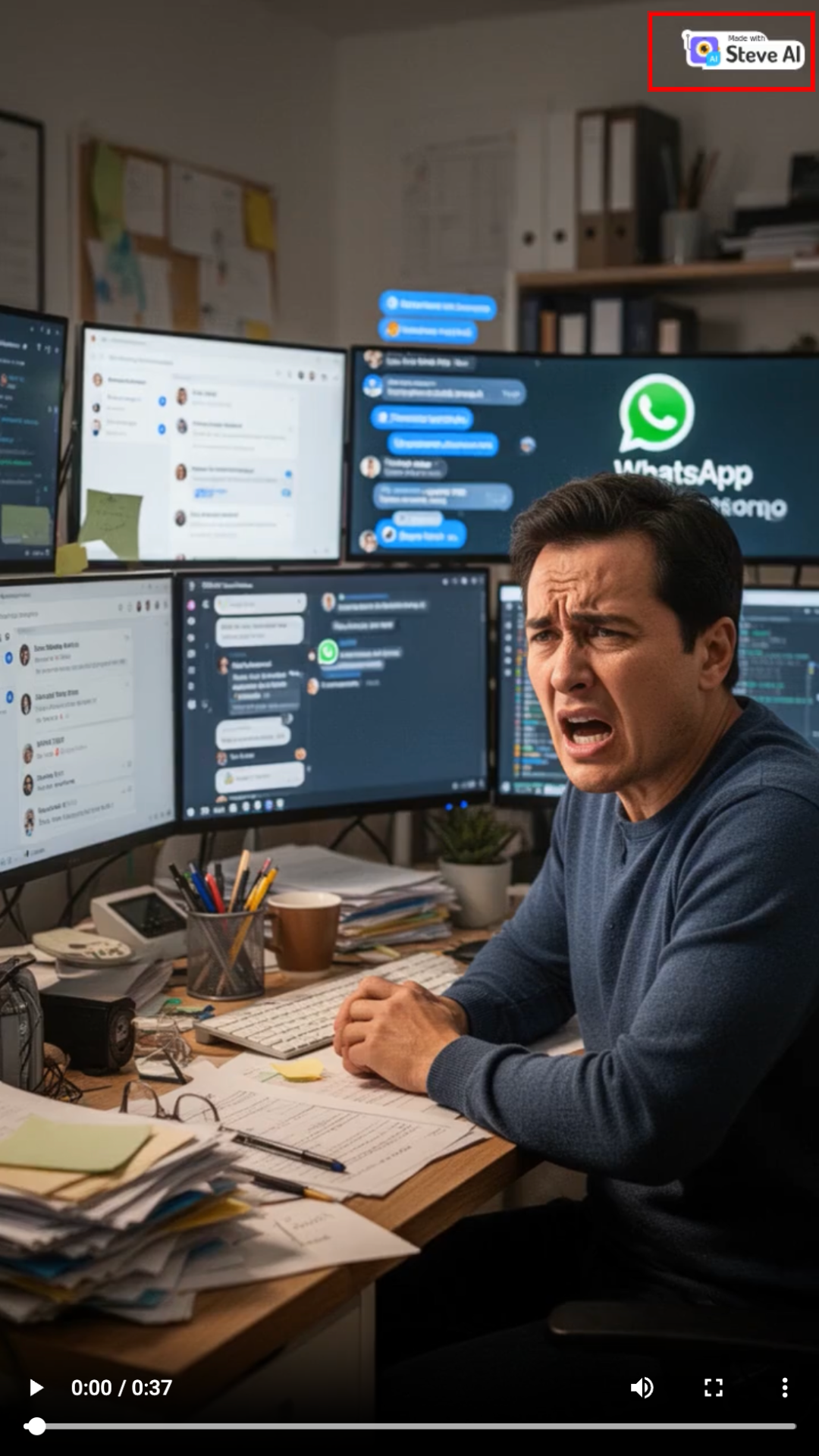
Observed output: Output artifact (Image): The export is vertical and ready to publish, but the free-plan version includes a visible Steve AI watermark. — SteveAI_Anchor1_WatermarkedExport.png
Input artifact: Input artifact (Text prompt): Free-plan export
Output artifact: Output artifact (Image): The export is vertical and ready to publish, but the free-plan version includes a visible Steve AI watermark. — SteveAI_Anchor1_WatermarkedExport.png
What changed: Text prompt transformed into Image
Test case: Text prompt → Image
Input type: Text prompt
Input used: Input artifact (Text prompt): Free-plan export
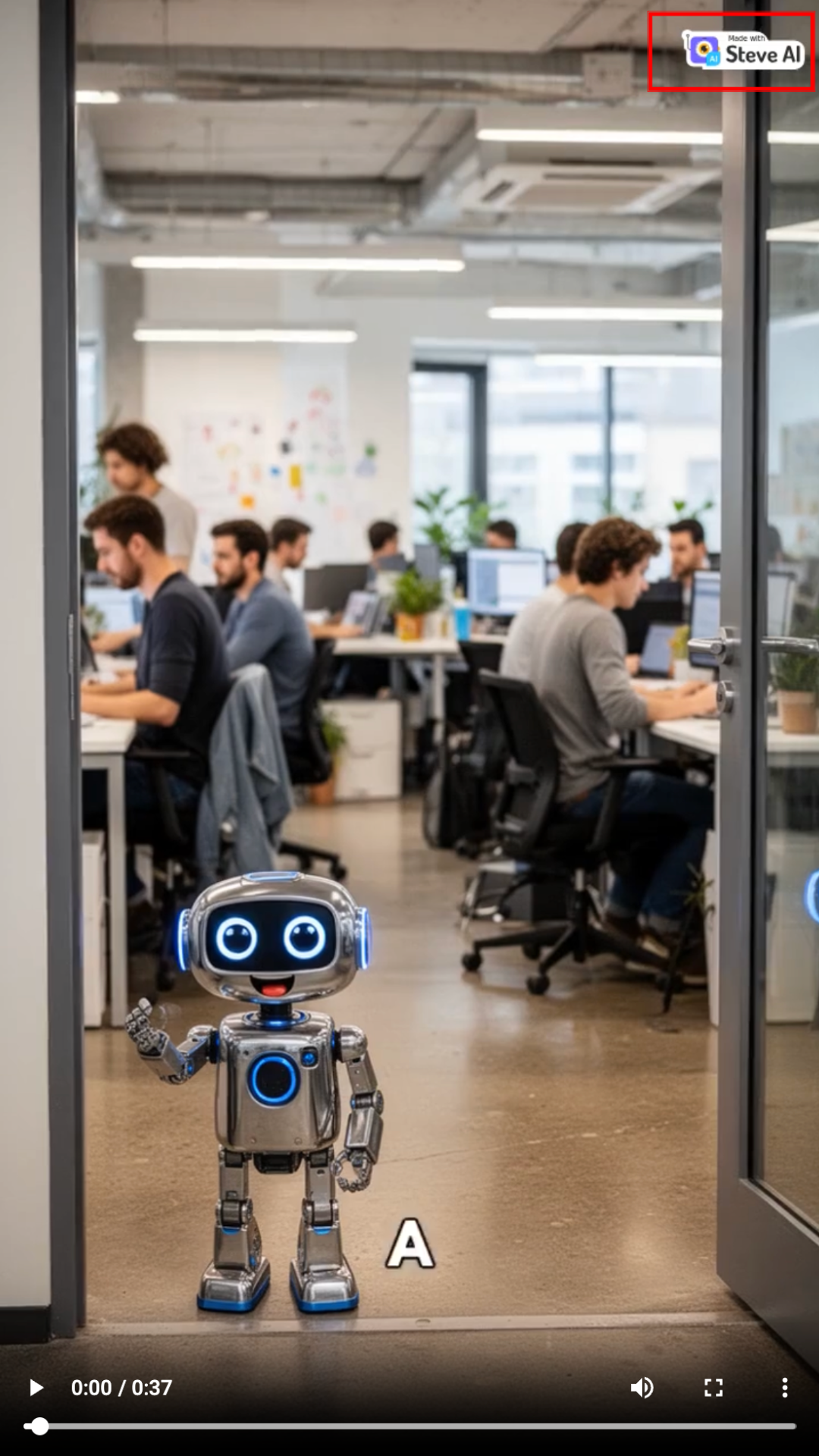
Observed output: Output artifact (Image): The export is vertical and ready to publish, but the free-plan version includes a visible Steve AI watermark. — SteveAI_Anchor2_WatermarkedExport.png
Input artifact: Input artifact (Text prompt): Free-plan export
Output artifact: Output artifact (Image): The export is vertical and ready to publish, but the free-plan version includes a visible Steve AI watermark. — SteveAI_Anchor2_WatermarkedExport.png
What changed: Text prompt transformed into Image
Why it matters / Conclusion: Exporting is straightforward, but free-tier watermarking is a hard limit for production use.
Steve AI exports completed vertical videos in a social-ready format. The tests also showed a visible watermark on the free plan, with watermark-free export reserved for paid plans.
Pricing & access
The benchmark tested the free plan, which exports with a watermark.
Last verified June 2026.
Banner Preview
How the embed badge will look on your site

Embed HTML
Copy this code to your website source
Quick Integration Guide
- 1Copy the HTML code block above.
- 2Paste it into your site's HTML or CMS editor.
- 3Banner appears instantly on your page.
- 4Links back to your tool profile here.
Similar Tools
Discover more AI tools like Steve AI to enhance your workflow.
Comments (0)
Need a custom AI solution for this use case?
If you are looking to build a custom short-form video generator, prompt-to-video workflow, or video editing tool for your business or internal workflow, email us at contact@futuresmart.ai.
Found something inaccurate or missing? We try to keep our AI research accurate and useful. If you found outdated information, an issue, or have a suggestion, email us at collaborate@aidemos.com.