
Fotor
Reliable image-to-video and cutouts, but motion is restrained and background replacement is shaky
Our take
- You need native audio in generated clips without a separate post-production pass.
- You care more about preserving faces, labels, and scene structure than about aggressive camera movement.
- You are animating portraits, illustrations, group shots, or product photos and can accept a restrained motion style.
- You need reliable large camera moves such as orbits or turntable rotations.
Our take
Fotor looked dependable for single-image video: every tested clip had native audio, and the outputs stayed visually clean, especially on portraits and product shots. Its subject segmentation and matting were also strong, with clean cutouts across hair, glasses, fur-like detail, and busy scenes. The main caveats are conservative camera movement, a Pro-plan background replacement workflow that never produced a replacement scene in testing, and vertical exports that came out landscape instead of staying upright.
In-Depth Review
Our detailed analysis of Fotor — features, performance, and real-world testing.
Feature-by-Feature Breakdown
Image-to-Video Generation with Native AudioUseful for simpler image-to-video clips, but motion is conservative and prompt precision matters.▾
Feature tested: Image-to-Video Generation with Native Audio
Result: Partial
Verdict: Useful for simpler image-to-video clips, but motion is conservative and prompt precision matters.
Expected behavior: Turns a still image into a short video clip and can include native audio. The evidence here came from a clean portrait/product-style source, with weaker reliability on larger camera moves and one prompt mismatch before the corrected result.
Test case: Image → Video file
Input type: Image
Input used: Input artifact (Image): Anime-style clover close-up tested with a slow push-in, blink, breeze, and petals prompt. — input-01.jpg
Observed output: Output artifact (Video file): A blink at about 1.25s, a smile building by about 2.5s, and petals drifting throughout; the camera barely changes. — input-01-output.mp4
Input artifact: Input artifact (Image): Anime-style clover close-up tested with a slow push-in, blink, breeze, and petals prompt. — input-01.jpg
Output artifact: Output artifact (Video file): A blink at about 1.25s, a smile building by about 2.5s, and petals drifting throughout; the camera barely changes. — input-01-output.mp4
What changed: Image transformed into Video file
Test case: Image → Video file
Input type: Image
Input used: Input artifact (Image): Stylized sunset market street with a donkey cart, tested with a forward-dolly crowd-motion prompt. — input-02.png
Observed output: Output artifact (Video file): A genuine forward dolly with tighter building crop, an advancing cart, and birds appearing mid-clip. — input-02-output.mp4
Input artifact: Input artifact (Image): Stylized sunset market street with a donkey cart, tested with a forward-dolly crowd-motion prompt. — input-02.png
Output artifact: Output artifact (Video file): A genuine forward dolly with tighter building crop, an advancing cart, and birds appearing mid-clip. — input-02-output.mp4
What changed: Image transformed into Video file
Test case: Image → Video file
Input type: Image
Input used: Input artifact (Image): Tiger-at-sunset photo tested with a push-in and roar prompt. — input-03.jpeg
Observed output: Output artifact (Video file): The tool invents its own stand-to-roar-to-sit arc instead of following the lighting-only brief. — input-03-output.mp4
Input artifact: Input artifact (Image): Tiger-at-sunset photo tested with a push-in and roar prompt. — input-03.jpeg
Output artifact: Output artifact (Video file): The tool invents its own stand-to-roar-to-sit arc instead of following the lighting-only brief. — input-03-output.mp4
What changed: Image transformed into Video file
Test case: Image → Video file
Input type: Image
Input used: Input artifact (Image): Realistic portrait of a woman at an outdoor café, tested with an intimate slow push-in prompt. — input-04.webp
Observed output: Output artifact (Video file): A near-imperceptible push-in with a smile that builds tooth-by-tooth; identity stays consistent. — input-04-output.mp4
Input artifact: Input artifact (Image): Realistic portrait of a woman at an outdoor café, tested with an intimate slow push-in prompt. — input-04.webp
Output artifact: Output artifact (Video file): A near-imperceptible push-in with a smile that builds tooth-by-tooth; identity stays consistent. — input-04-output.mp4
What changed: Image transformed into Video file
Test case: Image → Video file
Input type: Image
Input used: Input artifact (Image): Dinner toast group photo, tested with a semicircular glide and glass-clink prompt. — input-05.webp
Observed output: Output artifact (Video file): It opens tight on the glasses and pulls outward to reveal all five diners. — input-05-output.mp4
Input artifact: Input artifact (Image): Dinner toast group photo, tested with a semicircular glide and glass-clink prompt. — input-05.webp
Output artifact: Output artifact (Video file): It opens tight on the glasses and pulls outward to reveal all five diners. — input-05-output.mp4
What changed: Image transformed into Video file
Test case: Image → Video file
Input type: Image
Input used: Input artifact (Image): Perfume product shot with a readable Luméa ESSENCE label, tested with a turntable-rotation prompt. — input-06.webp
Observed output: Output artifact (Video file): The label stays perfectly legible and the composition remains stable, but the requested camera move never happens. — input-06-output.mp4
Input artifact: Input artifact (Image): Perfume product shot with a readable Luméa ESSENCE label, tested with a turntable-rotation prompt. — input-06.webp
Output artifact: Output artifact (Video file): The label stays perfectly legible and the composition remains stable, but the requested camera move never happens. — input-06-output.mp4
What changed: Image transformed into Video file
Test case: Text prompt → Text prompt
Input type: Text prompt
Input used: Input artifact (Text prompt): INPUT
Observed output: Output artifact (Text prompt): OUTPUT
Input artifact: Input artifact (Text prompt): INPUT
Output artifact: Output artifact (Text prompt): OUTPUT
What changed: Text prompt transformed into Text prompt
Test case: Text prompt → Text prompt
Input type: Text prompt
Input used: Input artifact (Text prompt): INPUT
Observed output: Output artifact (Text prompt): OUTPUT
Input artifact: Input artifact (Text prompt): INPUT
Output artifact: Output artifact (Text prompt): OUTPUT
What changed: Text prompt transformed into Text prompt
Why it matters / Conclusion: Still useful for straightforward image-to-video clips, but not for aggressive motion or sloppy prompts.
Turns a still image into a short video clip and can include native audio. The evidence here came from a clean portrait/product-style source, with weaker reliability on larger camera moves and one prompt mismatch before the corrected result.






Subject Segmentation and MattingStrong cutouts across all three video scenarios.▾
Feature tested: Subject Segmentation and Matting
Result: Passed
Verdict: Strong cutouts across all three video scenarios.
Expected behavior: Isolates foreground subjects from video footage into a clean matte. It worked on a beach-walk clip, an indoor talking-head clip, and a busy-street clip, including hair, glasses, fur trim, snow, and moving people.
Test case: Video file → Video file
Input type: Video file
Input used: Input artifact (Video file): Input — busystreet_input.mp4.mp4
Observed output: Output artifact (Video file): The main subject and nearby pedestrians remain segmented cleanly through motion, with stable edges and no dropped people. — fotor output 3.mp4
Input artifact: Input artifact (Video file): Input — busystreet_input.mp4.mp4
Output artifact: Output artifact (Video file): The main subject and nearby pedestrians remain segmented cleanly through motion, with stable edges and no dropped people. — fotor output 3.mp4
What changed: Video file transformed into Video file
Test case: Video file → Video file
Input type: Video file
Input used: Input artifact (Video file): Input — fotor_creation_2026-08-24 (1).webm
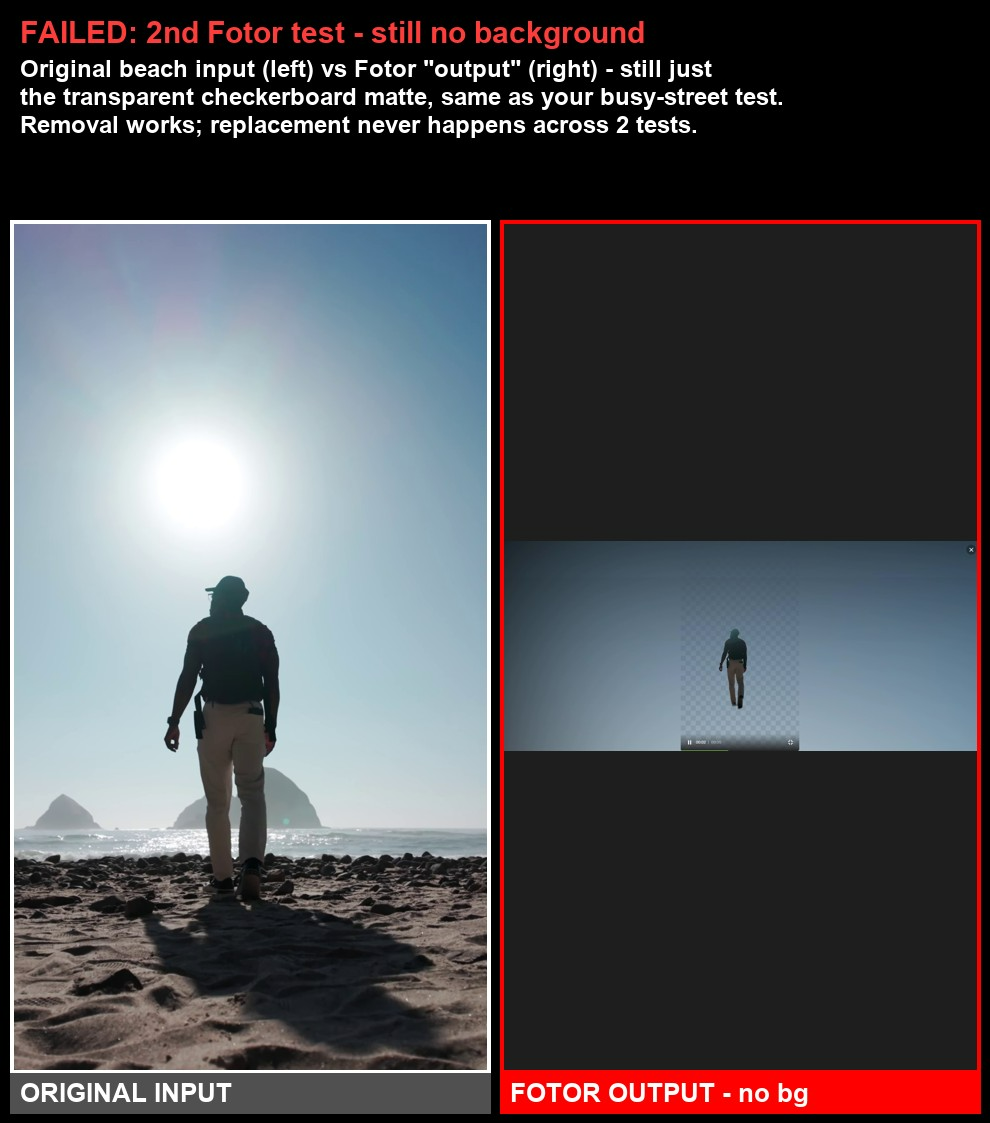
Observed output: Output artifact (Video file): The beach walker is isolated cleanly against checkerboard transparency, with the subject staying centered and no replacement background being generated. — fotor output 1.mp4
Input artifact: Input artifact (Video file): Input — fotor_creation_2026-08-24 (1).webm
Output artifact: Output artifact (Video file): The beach walker is isolated cleanly against checkerboard transparency, with the subject staying centered and no replacement background being generated. — fotor output 1.mp4
What changed: Video file transformed into Video file
Test case: Video file → Image
Input type: Video file
Input used: Input artifact (Video file): Input — talkinghead_input.mp4.mp4
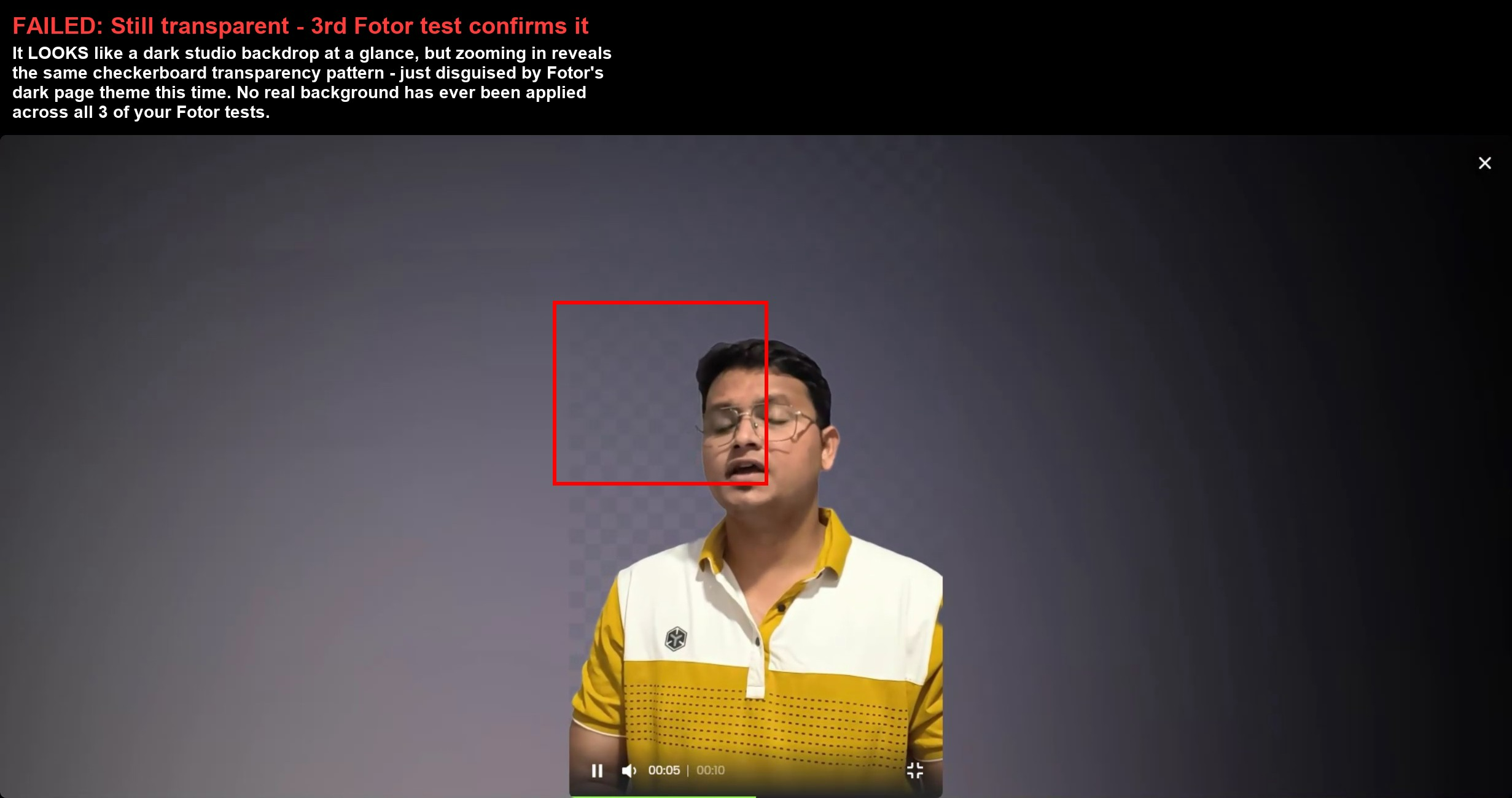
Observed output: Output artifact (Image): The talking-head subject stays cleanly cut out with stable outline, glasses, and hair, but the result remains a transparent checkerboard placeholder rather than a replaced scene. — image-2.png
Input artifact: Input artifact (Video file): Input — talkinghead_input.mp4.mp4
Output artifact: Output artifact (Image): The talking-head subject stays cleanly cut out with stable outline, glasses, and hair, but the result remains a transparent checkerboard placeholder rather than a replaced scene. — image-2.png
What changed: Video file transformed into Image
Why it matters / Conclusion: This is the strongest part of Fotor in the tested workflow: clean, stable cutouts even on motion-heavy footage.
Isolates foreground subjects from video footage into a clean matte. It worked on a beach-walk clip, an indoor talking-head clip, and a busy-street clip, including hair, glasses, fur trim, snow, and moving people.
Background Replacement and Scene CompositingRemoval worked, but no replacement scene ever appeared in 3/3 tests.▾
Feature tested: Background Replacement and Scene Compositing
Result: Failed
Verdict: Removal worked, but no replacement scene ever appeared in 3/3 tests.
Expected behavior: Replaces a segmented subject's background and composites the result into a new scene. In the tested clips, the transparent matte did not advance into a finished replacement, but the capability being exercised is background swapping/compositing.
Test case: Video file → Video file
Input type: Video file
Input used: Input artifact (Video file): Input — busystreet_input.mp4.mp4
Observed output: Output artifact (Video file): Checked across the full clip, the output remains a transparent checkerboard matte with no replacement scene at any timestamp. — fotor output 3.mp4
Input artifact: Input artifact (Video file): Input — busystreet_input.mp4.mp4
Output artifact: Output artifact (Video file): Checked across the full clip, the output remains a transparent checkerboard matte with no replacement scene at any timestamp. — fotor output 3.mp4
What changed: Video file transformed into Video file
Test case: Video file → Video file
Input type: Video file
Input used: Input artifact (Video file): Input — fotor_creation_2026-08-24 (1).webm
Observed output: Output artifact (Video file): The clip shows only a clean person cutout on checkerboard transparency; no replacement background appears anywhere in the result. — fotor output 1.mp4
Input artifact: Input artifact (Video file): Input — fotor_creation_2026-08-24 (1).webm
Output artifact: Output artifact (Video file): The clip shows only a clean person cutout on checkerboard transparency; no replacement background appears anywhere in the result. — fotor output 1.mp4
What changed: Video file transformed into Video file
Test case: Video file → Image
Input type: Video file
Input used: Input artifact (Video file): Input — talkinghead_input.mp4.mp4
Observed output: Output artifact (Image): The dark-themed player makes the output look less obvious at first glance, but it is still only checkerboard transparency with no real background behind the subject. — image-2.png
Input artifact: Input artifact (Video file): Input — talkinghead_input.mp4.mp4
Output artifact: Output artifact (Image): The dark-themed player makes the output look less obvious at first glance, but it is still only checkerboard transparency with no real background behind the subject. — image-2.png
What changed: Video file transformed into Image
Why it matters / Conclusion: On the tested Pro plan, replacement never fired. The live pricing page points to Pro+ / Max gating, but this pass did not include a confirmed enabled control run, so the exact cause remains unproven.
Replaces a segmented subject's background and composites the result into a new scene. In the tested clips, the transparent matte did not advance into a finished replacement, but the capability being exercised is background swapping/compositing.
Aspect Ratio and Canvas ControlVertical sources were rendered into landscape canvases every time.▾
Feature tested: Aspect Ratio and Canvas Control
Result: Failed
Verdict: Vertical sources were rendered into landscape canvases every time.
Expected behavior: Exports video onto a chosen canvas shape and framing, including how vertical sources are placed into a landscape output. The tested exports expanded to a 2462–2464×1080 frame with large side areas and a narrow centered subject strip.
Test case: Video file → Video file
Input type: Video file
Input used: Input artifact (Video file): INPUT — busystreet_input.mp4.mp4
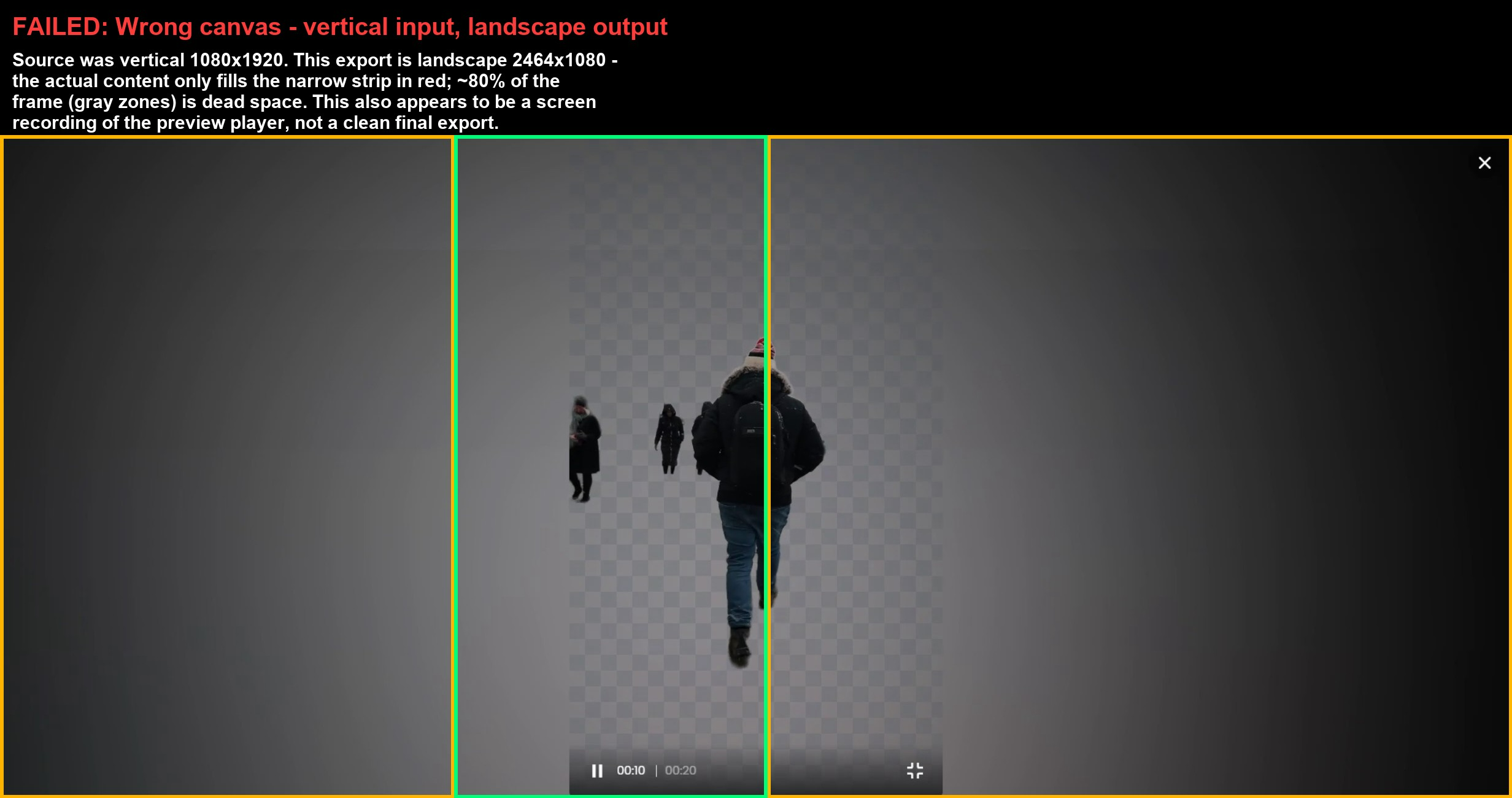
Observed output: Output artifact (Video file): The busy-street vertical source was exported into a landscape 2464×1080-style frame with the subject confined to a center strip. — fotor output 3.mp4
Input artifact: Input artifact (Video file): INPUT — busystreet_input.mp4.mp4
Output artifact: Output artifact (Video file): The busy-street vertical source was exported into a landscape 2464×1080-style frame with the subject confined to a center strip. — fotor output 3.mp4
What changed: Video file transformed into Video file
Test case: Video file → Video file
Input type: Video file
Input used: Input artifact (Video file): INPUT — fotor_creation_2026-08-24 (1).webm
Observed output: Output artifact (Video file): A vertical beach clip was rendered into a landscape canvas instead of preserving 9:16. — fotor output 1.mp4
Input artifact: Input artifact (Video file): INPUT — fotor_creation_2026-08-24 (1).webm
Output artifact: Output artifact (Video file): A vertical beach clip was rendered into a landscape canvas instead of preserving 9:16. — fotor output 1.mp4
What changed: Video file transformed into Video file
Test case: Video file → Image
Input type: Video file
Input used: Input artifact (Video file): Input — fotor_creation_2026-08-24 (1).webm
Observed output: Output artifact (Image): The beach source is compared against a landscape export that still shows only a narrow center strip and checkerboard matte instead of a vertically preserved final frame. — image.png
Input artifact: Input artifact (Video file): Input — fotor_creation_2026-08-24 (1).webm
Output artifact: Output artifact (Image): The beach source is compared against a landscape export that still shows only a narrow center strip and checkerboard matte instead of a vertically preserved final frame. — image.png
What changed: Video file transformed into Image
Test case: Video file → Image
Input type: Video file
Input used: Input artifact (Video file): Input — talkinghead_input.mp4.mp4
Observed output: Output artifact (Image): The talking-head result still uses a landscape canvas, and zooming reveals the checkerboard transparency pattern under the dark UI theme. — image-2.png
Input artifact: Input artifact (Video file): Input — talkinghead_input.mp4.mp4
Output artifact: Output artifact (Image): The talking-head result still uses a landscape canvas, and zooming reveals the checkerboard transparency pattern under the dark UI theme. — image-2.png
What changed: Video file transformed into Image
Test case: Video file → Image
Input type: Video file
Input used: Input artifact (Video file): Input — busystreet_input.mp4.mp4
Observed output: Output artifact (Image): The vertical busy-street source was rendered into a landscape 2464×1080 export, leaving the subject in a narrow center strip with large gray side padding. — image-4.png
Input artifact: Input artifact (Video file): Input — busystreet_input.mp4.mp4
Output artifact: Output artifact (Image): The vertical busy-street source was rendered into a landscape 2464×1080 export, leaving the subject in a narrow center strip with large gray side padding. — image-4.png
What changed: Video file transformed into Image
Why it matters / Conclusion: This export behavior breaks vertical delivery: the output canvas ignores source orientation and leaves too much dead space.
Exports video onto a chosen canvas shape and framing, including how vertical sources are placed into a landscape output. The tested exports expanded to a 2462–2464×1080 frame with large side areas and a narrow centered subject strip.
Live plan comparison
BG Remover & Replacement is listed on Pro+ and Max, not on Pro.
Pricing page geo-displays in INR. The Pro+/Max gating for BG Remover & Replacement was re-verified live on 2026-08-27. USD equivalents were mentioned in the research but were not independently confirmed here.
Featured in Rankings
Independent rankings where Fotor was tested and rated.
Banner Preview
How the embed badge will look on your site

Embed HTML
Copy this code to your website source
Quick Integration Guide
- 1Copy the HTML code block above.
- 2Paste it into your site's HTML or CMS editor.
- 3Banner appears instantly on your page.
- 4Links back to your tool profile here.
Similar Tools
Discover more AI tools like Fotor to enhance your workflow.
Comments (0)
Need a custom AI solution for this use case?
If you are looking to build a custom image-to-video, background replacement, or video editing tool for your business or internal workflow, email us at contact@futuresmart.ai.
Found something inaccurate or missing? We try to keep our AI research accurate and useful. If you found outdated information, an issue, or have a suggestion, email us at collaborate@aidemos.com.