Query Live Databases Using Plain English with AI
Query a Live Database Using Plain English with AI
Business teams often need answers from live databases, but most users cannot write SQL or wait for analysts every time they need a customer, order, payment, or pipeline answer.
We tested five AI database tools on the same live ecommerce database to see which ones can turn plain-English questions into SQL-backed answers, readable tables, follow-up analysis, charts, and business conclusions.
The best practical option we found is AskYourDatabase.
✓ What AI Database Tools Can Do Today
Today, AI tools can already make live databases much easier for business users to query. But the safest workflow is still to check the SQL, inspect the result table, and verify follow-up context before using the answer for decisions.
What We Tested
The Best Way to Do It
Our Recommendation — Use AskYourDatabase
AskYourDatabase gave the strongest direct experience for this use case because it showed generated SQL, returned readable business answers, kept follow-up context better than the other tools, and explained operational risks instead of only returning raw rows.
It was not perfect. Charts often needed an extra prompt. But for a business user asking a live database plain-English questions, it was the best practical tool tested.
Connect Your Live Database
Connect the live database you want to query inside AskYourDatabase.
For this test, we used an ecommerce-style database with customers, orders, payments, products, and order status history. This type of database is useful because it supports realistic business questions across acquisition, revenue, customer value, and operations.
💡 Start with a database where table names and columns are clear. AI tools perform better when the schema is understandable.

Ask a Business Question in Plain English
Start with a question that a non-technical user would naturally ask.
Example:
Show all customers created in the last 90 days. How does new customer acquisition compare to the previous 90 days?
AskYourDatabase returned a business summary instead of only raw rows. It compared the last 90 days with the previous 90 days, showed the decline, and listed the recent customers.
💡 Ask one clear business question first. This gives the tool a clean starting point before follow-ups.

Check the Generated SQL
After the answer appears, review the generated SQL.
This is important because visible SQL makes the result easier to verify. In testing, AskYourDatabase showed the SQL directly, which made it easier to understand how the answer was produced.
💡 Do not only read the final summary. Check whether the SQL matches the business question, especially for date ranges, joins, and filters.

Display the Query Result
After generating the SQL, AskYourDatabase displays the result in a readable table with a short business summary.
In this test, the tool compared new customers from the last 90 days with the previous 90 days. It showed 12 new customers in the last 90 days compared to 23 customers in the previous 90 days, meaning acquisition dropped by about 48%.
The response also listed the recent customers with details like name, email, phone, and created date.
💡 Do not only check whether the tool generated SQL. Check whether the final response is readable, includes the correct comparison, and gives a useful business takeaway.

Ask for a Chart or Export if Needed
AskYourDatabase can generate charts, but charts were not always automatic during testing.
For comparison questions, ask:
Visualize this comparison.
This produced a useful chart, but the need for a second prompt is one of the tool’s main limitations.
💡 For trend, comparison, percentage, or ranking questions, ask for the chart directly if it does not appear automatically.

What You’ll Actually Get
Real outputs from AskYourDatabase — no cherry-picking, no editing after generation.
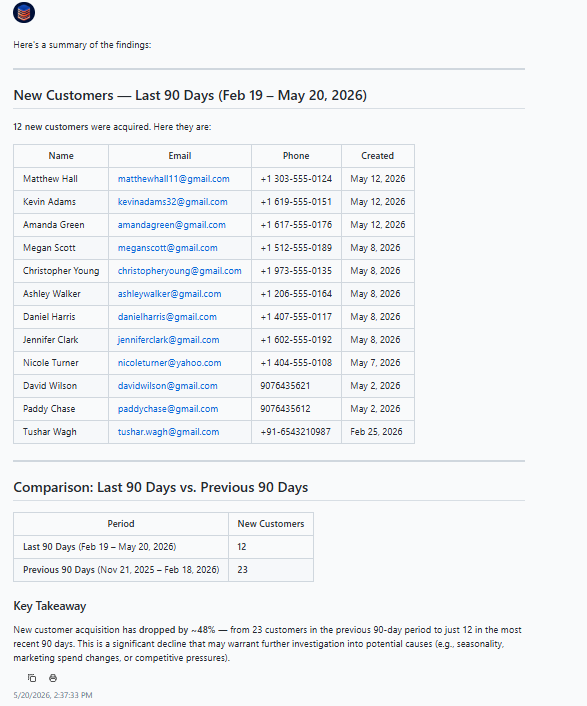
Customer Acquisition Comparison
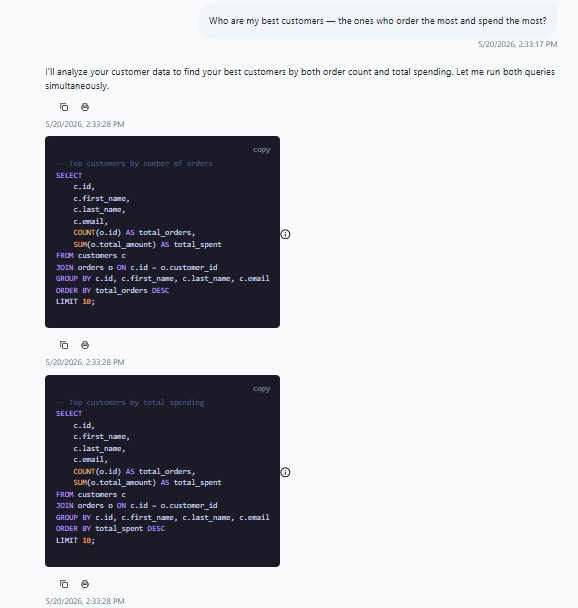
Best Customers SQL Visibility
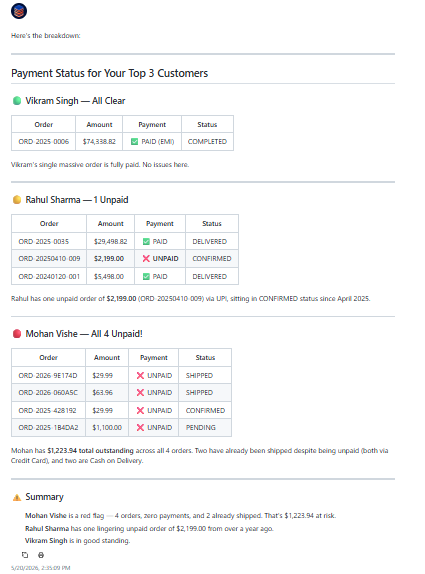
Top Customers With Unpaid Orders
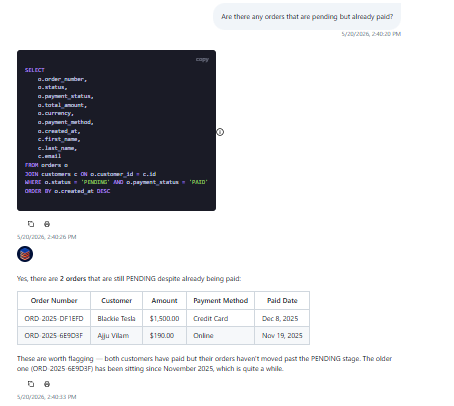
Pending but Paid Orders
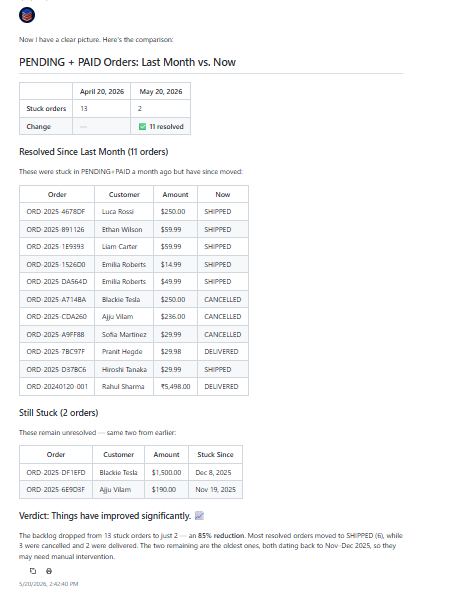
Month-over-Month Pending-Paid Comparison
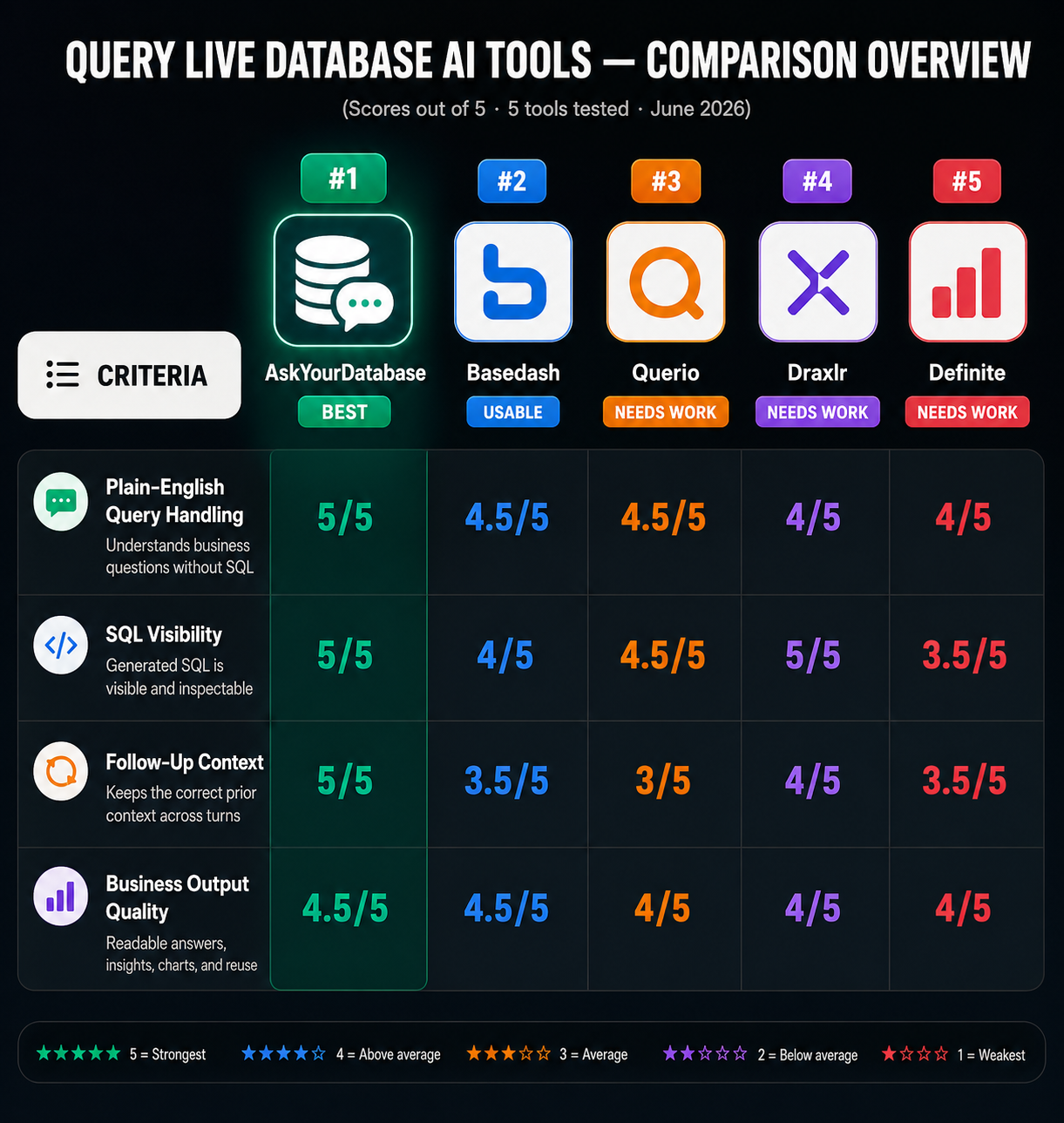
Charts may not appear automatically
AskYourDatabase can generate charts, but in testing, charts often required a separate visualization prompt. For comparison and trend questions, users may need to explicitly ask for a chart.
SQL should still be reviewed
The tool shows SQL, which is useful, but that does not remove the need to inspect it. For business-critical answers, check date filters, joins, and status logic before acting on the result.
Follow-up context is strong, but still worth checking
AskYourDatabase handled follow-ups better than the other tools tested, but follow-up context is still one of the riskiest parts of NL2SQL workflows. Questions like “same breakdown,” “that list,” or “those customers” should always be verified against the previous answer.
Ambiguous business terms need clear prompts
Terms like “best customers,” “successful orders,” and “active customers” can mean different things. The safest prompt explains the metric or asks the tool to show multiple interpretations.
Database schema quality affects answer quality
AI database tools depend heavily on the structure and naming of the connected database. Clear table names, readable column names, and consistent status values make the tool more reliable.
This does not replace analysts for high-stakes decisions
These tools are useful for fast exploration, reporting, and operational checks. For revenue reporting, finance decisions, or customer-impacting workflows, results should still be reviewed by someone who understands the database.
Frequently Asked Questions
Can AI tools really query a live database using plain English?▾
Yes. The tested tools could accept plain-English questions, generate SQL, run the query against a live database, and return tables or summaries. The difference is reliability. Some tools answer simple questions well but struggle with ambiguous follow-ups or deeper business logic.
Which tool worked best for this use case?▾
AskYourDatabase worked best overall. It gave the strongest mix of visible SQL, readable business summaries, follow-up handling, and operational edge-case detection.
Do I still need to know SQL?▾
Not for basic use. But for important decisions, SQL visibility helps. You do not need to write SQL, but you should still inspect the generated SQL when the answer matters.
What kind of questions work best?▾
Clear business questions work best. Examples: - “Show customers created in the last 90 days.” - “Who are the top customers by spend and order count?” - “Are there paid orders still pending?” - “Compare this metric to last month.”
Can these tools replace dashboards?▾
Not fully. They are useful for fast exploration and ad hoc questions. But recurring metrics still work better when saved as dashboards, reports, or scheduled views.
Need a custom AI solution for this use case?
If you are looking to build a custom natural language SQL, database querying, or BI assistant workflow for your business or internal workflow, email us at contact@futuresmart.ai.
Found something inaccurate or missing? We try to keep our AI research accurate and useful. If you found outdated information, an issue, or have a suggestion, email us at collaborate@aidemos.com.