
Unstructured
Good for text-first PDF-to-Markdown workflows, but not for faithful tables, charts, or images.
Strong on prose, weak on structure-heavy PDF elements
- You want an open-source PDF-to-Markdown parser you can run locally or in your own infrastructure.
- Your PDFs are mostly prose with scanned pages, and you care about preserving reading order.
- You can tolerate flattened headings and missing images if the text extraction is strong.
- You need faithful chart preservation or chart-to-data extraction.
Our take
Unstructured is reliable for narrative OCR and reading order, including scanned pages, but this benchmark shows flattened headings, dropped images, noisy charts, and fragile reconstruction for dense tables. It works best when your PDF is mostly prose with only modest table complexity.
In-Depth Review
Our detailed analysis of Unstructured — features, performance, and real-world testing.
Feature-by-Feature Breakdown
PDF Text Extraction to MarkdownMostly preserved, with punctuation and superscript fragility.▾
Feature tested: PDF Text Extraction to Markdown
Result: Partial
Verdict: Mostly preserved, with punctuation and superscript fragility.
Expected behavior: Extracts prose from both native-text and scanned PDFs into markdown, including legal disclosures and checkbox-style lines. It handles ordinary body text well, though typographic punctuation and superscript markers may not be preserved exactly.
Test case: Image → Image
Input type: Image
Input used: Input artifact (Image): Input — unstructured_input1_hybridearnings_checkbox_text.png
Observed output: Output artifact (Image): The checkbox lines are preserved with the source's x/o markers intact, showing accurate extraction of native text that already encodes checkbox state. — unstructured_input1_hybridearnings_checkbox_text_parsed_success.png
Input artifact: Input artifact (Image): Input — unstructured_input1_hybridearnings_checkbox_text.png
Output artifact: Output artifact (Image): The checkbox lines are preserved with the source's x/o markers intact, showing accurate extraction of native text that already encodes checkbox state. — unstructured_input1_hybridearnings_checkbox_text_parsed_success.png
What changed: Image transformed into Image
Test case: Image → Image
Input type: Image
Input used: Input artifact (Image): Input — unstructured_input2_financialpdf_disclaimer_text.png
Observed output: Output artifact (Image): The disclaimer paragraph is mostly preserved, but the curly apostrophe in the forward-looking-statements text is corrupted into mojibake. — unstructured_input2_financialpdf_disclaimer_text_parsed_partial_success.png
Input artifact: Input artifact (Image): Input — unstructured_input2_financialpdf_disclaimer_text.png
Output artifact: Output artifact (Image): The disclaimer paragraph is mostly preserved, but the curly apostrophe in the forward-looking-statements text is corrupted into mojibake. — unstructured_input2_financialpdf_disclaimer_text_parsed_partial_success.png
What changed: Image transformed into Image
Test case: Image → Image
Input type: Image
Input used: Input artifact (Image): Input — unstructured_input3_scannedpaper_superscript2.png
Observed output: Output artifact (Image): The scanned-paper sentence is otherwise accurate, but every superscript-2 unit marker in the sentence is misread as a question mark. — unstructured_input3_scannedpaper_superscript2_parsed_partial_success.png
Input artifact: Input artifact (Image): Input — unstructured_input3_scannedpaper_superscript2.png
Output artifact: Output artifact (Image): The scanned-paper sentence is otherwise accurate, but every superscript-2 unit marker in the sentence is misread as a question mark. — unstructured_input3_scannedpaper_superscript2_parsed_partial_success.png
What changed: Image transformed into Image
Why it matters / Conclusion: Good at ordinary prose OCR, but exact-string workflows will trip over non-ASCII punctuation and superscripts.
Extracts prose from both native-text and scanned PDFs into markdown, including legal disclosures and checkbox-style lines. It handles ordinary body text well, though typographic punctuation and superscript markers may not be preserved exactly.






Table ReconstructionSimple tables hold up; dense tables are brittle.▾
Feature tested: Table Reconstruction
Result: Partial
Verdict: Simple tables hold up; dense tables are brittle.
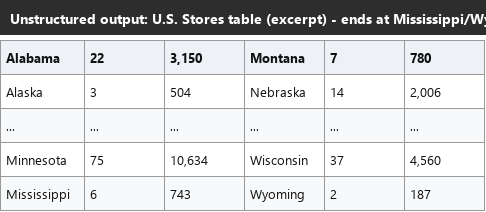
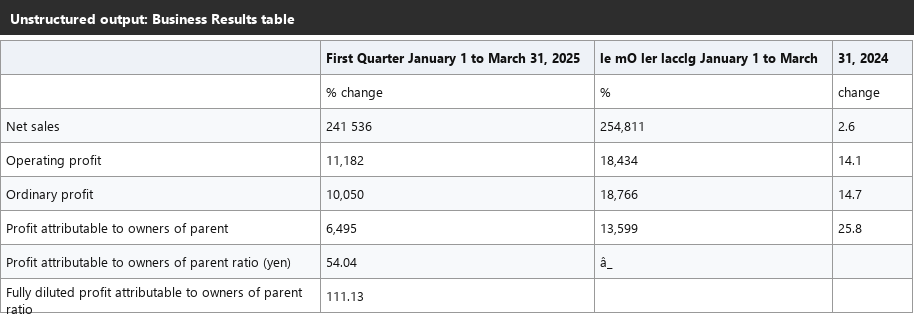
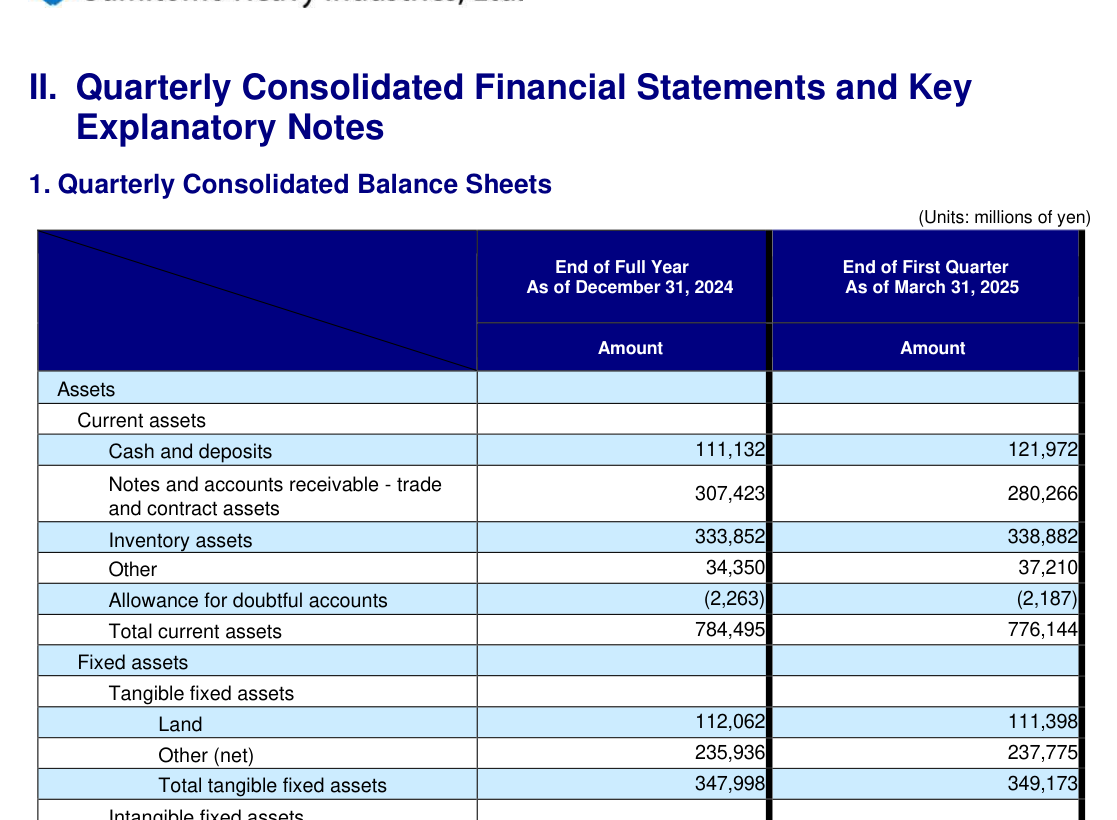
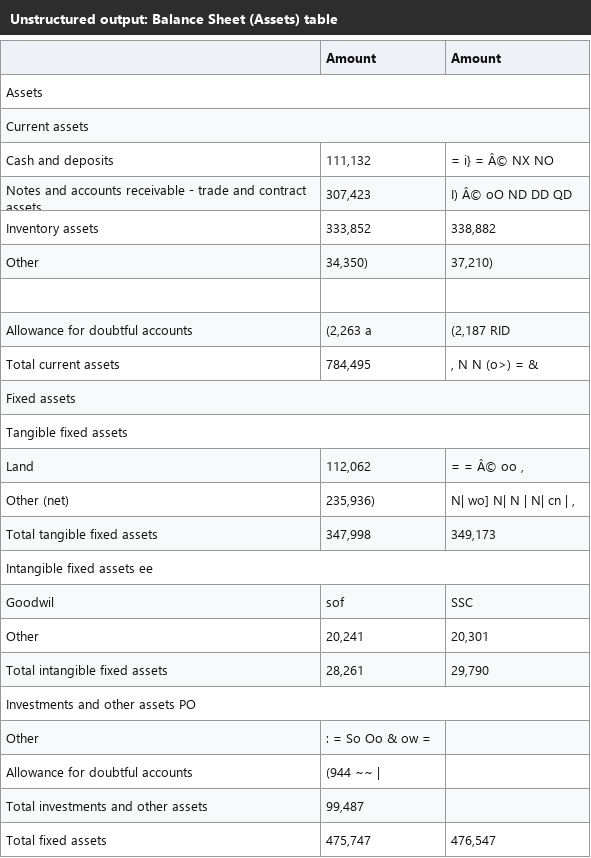
Expected behavior: Converts tables into markdown, with cleaner results on simple 2-3 column tables. Dense financial tables and uneven side-by-side layouts can lose columns, misalign cells, or spill values into nearby text.
Test case: Image → Image
Input type: Image
Input used: Input artifact (Image): Input — unstructured_input1_hybridearnings_us_stores_table.png
Observed output: Output artifact (Image): The side-by-side U.S. Stores layout is merged for paired rows, but the unpaired Missouri row is silently dropped. — unstructured_input1_hybridearnings_us_stores_table_omitted_failed.png
Input artifact: Input artifact (Image): Input — unstructured_input1_hybridearnings_us_stores_table.png
Output artifact: Output artifact (Image): The side-by-side U.S. Stores layout is merged for paired rows, but the unpaired Missouri row is silently dropped. — unstructured_input1_hybridearnings_us_stores_table_omitted_failed.png
What changed: Image transformed into Image
Test case: Image → Image
Input type: Image
Input used: Input artifact (Image): Input — unstructured_input2_financialpdf_business_results_table.png
Observed output: Output artifact (Image): The Business Results table loses the entire percent-change data column and one header cell is garbled into OCR noise. — unstructured_input2_financialpdf_business_results_table_parsed_partial_success.png
Input artifact: Input artifact (Image): Input — unstructured_input2_financialpdf_business_results_table.png
Output artifact: Output artifact (Image): The Business Results table loses the entire percent-change data column and one header cell is garbled into OCR noise. — unstructured_input2_financialpdf_business_results_table_parsed_partial_success.png
What changed: Image transformed into Image
Test case: Image → Image
Input type: Image
Input used: Input artifact (Image): Input — unstructured_input2_financialpdf_balance_sheet_table.png
Observed output: Output artifact (Image): The balance sheet keeps some rows correct, but others lose their second-column values to garbled glyphs and the table's own total-assets row is missing. — unstructured_input2_financialpdf_balance_sheet_table_parsed_partial_success.png
Input artifact: Input artifact (Image): Input — unstructured_input2_financialpdf_balance_sheet_table.png
Output artifact: Output artifact (Image): The balance sheet keeps some rows correct, but others lose their second-column values to garbled glyphs and the table's own total-assets row is missing. — unstructured_input2_financialpdf_balance_sheet_table_parsed_partial_success.png
What changed: Image transformed into Image
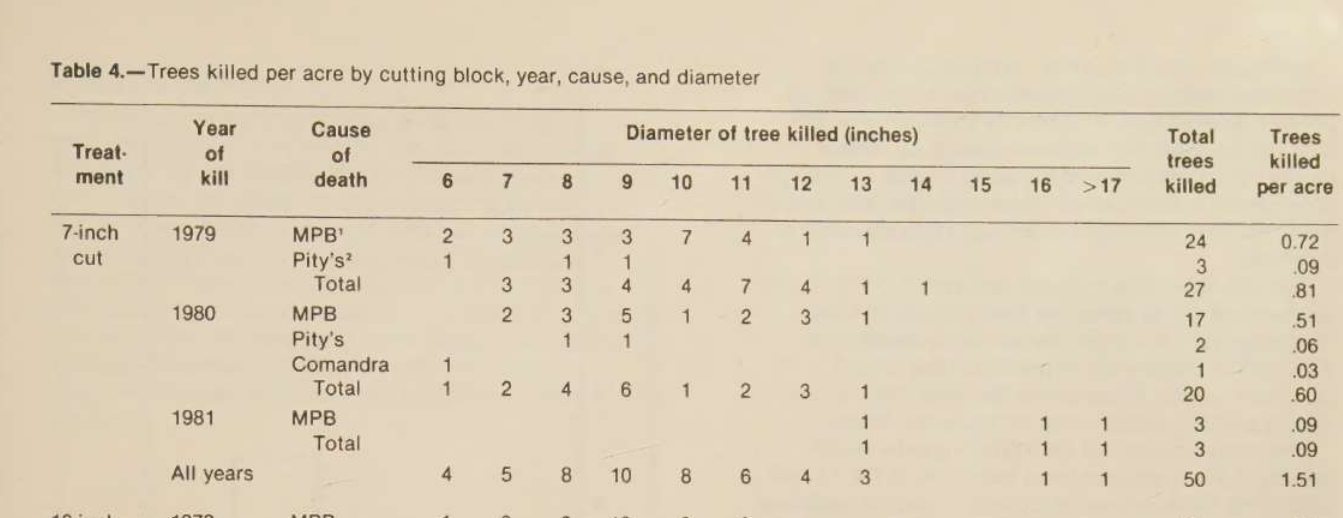
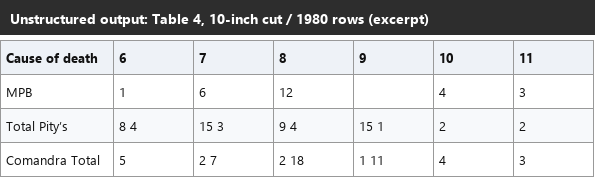
Test case: Image → Image
Input type: Image
Input used: Input artifact (Image): Input — unstructured_input3_scannedpaper_table4.png
Observed output: Output artifact (Image): The widest table in the scanned paper suffers row-label merging and concatenated cell values, making a meaningful fraction of the table unusable without cleanup. — unstructured_input3_scannedpaper_table4_omitted_failed.png
Input artifact: Input artifact (Image): Input — unstructured_input3_scannedpaper_table4.png
Output artifact: Output artifact (Image): The widest table in the scanned paper suffers row-label merging and concatenated cell values, making a meaningful fraction of the table unusable without cleanup. — unstructured_input3_scannedpaper_table4_omitted_failed.png
What changed: Image transformed into Image
Why it matters / Conclusion: Simple 2-3 column tables can come through well, but denser or uneven structures can lose columns, rows, or cell-to-value alignment.
Converts tables into markdown, with cleaner results on simple 2-3 column tables. Dense financial tables and uneven side-by-side layouts can lose columns, misalign cells, or spill values into nearby text.


Heading DetectionHeadings are detected, but nesting is flattened.▾
Feature tested: Heading Detection
Result: Partial
Verdict: Headings are detected, but nesting is flattened.
Expected behavior: Recognizes section headings and places them in markdown. In the tested PDFs it can flatten multi-level structure to a single depth and sometimes elevate non-heading text into heading form.
Test case: Image → Image
Input type: Image
Input used: Input artifact (Image): Input — unstructured_input1_hybridearnings_item1a_heading.png
Observed output: Output artifact (Image): The Item 1A heading and its subordinate category heading are both rendered at the same markdown level, flattening the source hierarchy. — unstructured_input1_hybridearnings_item1a_heading_parsed_failure.png
Input artifact: Input artifact (Image): Input — unstructured_input1_hybridearnings_item1a_heading.png
Output artifact: Output artifact (Image): The Item 1A heading and its subordinate category heading are both rendered at the same markdown level, flattening the source hierarchy. — unstructured_input1_hybridearnings_item1a_heading_parsed_failure.png
What changed: Image transformed into Image
Test case: Image → Image
Input type: Image
Input used: Input artifact (Image): Input — unstructured_input2_financialpdf_heading_levels_top.png
Observed output: Output artifact (Image): The top-level section, its subsection, and the nested '(i) Mechatronics' sub-subsection are all flattened to the same heading depth. — unstructured_input2_financialpdf_heading_levels_parsed_failure.png
Input artifact: Input artifact (Image): Input — unstructured_input2_financialpdf_heading_levels_top.png
Output artifact: Output artifact (Image): The top-level section, its subsection, and the nested '(i) Mechatronics' sub-subsection are all flattened to the same heading depth. — unstructured_input2_financialpdf_heading_levels_parsed_failure.png
What changed: Image transformed into Image
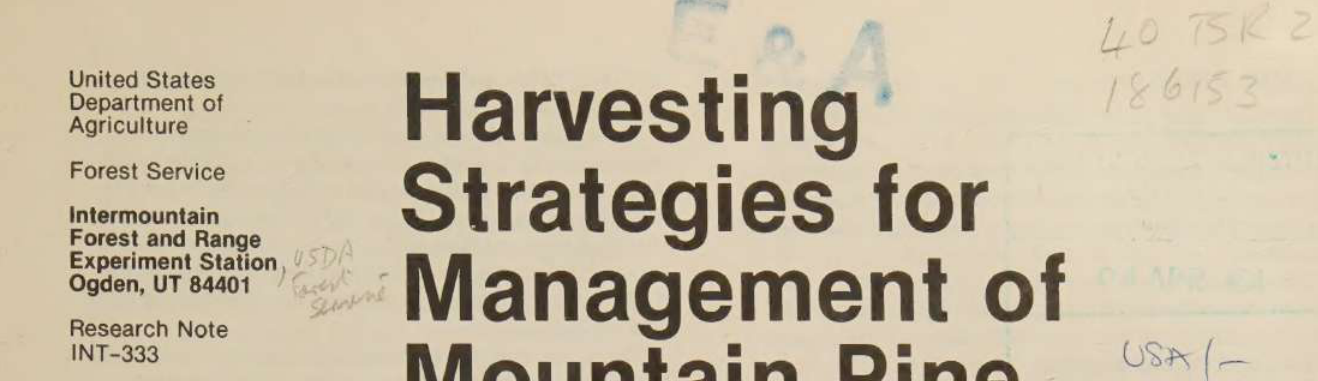
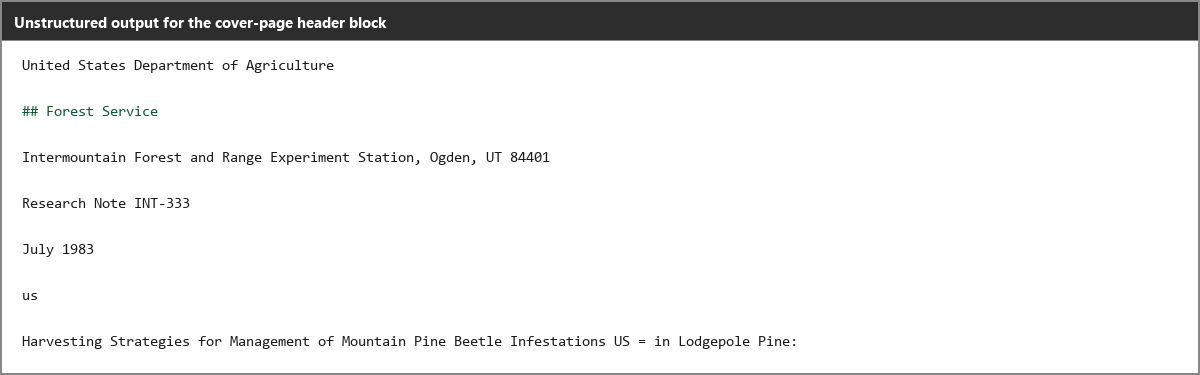
Test case: Image → Image
Input type: Image
Input used: Input artifact (Image): Input — unstructured_input3_scannedpaper_logo_header.png
Observed output: Output artifact (Image): Only part of the source's sidebar text is promoted to a heading, and the author byline is also treated like a heading rather than plain metadata text. — unstructured_input3_scannedpaper_logo_header_omitted_failed.png
Input artifact: Input artifact (Image): Input — unstructured_input3_scannedpaper_logo_header.png
Output artifact: Output artifact (Image): Only part of the source's sidebar text is promoted to a heading, and the author byline is also treated like a heading rather than plain metadata text. — unstructured_input3_scannedpaper_logo_header_omitted_failed.png
What changed: Image transformed into Image
Why it matters / Conclusion: The tool finds headings, but the source's real nesting depth does not survive the conversion.
Recognizes section headings and places them in markdown. In the tested PDFs it can flatten multi-level structure to a single depth and sometimes elevate non-heading text into heading form.




Reading Order PreservationSection flow and column order stay in sequence.▾
Feature tested: Reading Order Preservation
Result: Passed
Verdict: Section flow and column order stay in sequence.
Expected behavior: Keeps content in the source's top-to-bottom reading order across pages, including back-page footer text. It also linearizes two-column scanned content left-to-right in reading sequence.
Test case: Image → Image
Input type: Image
Input used: Input artifact (Image): Input — unstructured_input1_hybridearnings_item1_end.png
Observed output: Output artifact (Image): The closing Item 1 disclosure is extracted in the same place it appears in the source, with the next section continuing in order. — unstructured_input1_hybridearnings_item1_end_parsed_success.png
Input artifact: Input artifact (Image): Input — unstructured_input1_hybridearnings_item1_end.png
Output artifact: Output artifact (Image): The closing Item 1 disclosure is extracted in the same place it appears in the source, with the next section continuing in order. — unstructured_input1_hybridearnings_item1_end_parsed_success.png
What changed: Image transformed into Image
Test case: Image → Image
Input type: Image
Input used: Input artifact (Image): Input — unstructured_input2_financialpdf_segment_sequence.png
Observed output: Output artifact (Image): The segment subsections are emitted in the same source order, without being shuffled across the report. — unstructured_input2_financialpdf_segment_sequence_parsed_success.png
Input artifact: Input artifact (Image): Input — unstructured_input2_financialpdf_segment_sequence.png
Output artifact: Output artifact (Image): The segment subsections are emitted in the same source order, without being shuffled across the report. — unstructured_input2_financialpdf_segment_sequence_parsed_success.png
What changed: Image transformed into Image
Test case: Image → Image
Input type: Image
Input used: Input artifact (Image): Input — unstructured_input3_scannedpaper_title_abstract_order.png
Observed output: Output artifact (Image): The scanned paper preserves the opening sequence of title, subtitle, author line, abstract, and keywords in the same top-to-bottom order as the page. — unstructured_input3_scannedpaper_title_abstract_order_parsed_success.png
Input artifact: Input artifact (Image): Input — unstructured_input3_scannedpaper_title_abstract_order.png
Output artifact: Output artifact (Image): The scanned paper preserves the opening sequence of title, subtitle, author line, abstract, and keywords in the same top-to-bottom order as the page. — unstructured_input3_scannedpaper_title_abstract_order_parsed_success.png
What changed: Image transformed into Image
Why it matters / Conclusion: Reading order is a clear strength, including column linearization and end-of-document footers.
Keeps content in the source's top-to-bottom reading order across pages, including back-page footer text. It also linearizes two-column scanned content left-to-right in reading sequence.





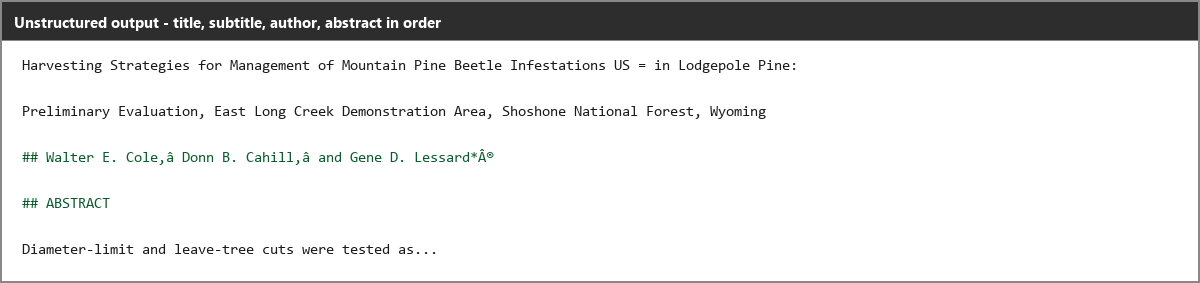
Chart HandlingCharts become unreadable noise instead of usable figures or data.▾
Feature tested: Chart Handling
Result: Failed
Verdict: Charts become unreadable noise instead of usable figures or data.
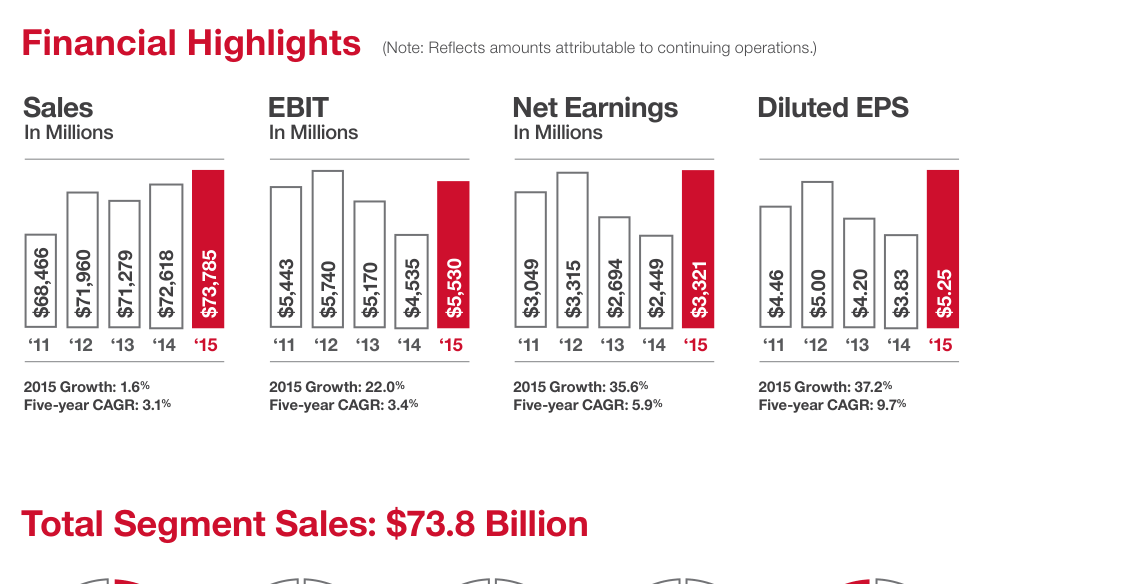
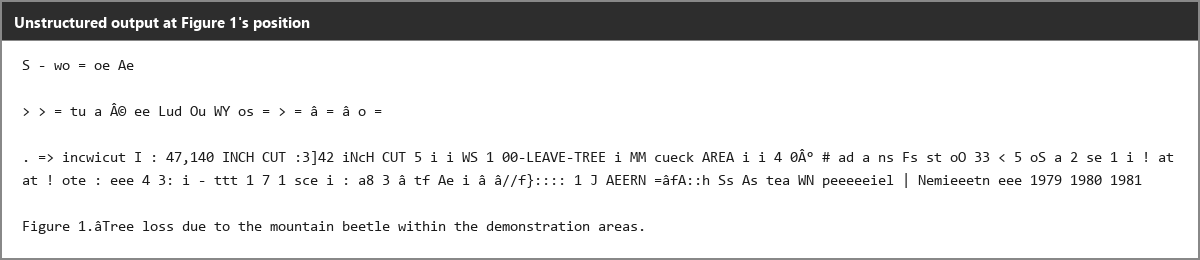
Expected behavior: Attempts to process chart regions from both native and scanned documents. In the tested outputs, charts were not reconstructed as structured data or clean placeholders, and instead became OCR noise or digit-soup in the markdown body.
Test case: Image → Image
Input type: Image
Input used: Input artifact (Image): Input — unstructured_input1_hybridearnings_financial_highlights_chart.png
Observed output: Output artifact (Image): The chart value labels are read character-by-character in the wrong order, turning the chart into interleaved digit-soup. — unstructured_input1_hybridearnings_financial_highlights_chart_omitted_failed.png
Input artifact: Input artifact (Image): Input — unstructured_input1_hybridearnings_financial_highlights_chart.png
Output artifact: Output artifact (Image): The chart value labels are read character-by-character in the wrong order, turning the chart into interleaved digit-soup. — unstructured_input1_hybridearnings_financial_highlights_chart_omitted_failed.png
What changed: Image transformed into Image
Test case: Image → Image
Input type: Image
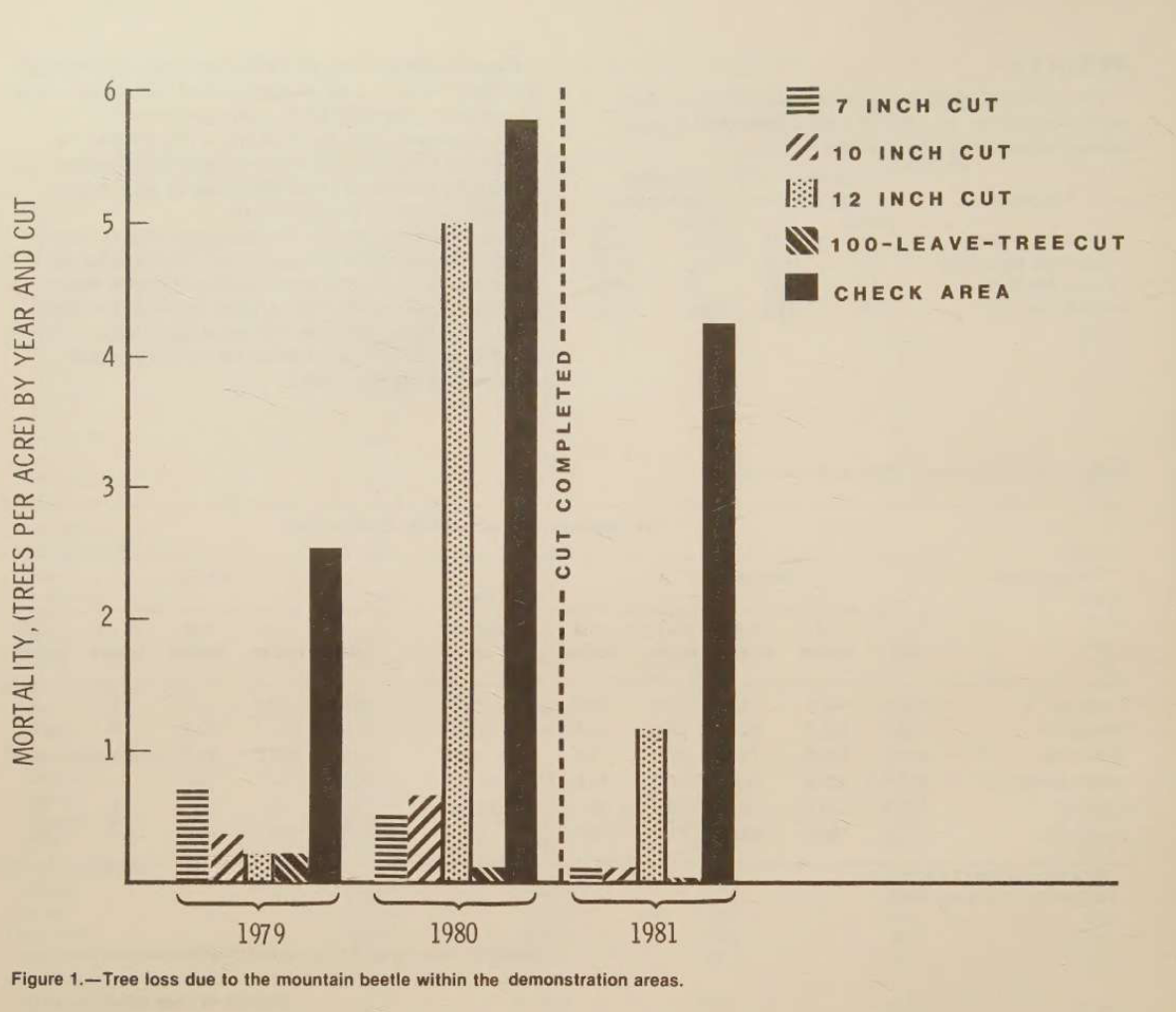
Input used: Input artifact (Image): Input — unstructured_input3_scannedpaper_figure1_chart.png
Observed output: Output artifact (Image): The scanned chart region is emitted as OCR noise with a few fragmentary labels, but no usable chart data survives. — unstructured_input3_scannedpaper_figure1_chart_omitted_failed.png
Input artifact: Input artifact (Image): Input — unstructured_input3_scannedpaper_figure1_chart.png
Output artifact: Output artifact (Image): The scanned chart region is emitted as OCR noise with a few fragmentary labels, but no usable chart data survives. — unstructured_input3_scannedpaper_figure1_chart_omitted_failed.png
What changed: Image transformed into Image
Why it matters / Conclusion: Charts are not preserved usefully: they are neither converted to data nor kept cleanly as visuals.
Attempts to process chart regions from both native and scanned documents. In the tested outputs, charts were not reconstructed as structured data or clean placeholders, and instead became OCR noise or digit-soup in the markdown body.

Embedded Image and Logo PreservationEmbedded images are dropped entirely.▾
Feature tested: Embedded Image and Logo Preservation
Result: Failed
Verdict: Embedded images are dropped entirely.
Expected behavior: Handles embedded images and logos during markdown export, but in the tested PDFs they were dropped with no image reference, placeholder, or comment marker. Repeated logos across pages were also removed.
Test case: Image → Image
Input type: Image
Input used: Input artifact (Image): Input — unstructured_input2_financialpdf_header_logo.png
Observed output: Output artifact (Image): The recurring header logo is omitted with zero trace in the markdown output. — unstructured_image_omitted_blank_placeholder.png
Input artifact: Input artifact (Image): Input — unstructured_input2_financialpdf_header_logo.png
Output artifact: Output artifact (Image): The recurring header logo is omitted with zero trace in the markdown output. — unstructured_image_omitted_blank_placeholder.png
What changed: Image transformed into Image
Test case: Image → Image
Input type: Image
Input used: Input artifact (Image): Input — unstructured_input3_scannedpaper_shield_logo.png
Observed output: Output artifact (Image): The printed shield logo is also dropped entirely, with no placeholder at all. — unstructured_image_omitted_blank_placeholder.png
Input artifact: Input artifact (Image): Input — unstructured_input3_scannedpaper_shield_logo.png
Output artifact: Output artifact (Image): The printed shield logo is also dropped entirely, with no placeholder at all. — unstructured_image_omitted_blank_placeholder.png
What changed: Image transformed into Image
Why it matters / Conclusion: No embedded image or logo tested here survives the markdown export.
Handles embedded images and logos during markdown export, but in the tested PDFs they were dropped with no image reference, placeholder, or comment marker. Repeated logos across pages were also removed.


Footnote and Caption PlacementNearby footnotes and captions stay attached.▾
Feature tested: Footnote and Caption Placement
Result: Passed
Verdict: Nearby footnotes and captions stay attached.
Expected behavior: Keeps footnotes directly beneath their source table and preserves figure captions in the correct relative position to the figure. This adjacency holds even when surrounding table or figure content is degraded.
Test case: Image → Image
Input type: Image
Input used: Input artifact (Image): Input — unstructured_input1_hybridearnings_footnote_a.png
Observed output: Output artifact (Image): The footnotes remain directly attached below the financial summary table instead of drifting to another part of the document. — unstructured_input1_hybridearnings_footnote_a_parsed_success.png
Input artifact: Input artifact (Image): Input — unstructured_input1_hybridearnings_footnote_a.png
Output artifact: Output artifact (Image): The footnotes remain directly attached below the financial summary table instead of drifting to another part of the document. — unstructured_input1_hybridearnings_footnote_a_parsed_success.png
What changed: Image transformed into Image
Test case: Image → Image
Input type: Image
Input used: Input artifact (Image): Input — unstructured_input3_scannedpaper_figure1_chart.png
Observed output: Output artifact (Image): The Figure 1 caption stays directly below the chart position, even though the chart itself degrades into OCR noise. — unstructured_input3_scannedpaper_figure1_chart_omitted_failed.png
Input artifact: Input artifact (Image): Input — unstructured_input3_scannedpaper_figure1_chart.png
Output artifact: Output artifact (Image): The Figure 1 caption stays directly below the chart position, even though the chart itself degrades into OCR noise. — unstructured_input3_scannedpaper_figure1_chart_omitted_failed.png
What changed: Image transformed into Image
Why it matters / Conclusion: Adjacency is preserved for footnotes and captions, even when the underlying table or figure is damaged.
Keeps footnotes directly beneath their source table and preserves figure captions in the correct relative position to the figure. This adjacency holds even when surrounding table or figure content is degraded.


Pricing
The report describes Unstructured as free and open source under Apache 2.0. The benchmark run was done in Google Colab on a T4 GPU, and processing time was not recorded.
Banner Preview
How the embed badge will look on your site

Embed HTML
Copy this code to your website source
Quick Integration Guide
- 1Copy the HTML code block above.
- 2Paste it into your site's HTML or CMS editor.
- 3Banner appears instantly on your page.
- 4Links back to your tool profile here.
Similar Tools
Discover more AI tools like Unstructured to enhance your workflow.
Comments (0)
Need a custom AI solution for this use case?
If you are looking to build a custom PDF to Markdown, text extraction, or document parsing system for your business or internal workflow, email us at contact@futuresmart.ai.
Found something inaccurate or missing? We try to keep our AI research accurate and useful. If you found outdated information, an issue, or have a suggestion, email us at collaborate@aidemos.com.