
PaddleOCR
Open-source PDF-to-markdown conversion that keeps images and tables in place, but still corrupts text and complex structure on harder documents.
Strong layout retention, but not clean enough to trust without review
- You need a self-hosted open-source PDF-to-markdown pipeline for mixed documents with text, tables, charts, and images.
- You can tolerate some post-processing when tables are complex or when native-digital text is not perfectly preserved.
- You want extracted photos, seals, signatures, and charts to stay embedded as real image files in the output.
- You need near-perfect paragraph OCR from clean digital PDFs with no cleanup.
Our take
PaddleOCR’s PP-StructureV3 is a capable self-hosted PDF-to-markdown pipeline: it reliably exports mixed PDFs, keeps charts/photos/signatures as real image files, and preserves many table values. But body text can lose words or digits, wide or rowspan-heavy tables break structurally, headings are inconsistent, and some logos are dropped entirely. It’s useful when you can tolerate cleanup, not when you need near-perfect markdown out of the box.
In-Depth Review
Our detailed analysis of PaddleOCR — features, performance, and real-world testing.
Feature-by-Feature Breakdown
OCR text extraction from mixed PDF pagesmixed▾
Feature tested: OCR text extraction from mixed PDF pages
Result: Partial
Verdict: mixed
Expected behavior: Extracts body text from both native-digital and scanned PDF pages into markdown. In the hybrid earnings report, table-heavy financial report, and scanned research paper, it could recover text but sometimes lost words, letters, or digits depending on document type.
Test case: Image → Image
Input type: Image
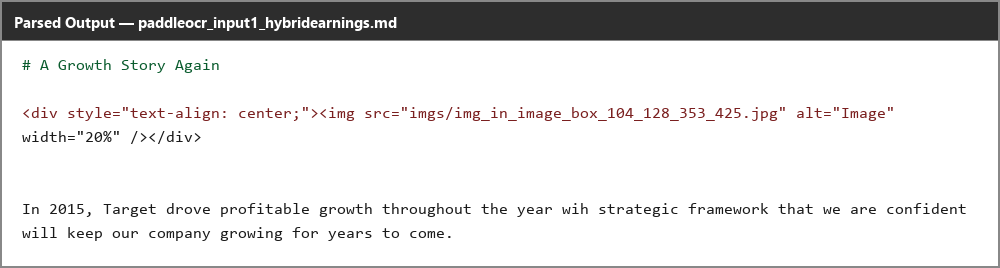
Input used: Input artifact (Image): Native-digital paragraph from the hybrid earnings report. — paddleocr_input1_hybridearnings_intro_paragraph.png
Observed output: Output artifact (Image): The paragraph is garbled with fused words and dropped letters, showing real content loss in a clean digital PDF. — paddleocr_input1_hybridearnings_intro_paragraph_parsed_failure.png
Input artifact: Input artifact (Image): Native-digital paragraph from the hybrid earnings report. — paddleocr_input1_hybridearnings_intro_paragraph.png
Output artifact: Output artifact (Image): The paragraph is garbled with fused words and dropped letters, showing real content loss in a clean digital PDF. — paddleocr_input1_hybridearnings_intro_paragraph_parsed_failure.png
What changed: Image transformed into Image
Test case: Image → Image
Input type: Image
Input used: Input artifact (Image): Opening sentence from a financial-report paragraph. — paddleocr_input2_financialpdf_total_assets_sentence.png
Observed output: Output artifact (Image): The opening sentence is missing entirely and the output starts mid-sentence, so text can be silently omitted. — paddleocr_input2_financialpdf_total_assets_sentence_parsed_failure.png
Input artifact: Input artifact (Image): Opening sentence from a financial-report paragraph. — paddleocr_input2_financialpdf_total_assets_sentence.png
Output artifact: Output artifact (Image): The opening sentence is missing entirely and the output starts mid-sentence, so text can be silently omitted. — paddleocr_input2_financialpdf_total_assets_sentence_parsed_failure.png
What changed: Image transformed into Image
Test case: Image → Image
Input type: Image
Input used: Input artifact (Image): Abstract paragraph from the scanned research paper. — paddleocr_input3_scannedpaper_abstract_paragraph.png
Observed output: Output artifact (Image): Every word is preserved correctly on the genuine scan; the main defect is dropped spacing rather than lost content. — paddleocr_input3_scannedpaper_abstract_paragraph_parsed_success.png
Input artifact: Input artifact (Image): Abstract paragraph from the scanned research paper. — paddleocr_input3_scannedpaper_abstract_paragraph.png
Output artifact: Output artifact (Image): Every word is preserved correctly on the genuine scan; the main defect is dropped spacing rather than lost content. — paddleocr_input3_scannedpaper_abstract_paragraph_parsed_success.png
What changed: Image transformed into Image
Why it matters / Conclusion: Strong on clean scanned text, but native-digital paragraphs can still lose words or digits, so the OCR layer is not uniformly trustworthy.
Extracts body text from both native-digital and scanned PDF pages into markdown. In the hybrid earnings report, table-heavy financial report, and scanned research paper, it could recover text but sometimes lost words, letters, or digits depending on document type.
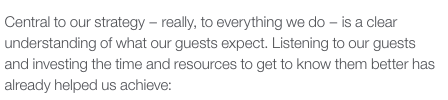



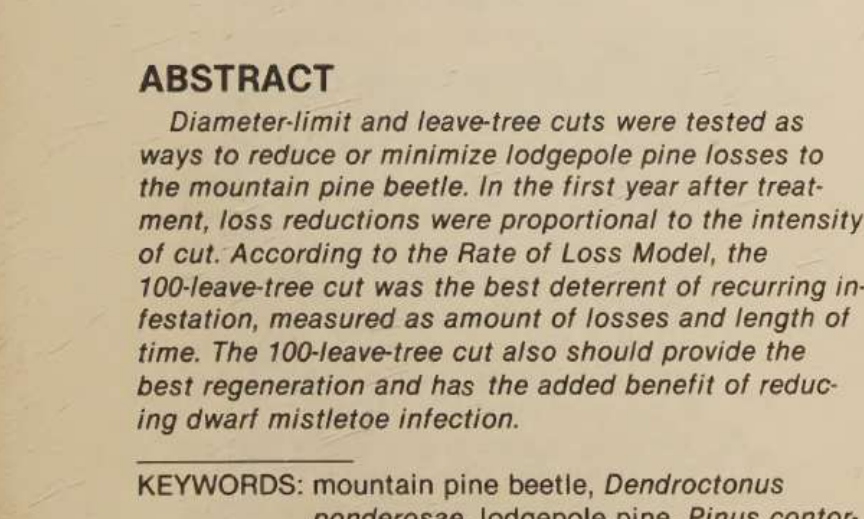

Table reconstructionmixed▾
Feature tested: Table reconstruction
Result: Partial
Verdict: mixed
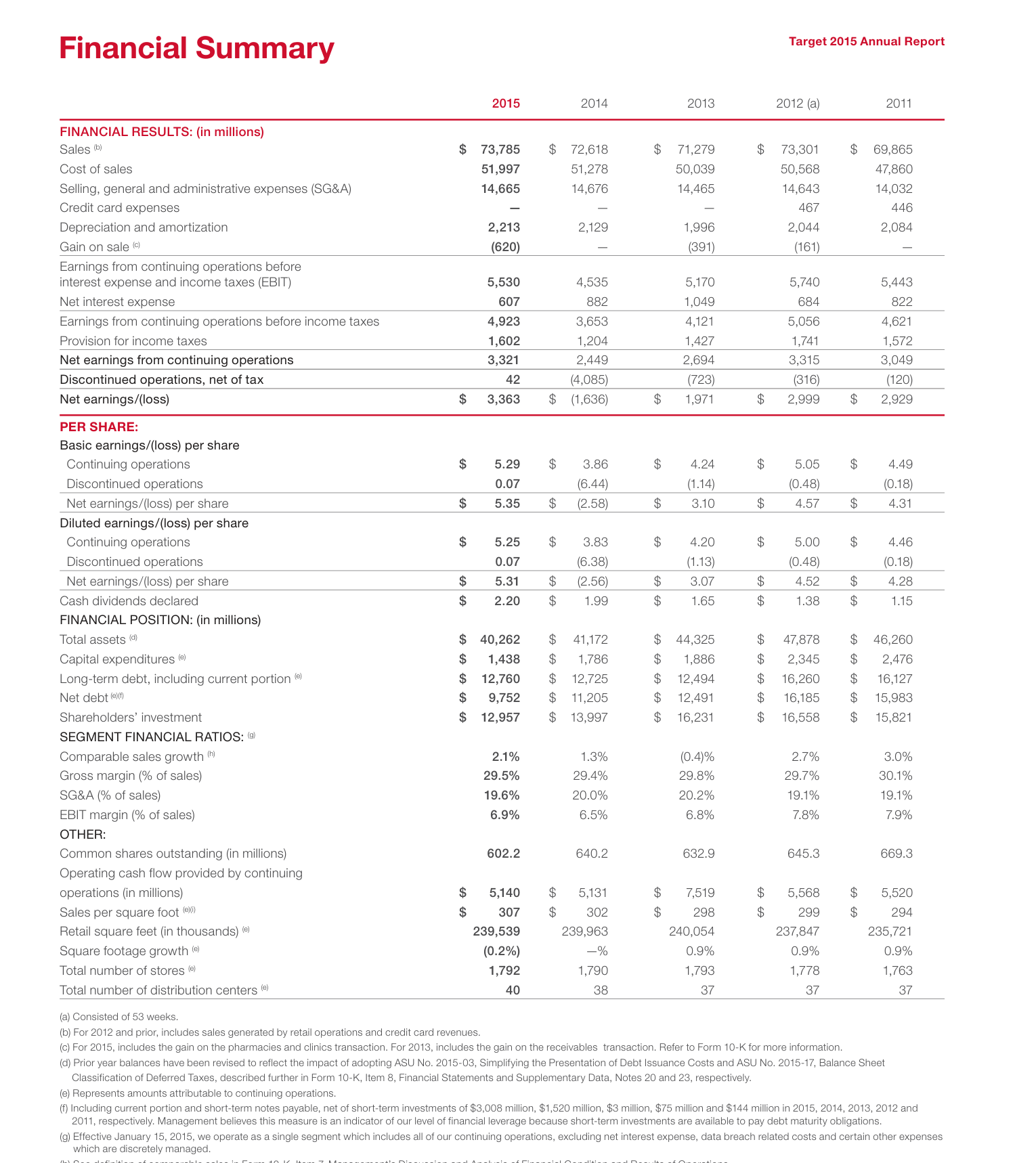
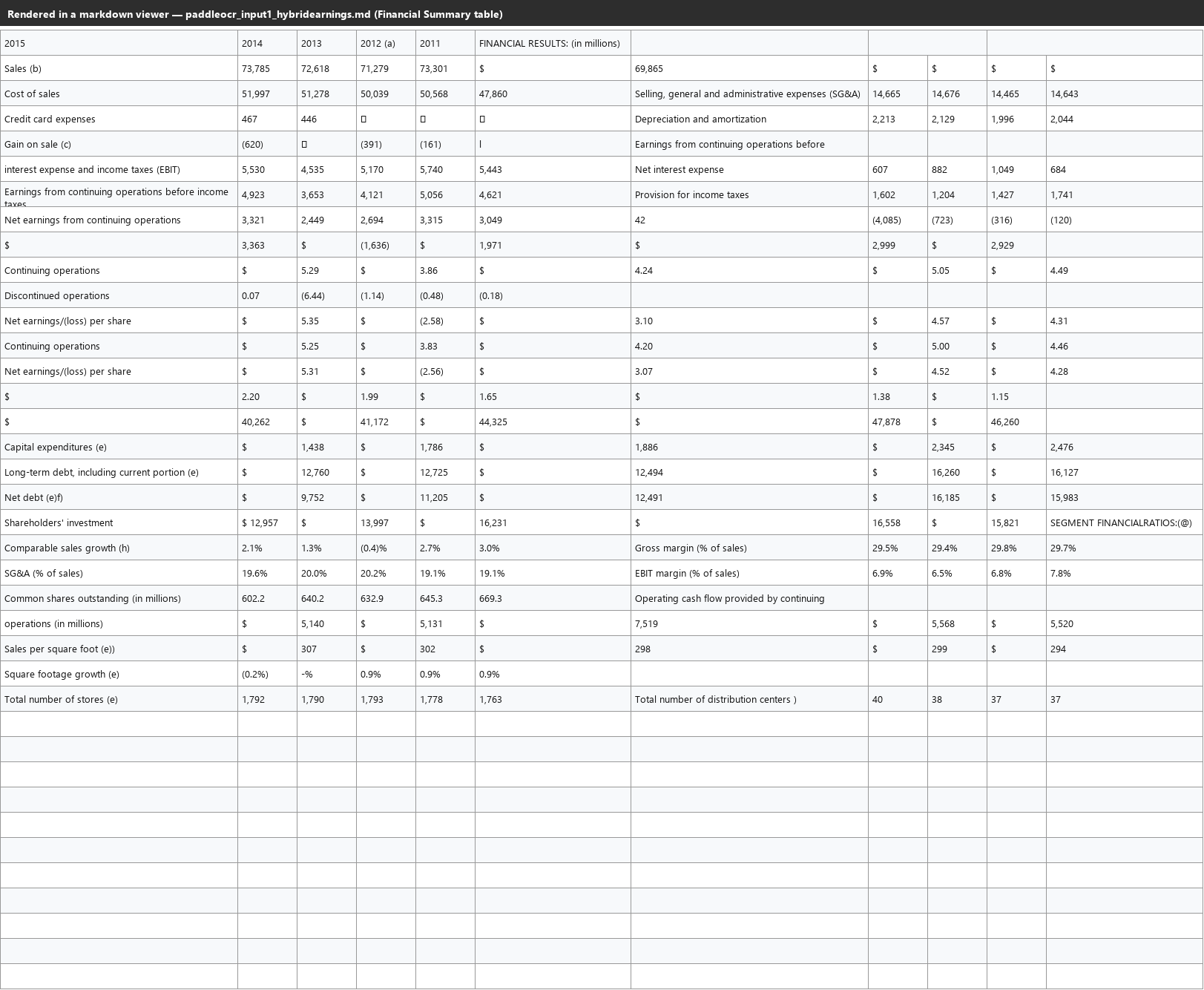
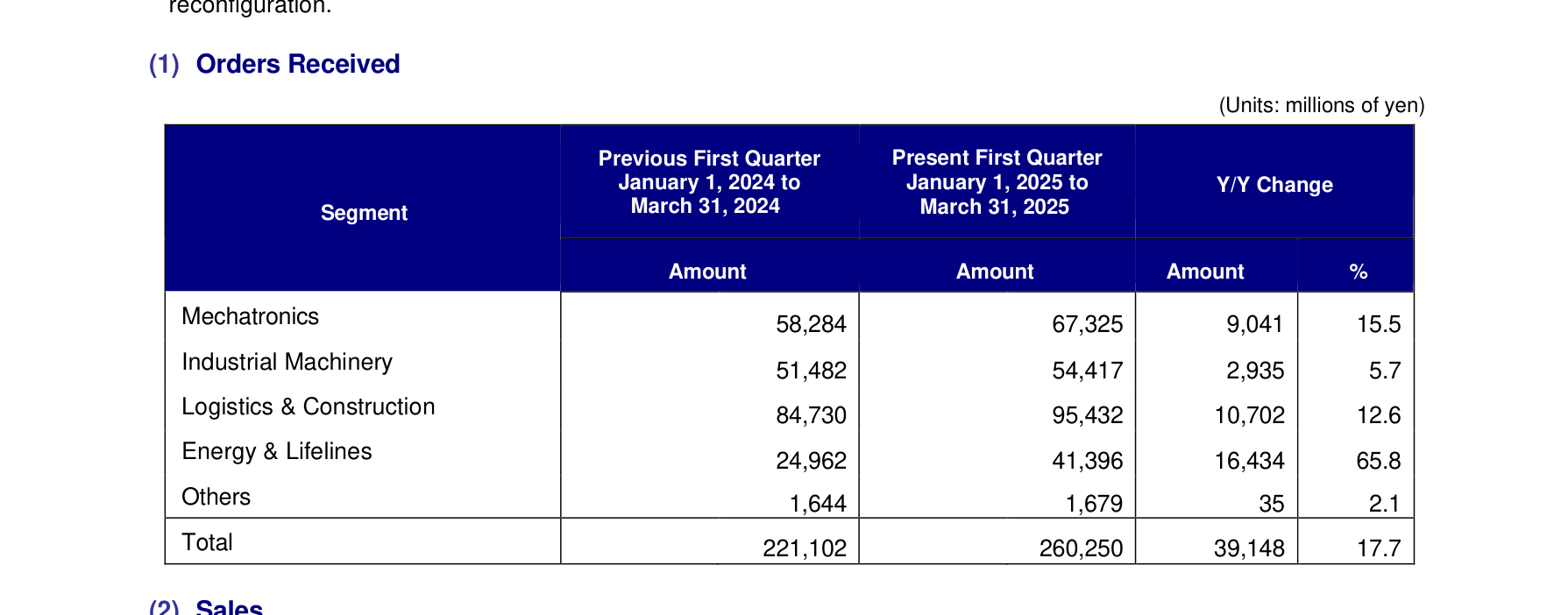
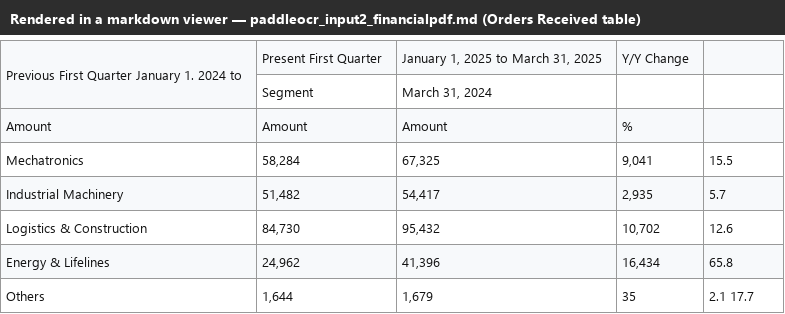
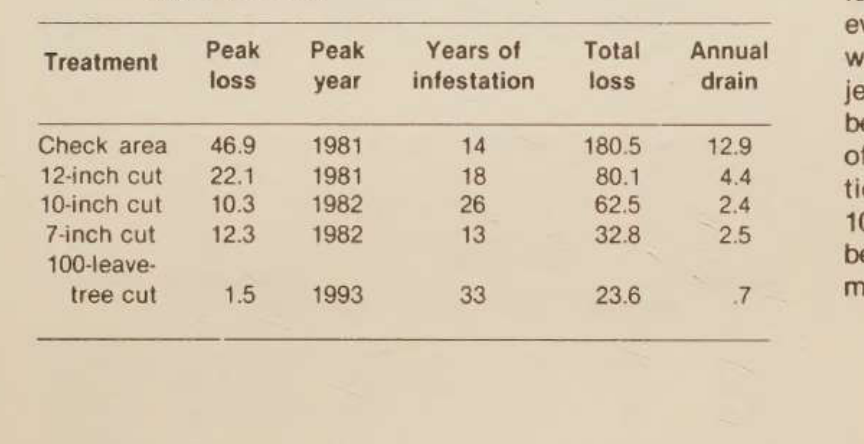
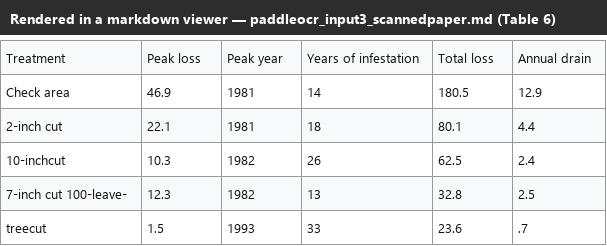
Expected behavior: Converts financial tables into markdown/HTML tables and usually preserves labels and values. The exercised inputs include small tables, larger wrapped-label tables, rowspan headers, and side-by-side layouts where structural fidelity becomes fragile.
Test case: Image → Image
Input type: Image
Input used: Input artifact (Image): Small REDcard Penetration table. — paddleocr_input1_hybridearnings_redcard_penetration_table.png
Observed output: Output artifact (Image): The small table is reconstructed exactly, with header-to-value alignment preserved. — paddleocr_input1_hybridearnings_redcard_penetration_table_parsed_success.png
Input artifact: Input artifact (Image): Small REDcard Penetration table. — paddleocr_input1_hybridearnings_redcard_penetration_table.png
Output artifact: Output artifact (Image): The small table is reconstructed exactly, with header-to-value alignment preserved. — paddleocr_input1_hybridearnings_redcard_penetration_table_parsed_success.png
What changed: Image transformed into Image
Test case: Image → Image
Input type: Image
Input used: Input artifact (Image): Wide Financial Summary table. — paddleocr_input1_hybridearnings_financial_summary_table.png
Observed output: Output artifact (Image): Most values are correct, but a wrapped row label causes row splitting and the following row loses its last column. — paddleocr_input1_hybridearnings_financial_summary_table_parsed_partial_success.png
Input artifact: Input artifact (Image): Wide Financial Summary table. — paddleocr_input1_hybridearnings_financial_summary_table.png
Output artifact: Output artifact (Image): Most values are correct, but a wrapped row label causes row splitting and the following row loses its last column. — paddleocr_input1_hybridearnings_financial_summary_table_parsed_partial_success.png
What changed: Image transformed into Image
Test case: Image → Image
Input type: Image
Input used: Input artifact (Image): Orders Received table with rowspan headers and a total row. — paddleocr_input2_financialpdf_orders_received_table.png
Observed output: Output artifact (Image): The data rows are mostly correct, but the rowspan header block is scrambled and the final Total row is dropped. — paddleocr_input2_financialpdf_orders_received_table_parsed_partial_success.png
Input artifact: Input artifact (Image): Orders Received table with rowspan headers and a total row. — paddleocr_input2_financialpdf_orders_received_table.png
Output artifact: Output artifact (Image): The data rows are mostly correct, but the rowspan header block is scrambled and the final Total row is dropped. — paddleocr_input2_financialpdf_orders_received_table_parsed_partial_success.png
What changed: Image transformed into Image
Test case: Image → Image
Input type: Image
Input used: Input artifact (Image): Complex table from the scanned research paper. — paddleocr_input3_scannedpaper_table6_predicted_loss.png
Observed output: Output artifact (Image): The table keeps most numeric values, but a wrapped row label splits and another label loses a digit. — paddleocr_input3_scannedpaper_table6_predicted_loss_parsed_partial_success.png
Input artifact: Input artifact (Image): Complex table from the scanned research paper. — paddleocr_input3_scannedpaper_table6_predicted_loss.png
Output artifact: Output artifact (Image): The table keeps most numeric values, but a wrapped row label splits and another label loses a digit. — paddleocr_input3_scannedpaper_table6_predicted_loss_parsed_partial_success.png
What changed: Image transformed into Image
Why it matters / Conclusion: Good at reading table content, but structural fidelity breaks down on complex tables long before the data values themselves do.
Converts financial tables into markdown/HTML tables and usually preserves labels and values. The exercised inputs include small tables, larger wrapped-label tables, rowspan headers, and side-by-side layouts where structural fidelity becomes fragile.


Embedded visual retentionmixed▾
Feature tested: Embedded visual retention
Result: Partial
Verdict: mixed
Expected behavior: Retains non-text visual elements from PDFs as real cropped image files placed near their original location. The cards exercise this on charts/figures as well as photos, signatures, seals, and logos, with some cases collapsing or disappearing entirely.
Test case: Image → Image
Input type: Image
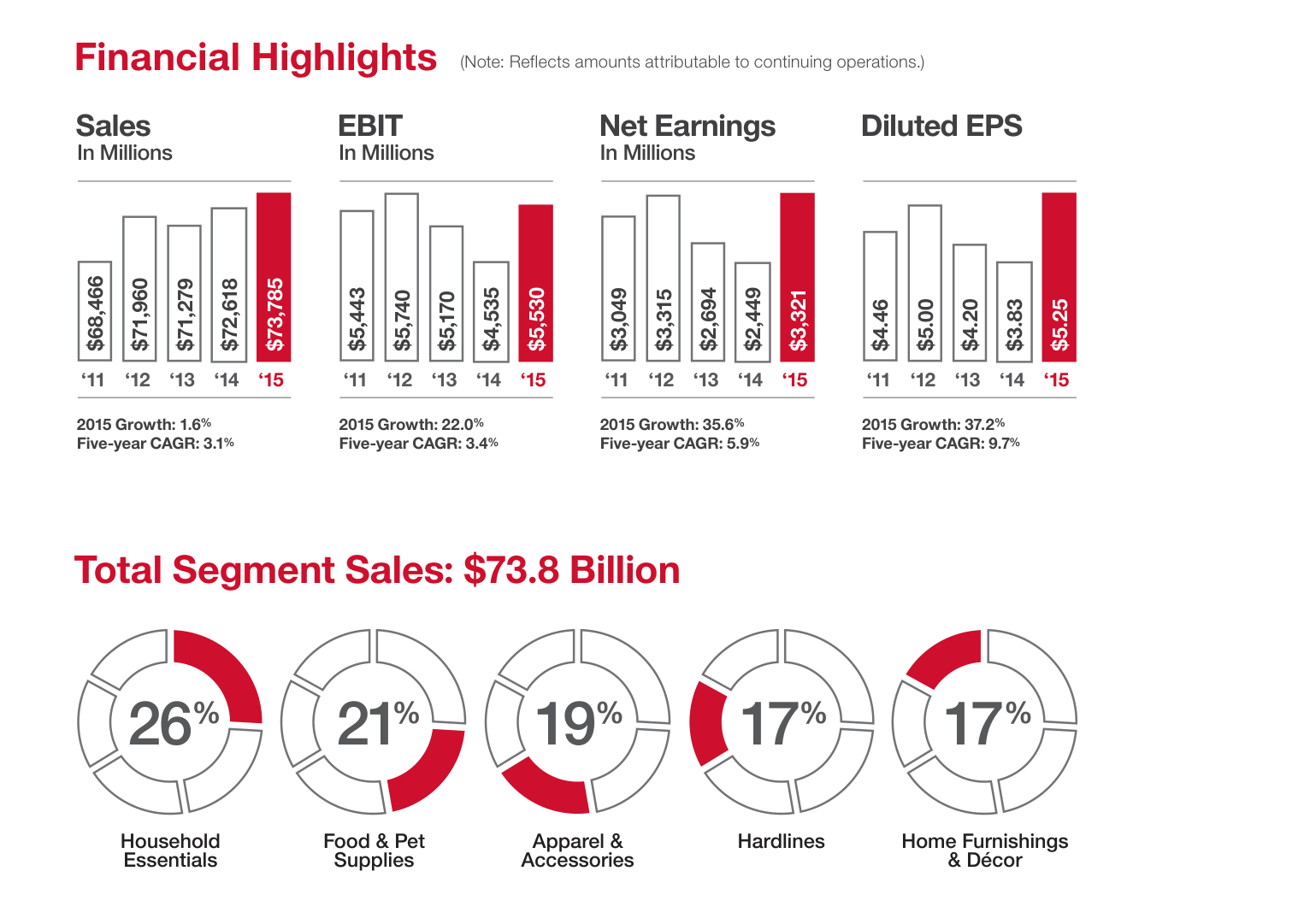
Input used: Input artifact (Image): Cluster of charts from the hybrid earnings report. — paddleocr_input1_hybridearnings_financial_highlights_charts.png
Observed output: Output artifact (Image): Nine chart objects are flattened into one large image block, with no chart values or labels recovered as text. — paddleocr_input1_hybridearnings_financial_highlights_charts_parsed_failure.png
Input artifact: Input artifact (Image): Cluster of charts from the hybrid earnings report. — paddleocr_input1_hybridearnings_financial_highlights_charts.png
Output artifact: Output artifact (Image): Nine chart objects are flattened into one large image block, with no chart values or labels recovered as text. — paddleocr_input1_hybridearnings_financial_highlights_charts_parsed_failure.png
What changed: Image transformed into Image
Test case: Image → Image
Input type: Image
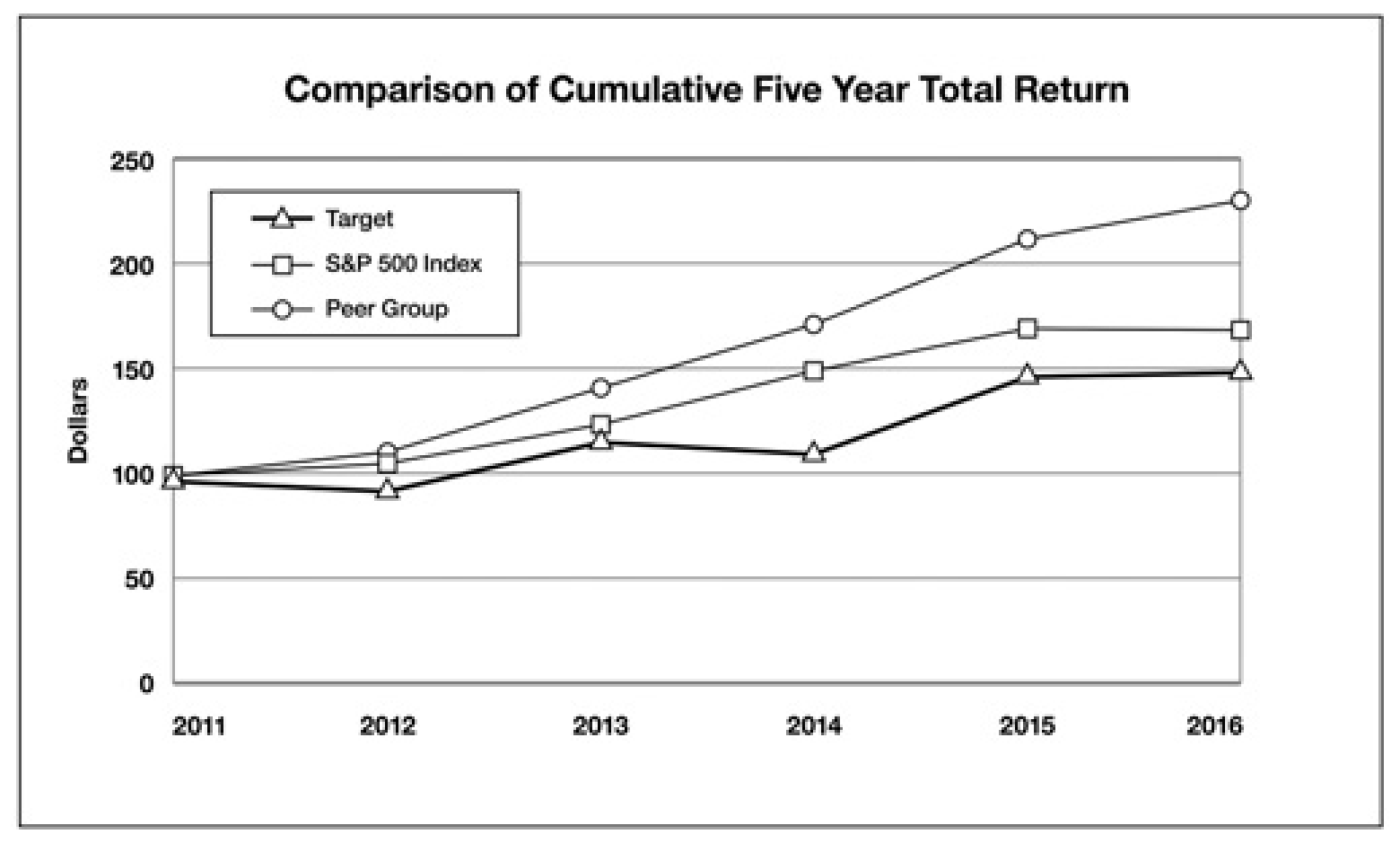
Input used: Input artifact (Image): Total-return line chart from the hybrid earnings report. — paddleocr_input1_hybridearnings_total_return_chart.png
Observed output: Output artifact (Image): The chart is retained as a correctly scoped image, but no chart data is reconstructed. — paddleocr_input1_hybridearnings_total_return_chart_parsed_partial_success.png
Input artifact: Input artifact (Image): Total-return line chart from the hybrid earnings report. — paddleocr_input1_hybridearnings_total_return_chart.png
Output artifact: Output artifact (Image): The chart is retained as a correctly scoped image, but no chart data is reconstructed. — paddleocr_input1_hybridearnings_total_return_chart_parsed_partial_success.png
What changed: Image transformed into Image
Test case: Image → Image
Input type: Image
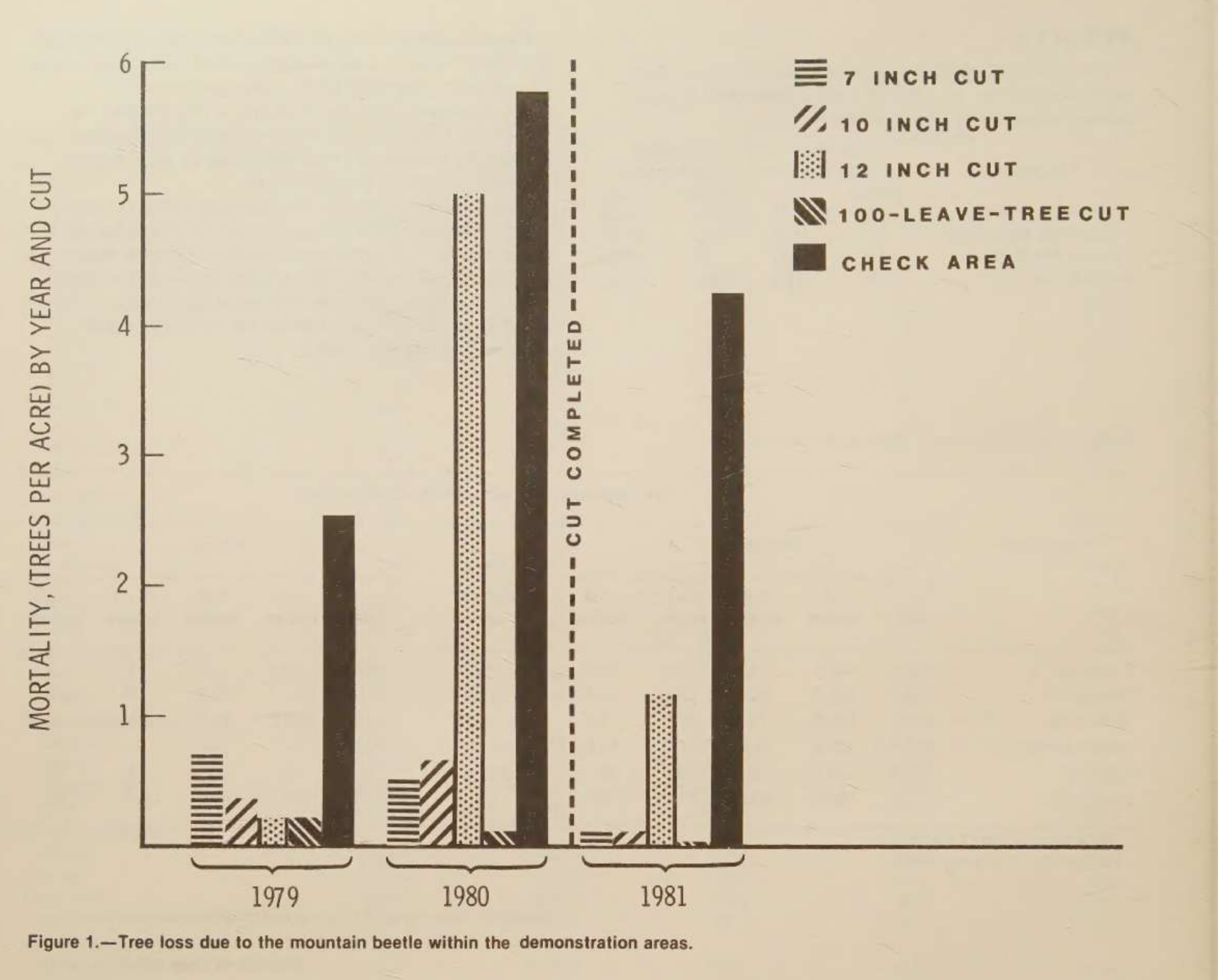
Input used: Input artifact (Image): Figure 1 bar chart from the scanned paper. — paddleocr_input3_scannedpaper_figure1_chart.png
Observed output: Output artifact (Image): The chart is preserved as its own image and captioned correctly, but the values are not extracted. — paddleocr_input3_scannedpaper_figure1_chart_parsed_partial_success.png
Input artifact: Input artifact (Image): Figure 1 bar chart from the scanned paper. — paddleocr_input3_scannedpaper_figure1_chart.png
Output artifact: Output artifact (Image): The chart is preserved as its own image and captioned correctly, but the values are not extracted. — paddleocr_input3_scannedpaper_figure1_chart_parsed_partial_success.png
What changed: Image transformed into Image
Test case: Image → Image
Input type: Image
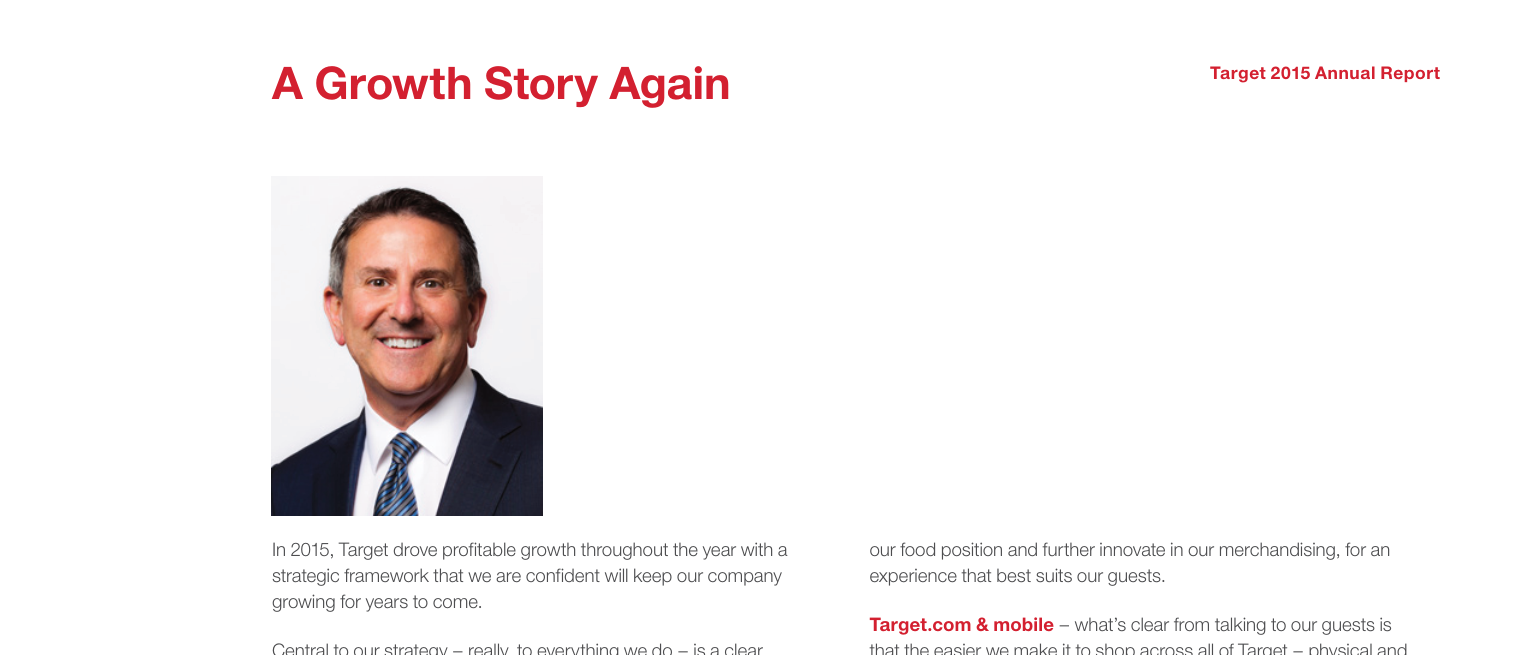
Input used: Input artifact (Image): CEO photo page from the hybrid earnings report. — paddleocr_input1_hybridearnings_ceo_photo.png
Observed output: Output artifact (Image): The photo is retained as a real inline image tag in the parsed markdown. — paddleocr_input1_hybridearnings_ceo_photo_parsed_success.png
Input artifact: Input artifact (Image): CEO photo page from the hybrid earnings report. — paddleocr_input1_hybridearnings_ceo_photo.png
Output artifact: Output artifact (Image): The photo is retained as a real inline image tag in the parsed markdown. — paddleocr_input1_hybridearnings_ceo_photo_parsed_success.png
What changed: Image transformed into Image
Test case: Image → Image
Input type: Image
Input used: Input artifact (Image): USDA shield seal from the scanned paper. — paddleocr_input3_scannedpaper_usda_shield_page1.png
Observed output: Output artifact (Image): The seal is retained as a real inline image, not dropped or flattened to text. — paddleocr_input3_scannedpaper_usda_shield_page1_parsed_success.png
Input artifact: Input artifact (Image): USDA shield seal from the scanned paper. — paddleocr_input3_scannedpaper_usda_shield_page1.png
Output artifact: Output artifact (Image): The seal is retained as a real inline image, not dropped or flattened to text. — paddleocr_input3_scannedpaper_usda_shield_page1_parsed_success.png
What changed: Image transformed into Image
Why it matters / Conclusion: It reliably keeps chart regions inline, but the output is image-only rather than data-aware.
Retains non-text visual elements from PDFs as real cropped image files placed near their original location. The cards exercise this on charts/figures as well as photos, signatures, seals, and logos, with some cases collapsing or disappearing entirely.




Heading and document hierarchy exportmixed▾
Feature tested: Heading and document hierarchy export
Result: Partial
Verdict: mixed
Expected behavior: Turns section titles into markdown headings to approximate document structure. The tested pages include section titles from reports and a scanned paper, but heading levels and section flattening can be inconsistent.
Test case: Image → Image
Input type: Image
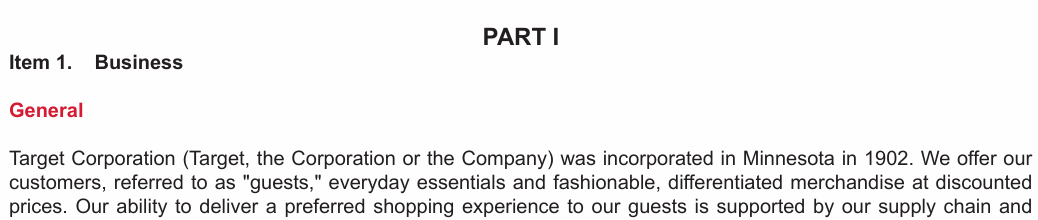
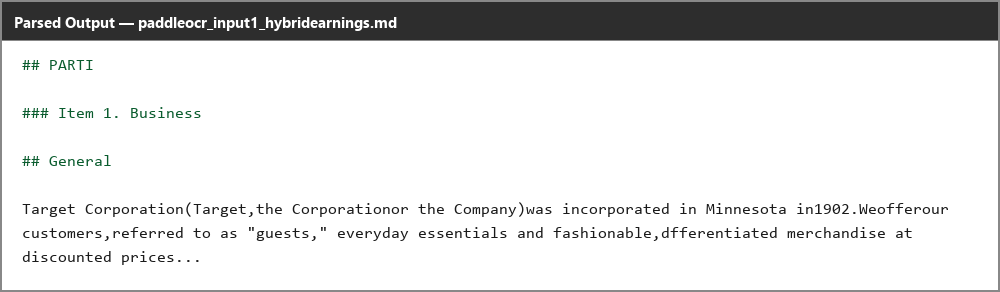
Input used: Input artifact (Image): Item 1 / General heading region from the hybrid earnings report. — paddleocr_input1_hybridearnings_item1_general_heading.png
Observed output: Output artifact (Image): The sub-section is preserved, but its heading level is inverted relative to its parent section. — paddleocr_input1_hybridearnings_item1_general_heading_parsed_failure.png
Input artifact: Input artifact (Image): Item 1 / General heading region from the hybrid earnings report. — paddleocr_input1_hybridearnings_item1_general_heading.png
Output artifact: Output artifact (Image): The sub-section is preserved, but its heading level is inverted relative to its parent section. — paddleocr_input1_hybridearnings_item1_general_heading_parsed_failure.png
What changed: Image transformed into Image
Test case: Image → Image
Input type: Image
Input used: Input artifact (Image): Item 6 section heading from the hybrid earnings report. — paddleocr_input1_hybridearnings_item6_heading.png
Observed output: Output artifact (Image): The section title is flattened into centered div text instead of a markdown heading. — paddleocr_input1_hybridearnings_item6_heading_parsed_failure.png
Input artifact: Input artifact (Image): Item 6 section heading from the hybrid earnings report. — paddleocr_input1_hybridearnings_item6_heading.png
Output artifact: Output artifact (Image): The section title is flattened into centered div text instead of a markdown heading. — paddleocr_input1_hybridearnings_item6_heading_parsed_failure.png
What changed: Image transformed into Image
Test case: Image → Image
Input type: Image
Input used: Input artifact (Image): Document title from the scanned research paper. — paddleocr_input3_scannedpaper_title_heading.png
Observed output: Output artifact (Image): The heading is mostly correct, but unrelated handwritten marginalia is OCR'd into the title itself. — paddleocr_input3_scannedpaper_title_heading_parsed_failure.png
Input artifact: Input artifact (Image): Document title from the scanned research paper. — paddleocr_input3_scannedpaper_title_heading.png
Output artifact: Output artifact (Image): The heading is mostly correct, but unrelated handwritten marginalia is OCR'd into the title itself. — paddleocr_input3_scannedpaper_title_heading_parsed_failure.png
What changed: Image transformed into Image
Why it matters / Conclusion: Useful for rough sectioning, but the heading tree is inconsistent enough that a clean TOC or outline needs manual review.
Turns section titles into markdown headings to approximate document structure. The tested pages include section titles from reports and a scanned paper, but heading levels and section flattening can be inconsistent.



Reading-order preservationmixed▾
Feature tested: Reading-order preservation
Result: Partial
Verdict: mixed
Expected behavior: Keeps content in front-to-back order for most single-column pages and documents. The exercised multi-column layouts show that unrelated blocks can interleave and paragraph boundaries can break at column transitions.
Test case: Image → Image
Input type: Image
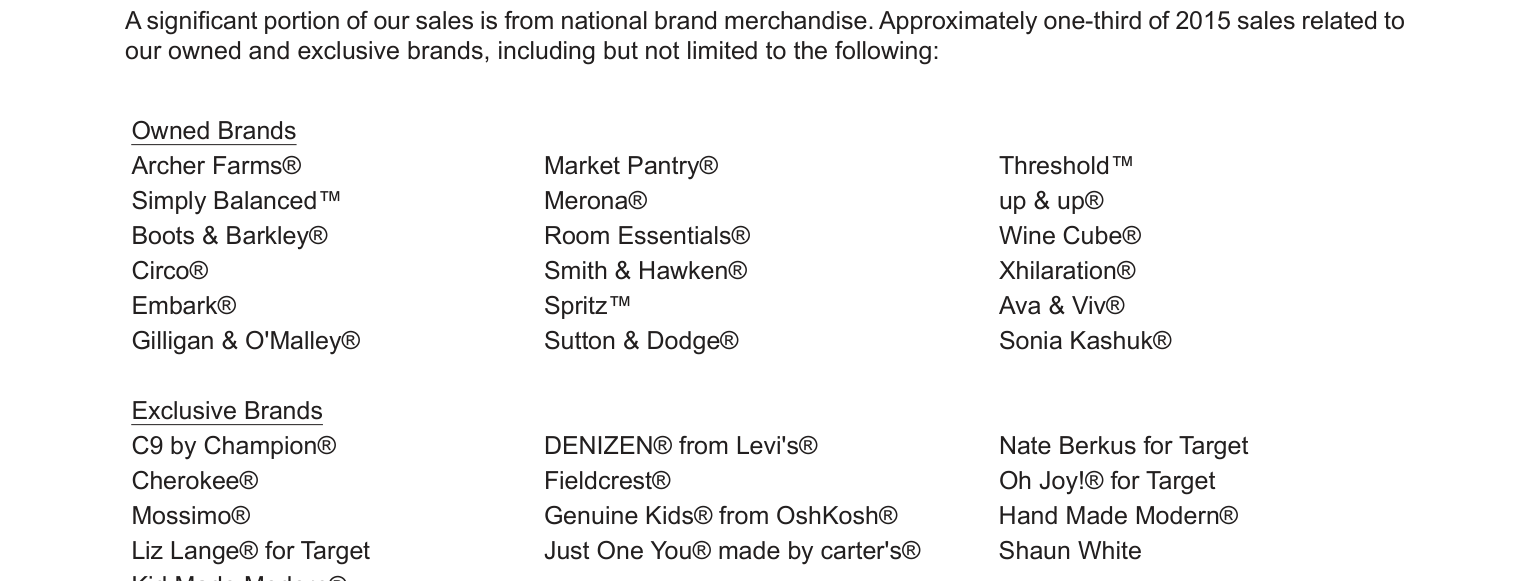
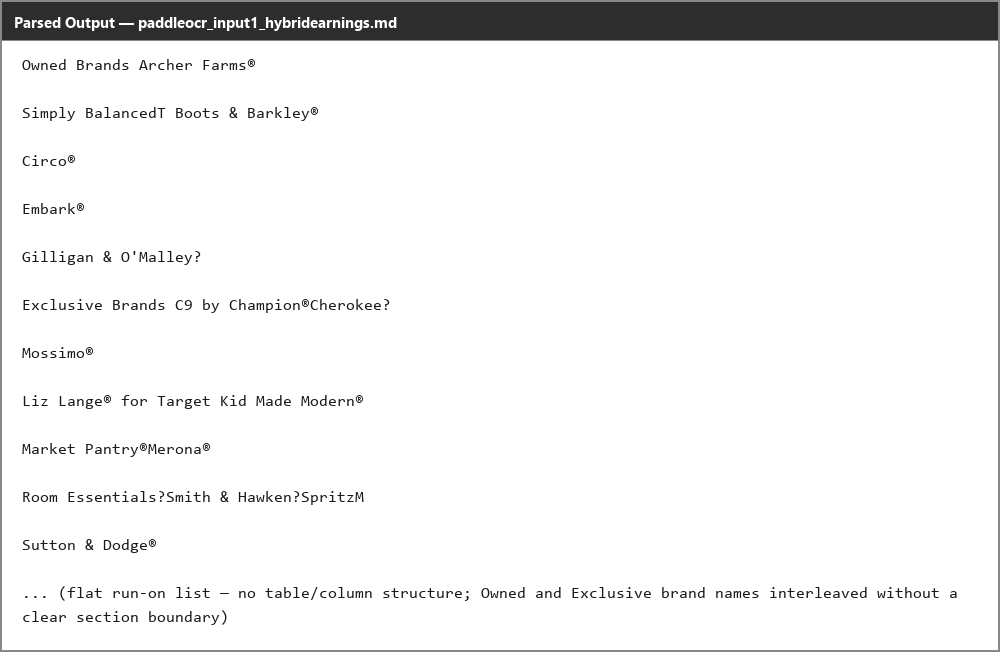
Input used: Input artifact (Image): Three-column owned/exclusive brands section from the hybrid earnings report. — paddleocr_input1_hybridearnings_brand_list.png
Observed output: Output artifact (Image): The two sections are interleaved out of order, so reading order breaks in the multi-column region. — paddleocr_input1_hybridearnings_brand_list_parsed_failure.png
Input artifact: Input artifact (Image): Three-column owned/exclusive brands section from the hybrid earnings report. — paddleocr_input1_hybridearnings_brand_list.png
Output artifact: Output artifact (Image): The two sections are interleaved out of order, so reading order breaks in the multi-column region. — paddleocr_input1_hybridearnings_brand_list_parsed_failure.png
What changed: Image transformed into Image
Test case: Image → Image
Input type: Image
Input used: Input artifact (Image): Two-column column-break region from the scanned paper. — paddleocr_input3_scannedpaper_study_area_colbreak.png
Observed output: Output artifact (Image): The words stay in the correct sequence, but paragraph boundaries are lost at the column transition. — paddleocr_input3_scannedpaper_study_area_colbreak_parsed_partial_success.png
Input artifact: Input artifact (Image): Two-column column-break region from the scanned paper. — paddleocr_input3_scannedpaper_study_area_colbreak.png
Output artifact: Output artifact (Image): The words stay in the correct sequence, but paragraph boundaries are lost at the column transition. — paddleocr_input3_scannedpaper_study_area_colbreak_parsed_partial_success.png
What changed: Image transformed into Image
Why it matters / Conclusion: Normal linear pages are fine, but multi-column layouts and column breaks still need cleanup.
Keeps content in front-to-back order for most single-column pages and documents. The exercised multi-column layouts show that unrelated blocks can interleave and paragraph boundaries can break at column transitions.

Caption and footnote anchoringpreserved▾
Feature tested: Caption and footnote anchoring
Result: Passed
Verdict: preserved
Expected behavior: Keeps captions, unit notes, and footnotes attached to the table or figure they describe, even when the underlying object is degraded. The tested cases include captions under tables and figures where the explanatory text still stays in place.
Test case: Image → Image
Input type: Image
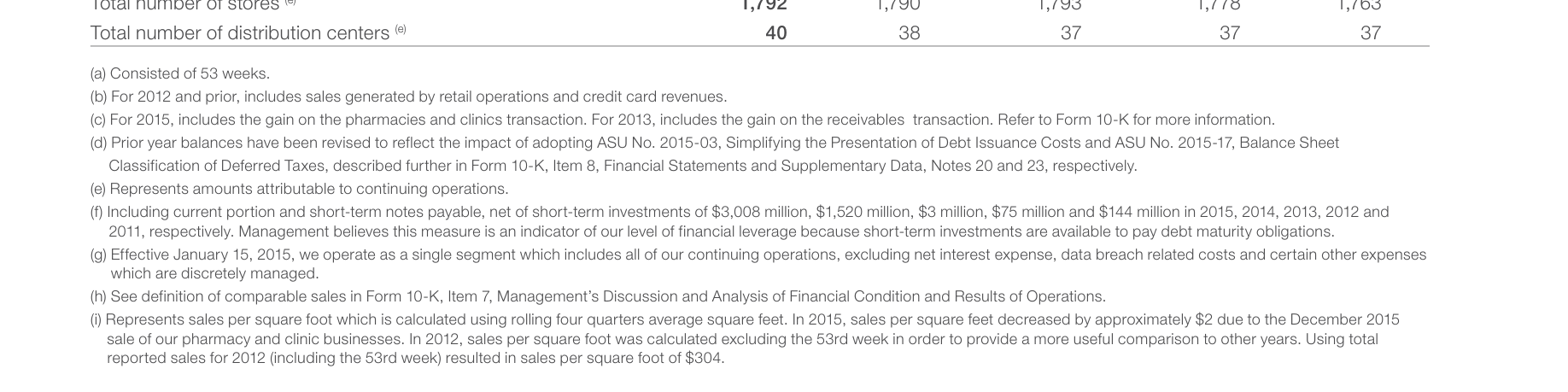
Input used: Input artifact (Image): Financial Summary footnotes from the hybrid earnings report. — paddleocr_input1_hybridearnings_financial_summary_footnotes.png
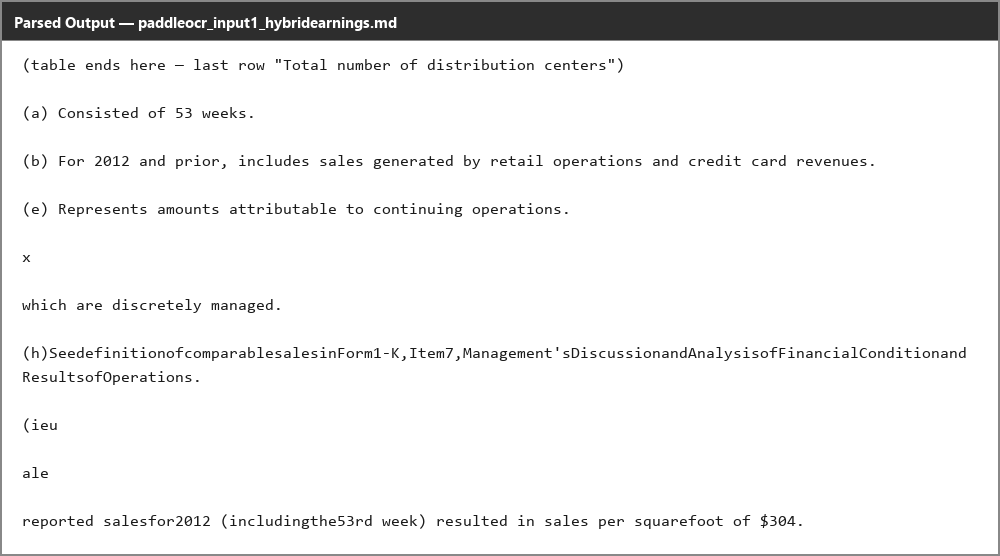
Observed output: Output artifact (Image): The footnotes stay directly beneath the table they explain, even though the footnote text itself is only partially parsed. — paddleocr_input1_hybridearnings_financial_summary_footnotes_parsed_partial_success.png
Input artifact: Input artifact (Image): Financial Summary footnotes from the hybrid earnings report. — paddleocr_input1_hybridearnings_financial_summary_footnotes.png
Output artifact: Output artifact (Image): The footnotes stay directly beneath the table they explain, even though the footnote text itself is only partially parsed. — paddleocr_input1_hybridearnings_financial_summary_footnotes_parsed_partial_success.png
What changed: Image transformed into Image
Test case: Image → Image
Input type: Image
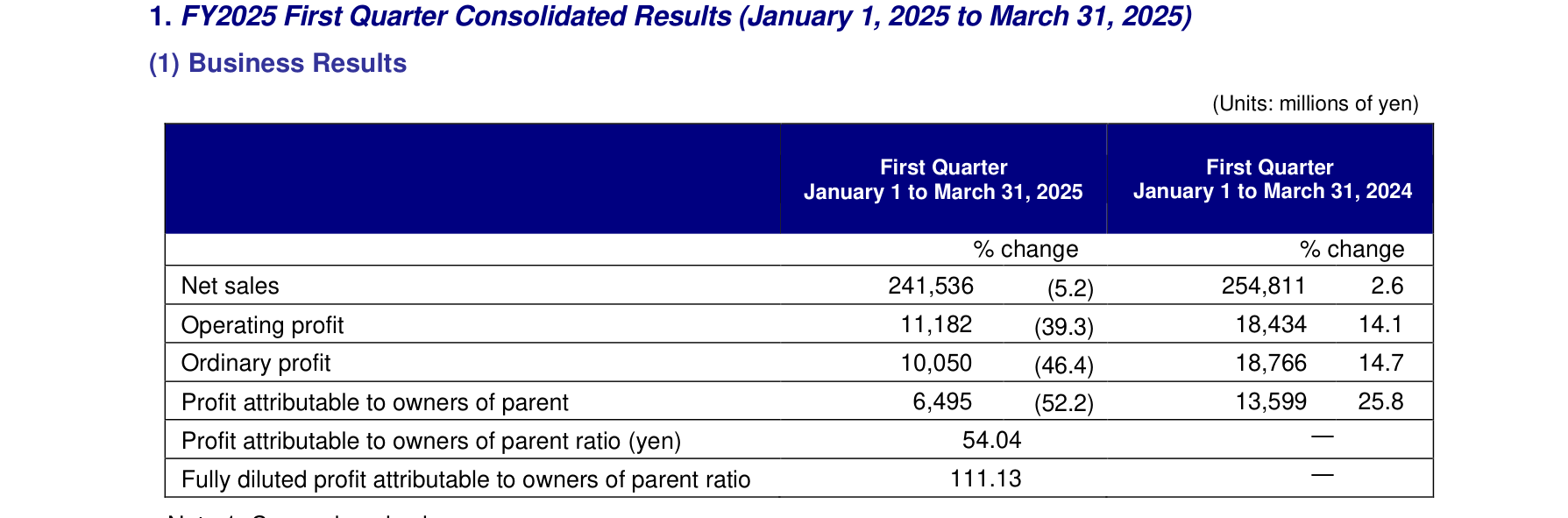
Input used: Input artifact (Image): Business Results table with its unit caption. — paddleocr_input2_financialpdf_business_results_table.png
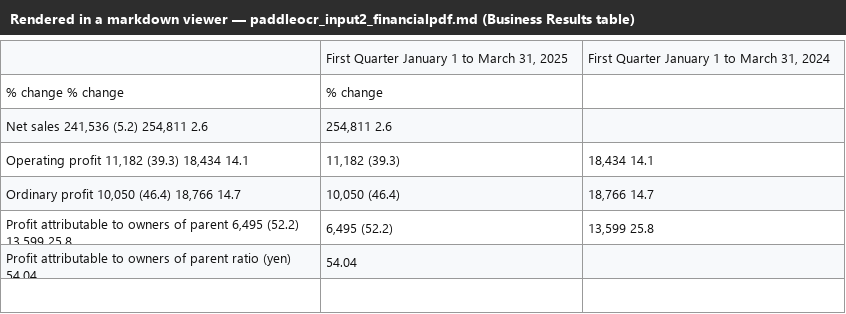
Observed output: Output artifact (Image): The unit caption remains immediately above the same table in the parsed markdown. — paddleocr_input2_financialpdf_business_results_table_parsed_partial_success.png
Input artifact: Input artifact (Image): Business Results table with its unit caption. — paddleocr_input2_financialpdf_business_results_table.png
Output artifact: Output artifact (Image): The unit caption remains immediately above the same table in the parsed markdown. — paddleocr_input2_financialpdf_business_results_table_parsed_partial_success.png
What changed: Image transformed into Image
Test case: Image → Image
Input type: Image
Input used: Input artifact (Image): Orders Received table with its unit caption. — paddleocr_input2_financialpdf_orders_received_table.png
Observed output: Output artifact (Image): The unit caption stays attached to the correct table rather than drifting to a later section. — paddleocr_input2_financialpdf_orders_received_table_parsed_partial_success.png
Input artifact: Input artifact (Image): Orders Received table with its unit caption. — paddleocr_input2_financialpdf_orders_received_table.png
Output artifact: Output artifact (Image): The unit caption stays attached to the correct table rather than drifting to a later section. — paddleocr_input2_financialpdf_orders_received_table_parsed_partial_success.png
What changed: Image transformed into Image
Why it matters / Conclusion: Captions and footnotes are generally anchored correctly, which helps even when the table or chart itself is imperfect.
Keeps captions, unit notes, and footnotes attached to the table or figure they describe, even when the underlying object is degraded. The tested cases include captions under tables and figures where the explanatory text still stays in place.
Open source, no per-page fees
Apache 2.0 licensing; compute is the only real cost.
PaddleOCR / PP-StructureV3 is open source under Apache 2.0, with no usage-based API pricing. The report’s runs were done on Google Colab T4 GPU compute, so the practical cost is infrastructure rather than vendor fees.
Banner Preview
How the embed badge will look on your site

Embed HTML
Copy this code to your website source
Quick Integration Guide
- 1Copy the HTML code block above.
- 2Paste it into your site's HTML or CMS editor.
- 3Banner appears instantly on your page.
- 4Links back to your tool profile here.
Similar Tools
Discover more AI tools like PaddleOCR to enhance your workflow.
Comments (0)
Need a custom AI solution for this use case?
If you are looking to build a custom OCR extraction, PDF-to-markdown conversion, or document parsing workflow for your business or internal workflow, email us at contact@futuresmart.ai.
Found something inaccurate or missing? We try to keep our AI research accurate and useful. If you found outdated information, an issue, or have a suggestion, email us at collaborate@aidemos.com.