MinerU is a solid self-hosted choice when your top priority is preserving figures, charts, logos, and reading order in a markdown output. It is less reliable on dense tables, and recurring mojibake plus slow runtimes make it a mixed fit for production pipelines that need exact text and fast throughput.
Our detailed analysis of MinerU — features, performance, and real-world testing.
AD
AI Demos Team
Expert Reviewer
Verified Review
Feature-by-Feature Breakdown
Embedded Visual Preservation
Strong
▾
Test Summary
Feature tested: Embedded Visual Preservation
Result: Passed — Strong
Feature tested: Embedded Visual Preservation
Result: Passed
Verdict: Strong
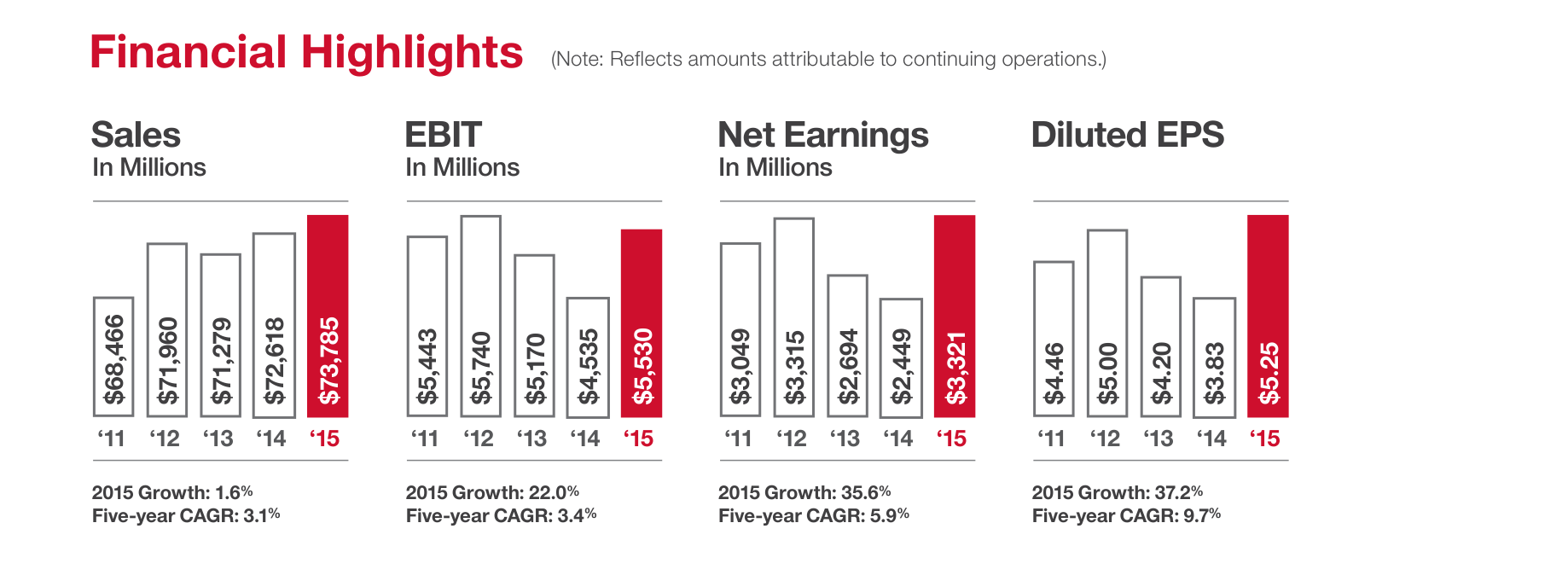
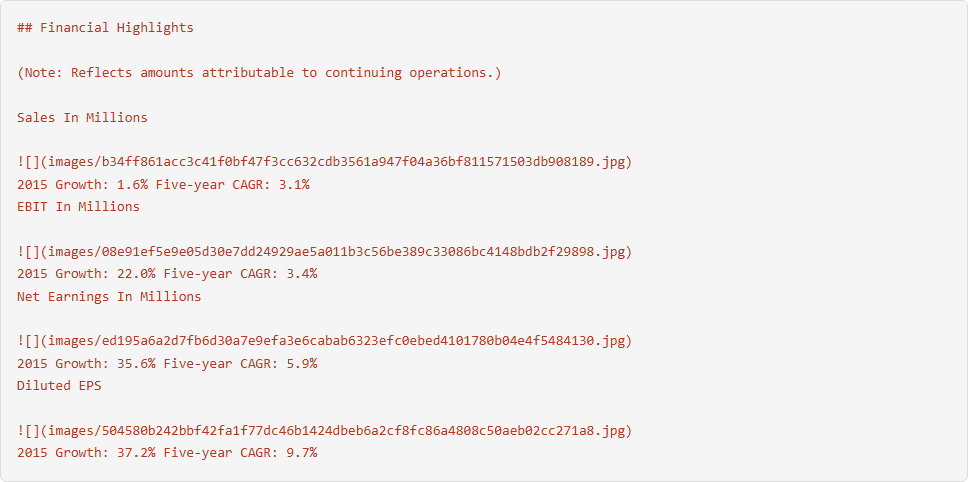
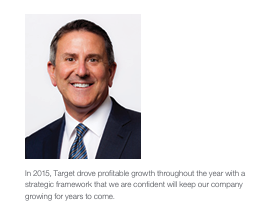
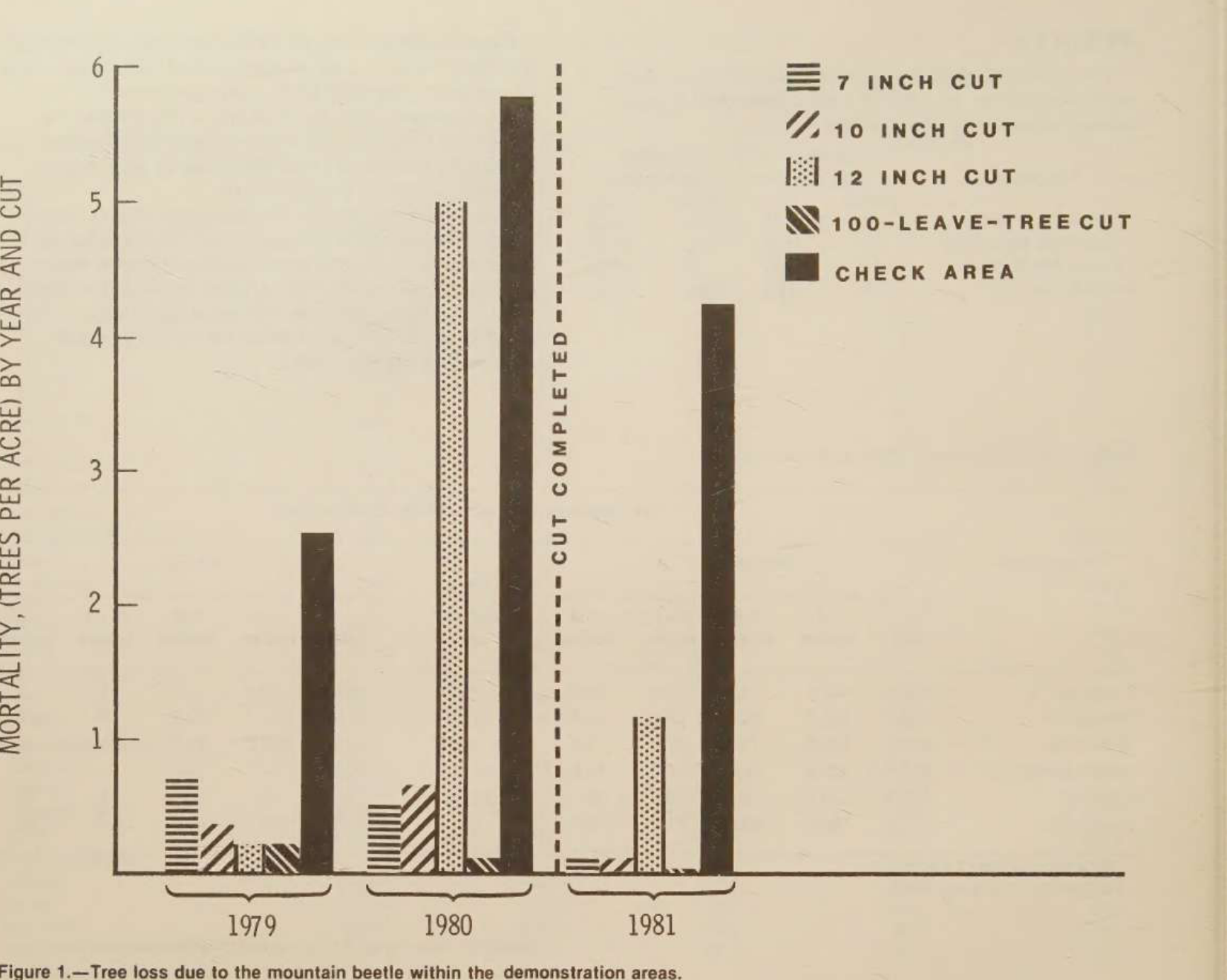
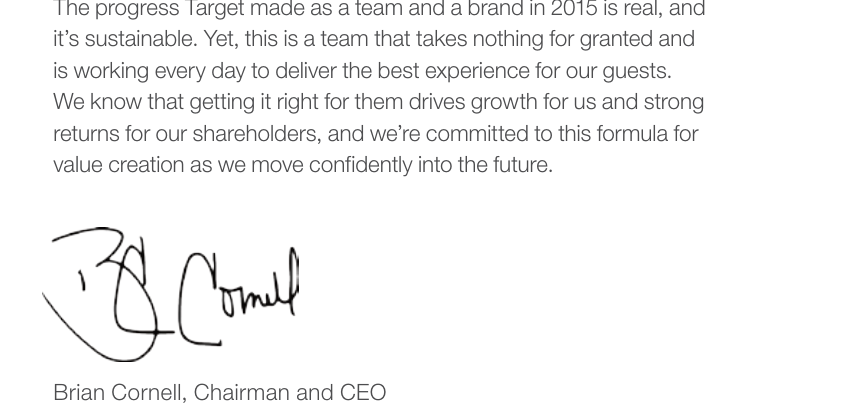
Expected behavior: Keeps charts, figures, photos, logos, and other embedded visuals as real image references in the markdown output. In the hybrid earnings report it preserved financial charts and the CEO portrait; in the scanned paper it preserved the figure and cover logo as images.
Observed output: Output artifact (Image): Financial highlights charts remained real images with labels and stats still paired to them. — mineru_input1_hybridearnings_financial_charts_parsed_success.png
Output artifact: Output artifact (Image): Financial highlights charts remained real images with labels and stats still paired to them. — mineru_input1_hybridearnings_financial_charts_parsed_success.png
Observed output: Output artifact (Image): The CEO portrait stayed embedded before the signoff line. — mineru_input1_hybridearnings_ceo_photo_parsed_success.png
Output artifact: Output artifact (Image): The CEO portrait stayed embedded before the signoff line. — mineru_input1_hybridearnings_ceo_photo_parsed_success.png
Observed output: Output artifact (Image): The scanned research figure stayed embedded with its caption adjacent. — mineru_input3_scannedpaper_figure_1_parsed_success.png
Output artifact: Output artifact (Image): The scanned research figure stayed embedded with its caption adjacent. — mineru_input3_scannedpaper_figure_1_parsed_success.png
What changed: Image transformed into Image
Why it matters / Conclusion: This is MinerU's strongest capability: visuals are consistently preserved as real images instead of placeholders.
Keeps charts, figures, photos, logos, and other embedded visuals as real image references in the markdown output. In the hybrid earnings report it preserved financial charts and the CEO portrait; in the scanned paper it preserved the figure and cover logo as images.
image
↓→
image
Financial highlights charts remained real images with labels and stats still paired to them.
image
↓→
image
The CEO portrait stayed embedded before the signoff line.
image
↓→
image
The scanned research figure stayed embedded with its caption adjacent.
Bottom Line
This is MinerU's strongest capability: visuals are consistently preserved as real images instead of placeholders.
From our researchPDF to markdown using open source libraries
OCR Text Extraction
Mixed
▾
Test Summary
Feature tested: OCR Text Extraction
Result: Partial — Mixed
Feature tested: OCR Text Extraction
Result: Partial
Verdict: Mixed
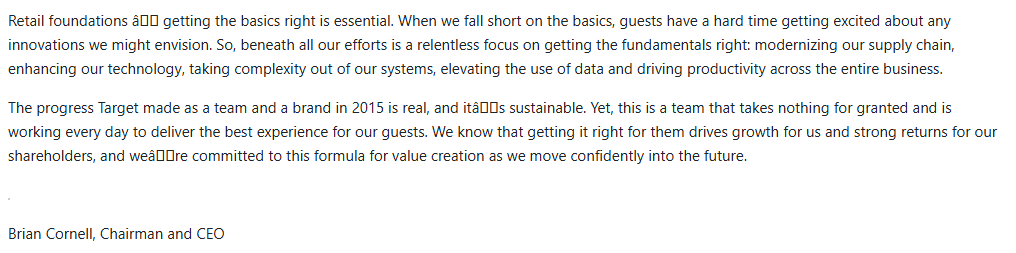
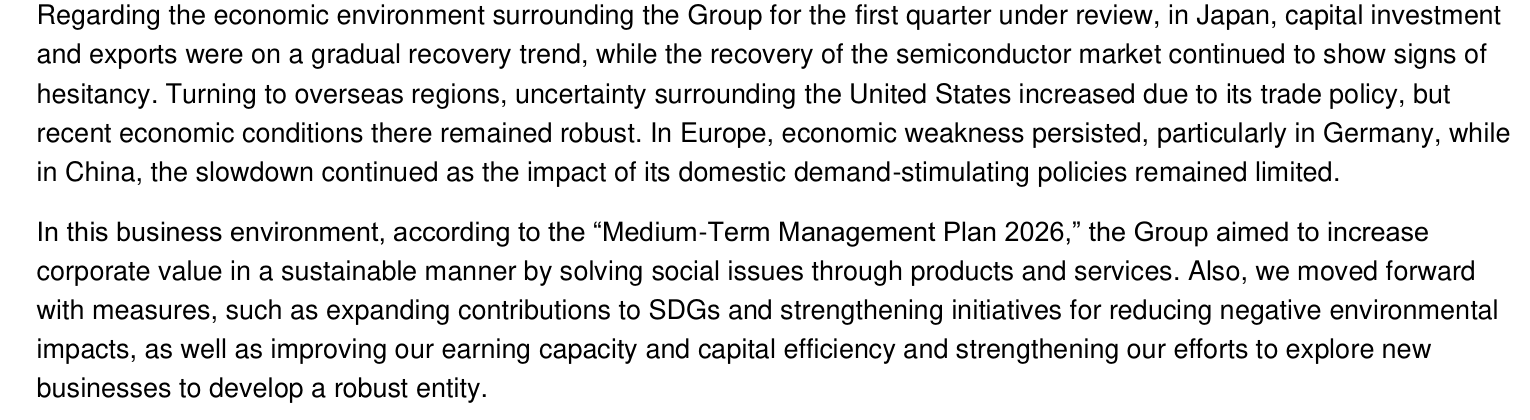
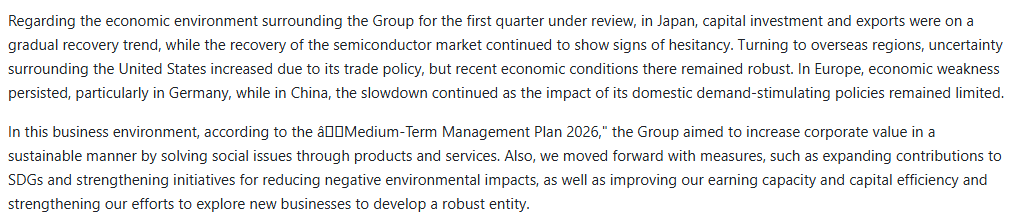
Expected behavior: Converts native text and scanned pages into markdown text while keeping most content readable. It handled the hybrid earnings CEO letter, the Japanese/English management-plan excerpt, and the scanned paper's title/header text, though punctuation and some characters can be corrupted by mojibake.
Observed output: Output artifact (Image): The CEO letter text is readable, but punctuation and a few characters are corrupted. — mineru_input1_hybridearnings_ceo_letter_parsed_failure.png
Output artifact: Output artifact (Image): The CEO letter text is readable, but punctuation and a few characters are corrupted. — mineru_input1_hybridearnings_ceo_letter_parsed_failure.png
Observed output: Output artifact (Image): The management-plan paragraph is preserved, with curly quotes corrupted into mojibake. — mineru_input2_financialpdf_mgmt_plan_quote_parsed_failure.png
Output artifact: Output artifact (Image): The management-plan paragraph is preserved, with curly quotes corrupted into mojibake. — mineru_input2_financialpdf_mgmt_plan_quote_parsed_failure.png
What changed: Image transformed into Image
Why it matters / Conclusion: Text extraction is strong overall, but punctuation cleanup is inconsistent and exact OCR fidelity is not perfect.
Converts native text and scanned pages into markdown text while keeping most content readable. It handled the hybrid earnings CEO letter, the Japanese/English management-plan excerpt, and the scanned paper's title/header text, though punctuation and some characters can be corrupted by mojibake.
image
↓→
image
The CEO letter text is readable, but punctuation and a few characters are corrupted.
image
↓→
image
The management-plan paragraph is preserved, with curly quotes corrupted into mojibake.
Bottom Line
Text extraction is strong overall, but punctuation cleanup is inconsistent and exact OCR fidelity is not perfect.
From our researchPDF to markdown using open source libraries
Table Reconstruction
Mixed
▾
Test Summary
Feature tested: Table Reconstruction
Result: Partial — Mixed
Feature tested: Table Reconstruction
Result: Partial
Verdict: Mixed
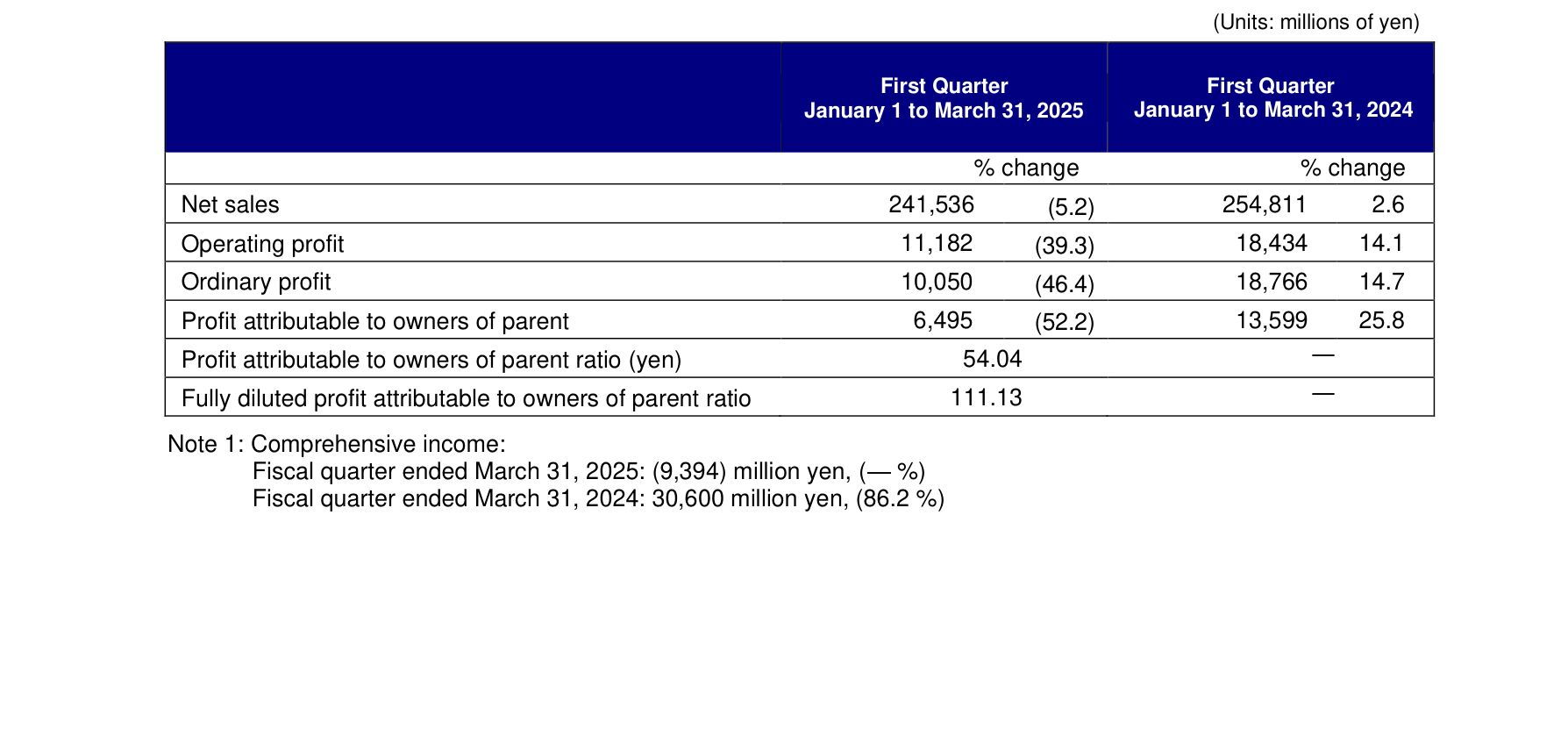
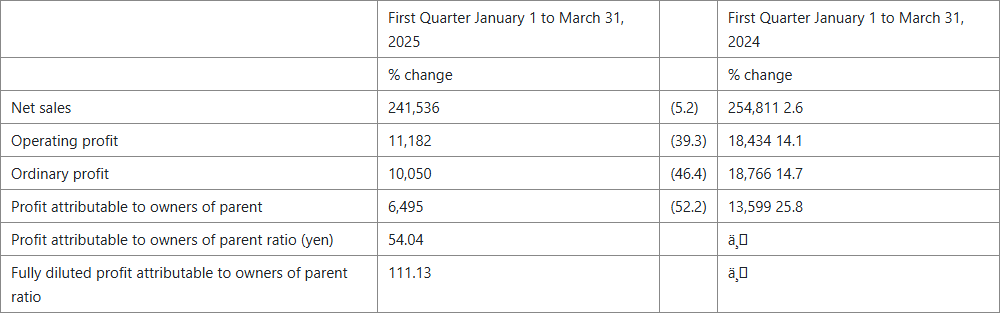
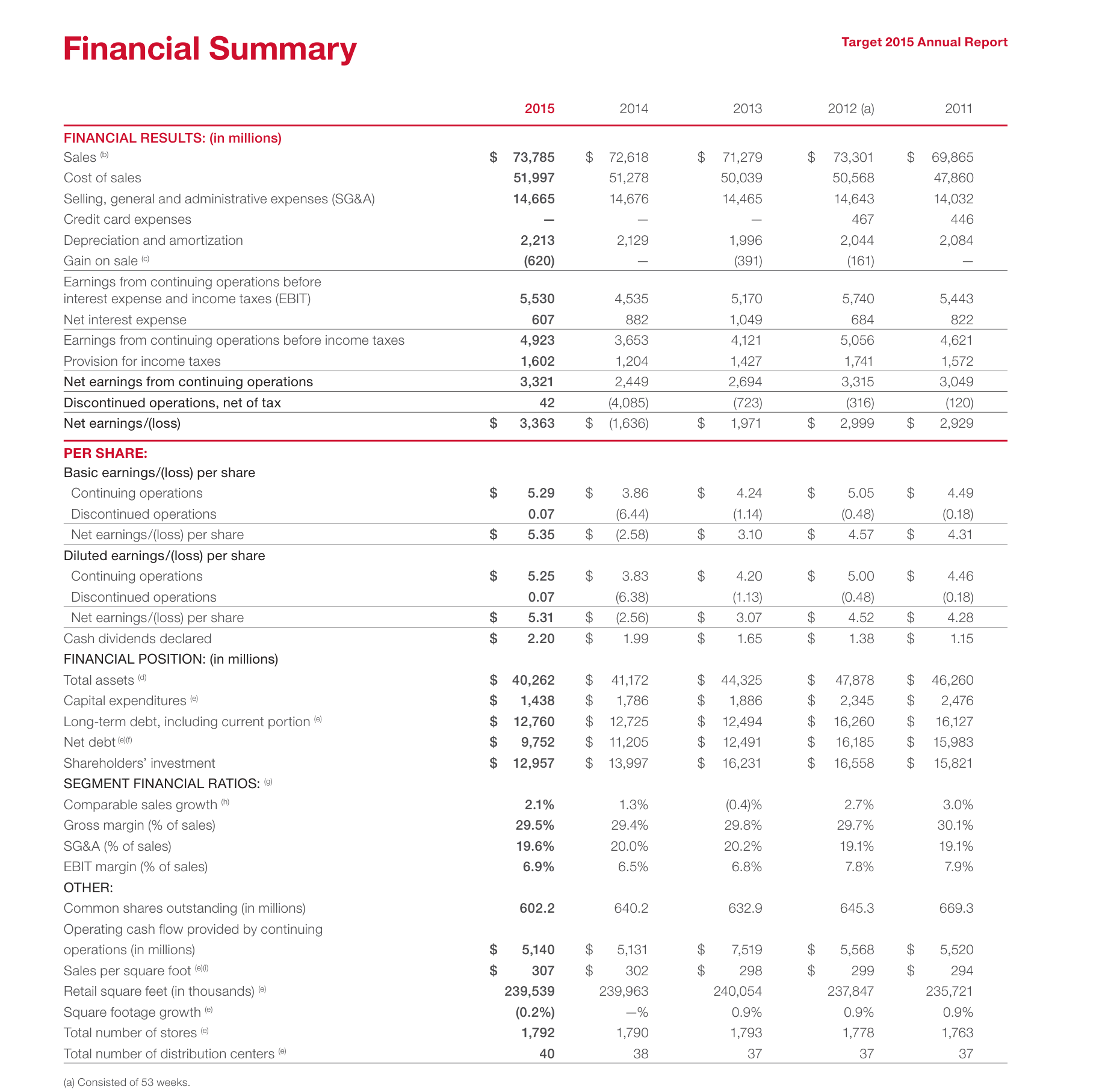
Expected behavior: Rebuilds tables with real rowspan/colspan HTML structure in markdown. It works well for many multi-level financial tables, but some dense or merged-cell tables can still break into misaligned, truncated, or collapsed rows.
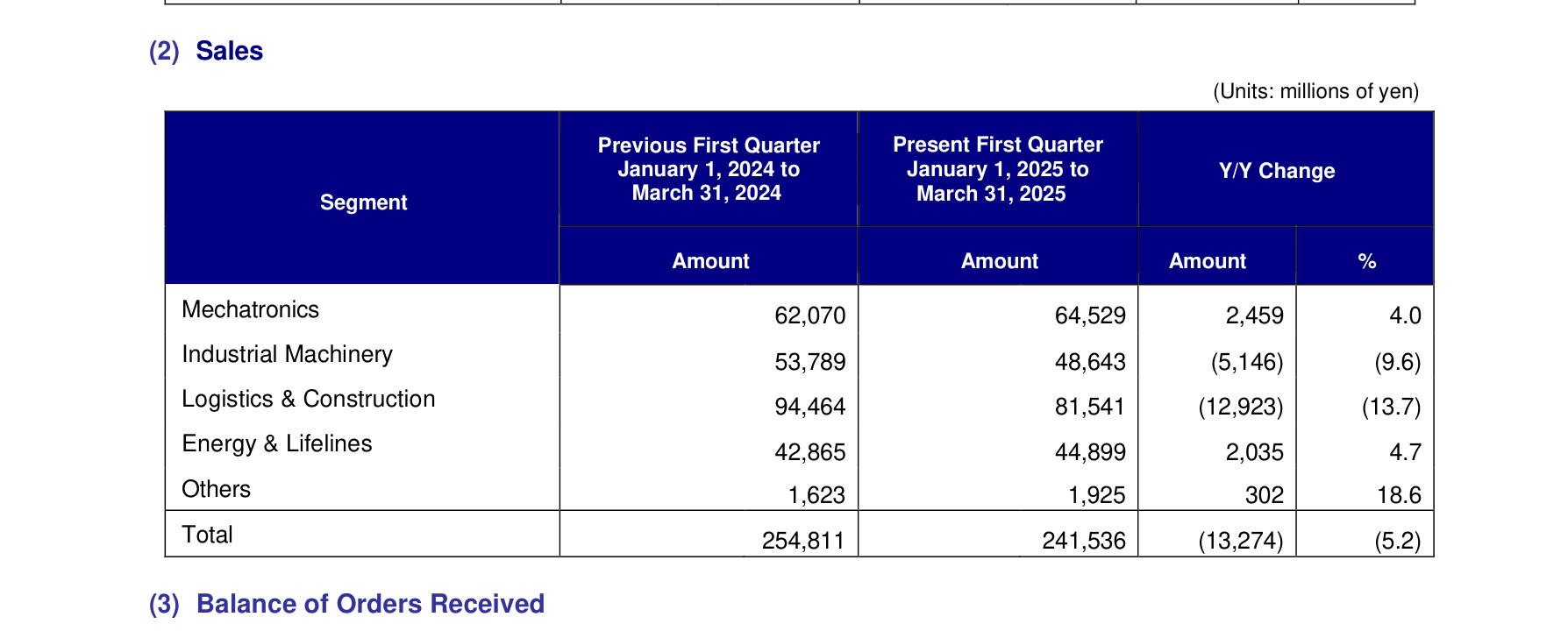
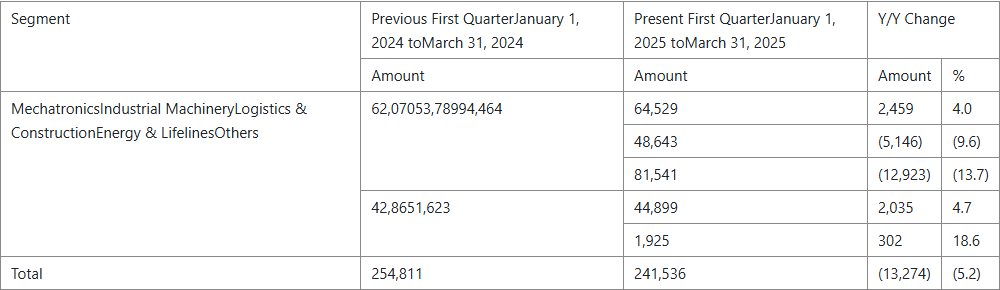
Observed output: Output artifact (Image): The quarterly business results table mostly holds together, with only minor mojibake in a couple of cells. — mineru_input2_financialpdf_business_results_table_partial_success.png
Output artifact: Output artifact (Image): The quarterly business results table mostly holds together, with only minor mojibake in a couple of cells. — mineru_input2_financialpdf_business_results_table_partial_success.png
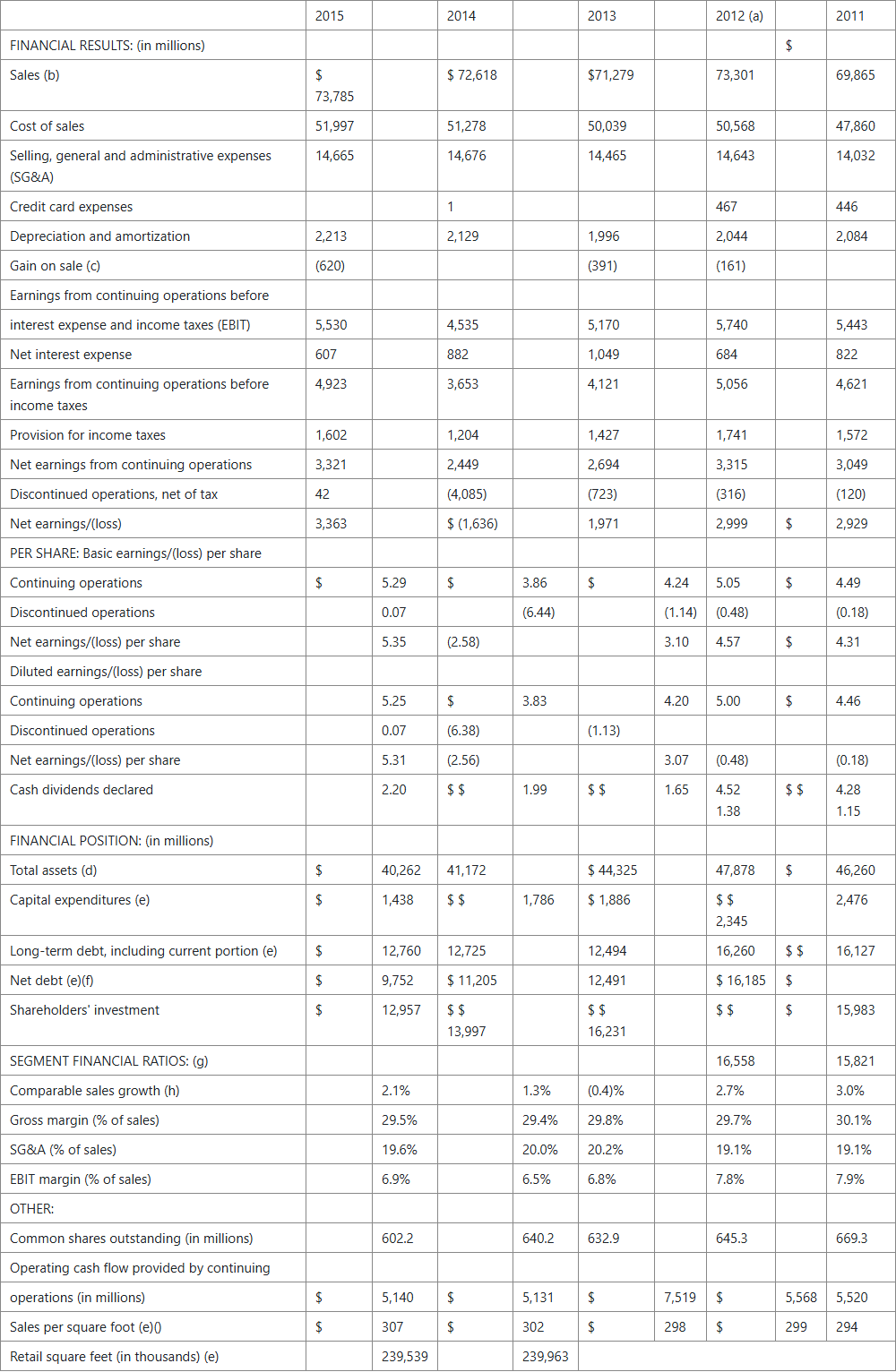
Observed output: Output artifact (Image): The financial summary table is misaligned and truncated. — mineru_input1_hybridearnings_financial_summary_table_parsed_failure.png
Output artifact: Output artifact (Image): The financial summary table is misaligned and truncated. — mineru_input1_hybridearnings_financial_summary_table_parsed_failure.png
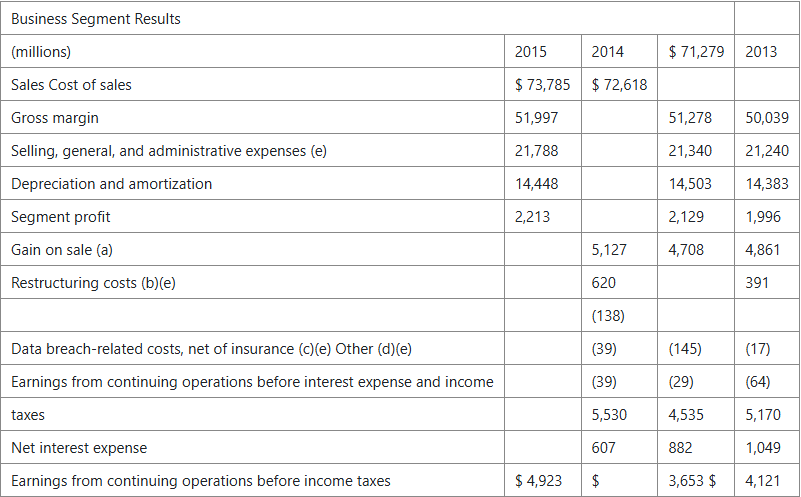
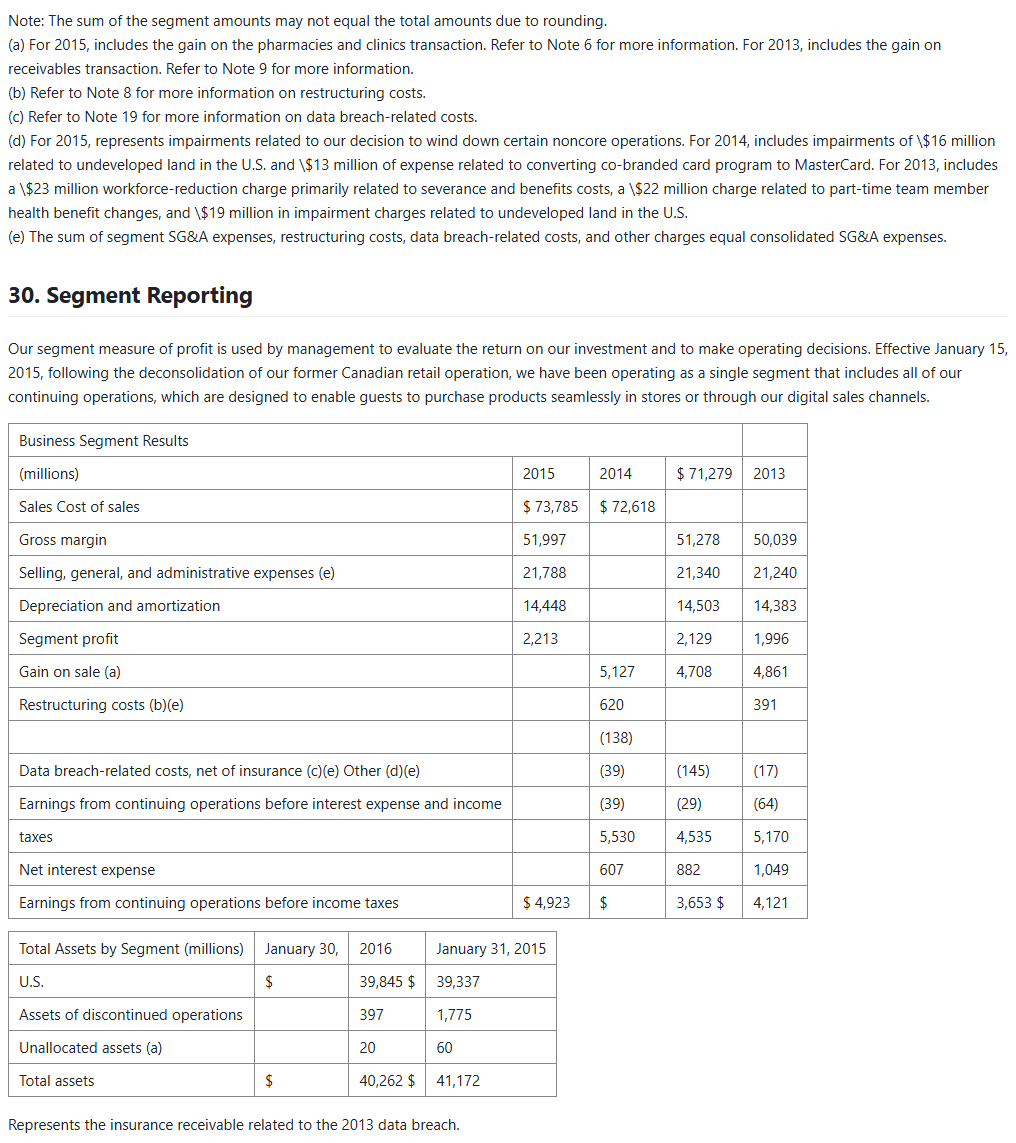
Observed output: Output artifact (Image): The segment-results table header is malformed and rows shift out of alignment. — mineru_input1_hybridearnings_segment_results_table_parsed_failure.png
Output artifact: Output artifact (Image): The segment-results table header is malformed and rows shift out of alignment. — mineru_input1_hybridearnings_segment_results_table_parsed_failure.png
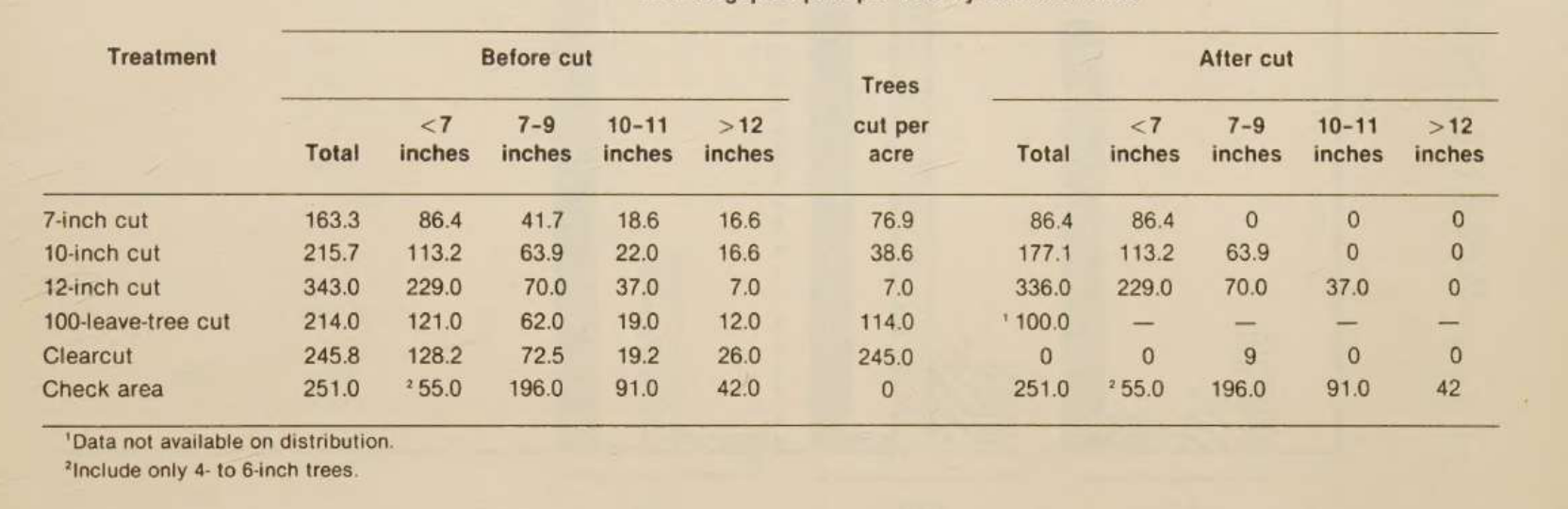
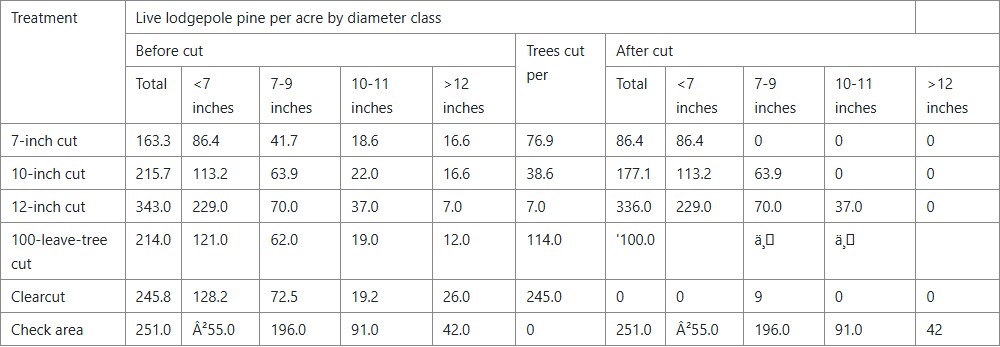
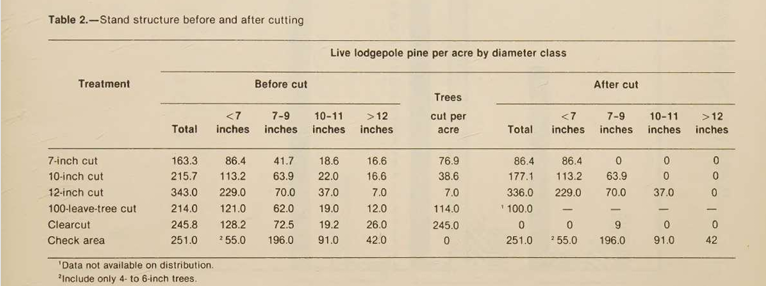
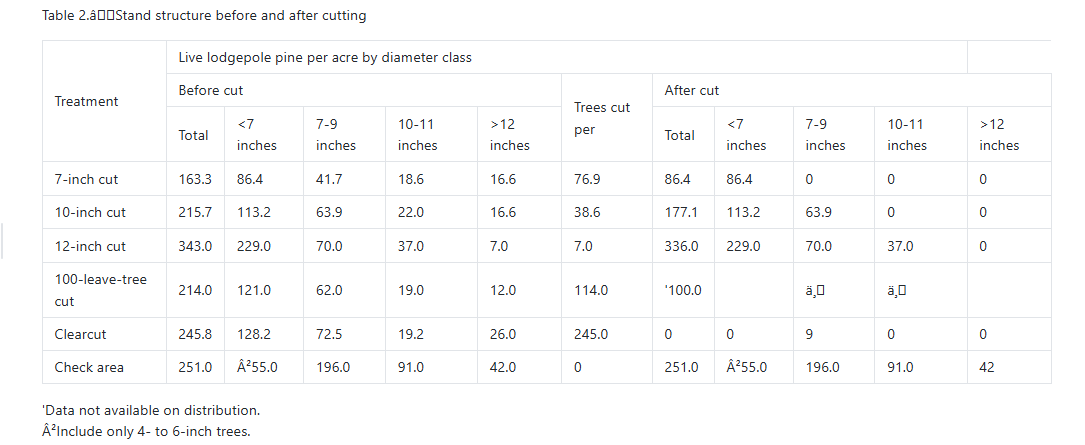
Observed output: Output artifact (Image): The scanned paper's table is structurally intact but specific cells are replaced by mojibake. — mineru_input3_scannedpaper_table_2_parsed_failure.png
Output artifact: Output artifact (Image): The scanned paper's table is structurally intact but specific cells are replaced by mojibake. — mineru_input3_scannedpaper_table_2_parsed_failure.png
What changed: Image transformed into Image
Why it matters / Conclusion: Good on simpler or well-structured tables, but brittle on the exact financial and segment tables that matter most.
Rebuilds tables with real rowspan/colspan HTML structure in markdown. It works well for many multi-level financial tables, but some dense or merged-cell tables can still break into misaligned, truncated, or collapsed rows.
image
↓→
image
The quarterly business results table mostly holds together, with only minor mojibake in a couple of cells.
image
↓→
image
The financial summary table is misaligned and truncated.
image
↓→
image
The segment-results table header is malformed and rows shift out of alignment.
image
↓→
image
The sales-by-segment table collapses multiple row labels and values into merged cells.
image
↓→
image
The scanned paper's table is structurally intact but specific cells are replaced by mojibake.
Bottom Line
Good on simpler or well-structured tables, but brittle on the exact financial and segment tables that matter most.
From our researchPDF to markdown using open source libraries
Reading-Order and Heading Preservation
Strong
▾
Test Summary
Feature tested: Reading-Order and Heading Preservation
Result: Passed — Strong
Feature tested: Reading-Order and Heading Preservation
Result: Passed
Verdict: Strong
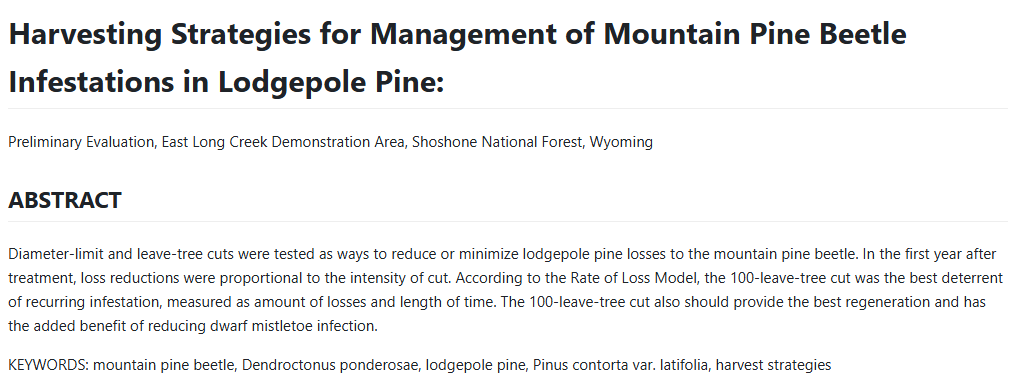
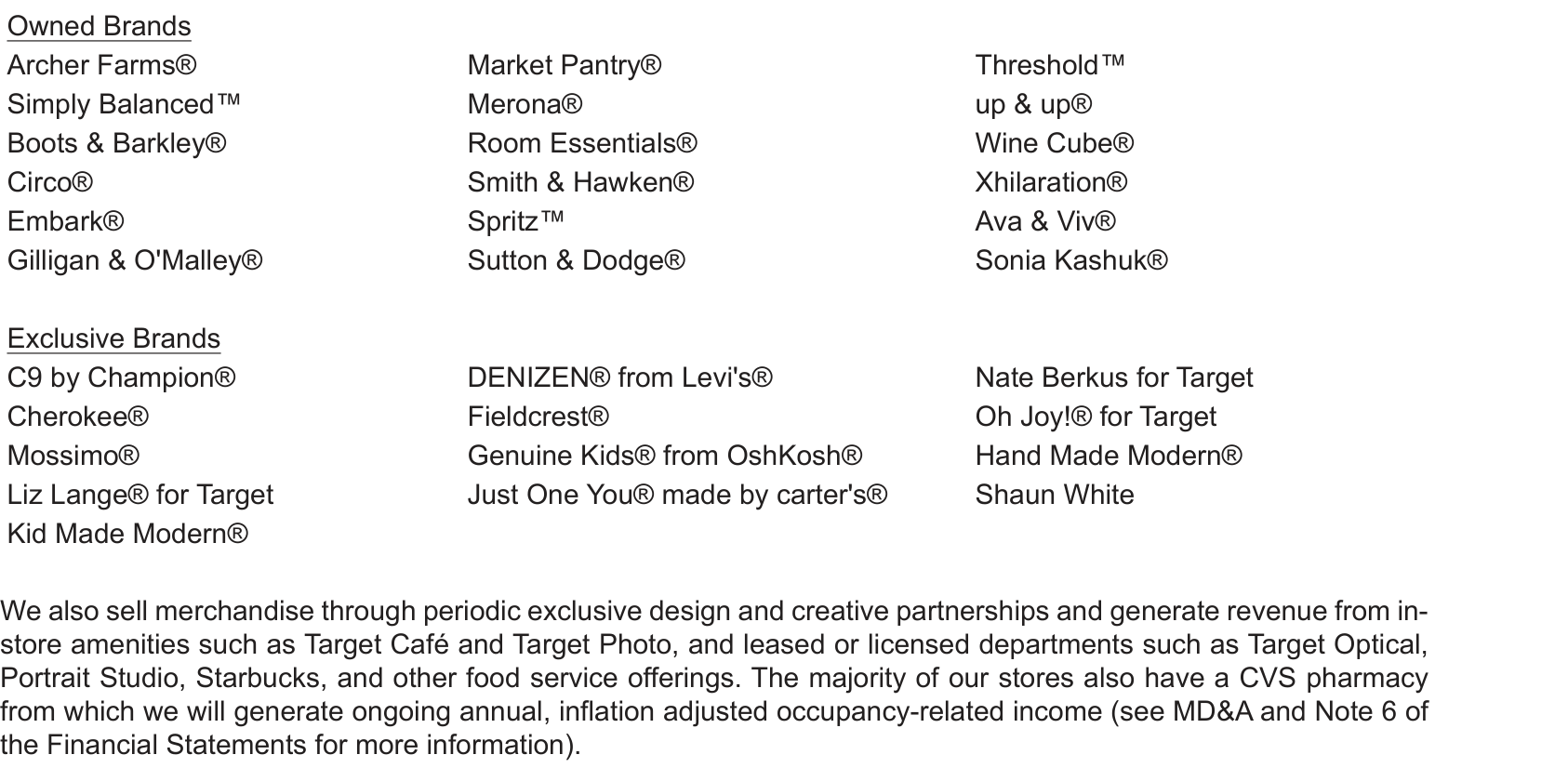
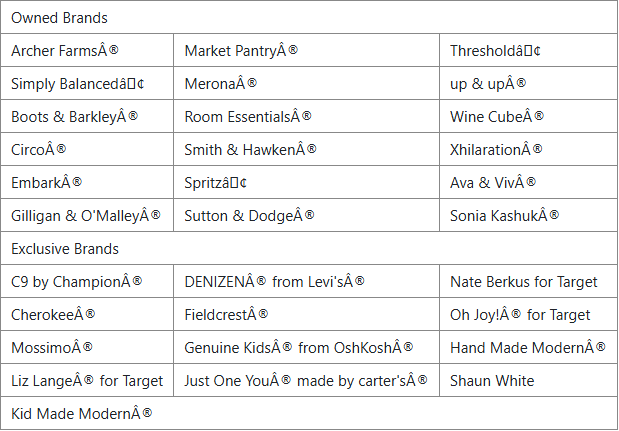
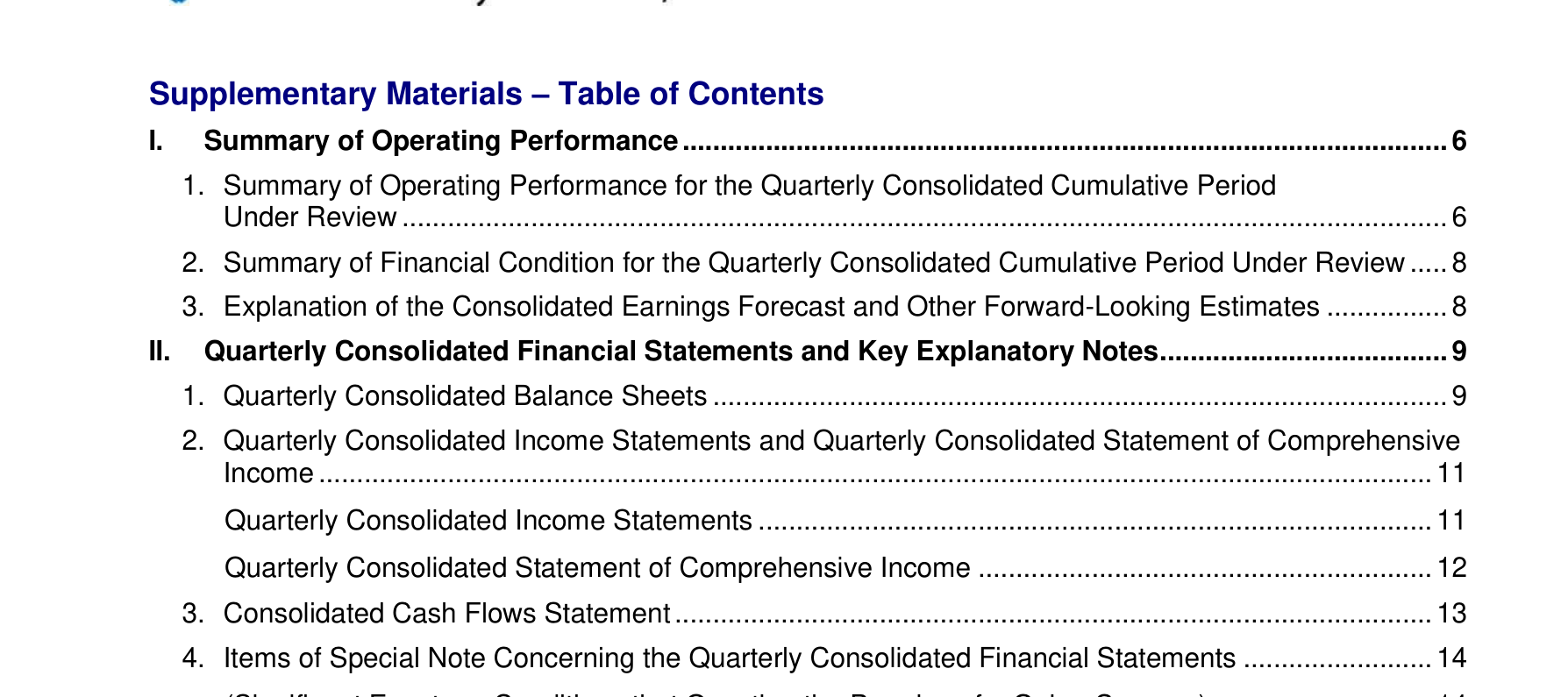
Expected behavior: Keeps section order and heading hierarchy mostly intact across mixed digital and scanned PDFs. It preserved the scanned paper's title-before-abstract order and linearized the multicolumn brand list correctly, with only occasional OCR noise in table-of-contents entries.
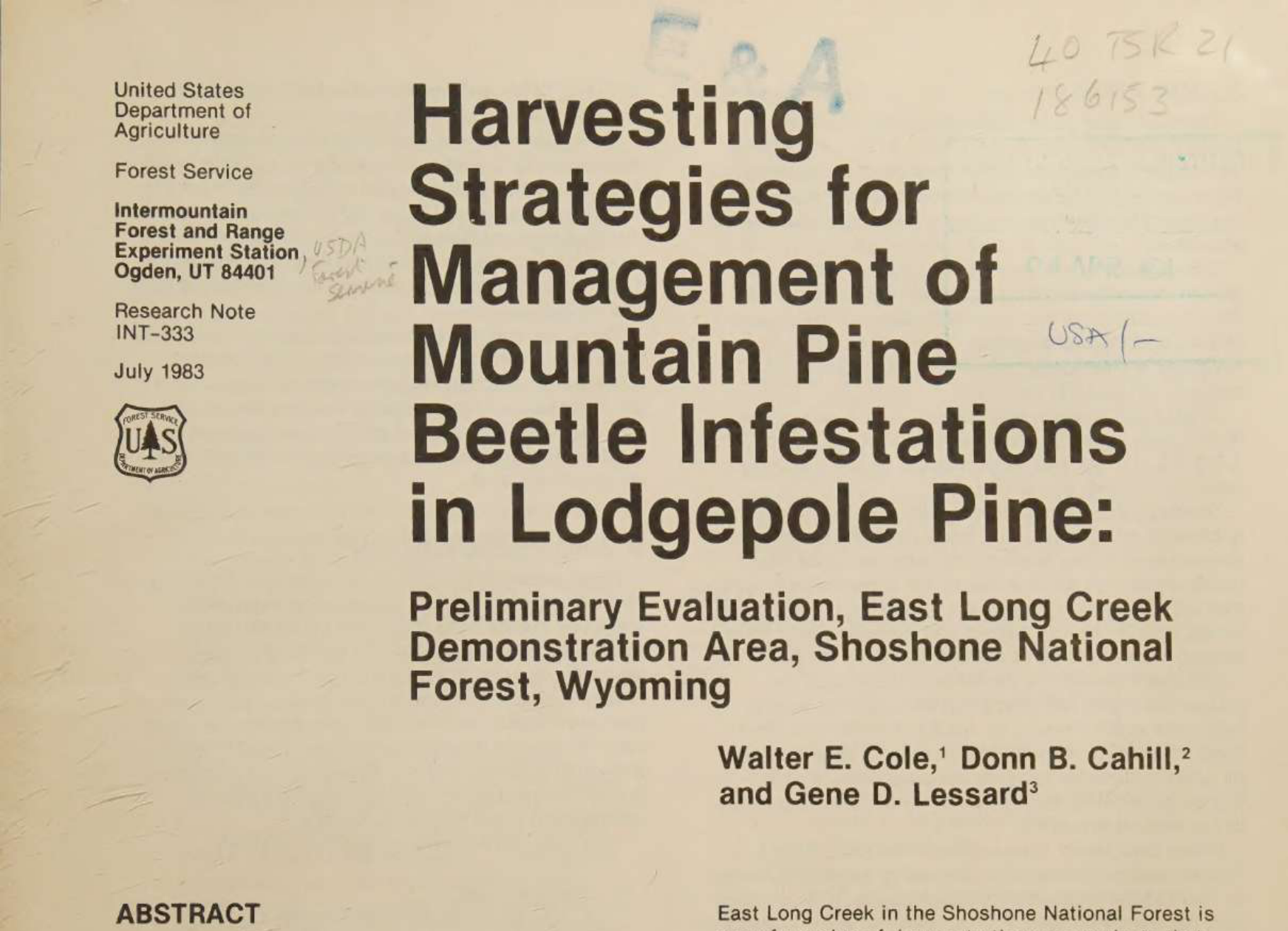
Observed output: Output artifact (Image): The title appears before the abstract, in the correct source order. — mineru_input3_scannedpaper_title_abstract_order_parsed_success.png
Output artifact: Output artifact (Image): The title appears before the abstract, in the correct source order. — mineru_input3_scannedpaper_title_abstract_order_parsed_success.png
Observed output: Output artifact (Image): The owned and exclusive brand groups were linearized in the right order. — mineru_input1_hybridearnings_brand_list_parsed_success.png
Output artifact: Output artifact (Image): The owned and exclusive brand groups were linearized in the right order. — mineru_input1_hybridearnings_brand_list_parsed_success.png
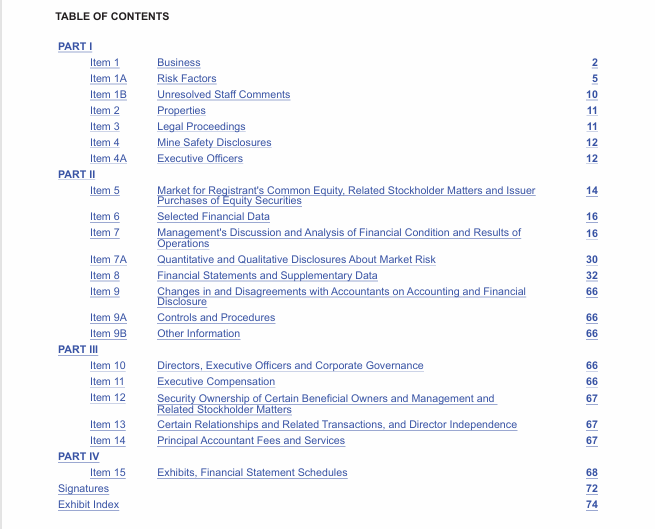
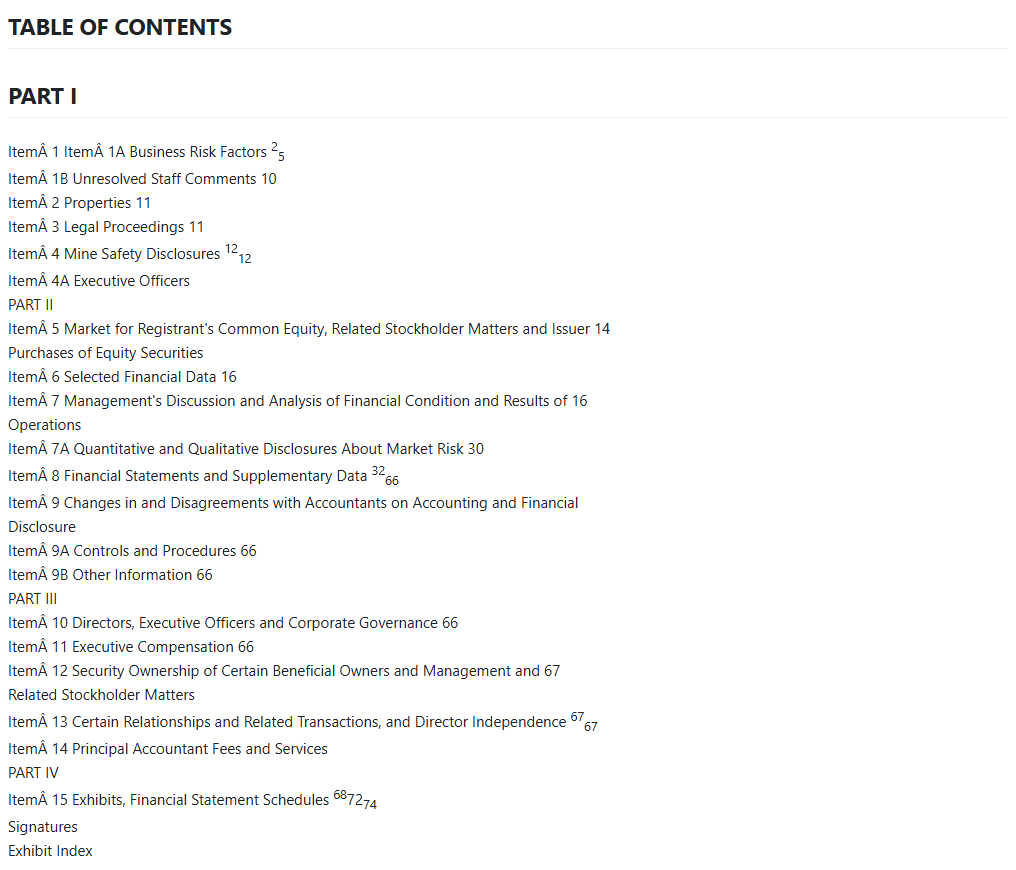
Observed output: Output artifact (Image): The annual report table of contents keeps the structure but adds mojibake to many item labels. — mineru_input1_hybridearnings_toc_parsed_failure.png
Output artifact: Output artifact (Image): The annual report table of contents keeps the structure but adds mojibake to many item labels. — mineru_input1_hybridearnings_toc_parsed_failure.png
What changed: Image transformed into Image
Why it matters / Conclusion: Hierarchy and order are usually preserved well, with the main blemish being OCR noise in some TOC entries.
Keeps section order and heading hierarchy mostly intact across mixed digital and scanned PDFs. It preserved the scanned paper's title-before-abstract order and linearized the multicolumn brand list correctly, with only occasional OCR noise in table-of-contents entries.
image
↓→
image
The title appears before the abstract, in the correct source order.
image
↓→
image
The owned and exclusive brand groups were linearized in the right order.
image
↓→
image
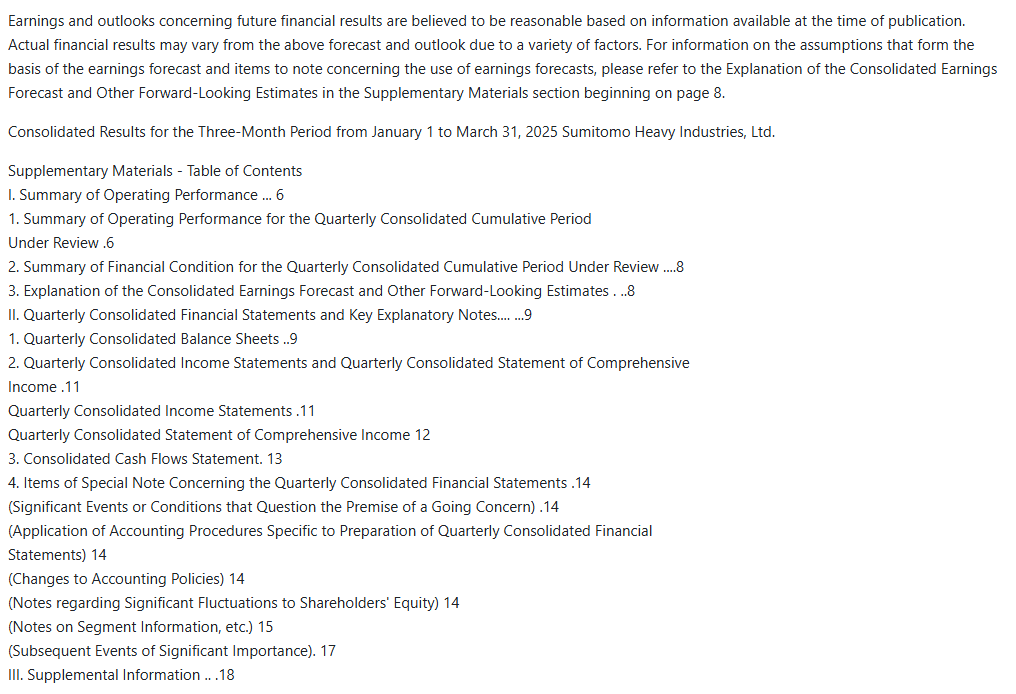
The financial report table of contents preserves section hierarchy and page numbers cleanly.
image
↓→
image
The annual report table of contents keeps the structure but adds mojibake to many item labels.
Bottom Line
Hierarchy and order are usually preserved well, with the main blemish being OCR noise in some TOC entries.
From our researchPDF to markdown using open source libraries
Caption and Footnote Association
Mixed
▾
Test Summary
Feature tested: Caption and Footnote Association
Result: Partial — Mixed
Feature tested: Caption and Footnote Association
Result: Partial
Verdict: Mixed
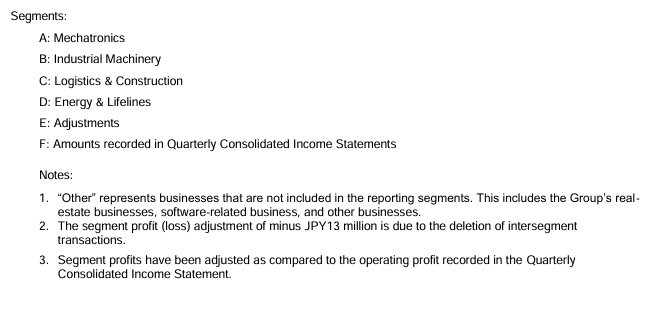
Expected behavior: Keeps captions, notes, and segment explanations adjacent to the elements they describe. The financial report's notes stay under their table, and the scanned paper's figure/table captions stay adjacent, though the hybrid earnings footnote block can be displaced ahead of its section heading.
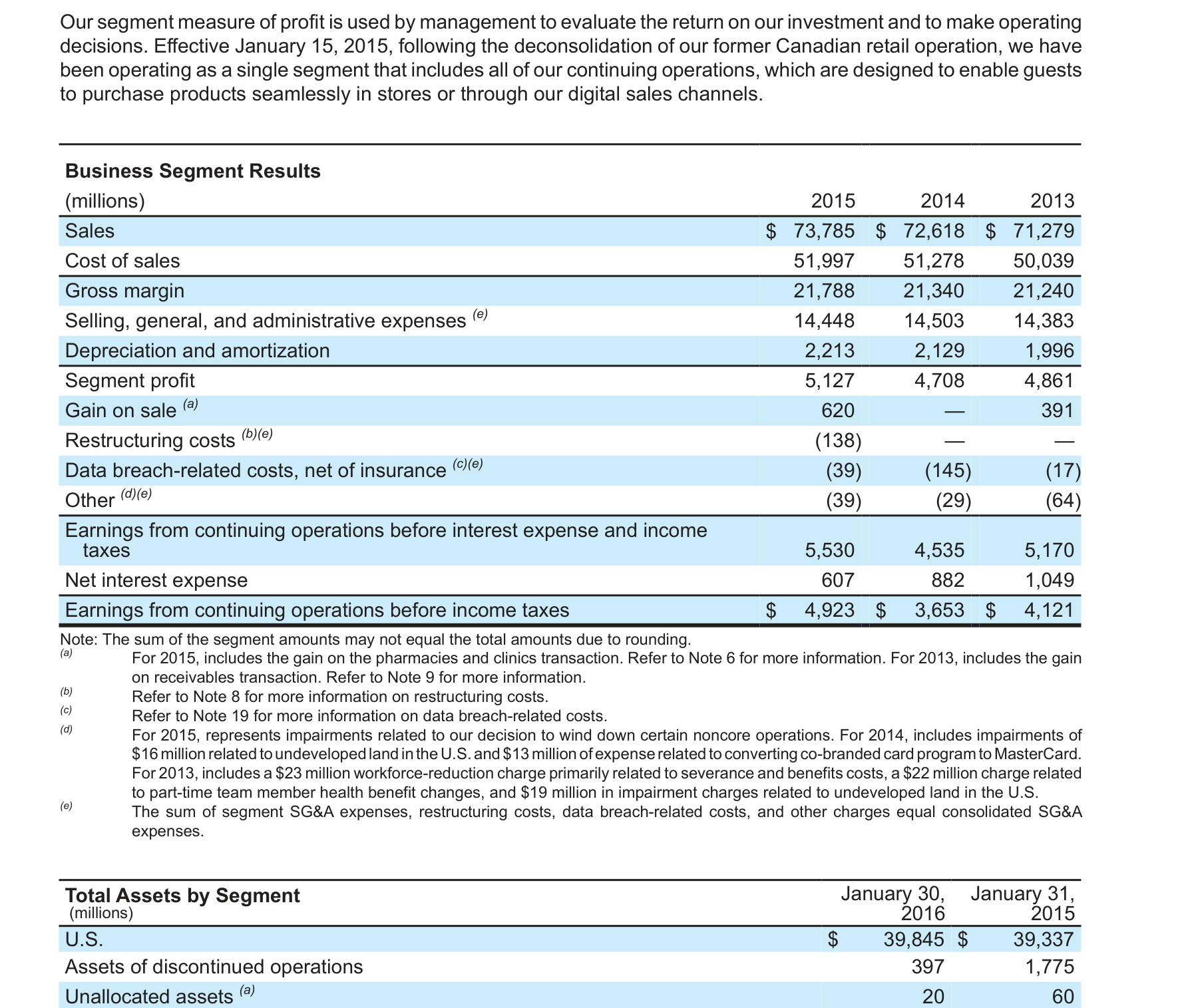
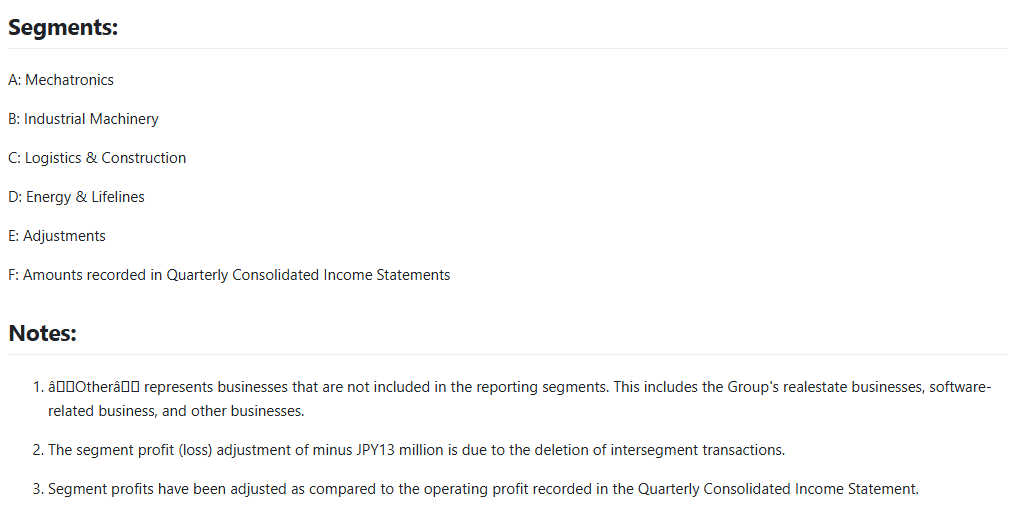
Observed output: Output artifact (Image): The segment legend and notes stay directly below the related table. — mineru_input2_financialpdf_segment_notes_parsed_success.png
Output artifact: Output artifact (Image): The segment legend and notes stay directly below the related table. — mineru_input2_financialpdf_segment_notes_parsed_success.png
Observed output: Output artifact (Image): The segment footnotes are displaced ahead of the section heading instead of staying under the table. — mineru_input1_hybridearnings_segment_footnote_parsed_failure.png
Output artifact: Output artifact (Image): The segment footnotes are displaced ahead of the section heading instead of staying under the table. — mineru_input1_hybridearnings_segment_footnote_parsed_failure.png
What changed: Image transformed into Image
Why it matters / Conclusion: Association is usually correct, but the hybrid earnings footnote displacement shows it can misplace notes on complex pages.
Keeps captions, notes, and segment explanations adjacent to the elements they describe. The financial report's notes stay under their table, and the scanned paper's figure/table captions stay adjacent, though the hybrid earnings footnote block can be displaced ahead of its section heading.
image
↓→
image
The segment legend and notes stay directly below the related table.
image
↓→
image
The table caption stays immediately above the table.
image
↓→
image
The segment footnotes are displaced ahead of the section heading instead of staying under the table.
Bottom Line
Association is usually correct, but the hybrid earnings footnote displacement shows it can misplace notes on complex pages.
From our researchPDF to markdown using open source libraries
Form Checkbox State Extraction
Strong
▾
Test Summary
Feature tested: Form Checkbox State Extraction
Result: Passed — Strong
Feature tested: Form Checkbox State Extraction
Result: Passed
Verdict: Strong
Expected behavior: Recognizes simple SEC filing checkbox states on the cover page and preserves them as x/o markers. On the tested filing, it kept the checked annual-report option and the unchecked transition-report option.
Observed output: Output artifact (Image): The checked annual-report box and unchecked transition-report box are both preserved as the correct states. — mineru_input1_hybridearnings_form_checkbox_parsed_success.png
Output artifact: Output artifact (Image): The checked annual-report box and unchecked transition-report box are both preserved as the correct states. — mineru_input1_hybridearnings_form_checkbox_parsed_success.png
What changed: Image transformed into Image
Why it matters / Conclusion: Works for simple filing checkboxes on this test.
Recognizes simple SEC filing checkbox states on the cover page and preserves them as x/o markers. On the tested filing, it kept the checked annual-report option and the unchecked transition-report option.
image
↓→
image
The checked annual-report box and unchecked transition-report box are both preserved as the correct states.
Bottom Line
Works for simple filing checkboxes on this test.
From our researchPDF to markdown using open source libraries
Free and self-hosted
Open Source
$0
Apache-2.0-based MinerU Open Source License
✓ Use This If
●You need charts, figures, logos, or photos preserved as real embedded images in markdown.
●You want open-source PDF-to-markdown with decent heading order and OCR on scanned pages.
●You can tolerate slower processing in exchange for local/self-hosted control and image retention.
✕ Skip This If
●You need punctuation-perfect OCR with no mojibake in em-dashes, quotes, or apostrophes.
●You need every complex table to preserve row and column boundaries without any structural defects.
●You need fast turnaround on long, visually dense PDFs.
developer-toolspdf-toolstextOther
Yes. In this research, MinerU retained every chart, figure, photo, logo, and seal as a real embedded image across all three test PDFs.
Mixed. Some tables were reconstructed well with real HTML rowspan/colspan structure, but others were misaligned, truncated, or collapsed into merged cells, especially the hybrid earnings summary and the sales-by-segment table.
Mostly accurate, but recurring mojibake affects punctuation such as em-dashes, curly quotes, apostrophes, and some isolated characters. The scanned research paper text was otherwise very clean.
Generally yes. The scanned paper kept title-before-abstract order, the financial report TOC preserved section hierarchy, and the multicolumn brand list was linearized correctly. The hybrid earnings TOC had mojibake in many item labels, though the structure was still recognizable.
Usually well. Table notes and figure captions stayed adjacent to their content in the financial report and scanned paper, but one hybrid-earnings footnote block was displaced ahead of its own section heading.
Yes. The report identifies it as open source under an Apache-2.0-based MinerU Open Source License, with a $0 price.
Banner Preview
How the embed badge will look on your site
Embed HTML
Copy this code to your website source
<a target="_blank" href="https://aidemos.com/tools/mineru?utm_source=mineru_embed" style="width: 250px; height: 80px; border-radius:4px;" width="250" height="80">
<img src="https://aidemos-website-images.s3.amazonaws.com/featured.png" alt="MinerU | Featured on AI Demos" style="width: 250px; height: 80px; border-radius:4px;" width="250" height="80">
</a>
Quick Integration Guide
1Copy the HTML code block above.
2Paste it into your site's HTML or CMS editor.
3Banner appears instantly on your page.
4Links back to your tool profile here.
Similar Tools
Similar Tools
Discover more AI tools like MinerU to enhance your workflow.
⚡ Built by FutureSmart AI — the team behind AI Demos
Need a custom AI solution for this use case?
If you are looking to build a custom PDF parsing, document conversion, or structured data extraction system for your business or internal workflow, email us at contact@futuresmart.ai.
Found something inaccurate or missing? We try to keep our AI research accurate and useful. If you found outdated information, an issue, or have a suggestion, email us at collaborate@aidemos.com.