Docling is a strong self-hosted PDF-to-markdown parser when your priority is readable text, preserved headings, and solid reconstruction of standard tables. It handled long documents and scanned pages well, but it consistently replaced charts, figures, logos, signatures, and other visual assets with placeholders, and its hardest scan-heavy tables still broke down.
Demo walkthrough of Docling converting a hybrid earnings report to markdown.
In-Depth Review
Our detailed analysis of Docling — features, performance, and real-world testing.
AD
AI Demos Team
Expert Reviewer
Verified Review
Feature-by-Feature Breakdown
Text Extraction and OCR
Strong
▾
Test Summary
Feature tested: Text Extraction and OCR
Result: Passed — Strong
Feature tested: Text Extraction and OCR
Result: Passed
Verdict: Strong
Expected behavior: Docling extracts native PDF text and OCR text from scanned pages with high fidelity overall. In the hybrid earnings report, the table-heavy financial report, and the scanned research paper, the text stayed readable end to end, with only minor spacing/merging noise in tight crops.
Observed output: Output artifact (Text/code file): Preserved the report text and section content with only minor spacing issues inside some table cells. — docling_input1_hybridearnings_output.md
Output artifact: Output artifact (Text/code file): Preserved the report text and section content with only minor spacing issues inside some table cells. — docling_input1_hybridearnings_output.md
What changed: PDF document transformed into Text/code file
Test case: PDF document → Text/code file
Input type: PDF document
Input used: Input artifact (PDF document): Table-heavy financial report with narrative disclosures and quarterly statements. — input2_financialpdf.pdf
Observed output: Output artifact (Text/code file): Preserved the report text cleanly across all 18 pages, including the introductory disclaimer and operating-performance narrative. — docling_input2_financialpdf_output.md
Input artifact: Input artifact (PDF document): Table-heavy financial report with narrative disclosures and quarterly statements. — input2_financialpdf.pdf
Output artifact: Output artifact (Text/code file): Preserved the report text cleanly across all 18 pages, including the introductory disclaimer and operating-performance narrative. — docling_input2_financialpdf_output.md
What changed: PDF document transformed into Text/code file
Test case: Image → Image
Input type: Image
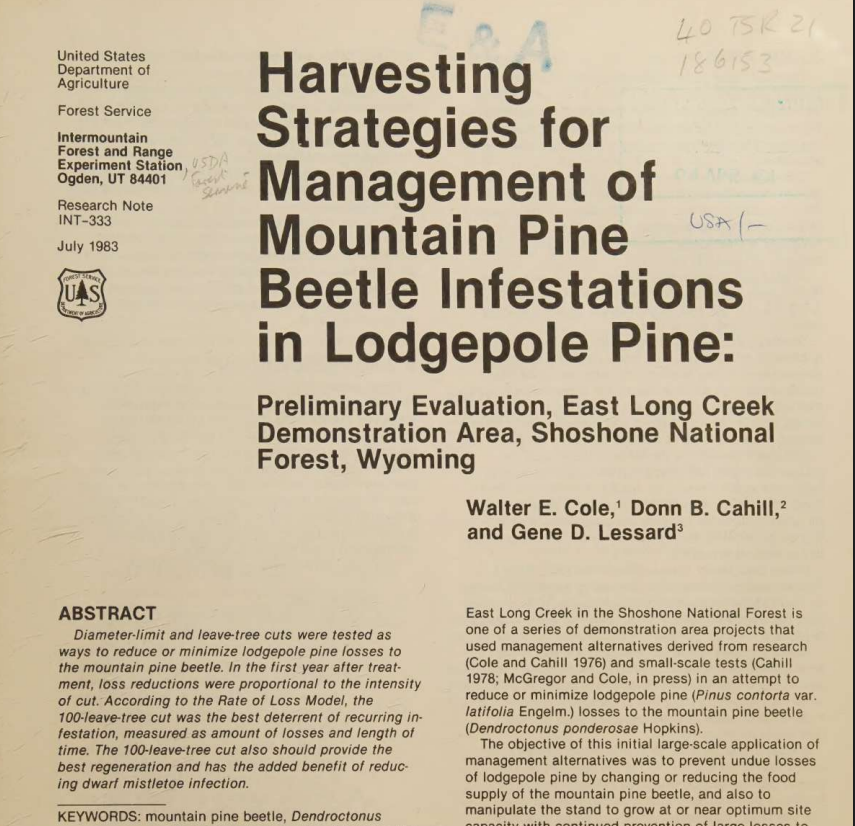
Input used: Input artifact (Image): Scanned first-page crop showing the title and abstract area of the mountain pine beetle paper. — docling_input3_scannedpaper_page_1.png
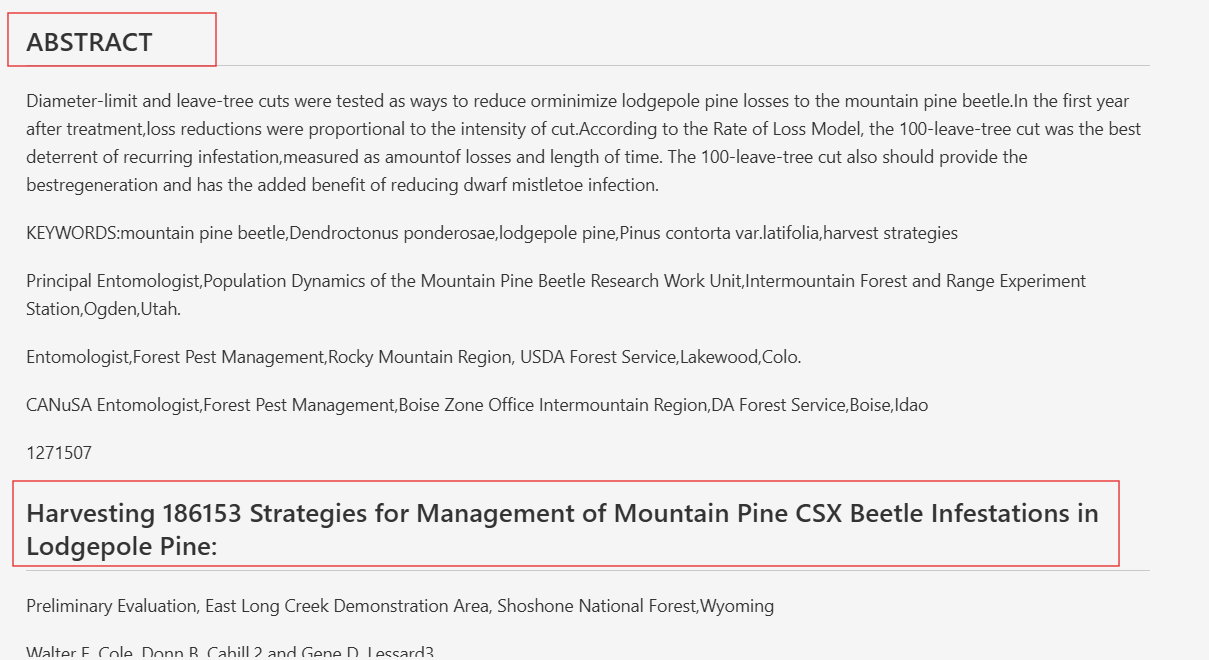
Observed output: Output artifact (Image): OCR captured the page text, but the opening page introduced noise such as merged words and library-stamp artifacts, including the injected numbers/letters in the title area. — docling_input3_scannedpaper_page_1_parsed_failure.png
Input artifact: Input artifact (Image): Scanned first-page crop showing the title and abstract area of the mountain pine beetle paper. — docling_input3_scannedpaper_page_1.png
Output artifact: Output artifact (Image): OCR captured the page text, but the opening page introduced noise such as merged words and library-stamp artifacts, including the injected numbers/letters in the title area. — docling_input3_scannedpaper_page_1_parsed_failure.png
What changed: Image transformed into Image
Why it matters / Conclusion: Strong OCR and text preservation across all three documents, with only small scan-related noise rather than silent text loss.
Docling extracts native PDF text and OCR text from scanned pages with high fidelity overall. In the hybrid earnings report, the table-heavy financial report, and the scanned research paper, the text stayed readable end to end, with only minor spacing/merging noise in tight crops.
INPUT
input1_hybridearnings.pdf
Hybrid earnings report combining native text, tables, charts, and a scanned signature page.
↓→
OUTPUT
docling_input1_hybridearnings_output.md
Loading file...
Preserved the report text and section content with only minor spacing issues inside some table cells.
INPUT
input2_financialpdf.pdf
Table-heavy financial report with narrative disclosures and quarterly statements.
↓→
OUTPUT
docling_input2_financialpdf_output.md
Loading file...
Preserved the report text cleanly across all 18 pages, including the introductory disclaimer and operating-performance narrative.
INPUT
Scanned first-page crop showing the title and abstract area of the mountain pine beetle paper.
↓→
OUTPUT
OCR captured the page text, but the opening page introduced noise such as merged words and library-stamp artifacts, including the injected numbers/letters in the title area.
Bottom Line
Strong OCR and text preservation across all three documents, with only small scan-related noise rather than silent text loss.
Table Reconstruction
Mixed but generally strong
▾
Test Summary
Feature tested: Table Reconstruction
Result: Passed — Mixed but generally strong
Feature tested: Table Reconstruction
Result: Passed
Verdict: Mixed but generally strong
Expected behavior: Docling reconstructs standard tables well, including multi-column financial layouts and clean balance-sheet structures. It also preserves many smaller scanned tables, though multi-level headers can flatten or duplicate and dense scan-heavy tables can become garbled.
Test case: Image → Image
Input type: Image
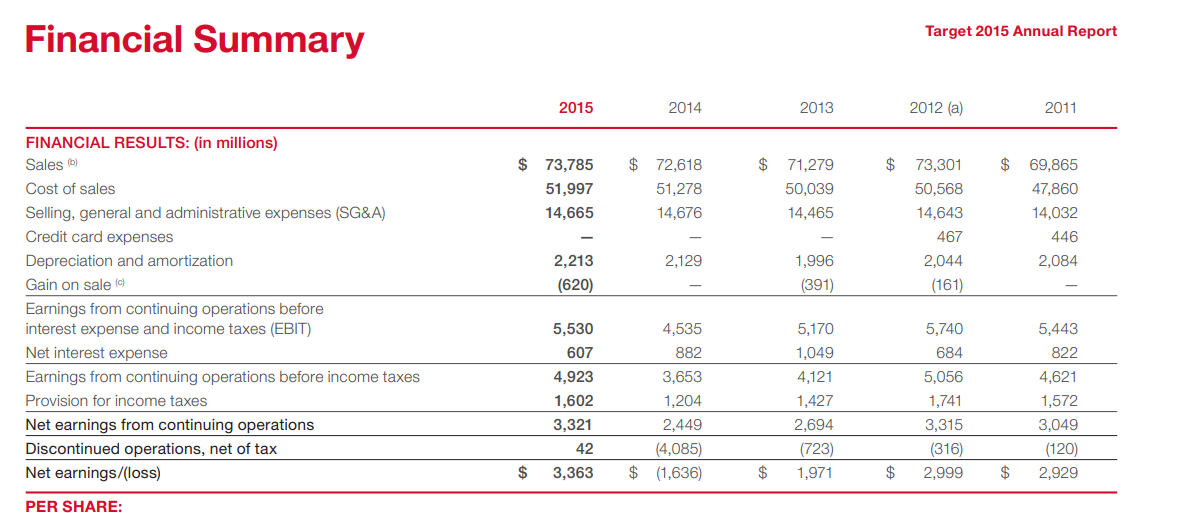
Input used: Input artifact (Image): Financial Summary table from the hybrid earnings report. — docling_input1_hybridearnings_financial_table.png
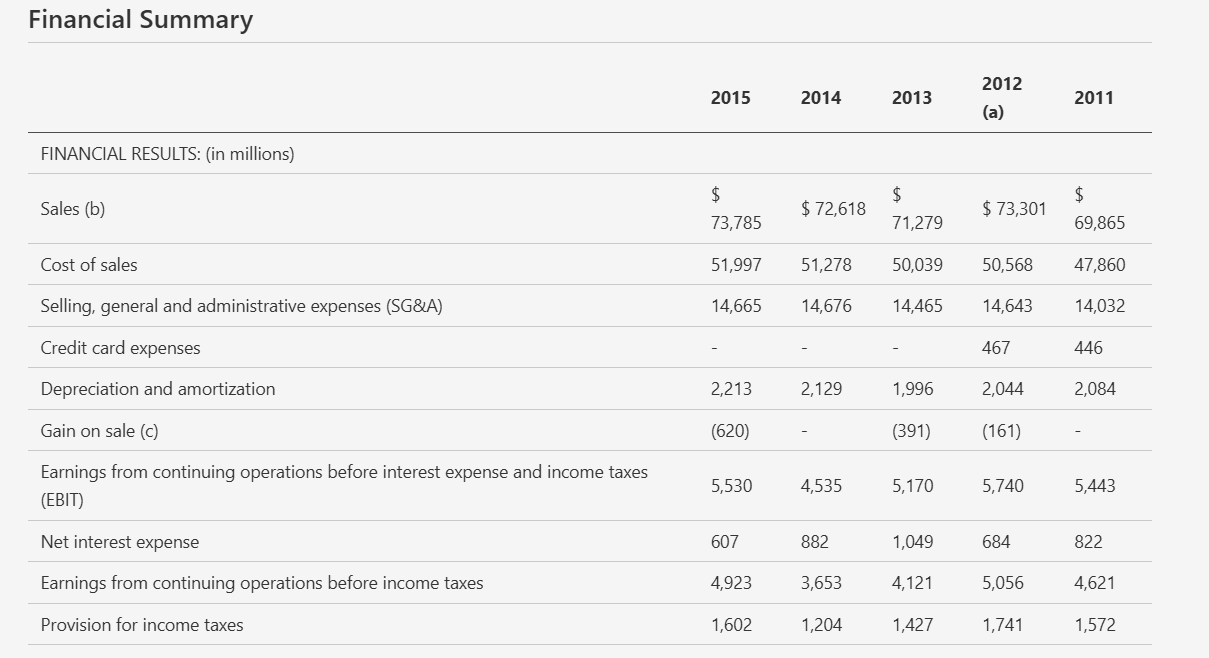
Observed output: Output artifact (Image): Reconstructed the yearly financial summary as a clean table with values aligned across 2015 through 2011. — docling_input1_hybridearnings_financial_table_parsed_success.png
Input artifact: Input artifact (Image): Financial Summary table from the hybrid earnings report. — docling_input1_hybridearnings_financial_table.png
Output artifact: Output artifact (Image): Reconstructed the yearly financial summary as a clean table with values aligned across 2015 through 2011. — docling_input1_hybridearnings_financial_table_parsed_success.png
What changed: Image transformed into Image
Test case: Image → Image
Input type: Image
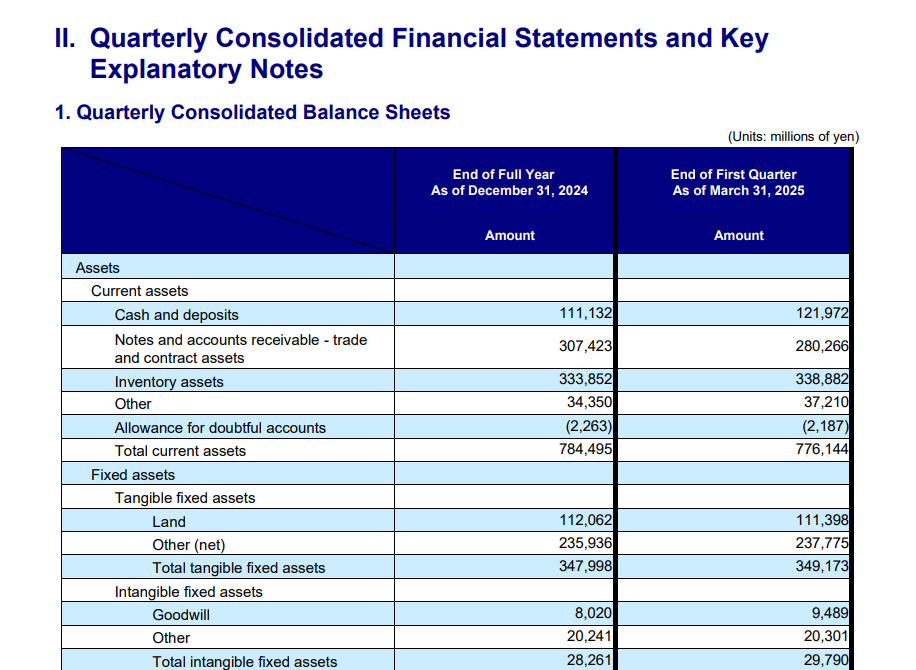
Input used: Input artifact (Image): Quarterly consolidated balance sheet table from the financial report. — docling_input2_financialpdf_quarterly_table.png
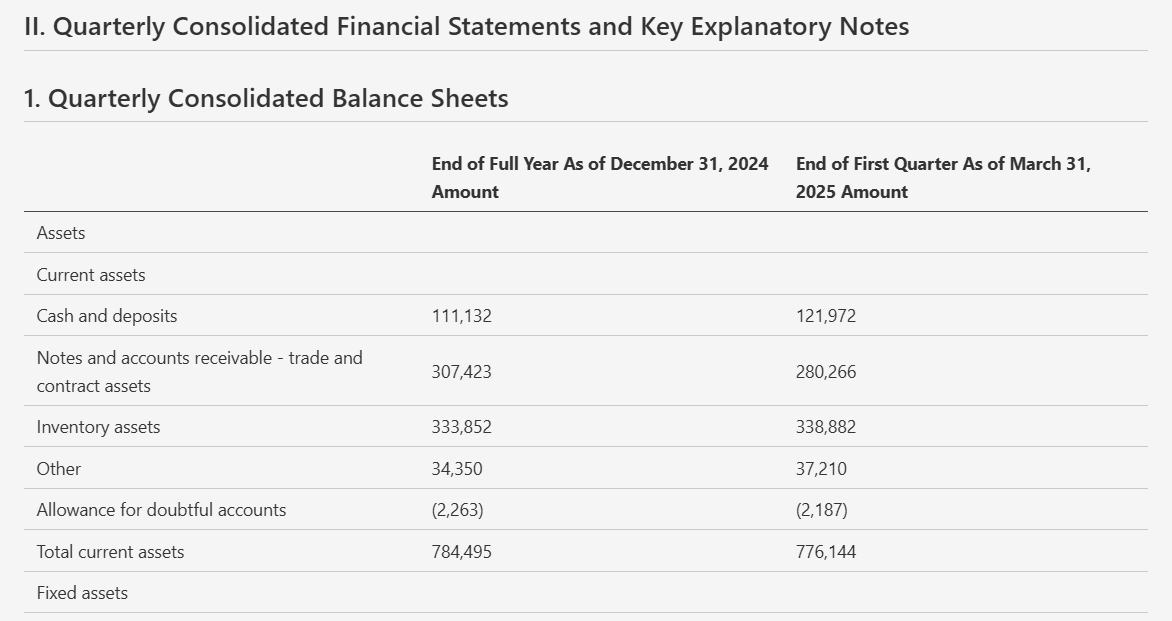
Observed output: Output artifact (Image): Preserved the balance-sheet rows and the two reporting dates in a readable table layout. — docling_input2_financialpdf_quarterly_table_parsed_success.png
Input artifact: Input artifact (Image): Quarterly consolidated balance sheet table from the financial report. — docling_input2_financialpdf_quarterly_table.png
Output artifact: Output artifact (Image): Preserved the balance-sheet rows and the two reporting dates in a readable table layout. — docling_input2_financialpdf_quarterly_table_parsed_success.png
What changed: Image transformed into Image
Test case: Image → Image
Input type: Image
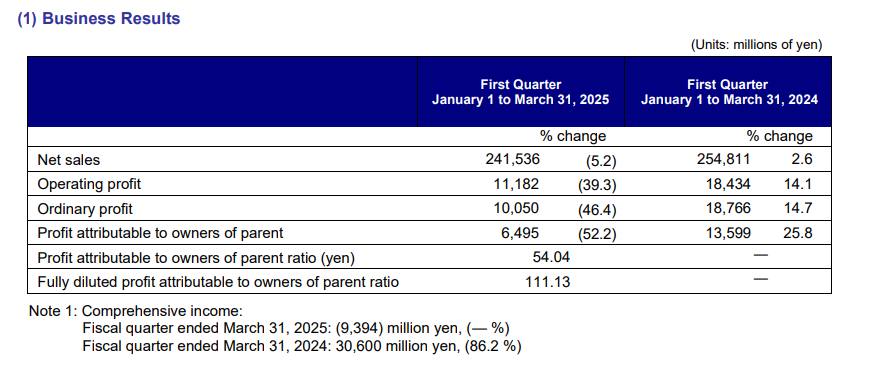
Input used: Input artifact (Image): Business Results table comparing first quarter FY2025 versus FY2024. — docling_input2_financialpdf_business_results_table.png
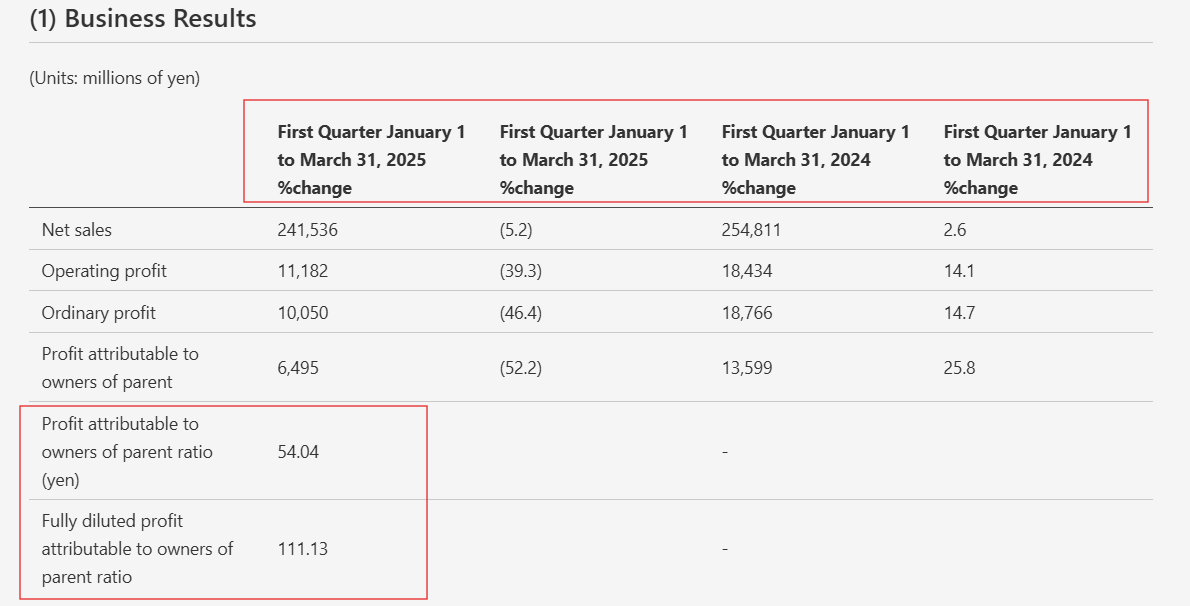
Observed output: Output artifact (Image): The table stayed recognizable, but the multi-level headers were duplicated and misaligned, which made column mapping confusing. — docling_input2_financialpdf_business_results_table_parsed_failure.png
Input artifact: Input artifact (Image): Business Results table comparing first quarter FY2025 versus FY2024. — docling_input2_financialpdf_business_results_table.png
Output artifact: Output artifact (Image): The table stayed recognizable, but the multi-level headers were duplicated and misaligned, which made column mapping confusing. — docling_input2_financialpdf_business_results_table_parsed_failure.png
What changed: Image transformed into Image
Test case: Image → Image
Input type: Image
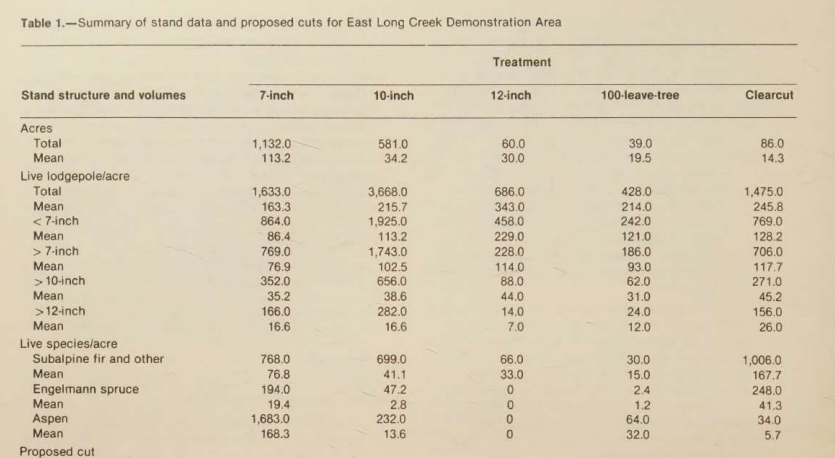
Input used: Input artifact (Image): Scanned Table 1 with stand data and proposed cuts. — docling_input3_scannedpaper_table_1.png
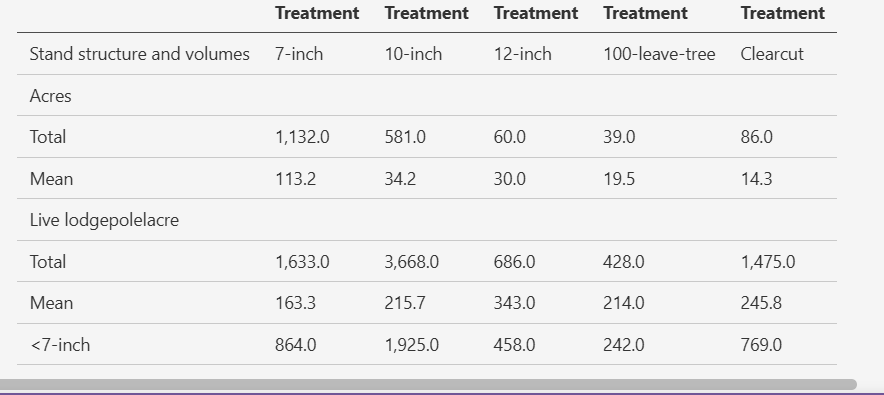
Observed output: Output artifact (Image): Extracted the upper portion of the table with some values preserved, but the structure was only partially recovered. — docling_input3_scannedpaper_table_1_parsed_partial_success.png
Input artifact: Input artifact (Image): Scanned Table 1 with stand data and proposed cuts. — docling_input3_scannedpaper_table_1.png
Output artifact: Output artifact (Image): Extracted the upper portion of the table with some values preserved, but the structure was only partially recovered. — docling_input3_scannedpaper_table_1_parsed_partial_success.png
What changed: Image transformed into Image
Test case: Image → Image
Input type: Image
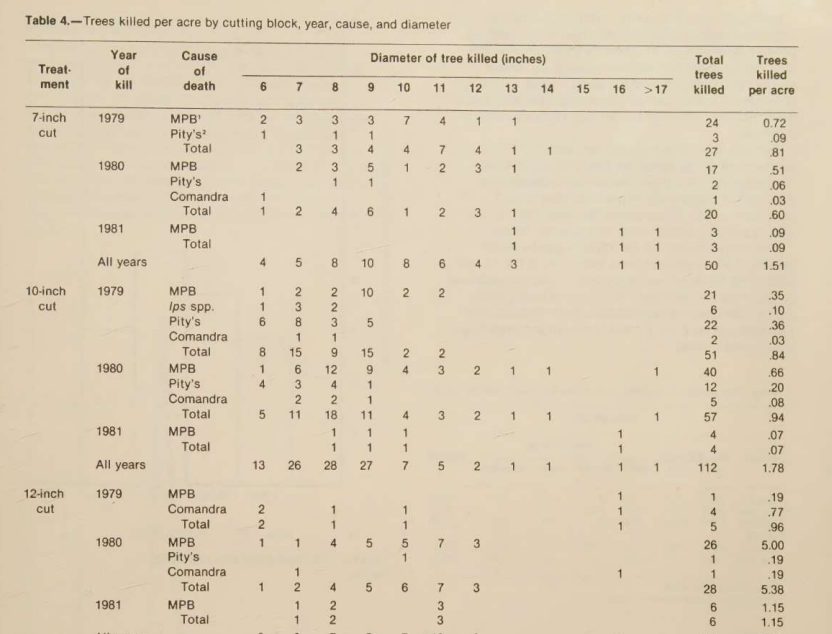
Input used: Input artifact (Image): Scanned Table 4 with trees killed per acre by cutting block, year, cause, and diameter. — docling_input3_scannedpaper_table_4.png
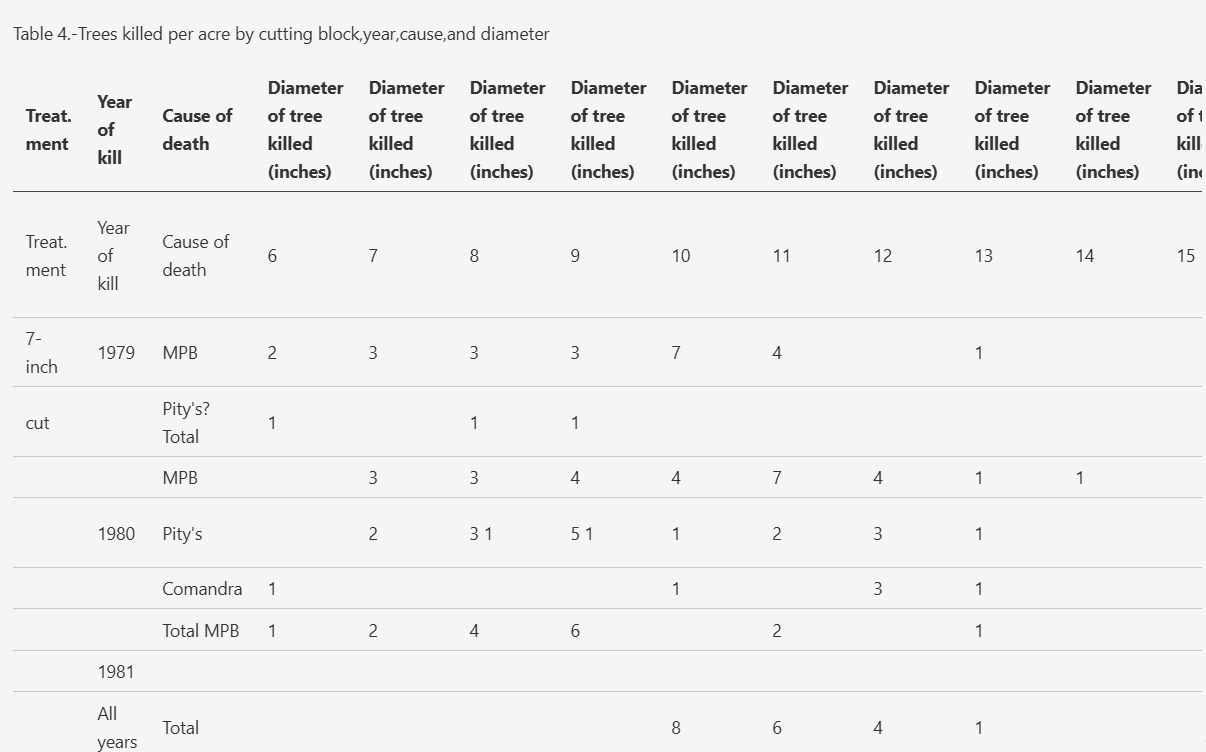
Observed output: Output artifact (Image): The table structure broke badly: headers expanded awkwardly and the row/column layout became unusable. — docling_input3_scannedpaper_table_4_parsed_failure.png
Input artifact: Input artifact (Image): Scanned Table 4 with trees killed per acre by cutting block, year, cause, and diameter. — docling_input3_scannedpaper_table_4.png
Output artifact: Output artifact (Image): The table structure broke badly: headers expanded awkwardly and the row/column layout became unusable. — docling_input3_scannedpaper_table_4_parsed_failure.png
What changed: Image transformed into Image
Why it matters / Conclusion: Excellent on standard tables, but header flattening and scan-heavy complexity can still break the extraction.
Docling reconstructs standard tables well, including multi-column financial layouts and clean balance-sheet structures. It also preserves many smaller scanned tables, though multi-level headers can flatten or duplicate and dense scan-heavy tables can become garbled.
INPUT
Financial Summary table from the hybrid earnings report.
↓→
OUTPUT
Reconstructed the yearly financial summary as a clean table with values aligned across 2015 through 2011.
INPUT
Quarterly consolidated balance sheet table from the financial report.
↓→
OUTPUT
Preserved the balance-sheet rows and the two reporting dates in a readable table layout.
INPUT
Business Results table comparing first quarter FY2025 versus FY2024.
↓→
OUTPUT
The table stayed recognizable, but the multi-level headers were duplicated and misaligned, which made column mapping confusing.
INPUT
Scanned Table 1 with stand data and proposed cuts.
↓→
OUTPUT
Extracted the upper portion of the table with some values preserved, but the structure was only partially recovered.
INPUT
Scanned Table 4 with trees killed per acre by cutting block, year, cause, and diameter.
↓→
OUTPUT
The table structure broke badly: headers expanded awkwardly and the row/column layout became unusable.
Bottom Line
Excellent on standard tables, but header flattening and scan-heavy complexity can still break the extraction.
Document Hierarchy Preservation
Strong
▾
Test Summary
Feature tested: Document Hierarchy Preservation
Result: Passed — Strong
Feature tested: Document Hierarchy Preservation
Result: Passed
Verdict: Strong
Expected behavior: Docling preserves sectioning, headings, and nested list structure so the output reads like a usable markdown document rather than a flat text dump. This held across the annual-report business section, the financial report summary headings, and the scanned paper's structured prescriptions list.
Test case: Image → Image
Input type: Image
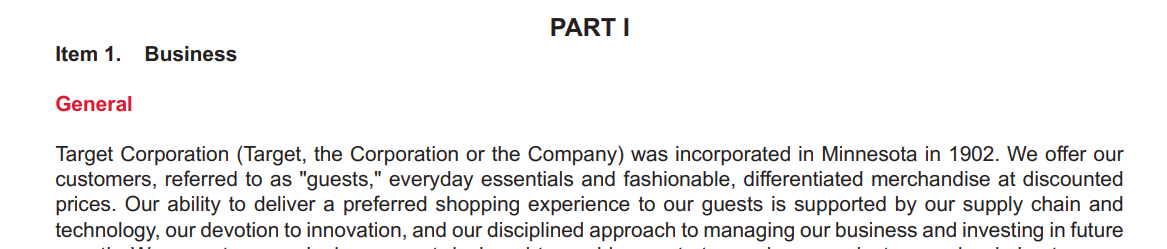
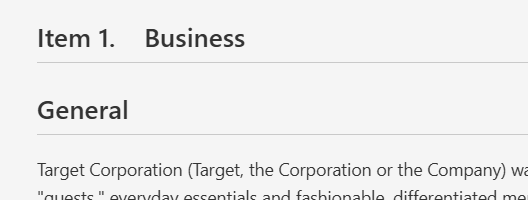
Input used: Input artifact (Image): Annual-report section header for Item 1. Business and General. — docling_input1_hybridearnings_item_header.png
Observed output: Output artifact (Image): Preserved the Item 1. Business section as a clear heading with the opening paragraph below it. — docling_input1_hybridearnings_item_header_parsed_success.png
Input artifact: Input artifact (Image): Annual-report section header for Item 1. Business and General. — docling_input1_hybridearnings_item_header.png
Output artifact: Output artifact (Image): Preserved the Item 1. Business section as a clear heading with the opening paragraph below it. — docling_input1_hybridearnings_item_header_parsed_success.png
What changed: Image transformed into Image
Test case: Image → Image
Input type: Image
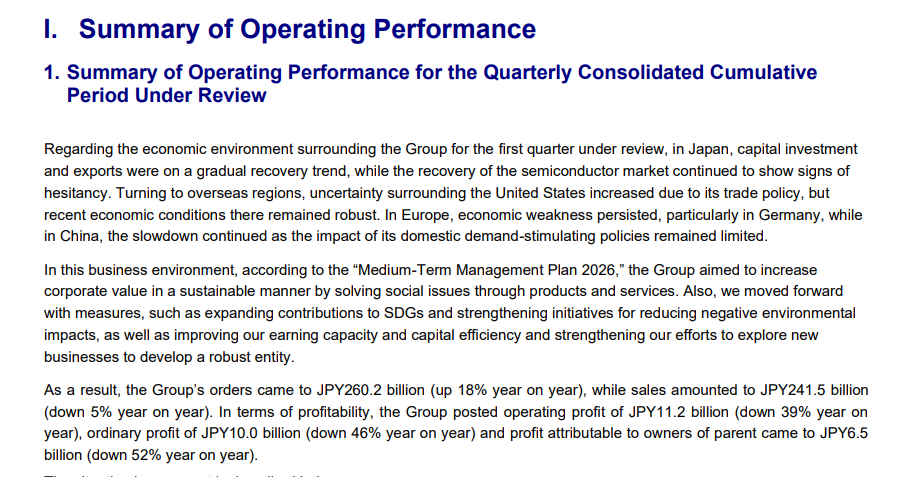
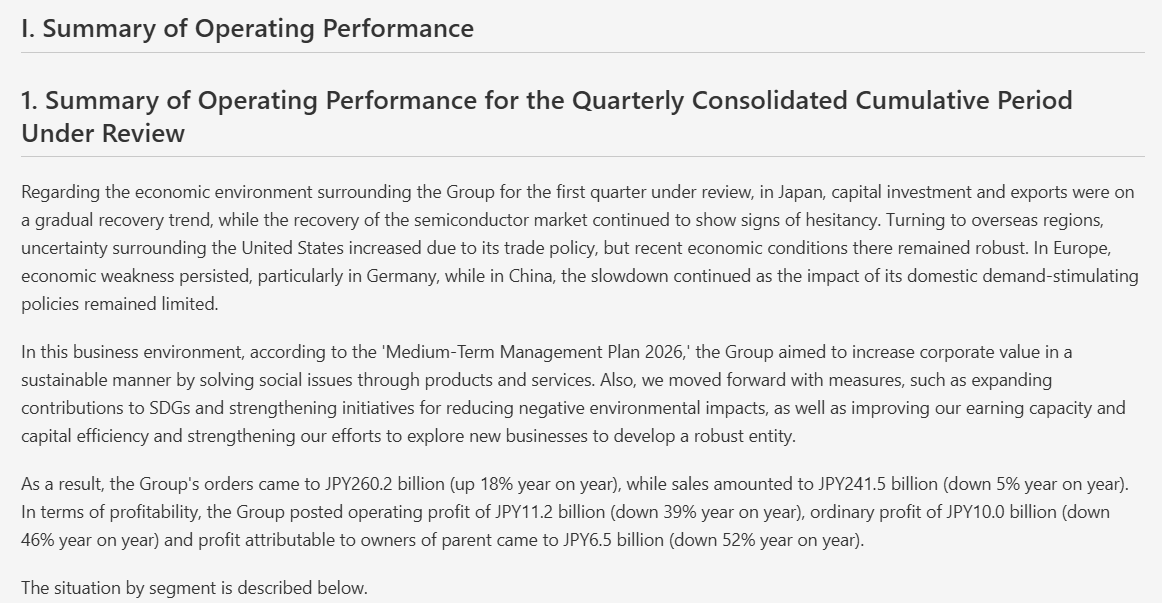
Input used: Input artifact (Image): Summary of Operating Performance section from the financial report. — docling_input2_financialpdf_summary_section-2.png
Observed output: Output artifact (Image): Kept the section heading and paragraph structure intact, including the concluding sentence that introduces the segment discussion. — docling_input2_financialpdf_summary_section_parsed_success-2.png
Input artifact: Input artifact (Image): Summary of Operating Performance section from the financial report. — docling_input2_financialpdf_summary_section-2.png
Output artifact: Output artifact (Image): Kept the section heading and paragraph structure intact, including the concluding sentence that introduces the segment discussion. — docling_input2_financialpdf_summary_section_parsed_success-2.png
What changed: Image transformed into Image
Test case: Image → Image
Input type: Image
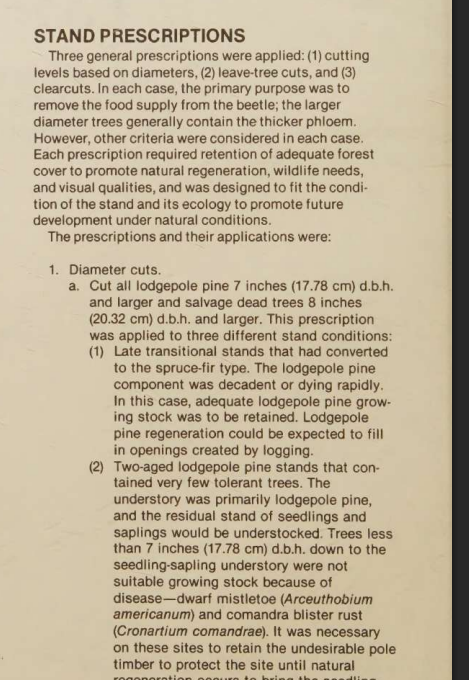
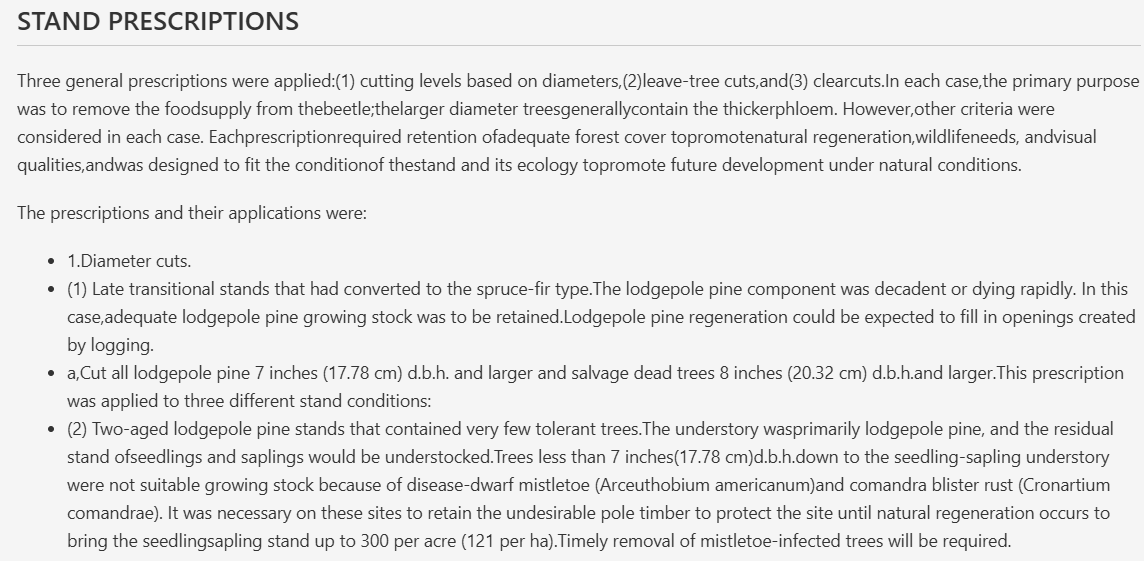
Input used: Input artifact (Image): Scanned STAND PRESCRIPTIONS section with numbered and lettered list items. — docling_input3_scannedpaper_stand_prescriptions_list.png
Observed output: Output artifact (Image): Recovered the heading and nested list structure into readable markdown-style prose and bullets. — docling_input3_scannedpaper_stand_prescriptions_list_parsed_success.png
Input artifact: Input artifact (Image): Scanned STAND PRESCRIPTIONS section with numbered and lettered list items. — docling_input3_scannedpaper_stand_prescriptions_list.png
Output artifact: Output artifact (Image): Recovered the heading and nested list structure into readable markdown-style prose and bullets. — docling_input3_scannedpaper_stand_prescriptions_list_parsed_success.png
What changed: Image transformed into Image
Why it matters / Conclusion: Section headings and nested lists are consistently preserved well across native and scanned inputs.
Docling preserves sectioning, headings, and nested list structure so the output reads like a usable markdown document rather than a flat text dump. This held across the annual-report business section, the financial report summary headings, and the scanned paper's structured prescriptions list.
INPUT
Annual-report section header for Item 1. Business and General.
↓→
OUTPUT
Preserved the Item 1. Business section as a clear heading with the opening paragraph below it.
INPUT
Summary of Operating Performance section from the financial report.
↓→
OUTPUT
Kept the section heading and paragraph structure intact, including the concluding sentence that introduces the segment discussion.
INPUT
Scanned STAND PRESCRIPTIONS section with numbered and lettered list items.
↓→
OUTPUT
Recovered the heading and nested list structure into readable markdown-style prose and bullets.
Bottom Line
Section headings and nested lists are consistently preserved well across native and scanned inputs.
Reading Order Linearization
Mostly good, with one clear scanned-page exception
▾
Test Summary
Feature tested: Reading Order Linearization
Result: Partial — Mostly good, with one clear scanned-page exception
Feature tested: Reading Order Linearization
Result: Partial
Verdict: Mostly good, with one clear scanned-page exception
Expected behavior: Docling usually linearizes mixed-layout pages into a coherent reading sequence, including multi-column text and side-by-side brand lists. The main exception was the scanned paper's first page, where the abstract appeared before the title, and some multi-column layouts merged.
Test case: Image → Image
Input type: Image
Input used: Input artifact (Image): Scanned first page of the research note, with title above the abstract in the source layout. — docling_input3_scannedpaper_page_1.png
Observed output: Output artifact (Image): The abstract was extracted before the paper title, showing a first-page reading-order error even though the surrounding OCR text was recovered. — docling_input3_scannedpaper_page_1_parsed_failure.png
Input artifact: Input artifact (Image): Scanned first page of the research note, with title above the abstract in the source layout. — docling_input3_scannedpaper_page_1.png
Output artifact: Output artifact (Image): The abstract was extracted before the paper title, showing a first-page reading-order error even though the surrounding OCR text was recovered. — docling_input3_scannedpaper_page_1_parsed_failure.png
What changed: Image transformed into Image
Test case: Image → Image
Input type: Image
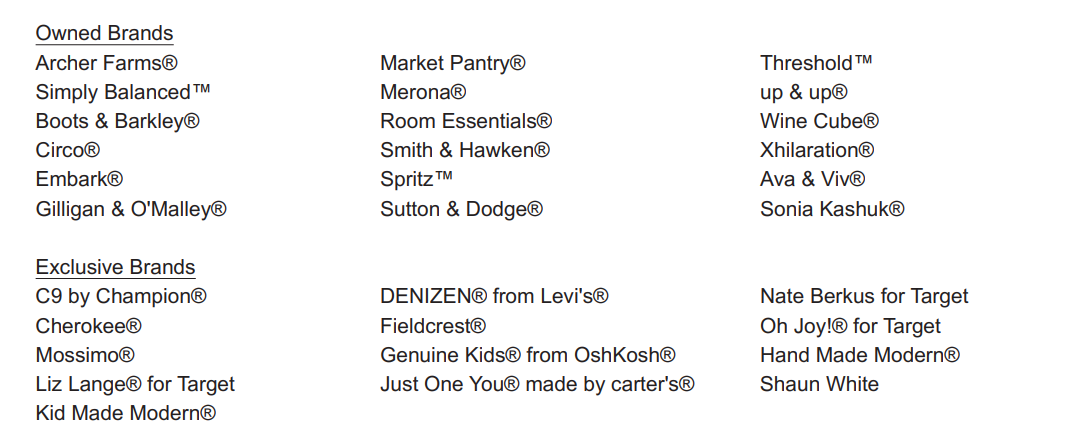
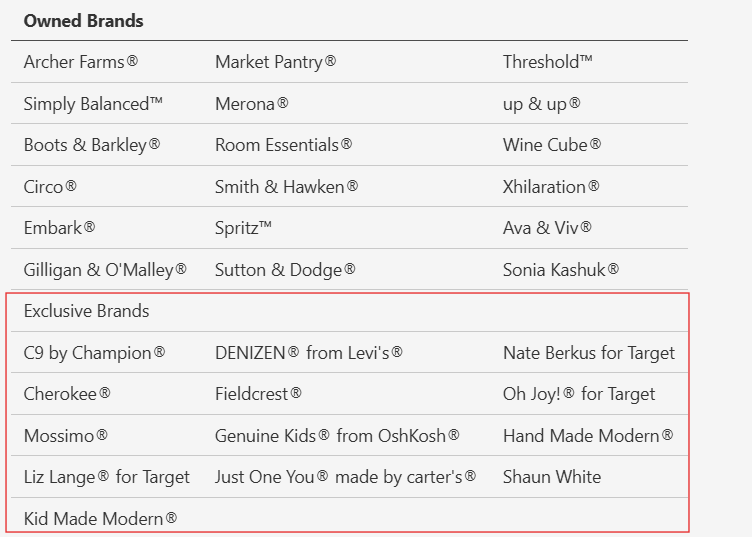
Input used: Input artifact (Image): Two-column brand inventory page with owned brands and exclusive brands. — docling_input3_hybridearnings_brand_list.png
Observed output: Output artifact (Image): The list was reconstructed into a usable layout, but the two brand columns were merged into a single flow rather than kept fully distinct. — docling_input3_hybridearnings_brand_list_partial_success.png
Input artifact: Input artifact (Image): Two-column brand inventory page with owned brands and exclusive brands. — docling_input3_hybridearnings_brand_list.png
Output artifact: Output artifact (Image): The list was reconstructed into a usable layout, but the two brand columns were merged into a single flow rather than kept fully distinct. — docling_input3_hybridearnings_brand_list_partial_success.png
What changed: Image transformed into Image
Test case: Image → Image
Input type: Image
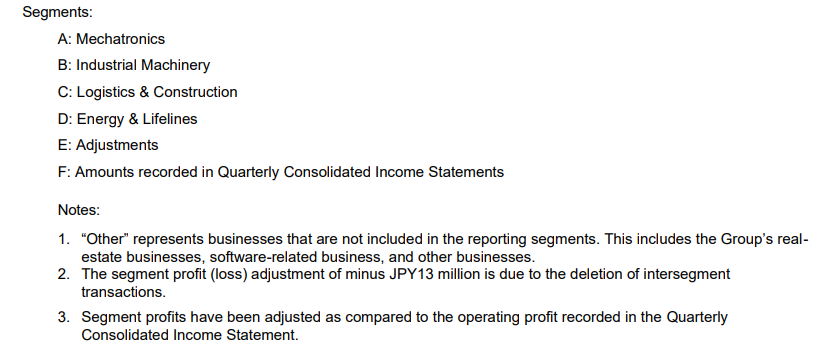
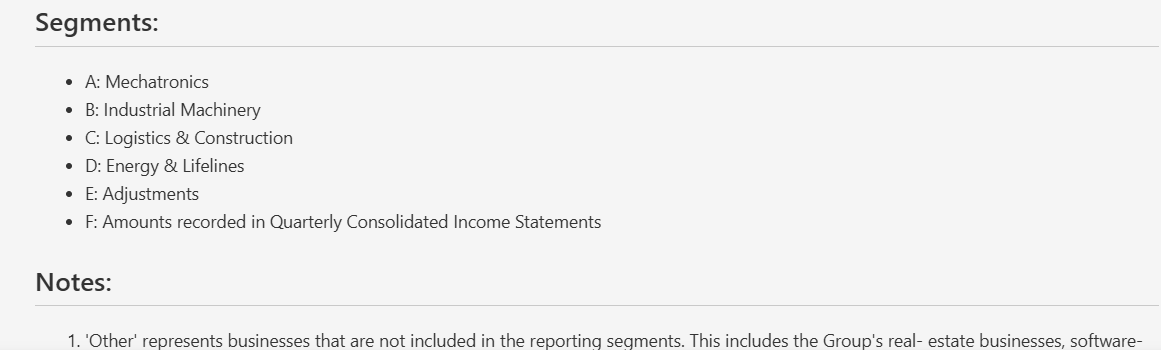
Input used: Input artifact (Image): Segments and notes section from the financial report. — docling_input2_financialpdf_segments.png
Observed output: Output artifact (Image): The segment list and explanatory notes stayed in a logical sequence after extraction. — docling_input2_financialpdf_segments_parsed_success.png
Input artifact: Input artifact (Image): Segments and notes section from the financial report. — docling_input2_financialpdf_segments.png
Output artifact: Output artifact (Image): The segment list and explanatory notes stayed in a logical sequence after extraction. — docling_input2_financialpdf_segments_parsed_success.png
What changed: Image transformed into Image
Why it matters / Conclusion: Reading order is usually coherent, but the scanned paper's opening page and some multi-column layouts show the limits.
Docling usually linearizes mixed-layout pages into a coherent reading sequence, including multi-column text and side-by-side brand lists. The main exception was the scanned paper's first page, where the abstract appeared before the title, and some multi-column layouts merged.
INPUT
Scanned first page of the research note, with title above the abstract in the source layout.
↓→
OUTPUT
The abstract was extracted before the paper title, showing a first-page reading-order error even though the surrounding OCR text was recovered.
INPUT
Two-column brand inventory page with owned brands and exclusive brands.
↓→
OUTPUT
The list was reconstructed into a usable layout, but the two brand columns were merged into a single flow rather than kept fully distinct.
INPUT
Segments and notes section from the financial report.
↓→
OUTPUT
The segment list and explanatory notes stayed in a logical sequence after extraction.
Bottom Line
Reading order is usually coherent, but the scanned paper's opening page and some multi-column layouts show the limits.
Caption and Footnote Association
Strong
▾
Test Summary
Feature tested: Caption and Footnote Association
Result: Passed — Strong
Feature tested: Caption and Footnote Association
Result: Passed
Verdict: Strong
Expected behavior: Docling keeps footnotes and captions adjacent to the tables or figures they explain, even when other layout elements degrade. In the hybrid report the financial table footnotes stayed nearby, and in the scanned paper the Table 2 caption remained attached to the table header area.
Test case: Image → Image
Input type: Image
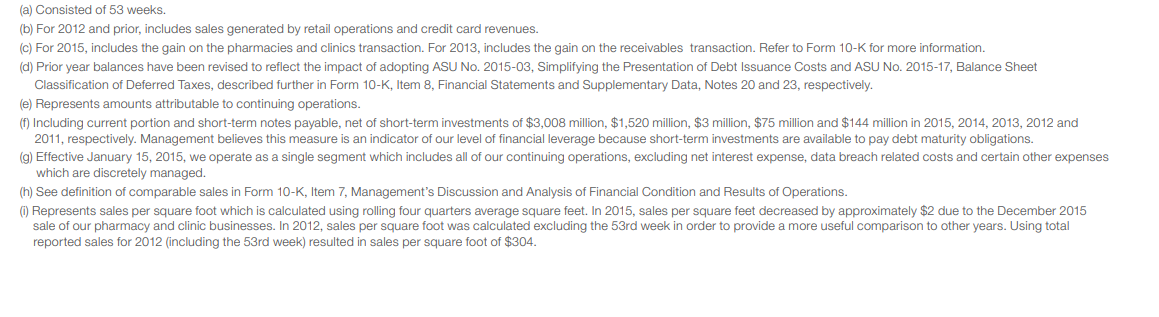
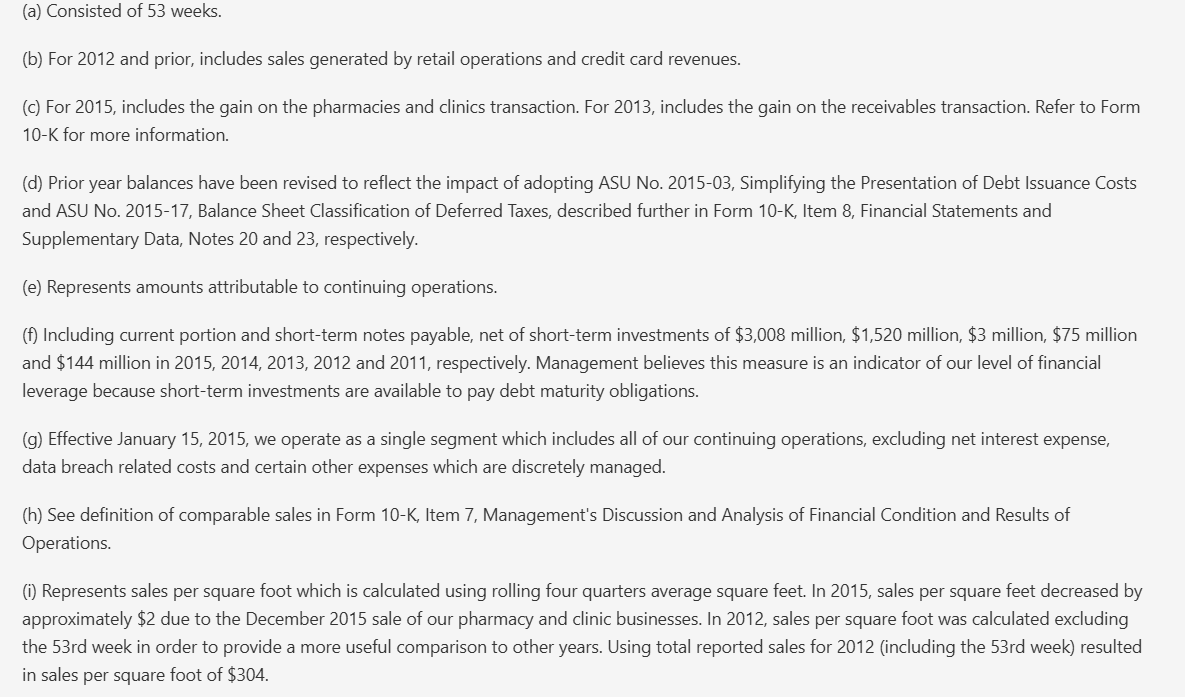
Input used: Input artifact (Image): Dense financial-table footnotes block from the hybrid earnings report. — docling_input1_hybridearnings_financial_table_footnotes.png
Observed output: Output artifact (Image): The footnotes were extracted into readable paragraph text and stayed directly below the financial summary table. — docling_input1_hybridearnings_financial_table_footnotes_parsed_success.png
Input artifact: Input artifact (Image): Dense financial-table footnotes block from the hybrid earnings report. — docling_input1_hybridearnings_financial_table_footnotes.png
Output artifact: Output artifact (Image): The footnotes were extracted into readable paragraph text and stayed directly below the financial summary table. — docling_input1_hybridearnings_financial_table_footnotes_parsed_success.png
What changed: Image transformed into Image
Test case: Image → Image
Input type: Image
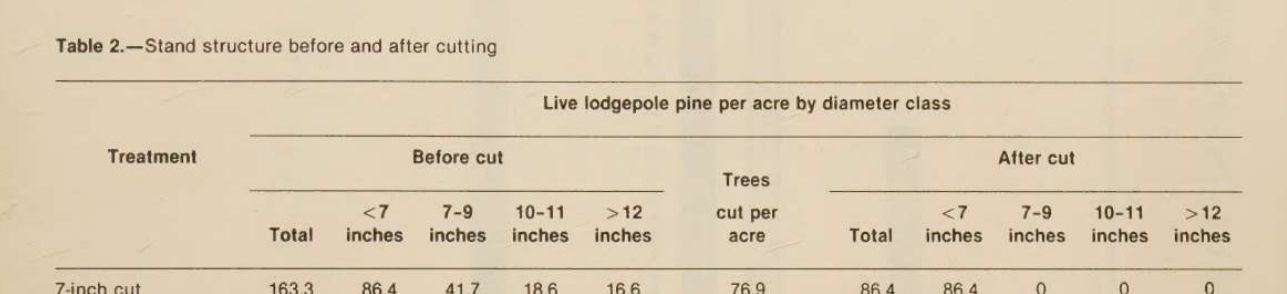
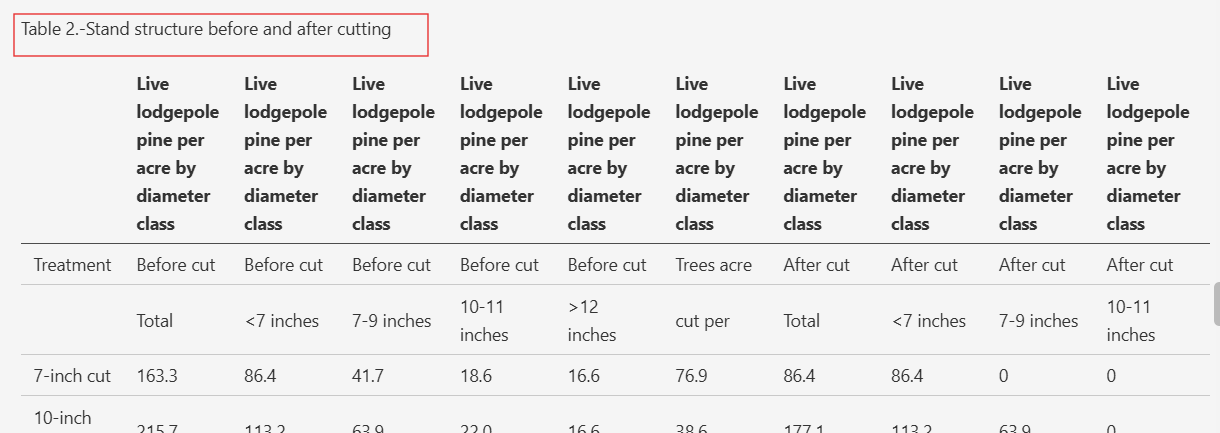
Input used: Input artifact (Image): Scanned Table 2 caption and top rows from the research paper. — docling_input3_scannedpaper_table_1_caption.png
Observed output: Output artifact (Image): The caption was preserved and remained adjacent to the table structure in the extracted output. — docling_input3_scannedpaper_table_1_caption_parsed_success.png
Input artifact: Input artifact (Image): Scanned Table 2 caption and top rows from the research paper. — docling_input3_scannedpaper_table_1_caption.png
Output artifact: Output artifact (Image): The caption was preserved and remained adjacent to the table structure in the extracted output. — docling_input3_scannedpaper_table_1_caption_parsed_success.png
What changed: Image transformed into Image
Why it matters / Conclusion: Captions and footnotes are preserved close to their source tables, which makes the markdown easier to trust.
Docling keeps footnotes and captions adjacent to the tables or figures they explain, even when other layout elements degrade. In the hybrid report the financial table footnotes stayed nearby, and in the scanned paper the Table 2 caption remained attached to the table header area.
INPUT
Dense financial-table footnotes block from the hybrid earnings report.
↓→
OUTPUT
The footnotes were extracted into readable paragraph text and stayed directly below the financial summary table.
INPUT
Scanned Table 2 caption and top rows from the research paper.
↓→
OUTPUT
The caption was preserved and remained adjacent to the table structure in the extracted output.
Bottom Line
Captions and footnotes are preserved close to their source tables, which makes the markdown easier to trust.
Embedded Image and Chart Preservation
Hard fail
▾
Test Summary
Feature tested: Embedded Image and Chart Preservation
Result: Failed — Hard fail
Feature tested: Embedded Image and Chart Preservation
Result: Failed
Verdict: Hard fail
Expected behavior: Docling does not retain charts, figures, logos, signatures, or divider graphics in a usable way. In the tested documents, those assets were replaced with generic placeholders such as `<!-- image -->`, with no chart data reconstruction and no surviving visual file references.
Test case: Image → Text/code file
Input type: Image
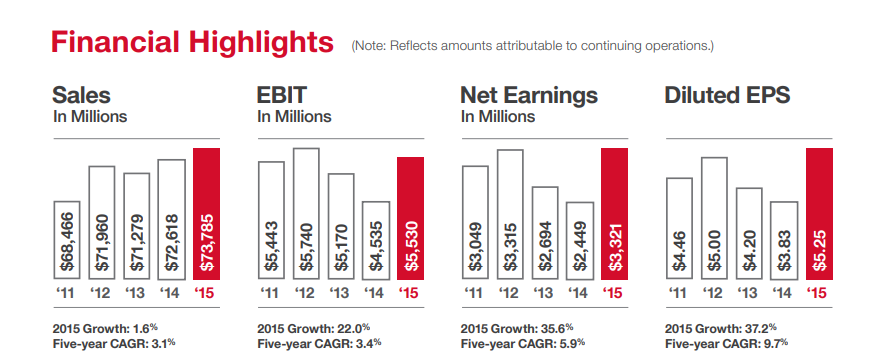
Input used: Input artifact (Image): Four-panel Financial Highlights chart page from the hybrid earnings report. — docling_input1_hybridearnings_financial_charts.png
Observed output: Output artifact (Text/code file): The output markdown replaced the Financial Highlights charts with `<!-- image -->` placeholders and did not recover any chart values. — docling_input1_hybridearnings_output.md
Input artifact: Input artifact (Image): Four-panel Financial Highlights chart page from the hybrid earnings report. — docling_input1_hybridearnings_financial_charts.png
Output artifact: Output artifact (Text/code file): The output markdown replaced the Financial Highlights charts with `<!-- image -->` placeholders and did not recover any chart values. — docling_input1_hybridearnings_output.md
What changed: Image transformed into Text/code file
Test case: Image → Image
Input type: Image
Input used: Input artifact (Image): Brian Cornell signature image from the hybrid earnings report. — docling_input1_hybridearnings_ceo_sign.png
Observed output: Output artifact (Image): The signature was omitted and replaced by a placeholder instead of being retained as an image. — docling_input1_hybridearnings_ceo_sign_omitted_failure.png
Input artifact: Input artifact (Image): Brian Cornell signature image from the hybrid earnings report. — docling_input1_hybridearnings_ceo_sign.png
Output artifact: Output artifact (Image): The signature was omitted and replaced by a placeholder instead of being retained as an image. — docling_input1_hybridearnings_ceo_sign_omitted_failure.png
What changed: Image transformed into Image
Test case: Image → Image
Input type: Image
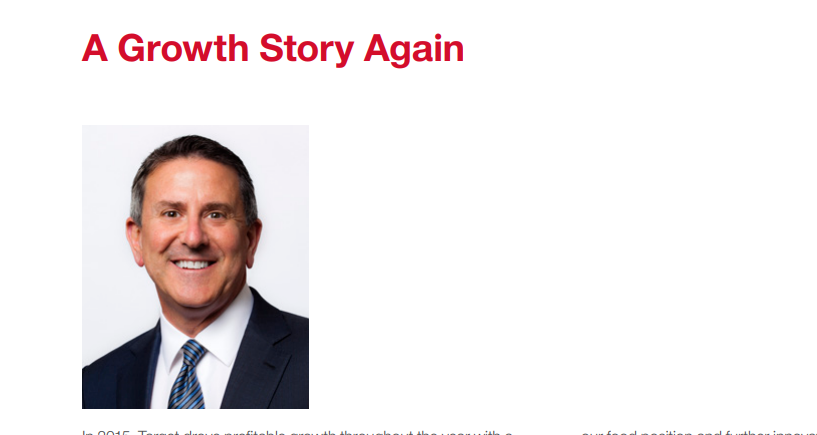
Input used: Input artifact (Image): CEO portrait/title-page image from the hybrid earnings report. — docling_input1_hybridearnings_ceo_image.png
Observed output: Output artifact (Image): The portrait image was omitted from the extracted output and reduced to text-only content. — docling_input1_hybridearnings_ceo_image_omitted_failed.png
Input artifact: Input artifact (Image): CEO portrait/title-page image from the hybrid earnings report. — docling_input1_hybridearnings_ceo_image.png
Output artifact: Output artifact (Image): The portrait image was omitted from the extracted output and reduced to text-only content. — docling_input1_hybridearnings_ceo_image_omitted_failed.png
What changed: Image transformed into Image
Test case: Image → Text/code file
Input type: Image
Input used: Input artifact (Image): Divider graphic from the financial report front matter. — docling_input2_financialpdf_divider_graphic.png
Observed output: Output artifact (Text/code file): The divider graphic was replaced by a placeholder in the markdown output rather than being retained as an image. — docling_input2_financialpdf_output.md
Input artifact: Input artifact (Image): Divider graphic from the financial report front matter. — docling_input2_financialpdf_divider_graphic.png
Output artifact: Output artifact (Text/code file): The divider graphic was replaced by a placeholder in the markdown output rather than being retained as an image. — docling_input2_financialpdf_output.md
What changed: Image transformed into Text/code file
Test case: Image → Image
Input type: Image
Input used: Input artifact (Image): USDA Forest Service logo and front-matter branding from the scanned paper. — docling_input3_scannedpaper_usda_logo.png
Observed output: Output artifact (Image): The logo was dropped and replaced with a placeholder in the extracted output. — docling_input3_scannedpaper_usda_logo_omitted_failed.png
Input artifact: Input artifact (Image): USDA Forest Service logo and front-matter branding from the scanned paper. — docling_input3_scannedpaper_usda_logo.png
Output artifact: Output artifact (Image): The logo was dropped and replaced with a placeholder in the extracted output. — docling_input3_scannedpaper_usda_logo_omitted_failed.png
What changed: Image transformed into Image
Test case: Image → Image
Input type: Image
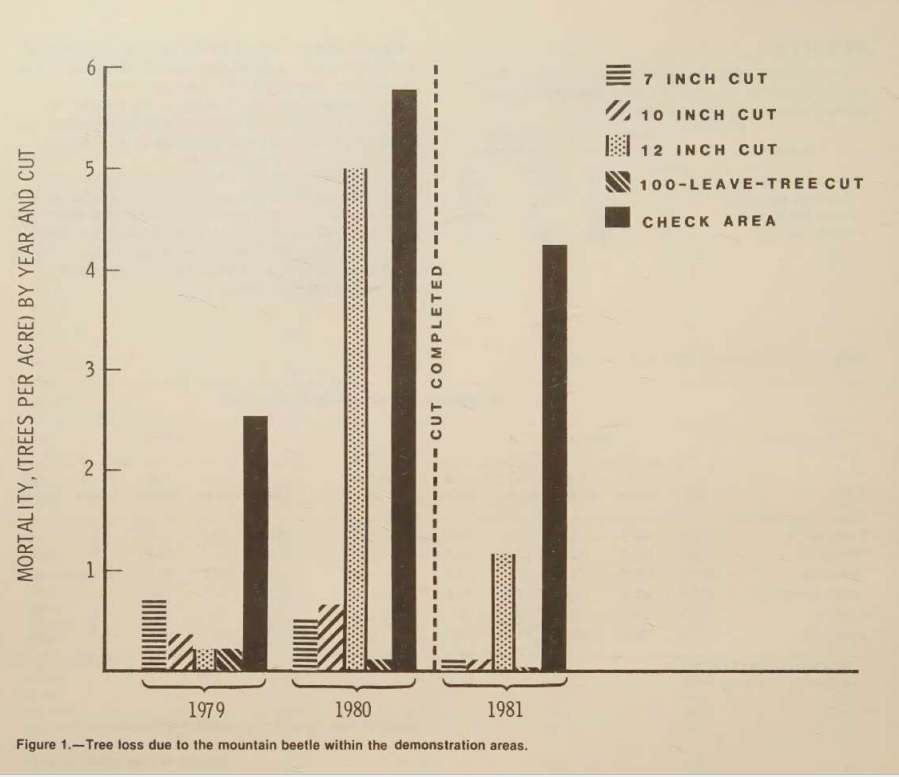
Input used: Input artifact (Image): Figure 1 chart from the scanned paper. — docling_input3_scannedpaper_figure_1.png
Observed output: Output artifact (Image): Only the figure caption survived; the chart image itself was replaced with a placeholder. — docling_input3_scannedpaper_figure_1_parsed_failure.png
Input artifact: Input artifact (Image): Figure 1 chart from the scanned paper. — docling_input3_scannedpaper_figure_1.png
Output artifact: Output artifact (Image): Only the figure caption survived; the chart image itself was replaced with a placeholder. — docling_input3_scannedpaper_figure_1_parsed_failure.png
What changed: Image transformed into Image
Test case: Image → Image
Input type: Image
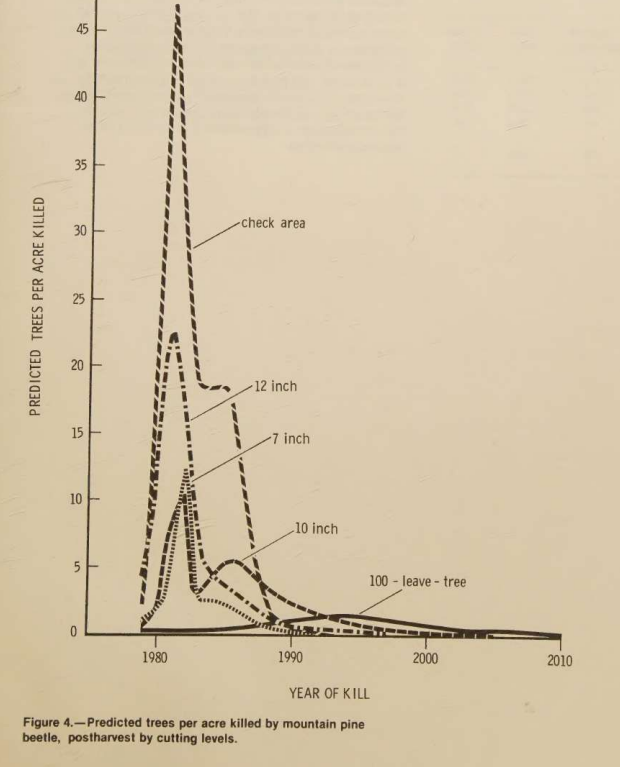
Input used: Input artifact (Image): Figure 4 chart from the scanned paper. — docling_input3_scannedpaper_figure_4.png
Observed output: Output artifact (Image): The chart was not reconstructed and the output kept only the caption plus a placeholder. — docling_input3_scannedpaper_figure_4_parsed_failure.png
Input artifact: Input artifact (Image): Figure 4 chart from the scanned paper. — docling_input3_scannedpaper_figure_4.png
Output artifact: Output artifact (Image): The chart was not reconstructed and the output kept only the caption plus a placeholder. — docling_input3_scannedpaper_figure_4_parsed_failure.png
What changed: Image transformed into Image
Why it matters / Conclusion: Visual assets are consistently lost across all three inputs, so Docling is not safe when charts or images must survive conversion.
Docling does not retain charts, figures, logos, signatures, or divider graphics in a usable way. In the tested documents, those assets were replaced with generic placeholders such as `<!-- image -->`, with no chart data reconstruction and no surviving visual file references.
INPUT
Four-panel Financial Highlights chart page from the hybrid earnings report.
↓→
OUTPUT
docling_input1_hybridearnings_output.md
Loading file...
The output markdown replaced the Financial Highlights charts with `<!-- image -->` placeholders and did not recover any chart values.
INPUT
Brian Cornell signature image from the hybrid earnings report.
↓→
OUTPUT
The signature was omitted and replaced by a placeholder instead of being retained as an image.
INPUT
CEO portrait/title-page image from the hybrid earnings report.
↓→
OUTPUT
The portrait image was omitted from the extracted output and reduced to text-only content.
INPUT
Divider graphic from the financial report front matter.
↓→
OUTPUT
docling_input2_financialpdf_output.md
Loading file...
The divider graphic was replaced by a placeholder in the markdown output rather than being retained as an image.
INPUT
USDA Forest Service logo and front-matter branding from the scanned paper.
↓→
OUTPUT
The logo was dropped and replaced with a placeholder in the extracted output.
INPUT
Figure 1 chart from the scanned paper.
↓→
OUTPUT
Only the figure caption survived; the chart image itself was replaced with a placeholder.
INPUT
Figure 4 chart from the scanned paper.
↓→
OUTPUT
The chart was not reconstructed and the output kept only the caption plus a placeholder.
Bottom Line
Visual assets are consistently lost across all three inputs, so Docling is not safe when charts or images must survive conversion.
Form and Checkbox Extraction
Successful
▾
Test Summary
Feature tested: Form and Checkbox Extraction
Result: Passed — Successful
Feature tested: Form and Checkbox Extraction
Result: Passed
Verdict: Successful
Expected behavior: Docling can preserve simple filing-form checkbox state in the extracted output. On the SEC Form 10-K cover page, it correctly rendered the annual-report option as selected rather than dropping the mark entirely.
Test case: Image → Image
Input type: Image
Input used: Input artifact (Image): SEC Form 10-K cover page with a marked annual-report checkbox. — docling_input1_hybridearnings_form.png
Observed output: Output artifact (Image): The checked annual-report state was preserved in the parsed output. — docling_input1_hybridearnings_form_parsed.png
Input artifact: Input artifact (Image): SEC Form 10-K cover page with a marked annual-report checkbox. — docling_input1_hybridearnings_form.png
Output artifact: Output artifact (Image): The checked annual-report state was preserved in the parsed output. — docling_input1_hybridearnings_form_parsed.png
What changed: Image transformed into Image
Why it matters / Conclusion: A useful bonus capability: checkbox state survives the conversion.
Docling can preserve simple filing-form checkbox state in the extracted output. On the SEC Form 10-K cover page, it correctly rendered the annual-report option as selected rather than dropping the mark entirely.
INPUT
SEC Form 10-K cover page with a marked annual-report checkbox.
↓→
OUTPUT
The checked annual-report state was preserved in the parsed output.
Bottom Line
A useful bonus capability: checkbox state survives the conversion.
Long-Document Robustness
Stable
▾
Test Summary
Feature tested: Long-Document Robustness
Result: Passed — Stable
Feature tested: Long-Document Robustness
Result: Passed
Verdict: Stable
Expected behavior: Docling stayed stable on long documents in this research: an 84-page annual report, an 18-page financial report, and a 12-page scanned research paper all completed without truncation or collapse in the extracted structure. The main quality risks came from layout complexity and images, not document length.
Observed output: Output artifact (Text/code file): The report was processed end to end with stable formatting; the research notes the run completed in 4 minutes 23 seconds. — docling_input1_hybridearnings_output.md
Output artifact: Output artifact (Text/code file): The report was processed end to end with stable formatting; the research notes the run completed in 4 minutes 23 seconds. — docling_input1_hybridearnings_output.md
What changed: PDF document transformed into Text/code file
Observed output: Output artifact (Text/code file): The report parsed end to end in 1 minute 57 seconds without truncation or output collapse. — docling_input2_financialpdf_output.md
Output artifact: Output artifact (Text/code file): The report parsed end to end in 1 minute 57 seconds without truncation or output collapse. — docling_input2_financialpdf_output.md
What changed: PDF document transformed into Text/code file
Observed output: Output artifact (Text/code file): The scanned paper also completed in 1 minute 57 seconds, with stable extraction despite OCR and layout complexity. — docling_input3_scannedpaper_output.md
Output artifact: Output artifact (Text/code file): The scanned paper also completed in 1 minute 57 seconds, with stable extraction despite OCR and layout complexity. — docling_input3_scannedpaper_output.md
What changed: PDF document transformed into Text/code file
Why it matters / Conclusion: Length itself is not the problem; Docling remained stable on all three long documents.
Docling stayed stable on long documents in this research: an 84-page annual report, an 18-page financial report, and a 12-page scanned research paper all completed without truncation or collapse in the extracted structure. The main quality risks came from layout complexity and images, not document length.
INPUT
input1_hybridearnings.pdf
84-page hybrid annual report.
↓→
OUTPUT
docling_input1_hybridearnings_output.md
Loading file...
The report was processed end to end with stable formatting; the research notes the run completed in 4 minutes 23 seconds.
INPUT
input2_financialpdf.pdf
18-page table-heavy financial report.
↓→
OUTPUT
docling_input2_financialpdf_output.md
Loading file...
The report parsed end to end in 1 minute 57 seconds without truncation or output collapse.
No. In this research, charts, figures, logos, signatures, and divider graphics were consistently replaced with placeholders, and no chart data was reconstructed.
It handled standard financial tables very well, including clean row and column alignment. But multi-level headers could flatten or duplicate, and a dense scanned table became badly garbled.
Yes. It extracted scanned text accurately overall, but the scanned paper showed minor word-merging and library-stamp noise in the OCR output.
Yes. The reports kept their section headings, nested list structure, and general document hierarchy in markdown form.
Yes. Financial footnotes and scanned-table captions stayed adjacent to the relevant tables, even when the surrounding layout was imperfect.
Yes. The SEC filing cover page preserved the checked annual-report state in the parsed output.
Very stable in this research. It processed an 84-page report, an 18-page report, and a 12-page scanned paper without truncation or output collapse.
Banner Preview
How the embed badge will look on your site
Embed HTML
Copy this code to your website source
<a target="_blank" href="https://aidemos.com/tools/docling?utm_source=docling_embed" style="width: 250px; height: 80px; border-radius:4px;" width="250" height="80">
<img src="https://aidemos-website-images.s3.amazonaws.com/featured.png" alt="Docling | Featured on AI Demos" style="width: 250px; height: 80px; border-radius:4px;" width="250" height="80">
</a>
Quick Integration Guide
1Copy the HTML code block above.
2Paste it into your site's HTML or CMS editor.
3Banner appears instantly on your page.
4Links back to your tool profile here.
Similar Tools
Similar Tools
Discover more AI tools like Docling to enhance your workflow.
⚡ Built by FutureSmart AI — the team behind AI Demos
Need a custom AI solution for this use case?
If you are looking to build a custom PDF to markdown conversion, document parsing, or structured data extraction workflow for your business or internal workflow, email us at contact@futuresmart.ai.
Found something inaccurate or missing? We try to keep our AI research accurate and useful. If you found outdated information, an issue, or have a suggestion, email us at collaborate@aidemos.com.