
docTR
Fast OCR for PDFs when you need raw text, digits, and speed more than preserved Markdown structure.
Fast OCR, but not a Markdown converter
- You need a self-hosted OCR engine for PDFs and can post-process the raw text yourself.
- You care more about fast text and digit extraction than about preserving Markdown structure.
- You need a library that handled long PDFs and a fully scanned PDF without crashing in this benchmark.
- You need real Markdown headings, tables, image references, or document hierarchy from the parser itself.
Our take
docTR is very fast and its OCR is solid on both digital and scanned PDFs, with most prose and digits surviving intact. The hard limit is structural: it only emits flat page text, so tables, headings, images, and chart structure are lost. For PDF-to-Markdown, it works best as a raw OCR layer you clean up yourself.
In-Depth Review
Our detailed analysis of docTR — features, performance, and real-world testing.
Feature-by-Feature Breakdown
PDF OCR Text ExtractionStrong raw OCR, but the export stays flat and page-based.▾
Feature tested: PDF OCR Text Extraction
Result: Partial
Verdict: Strong raw OCR, but the export stays flat and page-based.
Expected behavior: docTR converts hybrid and scanned PDFs into searchable plain text, as shown on the earnings report, the financial filing, and the scanned research note. The evidence covers long documents that complete without crashing, but the output remains flat text rather than Markdown.
Test case: Image → Image
Input type: Image
Input used: Input artifact (Image): Input — doctr_input2_financialpdf_narrative_numbers.png
Observed output: Output artifact (Image): A single-column financial paragraph reads in natural order and keeps all checked monetary figures intact. — doctr_input2_financialpdf_narrative_numbers_parsed_success.png
Input artifact: Input artifact (Image): Input — doctr_input2_financialpdf_narrative_numbers.png
Output artifact: Output artifact (Image): A single-column financial paragraph reads in natural order and keeps all checked monetary figures intact. — doctr_input2_financialpdf_narrative_numbers_parsed_success.png
What changed: Image transformed into Image
Test case: Image → Image
Input type: Image
Input used: Input artifact (Image): Input — doctr_input1_hybridearnings_trademark_brands.png
Observed output: Output artifact (Image): A simple brand grid is read in a usable row-major order, so not every multi-column layout fails. — doctr_input1_hybridearnings_trademark_brands_parsed_partial_success.png
Input artifact: Input artifact (Image): Input — doctr_input1_hybridearnings_trademark_brands.png
Output artifact: Output artifact (Image): A simple brand grid is read in a usable row-major order, so not every multi-column layout fails. — doctr_input1_hybridearnings_trademark_brands_parsed_partial_success.png
What changed: Image transformed into Image
Test case: PDF document → Text/code file
Input type: PDF document
Input used: Input artifact (PDF document): 84-page hybrid annual report with charts, two-column prose, tables, and a scanned section. — input1_hybridearnings.pdf
Observed output: Output artifact (Text/code file): Converted to a page-by-page plain-text dump; prose and digits are extracted, but the file contains no native table, heading, or image markup. — DocTR_input1_output-2.md
Input artifact: Input artifact (PDF document): 84-page hybrid annual report with charts, two-column prose, tables, and a scanned section. — input1_hybridearnings.pdf
Output artifact: Output artifact (Text/code file): Converted to a page-by-page plain-text dump; prose and digits are extracted, but the file contains no native table, heading, or image markup. — DocTR_input1_output-2.md
What changed: PDF document transformed into Text/code file
Test case: PDF document → Text/code file
Input type: PDF document
Input used: Input artifact (PDF document): 18-page financial report with dense tables and narrative disclosures. — input2_financialpdf.pdf
Observed output: Output artifact (Text/code file): Converted successfully to flat OCR text; numeric content survives well, but structure remains linear text. — DocTR_input2_output-2.md
Input artifact: Input artifact (PDF document): 18-page financial report with dense tables and narrative disclosures. — input2_financialpdf.pdf
Output artifact: Output artifact (Text/code file): Converted successfully to flat OCR text; numeric content survives well, but structure remains linear text. — DocTR_input2_output-2.md
What changed: PDF document transformed into Text/code file
Test case: PDF document → Text/code file
Input type: PDF document
Input used: Input artifact (PDF document): 12-page fully scanned research note with tables, charts, and a mixed-layout title page. — input3_scannedpaper.pdf
Observed output: Output artifact (Text/code file): OCR output produced from a zero-text-layer PDF; the result is plain text rather than structured Markdown. — DocTR_input3_output-2.md
Input artifact: Input artifact (PDF document): 12-page fully scanned research note with tables, charts, and a mixed-layout title page. — input3_scannedpaper.pdf
Output artifact: Output artifact (Text/code file): OCR output produced from a zero-text-layer PDF; the result is plain text rather than structured Markdown. — DocTR_input3_output-2.md
What changed: PDF document transformed into Text/code file
Why it matters / Conclusion: Good at turning PDFs into searchable text, including scans, but it stops at plain text rather than Markdown structure.
docTR converts hybrid and scanned PDFs into searchable plain text, as shown on the earnings report, the financial filing, and the scanned research note. The evidence covers long documents that complete without crashing, but the output remains flat text rather than Markdown.
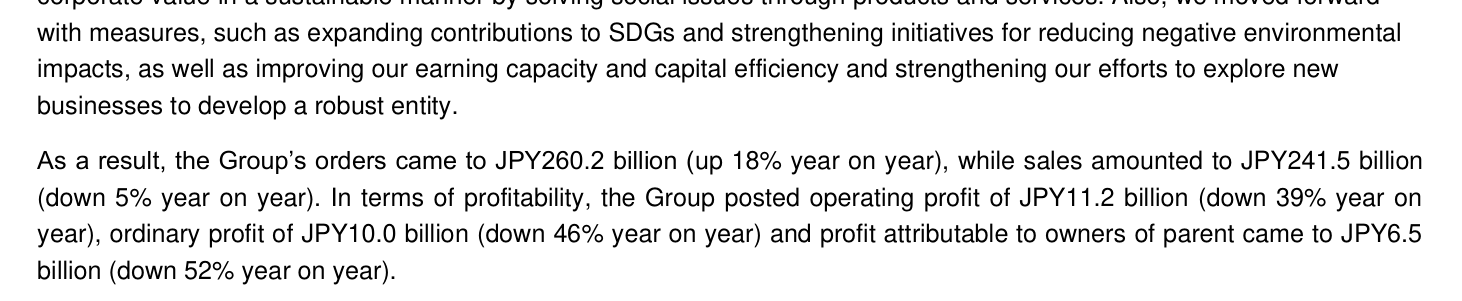
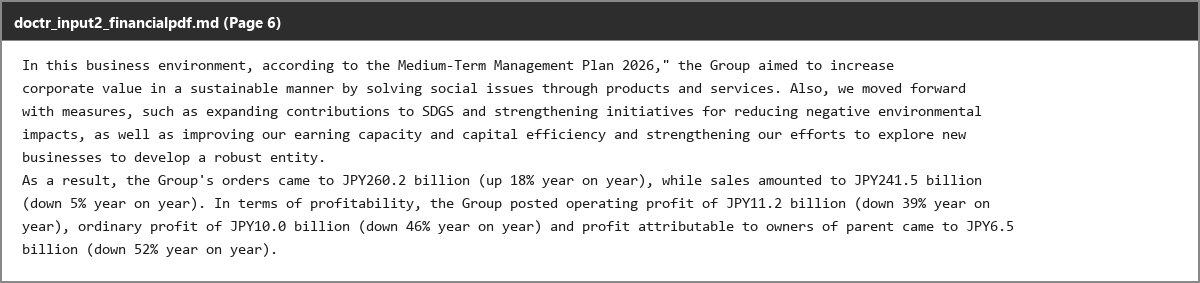

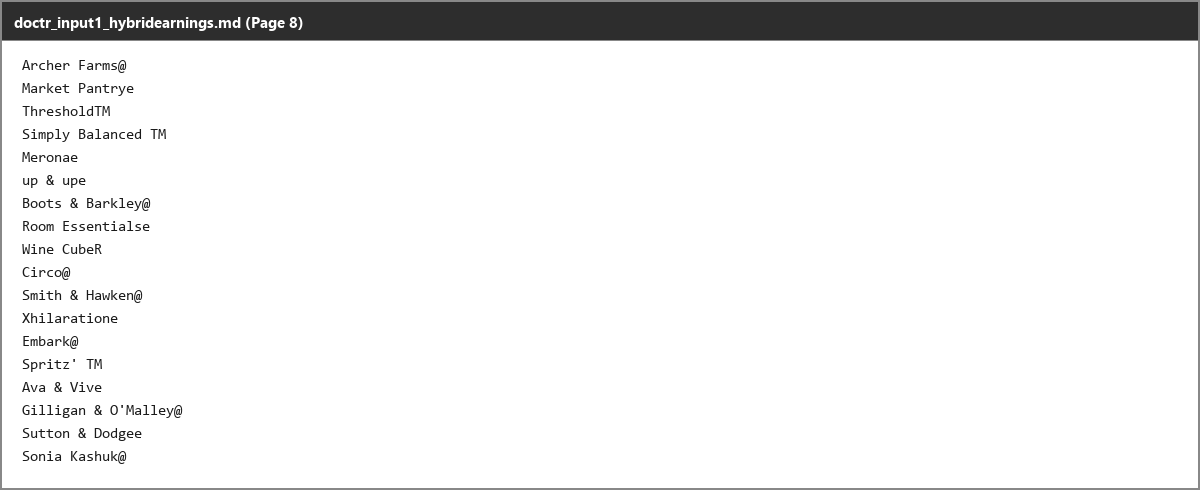
Table OCR TranscriptionTable numbers are usually transcribed correctly and kept in left-to-right order, but blank cells and some headers lose structure.▾
Feature tested: Table OCR Transcription
Result: Partial
Verdict: Table numbers are usually transcribed correctly and kept in left-to-right order, but blank cells and some headers lose structure.
Expected behavior: docTR reads table contents from hybrid, dense, and scanned documents, preserving many numeric sequences and row values in left-to-right order. The examples also show structural limits such as omitted blank cells, sparse headers, and occasional noise on difficult scans.
Test case: PDF document → Text/code file
Input type: PDF document
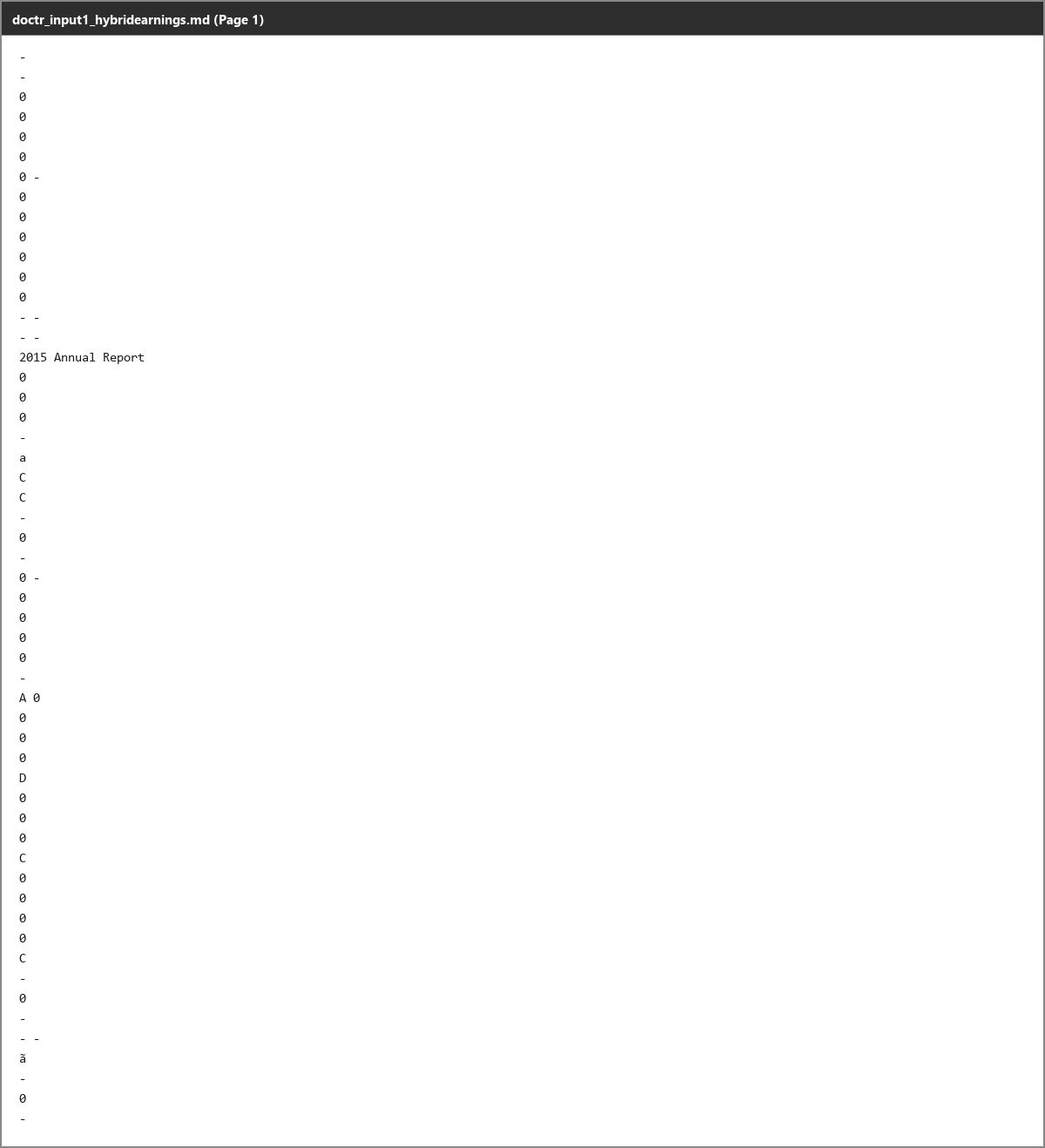
Input used: Input artifact (PDF document): Target annual report financial-summary row with three blank year cells followed by two populated cells. — input1_hybridearnings.pdf
Observed output: Output artifact (Text/code file): The row is transcribed as bare numbers, but the blank cells vanish, so the fiscal-year alignment is no longer recoverable from the text alone. — DocTR_input1_output-2.md
Input artifact: Input artifact (PDF document): Target annual report financial-summary row with three blank year cells followed by two populated cells. — input1_hybridearnings.pdf
Output artifact: Output artifact (Text/code file): The row is transcribed as bare numbers, but the blank cells vanish, so the fiscal-year alignment is no longer recoverable from the text alone. — DocTR_input1_output-2.md
What changed: PDF document transformed into Text/code file
Test case: PDF document → Text/code file
Input type: PDF document
Input used: Input artifact (PDF document): Segment table header that appears twice on adjacent pages with one single-character column label occasionally missing. — input2_financialpdf.pdf
Observed output: Output artifact (Text/code file): The numeric row still reads correctly, but the single-character header label can disappear on one occurrence of an otherwise identical table. — DocTR_input2_output-2.md
Input artifact: Input artifact (PDF document): Segment table header that appears twice on adjacent pages with one single-character column label occasionally missing. — input2_financialpdf.pdf
Output artifact: Output artifact (Text/code file): The numeric row still reads correctly, but the single-character header label can disappear on one occurrence of an otherwise identical table. — DocTR_input2_output-2.md
What changed: PDF document transformed into Text/code file
Test case: PDF document → Text/code file
Input type: PDF document
Input used: Input artifact (PDF document): Scanned table with many numeric columns and treatment rows. — input3_scannedpaper.pdf
Observed output: Output artifact (Text/code file): The dense table keeps its numeric sequence, but rows that start after a leading blank cell lose visible alignment. — DocTR_input3_output-2.md
Input artifact: Input artifact (PDF document): Scanned table with many numeric columns and treatment rows. — input3_scannedpaper.pdf
Output artifact: Output artifact (Text/code file): The dense table keeps its numeric sequence, but rows that start after a leading blank cell lose visible alignment. — DocTR_input3_output-2.md
What changed: PDF document transformed into Text/code file
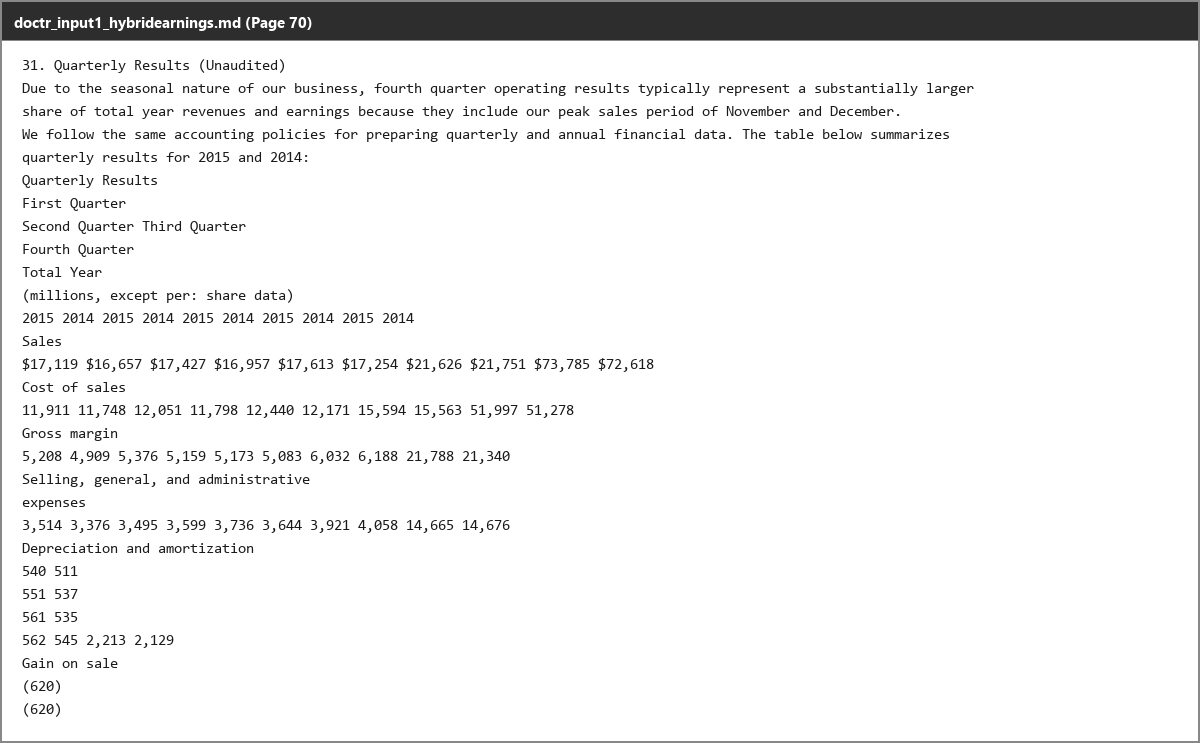
Test case: Image → Image
Input type: Image
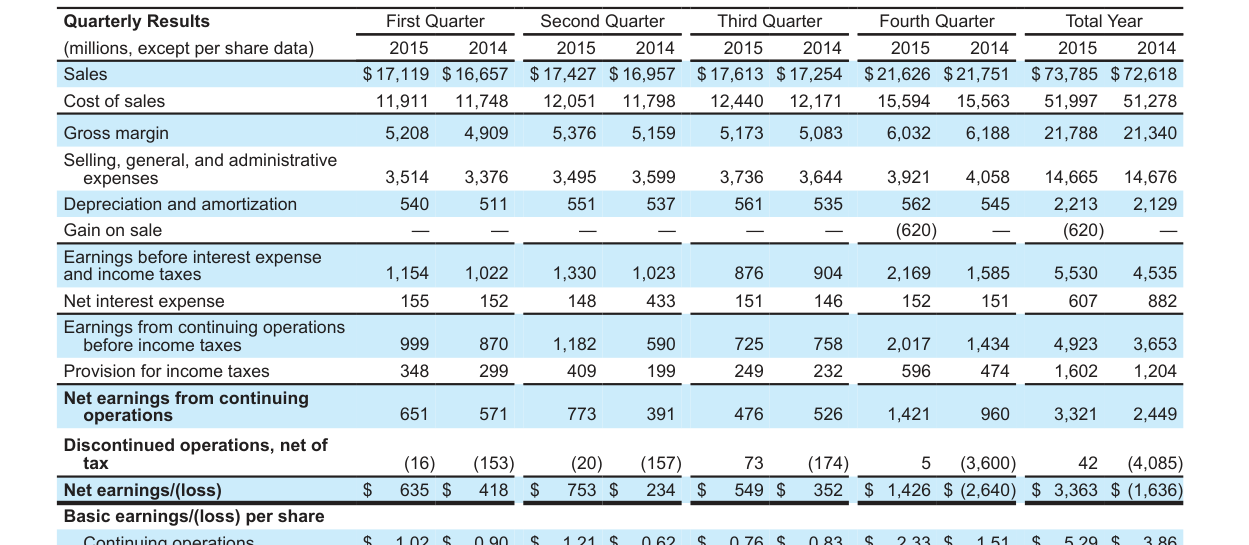
Input used: Input artifact (Image): Dense quarterly-results table from the hybrid earnings report. — doctr_input1_hybridearnings_quarterly_results_table.png
Observed output: Output artifact (Image): The dense quarterly-results table keeps all values in the correct left-to-right order across ten numeric columns. — 47f56f495d884071805a49cc39e52487.png
Input artifact: Input artifact (Image): Dense quarterly-results table from the hybrid earnings report. — doctr_input1_hybridearnings_quarterly_results_table.png
Output artifact: Output artifact (Image): The dense quarterly-results table keeps all values in the correct left-to-right order across ten numeric columns. — 47f56f495d884071805a49cc39e52487.png
What changed: Image transformed into Image
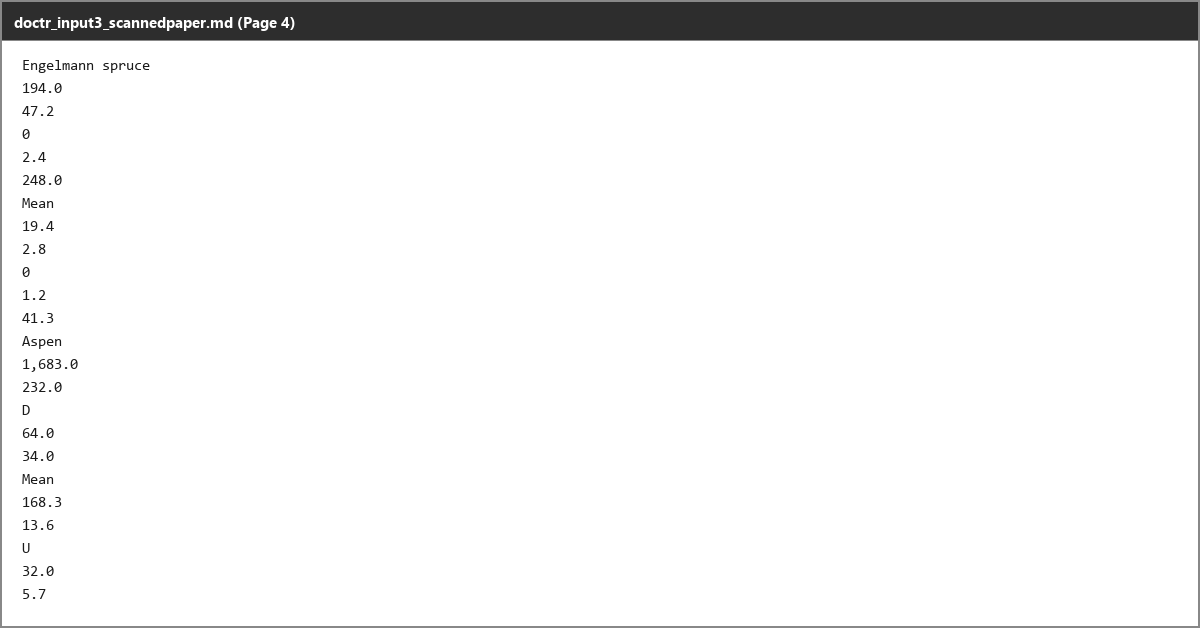
Test case: Image → Image
Input type: Image
Input used: Input artifact (Image): Table row crop from the scanned research paper. — doctr_input3_scannedpaper_aspen_row.png
Observed output: Output artifact (Image): On a genuinely scanned table, the source zero is misread as letters in adjacent rows, showing that scan glyphs are less stable than digital digits. — bae2fed9024148c2b70b74114a15126c.png
Input artifact: Input artifact (Image): Table row crop from the scanned research paper. — doctr_input3_scannedpaper_aspen_row.png
Output artifact: Output artifact (Image): On a genuinely scanned table, the source zero is misread as letters in adjacent rows, showing that scan glyphs are less stable than digital digits. — bae2fed9024148c2b70b74114a15126c.png
What changed: Image transformed into Image
Why it matters / Conclusion: Numeric transcription is strong, but structural table fidelity is only partial because empty cells and some header labels have no stable representation.
docTR reads table contents from hybrid, dense, and scanned documents, preserving many numeric sequences and row values in left-to-right order. The examples also show structural limits such as omitted blank cells, sparse headers, and occasional noise on difficult scans.

Reading Order ReconstructionWorks on straightforward single-column pages, but two-column prose and mixed title/sidebar layouts can be interleaved or zipped together.▾
Feature tested: Reading Order Reconstruction
Result: Failed
Verdict: Works on straightforward single-column pages, but two-column prose and mixed title/sidebar layouts can be interleaved or zipped together.
Expected behavior: docTR reconstructs reading order on straightforward single-column pages and row-major lists, but becomes unreliable when multiple text streams or mixed layouts are present. The evidence includes simple financial pages as well as two-column and masthead/title pages where text can interleave.
Test case: PDF document → Text/code file
Input type: PDF document
Input used: Input artifact (PDF document): Annual-report page with a left column and a right column of prose. — input1_hybridearnings.pdf
Observed output: Output artifact (Text/code file): The two columns are interleaved line-by-line instead of being read as two separate paragraphs. — DocTR_input1_output-2.md
Input artifact: Input artifact (PDF document): Annual-report page with a left column and a right column of prose. — input1_hybridearnings.pdf
Output artifact: Output artifact (Text/code file): The two columns are interleaved line-by-line instead of being read as two separate paragraphs. — DocTR_input1_output-2.md
What changed: PDF document transformed into Text/code file
Test case: PDF document → Text/code file
Input type: PDF document
Input used: Input artifact (PDF document): Financial report page with a simple single-column layout and a row sequence in the assets section. — input2_financialpdf.pdf
Observed output: Output artifact (Text/code file): The row sequence stays in the same top-to-bottom order as the source. — DocTR_input2_output-2.md
Input artifact: Input artifact (PDF document): Financial report page with a simple single-column layout and a row sequence in the assets section. — input2_financialpdf.pdf
Output artifact: Output artifact (Text/code file): The row sequence stays in the same top-to-bottom order as the source. — DocTR_input2_output-2.md
What changed: PDF document transformed into Text/code file
Test case: PDF document → Text/code file
Input type: PDF document
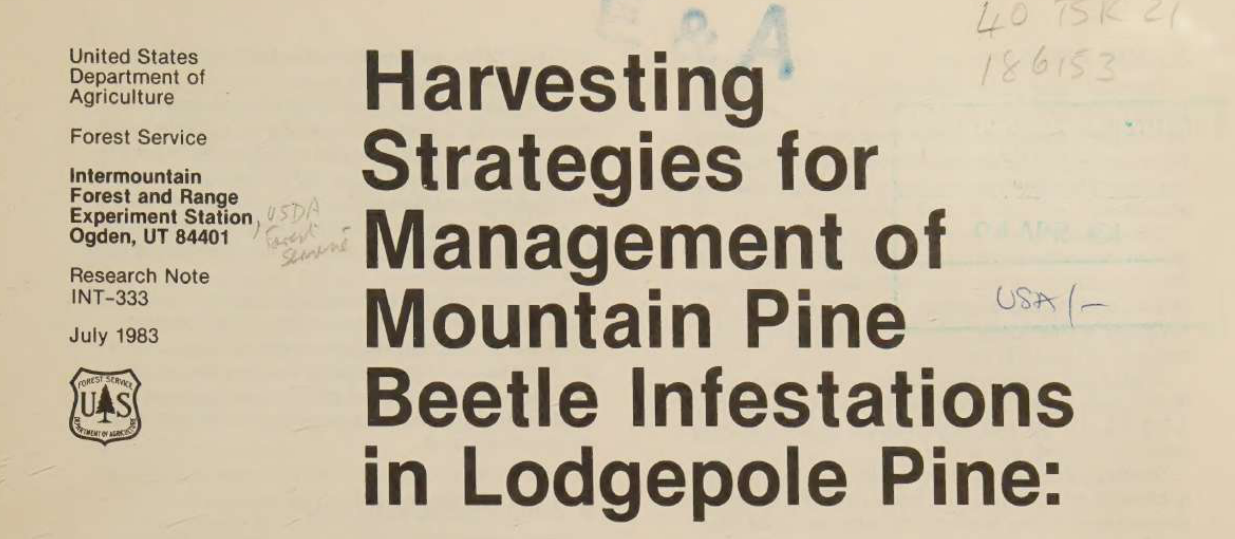
Input used: Input artifact (PDF document): Scanned research-note first page with a narrow masthead sidebar, a large title, and handwritten marginal notes. — input3_scannedpaper.pdf
Observed output: Output artifact (Text/code file): The sidebar, title, and marginalia are interleaved into one stream, so the page’s reading order is not recoverable cleanly. — DocTR_input3_output-2.md
Input artifact: Input artifact (PDF document): Scanned research-note first page with a narrow masthead sidebar, a large title, and handwritten marginal notes. — input3_scannedpaper.pdf
Output artifact: Output artifact (Text/code file): The sidebar, title, and marginalia are interleaved into one stream, so the page’s reading order is not recoverable cleanly. — DocTR_input3_output-2.md
What changed: PDF document transformed into Text/code file
Why it matters / Conclusion: Good on simple layouts, unreliable on multi-stream pages where content should stay separated.
docTR reconstructs reading order on straightforward single-column pages and row-major lists, but becomes unreliable when multiple text streams or mixed layouts are present. The evidence includes simple financial pages as well as two-column and masthead/title pages where text can interleave.
Caption and Footnote AssociationCaptions usually stay attached, but in-table reference markers can be garbled.▾
Feature tested: Caption and Footnote Association
Result: Partial
Verdict: Captions usually stay attached, but in-table reference markers can be garbled.
Expected behavior: docTR keeps figure/table captions and numbered footnotes near the content they describe in extracted output. The examples include financial tables and figure pages where nearby notes stay grouped even when local OCR around the markers is imperfect.
Test case: PDF document → Text/code file
Input type: PDF document
Input used: Input artifact (PDF document): Annual-report table row with compound footnote markers attached to the label. — input1_hybridearnings.pdf
Observed output: Output artifact (Text/code file): The marker text is corrupted, but the footnote block still stays with the table beneath it. — DocTR_input1_output-2.md
Input artifact: Input artifact (PDF document): Annual-report table row with compound footnote markers attached to the label. — input1_hybridearnings.pdf
Output artifact: Output artifact (Text/code file): The marker text is corrupted, but the footnote block still stays with the table beneath it. — DocTR_input1_output-2.md
What changed: PDF document transformed into Text/code file
Test case: PDF document → Text/code file
Input type: PDF document
Input used: Input artifact (PDF document): Segment-table footnotes listed immediately below the table. — input2_financialpdf.pdf
Observed output: Output artifact (Text/code file): The numbered notes remain directly attached to the segment table in the correct order. — DocTR_input2_output-2.md
Input artifact: Input artifact (PDF document): Segment-table footnotes listed immediately below the table. — input2_financialpdf.pdf
Output artifact: Output artifact (Text/code file): The numbered notes remain directly attached to the segment table in the correct order. — DocTR_input2_output-2.md
What changed: PDF document transformed into Text/code file
Test case: PDF document → Text/code file
Input type: PDF document
Input used: Input artifact (PDF document): Scanned paper figure with a caption directly under the chart. — input3_scannedpaper.pdf
Observed output: Output artifact (Text/code file): The figure caption stays numbered and attached to the chart content. — DocTR_input3_output-2.md
Input artifact: Input artifact (PDF document): Scanned paper figure with a caption directly under the chart. — input3_scannedpaper.pdf
Output artifact: Output artifact (Text/code file): The figure caption stays numbered and attached to the chart content. — DocTR_input3_output-2.md
What changed: PDF document transformed into Text/code file
Why it matters / Conclusion: Association is usually good, but corrupted in-table markers can still make the reference chain unreliable.
docTR keeps figure/table captions and numbered footnotes near the content they describe in extracted output. The examples include financial tables and figure pages where nearby notes stay grouped even when local OCR around the markers is imperfect.
Visual Element PreservationImages are not retained as images, and charts lose their visual content.▾
Feature tested: Visual Element Preservation
Result: Failed
Verdict: Images are not retained as images, and charts lose their visual content.
Expected behavior: docTR attempts to carry non-text visuals such as cover art, photos, signatures, logos, seals, and charts through extraction, using examples from cover pages and portrait/signature pages. In practice, those visuals are often omitted or degraded into noise.
Test case: Image → Image
Input type: Image
Input used: Input artifact (Image): Target annual-report cover with decorative bullseye artwork. — doctr_input1_hybridearnings_cover.png
Observed output: Output artifact (Image): The cover art is not retained as an image reference; the output keeps the title text but drops the artwork as structure. — 5dffce68cbc74150a0b9b7f30abaad83.png
Input artifact: Input artifact (Image): Target annual-report cover with decorative bullseye artwork. — doctr_input1_hybridearnings_cover.png
Output artifact: Output artifact (Image): The cover art is not retained as an image reference; the output keeps the title text but drops the artwork as structure. — 5dffce68cbc74150a0b9b7f30abaad83.png
What changed: Image transformed into Image
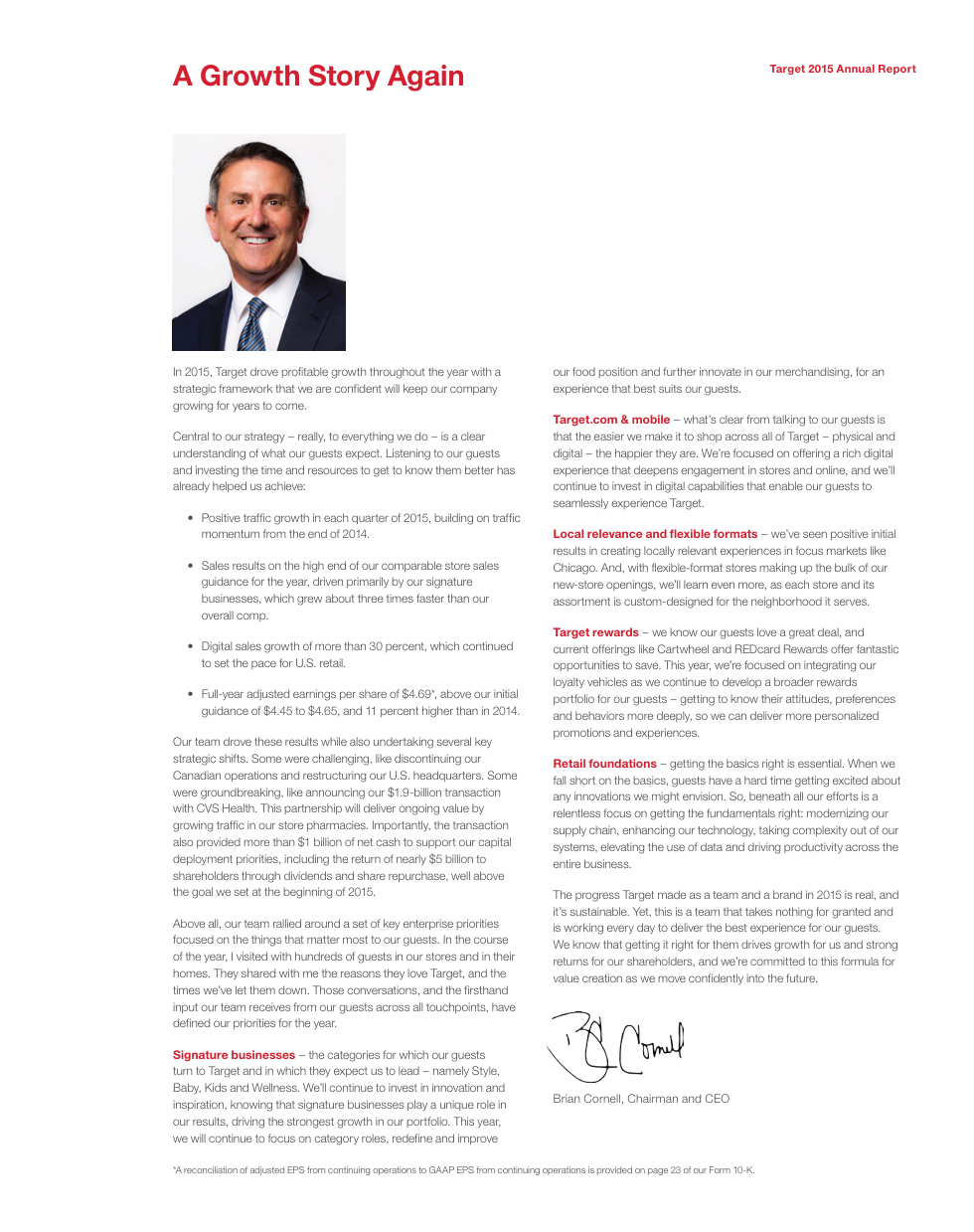
Test case: Image → Text/code file
Input type: Image
Input used: Input artifact (Image): Hybrid earnings page with a portrait and signature graphic. — doctr_input1_hybridearnings_twocolumn_page3.png
Observed output: Output artifact (Text/code file): The CEO photo and signature are dropped without any image reference in the text output. — DocTR_input1_output.md
Input artifact: Input artifact (Image): Hybrid earnings page with a portrait and signature graphic. — doctr_input1_hybridearnings_twocolumn_page3.png
Output artifact: Output artifact (Text/code file): The CEO photo and signature are dropped without any image reference in the text output. — DocTR_input1_output.md
What changed: Image transformed into Text/code file
Test case: Image → Image
Input type: Image
Input used: Input artifact (Image): Financial report header with a small logo icon and wordmark. — doctr_input2_financialpdf_logo_banner.png
Observed output: Output artifact (Image): The wordmark text survives, but the small logo icon is omitted silently. — 8f9fe7a3df5b496bbd27593238e283eb.png
Input artifact: Input artifact (Image): Financial report header with a small logo icon and wordmark. — doctr_input2_financialpdf_logo_banner.png
Output artifact: Output artifact (Image): The wordmark text survives, but the small logo icon is omitted silently. — 8f9fe7a3df5b496bbd27593238e283eb.png
What changed: Image transformed into Image
Test case: Image → Text/code file
Input type: Image
Input used: Input artifact (Image): Scanned masthead page with a Forest Service seal. — doctr_input3_scannedpaper_masthead_title.png
Observed output: Output artifact (Text/code file): The seal is not retained and instead bleeds a few noise tokens into the text stream. — DocTR_input3_output.md
Input artifact: Input artifact (Image): Scanned masthead page with a Forest Service seal. — doctr_input3_scannedpaper_masthead_title.png
Output artifact: Output artifact (Text/code file): The seal is not retained and instead bleeds a few noise tokens into the text stream. — DocTR_input3_output.md
What changed: Image transformed into Text/code file
Test case: Image → Image
Input type: Image
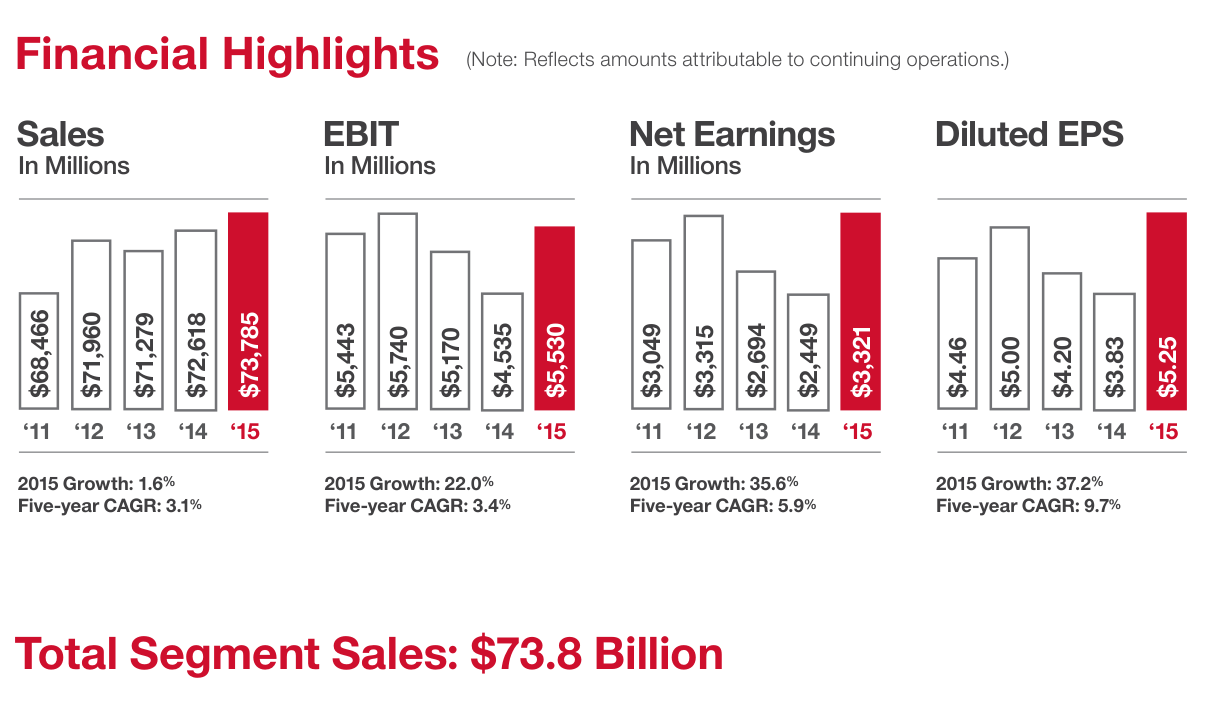
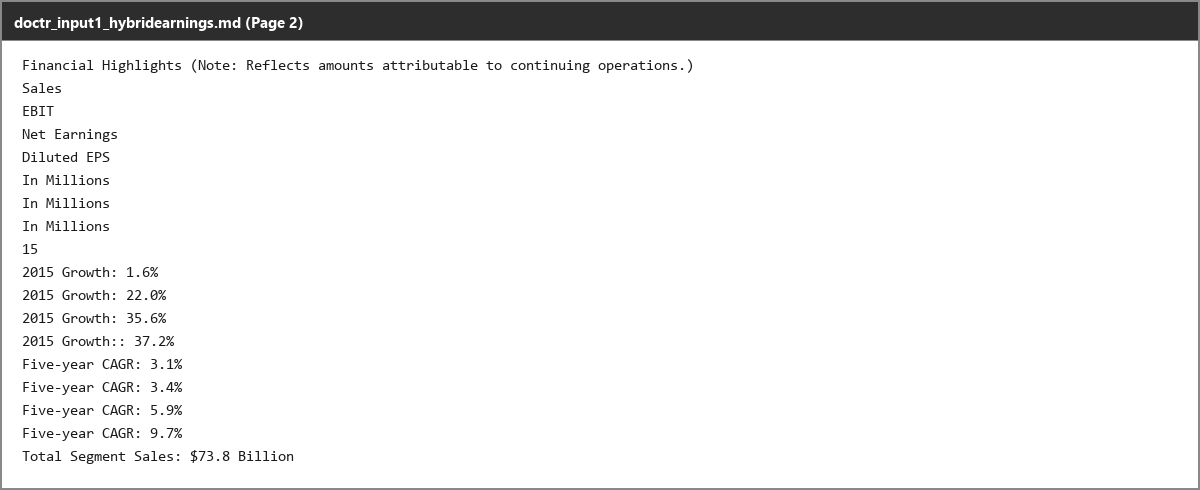
Input used: Input artifact (Image): Hybrid earnings bar-chart page with visible yearly values in the bars. — doctr_input1_hybridearnings_financial_highlights_chart.png
Observed output: Output artifact (Image): All twenty bar-value labels disappear, so the chart is reduced to surrounding text like growth rates and totals. — 6edbb021257f45ffb3adcf44932eeae1.png
Input artifact: Input artifact (Image): Hybrid earnings bar-chart page with visible yearly values in the bars. — doctr_input1_hybridearnings_financial_highlights_chart.png
Output artifact: Output artifact (Image): All twenty bar-value labels disappear, so the chart is reduced to surrounding text like growth rates and totals. — 6edbb021257f45ffb3adcf44932eeae1.png
What changed: Image transformed into Image
Why it matters / Conclusion: If you need figures, logos, or charts preserved in the output, docTR does not do that; at best it drops them, and at worst it turns them into noise.
docTR attempts to carry non-text visuals such as cover art, photos, signatures, logos, seals, and charts through extraction, using examples from cover pages and portrait/signature pages. In practice, those visuals are often omitted or degraded into noise.



Free and open source
Apache 2.0; no API fees.
The benchmark ran in Google Colab on a T4 GPU, at roughly 0.5–0.7 seconds per page depending on the document.
Banner Preview
How the embed badge will look on your site

Embed HTML
Copy this code to your website source
Quick Integration Guide
- 1Copy the HTML code block above.
- 2Paste it into your site's HTML or CMS editor.
- 3Banner appears instantly on your page.
- 4Links back to your tool profile here.
Similar Tools
Discover more AI tools like docTR to enhance your workflow.
Comments (0)
Need a custom AI solution for this use case?
If you are looking to build a custom OCR, PDF text extraction, or document processing system for your business or internal workflow, email us at contact@futuresmart.ai.
Found something inaccurate or missing? We try to keep our AI research accurate and useful. If you found outdated information, an issue, or have a suggestion, email us at collaborate@aidemos.com.